2013 The Clute Institute Copyright by author(s) Creative Commons License CC-BY 99
Maintaining Database Integrity Using
Data Macros In Microsoft Access
Ali Reza Bahreman, Oakland University, USAMohammad Dadashzadeh, Oakland University, USA
ABSTRACT
The introduction of Data Macros in Microsoft Access 2010 addresses a major shortcoming of Access in enforcing business rules associated with a database application. Specifically, data macros remove the onerous “coordination” across data entry/update forms touching a base table in order to enforce semantic integrity constraints. More importantly, similar to triggers in SQL, Access data macros allow users to update tables by direct datasheet edits or explicit SQL update while enforcing that any update violating an integrity constraint is rejected. This paper categorizes semantic integrity constraints and presents the approach to implement each of the five categories in Microsoft Access using data macros.
Keywords: Database Management Systems; Semantic Integrity Constraints; Validation Rules; SQL-99; Triggers; Microsoft Access 2010; Data Macros
INTRODUCTION
emantic integrity constraints, also referred to as data validation rules, are a common occurrence in database implementation scenarios. Consider the following database about departments and their employees:
DEPT(DNO, Name, City, ManagerID, PayrollBudget)
EMP(ENO, FullName, HireDate, ReviewDate, Salary, SSN, DeptID)
Each of the following represents a sample business rule or semantic integrity constraint for this scenario.
Rule 1: No two departments will be assigned the same value for DNO (primary key integrity). Rule 2: No two employees will be assigned the same value for ENO (primary key integrity).
Rule 3: Social Security Number (SSN) is either null (missing) or is unique; that is, no two employees will have the same value for SSN.
Rule 4: ManagerID is either null or the same as an ENO value (referential integrity). Rule 5: DeptID must be the same as a DNO value (referential integrity).
Rule 6: The only permissible values for City are: Boston, Chicago, and Detroit.
Rule 7: PayrollBudget for each department must be greater than or equal to the sum of salaries of employees assigned to that department.
Rule 8: HireDate must be greater than or equal to September 1, 2012.
Rule 9: For each employee, ReviewDate is either null or greater than HireDate. Rule 10: Valid salaries are between $10,000 and $90,000.
Rule 11: Department D10 employee salary cannot be less than $35,000. Rule 12: Salaries should not be reduced.
Rule 13: For department D10 employees hired on the same date, the ReviewDate must be identical. Rule 14: Each department manager must come from the same department.
To maintain our example database’s integrity, each of the above rules must be enforced. As pointed out by Dadashzadeh (2007), there are four ways to accomplish this:
1. Let the users be responsible for it!
2. Do not let users update (i.e., add, delete, or modify) the database directly. Always write programs to handle data entry and update and let the programs enforce the integrity constraints.
3. Let the users update the database directly, but write DBMS triggers that would be invoked automatically upon updates to enforce the integrity constraints.
4. Declare the integrity constraints as DBMS assertions that would automatically be enforced by the DBMS. It is generally agreed that letting the users police themselves would be an unrealistic approach. On the other hand, the most ideal approach is through DBMS assertions where the burden of enforcement is placed completely on the DBMS itself. Unfortunately, current database management systems fall short of this ideal (Türker and Gertz, 2001) and database developers must resort to some form of programming (approaches 2 and 3) to enforce integrity constraints.
The concept of database assertions is not new (Date, 1990; Grefen and Apers, 1993). Indeed, database assertions are supported in a limited basis by all current DBMS software (Dadashzadeh, 2007). Specifically, the ability to designate the primary key of a table is nothing more than asserting a constraint and letting the DBMS enforce it during database updates. On the other hand, an integrity constraint, such as Rule 7, could be specified in SQL-99 syntax as:
CREATE ASSERTION Rule7
CHECK Not Exists
(SELECT DNO
FROM DEPT INNER JOIN EMP ON DEPT.DNO = EMP.DEPTID GROUP BY DNO, PayrollBudget
HAVING Sum(EMP.Salary) > PayrollBudget);
leaving its enforcement to the DBMS. Unfortunately, support for such arbitrary database assertions is not present in today’s commercial software.
In the absence of support for database assertions, an integrity constraint, such as Rule 7, can be enforced by programming similar to:
If
Exists( SELECT DNO
FROM DEPT INNER JOIN EMP ON DEPT.DNO = EMP.DEPTID GROUP BY DNO, PayrollBudget
HAVING Sum(EMP.Salary) > PayrollBudget ) Then
Alert(“Rule 7 has been violated!”) Abort
End If
2013 The Clute Institute Copyright by author(s) Creative Commons License CC-BY 101 Prior to its 2010 release, Microsoft Access provided mixed support for specification and enforcement of semantic integrity constraints. It supported database assertions in a limited way, did not support triggers, but provided the necessary methods for procedural support of enforcing integrity constraints. The introduction of data macros in Access 2010 (Conrad and Viescas, 2010) has overcome its major shortcoming of not supporting trigger-like features for maintaining database integrity. In this paper, we review a classification of semantic integrity constraints and present the approach to implement each of the five categories in Microsoft Access using data macros.
A CLASSIFICATION OF SEMANTIC INTEGRITY CONSTRAINTS
A useful categorization of database integrity constraints is presented by Dadashzadeh (2007). Semantic integrity constraints are either static or dynamic. Static integrity constraints are those that can be determined to have been violated or not by a transaction by simply examining the database state when the transaction commits its changes. For example, consider a database transaction change of an employee’s salary to:
EMP
ENO Full Name Hire Date Review Date Salary SSN DEPTID
E1 Emily Smith 9/1/2005 $86,000.00 123-45-6789 D10
Rules 10 and 11 can be immediately verified to have not been violated by merely considering this proposed database state. Specifically, salary is within permissible range of $10,000 to $90,000 and as a department D10 employee, the salary is indeed not less than $35,000. However, it is impossible to verify that the transaction has not violated Rule 12 by merely examining the proposed database state. A dynamic integrity constraint, such as Rule 12, can only be verified by examining both the proposed database state as well as the starting database state. So, if the prior state is:
EMP
ENO Full Name Hire Date Review Date Salary SSN DEPTID
E1 Emily Smith 9/1/2005 $87,500.00 123-45-6789 D10
then Rule 12 is seen as being violated since the salary value of $87,500 is being reduced to $86,000.
Static integrity constraints can be classified into four categories:
1. Domain-Type constraints limit permissible values for a data field (column). A domain-type constraint can be determined to have been violated or not by simply examining the value of a single field in the record being added/changed. For example, valid salaries are between $10,000 and $90,000 (Rule 10).
2. Tuple-Type constraints limit permissible values for a data field based on values in other data fields in the same record. A tuple-type constraint can be determined to have been violated or not by examining the values of multiple fields in the record being added/changed. For example, department D10 employee salary cannot be less than $35,000 (Rule 11).
3. Relation-Type constraints limit permissible values for a data field based on values in other records in the same table. A relation-type constraint can be determined to have been violated or not by examining the values in other records in the table being added/changed. The quintessential relation type constraint is the primary key integrity rule that limits the permissible value in the key field of a record being inserted/changed by the existence of the same value in other records in the table.
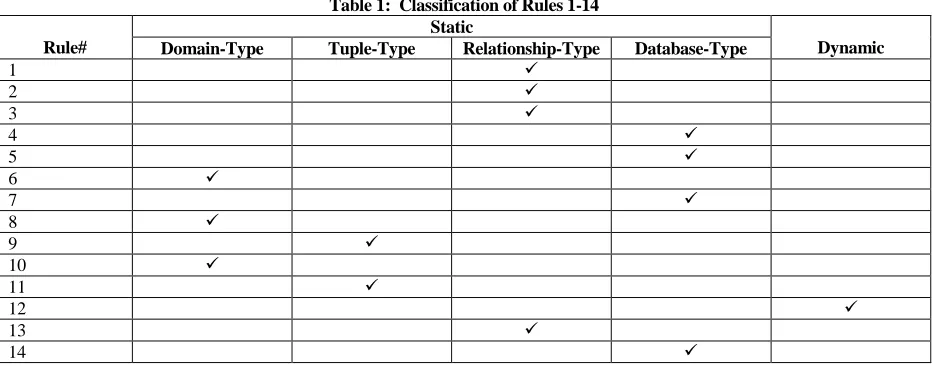
Table 1 classifies each of the 14 rules in our example database scenario and the next section presents the manner by which each type can be enforced in Microsoft Access using data macros.
Table 1: Classification of Rules 1-14
Rule#
Static
Dynamic Domain-Type Tuple-Type Relationship-Type Database-Type
1
2
3
4
5
6
7
8
9
10
11
12
13
14
SEMANTIC INTEGRITY CONSTRAINTS IN MICROSOFT ACCESS
Microsoft Access provides mixed support for specification and enforcement of semantic integrity constraints. Domain-type constraints are handled easily through assertions as validation rules. Tuple-type constraints in Microsoft Access are also handled by assertions. However, all tuple-type constraints must be combined in a single validation rule specified as a table property. To assert Rules 9 and 10, the following combined validation rule must be specified:
(([ReviewDate] Is Null) Or ([ReviewDate]>[HireDate])) And (([DEPTID]<>"D10") Or (([DEPTID]="D10") And ([Salary]>35000)))
The primary key relation-type integrity constraint is easily handled in Microsoft Access by designating the primary key column(s). Closely related relation-type integrity constraints arising from candidate keys (such as Social Security Number (SSN) column in our sample EMP table) are handled by requiring indexing with no duplicates allowed for the specific column in table design view. Or, a unique index on multiple columns may be specified in Access using an SQL statement, such as CREATE UNIQUE INDEX idx1ON EMP(SSN, HireDate).
Other kinds of relation type integrity constraints, such as Rule 13 (i.e., for department D10 employees hired on the same date, the ReviewDate must be identical), must be programmed in Microsoft Access. The basic approach is to create logic that runs before a record is saved to validate changes and then decide to allow the new values or show an error to stop the changes. The Before Change data macro associated with our EMP table is where the logic to enforce Rule 13 must be encoded to handle each of the following triggering updates that may violate Rule 13:
A new EMP record is being inserted
An existing EMP record’s HireDate, ReviewDate, or DeptID field is being updated
This can be accomplished in the Before Change data macro for EMP table using an If program flow conditional block, a LookupRecord data block, and a RaiseError data action as follows:
If ([EMP].[DEPTID]="D10") And
2013 The Clute Institute Copyright by author(s) Creative Commons License CC-BY 103 Where [E].[DEPTID]="D10" And
[E].[HireDate]=[EMP].[HireDate] And [E].[ReviewDate]<>[EMP].[ReviewDate] RaiseError (13, “Rule 13 will be violated in EMP.”)
End If
The [IsInsert] property would be true if the Before Change event is triggered by an attempt to insert a row into the table. The Updated("Field Name") function returns true if the data field has changed. The Look Up A Record is used to find a record that would violate the integrity constraint (i.e., Rule 13) if the newly inserted or updated row is committed to the table. In this case, the table EMP with alias E is used to locate an employee record in department D10 hired on the same date as the newly inserted or updated record but having a different review date. If at least one such record is found, the next statement will be executed; otherwise, the LookupRecord data block is completed. Therefore, the RaiseError data action will only be executed if a match is found indicating a violation of Rule 13 and the data macro is stopped allowing the user to take corrective action or to undo the insert/update.
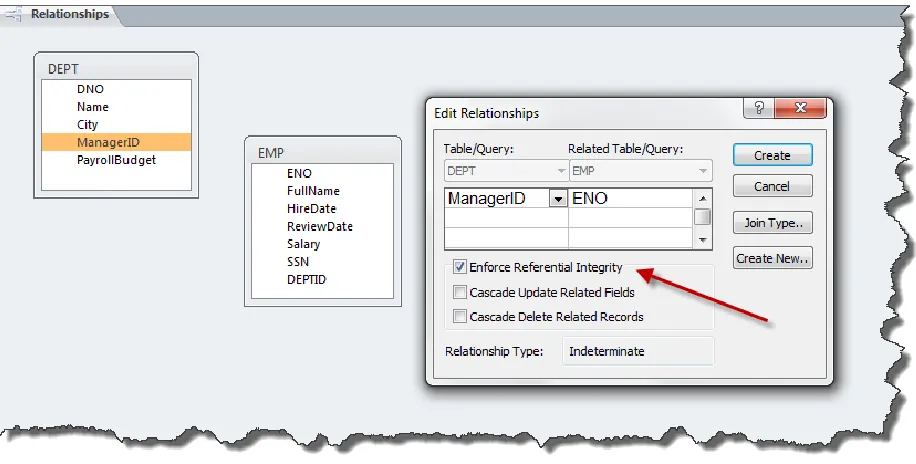
The referential integrity database type constraints are easily handled in Microsoft Access using the relationship screen where the cascade delete and cascade update triggering actions can also be specified as shown in Figure 1 for Rule 4.
Figure 1: Using Relationships to Assert Referential Integrity Database Type Constraints
Other kinds of database-type integrity constraints must, however, be handled through data macro(s) in Microsoft Access. Rule 7 (i.e., PayrollBudget for each department must be greater than or equal to the sum of salaries of employees assigned to that department), for example, is enforced by first identifying the insert/update/delete actions that can trigger its violation:
A new EMP record is being inserted
An existing EMP record’s Salary or DeptID field is being updated
This is accomplished in the Before Change data macro for EMP table and in the Before Change data macro for DEPT table using an auxiliary view named ViewDepartmentSalaryTotal and defined as follows:
CREATE VIEW ViewDepartmentSalaryTotal AS SELECT DeptID, Sum( Salary ) AS [Total Salary]
FROM EMP
GROUP BY DeptID;
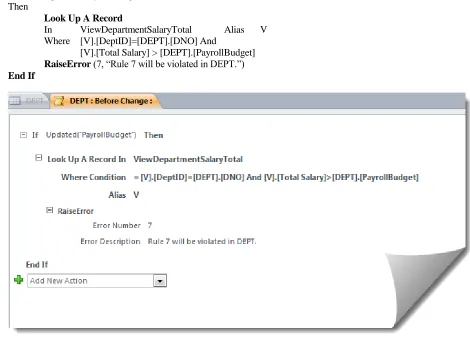
Then, in DEPT table data macro, we define the following condition block which appears in Access as shown in Figure2.
If Updated(“PayrollBudget”) Then
Look Up A Record
In ViewDepartmentSalaryTotal Alias V Where [V].[DeptID]=[DEPT].[DNO] And
[V].[Total Salary] > [DEPT].[PayrollBudget] RaiseError (7, “Rule 7 will be violated in DEPT.”) End If
Figure 2: Before Change Data Macro for DEPT Table
And, in EMP table data macro, we take advantage of the SetLocalVar data action to maintain a local variable needed for a subsequent LookupRecord and accessing the previous value in a field being updated by using [Old].[Field Name] syntax:
If Updated(“Salary”) Then
SetLocalVar (TotalDepartmentSalary, 0) Look Up A Record
2013 The Clute Institute Copyright by author(s) Creative Commons License CC-BY 105 Look Up A Record
In DEPT Alias D
Where [D].[DNO]=[EMP].[DeptID] And
[D].[PayrollBudget] < ([TotalDepartmentSalary]+[EMP].[Salary]-[Old].[Salary]) RaiseError (7, “Rule 7 will be violated in EMP due to salary change.”)
End If
If Updated(“DEPTID”) Or [IsInsert] Then
SetLocalVar (TotalDepartmentSalary, 0) Look Up A Record
In ViewDepartmentSalaryTotal Alias V Where [V].[DeptID]=[EMP].[DEPTID]
SetLocalVar (TotalDepartmentSalary, [V].[Total Salary]) Look Up A Record
In DEPT Alias D
Where [D].[DNO]=[EMP].[DeptID] And
[D].[PayrollBudget] < ([TotalDepartmentSalary]+[EMP].[Salary])
RaiseError (7, “Rule 7 will be violated in EMP due to department change or insert.”) End If
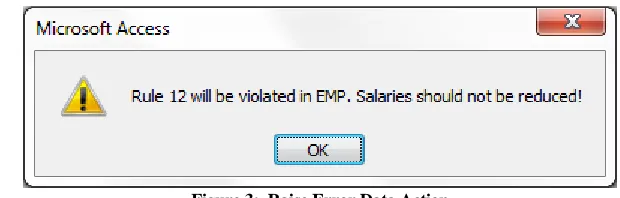
Finally, Microsoft Access readily supports enforcing dynamic integrity constraints through data macros by making available the previous value in a data field being updated by using [Old].[Field Name] syntax. As such, dynamic constraints, such as Rule 12, can be enforced as shown in Figure 3 as a part of the Before Change data macro for the table:
If Updated("Salary") And [Old].[Salary]>[EMP].[Salary] Then
RaiseError (12, “Rule 12 will be violated in EMP. Salaries should not be reduced!”) End If
Figure 3: Raise Error Data Action
As demonstrated in this section and the Appendix, all types of semantic integrity constraints can be specified and enforced in Microsoft Access using data macros. For domain-type and tuple-type integrity constraints, Access supports a declarative approach to specification and provides for automatic enforcement. For relation-type and data-type constraints, other than primary key integrity and referential integrity rules, Access leaves both the specification, as well as the enforcement, to program logic in data macros. Notwithstanding performance considerations, it seems most appropriate that all integrity constraints be specified and enforced as part of data macros for each base table in the database.
CONCLUSIONS
papers (Eswaran and Chamberlin, 1975; Hammer and McLeod, 1975) proposed the implementation of constraint checking as an integral subsystem in DBMS software. Unfortunately, however, commercial software adoption of those ideas has been lagging far behind (Dadashzadeh, 2007).
Support for declarative semantic integrity constraints (i.e., database assertions) in DBMS software ranging from DB2, Oracle, SQL Server to Microsoft Access remains limited to primary key integrity, referential integrity, and what has been characterized in this paper as domain-type and tuple-type static constraints. The more complex relation-type, database-type, and dynamic constraints must be enforced using procedural definition of integrity constraints by triggers. The introduction of data macros in Access 2010 has finally brought trigger-like functionality to Microsoft Access. In this paper, we presented how all types of semantic integrity constraints can be specified and enforced in Microsoft Access using data macros – paving the way to a more streamlined approach to marinating database integrity.
AUTHOR INFORMATION
Ali Reza Bahreman earned his Master of Science in Information Networking from Carnegie Mellon University in 1992. His thesis research in Certified Electronic Mail led to project leadership assignments at Bellcore and Verifone in secure platforms for electronic commerce and a US Patent in 2000. Bahreman returned to Michigan to earn his Master of Science in IT Management focusing in Business Analytics at Oakland University in 2013. E-mail: [email protected]
Mohammad Dadashzadeh serves as Professor of MIS and Chair of Department of Decision and Information Sciences and the coordinator of the 1-year, half on-line program leading to a Master of Science in IT Management focusing in Business Analytics from Oakland University. He has authored 4 books and more than 50 articles on information systems and has served as the editor-in-chief of Journal of Database Management. E-mail: [email protected]
REFERENCES
1. Conrad, J. and Viescas, J. (2010) Microsoft Access 2010 Inside Out, Microsoft Press, Sebastopol, CA. 2. Dadashzadeh, M. (2007) “Specification and Enforcement of Semantic Integrity Constraints in Microsoft
Access.” Journal of Information Systems Education, Vol. 18, No. 4, pp. 393-398.
3. Date, C.J. (1990) “A Contribution to the Study of Database Integrity.” In Relational Database Writings 1985-1989, Edited by C.J. Date. Addison-Wesley, Reading, MA.
4. Eswaran, K.P. and Chamberlin, D.D. (1975) “Functional Specifications of a Subsystem for Data Base Integrity.” In Proceedings of the 1st International Conference on Very Large Data Bases (VLDB ’75), Edited by D.S. Kerr. Morgan Kaufmann Publishers, Los Altos, CA.
5. Grefen, P.W.P.J. and Apers, P.M.G. (1993) “Integrity Control in Relational Database Systems–An Overview,”
Data & Knowledge Engineering, 10(2), pp. 187-223.
6. Hammer, M.M. and McLeod, D.J. (1975) “Semantic Integrity in a Relational Data Base System.” In
Proceedings of the 1st International Conference on Very Large Data Bases (VLDB ’75), Edited by D.S. Kerr. Morgan Kaufmann Publishers, Los Altos, CA.
2013 The Clute Institute Copyright by author(s) Creative Commons License CC-BY 107 APPENDIX
Using Data Macros to Enforce Rules 1-14
While domain and tuple-type constraints as well as primary key (a relation type constraint) and referential integrity (a database type constraint) can be declaratively asserted and enforced by Access, for completeness, we show the implementation of all 14 example constraints using data macros in a supplementary paper available from the authors.
In general, when considering where and when to include the programming logic for verifying integrity constraints, it is helpful to create a table that documents triggering conditions for each rule; that is, which update operation(s) (Insert, Delete, or Update) and which field(s) could trigger the potential violation of a business rule. Table 2 provides that information for rules 1-14.
Table 2: Triggering Update Operations (Insert, Delete, or Update) and Data Fields for Rules 1-14
Rule# Field EMP DEPT
Before Change Before Delete Before Change Before Delete
1 DNO I,U
2 ENO I,U
3 SSN I,U
4 ManagerID I,U
5 DeptID I,U
DNO U D
6 City I,U
7 PayrollBudget U
Salary I,U
DeptID U
8 HireDate I,U
9 ReviewDate I,U
HireDate I,U
10 Salary I,U
11 Salary I,U
DeptID I,U
12 Salary U
13 DeptID I,U
HireDate U
ReviewDate U
14 ManagerID I,U D
DeptID U