1.0.0 RC 1
Preface ... iv
1. Security ... 1
1.1. Before You Begin ... 1
1.2. Introduction ... 1
1.2.1. Current Status ... 1
1.3. High Level Design ... 1
1.3.1. Key Components ... 1
1.3.2. Supported Secure Objects ... 3
1.3.3. Configuration Attributes ... 3 1.4. Request Contexts ... 4 1.4.1. Historical Approach ... 4 1.4.2. SecurityContext ... 4 1.4.3. Context Storage ... 4 1.4.4. Localization ... 5 1.5. Security Interception ... 5
1.5.1. All Secure Objects ... 5
1.5.2. AOP Alliance (MethodInvocation) Security Interceptor ... 6
1.5.3. AspectJ (JoinPoint) Security Interceptor ... 9
1.5.4. FilterInvocation Security Interceptor ... 10
1.6. Authentication ... 12
1.6.1. Authentication Requests ... 12
1.6.2. Authentication Manager ... 13
1.6.3. Provider-Based Authentication ... 14
1.6.4. Concurrent Session Support ... 15
1.6.5. Data Access Object Authentication Provider ... 15
1.6.6. In-Memory Authentication ... 17 1.6.7. JDBC Authentication ... 18 1.6.8. JAAS Authentication ... 18 1.6.9. Siteminder Authentication ... 19 1.6.10. Authentication Recommendations ... 21 1.7. Authorization ... 21 1.7.1. Granted Authorities ... 21
1.7.2. Access Decision Managers ... 22
1.7.3. Voting Decision Manager ... 22
1.7.4. Authorization-Related Tag Libraries ... 24
1.7.5. Authorization Recommendations ... 26
1.8. After Invocation Handling ... 26
1.8.1. Overview ... 26
1.8.2. ACL-Aware AfterInvocationProviders ... 27
1.9. Run-As Authentication Replacement ... 28
1.9.1. Purpose ... 28
1.9.2. Usage ... 29
1.10. User Interfacing with the SecurityContextHolder ... 29
1.10.1. Purpose ... 29
1.10.2. HTTP Form Authentication ... 30
1.10.3. HTTP Basic Authentication ... 31
1.10.4. HTTP Digest Authentication ... 32
1.10.6. Remember-Me Authentication ... 34
1.10.7. Well-Known Locations ... 36
1.11. Container Adapters ... 36
1.11.1. Overview ... 36
1.11.2. Adapter Authentication Provider ... 36
1.11.3. Catalina (Tomcat) Installation ... 37
1.11.4. Jetty Installation ... 38
1.11.5. JBoss Installation ... 39
1.11.6. Resin Installation ... 40
1.12. Yale Central Authentication Service (CAS) Single Sign On ... 41
1.12.1. Overview ... 41
1.12.2. How CAS Works ... 41
1.12.3. CAS Server Installation (Optional) ... 44
1.12.4. CAS Acegi Security System Client Installation ... 45
1.12.5. Advanced CAS Usage ... 47
1.13. X509 Authentication ... 48
1.13.1. Overview ... 48
1.13.2. X509 with Acegi Security ... 48
1.13.3. Configuring the X509 Provider ... 49
1.14. Channel Security ... 49
1.14.1. Overview ... 49
1.14.2. Configuration ... 50
1.14.3. Usage ... 51
1.15. Instance-Based Access Control List (ACL) Security ... 51
1.15.1. Overview ... 51
1.15.2. The org.acegisecurity.acl Package ... 52
1.15.3. Integer Masked ACLs ... 53
1.15.4. Conclusion ... 57 1.16. Filters ... 57 1.16.1. Overview ... 57 1.16.2. FilterToBeanProxy ... 57 1.16.3. FilterChainProxy ... 58 1.16.4. Filter Ordering ... 59
1.17. Contacts Sample Application ... 60
1.18. Become Involved ... 61
This document provides a reference guide to the Acegi Security System for Spring, which is a series of classes that deliver authentication and authorization services within the Spring Framework.
I would like to acknowledge this reference was prepared using the DocBook configuration included with the Spring Framework. The Spring team in turn acknowledge Chris Bauer (Hibernate) for his assistance with their DocBook.
1.1. Before You Begin
For your security, each official release JAR of Acegi Security has been signed by the project leader. This does not in any way alter the liability disclaimer contained in the License, but it does ensure you are using a properly reviewed, official build of Acegi Security. Please refer to thereadme.txtfile in the root of the release
distribution for instructions on how to validate the JARs are correctly signed, and which certificate has been used to sign them.
1.2. Introduction
The Acegi Security System for Spring provides authentication and authorization capabilities for
Spring-powered projects, with optional integration with popular web containers. The security architecture was designed from the ground up using "The Spring Way" of development, which includes using bean contexts, interceptors and interface-driven programming. As a consequence, the Acegi Security System for Spring is useful out-of-the-box for those seeking to secure their Spring-based applications, and can be easily adapted to complex customized requirements.
Security involves two distinct operations, authentication and authorization. The former relates to resolving whether or not a caller is who they claim to be. Authorization on the other hand relates to determining whether or not an authenticated caller is permitted to perform a given operation.
Throughout the Acegi Security System for Spring, the user, system or agent that needs to be authenticated is referred to as a "principal". The security architecture does not have a notion of roles or groups, which you may be familiar with from other security implementations, although equivalent functionality is fully accommodated by Acegi Security.
1.2.1. Current Status
The Acegi Security System for Spring is widely used by members of the Spring Community. The APIs are considered stable and only minor changes are expected. Having said that, like many other projects we need to strike a balance between backward compatibility and improvement. Effective version 0.6.1, Acegi Security uses the Apache Portable Runtime Project versioning guidelines, available from
http://apr.apache.org/versioning.html.
We are now at release 0.9.0, and a lot of effort has been made to implement all non-backward compatible changes either in or before this release. Some minor improvements are currently intended to the 1.0.0 release, although they will in no way modify the project's central interfaces or classes. Users of Acegi Security System for Spring should therefore be comfortable depending on the current version of the project in their applications. Please note that we will be changing the package name prefix in the 1.0.0 release, but this should be a simple "find and replace" type operation in your code.
1.3. High Level Design
Most enterprise applications have four basic security requirements. First, they need to be able to authenticate a principal. Second, they need to be able to secure web requests. Third, enterprise applications need to be able to secure services layer methods. Finally, quite often an enterprise application will need to secure domain object instances. Acegi Security provides a comprehensive framework for achieving all of these four common enterprise application security requirements.
The Acegi Security System for Spring essentially comprises eight key functional parts:
• AnAuthenticationobject which holds the principal, credentials and the authorities granted to the
principal. The object can also store additional information associated with an authentication request, such as the source TCP/IP address.
• ASecurityContextHolderwhich holds theAuthenticationobject in aThreadLocal-bound object. • AnAuthenticationManagerto authenticate theAuthenticationobject presented via theContextHolder. • AnAccessDecisionManagerto authorize a given operation.
• ARunAsManagerto optionally replace theAuthenticationobject whilst a given operation is being executed.
• A "secure object" interceptor, which coordinates the authentication, authorization, run-as replacement, after invocation handling and execution of a given operation.
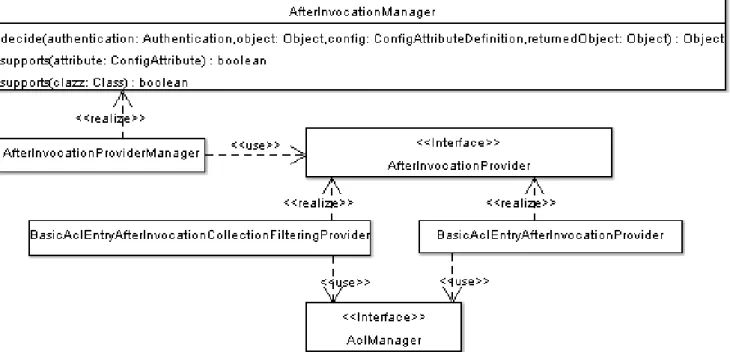
• AnAfterInvocationManagerwhich can modify anObjectreturned from a "secure object" invocation, such as removingCollectionelements a principal does not have authority to access.
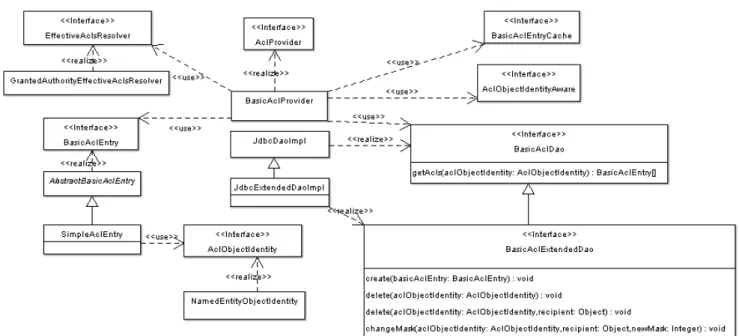
• An acess control list (ACL) management package, which can be used to obtain the ACLs applicable for domain object instances.
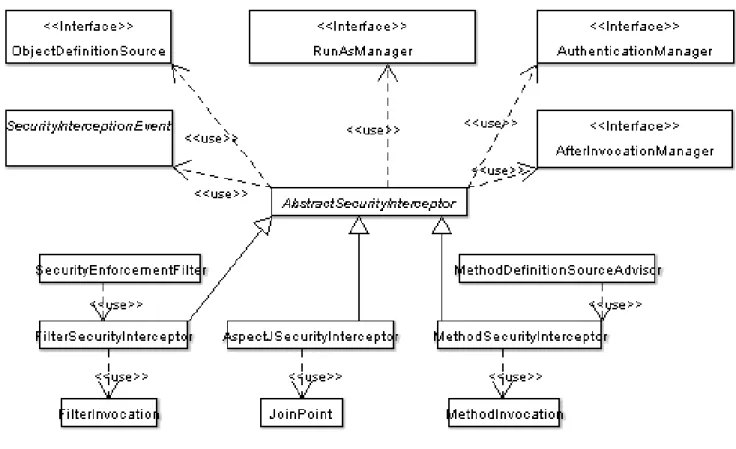
A "secure object" interceptor executes most of the Acegi Security key classes and in doing so delivers the framework's major features. Given its importance, Figure 1 shows the key relationships and concrete implementations ofAbstractSecurityInterceptor.
Figure 1: The key "secure object" model
Each "secure object" interceptor (hereinafter called a "security interceptor") works with a particular type of "secure object". So, what is a secure object? Secure objects refer to any type of object that can have security applied to it. A secure object must provide some form of callback, so that the security interceptor can
transparently do its work as required, and callback the object when it is time for it to proceed with the requested operation. If secure objects cannot provide a native callback approach, a wrapper needs to be written so this becomes possible.
Each secure object has its own package underorg.acegisecurity.intercept. Every other package in the security system is secure object independent, in that it can support any type of secure object presented.
Only developers contemplating an entirely new way of intercepting and authorizing requests would need to use secure objects directly. For example, it would be possible to build a new secure object to secure calls to a messaging system that does not useMethodInvocations. Most Spring applications will simply use the three currently supported secure object types (AOP AllianceMethodInvocation, AspectJJoinPointand web request FilterInterceptor) with complete transparency.
Each of the eight key parts of Acegi Security are discussed in detail throughout this document.
1.3.2. Supported Secure Objects
As shown in the base of Figure 1, the Acegi Security System for Spring currently supports three secure objects. The first handles an AOP AllianceMethodInvocation. This is the secure object type used to protect Spring beans. Developers will generally use this secure object type to secure their business objects. To make a standard Spring-hosted bean available as aMethodInvocation, the bean is simply published through a ProxyFactoryBeanorBeanNameAutoProxyCreatororDefaultAdvisorAutoProxyCreator. Most Spring developers would already be familiar with these due to their use in transactions and other areas of Spring. The second type is an AspectJJoinPoint. AspectJ has a particular use in securing domain object instances, as these are most often managed outside the Spring bean container. By using AspectJ, standard constructs such as new Person();can be used and full security will be applied to them by Acegi Security. The
AspectJSecurityInterceptoris still managed by Spring, which creates the aspect singleton and wires it with the appropriate authentication managers, access decision managers and so on.
The third type is aFilterInvocation. This is an object included with the Acegi Security System for Spring. It is created by an included filter and simply wraps the HTTPServletRequest,ServletResponseand
FilterChain. TheFilterInvocationenables HTTP resources to be secured. Developers do not usually need to understand the mechanics of how this works, because they just add the filters to theirweb.xmland let the security system do its work.
1.3.3. Configuration Attributes
Every secure object can represent an infinite number of individual requests. For example, aMethodInvocation can represent the invocation of any method with any arguments, whilst aFilterInvocationcan represent any HTTP URL.
The Acegi Security System for Spring needs to record the configuration that applies to each of these possible requests. The security configuration of a request toBankManager.getBalance(int accountNumber)needs to be very different from the security configuration of a request toBankManager.approveLoan(int
applicationNumber). Similarly, the security configuration of a request tohttp://some.bank.com/index.htm needs to be very different from the security configuration ofhttp://some.bank.com/manage/timesheet.jsp. To store the various security configurations associated with different requests, a configuration attribute is used. At an implementation level a configuration attribute is represented by theConfigAttributeinterface. One concrete implementation ofConfigAttributeis provided,SecurityConfig, which simply stores a
configuration attribute as aString.
The collection ofConfigAttributes associated with a particular request is held in a
ConfigAttributeDefinition. This concrete class is simply a holder ofConfigAttributes and does nothing special.
When a request is received by the security interceptor, it needs to determine which configuration attributes apply. In other words, it needs to find theConfigAttributeDefinitionwhich applies to the request. This decision is handled by theObjectDefinitionSourceinterface. The main method provided by this interface is public ConfigAttributeDefinition getAttributes(Object object), with theObjectbeing the secure object. Recall the secure object contains details of the request, so theObjectDefinitionSourceimplementation will be able to extract the details it requires to lookup the relevantConfigAttributeDefinition.
1.4. Request Contexts
1.4.1. Historical Approach
Prior to release 0.9.0, Acegi Security used aContextHolderto store aContextbetween sessions. A particular subclass ofContext,SecureContextdefined an interface used for storage of theAuthenticationobject. The ContextHolderwas aThreadLocal. A fuller discussion of theThreadLocalusage with Acegi Security follows in this document.ContextHolderandSecureContextwas removed from 0.9.0 after discussion with other Spring developers for the sake of consistency. See for example
http://article.gmane.org/gmane.comp.java.springframework.devel/8290and JIRA task SEC-77. This history is mentioned as the long periodContextHolderwas used will likely mean that certain documentation you encounter concerning Acegi Security might still refer toContextHolder. Generally you can just substitute "SecurityContextHolder" for "ContextHolder", and "SecurityContext" for "SecureContext", and you'll have the primary meaning of such documentation.
1.4.2. SecurityContext
The Acegi Security System for Spring uses aSecurityContextHolderto store theSecurityContext. The SecurityContextcontains a single getter/setter forAuthentication. All Acegi Security classes query the SecurityContextHolderfor obtaining the currentSecurityContext(and in turn the principal).
SecurityContextHolderis aThreadLocal, meaning it is associated with the current thread of execution.
1.4.3. Context Storage
Central to Acegi Security's design is that the contents of theSecurityContextHolder(which is simply a SecurityContextimplementation) can be stored between web requests. This is so that a successfully
authenticated principal can be identified on subsequent requests through theAuthenticationstored inside the SecurityContextobtained from theSecurityContextHolder. TheHttpSessionContextIntegrationFilter exists to automatically copy the contents of a well-definedHttpSessionattribute into the
SecurityContextHolder, then at the end of each request, copy theSecurityContextHoldercontents back into theHttpSessionready for next request.
It is essential - and an extremely common error of end users - thatHttpSessionContextIntegrationFilter appears before any other Acegi Security filter. Acegi Security filters expect to be able to modify the
SecurityContextHoldercontents as they see fit, and something else (namely
HttpSessionContextIntegrationFilter) will store those between requests if necessary. This is why HttpSessionContextIntegrationFiltermust be the first filter used.
You can define a customSecurityContextimplementation be used in your application by setting thecontext property on theHttpSessionContextIntegrationFilterbean.
1.4.4. Localization
From 1.0.0, Acegi Security supports localization of exception messages that end users are likely to see. Such exceptions include authentication failures and access being denied (authorization failures). Exceptions and logging that is focused on developers or system deployers (including incorrect attributes, interface contract violations, using incorrect constructors, startup time validation, debug-level logging) etc are not localized and instead are hard-coded in English within Acegi Security's code.
Shipping in theacegi-security-xx.jarinside theorg.acegisecuritypackage is amessages.properties file. This should be referred to by yourApplicationContext, as Acegi Security classes implement Spring's MessageSourceAwareinterface and expect the message resolver to be dependency injected at application context startup time. Usually all you need to do is register a bean inside your application context to refer to the messages. An example is shown below:
<bean id="messageSource"
class="org.springframework.context.support.ReloadableResourceBundleMessageSource"> <property name="basename"><value>org/acegisecurity/messages</value></property> </bean>
Themessages.propertiesis named in accordance with standard resource bundles and represents the default language supported by Acegi Securtiy messages. This default file is in English. If you do not register a message source, Acegi Security will still work correctly and fallback to hard-coded English versions of the messages. If you wish to customize themessages.propertiesfile, or support other languages, you should copy the file, rename it accordingly, and register it inside the above bean definition. There are not a large number of message keys inside this file, so localization should not be considered a major initiative. If you do perform localization of this file, please consider sharing your work with the community by logging a JIRA task and attaching your appropriately-named localized version ofmessages.properties.
Rounding out the discussion on localization is the SpringThreadLocalknown as
org.springframework.context.i18n.LocaleContextHolder. You should set theLocaleContextHolderto represent the preferredLocaleof each user. Acegi Security will attempt to locate a message from the message source using theLocaleobtained from thisThreadLocal. Please refer to Spring documentation for further details on usingLocaleContextHolderand the helper classes that can automatically set it for you (eg
AcceptHeaderLocaleResolver,CookieLocaleResolver,FixedLocaleResolver,SessionLocaleResolveretc)
1.5. Security Interception
1.5.1. All Secure Objects
As described in the High Level Design section, each secure object has its own security interceptor which is responsible for handling each request. Handling involves a number of operations:
1. Store the configuration attributes that are associated with each secure request.
2. Extract theConfigAttributeDefinitionthat applies to the request from the relevant ObjectDefinitionSource.
3. Obtain theAuthenticationobject from theSecurityContext, which is held in the SecurityContextHolder.
4. Pass theAuthenticationobject to theAuthenticationManager, update theSecurityContextHolderwith the response.
5. Pass theAuthenticationobject, theConfigAttributeDefinition, and the secure object to the AccessDecisionManager.
6. Pass theAuthenticationobject, theConfigAttributeDefinition, and the secure object to the RunAsManager.
7. If theRunAsManagerreturns a newAuthenticationobject, update theSecurityContextHolderwith it. 8. Proceed with the request execution of the secure object.
9. If theRunAsManagerearlier returned a newAuthenticationobject, update theSecurityContextHolder with theAuthenticationobject that was previously returned by theAuthenticationManager.
10. If anAfterInvocationManageris defined, pass it the result of the secure object execution so that it may throw anAccessDeniedExceptionor mutate the returned object if required.
11. Return any result received from theAfterInvocationManager, or if noAfterInvocationManageris defined, simply return the result provided by the secure object execution.
Whilst this may seem quite involved, don't worry. Developers interact with the security process by simply implementing basic interfaces (such asAccessDecisionManager), which are fully discussed below.
TheAbstractSecurityInterceptorhandles the majority of the flow listed above. As shown in Figure 1, each secure object has its own security interceptor which subclassesAbstractSecurityInterceptor. Each of these secure object-specific security interceptors are discussed below.
1.5.2. AOP Alliance (MethodInvocation) Security Interceptor
To secureMethodInvocations, developers simply add a properly configuredMethodSecurityInterceptorinto the application context. Next the beans requiring security are chained into the interceptor. This chaining is accomplished using Spring’sProxyFactoryBeanorBeanNameAutoProxyCreator, as commonly used by many other parts of Spring (refer to the sample application for examples). Alternatively, Acegi Security provides a MethodDefinitionSourceAdvisorwhich may be used with Spring'sDefaultAdvisorAutoProxyCreatorto automatically chain the security interceptor in front of any beans defined against the
MethodSecurityInterceptor. TheMethodSecurityInterceptoritself is configured as follows:
<bean id="bankManagerSecurity"
class="org.acegisecurity.intercept.method.aopalliance.MethodSecurityInterceptor"> <property name="validateConfigAttributes"><value>true</value></property>
<property name="authenticationManager"><ref bean="authenticationManager"/></property> <property name="accessDecisionManager"><ref bean="accessDecisionManager"/></property> <property name="runAsManager"><ref bean="runAsManager"/></property>
<property name="afterInvocationManager"><ref bean="afterInvocationManager"/></property> <property name="objectDefinitionSource"> <value> org.acegisecurity.context.BankManager.delete*=ROLE_SUPERVISOR,RUN_AS_SERVER org.acegisecurity.context.BankManager.getBalance=ROLE_TELLER,ROLE_SUPERVISOR,BANKSECURITY_CUSTOMER,RUN_AS_SERVER </value> </property> </bean>
As shown above, theMethodSecurityInterceptoris configured with a reference to an
AuthenticationManager,AccessDecisionManagerandRunAsManager, which are each discussed in separate sections below. In this case we've also defined anAfterInvocationManager, although this is entirely optional. TheMethodSecurityInterceptoris also configured with configuration attributes that apply to different method signatures. A full discussion of configuration attributes is provided in the High Level Design section of this document.
TheMethodSecurityInterceptorcan be configured with configuration attributes in three ways. The first is via a property editor and the application context, which is shown above. The second is via defining the
configuration attributes in your source code using Jakarta Commons Attributes or Java 5 Annotations. The third is via writing your ownObjectDefinitionSource, although this is beyond the scope of this document.
Irrespective of the approach used, theObjectDefinitionSourceis responsible for returning a
ConfigAttributeDefinitionobject that contains all of the configuration attributes associated with a single secure method.
It should be noted that theMethodSecurityInterceptor.setObjectDefinitionSource()method actually expects an instance ofMethodDefinitionSource. This is a marker interface which subclasses
ObjectDefinitionSource. It simply denotes theObjectDefinitionSourceunderstandsMethodInvocations. In the interests of simplicity we'll continue to refer to theMethodDefinitionSourceas an
ObjectDefinitionSource, as the distinction is of little relevance to most users of the MethodSecurityInterceptor.
If using the application context property editor approach (as shown above), commas are used to delimit the different configuration attributes that apply to a given method pattern. Each configuration attribute is assigned into its ownSecurityConfigobject. TheSecurityConfigobject is discussed in the High Level Design section. If you are using the Jakarta Commons Attributes approach, your bean context will be configured differently:
<bean id="attributes" class="org.springframework.metadata.commons.CommonsAttributes"/> <bean id="objectDefinitionSource"
class="org.acegisecurity.intercept.method.MethodDefinitionAttributes"> <property name="attributes"><ref local="attributes"/></property> </bean>
<bean id="bankManagerSecurity"
class="org.acegisecurity.intercept.method.aopalliance.MethodSecurityInterceptor"> <property name="validateConfigAttributes"><value>false</value></property>
<property name="authenticationManager"><ref bean="authenticationManager"/></property> <property name="accessDecisionManager"><ref bean="accessDecisionManager"/></property> <property name="runAsManager"><ref bean="runAsManager"/></property>
<property name="objectDefinitionSource"><ref bean="objectDefinitionSource"/></property> </bean>
In addition, your source code will contain Jakarta Commons Attributes tags that refer to a concrete
implementation ofConfigAttribute. The following example uses theSecurityConfigimplementation to represent the configuration attributes, and results in the same security configuration as provided by the property editor approach above:
public interface BankManager { /**
* @@SecurityConfig("ROLE_SUPERVISOR") * @@SecurityConfig("RUN_AS_SERVER") */
public void deleteSomething(int id); /**
* @@SecurityConfig("ROLE_SUPERVISOR") * @@SecurityConfig("RUN_AS_SERVER") */
public void deleteAnother(int id); /** * @@SecurityConfig("ROLE_TELLER") * @@SecurityConfig("ROLE_SUPERVISOR") * @@SecurityConfig("BANKSECURITY_CUSTOMER") * @@SecurityConfig("RUN_AS_SERVER") */
public float getBalance(int id); }
If you are using the Spring Security Java 5 Annotations approach, your bean context will be configured as follows:
<bean id="attributes" class="org.acegisecurity.annotation.SecurityAnnotationAttributes"/> <bean id="objectDefinitionSource"
class="org.acegisecurity.intercept.method.MethodDefinitionAttributes"> <property name="attributes"><ref local="attributes"/></property> </bean>
<bean id="bankManagerSecurity"
class="org.acegisecurity.intercept.method.aopalliance.MethodSecurityInterceptor"> <property name="validateConfigAttributes"><value>false</value></property>
<property name="authenticationManager"><ref bean="authenticationManager"/></property> <property name="accessDecisionManager"><ref bean="accessDecisionManager"/></property> <property name="runAsManager"><ref bean="runAsManager"/></property>
<property name="objectDefinitionSource"><ref bean="objectDefinitionSource"/></property> </bean>
In addition, your source code will contain the Acegi Java 5 Security Annotations that represent the ConfigAttribute. The following example uses the@Securedannotations to represent the configuration attributes, and results in the same security configuration as provided by the property editor approach:
import org.acegisecurity.annotation.Secured; public interface BankManager {
/**
* Delete something */
@Secured({"ROLE_SUPERVISOR","RUN_AS_SERVER" }) public void deleteSomething(int id);
/**
* Delete another */
@Secured({"ROLE_SUPERVISOR","RUN_AS_SERVER" }) public void deleteAnother(int id);
/**
* Get balance */
@Secured({"ROLE_TELLER","ROLE_SUPERVISOR","BANKSECURITY_CUSTOMER","RUN_AS_SERVER" }) public float getBalance(int id);
}
You might have noticed thevalidateConfigAttributesproperty in the aboveMethodSecurityInterceptor examples. When set totrue(the default), at startup time theMethodSecurityInterceptorwill evaluate if the provided configuration attributes are valid. It does this by checking each configuration attribute can be processed by either theAccessDecisionManageror theRunAsManager. If neither of these can process a given configuration attribute, an exception is thrown. If using the Jakarta Commons Attributes method of
1.5.3. AspectJ (JoinPoint) Security Interceptor
The AspectJ security interceptor is very similar to the AOP Alliance security interceptor discussed in the previous section. Indeed we will only discuss the differences in this section.
The AspectJ interceptor is namedAspectJSecurityInterceptor. Unlike the AOP Alliance security
interceptor, which relies on the Spring application context to weave in the security interceptor via proxying, the AspectJSecurityInterceptoris weaved in via the AspectJ compiler. It would not be uncommon to use both types of security interceptors in the same application, withAspectJSecurityInterceptorbeing used for domain object instance security and the AOP AllianceMethodSecurityInterceptorbeing used for services layer security.
Let's first consider how theAspectJSecurityInterceptoris configured in the Spring application context:
<bean id="bankManagerSecurity"
class="org.acegisecurity.intercept.method.aspectj.AspectJSecurityInterceptor"> <property name="validateConfigAttributes"><value>true</value></property>
<property name="authenticationManager"><ref bean="authenticationManager"/></property> <property name="accessDecisionManager"><ref bean="accessDecisionManager"/></property> <property name="runAsManager"><ref bean="runAsManager"/></property>
<property name="afterInvocationManager"><ref bean="afterInvocationManager"/></property> <property name="objectDefinitionSource"> <value> org.acegisecurity.context.BankManager.delete*=ROLE_SUPERVISOR,RUN_AS_SERVER org.acegisecurity.context.BankManager.getBalance=ROLE_TELLER,ROLE_SUPERVISOR,BANKSECURITY_CUSTOMER,RUN_AS_SERVER </value> </property> </bean>
As you can see, aside from the class name, theAspectJSecurityInterceptoris exactly the same as the AOP Alliance security interceptor. Indeed the two interceptors can share the sameobjectDefinitionSource, as the ObjectDefinitionSourceworks withjava.lang.reflect.Methods rather than an AOP library-specific class. Of course, your access decisions have access to the relevant AOP library-specific invocation (ie
MethodInvocationorJoinPoint) and as such can consider a range of addition criteria when making access decisions (such as method arguments).
Next you'll need to define an AspectJaspect. For example:
package org.acegisecurity.samples.aspectj;
import org.acegisecurity.intercept.method.aspectj.AspectJSecurityInterceptor; import org.acegisecurity.intercept.method.aspectj.AspectJCallback;
import org.springframework.beans.factory.InitializingBean;
public aspect DomainObjectInstanceSecurityAspect implements InitializingBean { private AspectJSecurityInterceptor securityInterceptor;
pointcut domainObjectInstanceExecution(): target(PersistableEntity)
&& execution(public * *(..)) && !within(DomainObjectInstanceSecurityAspect); Object around(): domainObjectInstanceExecution() {
if (this.securityInterceptor != null) {
AspectJCallback callback = new AspectJCallback() { public Object proceedWithObject() {
return proceed(); }
};
return this.securityInterceptor.invoke(thisJoinPoint, callback); } else {
return proceed(); }
}
return securityInterceptor; }
public void setSecurityInterceptor(AspectJSecurityInterceptor securityInterceptor) { this.securityInterceptor = securityInterceptor;
}
public void afterPropertiesSet() throws Exception { if (this.securityInterceptor == null)
throw new IllegalArgumentException("securityInterceptor required"); }
}
In the above example, the security interceptor will be applied to every instance ofPersistableEntity, which is an abstract class not shown (you can use any other class orpointcutexpression you like). For those curious, AspectJCallbackis needed because theproceed();statement has special meaning only within anaround() body. TheAspectJSecurityInterceptorcalls this anonymousAspectJCallbackclass when it wants the target object to continue.
You will need to configure Spring to load the aspect and wire it with theAspectJSecurityInterceptor. A bean declaration which achieves this is shown below:
<bean id="domainObjectInstanceSecurityAspect"
class="org.acegisecurity.samples.aspectj.DomainObjectInstanceSecurityAspect" factory-method="aspectOf">
<property name="securityInterceptor"><ref bean="aspectJSecurityInterceptor"/></property> </bean>
That's it! Now you can create your beans from anywhere within your application, using whatever means you think fit (egnew Person();) and they will have the security interceptor applied.
1.5.4. FilterInvocation Security Interceptor
To secureFilterInvocations, developers need to add a filter to theirweb.xmlthat delegates to the SecurityEnforcementFilter. A typical configuration example is provided below:
<filter>
<filter-name>Acegi HTTP Request Security Filter</filter-name>
<filter-class>org.acegisecurity.util.FilterToBeanProxy</filter-class> <init-param> <param-name>targetClass</param-name> <param-value>org.acegisecurity.intercept.web.SecurityEnforcementFilter</param-value> </init-param> </filter> <filter-mapping>
<filter-name>Acegi HTTP Request Security Filter</filter-name> <url-pattern>/*</url-pattern>
</filter-mapping>
Notice that the filter is actually aFilterToBeanProxy. Most of the filters used by the Acegi Security System for Spring use this class. Refer to the Filters section to learn more about this bean.
In the application context you will need to configure three beans:
<bean id="securityEnforcementFilter"
class="org.acegisecurity.intercept.web.SecurityEnforcementFilter">
<property name="filterSecurityInterceptor"><ref bean="filterInvocationInterceptor"/></property> <property name="authenticationEntryPoint"><ref bean="authenticationEntryPoint"/></property> </bean>
<bean id="authenticationEntryPoint" class="org.acegisecurity.ui.webapp.AuthenticationProcessingFilterEntryPoint"> <property name="loginFormUrl"><value>/acegilogin.jsp</value></property> <property name="forceHttps"><value>false</value></property> </bean> <bean id="filterInvocationInterceptor" class="org.acegisecurity.intercept.web.FilterSecurityInterceptor">
<property name="authenticationManager"><ref bean="authenticationManager"/></property> <property name="accessDecisionManager"><ref bean="accessDecisionManager"/></property> <property name="runAsManager"><ref bean="runAsManager"/></property>
<property name="objectDefinitionSource"> <value> CONVERT_URL_TO_LOWERCASE_BEFORE_COMPARISON \A/secure/super/.*\Z=ROLE_WE_DONT_HAVE \A/secure/.*\Z=ROLE_SUPERVISOR,ROLE_TELLER </value> </property> </bean>
TheAuthenticationEntryPointwill be called if the user requests a secure HTTP resource but they are not authenticated. The class handles presenting the appropriate response to the user so that authentication can begin. Three concrete implementations are provided with the Acegi Security System for Spring:
AuthenticationProcessingFilterEntryPointfor commencing a form-based authentication, BasicProcessingFilterEntryPointfor commencing a HTTP Basic authentication process, and
CasProcessingFilterEntryPointfor commencing a Yale Central Authentication Service (CAS) login. The AuthenticationProcessingFilterEntryPointandCasProcessingFilterEntryPointhave optional properties related to forcing the use of HTTPS, so please refer to the JavaDocs if you require this.
ThePortMapperprovides information on which HTTPS ports correspond to which HTTP ports. This is used by theAuthenticationProcessingFilterEntryPointand several other beans. The default implementation, PortMapperImpl, knows the common HTTP ports 80 and 8080 map to HTTPS ports 443 and 8443 respectively. You can customise this mapping if desired.
TheSecurityEnforcementFilterprimarily provides session management support and initiates authentication when required. It delegates actualFilterInvocationsecurity decisions to the configured
FilterSecurityInterceptor.
Like any other security interceptor, theFilterSecurityInterceptorrequires a reference to an
AuthenticationManager,AccessDecisionManagerandRunAsManager, which are each discussed in separate sections below. TheFilterSecurityInterceptoris also configured with configuration attributes that apply to different HTTP URL requests. A full discussion of configuration attributes is provided in the High Level Design section of this document.
TheFilterSecurityInterceptorcan be configured with configuration attributes in two ways. The first is via a property editor and the application context, which is shown above. The second is via writing your own ObjectDefinitionSource, although this is beyond the scope of this document. Irrespective of the approach used, theObjectDefinitionSourceis responsible for returning aConfigAttributeDefinitionobject that contains all of the configuration attributes associated with a single secure HTTP URL.
It should be noted that theFilterSecurityInterceptor.setObjectDefinitionSource()method actually expects an instance ofFilterInvocationDefinitionSource. This is a marker interface which subclasses ObjectDefinitionSource. It simply denotes theObjectDefinitionSourceunderstandsFilterInvocations. In the interests of simplicity we'll continue to refer to theFilterInvocationDefinitionSourceas an
ObjectDefinitionSource, as the distinction is of little relevance to most users of the FilterSecurityInterceptor.
If using the application context property editor approach (as shown above), commas are used to delimit the different configuration attributes that apply to each HTTP URL. Each configuration attribute is assigned into its
ownSecurityConfigobject. TheSecurityConfigobject is discussed in the High Level Design section. The ObjectDefinitionSourcecreated by the property editor,FilterInvocationDefinitionSource, matches configuration attributes againstFilterInvocationsbased on expression evaluation of the request URL. Two standard expression syntaxes are supported. The default is to treat all expressions as regular expressions. Alternatively, the presence of aPATTERN_TYPE_APACHE_ANTdirective will cause all expressions to be treated as Apache Ant paths. It is not possible to mix expression syntaxes within the same definition. For example, the earlier configuration could be generated using Apache Ant paths as follows:
<bean id="filterInvocationInterceptor"
class="org.acegisecurity.intercept.web.FilterSecurityInterceptor">
<property name="authenticationManager"><ref bean="authenticationManager"/></property> <property name="accessDecisionManager"><ref bean="accessDecisionManager"/></property> <property name="runAsManager"><ref bean="runAsManager"/></property>
<property name="objectDefinitionSource"> <value> CONVERT_URL_TO_LOWERCASE_BEFORE_COMPARISON PATTERN_TYPE_APACHE_ANT /secure/super/**=ROLE_WE_DONT_HAVE /secure/**=ROLE_SUPERVISOR,ROLE_TELLER </value> </property> </bean>
Irrespective of the type of expression syntax used, expressions are always evaluated in the order they are defined. Thus it is important that more specific expressions are defined higher in the list than less specific expressions. This is reflected in our example above, where the more specific/secure/super/pattern appears higher than the less specific/secure/pattern. If they were reversed, the/secure/pattern would always match and the/secure/super/pattern would never be evaluated.
The special keywordCONVERT_URL_TO_LOWERCASE_BEFORE_COMPARISONcauses the
FilterInvocationDefinitionSourceto automatically convert a request URL to lowercase before comparison against the expressions. Whilst by default the case of the request URL is not converted, it is generally
recommended to useCONVERT_URL_TO_LOWERCASE_BEFORE_COMPARISONand write each expression assuming lowercase.
As with other security interceptors, thevalidateConfigAttributesproperty is observed. When set totrue (the default), at startup time theFilterSecurityInterceptorwill evaluate if the provided configuration attributes are valid. It does this by checking each configuration attribute can be processed by either the AccessDecisionManageror theRunAsManager. If neither of these can process a given configuration attribute, an exception is thrown.
1.6. Authentication
1.6.1. Authentication Requests
Authentication requires a way for client code to present its security identification to the Acegi Security System for Spring. This is the role of theAuthenticationinterface. TheAuthenticationinterface holds three
important objects: the principal (the identity of the caller), the credentials (the proof of the identity of the caller, such as a password), and the authorities that have been granted to the principal. The principal and its credentials are populated by the client code, whilst the granted authorities are populated by theAuthenticationManager.
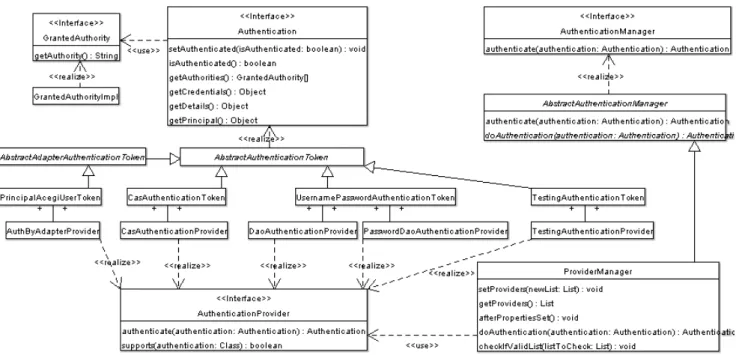
Figure 3: Key Authentication Architecture
As shown in Figure 3, the Acegi Security System for Spring includes several concreteAuthentication implementations:
• UsernamePasswordAuthenticationTokenallows a username and password to be presented as the principal and credentials respectively. It is also what is created by the HTTP Session Authentication system.
• TestingAuthenticationTokenfacilitates unit testing by automatically being considered an authenticated object by its associatedAuthenticationProvider.
• RunAsUserTokenis used by the default run-as authentication replacement implementation. This is discussed further in the Run-As Authentication Replacement section.
• CasAuthenticationTokenis used to represent a successful Yale Central Authentication Service (CAS) authentication. This is discussed further in the CAS section.
• PrincipalAcegiUserTokenandJettyAcegiUserTokenimplementAuthByAdapter(a subclass of
Authentication) and are used whenever authentication is completed by Acegi Security System for Spring container adapters. This is discussed further in the Container Adapters section.
The authorities granted to a principal are represented by theGrantedAuthorityinterface. The GrantedAuthorityinterface is discussed at length in the Authorization section.
1.6.2. Authentication Manager
As discussed in the Security Interception section, theAbstractSecurityInterceptorextracts the
Authenticationobject from theSecurityContextin theSecurityContextHolder. This is then passed to an AuthenticationManager. TheAuthenticationManagerinterface is very simple:
public Authentication authenticate(Authentication authentication) throws AuthenticationException;
Implementations ofAuthenticationManagerare required to throw anAuthenticationExceptionshould authentication fail, or return a fully populatedAuthenticationobject. In particular, the returned
Authenticationobject should contain an array ofGrantedAuthorityobjects. TheSecurityInterceptor places the populatedAuthenticationobject back in theSecurityContextin theSecurityContextHolder, overwriting the originalAuthenticationobject.
TheAuthenticationExceptionhas a number of subclasses. The most important are
BadCredentialsException(an incorrect principal or credentials),DisabledExceptionandLockedException. The latter two exceptions indicate the principal was found, but the credentials were not checked and
authentication is denied. AnAuthenticationServiceExceptionis also provided, which indicates the authentication system could not process the request (eg a database was unavailable).
AuthenticationExceptionalso has aCredentialsExpiredExceptionandAccoungtExpiredException subclass, although these are less commonly used.
1.6.3. Provider-Based Authentication
Whilst the basicAuthenticationandAuthenticationManagerinterfaces enable users to develop their own authentication systems, users should consider using the provider-based authentication packages provided by the Acegi Security System for Spring. The key class,ProviderManager, is configured via the bean context with a list ofAuthenticationProviders:
<bean id="authenticationManager" class="org.acegisecurity.providers.ProviderManager"> <property name="providers"> <list> <ref bean="daoAuthenticationProvider"/> <ref bean="someOtherAuthenticationProvider"/> </list> </property> </bean>
ProviderManagercalls a series of registeredAuthenticationProviderimplementations, until one is found that indicates it is able to authenticate a givenAuthenticationclass. When the first compatible
AuthenticationProvideris located, it is passed the authentication request. TheAuthenticationProviderwill then either throw anAuthenticationExceptionor return a fully populatedAuthenticationobject.
Note theProviderManagermay throw aProviderNotFoundException(a subclass of
AuthenticationException) if it none of the registeredAuthenticationProviderscan validate the Authenticationobject.
TheProviderManageralso has several other important functions. It integrates with concurrent session handling supoprt, and it also converts any exceptions thrown by anAuthenticationProviderand publishes a suitable event. The events that are published are located in theorg.acegisecurity.event.authenticationpackage and advanced users can map different exceptions to different events by configuring the
ProviderManager.exceptionMappingsproperty (generally this is not required and the default event propagation is appropriate - especially as events will simply be ignored if you don't have an
ApplicationListenerconfigured in theApplicationContext).
SeveralAuthenticationProviderimplementations are provided with the Acegi Security System for Spring:
• TestingAuthenticationProvideris able to authenticate aTestingAuthenticationToken. The limit of its authentication is simply to treat whatever is contained in theTestingAuthenticationTokenas valid. This makes it ideal for use during unit testing, as you can create anAuthenticationobject with precisely the GrantedAuthorityobjects required for calling a given method. You definitely would not register this AuthenticationProvideron a production system.
• DaoAuthenticationProvideris able to authenticate aUsernamePasswordAuthenticationTokenby accessing an authentication respository via a data access object. This is discussed further below, as it is the main way authentication is initially handled.
• RunAsImplAuthenticationProvideris able to authenticate aRunAsUserToken. This is discussed further in the Run-As Authentication Replacement section. You would not register thisAuthenticationProviderif
you were not using run-as replacement.
• AuthByAdapterProvideris able to authenticate anyAuthByAdapter(a subclass ofAuthenticationused with container adapters). This is discussed further in the Container Adapters section. You would not register thisAuthenticationProviderif you were not using container adapters.
• CasAuthenticationProvideris able to authenticate Yale Central Authentication Service (CAS) tickets. This is discussed further in the CAS Single Sign On section.
• JaasAuthenticationProvideris able to delegate authentication requests to a JAASLoginModule. This is discussed further below.
1.6.4. Concurrent Session Support
Acegi Security is able to stop the same principal authenticating to the same web application multiple times concurrently. Put differently, you can stop user "Batman" from logging into a web application twice at the same time.
To use concurrent session support, you'll need to add the following to web.xml:
<listener>
<listener-class>org.acegisecurity.ui.session.HttpSessionEventPublisher</listener-class> </listener>
In addition, you will need to add theorg.acegisecurity.concurrent.ConcurrentSessionFilterto your FilterChainProxy. The ConcurrentSessionFilter requires only one property, sessionRegistry, which generally points to an instance ofSessionRegistryImpl.
Theweb.xml HttpSessionEventPublishercauses anApplicationEventto be published to the Spring ApplicationContextevery time aHttpSessioncommences or terminates. This is critical, as it allows the SessionRegistryImplto be notified when a session ends.
You will also need to wire up theConcurrentSessionControllerImpland refer to it from your ProviderManagerbean:
<bean id="authenticationManager" class="org.acegisecurity.providers.ProviderManager"> <property name="providers">
<!-- your providers go here --> </property>
<property name="sessionController"><ref bean="concurrentSessionController"/></property> </bean>
<bean id="concurrentSessionController"
class="org.acegisecurity.concurrent.ConcurrentSessionControllerImpl"> <property name="maximumSessions"><value>1</value></property>
<property name="sessionRegistry"><ref local="sessionRegistry"/></property> </bean>
<bean id="sessionRegistry" class="org.acegisecurity.concurrent.SessionRegistryImpl"/>
1.6.5. Data Access Object Authentication Provider
The Acegi Security System for Spring includes a production-qualityAuthenticationProviderimplementation calledDaoAuthenticationProvider. This authentication provider is able to authenticate a
UsernamePasswordAuthenticationTokenby obtaining authentication details from a data access object configured at bean creation time:
<bean id="daoAuthenticationProvider"
class="org.acegisecurity.providers.dao.DaoAuthenticationProvider">
<property name="userDetailsService"><ref bean="inMemoryDaoImpl"/></property> <property name="saltSource"><ref bean="saltSource"/></property>
<property name="passwordEncoder"><ref bean="passwordEncoder"/></property> </bean>
ThePasswordEncoderandSaltSourceare optional. APasswordEncoderprovides encoding and decoding of passwords obtained from the authentication repository. ASaltSourceenables the passwords to be populated with a "salt", which enhances the security of the passwords in the authentication repository.PasswordEncoder implementations are provided with the Acegi Security System for Spring covering MD5, SHA and cleartext encodings. TwoSaltSourceimplementations are also provided:SystemWideSaltSourcewhich encodes all passwords with the same salt, andReflectionSaltSource, which inspects a given property of the returned UserDetailsobject to obtain the salt. Please refer to the JavaDocs for further details on these optional features. In addition to the properties above, theDaoAuthenticationProvidersupports optional caching of
UserDetailsobjects. TheUserCacheinterface enables theDaoAuthenticationProviderto place a
UserDetailsobject into the cache, and retrieve it from the cache upon subsequent authentication attempts for the same username. By default theDaoAuthenticationProvideruses theNullUserCache, which performs no caching. A usable caching implementation is also provided,EhCacheBasedUserCache, which is configured as follows:
<bean id="daoAuthenticationProvider"
class="org.acegisecurity.providers.dao.DaoAuthenticationProvider">
<property name="userDetailsService"><ref bean="userDetailsService"/></property> <property name="userCache"><ref bean="userCache"/></property>
</bean>
<bean id="cacheManager" class="org.springframework.cache.ehcache.EhCacheManagerFactoryBean"> <property name="configLocation">
<value>classpath:/ehcache-failsafe.xml</value> </property>
</bean>
<bean id="userCacheBackend" class="org.springframework.cache.ehcache.EhCacheFactoryBean"> <property name="cacheManager"> <ref local="cacheManager"/> </property> <property name="cacheName"> <value>userCache</value> </property> </bean>
<bean id="userCache" class="org.acegisecurity.providers.dao.cache.EhCacheBasedUserCache"> <property name="cache"><ref local="userCacheBackend"/></property>
</bean>
All Acegi Security EH-CACHE implementations (includingEhCacheBasedUserCache) require an EH-CACHE Cacheobject. TheCacheobject can be obtained from wherever you like, although we recommend you use Spring's factory classes as shown in the above configuration. If using Spring's factory classes, please refer to the Spring documentation for further details on how to optimise the cache storage location, memory usage, eviction policies, timeouts etc.
For a class to be able to provide theDaoAuthenticationProviderwith access to an authentication repository, it must implement theUserDetailsServiceinterface:
public UserDetails loadUserByUsername(String username) throws UsernameNotFoundException, DataAccessException;
TheUserDetailsis an interface that provides getters that guarantee non-null provision of basic authentication information such as the username, password, granted authorities and whether the user is enabled or disabled. A concrete implementation,User, is also provided. Acegi Security users will need to decide when writing their UserDetailsServicewhat type ofUserDetailsto return. In most casesUserwill be used directly or
subclassed, although special circumstances (such as object relational mappers) may require users to write their ownUserDetailsimplementation from scratch.UserDetailsis often used to store additional principal-related properties (such as their telephone number and email address), so they can be easily used by web views. GivenUserDetailsServiceis so simple to implement, it should be easy for users to retrieve authentication information using a persistence strategy of their choice.
A design decision was made not to support account locking in theDaoAuthenticationProvider, as doing so would have increased the complexity of theUserDetailsServiceinterface. For instance, a method would be required to increase the count of unsuccessful authentication attempts. Such functionality could be easily provided by leveraging the application event publishing features discussed below.
DaoAuthenticationProviderreturns anAuthenticationobject which in turn has itsprincipalproperty set. The principal will be either aString(which is essentially the username) or aUserDetailsobject (which was looked up from theUserDetailsService). By default theUserDetailsis returned, as this enables applications to add extra properties potentially of use in applications, such as the user's full name, email address etc. If using container adapters, or if your applications were written to operate withStrings (as was the case for releases prior to Acegi Security 0.6), you should set theDaoAuthenticationProvider.forcePrincipalAsString property totruein your application context.
1.6.6. In-Memory Authentication
Whilst it is easy to use theDaoAuthenticationProviderand create a customUserDetailsService
implementation that extracts information from a persistence engine of choice, many applications do not require such complexity. One alternative is to configure an authentication repository in the application context itself using theInMemoryDaoImpl:
<bean id="inMemoryDaoImpl" class="org.acegisecurity.userdetails.memory.InMemoryDaoImpl"> <property name="userMap"> <value> marissa=koala,ROLE_TELLER,ROLE_SUPERVISOR dianne=emu,ROLE_TELLER scott=wombat,ROLE_TELLER peter=opal,disabled,ROLE_TELLER </value> </property> </bean>
TheuserMapproperty contains each of the usernames, passwords, a list of granted authorities and an optional enabled/disabled keyword. Commas delimit each token. The username must appear to the left of the equals sign, and the password must be the first token to the right of the equals sign. Theenabledanddisabled keywords (case insensitive) may appear in the second or any subsequent token. Any remaining tokens are treated as granted authorities, which are created asGrantedAuthorityImplobjects (refer to the Authorization section for further discussion on granted authorities). Note that if a user has no password and/or no granted authorities, the user will not be created in the in-memory authentication repository.
InMemoryDaoImplalso offers asetUserProperties(Properties)method, which allows you to externalise the java.util.Propertiesin another Spring configured bean or an external properties file. This might prove useful for simple applications that have a larger number of users, or deployment-time configuration changes, but do not wish to use a full database for authentication details.
1.6.7. JDBC Authentication
The Acegi Security System for Spring also includes an authentication provider that can obtain authentication information from a JDBC data source. The typical configuration for theJdbcDaoImplis shown below:
<bean id="dataSource" class="org.springframework.jdbc.datasource.DriverManagerDataSource"> <property name="driverClassName"><value>org.hsqldb.jdbcDriver</value></property>
<property name="url"><value>jdbc:hsqldb:hsql://localhost:9001</value></property> <property name="username"><value>sa</value></property>
<property name="password"><value></value></property> </bean>
<bean id="jdbcDaoImpl" class="org.acegisecurity.userdetails.jdbc.JdbcDaoImpl"> <property name="dataSource"><ref bean="dataSource"/></property>
</bean>
You can use different relational database management systems by modifying theDriverManagerDataSource shown above. Irrespective of the database used, a standard schema must be used as indicated indbinit.txt. If you default schema is unsuitable for your needs,JdbcDaoImplprovides two properties that allow
customisation of the SQL statements. You may also subclass theJdbcDaoImplif further customisation is necessary. Please refer to the JavaDocs for details.
1.6.8. JAAS Authentication
Acegi Security provides a package able to delegate authentication requests to the Java Authentication and Authorization Service (JAAS). This package is discussed in detail below.
Central to JAAS operation are login configuration files. To learn more about JAAS login configuration files, consult the JAAS reference documentation available from Sun Microsystems. We expect you to have a basic understanding of JAAS and its login configuration file syntax in order to understand this section.
1.6.8.1. JaasAuthenticationProvider
TheJaasAuthenticationProviderattempts to authenticate a user’s principal and credentials through JAAS. Let’s assume we have a JAAS login configuration file,/WEB-INF/login.conf, with the following contents:
JAASTest {
sample.SampleLoginModule required; };
Like all Acegi Security beans, theJaasAuthenticationProvideris configured via the application context. The following definitions would correspond to the above JAAS login configuration file:
<bean id="jaasAuthenticationProvider" class="org.acegisecurity.providers.jaas.JaasAuthenticationProvider"> <property name="loginConfig"> <value>/WEB-INF/login.conf</value> </property> <property name="loginContextName"> <value>JAASTest</value> </property> <property name="callbackHandlers"> <list> <bean class="org.acegisecurity.providers.jaas.JaasNameCallbackHandler"/> <bean class="org.acegisecurity.providers.jaas.JaasPasswordCallbackHandler"/> </list>
</property> <property name="authorityGranters"> <list> <bean class="org.acegisecurity.providers.jaas.TestAuthorityGranter"/> </list> </property> </bean>
TheCallbackHandlers andAuthorityGranters are discussed below.
1.6.8.2. Callbacks
Most JAASLoginModules require a callback of some sort. These callbacks are usually used to obtain the username and password from the user. In an Acegi Security deployment, Acegi Security is responsible for this user interaction (typically via a reference to aContextHolder-managedAuthenticationobject). The JAAS package for Acegi Security provides two default callback handlers,JaasNameCallbackHandlerand
JaasPasswordCallbackHandler. Each of these callback handlers implement
JaasAuthenticationCallbackHandler. In most cases these callback handlers can simply be used without understanding the internal mechanics. For those needing full control over the callback behavior, internally JaasAutheticationProviderwraps theseJaasAuthenticationCallbackHandlers with an
InternalCallbackHandler. TheInternalCallbackHandleris the class that actually implements JAAS’ normalCallbackHandlerinterface. Any time that the JAASLoginModuleis used, it is passed a list of
application context configuredInternalCallbackHandlers. If theLoginModulerequests a callback against the InternalCallbackHandlers, the callback is in-turn passed to theJaasAuthenticationCallbackHandlers being wrapped.
1.6.8.3. AuthorityGranters
JAAS works with principals. Even “roles” are represented as principals in JAAS. Acegi Security, on the other hand, works withAuthenticationobjects. EachAuthenticationobject contains a single principal, and multipleGrantedAuthority[]s. To facilitate mapping between these different concepts, the Acegi Security JAAS package includes anAuthorityGranterinterface. AnAuthorityGranteris responsible for inspecting a JAAS principal and returning aString. TheJaasAuthenticationProviderthen creates a
JaasGrantedAuthority(which implements Acegi Security’sGrantedAuthorityinterface) containing both the AuthorityGranter-returnedStringand the JAAS principal that theAuthorityGranterwas passed. The JaasAuthenticationProviderobtains the JAAS principals by firstly successfully authenticating the user’s credentials using the JAASLoginModule, and then accessing theLoginContextit returns. A call to
LoginContext.getSubject().getPrincipals()is made, with each resulting principal passed to each AuthorityGranterdefined against theJaasAuthenticationProvider.setAuthorityGranters(List) property. Acegi Security does not include any productionAuthorityGranters given every JAAS principal has an implementation-specific meaning. However, there is aTestAuthorityGranterin the unit tests that
demonstrates a simpleAuthorityGranterimplementation.
1.6.9. Siteminder Authentication
Acegi Security provides a web filter
(org.acegisecurity.ui.webapp.SiteminderAuthenticationProcessingFilter) that can be used to process requests that have been pre-authenticated by Computer Associates' Siteminder. This filter assumes that you're using Siteminder for authentication, and your application (or backing datasource) is used for authorization. The use of Siteminder for authorization is not yet directly supported by Acegi.
This agent redirects the initial request to a login page, and only after successful authentication does your application receive the request. Authenticated requests contain one or more HTTP headers populated by the Siteminder agent. Below we'll assume that the request header key containing the user's identity is "SM_USER", but of course your header values may be different based on Siteminder policy server configuration. Please refer to your company's "single sign-on" group for header details.
1.6.9.1. SiteminderAuthenticationProcessingFilter
The first step in setting up Acegi's Siteminder support is to define anauthenticationProcessingFilterbean and give it anauthenticationManagerto use, as well as to tell it where to send users upon success and failure and where to find the Siteminder username and password values. Most people won't need the password value since Siteminder has already authenticated the user, so it's typical to use the same header for both.
<!-- ======================== SITEMINDER AUTHENTICATION PROCESSING FILTER ======================= -->
<bean id="authenticationProcessingFilter"
class="org.acegisecurity.ui.webapp.SiteminderAuthenticationProcessingFilter">
<property name="authenticationManager"><ref bean="authenticationManager"/></property> <property name="authenticationFailureUrl"><value>/login.jsp?login_error=1</value></property> <property name="defaultTargetUrl"><value>/security.do?method=getMainMenu</value></property> <property name="filterProcessesUrl"><value>/j_acegi_security_check</value></property> <property name="siteminderUsernameHeaderKey"><value>SM_USER</value></property> <property name="siteminderPasswordHeaderKey"><value>SM_USER</value></property> </bean>
Since thisauthenticationProcessingFilterdepends on anauthenticationManager, we'll need to define one:
<!-- ======================== AUTHENTICATION ======================= -->
<!--- The top<!---level Authentication Manager is responsible for all application AUTHENTICATION - operations. Note that it must reference one or more provider(s) defined below.
-->
<bean id="authenticationManager" class="org.acegisecurity.providers.ProviderManager"> <property name="providers"> <list> <ref local="daoAuthenticationProvider"/> </list> </property> </bean>
Note that yourdaoAuthenticationProviderabove will expect the password property to match what it expects. In this case, authentication has already been handled by Siteminder and you've specified the same HTTP header for both username and password, so you can codedaoAuthenticationProviderto simply make sure the username and password values match. This may sound like a security weakness, but remember that users have to authenticate with Siteminder before your application ever receives the requests, so the purpose of your daoAuthenticationProvidershould simply be to assign roles and other properties needed by subsequent method interceptors, etc.
Finally we need to tell thefilterChainProxyto include theauthenticationProcessingFilterin its operations.
<!-- ======================== FILTER CHAIN ======================= -->
<!--- The web.xml file has a single filter reference to this top<!---level bean, which - invokes the chain of sub-filters specified below.
-->
<bean id="filterChainProxy" class="org.acegisecurity.util.FilterChainProxy"> <property name="filterInvocationDefinitionSource">
<value> CONVERT_URL_TO_LOWERCASE_BEFORE_COMPARISON PATTERN_TYPE_APACHE_ANT /**=httpSessionContextIntegrationFilter,authenticationProcessingFilter,securityEnforcementFilter </value> </property> </bean>
In summary, once the user has authenticated through Siteminder, their header-loaded request will be brokered byfilterChainProxytoauthenticationProcessingFilter, which in turn will grab the user's identity from the SM_USER request header. The user's identity will then be passed to theauthenticationManagerand finallydaoAuthenticationProviderwill do the work of authorizing the user against back-end databases, etc. and loading theUserDetailsimplementation with roles, username and any other property you deem relevant.
1.6.10. Authentication Recommendations
With the heavy use of interfaces throughout the authentication system (Authentication,
AuthenticationManager,AuthenticationProviderandUserDetailsService) it might be confusing to a new user to know which part of the authentication system to customize. In general, the following is recommended:
• Use theUsernamePasswordAuthenticationTokenimplementation where possible.
• If you simply need to implement a new authentication repository (eg to obtain user details from your application’s existing database), use theDaoAuthenticationProvideralong with theUserDetailsService. It is the fastest and safest way to integrate an external database.
• If you're using Container Adapters or aRunAsManagerthat replaces theAuthenticationobject, ensure you have registered theAuthByAdapterProviderandRunAsManagerImplProviderrespectively with your ProviderManager.
• Never enable theTestingAuthenticationProvideron a production system. Doing so will allow any client to simply present aTestingAuthenticationTokenand obtain whatever access they request.
• Adding a newAuthenticationProvideris sufficient to support most custom authentication requirements. Only unusual requirements would require theProviderManagerto be replaced with a different
AuthenticationManager.
1.7. Authorization
1.7.1. Granted Authorities
As briefly mentioned in the Authentication section, allAuthenticationimplementations are required to store an array ofGrantedAuthorityobjects. These represent the authorities that have been granted to the principal. TheGrantedAuthorityobjects are inserted into theAuthenticationobject by theAuthenticationManager and are later read byAccessDecisionManagers when making authorization decisions.
GrantedAuthorityis an interface with only one method: