Article No. jnca.1999.0091, available online at http://www.idealibrary.com on
Towards role-based administration in network
information services
Gail J. Ahn and Ravi Sandhu
ISE Department, Mail Stop 4A4, George Mason University, Fairfax, VA 22030, USA; E-mail:fgahn, sandhug@isse.gmu.edu
Client-server networks have grown tremendously since the mid-1980s. The information they store changes much more rapidly than it did during the time at beginning. The size and complexity of these networks required new, autonomous administration prac-tices. Network Information Services was designed to address these requirements. As one of the network information services, NISC is a widely used network protocol. It allows networked machines to have a common interface regardless of the workstation that a user logs into. NISCkeeps all information into tables to support a common inter-face between networked machines. In the most of case these information are controlled by centralized manner. Centralized management of NISC tables in large systems is a tedious and costly task. An appealing possibility is to use role and role hierarchy to facilitate decentralized administration of NISCtables which has not been previously rec-ognized in the literature. This paper presents decentralized administration of NISCtables using the notion of role and also shows how to simulate role hierarchy in NISCgroups.
1999 Academic Press
1. Introduction
Network information services store information that users, workstations, and applications must have to communicate across the network. Without a network information service, each workstation would have to maintain its own copy of this information. For example, take a simple network of three workstations; Alice, Bob and Chris. Before Alice can send a message to either Bob or Chris, it must know their network addresses. For this reason, it keeps a file, /etc/hosts, that stores the network address of every workstation in the network, including itself. Likewise, in order for Bob and Chris to communicate with Alice or with each other, they must keep similar files. However, addresses are not the only network information that workstations needs to store. They also need to store security information, mail information, information about their Ethernet interfaces, information about network services, and about groups of users allowed to use the network, about services offered on the network, and so on. As networks offer more services, the list grows. As a result, each workstation may need to keep an entire set of files similar to/etc/hosts. Unfortunately, some files change too frequently to be kept current. The problem of keeping system information current is especially troublesome with very dynamic information such as passwords. As this information changes, administrators must keep it current on every workstation
in the network. In a small network this is simply tedious, but on a large network, the job becomes not only time consuming, but unmanageable.
Network information services solve this problem by maintaining system infor-mation on a central host known as an NISCserver. It stores network information on servers and provides it to any workstation that asks for it. Network Informa-tion Services allow networked machines to have a common interface regardless of the workstation that a user logs into. With this mecahanism we can use the same password and group files (the same uid and gid) over the network and the same home directory can be mounted on each machines. It also reduces the effort required to setup and maintain a network of Unix workstations. This is accomplished through the centralization on a server of the major configuration files required to setup a Unix machine for a particular site. Thus only the set of configuration files on the server need to be updated to effect all machines at a site. This has proven to be a very powerful network administration tool.
However, the information on the server is exclusively controlled by a central-ized manner which does not scale gracefully to systems with large numbers of groups and users. More generally, it is possible to decentralize an administra-tion by allowing administrators to selectively delegate authority to control the information. In this paper we describe decentralized administration of NISC can be implemented by means of setting access rights to NISC objects (specially to NISC table) supporting NISCadministration mechanism.
The rest of the paper is organized as follows. In Section 2, we discuss the overview of network information services. In Section 3 we review the role concept and discuss its adoption in NISC followed by implementation of Role-based NISC in Section 4. Section 5 concludes the paper.
2. Overview of NIS and NISC
In this section we describe the background of network information services. And we present the basic structure of NISC which we will focus on.
2.1 Background on NIS and NISC
NIS was developed independently of DNS and had a slightly different focus.1 Whereas DNS focused on making communication simpler by using workstation names instead of addresses, NIS focused on making network administration more manageable by providing centralized control over a variety of network information. As a result, NIS stores information not only about workstation names and address, but also about users, the network itself, and network services. This 1DNS, the Domain Naming Service, is the network information service provided by the Internet
for TCP/IP networks. It was developed so that workstations on the network could be identified with common names instead of Internet addresses. NIS and NISCare other network information services developed by SunSoftTM.
collection of network information is referred to as the NIS namespace. NIS stores information in a set of maps. However, NIS maps were designed to replace Unix etc files, as well as other configuration files, so they store much more than names and addresses. As a result, the NIS namespace has a large set of maps. NISC
was designed to replace NIS. NIS addresses the administration requirements of client-server computing networks prevalent in the 1980s. Client-server networks have grown tremendously since the mid-1980s. The size and complexity of these networks required new, autonomous administration practices. NISCwas designed to address theses requirements. NISCis upwardly compatible with NIS. The new service provides for a hierarchical name space, similar to that used by the Internet. This allows for a distributed authority mechanism.
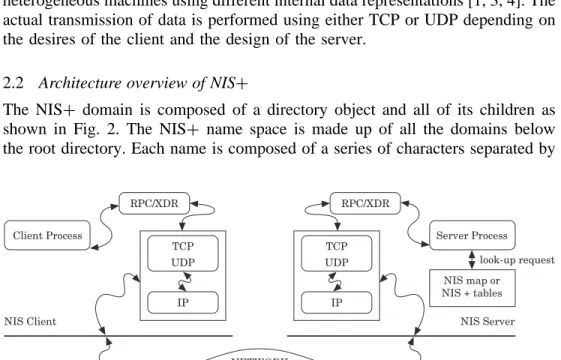
NIS and NISC are based upon the Remote Procedure Call (RPC) protocol which uses the External Data Representation (XDR) standard. Below this level are the raw communications services of Transmission Control Protocol (TCP) and User Datagram Protocol (UDP) provided by the Internet Protocol (IP) [2]. The relationships between these protocols are shown in Fig. 1. RPC implements a method by which a client process on one machine can perform a virtual procedure call to a server process on a remote machine. The client is considered to be accessing a feature of a service provided by the server. The client calls an RPC procedure with the arguments for the remote procedure and does not return from the call until the request has been sent to the server, processed, and a reply received. The message is encoded using XDR so that RPC can be used between heterogeneous machines using different internal data representations [1, 3, 4]. The actual transmission of data is performed using either TCP or UDP depending on the desires of the client and the design of the server.
2.2 Architecture overview of NISC
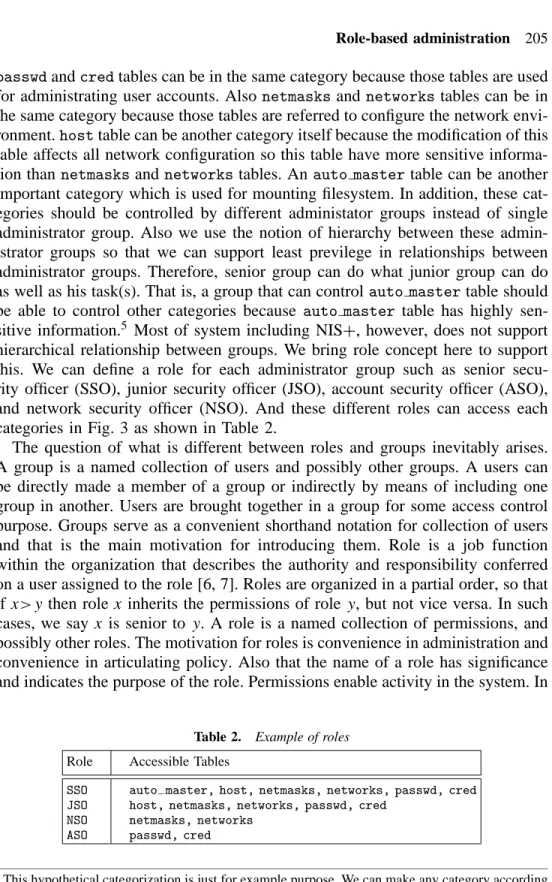
The NISC domain is composed of a directory object and all of its children as shown in Fig. 2. The NISC name space is made up of all the domains below the root directory. Each name is composed of a series of characters separated by
RPC/XDR IP TCP UDP Client Process RPC/XDR IP TCP UDP Server Process NIS map or NIS + tables NIS Server look-up request NETWORK NIS Client
org_dir.list.gmu.edu. group_dir.list.gmu.edu. list.gmu.edu. group3 group2 group1 GROUPS group1.group_dir.list.gmu.edu. TABLES
Figure 2. NIS architecture.
a (.). These character sequences are known as labels. There are three types of objects:
objects description
directory objects they form the framework of the name space
table objects they store the information
group objects they are used for security
The directory objects are at the top of the name space. Directory objects contain the names, addresses, and authentication information for systems within the domain. Objects within the database are stored as children of the directory object. The directory object at the top of the hierarchy is known as the root directory. Thetable objectsidentify table databases. The table object contains the scheme by which columns within the table can be identified and searched. Each table contains information about users, machines, or resources on the network.2
The group objects contain a list of members of the group. An NISC group is a collection of users and workstations identified by a single name. They are assigned access rights as a group. Essentially, this is used to set security. As shown in Table 1(a, b) NISC authorization allows four classes of principals and four access rights. NISC objects specify access rights for NISCprincipals in the same way that UNIX files specify permissions for UNIX users. Access rights specify the types of operations that NISC principals are allowed to perform on 2The normal set of 16 tables store information for: hosts, bootparams, password, cred, group, netgroups, mail, aliases, timezone, networks, netmasks, ethers, services, protocols, rpc, auto home, auto master.
Table 1. The basic structure of NISC (a) Principals
Principal Description
Owner owner of the object
Group set of specified users
World set of authenticated users
Nobody all clients
(b) Access rights Right Functionality
read read contents of objects
modify change objects
create add objects to tables
destroy remove objects from tables
(c) Default access rights for NISCobjects
Object Nobody Owner Group World
Root-directory object r--- rmcd rmcd
r---Non-root directory object r--- rmcd rmcd
r---group dir directory objects r--- rmcd rmcd
r---org dir directory objects r--- rmcd rmcd
r---NISCgroups ---- rmcd r---
r---NISCtables varies varies varies varies
an NISCobject. NISCoperations vary among different types of objects, but they fall into for classes: read, modify, create, and destroy. NISCobjects specify their access right as part of their object definitions. So, if the operation that a principal tries to perform on an object is authorized by the object’s definition, the server performs it. There is one more wrinkle in this process. An object does not grant access right directly to a particular principal. Instead, it grants access rights to four classes of principal:Owner, Group, World, and Nobody. The principal who happens to be the object’s owner gets the rights granted to the Owner class. The principals who belong to the object’s Group class get the rights granted to the Group class.3 The World class encompasses all NISC principals that a server has been able to authenticate. Finally, the Nobody class is reserved for everyone, whether an authenticated principal or not. Table 1(c) shows the default access rights for NISCobjects.4
3. Roles in Network Information Systems
As metioned in Section 2, NISC maintains the tables to store information about users, machines, or resources on the network. And controlling these tables is done by a centralized method. Centralized management of NISC tables in large systems is a tedious and costly task. An appealing possibility is to use role and 3This is an NISCgroup, by the way, not a UNIX group or a netgroup. Information about NISC
groups is not stored in the NISCgroup table. That table stores information about UNIX groups. Information about NISCgroups is stored in NISCgroup objects, under the groups dir subdirectory of every NISCdomain.
4We can change permission attributes of an object with the/usr/bin/nischmod command. The /usr/bin/nislscommand can be used to list the objects and permissions of an NISCdirectory.
role hierarchy to facilitate decentralized administration of NISCtable which has not been previously recognized in the literature. In this section we address the needs of role and role hierarchy in network information systems.
3.1 Groups and roles
NISC tables store a wide variety of information, ranging from user names to Internet services. Although NISC tables have the same underlying sturcture, each table stores different types of information. For instance, auto master table contains automounter map information which can be used in network filesytem. Passwd and cred tables store password information and credentials for users who belong to the domain. These two tables are used for authentication process.Networksandnetmaskstables list the network masks used to implement standard Internet subsetting including the networks of the Internet created from the official network table maintained at the Network Information Control Center (NIC). Unlikenetworksandnetmasktables, hosts table associates the names of all the workstations in a domain with their IP addresses. These NISC tables are normally administrated by an administrator or single administrator group. This kind of management in large systems is a tedious and costly task. Also, single mistake may affect whole systems because administration of NISCtables does not have a supervising method such as hierarchical structure between administrator group.
Instead of centralized and single-level administration, we introduce decen-trailized and hierarchical administration. In order to do that we divide NISC
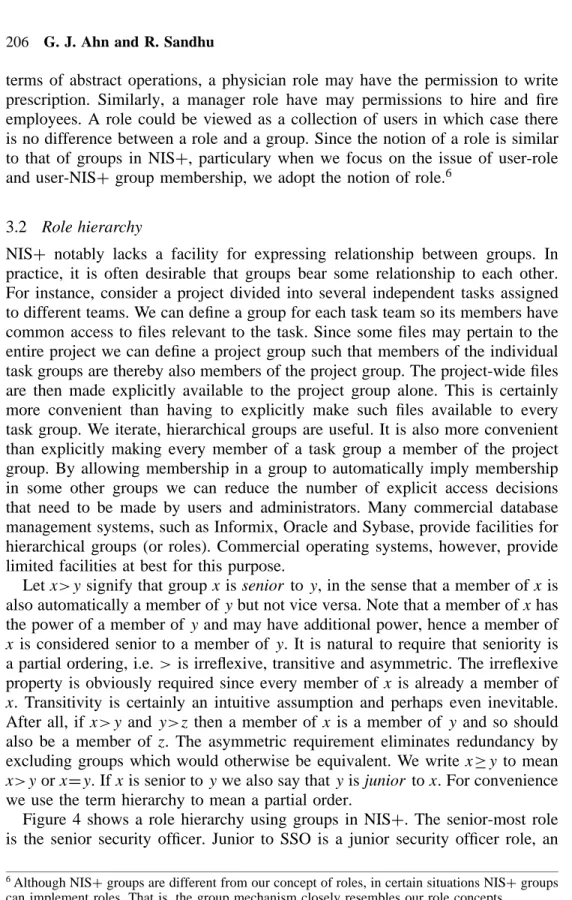
tables into several categories according to their types and characteristics because each table has different types of information. For example, as shown in Fig. 3, we have four categories grouped by their similarity and sensitivity. For instance,
auto_master table Category A Group A host table Category B Group B passwd table Category C Group C cred table netmasks table Category D networks table Group D Figure 3. A scenario.
passwdandcredtables can be in the same category because those tables are used for administrating user accounts. Also netmasksand networkstables can be in the same category because those tables are referred to configure the network envi-ronment.hosttable can be another category itself because the modification of this table affects all network configuration so this table have more sensitive informa-tion than netmasksandnetworkstables. An auto mastertable can be another important category which is used for mounting filesystem. In addition, these cat-egories should be controlled by different administator groups instead of single administrator group. Also we use the notion of hierarchy between these admin-istrator groups so that we can support least previlege in relationships between administrator groups. Therefore, senior group can do what junior group can do as well as his task(s). That is, a group that can control auto mastertable should be able to control other categories because auto master table has highly sen-sitive information.5 Most of system including NISC, however, does not support hierarchical relationship between groups. We bring role concept here to support this. We can define a role for each administrator group such as senior secu-rity officer (SSO), junior secusecu-rity officer (JSO), account secusecu-rity officer (ASO), and network security officer (NSO). And these different roles can access each categories in Fig. 3 as shown in Table 2.
The question of what is different between roles and groups inevitably arises. A group is a named collection of users and possibly other groups. A users can be directly made a member of a group or indirectly by means of including one group in another. Users are brought together in a group for some access control purpose. Groups serve as a convenient shorthand notation for collection of users and that is the main motivation for introducing them. Role is a job function within the organization that describes the authority and responsibility conferred on a user assigned to the role [6, 7]. Roles are organized in a partial order, so that if x>y then rolex inherits the permissions of roley, but not vice versa. In such cases, we say x is senior to y. A role is a named collection of permissions, and possibly other roles. The motivation for roles is convenience in administration and convenience in articulating policy. Also that the name of a role has significance and indicates the purpose of the role. Permissions enable activity in the system. In
Table 2. Example of roles
Role Accessible Tables
SSO auto master, host, netmasks, networks, passwd, cred JSO host, netmasks, networks, passwd, cred
NSO netmasks, networks ASO passwd, cred
5This hypothetical categorization is just for example purpose. We can make any category according
terms of abstract operations, a physician role may have the permission to write prescription. Similarly, a manager role have may permissions to hire and fire employees. A role could be viewed as a collection of users in which case there is no difference between a role and a group. Since the notion of a role is similar to that of groups in NISC, particulary when we focus on the issue of user-role and user-NISC group membership, we adopt the notion of role.6
3.2 Role hierarchy
NISC notably lacks a facility for expressing relationship between groups. In practice, it is often desirable that groups bear some relationship to each other. For instance, consider a project divided into several independent tasks assigned to different teams. We can define a group for each task team so its members have common access to files relevant to the task. Since some files may pertain to the entire project we can define a project group such that members of the individual task groups are thereby also members of the project group. The project-wide files are then made explicitly available to the project group alone. This is certainly more convenient than having to explicitly make such files available to every task group. We iterate, hierarchical groups are useful. It is also more convenient than explicitly making every member of a task group a member of the project group. By allowing membership in a group to automatically imply membership in some other groups we can reduce the number of explicit access decisions that need to be made by users and administrators. Many commercial database management systems, such as Informix, Oracle and Sybase, provide facilities for hierarchical groups (or roles). Commercial operating systems, however, provide limited facilities at best for this purpose.
Let x>y signify that groupx is senior toy, in the sense that a member of x is also automatically a member ofy but not vice versa. Note that a member ofx has the power of a member of y and may have additional power, hence a member of x is considered senior to a member ofy. It is natural to require that seniority is a partial ordering, i.e. >is irreflexive, transitive and asymmetric. The irreflexive property is obviously required since every member of x is already a member of x. Transitivity is certainly an intuitive assumption and perhaps even inevitable. After all, if x>y and y>z then a member ofx is a member of y and so should also be a member of z. The asymmetric requirement eliminates redundancy by excluding groups which would otherwise be equivalent. We write x½y to mean x>y orxDy. Ifx is senior toy we also say thaty is junior tox. For convenience we use the term hierarchy to mean a partial order.
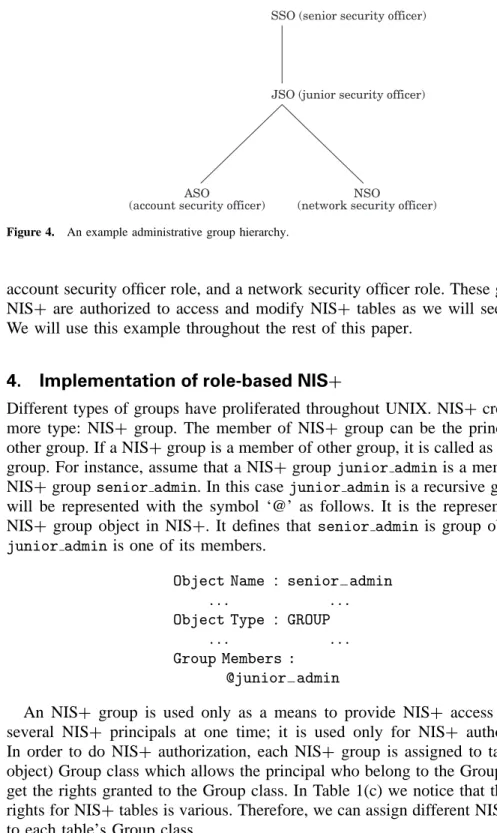
Figure 4 shows a role hierarchy using groups in NISC. The senior-most role is the senior security officer. Junior to SSO is a junior security officer role, an 6Although NISCgroups are different from our concept of roles, in certain situations NISCgroups
ASO
(account security officer)
NSO
(network security officer) JSO (junior security officer) SSO (senior security officer)
Figure 4. An example administrative group hierarchy.
account security officer role, and a network security officer role. These groups in NISC are authorized to access and modify NISC tables as we will see shortly. We will use this example throughout the rest of this paper.
4. Implementation of role-based NISC
Different types of groups have proliferated throughout UNIX. NISC creates one more type: NISC group. The member of NISC group can be the principal and other group. If a NISCgroup is a member of other group, it is called as recursive group. For instance, assume that a NISCgroup junior adminis a member of a NISC groupsenior admin. In this casejunior adminis a recursive group and will be represented with the symbol ‘@’ as follows. It is the representation of NISC group object in NISC. It defines that senior adminis group object and junior admin is one of its members.
Object Name : senior admin
. . . .
Object Type : GROUP
. . . .
Group Members : @junior admin
An NISC group is used only as a means to provide NISC access rights to several NISC principals at one time; it is used only for NISC authorization. In order to do NISC authorization, each NISC group is assigned to table’s (or object) Group class which allows the principal who belong to the Group class to get the rights granted to the Group class. In Table 1(c) we notice that the access rights for NISCtables is various. Therefore, we can assign different NISCgroup to each table’s Group class.
That is, member users of a table’s group owner can have special privileges to that object. For example, we can add several junior administrators to the administrator group so that they can only modify the password and hosts tables, but they would be unable to modify any other tables. By using this mechanism, we can distribute administration tasks across many users and not just reserve them for the superuser of the entire table [5]. Each administrator group can be role which performs certain control over the NISCtables. In our case study, we also have four NISC groups and each table has different group ownerships as shown in Table 4.
In order to achieve group hierarchy in NISC, we use the recursive group membership functionality in NISC. First, we need to create NISCgroup as below. The first argument is the group name. Using NISC group, we create a network security officer role.
# nisgrpadm -c NSO.list.gmu.edu
Group ‘‘NSO.list.gmu.edu.’’ created.
In order to assign a user to network security officer, we can use the following command. The first argument is a group name. The remaining argument is the name of the administrator. So we assign Dave to network security officer role.
# nisgrpadm -a NSO.list.gmu.edu Dave.list.gmu.edu
Added ‘‘Dave.list.gmu.edu.’’ to group ‘‘NSO.list.gmu.edu.’’ To remove members from NISC group, we can use the-r option as below.
# nisgrpadm -r NSO.list.gmu.edu Dave.list.gmu.edu
Removed ‘‘Dave.list.gmu.edu.’’ from group ‘‘NSO.list.gmu.edu.’’ As mentioned before, we use one of NISCfeatures, a recursive group, to simulate the hierarchy between NISC groups. For example, the following statement add a recursive group, JSO as a member of NSO. Therefore, all members of junior security officer are also the member of network security officer group.
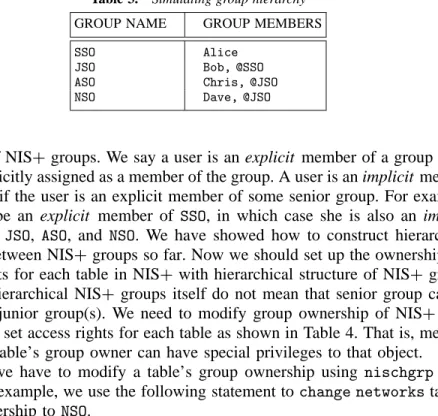
# nisgrpadm -a NSO.list.gmu.edu @JSO.list.gmu.edu Added ‘‘@JSO.list.gmu.edu.’’ to group ‘‘NSO.list.gmu.edu.’’ Table 3 shows how we can construct hierarchy between NISC group. Alice is a member of senior group SSO and also a member of JSO, ASO, and NSO according to the hierarchical structure as shown in Fig. 4. Bob who is a member of JSO becomes a member of ASO and NSO. That is, this table implies that SSO is the senior-most group andJSO who is junior toSSOis senior to ASOand NSO. Assigning NISC groups as shown in Table 3 we can achieve the hierarchical
Table 3. Simulating group hierarchy
GROUP NAME GROUP MEMBERS
SSO Alice JSO Bob, @SSO ASO Chris, @JSO NSO Dave, @JSO
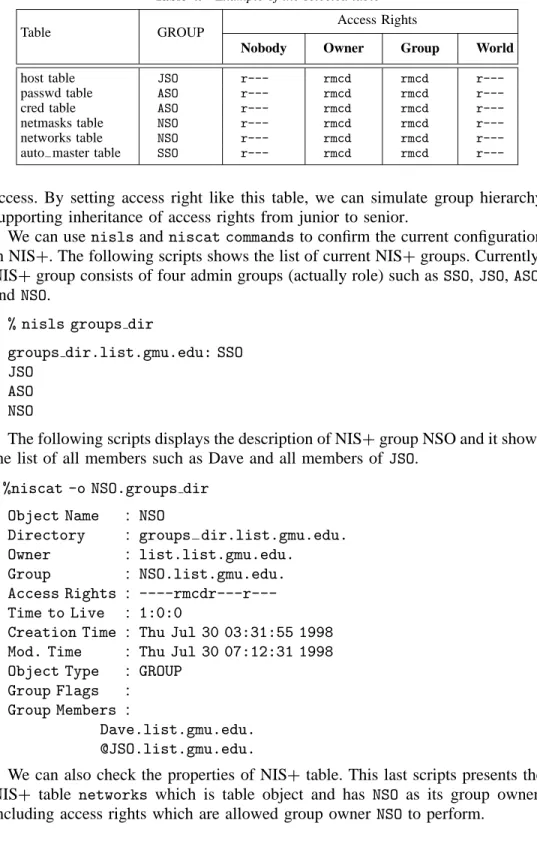
structure of NISCgroups. We say a user is an explicit member of a group if the user is explicitly assigned as a member of the group. A user is an implicit member of a group if the user is an explicit member of some senior group. For example, Alice can be an explicit member of SSO, in which case she is also an implicit member of JSO, ASO, and NSO. We have showed how to construct hierarchical structure between NISCgroups so far. Now we should set up the ownership and access rights for each table in NISC with hierarchical structure of NISCgroups since the hierarchical NISC groups itself do not mean that senior group can do more than junior group(s). We need to modify group ownership of NISC table objects and set access rights for each table as shown in Table 4. That is, member users of a table’s group owner can have special privileges to that object.
Firstly, we have to modify a table’s group ownership using nischgrp com-mand. For example, we use the following statement to change networkstable’s group ownership toNSO.
# nischgrp NSO.list.gmu.edu. networks.org dir.list.gmu.edu. Secondly, we modify access rights to an NISC table. It ensures that certain NISCgroup(s) can have special privilege over an NISCtable. In order to change access rights to an NISCtable, we use C/ operator and an indexed name with nischmod command. The following statement adds read and modify rights to group owner for an entry in thenetworks.org dir.list.gmu.edu. table.
# nischmod gCrm networks.org dir.list.gmu.edu.
In order to prevent other classes of principal such as Nobodyand Worldfrom accessing the entry of an NISCtable, we may need to remove the default access right from them using nischmodcommand with the option. For example, we remove modify, create, anddestory rights from group owner for an entry in the networks.org dir.list.gmu.edu.table.
# nischmod g-mcd networks.org dir.list.gmu.edu.
As shown in Table 4, we can add several junior administrators to theASOgroup so that they can only modify the password and credential tables, but they would be unable to modify any other tables. And JSO can access all tables which ASO and JSO can access but cannot access auto master table which only SSO can
Table 4. Example of the selected table
Access Rights
Table GROUP
Nobody Owner Group World
host table JSO r--- rmcd rmcd
r---passwd table ASO r--- rmcd rmcd
r---cred table ASO r--- rmcd rmcd
r---netmasks table NSO r--- rmcd rmcd
r---networks table NSO r--- rmcd rmcd
r---auto master table SSO r--- rmcd rmcd
r---access. By setting access right like this table, we can simulate group hierarchy supporting inheritance of access rights from junior to senior.
We can usenisls andniscat commandsto confirm the current configuration in NISC. The following scripts shows the list of current NISCgroups. Currently, NISCgroup consists of four admin groups (actually role) such as SSO,JSO,ASO, and NSO.
% nisls groups dir
groups dir.list.gmu.edu: SSO JSO
ASO NSO
The following scripts displays the description of NISCgroup NSO and it shows the list of all members such as Dave and all members of JSO.
%niscat -o NSO.groups dir
Object Name : NSO
Directory : groups dir.list.gmu.edu.
Owner : list.list.gmu.edu.
Group : NSO.list.gmu.edu.
Access Rights :
----rmcdr---r---Time to Live : 1:0:0
Creation Time : Thu Jul 30 03:31:55 1998
Mod. Time : Thu Jul 30 07:12:31 1998
Object Type : GROUP
Group Flags :
Group Members :
Dave.list.gmu.edu. @JSO.list.gmu.edu.
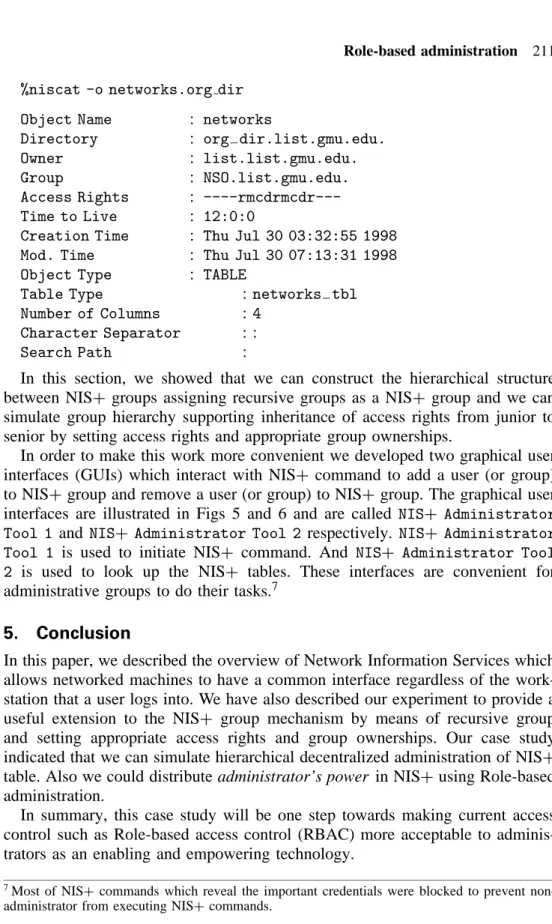
We can also check the properties of NISCtable. This last scripts presents the NISC table networks which is table object and has NSO as its group owner, including access rights which are allowed group owner NSOto perform.
%niscat -o networks.org dir
Object Name : networks
Directory : org dir.list.gmu.edu.
Owner : list.list.gmu.edu.
Group : NSO.list.gmu.edu.
Access Rights :
----rmcdrmcdr---Time to Live : 12:0:0
Creation Time : Thu Jul 30 03:32:55 1998
Mod. Time : Thu Jul 30 07:13:31 1998
Object Type : TABLE
Table Type : networks tbl
Number of Columns : 4
Character Separator : :
Search Path :
In this section, we showed that we can construct the hierarchical structure between NISC groups assigning recursive groups as a NISC group and we can simulate group hierarchy supporting inheritance of access rights from junior to senior by setting access rights and appropriate group ownerships.
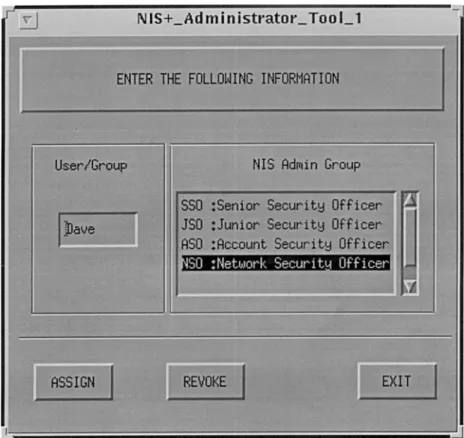
In order to make this work more convenient we developed two graphical user interfaces (GUIs) which interact with NISC command to add a user (or group) to NISCgroup and remove a user (or group) to NISCgroup. The graphical user interfaces are illustrated in Figs 5 and 6 and are called NISC Administrator Tool 1 and NISC Administrator Tool 2 respectively. NISC Administrator Tool 1 is used to initiate NISC command. And NISC Administrator Tool 2 is used to look up the NISC tables. These interfaces are convenient for administrative groups to do their tasks.7
5. Conclusion
In this paper, we described the overview of Network Information Services which allows networked machines to have a common interface regardless of the work-station that a user logs into. We have also described our experiment to provide a useful extension to the NISC group mechanism by means of recursive group and setting appropriate access rights and group ownerships. Our case study indicated that we can simulate hierarchical decentralized administration of NISC
table. Also we could distribute administrator’s power in NISCusing Role-based administration.
In summary, this case study will be one step towards making current access control such as Role-based access control (RBAC) more acceptable to adminis-trators as an enabling and empowering technology.
7Most of NIS
Ccommands which reveal the important credentials were blocked to prevent non-administrator from executing NISCcommands.
Figure 5. User interface:TOOL 1.
References
1. A. D. Birrell 1985. Secure communication using remote procedure calls. ACM Transactions on
Computer Systems, 3(1):1 – 14, 1992.
2. D. K. Hess, D. R. Safford and U. W. Pooch 1992. A Unix network protocol security study: Network information service. Technical report, Texas A&M University.
3. Sun Microsystems Inc. 1987. XDR: External Data Representation Standard. ARPA Network Information Center, June 1987. RFC 1014.
4. Sun Microsystems Inc. 1988. RPC: Remote Procedure Call Protocol Specification. ARPA Network Information Center, April 1988. RFC 1050.
5. R. Ramsey 1994. All about Administering NISC. Prentice Hall.
6. R. Sandhu. Roles versus groups. In Proceedings of the 1st ACM Workshop on Role-Based Access
Control. ACM, 1997 pp. 25 – 27.
7. R. S. Sandhu, E. J. Coyne, H. L. Feinstein and C. E. Youman 1996. Role-based access control models. IEEE Computer, 29(2):38 – 47.
Gail-Joon Ahn received his BS degree in Computer Science from
SoongSil University, Seoul, Korea in 1994 and MS degree in Computer Science from George Mason University at Fairfax, Virginia in 1996. He joined the Laboratory for Information Security Technology since 1996, and was actively involved in rearch in information security. During 1999 he received the doctoral fellowship to continue his PhD studies from School of Information Technology and Engineering, George Mason Uni-versity. His research interests include access control, security, distributed objects, and secure information system.
Ravi Sandhu is professor of Information and Software Engineering
at George Mason University, Fairfax, Virginia; and director of the Laboratory for Information Security Technology at GMU. His principal research and teaching interests are in information and systems security. Sandhu received PhD and MS degrees from Rutgers University, New Jersey, and BTech and MTech degrees from IIT Bombay and Delhi, India, respectively. Sandhu chairs ACM’s Special Interest Group on Security Audit and Control.