IMPLEMENTATION AND EVALUATION OF A MOBILE AUGMENTED
REALITY SYSTEM FOR BUILDING MAINTENANCE
1Charles Woodward, Timo Kuula, Petri Honkamaa, Mika Hakkarainen, Paul Kemppi
VTT Technical Research Centre of Finland (contact: [email protected])
ABSTRACT: We implemented a mobile AR system for building maintenance workers based on participatory
design of the system requirements. The technical implementation relies on hybrid tracking, combining computer vision tools, sensors and indoors locationing. The application was tested in a pilot case by end-users in field tests, where the users were able to evaluate the system that had been developed based on their own specifications. The results indicate good user acceptance and strong potential for utilizing BIM data and mobile AR solutions in building maintenance work, as well as for other building life cycle applications.
KEYWORDS: Augmented reality, BIM, facility management, maintenance, participatory design.
INTRODUCTION
Building Information Models (BIMs) are a widely accepted tool for planning and construction phases of the building industry. However, the application of BIMs after the building work has been completed has remained low. This is unfortunate, as a lot of the BIM information could also be employed in
applications such as maintenance and repair. In addition to the BIM metadata, the 3D representation of the building can serve as a platform to link various other information, e.g. facility management and building automation systems, as well as maintenance reports, as-built documentation etc.
Augmented Reality (AR), on the other hand, is recognized as a most promising technology to help mobile workers with improved situational awareness (Gheisary and Irizarry 2011), also reducing t
attention from the work target to external devices or manuals. Recent hardware developments e.g. increased computing power and integrated sensors now enable demanding AR applications on mobile phones and tablets. A new generation of wireless optical see-through data glasses e.g. by Epson and Meta open up new usage paradigms, enabled also by commodity level depth cameras and supported by sophisticated computer vision technology, cf. developing indoor locationing technology that may soon be deployed as generally available infrastructures to help develop wide area AR applications; see (Grizzly Analytics 2014). The DigiSpaces project was carried out in Finland during 2011-2013, with the goal of producing a mobile AR system to access BIM data for mobile maintenance work. We wanted to provide a proof of concept, first, that such a system would be technically feasible to implement, and just as importantly, that it would be useful for the maintenance workers. The software design was based on participatory design and user centric principles, involving users and experts from a group of industrial partners. The partners were among the leading AEC related companies in Finland: Granlund (building services), Pöyry (engineering), Skanska (construction), Tekla (BIM design), Solibri (BIM verification), and Nokia (mobile devices and location based services).
The first part of the project consisted of user studies, qualifying their ideas and wishes for the mobile system (Kuula et al. 2012). As described in (Kuula et al. 2012), the main methodological approach for the user study was participatory design (PD) combined with basic principles of user centric design (UCD). In this approach, the user is involved as an essential part of the design process and the user centric process begins at the very early stages of the project (ISO 9241-210:2010). One of the main findings was that having just the BIM information available on the mobile device was not always sufficient, but other sources, such as Facility Management System (FMS), would be required in many maintenance tasks as well. Also, the users agreed that besides the AR mode, a Virtual Reality (VR) view to the BIM data would be useful in many applications. These requirements were then taken into account in the final system design, and user tests were designed around the typical use cases proposed by the users. This paper continues from (Kuula et al. 2012) and covers now the technical implementation of the system, pilot cases and user acceptance. The paper is organized as follows. Section 2 discusses previous work in BIM related mobile AR research. Section 3 recaps the results of our first user studies, leading to system requirements. Section 4 describes the final system architecture and functionality, with a discussion in Section 5 for tracking and locationing
1 Citation: Woodward, C., Kuula, T., Honkamaa, P., Hakkarainen, M. & Kemppi, P. (2014). Implementation and
evaluation of a mobile augmented reality system for building maintenance. In: N. Dawood and S. Alkass (Eds.), Proceedings of the 14th International Conference on Construction Applications of Virtual Reality, 16-18 November 2014, Sharjah, UAE.
technologies. Section 6 describes the second round of user studies for technology acceptance, performed in a real world pilot case. Section 7 draws the conclusions and lists some items for future work.
RELATED WORK
The first mobile outdoors AR system was presented by Feiner et al. (1997), with a backpack PC and HMD to view information around the Columbia University campus area. Some years later, the first handheld systems included marker based AR solutions on PDAs (Pasman and Woodward 2003) and on mobile phones (Henrysson and Ollila 2004). Among the next ground breaking steps, one of the first systems combining hybrid computer vision and sensor-based tracking for mobile outdoor applications was presented by Reitmayr and Drummond (2006). Today, several commercial and even free of charge AR systems for building visualization are available for mobile phones and tablets. Tracking is most typically based on GPS and compass sensors. Mobile AR applications in the AEC field have been studied e.g. by Olsson et al. (2012) for city planning, and also by Woodward and Hakkarainen (2011) for construction time visualization. Accurate 3D tracking technology was introduced to construction sites by Peña-Mora et al. (2010), utilizing 3D point clouds generated from site photos. Our tracking also relies on image based point clouds, furthermore we perform AR on live video instead of still images. Mobile AR has been applied much more in outdoor applications than indoors, one reason being the limitations of GPS locationing. Among BIM related applications, mobile AR solutions have been practically non-existent until the last couple of years. Remarkable work for mobile AR and maintenance applications has recently been presented by Kahn et al. (2012). They combine various computer vision tools, 3D reconstructions and sensors to provide reliable tracking, offer the choice of client-server or stand-alone solutions on the mobile device, integrate BIM and FMS in their system, provide a user interface with annotations and other feedback, etc. Thus their system is functionally quite similar to ours, in system integration terms probably closer to practical applicability, and comparable in tracking implementation and performance.
Another approach for mobile AR maintenance has been presented by Irizarry et al. (2013). Their InfoSPOT system utilizes BIMs for facility management, based on predefined natural markers in the environment. They include comprehensive user tests in their study, evaluating user acceptance and performance with different modalities of the system. The main differences compared to our work, besides technical e.g. tracking issues, are that our user studies were performed in two stages following the PD and UCD priciples. In conclusion, our user studies serve to verify the positive user evaluation results of Irizarry et al. (2013).
Commercial activity in the mobile AR maintenance field has recently been presented by NAVVIS, a spin-out company of the Technical University of Munchen (NAVVIS 2014). Similarly to us, they use 3D point clouds of the interiors as basis for camera tracking. We use an autonomous robot for location fingerprinting and point cloud acquisition, instead of their manually operated trolley. The German company Augmensys (2014) carries out
activities in the AR / AEC field are reported by Cote et al. (2013).
To summarize, our work has advanced in parallel with other research groups that have been working in the same field since our first report (Kuula et al. 2012). The main new contributions of our work are: first engaging users in the design phase of the application; this leading to a set of features and functionality specifically designed for the maintenance application; an implementation including accurate real-time tracking based on several 3D point clouds; and finally, user tests with a real world pilot case verifying the user acceptance of the proposed solution.
SYSTEM REQUIREMENTS
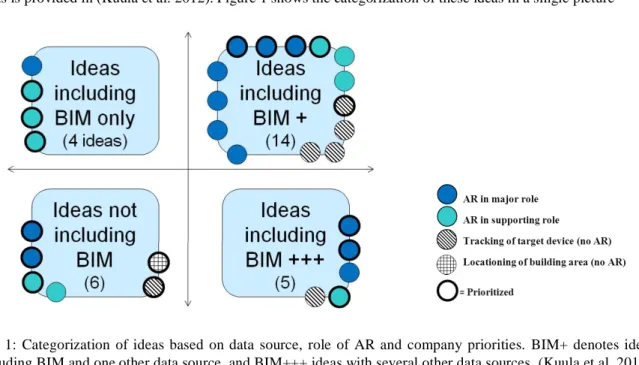
Our first round of user studies started at the end of 2011. First, workshops were carried out with experts from all the participating companies. Next, personnel working in maintenance and construction from three companies (Granlund, Skanska and Pöyry) took part in four group interviews in January-February 2012. Altogether, 12 people participated in the interviews, 2-4 persons in each interview. The interviews followed the user centric design and participatory design principles, as described in (Kuula et al. 2012). The aim of the interviews was to collect user ideas to support and guide the technical development of the mobile AR maintenance application. Altogether, 43 ideas were collected and listed in the group interviews. After some filtering to reject overlapping ideas and those with no locationing need, 29 relevant ideas remained on the list. The ideas were categorized based on two criteria: 1) the data source(s) relating to the idea, and 2) the role of AR in the idea. Regarding the data sources, only 4 ideas included BIM as the only data source, 6 ideas did not include BIM at all, 14 ideas included BIM and some other data source, and 5 ideas included BIM and several data sources; see Figure 1. The other data sources included building automation system, facility management system, and building service books.
target device, but no AR view required; 4) locationing of the building area (no AR). Based on this analysis, 18 ideas with BIM as data source included AR in a major or supporting role. Thus, 62% of all 29 relevant ideas supported our hypothesis of combining BIM with a mobile AR view being useful to the maintenance worker. Experts from the participating three companies were then asked to prioritize these ideas on a scale from 1 (most important) to 3 (less important). As result, 16 ideas had an average priority value less than 2 and were chosen for more detailed study. Out of these, as many as 13 ideas had AR in a major role. The full list of the top 16 priority ideas is provided in (Kuula et al. 2012). Figure 1 shows the categorization of these ideas in a single picture
Fig. 1: Categorization of ideas based on data source, role of AR and company priorities. BIM+ denotes ideas including BIM and one other data source, and BIM+++ ideas with several other data sources. (Kuula et al. 2012). In the last step of the study, we categorized the 16 top priority ideas in a further three categories, according to their relevance to our project. Six ideas were identified as having both AR in major (or supporting) role, and simultaneously involving BIM (and possibly one additional data source). These ideas were:
1. BIM based fault diagnosis
2. Viewing the zone affected by a faulty device in 3D 3. Mobile route guidance for walking inside the building 4. Building performance and related problem monitoring in 3D 5. Viewing of target spaces through different user profiles 6. How to send information to necessary parties involved
These six top priority ideas were chosen for implementation in the mobile AR system, and as use cases for our next round of user studies. The ideas 1 3 included BIM as the only data source, thus they were fundamentally of highest priority from the perspectives of this study. For additional data sources, we implemented some facility management system functionality, though based only on simulations and not linked to any real FMS system. Also, some other simplifications had to be made due to a limited project budget, covering a total of 28 person months for all the work.
MODULES AND FUNCTIONALITY
The DigiSpaces software architecture contains four software modules: 1) DS_BIM_Studio, 2) DS_AR_Studio, 3) DS_Browser and 4) point cloud generation tools; see the system diagram in (Kuula et al. 2012). In this Section we describe the final implementation and main features of the first three modules; tracking solutions and point cloud generation tools are discussed separately in Section 5. The first generation of these three modules was developed in the AR4BC project (Hakkarainen et al. 2009, Woodward and Hakkarainen 2011), where a similar mobile outdoor AR system architecture was implemented for architectural planning and construction visualization. In the DigiSpaces project the software modules were adopted for building maintenance tasks, now using a completely rewritten set of tracking technologies.
BIM import and interaction
DS_BIM_Studio is a Windows desktop application used at the office, to import, visualize and interact with the
The system supports IFC and OSG compatible 3D formats. Besides BIM metadata, the application allows importi
external sources can be e.g. facility management system or service book. The mapping is achieved by selecting and combining data from XML files and attaching the data to the corresponding BIM elements. The system can also be
The application also displays user feedback that has been collected from the site. In the current prototype, this feature was implemented only for reports through the FMS service requests. Our first implementation did not support free-form reports or e.g photos taken by users.
AR and tracking content
DS_AR_Studio is a Windows desktop application, used at the office for the AR and 3D tracking content authoring
The floor plan can be basically any common image file format (jpeg, tiff etc.). The 3D model, or part of it e.g. 1st floor, is placed on the floor plan interactively by defining at least three point correspondences between the floor plan and the 3D model. Further model parts can then be imported and aligned with the previously defined parts.
The final step is to load and align the point clouds with the 3D model (BIM). The system allows importing several point clouds and (sub) models from the site. In the current implementation the alignment of point clouds is done interactively; this step could be avoided e.g. by using markers at predefined locations when producing the point clouds. Section 5 discusses further automated methods, i.e. using a locationing robot for the point cloud alignment. After the alignment of the floor plan, 3D models and point clouds, including BIM metadata and external links from the DS_BIM_Studio, the application content is completely defined, and ready to be exported to the mobile application as XML descriptions.
Mobile AR application
DS_Browser is the mobile AR maintenance application for the end user on the site. DS_Browser handles the AR tracking, visualizes the BIM in AR and VR views, visualizes the warnings and alarms from the FMS or maintenance reports and allows the user to react to them. The current implementation is done for Windows tablets. While we did not have real access to the FMS, we simulated the connection by creating a local database for certain scenarios. These scenarios were built based onthe end user interviews at the start of the project. We did not implement all the proposed features and scenarios, but concentrated on the cases chosen for piloting the system with the users.
Among the basic features, DS_Browse
plan is to allow the user to navigate to the right room or section of the building. When at the target location, the user r to the mobile device. This project file contains the 3D model of the site, point cloud and the FMS information of the location. In the current prototype, loading of the
on the locationing data. As the user selects the AR view and points the camera to the target, the BIM is visualized partly transparent in the right position and orientation. This gives an illusion that the BIM is merged with the real, existing building. The user may move and pan with the device (camera) to browse the environment and the 3D tracking holds the model
interaction with the system easier than having to hold the device towards the target, when writing the report etc.
AR view. The user is also able to select objects of interest from the AR view by clicking the BIM part. The part is highlighted in the view and in the part list, and additional part information is shown to the user. The user is able to add feedback on the part, e.g. mark a maintenance procedure being done or pending for further action.
Visualization of the BIM can be restricted to certain parts only, and parts can be removed from the AR view by clicking on them. The system allows the BIM parts to be visualized independently or in groups. Having access to part groups is useful especially when the source of the problem is at a different location than the effect; take for example air conditioning, where the effect may be in the room but the reason is in the air conditioning unit elsewhere (see Figure 2).
colours (warning yellow, alarm red, etc.). The user may click on any part of the BIM or related links to get more information on the parts, remove the
she is provided with the alarm report from the FMS. The user may then resolve the alarm or discard it for later inspection.
Besides the AR mode, we implemented the same functionality in a VR view, where the user may inspect the BIM from arbitrary viewing angles and close-ups. This requirement was brought to us by the users in the first part of the user studies. Naturally, the application also allows browsing the error and warning list without any visualization; this may help the end user to react to the errors without searching for them, especially in familiar cases.
TRACKING AND LOCATIONING
Accurate indoor positioning and 3D tracking is required for the application to display BIM and other maintenance information correctly aligned with the real environment. We tested several approaches and finally selected a set of them for the pilot experiments:
Point cloud tracking. Our primary tracking solution is to use pre-computed point clouds along with estimated keyframe positions for visual tracking. In a pre-processing step, a sparse 3D reconstruction of the area is created using 30-100 photos (keyframes) from each target area. The point clouds are created using the open source software Bundler (Snavely et. al. 2006). During real time tracking, the system finds point correspondences between the video frames and point cloud keyframes. The point correspondences are used for automatic tracking initialization and then to track the camera movements in all six degrees of freedom. See further details of the implementation and performance below.
Model based tracking. Initially we planned on using the available BIM models instead of reconstructed 3D point clouds for tracking. However, in the end we were not able to produce an implementation that would be usable in pilots with this technology. The main challenge was that even detailed BIM models did not contain enough visible features compared with the real life video view.
Inertial Measurement Unit (IMU). We use an IMU for assisting point cloud tracking in fast camera rotations and in cases where the user turns to look at an area without existing point cloud data. The system automatically notices when point cloud tracking does not give a valid result and switches to use the IMU instead. Along with point cloud tracking, this was also used in the pilot system implementation.
Compass. We also experimented with using the compass to aid with the tracking initialization, however the indoor compass accuracy did not provide much help for this purpose and was not used in the pilots. WLAN fingerprint based positioning. We integrated to the system WLAN fingerprint based positioning where a pre-computed map of WLAN signal strengths was used to estimate the user position on the floorplan. This information was used for navigation purposes in some tests, but was not used in the final pilots as the accuracy did not seem to be useful enough in the planned testing environment.
High Accuracy Indoor Positioning (HAIP).The HAIP positioning technology was originally developed by Nokia and commercialized by the company Quuppa (Quuppa 2014). The method uses HAIP locator devices, installed e.g. on ceilings, that locate the bluetooth signal direction of special HAIP tags. In our tests HAIP achieved good 1 meter accuracy. HAIP positioning was integrated into the tracking system, but it was not used in the pilot as we covered only a very limited area with our HAIP locators available. Mapping robot. A special challenge with the point cloud tracking approach is collecting the reference material (images) from the environment. We developed in parallel EIT ICT Labs projects an autonomous robot to collect the tracking data. The robot collects the data needed for WLAN fingerprint based positioning, as well as images for creating the point clouds for visual tracking. Our robot has good inherent positioning based on various sensors, e.g. odometry and Kinect. As each image is tagged with this information, we could align the tracking point clouds semi-automatically with the BIM model. Also, we implemented a method to automatically download available point clouds from the server only using visual information from the mobile device. See video (VTT 2013b) for the mapping robot in action. Our point cloud tracking uses similar approach as Fraunhofer (Kahn et al. 2012), although our implementations are completely independent. In brief summary, our tracker first finds feature matches between the current image frame and point cloud key frames using ORB keypoint detector and BRIEF descriptor. Based on the feature matches, 3D coordinates from the point cloud are associated with 2D points in the current frame and calculate the initial pose for the camera. After initialization, the feature points on the image plane are tracked using optical flow estimation with the Lucas-Kanade method. For each frame, the pose is optimized with the updated data using Levenberg-Marquardt with M-estimators to make it robust for outliers. To allow free movement around the whole target area, features that go out from the frame or do not match the current pose estimation are dropped from the tracker and new features are added from the point cloud dynamically.
-60 1.0 GHz processor that was used in the pilots, our point cloud tracker was about 15 fps as a separate process. The complete AR loop including video capture, IMU support and rendering reached some 10 fps. On a more powerful Dell Latitude E6530 laptop with an Intel 2.60 GHz processor, the tracking speed is theoretically (with a fast enough camera) over 100 fps, cf. video (VTT 2013a).
TECHNOLOGY ACCEPTANCE
Pilot case
case for the second round of user tests. Other possible cases were also considered,, but access to the updated BIMs of these buildings turned out difficult e.g. for proprietary reasons. Digitalo was finally chosen because of its convenient location for researchers and because of access to accurate BIM models. Two separate user tests with different participants were conducted on the premises of Digitalo in October 2013, both including two imaginary problem situations typical for maintenance work as derived from the ideas of the first round of user studies in 2012.
User groups
Two groups of users participated in the test. The participants of the first test group were maintenance workers of wo worker groups collaborate closely together even on a daily basis and represented the planned end users of the mobile system. The participants of the second test group were named by partner companies Granlund and Skanska representing expert and manager level workers in building management and construction, 4 persons altogether. Furthermore, the system designer -centred design. Following the principles of participatory design, different stakeholders were asked to participate in collaboration including face-to-face interaction and emphasizing working in groups (Friedrich 2013).
Implementation of the user test
The user test consisted of two imaginary problem situations which were realised in two different spaces of Digitalo. These cases were based on the highly prioritized features in the previous round of user studies, including fault diagnosis and finding the malfunction area using BIM data. The cases are outlined in Table 1.
Space Problem Tasks
Case 1 Lobby Feeling of draught in the lobby caused by air conditioning
Find the malfunction area Find the host device
Read the data from the host device Solve the problem; write a report Case 2 Meeting room Two alarms and one
warning in the room
Find alarm 1: broken camera Find alarm 2: broken thermostat
Find warning: lamp of projector must be changed soon Solve the problems; write reports
Fig 2: Left: Mobile user browsing the problem in AR view. Right: BIM with malfunction device highlighted. Figure 2 shows the malfunction area of Case 1 highlighted in the BIM, and the mobile user finding the cause of problem using the mobile AR application. Figure 3 shows the mobile user inspecting warnings and alarms of Case 2. The pilot cases are also demonstrated live on video (VTT 2013a).
Both tests with groups 1 and 2 included the same cases. At the beginning of the test, a short introduction to the project and the mobile AR system was given to the participants. Then, the participants were asked to accomplish the case tasks with the system. The system designer gave instructions when needed and explained how the system works.
After the actual test phase, a group interview was conducted by the researcher. From the Technology Acceptance Model (TAM), the concepts ofperceived ease of use and perceived usefulness(Davis 1989) were included in the interview questions. The final interview structure consisted of the following themes:
1. Overall evaluation: advantages and disadvantages of the system 2. Ease of use of the system
3. Usefulness of the system
4. Attitude towards using the system
5. Other experiences of utilising mobile technology for work purposes
Additionally, an email questionnaire was sent after a couple of days to the participants of both test groups. Eight out of nine (N=8) participants answered the questionnaire. The questionnaire partly followed the themes of the interview including statements on usefulness and ease of use. Additional specific statements related to BIM and AR relevance to the applicationwere included. The scale used in the questionnaire was 1 7, in which 1 = completely disagree, 7 = completely agree. The statements are separately presented in Section 6.4. The results of the user study are based both on analysis of the interviews and questionnaires.
Fig. 3: Left: Mobile user finding warnings and alarms in a room. Right: Alerts highlighted in AR view.
User test results
its potential was generally very positive. The average of the questionnaire statementThe tablet system would be useful in practical workwas 6,50 (7 = completely agree), and the average of the statementIt is worthwhile to develop the system further into a completed productwas6,63.
In both user groups it was stated that the system would be useful as an indoor navigation tool for the maintenance worker and it would especially help when arriving into a new and unknown location. The second significant benefit would be that with the tablet it would be possible to have all the necessary documentation and technical material needed for the maintenance work available on the spot.
In group 1 (maintenance workers, facility coordinators), the usefulness of the system in electrical repairs was emphasized, since the switchboard of the device could be situated in a completely different place than the actual device. Secondly, the possibility to predict forthcoming repair and maintenance tasks with the help of visual cues
In group 2 (building management and construction), it was generally agreed that the AR view would make it possible to notice more effectively the devices that affect the given malfunction. The VR mode was also mentioned as an illustrative feature.
Specific questions relating to the usefulness of AR-visualisation and to the utilisation of BIM models were included in the questionnaire. The average of the statementAR visualisation of the targets of maintenance would help in practical work was6,0, and the average of the statement BIM model contents of the building on a mobile device would help in practical work was6,38.
System usability and suitability for current work
-related statementUse of the current version of the tablet system was easy gave an average of4,75. It should be noted that the system was still a prototype and not finalized for everyday work. The following usability aspects were stated in the interviews:
The amount of buttons should be limited and the buttons should be large enough One should be able to customize the view based on user needs or profile Both right- and left-handed version of the system are needed
The tablet should have a protective cover and a handle
-button for freezing the display view was considered as an especially good feature
As a technology, the system was said to be well suited for current daily activities in both groups. The maintenance workers and facility coordinators (group 1) were not completely happy with their current working tools and devices and expressed their wish to get tablets as devices for work. The maintenance workers have a number of locations to visit and they are constantly on the move, thus their tools should support mobile work.
Compared with other portable devices, laptop computers were considered to be bulky and inconvenient to use, while the screen of a smart phone is simply too small. However, the advantage of a phone is that one is always carrying it, unlike the tablet.
In both test groups, narrow and dark tunnels were considered problematic when using the system, as well as changing conditions in terms of e.g. humidity and temperature. Durability and battery life of the tablet were also matters of discussion.
User remarks for further development
A number of additional ideas and remarks for further development of the system were given in the groups, describing different viewpoints of the use and utility of the system. Some remarks concerned functionality that we had intended to implement, but which had to be dropped due to limited resources: for example, sending and storing photos and comments of arbitrary targets; saving the maintenance history of the target equipment in the backend system; and combining building service book with the mobile AR system. Improvements were also proposed on the style and amount of BIM elements to be visualized for different tasks. Among further ideas, it was proposed that in a large space, the system should give a hint e.g. alarm sound about the maintenance need and direction of the alarms.
CONCLUSIONS AND FUTURE WORK
In this paper, we have described the implementation of a mobile AR system for building maintenance workers, based on earlier user studies to define the system requirements, and completed with a second round of studies for user acceptance. Several results from the first round of studies were taken into account in the final (prototype) implementation.
Among the most important findings, it was obvious from the user comments that other data sources such as FMS should be integrated into the system besides BIM. The system implementation included several other features that were appreciated by the users, e.g
input and other interaction. The available resources did not allow us to implement all the features proposed by the users. Nevertheless, the second round of user tests showed very positive results for user acceptance of the prototype application, thus validating our original research hypothesis (Kuula et al. 2012) as well as verifying the findings by other researchers (Irizarry et al. 2013).
The very positive user evaluation results were most likely affected by the idea that the tablets would be generally useful in everyday maintenance work, not just limited to functionality of the DigiSpaces mobile AR application. The assumption that tablets create better working conditions might have affected the evaluation (possible Hawthorne effect especially in user group 1). However, during the group interviews also negative aspects were mentioned and the interviewees were encouraged to give truthful answers
On the technical side, our implementation offers fast and accurate 3D tracking functionality based on point cloud reconstructions, complemented with sensor based tracking to achieve generality and robustness. Our pilot experiments were executed in a limited area of the building (two rooms), but our discussion extends to covering wider areas e.g. whole buildings by automatic point cloud acquisition methods using a locationing robot. Even if building wide locationing infrastructures (e.g. WLAN or HAIP) are not available, we have demonstrated how to provide locationing solutions and dynamic downloading of tracking data using only computer vision based tools. In future work, our most important task will be to integrate the system to real world FMS and other production systems already in place for building maintenance work. On the system implementation side, the user interface needs to be better adapted for mobile use. In particular, when considering integration with new generation data glasses, the system will most likely require more work on HCI aspects and a focus on a subset of key features. Finally, we hope that BIM practices will be developed to better serve building life-cycle applications, besides their current use for planning and construction. Much of the current BIM information is actually not required after the construction phase, and it should be made easy to extract the relevant components and level-of-detail for having BIMs serve as a living document and data repository for building life cycle management.
ACKNOWLEDGEMENTS
The main body of this work was conducted in the DigiSpaces project, partly funded by Tekes (Finnish Funding Agency for Technology and Innovation) and by industrial partners Granlund, Pöyry, Skanska, Tekla, Solibri and Nokia. We would also like to thank Quuppa for co-operation. Additional work was implemented in the EIT ICT Labs project Mobile Urban Augmentation. Besides the authors, VTT researchers Tuomas Kantonen, Kalevi Piira, Kari Rainio, Anu Seisto and Alain Boyer provided significant contributions to this work.
REFERENCES
Augmensys (2014).http://www.augmensys.com/en/. Last accessed June 3, 2014.
Côté S., Trudel P., Snyder R., Gervais R., (2013). An augmented reality tool for facilitating on-site interpretation of 2D construction drawings. In Proc. CONVR2013, London, UK, Nov 2013.
Davis F. D. (1989). Perceived usefulness, perceived ease of use, and user acceptance of information technology. MIS Quarterly, Vol. 13, No. 3 (1989), pp. 319 340.
Feiner S., MacIntyre B., Höllerer T., Webster A. (1997). A touring machine: prototyping 3D mobile augmented reality systems for exploring the urban environment. In Proc. ISWC'97, Cambridge, MA, USA, Oct 13, 1997.
Friedrich, P. (2013). Web-based co-design: Social media tools to enhance user-centred design and innovation process. Doctoral dissertation. Espoo 2013. VTT Science 34.
Hakkarainen M., Woodward C., Rainio K. (2009). Software architecture for mobile mixed reality and 4D BIM interaction. In Proc. 25th CIB W78 Conference, Istanbul,Turkey, Oct 2009.
Henrysson A. and Ollila M (2004). UMAR: Ubiquitous mobile augmented reality. Proc. of the 3rd International Conference on Mobile and Ubiquitous Multimedia (MUM 2004), Maryland, USA, Oct 27 - 29, 2004, pp. 41-45.
ion making process through a situation awareness approach. International Journal of Facility management, Vol 2, No 1.
Grizzly Analytics (2014). Indoor Location Positioning Technology: Research, Solutions & Trends.
http://www.grizzlyanalytics.com/report_2014_02_Indoor.html. Last accessed June 3, 2014.
International standard ISO 9241-210:2010(E) (2010). Ergonomics of human-system interaction - Part 210: Human-centred design for interactive systems.
Irizarry J., Gheisari M., Williams G., Walker B.N. (2013). InfoSPOT: A mobile augmented reality method for accessing building information through a situation awareness approach, Automation in Construction 33 (2013), pp. 11 23.
Kahn S,
on Cyberworlds, Darmstadt, Germany, Sep 25-27, pp. 29-36.
Kuula T., Piira K., Seisto A., Hakkarainen M., Woodward C. (2012). User requirements for mobile AR and BIM utilization in building life cycle management, Proc. CONVR2012, Taipei, Taiwan, Nov 1-2, 2012, pp. 203-211.
NAVVIS (2014).http://www.navvis.lmt.ei.tum.de/. Last accessed June 3, 2014.
Olsson T., Savisalo A., Hakkarainen M., Woodward C. (2012). User evaluation of mobile augmented reality in architectural planning", Proc. ECPPM2012, Reykjavik, Island, July 2012, pp. 733-740.
Pasman W. and Woodward C., (2003). Implementation of an augmented reality system on a PDA", Proc. ISMAR2003, Tokyo, Japan, Oct 2003, pp. 276-277.
Peña-Mora F., Golparvar-Fard M., Fukuchi Y., Savarese S. (2010). D4AR 4 Dimensional Augmented Reality models for automation and interactive visualization of construction progress monitoring. Proc. CONVR2010, Sendai, Japan, Nov 4-5, 2010, pp. 15-24.
Quuppa (2014). http://quuppa.com/. Last accessed June 3, 2014.
Reitmayr G. and Drummond T. (2006). Going out: robust, model based tracking for outdoor augmented reality. Proc. ISMAR2006, Santa Barbara, USA, 22-25 Oct 2006, pp.109-118.
Snavely, Noah, Seitz, Steven M., Szeliski , Richard. (2006) Photo tourism: exploring image collections in 3D. ACM Transactions on Graphics (Proc. SIGGRAPH 2006).
VTT (2013a). Mobile Augmented Reality for Building Maintenance. YouTube video.
http://www.youtube.com/watch?v=uYFtYbqvoq0. Last accessed June 3, 2014.
VTT (2013b). 3D Tracking of Mobile Device Using Several Point Clouds. YouTube video.
http://www.youtube.com/watch?v=ttgHKtyKHKw. Last accessed June 3, 2014.
Woodward C. and Hakkarainen M. (2011). Mobile mixed reality system for architectural and construction site visualization. In Augmented Reality - Some Emerging Application Areas, Andrew Yeh Ching Nee (ed.), InTech, ISBN 978-953-307-422-1. Available as:http://cdn.intechopen.com/pdfs-wm/24827.pdf.