L
L
OAOADDIINGNGD
D
ATATAAI
I
NTNTOOT
T
HEHEW
W
ARAREEHHOOUUSSEE BYThe data warehouse is loaded with data that has been transformed coming from operational systems. The data coming from the operational systems undergoes a significant amount of conversion and transformation before the data is readied for loading into the data warehouse. This transformation and conversion is a complex subject that has been documented and discussed widely in the trade press, books, articles, white papers, and other places. This white paper is on the mechanics and techniques required for the movement of data from the operational environment to the data warehouse environment.
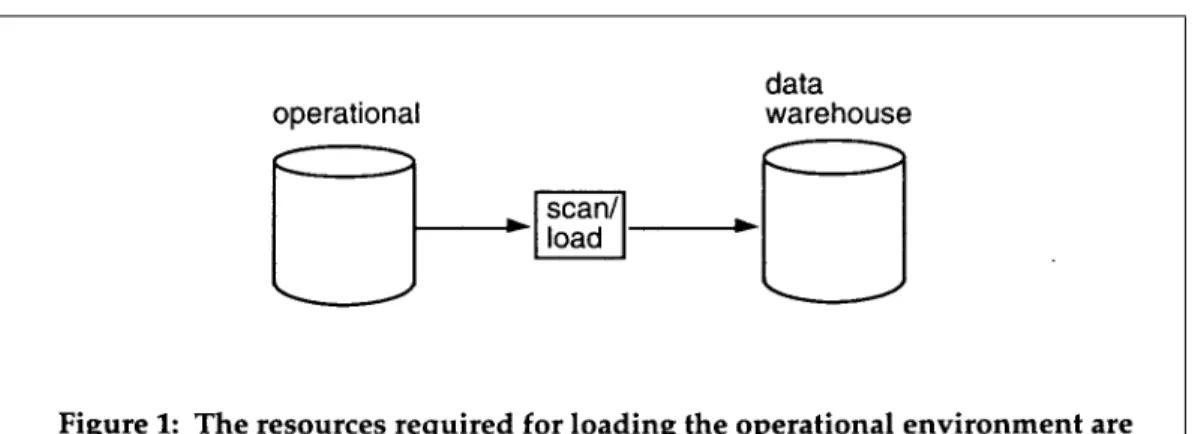
Figure 1 shows the subject for conversation.
There is one universal underlying assumption made about the movement of data from the operational environment to the data warehouse environment and that assumption is that if operational data must be repeatedly scanned and rescanned prior to refreshment into the data warehouse environment that the resources required for such an approach are prohibitive. One of the hallmarks of good interface design between the operational and data warehouse environment is that each operational unit of data be scanned once in its life as to possible entry and transport to the data warehouse environment.
THREE TYPES OF LOADS
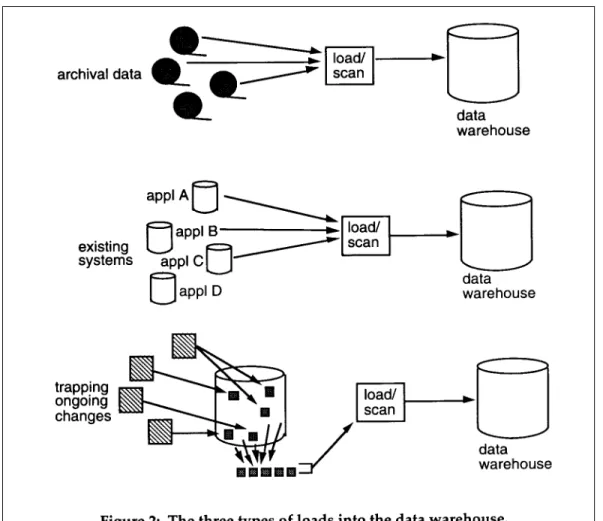
There are three types of loads into the data warehouse that the designer must concern himself/herself with:
• the loading of data already archived,
• the loading of data contained in existing applications,
• the trapping of ongoing changes to the operational environment from the last time data was loaded into the data warehouse.
Figure 2 shows the three types of loads.
Each of these types of loads has its own special set of considerations.
LOADING ARCHIVAL DATA
The simplest type of load is that of loading older existing archival data into the data warehouse. Figure 3 illustrates this type of load.
Archival data is usually stored on some form of sequential bulk storage. The data is read from the bulk storage and transformed into data ready to go into the warehouse. The same transformation of data occurs here as for other types of loads.
Occasionally the metadata is lost for the older archival data. Under anything but the most unusual of circumstances, the inability to relate archival data to its metadata renders the archival data useless.
Many companies have such undisciplined control of their archival data or such little use for the archival data that the archival data is not loaded into the data warehouse. In any case, when such a load occurs, the load is done only once. Because of its infrequent execution and because the load is done only once (on those occasions where it is done at all), there is a minimal amount of concern as to the resources consumed by the loading of archival data into the data warehouse.
LOADING DATA CONTAINED IN EXISTING SYSTEMS
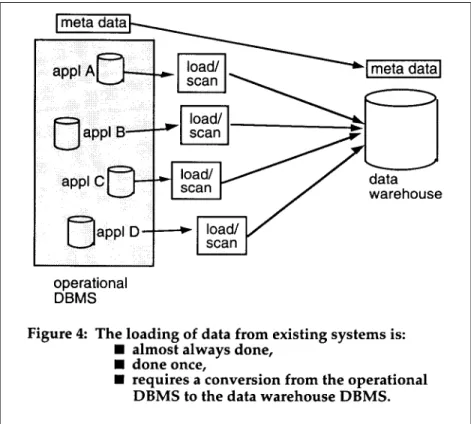
Unlike archival data (which often is not loaded into the data warehouse) the data contained in the existing operational systems is almost always loaded into the data warehouse. Figure 4 shows an example of the loading.
Figure 4 shows that existing files are scanned and data stripped from them for
transformation into the data warehouse. The execution of this process must be carefully timed because the data in the warehouse ages as soon as it is placed in the warehouse. In addition, there is the issue of changing technologies as the data is transformed. Seldom is the data warehouse technology the same as the operational one.
The resources consumed by this type of load are considerable. However, since this is a one time only load, like the loading of archival data, the cost of resource consumption required for conversion is able to be accommodated.
An alternative to the direct reading of the existing systems database is to load the
existing systems database down to a sequential medium and perform the transformation of data into the data warehouse using the flat files. Figure 5 shows this option.
There are many very desirable aspects to the technique shown in Figure 5. The first is that the download to a sequential medium can often be accomplished by the execution of a utility that operates very efficiently. Once the data is downloaded the transformation is done on another processor, out of harms way. In such a fashion the download places the minimal burden on the online system. But there is another important aspect as well. By moving the data off to the sequential environment then performing the
transformation against the sequential data, the complexity of having to deal with the data in the existing databases is minimized or bypassed altogether. There is then a strong case to be made for the usage of an intermediate sequential file in the
transformation of existing operational data to data warehouse data.
TRAPPING CHANGES TO EXISTING SYSTEMS SINCE THE LAST LOAD
The third type of load into the data warehouse environment is that of the load of changes into the data warehouse that have been made since the last time the data warehouse was refreshed. In order to clearly outline this case, a discussion of exactly what is meant is in order.
On Monday a refreshment of data is made to the data warehouse from the operational environment. Then throughout the day and the remainder of the week, the operational environment sustains updates. Individual record insertions, deletions, and changes to operational records are made. On Friday it is time to refresh the data warehouse once again. The operational file is too large for a sequential scan (and besides, how can changes made throughout the week be identified?) So only the changes made from Monday to Friday are considered as input into the data warehouse. The question becomes - how are these changes identified?
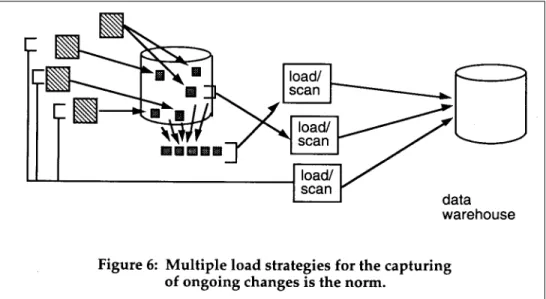
The identification and segregation of periodic changes to a file is a nontrivial task. As a rule a company will employ many techniques for this identification. It is not normal to have only a single approach to the trapping of changes in the operational environment. Figure 6 shows that there are multiple ways to accomplish this task.
The technique for trapping all changes from one moment in time to another has many variations. In particular the techniques include:
• the simple write over of an entire table,
• the usage of dates buried in the operational records to select only the appropriate records,
• the usage of an operational created "delta" or audit file,
• the alteration of application code for the creation of a "delta" or audit file,
• the trapping of changes at the dbms level,
• the access of a log tape, and/or
• the comparison of a "before" and an "after" image to each other. Each of these alternatives will be explored.
COMPLETE TABLE REPLACEMENTS
A complete table replacement is far and away the simplest of the trapping options because the operational table is simply copied over to the data warehouse. All changes that have occurred naturally are trapped. There are some severe restrictions associated with this option however.
The first restriction is that wholesale write over applies ONLY to small and very small operational tables. The vast preponderance of operational tables could never be handled with a wholesale write over.
The second restriction associated with wholesale write over is that the technique applies only to very stable tables. Tables with a high degree of updates and inserts cannot effectively be handled this way.
The third restriction is that there is no historical record of changes. Once a change occurs in the operational environment, the next refreshment of the data into the data warehouse will write over the change. If there is ever a need for the history of activities and changes (as is often the case with data warehouses), then this technique cannot be used.
The appeal of this technique is that it is absolutely very simple to employ. The drawback is that it applies in only the most unusual of circumstances.
SCANNING INTERNAL DATE FIELDS
A second approach to the trapping of changes in the operational environment is that of using the dates contained in the records found in the operational environment to
Figure 8 shows that the records in the operational environment contain dates that the application developer has specified. These dates may be of a wide variety, including but not limited to:
• activity date,
• effective date,
• expiration date,
• due date,
• date paid, etc.
The data architect is able to use the dates to effectively eliminate entire rows of data from consideration of scanning. Any date meeting the criteria is selected for scan; any date not meeting the criteria is not selected for scanning.
Certain industries typically have many more dates in their files than other industries. In particular the insurance and the banking industry often have many dates in their
records.
In order for the dates to be effectively used as a discriminating criteria for the selection of data, it is assumed that the dates can be easily and conveniently accessed. Usually this means that the dates are a part of a key structure that is indexed. The index is scanned without having to go to the primary data. If in fact the desired date is not part of a key structure, it may do no good whatsoever using the data for selection criteria as all rows have to be scanned to find selected dates when the key is not part of an indexed key structure.
Another consideration of using dates contained in a record is that deletes to an
operational file usually are not trapped. The only activities that are trapped are inserts and changes.
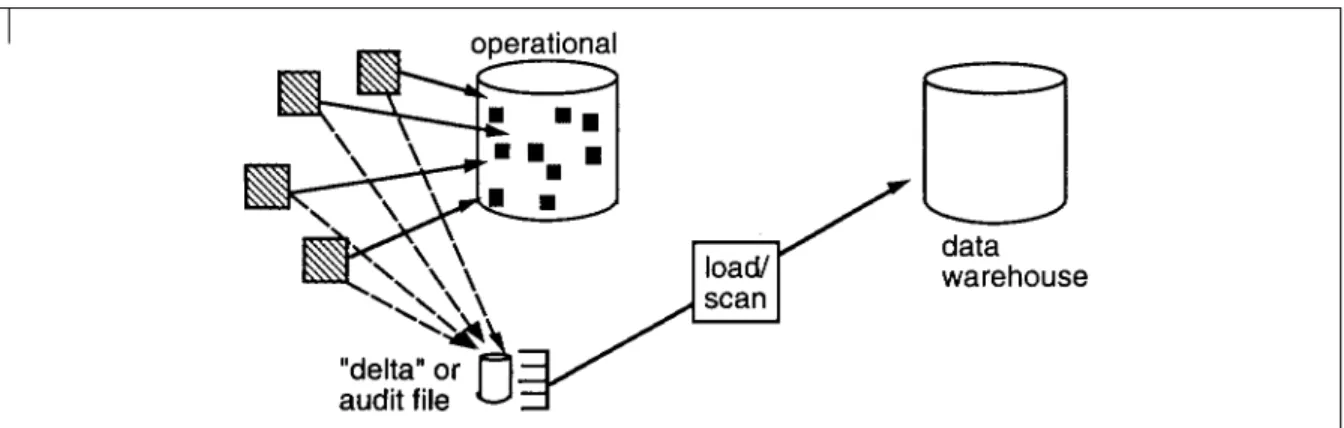
USING "DELTA" OR AUDIT FILES
Occasionally an application designer will build what can be termed a "delta" or audit file into an application. A delta file is a file that contains the changes and only the changes made to a database. The delta file has the time of the transaction stored in the delta file as well.
If an application designer in fact has specified a delta or audit file, then the file makes an ideal candidate for the trapping of changes made to the application. Usually the delta file is small and very efficient to access. And the dates in the delta file make it very easy to find the changes that have occurred since the last refreshment of the data warehouse.
Figure 9 shows the use of a delta file.
One of the limitations of a delta file is that the designer may have trapped some but not all of the changes made to the operational file. When this is the case either the delta file is changed to capture all the necessary changes or the untrapped changes are trapped elsewhere using some other technique.
When there happens to be a delta file, this technique is a very good technique to use. Unfortunately, the application design practice of creating a delta file is not a common one.
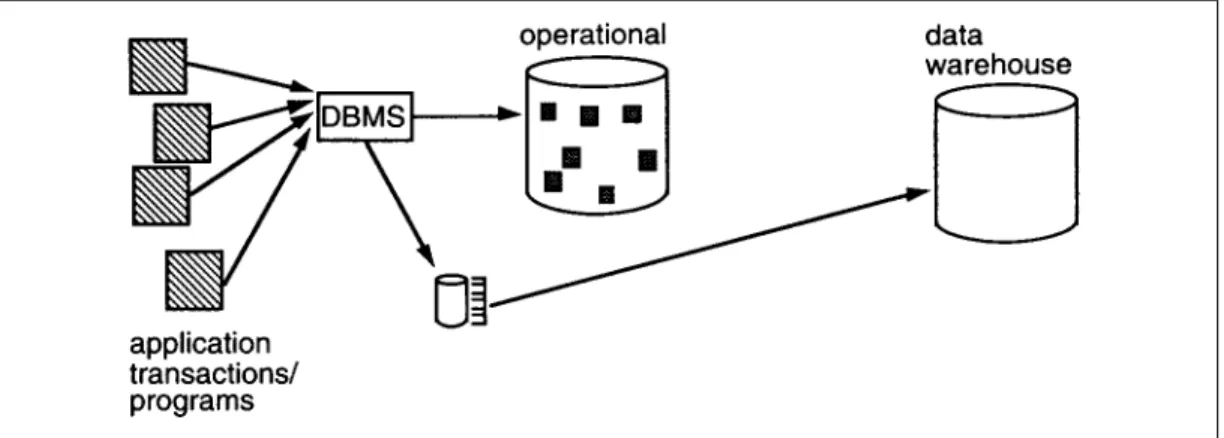
ALTERING EXISTING CODE
There is no manager anywhere that relishes the act of having to go into old existing application code - for transactions and programs - and make wholesale alterations to that code. In many cases the old application code is so shopworn that it can hardly stand another round of maintenance. However, this option is one that is viable and should not automatically be discarded.
Figure 10 illustrates this option.
Figure 10 shows that a delta or audit file has been created from the transactions and programs that manipulate the operational file.
One of the considerations of this approach is that of the extra burden of I/O. Using this approach the online system sustains the overhead of I/O during the hours of high performance processing.
TRAPPING CHANGES AT THE DBMS LEVEL
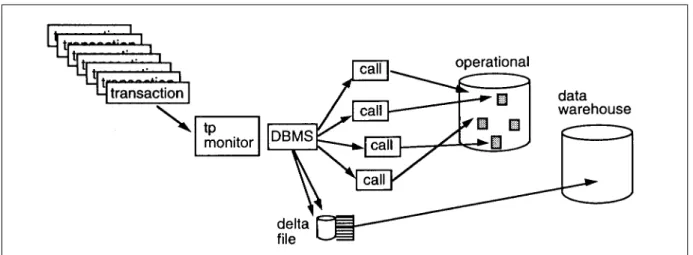
While trapping changes at the application code level is not a task that a manager enjoys taking on, trapping the changes to the operational environment at the dbms call level is another option that should be considered and is usually very palatable to the
Figure 11 shows that the calls made by the transactions and programs to the dbms are stored off onto a separate file. The separate file amounts to a delta file. The "after" image of the data is stored. It is then very efficient to run the scan for refreshment of the data warehouse from the delta file.
There are several considerations of this option. The first consideration is that this option requires extra I/O be done in the middle of the online high performance processing window. This extra I/O may become a very negative influence on high levels of
performance. Before selecting this option, make sure that there will not be a calamitous effect on the online system.
The second consideration is how clean this option is. Compared to having to go into operational application code, this is usually a very straightforward option. However, some dbms do not allow this kind of processing.
The third consideration is in the regeneration of the data base definitions for the
operational environment. Some shops would rather not have data base configurations that have been long stable being altered.
It is a temptation to say that the transactions must be trapped, not the calls to the dbms. Figure 12 illustrates why it does no good to trap the transactions.
If the transactions going to the operational environment are trapped (which they can be), there is no guarantee what effect the transaction has had once it has gone into execution. In other words, a transaction may well have entered the operational environment, but the effects it has had upon going into execution are unknown. The transaction may have been aborted, may not have passed edit, may have had an unsuspected execution and so forth. What the data architect is really interested in are the calls that have resulted as a consequence of the transaction going into execution. It is the calls that determine what updates have gone against the operational databases.
A product called the Data Propagator from IBM will trap data from successful IMS
segment update calls and propagate the data from IMS to DB2 databases. It consists of three phases:
• mapping definition phase – defines the mapping of data for the propagation phase
• data extract/load phase – does the initial extract and load of data from IMS to DB2
• propagation phase – traps data from successful IMS segment updates via the IMS V3 R1 Data Capture SPE (Small Programming Enhancement)
Propagation can be synchronous (takes place immediately) or asynchronous (takes place at a later time). Synchronous propagation is not recommended for data warehouse due to high overhead and low need for immediate update.
Asynchronous propagation requires application programs to capture the changed data fro IMS (the sender) and later invoke Data Propagator (the receiver). The IMS changed data can be stored in an IMS database, the IMS log or as IMS output messages. This process may be somewhat complex due to the programs that must be written.
Data propagation requires IMS V3, DB2 V2, and IMS V3 R1 Data Capture SPE (Small Programming Enhancement) and propagates data from SHISAM, HISAM, HIDAM, HDAM, and DEDBs (except for sequential dependent segments) in IMS. It does not run in CICS. It can map one single IMS segment type with the keys of all parents up to the root, plus data from one or more immediately subordinate segment types (with a maximum of one occurrence of each segment type per parent), to a row in a single DB2 table. Data
Propagator supports a standard set of data conversions and allows segment, field and propagation exit routines to further customize the data propagation. Use of DXT V2 R4 can help define requests for propagation and extract/load of the original IMS database to DB2.
Data Propagator would be most useful in a situation where data in the warehouse must be changed and deleted as well as inserted.
USING LOG TAPES TO TRAP CHANGES
Log tapes are a normal part of every online data base environment. Log tapes are required for the backup and restoration of the online dbms system. The only difference in log tape manipulation from one dbms to another lies within the technology of the different dbms themselves.
Log tapes contain many of the components necessary for the trapping of changes to operational systems. Figure 13 shows the usage of a log tape to find what changes have been made to the operational environment from one moment in time to the next.
One of the major attractions of the log tape approach to trapping changes to the operational environment is that there is no performance impact (as is the case with intercepting calls to the dbms). The log tape is going to be written whether it is used for this purpose or not.
There are some difficult problems associated with using log tapes. The first difficulty is that computer operations is often loathe to release control of the log tape. The primary purpose of the log tape is to be able to restore the operational system in the event of a failure. If the data architect has damaged the log tape or has lost it and the occasion arises that computer operations needs the tape, then there is a major problem. For this reason, computer operations (rightfully so!) is reluctant to release the log tape.
The second major difficulty with the log tape is that it is not written for the purpose of supporting the data warehouse environment. The log tape has a format that is often hard to decipher. A really serious technological barrier may exist between the log tape and the data warehouse architect. Some technologies are much easier to deal with than other technologies in this regard. Some dbms offer a utility that masks the internal format of the log tape, making the log tape a viable option.
The second (related) barrier is that the log tape may contain much data that is
extraneous to the data warehouse. This means that much data on the log tape has to be passed to get at a few desired records.
The third difficulty with using log tapes for the scanning of changes that have occurred in the operational environment is that there may be data that is needed for the data
A fourth difficulty with using log tapes to trap changes is that for some processes the log tape will be shut off. Occasionally a large batch program will be run in which no logging is done. In this case other trapping techniques must be used.
Despite all these barriers, the usage of log tapes has tremendous promise for the data warehouse environment. The following are a few ideas as to how the objections of the computer operator may be met.
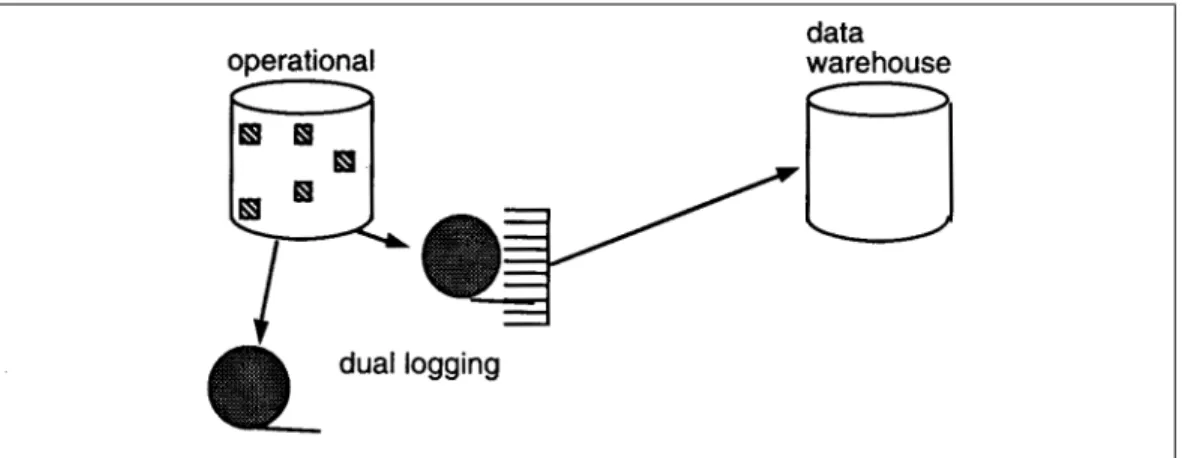
One approach is to do dual logging. Some shops already do dual logging so this presents no challenge what so ever. One of the logs is made available to the data warehouse architect.
Figure 14 shows the usage of the second log tape.
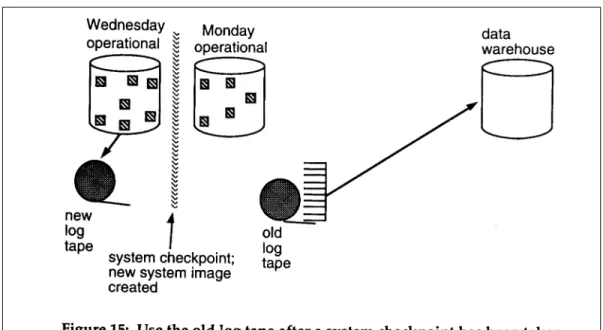
Another approach is to wait until a system checkpoint is done and use the old log tapes that are not needed anymore. Periodically - usually no more than every 48 hours - computer operations will perform a system checkpoint. At this time an image of the database is taken and a new set of log tapes is created. Most shops do not like to go more than 48 hours between checkpoints because any longer time span between checkpoints implies that when recovery must be done that the resources required will truly be magnanimous.
Waiting 48 hours to use the old log tape means that the changes to the data warehouse will be at least 48 hours old. This "wrinkle" of time however, may be a very beneficial feature of the data warehouse. The wrinkle ensures that no one is using the data warehouse for operational purposes.
Figure 15 shows this technique.
Options for trapping changes in log tapes from several specific DBMSs follow. IDMS journal records contain before (BFOR) and after (AFTR) images of the entire
database record for STORE, MODIFY and ERASE statements. STORE statements contain a null before image with a record-image-length field of zero. ERASE statements contain a null after image with a record-image-length field of zero.
There are several possible difficulties with the IDMS journal:
• BFOR and AFTR records are not necessarily contiguous in the journal file.
• BFOR and AFTR records can span journal blocks (they will appear as two records).
• BFOR and AFTR records do not contain a timestamp (it might be possible to connect the records to other records which do contain a timestamp).
IDMS journals may be accessed JREPORT module 008 (Formatted Record Dump). Selects with a boolean expression can be specified in input parameters for this report. Input module CULLJRNL reads and deblocks the archive journal file and passes individual records to the CULPRIT buffer – perhaps it could be modified to write to a sequential file. IDMSRFWD utilities may also produce useful information on, before and after database record images.
IMS log tapes contain records for IMS ISRT, REPL and DLET functions. Unfortunately, segment data is compressed in the IMS/ESA version. This could make the process of extracting information from the log tapes very complex.
Utility program DFSERA10:
• can be used to select log records based upon data contained within the record itself.
• allows EXIT routines to specially process any selected log records.
• supports CICS.
• allows copies of output data to a specified data set.
• is a two-stage process:
1. control statement processing, and 2. record selection and output processing.
• Allows you to skip records and/or stop after a specified number.
• Allows you to define field tests. You can specify test values as hexadecimal or EBCDIC. Multiple field tests on a single field create a logical ‘OR’ function.
• Allows you to test on multiple fields – this creates a logical ‘AND’ function.
• Allows you to define the type of test and its relationship to other tests in the group.
• Allows you to do a ‘test under mask.’
• Allows you to copy to a single or multiple output data sets in one pass.
• Requires knowledge of the log format.
COMPARING "BEFORE" AND "AFTER" IMAGES
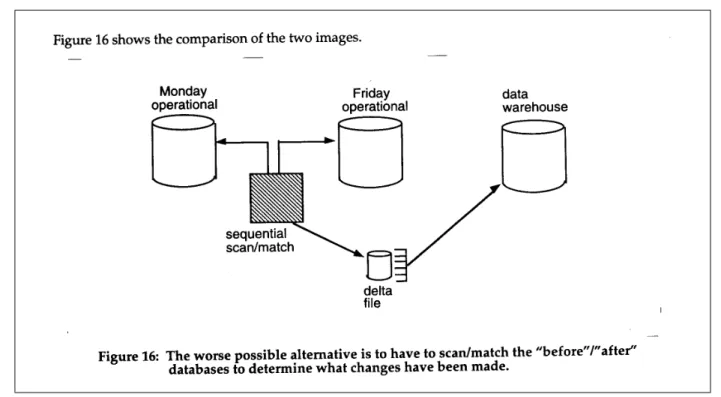
The final option for the trapping of changes is that of comparing "before" and "after" images of a database together. This option is so resource intensive and so complex that it best serves as an incentive to revisit other options. Almost any other option is better than this one. However, on rare occasions the comparison of before and after images is the only choice available.
Figure 16 shows that an image is taken of a database on Monday. Updates are applied to the database throughout the week. Then on Friday another image of the database is made. A program is written which sequentially marches through the databases comparing the databases record for record. When a record is found in one database but not the other, the inference that an insertion or a deletion has been made is drawn. When a match is found between the two databases, the two records then are compared field for field to determine whether any changes have been made to the record. Upon discovering any form of update activity, the update activity is recorded in a delta file. The delta file is then read as input into the data warehouse.
There are many difficulties with the before/after comparison approach. The first difficulty is that many resources are required for the sequential scanning of the two databases. The second difficulty is that the program that does the scanning and comparisons is a complex program. The third difficulty is that the scan and compare program is constantly being maintained. The fourth difficulty is that doing a sequential march through a database is not easily accomplished in some data base technologies. The fifth difficulty is that every byte and bit of two databases must be compared to each other. And the sixth difficulty is that the changes (in the example shown) are up to five days out of phase from the time they were applied against the operational database until they arrive in the data warehouse. There are then many and serious difficulties with the before and after comparison approach. In fact, the difficulties are so many that it is debatable whether the approach should be taken seriously.
COMBINING APPROACHES
The preceding discussions on exactly how the load to the data warehouse is made should convince the reader that more than one approach is the norm. While a shop may choose to do most of their loads in one style, the diversity of needs and considerations is such that using multiple approaches is very much the accepted practice.
SUMMARY
The resources used by the movement of data to the data warehouse environment and the complexity entailed requires that special thought be given.
There are three common types of loads:
• loading archival data,
• loading data in existing files,
• loading data that has changed from the last refreshment.
Easily the most complex and important of these types of loads is the loading of changes. For the loading of changes there are several techniques which are used:
• the wholesale movement of entire files,
• the movement of data base on dates found in the file,
• the usage of an application created delta file,
• the alteration of application code to create a delta file,
• the trapping of changes at the dbms call level,
• the trapping of changes on a log tape, and