Network Services Application to Controlling and
Develop Institute Computer LABs
Majzoob Kamal Aldein Omer
Abstract
—
The research aims to develop a system that helps the use of computer labs devices in the colleges optimal use, through the imposition of a range of settings and restrictions, such as the controlling operations on the devices in the network, by using a series of commands such as closed, and select a specific time to run student education programs, identify the type of software used after checked and validated, enables the administrator to control and restrict the network access to specific destinations and process of controlling the students access to network services such as the Internet, where the management process include blocking non-useful sites which cause a bottleneck in the network, leading to weakness in the efficiency of the network, but sometimes leads to a break, the program determine the specific sites is preventing access to it even increases the efficiency of the network. The System operates on a set of related LAN devices facilitate the take actions settings and services on the devices expeditiously, the system provides settings and restrictions from one central point facilitates the management processing, cause there is a specific central device in the network (server) allows to control network devices from a single location .Index Terms: Computer labs, Network services, student user, administrator user, client services, services administration program
I.INTRODUCTION
There are some colleges, universities and scientific institutes used a computer in the education process, by providing computers for students to work on and assist in the education process, with the passage of time appears the technical problems in the devices used in educational labs. Including the operating system damage in some devices, not optimized using, where some of the students or staff using devices to access the social networking sites, or not useful sites such as that offer free games or displays video clips services leading to passive influence to the devices or using of some software that caused damage to devices such as malware, And thus reduce the efficiency of the devices such as that take a lot of memory or a large space of the processor's capacity. A computer lab is a place which provides computer services to the public, usually for free. There is the need for protection and restrictions within networks available to the public. Users might be denied access to websites featuring adult content or sites that demand too much bandwidth. Those using a computer lab also usually are allowed a limited amount of time to be signed onto a machine, whether surfing the Internet or using software to do other work. Seldom is there a charge to use a public computer lab, but labs in educational facilities tend to be available only to current students of the school, and they usually must sign on so that their activities can be traced and monitored if necessary.
Revised Version Manuscript Received on May 31, 2015.
Dr. Majzoob Kamal Aldein Omer, Ph.D. in Information Technology, Assistant professor and Head of Computer Science Department at AL Baha University, faculty of Sciences & Arts, KSA.
Computer labs can be found
in libraries, schools, government buildings, Science labs, community centers, companies with IT departments that requires such a place for their employees to do their jobs, and research centers. Printers, scanners, and other peripherals may augment the lab setup.
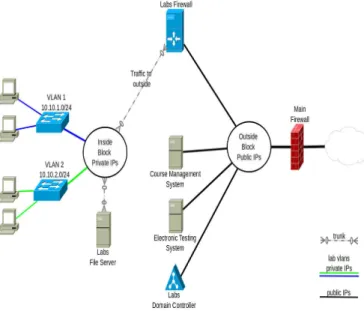
An Internet café differs from a computer lab in that usage of a computer lab is generally free for those with access, while Internet cafés charge for computer use. The term 'Internet café' is often used interchangeably with 'computer lab' but may differ from a computer lab in that users can also connect to the Internet using their own computer or device, and users of a computer lab generally do not need any equipment of their own.[1].(see fig.1). Universities are used in three general situations: practical demonstrations, individual work by students on projects and conducting exams. Depending on the special use-cases for each situation, different access permissions are required, different network setup is required, access to online resources should be permitted/denied, and in most situations such adjustments should be performed by the teacher, without any network administration knowledge and equipment access.[2]. Several challenging hurdles need to be overcome to maintains controlling and manage computer labs, but the cost is the first and most critical issue. Although many universities receive heavy discounts for educational use of the equipment, it is critically important to maximize the utilization rate for the best investment returns. The major issue is related to network security to provide high fidelity experiences to students, it is necessary for the lab to operate (almost) exactly as the Internet works: IP address space partition and aggregation, routing, access, domain name system (DNS), etc. Most services require the equivalent of root (UNIX) or administrator (Windows) access. And it is necessary to allow students to make mistakes. Unless special care is taken, labs can create major security and service problems for operational networks. The other issue is related to class scheduling. Students acquire their skills stage by stage, and thus they should be granted different levels of privilege in a carefully controlled manner. Otherwise, a poorly implemented exercise can bring chaos to supporting software systems, defeating the purpose of the hands-on lab. This major access interfaces (from external to internal) are supported in ARMS: web access servers, teaching material server and direct access servers. These servers are designed to provide remote users the feel and look of the user interfaces of the laboratory devices, yet still prevent misuse of the physical and logical components to affect the operational networks. An additional resource configuration server is responsible for efficient and reliable (re)configuration of laboratory facilities. [3] A remote laboratory corresponds to the situations where the control and observation of the physical instruments and objects under experimentation is mediated through a computer and adequate remote access to that computer is provided through specific communication networks. [4].[5].
Figure 1: Diagram of Network Architecture per Labs II.AREVIEWOFLITERATURE
1- V. Ajanovski (FCSE, UKIM), Access Controland
Monitoring for Campus Computer Labs, April 2015 , This document should be considered as a reference and guide to possible simple solutions that can be used for such scenarios, based on many years of trials at computing departments within the Ss. Cyril and Methodius University, Skopje, Macedonia. The work is based on ideas from the current implementations at the Computer Labs of the Faculty of Computer Science and Engineering. Ideally, the whole solution is organized as a fully automated integrated information and control system – building on top of several practices, tools and applications for network level access control and monitoring. In this document the design and organizational process development of such system is presented together with the tools that enable and ease the implementation of such process. Business-level use-cases are first presented, to understand the general level functional requirements that teachers and administrators place on the overall solution and further several non-functional requirements are discussed. Where the solution is not possible to be automated, a manual process is proposed.[1] 2- UTEP Computer Lab Management Policy, 2006, the purpose of this document is to outline the policies, procedures, and guidelines for the creation and management of academic computer laboratories that serve students at the University of Texas at El Paso (UTEP). These guidelines are necessary in order to:
1. Better serve students by providing them with consistent hardware and software, improved software access, and consistent security mechanisms).
2. Save money through better use of existing hardware, more advantageous licensing, and standardized configurations for cheaper purchasing and easier maintenance).
3. Provide students with documented and consistent efforts to maximize their technology fees paid to the university. This document does not cover all types of laboratories at the university, but is limited in scope to labs which are primarily computer labs. This policy does not cover research lab environments. Due to the ever-changing nature of
technology, this document will be revised at minimum annually.[2]
3- This paper, present the architecture and design for a Virtual Networking Lab (VNL) that is being developed for hands-on exercises in network engineering curricula at Texas A&M University. The objective of the VNL is to create a remotely accessible environment for students to obtain hands-on networking experiences. Isolation provides for wide scope networking training without compromising operational campus networks and enhances the desirability of remote access. The facility is designed to support fine grained, detailed instrumentation and experiments on real networking equipment. VNL architecture consists of two major foundations: Access/Resource Management Servers, (ARMS), for management of remote users and test bed resources; and the Micro-Internet Test Bed, (MITB), for execution of experiments and exercises. ARMS safeguards full and secure access of VNL equipment through the Internet, supports efficient equipment management and provides a structure for pedagogical aid. One of several planned environments, MITB is a small, yet complete inter-networking structure based on the real-world Internet architecture. [3]
III.NETWORKS SERVICES APPLICATION
Microsoft windows services) also known as NT services and applications are created to be enforceable, it could potentially start automatically when you start the computer, or it can be a temporary operation or restart the operating system. This feature makes the services very ideal for use in servers, and also the potential of working in computers and not overlap with other users of the device and this services can be safely run in each user has to run on user account. The different between each user by recognizing the user name and password through the Create Services function. When you start the Services control services, the program downloaded all the Services to the unique user.
There are three types of services running on the user level and operate in a particular level of security:
1- Local services account:
This type of the services cannot be identified through its sub security systems; therefore is not authorized to implementation at the level of high validity, and is known as a species of low validity.
2- Local System account :
This type has the advantage that it is higher than the previous type validity, but it is not recognized by the Sub-security systems is therefore a limited validity.
3- Network services account:
This type operate at the network level and has limited validity and the advantage of the same privileges of other species, but it is ideal in the case of networks that are often used in servers.
I use in this system logical arrangement of system in which all the system maintains common DB to secure the network so that available resources are only accessible to users who have been granted the proper permissions and provides file and access services, secure Internet connectivity, centralized management of network resources (see table.1)
Table 1: Advantage of controlling NW LABs Feature NW Services Controlling Ordinary NW Administration Easier to administer when the n/w is large because administration is centralized Difficult to administrator Configuration Require a professional administrator
Does not require additional specialized n/w
administration software Security Provide better
security
Less secure Expensive Expensive Less expensive to
implement
I used Visual Studio to build the system because it contains codes editor, compiler detects run-time errors, interpreter detects spelling errors in codes, building a graphical user interface, designed web. Visual Studio supports many programming languages such as Microsoft visual C, Microsoft visual C #, Microsoft Visual Basic, java script and also many of markup languages such as html, xml, xhtml and xsl. The System consists of Client Server Model, where the client device (student Users) has the following programs:
1- Client Services :
There are a full authority on the Student Users where the files can modification in the Registry and implementation of a set of processes authority to the Administrator. These services operated automatically in one-time when start the device, these services connect with the server device. If cannot access the server the services stop and cannot be operated except manually or restart the computer.
But there are a variety of disadvantages to these services such as taking (Snapshot) from the other student device, display the dialog screen in the client device to guide it or warning,access the existing files in the client machine. To solve this problem.
To resolve this issue must be created a program (Services
Administration Program) performs the following functions:
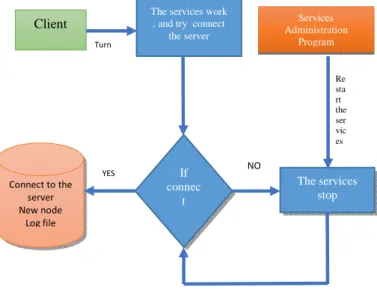
Monitoring the (Service) to make sure it is working and restart the services if it is stopped and connect to the server again and implement all the services operations.
When the Student User start the client machine, the services and the Services Administration Program run on client machine automatically. The Service connect to the server and it appears in the server application a new Node indicates to the client that made a connection, in the case of not being able to connect to the server whether that was a network failure or the server break down.
The Services Administration Program restarts the services again and try connected to the server again many times until connecting to the server. (See fig.2)
fig.2: Client Services Diagram
All student users commands are registered by the administrator user that controls the network (Log File) and register the time and where the commands are stored in a database, the system administrator can review again all the student user commands on a specific date. The network is controlled by sending commands from the server to the (Service) in which the client device and that the (Thread) is dedicated to the receipt of commands sent from the server. There is in the client machine (thread) is dedicated to the receipt of commands sent from the server. f the commands are the powers of the Service, the controls are being implemented. Otherwise, passing it to the other program services also inside student device, If the command has been executed by other services, then the result of this commands must be returned to the server, but if the command has been executed by the other program in the student client the results are returned for the main Service, which is passes the results to the server in order to relieve the pressure on the server.(see fig.3)
fig.3: Controlling Services program Diagram
Client
The services work , and try connect
the server Turn If connec t NO YES Connect to the server New node Log file The services stop Services Administration Program Re sta rt the ser vic es N O YES Return result Return result Server send commands Main services program (thread) in client If executed Other services program in client Execute the command
The application required to enter username and password to verify the user. And determined the user type (student user or administrator user). See fig.4
Fig.4: User name & Password to identify the user
The system can add a set of computer devices using (add group), and the introduction of the group name and the extent of devices addresses (IP Address) belonging to this group and this groups can be modified or deleted by User Administrator. (see fig.5)
fig.5: Creating and Managing Computer Group
The system can also display the existing programs in the client system with the possibility of selecting a group of them and stop them from working. Even if the user at the client machine delete the programs that have been stopped and re-downloaded cannot run again, it can be executed only by the system administrator. (See fig.6)
Fig.6: programs executed by the client
The system can also add a set of blocked websites without any use to (Proxy Server). (see fig.7)
Fig.7: How to Add Blocked Web Sites
The system also implement a range of control processes for each of the device in a particular group, such as the shut down and restart the computer , log out a user, implementation of a specific command in the event that the device is not used for a period determined by the controller. Control of the ports (USB) and includes the possibility of closing up and running.(see fig:8)
Fig.8: Controlling Multi Task in Client Devices
IV.CONCLUSION
In this paper, I proposed an enhancement model to increase the efficiency of the student computer LABs by using services programming to control student commands. My results from this model to create a program (Services Administration Program) performs many functions such as Monitoring the (Service) to make sure it is working and restart the services if it is stopped and connect to the server again and implement all the services operations. Also the system can perform multi task to control student LABs Networking by using various command to block web sites, and deny services, deleted not useful programs from student
devices. Moreover, the proposed application describes the
Services Administration Program which is restarts the
services again and try connected to the server many times until connecting to the server and execute the commands, and how to use log file to determine the student user activity. Also the application achieved ease of dealing with the devices in the LABs and how to manage, control and monitoring this devices.
REFERENCES
1. V. Ajanovski (FCSE, UKIM), Access Control and Monitoring for Campus Computer Labs, Produced by the MARNET-led working group on network security and monitoring, April 2015.
2. UTEP Computer Lab Management Policy,2006
3. Steve Liu, Willis Marti, Wei Zhao, Virtual Networking Lab (VNL): its concepts and implementation, Proceedings of the 2001 American Society for Engineering Education Annual Conference & Exposition 4. Gustavo R.Alves, Manual G.Gericota, Juarez B.Silva, Joao Bosco
Alves, Large and Small Scale Network of Remote Labs, 2007 5. Luis Gomez and Javier Garcia – zubia(eds) , Advances on Remote
Laboratories and E-Learning Experiences, 2007.
Dr. Majzoob Kamal Aldein Omer, Ph.D. in Information Technology, Assistant professor and Head of Computer Science Department at AL Baha University, faculty of Sciences & Arts, KSA. Assistant professor at AL Neelain University, Faculty of Computer Science and Information Technology.