,..
I.'c""'~·'" SERVICE
.~ NOTICE
NUMBER 0001 0002 0003 0004 0005 0006 0007 0008 0009A 0010 0011 0012 0013 0014A 0015 0015A 0015B 0015C 0016 0017 0018 0019
;.,,'-
0020..J 0021
"~. 0022 0023A 0024A 0025A 0026 0027 0028 0029 0030A 0031 0032 0033 0034 0035 0036 0037 0038 0039 0040 0041 0042 " , DATE; 10/18/82 10/18/82 11/01/82 11/04/82, 11/04/82· 11/04/82 11/04/82 11/04/82 11/05/'82 11/11/82 12/28/82 12/28/82 02/16/83 02/16/83 03/10/83 03/10/83 03/10/83 03/10/83 03/21/83 03/21/83 03/21/83 03/30/83 04/15/83 06/07/83 06/07/83 09/12/83 09/12/83 09/12/83 08/18/83 09/02/83 01/09/84· 01/09/84 01/09/84 01/09/84 01/09/84 01/18/84 01/18/84 01/18/-84' 01/18/8~,' 01J23I~l4 01/2:l/84 02/10/84 04/20/84 04/20/84· .. , 04/20/84
.,:". ·,:."4··".. ,1:. ", .,. . v<'"
Flo,PPY Disk Re~~~+obl~~s ' ";~'.;
'l'JO
Shuga,rtFloppY',;;'Or1ve.";:~ . . . . . N O Micropo.lis 45 ~$'DriVe.', .... ...• ""':~<jid FlopP¥' Di'sk Me ',a<Fa,11ures .' ':" ,.' .. , ...•..•.. "YES"
.
~r!~¥~:~~ s~!~~~~~~i4;rui~~;
... :
',,11:." ...
Shugart.' AddresS:'jf;.}~~~9rmatitP!1 "'lttJt)G.~;s'6T1'jA.lQS;~~S:" 32: 1.6 Cables (S'llerced~s'i(1:!Nbti¢e·0:t)Q9) , .. , .. " •• '. y:r:;S;.",
~~:!i.j~~I.if~/.~~it.!I!~~~~i~/,.~~j.~4t:
: New.: 3 2~,:t'16 D1agnostJ;.cSt,:ae:t:ea~~3:'~· 0' \ ·".:~;:~Y1i:S.·
'~:::~~i:~Pb~.~~~·~if;6;~~±.~e~~~~~~I~~~'t~;';'~"··' ':"'i~~',·\,:·:,
New: Keypoa rd,/ CRT ';Il+agp'(js't~~~Ch\ap.g:~Er ... YES
.'
!~:~~~~i:i~i::~t~=:·?:i·. ..::.~.
::; ·
····,i .
, " Correotion: Seagate/A'¢!dress":XI'\fol:'mat:"ion: .. ,Y:E:S~. .
2P3wer'SuPE!~A~j
us .. t .•. ,e.,.,~.,t
.. ,., •. ,:;p .. rog.e .. · .. d . , ..il:r::~,
".>.;'.::'" .~..
YE.S. optional . c1tor,ii!'t't!or 20M'B':'" ." ... , YES . .• 2 OMB':upgt7a'def}Instruptiot),$.:· . ' " . .' "'. YES Booj: Proplemf!; ." '-"! .. :;;'C:'>.',' ".-.'. r . Y S S
:ID<.Q·r·,~···c~C<!Pr6blems.:" . -~'. ;;Y$·$.,'--Bad B10e:k Sparing ..••.. ;. YES
~otherboard failUre ...' ' . _ ,YES Failing'l/O PAL'. ' ¢ " " .. ' ' , . _ '. . > 'YES
support' Fo·rAdditionsr~; to::,') OMB:Exp ~ phas~. "NO Running, hdtest·· diagno$t;it:s on
"ori
v e l ' . YES Warnihg- ';""PossibleDi~k' Dainage YESverification of serial' Pal YES
Spare 1;toth7~boards/ Sof£wal:'e ,'" R~pl::,C:l.pemerit " YES IDawHard D1S~ ~ontrolltf 10000!~j.01· . ' ." NO
:'I.C:.-"¥t.··~.·._'.r.:\l
..
F:~~
.•
~~.' =:~;.:e~.co
....
i~
....
~.,
t i .•.;~.'~-:"
...•.•....•. : ..,i~~
Exp;;,'i~ab. sOftware Inst;().l<EJroceaur~:'" ¥ES
'W~.terrt:i-$leqtl:'~cpower C#pplies .' ...•• '. NO
s.itstem~t!problemS{Due,' to~~c·· po~e;r, ...••. ,... .' ' .. XES
m:E.Pbw~r SupplYlnstar~ Instrll;c:t~Qn~"'.YES .
Ol1anges..~to S~tvioe~Notice' 9{)23~' . .. YES ··I.iev:elof'
wq
controller', . YES•
\c/
SERVICE NOTICE NUMBER 0043 0044 0045 0046 0047 0048 0049 0050 0051 0052 0053 0054 0055 0056 0057 0058 0059 0060 0061 0062 0063 0064 0065 0066 0067 0068 0069 0070 0071 0072 0073 0074 0075 0076 0077 0078 0079 0080 0081 0082 0083 0084 0085 0086 0087 DATE 04/20/84 04/20/84 04/20/84 OS/25/84 OS/25/84 OS/25/84 OS/25/84 OS/25/84 OS/25/84 OS/25/84 OS/25/84 08/17/84 08/17/84 08/17/84 08/17/84 08/17/84 08/17/84 08/17/84 10/17/84 10/17/84 10/17/84 10/17/84 10/17/84 10/17/84 10/17/84 10/17/84 01/14/85 01/14/85 01/14/85 01/14/85 01/14/85 04/12/85 04/12/85 04/12/85 04/12/85 04/12/85 04/18/85 OS/29/85 08/16/85 08/16/85 08/16/85 08/16/85 10/11/85 10/11/85 10/11/85FORTUNE SYSTEMS CORP. SERVICE NOTICE INDEX
SUBJECT
Servicing a 32:16/XP 32:16 w/exp. cab. Hard disk controller used w/ expo cab. Hard disk controller change
Streamer tape full system restore PS and Disk Drive Identification 3 Disk Drive Systems
FIS 1000 Interchangeability Streamer Tape Testing
Short Between Conformal Coat. & PS streamer Tape Replac.Policy & Proced. Western Elec.Power Sup. upgrade Kit New Loc. of Serial Pal
Streamer Tape - Drive #0 Only Installing PIO in CommA Slot CommB Cables
New CPU Cabinet 1 K Ohm Termination Grinding Int. 5
Disk Mounting Chassis Isolation 45 Meg Drive Requirements
Half High Floppy Switch
Half High Floppy Height Adjustment Half High Floppy is Quiet & Dim
Running Diagnostics on Micropolis 45meg New Case/New Screws
Streamer Tape cartridges Genicom 3000 Strapping Info Using Nologin
Tape Diagnostic Info
45 Meg Drive Addressing Info
45 Meg Drive in Expansion Cabinets C20 Hard Disk Errors
Fortune 1000 Display Terminal change Fortune 1000 Display Terminal change New Hard Disk Diag. Error Messages
F-1000 Display Terminal Troubleshooting Set-up Menu on Power On
MX Jumper on Floppy Drive Fortune 1000 Keyboard Problem Install.Conf.Block for 1.8
Formatting New Floppy Diskettes - 1.8 Upgrading to SX (WI) tJISot.I\.~)
COMB change COMA Extenders
Cleaning SXT Tape Drives
•
.\c
SERVICENOTICE NUMBER 0088 0089 0090 0091 0092 0093 0094 0095 0096 0097 0098 0099 0100 0100A 0101 0102 0103 0104 0105 0106 0107 0108 0109 0110 0111 0112 0113 0114 0115 0116 0117 0118 0119 0120 0121 0122 DATE 10/11/85 10/11/85 10/11/85 10/11/85 10/11/85 11/04/85 11/04/85 11/04/85 11/25/85 11/25/85 12/02/85 03/10/86 03/18/86 04/29/86 03/20/86 03/20/86 03/20/86 04/29/86 04/30/86 04/30/86 06/09/86 07/22/86 10/01/86 10/01/86 10/01/86 10/01/86 02/27/87 02/27/87 02/27/87 OS/29/87 OS/29/87 OS/29/87 06/29/87 06/29/87 06/29/87 06/29/87
FORTUNE SYSTEMS CORP. SERVICE NOTICE INDEX
SUBJECT ACTIVE?
SXT Tape cartridges MX Jumper Drive Repair New 45 Meg Drive (C45) COMA Change
Archive Tape Drives
Fortune 1000 CRT Elect/Assy Replacement Fortune 1000 Base/Assy Replacement
Fo ne 1000 NCE Elects. Replacement MX Shun Chip on Tandom Floppy Drives
od1me Ampex Microprocesser Replacement Exp. Cab. Disc Only Resistor Assembly Plastic Pal Chip in SX Mother Board 256k Memory Bds. in SX Systems
256k Memory Bds. in SX Systems Update MS-DOS/Wyse Term. requires PAL Change Horizontal Adjustment on F1000
Adding Memory to MS-DOS/Wyse Terminals Risk in Buying Vendor Hard Disk
Bad Block Information Spurious pixels:FOR:1000
Western Elec. Power Sup. Modification PIO PWA SHAMROCK
Fortune: Link
Correction to Comm B/Diagnostics 1 MB Memory Board/.5 MB Memory Board SX 3.5 MB Memory Upgrade
Fortune Supplied Free Parts Multiplier Card
Graphics Coprocessor Embedded SCSI Drives SCSI Upgrade Path/32:16
SCSI Host Adapter (PN 1003800-0X Comm-6 Hang Problem
Comm-6 Hang Problem, SLB Fix SCSI Tape Controller Rework SCSI Host Adapter Board Rework
-~---c···
FORTUNE SYSTEMS CORP
SERVICE NOTICE
NUl-mER 0001
---
---~-~----PROBLEM: POSSIBLE FLOPPY DISK PROBLEf.1S WITH READING DISKETTES FRor.l OTHER SYSTEf.lS 0
SOLUTION: PROBLEM MAY BE DUE TO WARPING OF THE FLOPPY DRIVE BASE. ENSURE THAT THE FLOPPY DRIVE IS ATTACHED TO THE MOUNTING ?LATE WITH ONLY TWO SCREWS, AND THAT BOTH SCREWS ARE 'ON THE SAl'IE SIDE. THIS WILL PREVENT THE BASE OF THE DRIVE FROZ,l BEING WARPED DUE TO UNEVEN TORQUE OF THE MOUNTING SCREWS.
---FORTUNE SYSTEMS CORP. 1501 INDUSTRIAL RD. SAN CARLOS, CA 94070
DATE /0
-/8 -8Z
FORTUNE SYSTEMS CORP SERVICE NOTICE
NUMBER 0002
PROBLEl'1: FLOPPY DISK DOOR SENSE SWITCH ON SHGUART DRIVES NAY NOT BE OPERATING PROPERLY DUE TO THE TONGUE ON THE DOOR.
NOTE: FLOPPY DIAGNOSTICS WILL RUN ERROR FREE BECAUSE THEY DO NOT CHECK THE DOOR SWITCH. HOWEVER, THE OPERATING SYSTEf.1 WILL NOT WORK PROPERLY WHEN TRYING TO ACCESS THE FLOPPY.
SOLUTION: CHECK THAT THE TONGUE ON THE BACK OF THE FLOPPY DISK DOOR IS ALLm'lING THE DOOR SWITCH TO OPEN AND CLOSE PROPERLY. THIS IS BEST DONE BY REMOVING THE TOP COVER AND OBSERVING THE OPERATION OF THE DOOR AND SWITCH BY LOOKING DOWN AT THE DOOR FROM THE TOP. IF THE SWITCH IS NOT MAKING PROPERLY TRIM WITH DYKES OR FILE ABOUT .20n FROM THE E~m OF THE
(- FLOPPY DISK DOOR TONGUE. REFER TO DRAWING BELmv.
--'J I /
~=kf-~
j
,-,e/l"'f .4PP~x .
.
~S"():l.o"
r:+=::::::::-I
I
I
I
I
I
I
L_
---FORTUNE SYSTEl4S CORP.
1501 INDUSTRIAL RD. SAN CARLOS, CA 94070
DATE /tJ - 18 -
82
f
£--•...
FORTUNE SYSTEMS CORP
SERVICE NOTICE
NUMBER 0003
---PROBLEM: Possiible error in assembly of Spacer on floppy disk door.
SOLUTION: Insure Spacer is installed per the attached drawing on each of the floppy drive types.
---FORTUNE SYSTEr.IS CORP. 1501 INDUSTRIAL RD. SAN CARLOS, CA 94070
DATE Nov 1, 1982
(=
.
~~
i..:~
..5Htltjlll(T
P/S~])/( /VC..
(
(
FORTUNE SYSTEMS CORP
SERVICE NOTICE
NUMBER 0004
PROBLEM: Floppy disk failures.
SOLUTION: Insure that the diskettes are certified for 96TPI, 80 TRACKS PER SIDE, DOUBLE SIDED, DOUBLE DENSITY.
The following products have been used on the Fortune 32:16
l)DYSAN CORP.
SANATA CLARA, CA. 95051
PIN 204-2D
ORDER NO. 802067
2}VERBATIAM CORP. SUNNYVALE, CA. 940136
PIN MD557-0l
ORDER NO. 18239 SOFT BOX 19242 PLASTIC BOX
3) r·1AXELL CORP.
MOONACHIE, N.J. 07074
PIN t·1D2-DD
---7---
FORTUNE SYSTEMS CORP. DATE / / -z: -
ff:2-1501 INDUSTRIAL RD.
FORTUNE SYSTEMS CORP
SERVICE NOTICE
NUl-1BER 000 5
PROBLEM: CHANGING FLOPPY DISK DRIVES A~~ INSTALLING A DRIVE FROM A DIFFERENT VENDOR.
SOLUTION: WHEN CHANGING FLOPPY DISK DRIVES, REMEMBER TO CHANGE THE DRIVE TYPE ON THE MAINTENANCE MENU IF THE DRIVE IS FROM A
DIFFERENT VENDOR. THIS IS DONE BY HOLDING DOWN THE "CANCEL/DEL' KEY WHEN FIRST POWERING ON THE SYSTEM, PRESSING THE "F6" KEY,
A~~ THEN SELECTING THE DRIVE TYPE WITH THE nSPACE BAR". YOU SHOULD THEN PRESS THE "F9" KEY TO STORE THE NEW INFOR-MNrION ON EAROM.
---
---~---FORTUNE SYSTEMS CORP. 1501 INDUSTRIAL RD. SAN CARLOS, CA 94070
DATE NOV 4, 1982
(~ ..
(
FORTUNE SYSTE~tS CORP SERVICE NOTICE
NUMBER 0006
PROBLEM: ATTACHING PRINTERS TO THE SYSTEM USING THE INCORRECT CABLE MAY DESTROY THE PRINTER OR THE pmiER SUPPLY IN THE
FORTUNE CPU.
SOLUTION: THE SIO PORT AND NEW COMA BOARDS HAVE +12 VOLTS ON PIN 9 AND -12 VOLTS ON PIN 10. ON PRINTERS DESIGNED TO OPERATE IN BOTH PARALLEL AND SERIAL MODE (i.e.IDS) THESE VOLTAGES CAN D~IAGE THE PRINTER INTERF~CE OR BE HELD DOWN BY THE PRINTER AND CAUSE FAILURE OF THE POWER SUPPLY IN THE CPU. BE SURE TO USE ONLY THE CABLES SPECIFIED IN THE FIELD SERVICE MANUAL. IF YOU ARE MAKING YOUR OWN OR USING OFF THE SHELF CABLES, BE SURE THEY ARE WIRED AS SHOWN IN THE FIELD SERVICE MANUAL.
---_.
FORTUNE SYSTEMS CORP. 1501 I~~USTRIAL RD. SAN CARLOS, CA 94070
DATE NOV 4, 1982
FORTUNE SYSTEMS CORP SERVICE NOTICE
Nm1BER 0007
---,
PROBLEM: NEW HARD DISK DRIVE FOR THE FORTUNE CPU. FORTUNE IS NOW SHIPPING THE nMINI-SCIBE n HARD DISK IN THE SYSTEM AND FOR SPARES.
SOLUTION: SEE BELOW FOR THE PROPER PLUGGING OF THE nMINI-SCRIBE n DISK.
7 8
I
I '..
~.e;t/e
(3~D,el';el
r
-'---_ _ _ _ iU,/v£
:z
~ _ _ _ _ _ _ lJ.elv'e ~A&lv~~£VJ
~ _ _ _ _ _ _ _ _ F,;fG.-7:J.et.f.:s·r
-1,e.1
v6.S
'--_ _ _ _ _ _ _ _ _ ,4c.-u)At(S Sh()uW
~ ______________ ~~~ ~/6d
---FORTUt\E SYSTEl-1S CORP.
1501 INDUSTRIAL RD. SAN CARLOS, CA 94070
DATE NOV 4, 1982
FORTUNE SYSTEHS CORP SERVICE NOTICE
NUMBER 0008
PROBLEM: FORTUNE IS NOlv SHIPPING "SHUGART" FLOPPY DISK DRIVES IN THE SYSTEM AND AS SPARES.
SOLUTION: BELOW ,IS THE PLUGGING FOR THE "SHUGART" FLOPPY DISK DRIVE:
Drive 1
Drive
2... \ _
...
Drive (Irococo
Drive 3 ' -CO
"--_...Js-
Terminato~ BlockSelect Drive Address By
Installin~ JUM?er as Indicated
Install Terminator Block in Last Drive in 'Chain'
SS
>
CLOSE3)R'b
IR~cEe~~ ~bi~~
:z
?I.vs o~ I\.C. ON 2'5 BoUlDSI U IS iJ4'1:' ,) I.{j.("'~l>
13",T
AI
IS.
---~---FORTUNE SYSTEMS CORP. DATE / / - ~
?:2-1501 I~~USTRIAL RD.
(
,(~.
~/
FORTUNE SYSTEMS CORP
SERVICE N07!CE
NUMBER 0009 A (To supercede 0009)
PROBLEM: CONFUSION ABOUT THE CABLES 70 ATTACH VARIOUS EQUIPMENT TO THt FORTUNE 32:16. CORRECT ERROR IN EARLY FIELO SERVICE MANUALS.
SOLUTION: ATTACHED YOU WILL FIND THE PART NUMBER AND O:ACRAM FOR THE VARIOUS TYPES OF CABLES USED ON THE rOR7tJNE SYSTEM. PLEASE ENSURE THAT THE DIACRAMS IN YOUR FIELD SERVICE MANUAL ARE CORRECT. THESE DRAWINCS SUPERSEDE ALL OLDER ORAWINCS.
---.---~---
---FORTUNE SYSTEMS CORP.
1501 INDUSTRIAL RO. SAN CARLOS, CA 94070
OA'rE NOV 5, 1 9S Z
(
(
PRIN'!'ER CASLES
~HE FOLLO~ING DIAGRAM REFERS TO THE 1000664-XXCASLES THATARE USED FOR PRINTERS ON THE FORTUNE 32: 16 :
Pl :'2
l '
r-:L
...r-
'12 Z
3 ( \
, ,
34 I ! I I
I I .;
5 I I 5
I I I I
6 6
1 I I I I 7
S I I I j a
1 I I I I
20
,
I 20
II
.-
I I :...
...",
...
THE ABOVE DIAGRAM HAS THE FOLLO~ING PART NUMBERS AND USES:
1000664-01 Pi-MALE, P2-MALE tETTER QUALITY PRINTER LENGTH 10' -02 Pl-MAtE, P2-MALE " " 20' -03 Pl-MALE, P2-MALE " " SO' -04 Pl-MALE, P2-FEMALE DOT MATRIX PRINTER 10'
(
(
COMMUNICATION CABLES
~HE FOLLO~ING O!AGRAMS REFER TO THE 1000633-XX CABLES THAT ARE USED FOR COMMUNICATION DEVICES:
Pl
'-"
~
~
~-=:
2
\ "
3 I
,
I 34 I I I I
I I I I 4
5
I I I I '5
6
I I I I .)
7 7
I I I f
S S
I I i I
20 20
I I
1 ...
'1J.l
.u
THE ABOVE DIAGRAM HAS THE rOLLO~ING PART NUMBERS AND USES:
1000633-01 Pi-MALE, PZ-MALE USED FOR CPU TO ASC!! TERMINAL LENCTH 10'
-02 P1-MALE, PZ~FEMALE USED FOR EXTENSION CABLE " 1 0 '
-03 P1-MALE, PZ-FEMALE " . . .. za'
-04 Pi-MALE, PZ-t"EMALE " . . '50'
... -08 Pi-MALE, PZ-MALE USED FOR CPU TO ASCII TERM!l~AL .. :0'
-.-,. -09 Pl-MALE, PZ-MALE .. " I t II I f " SO' Pl
1 --:::...
2 , \
3 I
::n
7 I8~---~---~~
THE ABOVE DIAGRAM 1000633-05 Pt-MALE, -06 Pt-MALE,
-07 Pl.-MALE,
.-P1
~
HAS THE PZ-MALE PZ-MALE PZ-MALE
2
--::l...
3 I I
I I
4
I I
'5
I I
6
1 I
,
I I
a I
I .!.9.
THE ABOVE DIAGRAM HAS THE 1000633-10 P1-MALi, PZ-MALE -11 P1-MALt, PZ-MALE -12 Pl-MALE, PZ-MAtE
FOttO~INC PART CPU TO CPU CPU TO CPU CPU TO CP'U
~
t"OLr.O~tNG PART CPU TO MODEM
"
PZ
NUMBERS AND USES: LENGTH 10'
" 20'
SO"
:'2
-,r-
12
I
•
3
I
.
, 4
I
I I 5 I j 6
1
I ,
I I a
"-'
.u.
NUMBERS AND USES: L£NG':'H 10 •
(
(
FORTUNE SYSTEMS CORP SERVICE NOTICE
NUMBER 0010
---PROBLEM: POSSIBLE PROBLEM OF SHORTING OUT THE ANALOG PCB WHEN CHANGING CRT.
---~----~---SOLUTION: BE SURE THAT THE CONFORMAL COATING (THE GRAY COATING ON THE INSIDE OF THE COVER) ON THE STAND-OFF'S FOR THE ANALOG PCB IN THE CRT HOUSING HAS BEEN REMOVED. SOME ASCII TER}lINALS AND MASTER CONSOLE CRT'S WERE SHIPPED WITH-OUT THE COATING REMOVED. IF THE CRT IS REPLACED WITH A DIFFERENT VENDOR TYPE CRT, THE ANALOG PCB MAY SHORT TO THE CONFORMAL COATING.
---FORTUNE SYSTEMS CORP. 1501 I~~USTRIAL RD. SAN CARLOS, CA 94070
DATE NOV 11, 1982
FORTUNE SYSTEMS CORP
SERVICE NOTICE
NUMBER 0011
---PROBLEM:A quick way to check out a Fortune Intelligent Work Station.
SOLUTION:Jumper pins 2 and 3 of the host connector together. Then any character input from the keyboard will be echoed to the CRT
screen •.
FORTUNE SYSTEMS CORP. 1501 INDUSTRIAL RD. SAN CARLOS, CA 94070
DATE
1:2 -
.2.8 -(
FORTUNE SYSTEMS CORP
SERVICE NOTICE
Nm1BER 0012
PROBLEM:Running fids on ampex 20 megabyte hard disk.
---
SOLUTION:Load the diagnostic using the load procedure on page7-1 of the Field Service manual. After the Fortune .Diagnostic main menu appears do the following:
1. Change Slot
=
E2. Change Drive type
=
other 3. Press Execute Key.4. Type - ~ - Press Return. 5. Change I of Cyls
=
320
Change # of Heads
=
8 awC Cyl=
132 WPRECMP CYS=
132
ECC length
=
11 6. Press Execute Key7. Press 'F9'
8. Press Execute, test will run in usual way.
---~---~--- ---FORTUNE SYSTEMS CORP.
1501 INDUSTRIAL RD. SAN CARLOS, CA 94070
(
FORTUNE SYSTEMS CORP
SERVICE NOTICE
NUMBER 0013
---~---PROBLEM: Fortun-: is now shipping AMPEX PYXIS Model 27 (20 Meg) hard disk.
SOLUTION: Below is the addressing information.
13121110 I
TOFAClA-To identify a drive, the pole corresponding to the address of the drive is closed. Only one pole in each drive can be in the
closed position.
---~---~~--.~---FORTUNE SYSTEMS CORP. DATE_..::..s:.-.... <1:::;.o-~;.,.J'-'("e ... /.;;.:..,('-:;>~---__
1501 INDUSTRIAL RD.
(
FORTUNE SYSTEMS CORP
SERVICE NOTICE
NUMBER 0014
PROBLEM: This Service Notice is intended to describe the procedure for exercising the Fortune 32:16 SIO PORT using an ASCII Terminal.
---~---~-~-~---SOLUTION: 1. Cable the ASCII Termimal Bost Port to the 32:16 SIO Port.
2. Reset or power up the 32:16 while holding down the cancel/del key. The Maintenance menu will appear.
3. Set the ASCII Terminal Baud Rate switches to match the back port speed of the 32:16 (F2 on the Menu). Remember to turn
the ASCII Terminal off/then on after changing switches.
4. Press the F3 key. Press the space bar until the power-up action changes to RTermina1Mode R• Press the execute key.
s.
The 32:16 is now ready to communicate with the terminal. Data entered on the 32:16 keyboard is displayed on the ASCII Terminal display, and date entered on the terminal keyboardis displayed on the 32:16 CRT. Enter several lines on each device and verify that the corresponding display is correct.
---~----;~;;~;;-~;~;;;~-~~;;:---~~;;---~-~~~~7?:3---1501 INDUSTRIAL RD.
FORTUNE SYSTEMS CORP
SERVICE NOTICE
NUMBER 0015
PROBLEM: Notification of new release of Field Engineering 32:16
diagnostics. PART NUMBER: 1000834-02
NOTE: This Service Notice was written to notify the people who had already been to Field Service Training of the difference between 1000834-01
(old diagnostic floppy) and 1000834-02 (new diagnostic floppy). Attached to their copy of this service notice is a new chapter on diagnostics (page 7.1 has an 03-83 in the bottom left corner). They should note the
differences between the old and the new diagnostic procedures, then replace the old diagnostic chapter with the new diagnostic chapter.
---~---~---~~--~-~---~.---SOLUTION: New release of diagnostics has improvements to:
1. Floppy Disk Diagnostic 2. Keyboard/CRT Diagnostic 3. Hard Disk Diagnostic
The name of the Floppy Disk Diagnostics was changed from "fdmenu"·to "fdtest.
The name of the Keyboard/CRT Diagnostics was changed from -kbdcrt" to "kbtest".
The name of the Hard Disk Diagnostic was changed from "fids" to "hdtest".
No changes were made to the "mem", "mmu", or "coma" diagnostics.
See the following pages for instructions.
---~---~i--~-~:----~---FORTUNE SYSTEMS CORP. DATE :/ Itt. ~;..;. -- )
1501 INDUSTRIAL RD.
SERVICE NOTICE NUll!BER 0015A
?ROBLEM: Changes to Floppy Disk Diagnostic nfdmenu n •
i:~OTE: "fdmenu" has changed to nfdtest".
Reference: Pages 7-9 to 7-12 of Field Service Manual for the following changes.
SOLUTION: Select the Floppy Disk Diagnostic using file name nfd02/fdtest n • The only change to this diagnostic was made to the Read Cycle Test. This test no longer does a data comparison test. CRC verification is done on all blocks read. This is a good media test. Use to read suspect floppy disks.
---~~--I.--- ---FORTUNE SYSTEMS CORP. DATE--~. ~;/~j_~~,I_I,~?_~_· ____________________ _
1501 I~mUSTRIAL RD.
(
(
SERVICE NOTICE
~1UMBER 001513
---~---PROBLEr>!: Change to Hard Disk Diagnostic nfids n•
NOTE: "fids" has changed to nhdtest n•
Reference: Pages 7-13 to 7-19 of the Field Service Manual for the following changes.
---~---~---~-SOLUTION: Select the Hard Disk Diagnostic using file name "fd02/hdtest n The diagnostic now defaults to slot "E" instead of slot "Bn. The
diagnostic now uses the same device codes as the operating system. DRIVE TYPE:
AlO - Seagate 10 meg B5 - Miniscribe
5
meg 1310 - Miniscribe 10 meg B20 - Miniscribe 15 meg C20 - Ampex 25 megE15 - IMI 15 meg G25 - ATASI 25 meg H25 - Evotek 25 meg 120 - Disctron 20 meg Z5 - Seagate 5 meg
OTHER - Make your own parameters.
The diagnostic now uses the "Down Arrow" key to move the cursor on the main menu. Press the "Down Arrow" key twice to move the cursor to the drive type.
The diagnostic now uses the nRight Arrow" key to change the drive type. EXM1PLE: Press nRight Arrow" key four (4) times to change drive type to C20 (Ampex 20).
---~--~--- ---FORTUNE SYSTEMS CORP. DATE~~~~.-~·~~~~~/~(_~~,: __________________ _
1501 I~mUSTRIAL RD.
(
Service Notice 0015B Continued
For systems running Operating Systems 1.2.4. and above, after selecting the d~ive type all options are default values. You do not have to change the step rate for the (Z5) Seagate 5 meg or add parameters to the (C20) Ampex 20 meg.
For systems running Operating System 1.2.3., all options are default except for the (C20) Ampex 20 meg. You must change the end block count from 43655 to 43519. This is because the diagnostic uses 321 cylinders and 1.2.3. only uses 320 cylinders.
For systems Below 1.2.3., you have to do an ftinitft command and change the number of blk/Track from 17 to 16. This is because the diagnostic uses 17 blocks per track and the older operating systems used 16. You can find the operating system level using ftpstat ft under Unix.
HELPFUL HINTS
1. I20 is the Disctron 20 meg designation. A few, approximately 30, systems left the plant with an F20 on the system configuration sticker as the hard disk drive type. If you see an F20, change it to read I20.
2. The Disctron 20 meg systems have a capacitor mounted on the back of the hard disk shield. Do not try to run a Disctron without this capacitor.
3. Operating systems below 1.2.4 cannot be run on Disctron 20 meg systems.
4. After a sucessful completion of a sequencial test, run a few minutes of random testing. To do this change the test mode
=
random and the loop count = 9999.5. Soft errors are recoverable errors of the disk system. A few are normal, alot are unusual and the cause should be found. Hard errors are unrecoverable. Remember, the operating system uses bad block
forwarding and the diagnostic does not. Always check the configuration block of the hard disk using rdconf /dev/hd02 (under Unix) to find the true bad blocks of a hard disk.
(-SERVICE NOTICE
NUMBER OOISC
PROBLEM: Changes to keyboard/CRT test "kbdcrt".
NOTE: "kbdcrt" has changed to "kbtest"
Reference: Page 7-8 of the Field Service Manual.
•
---SOLUTION: Select the keyboard/CRT test by selecting file name "fd02/kbtest".
The CRT Scroll Test now will test either a domestic or an international CRT. The default is domestic. If you change the default to "No" the international test will be run.
The CRT Atribute Test still- tests all of the atribute ·functions.
The keyboard test has changed drastically. You will like this one alot better. The keyboard test will test the following types of keyboards.
AM - American
BR - British (U.K.) FR - Francaise DE - Deutsch
IT - Italian SV - Sverige NO - Norge
SR - Swisse - Romande SD - Schweiger - Deutsch
Use the first two (2) uppercase letters of the type of keyboard you have.
EXAMPLE: AM (Return) will select the domestic keyboard.
(
Service Notice OOlSC Continued
NOTE: To remove the special keys (CTRL, LOCK, SHIFT), press these keys:
(CTRL) - Hold down (CTRL) and press 'q'
Right Left
(LOCK) - Hold down (LOCK), then press It', then to unlock the keyboard release and press (Lock)
again.-(SHIFT)- Hold down right (SHIFT) and press 'h'. (SHIFT)- Hold down left (SHIFT) and press 'g'.
If the keyboard will not remove all the keys, you can press the (Return) key next to the far right number keys a~ the same time holding down the
(SHIFT) key. This will abort the test.
The keyboard driver test has been removed.
The cursor positioning test now gives you a boot prompt after the screen is filled with ·X's·.
FORTUNE SYSTEMS CORP
SERVICE NOTICE
~1UMBER 0016
---PROBLEM: Intermittent 120 Errors.
SOLUTION: When after running all diagnostics your systems still get Intermittent 120 errors, try replacing the floppy pal (eoordinates 9F on the motherboard) before replacing the motherboard. Order floppy pals through Field Engineering_
Fortune System Corp. 300 Harbor Blvd. Belmont, CA 94002 Attn: Angie Alvarez
NOTE: Floppy pals labeled .1 CPU FLO have been screened for this problem and do not need to be replaced.
!~---(~
FORTUNE SYSTEMS CORP SERVICE NOTICE
NUMBER 0017
---~--PROBLEM: Reduced airflow because of a poor fan voltage connection.
SOLUTION: After servicing the Fortune 32:16, always check the voltage connection at the fan and make sure it is tight before buttoning up the machine. After button up always turn on the machine and check for proper air flow before returning to the customer.
---FORTUNE SYSTEMS CORP. DATE ; !
=- (
~i "~J
j1501 INDUSTRIAL RD.
~-.;;..---(
if
(
FORTUNE SYSTEMS CORP SERVICE NOTICE
NUMBER 0018
PROBLEM: Poor quality video on CRT monitors and reduced range of contrast adjustment on CRT controller.
SOLUTION: Some video controllers have six capacitors, C4-C9, located in the area of P2. If you experience either of the above problems check to see if these capacitors are installed. If installed, cut out.
---~--~---FORTUNE SYSTEMS CORP. DATE
3/
<. , /Z"3
----~--~~~---1501 INDUSTRIAL RD.
~----~<~/---~--~---FORTmlE SYSTEMS CORP
SERVICE NOTICE
NUMBER 0019
---PROBLEM: Drive selection and terminator block locations shown incorrectly for Seagate ST506 and ST4l2 drives.
---~---~---SOLUTION: Remove page 6-7/6-8 Revision 01-83 from the Field Service Manual and replace with page 6-7/6-8 Revision 02/83.
Note that the terminator resistor pack and drive selection shunt were reversed in the old drawing~
---FORTUNE SYSTEMS CORP. 1501 INDUSTRIAL RD. SAN CARLOS, CA 94070
'\'
FOR'l'tJ~E SYSTEMS CORP SERV%CE NOTICE
NtJMB£R 0020
.~~---
...
----
...
-
....
--~:-'---~-...,..---..
-.--
...
~--...
-
...
---
....--
...
-
..
---PttOSt!:M:
32:16 System Power suppl.y Adjustment. procedure.__ ~_~ _____ ~_~ ___________________________ ~ ____________ ~a • •
_.6 ______ . _______ _
SOLUTION:
1.0 GENERAL
2.0
Voltage levels at the +5 volt, +12vo·l.t and -12.volt ·outputs .·re controlled by one common adjustment and· th~ vo1tag·.1; are affected by.cu.t,rent draw at each output. Certain sup»lies may require lome
,~e~ajia-.tment as the +5 volt current draw is increased. Adding ._do:it10ha1 memory and/or options increases the +5 volt current
araw~ .
-VOLTAGE SPECIFICATION
VOltag"J..should be adjusted to achieve the range: shown in tllble 1.
The8e)jo~taqes are specified at the connector that'.pIUt. into;'t'he n,l9therboltd. The connector pin numbers for the various voltaqes are also.hown in Table 1.
t •. •·
~---;;;;~;;-;;~;;~~;;:---~;;;----i-lj;.li:;---I ;
Q
Q
1501 INDUSTRIAL RD. \ - '
SAN CARLOS, CA 94070
APPROVEDfbt_y~;
L'-'" ...~~,",,'-'O
..
u
-14- \
n
Ij~
/0
~
fo
4
2
r
-'"
-J6y3
I}
1
7
5
3
1
I
';l
'ffJ-,j
"
Service Notice 0020 Continued.
I I
I OUTPUT OUTPUT VOLTAGE CONNECTOR I WIRE I NAME TOLERANCE RANGE PUT NUMBERS I COLOR
I Min. MAX . I
I • I
I . +SV 4.90 5.25 1, 2, 3 , 4, 51 RED
I I
I I
I +12V 11.40 12.60 6 I YELLOW I
I
I -12V 11.40 12.60 8 VIOLET
I
I WHITE
I +12V Reg 12.00 13.20 10 YELLOW I
I 11, 12, 13,
I GROUND -0- 14, 15, 16 BLACK
I
TABLE 1
iiAi~nlG
HIGH VOLTAGE IS PRESENT AT VARIOUS POINTS ON THE POWER SUPPLY. CARE SHOULD BE EXERCISED TO AVOID TOUCHING ANY EXPOSED COMPONENT LEADS, BEAT SINKS, ETC.
Air flow through the system is affected by removal of the cover. The system should not be powered up for more than 30 minutes with the cover off.
3.0 PROCEDURE
Equipment required for this procedure is a digital voltmeter (.01 volt graduation) and a non-conductive flat blade 6 inch adjustment tool. Cover should be removed and all options plugged in before AC power is applied. Remove all potting material on adjusting screw with power off and AC cord unplugged.
3.1 +12 VOLTS
Check the +12 volt output, it should be less than 12.60 volts. If it is above, adjust potentiometer R26 (see Figure 1.0) until
Service Notice 0020 Continued.
3.2 +5 VOLTS
Check the +5 volt output, it should be above 4.90 volts. If it is
below 4.90 volts, and +12 is at 12.60, reject the power supply. If the +12 is less than 12.60, raise the +5 until it reads 4.90 to 5000 making sure the +12 does not go above 12.60.
3.3 +12 VOLTS REGULATED
Check the +12 volt REG output, it should be greater than 12.00-volts. If the voltage is less than 12.00 volts, the size of the display area on the system monitor should be checked. If the display is acceptable, the supply can be used if the output is above 11.60 volts.
3.4 -12 VOLTS
Check the -12 volt output, it should be between -11.40 volts and -12.60 volts. This supply is used only for RS232 type
communications options at this time. If the system includes only RS232 type options (Comm A or Comm B), the supply will be
Service Notice 0020 ,Continued
FIGURE 1. 0
-
(-FORTUNE SYSTEMS CORP
SERVICE NOTICE
NUMBER 0021
PROBLEM: Announcing an optional capacitor kit for 20 megabyte systems.
Only order the kit, part #1001775-01, if the 20 megabyte system is experiencing intermittent hard disk/floppy disk problems.
---~---~-.~~-~---SOLUTION: Install capacitor assembly, part 11001612 .... 01 between hard disk power plug from power supply, and hard disk power plug on drive.
Secure capacitor assembly to back of hard disk shield using clamp, part 11001614-01. Use 1 (6X32 3/8" pan head) screw and 1 each 16 10cKwasher and flat washer. The shield is tapped at the rear for a 6X32 screw.
FORTUNE SYSTEMS CORP. 1501 INDUSTRIAL RD. SAN CARLOS, CA 94070
'. ,., DATE ;:, .)
I .
_. ~
-(
FORTUNE SYSTEMS CORP
SERVICE NOTICE
NUMBER 0022
PROBLEM: 20 megabyte upgrade instructions.
---~---SOLUTION: Before proceeding to upgrade a 5 or 10 megabyte system make sure you have the following parts available.
PART! 1000081-03 1000380-01 1000448-02 1001172-01 1001130-01 1000411-01 1000303-07 1001612-01 1000303-01 1000326-01 1001614-01
**
1001051-01 1000454-03**
or 1000303-0220MB Disk Drive
Disk Mounting Bracket Shield, 20MB . Shield, Hard Disk Standoffs
Lockwasher 16
QUANTITY lea. lea. lea. lea. 4ea.
Screw,Pan Head 6X32 3/16" Capacitor Assemply
Screw,Pan Head 6X32 3/8" Washer,F1at #6
5ea. 6ea. lea. lea. lea. lea. 4ea. 2ea. Clamp
Screw,Under Cut,6X32 1/4" Insulator
Sciew,Pan Head 6X32 1/4" 3ea.
FORTUNE SYSTE!o!S CORP. 1501 INDUSTRIAL RD. SAN CARLOS, CA 94070
DATE ____
(~~~/_-~,-!-·~---,---/ \
Ser.0022 Continued
These parts can be ordered under one part number, tl001700-0l (20HB Upgrade Kit) •
STEP 1
Remove the old drive from the system.
STEP 2
If the original disk mounting bracket has the same number of holes as the new one, you do not have to remove the floppy disk drive from the disk mounting bracket. If the original disk mounting bracket has fewer holes than the new one, install the floppy disk drive on the new mounting bracket and discard the old mounting bracket.
STEP 3
Install the four standoffs on the bottom of the 20 meg drive.
STEP 4
Install the large shield on the 20 meg drive using the 3 (6X32 1/4ft
pan head) screws. Leave the left rear screw hole blank. If the under cut 6X32 1/4" screw was supplied, use it instead.
STEP 5
Install the 20 meg disk drive onto the disk mounting bracket using the third and last (from the front) set of holes. Use 4 (6X32 3/16" pan head) screws and 4 (#6) lock washers.
STEP 6
Install the disk assembly into the system.
STEP 7
Install the capacitor assembly onto the back of shield using the clamp with a (6X32 3/8" pan head screw, #6 flat and lockwashers) • The capacitor assembly electrically goes between the disk power supply connection and the 20 meg disk drive.
STEP 9
Install the two insulators on the small shield, one on the top and one on the side.
STEP 9
Install the small shield to the large shield using the two remaining (6X32 3/16" pan head) screws.
STEP lQ
ro
•
FORTUNE SYSTEHS CORP SERVICE NOTICE
NUl-mER 0023A
~---~-~~---
---PROBLEM: Boot problems caused by missing or damaged 'Configuration Block' or 'Boot' file.
If during the normal boot procedure the system shows one of the following abnormal conditions:
1. Screen shows '1 2' and goes no further. 2. Screen shows '1 2 3' and goes no further.
3. The message "There's something wrong, start over" appears at the bottom of the screen.
4. Goes to the "Maintenance Menu· and continually returns to the "Maintenance Menu" after preSSing the 'execute' key.
It may mean that the .'Boot' program or the 'Configuration Block' may have been damaged. Rewriting the 'Boot' or 'Conf Block' may solve the problem without having to 'Cold Boot' the system.
Determine if the 'Conf Block' is damaged by booting up from floppy disk (i.e. Cold Boot tl). If the message ahd: Drive 0 is bad" appears, the 'Conf Block' on the rigid disk cannot be read.
Determine if the 'Boot Program' is bad by changing the 'Boot Device' (F4) on the maintenance menu to boot from floppy drive, and install 'Cold Boot t1'. If the system comes up normally after reading the boot from floppy, the 'Boot' on
~he rigid disk is damaged.
---SOLUTION: First run diagnostics to determine that the hardware is OK. If 'hdtest' runs OK, then you can proceed to rebuild the
'Configuration Block' or the 'Boot' program on the rigid disk.
Rebuilding Configuration Block
There are two things you need to know before rebuilding the IConf Block l • The number of users the disk was formatted for,
and any 'Bad Blocks' that were spared in the original 'Conf Block'. It is advised that on any systems you sell or do service on, that you do the command rdconf /dev/hdOO and record the information concerning bad blocks that are spared and the size of the partitions
BEFORE ANY PROBLEMS OCCOR,
so that if the following procedures are required you will have all the information you need. Also note the number of users specified at the time of 'Cold Boot'. JOnly proceed to rebuild the configuration block if you bad recorded the bad blocks and number of users.
~~---~--~---~---~-~---FORTUNE SYSTEMS CORP. 1501 INDUSTRIAL RD. SAN CARLOS, CA. 94070
DATE, ____ ~~ __
--~---Service Notice 0023A Continued
·
----NOTE----In the following write-up, all references to 'disk type' will be 'XYY'. You would substitute the the correct value for the disk type you are working with (i.e. AIO, BIO,C20, 120, Z5 etc •• ) •
PROCEDURE: Start a normal 'Cold Boot' bringing the system all the way to the menu that asks you to select Fl, F2, or F3 to reload the
system. You will note that the last message says that anything else will be treated as a 'maintenance mode' command. At this point enter~
cd
letc
(RETURN>This will 'cause the system to change the working directory to
letc
and return with the • prompt. At this time enter~dskselect XH <RETURN> Example: Use C2D for XYY if you have a C2D system.
A menu will appear asking you to select a disk type. Enter the number that corresponds to the drive type
in
your system. Example: 10(RETURN> for a C20 system. You will now enter 7 ...
mkcon£ -i XYY Idev/bdOO (RETORR>
The 'Configuration Block' will now begin to appear on the CRT with '1' prompts. Press the <RETURN> to enter the default value until you get the question 'Number of Spare Blocks =0'1, at this point enter7
.6
<RB'rORN>The system will now be set to spare any known bad blocks, and will return the message fSpare 0 (Block 3)= free ?' If" you have any known 1::>ad blocks you would enter the first bad block number here and 'hit
(RETURN>. You would continue to do this for all bad blocks. If there are no bad blocks or when you have entered all known bad blocks, you will enter 'bad' for the remainder of the spares entries .~'lhen you make the last entry, the system will automatically write the new 'Conf Block' to the r'igid disk. The disk now has a 'Conf Block' for a one
(I) USer system. If the system was formatted for a 3 or 5 user system, do the following command 1 Fotc..tkJ WIt-&! PF 'lib l>&'tG'~"'1 u41 ,,,'H, 0 U&(II4Kt..
mkcon£ ~U
'*
Idev/hdOO <RB'rORN> llUoKltt AlI.(,HIJ~tA ~o--.. '1( &fvt"",- l>r:- QcrAb'" -K.where
*
is the Dumber of users (i.e. 3 or 5). You should now check the 'Conf Block' by doing the following command;rdconf Idev/bdOO
<RETtJRN>
~'bCoAJ~ • U {ioLVa''' .sw.cr a~IT..rIf all went well, you should have
a
working hard disk at this point. Do a file system check to verify system file integrity, enter;fack Idev/bd02 (RE'rURN> - J::o AAsr SI(,P "t1Jts Sl~P
. The file system check should run error free. If not, you have file damage and a cold boot may be in order.Enter the following commands;
sync <RETURN>
sync <RETURN>
S"'N
#23w(/~.~
US/~Fi>J6r1
As~
7>r:~T : /7)&1/ /1't'.J>{Jj
'Bur
~ fAJlTN /, ,,/.I ,
I~jm 1.1..&1)~r FbSS/i!SL& I (..($<;;
/S.,!eoo-r
.~
r.
Service Notice 0023A Continued
Rebuilding Boot Program
PROCEDURE: Start a normal 'Cold Boot' and bring the system up to the point where it displays the menu that asks you to select Fl, F2 or F3 to reload the system. You will note that the last message says that anything else entered will be treated as a 'maintenance mode' command. At this point enter the following;
cd /etc (RETURN>
This changes the working directory to letc and the system will return with a i prompt. You will now enter the following;
bootcp /sa/boot /dev/rbdOO 0
<R.E"roRR>
The system will now write the 'Boot' program from floppy to the hard disk and return the i prompt. You will then enter;
sync (RETURN>
sync (RE'l'URN>
and remove the 'Cold Boot' disk and bring up the system in the normal manner to verify operation.
If when you entered bootcp •••••• the system returned the message bootcp; not found, enter the following command;
dd if=/salboot of=/dev /hdOO bs=S12 seek=.* <RE'l"ORR>
and then proceed as above. - .
For the
*
parameter use the starting block number of the boot 0 program. This information is available in the configuration block. The -Boot 0 begins at" message gives the starting block number that should be used for this parameter. ·To see the configuration block enter;FORTUNE SYSTEHS CORP
SERVICE NOTICE
NUHBER 0024A
~---
---PROBLEM: Rigid Disk Error messages of '10 not found' or 'CRC Error'.
First you must know what lID" and 'CRC' mean. The '10 Fields' on the disk are the headers for the data blocks, which contain the cylinder, head and sector information. 'CRC' stands for 'Cyclic Redundency Check' which is the way we check for errors in the '10 Field'.
If an error occurs in the '10 field' we must reformat, that is,
rewrite the cylinder, head and sector information for that section of the rigid disk drive.
-NOTE-ALL DATA tVILL BE LOST IN THE AREAS THAT ARE REFOR~1ATTED
For this reason only the boot program area of partition 0 and all of partition 1 can be reformatted. The danger of losing data and
pointers is to great to allow reformatting of other areas. The boot program area and partition 1'5 area are shown in the configuration block of the rigid disk drive. If other areas of the disk have 10
errors a cold boot will be necessary.
---
SOLUTION: Since both hdtest (diagnostic) and unix (operating system)give error information in blocks, and the format command needs track (t) and head (h) information we need to be able to convert blocks to tracks and heads.
To corivert you need to know the sectors/track and number of heads for your particular operating system/disk drive combination. This
information is available in the configuration block of the rigid disk drive. How to read the configuration block will be shown later.
-HOft-DRIVES HAVE VARIOUS NUMBERS OF BEADS AND SECTORS PER TRACK
After you have the sectors/track (sectora :per track) information and the Dumber of heada information, multiply them tQgether.
~---~--~---~---~-~---~---FORTUNE SYSTEMS CORP. 1501 INDOSTRIAL RD. SAN CARLOS, CA 94070
DATE, ____ ~~ ____
~--~~~~---Service Notice 0024A Continued
EXAMPLE:
EXAMPLE:
Unix 1.2.4 operating system and a 20 megabyte C20 disk drive sectors/track = 17
number of heads =--B
136 (blocks per cylinder)
Unix 1.2.4 operating system and a 10 megabyte BI0 disk drive. sectors/track = 17
number of heads =--1
68 (blocks per cylinder)
Take this number (blocks per cylinder) and divide it into the failing block(s) number. The result is the track (t) number you need for the format command. Divide the remainder by sectors/track (sectors per track). This result is the head (h) number you need for the format command.
EXAMPLE:
Block 128 is bad on a 1.2.4 system with a C20 disk drive.
0= Track{t) 13 6"!""")
~1~2~8:-remainder=128
--2= Head (h) 17)128
III 9
With this example the format command would reformat one entire track, . from block 119 to block 135. 17 blocks total reformatted.
EXAMPLE:
Block 1000 is bad on a 1.2.4 system with a BIO drive~
_...Iil~4.-.= Track (t)· 68)1000
...6JL
320
-2.ll
remainder=48
_ _ 2&;.;;=;...H,ead (h) 17) 48
...3..!
14
With this example the format command wo'uld reformat one entire track, from block 986 to block 1002. 17 blocks total reformatted.
Service Notice 0024A Continued
PROCEDURE FOR REFORMATTING:'
Start a normal 'cold boot' bringing the system all the way to the menu that asks you to select Fl, F2, or F3 to reload the system. You will note that the last message says that anything else will be treated as a 'maintenance mode' command. At this point enter,
cd letc <Return>
This will cause the system to change the working directory to letc and return with the t prompt. At this time enter,
rdconf /dev/bdOO <Return>
The rigid disk configuration block will appear.
-NO'rE-CHECK TO SEE THAT '!'BE AREA YOU WANT TO REFORMAT IS IN 'l'BE BOOT PROGRAM AREA OR PARTITION 1. ONLY PROCEED IP 1'1' IS.
This is where you find the :sector/track and Dumber Of heads
information that you needed for the block to track (t) and head (h) conversion. Do your conversion and proceed as follows. Enter~
format -t
*
-b @ /dev/bdOO <Return> .Use the track (t) number from your calculations in place of the
*
symbol. Use the head (h) number from your calculations in place of the @ symbol.At this point enter, sync <Return>
sync <Return>
At this point run diagnostics to see that the 10 field was restored correctly • .
-POINTS 'lO
PONDER-1. The bad block replacement area of the rigid disk starts at block 3 and ends at block 48 • If the disk 'has bad blocks they were spared to this area. This area is considered part of the file system.'
2. The swap area (All ·of partition 1) can be reformatted without any file rebuilding. Partition information can be found in the
configuration block.
3. You can reformat the 'boot' area, then rebuild it using Service Notice 0023. The 'boot' area location of each rigid disk is also
shown in its configuration block.
(-'
FORTUNE SYSTEHS CORP
SERVICE NOTICE
NUr.!BER 0025A
PROSLEr·I: Bad block sparing
Over the life of a rigid disk drive it is normal that some bad blocks (bad media) will develop. This procedure, hopefully, will tell you
~ and hQH to spare out the bad blocks that develop.
First a determination must be made as to the validity of the bad
block. Is it really bad media or is it some other disk system related problem?
Only spare a block if it repeatedly fails either under the 'operating system' or 'hdtest'. Randomly failing blocks should not be spared but the problem with the rigid disk system shoula be found.
-NOTES-SPARING A BLOCK DESTROYS ALL DATA IN THAT BLOCK! The diagnostic (hdtest) does not recognize bad blocks sparing. If a block fails repeatedly running 'hdtest', check the configuration block to see if that block is already spared out. If not, sprare it out using the sparing procedure. DO A FULL SYSTEM BACKUP BEFORE PROCEEDING.
---
SOLUTION: Start a normal 'cold boot' bringing the system all the wayto the menu that asks you to select Fl, F2, or F3 to reload the
system. You will note that the last message says that anything else will be treated as a 'maintenance mode' command. At this point enter1 cd letc <Return)
This will cause the system to change the working directory to letc and return with the t prompt. At this time enter:
mkconf -1 /dev/bdOO /dev/bdOO <Return)
The 'Configuration Block' will now begin to appear on the CRT with '?'
p~ompts. Press the <Return> key to enter the default value until you get the question 'Number of Spare Blocks
=
46'1 at this time enter:.6
(Return)At this point we can start sparing bad blocks. Enter the bad block number followed by <Return> at the first spare entry that ends in
'Bad?'. Repeat this for all known bad blocks.
After entering all bad block numbers enter , Done <Return) at the next spare entry.
Now do ar rdconf /dev/hdOO (Return) and check the configuration block. It should now show the bad block as being spared out. Enter,
sync <Return) sync (Return)
4f~
Now recold boot the system.1501 INDUSTRIAL RD. SAN CARLOS, CA 94070
/ . , / /
APPROVED ____
~·r~~
__ --_f __(--DATE: 03/25/83
BAD BLOCK SPARING
YOU WILL USE ONLY VOLUME 1 OF COLD BOOT ••••
Pow.r on or r ••• t the CPU. whi I. holdi."9 down th. Canc.l/0.1 t.y. Th. boot •• nu will b. di.played a • • hown i" Figur. 3-1
Copyright ec) Fortu". Syst... R ... 1.0
Fl' Chang_ front port .p •• d HOO
F% Chanq. bact port sp.ed "00
F3 Cha"ge pow.r-up actIo" Boot up
F4 Chanqe boot d.vice 10/0 Boot • . Or i ve Q
F~ Chang. boot progra .. nu .. b •• 0
F6 Chanq. floppy drive 0 type Tandon F1 Set boot f U . na.e hdOZ I unix Fa Read s.t t ing. Iro .. EAROH
F9 Save "s.ttinQ' ·1 ro .. EAROH
FiQure 3-1 Boot l1.nu
Load the Cold Boot di.t.tte .1 into the floppy driv •.
. D.pr ••• the luncttort t.y (F4). and ob.e.ve that "Chanq. boot d.vice" ad1ac.nt to F4 i. now hiqhlight.d. D.p •••• the spac. bar until the boot d.vice i. changed to "Floppy Oriv. 0".
D.pre •• the function k.y (F7). and ob •• rve that "S.t boot Iii. na .. e" adjacent to F7 " now hiqhliqhted. and that "lldaZluni." is no lonq.r display.d. Enter "/dOZ/la/reconf" and depre.s (RETURN) and (EXECUTE). Th. 5yste .. will then d.splay the confiQuration l1enu as in 'iqure 3-%
(
(
Depre.s (RETURN) until "root d.vics"iS higlllightsd. anet enter "tel02". DeprelSs (RETURN) until "swap devics" ie higllligllted. aad enter "fd"Ol". Depress "F311 to GO, and the syst •• Will start lo.dinq
tile informatioa from the first Cold Boot diskette. SlIortly
afterword. the system will ask a s.ris. of que.tion •• about the sis. of th. lIarel disk. number of us.rs. and whether to r.format the hard elist.
At ter answering th. qu •• tions. the syst • • will for.at tile liard eli..,:. if .el.cted. then load unix and file. onto the hard disk. After about five to ten .inut.s (d.p.nding on m • • ory si.e). the eyste. will prompt til. opsrator to pow.r the Iyst • • ott th.n on again. It will load .ore files trom the .1 dlsk.tte. and will pro.pt the operator to load ths 12 eliakett •. Vh.n the syet •• I. finisheel loaelino all the file •• it Will pro.pt the op.rator to r.mOYe dlsk.tt. '2. anel e".ntually co •• up to the date and ti.e prompt. follow. d by
the logon prompt.
Aft.r a cold boot. the syste. will only contain the cold boot. systs. lIlanaoement and .y.t.m utilitl ••. All applications whether highlighted in the ,Iobal •• nu or not will ha"e to b. load.d onto the sYlt •• fro. back up copies.
Fortune Syst ••• Configuration M.nu
Power up action
·
BOOT Con.ols locatloa·
CRT Boot da y ice·
hel t I ••• on.·
PACIFIC Boot dtiv.•
·
00 Da,ll;ht .avln,.·
YES Bool Program I·
00 Line Fr.qu.nc, • 60Boot fils
·
hdOZ/unill Nu.ber buff.rs·
010 Fl •• elri •• 11 • TAN DON Numb.r iaod ••·
040 Fl •• drl". lIZ • TANOON Nu.ber f i h s·
040rh. o i". '3
·
TANOON Numller t •• t .·
DOS Fl •• dri". 14·
TANOON Nu.bsr eli . t .·
DID loot device·
hd02 Numb.r proc •••••·
010 Swap device a IIdOI Ha. proc ••• Sia. a 160 TTY 011 port Ipe.d a HOD S. t para.s auto?·
YES TTYDI .port .p •• d·
'600 Appro. I of u •• re·
1EAROM ha. b •• n chano.d 14 tim •• a.v,uon 1.0 Tu. AuO 10 %3:33:48 PDT 198%
rl • STORE F2. READ r3. CO F 4 . REBOOT
Fivure 3-% Configuratjon M.nu
BOOT PROMPT • • • • •
ENTER
:fa02/unix <cr>
THE OPERATING SYSTEM WILL DISPLAY THE NEXT MENU •••
Select a function key: [Help) For more information
[Fl)
[F2)
[F3)
To completely erase and reload your disk
To reload your hard disk without eraSing or reformatting it [not implemented yet)
To retry starting up the system as specified in the Maintenance Screen
(Anything else typed in will be executed as a maintenance mode command.)
PAGE 2
RUNNING UNIX FROM THE FLOPpy ••••
perform the following:
at the unix prompt enter
i cd etc
enter
i mkconf -i /dev/hd02 /dev/hd02
the following menu will appear
Configuration block for: /dev/hd12 System ID: 0
Format time: Wed Dec 29 13:31:30 1982 Modify time: Wed Dec 29 13:31:40 1982 Media type: Hard
Sectors/track: 17 Number of heads: 8 Number of cylinders: 320 Write reduce: 132 Write precomp: 132 Drive attributes: 0 Block size: 512 Software interlace: 1 Hardware interlace: 2 System interlace: 3
Disk identification: ·C20 - 20 Mega byte"
P~rtition 0 begins at 0, 272 in length Partition 1 begins at 272, 4480 in length Partition 2 begins at 4752, 38768 in length Boot 0 begins at 68, 84 in length
---~ Number of bad blocks: 46 Diagnostic spares: 0-2 . Spares bad, not used: 3-45
PAGE 3
•••••• depress the RETURN key untill you reach the prompt diplayin(
NUMBER OF BAD BLOCKS: 46
enter 46
(
(
l
PAGE 4
RUNNING UNIX FROM THE FLOPpy ••••••
at this point you now have four options:
t - you can enter the actual bad block number.
o -
free the spare block to be used later you can entero
or free.bad - delete the spare block from the table by entering bad.
done - to end entries into the table.
spares 0 -45 will apear one at time by entering <CR>.if you have a bad block number to enter, enter it at the first
available spare block (spare 3 block 6). the first three block are reserved for diag, Also spare 15,16, 32, 33. After you have spared a bad block you can enter BAD to all remaining blocks.
spare 0 (block 3)
=
diag ?spare 1 (block 4) = diag ? "',
spare 2 (block 5) = diag ? ''''-./
spare 3 (block 6)
=
bad ? 11223 spare 4 (block 7)=
bad ? 0• • • • •
spare 45 (block 48)
=
bad ? 0t
please not successfull entry into the bad block table will result in the root prompt being returned. If it is not
PAGE 5
RETURN THE FILE SYSTEM TO HARD DISK ••••
If your were successful, you return the operating system to hard disk. You do this by depressing <RESET) on your cpu, and allowing it to come up normally. When you have the logon prompt enter root and do the following to verify your enteries into th table.
enter
# cd etc
# rdconf /dev/hd02
The conf. table will apppear as below diplaying the ba block you entered and the spares available to the operating system. From this point the operating system will spare the blocks for you.
Confiquration block for: /dev/hd12 System 10: 0
Format time: Wed Dec 29 13:31:30 1982 Modify time: Wed Dec 29 13:31:40 1982 Media type: Bard
Sectors/track: 17 Number of heads: 8 NUmber of cylinders: 320 Write reduce: 132 Write precomp: 132 Drive attributes: 0 Block size: 512 Software interlace: 1 Hardware interlace: 2 System interlace: 3
Disk identification: ·C20 - 20 Meqa byte" Partition 0 beqins at 0, 272 in length Partition 1 beqins at 272, 4480 in lenqth Partition 2 beqins at 4752, 38768 in length Boot 0 beqins at 68, 84 in lenqth
Number of bad blocks: 46
Diaqnostic spares: 0-2
FORTUNE SYSTEMS CORP
SERVICE NOTICE
NUMBER 0026
PROBLEM: Motherboard Failure
---~---~~~--~~---~--~~~---~---SOLUTION: If a system problem is isolated to a motherboard check the six solder pads, shown in the two circles on the following page, for solder shorts from these pads to adjacent traces. Remove all excess solder with an exacto knife being very careful not to damage the motherboard.
Recheck the motherboard in the system if excess solder was removed.·
•
---;~;;~;~-;;;;~;;-~~;;:---~~;~---~
..
~~-53"---1501 INDUSTRIAL RD. '~ /~
.
.•
•
••••••
•
~:~~~=;:~~~~~~~~~
...
z:..,.,.. • .".., • ..---'L •••••••••••••••••••••
... ...
.
... .
~o
CD .co
•••••••••••••••••••••
• • • • • • ~ • • • r.:~..:..;:o..;::.J
• • :,. • • • • • • • • e fI • •
~
•~
.1 •••
1
0 • • • • • • • • • • • • • • •.• • • • • • • • • • • • • • ;;1 •••
'ii., ••••••••••••••••••
•
(I)"-o
-
() CD C C oo
-
o CIJ c o-
-Q.
o
o
- "-CD '0 C ;:) I CD '0 -CI) .s:::. () -W "-CD C "-0 0--
CD ..J E 0--
0 Cl( '
.1""-.. .. ,
'-FORTUNE SYSTEMS CORP
SERVICE NOTICE
NUMBER 0027
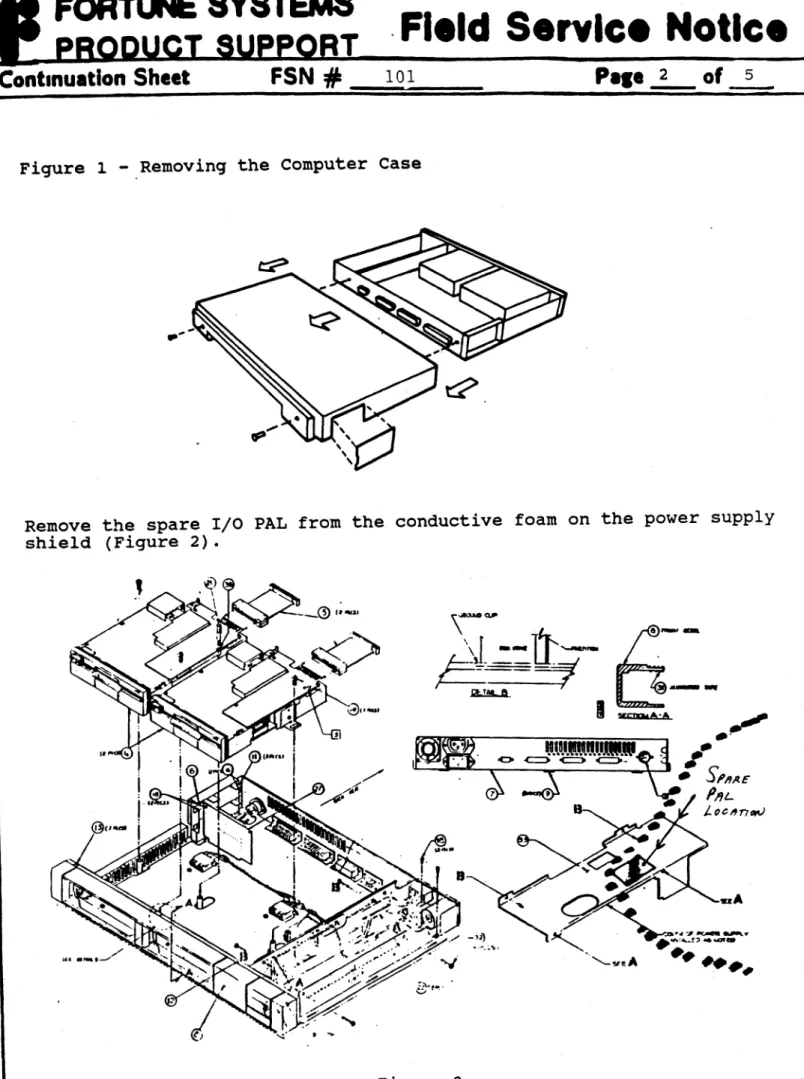
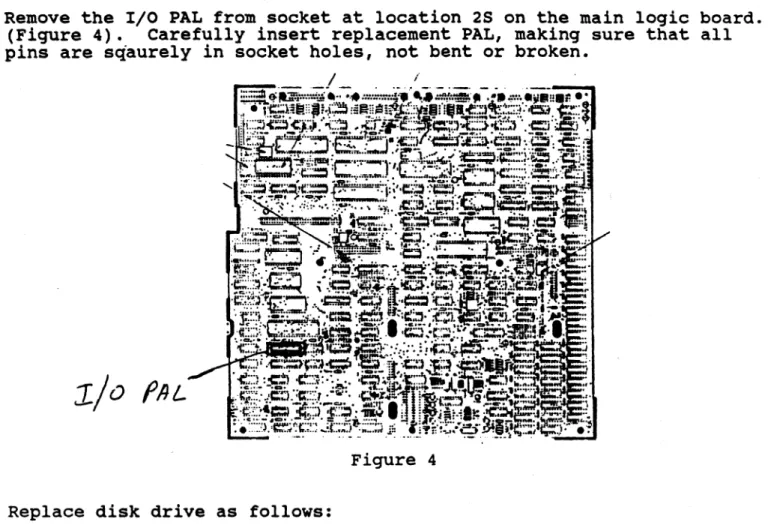
---~~~---PROBLEM: A failing motherboard I/O pal which shows up most often in systems with fully loaded option slots. The failure will appear in the following two areas:
1. System Clock Circuitry:
Upon bringing up the system from power on, the system may appear to be completely dead. Also, if you should get as far as the password prompt, keyed characters will not be displayed of course but as more and more characters are keyed in (around 15 or so) all the characters keyed so far will suddenly
display as a block. The system will then go into lock-up condition.
2. System Display Errors:
These may show up as: Displaying a different character than the one keyed: dropping characters, or most commonly:
recognizing in duplicate the last character keyed.
***
THIS PROBLEM HAS BEEN RESOLVED ON ALL l~OTHERBOARDS AT REV. 10 AND ABOVE.---~---~---~---~---.---SOL~ION: Physically inspect the manufacturer type code on the 1/0 pal at location 19£ on the motherboarq. Yes, it will be necessary to remove the disk module base plate assembly first. If you are experiencing p~oblems as described above you will most likely find a pal with the manufacturers code of AND installed. After peeling back the sticky label on top of the 'chips, reference the diagrams below for a facsimile of what the logos look like. Order and replace this pal with one made by
RBI,
part number 1000226-01. When ordering, don't forget to specify IIMI I/O pa1as thedescription of the part.
---~---~.~---~-~-~--~~~---~-~---~---~-~--~--FORTUNE SYSTEMS CORP. 101 TWIN DOLPHINS DRIVE REDWOOD CITY, CA 94065
AUTHOR
~<eq~
'!ILIP
FLO. ENG. ; / ///,,:,~/' _. :.-' (' ;-APPROVEDij'",,",j /:.-- . IIL/~ HOW. ENG. I ' ( l . ',; I • . '.
APPROVED I '-: I '--".''::. ( = -)
I
-.l::....1 ;:'
.~;SFT.ENG. M