SERIES 60 (LEVEL 68)
SOFTWARE
MULTICS COBOL USER'S GUIDE
SUBJECT
Information Concerning Efficient Techniques for Using Multics COBOL
SPECIAL INSTRUCTIONS
This manual supersedes AS43, Rev. 0, which has been extensively revised. Marginal change indicators have been omitted.
SOFrNARESUPPORTED
Multics Software Release 6.0
Includes update pages issued as Addendum A in April 1978.
ORDER NUMBER
AS43,Rev.1 December 1976
PREFACE
This manual is a supplement to the Multics COBOL Reference Manual, Order No. AS44.
Section I provides an introduction to the contents of this manual and lists terms the Multics COBOL user must understand before using this manual.
Section II explains how a COBOL source program is created on Multics.
Section III discusses in detail the COBOL compiler, its available options, and its output.
Section IV shows how COBOL source 1/0 statements interface and interact with the Multics 1/0 system.
Section V describes the run-time environment of a COBOL program.
Section VI discusses the use of the Multics symbolic debugging facilities with a COBOL program, explains the general procedure used for reporting run-time errors, and shows various ways of dealing with these errors.
Section VII contains suggestions for achieving most efficient use of Multics COBOL.
Section VIII describes the design of the runtime package that supports the ANSI COBOL-74 Communication Module.
Symbolic notations used to describe general source language formats within this manual are as follows. Brackets [ ] enclose portions of a general format that may be included or omitted at the user's discretion. Braces { } enclosing a portion of a general format indicate that an option contained within the braces must be selected. Choice indicators, {: :}, enclosing a portion of a general format mean that a selection of one or more of the options contained within the choice indicators must be made, but the same sequence of words cannot be chosen more than once in that entry or statement. The ellipsis represents an optional repetition of the preceding term. Components of a format description that refer to a set of possible values rather than to a value itself are given descriptive names enclosed in angle brackets
<
>.
Optional command arguments are enclosed in braces (e.g., {path}, {-control args}). All other arguments are required. Control arguments are identified in the usage line with a leading hyphen (e.g., -control arg) simply as a reminder that all control arguments must be preceded by a hyphen in the actual invocation of the command. To indicate that a command accepts more than one of a specific argument, an "s" is added to the argument name (e.g., paths, -control args). See the MPM Commands, Section 3 introduction, for a complete descriptIon of the command description format.
© 1978, Honeywell Information Systems Inc. File No.: 1L23
The set of values constituting permissible values of path, -control_args are defined (informally) at some point in this manual.
and
I
When a sequence of lines representing interactive communication between the user and Multics is given, the following conventions illustrate the nature of the interaction: all lines are indented, lines the user types are preceded by the exclamation mark (!), and those the system prints stand alone.
I
Parenthesized information on the right side of a line constitutes additional commentary concerning the particular line. For example:edm progname.cobol
Edit. (segment already exists)
q (to return to command level)
r 2314 1.007 1.567 18
COBOL key words may be written in uppercase or lowercase letters in the source program, but they always appear in uppercase in the text of this manual. Multics key words (i.e., command names and control arguments) must be given in lowercase.
In this manual many references are made to commands; some are described in detail, while others are mentioned only in passing. Any key word termed a command refers to a standard Multics command generally available to the Multics user at command level. Most commands have both a long and abbreviated form. Only the long, more descriptive name is given.
Some Multics subroutines are also referenced. These are not normally called from command level, as they often require noncharacter-string,arguments. By convention, Multics subroutines have a name ending with the underscore character; e.g., print_cobol_error .
A full description of standard commands is available in the Multics Programmers' Manual, Commands and Active Functions, Order No. AG92. Subroutines are described in the Multics Programmers' Manual, Subroutines, Order No. AG93. These references are given here to avoid repetitive references with the mention of each command and subroutine in the text. Further references to the Multics Programmers' Manual are abbreviated to MPM ..
Primary reference for user and subsystem programming on the Multics system is contained in five manuals that are collectively referred to as the MPM. Throughout this manual, references are frequently made to the MPM. For convenience, these references will be as follows:
04/78
Document
Reference Guide (Order No. AG91)
Commands and Active Functions (Order No-:-i\G92)
Subroutines (Order No. AG93)
Subsystem Writers' Guide (Order No. AK92)
Peripheral Input/Output (Order No. AX49)
iii
Referred To In Text As
MPM Reference Guide
MPM Commands
MPM Subroutines
MPM Subsystem Writers' Guide
MPM 1/0
AS43A
ACKNOWLEDGMENT
This acknowledgment has been reproduced from the CODASYL COBOL Journal of Development 1976, as requested in that publication, prepared and published by the CODASYL Programming Language Committee.
"Any organization interested in reproducing the COBOL report and specifications in whole or in part, using ideas from this report as the basis for an instruction manual or for any other purpose, is free to do so. However, all such organizations are requested to reproduce the following acknowledgment paragraphs in their entirety as part of the preface to any such publication. Any organization using a short passage from this document, such as in a book review, is requested to mention "COBOL" in acknowledgment of the source, but need not quote the acknowledgment.
12/79
COBOL is an industry language and is not the property of any company or group of companies, or of any organization or group of organizations.
No warranty, expressed or implied, is made by any contributor or by the CODASYL Programming Language Committee as to the accuracy and functioning of the programming system and language. Moreover, no responsibility is assumed by any contributor, or by the committee, in connection therewith.
The authors and copyright material used herein
holders of the copyrighted
FLOW-MATIC (trademark of Sperry Rand Corporation), Programming for the Univac (R) I and II, Data Automation Systems copyr ighted 1958, 1959, by Sperry Rand Corporation; IBM Commercial Translator Form No. F 28-8013, copyrighted 1959 by IBM; FACT, DSI 27A5260-2760, copyrighted 1960 by Minneapolis-Honeywell
have specifically author~zed the use of this material in whole or in part, in the COBOL specifications. Such authorization extends to the reproduction and use of COBOL specifications in programming manuals or similar publications."
Section I
Section II
Section III
7/81
CONTENTS
Introduction
COBOL Source Program
Source Segment . . . .
Creating a COBOL Source Segment . . . . COBOL Reference Format . . . .
Fixed Format on Multics . . . . Conversion Considerations Nonexistent Areas . . . .
Alternate Terminal-Oriented For~at
Free-Form Format Definition . . . Permanent Translation
COBOL Source Code . . . . Use of Non-COBOL Characters . . Capitalization Considerations .
Special Characters in Nonnumeric Literals Escape Convention . . . . . Control Division . . . . . .
Sign Control . . . .
Usage Control . . . . .
Precision Control . . . . Descriptor Control
COBOL Library Facility . . Definition of a Library . .
Dynamic Nature of the Library . . . . Format Restriction for Library Text . Text Comparison and Replacement . Auxiliary Commands . . . . .
expand cobol source, ecs
Compiling the COBOL Program . . . . Invoking the Compiler
Source Errors . . . . . Diagnostic Format . .
Controlling Terminal Output . Severity Control . . . .
Suppression of Warnings and Fatal Errors . . . . Reporting Observations . . . . Unrecoverable Errors
Repetition Control Leveling . . . . .
List Header . . . .
Source Listing . . . . . DATE-COMPILED Paragraph Cross-Reference Listing .
Usage
Allocation .
Object ~ap . . . . . Object Listing . . . . .
Additional Compiler Arguments . . . . Object Code Suppression . .
Run-Time Error Checking . . . . . Parameter Validation . . . . Subscript Range Checking . .
v Pap.e 1-1 2-1 2-1 2-2 2-3 2-3
2-3
2-4 2-5 2-5 2-6 2-6 2-7 2-8 2-9 2-9 2-11 2-11 2--11 2-12 2-12 2-12. 1 2-12. 1 2-12.22-13
2-13 2-17 2-173-1
3-1
3-23-2
3-33-3
3-4
3-4
3-4
3-5
3-5
3-5.i 3-6 3-6 3-73-8
3-8
3-9 3-10 3-10. 1Section IV
7/81
CONTENTS (cont)
String Range Checking
Index Integrity Verification Source Transformations . . . . . Run-Time Performance Measurement . . . . Source Level Debugging Requirements
Allocation for Temporary Compile-Time Files . . . . Compiler Development and Testing
Facilities . . . . Argument Summary
Object Segment . . . . Segment Creation
Object Segment Format . Text Section . . . Definition Section . . Linkage. Section
Symbol Section . . .
Compiler Characteristics . . . . . Reentrancy . . . .
Command Line Considerations Ordering of Arguments
Multiple Compilations . . . . Online Documentation
Input/Output Processing .
Terminal I/O . . . . Accepting Data . . . . . . . Displaying Data . . . . Performing COBOL I/O on Multics
Opening a File . . . .
Transmitting Data . . . . Closing a File . . . . .
File Characteristics and Device Independence
File Sharing . . . .
Scope of Files . . . . Attaching from Command Level
Implications for the OPEN and CLOSE Verbs Defining a File . . . .
File Selection - SELECT Clause . . . . . File Structure·.
Organization Access Mode • . Record Format Keys . . . .
Record Key . . . . Relative Key
I/O Switch Assignment . . . . EXTERNAL Attribute
Internal-file-name . . . . . Device Specification
File Status . . . . .
Supplementary Options - APPLY Clause Temporary Files . . . . . . . . . Attachment Control . . . . . . . . Explicit Attach Specification . . . . Tape Attachment Specialization .
Record Description - FD Entry . . Value of Catalog-Name is Clause Virtual Hemory Files . . . Tape Files . . . . Variable-Length Records .
Declarative Procedures . . Print Files . . . . .
Page and Line Control . .
vi Page 3-12.2 3-12.2 3-11 3-13 3-13. 1
3-13. i
Section V
Section VI
7/81
CONTENTS (cont)
File Opening Modes . . . . .
Implementation Specifics . . . . . . File State Rlock . . . .
File Activity Recording. . . . . . File Organization and Structure . . . .
Sequential Files . . . . Relative Fiies . . . .
Sequential Mode . . . .
Random Mode . . . .
Dynamic Mode . . . . Indexed Files . . . .
Sequential Mode . . . .
Random Mode . . . . Dynamic Mode . . Example . . . .
Executing a COBOL Program
Referencing an Object Segment Resolving External References
Multics Environment . Search Rules . Dynamic Linking . .
Binding . . . . Program Execution from Command Level COBOL Run-Unit . . . .
Run-Unit Definition . . . . Run-Unit Related Statements . .
STOP RUN Statement . . EXIT PROGRAM Statement .
CANCEL Statement . . . . . Auxiliary Commands . . . .
run cobol Command . . . . .
stop cobol run Command . . . . . cancel cobol program Command . . . . . display cobol run unit Command
Aspects of the Run-Time-Environment . . . . STOP <literal> Statement . . . . External Switches . . . .
COBOL Segmentation . . . . Improper Program Termination COBOL Data . . . .
Data Types . . . . Unsigned Display Data
Separate Sign Display Data .
Nonseparate Sign Display Data . . . . Packed Decimal Data
Binary Data . . . . . Data Allocation . . . . Interprogram Communication Aggregate Data . . . . Implementation Specifics
Run-Unit Control .
Data Addressability . . .
Error Processing and Debugging . . . . Symbolic Debugging . . . . .
Monitoring Program Execution
Displaying and Modifying Data . . . . Character-String Data (display)
Packed Decimal Data (CO~P, COMP-5, COMP-8) . . . . Binary Data (COMP-6, COMP-7) . . . . . Run-Time Errors . . . . . . . . .
Anticipated Errors . . . .
Section VII
Section VIII
Section IX
7/S1
CONTENTS (cont)
1/0 Errors . . . . print cobol error Subroutine. SIZE ERROR OptIon
Unanticipated Errors . . . .
Efficiency Considerations Program Size . . . . Data Definition
1/0 Considerations . . . Use of Numeric Data Types Use of the Inspect Statement . Miscellaneous Considerations . Measuring a Program's Performance
COBOL Message Control System . . . . References . ." .
Terminology . . . .
Design Concepts . . . . COBOL MCS Queue Organization
Overview of CMCS Data Bases Administrative Functions . .
CMCS Administrator
Message Processing Operation Daemon Message Processor . .
System Administrator Actions Project Administrator Actions . Operator Actions . . . . User Commands . . . . . . . . .
cobol mcs, cmcs . . cobol mci admin, cmcsa
cv cmcs station ctl . . . . cv-cmcs-terminaI ctl .
cv-cmcs-tree ctl- . .
File Ordering -- Sort and Merge Concepts . . . .
Sorting . . . . Sort Statement
Merging . . . . Merge Statement
Ordering . . . . Program Organization
Sort Statement . . . . . Sort File . . . .
Sort Key Declarations . . . . Variable-Length Records
Dominant Record Length .
Sort Key Evaluation . . . . • . . Sort Input Processing . .
Using Option . . I . • •
Input Procedure Option RELEASE Statement .
Giving Option . . . . Output Procedure Option RETURN Statement . . . . . Sort Operational Considerations
Flow of Control . . . . Sort Examples . . . .
Merge Statement . . . . The Merge File . . . .
Merge Key Declarations
Variable-Length Records . . . . Merge Key Evaluation
Merge Input Processing
Section X
Section XI
Appendix A
Index
Figure 9-1.
Figure 9-2. Figure 9-3.
Figure 9-4. Figure 9-5.
Table 2-1. Table 2-2. Table 3-1.
Table 3-2.
Table 3-3.
Table 4-1. Table 4-2.
7/81
CONTENTS (cont)
Merge Output Processing . . . . Giving Option . . . .
Output Procedure Option
RETURN Statement . . . . Merge Operational Considerations .
Flow of Control . Merge Examples Work Requirements
Sort Work Files . . . . .
Process Directory Work Files . . . . Running COBOL Programs with the SORT
Statement . . . .
Page 9-13 9-13 9-13 9-14 9-14 9-14 9-16 9-17 9-17 9-17 9-18
Debug Facility . . . .
Description of the Debug Facility Example of the Debug Facility
10-1 . . . 10-1 . . . . 10-1
Report Writer.. . . . . 11-1
Description of the Report Writer. . . 11-1 Report Format. . . . . . . . 11-1
Report Control in the Procedure Division 11-2 Skeletal Format for the Report Section . 11-tl
RD Entries . . . 11-5
Report Group Entries . . . 11-5
Elements of a Report. . . 11-6
Report Groups . . . 11-6
Control Data Items . . . . 11-7 File Characteristics . . . . 11-B
Line Counter . . . 11-8 Page Counter . . . . . . . . . . 11:-9
SUM Counter Manipulation 11-9
Subtotalling . . . Rolling Forward Crossfooting . Producing A Report .
Report Command
Order of COBOL 30urce Program . .
ILLUSTRATIONS
Sort Program Organization . . . . Merge Program Organization . . . . Sort Input Procedure Organization .
1 1 1 f'\
• 1 1 -IV
· 11-10 · 11-11 · 11-12 . . . . 11-12
A-l
i-1
Sort Output Procedure Organization . . . . Merge Output Procedure Organization
9-4 9-~ 9-9 9-10 9-15 TABLES
Fixed Format Areas . . . .
Escape Convention . . . . Diagnostic Severity Levels
Summary of List Arguments . . . . . Summary of Compiler Control Arguments . Multics 1/0 Modules . . . .
File Organization . . . .
Table 4-3. Table 5-1. Table 5-2. Table 5-3. Table 5-4.
7/81
CONTENTS (cont)
File Opening Modes • . . . . COBOL Data Types . . . . Display Data Digit Encoding . . Display Separate Sign Encoding . . Display Nonseparate Sign Encoding
x
Page
4-28 5-18 5-19 5-20 5-21
AS43E
SECTION I
INTRODUCTION
This manual provides information that enables the COBOL programmer to create new programs on Multics and to convert existing programs to run efficiently. The user is assumed to possess a basic knowledge of the COBOL language and some familiarity with the essential ideas, terminology, and usage of the Multics system. Specifically, he should understand the following terms:
Directory structure:
pathname directory segment link
access mode
access control list (ACL)
Interactive control:
command processor command level ready message quit and restart
Processing environment:
process user stack
process directory working directory
File system:
file
1/0 switch 1/0 module attach
If necessary, review the appropriate sections of the MPM Reference Guide.
This manual explains in detail those aspects of the COBOL language that interface with or are dependent on the Multics system. Particular attention is given to the inte~pretation of the various paragraphs of the Environment Division, since this is the system-dependent component of the COBOL program.
This manual deals specifically with the meaning files in the Multics virtual memory system. It environment of the COBOL run-unit and the effects execution of a modular run-unit and describes certain that give the user supplemental information and Finally, error processing and recovery are discussed.
1-2
of device-oriented COBOL discusses the run-time of dynamic linking on the COBOL-oriented commands control over the run-unit.
SECTION II
COBOL SOURCE PROGRAM
This section explains the manner in which a COBOL source program is created on Multics. Uppercase, lowercase, and character set usage are discussed. Also, the COBOL card-oriented reference format is described, and an alternate, terminal-oriented format is presented. Such matters as the effect of the newline character and trailing spaces on nonnumeric literals and a source-level escape convention for nonprinting characters are explained. Finally, the COBOL library facility is defined in terms of the Multics storage system.
SOURCE SEGMENT
The source program is defined as a syntactically correct set of COBOL statements and serves as input to the COBOL compiler. It is contained in a segment that must have a name of the form:
<program name>.cobol
where <program name) corresponds to ~ne name soecified in the PROGRAM-ID paragraph of the Identification Division. The source segment may be created and modified by using any of the text editors available on the Multics system. Complete descriptions of the edm and qedx text editors can be found in the MPM Commands manual.
I
I
•
I
I
CREATING A COBOL SOURCE SEGMENT
To create a COBOL program named time-and-date that displays the time and date on the user's terminal, the user could invoke the qedx text edi tor to create a source segment named time-and-date.cobol as follows:
qedx a
\ f
(invoke the editor)
(enter append mode)
IDENTIFICATION DIVISION. PROGRAM-ID. time-and-date. ENVIRONMENT DIVISION.
CONFIGURATION SECTION. source-computer. Multics. object-computer. Multics. DATA DIVISION.
WORKING-STORAGE SECTION. 01 time-out pic 99B99b99pp. 01 DATE-OUT PIC xeS).
01 date-in. 02 yy pic 99. 02 mm pic 99. 02 dd pic 99. PROCEDURE DIVISION.
begin. accept date-in from date.
string mm
"I"
dd"I"
yy delimited by size into date-out. accept time-out from time.inspect time-out replacing all spaces by":". display "Time: " time-out" Date:" date-out. exit program.
w time-and-date.cobol (create the segment) (return control)
q
r 1445 2.110 11.020 20S (system ready for next command)
At this point, the source program exists in a permanent segment in the user's working directory and is ready to be compiled. Another invocation of a text editor may be made to further alter the program contents. For example, the following editing sequence could be employed if the user decided to separate the hours,minutes, and seconds by commas instead of colons:
qedx (invoke the editor)
r time-and-date.cobol (segment to be edited)
1:1 (locate line containing colon)
inspect time-out replacing all spaces by":".
s/:/,1 p (change the colon to a comma and print results)
inspect time-out replacing all spaces by",".
w (permanently change the segment)
q
r
1447 1.773 3.747 47
(system ready for next command)The source segment time-and-date.cobol is again ready to be compiled.
COBOL REFERENCE FORMAT
The COBOL language is specified in terms of a reference format that divides input source lines into areas. These areas control the interpretation of certain words and characters and exert constraints on the placement of certain constructs. For example, a hyphen in the Indicator Area has a different meaning than a hyphen appearing elsewhere, whereas division and procedure names are required to begin in Area A (defined below).
Fixed Format on Multics
The source program consists of a stream of characters divided into lines. Each line is variable in length and is delimited by a newline character (012 octal). The newline character itself is never considered part of the line.
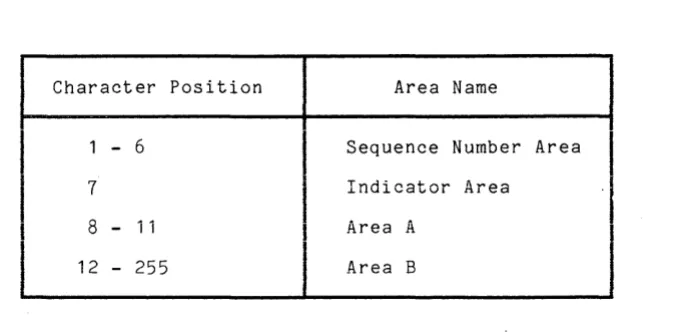
The reference format of a COBOL source program is described in terms of character positions on a line, traditionally corresponding to columns on an 80-column card. The COBOL language itself is sensitive to areas defined by such column positions. For Multics COBOL, these are defined in Table 2-1.
Table 2-1. Fixed Format Areas
Character Position Area Name
- 6 Sequence Number Area
7
Indicator Area8 - 11 Area A
12 - 255 Area B
CONVERSION CONSIDERATIONS
Because any line may be of length 0 to 255 inclusive, all of the areas are of variable length. Additionally, since the positioning of the newline character determines the length of Area B, no right-hand margin exists in which comments may appear. Often, with card-oriented reference formats, Area B has a fixed length, extending from positions 12 through 72, thus allowing an
I
eight-character right-hand margin for comments. Modifications must be made to existing programs that assume such a format. Also, for space considerations, trailing blanks that are left over after a card deck is converted to a Multics segment should be eliminated except where they are meaningful (as in continued nonnumeric literals; see "Special Characters in Nonnumeric Literals" below). [image:15.613.161.502.318.484.2]NONEXISTENT AREAS
Area B is always variable in length. If the total line length is less than twelve, Area B is considered nonexistent, i.e., as a zero-length (or null) string of characters.
If the line length is less than eleven, Area A is assumed to contain the characters starting at position eight and extending to the end of the line, ro~~owea DY as many blanks as necessary to total four characters. In this case Area B is nonexistent.
The Indicator Area may contain one of the following characters: ~ (blank),
*, /, or d. Any other value in this area is ignored and treated as though it
were a blank with a warning message issued during comDilation. If the total line length is less than seven, the Indicator Area is assumed to contain a b18nk character.
The Se~ue~ce Number Area is normally used for card numbers. Since Multics text editors. are character-stream oriented rather than card-oriented, this~area is usually not of use to COBOL users and may be left blank. All co~piler diagnostic messages as well as run-time error messages refsrring to line numbers use the external line number. This is the actual relative nu~ber of the line in the segment and corresponds to the line number addressed by the text editors. The external line number is shown to~ether with the corresponding line in the output listing if one is produced. COBOL acceDts any value in the Sequence Number Area. If the line length is less than six, the sequence number is taken as the characters specified (if any) followed by as many blanks as necessary to total six characters.
For example, if the input were as follows (with ~ representing the blank character):
~~~~~~~~~~~DISPLAY~"XY~ ~~~~~~-~~~~"~~~
~~~~~~-~~~~" ~~~~~~-~~~~"Z".
Alternate Terminal-Oriented Format
COBOL rules concerning positioning by column number are not well suited to terminal input and tend to cause errors and annoyance for the interactive user. A free-form COBOL spe~ification is available to the user to facilitate creating COBOL programs at the terminal,
FREE-FORM FORMAT DEFINITION
The expand cobol source command (abbreviated ecs) and the -format control
I
argument of the-cobol-command allow the user to enter a COROL source input file in free-form, typically through a terminal, and reformats each source line into the standard COBOL reference forma-to (See Table 2-1, above.) In a C-OBOL source program, statements generally begin in Area B. However, certain entries, such as COBOL-defined division names, section and paragraph names, level indicators, and special level numbers, must begin in Area A. In addition, speci8l characters, such as the asterisk, slash, hyphen, and the letter d, have significant meanings when they appear in the indicator area.If the -format (abbreviated -fmt) option is specified, a temporary internal f i 1 e i s g en era ted i n s u c h a 'm ann e r t hat sou r c e l i n esc 0 n t a i n i n g COR 0 L - d e fin e d names required to begin in Area A are actually interpreted as beginning in Area A. For example, lines beginning with level-numbers 01, 06,77, or 88 are assumed to begin in Area A. Lines beginning with level-numbers 02 through 49 are assumed to be indented seven spaces plus the numeric value of the level-number. ror example, level-number 02 begins at column 9; level-number 05, begins at column 12.
Some special characters force specific interpretation when they begin a free-form source line. The slash denotes a comment line with page ejection; the asterisk, a comment line without page ejection. The hyphen denotes a continuation line. For continuation lines, the remainder of the line following the hyphen is assumed to begin in Area B, since COBOL prohibits use of Area A in this case.
Debugging lines are probably of little interest to Multics COROL users, due to the powerful symbolic debugging facilities available on an interactive basis, but they may be specified in free-form source by beginning the line with d*.
Source lines not beginning with a special character and not containing entries required to begin in Area A are assumed to begin in Area B. Any indentation already existing in the free-form file is thereby maintained relative to column
12. If a list file is produced, source lines appear in reformatted form.
The compiler converts all horizontal tab characters (ASCII 011) that are not contained in nonnumeric literals to spaces. The number of spaces is determined by subtracting the position of the tab character on the source line modulo 10 from 11. In this way, the user can use the tab character, a nonstandard COBOL character, as a forma~ting tool to input his source program.
~f a free-form formatted program is invoked for a compilation and the -format control argument is not specified the compiler treats that source in a free-form manner. However, the following message is produced at the output device.
COBOL~ The -fmt option is assumed since the source file is apparently in free format.
When debugging a COBOL program wi th its source in free-form format the Multics Debugger cannot display the source line. However, all other debugging facilities are available. An easy resolution to this situation is to make a permanent translation of the source.
Users wishing to create a permanent file in reformatted form may achieve identical functionality to that described above by using the format cobol source command. (Refer to the MPM Commands manual.)
PERMANENT TRANSLATION
COBOL source files may be entered and maintained in terminal-oriented format. In this case, the control argument available with the cobol command, -format, indicates to the compiler that the source file is in such a format. Alternately,
I
a program entered through the terminal in this format can be permanently transformed to fixed format by the expand_cobol_source command. The usage of this command is:I
ecs path1 path2where pathi is ~ne path name of the segment containing terminal-oriented source statements (input) and path2 is the pathname of the segment that is to contain the translated fixed format statements (output). Full details are available in
I
this manual.COBOL SOURCE CODE
The basic unit of the COBOL language is the character. The character set used to form COBOL character-strings and separators includes the 26 letters of the alphabet, the 10 numeric digits, and the following 15 special characters:
is +
* /
=
$"
(<
>
Additionally, as an extension to standard COBOL, Multics COBOL allows the use of the lowercase in forming character-strings wherever the rules for their formation allow the use of uppercase. The following paragraphs discuss conditions under whicn uppercase and lowercase letters are treated as distinct characters and the instances where characters not in the COBOL character set are allowed.
Use of Non-COBOL 8haracters
The COBOL source program must consist entirely of characters in the COBOL character set except in the following instances, where any character in the Multics character set (with the exception of the newline character) may be used:
1. In comment lines (denoted by an asterisk in the Indicator Area)
2. In comment-entries of the Identification Division
3. In nonnumeric literals
4. In the internal-file-name specified in the SELECT clause (with the additional exclusion of the hyphen and blank)
The name specified with the PROGRAM-ID clause of the Identification Division and the text name specified in the COpy statement must contain only characters of the COBOL character set used for forming character-strings (i.e., the special characters, used as separators, are not available)~
Although the name of a COBOL program may not contain non-COBOL characters, the program may call another program whose name contains such characters, because the object of a CALL statement is either an alphanumeric variable or literal, both of which may contain any character. Of particular interest is the underscore character that is used extensively in PL/I programming throughout the Multics system. The period often used in the names of Multics segments must never appear in the name of a COBOL source file nor in the <text-name> portion of the name of library text file. Conversely, if a COBOL program is to be declared by a PL/I program, it must not have a name cont~ining the hyphen, for this would violate the syntax of PL/I.
Capitalization Considerations
COBOL source code can generally be written in uppercase, lowercase, or a combination of the two. Uppercase and lowercase letters are interchangeable in key words, variable names, and picture clauses. For example, the following statements are all equivalent:
01 NAME PIC XXBXX. 01 name pic xxbxx. 01 Name PiC xXbXx.
An attempt to define two data items with names differing only in capitalization (e.g., data-item and DATA-ITEtO results in a fatal diagnostic due to duplicate definition. Uppercase and lowercase letters are treated as distinct characters only in the following cases:
1. The contents of a nonnumeric literal maintains its case. Thus, "ABC" is not equal to Habc".
2. The name specified with the PROGRAM-ID clause of the Identification Division maintains its case. For example, a source program with the statement:
3.
4.
PROGRAM-ID. ABC.
is not equivalent to a program with a PROGRAM-ID of abc.
The name specified as the internal-file-name in the maintains its case although the device suffix does not.
select file-name assign to sw_name.1-printer
is equivalent to
select file-name assign to sw_name.1-PRI~~ER
but not equivalent to
select file-name assign to SW_NAME.1-printer
SELECT clause For example:
The text name given with the COpy statement maintains its case. example:
For
COPY ABC.
is not equivalent to
COPY abc.
~ecial Characters in Nonnumeric Literals
Only nonnumeric literals longer than 243 characters need be continued from one line to the next by use of the continuation convention (i.e., a hvphen in the Indicator Area in the following line). When such literals are continued, the actual number of blanks between the rightmost non blank character on the line and the newline character ~re considered part of the literal. Such trailing blanks should be transferred to the begInning of the continued line, because the blanks are not readil~ apparent when the line is printed on the terminal or on the printed listing and the standard Multics terminal 1/0 module normally discards trailing white space (spaces or horizontal tabs).
Escape Convention
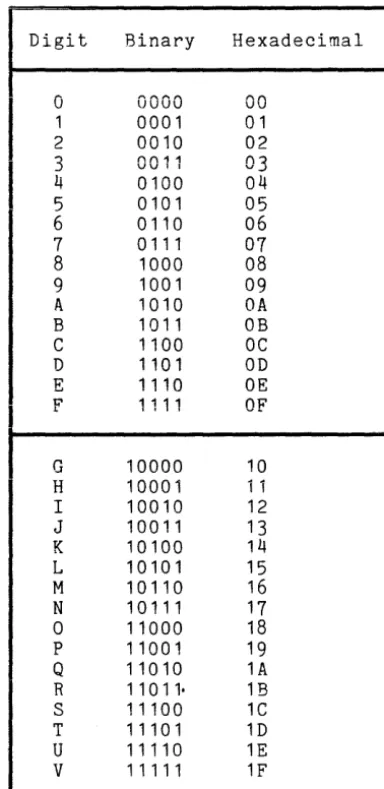
The newline character is not considered part of the source line and is not part of a continued literal. To include the newline character (or any other character) in a nonnumeric literal, a source-level escape convention is available. Any character within a nonnumeric literal :?n be represented by a string of digit pairs enclosed in quotation marks. The values are shown in Table 2-2. The leftmost digit represents the left five bits of the character, and the rightmost digit represents the right four bits of the character. For example, in the literal:
"AX$"3BHC"YZ"
AX$ and YZ represent normal ASCII characters. 3BHC represents the following bit pattern:
OOOii iOii 10001 1100
In Table 2-2, the digits in the top half of the table may be used as either the left or right digit. The lower half may be used only as the left digit.
The newline character in the ASCII character set has the octal value 012 and the hexadecimal value (the escape code) OA. To define a data item one character long having the value of the newline character, the convention used is:
01 newline pic x value ""OA"".
To define the characters "A" and "B" separated by the newline character, the convention used is:
01 A-nl-B pic xxx value "A"OA"B".
Table 2-2. Escape Convention Digit
a
1 2 3 4 5 6 7 8 9 A B C D E 1:' L-G H I J K L M N 0 p Q R S T U V Binary 0000 0001 0010 £'1£'111VV 11
0100 0101 0110 0111 1000 1001 1010 1011 1100 1101 1110 1111 10000 10001 10010 10011 10100 10101 10110 10111 11000 11001 11010 11011· 11100 11101 11110 1 1111 Hexadecimal 00 01 02 (\"2 V...J 04 05 06 07 08 09 OA OB OC OD OE OF 10 1 1 12 13 14 15 16 17 18 19 1A 1B 1C 1D 1E 1F
This convention is geared to the hexadecimal representation of an 8-bit character. A Multics character is nine bits long, and the system escape convention expresses the character as three octal digits preceded by a backslash character (\). For example, the newline character is represented by the characters \012. It is necessary to use the COBOL escape convention only when dealing with the newline character, the only character in a nonnumeric literal to which the compiler is sensitive. Other nonprinting characters can be included in the literal by typing the character itself or by using the Multics escape convention, if compatibility is not a consideration. For example:
01 beep pic x value "\007".
Expressing the newline character in a similar way would result in a fatal compile-time diagnostic.
NOTE: Use this feature only when absolutely necessary. The hexadecimal escape convention may change in future releases of the compiler. Furthermore, changes in future releases may make current programs operate incorrectly.
[image:22.623.201.393.41.436.2]CONTROL DIVISION
Multics COBOL provides an optional Control Division to allow centralized control over certain aspects of the program. The Control Division, when present, is specified immediately before the Identification Division.
Sign Control
Standard COBOL assumes that, unless otherw.ise specified, the operational sign of signed numeric data is associated with some digit positions, rather than occupying a separate character. This convention is not well suited to the Multics hardware and separate sign data should be used whenever possible for efficiency considerations. Sign positioning can be controlled by the SIGN clause in the Data Division entry defining the data in question as follows:
[ DISPLAY SIGN
{
LEADING } ]
[SEPARATE CHARACTER] TRAILING
IS
To avoid adding a SIGN clause for all signed numeric data not already having one, the user may simply specify in the Default Section of the Control Division:
DEFAULT SIGN IS LEADING SEPARATE CHARACTER or
DEFAULT SIGN IS TRAILING SEPARATE CHARACTER
Usage Control
Another useful function provided by the Control Division is controlling the default data type attribute of numeric data defined with the USAGE IS COMPUTATIONAL clause. The default for Multics COBOL COMPUTATIONAL is COMP-5, packed decimal. In some cases, the user may wish to treat computational data as though it were of DISPLAY or some other COMPUTATIONAL usage. To avoid changing the USAGE clauses for all computational data, the user may merely specify in the Default Section of the Control Division:
DEFAULT FOR COMPUTATIONAL IS DISPLAY
This will accomplish the same results. The complete COMPUTATIONAL format is:
[ DEFAULT FOR - - IS
{
COMP }
] COMPUTATIONAL
r
DISPLAY1
COMP-5
-_
... _"',. ... --_...-LoUI"It'U 1 1\ llUN1\L-~
COMP-6
COMPUTATIONAL-6 COMP-7
COMPUTATIONAL-7 COMP-8
COMPUTATIONAL-8
For a complete description of the COMPUTATIONAL clause, refer to the Multics COBOL Reference Manual.
04/78 2-11 AS43A
I
I
I
I
I
I
I
I
Precision Control
In addition, the NUMERIC LIMIT clause allows the user to specify the degree of precision he desires for intermediate results of arithmetic operations. If this clause is omitted, 30 positions are assumed. If an arithmetic result exceeds the size limit, only the specified number of most significant digits are retained.
The NUMERIC LIMIT clause has the following format:
[DEFAULT FOR] NUMERIC LIMIT IS integer-1
Descriptor Control
The GENERATE DESCRIPTOR clause allows the user to specify that either NO descriptors, or one of two types of descriptors are to be generated for CALL statements specifying arguments (via the USING clause).
They are:
1. SCALAR indicates that structures and arrays (tables) are to be described to the called program as a character string redefinition of the area they actually occupy. This is the way the COBOL language deals with such data. This is the default.
2. AGGREGATE indicates that structures and arrays are to be described with information about each individual component. This is the way the PL/I language treats aggregate data.
3.
NO specifies that no descriptors are generated at object time when calls are made.The GENERATE DESCRIPTOR clause has the following format:
{
NO }
SCALAR AGGREGATE
[DEFAULT FOR] GENERATE DESCRIPTORS
The GENERATE AGGREGATE DESCRIPTORS clause is used for the following purposes:
1. To communicate with PL/I program defining parameters with variable array extents.
2. To interface properly with the Multics data base manager MIDS (Multics Integrated Data Store) and MRDS (Multics Relational Data Store) which expects PL/I type descriptors in order to interpret the data passed to them.
The GENERATE NO DESCRIPTORS clause is used to cause efficient execution of the programs in situations where descriptors are not used by the called programs. Keep in mind that a COBOL program never requires that description be passed to it; however in this case, the ~rck option's function of checking parameter validity is disabled. See "Interprogram Communication" in Section 5 for more details.
For a complete description of the GENERATE DESCRIPTORS clause, refer to the MULTICS COBOL Reference Manual.
COBOL LIBRARY FACILITY .
The COBOL source text manipulation fac iIi ties are the COPY and REPLACE statements. These statements are described in the Multics COBOL Reference t-1anual, Order No e AS44. Programs which contain COPY REPLACING or REPLACE statements
must be compiled using the -expand option (see "Source Transformations" in Section I I I of this manual) • Programs which contain only simple COpy statements (i. e., COPY statements without the REPLACING option) need not use the -expand option.
The library facility allows a set (or sets) of source program statements that reside in a source library to be incorporated into a COBOL program. Data descriptions and procedures common to several programs can thus be maintained in only one location (the library) and included in all programs that require them. Multics COBOL supports the COpy statement, which inserts library text into the source program where it is treated by the compiler as a part of the source program.
General Format:
COPY text-name [ { :: } library-name ]
r .
l
REPLACINGr
~
,
l
r
==pseudo-text-1 ==1
r
==pseudo-text-2==11
1
t
identifier-1 literal-1J
BYt
identifier-2 literal-2J J
• • • •J
word-1 - - word-2
Each set of source program statements subject to reference by a COpy statement is called a text item and is referenced by a text-name. Text items may be organized into a single directory or may be distributed among many directories, at the discretion of the user. Each text-name within any given directory must be unique. The COBOL constructs text-name and library are Multics entry names.
I
Definition of a Library
On Hultics, a COBOL library may be defined as a set of segments existing in one or more storage system directories, each of which additionally:
12/79
1. Contains COBOL source code
2. Has a name in the form (text name> .incl.cobol where (text name> must contain characters only of the COBOL character set
3. Is accessible to the process performing the compilation at the time the compilation is being performed
DYNAMIC NATURE OF THE LIBRARY
If the text-name in a COpy statement is not qualified by a library-name, then the library text is located by using the Multics search facility with the
I
"translator" or "tran~" search list. For more information on the Multics searchfacility see add_search_paths in the MPM Commands manual.
If the text-name in a COpy statement is qualified by a library-name, then library-name specifies a Multics directory which must contain the segment:
text-name.incl.cobol
An absolute pathname for the include file is obtained by applying the ~ultics
subroutine
expand_pathname $add_suffix
to the following relative pathname
library-name>text-name
Format Restriction for Library Text
The -format control argument affects only the text in the source program itself, not the library text segments that may be referenced in the source. Thus, library text segments must be in fixed format at the time of compilation. I f such a segment has been created in terminal-oriented format, it must be
conve~ted to fixed format by the expand_cobol_source command before compilation.
i
Text Comparison and Replacement
Source statements may be incorporated into a program intact by using a simple COpy statement, or may be modified as they are incorporated by using the REPLACING phrase of the COPY and the REPLACE statement.
The logic for text comparison and replacement is the same for both COPY ... REPLACING and for REPLACE statements.
The text of a COBOL source program or library text item consists of a sequence of text words where a text word may be:
7/81
a. A separator, except for: a pseudo-text delimiter, and opening and closing delimiters for nonnumeric literals. The right and left parentheses are always considered text words regardless of their context.
b. A literal including, in the case of nonnumeric literals, the opening quotation mark and the closing quotation mark which bound the literal.
c. Any other sequence of contiguous characters except comment lines, bounded by separators, which is neither a separator nor a literal.
Characters recognized as separators are the space (or a series of spaces), the punctuation characters: comma, semicolon, and period (when one is followed by a space), left and right parenthesis, quote, and the pseudo-text delimiter.
Each text-word and each separator, other than a space or a series of spaces, is recognized as a text-unit, and it is on the basis of text-units that comparisons are made for purposes of replacement.
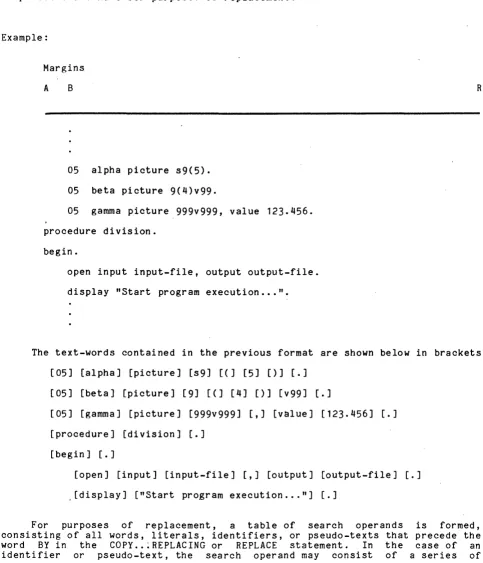
Example:
Margins
A B
05 alpha picture s9(5).
05 beta picture 9(4)v99.
05 gamma ~icture 999v999, value 123.456.
procedure division.
begin.
open input input-file, output output-file.
display "Start program execution ... ".
R
The text-words contained in the previous format are shown below in brackets:
[05] [alpha] [picture] [s9] [(] [5] [)] [.]
[05] [beta] [picture] [9] [(] [4] [)] [v99] [.]
[image:28.613.58.541.167.730.2][05] [gamma] [picture] [999v999] [,] [value] [123.456] [.]
[procedure] [division] [.]
[begin] [.]
[open] [input] [input-file] [,] [output] [output-file] [.]
,[display] ["Start program execution ... "] [.]
For purposes of replacement, a table of search operands is formed, consisting of all words, literals, identifiers, or pseudo-texts that precede the word BY in the COPY .. :REPLACING or REPLACE statement. In the case of an identifier or pseudo-text, the search operand may consist of a series of
text-words. A corresponding table of replacement operands is built consisting
of all words, literals, identifiers, or pseudo-texts that follow the word ay in
the COpy or REPLAC~ statement.
The library text is scanned, text-word by text-word, until a text-word or series of text-words is found that exactly matches one of the search operands.
Except for the very special case where the search operand consists solely of a comma or semicolon, the occurrence of a text-word consisting of a comma or semicolon separator is treated as a single space. For example, the text
, a, b, c' is equal to 'a; b; c' and to 'a- b c' and to 'a b c ' .
The continuation of lines has no effect on comparison. If a line contains a continuation indicator, the partial character-string at the end of the preceding line is simply concatenated with the partial character-string at the beginning of the continuation line, thus forming a complete text-word. For example, the pseudo-text ==add a b giving c== is found to match the following:
Margins
A B R
add a b giv
ing c.
Comment-lines do not affect comparison since a comment-line is treated as a space, which is a separator, but not a text-word. Therefore '0 the pseudo-text ==move a to b c== is found to match the following:
Margins
A B R
move x to y. move a
• This is a comment l1ne.
to b c.
Comparisons are always made on the basis of complete text-words. A partial text-word that happens to match a search operand is not a candidate for replacement. For example, the pseudo-text ==master== does not match either of the following:
Margins
A B R
fd master-file
display "Error on master 7ecord.".
When the search operand is either an subscripting of indexing is expressed, the
02/79 2-15
identifier or pseudo-text in which
presence or absence of spaces has no
AS43B
•
effect on comparison. The construct 'array(m,n)' is logically equivalent to 'array (m, n)'.Once a match is found between one of the search operands and the library text, _the corresponding replacement operand is substituted for the matching text in the library.
If the replacement operand is a single word, literal, an identifier, or pseudo-text wh611y contained within Area B, the replacement operand is simply substituted into the library text at the same position occupied by the text being replaced. If the replacement operand is longer than the text it is replacing, extra lines may be added to the library text.
Sometimes, however, the replacement operand must occupy a specific position within a source line. This is often the case when one or more complete lines of text are being substituted and they contain a level indicator or a paragraph-name that must begin in Area A, or when comment-lines are being inserted. In such cases, the replacement operand (pseudo-text-2) must be positioned with respect to standard COBOL reference format exactly as it.is to appear in the resulting source program.
AUXILIARY COMMANDS
The expand cobol source command applies a transformation to a COBOL source program. The nature of the source transformation is defined by control arguments. If no control argument is given, then a segment containing text of a standard format COBOL source program which possibly contains COpy and REPLACE statements is translated into an equivalent source program not containing these statements.
expand_cobol source oldpath {newpath} {-control_args}
where:
1. oldpath
is the pathname of the input segment. If the path does not have a suffix of .cobol, one is assumed. However the suffix .cobol must be the last component of the name of the source segment.
2. newpath
is the pathname of the output segment~ If the path does not h~ve a suffix of .cobol then one is assumed. If this argument is omitted then the translated segment is in the form of the first component with the suffix .ex.cobol.
3.
control args, can be selected from the following:
-format, -fmt
a pseudo free-form COBOL source program is translated into a standard fixed format COBOL source program. All characters in the source program are left exactly as typed.
-upper case, -uc
translation to standard fixed format occurs as descri bed for the argument, -format. All characters except for those in alphanumeric literals are converted to uppercase.
-lower case, -lc
-card
translation to standard fixed format. occurs as described for the argument, -format. All characters except for those in alphanumeric literals are converted to lowercase.
meaningless trailing blanks are del~ted from a standard fixed format COBOL source program in card-image format. Characters in the identification field (columns 73-80) are ignored.
-expand, -exp
a standard fixed format COBOL source program which possibly contains COpy and REPLACE statements is translated into an equivalent source program not containing these statements. This argument is the default.
-no e~pand, -no exp
- COpy and REPLACE statements in a standard fixed format COBOL source program are not translated.
The control arguments -format, -upper case and -lower case cause a pseudo free-form COBOL source program to be translated into an - equivalent standard
I
fixed format COBOL source program. They may be used in combination with the control argument -expand but are inconsistent with the control argument -card. They should not be used if the source program is already in standard fixedformat.
The control argument -card causes a standard fixed format COBOL source program in card image format to be translated into an equivalent standard fixed form~t program. Meaningless trailing blanks are deleted from each line in the source program. If a line is exactly 80 characters long then the identification field (columns
73 -
80) is deleted before removing meaningless trailing blanks. This argument may be used in combination with the control argument -expand but is inconsistent with the control arguments -format, -upper case and -lower case.The argument -expand causes a standard fixed format COBOL source program possibly containing COpy and REPLACE statements to be translated into an equivalent standard fixed format program not containing these statements. The argument may be used in combination with the control arguments -format, -upper case, -lower case and -card. Expansion of COPY and REPLACE statements will take place unless the argument -no_expand is present. This argument is the default for the command.
SECTION
COMPILING THE COBOL PROGRAM
Once a source program is available in a properly named segment and all library text segments referenced by the program exist in one or more directories specified in the current translator search rules, the source program may be compiled. This section discusses in detail the COBOL compiler, its available control arguments, and its output.
INVOKING THE COMPILER
The COBOL compiler is invoked by using the following command:
cobol path {-control args}
where path is the pathname of the source segment that is to be translated by the COBOL compiler. If path does not have a suffix of cobol, then one is assumed. However, the suffix cobol must be the last component of the name of the source segment. For example, typing:
cobol )udd)PROJ)Smith)time-and-date.cobol
causes compilation of the source program contained in the segment named time-and-date.cobol that is contained (or linked to) in the directory )udd)PROJ)Smith. Since the source segment is required to have a name in the form <program name).cobol, it is not necessary to specify the language suffix explicitly. Typing the command:
cobol time-and-date
causes compilation of the source segment time-and-date.cobol which, in this case, must exist in the current working directory.
Once the compiler is invoked, it confirms the existence of the named source segment and the validity of any specified options. After doing so, it prints the response message:
COBOL
indicating that compilation has commenced.
The <phase-diag number> actually contains a breakdown of <phase number> and <diag number> where the phases of the compiler are abbreviated as follows:
Phase Number
04118
2
3
5
6
8
L
Phase Abb.
LEX
IDED DDA
DD
PD
REPL
CaRR
LEVEL
Description
Separates the source program into COBOL elements
Identification and Environment Division processing, and Data Division and Allocation
Data Division processing
Procedure Division processing
Matches user words in the Procedure Division with definitions from the Data Division
Corresponding processing
FIPS Leveling processing
SOURCE ERRORS
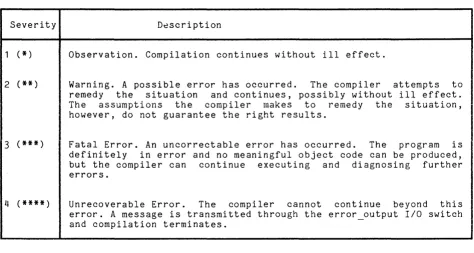
The compiler diagnoses source program errors of various levels of severity: observations, warnings, fatal errors, and unrecoverable errors. Each is described in Table 3-1.
Table 3-i. Diagnostic Severity
Severity D~scription
1 (*) Observation. Compilation continues without ill effect.
2 (**) Warning. A possible error has occurred. The compiler attempts to remedy the situation and continues, possibly without ill effect. The assumptions the compiler makes to remedy the situation, however, do not guarantee the right results.
3
(***)
Fatal Error. An uncorrectable error has occurred. The program is definitely in error and no meaningful object code can be produced, but the compiler can continue executing and diagnosing further errors.4
(****)
Unrecoverable Error. The compiler cannot continue beyond this error. A message is transmitted through the error_output 1/0 switch and compilation terminates.Diagnostic Format
Diagnostics are printed on the message. Each diagnostic along with following format:
terminal immediately following the response the associated source line is given in the
<external line number> <source line image> <error indicator> ...
I
<severity indicator> <error indicator> <phase-diag number> <diag text>The <external line number> is the relative number of the line in the source segment, the content of which is <source' line image>, including the Sequence Number Area. The <error indicator> is a digit used as a pOinter. It is positioned under the word or character of the source line that caused the compiler to determine an error existed. Where more than one error occurs on one line, the digit 1 is positioned under the first incorrect word, 2 under the second, and so on. There would follow as many diagnostic message lines as <error indicator>'s under <source image>. In this way, no source line is ever printed more than once. The <severity indicator> is either
*, **,
or***,
corresponding to severity 1, 2, and 3, respectively. Both <diag number> and <diag text> are explained in examples below.
[image:35.613.70.544.137.390.2]After all diagnostics are printed, the compiler returns to Multics command level. Note: ~o more than 300 diagnostics can be printed on the terrrinal.
In the program time-and-date shown in Section II, if the statement on the sixteenth line contained a misspelling of the variable name "date-in", the following sequence would occur:
cobol time-and-date COBOL
cobol: 16
fatal error encountered in time-and-date begin. accept daye-in from date.
1
***
1 6-2 Data-name not declared cobol: Translation failedr 2359 0.368 2.034 58
The user would again be at command level. If the spelling were corrected, but the period following the paragraph name "begin" on the same line was omitted (a nonfatal error), the following sequence would occur:
cobol time-and-date COBOL
16 begin accept date-in from date. 1
**
1 5-7 PERIOD expected after the previous word r 2359 0.369 2.035 59An object program would be produced in this case.
Controlling Terminal Output
The user can control the type of diagnostics reported and the amount of information printed on the terminal by specifying arguments when the compiler is invoked.
SEVERITY CONTROL
The -severityi control argument (abbreviated -svi) controls the number of diagnostics printed by allowing only those having a specified severity level i or higher to be reported. If this control argument is not specified, -sv2 is assumed as a default, and warnings, fatal errors, and unrecoverable errors are reported. This argument has no effect on the list file, if one is produced, which includes all diagnostics. See "List File," below.
04/78 3-3 AS43A
I
Suppression of Warnings and Fatal Errors
It is sometimes desirable to suppress warning messages. Some COBOL programs may contain such messages, yet still run correctly as programmed. To suppress these messages, the user types:
cobol warningful -sv3
where warningful.cobol is such a program.
Even fatal errors can be suppressed by specifying the control argument -sv4. A message is issued indicating that no object segment is produced if fatal errors are encountered. The user can refer to the list file to determine the errors that were detected.
Reporting Observations
Observations are not normally displayed on the terminal. They exist only
in the list segment. Often, such observations involve the moving of data from
one field to a shorter field (causing truncation) or the moving of a signed value to an unsigned numeric field (causing loss of sign).
To print observations on the terminal, the user must override the compiler's default action by specifying the -sv1 control argument.
Unrecoverable Errors
Unrecoverable errors occur when the compiler reaches an internally inconsistent or unexpected state during execution. The diagnostic issued in these cases has a special format with the phase or module discovering the condition usually identified, along with a descriptive message. This type of error should not normally occur. If it does, the error should be reported as a compiler bug. By eliminating some sequence of invalid source code, the user can circumvent such errors.
When an unrecoverable error occurs, compilation is immediately terminated. The maximum value of i in the -svi control argument is 4; -sv4 indicates only unrecoverable errors are to be reported.