The Conductor Interaction Method: Interacting
using Hand Gestures and Gaze
Dorothy Katharine Rachovides
Submitted for the degree of Doctor of Philosophy
Department of Computing
Lancaster University
UK
ProQuest Number: 11003567
All rights reserved
INFORMATION TO ALL USERS
The qu ality of this repro d u ctio n is d e p e n d e n t upon the q u ality of the copy subm itted.
In the unlikely e v e n t that the a u th o r did not send a c o m p le te m anuscript and there are missing pages, these will be note d . Also, if m aterial had to be rem oved,
a n o te will in d ica te the deletion.
uest
ProQuest 11003567
Published by ProQuest LLC(2018). C op yrig ht of the Dissertation is held by the Author.
All rights reserved.
This work is protected against unauthorized copying under Title 17, United States C o d e M icroform Edition © ProQuest LLC.
ProQuest LLC.
789 East Eisenhower Parkway P.O. Box 1346
Acknowledgements
I would like to thank all those who have helped me during the production of this thesis. In particular, I would like to thank my supervisor Alan Parkes, for his patience and his always- constructive criticism, which were crucial for getting this thesis completed. I would also like to thank Pete Sawyer for providing valuable feedback on my thesis and John Mariani for his feedback on the prototype. Special thanks to James Walkerdine and Peter Phillips for their valuable help and support over the past few years.
I have made a lot o f friends over the years o f my studies at Lancaster, in particular Zoe, Awais, Rouza, Adam, Paul, Rosemarie, Nelly and James H, thank you for making them enjoyable.
Declaration
I declare that the work presented in this thesis is, to the best o f my knowledge and belief, original and my own work. The material has not been submitted, either in whole or part, for a degree at his or any other university.
Abstract
The Conductor Interaction Method: Interacting using Hand
Gestures and Gaze
Dorothy Katharine Rachovides
Submitted for the degree of Doctor of Philosophy
Department of Computing, Lancaster University, UK
June,2004
Over the past thirty years computers have increasingly become part o f our everyday lives. Most humans have become computer users in one way or another, since many activities involve either the direct use of a computer or are supported by one. This has prompted research into developing methods and mechanisms to assist humans in interacting with computers (known as Human Computer Interaction or HCI). This research is responsible for the development o f a number of techniques that have been used over the years, some of which are quite old but continue to be used, and some are more recent and still evolving. Many of these interaction techniques, however, are not natural in their use and typically require the user to learn a new means o f interaction. Inconsistencies within these techniques and restrictions they impose on user creativity can also make such interaction techniques difficult to use, especially for novice users.
Published papers related to this work
"Technology, Tools and Creativity", Dorothy Rachovides and Alan P. Parkes, Panel paper at the EPSRC panel session on “Creativity and IT” at the 4th Computers and Creativity Conference, Loughborough, 16 October 2002.
"Metaphors and Multimodal Interaction", Dorothy Rachovides, Zoe Swiderski and Alan Parkes, presented at COSIGN2001, 10-12 September 2001, published in the conference proceedings, pp. 125-128.
" "Multi-modelling" o f Multimodality Interaction", Dorothy Rachovides, Zoe Swiderski,
Alan P. Parkes Workshop on Computational Semiotics for New Media, University o f Surrey, 29-30 June 2000.
TABLE OF CONTENTS
Chapter 1 - Introduction...
1.1 Interacting with computers... 1.2 Failings with existing approaches... 1.3 The Conductor Interaction Method... 1.4 Objectives of the work... 1.5 Novel contributions of this work... 1.6 Structure of the thesis...
Chapter 2 - Interacting with C om puters... .
2.1 Introduction... 2.2 Interacting with the computer... 2.3 Problems with existing interaction techniques... 2.4 Aspects o f Human-Human communication... 2.4.1 Transfer effects and personal space... 2.4.2 Back channels, confirmation and interruption... 2.4.3 Turn-taking... 2.4.4 Discussion... 2.5 Gaze and Eye Contact... 2.5.1 Using Gaze as part of HCI... 2.5.2 Techniques for Gaze based HCI... 2.5.2.1 Techniques based on Reflected Light... 2.5.2.1.1 Comeal and Pupil reflection relationship - Video Oculography (VOG)... 2.5.2.2 Technique based on the electric potential around the eyes... 2.5.2.3 Techniques Based on Contact Lenses... 2.5.2.4 Summary of techniques... 2.5.3 The Midas Touch problem... 2.5.4 Summary... 2.6 Gestures... 2.6.1 Gestures and language... 2.6.2 Using Gestures in HCI... 2.6.3 Techniques for Gesture based H C I...
2.6.3.1 Two-Dimensional Gesture capture techniques... 28
2.6.3.2 Three-Dimensional Gesture capture techniques using physical devices 29 2.6.3.3 Three-Dimensional Gesture capture techniques using Data gloves... 31
2.6.3.4 Three-Dimensional gesture based systems using Computer Vision... 32
2.6.4 Summary... 33
2.7 Discussion... 34
2.8 Chapter summary...35
Chapter 3 - Related W ork... 37
3.1 Introduction... 37
3.2 Gesture only systems... 37
3.2.1 Gscore...37
3.2.2 Digital baton... 38
3.2.3 W orldBeat... 40
3.3 Gaze and head tracking based systems... 41
3.3.1 EagleEyes...42
3.3.2 Head Orientation and Gaze Direction in Meetings... 43
3.3.3 Computer Display Control and Interaction Using Gaze: Visual M ouse... 46
3.4 Multiple Modality based systems...48
3.4.1 Multimodal Natural Dialog...48
3.4.2 Gandalf: An Embodied Humanoid Capable of Real-Time Multimodal Dialogue with People...50
3.4.3 Manual And Gaze Input Cascaded (MAGIC)... 51
3.5 Discussion... 53
3.6 Chapter Summary...54
Chapter 4 - Designing the Conductor Interaction Method and Presentation C onductor... 56
4.1 Introduction... 56
4.2 Metaphors in HCI...56
4.2.1 Metaphor creation... 57
4.2.2 Orchestra Metaphor... 60
4.3 The Conductor Interaction Method... 4.4 An Architecture for The Presentation Conductor... 4.4.1 Overview... 4.4.2 The U ser... 4.4.3 The Interfaces... 4.4.3.1 The Gaze Interface... 4.4.3.2 The Gesture Interface... 4.4.3.3 The Audio/Visual Interface... 4.4.4 The Application...
4.4.4.1 Media Object... 4.4.4.2 Media Gallery... 4.4.4.3 Media Controls... 4.4.4.4 Presentation Definitions... 4.4.4.5 Media Browser... 4.4.4.6 Media E ditor... 4.4.4.7 Presentation Creator... 4.4.4.8 Presentation Player... 4.4.4.9 Media Repository... 4.5 Scenarios of the Presentation Conductor Architecture and
Conductor Interaction Method in use... 4.5.1 Selecting, editing and placing an image and sound clip within the presentation... 4.5.2 Displaying and saving the presentation... 4.5.3 Browsing, loading, and displaying an existing presentation... 4.6 Chapter summary...
Chapter 5 - The Presentation Conductor: an Implementation
o f the Conductor Interaction M ethod...
5.1 Introduction... 5.2 Implementing the Conductor Interaction Method... 5.2.1 Implementing the Conductor M etaphor... 5.2.2 Implementing the Orchestra Metaphor... 5.2.3 Providing two-phased interaction... 5.2.4 Assist in reducing the learning overhead...
5.3 Implementing the Presentation Conductor Application...80
5.3.1 Overview...80
5.3.2 Incorporating the Conductor Interaction Method within the application... 81
5.3.3 Supporting the creation and editing of presentations...83
5.3.3.1 Supporting user browsing of the Media Galleries... 84
5.3.3.2 Editing the Media Objects...85
5.3.3.3 Placing, scheduling and deleting Media Objects...88
5.3.4 Supporting the playing, saving and loading of a presentation... 91
5.3.4.1 Playing a presentation...91
5.3.4.2 Saving a presentation...92
5.3.4.3 Loading a presentation...92
5.4 Chapter Summary...93
Chapter 6 - Evaluating the Conductor Interaction Method through the Presentation Conductor... 95
6.1 Introduction...95
6.2 Motivation for the evaluation... 96
6.3 Evaluation approach...97
6.3.1 Evaluation Structure... 98
6.4 Stage 1: Evaluating the method... 100
6.4.1 Format of sessions...100
6.4.2 Discussion o f sessions... 102
6.4.2.1 The Conductor Interaction Method... 102
6.4.2.2 The M etaphors...104
6.4.2.3 Learning overhead... 106
6.4.2.4 NASA Task Load ratings... 107
6.5 Stage 2: Evaluating the technology... 109
6.5.1 Format of session...110
6.5.2 Discussion of sessions... 111
6.5.2.1 Experiences with the Eye Tracker and G loves...111
6.5.2.2 Experiences with the Large Screen and Gloves...113
6.5.2.3 NASA Task Load ratings... 114
Chapter 7 - Conclusions... 120
7.1 Summary of thesis...120
7.2 Thesis Objectives revisited... 121
7.2.1 Objective 1 ...121
7.2.2 Objective 2 ...122
7.2.3 Objective 3 ...123
7.3 Summary of Contributions... 124
7.4 Further Development...125
7.4.1 Improved method training support...125
7.4.2 Refining the metaphors... 126
7.4.3 Experimenting with different technologies... 126
7.4.4 Investigating different application domains... 127
7.4.5 Further experiments with inexperienced users...128
7.5 Final comments...128
Collected References...129
Appendix A - Interaction Techniques... 140
Appendix B - Eye Tracking T echniques...150
Appendix C - Communicating with gestures... 156
Appendix D - NASA Task Load Index... 164
Appendix E - Q uestionnaires...166
Appendix F - User G uide... 176
List of Figures
Figure 2. 1- Two people engaged in a conversation (picture from
MGM film “Tomorrow Never Dies” 1998)... 15
Figure 2. 2 - Purkinje images (Glenstrup et al., 1995)... 18
Figure 2. 3 - LC technologies eye tracker... 19
Figure 2. 4 : Measurement of electrical potential in saccadic movement of the eyes (Hasset, 1978)... 20
Figure 2. 5 - EagleEyes full screen "spell and speak " (Gips et al., 1996)... 21
Figure 2. 6 - EagleEyes two-level "spell and speak" (Gips et al., 1996)... 22
Figure 2 .1 - Continuum of Gestures (McNeil, 1992)...24
Figure 2. 8 - Phatom (SensAble technologies)... 30
Figure 2. 9 - 5DT Data G love... 31
Figure 2. 10 - Right Hand... 32
Figure 3. 1 - The Digital Baton (Marrin, 1997)... 39
Figure 3. 2 - WorldBeat... 40
Figure 3 . 3 - User with electrodes, ready to use EagleEyes (Gips and Olivieri 1996)... 42
Figure 3 . 4 - Data collection with eye and head tracking system during a meeting (Stiefelhagen et.al. 2002)...44
Figure 3. 5 - Histogram of horizontal gaze direction of two subjects (Stiefelhagen and Zhu 2002)...45
Figure 3. 6- ASL eye tracker setup for Visual Mouse (Farid et al. 2002)...46
Figure 3. 7- Multiple Video streams in Browser for use with Visual Mouse (Farid et. al. 2002)...48
Figure 3. 8 - Rotating a block (from Bolt and Herranz, 1992)... 49
Figure 3. 9 - A user gets ready to interact with Gandalf... 50
Figure 3. 10- MAGIC: the liberal approach taken from Zhai et al. (1999)... 52
Figure 3 . 1 1 - MAGIC : the conservative approach taken from Zhai et al. (1999)...52
Figure 4. 1 - The Orchestral Metaphor...60
Figure 4. 2 - The Presentation Conductor Architecture...65
Figure 5 . 1 - Capturing and recognising gestures within the Conductor metaphor...76
Figure 5 . 3 - The implementation of the Orchestra metaphor used with the Presentation
Conductor... 78
Figure 5. 4 - How two-phased interaction has been implemented... 79
Figure 5 . 5 - Using gaze to select a Media Gallery... 84
Figure 5 . 6 - Using gestures to browse a Media Gallery... 85
Figure 5 . 7 - The Media Editor... 86
Figure 5 . 8 - Using the Media Editor to manipulate the properties of a Media O bject... 87
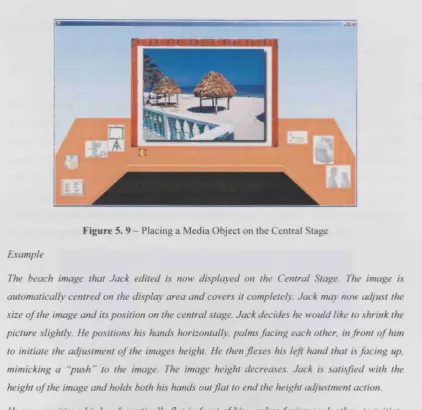
Figure 5. 9 - Placing a Media Object on the Central Stage...90
Figure 5 . 1 0 - Playing a presentation...91
Figure 5 . 1 1 - Browsing and selecting a Presentation Definition... 93
Figure 5. 12 - A loaded presentation...93
Figure 6. 1 - Stage 1 set-up... 100
Figure 6. 2 - Taskload for the PowerPoint experiment... 108
Figure 6. 3 - Taskload for Eye Tracker experiment... 109
Figure 6. 4 -Stage 2 set-up... 110
List of Tables
Table 3. 1 - Eye blinks and contribution of head orientation to overall gaze direction
(Stiefelhagen and Zhu 2002)...44
Table 3. 2 - Accuracy of focus of attention estimation based on head orientation data alone (Stiefelhagen and Zhu 2002)...45
Table 3. 3 - A summary of systems reviewed in this chapter...55
Table 4. 1 - Media Gallery Properties...67
Table 4. 2 - Media Control Properties...68
Table 4. 3 - Presentation Definition Properties... 69
Table 5. 1 Mapping between gestures and operations within the Presentation Conductor 81 Table 5.1 (cont.) Mapping between gestures and operations within the Presentation Conductor...82
Table 5.1 (cont.) Mapping between gestures and operations within the Presentation Conductor...83
Table 5 . 2 - How mouse events are mapped to functionality within the Presentation Conductor...83
Table 5. 3 - The Media Controls that have been implemented in the Presentation Conductor... 86
Table 5 . 4 - Adjusting the attributes of visual Media Objects on the Central Stage...88
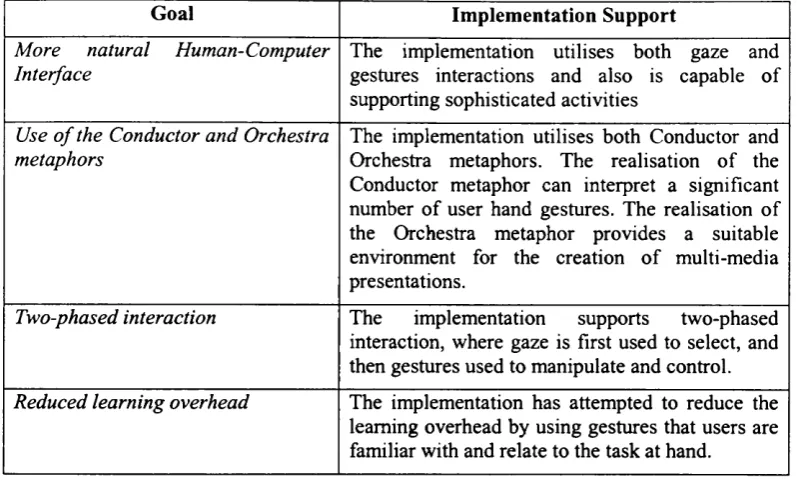
Table 5. 5 - How the implementation of the Conductor Interaction Method meets the design goals...94
Table 6. 1 - Evaluation Techniques... 97
Table 6. 2- Evaluation Tasks...101
Chapter 1 - Introduction
1.1 Interacting with computers
Humans are increasingly using computers as part of their everyday lives. Computers can be used to facilitate human activities, such as work, communication and entertainment. Most of our activities today involve either the direct use of a computer by us or are supported by a computer.
Over the last 30 years much research has been carried out into developing methods and mechanisms to assist humans in interacting with computers (known as Human-Computer Interaction or HCI).
As computer technology has evolved so have the techniques used to interact with it, rendering some to be more successful than others. A key example of this has been the general shift away from command line interfaces to more visual interfaces such as the WIMP as a result of the increased resources being made available to interface designers.
The types o f users have also changed. Whereas in the past computer users were typically programmers or scientists, in today’s world the average computer user is a non-computer expert who may use a computer to support their work, but possess little knowledge of how the computer actually operates.
As computers are integrated more into our lives and used to perform a larger variety of tasks, humans have to learn how to use these new systems efficiently. There are many cases where the effort required to learn the use o f a system outweighs the benefits o f its use, (for example the interface of the 3D Max software is so complex, consisting o f tabbed toolbars and multiple view ports, that in order for a user to be able to create a simple object such as a cube, a significant amount o f learning is involved). The learning overhead that users are presented with can be considerable, which is one reason users are often reluctant to try new applications or interaction techniques.
that of British Airways (British Airways). Finally there are the widely used WIMP interfaces, such as Mac OS (Apple Corp), Point-and-click interfaces, as demonstrated in Web browsers (Internet Explorer), and Three-dimensional interfaces, which are widely used in computer games and Virtual Reality environments (VR-VIBE).
1.2 Failings with existing approaches
Existing human-computer interaction techniques, such as those mentioned above, certainly can provide benefits for interaction as demonstrated by their continued use. Nevertheless these techniques do have certain failings, more specifically:
• Existing interaction techniques are not natural and they typically require the user to learn a new interaction method. As most techniques previously mentioned are significantly different from each other and from human-human interaction, users need to devote a significant amount o f time to learn to use any given interface. Most of them heavily rely on memorisation o f commands, which increases the learning curve.
• Existing interaction techniques can be inconsistent. This is an issue that arises with interfaces that are of the same type but have small differences. They can be confusing for any user, no matter how experienced.
• Existing interaction techniques can restrict creativity and be over simplistic. Existing interaction techniques are task driven and tend to be very structured towards that end. This approach can be very useful in guiding the user through a specific task, but can also be seen as an obstacle in the expression o f the user’s creativity.
This thesis provides the rationale for and describes an alternative interaction method that draws upon existing human-human interaction techniques. In particular it argues that a combination o f gaze and gesture input modalities used in conjunction with a suitable interaction method, can provide a usable alternative for interacting with a computer. This interaction method aims to address the shortcomings exhibited by existing interaction techniques, and in particular aims to provide a more natural and easier to leam interaction method.
1.3 The Conductor Interaction Method
environment. This environment is built around two metaphors that have been developed, that take into account the use of gaze and gesture interaction mechanisms. The method also makes use of a two-phased interaction process, where gaze is used for selection and gestures are used for manipulation.
A particular aim for the Conductor Interaction Method is for it to provide a more natural interface than existing interaction methods, and for it to have a low learning overhead. It is envisioned that this method will be particularly beneficial for novice computer users, who will be able to utilise interaction techniques they are more familiar with (for example, gaze and gestures), rather than having to learn totally new interaction methods. Areas where this method could be applied include creative domains, such as presentation creation, music, story creation, computer based learning etc., as well as control domains where the user may manipulate properties o f an environment such as lights and sound within a house or night club, or cameras within a surveillance system.
The proposed Conductor Interaction Method is also supported by recent advances and reduced costs in the technology that can be used for capturing human-human interactions. The development o f more affordable and sophisticated devices, whose cost was prohibitive in the past, has made it feasible to consider the adoption o f Human-Human interaction methods into HCI. As a result, it is likely that there will be a growing move towards integrating aspects of human-human interaction into HCI, and consequently a need for research into new techniques and interfaces to support this.
The Conductor Interaction Method that is presented in this thesis is realised through the development of a system architecture and implementation. The architecture provides a structure for the development o f a Presentation Conductor system, which enables users to create multi-media presentations using the Conductor Interaction Method. The implementation of this architecture allows for the interaction method to be demonstrated, as well as providing a mechanism for its evaluation.
1.4 Objectives of the work
• To develop a method for interacting with computers that utilises modalities that are typically used in Human-Human communication. The method would support the use of these novel interaction techniques with a specially tailored interface based on metaphors that users can relate to. Key requirements for the method would be for it to possess a low learning overhead and be easy to use.
• To demonstrate the feasibility o f the method by designing and implementing a prototypical system, the Presentation Conductor, that would utilise it as the main method o f interaction.
• To evaluate the Conductor Interaction Method through the Presentation Conductor. The evaluation should compare the method against existing interaction approaches to see whether it can be a beneficial alternative. The evaluation studies should involve a range o f users with differing computer experience in order to provide a broad study.
1.5 Novel contributions of this work
The work presented in this thesis represents a novel approach to Human-Computer Interaction. The specific contributions of the work can be summarised as follows:
• The Conductor Interaction Method. This thesis presents a novel interaction method, which aims to provide users with a more natural way o f interacting with a computer, and seeks to overcome some of the failings exhibited by existing human-computer interaction techniques.
The presented method, the Conductor Interaction Method, makes use o f human- human multimodal interaction mechanisms, namely gaze and gesture. The method also makes use o f a novel interaction environment that is based on the Orchestra and Conductor metaphors.
• Orchestra and Conductor metaphors. This thesis presents two novel metaphors that have been developed in order to provide the user with an environment to interact in and a technique to support the interaction.
The familiarity of the stage set-up gives the user the sense o f expectation and helps in orienting them to the interface.
The Conductor metaphor is an interaction metaphor that is used in conjunction with the stage-based environment with the view of providing the user with an interface that is easy to use and understand, especially for inexperienced computer users. As the name suggests the user interacts with the resources depicted within the Orchestra metaphor in the same way that a conductor would interact with the musicians o f an orchestra. The Conductor metaphor has been specifically designed for gaze and gesture based interaction methods.
• An architecture and implementation fo r a prototypical system to demonstrate the Conductor Interaction Method. This thesis presents an architecture for a prototypical system that demonstrates the Conductor Interaction Method. An implementation has also been developed that realises this architecture. The developed system, the Presentation Conductor, allows users to construct and display multi-media presentations by making use o f the Conductor method. This system also forms the basis o f the evaluation that has been carried out that aims to assess the usefulness of the Conductor Interaction Method.
• Experience o f using the method. This thesis presents an evaluation o f the Conductor Interaction Method via use of the Presentation Conductor system. The evaluation used a formative and qualitative approach, and involved users with varying computer experience performing a set of tasks with the system. The evaluation also assessed the impact different technologies could have on the effectiveness o f the method.
1.6 Structure of the thesis
The rest o f the thesis consists o f six chapters.
technologies examined. Finally, the chapter discusses the benefits and feasibility of developing an interaction method that utilises such input modalities.
Chapter 3 examines nine key systems that utilise gaze, gesture or a combination o f both as a means o f interacting with the computer. An analysis o f these systems is provided which indicates a number o f issues that needed to be taken into account when designing the Conductor Interaction Method and developing the Presentation Conductor architecture. In particular the issues surrounding the Midas touch problem and how to support two-phased interaction were important factors that contributed towards the design o f the Conductor Interaction Method.
Chapter 4 presents the Conductor Interaction Method, the interaction approach that is proposed by this thesis. Metaphors play a prominent role within the interaction method and after a brief overview o f the role o f metaphors in HCI, the Conductor and Orchestra metaphors are described. The Conductor Interaction Method is then described in detail and it is discussed how two-phased interaction, a more natural interface and reducing the user’s learning overhead, have been taken into account. The Presentation Conductor system is introduced and an architecture for it is presented. Scenarios are used to illustrate the proposed operation o f the system.
Chapter 5 discusses the implementation o f the Presentation Conductor and how the Conductor Interaction Method has been implemented within it. The implementation realises the architecture that is presented in chapter 4, and allows users to create multi-media presentations via use o f the Conductor Interaction Method. The Conductor and Orchestra metaphors are central to the implementation, with the Conductor metaphor supporting the interpretation o f a significant number of hand gestures, and the Orchestra metaphor providing the appropriate environment in which to create multi-media presentations. The implementation has attempted to reduce the learning overhead by using gestures that are familiar to the user and can be readily associated with specific tasks.
the use of different technologies with the Conductor method. The results o f both stages are presented and discussed.
Chapter 2 - Interacting with Computers
2.1 Introduction
In order to develop a novel, more natural interaction method as is proposed by this thesis, it is first necessary to examine the existing state of work within the field o f Human-Computer Interaction. This allows us to gain an understanding of existing HCI techniques, as well as to examine how these can be extended to include more natural techniques, such as gestures and gaze.
This chapter begins by identifying eight common HCI techniques. A general analysis o f these techniques is provided that highlights their failings with respect to providing a natural means of interaction.
It is proposed that one way in which these failings could be tackled (at least to an extent) is by drawing on interaction techniques used for Human-Human interaction. The key aspects of Human-Human interaction are then discussed, with a particular focus on gaze and gestures. These two are discussed in detail examining their applicability in HCI, the main techniques used to capture them, and their general advantages and disadvantages.
The chapter ends by discussing why a gaze and gesture based interaction method is a feasible alternative to existing HCI techniques.
2.2 Interacting with the computer
Before discussing the failings of existing HCI techniques, this chapter first provides a brief overview o f the commonly used techniques. Some have been used for many years and continue to be used, some are relatively more recent and some are still evolving.
Dix et al. (2004) identified the following key methods o f interacting with computers:
• Command line interface. The user expresses the commands to the computer directly, using a set o f predefined commands and function keys. Familiar examples o f command line interfaces include MS-DOS (Microsoft Corp.) and UNIX environments.
alphanumeric keys. The MS-DOS Editor (Microsoft Corp.) is an example of such an interface.
• Pseudo Natural language. These are interfaces where speech or written input in a natural form is used as a means o f interaction. A few search engines, such as Ask Jeeves (Ask Jeeves), are examples o f systems that use “natural language” processing.
• Question/answer and query dialog. These interfaces are based on the principle o f asking the user a series o f questions, to lead him/her through the interaction. An example o f such an interface is an on-line air ticket booking system (British Airways).
• Form-Jills and spreadsheets. Form-jills are very specific interfaces for data collection and are used both for data entry and for specifying fields in data retrieval. Interfaces that are used to enter data into large databases are usually o f this type. Conference registration is an example o f where such an interface is used (ACM SIGCHI). A spreadsheet is a system o f rows and columns that forms a grid o f cells in which the user may enter numeric or text data. An example o f a widely used spreadsheet is Excel (Microsoft Corp.).
• The WIMP interface. Interfaces that use the combination of E ndow s - /cons - A/enus - Pointers (WIMP) are the basis for most interactive systems used today. Examples of such systems are MacOS (Apple Computers) , Microsoft Windows (Microsoft Corp.) and Adobe Photoshop (A dobe)
• Point-and-click interfaces. Interfaces o f this type are mainly used in multimedia applications and the web, as they enable the user to interact with the interface through a single click. The British Airways Check-in Kiosks (British Airways) found at most UK airports are an example of this type o f interface
• Three-dimensional interfaces. A wide range o f interfaces, starting from WIMP elements that have a sculptured effect to 3D virtual environments, belong to this category. Examples o f 3D interfaces include Dive (SICS), COVEN (COVEN Consortium), VR- VIBE (Benford et al., 95) and UCL's ReaCToR CAVE environment (UCL).
2.3 Problems with existing interaction techniques
The interaction techniques identified in the previous section certainly do provide benefits for Human Computer Interaction, as their continued use illustrates. However these techniques do raise certain issues, namely:
• Existing interaction techniques are not natural and they typically require a user to learn a new interaction method
Most of the interaction techniques used today in HCI require the user to learn a specific interaction method for every type o f system he/she needs to use, for example using command line interfaces and WIMP interfaces. These methods are typically significantly different from those that humans are more familiar with, namely human-human interaction techniques, which humans experience from birth onwards. As a consequence, humans have to invest time in learning and adapting to these alternative HCI interfaces. The fact that many interaction techniques heavily rely on memorisation o f commands and sequences o f operations can further increase the learning curve.
Some interaction techniques try to overcome the difficulty imposed by memorisation by using logical groupings and hierarchies. This approach is illustrated by Menu and WIMP interfaces. The problem here is that a logical grouping for one person or group of people may not be accepted as a logical grouping by the larger group o f users o f a system.
A similar issue arises with the use o f visual metaphors (for example, button icons) to represent groupings or operations. It is not uncommon for a user to fail to recognise visual metaphors, and thus be forced to leam the mapping between the icon and its functionality.
• Existing interaction techniques can be inconsistent
An issue that arises when users interact with a variety o f interfaces that are o f the same type is inconsistency. This can be very confusing for users, even if they are experienced. Typically users who use two similar interfaces that have some small differences can become confused and attempt to interact with one in ways they would with the other. A very familiar example is that of the trashcan icon in MacOS (Apple Computers) and MS- WINDOWS (Microsoft Corp.). In the Apple interfaces, placing a diskette in the trashcan ejects the diskette from the computer’s diskette drive. In MS-Windows the same operation results in deleting the entire contents o f the diskette.
• Existing interaction techniques can restrict creativity and be over sim plistic
interacting can be seen as stifling creativity when it comes to interacting with computers. As the user has to perform specific tasks in pre-described ways there are very few opportunities to be creative. For example, a user who wants to create a story using a variety o f media has to master a number of interfaces and finally edit together all the media clips using a different application. The user’s creativity could be less stifled by the use o f a single more creative interface, as the user would not have to become an expert in the use o f a range of interfaces in order to be able to accomplish the creative task. The majority o f creative interactions are in interfaces that have been specifically developed to support creativity, or are themselves a piece o f digital artwork.
A related issue is the tendency to oversimplify interfaces. Although this is mainly a consequence o f attempting to reduce the learning overhead and to gear an interface to a specific task, it has resulted in the development o f interfaces that are very restrictive and specific. There is often no flexibility embedded in such interfaces and the interaction is simple but rigid. Consequently, should a new mode o f working be required at a later date, it is likely that yet another interface would need to be developed. An example o f such a case o f interaction is a PDA based restaurant order taking system, where a point-and-click interface is used. If a customer wants to customise their meal, such as specifying no cheese in their salad, it will probably be up to the waiter to remember to inform the kitchen, as there is possibly no embedded flexibility in the system.
These issues suggest the need to consider alternative interaction methods. This thesis argues that such an alternative could involve making greater use of interaction techniques that humans use to communicate with each other, for example the use o f gestures and gaze. The following section provides an overview o f the key aspects of human-human interaction and discusses their applicability to HCI.
2.4 Aspects of Human-Human communication
This section identifies the main aspects o f Human-Human interaction. It briefly examines three o f these before the chapter focuses on gestures and gaze, the aspects that are primarily used in the work presented in this thesis.
Human-human interaction can be broken down into the following aspects (Dix et. al. 2004):
• Transfer effects and personal space
• Eye contact and gaze • Gestures and body language • Speech
The following sections discuss each of these in more detail:
2.4.1 Transfer effects and personal space
When two people have a discussion they tend to stand with their heads and bodies at a fairly constant distance (Kendon, 1992). This is known as personal space, and refers to the distance from one person at which another feels comfortable. This distance is usually determined by the context in which the communication takes place. However, even in crowded or noisy areas, though the conversants will bring their heads together to “listen”, they will then retreat back to their original position to reclaim their personal space. A typical situation where this is encountered is in elevators, where passengers will try to keep their personal space by any means, and as the elevator becomes more crowded the passengers tend to look away from each other by staring either on the floor numbers or their shoes so as to avoid eye contact and defend their personal space. Personal space is different across cultures, Britons preferring larger distances, North Americans and southern Europeans preferring closer distances.
When technology is used to facilitate human-human interaction, such as in video conferencing, transfer effect problems can occur as a result of the miscommunication of personal space. For example, during a videoconference, if one of the participants appears too zoomed in the other party might perceive this as intrusive and feel uncomfortable. In essence a virtual personal space is created which cannot be controlled by the participants (unless the zooming o f cameras can be adjusted remotely). When supporting human-human communication with technology it is important to consider such implications.
2.4.2 Back channels, confirmation and interruption
an idea is presented, and when feedback on the idea is given the person talking will appear to be really supportive or against the idea from the tone in his/her voice and the facial gestures he/she will make.
2.4.3 Turn-taking
One o f the fundamental structures of a dialogue (a conversation between two or more persons, or similarly an exchange between a person and something else such as a computer) is turn- taking. When a dialogue takes place there is an informal protocol by which the parties involved wait until the speaker has concluded, at which point the next speaker in turn speaks, and the previous becomes a listener. This change o f role, from speaker to listener and vice versa is called turn-taking (Dix et. al., 2004).
Back channels, discussed previously, help this process, by giving cues that a listener would like to be a speaker or that the speaker has exceeded the time that the listener is willing to listen for.
2.4.4 Discussion
Personal space, back channels and turn taking are very important aspects o f human-human communication since they assist in defining the framework /context in which interaction takes place. When considering techniques to support humans interacting with computers it would be beneficial to bear in mind these characteristics, as they are already familiar to humans and are expected within an interaction.
The aspects that play a more fundamental role in human-human interaction are eye contact /gaze, gesture/body language and speech. These aspects actually carry the information that is communicated, whilst the aspects previously discussed mainly assist the communication. As discussed in Appendix A, the use of natural language as HCI technique is still problematic due to ambiguity. For this reason, this thesis focuses on the use o f gaze and gestures as HCI techniques.
The following sections discuss these two aspects o f human-human interaction in more depth and examine how they can be incorporated into HCI.
2.5 Gaze and Eye Contact
contact, which represents the percentage o f time that two people who are interacting look at each other in the area o f the face (Argyle, 1996), is used extensively in conversation. Through these channels we can identify issues such as whether our audience is listening or not, is bored, interested, confused etc. By directing our eye gaze and establishing eye contact with another party we can direct the communication towards that person or give a cue for that person to start speaking, i.e. a teacher may indicate a readiness to take questions from students by making eye contact with them (Kendon, 1992).
There are a number o f different aspects o f gaze which have different causes and effects on human-human communication (Argyle, 1996):
• The Amount o f Gaze at another. This is the percentage of time spent looking at another person in the area of the face. People do not usually fixate at one area but make a series o f glances at different points, usually around the eyes and the mouth.
• Mutual gaze, or Eye Contact, is the percentage of time that two people who are interacting look at each other in the area o f the face.
• Looking while talking and Looking while Listening, Looking at the other participant, during a dialogue.
• Glances. Gaze consists o f glances that have a duration of two to three seconds.
• Mutual Glances. As for Mutual Gaze, this is the percentage of time that two people who are interacting glance at each other in the area of the face at the same time. This is typically around one second.
• Pattern o f fixation: the different points that a person fixates on when looking at another human or an object.
• Pupil dilation. This is an aspect o f gaze that affects the behaviour o f the recipient, though the recipient might not be aware o f it.
• Eye expression: Eyes are expressive in many ways, such as how far open they are, the amount o f white showing above and below the pupil. The recipient may characterise the gaze he/she receives based on eye expression as, for example, “staring”, looking “intently” or “looking through” the other person, i.e. fixating beyond them (Fehr and Exline, 1987)
• Direction o f gaze-breaking: when interactants are not looking at each other, and typically shift their gaze to the side
W h e n tw o h u m a n s c o m m u n ic a te , d e p e n d in g on th eir cultural b ac k g ro u n d , th ey m o st likely
will es tab lish ey e contact. S tu d ies o f face-to -fac e h u m a n - h u m a n in teraction in dic ate that in
suc h c o m m u n ic a ti o n , ty p ic ally both sp e a k e r an d d irec t recip ien t o rie n t th e ir b o d ie s at least
partially to w a rd o n e an o th er. T h is is d o n e in such a w a y th at the o rie n tatio n o f each
p a r ti c ip a n t’s head is to w a rd the o t h e r 's (F ig u re 2.1). T h is p o s it io n in g en a b le s the in te rm itte nt
ai m in g o f the ey es at a nother, w h ich is o n e o f the p rinciple w a y s th at th e sp e a k e r in dicates the
fo cu s o f his o r h e r a ttention (an e x p e r im e n t th at illustrate s this is d es c rib ed in c h a p te r 3). In
th e s a m e w ay , th e d irec tio n o f the r e c ip ie n t’s ey es to w a r d s the s p e a k e r in d icates an
a c k n o w le d g m e n t th at he o r she is th e recip ien t ( K e n d o n , 1992). So gaz e can be d e s c rib e d as
both a signal and a c o m m u n ic a ti o n ch a n n e l in h u m a n in teraction (A rg y le , 1996).
(a) head turned towards other person, (b) body oriented towards the direction o f other person,
(c) shared space (d) eye contact
Figure 2. 1- T w o p eo p le e n g a g e d in a c o n v e rs a tio n (p ictu re from M G M film “ T o m o r r o w N e v e r D ie s ” 1998)
2.5.1 Using Gaze as part of HCI
In HCI, the m ain b enefit o f g az e is to d e t e rm in e the fo cu s o f the u s e r ’s atten tio n , or, m o re
sp ecific ally, d e t e r m in e w h a t the u se r is lo o k in g at on the screen. T h e m e a s u r e m e n t o f a u s e r ’s
atten tio n can be used, for e x a m p le , to h elp e v a lu a te an in te rface, o r to p ro v id e a n o t h e r input
c h a n n e l w ith w h ic h to co n tro l an interface.
O n e a re a in w h ic h rese arch has fo c u se d is in the d e v e lo p m e n t o f s y s te m s that use gaz e to
s u p p o rt c o m m u n ic a ti o n . T h e G A Z E g r o u p w a re system ( V e rteg a al, 19 9 9 ), is a virtual m e etin g
ro o m w h ic h uses gaze a w a re n e s s in o r d e r to s u p p le m e n t a u d io c o n fe re n cin g , a l lo w in g each
FRED (Vertegaal, 2001) is a multi agent conversational system that uses gaze to determine which agent the user is listening or speaking to.
Although gaze may seem to be most suitable for supporting communication it can also be used as a form o f simple interaction. Instance et al. (1994) developed a system to evaluate how users can control unmodified graphical user interfaces, such as WIMP interfaces, through eye tracking. These experiment showed that simple tasks such as object selection and “clicking” can be satisfactorily achieved.
A simple interaction method has been to use gaze as a means to point-and-click by measuring how long the user’s gaze dwells on an object on the screen (such a technique is referred to as ‘look-and-dwell’). Work developed by Sibert et al. (2000), Salvucci (1999) and the EagleEyes system (Gips et al., 1996) (discussed in detail in Chapter 3), are examples of systems that make use o f look-and-dwell for typing - the user looks and dwells on a letter on the screen.
The Visual mouse System (Farid et al., 2002a, 2002b) is another example o f where gaze is used for interaction. In this case the users gaze is used to select a stream of video from a web page. Patmore et al. (1998) developed an EOG eye tracker (described in the next section) to provide a pointing device for people with disabilities. The MAGIC system (Zhai, 1999) is similar and uses gaze to determine the user’s focus o f attention in order to move the pointer around the screen (this system is discussed in more detail in chapter 3). Related to this is the system designed for WIMP environments by Lankford (2000), in which when a user dwells on an object, a menu with possible mouse operations appears.
Other systems includes that by Tanriverdi et al. (2000) that used an eye tracker for interacting with simple virtual environments in which objects move closer or further away, depending on whether the user is looking at them.
Generally, such systems as those above have demonstrated that such gaze based interaction can be quite successful for performing simple tasks. For more complex tasks, such as text selection and manipulation, the use o f gaze can be more problematic (Instance et al., 1994). Other issues that these systems have encountered are the Midas Touch problem (Jacob, 1991) and equipment calibration in conjunction with user fatigue (Farid et al., 2002).
2.5.2 Techniques for Gaze based HCI
Eye tracking (monitoring where the eye fixates) is the most widely used method to determine a person’s eye gaze. A variety o f techniques have been developed to track a user’s gaze, and the intrusiveness and restrictiveness o f these may vary. The following list shows the more common eye tracking techniques that are currently used and these are classified according to the way they make contact with the user (Glenstrup, 1995):
• Measuring the reflection o f a light beam shone into the user’s eye. • Measuring the electrical potential around the eyes
• Using special contact lens that enable the tracking o f the eye/lens position
Besides eye tracking, alternative methods have also been developed that can be used to identify the focus of a user’s gaze. In particular, studies have shown that the object o f a person’s gaze or focus o f attention can be determined by their head orientation (Stiefalhagen and Zhu, 2002). This study is discussed in more detail in Chapter 3.
The above-mentioned eye tracking techniques are summarised here and compared for their usability and effectiveness. A more detailed description of these techniques is provided in Appendix B.
2.5.2.1 Techniques based on Reflected Light
These techniques are based on the reflection o f light (normally infrared) on some part of the eye. Infrared light is preferred in eye tracking because it is “invisible” to the eye. This means that it does not distract the user, and, as infrared detectors are generally not affected by other light sources, there are no special lighting requirements. The Limbus and Pupil Tracking methods (Glenstrup, 1995), otherwise referred to as Infrared Oculography (IROG) (Eye- movement equipment database), are based on the amount o f light that is reflected back from the eye. Other methods are based on the Perkinje (Muller et al., 1993) phenomenon (as described below in section 2.5.2.1.1), and use specific reflections that occur on the boundaries o f the lens and the cornea. The most popular eye tracking method, the Corneal and Pupil reflection relationship - Video Oculography (VOG) (Eye-movement equipment database), uses this approach (and is reviewed in the following section).
head in a frame) or that the user wears the equipment on his/her head. Clearly, both of these methods can be intrusive to the user.
The range of applications in which these eye-tracking techniques are used extends beyond HCI. Ergonomics, neurology, ophalmology, sleep disorders, and aviation are areas where this technique is used both in research and in specialised applications. The majority o f eye tracking systems today use reflected light techniques. VOG is considered more comfortable, and less intrusive, and for this reason is used also with children. This technique is discussed in more detail below.
2.5.2.1.1 C orneal a n d P u p il reflection relationship — Video O culography (VOG) When light, typically infrared light, is shone into the user’s eye, four reflections occur on the boundaries of the lens and the comea. This is due to the Perkinje phenomenon in which all of the colours of the spectrum do not fade equally with diminishing light. It is actually a shift in the relative brightness o f certain colours as illumination diminishes. These images are referred to as the Perkinje images (figure 2.2). The first Perkinje image, or glint as it is also called, together with the reflection off the retina, or bright-eye as it is also referred to, can be recorded using an infrared sensitive camera. As the user’s eye moves horizontally or vertically, the relative positioning o f these two images change accordingly. The direction of the user’s gaze can be determined by calculating from these relative positions and this is referred to as video oculography (VOG).
I i 9 h t
r
a
y
image' image' image' image' s
Figure 2 . 2 - Purkinje images (Glenstrup et al., 1995)
Comea
IR-cam era
IR- camera monitor
Figure 2. 3 - LC te c h n o lo g ie s ey e tra c k e r
T h e m ain p ro b lem w ith th is te c h n iq u e is th a t a g o o d v ie w o f th e ey e m u st be m a in ta in e d , so
th e h ead m o v e m e n ts m u st ag ain be m in im al. F or th is rea so n a V O G b ased sy stem is e ith e r
w o rn by th e u se r on h is/h e r h ead o r m ay re q u ire a m o v e m e n t-re stric tin g fra m e o r ch in rest. A
ty p ic a l ey e tra c k in g sy stem , w h e re th e IR -ca m era is m o u n te d u n d e r th e m o n ito r, is sh o w n in
F ig u re 2.3.
N u m e ro u s ey e tra c k in g sy ste m s h av e b een d e v e lo p e d th a t m a k e use o f th e V O G te c h n iq u e ,
in c lu d in g th e V isu a l M o u se sy stem (F a rid el al, 2 0 0 2 ), th e G a z e tra c k e r S y stem (L a n k fo rd ,
2 0 0 0 ), th e F R E D system (V e rte g a a l, 2 0 0 1 ), T h e G az e g ro u p w a re sy stem (V e rte g a a l, 1999),
an d o th e r sy ste m s (S ib e rt et al., 2 0 0 0 ; T a n riv e rd i e t al., 2 0 0 0 ; S a lv u c c i, 1999 an d In stan c e et
al, 1999).
2.5.2.2 Technique b a se d on the electric potential around the eyes
T h is te c h n iq u e is b ased on e le c tro o c u lo g ra p h y , o r E O G , w h ich is a d ire c t re c o rd in g o f th e
e le c tric a l p o te n tia ls g e n e ra te d by ey e m o v e m en t. In sa c c a d ic m o v e m e n t o f th e ey e (sid e to
sid e ey e m o v e m en t, fo r e x a m p le th a t o c c u rs w h en re a d in g ), w h en th e ey e fo c u se s on a
p a rtic u la r sp o t th e p o te n tia l re m a in s c o n s ta n t. D e p e n d in g on th e d ire c tio n o f th e sa c c a d ic
m o v e m en t o f th e ey e, th e p o te n tia l w ill be e ith e r p o sitiv e v a lu e s (fo r left m o v e m e n t) o r
n e g a tiv e v a lu e s (fo r rig h t m o v e m e n t), as sh o w n in fig u re 2.4 (H a sse t, 1978). E O G m e asu red
ey e m o v e m e n ts h av e b een u se fu l in th e a s se ss m e n t o f c o g n itiv e fu n c tio n s (S te m , 1984), d ru g
e ffe c ts (Ja n tti, 1983), path p h y sio lo g y (K e n n a rd et. al, 1994) an d p sy c h ia tric d iso rd e rs
(H o lz m a n and L evy, 1977) an d in th e a c c u ra te a s se ss m e n t o f ey e fix a tio n in th e o p e ra tio n o f
an a irc ra ft (V iv e a sh et. a l , 1996).
T e c c e et al. c o n d u c te d tw o e x p e rim e n ts to d e te rm in e th e a c c u ra c y o f c o m p u te r c o n tro l
th ro u g h ey e m o v e m e n t u sin g th e E O G m e th o d (T e c c e et al., 1998). T h e ir fin d in g s c o n c lu d e d
typing). The main disadvantage of this technique is that the electrodes are positioned on the user’s face, very close to the eyes, which is very intrusive.
LaR
Rocotcftng syitMi
Reeordng SyatMn
0* 15*0*
| »*c I 1 I « 0mV
Right
1 te c
|--- 1 JwomV •• a r o*
—
r~
Figure 2. 4 : Measurement o f electrical potential in saccadic movement o f the eyes (Hasset, 1978)
The EOG method has been successfully used by Gips and Olivieri (1996) in the EagleEyes project. Patmore and Knapp (1998) have also used this technique successfully for computer control, in which the user can move the cursor to given target areas on the screen.
2.5.2.3 Techniques Based on Contact Lenses
It is also possible to make recordings of the direction o f a human’s eyes with the use of special contact lenses. Two methods are commonly used. In the first, the contact lenses have mirror surfaces engraved on them and the reflection o f the light beams are used to calculate the position of the user’s eye. In the second method, a tiny induction coil is implanted into the lens, and this allows the recording o f the user’s eye position through the use o f a high- frequency electromagnetic field, placed around the user’s head.
Both of these methods are problematic, as they are intrusive and may be very uncomfortable for the user, as some available systems have wires connected to the contact lenses. There are also health issues concerning high-frequency electro-magnetic fields. As a result, contact lens based eye tracking has not become widely used, with developers preferring to use techniques based on reflected light instead.
2.5.2.4 Summary of techniques
is for the user. For example, the use o f a camera mounted on a monitor is less intrusive compared to the positioning of electrodes around the user’s eyes.
Of all o f the above techniques, however, the most popular with developers are those that use reflected light, and in particular VOG.
2.5.3 The Midas Touch problem
Considering gaze based interfaces and the interaction options that are available with the implementation o f the technologies discussed previously, it is very easy to design an interface that will present a similar problem to what Midas experienced. Jacob (1991) describes such a situation: “At first, it is empowering to be able simply to look at what you want and have it happen, rather than having to look at it (as you would anyway and then point-and-click it with the mouse or otherwise issue a command). Before long, though, it becomes like The Midas Touch. Everywhere you look, another command is activated; you cannot look anywhere without issuing a command. The challenge in building a useful eye tracker interface is to avoid The Midas Touch problem.”
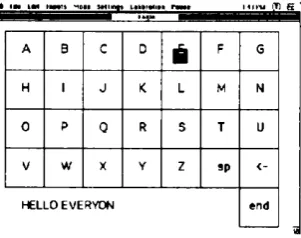
This problem is illustrated through a brief discussion o f two versions o f the “spell and speak” program that were developed in the EagleEyes project (discussed in more detail in chapter 3). The first puts a picture o f a keyboard on the screen (figure 2.5). By dwelling his/her gaze on a letter the user selects that letter, and it is placed in the message area. In order to delete a selected letter the user may “select” the backspace. By selecting “end” when the user is finished with the letter selections the computer “speaks out” the message.
• m i m i m h mc«# SMtintc k#M»r«iM r w M m i k u iT) S '
A 0 c D
B F G
H 1 J K L M N
0 P Q R S T U
V W X Y z sp
<-HELLO EVERVDN end
Figure 2. 5 - EagleEyes full screen "spell and speak " (Gips et al., 1996)
[image:35.456.147.298.448.567.2]HELLO EVERYON
Figure 2. 6 - E a g le E y e s tw o -lev e l "spell and sp e ak " (G ip s et al., 1996)
C o n s id e rin g th e se tw o a p p lic a tio n s o f th e sam e te c h n iq u e it is c le a r th a t th e first can su ffe r
a c u te ly from th e M id a s to u c h p ro b lem . W h e re v e r th e u se r looks on th e sc re en th e re is a key,
w h ich at a fix a tio n -d w e ll o f th e ey e w ill be se le c te d . T h e u se r has to be c a re fu l as to w h e re to
rest h is/h e r g aze. H o w ev er, th e se co n d p ro g ra m p ro v id e s a d d itio n a l “ d e a d ” sp a c e th a t can be
u sed to look at w h en n ot in te n d in g to se le c t a key (G ip s and O liv ie ry , 1996). C o n s e q u e n tly , th e M id a s to u c h p ro b lem is less o f an issu e w ith th is v ersio n .
T h e M id a s T o u ch p ro b lem is c le a rly an im p o rta n t issu e fo r d e s ig n e rs o f g az e based in te rfa ce s.
2.5.4 Sum m ary
G a z e can be an e ffe c tiv e ad d itio n a l m o d a lity fo r in te ra c tin g w ith c o m p u te rs. R e sea rch o v er
th e past y e a rs h as re su lte d in th e d e v e lo p m e n t o f n u m e ro u s sy stem s th a t use g az e e ith e r as the
o n ly , o r as a su p p le m e n ta ry , m o d a lity to so m e effe c t. T h is re se arch has also led into th e
d e v e lo p m e n t o f a v a rie ty o f te c h n iq u e s th a t e n a b le us to c a p tu re th e u s e r ’s ey e m o v e m en ts.
T h o u g h th e use o f g aze can b e n e fit H C I, a n u m b e r o f lim ita tio n s e x ist th a t re n d e r it
p ro b le m a tic fo r c e rta in ta sk s. In p a rtic u la r, g az e is less e ffe c tiv e w h en used fo r a c h ie v in g
c o m p lic a te d ta sk s (fo r e x a m p le , e d itin g and m a n ip u la tin g an im age), b e c a u s e h u m a n s
n a tu ra lly use g aze to o b se rv e ra th e r th a n to co n tro l. T h e use o f g az e a lso ra ise s p ro b le m s for
in te rfa c e d e sig n , in p a rtic u la r th e M id a s T o u c h p ro b lem . F u rth e rm o re , th e re are a n u m b e r o f
p ro b le m s a sso c ia te d w ith th e h a rd w a re used to c a p tu re g az e such as c a lib ra tio n o f th e sy stem ,
u se r fatig u e and in tru siv e n e ss.
D esp ite th e se d ra w b a c k s, g az e can p ro v e to be e ffe c tiv e fo r sim p le HCI ta sk s.
2.6 G estures
B aum l an d B aum l (1 9 9 7 ), in th e ir Dictionary o f Worldwide Gestures, d e fin e a G e stu re as: ua p o stu re o r m o v e m e n t o f th e b o d y o r a n y o f its m e m b ers, th a t is to be u n d e rsto o d to be
the spoken word. They are either a visible accompaniment to or a substitute for, speech or action. Whenever a gesture by one person influences another it is referred to as an instance of non-verbal or bodily communication.
Gestures, particularly hand gestures, play an integral part in our everyday human-human communication. Humans use gestures both consciously and subconsciously and they are used either on their own or to support speech. Gestures can be the main communication channel or a back channel (as highlighted in section 2.4).
The context in which people use gestures can vary and includes:
• An accompaniment to normal speech. For example, when a person is describing an object, he/she may often show the dimensions o f that object by gesturing.
• A substitute fo r a foreign language. For example, communication through signs was extensively practised by the Plains Indians to overcome the variety o f languages and dialects among their nations.
• A substitute where normal speech becomes inaudible, disadvantageous or dangerous. For example, the gestures used by divers to communicate under water.
• An accompaniment to certain professional activities. For example, by actors, dancers and practical speakers, to supplement or replace the spoken word.
Gestures have been classified according to the way they are integrated in our everyday communication and the way they are formulated. McNeil (1992) classifies gestures in five categories, according to their use and way of delivery:
• Iconics: These are gestures that bear close formal relationship to the semantic content of the speech. For example, when a person is describing a fight, he appears to replicate with his fists the movements o f the fighter.
• Beats: These gestures are named so because they look like beating music time. The hand moves along with the rhythm of speech. They reveal the speaker’s conception of the narrative dialogue as a total. The semiotic value of a beat emphasises the word or phrase it accompanies, not for its semantic value, but at the specific point that it occurs in a dialogue. A typical example of a beat gesture is found during discussion, when a speaker wants to emphasize a point such as an event that happens frequently, and does this by slightly raising his/ her hand, and then bringing it back to a resting position.
• Cohesive: The cohesive gestures are quite eclectic in form. They can consist o f iconics, metaphorics, pointing gestures, or even beats. Gestural cohesion depends on the repetition of the same gesture form, movement, or locus (i.e. the location of the gesture) in the gesture space. Through repetition, the gesture shows the recurrence or continuation o f the theme. Examples of cohesive beats are the gestures that are demonstrated by politicians whilst talking.
• Deictic (pointing): Pointing has the obvious function o f indicating objects and events in the concrete world, but it also plays a part even where there is nothing objectively present to point at. Most pointing gestures in narratives and conversations are of this abstract kind. For example, during a conversation a speaker might ask his /her conversants about their whereabouts, pointing to an area between them, although the discussion might be referring to a different time and location.
2.6.1 Gestures and language
Gestures are closely linked to speech, but present meaning in a different form. Our thoughts are expressed by a combination o f gestures and utterances. Thoughts may be comprised of imagery, specific concepts or generalisations, which can be subdivided into smaller segments. (McNeill, 1992). To express our thoughts we typically use both speech and gesture.
Gesticulation "► Language-like Gestures
Pantomimes Emblems Sign Languages
Figure 2 .1 - Continuum of Gestures (McNeil, 1992)
important as it can be used for distinguishing gestures of fundamentally different kinds. McNeill uses the term “gesture” specifically to refer to the leftmost gesticulation end o f his spectrum.
In the gesticulation sense, gestures are idiosyncratic movements of the hands and arms accompanying speech. These almost never occur in the absence of speech
Language-like gestures are similar in form but are grammatically integrated into the utterance
In pantomime, the hands represent objects or actions, but speech is not obligatory. The fading of speech brings pantomime in the middle o f Kendon’s continuum. In a pantomime there can be either silence or inarticulate onomatopoetic sound effects, like “ssh!”, “Click”, etc. Successive pantomimes can create sequence-like demonstrations and this is different from gesticulation where successive gestures do not combine.
Emblems are the “Italianate” gestures, mostly insults, though in some cases praise. Virtually all emblems represent an attempt to exert control over another person. Emblems have standards o f well-formedness, a crucial language-like property that gesticulation and pantomime lack.
Sign languages are full-fledged linguistic systems.
When considering the use of gestures in HCI, it is useful to consider this categorisation of gestures that we use in our everyday lives. The gestures that are at the beginning of the spectrum are more natural and idiosyncratic, while those at the end are more standardised. According to the type o f application, there are cases that a specific type o f gesture is more appropriate that another. The majority o f applications use emblem type gestures.
Gestures are discussed in greater detail in Appendix C.