Whitepaper Submission of the Year 2013
WORK ORDER MANAGEMENT: PROCESS AND PRACTICE
By Sergei Guzik and Alexey Lamykin
Sergei Guzik
Has worked in the IT field since 1997 with Ecotech, Taurus Technologies, Aquarius Consulting, and Jet Infosystems.
Since 2005, CEO of GSV Consulting company. Member of the founding committee of Russia’s itSMF Chapter. Member of the Executive Board of the Foundation for Support of Engineering, Standardization and Project Management (FOSTAS Foundation).
http://linkedin.com/pub/sergei-guzik/7/862/6 [email protected]
Alexey Lamykin
ITIL Expert, PMP. Worked in the corporate IT units of the National Training Foundation, R. J. Reynolds Tobacco International (JTI), UCLA, and
Indymac since 1995. Since
2000, has worked in systems integration and IT consulting. Currently Lead Consultant at GSV Consulting.
http://linkedin.com/in/lamykin [email protected]
This article was originally published in Russian in the Information Management magazine (#5, 2013). The authors wish to thank Konstantin Zimin, Chief Editor of the magazine, for his support and cooperation.
Synopsis
ITIL, COBIT, and other modern IT management frameworks are mostly concentrated on service management and IT governance processes. Meanwhile building complete end-to-end IT management process model also requires process organization of operational activities. The article proposes the approach to the work order management process including design of task cards (similar to incident, request and change models in ITIL), control over work order execution, and analysis of tasks fulfilled. Advantages of the proposed method include linking everyday activities of IT staff to IT services, better visibility of personnel workload and possibility of limiting work in progress, easy integration and control of scheduled maintenance tasks.
Provisioning of IT services has to be intelligently organized to meet numerous requirements. It should be effective and efficient. In connection with this, IT management often faces the following questions:
• How to best plan activities of the IT department?
• How to compare the IT units’ effectiveness?
• How to stimulate the personnel? Who of the employees deserve bonuses?
• How to reveal available reserves and optimize activities of the IT department?
In order to respond to these and many other questions, the IT management should be able to properly plan, prioritize, and control the entire scope of the work performed by the IT staff regardless of whether this work is aimed at resolving incidents, implementing changes, or performing scheduled maintenance.
Work order management in the IT management frameworks
Unfortunately most of today’s IT management frameworks almost disregard work order management. Some of them just make reference to work orders or operational procedures. However, they neither describe the way work orders or operational procedures should be managed, nor regard work order management as a stand-alone process.
For instance, COBIT 5 describing the BAI06 “Manage Changes” process refers to the change planning and scheduling, as well as to the subsequent status tracking. Also, DSS01.01 “Perform operational
procedures” practice, inter alia, includes the following activity: “Maintain a schedule of operational activities, perform the activities, and manage the performance and throughput of the scheduled
activities”1. It envisages the planning, scheduling, and monitoring of the IT operations. However, in both
of these cases neither the details of the planning mechanisms are specified nor is the “work order” term used.
Microsoft Operations Framework (MOF) version 4considers mostly operational work related to the IT operations (Operations Service Management Function). MOF describes the planning processes (Process 3: Plan Operational Work) and operational work execution (Process 4: Execute Operational Work). However, in MOF task management, mechanisms are limited to the operational work and are not applied to the other IT service lifecycle stages.
ITIL 2011 refers to work orders in the change management process2. It is pointed out that the best
practice is to use work orders implementing changes: “Authorized changes should be passed to the relevant technical groups for building the changes. It is best practice to do this in a formal way that can be tracked, e.g. using work orders”3. Work orders are also referenced in the Request Fulfillment
process: “Requests will need to follow a predefined standard fulfillment procedure. This implies that a documented request model be in place that communicates a predefined process flow for each of the services being requested. This should also include all procurement policies, roles and responsibilities, which functions will be assigned to execute the model, and the ability to generate purchase orders and work orders”4.
1 COBIT 5 Enabling Processes, ISACA 2012, ISBN 978-1-60420-241-0, page 174
ITIL approaches work order management most closely when it describes models of incidents, changes, and service requests5. Particularly, it advises establishing a set of operational models (templates) used
to resolve typical incidents and execute standard service requests. These models should specify:
• Steps required to resolve incidents or execute requests
• Order of these steps should be taken into consideration if there are dependencies
• Responsibilities for implementing these steps
• Timescales (implementation deadlines, threshold values)
• Escalation procedures related to implementing these steps
As a matter of fact, ITIL describes here a system of task cards. However, ITIL does not consider work order management as a stand-alone process. ITIL specifies neither the way incidents and request models should be designed nor the valuation of time and skills required to perform the tasks.
Notably, when it comes to the practical implementation and automation of IT management processes the service desk tool developers often apply the work order management mechanisms. For instance, Hewlett-Packard Service Manager supports the task mechanism (Tasks) applicable to certain processes (such as change management and problem management). Naumen Service Desk supports the
comprehensive task and work order management mechanism, which includes such options as work order template pre-setting, different responsibility allocation methods, and actual labour input logging6.
The BMC Remedy and OmniNet OmniTracker systems also offer similar functionalities.
Work order management process
Despite the fact that the current IT service management frameworks generally disregard the work order management process, we believe that its implementation as a stand-alone process provides significant advantages, especially when it is used in a broader context and is not limited to the operations
management or service support. Based on our experience of implementing the work order management process in a number of projects, we consider it a good practice.
Let us proceed making the following assumptions:
1. Most activities carried out by the IT staff can and should be described in the form of tasks and registered as work orders.
2. All executed tasks should be linked to the head objects, which in turn should be related to the process or project activities. In other words, the work orders executed by IT personnel should be related to relevant incidents, changes, service requests, scheduled maintenance operations, or projects.
3. Activities categorized as work orders require certain practices for registration, control, and reporting.
Some basic terms and definitions are listed below:
• Head object – an incident, change, service request, scheduled maintenance procedure7, or
project that serves as the basis for the task execution.
5 See, for example, ITIL 2011 Service Operation sections 4.2.4.2 (page 75) and 4.3.4.2 (page 88) and ITIL 2011 Service Transition
section 4.2.4.5 (page 67)
6 Source: http://www.naumensd.ru/tour/itil/task-management
7 Under scheduled maintenance procedure we mean a document which outlines the scope and order of activities executed by IT
staff on an established schedule aimed at reducing the number of incidents or meeting the external and internal requirements (regulations, standards, and policies). Implementation of scheduled maintenance operations is beyond the scope of this article.
• Task – activity related to the provision of services, resolution of incidents, implementation of changes, or IT projects.
• Work order – a record containing details of the task assigned to an individual performer.
• Task card – a document describing the operational work that enables a standard set of tasks to be performed (for instance, standard change execution). Task cards stored in the database can be accessed by other processes and used to create work orders based on head objects. The work order management process purpose is to ensure high-quality and timely execution of tasks required to provide IT services and IT infrastructure maintenance.
Work order management process objectives are:
• To enhance the IT service’s efficiency by improving work planning mechanisms
• To ensure stable and predictable performance and quality of work
• To improve the interaction of parties involved in the process of providing IT services The work order management process performs the following tasks:
• Design and improvement of task cards and work standards
• Controlling the task routing and execution
• Task recordkeeping and appropriate reporting
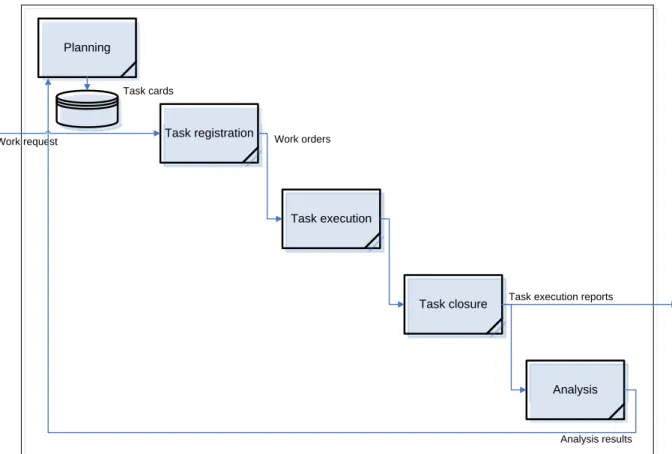
The work order management process is schematically shown in Fig. 1.
Planning Task execution Task registration Task closure Analysis Task cards Work orders
Task execution reports Work request
Analysis results
Fig. 1. Work order management process
installation, data backups, and so on. They describe necessary tasks, skill requirements, and predetermined labour input.
The task cards database can be accessed from all IT service management processes. Requesting a certain task to be fulfilled, it is possible to refer to the task card in the database. Planning is also responsible for valuation of requests that are not described by existing task cards. De facto planning procedure sets up methodological framework for work order processing.
Task registration. Based on requests and task cards, work orders are registered and prioritized. After that, work orders appear on the performer’s queues. Different algorithms can be used to prioritize work orders. Generally they relate to the types of the head objects and their priority (for instance, the priority of tasks connected to a large-scale incident may be higher than that of a scheduled maintenance
procedure). The work order distribution among the parties executing relevant operations involves two basic mechanisms:
• push – a work order gets assigned to a specific employee (by a dispatcher or automatically in compliance with established rules)
• pull – a work order gets assigned to a working group or company unit, employees accept the above work order for execution on their own
It is quite frequent that both mechanisms are combined. Even if pull mechanism is used, it is important to control whether or not a work order is accepted. If the work order has not been accepted for
execution within the established timeframe it shall be escalated to the head of the working group, who shall appoint a performer in charge of its execution. Regardless of what mechanism has been applied at this stage, an automation tool shall be used to monitor the workload by limiting the number of work orders assigned to one performer simultaneously.
Task execution. The performer selects a work order from the task queue and starts its execution. The work order status shall change accordingly. If the job cannot be fulfilled without additional information provided or another job fulfilled, the performer may suspend the work order execution, stating the reason for the delay. In this case the work order execution timer shall be stopped. Either way, at this stage it is important to monitor work order execution time and properly escalate if necessary.
Task closure. Upon completion of the task, the performer changes the work order status and reports work completed and results achieved (both in case of success and failure). This report shall normally be a part of the IT management automation system record. Both predefined and non-standard reports can be used. Predefined reports are prepared in advance depending on the type of work order (for instance: “The printer cartridge has been routinely replaced, no problems/complaints reported”) and can be selected by the task performer in the automation system. Non-standard reports are prepared by the performer (for instance, a detailed report of changes to a software module describing modified
functions). The work order execution control and final closure shall be exercised by the person in charge of the head object to which the relevant work order relates. A work order can be closed automatically if no claims to the work scope and quality have been made within the established timeframe (usually 1- 3 business days).
Analysis is an essential part of the work order management process. The entire work order processing cycle (Registration – Execution – Closure) is used to gather data required for the subsequent analysis. This phase includes analysis of output, productivity, and deviations from task cards and established
standards. It also provides identification of bottlenecks and ways for improvement8. Analysis enables
the management to reveal a number of unobvious aspects of the IT service activities, which we largely ignore if the work order management process is not used. For example, a huge number of work orders assigned to an employee or a workgroup waiting for a long time in execution queue will show a typical bottleneck, limiting productivity of the IT department on a whole. It is equally important to see the staff workload broken down into the types of head objects: are we spending more time doing “firefighting” (incident resolution) or performing purposeful activities aimed at the development and support of the infrastructure and services (projects, changes, and scheduled maintenance)?
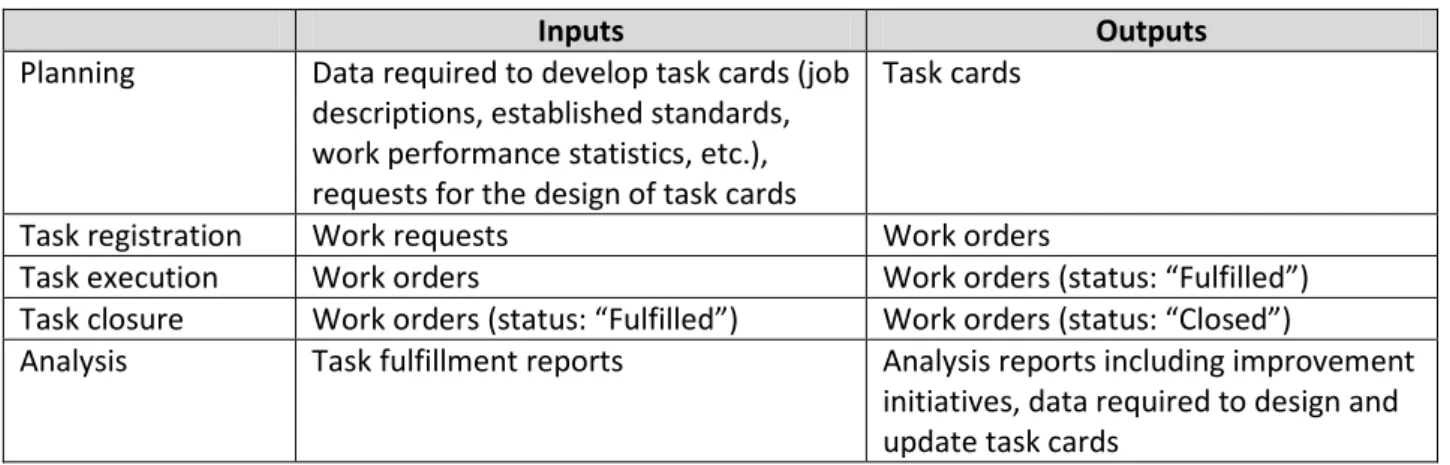
The work order management process inputs, outputs, and the responsibility assignment matrix are shown in Tables 1 and 2.
Table 1. Inputs and outputs of the work order management procedures
Inputs Outputs
Planning Data required to develop task cards (job descriptions, established standards, work performance statistics, etc.), requests for the design of task cards
Task cards
Task registration Work requests Work orders
Task execution Work orders Work orders (status: “Fulfilled”) Task closure Work orders (status: “Fulfilled”) Work orders (status: “Closed”)
Analysis Task fulfillment reports Analysis reports including improvement initiatives, data required to design and update task cards
Table 1. Work order management process roles and their responsibilities9
Process
manager Technologist Task initiator10 Head of the functional
workgroup Member of the functional workgroup Planning A R C C Task registration R I I Task execution C A R Task closure I A R Analysis A R С C C
Management objects hierarchy
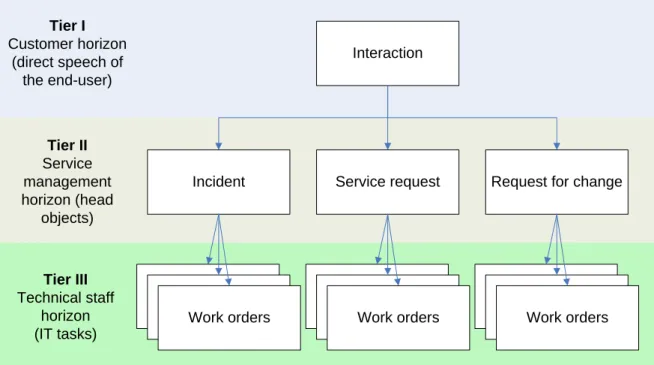
The use of work orders forms a three-tier hierarchy of management objects (see Fig. 2).
8 Task analysis has much in common with quality management, but does not replace it. Data gathered within the work order
management process can also be used for quality control. The correlation and interaction of these processes is a subject for a separate discussion.
Interaction
Service request Request for change
Incident
Work orders Work orders
Work orders Tier I Customer horizon (direct speech of the end-user) Tier II Service management horizon (head objects) Tier III Technical staff horizon (IT tasks)
Fig. 2. Management objects hierarchy
The interaction with the customer is placed in the upper tier and in effect represents the user’s direct speech. In most cases the end-user will not care about lower-level classification of his address – he just has an issue and needs IT to resolve it. So it is advisable to record and keep all the communications with the customers at this level. A user address may include one or several requests. Analysis and
classification of this address is generally a function performed by the service desk’s first line. As a result it creates requests and incidents, representing IT service management process head objects. The
principal task of managing interactions is to record user requirements. Therefore an interaction does not require complex processing and its lifecycle is simplified to the maximum (“Registered” – “Processed” – “Closed”).
The head objects (incidents, service and change requests, etc.) are placed in the middle tier constituting service management horizon. At this level all the major processing and decision-making is fulfilled, including request categorization, authorization, and prioritization. Therefore the head object’s lifecycle appears to be more complicated and may include different stages depending on its type. Fairly
complicated escalation mechanisms, which, for instance, may depend on services provided, may be applied at this tier.
Work orders are placed in the bottom tier. As the end-users, technical personnel may not be aware of the service management concepts and different types of requests. So it may be beneficial for IT staff to have a single prioritized task queue. The major processing has already been performed at the second tier; therefore this tier’s primary target is to ensure the efficient execution of relevant tasks and their monitoring. The work order lifecycle is quite simple and depends mostly on the task assignment mechanism (push or pull) applied. Emerging issues are usually escalated to the head of the workgroup or direct supervisor of the person in charge of the task.
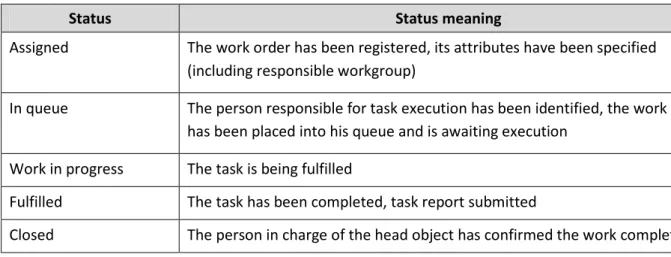
A typical set of work order statuses will include:
• Assigned
• Work in progress
• Fulfilled
• Closed
The status implications are included in Table 3. Additional statuses can be used to process abnormal situations such as wrong work order assignment, task suspension waiting for additional information or another task to be completed, reclamations caused by low quality.
Table 3. Work order statuses
Status Status meaning
Assigned The work order has been registered, its attributes have been specified (including responsible workgroup)
In queue The person responsible for task execution has been identified, the work order has been placed into his queue and is awaiting execution
Work in progress The task is being fulfilled
Fulfilled The task has been completed, task report submitted
Closed The person in charge of the head object has confirmed the work completion
The work order lifecycle is closely related to that of the head object. ITSM tool should normally monitor the status of underlying work orders and not only inform head object owner of the task completion, but also prevent the closure of the head object or its phase change before the fulfillment of the tasks assigned. Detailed design of the work order and head object lifecycles is generally a part of the ITSM process design. An example of the management objects’ lifecycles is shown in Fig. 3 below.
Registered In process
Registered Assigned Work in progress Resolved Closed
Assigned In queue WIP Fulfilled Closed
First line support analyses information received from the customer and creates an incident record
Both interaction and head object records are closed upon the receipt
of the positive feedback from the customer or expiration of
control time
Activities required to resolve the incident determined,
necessary work orders created The person in charge of the head object is notified upon the completion of tasks
The head object owner confirms that the tasks have been fulfilled,
work orders are closed
User interaction Incident (head object) Work orders Processed Closed Incident is resolved, customer is notified and proposed to provide feedback
Assigned In queue WIP Fulfilled Closed
Assigned In queue WIP Fulfilled Closed
Fig.3. Management objects’ lifecycles interrelation example
• To standardize and record working time
• To make staff workload more transparent providing visibility of process work for functional managers and possibility for limiting work in progress
• To provide single task queue with proper task prioritization for IT personnel
• To give a fair assessment of the contribution of each IT staff member
• To identify bottlenecks impacting IT productivity
Work order management also simplifies pre-emptive planned maintenance. Maintenance activities could be described in the form of task cards and fired on schedules stored with CI records in the CMDB. Implementation of work orders could also help with further IT automation. Splitting typical operations into smaller tasks could reveal many opportunities – there is just one step from assigning “Create a virtual server from template” task to a person to performing it with a script.
The major advantage of the work order management process is its ability to establish the link from practically all the activities carried out by IT personnel through head objects to the IT services, thus providing capabilities for enhancing planning and deep analysis, serving as the basis for intelligent managerial decisions.