Session 1554
Web-Based Database for Laboratory Courses
Chiang Lin, Susan M. Morgan, Eric A. Stueber Southern Illinois University Edwardsville
Abstract
As many other departments are doing, the Department of Civil Engineering at Southern Illinois University Edwardsville is in the process of incorporating the Internet into courses. In
conjunction with a project to develop course web pages, it was determined that there was a need in laboratory courses to find a method for students to share data more readily. In the past, the students posted their laboratory data on a hall bulletin board. However, these postings regularly disappeared before the reports’ due dates.
To solve this problem, a team of seniors in the Computer Science Department developed a web-based database, Laboratory and Database Integration (LADI), for the Department. The database consists of two basic parts--the database and web page files. The database serves as a container for user profiles and laboratory data. The web page files serve as an interface between the users and the data. Instead of using more expensive database server packages, Microsoft Access97 was used for the database while Active Server Pages (ASP) were used as an interface between the web browser and the database. The security features of the database are simple to setup independently with web page files. Students are required to log into the database using their own passwords from the course web page, and any changes made to the database are tracked.
Based on the results from a partial evaluation in Spring 1999, several advantages of using this database were noted. One, the students have full control of posting and updating their laboratory data. Two, all modifications to the data are automatically tracked; therefore, a mechanism is in place to identify who has modified the data. Third, the security features, while simple to implement, appear to be adequate. The database will be fully evaluated over the Fall 1999 and Spring 2000 semesters.
Introduction
Web-based databases have been extensively used on many commercial Internet sites for storage and query purposes. Most of these sites have used commercially available web-based database engines to develop these applications. However, it is difficult to successfully design and implement a web-based database, and it is usually expensive and labor intensive.
P
The importance of incorporating the Internet into course teaching has been recognized and the demand for web-based databases associate with course web sites is also increasing. At the Department of Civil Engineering, Southern Illinois University Edwardsville, we have successfully applied a relatively low-cost method to develop a web-based database for lab courses. In this paper, we describe the method used in developing the pages and also discuss students’ feedback regarding the use of these pages.
The Problem
In engineering, lab courses are an essential part of the curriculum. Especially in civil
engineering, we have routinely conducted experiments based on a given set of procedures, such as methods covered under ASTM (American Standard for Testing Materials) standards. A new experiment is introduced every week and students are divided into small groups to learn how to conduct such experiments. Every group has a leader for each experiment, and the members in the same group take turns being the leader. It is the leader’s responsibility to record the raw data during the experiment and to pass the data on to other members in the group.
In the past, transferring raw data was done manually. Data sheets were posted on a bulletin board located outside the laboratory. Students were required to come to campus to copy all the necessary data in order to prepare their reports. They would frequently find the data sheets missing from the board. Therefore, a method was sought to readily display the raw data and prevent its disappearance.
The Solution
This problem can be easily solved through the use of class web pages. The raw data produced in a lab can be directly posted on the class web pages for other students to view and copy while minimizing the time required to post data. The advantages to implementing such a web database are listed below.
Á The web database is readily accessible to those students who are allowed to view it. Á Each student can update the database without being given administrative access to the
course web pages.
Á Log-in records can keep track of students who have accessed the database.
Á Students can view their private records (e.g., course grades) if the records are kept in the
database.
Á Although the database does not have its own security system, the database can be
independently secured by placing a field inside the database called "identification" for users’ passwords.
The Implementation
A team of programmers was assembled in Fall1998 to produce a web database for a soil mechanics laboratory course, CE 354L. The team consisted of two professors and five
The project objectives were to identify a set of software tools and then use them to implement a web database on an MS Windows NT server. Prior to the start of the database project, web pages had been developed for CE 354L due to a continuing effort at the University to incorporate the Internet into courses. The development of the web database was part of this continuing effort. Selection of Software Tools
The following factors were considered during the selection of the software tools:
Á ease of use
Á compatibility with MS Windows NT Á complexity of future maintenance
Á reputation and stability of the manufacturer Á reasonableness of the price.
Based on these considerations, the decision was made to utilize Microsoft’s Access 97, Active Server Pages (ASP) 4.0, and Internet Information Server (IIS) 4.0 as the software tools. Microsoft products were chosen, in part, because the campus uses Microsoft Office 97 and Windows NT as its standard software packages. In addition, the CE 354L web pages were developed with Microsoft's FrontPage 98. And Microsoft is considered as one of the world's dominant firms.
Development of LADI
The web database, Laboratory and Database Integration (LADI) can be logically divided into two major parts: the database, which serves as a container for user profiles and lab data, and the web page files, which serve as an interface between users and their data. MS Access97 was used to create the database, and ASP, which can be served from the standard IIS web directory, was used to develop the web pages.
The Database
There are four types of tables created in the database file in Access97 (“Ladi.mdb”): tblUser, tblLog, tblLabX, and tblGrades. 1 “tblUser” contains users’ profile information. (such as user ID, passwords, and user type) that controls access for security. “tblLog” contains users’ log in information (such as user ID, update time, records update, and log in IP addresses.) This table allows all changes to the database to be recorded and tracked. “tblLabX” is a collection of tables for the laboratory data for all the experiments. Each experiment has a specially designed table. “tblGrades” is set up to store the grade information for all the users. Any user can obtain his or her up-to-date course grades from this table but cannot view any other student's grades.
The ASP Files
ASP allows the presentation of dynamically-generated web pages to users. Serving ASP web pages to a client requires a web server running Windows NT Server 4.0 and Internet Information Server 4.0 2. ASP pages are text files that can contain a combination of HTML, VBScript, and
P
JavaScript. In this project, only HTML and VBScript were used to create the necessary ASP files. As a security measure, most ASP files begin with a block of code that checks user type to verify that the individual trying to access a particular page has permission to do so, as shown below.
If Session ("userType") <> 1 And Session ("userType") <> 2 Then Response.Redirect ("Default.htm")
End If
There are a total of 44 ASP files prepared to handle 9 laboratory experiments. Besides 14 files that take care of help, log in/out, messaging, viewing grades, and the main menu, 27 files were created for viewing and updating the data for the 9 experiments, i.e., 3 files for each experiment. These three files were “make_labX.asp,” “labX.asp,” and “processlabX.asp.” As indicated from their names, “make_labX.asp” generates and inserts lab data the first time for a given
experiment. Then, “labX.asp” allows users to view and update an existing data set created. After the SUBMIT button on “labX.asp” is clicked, “processlabX.asp” is activated to gather all the updated information from “labX.asp” to make changes in "Ladi.mdb."
Connection between Database and ASP Files
The connection between the ASP files and the Access97 database file was made by: properly configuring IIS 4.0 and inserting the “connection string” statement in the ASP files that connect to the database file, Ladi.mdb. 3 “Internet Service Manager” was used to configure IIS for the LADI site. The following properties of the web site in which LADI was running were modified.
Á Under the “Directory” tab, the following settings were made: (1) “allow directory
browsing” was disabled, (2) “run in separate memory space” was enabled, and (3) “permissions” were set to “Script.”
Á Under the “Documents” tab, “enable default document” was chosen and “default.htm”
was added to the list.
Á Under the “HTTP Headers” tab, “enable content expiration” was disabled to allow
expirations to be set by using VBscript in individual files. The “connection string” statement included is shown below.
userConn.Open
"DBQ=C:\Inetpub\LadiDB2\LADI2.mdb;DefaultDir=C:\Inetpub\LadiDB2;Driver= {Microsoft Access Driver (*.mdb)};DriverId=25;FIL=MS
Access;ImplicitCommitSync=Yes;MaxBufferSize=512;MaxScanRows=8;PageTimeo ut=5;SafeTransactions=0;Threads=3;;UserCommitSync=Yes;;;"
The Operation of LADI
The beta version of the LADI site was completed and linked to the CE 354L course site in March
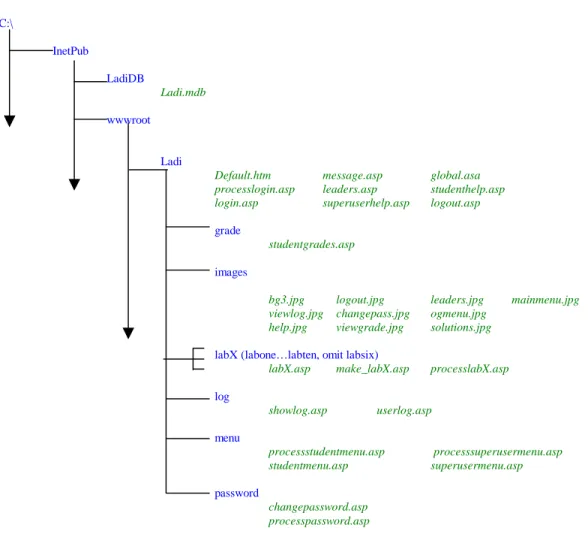
C:\ InetPub LadiDB Ladi.mdb wwwroot Ladi
Default.htm message.asp global.asa
processlogin.asp leaders.asp studenthelp.asp login.asp superuserhelp.asp logout.asp
grade
studentgrades.asp
images
bg3.jpg logout.jpg leaders.jpg mainmenu.jpg viewlog.jpg changepass.jpg ogmenu.jpg
help.jpg viewgrade.jpg solutions.jpg
labX (labone…labten, omit labsix)
labX.asp make_labX.asp processlabX.asp
log showlog.asp userlog.asp menu processstudentmenu.asp processsuperusermenu.asp studentmenu.asp superusermenu.asp password changepassword.asp processpassword.asp
Figure 1. File System Schematic
ready in July. The current LADI site contains a total of 56 files, including 44 ASP files. A schematic representation 4 of the layout of the LADI files is shown Figure 1.
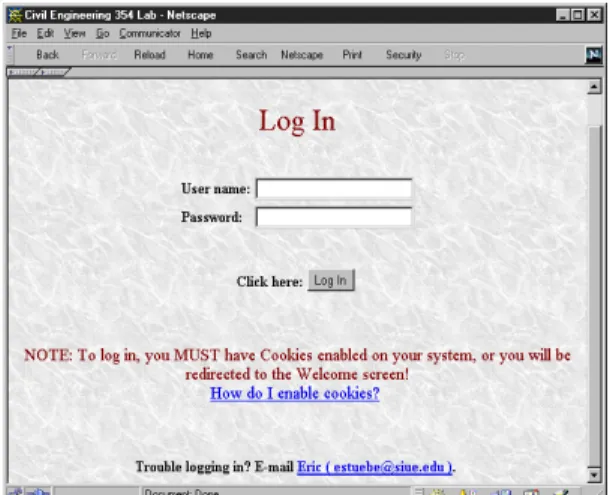
Because we are unable to show all the available features due to space limitations, only those screens through the data entry are described. At the beginning of the course, student information is input to the database file Ladi.mdb. When the LADI site is opened, a welcome screen (Figure 2) will be displayed. If a user chooses the “log in” option, he/she will be led to a typical "log in" screen (Figure 3). Once the user enters the correct user name and password and clicks on the “log in” button, the main menu screen will be displayed (Figure 4).
Besides links to each experiment, users have five options listed at the bottom of the screen. The instructor and teaching assistant, who are classified at a higher level of authority, have another option--“view log,” used to prevent possible break-in situations by tracking logging information. This higher authority also allows them to view grades for the entire class. As recommended in the user menu, users should change the assigned password when visiting the site for the first time (Figure 5).
P
Figure 2. "Welcome" Screen Figure 3. "Log In" Screen
Figure 4. “Main Menu” Screen Figure 5. “Change Password” Screen
Figure 6A. “Lab #8” Screen 1 Figure 6B. “Lab #8” Screen 2
P
To access a lab data sheet, students choose their group and the lab number on the main menu. After the user clicks on the “GO TO LAB” button, the proper lab menu screen will appear, as shown in Figures 6A & 6B. Once a user types in all the needed information and uploads the screen to the database, then other members in the team are able to view the data from any PC that is connected to the web. Therefore, the students are no longer required to make a special trip to obtain the data.
Users' Feedback
The students in CE 354L during Fall 1999 were the first group to use the completed LADI site. Therefore, a survey was conducted during the semester to obtain feedback. All the students indicated that they used LADI at least weekly, which is not surprising since experiments are conducted weekly. Some students indicated that they used the site daily. The students rated the usefulness of the database for learning; the average was 4 out of 5 points. The students rated the ease of use of the database similarly, the average being 3.9. However, several students reported a problem inputting data for one lab. While fewer than half the students (45%) had viewed their grades, those that had rated the usefulness of this feature highly (4.2 out of 5 points). Based on the survey results to date, the implementation of LADI has been very successful. At the present time, changes are being made based on the students' responses.
Conclusion
LADI has been used for one only semester; nevertheless, it has proven to be a very successful undertaking. The database has shown itself to be an effective tool that allows students to display the raw data from their experiments on the Internet. The security of the database is independent of the security of the course web page and this unique feature ensures that the authority of the course web pages will not be altered. The data-tracking feature of the database gives the site owner an additional level of security. These security features provide two benefits to the students. First, it allows them to display their group data knowing that it will not be tampered with, and second, it gives them confidence that their grades are available to only themselves. Just as important as security, the learning curve for using this database is very low because of the planning and diligent work done by the design team. In addition, the project was inexpensive to develop. The cost was kept low because the project was identified as being suitable for a senior design project plus the software tools chosen were available through the campus.
The web database is a powerful tool. It can be used in a variety ways. Based on the successful experience of this project, the Civil Engineering Department at SIUE has planned to add new features and to set up similar web database sites for other lab-related courses.
Bibliography
1. Dwayne Gifford, et al., Access 97, Unleashed, Sams Publishing Company, 1997. 2. Scot Johnson, Using Active Server Pages, Que Corporation, 1997.
3. Leonid Braginski and Matthew Powell, Running Microsoft Internet Information Server, Microsoft Press, 1998.
CHIANG LIN
Chiang Lin is a Professor in and the Chair of the Department of Civil Engineering, Southern Illinois University Edwardsville. He received his B.S. in Civil Engineering from Chung-Yuan University in Taiwan, and M.S. and Ph.D. in the same disciplinary area from the University of Kentucky. He taught at SIUE for the past 15 years, specializing in geotechnical and engineering materials courses. He is especially interested in teaching lab-related courses. Currently, he is involved with other faculty members to research the integration of Internet in teaching. SUSAN M. MORGAN
Susan Morgan is an Assistant Professor in and the Graduate Program Director for the Department of Civil Engineering at Southern Illinois University Edwardsville. Dr. Morgan is a licensed Professional Engineer in Illinois. She received a B.S. degree in Civil Engineering from Southern Illinois University Carbondale in 1991 and a Ph.D. from the Department of Environmental Systems Engineering at Clemson University in 1995.
ERIC STUEBER
Eric Stueber is a computer programmer. He received his B.A. from the Department of Computer Science at Southern Illinois University Edwardsville in August 1999. He was the leader of the design team for the LADI development project.
P