Microsoft Dynamics AX 2009 Business
Intelligence Cube Reference Guide
Microsoft Corporation Published: July 2009
enables you and your people to make business decisions with greater confidence. Microsoft Dynamics works like and with familiar Microsoft software, automating and streamlining financial, customer relationship and supply chain processes in a way that helps you drive business success.
U.S. and Canada Toll Free 1-888-477-7989 Worldwide +1-701-281-6500
www.microsoft.com/dynamics
This document is for informational purposes only. MICROSOFT MAKES NO WARRANTIES, EXPRESS, IMPLIED, OR STATUTORY, AS TO THE INFORMATION IN THIS DOCUMENT. Information in this document, including URL and other Internet Web site references, is subject to change without notice. The entire risk of the use or the results from the use of this document remains with the user. Unless otherwise noted, the companies, organizations, products, domain names, e-mail addresses, logos, people, places, and events depicted in examples herein are fictitious. No association with any real company, organization, product, domain name, e-mail address, logo, person, place, or event is intended or should be inferred.
Complying with all applicable copyright laws is the responsibility of the user. Without limiting the rights under copyright, no part of this document may be reproduced, stored in or introduced into a retrieval system, or transmitted in any form or by any means (electronic, mechanical,
photocopying, recording, or otherwise), or for any purpose, without the express written permission of Microsoft Corporation.
Microsoft may have patents, patent applications, trademarks, copyrights, or other intellectual property rights covering subject matter in this document. Except as expressly provided in any written license agreement from Microsoft, the furnishing of this document does not give you any license to these patents, trademarks, copyrights, or other intellectual property.
© 2009 Microsoft Corporation. All rights reserved.
Microsoft and the Microsoft Dynamics Logo are either registered trademarks or trademarks of Microsoft Corporation, FRx Software Corporation, or Microsoft Business Solutions ApS in the United States and/or other countries. Microsoft Business Solutions ApS and FRx Software Corporation are subsidiaries of Microsoft Corporation.
Cube setup and security ... 5
Access cube data ... 6
Cube modifications ... 7
Cube reference ... 8
Shared dimensions... 10
General ledger cube ... 27
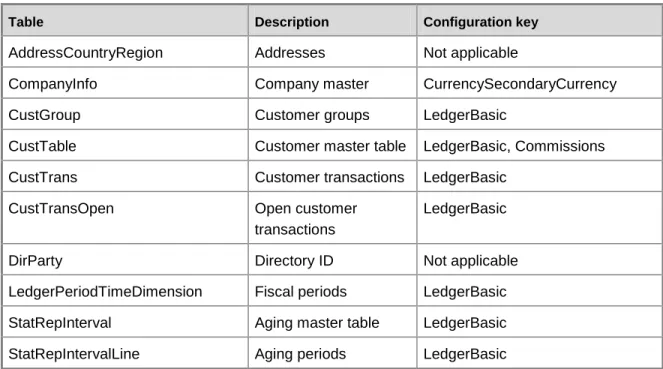
Accounts receivable cube ... 63
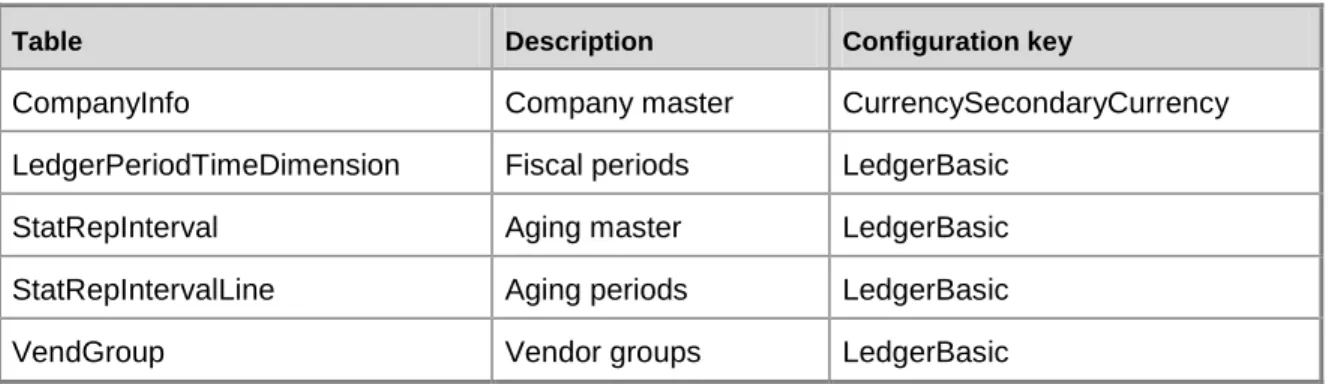
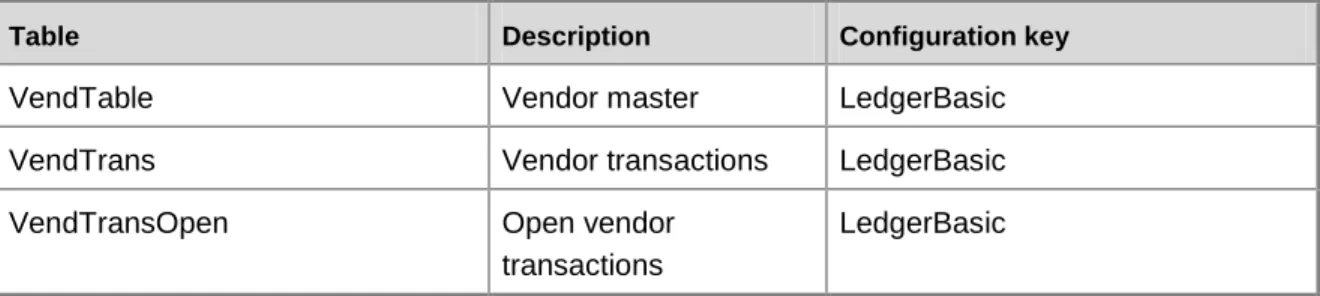
Accounts payable cube ... 77
Expense management cube ... 95
Project accounting cube ... 109
Sales cube ... 135
Purchase cube ... 152
Production cube ... 167
Customer relationship management cube ... 179
Cube setup and security
For information about setting up SQL Server Analysis Services cubes and related topics, see the System and Application Setup Help. Select System and Application Setup on the Help menu of the Microsoft Dynamics AX Windows client.
Selecting a primary company for cube data
When the cubes are set up, a primary company is selected.The fiscal calendar and the company currency (AmountMST) for the primary company are used as the fiscal calendar and company currency for all companies in the cubes. When foreign currency (AmountCur) amounts are evaluated, they are converted by using the exchange rates and currencies of the individual company, and converted to the company currency of the individual company. These converted amounts and AmountMST fields are in the company currency of the individual companies. Those amounts are then converted to company currency of the primary company by using the exchange rates and fiscal calendar of the primary company. All analysis services calculations take place by using that currency.
If the amount is to be displayed in a foreign currency or the company currency of the individual company, the amount is converted again before it is displayed in Role Centers or Microsoft Office Excel. For information about updating cubes with exchange rate information, see the System and Application Setup Help.
Security for cubes
To access cube data, users must be assigned to appropriate roles in Microsoft Dynamics AX. To grant security access to a user, you can assign the user to the appropriate role. You also can grant security to specific users. For information about configuring security settings for cubes, see the System and Application Setup Help.
You also must assign users to database roles. See the "Configuring security settings for cubes" topic in the System and Application Setup Help.
For a list of security roles that are used by default for each cube, see the following topics:
General ledger cube
Accounts receivable cube
Accounts payable cube
Expense management cube
Project accounting cube
Sales cube
Production cube
Customer relationship management cube
Human resource management cube
Access cube data
There are two ways to access data in Microsoft Dynamics AX cubes:
By using Microsoft Office Excel to connect to a cube through a data connection and to create PivotTable reports. For information about creating an ad hoc multidimensional report, see the Application and Business Processes Help.
By viewing data provided on role center pages. For information about viewing preconfigured multidimensional reports, see the Application and Business Processes Help.
Role Centers
The role centers provide reports, key performance indicators (KPIs), charts, and named queries in which the data comes from the analysis cubes database. For more information, see the Role Centers documentation.
Using role-playing dimensions for analysis
A role-playing dimension is a dimension that is used in a cube more than one time, each time for a different purpose. For example, a Time dimension can be included in a cube three times to track the time that products are ordered, shipped, and invoiced. Each role-playing dimension is joined to a fact table by a different field. Microsoft Dynamics AX cubes include Time and LedgerPeriodDimension role-playing dimensions. Use the Time dimension for analysis by calendar year, quarter, month, week, or day. Use the LedgerPeriodTimeDimension dimension for analysis by fiscal year, period, or day.
Drill through to transaction data in Office Excel
When you create a PivotTable report in Excel based on a measure group, you can drill through the data to see a list of the transactions that are included in the aggregation. Some transactions are represented by multiple rows, such as an account and one or more offset accounts. In the drill-through worksheet, the columns come from the dimensions and the measures that are used by the measure group. For example, if you create a PivotTable report by using the Ledger balances measure group and drill through on the amounts, the following columns are displayed: Department
Cost center
Company accounts
Ledger chart of accounts
Ledger period time dimension
Days
Ledger balances Count
Master Debit Amount – Ledger
Master Credit Amount – Ledger
Cube modifications
Configuration keys
The predefined cubes require full license keys. If any configuration keys are disabled, related tables and fields are automatically removed when the Microsoft Dynamics AX database is synchronized. Similarly, when the OLAP database is synchronized with the Microsoft Dynamics AX database, some related cube components are removed. In this case, you must manually remove those elements of the cube, such as key performance indicators (KPIs), calculated measures, and dimensions based on named queries, before you can successfully process the cubes. Use the error messages that appear in the synchronization log as your guide to the elements that must be removed.
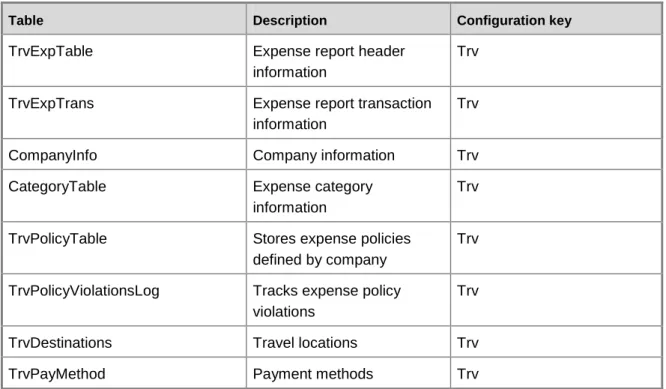
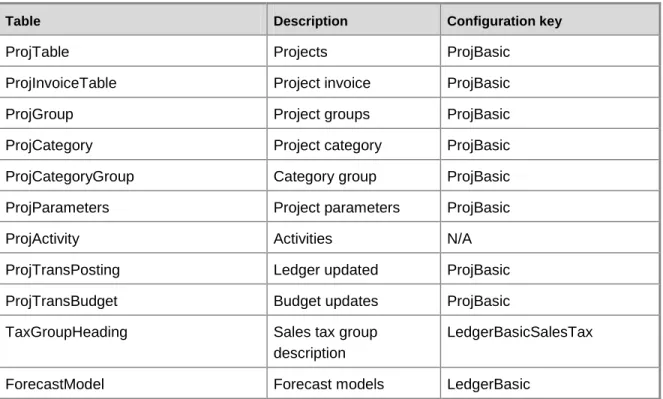
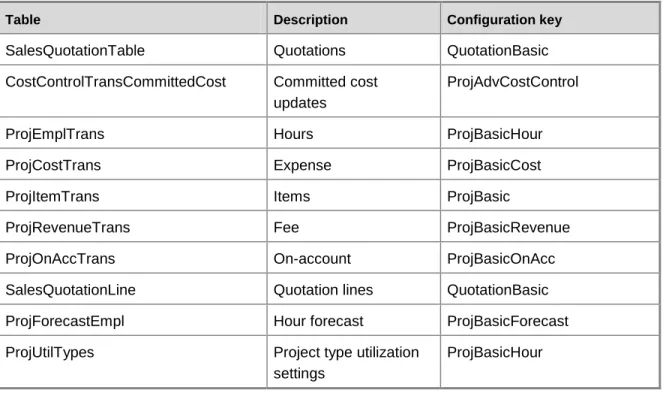
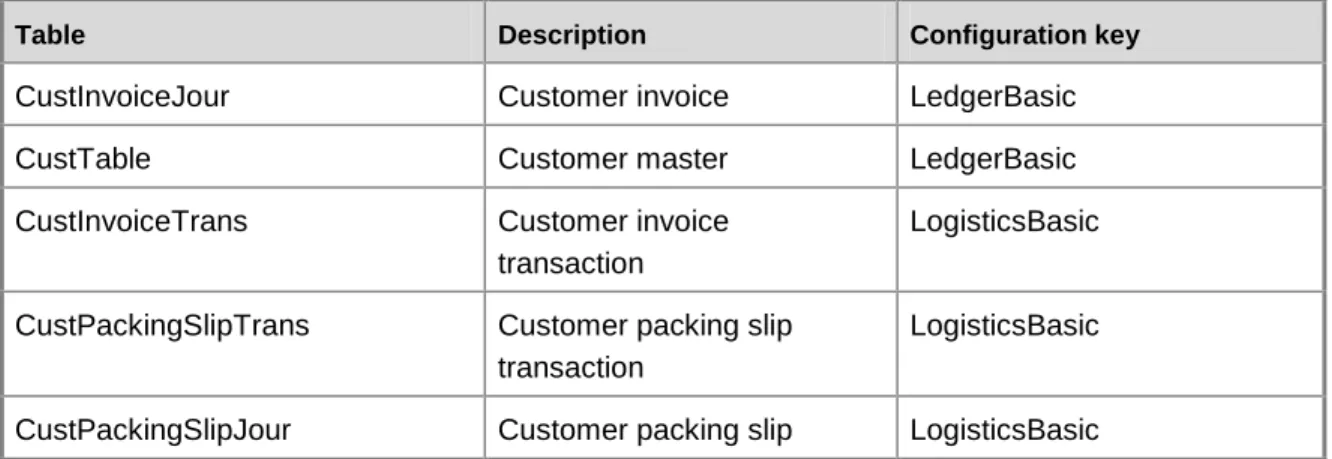
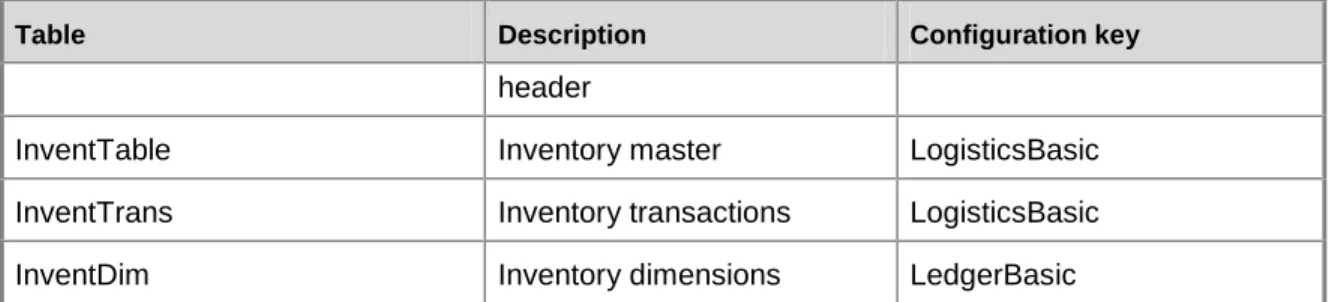
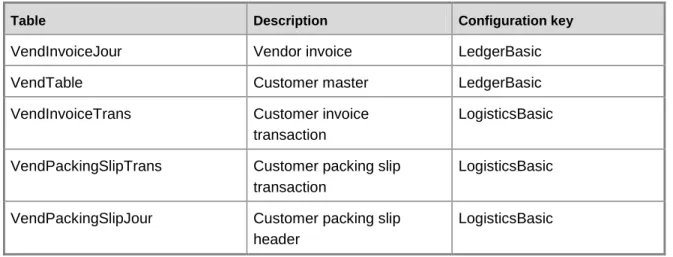
For a list of tables and configuration keys that are used by each cube, see the following topics:
General ledger cube
Accounts receivable cube
Accounts payable cube
Expense management cube
Project accounting cube
Sales cube
Purchase cube
Production cube
Customer relationship management cube
Human resource management cube
Cube modification and deployment
If you choose to make significant changes to the cube functionality by adding or removing fields, measures or dimensions, you must redeploy the cubes project. Contact your authorized Microsoft Dynamics Partner for more information.
Cube reference
The topics in this section provide information about the cubes that are delivered with Microsoft Dynamics AX.
Shared dimensions General ledger cube Accounts receivable cube Accounts payable cube Expense management cube Project accounting cube Sales cube
Purchase cube Production cube
Customer relationship management cube Human resource management cube
Cube elements
A measure group is a collection of related measures in a cube. Each measure group is based on a fact table, which can be either a single table in the Microsoft Dynamics AX database or a named query that includes information from multiple tables in the Microsoft Dynamics AX database.
A measure is a set of values that is usually numeric and is based on a column in the fact table of the cube. Measures are the central values that are aggregated and analyzed. Measures can be static values or calculated values. For example, the extended cost for an item is a static measure, while the margin percentage is a calculated measure. For more information, see the following table for each cube.
Measures
Each OLAP cube includes multiple dimensions. A dimension is an OLAP metadata structure that describes the data in a fact table. For example, the Receivables cube includes a Customers dimension. A single cube dimension includes related attributes. For example, the Customers dimension includes information about customer balances, credit limits, and salespersons assigned to the customers.
The attributes of a dimension are organized into hierarchies. The hierarchical relationship between two attributes depends on how the data is being viewed. For example, if you select to view customers by salesperson name, the salesperson names are at the top of the hierarchy, followed by customer names.
In a PivotTable report or PivotChart report, each dimension and its attributes corresponds to a set of fields where you can expand and collapse detail. For more information, see the following tables for each cube.
Dimensions and attributes
Hierarchies for organizing attributes
Some dimensions allow you to drill through a report to the transactional data that comprises the report. For more information, see the following table for each cube.
Shared dimensions
Shared dimensions and attributes
The following dimensions and attributes are shared by multiple cubes.
Dimension Dimension ID ID Attribute
Aging Periods
AGINGPERIODS Name Aging Bucket
DATAAREAID Company
DESCRIPTION Description
HEADING Header
INTERVALTYPE Interval
STATREPINTERVALLINE Lines for setup of statistics STATREPINTERVAL Statistics
QTY Unit
Closed date Time_CLOSED/Time (role-playing dimension) Days Days FiscalDate FiscalDate FiscalHalfYears FiscalHalfYear s FiscalMonths FiscalMonths FiscalQuarters FiscalQuarters FiscalTrimesters FiscalTrimester s FiscalWeeks FiscalWeeks FiscalYears FiscalYears HalfYears HalfYears Months Months Quarters Quarters
Dimension Dimension ID ID Attribute
TenDays TenDays
Trimesters Trimesters
Weeks Weeks
Years Years
Color INVENTCOLOR INVENTCOLOR Colors
NAME Colors – Name
Company information
COMPANYINFO CITY City
COMPANYINFO Company
information ADDRESSCOUNTRYREGION Company
information Country region
NAME Country region
ADDRESSCOUNTRYREGION CURRENCY Currency CURRENCYCODE Functional Currency ID SECONDARYCURRENCYCODE Reporting Currency ID STATE State EUROCURRENCYCODE Triangulation currency ZIPCODE Zipcode
Company DATAAREA NAME Company
accounts
CURRENCYCODE Currency code
ISPIVOT Is pivot
currency SECONDARYCURRENCYCODE Secondary
Dimension Dimension ID ID Attribute
currency Configuratio
n
CONFIGTABLE CONFIGTABLE Item
configurations
NAME Item
configurations - Name
Cost center TABLEEX_DIMENSION_2 TABLEEX_DIMENSION_2 Cost Center
DESCRIPTION Description
Currency BICURRENCYDIMENSION BICURRENCYDIMENSION Currency
CURRENCYNAME Currency name
ISOCURRENCYCODE ISO currency
code
SYMBOL Symbol
Customers CUSTTABLE DESCRIPTION Chain
CITY City COMMISSIONSALESGROUP Commission sales group SMMBUSRELCHAINGROUP Company chains ADDRESSCOUNTRY REGION NAME Country region
CURRENCYCODE Country region
– Currency
COUNTRY Country
CREATEDDATETIME Created Date
Time
CREDITMAX Credit limit
CURRENCY Currency
CUSTGROUP Customer
Dimension Dimension ID ID Attribute
CUSTGROUP NAME Customer
groups – Name NAME Customer name CUSTTABLE Customers ADDRESSCOUNTRYREGION Customers Country region DESTINATIONCODE Customers Destination code LINEOFBUSINESS Customers Line of business
INVENTSITE Customers Site
DESTINATIONCODE DESCRIPTION
Destination code
DIRPARTYTABLE Global address
book
DIRPARTYTABLE NAME Global address book - Name INVOICEACCOUNT Invoice account LINEOFBUSINESS DESCRIPTION Line of business
PATMTERMID Payment Term
ID COMMISSIONSALESGROUP NAME Sales group SMMBUSRELSEGMENTGROUP DESCRIPTION Segment
SMMBUSRELSEGMENTGROUP Segment table
Dimension Dimension ID ID Attribute
STATE State
ZIPCODE ZIP postal
code Customers
– Invoice account
CUSTTABLE DESCRIPTION Chain
CITY City COMMISSIONSALESGROUP Commission sales group SMMBUSRELCHAINGROUP Company chains ADDRESSCOUNTRY REGION NAME Country region
CURRENCYCODE Country region
– Currency
COUNTRY Country
CREATEDDATETIME Created Date
Time
CREDITMAX Credit limit
CURRENCY Currency
CUSTGROUP Customer
group
CUSTGROUP NAME Customer
groups – Name NAME Customer name CUSTTABLE Customers ADDRESSCOUNTRYREGION Customers Country region DESTINATIONCODE Customers Destination code
Dimension Dimension ID ID Attribute
LINEOFBUSINESS Customers
Line of business
INVENTSITE Customers Site
DESTINATIONCODE DESCRIPTION
Destination code
DIRPARTYTABLE Global address
book
DIRPARTYTABLE NAME Global address book - Name INVOICEACCOUNT Invoice account LINEOFBUSINESS DESCRIPTION Line of business
PATMTERMID Payment Term
ID COMMISSIONSALESGROUP NAME Sales group SMMBUSRELSEGMENTGROUP DESCRIPTION Segment
SMMBUSRELSEGMENTGROUP Segment table
INVENTSITE NAME Site
STATE State
ZIPCODE ZIP postal
code Date Time_TRANSDATE/Time (role-playing dimension) Days Days FiscalDate FiscalDate FiscalHalfYears FiscalHalfYear s FiscalMonths FiscalMonths FiscalQuarters FiscalQuarters
Dimension Dimension ID ID Attribute FiscalTrimesters FiscalTrimester s FiscalWeeks FiscalWeeks FiscalYears FiscalYears HalfYears HalfYears Months Months Quarters Quarters TenDays TenDays Trimesters Trimesters Weeks Weeks Years Years
Department TABLEEX_DIMENSION_1 TABLEEX_DIMENSION_1 Department
DESCRIPTION Description Document Date Time_DOCUMENTDATE/Ti me (role-playing dimension) Days Days FiscalDate FiscalDate FiscalHalfYears FiscalHalfYear s FiscalMonths FiscalMonths FiscalQuarters FiscalQuarters FiscalTrimesters FiscalTrimester s FiscalWeeks FiscalWeeks FiscalYears FiscalYears HalfYears HalfYears Months Months Quarters Quarters TenDays TenDays
Dimension Dimension ID ID Attribute
Trimesters Trimesters
Weeks Weeks
Years Years
Employee EMPLTABLE ACCOUNTTYPE Account type
BIRTHDATE Birthdate
EMPLTABLE Employee
INVENTSITE Employee site
TODATETIME End date
DIRPARTYTABLE FIRSTNAME First name
EMPLGENDER Gender
DIRPARTYTABLE Global address
book
NAME Global address
book - Name DIRPARTYTABLE LASTNAME Last name MARITAL STATUS Marital status DIRPARTYTABLE
MIDDLENAME
Middle name
PROJPERIODID Period code
INVENTSITE NAME Site
FROMDATETIME Start date
STATUS Status
Employee – Recipient
EMPLTABLE ACCOUNTTYPE Account type
DAYSOFFWITHSALARY Additional paid vacation days
BIRTHDATE Birthdate
EMPLTABLE Employee
Dimension Dimension ID ID Attribute
TODATETIME End date
DIRPARTYTABLE FIRSTNAME First name
EMPLGENDER Gender
DIRPARTYTABLE Global address
book
NAME Global address
book – Name DIRPARTYTABLE LASTNAME Last name
MARITALSTATUS Marital status
DIRPARTYTABLE MIDDLENAME
Middle name
VACATIONWITHSALARY Paid vacation
PROJPERIOD Period code
CAREWITHSALARY Personal days
SENIORITYDATE Seniority date
INVENTSITE NAME Site
FROMDATETIME Start date
STATUS Status
EMPLOYEETYPE Type
SALARYTYPE Wage type
End Date Time Days Days
FiscalDate FiscalDate FiscalHalfYears FiscalHalfYear s FiscalMonths FiscalMonths FiscalQuarters FiscalQuarters FiscalTrimesters FiscalTrimester s FiscalWeeks FiscalWeeks
Dimension Dimension ID ID Attribute FiscalYears FiscalYears HalfYears HalfYears Months Months Quarters Quarters TenDays TenDays Trimesters Trimesters Weeks Weeks Years Years
Expiry Date Time Days Days
FiscalDate FiscalDate FiscalHalfYears FiscalHalfYear s FiscalMonths FiscalMonths FiscalQuarters FiscalQuarters FiscalTrimesters FiscalTrimester s FiscalWeeks FiscalWeeks FiscalYears FiscalYears HalfYears HalfYears Months Months Quarters Quarters TenDays TenDays Trimesters Trimesters Weeks Weeks Years Years
Item INVENTTABLE ABCTIEUP ABC-code
carrying cost ABCCONTRIBUTIONMARGIN ABC-code
Dimension Dimension ID ID Attribute margin ABCREVENUE ABC-code revenue ABCVALUE ABC-code value ADDRESSCOUNTRYREGION NAME Country region CURRENCYCODE Currency
INVENTTABLEMODULE UNITID Inventory module parameters – Unit
NAME Item group
INVENTITEMGROUP Item groups
ITEMNAME Item name
ITEMTYPE Item type
INVENTTABLE Items
ADDRESSCOUNTRYREGION Items Country region
INVENTTABLEMODULE PRICE Price Ledger
Period Closed Date
Ledger period time
dimension 3/Ledger Period Time Dimension (role-playing dimension) COMPANYID Company accounts ID LEDGERPERIODDATE Date LEDGERPERIODTIMEDIMENSI ON Ledger period time dimension LEDGERPERIOD Period LEDGERPERIODYEAR Year Ledger period document
Ledger period time
dimension 2/Ledger Period Time Dimension
(role-COMPANYID Company
Dimension Dimension ID ID Attribute
date playing dimension)
LEDGERPERIODDATE Date LEDGERPERIODTIMEDIMENSI ON Ledger period time dimension LEDGERPERIOD Period LEDGERPERIODYEAR Year Ledger period time dimension
Ledger period time dimension COMPANYID Company accounts ID LEDGERPERIODDATE Date LEDGERPERIODTIMEDIMENSI ON Ledger period time dimension LEDGERPERIOD Period LEDGERPERIODYEAR Year Ledger Period Trans Date
Ledger period time
dimension 1/Ledger Period Time Dimension (role-playing dimension) COMPANYID Company accounts ID LEDGERPERIODDATE Date LEDGERPERIODTIMEDIMENSI ON Ledger period time dimension LEDGERPERIOD Period LEDGERPERIODYEAR Year Master Company Reporting Currency
Reporting currency 1 BICURRENCYDIMENSION Currency
CURRENCYNAME Currency name
ISOCURRENCYCODE ISO currency
code
Dimension Dimension ID ID Attribute
Purpose TABLEEX_DIMENSION_3 TABLEEX_DIMENSION_3 Purpose
DESCRIPTION Description
Reporting Currency
Reporting Currency BICURRENCYDIMENSION Currency
CURRENCYNAME Currency name
ISOCURRENCYCODE ISO currency
code
SYMBOL Symbol
Size INVENTSIZE INVENTSIZE Sizes
NAME Sizes - Name
Time Time Days Days
FiscalDate FiscalDate FiscalHalfYears FiscalHalfYear s FiscalMonths FiscalMonths FiscalQuarters FiscalQuarters FiscalTrimesters FiscalTrimester s FiscalWeeks FiscalWeeks FiscalYears FiscalYears HalfYears HalfYears Months Months Quarters Quarters TenDays TenDays Trimesters Trimesters Weeks Weeks Years Years
Dimension Dimension ID ID Attribute NAME Warehouse INVENTLOCATIONTYPE Warehouse type INVENTLOCATION Warehouses INVENTSITE Warehouse Site
Shared dimension usage
Yes indicates that the shared dimension is used by the specified cube.
Shared dimension General ledger cube Accounts receivable cube Accounts payable cube Expense management cube Project accounting cube
Aging Periods Yes Yes Yes No No
Closed Date Yes No Yes No No
Color No No No No No
Company Yes Yes Yes Yes Yes
Company Information
Yes Yes Yes No No
Configuration No No No No No
Cost Center Yes Yes Yes Yes Yes
Currency Yes Yes Yes Yes Yes
Customers No No No No Yes
Customers – Invoice account
No No No No Yes
Date Yes Yes Yes No No
Department Yes Yes Yes Yes Yes
Document Date Yes Yes No No
Employee No No No Yes Yes
Shared dimension General ledger cube Accounts receivable cube Accounts payable cube Expense management cube Project accounting cube Recipient
End Date No No No No Yes
Expiry Date No No No No Yes
Item No No No No Yes Ledger Period Closed Date Yes No Yes No No Ledger Period Document Date
Yes Yes Yes No No
Ledger Period Time Dimension
Yes Yes Yes No No
Ledger Period Trans Date Yes No Yes No No Master Company Reporting Currency
Yes Yes Yes Yes Yes
Purpose pose
Yes Yes Yes Yes Yes
Reporting Currency
No No No No Yes
Size No No No No No
Time Yes Yes Yes Yes Yes
Warehouse No No No No Yes
Shared dimension usage, continued
Shared dimension Sales cube Purchase cube Production cube CRM cube HRM cube
Aging Periods No No No No No
Shared dimension Sales cube Purchase cube Production cube CRM cube HRM cube
Color Yes Yes Yes No No
Company Yes Yes Yes Yes Yes
Company Information
No No No No No
Configuration Yes Yes Yes No No
Cost Center Yes Yes Yes Yes Yes
Currency Yes Yes Yes Yes Yes
Customers Yes No No No No
Customers – Invoice account
Yes No No No No
Date No No No No No
Department Yes Yes Yes Yes Yes
Document Date No No No No No
Employee Yes Yes Yes Yes
Employee – Recipient
No No No Yes No
End Date No No Yes Yes Yes
Expiry Date No No No Yes Yes
Item Yes Yes Yes No No
Ledger Period Closed Date No No No No No Ledger Period Document Date No No No No No Ledger Period Time Dimension No No No No No Ledger Period Trans Date No No No No No Master Company Reporting Currency
Shared dimension Sales cube Purchase cube Production cube CRM cube HRM cube
Purpose pose
Yes Yes Yes Yes Yes
Reporting Currency
Yes Yes No No No
Size Yes Yes Yes No No
Time Yes Yes Yes Yes Yes
General ledger cube
Use the General ledger cube to report on ledger accounts and bank accounts.
The General ledger cube corresponds to the LedgerCube perspective in Microsoft Dynamics AX.
Cross-company analysis for financial data
To use analysis cubes to analyze data for multiple companies, the fiscal periods must be defined the same way in all companies.
Key performance indicators and account categories
The default ledger account categories and the analysis cubes that are provided with Microsoft Dynamics AX are designed to work together. Keep the following considerations in mind if you want to make changes to either the default ledger account categories or the analysis cubes:
You cannot delete the default ledger account categories.
Use care if you change the name of a default ledger account category. If the new name means something different than the default value, key performance indicators (KPIs) that use data from that ledger account category might show incorrect data. For example, if you change the name of ledger account category 1 from Cash to Cost of Goods Sold, KPIs that use that account category will continue to use account category 1 as if it contains the Cash amounts.
You can add ledger account categories. To incorporate data from the ledger account categories into KPIs and other calculated measures, you must also revise the relevant calculations.
For information about the default ledger account categories and the KPIs and calculated measures that use them, see Applications and Business Processes Help.
Configuration keys and tables
The following configuration keys are required for the General ledger cube to work properly:
Bank
BankCheque
LedgerBasic
LedgerBudgetBasic
CurrencySecondaryCurrency: An extended data type key for LedgerTrans.AmtMSTSecond.
BankDeposit: An extended data type key for BankTrans.DepositNum. Note:
If a configuration key is not activated, the associated tables do not exist in the database. Therefore, references to those tables from the General ledger cube will not work.
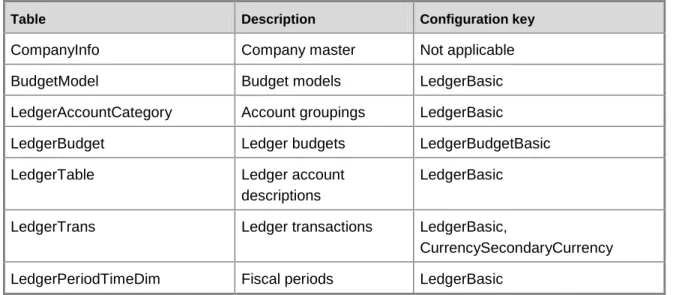
The General ledger cube uses data from the following Ledger tables.
Table Description Configuration key
CompanyInfo Company master Not applicable
BudgetModel Budget models LedgerBasic
LedgerAccountCategory Account groupings LedgerBasic
LedgerBudget Ledger budgets LedgerBudgetBasic
LedgerTable Ledger account
descriptions
LedgerBasic
LedgerTrans Ledger transactions LedgerBasic,
CurrencySecondaryCurrency LedgerPeriodTimeDim Fiscal periods LedgerBasic
The General ledger cube uses data from the following Bank tables.
Table Description Configuration key
BankAccountTable Bank account descriptions Bank
BankAccountTrans Bank account transactions Bank, Bank Deposit BankChequePaymentTrans Bank payment transactions BankCheque
CompanyInfo Company master Not applicable
LedgerPeriodTimeDimension Ledger periods and date tokens
LedgerBasic
Fact tables and measure groups
The General ledger cube includes several measure groups. Each measure group is based on a fact table. Some fact tables are mapped to Microsoft Dynamics AX tables; others are based on named queries.
Measure group Fact table (table/named query) Description
Bank Account Transactions
BankAccountTrans (table) Contains posted transaction information from bank accounts. Bank Payment BankChequePaymentTrans (table) Contains references to
Measure group Fact table (table/named query) Description
Transactions checks and the
transactions they paid. Exchange rate BIExchangeRates (table) Contains a record for each
exchange rate for each company.
Master company exchange rate
BIMasterCompanyExchangeRates (table)
Contains a record for each exchange rate for the company that is selected in the Setup Exchange Rates form.
Ledger Budget LedgerBudget (table) Contains budget
transactions for ledger accounts.
Open Customer Transactions
CustTransOpen (table) Contains customer transactions that have not been settled.
Ledger Transactions LedgerTrans (table) Contains posted general ledger transactions. Ledger Balances LedgerBalancesDimTrans (table) Contains the posted ledger
amount per account, dimension combinations, and date.
Named queries
The named query for Ledger Budgets is based on the LedgerBudget table, with the following additional fields brought into the query.
Additional fields Description
LedgerBudget.AccountNum Ledger account number.
LedgerBudget.ExpandID Record ID of the transaction that generated the item.
LedgerBudget.Active Budget active status.
LedgerBudget.Amount The amount by which the line contributes to the budget.
Additional fields Description
LedgerBudget.Dimension Department dimension. LedgerBudget.Dimension2 Cost center dimension. LedgerBudget.Dimension3 Purpose dimension. LedgerBudget.Currency Currency of the budget. LedgerBudget.ModelNum Model number of the budget. LedgerBudget.AmountMST The master budget amount.
LedgerBudget.DaraAreaID The company associated with the budget. LedgerBudget.RecVersion The version of the record.
LedgerBudget.RecID Unique record ID for each transaction. LedgerBudget.StartDate Start date for the budget.
Ledger.Budget.EndDate End date for the budget.
LedgerBudget.RevisionDate The date the budget revision was made. LedgerBudget.ModifiedDateTime The date and time the ledger budget was
modified.
Dimensions and attributes
The General ledger cube includes the following dimensions and attributes.
Dimension Dimension ID Attribute
Aging Periods* Bank account descriptions
BANKACCOUNTTABLE BANKACCOUNTTABLE Bank
accounts
NAME Bank name
CURRENCYCODE Currency
Bank transactions
BANKACCOUNTTRANS_DIM BANKACCOUNTTRANS_DIM Bank transactions
RECONCILED Reconciled
Dimension Dimension ID Attribute models TXT Budget name COV Cov BUDGETMODEL Ledger budget models MODELID Model ID SUBMODELID Submodel ID TYPE Type Company information* Company* Cost center* Currency*
Date* Time (role-playing dimension) Department*
Ledger account descriptions
LEDGERTABLE ACCOUNTCATEGORY Account
category
ACCOUNTNAME Account
name
ACCOUNTPLTYPE Account type
DESCRIPTION Category Description CLOSED Closed CURRENCYCODE Currency LEDGERACCOUNTCATEGORY Ledger account categories
Dimension Dimension ID Attribute
ACCOUNTTYPE Ledger
account categories - Account type
LEDGERTABLE Ledger chart
of accounts Ledger
budgets
LEDGERBUDGET_DIM ACTIVE Active
LEDGERBUDGET_DIM Ledger budget Ledger period document date*
Ledger Period Time Dimension (role-playing dimension) Ledger period time dimension* Ledger transactions
LEDGERTRANS_DIM LEDGERTRANS_DIM Ledger
transactions
PERIODCODE Period code
POSTING Posting TRANSTYPE Transaction type Master Company Reporting Currency* Purpose* Time*
Dimensions by measure group
The measure groups in the General ledger cube can be sliced by the following dimensions and fields.
Dimension Master company exchange rate
Exchange rate Ledger balances Ledger budgets
Department Department Department
Cost center Cost center Cost center
Purpose Purpose Purpose
Currency Currency Currency Currency
Company Company accounts Company accounts Company accounts Company accounts Ledger chart of accounts (Ledger account descriptions) Ledger chart of accounts Ledger chart of accounts
Ledger period time dimension Ledger period time dimension Ledger period time dimension Ledger period time dimension Ledger period time dimension Ledger budget models (Budget models) Model ID Company information Bank accounts (Bank account descriptions) Lines for setup of statistics (Aging Periods) Ledger budget (Ledger budget) Ledger budget Ledger transactions Bank transactions
Dimension Master company exchange rate
Exchange rate Ledger balances Ledger budgets
Time (Date) Ledger period time dimension (Ledger period document date) Master Company Reporting Currency
Dimensions by measure group, continued
The measure groups in the General ledger cube can be sliced by the following dimensions and fields.
Dimension Ledger transactions
Bank payment transactions
Bank transactions Open customer transactions
Department Department Department
Cost center Cost center Cost center
Purpose Purpose Purpose
Currency Currency Currency Currency
Company Company accounts Company accounts Company accounts Company accounts Ledger chart of accounts (Ledger account descriptions) Ledger chart of accounts Ledger chart of accounts Ledger chart of accounts Ledger period time dimension Ledger period time dimension Ledger period time dimension Ledger period time dimension Ledger period time dimension Ledger budget models (Budget models) Company information
Dimension Ledger transactions
Bank payment transactions
Bank transactions Open customer transactions
Bank accounts (Bank account descriptions)
Bank accounts Bank accounts
Lines for setup of statistics (Aging Periods) Ledger budget (Ledger budget) Ledger transactions Ledger transactions
Bank transactions Bank
transactions
Time Days Days Days Days
Time (Date) Days Ledger period time dimension (Ledger period document date) Ledger period time dimension Master Company Reporting Currency
Hierarchies for organizing attributes
Some attributes can be organized in hierarchies. You can use the following hierarchies to organize dimension attributes.
Dimension Hierarchies Attributes in hierarchical order
Aging Periods Hierarchy Company
Statistics Interval
Lines for setup of statistics
Dimension Hierarchies Attributes in hierarchical order
Header
Lines for setup of statistics Bank account descriptions By Bank Account ID – Name Bank Name
Bank Accounts Company information Country region – Company
information Country/region State City ZIP Code Company information
Date Years Quarters Months
Weeks Days Year Quarter Month Week Days Ledger account descriptions Ledger account categories –
Ledger chart of accounts
Ledger account categories
Ledger chart of accounts By Account Type and Number Account type
Account name
Ledger chart of accounts Ledger period document date Ledger Period Hierarchy Year
Period
Ledger period time dimension Ledger period time dimension Ledger Period Hierarchy Year
Dimension Hierarchies Attributes in hierarchical order
Ledger period time dimension
Time Years Quarters Months
Weeks Days Year Quarter Month Week Days
Measures
The General ledger cube includes the following measure groups and measures.
Measure group: Master company exchange rate
This measure group is based on the BIMasterCompanyExchangeRates table.
Measure Measure field name Aggregation Description
Count Not applicable Count Number of
exchange rate records. Master end
of day rate
BIMasterCompanyExchangeRates.EndOfDayRate Max Maximum exchange rate in the company that is specified as the master exchange rate company, as of the end of the specified day.
Measure group: Exchange rate
Measure Measure field name Aggregation Description
Exchange rate Count
Not applicable Count Number of
exchange rate records. End of day rate BIExchangeRates.EndOfDayRate Max Maximum
exchange rate as of the end of the specified day.
Measure group: Ledger balances
This measure group is based on the LedgerBalancesDimTrans table.
Measure Measure field name Aggregation Description
Ledger
balances Count
Not applicable Count Number of ledger
balance records. Master Debit
Amount - Ledger
LedgerBalancesDimTrans.DebitMst Sum Total debit amount of ledger balances, in company currency. Master Credit Amount - Ledger
LedgerBalancesDimTrans.CreditMst Sum Total credit amount of ledger balances, in company currency.
Measure group: Ledger budgets
This measure group is based on the LedgerBudget table.
Measure Measure field name Aggregation Description
Ledger budgets Count
Not applicable Count Number of ledger
balance records. Master Budget
Amount - Ledger
LedgerBudget.AmountMst Sum Total budget
amount, in company currency.
Measure Measure field name Aggregation Description
Budget Amount - Ledger
LedgerBudget.Amount Sum Total budget
amount, in transaction currency.
Measure group: Ledger transactions
This measure group is based on the LedgerTrans table.
Measure Measure field name Aggregation Description
Ledger transactions Count
Not applicable Count Number of ledger
transactions.
Secondary Master Amount - Ledger
LedgerTrans.AmountMstSecond Sum Total ledger transaction amount, in
reporting currency. Master Amount -
Ledger
LedgerTrans.AmountMst Sum Total ledger
transaction amount, in
company currency. Transaction
Amount - Ledger
LedgerTrans.AmountCur Sum Total ledger
transaction amount, in transaction currency.
Measure group: Bank payment transactions
This measure group is based on the BankChequePaymTrans table.
Measure Measure field name Aggregation Description
Bank payment transactions Count
Not applicable Count Number of
bank payment transactions. Cheque
Transaction
BankChequePaymTrans.PaymentAmountCur Sum Total bank payment
Measure Measure field name Aggregation Description
Amount - Bank transaction
amount, in transaction currency.
Measure group: Bank transactions
This measure group is based on the BankAccountTrans table.
Measure Measure field name Aggregation Description
Bank transactions Count
Not applicable Count Number of bank
transactions.
Bank Transaction Amount – Bank
BankAccountTrans.BankTransAmountCur Sum Total bank transaction amount, in transaction currency. Master Amount – Bank
BankAccountTrans.AmountMst Sum Total bank
transaction amount, in company currency. Transaction Amount – Bank
BankAccountTrans.AmountCur Sum Total bank
transaction amount, in the registration currency.
Measure group: Open customer transactions
This measure group is based on the CustTransOpen table.Measure Measure field name Aggregation Description
Open customer transactions Count
Not applicable Count Number of open
customer transactions.
Measure Measure field name Aggregation Description
Transaction Outstanding Amount
CustTransOpen.AmountCur Sum Total open customer transaction amount, in transaction currency. Master Outstanding Amount
CustTransOpen.AmountMst Sum Total open customer
transaction amount, in company
currency.
Calculated measures
The General ledger cube contains the following calculated measures.
Measure Formula Aggregation Description
COGS Summation of
LedgerTrans
AmountMST field for ledger accounts assigned to the ledger account category 35 (COGS).
No accumulation Cost of Goods Sold amount for your organization.
Gross profit Sales calculated measure times -1, minus Sales Return and Discounts calculated measure, minus COGS calculated measure.
No accumulation Gross profit for your organization.
Sales Summation of
LedgerTrans
AmountMST field for ledger accounts assigned to the ledger account category 33 (Sales).
No accumulation Sales for your organization.
Measure Formula Aggregation Description
discounts LedgerTrans
AmountMST field for ledger accounts assigned to the ledger account category 34 (Sales Returns and Discounts).
discounts for your organization.
Total Actuals Summation of LedgerTrans
AmountMST field for all accounts.
No accumulation Total actuals for your organization.
Total Budget Summation of LedgerBudget AmountMST field.
No accumulation Total budget amounts for your organization.
Total Payables Year-to-date summation of LedgerTrans
AmountMST field for ledger accounts assigned to the ledger account category 15 (AP).
Year-to-date accumulation
YTD payables for your organization.
Total Receivables Year-to-date summation of LedgerTrans
AmountMST field for ledger accounts assigned to the ledger account category 4 (AR).
Year-to-date accumulation
YTD receivables for your organization.
Total Sales Sales calculated measure + Sales Return and Discount calculated measure.
No accumulation Total sales for your organization.
General ledger cube KPI calculations
The key performance indicators (KPIs) in the General ledger cube depend on ledger account categories. Ledger account categories are attributes that are used to classify ledger accounts. KPI calculations refer to the ledger account categories, not directly to ledger accounts. For example, you might set up the following ledger accounts:
11000 Cash
11020 Cash Reserves
11030 Petty Cash
All three ledger accounts can be assigned to the Cash (Reference ID = 1) ledger account category. When a KPI is calculated, the total of the amounts for all three ledger accounts is included in the calculation.
Keep the following considerations in mind if you want to make changes to either the General ledger cube or the default ledger account categories:
You cannot delete the default ledger account categories.
Use care if you change the name of a default ledger account category. If the new name means something different than the default name, key performance indicators (KPIs) that use data from that ledger account category might show incorrect data. For example, if you change the name of ledger account category 1 from Cash to Cost of Goods Sold, KPIs that use that account category will continue to use account category 1 as if it contains the Cash amounts.
You can add ledger account categories. To incorporate data from the ledger account categories into KPIs and other calculated measures, you must also revise the relevant calculations.
The following table lists the KPIs that are associated with the General ledger cube. The reference ID numbers refer to ledger account categories. The balances for the ledger accounts that
correspond to some ledger account categories are stored as negative values in the MSDAX database. To express the amount as a positive amount, these values are multiplied by -1. An asterisk (*) indicates that the KPI calculations use accumulated amounts. Accumulated amounts, such as some period-to-date amounts, are not stored in the Microsoft Dynamics AX database. For example, to calculate a period-to-date amount, all the transactions from the beginning of the fiscal calendar to the end of the previous period are totaled. Then all the amounts from the beginning of the fiscal calendar to the current date are totaled. The difference between these two amounts is the period-to-date amount.
You can use the information in the following table to help verify the information in your KPIs. Export your chart of accounts to Office Excel and verify that the accounts that should be included in the KPIs are assigned to the correct ledger account category.
KPI name Calculation
KPI name Calculation
Inventory (Reference ID = 5) for period - Beginning Inventory (Reference ID = 5) for period)] / [Beginning Accounts Payable (Reference ID = 15) + Ending Accounts Payable (Reference ID = 15) / 2]
Note:
* Only the Inventory and Accounts Payable parts of this KPI are accumulated.
Accounts Receivable Days Outstanding *
Ending Accounts Receivable (Reference ID = 4) balance for the period / [[Credit Sales for the period (Reference ID = 33) *-1] - Sales Returns and Discounts (Reference ID = 34) for the period] * Number of days in the period
Note:
* Only the Ending Accounts Receivable balance for the period part of this KPI is accumulated. Accounts Receivable Turnover * [Sales (Reference ID = 33) *-1] - Sales Returns and
Discounts (Reference ID = 34) / [Beginning Accounts Receivable (Reference ID = 4) + Ending Accounts Receivable (Reference ID = 4) / 2]
Note:
* Only the Accounts Receivable part of this KPI is accumulated.
Average Collection Period * Accounts Receivable (Reference ID = 4) / Average Daily Sales (Average Daily Sales = Total Sales for the year to date (Reference ID = 33) *-1 / Number of days in fiscal year to date)
Note:
* Only the Accounts Receivable part of this KPI is accumulated.
Average Days Delinquent * Accounts Receivable Days Outstanding KPI - Best Possible Days Sales Outstanding KPI
Note:
* Only the Accounts Receivable part of this KPI is accumulated.
Average Days to Pay * Ending Accounts Payable (Reference ID = 15) balance for the period / [Cost of Goods Sold (Reference ID = 35) +
KPI name Calculation
(Ending Inventory (Reference ID = 5) for the period - Beginning Inventory (Reference ID=5) for the period)] * Number of days in the period
Note:
* Only the Accounts Payable and Inventory parts of this KPI are accumulated.
Best Possible Days Sales Outstanding *
Current portion of Accounts Receivable (Reference ID = 4) for the period / [[Credit Sales for the period (Reference ID = 33) *-1] - Sales Returns and Discounts (Reference ID = 34)] * Number of days in period
Note:
* Only the Current portion of the Accounts Receivable part of this KPI is accumulated.
Cash Position * Cash (Reference ID = 1) + Cash Equivalents (Reference ID = 2)
Note:
* Accumulation applies to all calculations.
Cash Ratio * Cash Equivalents (Reference ID = 2) + Cash (Reference ID = 1) / (Accounts Payable (Reference ID = 15) + Notes Payable (Reference ID = 16) + Current Maturities on Long Term Debt (Reference ID = 17) + Taxes Payable
(Reference ID = 18) + Interest Payable (Reference ID = 19) + Dividends Payable (Reference ID = 20) + Leases Payable (Current) (Reference ID = 21) + Sinking Fund Payable (Current) (Reference ID = 22) + Other Current Liabilities (Reference ID = 23))
Note:
* Accumulation applies to all calculations. Collection Effectiveness Index * [[Beginning Accounts Receivable (Reference ID = 4)
balance for the period + [Credit Sales for the period (Reference ID =33) *-1] - Sales Returns and Discounts (Reference ID = 34) - Ending Total Accounts Receivable (Reference ID = 4) for the period] / [(Beginning Accounts Receivable (Reference ID = 4) for the period + [Credit Sales (Reference ID = 33) *-1]) for the period - Sales Returns and Discounts (Reference ID = 34) - Ending
KPI name Calculation
Current Accounts Receivable (Reference ID =4) for the period.]] Multiply the expression result by 100.
Note:
* Only the Beginning Accounts Receivable, Ending Total Accounts Receivable, and Ending Current Accounts Receivable parts of this KPI are accumulated.
Cost of Goods Sold Cost of Goods Sold (Reference ID = 35)
Current Ratio * [Cash (Reference ID = 1) + Cash Equivalents (Reference ID = 2) + Short Term Investments (Reference ID = 3) + Accounts Receivable (Reference ID = 4) + Inventory (Reference ID = 5) + Notes Receivables (Reference ID = 6) + Work in Process (Reference ID = 7) + Prepaid Expenses (Reference ID = 8) + Other Current Assets (Reference ID = 9) + Inventory (Reference ID = 5)] / [Accounts Payable (Reference ID = 15) + Notes Payable (Reference ID = 16) + Current Maturities on Long Term Debt (Reference ID = 17) + Taxes Payable (Reference ID = 18) + Interest Payable (Reference ID = 19) + Dividends Payable (Reference ID = 20) + Leases Payable (Current) (Reference ID = 21) + Sinking Fund Payable (Current) (Reference ID = 22) + Other Current Liabilities (Reference ID = 23)]
Note:
* Accumulation applies to all calculations.
Debt to Equity * Accounts Payable (Reference ID = 15) + Notes Payable (Reference ID = 16) + Current Maturities on Long Term Debt (Reference ID=17) + Taxes Payable (Reference ID = 18) + Interest Payable (Reference ID = 19) + Dividends Payable (Reference ID = 20) + Leases Payable (Current) (Reference ID = 21) + Sinking Fund Payable (Current) (Reference ID = 22) + Other Current Liabilities (Reference ID = 23) + Long Term Debt (Reference ID = 24) / Common Stock (Reference ID = 25) + Preferred Stock (Reference ID = 26) + Additional Paid in Capital: Common (Reference ID= 27) + Additional Paid in Capital: Preferred (Reference ID = 28) + Retained Earnings (Reference ID = 29) + Treasury Stock (Reference ID = 30)
KPI name Calculation
Note:
* Accumulation applies to all calculations.
Debt to Total Assets * [Accounts Payable (Reference ID = 15) + Notes Payable (Reference ID = 16) + Current Maturities on Long Term Debt (Reference ID = 17) + Taxes Payable (Reference ID = 18) + Interest Payable (Reference ID = 19) + Dividends Payable (Reference ID = 20) + Leases Payable (Current) (Reference ID = 21) + Sinking Fund Payable (Current) (Reference ID = 22) + Other Current Liabilities (Reference ID = 23) + Long Term Debt (Reference ID = 24)] / [Cash (Reference ID =1) + Cash Equivalents (Reference ID = 2) + Short Term Investments (Reference ID = 3) + Accounts Receivable (Reference ID = 4)+ Inventory (Reference ID = 5) + Notes Receivables (Reference ID = 6)+Work in Process (Reference ID = 7) + Prepaid Expenses
(Reference ID = 8) + Other Current Assets (Reference ID = 9) + Long Term Investments (Reference ID = 10) + Property Plant and Equipment (Reference ID = 11) + Accumulated Depreciation (Reference ID = 12) + Intangible Assets (Reference ID = 13) + Other Assets (Reference ID = 14)]
Note:
* Accumulation applies to all calculations.
Expense Budget Variance Sum of budget amounts for the period selected for the accounts / Sum of actual balances for expense accounts for the same time period = Variance. The result is displayed as a percentage. The following ledger account categories are included in the sum of the budget amounts and in the sum of the actual amounts: Cost of Goods Sold (Reference ID = 35) + Selling Expense (Reference ID = 36) + Administrative Expense (Reference ID = 37) + Manufacturing Expense (Reference ID = 38) + Travel and Entertainment Expenses (Reference ID = 39) + Project Operation Expenses (Reference ID = 40) + Salaries Expense (Reference ID = 41 ) + Other Employee Expenses (Reference ID = 42) + Interest Expense
(Reference ID = 43) + Tax Expense (Reference ID = 44) + Depreciation Expense (Reference ID = 45) + Income Tax Expense (Reference ID = 46) + Other Expenses
KPI name Calculation
(Reference ID = 47) + Amortization of Intangible Assets (Reference ID = 52) + Gain/Loss on Asset Disposal (Reference ID = 51)
Note:
If necessary, the amounts for each account category are summed by dimension combination to compare the budget versus actual amounts by department, cost center, and so on. Reference ID 51 is included only if the balance of the accounts in that account category is positive. Otherwise it is excluded.
Gross Profit [Sales (Reference ID = 33) *-1] - Sales Returns and Discounts Reference ID = 34) - Cost of Goods Sold (Reference ID = 35)
Note:
The Sales account category is multiplied by -1 to reflect the sales amount as a positive value. Gross Profit Margin [Sales (Reference ID = 33) *-1] - Sales Returns and
Discounts (Reference ID = 34) - Cost of Goods Sold (Reference ID = 35) / [Sales (Reference ID = 33) *-1] - Sales Returns and Discounts (Reference ID = 34)) Inventory Turnover * Cost of Goods Sold (Reference ID = 35) / [Beginning
Inventory (Reference ID = 5) + Ending Inventory (Reference = 5) / 2]
Note:
* Only the Inventory part of this KPI is accumulated.
Net Income Result A - Result B
Result A = [Sales (Reference ID = 33) + Other Income (Reference ID = 48) + Sales Returns and Discounts (Reference ID = 34)] *-1
Result B = Cost of Goods Sold (Reference ID = 35) + Selling Expense (Reference ID = 36) + Administrative Expense (Reference ID = 37) + Manufacturing Expense (Reference ID = 38) + Travel and Entertainment Expenses (Reference ID = 39) + Project Operation Expenses
KPI name Calculation
41 ) + Other Employee Expenses (Reference ID = 42) + Interest Expense (Reference ID = 43) + Tax Expense (Reference ID = 44) + Depreciation Expense (Reference ID = 45) + Income Tax Expense (Reference ID = 46) + Other Expenses (Reference ID = 47)
Quick Ratio * [Cash (Reference ID =1) + Cash Equivalents (Reference ID = 2) + Short Term Investments (Reference ID = 3) + Accounts Receivable (Reference ID = 4) + Notes Receivables (Reference ID = 6)] / (Accounts Payable (Reference ID = 15) + Notes Payable (Reference ID = 16) + Current Maturities on Long Term Debt (Reference ID = 17) + Taxes Payable (Reference ID = 18) + Interest Payable (Reference ID=19) + Dividends Payable (Reference ID = 20) + Leases Payable (Current) (Reference ID=21) + Sinking Fund Payable (Current) (Reference ID = 22) + Other Current Liabilities (Reference ID = 23)
Note:
* Accumulation applies to all calculations.
Return on Total Assets * [Sales (Reference ID = 33) + Other Income (Reference ID = 48) + Gain or Loss on Asset Disposal (Reference ID = 51) *-1] - Sales Returns and Discounts (Reference ID = 34) - Cost of Goods Sold (Reference ID = 35) - Selling Expense (Reference ID = 36) - Administrative Expense (Reference ID = 37) - Manufacturing Expense (Reference ID = 38) - Travel and Entertainment Expenses (Reference ID = 39 ) - Project Operation Expense (Reference ID = 40) - Salaries Expense (Reference ID = 41) - Other Employee Expenses (Reference ID = 42) - Depreciation Expense (Reference ID = 45) - Other Expenses (Reference ID = 47) - Amortization of Intangible Assets (Reference ID = 52) / Cash (Reference ID = 1) + Cash Equivalents (Reference ID = 2) + Short Term Investments (Reference ID = 3) + Accounts Receivable (Reference ID = 4) + Inventory (Reference ID = 5) + Notes Receivables (Reference ID = 6) + Work in Process (Reference ID = 7) + Prepaid Expenses (Reference ID = 8) + Other Current Assets (Reference ID = 9) + Long Term Investments (Reference ID = 10) + Property Plant and Equipment (Reference ID =
KPI name Calculation
11) + Accumulated Depreciation (Reference ID = 12) + Intangible Assets (Reference ID = 13) + Other Assets (Reference ID = 14)
Note:
Reference ID 51 is included only if the balance of the accounts in that account category is negative. Otherwise it is excluded. * Only the total assets (Reference ID 1 through 14) part of this KPI is accumulated.
Revenue Budget Variance Sum of budget amounts for the period selected for the accounts / Sum of actual balances for revenue accounts for the same time period = Variance. The result is displayed as a percentage. The following ledger account categories are included in the sum of the budget amounts and in the sum of the actual amounts: Sales (Reference ID = 33) + Other Income (Reference ID = 48) + Sales Returns and Discounts (Reference ID = 34) + Gain/Loss on Asset Disposal (Reference ID = 51)
Note:
If necessary, the amounts for each account category are summed by dimension combination to compare the budget versus actual amounts by department, cost center, and so on. Reference ID 51 is included only if the balance of the accounts in that account category is negative. Otherwise it is excluded.
Times Interest Earned [Sales (Reference ID = 33) + Other Income (Reference ID = 48)+ Gain/Loss on Asset Disposal (Reference ID = 51)) *-1] - Sales Returns and Discounts (Reference ID = 34) - Cost of Goods Sold (Reference ID = 35) - Selling Expense (Reference ID = 36) - Administrative Expense (Reference ID - 37) - Manufacturing Expense (Reference ID - 38) - Travel and Entertainment Expenses (Reference ID - 39 ) - Project Operation Expense (Reference ID = 40) - Salaries Expense (Reference ID = 41) - Other Employee Expenses (Reference ID - 42) - Depreciation Expense (Reference ID = 45) - Other Expenses (Reference ID = 47)- Amortization of Intangible Assets (Reference ID = 52) / Interest
KPI name Calculation
Expense (Reference ID = 43) Note:
Reference ID 51 is included only if the balance of the accounts in that account category is negative. Otherwise it is excluded.
Total Expenses Cost of Goods Sold (Reference ID = 35) + Selling Expense (Reference ID = 36) + Administrative Expense (Reference ID = 37) + Manufacturing Expense (Reference ID = 38) + Travel and Entertainment Expense (Reference ID = 39) + Project Operation Expenses (Reference ID = 40) + Salaries Expense (Reference ID = 41 ) + Other Employee Expense (Reference ID = 42) + Interest Expense
(Reference ID = 43) + Tax Expense (Reference ID = 44) + Depreciation Expense (Reference ID = 45) + Income Tax Expense (Reference ID = 46) + Other Expenses
(Reference ID = 47) + Amortization of Intangible Assets (Reference ID = 52) + Gain/Loss on Asset Disposal (Reference ID = 51)
Note:
Reference ID 51 is included only if the balance of the accounts in that account category is positive. Otherwise it is excluded.
Total Revenue [Sales (Reference ID = 33) + Other Income (Reference ID = 48) + Sales Returns and Discounts (Reference ID = 34) + Gain/Loss on Asset Disposal (Reference ID = 51)] *-1
Note:
Reference ID 51 is included only if the balance of the accounts in that account category is negative. Otherwise it is excluded.
General ledger cube KPI source tables, configuration keys, and
Role Centers
The following table lists the key performance indicators (KPIs) that are associated with the General ledger cube. The tables from which data is drawn, required configuration keys, and related role centers are included.
KPI name Source tables Configuration keys (Tables) Role Centers
Accounts Payable Turnover *
LedgerTrans, LedgerTable LedgerBasic (LedgerTrans and LedgerTable), CurrencySecondaryCurrency (LedgerTrans) Accounting Manager, Bookkeeper, CFO, Controller Accounts Receivable Days Outstanding *
LedgerTrans, LedgerTable LedgerBasic (LedgerTrans and LedgerTable), CurrencySecondaryCurrency (LedgerTrans) Accounts Receivable Turnover *
LedgerTrans, LedgerTable LedgerBasic (LedgerTrans and LedgerTable), CurrencySecondaryCurrency (LedgerTrans) Accounting Manager, Bookkeeper, CFO, Controller, Credit and Collections Manager Average Collection Period *
LedgerTrans, LedgerTable LedgerBasic (LedgerTrans and LedgerTable), CurrencySecondaryCurrency (LedgerTrans) Credit and Collections Manager Average Days Delinquent * LedgerTrans, LedgerTable, CustTransOpen
Ledger Basic (LedgerTrans, LedgerTable, and CustTransOpen), CurrencySecondaryCurrency (LedgerTrans) Credit and Collections Manager Average Days to Pay *
LedgerTrans, LedgerTable Ledger Basic (LedgerTrans and LedgerTable), CurrencySecondaryCurrency (LedgerTrans) Accounting Manager, Bookkeeper, CFO, Controller Best Possible Days Sales Outstanding *
LedgerTrans, LedgerTable Ledger Basic (LedgerTrans and LedgerTable), CurrencySecondaryCurrency (LedgerTrans) Accounting Manager, Bookkeeper, CFO, Controller, Credit and Collections
KPI name Source tables Configuration keys (Tables) Role Centers
Manager Cash Position * LedgerTrans, LedgerTable Ledger Basic (LedgerTrans
and LedgerTable), CurrencySecondaryCurrency (LedgerTrans) Accounting Manager, Bookkeeper, CFO, Controller Cash Ratio * LedgerTrans, LedgerTable Ledger Basic (LedgerTrans
and LedgerTable), CurrencySecondaryCurrency (LedgerTrans) Accounting Manager, Bookkeeper, CFO, Controller Collection Effectiveness Index * LedgerTrans, LedgerTable, CustTransOpen
Ledger Basic (LedgerTrans, LedgerTable, and CustTransOpen), CurrencySecondaryCurrency (LedgerTrans) Credit and Collections Manager Cost of Goods Sold
LedgerTrans, LedgerTable Ledger Basic (LedgerTrans and LedgerTable), CurrencySecondaryCurrency (LedgerTrans) Accountant, Accounting Manager, Bookkeeper, CEO, CFO, Controller Current Ratio * LedgerTrans, LedgerTable Ledger Basic (LedgerTrans
and LedgerTable), CurrencySecondaryCurrency (LedgerTrans) Accounting Manager, Bookkeeper, CFO, Controller Debt to Equity * LedgerTrans, LedgerTable Ledger Basic (LedgerTrans
and LedgerTable), CurrencySecondaryCurrency (LedgerTrans) Accounting Manager, CFO, Controller Debt to Total Assets *
LedgerTrans, LedgerTable Ledger Basic (LedgerTrans and LedgerTable), CurrencySecondaryCurrency (LedgerTrans) Accounting Manager, CFO, Controller Expense Budget LedgerTrans, LedgerTable, LedgerBalancesDimTrans,
Ledger Basic (LedgerTrans, LedgerTable, and
Accounting Manager,
KPI name Source tables Configuration keys (Tables) Role Centers Variance LedgerBudget, TmpBudgetBalances LedgerBalancesDimTrans), CurrencySecondaryCurrency (LedgerTrans), LedgerBasicBudget (LedgerBudget) Bookkeeper, CFO, Controller
Gross Profit LedgerTrans, LedgerTable Ledger Basic (LedgerTrans and LedgerTable), CurrencySecondaryCurrency (LedgerTrans) Accountant, Accounting Manager, Bookkeeper, CFO, Controller Gross Profit Margin
LedgerTrans, LedgerTable Ledger Basic (LedgerTrans and LedgerTable), CurrencySecondaryCurrency (LedgerTrans) Accountant, Accounting Manager, Bookkeeper, CEO, CFO, Controller Inventory Turnover *
LedgerTrans, LedgerTable Ledger Basic (LedgerTrans and LedgerTable), CurrencySecondaryCurrency (LedgerTrans) Accounting Manager, CEO, CFO, Controller Net Income LedgerTrans, LedgerTable Ledger Basic (LedgerTrans
and LedgerTable), CurrencySecondaryCurrency (LedgerTrans) Accountant, Accounting Manager, Bookkeeper, CFO, Controller Quick Ratio * LedgerTrans, LedgerTable Ledger Basic (LedgerTrans,
LedgerTable), CurrencySecondaryCurrency (LedgerTrans) Accounting Manager, Bookkeeper, CFO, Controller Return on Total Assets *
LedgerTrans, LedgerTable Ledger Basic (LedgerTrans and LedgerTable), CurrencySecondaryCurrency (LedgerTrans) Accountant, Accounting Manager, CFO, Controller Revenue Budget
LedgerTrans, LedgerTable, Ledger Basic (LedgerTrans and LedgerTable),
Accounting Manager,
KPI name Source tables Configuration keys (Tables) Role Centers
Variance LedgerBudget CurrencySecondaryCurrency (LedgerTrans), LedgerBasicBudget (LedgerBudget) Bookkeeper, CFO, Controller Times Interest Earned
LedgerTrans, LedgerTable Ledger Basic (LedgerTrans and LedgerTable), CurrencySecondaryCurrency (LedgerTrans) Accounting Manager, CFO, Controller
Total Expenses LedgerTrans, LedgerTable Ledger Basic (LedgerTrans and LedgerTable), CurrencySecondaryCurrency (LedgerTrans) Accountant, Accounting Manager, Bookkeeper, CFO, Controller Total Revenue LedgerTrans, LedgerTable Ledger Basic (LedgerTrans
and LedgerTable), CurrencySecondaryCurrency (LedgerTrans) Accountant, Accounting Manager, Bookkeeper, CEO, CFO, Controller
General ledger KPI account categories
Each account in the chart of accounts can be assigned to a ledger account category. The calculations for General ledger KPIs use the balances in the accounts that are assigned to the specified ledger account categories. The following table lists the ledger account categories and descriptions for each General ledger KPI.
KPI Reference ID Ledger account category description
Accounts Payable Turnover 5, 15, 35 Inventory, Accounts Payable, Cost of Goods Sold
Accounts Receivable Days Outstanding
4, 33, 34 Accounts Receivable, Sales, Sales Returns and Discounts Accounts Receivable Turnover 4, 33, 34 Accounts Receivable, Sales,
Sales Returns and Discounts Average Collection Period 4, 33 Accounts Receivable, Sales
KPI Reference ID Ledger account category description
Average Days Delinquent 4, 33, 34 Accounts Receivable, Sales, Sales Returns and Discounts Average Days to Pay 5, 15, 35 Inventory, Accounts Payable,
Cost of Goods Sold Best Possible Days Sales
Outstanding
4, 33, 34 Accounts Receivable, Sales, Sales Returns and Discounts
Cash Position 1, 2 Cash, Cash Equivalents
Cash Ratio 1, 2, 15-23 Cash Equivalents, Accounts
Payable, Notes Payable, Current Maturities on Long Term Debt, Taxes Payable, Interest Payable, Dividends Payable, Leases Payable (Current), Sinking Fund Payable (Current), Other Current Liabilities
Collection Effectiveness Index 4, 33, 34 Accounts Receivable, Sales, Sales Returns and Discounts
Cost of Goods Sold 35 Cost of Goods Sold
Current Ratio 1-9, 15-23 Cash, Cash Equivalents, Short
Term Investments, Accounts Receivable, Inventory, Notes Receivables, Work in Process, Prepaid Expenses, Other Current Assets, Inventory, Accounts Payable, Notes Payable, Current Maturities on Long Term Debt, Taxes Payable, Interest Payable, Dividends Payable, Leases Payable (Current), Sinking Fund Payable (Current), Other Current Liabilities
Debt to Equity 15-30 Accounts Payable, Notes
payable, Current Maturities on Long Term Debt, Taxes
KPI Reference ID Ledger account category description
Payable, Interest payable, Dividends Payable, Leases Payable (Current), Sinking Fund Payable (Current), Other Current Liabilities, Long Term Debt, Common Stock,
Preferred Stock, Additional Paid in Capital - Common, Additional Paid in Capital - Preferred, Retained Earnings, Treasury Stock
Debt to Total Assets 1-24 Accounts Payable, Notes
Payable, Current Maturities on Long Term Debt, Taxes Payable, Interest Payable, Dividends Payable, Leases Payable (Current), Sinking Fund Payable (Current), Other Current Liabilities, Long Term Debt, Cash, Cash Equivalents, Short Term Investments, Accounts Receivable,
Inventory, Notes Receivables, Work in Process, Prepaid Expenses, Other Current Assets, Long Term
Investments, Property, Plant, and Equipment, Accumulated Depreciation, Intangible Assets, Other Assets
Expense Budget Variance 35-47, 51, 52 Cost of Goods Sold, Selling Expense, Administrative Expense, Manufacturing Expense, Travel and
Entertainment Expense, Project Expenses, Salaries Expense, Other Employee Expenses, Interest Expense, Tax Expense, Depreciation Expense, Income