1
Index
Safety Precautions ... 2
Vehicle Service Information ... 3
Visual Inspection ... 3
Electrical Specifications ... 34
Warranty ... 104
1. Multimeter Basic Functions Functions and Display Definitions ... 4
Setting the Range ... 6
Battery and Fuse Replacement ... 7
Measuring DC Voltage ... 8
Measuring AC Voltage ... 8
Measuring Resistance ... 9
Measuring DC Current ... 9
Testing for Continuity ... 10
Testing Diodes ... 11
Measuring Engine RPM ... 11
Measuring Dwell ... 12
2. Automotive Testing with the CP7677 General Testing ... 13
- Testing Fuses ... 13
- Testing Switches ... 13
- Testing Solenoids and Relays ... 14
Starting / Charging System Testing ... 15
- No Load Battery Test ... 15
- Engine Off Battery Current Draw ... 15
CP7677
Auto TroubleShooter
™
OPERATING
INSTRUCTIONS
- Cranking Voltage/Battery Load Test ... 16- Voltage Drops ... 17
- Charging System Voltage Test ... 18
Ignition System Testing ... 19
- Ignition Coil Testing ... 19
- Ignition System Wires ... 21
- Hall Effect Sensors/Switches ... 22
- Magnetic Pick-Up Coils ... 23
- Reluctance Sensors ... 23
- Ignition Coil Switching Action ... 24
Fuel System Testing ... 25
- Testing GM C-3 Mixture Control Solenoid Dwell ... 25
- Measuring Fuel Injector Resistance ... 26
Testing Engine Sensors ... 27
- Oxygen (O2) Type Sensors ... 27
- Temperature Type Sensors ... 29
- Position Type Sensors – Throttle and EGR Valve Position, Vane Air Flow ... 30
- Manifold Absolute Pressure (MAP) and Barometric Pressure (BARO) Sensors 31 - Mass Air Flow (MAF) Sensors ... 32
Instrucciones en español .... 35
SAFETY GUIDELINES
TO PREVENT ACCIDENTS THAT COULD RESULT IN SERIOUS INJURY
AND/OR DAMAGE TO YOUR VEHICLE OR TEST EQUIPMENT,
CAREFULLY FOLLOW THESE SAFETY RULES AND TEST PROCEDURES
• Always wear approved eye protection.
• Always operate the vehicle in a well ventilated area. Do not inhale exhaust gases – they are very poisonous!
• Always keep yourself, tools and test equipment away from all moving or hot engine parts.
• Always make sure the vehicle is in park (Automatic transmission) or neutral (manual transmission) and that the parking brake is firmly set. Block the drive wheels.
• Never lay tools on vehicle battery. You may short the terminals together causing harm to yourself, the tools or the battery.
• Never smoke or have open flames near vehicle. Vapors from gasoline and charging battery are highly flammable and explosive.
• Never leave vehicle unattended while running tests.
• Always keep a fire extinguisher suitable for gasoline/electrical/chemical fires handy.
• Always use extreme caution when working around the ignition coil, distributor cap, ignition wires, and spark plugs. These components contain High Voltage when the engine is running.
• Always turn ignition key OFF when connecting or disconnecting electrical components, unless otherwise instructed.
• Always follow vehicle manufacturer’s warnings, cautions and service procedures.
CAUTION:
Some vehicles are equipped with safety air bags. You must follow vehicle service manual cautions when working around the air bag components or wiring. If the cautions are not followed, the air bag may open up unexpectedly, resulting in personal injury. Note that the air bag can still open up several minutes after the ignition key is off (or even if the vehicle battery is disconnected) because of a special energy reserve module.
All information, illustrations and specifications contained in this manual are based on the latest information available from industry sources at the time of publication. No warranty (expressed or implied) can be made for its accuracy or completeness, nor is any responsibility assumed by Actron Manufacturing Co. or anyone connected with it for loss or damages suffered through reliance on any information contained in this manual or misuse of accompanying product. Actron Manufacturing Co. reserves the right to make changes at any time to this manual or accompa-nying product without obligation to notify any person or organization of such changes.
3
Vehicle Service Manual – Sources For Service
Information
The following is a list of sources to obtain vehicle service information for your specific vehicle.
• Contact your local Automotive Dealership Parts Department.
• Contact local retail auto parts stores for aftermarket vehicle service information. • Contact your local library. Libraries often allow you to check-out automotive service
manuals.
Do a Thorough Visual Inspection
Do a thorough visual and “hands-on” underhood inspection before starting any diagnostic procedure! You can find the cause of many problems by just looking, thereby saving yourself a lot of time.
• Has the vehicle been serviced recently? Sometimes things get reconnected in the wrong place, or not at all.
• Don’t take shortcuts. Inspect hoses and wiring which may be difficult to see due to location.
• Inspect the air cleaner and ductwork for defects.
• Check sensors and actuators for damage.
• Inspect ignition wires for: - Damaged terminals.
- Split or cracked spark plug boots - Splits, cuts or breaks in the ignition
wires and insulation.
• Inspect all vacuum hoses for: - Correct routing. Refer to vehicle
service manual, or Vehicle Emis-sion Control Information(VECI) decal located in the engine com-partment.
- Pinches and kinks. - Splits, cuts or breaks. • Inspect wiring for:
- Contact with sharp edges. - Contact with hot surfaces, such as
exhaust manifolds.
- Pinched, burned or chafed insula-tion.
- Proper routing and connections. • Check electrical connectors for:
- Corrosion on pins. - Bent or damaged pins.
- Contacts not properly seated in housing.
11
Alligator Clip Adapters
Some multimeter tests and measurements are more easily done using alligator clips instead of test prods. For these tests, push the crimp end of the alligator clip onto the test prod. If the crimp on the alligator clip becomes loose, then remove the alligator clip from the test prod and re-crimp using a pair of pliers.
Section 1. Multimeter Basic Functions
Digital multimeters or DMMs have many special features and functions. This section defines these features and functions, and explains how to use these functions to make various measurements.10
8
7
1
2
3
5
12
4
9
5
Functions and Display Definitions
1. ROTARY SWITCH
Switch is rotated to select a function.
2. DC VOLTS
This function is used for measuring DC (Direct Current) Voltages in the range of 0 to 1000V.
3. OHMS
This function is used for measuring the resistance of a component in an elec-trical circuit in the range of 0.1Ω to 20MΩ. (Ω is the electrical symbol for Ohms)
4. DIODE CHECK / CONTINUITY TESTS
This function is used to check whether a diode is good or bad. It is also used for fast continuity checks of wires and ter-minals. An audible tone will sound if a wire and terminal are good.
5. HOLD
Press HOLD button to retain data on display. In the hold mode, the "H" an-nunciator is displayed.
6. TEST LEAD JACKS BLACK Test Lead is
al-ways inserted in the COM jack.
RED Test Lead is
in-serted in the jack corre-sponding to the multim-eter rotary switch setting.
8. DC AMPS
This function is used for measuring DC (Direct Current) Amps in the range of 0 to 10A.
9. DWELL
This function is used for measuring DWELL on distributor ignition systems, and solenoids.
10. TACH
This function is used for measuring engine speed (RPM).
11. ON/OFF
Press to turn power ON. Press again to turn power OFF.
12. DISPLAY
Used to display all measurements and multimeter information.
Low Battery – If this symbol appears
in the lower left corner of the display, then replace the inter-nal 9V battery. (See Fuse and Battery re-placement on page 7.)
Overrange Indication
– If “1” or “-1” appears on the left side of the display, then the multi-meter is set to a range that is too small for the present measurement being taken. Increase the range until this dis-appears. If it does not disappear after all the ranges for a particular function have been tried, then the value being measured is too large for the multimeter to measure. (See Setting the Range on page 6.)
Zero Adjustment
The multimeter will automatically zero on the Volts, Amps and RPM functions.
Automatic Polarity Sensing
The multimeter display will show a minus (-) sign on the DC Volts and DC Amps functions when test lead hook-up is reversed.
Always connect TEST LEADS to the mul-timeter before connecting them to the circuit under test!!
7. AC VOLTS
This function is used for measuring AC Voltages in the range of 0 to 750V.
DC VOLTS AC VOLTS DIODES CONTINUITY RPM
DWELL OHMS DC AMPS
Setting the Range
Two of the most commonly asked ques-tions about digital multimeters are What does Range mean? and How do I know what Range the multimeter should be set to?
What Does Range mean?
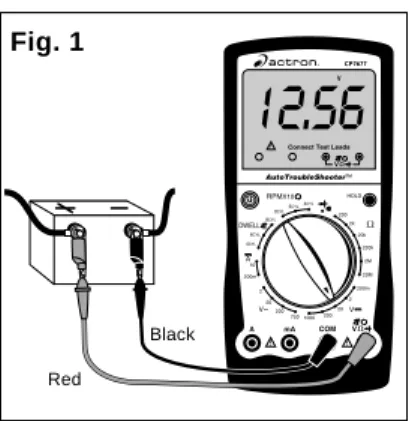
Range refers to the largest value the multimeter can measure with the rotary switch in that position. If the multimeter is set to the 20V DC range, then the highest voltage the multimeter can mea-sure is 20V in that range.
EXAMPLE: Measuring Vehicle Battery Voltage (See Fig. 1)
Now assume we set the multimeter to the 2V range. (See Fig. 2)
The multimeter display now shows a “1” and nothing else. This means the multi-meter is being overranged or in other words the value being measured is larger than the current range. The range should be increased until a value is shown on the display. If you are in the highest range and the multimeter is still showing that it is overranging, then the value being measured is too large for the mul-timeter to measure.
How do I know what Range the multi-meter should be set to?
The multimeter should be set in the l o w e s t p o s s i b l e r a n g e w i t h o u t overranging.
EXAMPLE: Measuring an unknown re-sistance
Let’s assume the multimeter is con-nected to an engine coolant sensor with unknown resistance. (See Fig. 3)
Fig. 2
Fig. 1
Let’s assume the multimeter is con-nected to the battery and set to the 20V range.
The display reads 12.56. This means there is 12.56V across the battery termi-nals.
Fig. 3
Start by setting the multimeter to the largest OHM range. The display reads 0.0Ω or a short circuit.
This sensor can’t be shorted so reduce the range setting until you get a value of resistance.
At the 200KΩ range the multimeter mea-sured a value of 4.0. This means there is 4KΩ of resistance across the engine coolant sensor terminals. (See Fig. 4) If we change the multimeter to the 20KΩ range (See Fig. 5) the display shows a
Red
Black
Red
Black
Black Red
7
Fig. 4
Fig. 5
value of 3.87KΩ. The actual value of resistance is 3.87KΩ and not 4KΩ that was measured in the 200KΩ range. This is very important because if the manufacturer specifications say that the sensor should read 3.8-3.9KΩ at 70°F then on the 200KΩ
range the sensor would be defective, but at the 20KΩ range it would test good. Now set the multimeter to the 2KΩ range. (See Fig. 6) The
display will indi-cate an overrange con-dition because 3.87KΩ is larger than 2KΩ. This example shows that by decreasing the range you in-crease the ac-curacy of your measurement. When you change the range, you change the
lo-cation of the decimal point. This changes
Fig. 6
the accuracy of the measurement by ei-ther increasing or decreasing the number of digits after the decimal point.
Battery and Fuse
Replacement
Important: A 9 Volt battery must be in-stalled before using the digital multim-eter. (see procedure below for installa-tion)
Battery Replacement 1. Turn multimeter OFF. 2. Remove test leads from
multimeter.
3. Remove screw from battery cover.
4. Remove battery cover. 5. Install a new 9 Volt battery. 6. Re-assemble multimeter.
Fuse Replacement 1. Turn multimeter OFF. 2. Remove test leads from
multimeter.
3. Remove rubber holster. 4. Remove screw from battery
cover, battery cover, and battery. 5. Remove screws from back of
multimeter. 6. Remove back cover. 7. Remove fuse.
8. Replace fuse with same size and type as originally installed. Use a 1/4" x 1-1/4", 10A, 250V, fast acting fuse or a 5mm x 20mm 315mA, 250V fast acting fuse. 9. Re-assemble multimeter.
Measuring DC Voltage
This multimeter can be used to measure DC voltages in the range from 0 to 1000V. You can use this multimeter to do any DC voltage measurement called out in the vehicle service manual. The most com-mon applications are measuring voltage drops, and checking if the correct voltage arrived at a sensor or a particular circuit. To measure DC Voltages (see Fig. 7):6. View reading on display - Note range setting for correct units. NOTE: 200mV = 0.2V
Measuring AC Voltage
This multimeter can be used to measure AC voltages in the range from 0 to 750V. To measure AC Voltages (see Fig. 8):Fig. 7
1. Insert BLACK test lead into COM test lead jack.
2. Insert RED test lead into test lead jack. 3. Connect RED test lead to positive
(+) side of voltage source. 4. Connect BLACK test lead to
nega-tive (-) side of voltage source. NOTE: If you don’t know which side is positive (+) and which side is nega-tive (-), then arbitrarily connect the RED test lead to one side and the BLACK to the other. The multimeter automatically senses polarity and will display a minus (-) sign when nega-tive polarity is measured. If you switch the RED and BLACK test leads, positive polarity will now be indicated on the display. Measuring negative voltages causes no harm to the multimeter.
5. Turn multimeter rotary switch to desired voltage range.
If the approximate voltage is unknown, start at the largest voltage range and decrease to the appropriate range as required. (See Setting the Range on page 6)
1. Insert BLACK test lead into COM test lead jack.
2. I n s e r t R E D t e s t l e a d i n t o test lead jack. 3. Connect RED test lead to one side
of voltage source.
4. Connect BLACK test lead to other side of voltage source.
5. Turn multimeter rotary switch to desired voltage range.
If the approximate voltage is un-known, start at the largest voltage range and decrease to the appropri-ate range as required. (See Setting the Range on page 6)
6. View reading on display - Note range setting for correct units. NOTE: 200mV = 0.2V
Red Black
Fig. 8
Red
9
Fig. 9
ments, polarity is not important. The test leads just have to be connected across the component.
6. Turn multimeter rotary switch to desired OHM range.
If the approximate resistance is un-known, start at the largest OHM range and decrease to the appropri-ate range as required. (See Setting the Range on page 6)
7. View reading on display - Note range setting for correct units. NOTE: 2KΩ = 2,000Ω; 2MΩ = 2,000,000Ω
If you want to make precise resis-tance measurements, then subtract the test lead resistance found in Step 4 above from the display reading in Step 7. It is a good idea to do this for resistance measurements less than 10Ω.
Measuring DC Current
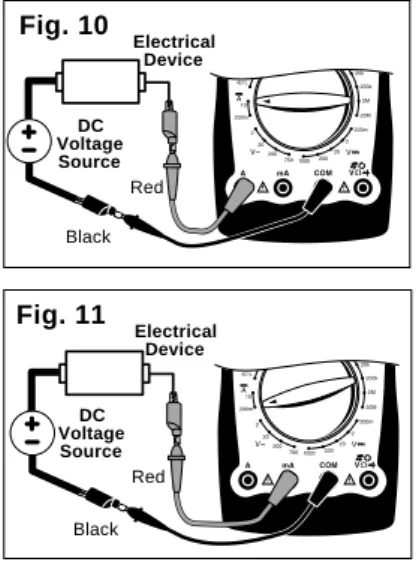
This multimeter can be used to measure DC current in the range from 0 to 10A. If the current you are measuring exceeds 10A, the internal fuse will blow (see Fuse Replacement on page 7). Unlike voltage and resistance measurements where the multimeter is connected across the com-ponent you are testing, current measure-ments must be made with the multimeter in series with the component. Isolating current drains and short circuits are some DC Current applications.To measure DC Current (see Figs. 10 & 11):
1. Insert BLACK test lead into COM test lead jack.
2. Insert RED test lead into "10A" test lead jack or "mA" test lead jack.
3. Disconnect or electrically open cir-cuit where you want to measure current.
This is done by:
• Disconnecting wiring harness. • Disconnecting wire from screw-on
type terminal.
• Unsolder lead from component if
Red Black
Unknown Resistance
Measuring Resistance
Resistance is measured in electrical units called ohms (Ω). The digital multi-meter can measure resistance from 0.1Ω to 20MΩ or (20,000,000 ohms). Infinite resistance is shown with a “1” on the left side of display (See Setting the Range on page 6). You can use this multimeter to do any resistance measurement called out in the vehicle service manual. Test-ing ignition coils, spark plug wires, and some engine sensors are common uses for the OHMS (Ω) function.To measure Resistance (see Fig. 9):
1. Turn circuit power OFF.
To get an accurate resistance mea-surement and avoid possible damage to the digital multimeter and electrical circuit under test, turn off all electrical power in the circuit where the resis-tance measurement is being taken. 2. Insert BLACK test lead into COM
test lead jack.
3. I n s e r t R E D t e s t l e a d i n t o test lead jack. 4. Turn multimeter rotary switch to
200Ω range.
Touch RED and BLACK multimeter leads together and view reading on display.
Display should read typically 0.2Ω to 1.5Ω.
If display reading was greater than 1.5Ω, check both ends of test leads for bad connections. If bad connec-tions are found, replace test leads. 5. Connect RED and BLACK test
leads across component where you want to measure resistance. When making resistance
measure-working on printed circuit boards. • Cut wire if there is no other pos-sible way to open electrical circuit. 4. Connect RED test lead to one side
of disconnected circuit.
5. Connect BLACK test lead to re-maining side of disconnected cir-cuit.
6. Turn multimeter rotary switch to 10A DC position, or 200mA posi-tion.
7. View reading on display. If minus (-) sign appears on display, then reverse RED and BLACK test leads.
Testing for Continuity
Continuity is a quick way to do a resis-tance test to determine if a circuit is open or closed. The multimeter will beep when the circuit is closed or shorted, so you don’t have to look at the display. Continuity checks are usually done when checking for blown fuses, switch opera-tion, and open or shorted wires. To measure Continuity (see Fig. 12):Fig. 12
Black Red
Fig. 10
Black Red
Electrical Device
DC Voltage Source
Fig. 11
Black Red
Electrical Device
DC Voltage Source
1. Insert BLACK test lead into COM test lead jack.
2. I n s e r t R E D t e s t l e a d i n t o test lead jack. 3. Turn multimeter rotary switch to
function.
4. Touch RED and BLACK test leads together to test continuity. Listen for tone to verify proper op-eration.
5. Connect RED and BLACK test leads across component where you want to check for continuity. Listen for tone:
• If you hear tone – Circuit is closed or shorted.
• If you don’t hear tone – Circuit is open.
11
Fig. 13
7. Switch RED and BLACK test leads and repeat Step 6.
8. Test Results If the display showed:
• A voltage drop of 0 volts in both directions, then the diode is shorted and needs to be replaced. • A “1” appears in both directions,
then the diode is an open circuit and needs to be replaced. • The diode is good if the display
reads around 0.5V–0.7V in one di-rection and a “1” appears in the other direction indicating the multi-meter is overranged.
Measuring Engine RPM
RPM refers to revolutions per minute. When using this function you must multi-ply the display reading by 10 to get actual RPM. If display reads 200 and the multim-eter is set to 6 cylinder RPM, the actual engine RPM is 10 times 200 or 2000 RPM. To measure Engine RPM (see Fig. 14):Testing Diodes
A diode is an electrical component that allows current to only flow in one direc-tion. When a positive voltage, generally greater than 0.7V, is applied to the an-ode of a dian-ode, the dian-ode will turn on and allow current to flow. If this same volt-age is applied to the cathode, the diode would remain off and no current would flow. Therefore, in order to test a diode, you must check it in both directions (i.e. anode-to-cathode, and cathode-to-an-ode). Diodes are typically found in alter-nators on automobiles.
Performing Diode Test (see Fig. 13):
Typical Ignition Coil
Ground
Black Red
Fig. 14
Anode Cathode
Black Red
1. Insert BLACK test lead into COM test lead jack.
2. I n s e r t R E D t e s t l e a d i n t o test lead jack. 3. Connect RED test lead to TACH
(RPM) signal wire.
• If vehicle is DIS (Distributorless Ignition System), then connect RED test lead to the TACH signal wire going from the DIS module to the vehicle engine computer. (refer to vehicle service manual for location of this wire)
• For all vehicles with distributors, 1. Insert BLACK test lead into COM
test lead jack.
2. I n s e r t R E D t e s t l e a d i n t o test lead jack. 3. Turn multimeter rotary switch to
function.
4. Touch RED and BLACK test leads together to test continuity. Check display – should reset to 0.00. 5. Disconnect one end of diode from
circuit.
Diode must be totally isolated from circuit in order to test its functional-ity.
6. Connect RED and BLACK test leads across diode and view dis-play.
Display will show one of three things: • A typical voltage drop of around
0.7V.
• A voltage drop of 0 volts. • A “1” will appear indicating the
connect RED test lead to negative side of primary ignition coil. (refer to vehicle service manual for loca-tion of igniloca-tion coil)
4. Connect BLACK test lead to a good vehicle ground.
5. Turn multimeter rotary switch to correct CYLINDER selection. 6. Measure engine RPM while engine
is cranking or running. 7. View reading on display.
• Remember to multiply display read-ing by 10 to get actual RPM. If display reads 200, then actual en-gine RPM is 10 times 200 or 2000 RPM.
Measuring Dwell
Dwell measuring was extremely impor-tant on breaker point ignition systems of the past. It referred to the length of time, in degrees, that the breaker points re-mained closed, while the camshaft was rotating. Today’s vehicles use electronic ignition and dwell is no longer adjust-able. Another application for dwell is in testing the mixture control solenoid on GM feedback carburetors.
To measure Dwell (see Fig. 15):
Ground
Black Red
Fig. 15
Typical Ignition Coil
1. Insert BLACK test lead into COM test lead jack.
2. I n s e r t R E D t e s t l e a d i n t o test lead jack. 3. Connect RED test lead to DWELL
signal wire.
• If measuring DWELL on breaker point ignition systems, connect RED test lead to negative side of primary ignition coil. (refer to ve-hicle service manual for location of ignition coil)
• If measuring DWELL on GM mix-ture control solenoids, connect RED test lead to ground side or computer driven side of solenoid. (refer to vehicle service manual for solenoid location)
• If measuring DWELL on any arbi-trary ON/OFF device, connect RED test lead to side of device that is being switched ON/OFF. 4. Connect BLACK test lead to a good
vehicle ground.
5. Turn multimeter rotary switch to correct DWELL CYLINDER posi-tion.
13
Section 2. Automotive Testing
The digital multimeter is a very usefultool for trouble-shooting automotive elec-trical systems. This section describes how to use the digital multimeter to test the starting and charging system, igni-tion system, fuel system, and engine sensors. The digital multimeter can also be used for general testing of fuses, switches, solenoids, and relays.
General Testing
The digital multimeter can be used to test fuses, switches, solenoids, and re-lays.
Testing Fuses
This test checks to see if a fuse is blown. You can use this test to check the internal fuses inside the digital multimeter. To test Fuses (see Fig. 16):
• If you hear tone - Fuse is good. • If you don’t hear tone - Fuse is
blown and needs to be replaced. NOTE: Always replace blown fuses with same type and rating.
Testing Switches
This test checks to see if a switch “Opens” and “Closes” properly. To test Switches (see Fig. 17):
Fig. 17
Red
Typical "Push" Button Switch
1. Insert BLACK test lead into COM test lead jack.
2. I n s e r t R E D t e s t l e a d i n t o test lead jack. 3. Turn multimeter rotary switch to
function.
4. Touch RED and BLACK test leads together to test continuity. Listen for tone to verify proper op-eration.
5. Connect BLACK test lead to one side of switch.
6. Connect RED test lead to other side of switch.
Listen for tone:
• If you hear tone - The switch is closed.
• If you don’t hear tone - The switch is open.
7. Operate switch. Listen for tone: 1. Insert BLACK test lead into COM
test lead jack.
2. I n s e r t R E D t e s t l e a d i n t o test lead jack. 3. Turn multimeter rotary switch to
function.
4. Touch RED and BLACK test leads together to test continuity. Listen for tone to verify proper op-eration.
5. Connect RED and BLACK test leads to opposite ends of fuse. Listen for tone:
Fig. 16
Red Black
Fuse
• If you hear tone - The switch is closed.
• If you don’t hear tone - The switch is open.
8. Repeat Step 7 to verify switch op-eration.
Good Switch: Tone turns ON and OFF as you operate switch. Bad Switch: Tone always ON or tone always OFF as you operate switch.
4. Connect BLACK test lead to one side of coil.
5. Connect RED test lead to other side of coil.
6. View reading on display. • Typical solenoid / relay coil
resis-tances are 200Ω or less. • Refer to vehicle service manual for
your vehicles resistance range. 7. Test Results
Good Solenoid / Relay Coil: Display in Step 6 is within manufacturers specification.
Bad Solenoid / Relay Coil: • Display in Step 6 is not within
manu-facturers specifications.
• Display reads overrange on every ohms range indicating an open cir-cuit.
NOTE: Some relays and solenoids have a diode placed across the coil. To test this diode see Testing Di-odes on page 11.
1. Insert BLACK test lead into COM test lead jack.
2. I n s e r t R E D t e s t l e a d i n t o test lead jack. 3. Turn multimeter rotary switch to
200Ω function.
Most solenoids and relay coil resis-tances are less than 200Ω. If meter overranges, turn multimeter rotary switch to next higher range. (see Setting the Range on page 6) This test checks to see if a solenoid or relay have a broken coil. If the coil tests good, it is still possible that the relay or solenoid are defective. The relay can have contacts that are welded or worn down, and the solenoid may stick when the coil is energized. This test does not check for those potential problems. To test Solenoids and Relays (see Fig. 18):
Relay or Solenoid
Red Black
Fig. 18
15
Starting/Charging System Testing
The starting system “turns over” the engine. It consists of the battery, starter motor, starter solenoid and/or relay, and associated wiring and connections. The charging system keeps the battery charged when the engine is running. This system consists of the alternator, voltage regulator, battery, and associated wiring and connections. The digital multimeter is a useful tool for checking the operation of these systems.
No Load Battery Test
Before you do any starting/charging sys-tem checks, you must first test the bat-tery to make sure it is fully charged. Test Procedure (see Fig. 19):Fig. 19
Black Red
1. Turn Ignition Key OFF.
2. Turn ON headlights for 10 sec-onds to dissipate battery surface charge.
3. Insert BLACK test lead into COM test lead jack.
4. I n s e r t R E D t e s t l e a d i n t o test lead jack. 5. Disconnect positive (+) battery
cable.
6. Connect RED test lead to positive (+) terminal of battery.
7. Connect BLACK test lead to nega-tive (-) terminal of battery.
8. Turn multimeter rotary switch to 20V DC range.
9. View reading on display. 10. Test Results.
Compare display reading in Step 9 with the following chart.
Percent Voltage Battery is Charged 12.60V
or greater 100%
12.45V 75%
12.30V 50%
12.15V 25%
If battery is not 100% charged, then charge it before doing anymore starting/ charging system tests.
Engine Off Battery
Current Draw
This test measures the amount of cur-rent being drawn from the battery when the ignition key and engine are both off. This test helps to identify possible sources of excessive battery current drain, which could eventually lead to a “dead” battery.
1. Turn Ignition Key and all accesso-ries OFF.
Make sure trunk, hood, and dome lights are all OFF.
(See Fig. 20)
2. Insert BLACK test lead into COM test lead jack.
3. Insert RED test lead into "A" (or "mA") test lead jack.
Black Red
Fig. 20
4. Disconnect positive (+) battery cable.
5. Connect RED test lead to positive (+) battery terminal.
6. Connect BLACK test lead to posi-tive (+) battery cable.
NOTE: Do not start vehicle during this test, because multimeter damage may result.
7. Turn multimeter rotary switch to 10A DC (or 200 mA) position. 8. View reading on display.
• Typical current draw is 100mA. (1mA = 0.001A)
• Refer to vehicle service manual for manufacturers specific Engine Off Battery Current Draw.
NOTE: Radio station presets and clocks are accounted for in the 100mA typical current draw.
9. Test Results.
Normal Current Draw: Display read-ing in Step 8 is within manufacturers specifications.
Excessive Current Draw:
- Display reading in Step 8 is well out-side manufacturers specifications. - Remove Fuses from fuse box one
at a time until source of excessive current draw is located.
- Non-Fused circuits such as head-lights, relays, and solenoids should also be checked as possible cur-rent drains on battery.
- When source of excessive current drain is found, service as necessary.
Cranking Voltage
-Battery Load Test
This test checks the battery to see if it is delivering enough voltage to the starter motor under cranking conditions. Test Procedure (see Fig. 21):
1. Disable ignition system so vehicle won’t start.
Disconnect the primary of the igni-tion coil or the distributor pick-up coil
or the cam/crank sensor to disable the ignition system. Refer to vehicle service manual for disabling proce-dure.
2. Insert BLACK test lead into COM test lead jack.
3. I n s e r t R E D t e s t l e a d i n t o test lead jack. 4. Connect RED test lead to positive
(+) terminal of battery.
5. Connect BLACK test lead to nega-tive (-) terminal of battery.
6. Turn multimeter rotary switch to 20V DC range.
7. Crank engine for 15 seconds con-tinuously while observing display. 8. Test Results.
Compare display reading in Step 7 with chart below.
Voltage Temperature 9.6V or greater 70 °F and Above
9.5V 60 °F
9.4V 50 °F
9.3V 40 °F
9.1V 30 °F
8.9V 20 °F
8.7V 10 °F
8.5V 0 °F
If voltage on display corresponds to above voltage vs. temperature chart, then cranking system is normal. If voltage on display does not corre-spond to chart, then it is possible that the battery, battery cables, starting sys-tem cables, starter solenoid, or starter motor are defective.
Fig. 21
17
If multimeter overranges, turn multim-eter rotary switch to the 2V DC range. (See Setting the Range on page 6) 6. Crank engine until steady reading
is on display.
• Record results at each point as displayed on multimeter. • Repeat Step 4 & 5 until all points
are checked. 7. Test Results –
Estimated Voltage Drop of Starter Circuit Components
Component Voltage
Switches 300mV
Wire or Cable 200mV
Ground 100mV
Battery Cable
Connectors 50mV
Connections 0.0V
• Compare voltage readings in Step 6 with above chart.
• If any voltages read high, inspect com-ponent and connection for defects. • If defects are found, service as
necessary.
Voltage Drops
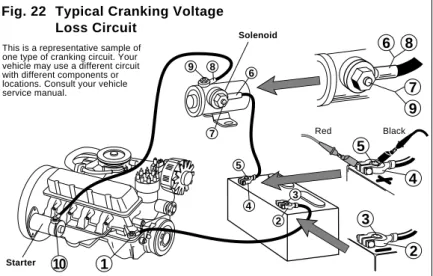
This test measures the voltage drop across wires, switches, cables, solenoids, and connections. With this test you can find excessive resistance in the starter sys-tem. This resistance restricts the amount of current that reaches the starter motor resulting in low battery load voltage and a slow cranking engine at starting. Test Procedure (see Fig. 22): 1. Disable ignition system so vehicle
won’t start.
Disconnect the primary of the igni-tion coil or the distributor pick-up coil or the cam/crank sensor to disable the ignition system. Refer to vehicle service manual for disabling proce-dure.
2. Insert BLACK test lead into COM test lead jack.
3. I n s e r t R E D t e s t l e a d i n t o test lead jack. 4. Connect test leads.
Refer to Typical Cranking Voltage Loss Circuit (Fig. 22).
• Connect RED and BLACK test leads alternately between 1 & 2, 2 & 3, 4 & 5, 5 & 6, 6 & 7, 7 & 9, 8 & 9, and 8 & 10.
5. Turn multimeter rotary switch to 200mV DC range.
1
10
2 4 5
6
8
7
7
9
89
6
2
4
5
3
3Red Black
Fig. 22 Typical Cranking Voltage
Loss Circuit
Solenoid
This is a representative sample of one type of cranking circuit. Your vehicle may use a different circuit with different components or locations. Consult your vehicle service manual.
8. Open throttle and Hold engine speed (RPM) between 1800 and 2800 RPM.
Hold this speed through Step 11 -Have an assistance help hold speed. 9. View reading on display.
Voltage reading should not change from Step 7 by more than 0.5V. 10. Load the electrical system by
turn-ing on the lights, windshield wip-ers, and setting the blower fan on high.
11. View reading on display. Voltage should not drop down below about 13.0V.
12. Shut off all accessories, return engine to curb idle and shut off. 13. Test Results.
• If voltage readings in Steps 7, 9, and 11 were as expected, then charging system is normal. • If any voltage readings in Steps 7,
9, and 11 were different then shown here or in vehicle service manual, then check for a loose alternator belt, defective regulator or alterna-tor, poor connections, or open al-ternator field current.
• Refer to vehicle service manual for further diagnosis.
This test checks the charging system to see if it charges the battery and pro-vides power to the rest of the vehicles electrical systems (lights, fan, radio etc). Test Procedure (see Fig. 23):
Fig. 23
Red Black
1. Insert BLACK test lead into COM test lead jack.
2. I n s e r t R E D t e s t l e a d i n t o test lead jack. 3. Connect RED test lead to positive
(+) terminal of battery.
4. Connect BLACK test lead to nega-tive (-) terminal of battery.
5. Turn multimeter rotary switch to 20V DC range.
6. Start engine - Let idle.
7. Turn off all accessories and view reading on display.
• Charging system is normal if dis-play reads 13.2 to 15.2 volts. • If display voltage is not between
13.2 to 15.2 volts, then proceed to Step 13.
19
Ignition System Testing
The ignition system is responsible for providing the spark that ignites the fuel in the cylinder. Ignition system components that the digital multimeter can test are the primary and secondary ignition coil resistance, spark plug wire resistance, hall effect switches/sensors, reluctance pick-up coil sensors, and the switching action of the primary ignition coil.
Ignition Coil Testing
This test measures the resistance of the primary and secondary of an ignition c o i l . T h i s t e s t c a n b e u s e d f o r distributorless ignition systems (DIS) provided the primary and secondary ig-nition coil terminals are easily acces-sible.Test Procedure:
1. If engine is HOT let it COOL down before proceeding.
2. Disconnect ignition coil from ig-nition system.
3. Insert BLACK test lead into COM test lead jack (see Fig. 24).
7. Connect test leads.
• Connect RED test lead to primary ignition coil positive (+) terminal. • Connect BLACK test lead to primary
ignition coil negative (-) terminal. • Refer to vehicle service manual for
location of primary ignition coil ter-minals.
8. View reading on display. Subtract test lead resistance found in Step 6 from above reading. 9. If vehicle is DIS, repeat Steps 7
and 8 for remaining ignition coils.
Typical Cylindrical Ignition Coil
Black Red
Primary Coil Secondary
Coil
Fig. 25
Typical Cylindrical Ignition Coil
Black
Secondary Coil
Primary Coil
Red
4. Insert RED test l e a d i n t o test lead jack. 5. Turn multimeter
rotary switch to 200Ω range. 6. Touch RED and
BLACK multime t multime r l multime a d s t o -gether and view reading on dis-play.
10. Test Results - Pri-mary Coil • Typical resistance
range of primary ignition coils is 0.3 - 2.0Ω.
• Refer to vehicle service manual for your vehicles resistance range. 11. Turn multimeter rotary switch to 200KΩ range (see Fig. 25).
12. Move RED test lead to secondary ignition coil terminal.
• Refer to vehicle service manual for location of secondary ignition coil terminal.
• Verify BLACK test lead is con-nected to primary ignition coil nega-tive (-) terminal.
13. View reading on display. 14. If vehicle is DIS, repeat Steps 12
and 13 for remaining ignition coils. 15. Test Results - Secondary Coil
• Typical resistance range of sec-ondary ignition coils is 6.0 - 30.0KΩ. • Refer to vehicle service manual for
your vehicles resistance range. 16. Repeat test procedure for a HOT
ignition coil.
NOTE: It is a good idea to test ignition coils when they are both hot and cold, because the resistance of the coil could change with tempera-ture. This will also help in diagnosing intermittent ignition system prob-lems.
17. Test Results - Overall
Good Ignition Coil: Resistance read-ings in Steps 10, 15 and 16 were within manufacturers specification. Bad Ignition Coil: Resistance read-ings in Steps 10, 15 and 16 are not within manufacturers specification.
21
Ignition System Wires
This test measures the resistance of spark plug and coil tower wires while they are being flexed. This test can be used for distributorless ignition systems (DIS) provided the system does not mount the ignition coil directly on the spark plug. Test Procedure:1. Remove ignition system wires one at a time from engine. • Always grasp ignition system
wires on the boot when re-moving.
• Twist the boots about a half turn while pulling gently to remove them. • Refer to vehicle service manual for ignition wire removal procedure. • Inspect ignition wires for cracks,
chaffed insulation, and corroded ends.
NOTE: Some Chrysler products use a “positive-locking” terminal electrode spark plug wire. These wires can only be removed from inside the dis-tributor cap. Damage may result if other means of removal are at-tempted. Refer to vehicle service manual for procedure.
NOTE: Some spark plug wires have sheet metal jackets with the follow-ing symbol: . This type of plug wire contains an “air gap” resistor and can only be checked with an oscilloscope.
2. Insert BLACK test lead into COM test lead jack (see Fig. 26). 3. I n s e r t R E D t e s t l e a d i n t o
test lead jack.
4. Connect RED test lead to one end of ignition wire and BLACK test lead to other end.
5. Turn multimeter rotary switch to 200KΩ range.
6. View reading on display while flex-ing ignition wire and boot in sev-eral places.
• Typical resistance range is 3KΩ to 50KΩ or approximately 10KΩ per foot of wire.
• Refer to vehicle service manual for your vehicles resistance range. • As you flex ignition wire, the
dis-play should remain steady. 7. Test Results
Good Ignition Wire: Display reading is within manufacturers specifica-tion and remains steady while wire is flexed.
Bad Ignition Wire: Display reading erratically changes as ignition wire is flexed or display reading is not within manufacturers specification.
Fig. 26
Black
Spark Plug Wire
9V
Hall Effect sensors are used whenever the vehicle computer needs to know speed and position of a rotating object. Hall Effect sensors are commonly used in ignition systems to determine cam-shaft and crankcam-shaft position so the ve-hicle computer knows the optimum time to fire the ignition coil(s) and turn on the fuel injectors. This test checks for proper operation of the Hall Effect sensor / switch.Test Procedure (see Fig. 27): 1. Remove Hall Effect Sensor from
vehicle.
Refer to vehicle service manual for procedure.
2. Connect 9V battery to sensor POWER and GROUND pins. • Connect positive(+) terminal of 9V
battery to sensor POWER pin. • Connect negative(-) terminal of 9V
battery to sensor GROUND pin. • Refer to illustrations for POWER
and GROUND pin locations. • For sensors not illustrated refer to
vehicle service manual for pin lo-cations.
3. Insert BLACK test lead into COM test lead jack.
4. I n s e r t R E D t e s t l e a d i n t o test lead jack. 5. Connect RED test lead to sensor
SIGNAL pin.
6. Connect BLACK test lead to 9V battery negative(-) pin.
7. Turn multimeter rotary switch to function.
Multimeter should sound a tone. 8. Slide a flat blade of iron or
mag-netic steel between sensor and magnet. (Use a scrap of sheet metal, knife blade, steel ruler, etc.) • Multimeter tone should stop and
display should overrange. • Remove steel blade and
multim-eter should again sound a tone. • It is O.K. if display changes
errati-cally after metal blade is removed. • Repeat several times to verify
re-sults. 9. Test Results
Good Sensor: Multimeter toggles from tone to overrange as steel blade is inserted and removed.
Bad Sensor: No change in multim-eter as steel blade is inserted and removed.
Fig. 27
Red
POWER
SIGNAL
SIGNAL POWER GROUND SIGNAL
Sensor GROUND
Jumper Wires
Black POWER
Magnet Iron or Steel Blade
Chrysler Distributor Hall Effect
Ford Distributor Hall Effect
Typical Hall Effect Sensor
GROUND
23
Magnetic Pick-Up Coils – Reluctance Sensors
Reluctance sensors are used wheneverthe vehicle computer needs to know speed and position of a rotating object. Reluctance sensors are commonly used in ignition systems to determine cam-shaft and crankcam-shaft position so the ve-hicle computer knows the optimum time to fire the ignition coil(s) and turn on the fuel injectors. This test checks the reluc-tance sensor for an open or shorted coil. This test does not check the air gap or voltage output of the sensor.
Test Procedure (see Fig. 28):
Reluctance Sensor
Red
Black
1. Insert BLACK test lead into COM test lead jack.
2. I n s e r t R E D t e s t l e a d i n t o test lead jack.
Reluctor Ring
Magnet
3. Connect RED test lead to either sensor pin.
4. Connect BLACK test lead to re-maining sensor pin.
5. Turn multimeter rotary switch to 2KΩ range.
6. View reading on display while flex-ing sensor wires in several places. • Typical resistance range is 150
-1000Ω.
• Refer to vehicle service manual for your vehicles resistance range.
• As you flex sensor w i r e s , t h e d i s p l a y should remain steady. 7. Test Results
Good Sensor: Display reading is within manu-facturers specification a n d r e m a i n s s t e a d y while sensor wires are flexed.
Bad Sensor: Display r e a d i n g e r r a t i c a l l y changes as sensor wires are flexed or display reading is not within manufacturers specifi-cation.
Ignition Coil Switching Action
This test checks to see if the negative terminal of the primary ignition coil is getting switched ON and OFF via the ignition module and camshaft / crank-shaft position sensors. This switching action is where the RPM or tach signal originates. This test is primarily used for a no start condition.Test Procedure (see Fig. 29):
Fig. 29
Typical Ignition Coil
Ground
Black Red
1. Insert BLACK test lead into COM test lead jack.
2. I n s e r t R E D t e s t l e a d i n t o test lead jack. 3. Connect RED test lead to TACH
signal wire.
• If vehicle is DIS (Distributorless Ignition System), then connect RED test lead to the TACH signal wire going from the DIS module to the vehicle engine computer. (refer to
vehicle service manual for location of this wire)
• For all vehicles with distributors, connect RED test lead to negative side of primary ignition coil. (refer to vehicle service manual for loca-tion of igniloca-tion coil)
4. Connect BLACK test lead to a good vehicle ground.
5. Turn multimeter rotary switch to correct CYLINDER selec-tion in RPM.
6. View reading on display while engine is cranking.
• Typical cranking RPM range is 50-275 RPM depending on temperature, size of engine, and battery condition. • Refer to vehicle service
manual for specific vehicle cranking RPM range. 7. Test Results.
Good Coil Switching Action: Display reading indicated a value consistent with manufacturers specifications. Bad Coil Switching Action: • Display read zero RPM, meaning
the ignition coil is not being switched ON and OFF.
• Check ignition system for wiring defects, and test the camshaft and crankshaft sensors.
25
Fuel System Testing
The requirements for lower vehicle emissions has increased the need for more precise engine fuel control. Auto manufacturers began using electronically controlled carburetors in 1980 to meet emission requirements. Today’s modern vehicles use electronic fuel injection to precisely control fuel and further lower emissions. The digital multimeter can be used to test the fuel mixture control solenoid onGen-eral Motors vehicles and to mea-sure fuel injector resistance.
Testing GM C-3 Mixture Control Solenoid Dwell
This solenoid is located in thecarbure-tor. Its purpose is to maintain an air/fuel ratio of 14.7 to 1 in order to reduce emissions. This test checks to see if the solenoid dwell is varying.
Test Description:
This test is rather long and detailed. Refer to vehicle service manual for the com-plete test procedure. Some important test procedure highlights you need to pay close attention to are listed below. 1. Make sure engine is at operating
temperature and running during test.
2. Refer to vehicle service manual for multimeter hook-up instruc-tions.
3. Turn multimeter rotary switch to 6 Cylinder Dwell position for all GM vehicles.
4. Run engine at 3000 RPM. 5. Make engine run both RICH and
LEAN.
6. Watch multimeter display. 7. Multimeter display should vary
from 10° to 50° as vehicle changes from lean to rich.
Typical Mixture Control Solenoid Connection
Mixture Control Solenoid
Measuring Fuel Injector Resistance
Fuel injectors are similar to solenoids.They contain a coil that is switched ON and OFF by the vehicle computer. This test measures the resistance of this coil to make sure it is not an open circuit. Shorted coils can also be detected if the specific manufacturer resistance of the fuel injector is known.
Test Procedure (see Fig. 30):
Fig. 30
Typical Fuel Injector
Black Red
1. Insert BLACK test lead into COM test lead jack.
2. I n s e r t R E D t e s t l e a d i n t o test lead jack. 3. Turn multimeter rotary switch to
200Ω range.
Touch RED and BLACK multimeter leads together and view reading on display.
Display should read typically 0.2 -1.5Ω.
If display reading was greater than 1.5Ω, check both ends of test leads for bad connections. If bad connec-tions are found, replace test leads. 4. Disconnect wiring harness from
fuel injector - Refer to vehicle ser-vice manual for procedure.
5. Connect RED and BLACK test leads across fuel injector pins. Make sure you connect test leads across fuel injector and not the wir-ing harness.
6. Turn multimeter rotary switch to desired OHM range.
If the approximate resistance is unknown, start at the largest OHM range and decrease to the appropriate range as required. (see Setting the Range on page 6)
7. View reading on display -Note range setting for cor-rect units.
• If display reading is 10Ω or less, subtract test lead resis-tance found in Step 3 from above reading.
• Compare reading to manu-facturers specifications for fuel injector coil resistance. • This information is found in
vehicle service manual. 8. Test Results
Good Fuel Injector resistance: Re-sistance of fuel injector coil is within manufacturers specifications. Bad Fuel Injector resistance: Resis-tance of fuel injector coil is not within manufacturers specifications. NOTE: If resistance of fuel injector coil is within manufacturers specifi-cations, the fuel injector could still be defective. It is possible that the fuel injector is clogged or dirty and that is causing your driveability prob-lem.
27
Testing Engine Sensors
In the early 1980’s, computer controls were installed in vehicles to meet Federal Government regulations for lower emissions and better fuel economy. To do its job, a computer-controlled engine uses electronic sensors to find out what is happening in the engine. The job of the sensor is to take something the computer needs to know, such as engine temperature, and convert it to an electrical signal which the computer can understand. The digital multimeter is a useful tool for checking sensor operation.
The Oxygen Sensor produces a voltage or resistance based on the amount of oxygen in the exhaust stream. A low voltage (high resistance) indicates a lean exhaust (too much oxygen), while a high voltage (low resistance) indicates a rich exhaust (not enough oxygen). The com-puter uses this voltage to adjust the air/ fuel ratio. The two types of O
2 Sensors commonly in use are Zirconia and Tita-nia. Refer to illustration for appearance differences of the two sensor types. Test Procedure (see Fig. 31): 1. If engine is HOT, let it COOL down
before proceeding.
2. Remove Oxygen Sensor from ve-hicle.
3. Insert BLACK test lead into COM test lead jack.
4. I n s e r t R E D t e s t l e a d i n t o test lead jack.
Titania-Type Oxygen Sensor
Zirconia-Type Oxygen Sensor
Exposed flat element
Flutes
Rich Lean
Red
5. Test heater circuit.
• If sensor contains 3 or more wires, then your vehicle uses a heated O
2 sensor.
• Refer to vehicle service manual for location of heater pins.
• Connect RED test lead to either heater pin.
1-wire or 3-wire: Ground is sensor housing 2-wire or 4-wire: Ground is in sensor wiring harness
Ground
Black
Fig. 31
• Connect BLACK test lead to re-maining heater pin.
• Turn multimeter rotary switch to 200Ω range.
• View reading on display. • Compare reading to manufacturer's
specification in vehicle service manual.
• Remove both test leads from sen-sor.
6. Connect BLACK test lead to sen-sor GROUND pin.
• If sensor is 1-wire or 3-wire, then GROUND is sensor housing. • If sensor is 2-wire or 4-wire, then
GROUND is in sensor wiring har-ness.
• Refer to vehicle service manual for Oxygen Sensor wiring diagram. 7. Connect RED test lead to sensor
SIGNAL pin. 8. Test Oxygen Sensor.
• Turn multimeter rotary switch to... – 2V range for Zirconia Type Sen-sors.
– 200KΩ range for Titania Type Sensors.
• Light propane torch.
• Firmly grasp sensor with a pair of locking pliers.
• Thoroughly heat sensor tip as hot as possible, but not “glowing.” Sen-sor tip must be at 660°F to operate. • Completely surround sensor tip with flame to deplete sensor of oxygen (Rich Condition).
• Multimeter display should read... – 0.6V or greater for Zirconia Type Sensors.
– an Ohmic(Resistance) value for Titania Type Sensors. Reading will vary with flame temperature. • While still applying heat to sensor,
move flame such that oxygen can reach sensor tip (Lean Condition). • Multimeter display should read...
– 0.4V or less for Zirconia Type Sensors.
– an overrange condition for Tita-nia Type Sensors. (See Setting the Range on page 6.)
9. Repeat Step 8 a few times to verify results.
10. Extinguish Flame, let sensor cool, and remove test leads.
11. Test Results. Good Sensor:
• Heater Circuit resistance is within manufacturer's specification. • Oxygen Sensor output signal
changed when exposed to a rich and lean condition.
Bad Sensor:
• Heater Circuit resistance is not within manufacturer's specification. • Oxygen Sensor output signal did not change when exposed to a rich and lean condition.
• Oxygen sensor output voltage takes longer than 3 seconds to switch from a rich to a lean condi-tion.
29 1. If engine is HOT let it COOL down
before proceeding.
Make sure all engine and transmis-sion fluids are at outside air tem-perature before proceeding with this test!
2. Insert BLACK test lead into COM test lead jack.
3. I n s e r t R E D t e s t l e a d i n t o test lead jack. 4. Disconnect wiring harness from
sensor.
5. If testing Intake Air Temperature Sensor - Remove it from vehicle. All other temperature sensors can remain on vehicle for testing. 6. Connect RED test lead to either
sensor pin.
7. Connect BLACK test lead to re-maining sensor pin.
8. Turn multimeter rotary switch to desired OHM range.
If the approximate resistance is un-known, start at the largest OHM range and decrease to the appropri-ate range as required. (See Setting the Range on page 6)
Red
Black
Hair Dryer
Typical Intake Air Temperature
Sensor
9. View and record reading on dis-play.
10. Disconnect multimeter test leads from sensor and reconnect sen-sor wiring.
This step does not apply to intake air temperature sensors. For intake air temperature sensors, leave multim-eter test leads still connected to sen-sor.
11. Heat up sensor.
If testing Intake Air Temperature Sen-sor:
• To heat up sensor dip sensor tip into boiling water, or...
• Heat tip with a lighter if sensor tip is metal or a hair dryer if sensor tip is plastic.
• View and record smallest reading on display as sensor is heated. • You may need to decrease the
range to get a more accurate read-ing.
For all other temperature sensors: • Start engine and let idle until upper
radiator hose is warm. • Turn ignition key OFF.
• Disconnect sensor wiring harness and reconnect multimeter test leads.
• View and record reading on dis-play.
12. Test Results. Good Sensor:
• Temperature sensors HOT resis-tance is at least 300Ω less than its COLD resistance.
• The key point is that the COLD re-sistance decreases with increasing temperature.
Bad Sensor:
• There is no change between the temperature sensors HOT resis-tance from the COLD resisresis-tance. • The temperature sensor is an open
or a short circuit. A temperature sensor is a thermistor or
a resistor whose resistance changes with temperature. The hotter the sensor gets, the lower the resistance becomes. Typi-cal thermistor applications are engine coolant sensors, intake air temperature sensors, transmission fluid temperature sensors, and oil temperature sensors. Test Procedure (see Fig. 32):
Fig. 32
Position Type Sensors
Position sensors are potentiometers or a type of variable resistor. They are used by the computer to determine po-sition and direction of movement of a mechanical device. Typical position sen-sor applications are throttle position sensors, EGR valve position sensors, and vane air flow sensors.Test Procedure (see Fig. 33):
• If multimeter overranges on larg-est range, then sensor is an open circuit and is defective.
7. Move RED test lead to sensor SIG-NAL pin.
• Refer to vehicle service manual for location of sensor SIGNAL pin. 8. Operate Sensor.
Fig. 33
1. Insert BLACK test lead into COM test lead jack.
2. I n s e r t R E D t e s t l e a d i n t o test lead jack. 3. Disconnect wiring harness from
sensor.
4. Connect Test Leads.
• Connect RED test lead to sensor POWER pin.
• Connect BLACK test lead to sen-sor GROUND pin.
• Refer to vehicle service manual for location of sensor POWER and GROUND pins.
5. Turn multimeter rotary switch to 20KΩ range.
6. View and record reading on dis-play.
• Display should read some resis-tance value.
• If multimeter is overranging, adjust the range accordingly. (See Set-ting the Range on page 6.)
Typical Toyota Throttle Position Sensor
Red Black
POWER GROUND
SIGNAL IDLE SWITCH
• To test these switches, follow the Testing Switches test procedure on page 13.
• When you are told to operate switch, then move throttle linkage. Vane Air Flow Sensor:
• Slowly open vane “door” from closed to open by pushing on it with a pencil or similar object. This will not harm sensor.
• Depending on hook-up, the dis-play reading will either increase or decrease in resistance.
• The display reading should either start at or end at the approximate resistance value measured in Step 6.
• Some vane air flow sensors have an idle switch and an intake air temperature sensor in addition to a potentiometer.
• To test idle switch see Testing Switches on page 13.
• When you are told to operate switch, then open vane “door”.
Throttle Position Sensor: • Slowly move throttle linkage
from closed to wide open posi-tion.
• Depending on hook-up, the dis-play reading will either increase or decrease in resistance. • The display reading should
ei-ther start at or end at the ap-proximate resistance value measured in Step 6.
• Some throttle position sensors have an Idle or Wide Open Throttle (WOT) switch in addi-tion to a potentiometer.
31 • To test intake air
tempera-ture sensor see Temperatempera-ture Type Sensors on page 29. EGR Valve Position • Remove vacuum hose from
EGR valve.
• Connect hand vacuum pump to EGR valve.
• Gradually apply vacuum to slowly open valve. (Typi-cally, 5 to 10 in. of vacuum fully opens valve.) • Depending on hook-up, the
display reading will either increase or decrease in re-sistance.
• The display reading should either start at or end at the a p p r o x i m a t e r e s i s t a n c e value measured in Step 6. 9. Test Results.
Good Sensor: D i s p l a y reading gradually increases or decreases in resistance as sensor is opened and closed. Bad Sensor: There is no change in resistance as sen-sor is opened or closed.
Manifold Absolute
Pressure (MAP) and
Barometric Pressure
(BARO) Sensors
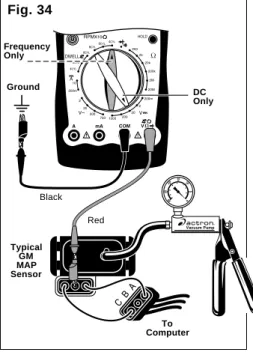
This sensor sends a signal to the com-puter indicating atmospheric pressure and/or engine vacuum. Depending on the type of MAP sensor, the signal may be a dc voltage or a frequency. GM, Chrysler, Honda and Toyota use a dc voltage MAP sensor, while Ford uses a frequency type. For other manufactur-ers refer to vehicle service manual for type of MAP sensor used.
Test Procedure (see Fig. 34): 1. Insert BLACK test lead into COM
test lead jack.
2. I n s e r t R E D t e s t l e a d i n t o test lead jack.
3. Disconnect wiring harnc Û and vacuum line from MAP sensor. 4. Connect jumper wire between Pin
A on wiring harness and sensor. 5. Connect another jumper wire be-tween Pin C on wiring harness and sensor.
6. Connect RED test lead to sensor Pin B.
7. Connect BLACK test lead to good vehicle ground.
8. Make sure test leads and jumper wires are not touching each other. 9. Connect a hand held vacuum pump to vacuum port on MAP sen-sor.
10. Turn Ignition Key ON, but do not start engine!
11. Turn multimeter rotary switch to... • 20V range for DC type MAP
sen-sors.
• 4 Cylinder RPM position for Fre-quency type MAP sensors.
Fig. 34
Ground
Red Black
Typical GM MAP Sensor
To Computer
DC Only Frequency
12. View reading on display. DC Volts Type Sensor:
• Verify hand held vacuum pump is at 0 in. of vacuum.
• Display reading should be approxi-mately 3V or 5V depending on MAP sensor manufacturer. Frequency Type Sensor:
• Verify hand held vacuum pump is at 0 in. of vacuum.
• Display reading should be approxi-mately 4770RPM ± 5% for Ford MAP sensors only.
• For other frequency type MAP sen-sors refer to vehicle service manual for MAP sensor specifications. • It is O.K. if last two display digits
change slightly while vacuum is held constant.
• Remember to multiply display reading by 10 to get actual RPM. • To convert RPM to Frequency or vice versa, use equation below.
Frequency =
RPM
30
(Equation Only Valid for Multimeter in 4 Cylinder RPM Position) 13. Operate Sensor.
• Slowly apply vacuum to MAP sen-sor - Never exceed 20 in. of vacuum because damage to MAP sensor may result.
• Display reading should decrease in voltage or RPM as vacuum to MAP sensor is increased. • Refer to vehicle service manual
for charts relating voltage and fre-quency drop to increasing engine vacuum.
• Use equation above for Frequency and RPM conversions.
14. Test Results. Good Sensor:
• S e n s o r o u t p u t v o l t a g e o r frequency(RPM) are within manu-facturers specifications at 0 in. of vacuum.
• Sensor output voltage or frequency (RPM) decrease with increasing vacuum.
Bad Sensor:
• Sensor output voltage or frequency (RPM) are not within manufactur-ers specifications at 0 in. of vacuum.
• Sensor output voltage or frequency (RPM) do not change with increas-ing vacuum.
Mass Air Flow (MAF)
Sensors
This sensor sends a signal to the com-puter indicating the amount of air enter-ing the engine. Dependenter-ing on the sen-sor design, the signal may be a dc volt-age, low frequency, or high frequency type. The CP7677 can only test the dc voltage and low frequency type of MAF sensors. The high frequency type sensors output a frequency that is too high for the CP7677 to measure. The high frequency type MAF is a 3-pin sen-sor used on 1989 and newer GM ve-hicles. Refer to vehicle service manual for the type of MAF sensor your vehicle uses.
Test Procedure (see Fig. 35): 1. Insert BLACK test lead into COM
test lead jack.
2. I n s e r t R E D t e s t l e a d i n t o test lead jack. 3. Connect BLACK test lead to good
vehicle ground.
4. Connect RED test lead to MAF signal wire.
• Refer to vehicle service manual for location of MAF signal wire. • You may have to backprobe or
pierce MAF signal wire in order to make connection.
• Refer to vehicle service manual for best way to connect to MAF signal wire.
5. Turn Ignition Key ON, but do not start engine!
33
8. Operate Sensor. • Start engine and let idle. • Display reading should...
- increase in voltage from Key On Engine OFF for DC type MAF sensors. - increase in RPM from Key On Engine OFF for Low Fre-quency type MAF sensors. • Rev Engine.
• Display reading should... - increase in voltage from Idle for DC type MAF sensors. - increase in RPM from Idle for Low Frequency type MAF sensors.
• Refer to vehicle service manual for charts relating MAF sensor voltage or fre-quency (RPM) to increasing air flow.
• Use equation above for Fre-quency and RPM conver-sions.
Typical GM 1988 & older Low Frequency type
MAF Sensor
Red
DC Only Frequency
Only
Black
Ground
Fig. 35
• 20V range for DC type MAF sen-sors.
• 4 Cylinder RPM position for Low Frequency type MAF sensors. 7. View reading on display.
DC Volts Type Sensor:
• Display reading should be approxi-mately 1V or less depending on MAF sensor manufacturer. Low Frequency Type Sensor: • Display reading should be
approxi-mately 330RPM ± 5% for GM Low Frequency MAF sensors. • For other Low Frequency type MAF
sensors refer to vehicle service manual for MAF sensor specifications. • It is O.K. if last two display digits change slightly while Key is ON. • Remember to multiply display
read-ing by 10 to get actual RPM. • To convert RPM to Frequency or
vice versa, use equation below.
Frequency =
RPM
30
{Equation Only Valid for Multim-eter in 4 Cylinder RPM Position}
9. Test Results. Good Sensor:
• Sensor output voltage or frequency (RPM) are within manufacturers specifications at Key ON Engine OFF.
• Sensor output voltage or frequency (RPM) increase with increasing air flow.
Bad Sensor:
• Sensor output voltage or frequency (RPM) are not within manufactur-ers specifications at Key ON En-gine OFF.
• Sensor output voltage or frequency (RPM) do not change with increas-ing air flow.