10
NETWORK SECURITY
One of the major goals of any organization that connects an internal private network to a public network is to do so in a manner that minimizes the possibility of security threats to the internal network. Although we would obviously prefer to eliminate all risk, the complexity of hardware and software may result in loopholes that hackers may be able to exploit. Thus, we should assume that there will always be some risk associated with the connection of a private internal network to a public network and consider the use of hardware and software to minimize that risk.
In this chapter we will examine the operation and utilization of two networking devices that can be used to minimize the threat associated with connecting a private network to a public network, such as the Internet. The ®rst device we will examine is the router, which provides the ability to block data transfers based upon network and transport layer information. Although this level of protection may be suf®cient for many networks, it precludes the ability to stop a variety of network attacks, as well as ignoring such key security items as authentication and encryption. Thus, in the second portion of this chapter, we will turn our attention to the use of ®rewalls and their operational capability in the form of proxy services that can be used to plug the holes associated with a reliance upon routers for network security.
10.1 ROUTERS
Routers operate at layer 3 of the ISO Reference Model. This means that they can read network layer information. Recogniz-ing that routers provide the basic mechanism by which private
Internetworking LANs and WANs: Concepts, Techniques and Methods. Second Edition. Gilbert Held Copyright&1993, 1998 John Wiley & Sons Ltd Print ISBN 0-471-97514-1 Online ISBN 0-470-84155-9
and public networks are interconnected, and also recognizing the need of organizations to control access to their internal network, router manufacturers added a packet ®ltering cap-ability to their products. This capcap-ability, frequently implemen-ted in the form of a list of access permissions, is also commonly referred to as a router's access list and is the focus of this section.
10.1.1 Access lists
An access list represents a sequential collection of permit and deny conditions that are applied to network addresses based upon a particular protocol. As the most common internetwork-ing protocol is TCP/IP, we will focus our attention upon router access lists designed to prede®ne the data ¯ow between networks connected by routers transferring TCP/IP packets. Thus, the use of router access lists can be used to govern the data ¯ow between segments on an internal corporate private network as well as between a private and public network. Readers should note that although our examination of access lists will be focused upon the TCP/IP protocol, it is also applicable, if supported by the router manufacturer, to other network layer protocols to include NetWare IPX, AppleTalk, and DecNET.
As previously indicated in Chapter 3, the IP header contains both a source address and a destination address ®eld. Under IPv4 those ®elds are 32 bits in length, whereas under the evolving IPv6 they are 128 bits in length. For both versions of IP the source address identi®es the originator and the destination address identi®es the recipient. Although IP represents the routable network layer of the TCP/IP protocol stack, end-to-end transmission is a layer 4 responsibility. At layer 4 the TCP/IP protocol suite supports two transport protocols, the Transport Control Protocol (TCP) and the User Datagram Protocol (UDP). Although TCP and UDP headers differ, both contain 16 bit Source and Destination ports that identify the port number of the sending and receiving process, respectively. As each IP header is followed by either a TCP or a UDP header, a router can control the data ¯ow of TCP/IP packets by operating upon up to four distinct ®elds that de®ne the sender, recipient, and process. This method of control is commonly referred to as packet ®ltering and is controlled by the creation of an appropriate access list. Thus, let us turn our attention to the
con®guration of several access lists to meet different organiza-tional requirements.
Con®guring an access list
Although there are considerable differences between routers with respect to their use of access lists, most devices operate very similarly with respect to two key operations. First, they commonly compare packet ®elds sequentially against the contents of the access list. This means that the ®rst match determines if a router will accept or reject a packet. Secondly, routers either have a default of permit or deny. This means that unless an access list has entries to override the default, the default condition will be applied to all non-listed situations. As the best way to become familiar with access lists is by example, let us do so. In doing so we will use a generic command format for illustrative purposes that may or may not be applicable to speci®c routers.
For our ®rst example we will assume that a router's access list is applicable to incoming packets received on a WAN connection and that the router using the list has only one LAN port. Thus, the access list does not include a port speci®cation. Figure 10.1 illustrates an example of the network con®guration associated with the router. In this example we will use an access list to control access to computers on the internal Ethernet LAN shown connected to the Internet.
Based upon the preceding, let us assume the format of the access list is as follows:
Access-list {permit|deny} source address, port
In the preceding access list format, the port represents the numeric associated with the TCP or UDP process and is also referred to as the well-known port. Table 10.1 lists ten examples of well-known TCP/UDP ports.
If we assume that the asterisk is used as a wildcard in IP address and port process value ®elds, two examples of access list entries follow:
access-list permit 198.*.*.*, * access-list deny *.*.*.*, 80
In the ®rst example any packet with a source address on a 198 network regardless of port value is permitted. In the second example, incoming HTTP (port 80) from any address is denied. Readers should note that the two access list entries placed together in an access list would have the unintended effect of allowing all packets from network 198 including HTTP packets to be permitted to ¯ow through the router. Thus, if you wish to deny HTTP from network 198 you could either move the second access list entry to the top of the access list, or pre®x the two access list entries with the following entry:
Access-list deny 198.*.*.*, 80
Internet
Web Server
FTP Server Router
By programming access lists based upon source and destination address and well-known port, you can control access to computers on your internal private network
Figure 10.1 Using a router access list to control packet ¯ow from the Internet onto a private Ethernet LAN
Table 10.1 Well-known TCP/UDP ports Port number Use 20 FTP (data) 21 FTP (control) 23 Telnet 25 SMTP 43 Whois 53 DNS 69 TFTP 70 Gopher 79 ®nger 80 HTTP
Reversing access list entries would result in the following access list:
access-list deny *.*.*.*, 80 access-list permit 198.*.*.*, *
Now the ®rst entry would deny all HTTP inbound traf®c while the second entry would allow all traf®c from network 198; however, since HTTP was previously barred, the second entry would only enable non-HTTP traf®c from network 198.
The use of three entries in the access list would result in the following list:
access-list deny 198.*.*.*, 80 access-list permit 198.*.*.*, * access-list deny *.*.*.*, 80
Now the ®rst entry speci®cally denies HTTP access from network 198 and the second entry allows all traf®c from network 198 other than HTTP that was previously barred. The third entry denies HTTP from all other network locations.
It should be noted that depending upon whether the general access default is permit or deny, you may at worst be required to modify your access list or at best have extraneous statements in your access list. For example, if your router's default is to deny all packets unless speci®cally permitted and you want to allow all packets from network 198 to include HTTP, you would only need one access list entry. That entry would be:
access-list permit 198.*.*.*, *
Extended access lists
Recognizing that routers can have multiple LAN interfaces, a logical extension of an access list is to apply list entries to speci®c ports. Thus, a second generic access list format is shown below:
access-list {permit|deny} port-out, source address, port Here the port-out entry is a numeral which identi®es a LAN interface.
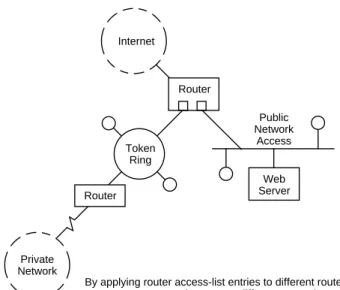
To illustrate the application of this extended access list, let us assume that a router is used to interconnect two LANs to the Internet as illustrated in Figure 10.2. Further assume that the Token-Ring network provides connectivity to an internal corporate network while the Ethernet LAN contains a public access Web server. Thus, one possible extended access list might be as follows:
access-list permit 1, *.*.*.*, 80 access-list permit 2, *.*.*.*, 25
The ®rst entry in the access list permits packets from any address containing HTTP (port 80) to be routed through the router and placed onto the Ethernet LAN. The second entry permits packets from any address containing SMTP (port 25) email to be routed through the router onto port 2 which is the Token-Ring network. If we presume a default of denial of service unless explicitly permitted, all other packets are sent to the great bit bucket in the sky. Thus, this short access list only permits email to ¯ow onto the Token-Ring network and Web access to the Ethernet public access network.
Additional extensions
Some routers permit packet ®ltering based upon source and destination addresses as well as well-known ports for both inbound and outbound traf®c. Thus, such routers may have an access list format similar to the following:
access-list {permit|deny} port-in, port-out, source, destination When you obtain the ability to ®lter packets based upon inbound or outbound direction, you must usually include the direction of packet ¯ow in the form of port-in to port-out port numbers. Other routers only require one physical port number to be speci®ed; however, they then require a direction ®eld in the access list to indicate if ®ltering should occur on inbound or outbound packets. Regardless of the method used, the ability to perform ®ltering based upon inbound and outbound packets provides additional security in the form of limiting access of organizational employees. For example, if your organization is using the Internet to connect several geographically dispersed corporate locations, you can use outbound ®ltering to limit
employees to accessing only other corporate locations, prevent-ing inadvertent downloadprevent-ing of viruses from an anonymous FTP site. Thus, the ability to perform ®ltering on both inbound and outbound traf®c can enhance the ability of network managers to control communications.
10.1.2 Router access
As access to the con®guration capability of a router controls its ®ltering capability, it is important to control such access. All too often persons forget to change the default login password, which can result in a hacker easily taking control of your router. Most routers provide access control not only via a console port, but, in addition, via Telnet and SNMP. This means that if a person knows or stumbles upon the IP address of an interface of the router via Telnet or SNMP, they can ®rst try some common default passwords to gain access to the router's console capability. To prevent this situation from occurring, you should consider disabling such access. If you need the ability to remotely con®gure a router, you should change the default password. In doing so, you should use an alphanumeric string instead of a common name to prevent a dictionary attack. Many
10.1 ROUTERS 439
Web Server Router
Internet
Token Ring
Router
Private Network
Public Network
Access
By applying router access-list entries to different router ports, you can control access to different networks
hackers purchase or otherwise acquire an electronic dictionary and write a program to try each entry in an attempt to break into routers and servers. Although such passwords as heather, administration, bozo, and georgia might be easy to remember, they would all fail upon a dictionary attack. Thus, adding numerals to a name precludes the ability of a dictionary attack to be successful.
Now that we have an appreciation for the level of security afforded by the packet ®ltering capabilities of routers, let us discuss why you may wish to consider additional security in the form of a ®rewall by examining some common threats that routers cannot prevent.
10.1.3 Threats not handled
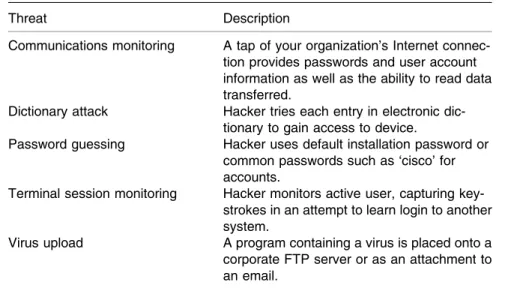
There are numerous security threats that the packet ®ltering capability of routers cannot control. Table 10.2 lists six common threats presented in alphabetical order that can result in security-related problems that a router cannot detect. Although you could use a router's ®ltering capability to bar access to an FTP server, you cannot selectively control different FTP commands. Thus, the use of unauthorized commands would represent an all or nothing issue when working with router ®lters. To provide an additional level of security beyond packet level ®ltering, organizations commonly turn to the use of a ®rewall.
10.2 FIREWALL
Unlike a router, which simply passes packets from one interface to another, ®rewalls include a proxy service capability which results in IP packets being barred from directly passing from input to output destinations. Instead, the ®rewall obtains the capability to examine the contents of each packet at each layer in the ISO Reference Model up through the application layer. Depending upon the capabilities programmed into the ®rewall, the use of proxy services makes the device able to detect suspicious activity on a given connection, generate alerts in response to suspicious activity, differentiate between different ®le transfer modes, and make authentication and authorization decisions. Thus, a ®rewall can be considered to represent a
much more sophisticated security device than that obtainable through the use of the packet ®ltering capability of a router.
10.2.1 Placement
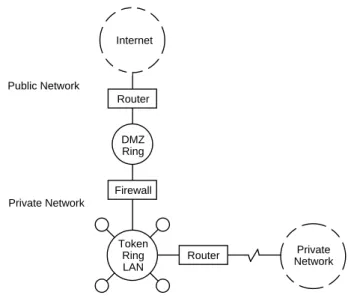
When connecting an internal private network to the Internet or to a similar public network, a ®rewall is placed between the two, protecting inside users from outside users. Although you can place a ®rewall on an internal network and have all incoming access ®rst directed to that device, if a person learns your internal network addressing scheme, it becomes possible to bypass the ®rewall and direct packets to recipients that may be better served by a packet examination process performed by the proxy service capability of most ®rewalls. Thus, the most common method used to install a ®rewall is to locate it on a separate network, a network commonly referred to as a demilitarized zone, or DMZ. The term DMZ or DMZ LAN obtains its name from the fact that that LAN contains no directly connected organizational computers. Instead, a DMZ LAN only has two connections, a router connection and a ®rewall connection. Thus, all incoming packets must be ®rst processed by the ®rewall prior to being transferred to the private network. Figure 10.3 illustrates the placement of a ®rewall on a DMZ Token-Ring LAN which would consist of a MAU with two
10.2 FIREWALL 441
Table 10.2 Common security threats not controllable by routers Threat Description
Communications monitoring A tap of your organization's Internet connec-tion provides passwords and user account information as well as the ability to read data transferred.
Dictionary attack Hacker tries each entry in electronic dic-tionary to gain access to device.
Password guessing Hacker uses default installation password or common passwords such as `cisco' for accounts.
Terminal session monitoring Hacker monitors active user, capturing key-strokes in an attempt to learn login to another system.
Virus upload A program containing a virus is placed onto a corporate FTP server or as an attachment to an email.
connections, one for the router and a second for the ®rewall. Note that the second ®rewall connection is to another Token-Ring; however, this ring represents part of the corporate network that is protected by the ®rewall.
10.2.2 Features
With over 50 vendors actively marketing ®rewalls, you would be quite correct in assuming that their features and operational capability can considerably differ between vendor products. Table 10.3 lists six basic ®rewall features that you should, as a minimum, consider when acquiring this communications device. Due to the importance of these features, let us review each.
Proxy services
A proxy represents a code that performs handshaking for a speci®c application, such as FTP, Telnet, or HTTP. Through the proxy services capability of a ®rewall, speci®c users or groups of users can be allowed or denied access to a server or to a subset of a server's functionality. For example, through the use of FTP proxy services, you may be able to enable or disable the use of
Firewall
Token Ring LAN Router
DMZ Ring
Router Internet
Private Network Public Network
Private Network
GET, MGET, PUT, MPUT, and other FTP commands for all addresses or selected IP addresses. Thus, it is important to examine both the type of proxy services supported by a ®rewall as well as the commands supported for each service supported. Readers should note that proxy services can vary considerably between different ®rewall products. However, this functionality does not exist in routers nor ®rewalls that simply provide an expanded packet ®ltering capability. Thus, proxy services represent a feature that can be used to differentiate a more capable ®rewall from less capable products.
To illustrate the con®guration of proxy services and some additional ®rewall features, this author captured several con®g-uration screens generated by the Technologic Interceptor ®re-wall. Figure 10.4 illustrates the Interceptor's Advanced Policy Options screen in which the cursor is shown pointed to the toggled check associated with the FTP Put command to block FTP uploads. In examining Figure 10.4 and subsequent Interceptor screen displays, you will note that they represent HTML screens displayed using a Netscape browser. The Technologic Interceptor ®rewall generates HTML forms to enable network managers to view, add, and modify ®rewall con®guration data. To secure such operations the ®rewall uses encryption and authentication by supporting Netscape's Secure Sockets Layer (SSL) protocol for encrypting all traf®c between the ®rewall and a Web browser used to con®gure the ®rewall, while passwords are used for authentication. This means that network managers can safely con®gure the ®rewall via the World Wide Web.
Using classes
The Technologic Interceptor ®rewall includes a class de®nition facility which provides users with a mechanism to replace address patterns, times of day, or URLs by symbolic names. Classes are initiated by selecting the Classes button on the left portion of the con®guration screen. By using an equals
10.2 FIREWALL 443
Table 10.3 Basic ®rewall features to consider Proxy services
Address translation Stateful inspection Alerts
Authentication Packet ®ltering
sign (=) as a pre®x, they are distinguished from literal patterns.
Through the use of classes you can considerably facilitate the con®guration of the ®rewall. For example, suppose that you want to control access from users behind the ®rewall to Internet services. To do so you would ®rst enter the IP addresses of computers that will be given permission to access common services that you wish them to use. Then you would de®ne a class name that would be associated with the group of IP addresses and create a policy that de®nes the services that the members of the class are authorized to use.
Figure 10.5 illustrates the use of the Technologic Interceptor Edit Policy con®guration screen to enable outbound traf®c for FTP, HTTP, Telnet, and SMTP. Note that this policy uses the class name =ALL-Interval-Hosts in the box labeled From. Although not shown, you would have ®rst used the class con®guration to enter that class name and the IP addresses you want associated with that class. Then this new edit policy would allow those IP addresses in the prede®ned class =ALL-Internal-Hosts to use FTP, HTTP, Telnet, and SMTP applica-tions.
Address translation
One method commonly used to protect internal networks from unauthorized access attempts is obtained through address
Figure 10.4 Using the Technologic Interceptor ®rewall con®guration screen to block all FTP Put commands
translation. When address translation is employed by a ®rewall, it hides IP addresses of the private network from outside users, functioning similar to the process used to obtain an unlisted telephone number. IP address translation can be accomplished in one of two ways: IP hiding or one-to-one mapping. Under IP hiding clients behind the ®rewall are restricted to initiating sessions and incoming packets are barred. When one-to-one mapping is employed, the ®rewall permits a bi-directional packet ¯ow; however, addresses behind the ®rewall are hidden and substituted by the use of a different set of IP addresses.
As IP addresses are becoming a scarce commodity until IPv6 arrives, network managers and administrators can consider using IP addresses speci®ed in RFC 1918 which allocated three blocks of IP address space for private internets. Those address blocks allocated for private internets include:
10.0.0.0 to 10.255.255.255 172.16.0.0 to 172.31.255.255 192.168.0.0 to 192.168.255.255
Any of the addresses in the preceding IP address blocks can be used behind a ®rewall, enabling the use of existing Class A, B, or C addresses to serve as translation addresses for use on the public side of the ®rewall.
Stateful inspection
The term stateful inspection was originally coined by Check-point Systems to refer to the examination of packets at the network layer. Although this feature is similar to ®ltering, there are several key differences. First, the analysis is performed on each packet based upon the context of previous transmission. This is similar to tracking a series of telephone calls and it permits a ®rewall to become aware of suspicious trends for which it may be con®gured to either bar further access attempts or to generate an alert to a designated person. Secondly, by tracking data from higher layers which are analyzed based upon the context of previous transmissions, the ®rewall becomes capable of providing a detailed audit trail of events. Thus, a stateful inspection capability can provide a higher level of protection than packet ®ltering as well as utilization information that may be useful in determining what services internal and external users have trouble accessing.
Alerts
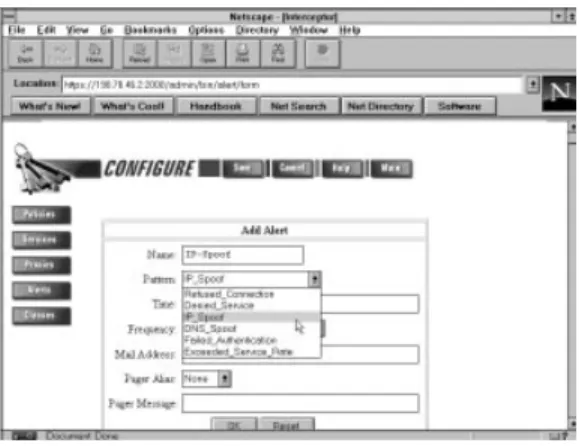
Stateful inspection by itself may provide a limited protection capability unless a ®rewall automatically terminates suspicious activity or alerts a network manager or administrator to a possible attack on their network. Figure 10.6 illustrates the Technologic Interceptor Add Alert screen display with the IP-Spoof pattern shown selected. Note that the interceptor's patterns can be considered as equivalent to stateful inspection events.
In the example shown in Figure 10.6 the IP Spoof alert is used as a mechanism to denote a connection request occurring from a host claiming to have an IP address which does not belong to it. In actuality, it can be very dif®cult to note the occurrence of IP spoo®ng. This is because unless the ®rewall previously obtained information about IP addresses, such as their locations on segments whose access is obtained via different ®rewall ports, or notes restrictions on service by IP address, it will assume that an IP address is valid. In comparison, other patterns such as refused connections or failed authentication are much easier to note. For each alert you would ®rst specify a name for the alert de®nition, such as IP-Spoof for that pattern. After selecting the pattern, you can specify the days and times of day and the frequency of occurrence that, when matched, should generate an alert. The Interceptor supports two methods of alert
Figure 10.5 Using the Technologic Interceptor ®rewall to create a policy allowing outbound FTP, HTTP, Telnet, and SMTP traf®c from all users in the previously de®ned class All=Internal-Hosts
generation: either via email or a pager. If you select the use of a pager to transmit an alert, you can include a message, such as a numerical alert code, to inform the recipient of the type of alert.
Authentication
Authentication is a mechanism used to verify the identity of a user requesting access to a speci®c service. A ®rewall can either directly perform authentication or operate in conjunction with one or more authentication servers located on the private side of the device.
There is a variety of methods used by ®rewalls or authentica-tion servers to perform authenticaauthentica-tion. Those methods include static passwords, tokens, and one-time passwords.
Static passwords
Static passwords represent the least secure method of authen-tication, as over a period of time the possibility of the password being compromised increases. In comparison, the use of tokens that change every minute or so, as well as one time passwords, do a hacker no good if captured. Thus, most ®rewalls that perform authentication either do not support the use of static passwords or their documentation recommends other methods.
10.2 FIREWALL 447
Token-based passwords
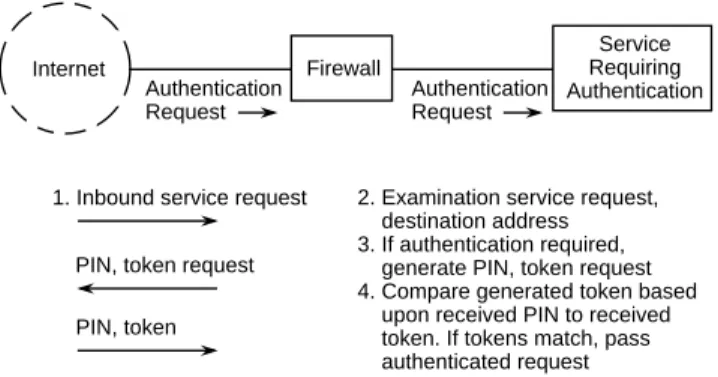
The most common form of token-based authentication involves the use of a credit card token generator by personnel requiring authenticated access to a service. The token generator issues a new password every 60 seconds or so, based upon a prede®ned algorithm and seed burnt into the card. If the ®rewall directly performs authentication, it prompts the user to enter a PIN and the token generated by the user's token generator card, usually a 6 or 8 digit random number. The ®rewall generates its own token based upon the user's PIN and compares the token it generated to the one transmitted by the user. If the two match, the requested service is allowed, otherwise access to the requested service is denied. If the actual authentication process runs on a separate server, such as FTP, Telnet, or a World Wide Web server, the ®rewall functions as a proxy, relaying authentication requests to the server providing the service that requires authentication.
Figure 10.7 illustrates the ®rewall authentication process. In this example, the ®rewall can be considered as a front end to the service, as it either enables or disables access based upon whether or not the token generated by the ®rewall matches the transmitted token.
One-time passwords
Although one-time passwords can be considered similar to token-based authentication due to the fact that they generate passwords that are only valid for use one time, there are two major differences between the two authentication methods. First, the token-based authentication method involves the use
Firewall
Service Requiring Authentication Internet
Authentication Request
Authentication Request
1. Inbound service request
PIN, token request
PIN, token
2. Examination service request, destination address 3. If authentication required, generate PIN, token request 4. Compare generated token based upon received PIN to received token. If tokens match, pass authenticated request Figure 10.7 The ®rewall authentication process
of hardware by the client in the form of a credit card sized device that generates tokens. In comparison, one-time passwords are generated through the use of software. A second difference between the two is the fact that token-based authentication methods are commercial products, whereas some one-time password generators are in the public domain and available for use without incurring additional expense.
Bellcore S/KEY
One example of a popular one-time password system is the Bellcore S/Key. Currently there are two versions of S/KEY. An early version, referred to as the S/KEY reference implementa-tion, is available from Bellcore via anonymous FTP; however, it has not been upgraded nor has the code been maintained over the past ®ve years. A second version of the product, simply referred to as S/KEY, is a commercial product from Bellcore that operates on a number of client and server platforms.
Operation The S/KEY one-time password authentication system is
based on the use of two software programs. One program, referred to as the key login program, operates on a server at the host site. The second program, which is called the S/KEY One-Time Password Generator, resides on the client computer. At the time this book was written, server software platforms supported included SunOS, IBM AIX, HP-UX, and Solaris. Client platforms supported include MS-Windows 3.1, Windows 95, Windows NT, SunOS, IBM AIX, HP-UX, Solaris, and Apple Macintosh.
The authentication process begins when a client attempts to access a protected network. The network server running S/KEY server software, which can be a ®rewall or a separate computer behind the ®rewall, issues a challenge to the client. The challenge consists of a number and a string of characters which forms a seed. The operator at the client workstation will enter the seed as well as a secret phrase into the S/KEY program running on the client workstation, resulting in the calculation of a response to the server's challenge. Thus, this method of one-time password entry is also commonly referred to as a challenge-response system.
In responding to the server's challenge, the client uses the challenge number and seed originally transmitted by the S/KEY server as well as the user's secret phrase to generate a secure hash function. This hash function is generated in the form of a one-time password consisting of six English words. This
password is then transmitted to the S/KEY server. That server generates its own hash function and compares the result with the stored one-time password used for the most recent login. If they match, the user is allowed access and the server decrements the challenge number and stores the newly used one-time password for use with the next login attempt.
As each access attempt commences with the generation and validation of a one-time password, this technique is similar to the use of a token generator in that it eliminates vulnerability from a `snif®ng' attack where a hacker learns and later uses the ID and password of legitimate network user. As unscrupulous persons can also reside on an internal private network, many organizations use token generators or one time passwords either in conjunction with ®rewalls or with separate servers to protect their internal network from internal threats.
Packet ®ltering
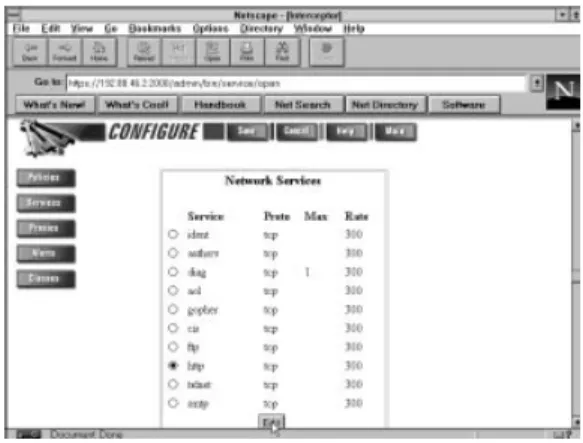
Although the packet ®ltering capability of ®rewalls functions similarly to that router feature, the ®rewall is usually easier to con®gure and provides more ¯exibility in enabling or disabling access based upon the set of rules that can be developed. As we examined the use of a router's basic access-list to enable or disable network services based upon IP addresses in the ®rst section of this chapter, let us return to the use of the Technologic Interceptor ®rewall's con®guration screen to exam-ine how packet ®ltering is expanded upon by ®rewalls. Figure 10.8 illustrates the Technologic Interceptor Network Services display which lists the protocols for which this ®rewall accepts connections. Note that the HTTP protocol is shown selected as we will edit that service. Also note the columns labeled Max and Rate. The column labeled Max indicates the maximum number of simultaneous connections allowed for each service, while the column labeled Rate indicates the maximum rate of new connections for each service on a per minute basis. By specifying entries for one or both columns you can signi®cantly control access to the network services you provide as well as balance the loads on heavily used services.
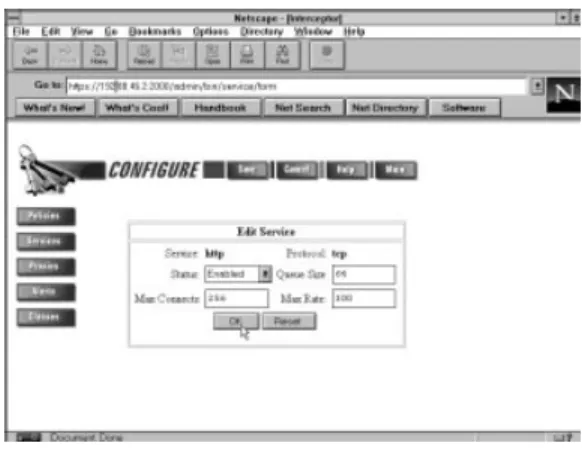
Figure 10.9 illustrates the Interceptor Edit Service display con®guration screen. In this example, HTTP service is enabled for up to 256 connections, and a queue size of 64 was entered, limiting TCP HTTP pending connections to that value. The Max Rate entry of 300 represents the maximum rate of new connections that will be allowed to an HTTP service. Once this
rate has been exceeded, the ®rewall will temporarily disable access to that service for a period of one minute. If you allow both internal and external access to an internal Web server, the ability to control the maximum rate of incoming connections to a particular service can be an important weapon in the war against so-called denial of service attacks. Under this techni-que, a malicious person (or persons) programs a computer to issue bogus service initiation requests using random IP addresses that more than likely do not exist. As each access request results in a server initiating a handshake response, the response is directed to a bogus IP address that does not respond. The server will typically keep the connection open for 60 to 120 seconds which represents a connection a valid user may not be able to use. Thus, if a hacker can issue 256 or more bogus connections and your Web server is con®gured to support that number of simultaneous connections, legitimate users could be barred from accessing the server. Although there is no one uniform solution to this problem, you could use the Max Connects to limit inbound HTTP connections so you will always be able to let internal users access your Web server. In addition, if you specify a low Max Connects rate, you can negate some of the ¯ooding of bogus connection attempts that will allow some legitimate users to reach your organization's Web server.
As the ®rewall must examine each packet to determine whether or not to allow a connection, it is performing packet ®ltering. However, this is a much more sophisticated type of packet ®ltering than that provided by most router manufac-turers which is typically restricted to decisions being
10.2 FIREWALL 451
Figure 10.8 Using the Technologic Interceptor ®rewall con®guration screen to edit HTTP network services
implemented based upon IP address and well-known port number. Thus, a ®rewall's packet ®ltering capability should also be carefully examined as it may provide you with the ability to control events that are beyond the capability of most routers. 10.2.3 The gap to consider
Although routers and ®rewalls can be used to prevent unauthorized access to your network hosts, they do not guarantee the security of the communications connection between client and server nor the security of the data being transferred. To obtain this security, you must use some type of encryption-based product. For example, when using Web browsers, you should consider the use of two related Internet protocols, Secure Sockets Layer (SSL) which was developed by Netscape, or the Secure Hypertext Transfer Protocol (S-HTTP) which was developed by Enterprise Integration Technologies. Both protocols support several cryptographic algorithms that use public key encryption methods. This allows a server to transmit upon request its public key to a client. The client uses that key to encrypt all communications for the session, enabling secure communications between client and server.
Figure 10.9 Using the Technologic Interceptor ®rewall Edit service con®guration display to set a series of rules to govern access to HTTP