On the Performance of Wide-Area Thin-Client
Computing
ALBERT M. LAI and JASON NIEH Columbia University
While many application service providers have proposed using thin-client computing to deliver computational services over the Internet, little work has been done to evaluate the effectiveness of thin-client computing in a wide-area network. To assess the potential of thin-client computing in the context of future commodity high-bandwidth Internet access, we have used a novel, non-invasive slow-motion benchmarking technique to evaluate the performance of several popular thin-client computing platforms in delivering computational services cross-country over Internet2. Our results show that using thin-client computing in a wide-area network environment can deliver acceptable performance over Internet2, even when client and server are located thousands of miles apart on opposite ends of the country. However, performance varies widely among thin-client platforms and not all platforms are suitable for this environment. While many thin-client systems are touted as being bandwidth efficient, we show that network latency is often the key factor in limiting wide-area thin-client performance. Furthermore, we show that the same techniques used to improve bandwidth efficiency often result in worse overall performance in wide-area networks. We characterize and analyze the different design choices in the various thin-client platforms and explain which of these choices should be selected for supporting wide-area computing services. Categories and Subject Descriptors: C.2.4 [Computer-Communication-Networks]: Distributed Systems; C.4 [Performance of Systems]: Measurement techniques
General Terms: Performance, Measurement, Experimentation, Algorithms
Additional Key Words and Phrases: thin-client, wide-area networks, Internet2, slow-motion benchmarking
1. INTRODUCTION
Rapid improvements in network bandwidth, cost, and ubiquity combined with the high total cost of ownership of PC desktop computers have created a growing mar-ket for application service providers (ASPs). Going beyond just web hosting, ASPs operate, maintain, and deliver customer data and applications from professionally
Parts of this work appeared as a conference publication in the Proceedings of the SIGMETRICS Conference on Measurement and Modeling of Computer Systems [Lai and Nieh 2002]. This work was supported in part by an NSF CAREER Award, and NSF grants EIA-0071954, CCR-0219943, and CNS-0426623. Internet2 characterization data obtained from the National Laboratory for Applied Network Research was sponsored by NSF Cooperative Agreement No. ANI-9807479. Authors’ Addresses: A. Lai, Department of Biomedical Informatics, Columbia University, Vanderbilt Clinic, 5th Floor, 622 West 168th Street, New York, NY 10032; Email: [email protected]; J. Nieh, Department of Computer Science, Columbia University, 1214 Amsterdam Avenue MC0401, New York, NY 10027-7003; Email: [email protected]. Permission to make digital/hard copy of all or part of this material without fee for personal or classroom use provided that the copies are not made or distributed for profit or commercial advantage, the ACM copyright/server notice, the title of the publication, and its date appear, and notice is given that copying is by permission of the ACM, Inc. To copy otherwise, to republish, to post on servers, or to redistribute to lists requires prior specific permission and/or a fee.
c
2006 ACM 0734-2071/2006/1100-0001 $5.00
for your personal use. Not for redistribution. The definitive version was published in ACM Transactions on Computer Systems (TOCS), 24(2), May 2006.
managed data centers, sparing their customers the headache of buying and main-taining their own hardware and software. To provide the infrastructure to deliver easier-to-maintain computational services anywhere on the Internet, a growing num-ber of ASPs are embracing a thin-client computing model [Expertcity, Inc. 2000; Charon Systems ; Runaware.com ]. In addition to ASPs, organizations have begun to use the thin-client computing model to provide remote access to applications that in the past were normally only available when used on-site.
A thin-client computing system consists of a server and a client that communi-cate over a network using a remote display protocol. The protocol allows graphical displays to be virtualized and served across a network to a client device, while ap-plication logic is executed on the server. Using the remote display protocol, the client transmits user input to the server, and the server returns screen updates of the user interface of the applications from the server to the client. Many of these remote display protocols can effectively web-enable applications without ap-plication modification. Examples of popular thin-client platforms include Citrix MetaFrame [Citrix Systems 1998; Mathers and Genoway 1998], Microsoft Termi-nal Services [Cumberland et al. 1999; Microsoft Corporation 1998], AT&T Virtual Network Computing (VNC) [Richardson et al. 1998], and Tarantella [Santa Cruz Operation 1998; Shaw et al. 2000]. The remote server typically runs a standard server operating system and is used for executing all application logic. Because all application processing is done on the server, the client only needs to be able to display and manipulate the user interface. The client can either be a specialized hardware device or simply an application that runs on a low-end personal computer. While many ASPs have proposed using thin-client computing to deliver computa-tional services over the Internet, little work has been done to evaluate the effective-ness of thin-client computing in a wide-area network (WAN). Thin-client comput-ing vendors often tout the bandwidth efficiency of their platforms, but as network technologies improve and high-bandwidth Internet access becomes a commodity, bandwidth efficiency alone may not be a good measure of wide-area thin-client performance. Existing ASPs have primarily focused on supporting simple office-productivity tools. It is unclear if the remote display approach used in thin-client computing can effectively support the growing class of graphics and multimedia-oriented applications. Because the importance of thin-client computing will only continue to increase with the rapidly growing ASP market, it is crucial to determine the effectiveness of thin-client computing in WANs on the kinds of web-based and multimedia applications that users are already using and will increasingly be using in the future.
To assess the limits of using thin clients to provide wide-area ubiquitous com-puting, we have characterized the design choices of underlying remote display tech-nologies and measured the impact of these choices on the performance of thin-client computing platforms in delivering computational services cross-country over Inter-net2. For our study, we considered a diversity of design choices as exhibited by six of the most popular thin-client platforms in use today: Citrix MetaFrame, Microsoft Windows 2000 Terminal Services, AT&T VNC, Tarantella, Sun Ray [Schmidt et al. 1999; Sun Microsystems ], and X [Scheifler and Gettys 1986]. These platforms were chosen for their popularity, performance, and diverse design approaches. We
fo-cus on evaluating these thin-client platforms with respect to their performance on web and multimedia applications, which are increasingly populating the comput-ing desktop. We conducted our experiments uscomput-ing Internet2 because it provides the kind of high-bandwidth network access that we expect will become increas-ingly cost-effective and accessible in future WAN environments. For example, the 100x100 Project aims to bring 100 Mbps connection speed to 100 million homes in the United States within the near future, with an experimental prototype ready by 2008 [100x100 Project ]. In addition, South Korea has announced plans to build a nationwide Internet access infrastructure capable of speeds up to 100 Mbps to the home by 2010 [Legard 2003].
We identified and isolated the impact of WAN environments by quantifying and comparing the performance of thin-client systems in both WAN and local-area net-work (LAN) environments. Because many thin-client systems are proprietary and closed-source, we employed a slow-motion benchmark [Nieh et al. 2003] technique for obtaining our results, addressing some of the fundamental difficulties in previ-ous studies of thin-client performance. Our results show that thin-client computing in a WAN environment can deliver acceptable performance over Internet2, even when client and server are located thousands of miles apart on opposite ends of the country. However, performance varies widely among different thin-client platform designs and not all approaches are suitable for this environment. We show that designing systems for WAN latencies is crucial for overall performance. In partic-ular, commonly used performance optimizations that work well for reducing the network bandwidth requirements of thin-client systems can degrade overall system performance due to the network latencies associated with wide-area environments. Our results show that a simple pixel-based remote display approach can deliver superior performance compared to more complex thin-client systems that are cur-rently used. We analyze the differences in the underlying mechanisms of various thin-client platforms and explain their impact on overall performance.
This paper is organized as follows. Section 2 details the experimental testbed and methodology we used for our study. Section 3 describes our measurements and performance results. Section 4 discusses related work. Finally, we present some concluding remarks and directions for future work.
2. EXPERIMENTAL DESIGN
The goal of our research is to compare thin-client systems to assess their basic dis-play performance and their feasibility in WAN environments. To explore a range of different design approaches, we considered six popular thin-client platforms: Citrix MetaFrame 1.8 for Windows 2000, Windows 2000 Terminal Services, Tarantella Enterprise Express II for Linux, AT&T VNC v3.3.2 for Linux, Sun Ray I, and XFree86 3.3.6 (X11R6) on Linux. In this paper, we also refer to these platforms by their remote display protocols, which are Citrix ICA (Independent Computing Ar-chitecture), Microsoft RDP (Remote Desktop Protocol), Tarantella AIP (Adaptive Internet Protocol), VNC (Virtual Network Computing), Sun Ray, and X, respec-tively.
To determine the characteristics of each of these platforms, we studied the pub-lic literature for each of the platforms and when available, inspected the source
Platform Display Proto-col Display Encoding Screen Updates Compression Max Display Depth Transport Protocol Citrix MetaFrame ICA Low-level graphics Server-push, lazy RLE 8-bit color∗ TCP/IP Microsoft Terminal Services RDP Low-level graphics Server-push, lazy RLE 8-bit color TCP/IP
Tarantella AIP Low-level graphics Server-push, eager or lazy depending on bandwidth, load Adaptively enabled, RLE and LZW at low bandwidths 8-bit color TCP/IP AT&T VNC VNC 2D draw primitives Client-pull, lazy updates between client requests discarded Hextile (2D RLE) 24-bit color TCP/IP
Sun Ray Sun
Ray 2D draw primitives Server-push, eager None 24-bit color UDP/IP X11R6 X High-level graphics Server-push, eager None 24-bit color TCP/IP
∗Citrix MetaFrame XP now offers the option of 24-bit color depth, but this was not available at the time of our experiments.
code. When source code was unavailable, we contacted the vendor of the thin-client platform and discussed with their engineers the design characteristics of their thin-client platform. Table I summarizes these findings. These platforms span a range of differences in five different parameters:
—Display encoding: encoding of display primitives, which can range from using low-level raw pixels to high-level graphics
—Screen updates: whether screen updates are sent from server to client using a lazy or eager model, and whether the updates are pulled by the client or pushed by the server
—Compression: the type of compression that was used on the screen updates, which ranged from none to adaptive selection of a collection of compression al-gorithms such as run-length encoding (RLE) and Lempel-Ziv Welch (LZW) [Ziv and Lempel 1977; 1978]
—Max display depth: the maximum color depth supported by the platform, which ranged from 8 bit to 24 bit
—Transport protocol: the transport protocol used, which was either TCP/IP or UDP/IP
To evaluate their performance, we designed an experimental Internet2 testbed and various experiments to exercise each of the thin-client platforms on single-user web-based and multimedia-oriented workloads. Section 2.1 introduces the non-invasive slow-motion measurement methodology we used to evaluate thin-client performance. Section 2.2 describes the experimental testbed we used. Section 2.3 discusses the mix of micro-benchmarks and application benchmarks used in our experiments.
2.1 Measurement Methodology
Because thin-client systems are designed and used very differently from traditional desktop systems, quantifying and measuring their performance effectively can be difficult. In traditional desktop systems, an application typically executes and displays its output on the same machine. In thin-client systems, an application executes on a server machine and sends its output over a network to be displayed on a client machine. The output display on the client may be completely decoupled from the application processing on the server such that an application runs as fast as possible on the server without regard to whether or not application output has been displayed on the client. Furthermore, display updates may be merged or even discarded in some systems to conserve network bandwidth. Since the server pro-cesses all application logic in thin-client systems, standard application benchmarks effectively measure only server performance and do not accurately reflect user per-ceived performance at the client. The problem is exacerbated by the fact that many thin-client systems, including those from Citrix, Microsoft, and Tarantella, are proprietary and closed-source, making it difficult to instrument them to obtain accurate, repeatable performance results.
To address these problems, we employed slow-motion benchmarking to evaluate thin client performance. This method employs two techniques to obtain accurate measurements: monitoring client-side network activity and using slow-motion ver-sions of application benchmarks. We give a brief overview of this technique below. For a more in depth discussion, see [Nieh et al. 2003]. We then extended this technique to compare relative performance across LAN and Internet2 network en-vironments.
We monitored client-side network activity to obtain a measure of user-perceived performance based on latency. Since we could not directly peer into the black-box thin-client systems, our primary measurement technique was to use a packet monitor to capture resulting network traffic on the client-side. For example, to measure the latency of an operation from user input to client output, we could use the packet monitor to determine when the user input is first sent from client to server and when the screen update finished sending from server to client. The difference between these times could be used as a measure of latency. To accurately measure user-perceived thin-client performance, measurements must be performed at the client-side; server-side measurements of application performance are insufficient. For instance, a video application might deliver smooth playback on the server-side only to deliver poor video quality on the client-side due to network congestion.
It must be noted that this measurement technique does not include the time from when the client receives a screen update from the network to the time the actual image is drawn to the screen. The measurement also does not include the time
from when client input is made and the input is sent. If these client processing times account for a significant part of overall system performance, the use of packet captures for measuring thin-client performance may not be accurate. For example, if the client were a much less powerful machine than the server, client processing time would need to be accounted for more precisely to provide an accurate perfor-mance measure. However, as discussed in Section 2.2, we used clients and servers of comparable performance for our experimental testbed. In this environment us-ing VNC, one of the few open-source thin-client systems, we have verified that measurements using packet monitoring of slow-motion benchmarks are within five percent of internal client and server source code instrumentation [Nieh et al. 2003]. We therefore assumed the client input and display processing times were negligible in our experiments.
We employed slow-motion versions of application benchmarks to provide a mea-sure of user-perceived performance based on the visual quality of display updates. While monitoring network activity provides a measure of the latency of display updates, it does not provide a sufficient measure of the overall quality of the per-formance. To address this problem, we altered the benchmark applications used by introducing delays between the separate visual components of each benchmark, such as web pages or video frames, so that the display update for each component is fully completed on the client before the server begins processing the next display update. We monitored network traffic to make sure the delays were long enough to provide a clearly demarcated period between display updates where client-server communication drops to the idle level for that platform. We then process the re-sults on a per-component basis to obtain the latency and data transferred for each visual component, and obtain overall results by taking the sum of these results. Section 2.3 describes in further detail how web and video application benchmarks were delayed for our experiments.
Because slow-motion benchmarking does introduce delays in how the applications are executed, it is possible that such delays can result in differences in the qualita-tive behavior of a slow-motion benchmark versus its standard version, particularly in terms of network performance when the TCP transport protocol is used. For example, by introducing delays and thereby causing the connection to potentially be idle for a few seconds, TCP may reset the congestion window back to the initial value, causing the connection to go through slow-start and reducing the effective connection bandwidth available when the next display updates are sent [Allman et al. 1998]. As another example, consider the TCP Nagle algorithm, which limits a sender by only being allowed to have one outstanding segment that is less than a full segment size. The sender is allowed to continue sending once the receiver ACK is received. By introducing delays, the ACK timer is allowed to fire on the client, removing the impact of the Nagle algorithm in the slow-motion case when it might cause a performance issue in the no delay case.
We address this issue in two ways. First, as discussed in Section 2.3, we incorpo-rate slow-motion benchmarking in web and video applications in such a way that we do not compromise the qualitative effectiveness of the benchmarks in measuring system performance. In fact, in the case of measuring interactive web performance, we argue that our slow-motion technique provides a better and more realistic
mea-sure of web performance than standard scripted download approaches. Second, we directly considered the impact of slow-motion benchmarking on TCP behavior. This is useful since all of the thin-client systems used in this study except for Sun Ray use TCP as the underlying transport protocol. To do this, we selected two representative thin-client systems, one on Linux and one on Windows, and ran the web benchmark discussed in Section 2.3.2 on those systems with and without the artificially induced delay of slow-motion benchmarking. X11 on Linux and ICA on Windows were used, both with 8-bit color display as noted in Section 2.2. This was possible to do in this case because neither X11 nor ICA merged or discarded any significant amount of display updates for this benchmark, as verified by observing the amount of data transferred with and without delays. The difference between these measurements was less than one percent for X11 on Linux and less than ten percent for ICA on Windows. This suggests that TCP congestion window resets and the Nagle algorithm are unlikely to be significant factors in the performance of these Linux and Windows thin-client systems in our experiments. All of the thin-client systems in this study that were based on TCP were also run on either Linux or Windows.
We compare relative performance across LAN and Internet2 network environ-ments to isolate the impact of WAN environenviron-ments on thin client performance. The impact can be quantified as the difference in performance between LAN and In-ternet2 environments. Furthermore, this relative performance measure allows us to factor out effects of client processing time, which we cannot directly measure because of the proprietary nature of most of the thin-client systems. We assume that client processing time does not change in any significant way as a result of dif-ferent network environments and we verified this assumption in the few open-source platforms tested.
Our combined measurement techniques provide three key benefits. First, the techniques ensure that display events reliably complete on the client so that packet captures from network monitoring provide an accurate measure of system perfor-mance. Ensuring that all clients display all visual components in the same sequence provides a common foundation for making comparisons among thin-client systems. Second, the techniques do not require any invasive modification of thin-client sys-tems. As a result, we are able obtain our results without imposing any additional performance overhead on the systems measured. More importantly, the techniques make it possible for us to measure popular but proprietary thin-client systems, such as those from Citrix and Microsoft. Third, by comparing performance in LAN and WAN environments, we are able to isolate and analyze the impact of WAN effects on thin client performance.
2.2 Experimental Testbed
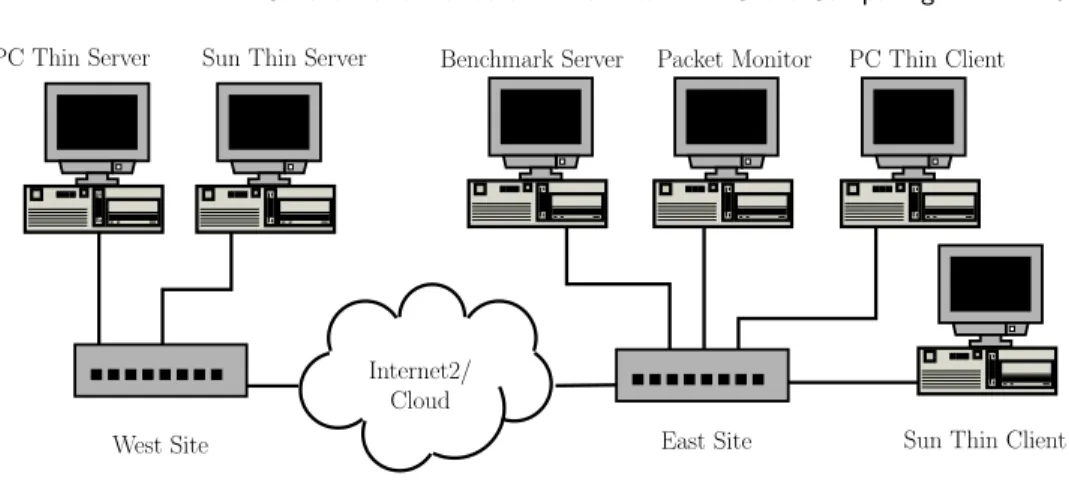
Figure 1 shows our Internet2 testbed. The testbed consisted of two pairs of thin client/server systems, a packet monitor machine, and a web server used for testing web applications. The features of each system are summarized in Table II. To ensure a level playing field, where possible we used the same hardware for all of our tests; the only change we made to our configuration was for testing the Sun Ray platform, which runs only on Sun machines. The machines were logically grouped into West and East sites separated by a network, with the thin servers located at
T able II. T estb ed m ac hine configurations Ro le / M o d el Hardw are OS / W indo w S ystem Soft w a re PC Thin Clien t 450 MHz In tel PI I MS Win 2000 Professional Citrix IC A Win32 Clien t Micron Clien t Pro 128 MB RAM Caldera O p enLin ux 2.4 MS RDP5 Clien t (East site) 14.6 G B D isk XF ree86 3.3.6 VNC Win32 3.3.3r7 Clien t 10/100BaseT NIC K D E 1.1.2 T aran tella Win32 Clien t Netscap e Comm unicator 4.72 Sun Thin Clien t 100 MHz Sun uSP AR C IIep Sun Ra y O S N/A Sun Ra y I 8M BR A M (East site) 10/100BaseT NIC Pa cke t M on it or 450 MHz In tel PI I MS Win 2000 Professional WildP ac kets’ E therp eek 4 Micron Clien t Pro 128 MB RAM (East site) 14.6 G B D isk 10/100BaseT NIC Benc hmark S erv er 450 MHz In tel PI I MS Win N T 4.0 Serv er S P 6a Ziff-Da vis i-Benc h 1.5 Micron Clien t Pro 128 MB RAM MS In ternet Informati on S erv er (East site) 14.6 G B D isk 10/100BaseT NIC P C Thin Serv er 2 500 MHz In tel PI II MS Win 2000 Adv anced Serv er Citrix MetaF rame 1.8 Hi-T ec h USA 160 MB RAM Caldera O p enLin ux 2.4 MS Win 2000 T erminal Services (W est site) 22 GB Disk XF ree86 3.3.6 A T&T VNC 3.3.3r7 for Win32 10/100BaseT NIC K D E 1.1.2 T aran tella Express A T&T VNC 3.3.3r2 for Lin u x Netscap e Comm unicator 4.72 Sun Thin Serv er 333 MHz U ltraSP AR C IIi Sun Solaris 7 Generic 106541-08 Sun Ra y S erv er 1.2 10.d Beta Sun Ultra-10 Creator 3D 384 MB RAM Op enWindo ws 3.6.1 Netscap e Comm unicator 4.72 (W est site) 9G BD is k CDE 1.3.5 2 10/100BaseT NICs Net w ork S im ulator 450 MHz In tel PI I MS Win N T 4.0 Serv er S P 6a Sh unra S oft w are T he Cloud 1.1 Micron Clien t Pro 128 MB RAM (sim ulator 14.6 G B D isk testb ed) 2 10/100BaseT NICs
Internet2/ Cloud PC Thin Server
West Site Sun Thin Client
Sun Thin Server Benchmark Server Packet Monitor PC Thin Client
East Site
Fig. 1. Experimental testbed
the West site and the remaining three machines located at the East site. For the Internet2 experiments, we located the West and East sites on opposite coasts of the United States at Stanford University and Columbia University, respectively. We selected sites that were geographically far apart as a measure of the limits of using thin-client computing in wide-area environments.
The East site consisted of a PC thin client, a Sun Ray thin client, a packet mon-itor machine, and a benchmark server. The packet monmon-itor machine was dedicated to running Etherpeek 4 [WildPackets, Inc. ], a software packet monitor that times-tamps and records all packet traffic visible by the machine. Except for the Sun Ray thin client, all other East site machines were Micron Client Pro PCs, each with a 450 MHz Pentium II CPU, 128 MB RAM, and 14.6 GB disk. The Sun Ray client was considerably less powerful than the PC client, with only a 100 MHz uSPARC CPU and 8 MB of RAM. The West site consisted of a PC server and a Sun server. The PC server was a Hi-Tech USA PC with dual 500 MHz Pentium III CPUs, 160 MB RAM, and 22 GB disk. The Sun server was an Ultra-10 Creator 3D with a 333 MHz UltraSPARC IIi, 384 MB RAM, and 9 GB hard disk. All machines had 10/100BaseT NICs. As discussed in Section 3.2, the slower Sun client and server hardware did not affect the lessons derived from our experiments.
For the Internet2 experiments, the East and West sites were connected by the Abilene Internet 2 backbone, an OC-48 operating at 2.5 Gbps, typically very lightly loaded with line utilization usually below 10% on any given link of the backbone [The Trustees of Indiana University ]. A total of 14 hops separate the machines at the East site from those at the West site. The East site is three hops away from a network provider that connects to the Abilene Internet2 backbone via an OC-12 (622 Mbps), with all links being OC-3 (155 Mbps) or greater. The West site is three hops away from a GigaPOP that connects to the Abilene Internet2 backbone via an OC-12, with all links being OC-3 (155 Mbps) or greater. The machines at each site are connected to a 100Base-T hub which is uplinked to the respective core networks via 100Base-T full-duplex switches. Since the minimum available bandwidth along any edge of the network was 100 Mbps, the theoretical maximum bandwidth of our connection was 100 Mbps. Based on our own measurements and a month of
sampled data obtained by the National Laboratory for Applied Network Research (NLANR), ping results have shown the mean round trip time (RTT) latency to be approximately 66.35 ms with a standard deviation of 4.52 ms and a minimum RTT of 64 ms [National Laboratory for Applied Network Research a; b]. The measured percentage packet loss over this Internet2 connection was less than 0.05%.
Because all of the thin-client systems tested, except for Sun Ray, used TCP as the underlying network transport protocol, we were careful to consider the impact of TCP window sizing on performance. TCP windows should be adjusted to at least the bandwidth delay product size to maximize bandwidth utilization [Mahdavi ] shown in Equation 1.
minimum TCP Window = bandwidth×RTT (1)
Otherwise, the effective bandwidth available can be severely limited because the largest amount of data that can be in transit without acknowledgement is the TCP window size being used. When at the default window size of 16 KB under Windows [Microsoft Corporation ] and at our average RTT latency of 66 ms, there is a max-imum theoretical bandwidth availability of only 1.9 Mbps. By applying Equation 1, one can see with an RTT latency of 66 ms, the optimal TCP window size is 825 KB in order to take full advantage of the 100 Mbps Internet2 network bandwidth capacity available. Because of this, we decided to test with the operating system defaults as well as a high network latency optimized large TCP window setting. To make things simple and ensure that the window size was large enough even if the network latency increased, a large TCP window size of 1 MB was used. After mak-ing this optimization, iperf [Tirumala and Ferguson ] was used to determine that the actual bandwidth available to us over Internet2 was approximately 45 Mbps.
To verify our results in a more controlled network environment and to provide a basis for comparison, we also constructed a local isolated testbed for comparison purposes, also shown in Figure 1. The local testbed structure was similar to the Internet2 testbed, except that a network simulator was used instead of Internet2 for the network connection between the East and West site. The network sim-ulator used was a Micron Client Pro PC with two 100BaseT NICs running The Cloud [Shunra Software ], a network simulator that has the ability to adjust the bandwidth, latency, and packet loss rate between the East and West sites. We used the local testbed in two ways. First, we used the local testbed network as a 100 Mbps low latency LAN testbed environment to allow us to compare thin client performance over Internet2 versus a LAN environment. Second, we adjusted the local testbed network characteristics to match the measured characteristics of the Internet2 testbed so that we could verify our Internet2 testbed measurements in a more controlled network environment. All platforms were evaluated in both Internet2 and the simulated Internet2 testbed except for Sun Ray, which was only evaluated in the simulated Internet2 testbed due to the difficulty of configuring its dynamic authentication over Internet2. There was no significant difference in our measurements in this simulated Internet2 testbed compared to our measurements during periods of light network load over Internet2. We therefore assume that Sun Ray would also have no significant performance difference between the two testing environments.
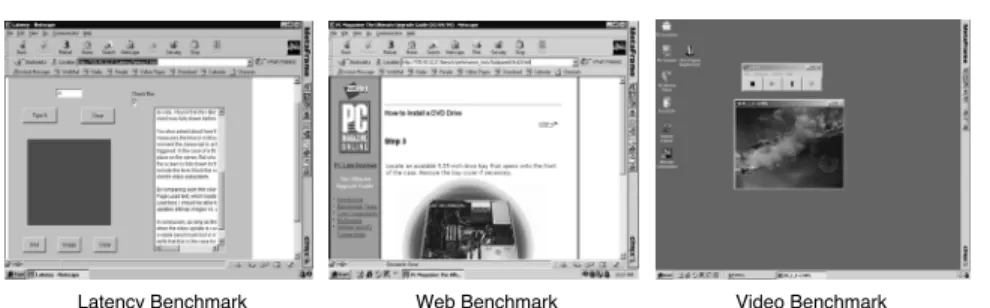
Latency Benchmark Web Benchmark Video Benchmark Fig. 2. Application benchmarks
configuration options and common applications across all platforms whenever pos-sible. Where it was not possible to configure all the platforms in the same way, we generally used default settings for the platforms in question. In particular, unless otherwise stated, the video resolution of the client was set to 1024x768 resolution, compression and memory caching were left on for those platforms that used it, and disk caching was turned off by default in those platforms that supported it. We tested each at the maximum supported color depths: ICA, RDP, and AIP at 8-bit color and Sun Ray, X, and VNC at 24-bit color. In order to compare 24-bit plat-forms with platplat-forms that only supported 8-bit color, we also tested X and VNC at 8-bit. Sun Ray does not support 8-bit color, therefore was only tested at 24-bit color. A study on the impact of caching on thin-client systems in WAN environ-ments is beyond the scope of this paper. For an analysis of caching on thin-client systems in LAN environments, see [Yang et al. 2002]. For each thin-client system, we used the server operating system that delivered the best performance for the given system; Terminal Services only runs on Windows, Citrix ran best on Win-dows, Tarantella, VNC, and X ran best on UNIX/Linux, and Sun Ray only runs on Solaris.
2.3 Application Benchmarks
To measure the performance of the thin-client platforms, we used three application benchmarks: a latency benchmark for measuring response time, a web benchmark for measuring web browsing performance, and a video benchmark for measuring video playback performance. Figure 2 shows screenshots of these three benchmarks in operation. The latency benchmark was used as a micro-benchmark to measure simple operations while the web and video benchmarks were used to provide a more realistic measure of real application performance. We describe each of these benchmarks in further detail below. In particular, the web and video benchmarks were used with the slow-motion benchmarking technique described in Section 2.1 to measure thin client performance effectively.
2.3.1 Latency Benchmark. The latency benchmark used was a small Java applet that permitted us to run five separate tests:
—Letter: a character typing operation that took a single keystroke as input and responded by displaying a 12-point capital letter ’A’ in sans serif font.
450 words in 58 lines in 12-point sans serif font, with 14 of the lines displayed in a 320x240 pixel area at any one time.
—Fill: a screen filling operation in which the system would respond to a mouse click by filling a 320x240 pixel area with the color red.
—Red Bitmap: a bitmap download operation in which the system would respond to a mouse click by displaying a 1.78 KB JPEG red bitmap at 320x240 pixels in size.
—Image: an image download operation in which the system would respond to a mouse click by displaying a 15.5 KB JPEG image at 320x240 pixels in size. For our experiments, we measured the latency of each test from the time of user input until the time that the client receives the last screen update from the server. This time is measured using packet trace data collected by the packet monitor. The time is calculated as the difference between the timestamp of the first client-to-server packet and the timestamp of the last client-to-server-to-client packet for the respective test.
2.3.2 Web Benchmark. The web benchmark we used was based on the Web Text Page Load test from the Ziff-Davis i-Bench benchmark suite [Ziff-Davis, Inc. ]. The original i-Bench web benchmark is a JavaScript-controlled load of a sequence of 54 web pages from the web benchmark server. Normally, as each page downloads, a small script contained in each page starts off the subsequent download. The pages contain both text and bitmap graphics, with some pages containing more text while others contain more graphics. The JavaScript cycles through the page loads twice, resulting in a total of 108 web pages being downloaded during this test. When the benchmark is run from a thin client, the thin server would execute the JavaScript that sequentially requests the test pages from the i-Bench server and relay the display information to the thin client.
For the web benchmark used in our tests, we modified the original i-Bench bench-mark for slow-motion benchbench-marking by introducing delays of several seconds be-tween pages using the JavaScript, sufficient in each case to ensure that the thin client received and displayed each page completely and there was no temporal over-lap in transferring the data belonging to two consecutive pages. We used the packet monitor to record the packet traffic for each page, and then used the timestamps of the first and last packet associated with each page to determine the download time for each page. We used Netscape Navigator 4.72 to execute the web benchmark, as it is available on all the platforms in question. The browser’s memory cache and disk cache were enabled but cleared before each test run. In all cases, the Netscape browser window was 1024x768 in size, so the region being updated was the same on each system.
Introducing delays between the web pages does qualitatively change the behavior of the benchmark from one that downloads a scripted sequence of web pages in rapid succession with no delays to one that has delays between the pages that are longer than the page downloads themselves. However, we argue that the slow-motion version of this benchmark is more representative of real-world web browsing because real users do not simply download pages one after another without pausing. Instead, users need time to read and digest the content available on those pages, and the user time required to do so is typically much longer than the web page
download times. As a result, the slow-motion web benchmark not only provides a better basis for measuring thin-client performance, it also provides a more realistic measure of web browsing performance.
2.3.3 Video Benchmark. The video benchmark used processes and displays an MPEG1 video file containing a mix of news and entertainment programming. The video is a 34.75 second clip that consists of 834 352x240 pixel frames with an ideal frame rate of 24 frames/sec. The total size of the video file is 5.11 MB. The thin server executed the video playback program to decode the MPEG1 video then relayed the resulting display to the thin client. In systems which have a lazy screen update mechanism, acting as frame buffer scrapers, frames that are drawn to the virtual framebuffer on the server between screen update requests are simply not relayed to the client. In systems which have an eager update mechanism where the display updates are encoded and sent at the time the server window system command occurs, the video application measures the time differential between the time the frame update was issued and completed. If the time differential is too great, the application then drops the intermediate frames to compensate.
Because of this behavior, we measured video performance using slow-motion benchmarking by monitoring resulting packet traffic at two playback rates, 1 frames/second (fps) and 24 fps. Although no user would want to play video at 1 fps, we took the measurement at that frame rate to ensure all data packet from the thin server to the client were recorded in order to establish the reference data size transferred from the thin server to the client that corresponds to a “perfect” playback. To measure the normal 24 fps playback performance and video quality, we monitored the packet traffic delivered to the thin client at the normal playback rate and compared the total data transferred to the reference data size. This ratio multiplied by 24 fps would yield the real effective frame rate of the playback [Nieh et al. 2003]. This results in the Video Quality equation shown in Equation 2.
Video Quality =
DataT ransf erred(24f ps)/P laybackT ime(24f ps) IdealF P S(24f ps)
DataT ransf erred(1f ps)/P laybackT ime(1f ps) IdealF P S(1f ps)
(2)
For the video benchmark, we used two different players capable of playing MPEG1 files. We used Microsoft Windows Media Player version 6.4.09.1109 for the Windows-based thin clients and MpegTV version 1.1 for the Unix-Windows-based thin clients. Both players were used with non-video components minimized so that the appearance of the video application was similar across all platforms.
Introducing delays between the video frames does qualitatively change the behav-ior of the benchmark from one that plays video in a normal way that users watch to a slow-motion version that no user watch in practice. However, the slow-motion video benchmark here is used only to provide additional information regarding the performance of the standard video benchmark. The additional information pro-vided is a measure of how much video data is discarded and never displayed on the client. In this case, the qualitatively different behavior of the slow-motion video benchmark versus the standard version is inherently necessary to obtain useful additional information to provide a better overall measure of video performance.
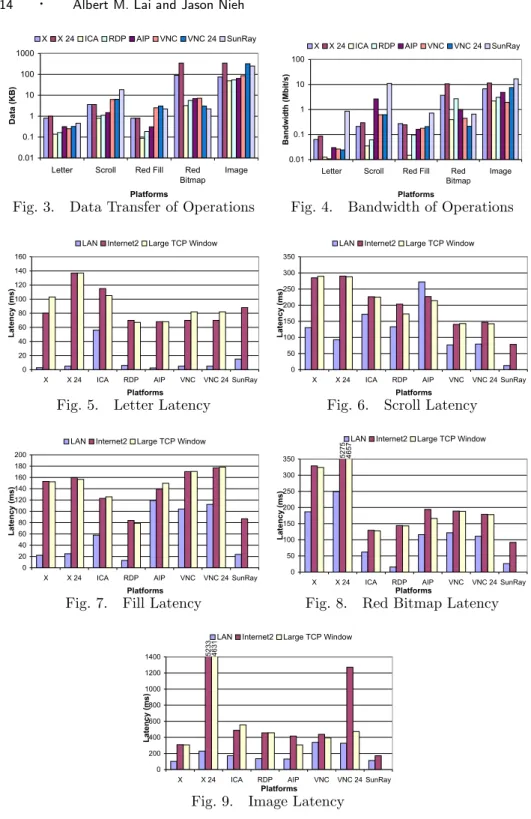
Fig. 3. Data Transfer of Operations Fig. 4. Bandwidth of Operations
Fig. 5. Letter Latency Fig. 6. Scroll Latency
Fig. 7. Fill Latency Fig. 8. Red Bitmap Latency
Fig. 9. Image Latency 3. EXPERIMENTAL RESULTS
We ran the three benchmarks on each of the six thin-client platforms and measured their resulting performance in both the Internet2 testbed and the local LAN testbed
environments. Results for both 8-bit and 24-bit color configurations are reported for X and VNC (X, X 24, VNC, and VNC 24 respectively). The results reported here for the local testbed were with the network simulator configured to represent a 100BaseT LAN network environment. For each of the thin-client systems, re-sults are shown for the respective latencies as an indicator of overall user-perceived performance. In addition, we provide results for the amount of data transferred and bandwidth utilization of the thin-client systems to demonstrate their respec-tive bandwidth efficiencies. For thin-client systems based on TCP/IP, we report results over Internet2 for both the default TCP window sizes and the large 1 MB window sizes used. Section 3.1 presents an overview of the measurements obtained and provides some metrics of performance for each application benchmark. These measurements provide the first quantitative performance comparisons of thin-client systems in WAN environments. Section 3.2 discusses the implications for how thin-client systems should be designed for WAN environments.
3.1 Measurements
Figures 3 to 9 show the results of running the latency benchmark on each of the six thin-client systems. The figures refer to the thin-client systems based on their re-mote display protocols. Figure 3 (in log scale) shows the amount of data transferred for each operation on each thin-client system over Internet2. The data transferred for the LAN and Internet2 with large TCP window sizes was similar for almost all platforms and is not shown. Tarantella AIP was an exception and is discussed further in Section 3.2.4. Figure 4 (in log scale) shows the amount of bandwidth utilized for each operation over a LAN connection. The bandwidth utilized for Internet2 and Internet2 with large TCP window sizes was less than that of LAN for all operations and is not shown. Figures 5 to 9 show the latency of the letter, scroll, fill, red bitmap, and image operations on each system, respectively. Gen-erally, for simple tasks such as typing, cursor motion, or mouse selection, system response should be less than the 50-150 ms threshold of human perception to keep users from noticing any delay [Shneiderman 1992]. Figures 5 to 9 show that several of the systems performed better than the 150 ms threshold for many of the oper-ations. Sun Ray stands out as having less than 100 ms latency for both LAN and Internet2 environments for almost all operations. Only the image operation took a little longer than 150 ms, and the 150 ms threshold used for simple tasks arguably does not apply for such a complex operation.
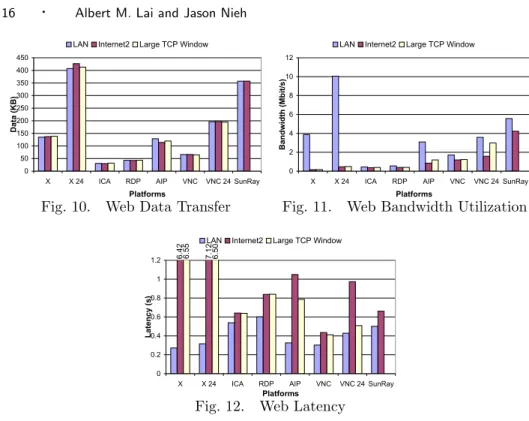
Figures 10 to 12 show the results of running the web benchmark on each of the six thin-client systems. Figure 10 shows the average amount of data transferred per web page over a LAN, Internet2, and Internet2 with 1 MB TCP window sizes. The amount of data transferred for each platform was approximately the same in each of the network conditions tested. Tarantella AIP transferred slightly less data over Internet2 compared to the LAN. However, the difference was less than ten percent and is attributable to the adaptive compression capabilities of the platform, as discussed in Section 3.2.4. Figure 11 shows the average amount of bandwidth utilized for the web benchmark over each of the network conditions tested. Figure 12 shows the average latency per web page. Usability studies have shown that web pages should take less than one second to download for the user to experience an uninterrupted browsing process [Nielsen 2000]. Our results show that while VNC
Fig. 10. Web Data Transfer Fig. 11. Web Bandwidth Utilization
Fig. 12. Web Latency
achieved the best Internet2 web performance, most of the platforms performed well over Internet2, with each web page taking less than a second on average to download and display. Only X and X 24 showed poor performance over Internet2, taking over six seconds on average to display each web page.
Figures 13 to 15 show the results of running the video benchmark on each of the six thin-client systems over a LAN, Internet2, and Internet2 with 1 MB TCP window sizes. Figure 13 shows the amount of data transferred during normal video playback at 24 fps. Unlike the latency and web benchmark results, there are sub-stantial differences in the amount of data each platform transferred among the different network conditions tested. Figure 13 also shows the amount of data trans-ferred during video playback when the playback rate was set to 1 fps. At 1 fps, all of the video frames were rendered completely on the client and the data transferred for each platform was similar over LAN, Internet2, and Internet2 with 1 MB TCP windows. Figure 14 shows the bandwidth utilization of the video benchmark over each of the network conditions tested. Figure 15 shows the video playback time on each system. Except for X, there was relatively little variation in playback time across different network environments. Figures 13 and 15 taken together indicate that when the thin-client systems cannot deliver the video at the desired playback rate, most of them simply discard data rather than slowing down the video. Figure 16 shows the quality of video delivered on each thin-client system, calculated as described in Section 2.3.3 by comparing the measured results at 24 fps versus the slowed down playback at 1 fps. Unlike the web benchmark in which most of the thin-client systems delivered reasonable performance, Figure 16 shows that most of the thin-client systems performed poorly on the video benchmark over both LAN and Internet2 environments. Only Sun Ray’s performance was reasonable over
In-ternet2, delivering roughly 70% video quality. The video quality achieved on all of the other platforms was below 35% and generally not usable.
For most of the TCP-based thin-client platforms, there was not a significant performance difference when running the benchmarks over Internet2 with default TCP window sizes versus the 1 MB TCP window sizes. Figures 12 and 16 show that Tarantella AIP, VNC, and X 24 performed better with the larger TCP window sizes on the web and video benchmarks, respectively. This effect is magnified in the greater bandwidth requirements of VNC 24 and X 24 compared to those of VNC and X respectively. The more pronounced performance difference occurred with the video benchmark. The use of larger TCP window sizes made a bigger difference there due to the higher data bandwidth requirements of video. In some cases, using larger window sizes resulted in slightly higher overhead. When using increased window sizes, RFC1323 options must be used which increases the sequence number field from 2 bytes to 4 bytes per packet and adds an additional window scaling field. These additional fields may add some overhead to the processing of each packet, the effect of which is exaggerated when the payload of the packet is small. These additional fields also resulted in slightly more data being transferred when using large window sizes, but the difference was only a few percent in all cases.
Because the measured packet loss over our Internet2 connection was less than 0.05% as noted in Section 2.2, our experiments did not focus on the impact of loss on thin-client performance. However, we did perform some additional experiments to confirm that this level of loss could be considered negligible in our measure-ments. Using VNC and Citrix, we compared measurements of the web benchmark with both 0% and 1% random packet loss on our simulated Internet2 testbed. In all cases, there was no significant difference. This is not surprising given that the measurements in Figure 11 show that the web benchmark is not particularly band-width intensive. If more bandband-width intensive applications are used with thin clients in more bandwidth constrained environments, we would expect loss to have a larger impact on performance. We also performed some preliminary testing with these thin clients with a 10% random packet loss in our simulated Internet2 testbed. At this high packet loss rate, we observed very low link utilization as expected [Lakshman and Madhow 1997; Lakshman et al. 2000].
Given the centrality of the network in thin-client systems, one might expect that thin clients would exhibit significantly poorer performance when used in high packet loss scenarios, particularly for systems that rely upon TCP for data transmission. Some related research has shown that thin-client performance may not be signif-icantly impacted until approximately 4% packet loss [Yang et al. 2003], which is fairly high compared to those seen on the commodity Internet today. Indications are that packet loss rates are decreasing by 40-50% per year and there are reports that rates of packet loss in the U.S. are less than 0.5% [Cottrell 2005; Bradner 2005]. Furthermore, related work suggests that differences in how thin clients use the network versus the traditional desktop computing model can result in thin clients providing superior performance in lossy networks for network applications such as web browsing [Yang et al. 2003]. However, the implications of loss and congestion on thin-client performance still requires further study and is beyond the
scope of this paper.
3.2 Interpretation of Results
The measurements presented in Section 3.1 show that using thin-client computing in a WAN environment can deliver acceptable performance over Internet2, even when client and server are located thousands of miles apart on opposite ends of the country. In particular, Sun Ray delivered excellent performance on all of the ap-plication benchmarks measured. However, performance varies widely among thin-client platforms and not all platforms are suitable for this environment. We discuss six principles that should serve as guidelines in designing thin-client systems for supporting wide-area computing services: optimize latency over bandwidth, par-tition client/server functionality to minimize synchronization, use simpler display primitives for speed, compress display updates, push display updates, and optimize transport protocol.
3.2.1 Optimize Latency vs. Bandwidth. Although thin-client computing ven-dors often tout the bandwidth efficiency of their platforms, our measurements show that the bandwidth efficiency of a thin-client system is not a good predictor of per-formance over Internet2. Figures 3, 10, and 13 show that Citrix ICA and Microsoft RDP usually transferred less data overall for each benchmark compared to the other systems while Sun Ray typically transferred the most amount of data overall for each benchmark. However, in terms of user-perceived performance, our measure-ments show that overall Sun Ray significantly outperformed both ICA and RDP over Internet2 for both the latency and video benchmarks and was comparable for the web benchmark. For the latency benchmark, Figures 5 to 9 show that ICA and RDP have response times that balloon to over 400 ms over Internet2 while Sun Ray response times remain near 150 ms or less. For the video benchmark, Figure 16 shows that Sun Ray delivered video quality that was more than four times better than either ICA or RDP. For the web benchmark, the web browsing latency for Sun Ray was comparable to ICA and better than RDP despite sending almost an order of magnitude more data. Furthermore, while ICA and RDP sent the least amount of data per page, 30 KB and 41 KB respectively, VNC had the lowest latency over Internet2 with an average page latency of 410 ms, 50 percent faster than ICA and twice as fast as RDP. In addition, when using large TCP windows, despite trans-ferring nearly 3 times as much data, VNC 24 suffered very little additional latency when compared to VNC.
Our measurements show that bandwidth availability in LAN or Internet2 envi-ronments was not the main performance limitation for both the latency and web benchmarks, assuming appropriately sized TCP windows. For the latency bench-mark, the most bandwidth consumed over Internet2 for any of the operations was 11 Mbps for the image operation on Sun Ray, as seen in Figure 4. For the web benchmark, Figure 11 shows that over Internet2 no platform consumed more than 5 Mbps on average. Only in the video benchmark, shown in Figure 14, did one of the platforms, Sun Ray, approach the limits of bandwidth available over Inter-net2, consuming roughly 33 Mbps. However, despite using the most bandwidth for the video benchmark, Sun Ray delivered by far the best video performance over Internet2.
Fig. 13. Video Data Transfer Fig. 14. Video Bandwidth
Fig. 15. Video Playback Time Fig. 16. Video Quality
Instead of network bandwidth being the primary bottleneck, our measurements comparing thin client performance over Internet2 versus the LAN show that net-work latency had a significant impact on thin client performance. For the latency benchmark, Figures 5 to 9 show that the latency of operations over Internet2 for almost all of the thin-client systems were roughly 65 ms or more longer than the results for the same operation over the LAN testbed. AIP was an exception to this, which we discuss further in Section 3.2.4. The reason for the added latency is because each operation requires the client to send input to the server and the server to reply with the display update, which entails at least one round trip across the network. Since the RTT for Internet2 is roughly 65 ms longer than the LAN, it should be expected that the operations would take 65 ms longer over Internet2 versus the LAN. What was not expected is that only Sun Ray and VNC took no more than one RTT longer for each operation over Internet2 versus the LAN. All of the other systems incurred more than one RTT of additional latency over Internet2 versus the LAN for some of the operations. This implies that X, X 24, ICA, RDP, and AIP in some cases required multiple round trip times to complete a simple operation, making them less tolerant of the increased network latencies found in WAN environments.
For the web benchmark, our measurements also show the impact of network latency on thin-client performance. Figure 12 shows that the average per web page download latency over Internet2 was roughly 65 ms or more longer than the same latency over a LAN for a given platform. In our Internet2 testbed shown in Figure 1, the thin-client server was located across the Internet2 network from the web server. Since the thin-client server is local to the web server in the LAN, we can expect an extra Internet2 RTT delay in downloading a web page over Internet2
versus the LAN because of extra delay between getting the container HTML page to the thin-client server and the subsequent retrieval of the images. In addition, the Netscape status widgets also induce an additional Internet2 RTT over Internet2. Since the web browser caches the web pages, the second run through the 54 web pages does not cause the browser to re-request the web pages from the web server. As a result, there is at best a two RTT additional delay for the first 54 pages only, or an average of one RTT additional delay per page. Only Sun Ray, VNC, and ICA incurred this minimum increased delay for the Internet2 versus LAN web benchmark results. While these three platforms performed the best over Internet2, the amount of data transferred for these systems varied from the smallest to the largest amount of data transfer for all of the platforms, showing no correlation with bandwidth consumption.
Our results demonstrate the importance of designing wide-area thin-client sys-tems with a focus on tolerating network latency as opposed to just minimizing network bandwidth. As network technologies improve and high-bandwidth Inter-net access becomes a commodity, the fundamental physical limits of propagation delay lead us to believe that the ability of thin-client systems to tolerate latency will be an increasingly dominant factor in determining their performance.
3.2.2 Partition Client/Server to Minimize Synchronization. The design of a thin-client system requires that the functionality of the system be partitioned in some manner between the client and the server. An important partitioning issue is to what extent is the client’s graphical user interface functionality supported on the client versus the server. For instance, Sun Ray and VNC do not support any win-dowing functions on the client but instead maintain all thin-client window system state at the server. On the other hand, X maintains significant window system state at the client to allow the client to locally manage window positioning, colormap information, font libraries, etc. X stands apart from the other thin-client systems in the degree in which it uses local client window system state, which also makes the client-side of an X system more heavyweight than those of other thin-client sys-tems. Compared with Sun Ray and VNC, the partitioning of functionality between client and server in X potentially allows X to perform more operations locally at the client, but may require more coordination between the client and server for display updates sent from the server.
While the X approach performs quite well over a LAN, overall it performs far worse over Internet2 than all of the other thin-client systems. For the latency benchmark, Figures 5 to 9 show that X incurred two to three Internet2 RTT of additional latency over Internet2 versus a LAN for all operations except the letter operation. X 24 suffered even more greatly, especially in the red bitmap and image latency tests, with many RTT of additional latency. This is in stark contrast with the other platforms, which for many of the operations only suffered the minimum of one RTT of additional latency over Internet2 versus a LAN. Given the Internet2 RTT of 66 ms, X has over 130 ms of additional latency for operations over Internet2, resulting in slower response time that is very noticeable to the user. For the web benchmark, Figure 12 shows that X provides the best performance over a LAN, but the absolute worst performance over Internet2. X and X 24 on average took well over 6 seconds per web page over Internet2. For the video benchmark, Figure 16
shows again that X provides the best video quality over a LAN but only 11% video quality over Internet2, the worst video quality of all the platforms assuming large TCP windows. Our results suggest that this partitioning of client/server display functionality in X requires a higher degree of synchronous coordination between client and server than systems which do not employ as much local client window system functionality. The better performance results with thin-client systems such as Sun Ray surprisingly suggest that minimizing the amount of local client window system functionality can result in better overall performance in WAN environments. The video benchmark perhaps most clearly shows the problems that result from synchronization of the client and server with the X protocol. In comparing the amount of data X transferred over Internet2 versus the LAN as shown in Figure 13, we can see that the primary problem is that most of the video data does not get sent to the client. The X display command does not complete until the client actually receives the video frame from the server and returns an acknowledgement, incurring a cross-country round trip delay for each video frame displayed. Because the application realizes that it cannot display the next video frame on time, it skips ahead in the video stream until it finds a video frame that can be displayed on time. The intermediate video frames are dropped and not displayed, resulting in degraded video quality, effectively showing only one out of every 10 frames. A sec-ondary factor for X’s poor video quality is that it takes much longer to playback the video stream. The 17 seconds of extra delay is due to the level of synchronized co-ordination between X client and server in allocating the color map used throughout the playback of the video. We verified that this was not just an artifact of MpegTV by testing the popular Berkeley Multimedia Research Center’s mpeg play, which also exhibited the same extra delay.
Because X is an application-level protocol, its performance depends heavily on what X primitives an application is programmed to use. X does have the have the ability to support client/server display functions that are more decoupled be-tween client and server. However, our experiments with widely-used commercial X applications such as Netscape show that it is not uncommon to find a high pro-portion of synchronous display functions used. In particular, whenever there is a return value that reports the status of a request, the operation must be completed synchronously and the application waits for the return value. Unfortunately in Netscape, all of the routines that draw the toolbar and the page load status bar create a significant number of GetWindowAttributes and GetGeometry requests, which are both synchronous functions. If widely-used commercial X applications can so easily have performance problems in WAN environments, it seems clear that the X system itself is at least partially to blame even if X primitives may exist that allow more decoupled client-server interactions.
We can quantify to some extent the degree of synchronization in a system’s display protocol by the amount of extra delay experienced running each system over Internet2 versus a LAN. For the latency benchmark, Sun Ray and VNC incur the minimum delay as discussed in Section 3.2.1. ICA and VNC 24 provide the next best performance, incurring the minimum delay except for the image operation. RDP does a little worse, requiring two extra RTT of delay on both the red bitmap and image operations. X and X 24 do the worst. From inspecting the packet
captures in the latency benchmark, it appears that ICA and RDP perform some sort of synchronized operation after approximately every 8 KB of data being sent. When this occurs, the protocols each wait a full RTT before continuing with the remaining data transfer. This synchronized execution also limits the utility of using larger TCP window sizes, as is evident by the lack of improvement in performance when using larger TCP window sizes versus default TCP window sizes. In contrast, as shown in Figure 9, the some additional synchronization in VNC 24 is removed when using appropriately sized TCP windows, which will be discussed further in Section 3.2.6. For the web benchmark, Sun Ray, VNC and ICA incur the minimum extra delay over Internet2 as discussed in Section 3.2.1. They are followed in best-to-worst relative performance order by RDP, AIP, X, and X 24. Unfortunately, due to the proprietary nature of ICA, RDP, and AIP, it was not possible to examine in detail the mechanisms behind the synchronization of the protocols.
Overall, the degree of synchronization in the display protocol has a much more significant impact over Internet2 than bandwidth efficiency. Our results demon-strate that to optimize performance for the larger latencies in WAN environments, the functionality in a thin-client system should be carefully partitioned between the client and server to minimize synchronization between client and server. If the client and server need to send messages back and forth several times to perform an operation, the much higher round trip latencies over Internet2 will result in significant increases in latency for the given operation.
3.2.3 Use Simpler Display Encoding Primitives. Different thin-client systems use different display primitives for encoding display updates that are sent from the server to the client. Four types of display encoding primitives are high-level graphics, low-level graphics, 2D draw primitives, and raw pixels. Higher-level dis-play encodings are generally considered to be more bandwidth efficient, but require more complexity on the client and may be less platform-independent. For instance, graphics primitives such as fonts require the thin-client system to separate fonts from images while using pixel primitives enable the system to view all updates as just regions of pixels without any semantic knowledge of the display content. X takes a high-level graphics encoding approach and supports a rich set of graphics primitives in its protocol, including windowing and color mapping commands. ICA, RDP, and AIP are based on lower-level graphics primitives that include support for fonts, icons, drawing commands as well as images. Sun Ray and VNC employ 2D draw primitives such as fills for filling a screen region with a single color or a two-color bitmap for common text-based windows. VNC can instead be configured to use raw pixels only, but none of the systems we considered used raw pixels by default.
Our results show that higher-level display encodings are not necessarily more bandwidth efficient than lower-level primitives. For the latency benchmark, Figure 3 shows that the low-level graphics encodings such as ICA, RDP, and AIP generally required less data transfer than the pixel-based approaches such as VNC and Sun Ray, but the high-level X encoding format required the highest data transfer on two of the five latency operations regardless of color depth. For the web benchmark, Figure 10 shows that while the higher-level encoding formats used by ICA and RDP require less data transfer than the lower-level pixel-based encoding format
used by VNC, VNC sends less data than either X or AIP, which also use higher-level encoding formats. For the web benchmark, Figure 10 shows that Sun Ray, which encodes pixel values in 24-bit color [Schmidt et al. 1999], using lower-level pixel-based encoding sends less data than X 24, with its higher level encoding.
In Figure 10, we see that the amount of data transferred in X 24 and VNC 24 are approximately 3 times greater than X and VNC respectively. Therefore, in order to compare 24-bit displays with 8-bit color displays, the data transfers can be normalized by the number of bits used for pixel color in the protocol. When we normalize the data transferred in Sun Ray, this would reduce the amount of data sent using the 24-bit color Sun Ray encoding by a factor of three less than shown in Figure 10. The normalized Sun Ray data transfer would be about 110 KB per web page, less than both X (which is consistent with the X 24 result) and AIP but still more than ICA. However, ICA achieves some of its bandwidth efficiency by using compression. When we turned off compression in ICA to reveal the performance of its basic display encoding on the web benchmark, the data transfer requirement for ICA ballooned to about 100 KB per web page, only 10 percent less than Sun Ray. A key reason why the higher-level display encoding primitives are often no bet-ter if not worse than the lower-level display encoding primitives is that many of these encodings were optimized for text-based displays. Much of the complexity of the higher-level encoding formats used by X, ICA, RDP, and AIP relates to keeping track of text-based primitives. But relative to images, graphics, and video, text generally does not require much bandwidth to begin with. Even for the web benchmark, which consisted of mostly text-based web pages, text-oriented display accounts for much less than half of the data in the original HTML pages. In addi-tion, for platforms such as X, one needs to maintain font libraries on the client that can take up many megabytes. Figure 13 shows that for the video benchmark, which involves no text-oriented display, the higher-level encoding formats are not more bandwidth efficient than the lower-level formats. If we again normalize for the num-ber of bits used for pixel color in the protocol, we see that X, AIP, and Sun Ray all require roughly the same amount of data transfer. Similarly, ICA, RDP, and VNC all require roughly the same amount of data transfer. ICA, RDP, and VNC require less data transfer than the other platforms simply because they use compression, as discussed in Section 3.2.4. As applications become more multimedia-oriented and bandwidth increases, the efficiency with which an encoding supports graphics and images is more important and additional complexity for text may in fact reduce performance.
More importantly, our measurements indicate that simpler lower-level display primitives as used by Sun Ray and VNC resulted in better overall user-perceived performance than higher-level display encoding primitives. Our results suggest that the higher-level primitives used in ICA, RDP, AIP, and X have higher latencies over Internet2 that may be due to their added complexity. For both the web and video benchmarks, Sun Ray and VNC outperformed all of the other higher-level encoding platforms. Figure 12 shows that Sun Ray and VNC had the lowest average web page latencies, with VNC being 50 percent better than any of the higher-level encoding platforms. Figure 16 shows that Sun Ray had the best video quality followed by VNC, with Sun Ray being more than two times better than any of the
higher-level encoding platforms. While VNC’s performance benefits substantially from compression as discussed in Section 3.2.4, Sun Ray’s good performance is simply due to a good balance between computing and communication costs in its display encoding format. Note that the good performance results for Sun Ray were achieved despite using slower client and server hardware as compared to the other thin-client systems. When network bandwidth is sufficient and network latency is the primary issue, the simpler pixel-based encoding approaches provide better overall performance.
3.2.4 Compress Display Updates. As summarized in Table I, many of the thin-client systems employ low-level compression techniques such as run-length encoding (RLE) and Lempel-Ziv Welch (LZW) compression to reduce the data size of display updates. For our experiments, compression was by default enabled on all of the thin-client systems that supported it. ICA, AIP, and VNC all provide a simple user option to enable or disable compression. To evaluate the impact of compression, we also ran the same benchmarks on these three thin-client systems with compression explicitly disabled and measured the resulting performance. As expected, all three platforms transferred less data on all of the benchmarks with compression enabled, though compression was least effective with the video benchmark. Furthermore, all three platforms performed better overall on the benchmarks with compression enabled as opposed to without it.
We identified three reasons why enabling compression improved performance. First, some of the thin-client systems, particularly VNC, were bandwidth limited when compression was disabled when default TCP window sizes were used. En-abling compression reduced the amount of data transferred and removed this band-width limitation. Second, two of the thin-client systems, ICA and RDP, require some synchronization between client and server after approximately every 8 KB of display update data that is sent, as discussed in Section 3.2.2. Enabling compres-sion reduced the amount of data transferred and therefore reduced the frequency at which this synchronization occurred, thereby improving performance for WAN environments. Third, some of the thin-client systems may employ different client rendering functions depending upon whether compression is enabled. We discov-ered that when hextile compression is enabled, the VNC client rendering function renders blocks of pixels at one time. When compression is not used, the rendering function renders pixels individually, one at a time. Our measurements on the web and video benchmark showed that the rendering function applied when compression was used was 6 to 24 times faster per pixel displayed. As discussed further in Sec-tion 3.2.5, because the VNC server waits until the client has completely rendered the last display update before sending the next display update, the shorter client rendering times with compression enabled result in better performance.
Our results also show that low-level compression applied to a simple pixel-based display encoding as used in VNC can perform surprisingly well. The VNC 24 red bitmap operation outperformed VNC as shown in Figure 8. When in 8 bit color, the red bitmap appeared as a dithered red area. In 24 bit color, the red bitmap was rendered as a solid uniform red area. Because of the combination of simple pixel-based encoding as well as low-level combination, rendering of this screen updated is reduced to a fill, sending less data than for the original JPEG red bitmap file. The