Developer's Guide
Version 6.2.30.0
Contents
Legal Notices
...4
Document Information
...5
Chapter 1: Overview
...6
What is the Routing API?
...7
Why use the Routing API?
...8
Customization Options
...8
Routing Feature Availability
...8
Chapter 2: Quick Start
...10
Requesting a Simple Route
...11
Getting Route Information
...11
Chapter 3: User Guide
...12
Acquiring Credentials
...13
Constructing a Request
...13
GET request
...13
POST request
...14
Additional Comments
...16
Customer Integration Testing
...18
Key Concepts
...18
Private Transport Routing
...18
Schema Evolution
...21
Service Support
...22
Examples
...22
Calculate Route Examples
...22
Resources and Parameters
...26
Calculate Route
...27
Get Link Info Request
...30
Get Route
...34
Calculate Isoline
...36
Calculate Reverse Flow
...38
Common Parameter Types
...40
Response Data Types
...53
CalculateRouteResponseType
...54
GetRouteResponseType
...55
GetLinkInfoResponseMetaInfoType
...56
GetRouteResponseType
...56
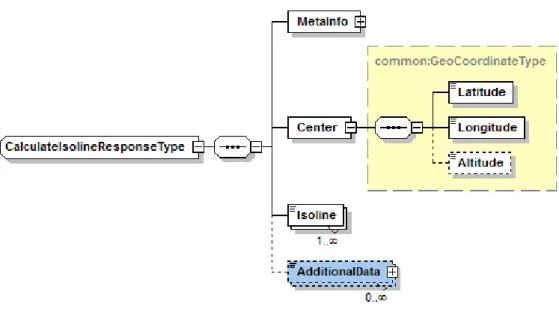
CalculateIsolineResponseType
...58
Routing Data Types
...59
Base Data Types
...90
Error Data Types
...114
Legal Notices
©
2013 HERE. All rights reserved.
This material, including documentation and any related computer programs, is protected by
copyright controlled by HERE. All rights are reserved. Copying, including reproducing, storing,
adapting or translating, any or all of this material requires the prior written consent of HERE. This
material also contains confidential information, which may not be disclosed to others without the
prior written consent of HERE.
Trademark Acknowledgements
HERE and Nokia are trademarks or registered trademarks of Nokia Corporation in the United States
and other countries.
Other trade names are trademarks or registered trademarks of their owners.
Disclaimer
This content is provided "as-is" and without warranties of any kind, either express or implied,
including, but not limited to, the implied warranties of merchantability, fitness for a particular
purpose, satisfactory quality and non-infringement. Nokia does not warrant that the content is error
free and Nokia does not warrant or make any representations regarding the quality, correctness,
accuracy, or reliability of the content. you should therefore verify any information contained in the
content before acting on it.
To the furthest extent permitted by law, under no circumstances, including without limitation Nokia's
negligence, shall Nokia be liable for any damages, including, without limitation, direct, special,
indirect, punitive, consequential, exemplary and/ or incidental damages that result from the use or
application of this content, even if Nokia or an authorized representative has been advised of the
possibility of such damages.
Document Information
Product
Name:
Routing API
Version:
Version 6.2.30.0
Document
Name:
Routing API Developer's Guide
Id:
f5badc3-1384362102
Status:
FINAL
Chapter
1
Overview
Topics:
• What is the Routing API? • Why use the Routing API? • Routing Feature Availability
The HERE Routing API calculates routes between two or more
locations and provides additional route-related information, such
as real-time traffic updates.
Route information consists of a graphical representation of the
route and a detailed turn-by-turn route description. It enables
mapping applications to render the geographical representation
of the route together with the map data, so that the route is
displayed on the map.
The Routing API is customizable so that the route calculation and
additional information can be adapted to both consumer and
enterprise applications and specific application use cases.
What is the Routing API?
HERE Routing API is a web service API that offers easy and fast routing for several regions in the
world.
The Routing API provides the following capabilities:
•
Calculate a route for a set of waypoints.
•
Update a previously calculated route.
•
Calculate a route isoline.
The following static routing attributes are supported in all HERE digital map formats and are available
in the Routing API:
•
form of way (such as roundabouts, ramps, service roads)
•
road numbers
•
direction of traffic flow (such as one-way, two-way, divided highway)
•
road condition
•
network classifications
•
blocked passages
•
special restrictions
•
restricted maneuvers
•
toll roads
•
speed categories
•
build up areas
In addition, maps can be enhanced with
•
pedestrian information
◦
stairs
◦
elevators
◦
pathways through parks, plazas, buildings, bridges, and tunnels
◦
sidewalks
◦
crosswalks
•
fleet truck attributes
◦
Legal restrictions for trucks (No trucks allowed, Turn restrictions for trucks)
◦
Physical restrictions for Trucks (Weight, Height, Width and Length)
◦
Hazmat restrictions for trucks (All trucks with hazardous goods forbidden, All trucks with
explosive and inflammable, goods forbidden, All trucks with natural goods)
Why use the Routing API?
HERE Routing API can be used in a variety of consumer and enterprise applications including
•
Fleet Tracking applications
•
Navigation and traffic web portals
•
Navigation and routing on mobile devices
•
Logistics (tour optimization)
•
Freight and vehicle exchange portals
Customization Options
You can tailor the route calculation for different use cases by
•
defining areas or links that the route must not cross
•
selecting a means of transportation, such as car, truck, or pedestrian
•
selecting a route type such as fastest, shortest, or scenic
•
deciding whether to consider current traffic and traffic patterns, seasonal closures, speed
categories and speed limits, road construction status, as well as short and long-term closures
•
defining custom penalty parameters to determine the weighting for using specific road
attributes in the route calculation, for example, toll road, motorway, boat and rail ferries
Routing Feature Availability
There are two versions of HERE Routing API, both provide core routing functionality.
•
6.2 API is the legacy API and is referred to as LBSP (Location Based Services Platform)
•
7.2 API is the newer API and is referred to as NLP (Nokia Location Platform)
Always use Routing API 7.2 unless you require functionality available only in 6.2 from this table:
Table 1: Routing Feature Availability Matrix
Feature
Version 6.2
Version 7.2
Public Transport Routing
-
+
Car Routing
+
+
Feature
Version 6.2
Version 7.2
Truck Routing
+
-GetRoute - Update a route
along a current route.
+
-GetLinkInfo - Retrieve specific
link information, such as
nearest links to a waypoint.
+
-Calculate Isoline- Retrieve a
polyline that connects the
end points of multiple routes.
+
-Calculate Reverse
Flow-Retrieve a set of links from
which a given destination point
is reachable in a specified
travel time or travel distance.
+
-Matrix Routing
+
1:N Pedestrian only.
Chapter
2
Quick Start
Topics:
• Requesting a Simple Route • Getting Route Information
The articles in this section provide information to help you start
using the HERE Routing API.
Requesting a Simple Route
To calculate directions for private transport between two locations, using the
CalculateRouteRequest
, include:
•
your authentication credentials,
app_id
and
app_code
(see
Acquiring Credentials
on page 13)
•
the start (
waypoint0
) and destination (
waypoint1
) waypoints,
•
and the
mode
, which describes the type of route calculation and whether to take traffic into
account.
This example requests the
fastest
route for a
car
without taking
traffic
conditions into account.
Note that the waypoints are specified in latitude and longitude by using the
geo!
string value.
http://route.st.nlp.nokia.com/routing/6.2/calculateroute.json
?app_id=DemoAppId01082013GAL
&app_code=AJKnXv84fjrb0KIHawS0Tg
&waypoint0=geo!52.5,13.4
&waypoint1=geo!52.5,13.45
&mode=fastest;car;traffic:disabled
Getting Route Information
Use a
getroute
request to retrieve more information about a previously calculated route by
specifying the
routeid
from a previously calculated route response, in this case the route from the
Requesting a Simple Route
on page 11 example and making sure to use the same
mode
parameter
(
mode=fastest;car;traffic:disabled
).
http://route.st.nlp.nokia.com/routing/6.2/getroute.json
?app_id=DemoAppId01082013GAL
&app_code=AJKnXv84fjrb0KIHawS0Tg
&routeid=REM01w8AAAAAAAAAAEBKQM3MzMzMzCpAAAAAoP8_SkAAAABAxswqQAAAAAAAAPB_
AAAAAAAA8H9Lxc38AAAAAAAAKQGZmZmZmZmrAAEAAABV_ygBAQAAgIObqwABAAAAAADA_wEAAAAAAMD_ccC_DDAW8A7s
&mode=fastest;car;traffic:disabled
Chapter
3
User Guide
Topics: • Acquiring Credentials • Constructing a Request • Key Concepts • Schema Evolution • Service Support • ExamplesThe articles in this section provide a guide to using the HERE
Routing API.
Acquiring Credentials
All users of HERE APIs must obtain authentication and authorization credentials and provide them as
values for the parameters
app_id
and
app_code
. The credentials are assigned per application.
To obtain the credentials for an application, please visit
http://developer.here.com/get-started
for
more details.
Constructing a Request
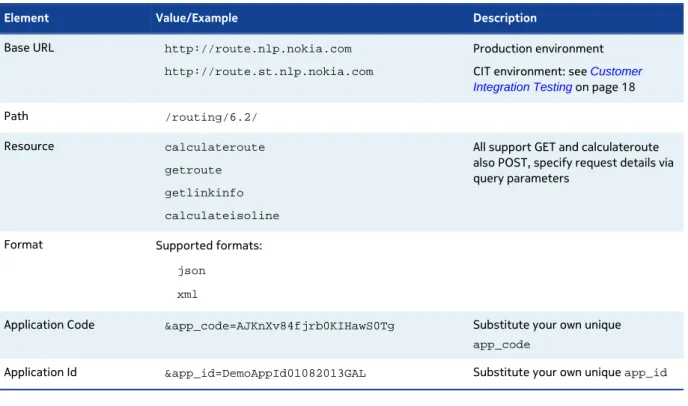
A request to the Routing API includes the basic elements shown in the following table and, in addition,
it may contain resource-specific parameters.
Table 2: Basic request elements
Element Value/Example Description
Base URL http://route.nlp.nokia.com
http://route.st.nlp.nokia.com
Production environment CIT environment: see Customer Integration Testing on page 18
Path /routing/6.2/
Resource calculateroute
getroute
getlinkinfo
calculateisoline
All support GET and calculateroute also POST, specify request details via query parameters
Format Supported formats:
json
xml
Application Code &app_code=AJKnXv84fjrb0KIHawS0Tg Substitute your own unique app_code
Application Id &app_id=DemoAppId01082013GAL Substitute your own unique app_id
GET request
Here is an example of a routing request, which uses the HTTP GET method:
?app_id=DemoAppId01082013GAL
&app_code=AJKnXv84fjrb0KIHawS0Tg
&waypoint0=geo!52.5,13.4
&waypoint1=geo!52.5,13.45
&mode=fastest;car;traffic:disabled
The following example shows how to retrieve the same search data in XML format:
http://route.st.nlp.nokia.com/routing/6.2/calculateroute.xml
?app_id=DemoAppId01082013GAL
&app_code=AJKnXv84fjrb0KIHawS0Tg
&waypoint0=geo!52.5,13.4
&waypoint1=geo!52.5,13.45
&mode=fastest;car;traffic:disabled
POST request
The Routing API also supports HTTP-POST to perform a route calculation. A tool called
wget
is
commonly used but there are also various browser add-ons like
Poster
tht allow you to do POSt
request (by default most browsers don't support POST in their user interfaces).
Two content types are supported for POST:
•
TXT
You can specify waypoint data in text format. TXT mimics the format you would put onto a URL,
with parameters defined by '&' and values preceded by '='.
•
XML
You can specify waypoint data in XML format.
An issue with REST requests is that there is a length limitation for URLs. If a route has more than
100 waypoints, you can run into this limitation. Using POST to specify the waypoint data overcomes
this problem. The default limit for the number of waypoints is 200 when you use POST mode. (If you
increase this limit, your performance will be negatively affected. However, you can increase this limit
if you need to.)
Example wget Command
Using
wget
with input parameters in XML file:
wget --verbose --server-response --header="Accept-Encoding: gzip,deflate"
--header="Content-Type: application/xml;charset=UTF-8" -O response.xml
http://route.st.nlp.nokia.com/routing/6.2/calculateroute.xml
--post-file=request.xml
Using
wget
with input parameters in TXT file:
wget --verbose --server-response --header="Accept-Encoding: gzip,deflate"
--header="Content-Type: application/x-www-form-urlencoded" -O
response.xml
http://route.st.nlp.nokia.com/routing/6.2/calculateroute.xml
--post-file=request.txt
Example of POST XML Input File
XML file format corresponds to JAXB objects from XSD file. Much more easily is to use TXT file
instead of XML file.
<ns2:CalculateRoute xmlns:ns2="http://www.navteq.com/lbsp/Routing-CalculateRoute/4"> <Request> <CalculateRouteRequestMetaInfo> <RequestID>0000003973</RequestID> <VerboseMode>1</VerboseMode> </CalculateRouteRequestMetaInfo> <RepresentationOptions> <Language>de-DE</Language> <RepresentationMode>overview</RepresentationMode><RouteAttributes>waypoints summary legs</RouteAttributes>
<LegAttributes>maneuvers waypoint length travelTime</LegAttributes> <ManeuverAttributes>position length travelTime</ManeuverAttributes> <LinkAttributes>shape speedLimit dynamicSpeedInfo address</LinkAttributes> </RepresentationOptions> <!-- &waypoint0=geo!53.58888308889949,10.133627234151305 --> <Waypoint xsi:type="ns4:GeoWaypointParameterType" xmlns:ns4="http://www.navteq.com/lbsp/Routing-Common/4" xmlns:xsi="http://www.w3.org/2001/XMLSchema-instance"> <Position> <Latitude>53.58888308889949</Latitude> <Longitude>10.133627234151305</Longitude> </Position> </Waypoint> <!-- &waypoint1=geo!53.253758714003276,10.440214453675111 --> <Waypoint xsi:type="ns4:GeoWaypointParameterType" xmlns:ns4="http://www.navteq.com/lbsp/Routing-Common/4" xmlns:xsi="http://www.w3.org/2001/XMLSchema-instance"> <Position> <Latitude>53.253758714003276</Latitude> <Longitude>10.440214453675111</Longitude> </Position> </Waypoint> ... <!-- &waypoint10=geo!49.49694817572595,8.401220616326924 --> <Waypoint xsi:type="ns4:GeoWaypointParameterType" xmlns:ns4="http://www.navteq.com/lbsp/Routing-Common/4" xmlns:xsi="http://www.w3.org/2001/XMLSchema-instance"> <Position> <Latitude>49.49694817572595</Latitude> <Longitude>8.401220616326924</Longitude> </Position> </Waypoint> <Departure>2012-08-30T12:00:00-05:00</Departure> <Mode> <Type>fastestNow</Type> <TransportModes>car</TransportModes> <TrafficMode>disabled</TrafficMode> </Mode> </Request>
</ns2:CalculateRoute>
Example of POST Text Input File
TXT file format is same as url string for parameters from normal request.
app_id=DemoAppId01082013GAL
&app_code=AJKnXv84fjrb0KIHawS0Tg
&verboseMode=0
&waypoint0=link!50.1120796%2C8.6834097!%2B52308740
&waypoint1=geo!51.839841889719146,10.622265301562521
&waypoint2=link!52.5161705%2C13.3769302!%2B724484271
&departure=2011-12-02T12%3A54%3A17%2B01%3A00
&language=en_US
&routeattributes=wp,sm,sc,sh,bb,lg,no
&maneuverattributes=all
&instructionformat=text
&mode=fastest;car;traffic:enabled;
&jsonAttributes=1
&jsoncallback=responsecallback
Additional Comments
Some parameters need to included into the POST URI, rather than into the post-content:
1.
jsoncallback
2.
jsonAttributes
3.
app_id
4.
app_code
These parameters are handled on a framework level. Support for POST was introduced on routing
application level.
Below an example of request with these parameters:
wget --verbose --server-response --header="Accept-Encoding: gzip,deflate"
--header="Content-Type: application/xml;charset=UTF-8" -O response.xml
http://route.st.nlp.nokia.com/routing/6.2/
app_id=DemoAppId01082013GAL&app_code=AJKnXv84fjrb0KIHawS0Tg&jsonAttributes=1
&jsoncallback=responsecallback --post-file=request.xml
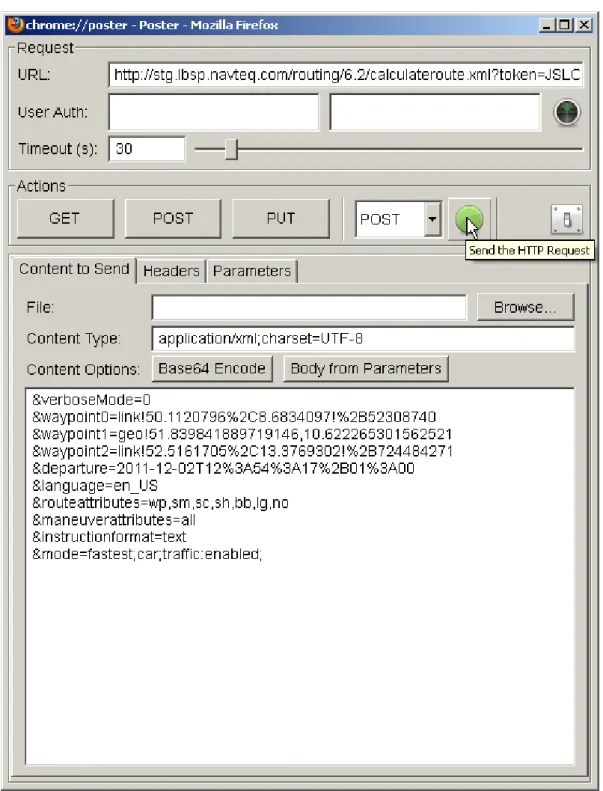
Firefox Add-on Poster
Poster is a Mozilla Firefox add-on that allows you to easily create and submit a HTTP-POST request to
the Routing API. The tool provides a convenient user interface. The image below shows Poster using a
text file as input as shown in
Example of POST Text Input File
on page 16
Customer Integration Testing
HERE is committed to maintain the best possible production service for all customers. Given that the
production environment is live and common to all API users, we request that you use the alternative
Customer Integration Testing (CIT) environment when evaluating our products, running tests, making
changes in your code and altering the way you access our APIs.
The CIT environment also allows you to test your software against a newer version of the service
before HERE brings that version into production. CIT offers a fully functional environment for
customers to use for development and testing, but it does not support high loads or performance
testing in general.
Note that the same application id can be used in both environments, but CIT may require a dedicated
application code. If this is the case, please contact us as described under
Service Support
on page
22.
The CIT environment is not intended for general production use.
Key Concepts
This section provides key concepts that underlie the HERE Routing API.
Private Transport Routing
This topic provides generic usage instructions and guidelines for Private Transport Routing
functionality.
Private Transport Routing Mode
Routing mode allows you to influence the decisions made by the routing engine when creating
routes. Each mode specifies key information, such as the type of routing used (
Type
), whether
you are are routing a vehicle or pedestrian (
TransportModes
), whether or not to consider traffic
(
TrafficMode
), and what route features should be considered (
Feature
).
A given routing mode will specify these pieces of information using the
mode
request parameter, with
the syntax shown below:
For example, if you requested that the service create the fastest route for a car, without considering
current traffic conditions, your request would include this line:
&mode=fastest;car;traffic:disabled
Routing Types
The Routing API routing engine prioritizes links included in the route for travel time during the day,
link distance, other features, and current traffic conditions (if enabled).
Most use cases need a route with the fastest travel time, which you can request using the
fastest
routing mode, however there may be times when it makes sense to choose another routing mode.
Types prioritize these elements as follows:
•
fastest
: routing favors the least amount of travel time, can consider traffic if enabled. This is
the most commonly used routing type.
•
fastestNow
: routing favors the least amount of travel time, always considers traffic
•
directDrive
: routing favors the least amount of travel time, disregards traffic
•
shortest
: routing favors the least amount of travel distance, disregards traffic
•
scenic
: routing favors scenery features, can consider traffic if enabled.
Transport Mode
The transport mode for private transport allows you to specify (using the
TransportModes
request
parameter) the type of vehicle for which you are routing, from the list below. Each transport mode
applies different considerations, as described:
•
car
: routing for cars, adheres to link rules and restrictions (for example, speed limits, direction
of travel, etc.), can consider traffic if enabled
•
pedestrian
: routing for pedestrians, considers pedestrian maneuverability of links, disregards
traffic
•
truck
: routing for fleet trucks, considers link weight restrictions, can consider traffic if enabled
Traffic-Enabled Routing
Enabling traffic allows the Routing API to consider up-to-date traffic information when calculating
a route. If the route calculation is performed for the current time, traffic information will be based
on current data. Calculations for future times will use typical traffic patterns to route appropriately.
If the request does not include a departure time, the service will assume that the depature is the
current time.
Note: This feauture may be subject to premium pricing. For details please contact your sales
representative.
Routing Mode Parameter Combinations
This section provides valid parameter combinations for routing mode, used in private transport
routing.
Transport Type Mode Combinations
car Traffic-enabled:
• mode=fastestNow;car
• mode=fastest;car;traffic:enabled
• mode=scenic;car;traffic:enabled
Traffic not enabled:
• mode=fastest;car;traffic:disabled • mode=directDrive;car • mode=shortest;car • mode=scenic;car;traffic:disabled pedestrian • mode=fastest;pedestrian • mode=scenic;pedestrian • mode=shortest;pedestrian truck Traffic-enabled: • mode=fastestNow;truck • mode=fastest;truck;traffic:enabled • mode=scenic;truck;traffic:enabled
Traffic not enabled:
• mode=fastest;truck;traffic:disabled
• mode=directDrive;truck
• mode=shortest;truck
• mode=scenic;truck;traffic:disabled
Attribute Switches
Attribute switches allow you to select the subset of response data you require for each request.
By default, the Routing API returns a list of [
waypoints
,
summary
, and
legs
]. If you use the
responseattributes
request parameter, you can add or remove elements for particular use cases
To save bandwidth and simplify processing, the best practice is to select only the set of attributes
you require, by using the
none
value and adding required attributes. For example, the following
example returns only route
legs
.
&responseattributes=none,legs
This example adds
shape
and
notes
to the response, in addition to the default list:
&responseattributes=shape,notes
or use the abbreviated forms:
&responseattributes=sh,no
The following example removes
legs
from the default list:
&responseattributes=-legs
To add
notes
to the previous example, returning
waypoints
,
summary
and
notes
; use:
&responseattributes=-legs,notes
If all attributes except
legs
are required, use the
all
value and remove unnecessary attributes. The
following example returns the whole attribute set except
legs
.
&responseattributes=all,-legs
For a complete list of attribute switches available in the Routing API, see
RouteRepresentationOptionsType
on page 42.
Schema Evolution
The two digits of the service version ensure that backward incompatible changes force a change in
the URL. The old version is maintained for a defined period of time. Bugfix releases not impacting the
interface as well as maintenance releases with backward compatible interface changes are deployed
using the same URL.
Service Support
If you need assistance with this or other HERE products, please contact your HERE representative or
Technical Customer Support via email at
[email protected]
.
Examples
This section provides examples of Routing API requests.
Calculate Route Examples
This section provides examples of calculate route requests.
Private Transport
This topic describes example scenarios for private transport routing.
Requesting a Route Avoiding an Area
To calculate directions between two coordinates without traveling through a specified area, use the
CalculateRouteRequest
service specifying the start (
waypoint0
), endpoint (
waypoint1
) and
area to avoid (
avoidareas
as a rectangular area, defining the top left and bottom right corners).
The string
geo!
indicates that you are specifying each point using latitude and longitude. Note that
you also have to specify an
app_id
and
app_code
(see
Acquiring Credentials
on page 13), type of
route calculation and whether to take traffic into account.
The following example calculates a route from the Westin Grand hotel (52.516858379, 13.3884717)
at Unter den Linden in Berlin to the Staatsoper in Berlin (52.51733824, 13.394678415)
avoiding passing the Deutsche Guggenheim (52.51704771, 13.39131492) by specifying
a rectangle that contains it (top left 52.517100760,13.3905424488 and bottom right
52.5169701849,13.391808451), and also the
fastest
route for a
car
without taking
traffic
conditions into account.
http://route.st.nlp.nokia.com/routing/6.2/calculateroute.json
?app_id=DemoAppId01082013GAL
&app_code=AJKnXv84fjrb0KIHawS0Tg
&waypoint0=geo!52.516858379,13.3884717
&waypoint1=geo!52.51733824,13.394678415
&mode=fastest;car;traffic:disabled
&avoidareas=52.517100760,13.3905424488;52.5169701849,13.391808451
Requesting a Route Using a Different Routing Modes
You can specify different route calculation modes in a request, to compare the calculated route
outcomes. We recommend only using this functionality when the route is small, as it may cause
increased response times from the service.
Example
The following request is an example for two route calculations, each using a different routing mode.
One route will be calculated using the
fastest
mode for a
car
(considering traffic information,
avoiding motorways), the other is calculated using the
pedestrian
mode.
http://route.st.nlp.nokia.com/routing/6.2/calculateroute.json
?app_id=DemoAppId01082013GAL
&app_code=AJKnXv84fjrb0KIHawS0Tg
&waypoint0=geo!37.7914050,-122.3987030
&waypoint1=geo!37.7866569,-122.4026513
&mode0=fastest;car;traffic:enabled;motorway:-1
&mode1=fastest;pedestrian
The CalculateRoute service returns two routes.
Figure 2: Route using the Fastest mode for car Figure 3: Route using the Pedestrian mode
Requesting a Route via a Third Coordinate
To calculate directions between two coordinates via a third coordinate, use the
CalculateRouteRequest
service specifying the start (
waypoint0
), middle point (
waypoint1
)
and destination (
waypoint2
). Specifying
waypoint1
as
stopOver
instead of
passThrough
means
breaking the journey here, not just driving through. The string
geo!
indicates that you are specifying
each point using latitude and longitude. Note that you also have to specify an
app_id
and
app_code
(see
Acquiring Credentials
on page 13 ), type of route calculation and whether to take traffic into
account.
In the following example we request the
fastest
route for a
car
without taking
traffic
conditions
to the Staatsoper in Berlin (52.51733824, 13.394678415) via the Deutsche Guggenheim
(52.51704771, 13.39131492).
http://route.st.nlp.nokia.com/routing/6.2/calculateroute.json
?app_id=DemoAppId01082013GAL
&app_code=AJKnXv84fjrb0KIHawS0Tg
&mode=fastest;car;traffic:disabled
&waypoint0=geo!52.516858379,13.3884717
&waypoint1=geo!stopOver!52.51704771,13.39131492
&waypoint2=geo!52.51733824,13.394678415
Chapter
4
API Reference
Topics:
• Resources and Parameters • Response Data Types • HTTP Status Codes
Articles in this section provide a comprehensive reference to the
query parameters supported by the HERE Routing API.
Resources and Parameters
This section provide a comprehensive reference to the query parameters supported by the Routing
API.
Calculate Route http://route.nlp.nokia.com/routing/6.2/calculateroute.{format}
Get Route http://route.nlp.nokia.com/routing/6.2/getroute.{format}
Get Link Info http://route.nlp.nokia.com/routing/6.2/getlinkinfo.{format}
Calculate Isoline http://route.nlp.nokia.com/routing/6.2/calculateisoline.{format}
Where
{format}
is either
json
or
xml
.
All results returned in
xml
format have the following properties:
Namespace:
http://route.nlp.nokia.com/lbsp/Errors/1
http://route.nlp.nokia.com/lbsp/Common/4
http://route.nlp.nokia.com/lbsp/Routing-Common/4
http://route.nlp.nokia.com/lbsp/Routing-CalculateRoute/4
http://route.nlp.nokia.com/lbsp/Routing-CalculateMatrix/1
http://route.nlp.nokia.com/lbsp/Routing-GetLinkInfo/4
http://route.nlp.nokia.com/lbsp/Routing-GetRoute/4
http://route.nlp.nokia.com/lbsp/Routing-CalculateIsoline/4
http://route.nlp.nokia.com/lbsp/Routing-CalculateReverseFlow/1
Schema location:
http://route.nlp.nokia.com/routing/6.2/xsd/LBSP-Errors.xsd
http://route.nlp.nokia.com/routing/6.2/xsd/LBSP-Common.xsd
http://route.nlp.nokia.com/routing/6.2/xsd/LBSP-Routing-Common.xsd
http://route.nlp.nokia.com/routing/6.2/xsd/LBSP-Rout-ing-CalculateRoute.xsd
http://route.nlp.nokia.com/routing/6.2/xsd/LBSP-Rout-ing-CalculateMatrix.xsd
http://route.nlp.nokia.com/routing/6.2/xsd/LBSP-Routing-GetLinkInfo.xsd
http://route.nlp.nokia.com/routing/6.2/xsd/LBSP-Routing-GetRoute.xsd
http://route.nlp.nokia.com/routing/6.2/xsd/LBSP-Rout-ing-CalculateIsoline.xsd
http://route.nlp.nokia.com/routing/6.2/xsd/LBSP-Rout-ing-CalculateReverseFlow.xsd
XSD Version
4.2
Calculate Route
Use the
calculateroute
resource to return a route between two waypoints. The required
parameters for this resource are
app_id
and
app_code
, two or more way points (
waypoint0
and
waypoint1
, to
waypointN
) and
mode
(specifying how to calculate the route, and for what mode of
transport).
../routing/6.2/calculateroute.{format}?<parameter>=<value>...
Parameter Description
app_id A 20 bytes Base64 URL-safe encoded string used for the authentication of the client application.
You must include an app_id and app_code with every request. To get an app_id assigned
to you, please see Acquiring Credentials on page 13.
app_code A 20 bytes Base64 URL-safe encoded string used for the authentication of the client application.
You must include an app_id and app_code with every request. To get an app_idassigned
to you, please see Acquiring Credentials on page 13.
waypoint List of waypoints that define a route. The first element marks the start, the last the end point. Waypoints in between are interpreted as via points.
waypoint0=geo!52.5,13.4
mode The routing mode determines how the route is calculated. When used in a getroute request,
the mode of transport must be the same as in the original request. See also RoutingModeType on page 50
Type;TransportModes;TrafficMode;Feature
&mode=fastest;car;traffic:disabled;motorway:2
requestid Clients may pass in an arbitrary string to trace request processing through the system. The
RequestId is mirrored in the MetaInfo element of the response structure.
avoidareas Areas which the route must not cross. Array of BoundingBox. avoidareas=52.517100760,
13.3905424488; 52.5169701849, 13.391808451;
Parameter Description
avoidlinks Links which the route must not cross. List of LinkIdType. LinkIdType is a xs:string with
the following regular expression restrictions: [-]\d+ avoidlinks=-53623477
departure Time when travel is expected to start. Traffic patterns and incidents are taken into account when calculating the route. You can use now to specify the current time. Specify either
DepartureTime or ArrivalTime, not both.xs:dateTime
departure=2013-07-04T17: 00:00+02:00Z
alternatives Number of alternative routes calculated. xs:integer
metricsystem The default is the metric system associated with the language settings. xs:string. Enum [imperial | metric]
viewbounds If the view bounds are given in the request only shapes and links which fit into these bounds will be returned. A common use case for this is the drag and drop scenario where the client is only interested in a rough visual update of the route in the currently visible bounds. Array of
BoundingBox.
viewbounds=37.7902858, -122.4027371;
37.7890649, -122.3993039
resolution Integer resolution of the view in meters per pixel, and optional snap resolution in meters per pixel. Snap resolution lets the routing service to pick links with waypoints that are visible in the client display resolution.
This information allows the route shape in the response to reflect the client's resolution.
resolution=viewresolution:snapresolution resolution=300:0,01
instructionformat Defines the representation format of the maneuver's instruction text. InstructionFormatType
on page 47 instructionformat=Enum [ txt | html | native]
language A single language from the following list. [en-uk | en-us | fr-fr | de-de | es-es | it-it]
jsonattributes Flag to control JSON output. Combine parameters by adding their values. See also JSON Representation on page 53 .
jsonattributes=2
jsoncallback Specifies the name of a user-defined function used to wrap the JSON response.
representation Define which elements are included in the response as part of the data representation of the route. See also RouteRepresentationModeType on page 42.
Enum[overview | display | dragNDrop | navigation | linkPaging | turnByTurn]
routeattributes Define which atrributes are included in the response as part of the data representation of the route. Defaults to waypoints, summary, legs, lines. See also RouteAttributeType on page
43.
Enum[waypoints | summary | summaryByCountry | shape | boundingBox | legs | notes
Parameter Description
legattributes Define which attributes are included in the response as part of the data representation of the route legs. Defaults to maneuvers, waypoint, length, travelTime. See also RouteLegAttributeType on page 43.
Enum [waypoint | maneuvers | links | length | travelTime
maneuverattributes Define which attributes are included in the response as part of the data representation of the route maneuvers. Defaults to position, length, travelTime. See also ManeuverAttributeType on page 44
Enum[ position | shape | travelTime | length | time | link | | roadName | nextRoadName | roadNumber | nextRoadNumber | signPost | notes | action | direction | freewayExit | freewayJunction | | baseTime | trafficTime | | ]
linkattributes Define which attributes are included in the response as part of the data representation of the route links. Defaults to shape, speedLimit, dynamicSpeedInfo, address . See also RouteLinkAttributeType on page 45.
Enum[shape , length | speedLimit | dynamicSpeedInfo | incidents | truckRestrictions | flags | address | roadNumber | roadName | freewayExit | freewayJunction | timezone | nextLink |TMCCodes | jamFactor | jamFactorTrend | confidence | remainTime | remainDistance | maneuver | functionalClass | speedCategory | ]
gen xs:int
Generation parameter used to influence which information to return in enumeration values. • gen=0 default behavior
• gen=1
◦ Returns additional link flag type builtUpArea and TruckRestrictions allHazardousGoods.
tunnelcategory Specify the tunnel category to restrict the truck route to. Enum [B | C | D | E] tunnelcategory=C
Example Request
http://route.st.nlp.nokia.com/routing/6.2/calculateroute.xml
?app_id=DemoAppId01082013GAL
&app_code=AJKnXv84fjrb0KIHawS0Tg
&waypoint0=geo!52.5,13.4
&waypoint1=geo!52.5,13.45
&mode=fastest;car;traffic:disabled
http://route.st.nlp.nokia.com/routing/6.2/calculateroute.xml
?app_id=DemoAppId01082013GAL
&app_code=AJKnXv84fjrb0KIHawS0Tg
&waypoint0=geo!123.45,-34.45;12.7;300
&waypoint1=link!-3456
&waypoint2=geo!123.45,-34.45;12.7;300
&waypoint3=link!-12345
&avoidareas=37.7890649,-122.4027371;37.7902858,-122.3993039
&mode=fastest;car
&departure=2010-04-01T17:00:00Z
&locale=en-us
&linkattributes=shape;dynamicSpeedInfo
&requestid=<YOUR_TRACKING_ID>
Example Response
<?xml version="1.0" encoding="UTF-8" standalone="yes"?>
<rtcr:CalculateRoute
xmlns:rtcr="http://www.navteq.com/lbsp/Routing-CalculateRoute/4">
<Response>
<MetaInfo>
<Timestamp>2013-05-21T14:49:50.645Z</Timestamp>
<MapVersion>8.0.49.122</MapVersion>
<ModuleVersion>7.2.26.0_CD-336_1</ModuleVersion>
<InterfaceVersion>2.4.31</InterfaceVersion>
</MetaInfo>
<Route>
<Waypoint>
<LinkId>-1609300611616932926</LinkId>
<MappedPosition>
<Latitude>52.4999823</Latitude>
<Longitude>13.3999649</Longitude>
</MappedPosition>
<OriginalPosition>
<Latitude>52.5</Latitude>
<Longitude>13.4</Longitude>
</OriginalPosition>
<Type>stopOver</Type>
<Spot>0.3606557</Spot>
<SideOfStreet>left</SideOfStreet>
<MappedRoadName>Neuenburger Straße</MappedRoadName>
<Label>Neuenburger Straße</Label>
Get Link Info Request
Use the
getlinkinfo
resource to return detailed information about a route. The required
parameters for this resource are
app_id
and
app_code
and either
linkids
or a
routeId
specifying a particular route.
../routing/6.2/getlinkinfo.{format}?<parameter>=<value>...
Parameter Description
app_id A 20 bytes Base64 URL-safe encoded string used for the authentication of the client application.
Parameter Description
You must include an app_id and app_code with every request. To get an app_id assigned
to you, please see Acquiring Credentials on page 13.
app_code A 20 bytes Base64 URL-safe encoded string used for the authentication of the client application.
You must include an app_id and app_code with every request. To get an app_idassigned
to you, please see Acquiring Credentials on page 13.
mode The routing mode determines how the route is calculated. When used in a getroute request,
the mode of transport must be the same as in the original request. See also RoutingModeType on page 50
Type;TransportModes;TrafficMode;Feature
&mode=fastest;car;traffic:disabled;motorway:2
requestid Clients may pass in an arbitrary string to trace request processing through the system. The
RequestId is mirrored in the MetaInfo element of the response structure.
metricsystem The default is the metric system associated with the language settings. xs:string. Enum [imperial | metric]
viewbounds If the view bounds are given in the request only shapes and links which fit into these bounds will be returned. A common use case for this is the drag and drop scenario where the client is only interested in a rough visual update of the route in the currently visible bounds. Array of
BoundingBox.
viewbounds=37.7902858, -122.4027371;
37.7890649, -122.3993039
resolution Integer resolution of the view in meters per pixel, and optional snap resolution in meters per pixel. Snap resolution lets the routing service to pick links with waypoints that are visible in the client display resolution.
This information allows the route shape in the response to reflect the client's resolution.
resolution=viewresolution:snapresolution resolution=300:0,01
instructionformat Defines the representation format of the maneuver's instruction text. InstructionFormatType
on page 47 instructionformat=Enum [ txt | html | native]
language A single language from the following list. [en-uk | en-us | fr-fr | de-de | es-es | it-it]
jsonattributes Flag to control JSON output. Combine parameters by adding their values. See also JSON Representation on page 53 .
jsonattributes=2
jsoncallback Specifies the name of a user-defined function used to wrap the JSON response.
representation Define which elements are included in the response as part of the data representation of the route. See also RouteRepresentationModeType on page 42.
Parameter Description
routeattributes Define which atrributes are included in the response as part of the data representation of the route. Defaults to waypoints, summary, legs, lines. See also RouteAttributeType on page 43.
Enum[waypoints | summary | summaryByCountry | shape | boundingBox | legs | notes
]
maneuverattributes Define which attributes are included in the response as part of the data representation of the route maneuvers. Defaults to position, length, travelTime. See also ManeuverAttributeType on page 44
Enum[ position | shape | travelTime | length | time | link | | roadName | nextRoadName | roadNumber | nextRoadNumber | signPost | notes | action | direction | freewayExit | freewayJunction | | baseTime | trafficTime | | ]
linkattributes Define which attributes are included in the response as part of the data representation of the route links. Defaults to shape, speedLimit, dynamicSpeedInfo, address . See also RouteLinkAttributeType on page 45.
Enum[shape , length | speedLimit | dynamicSpeedInfo | incidents | truckRestrictions | flags | address | roadNumber | roadName | freewayExit | freewayJunction | timezone | nextLink |TMCCodes | jamFactor | jamFactorTrend | confidence | remainTime | remainDistance | maneuver | functionalClass | speedCategory | ]
maxfunctionalclass Restrict the list of links to those of a particular functional class or less. See also
FunctionalClassType on page 101.
tmccodes List of TMC codes of the links to be returned. See also TMCCodeType on page 108
quadkey All links inside the bounding box are returned. Array of BoundingBox. quadkey=37.7902858,
-122.4027371; 37.7890649, -122.3993039
linkids Return detailed information for this list of link IDs.
routeid Return detailed information for the route corresponding to this RouteId.
waypoint List of waypoints that define a route. The first element marks the start, the last the end point. Waypoints in between are interpreted as via points.
waypoint0=geo!52.5,13.4
Example Request
http://route.st.nlp.nokia.com/routing/6.2/getlinkinfo.xml
?app_id=DemoAppId01082013GAL
&app_code=AJKnXv84fjrb0KIHawS0Tg
&waypoint=50.05564304861044,8.38889128575724
&linkattributes=all
Example Response
<?xml version="1.0" encoding="UTF-8" standalone="yes"?>
<rtgl:GetLinkInfo
xmlns:rtgl="http://www.navteq.com/lbsp/LBSP-Routing-GetLinkInfo/4">
<Response>
<MetaInfo>
<MapVersion>2012Q4</MapVersion>
<ModuleVersion>0.2</ModuleVersion>
<InterfaceVersion>4.2</InterfaceVersion>
<Timestamp>2013-05-29T14:30:51.263Z</Timestamp>
</MetaInfo>
<Link
xmlns:xsi="http://www.w3.org/2001/XMLSchema-instance" xmlns:rtc="http://www.navteq.com/lbsp/Routing-Common/4"
xsi:type="rtc:PrivateTransportLinkType">
<LinkId>-723354753</LinkId>
<Shape>50.0555916,8.3884697 50.0555916,8.3890696
50.0555801,8.3905296 50.0555687,8.3919296 50.0555611,8.3924103</Shape>
<Length>281.0</Length>
<SpeedLimit>999.0</SpeedLimit>
<DynamicSpeedInfo>
<TrafficSpeed>24.75</TrafficSpeed>
<TrafficTime>11.4</TrafficTime>
<BaseSpeed>33.33</BaseSpeed>
<BaseTime>8.4</BaseTime>
<JamFactor>2.41</JamFactor>
<JamFactorTrend>1.0</JamFactorTrend>
<Confidence>0.87</Confidence>
</DynamicSpeedInfo>
<Flags>motorway</Flags>
<TMCCodes>D01P12165</TMCCodes>
<FunctionalClass>1</FunctionalClass>
<Address>
<Label>A66</Label>
<Country>DE</Country>
<State>Hessen</State>
<County>Main-Taunus-Kreis</County>
<City>Hochheim am Main</City>
<Street>Rhein-Main-Schnellweg</Street>
</Address>
<RoadNumber>A66</RoadNumber>
<Timezone>+0200</Timezone>
<TruckRestrictions>
<Height>4.0</Height>
</TruckRestrictions>
<RoadName>Rhein-Main-Schnellweg</RoadName>
<SpeedCategory>SC1</SpeedCategory>
</Link>
</Response>
</rtgl:GetLinkInfo>
Get Route
Use the
getroute
resource to request a previously calculated route by providing the
RouteId
.
../routing/6.2/getroute.{format}?routeid=<ROUTEID>&<parameter>=<value>...
Parameter Description
requestid Clients may pass in an arbitrary string to trace request processing through the system. The
RequestId is mirrored in the MetaInfo element of the response structure.
routeid Return detailed information for the route corresponding to this RouteId.
pos Current position.
pos=geo!52.5,13.4
mode The routing mode determines how the route is calculated. When used in a getroute request,
the mode of transport must be the same as in the original request. See also RoutingModeType on page 50
Type;TransportModes;TrafficMode;Feature
&mode=fastest;car;traffic:disabled;motorway:2
departure Time when travel is expected to start. Traffic patterns and incidents are taken into account when calculating the route. You can use now to specify the current time. Specify either
DepartureTime or ArrivalTime, not both.xs:dateTime
departure=2013-07-04T17: 00:00+02:00Z
metricsystem The default is the metric system associated with the language settings. xs:string. Enum [imperial | metric]
viewbounds If the view bounds are given in the request only shapes and links which fit into these bounds will be returned. A common use case for this is the drag and drop scenario where the client is only interested in a rough visual update of the route in the currently visible bounds. Array of
BoundingBox.
viewbounds=37.7902858, -122.4027371;
37.7890649, -122.3993039
resolution Integer resolution of the view in meters per pixel, and optional snap resolution in meters per pixel. Snap resolution lets the routing service to pick links with waypoints that are visible in the client display resolution.
This information allows the route shape in the response to reflect the client's resolution.
resolution=viewresolution:snapresolution resolution=300:0,01
instructionformat Defines the representation format of the maneuver's instruction text. InstructionFormatType
Parameter Description
language A single language from the following list. [en-uk | en-us | fr-fr | de-de | es-es | it-it]
jsonattributes Flag to control JSON output. Combine parameters by adding their values. See also JSON Representation on page 53 .
jsonattributes=2
jsoncallback Specifies the name of a user-defined function used to wrap the JSON response.
representation Define which elements are included in the response as part of the data representation of the route. See also RouteRepresentationModeType on page 42.
Enum[overview | display | dragNDrop | navigation | linkPaging | turnByTurn]
routeattributes Define which atrributes are included in the response as part of the data representation of the route. Defaults to waypoints, summary, legs, lines. See also RouteAttributeType on page
43.
Enum[waypoints | summary | summaryByCountry | shape | boundingBox | legs | notes
]
maneuverattributes Define which attributes are included in the response as part of the data representation of the route maneuvers. Defaults to position, length, travelTime. See also ManeuverAttributeType on page 44
Enum[ position | shape | travelTime | length | time | link | | roadName | nextRoadName | roadNumber | nextRoadNumber | signPost | notes | action | direction | freewayExit | freewayJunction | | baseTime | trafficTime | | ]
linkattributes Define which attributes are included in the response as part of the data representation of the route links. Defaults to shape, speedLimit, dynamicSpeedInfo, address . See also RouteLinkAttributeType on page 45.
Enum[shape , length | speedLimit | dynamicSpeedInfo | incidents | truckRestrictions | flags | address | roadNumber | roadName | freewayExit | freewayJunction | timezone | nextLink |TMCCodes | jamFactor | jamFactorTrend | confidence | remainTime | remainDistance | maneuver | functionalClass | speedCategory | ]
legattributes Define which attributes are included in the response as part of the data representation of the route legs. Defaults to maneuvers, waypoint, length, travelTime. See also RouteLegAttributeType on page 43.
Enum [waypoint | maneuvers | links | length | travelTime
hastrailer Boolean.
Truck routing only, specifies that the vehicle has a trailer. shippedhazardousgoods Truck routing only, list of harzardous goods in the vehicle. permittedgrossweight Truck routing only, permitted vehicle gross weight. limitedweight Truck routing only, limited vehicle weight. weightperaxle Truck routing only, vehicle weight per axle.
Parameter Description
height Truck routing only, vehicle height in meters. width Truck routing only, vehicle width in meters. length Truck routing only, vehicle length in meters.
Example Request
http://route.st.nlp.nokia.com/routing/6.2/getroute.xml
?app_id=DemoAppId01082013GAL
&app_code=AJKnXv84fjrb0KIHawS0Tg
&routeid=ZAK128JSS90JN1729
&avoidareas=37.7890649,-122.4027371,37.7902858,-122.3993039
&mode=fastest;car
&maneuverattributes=position,link
&linkattributes=shape,DynamicSpeedInfo
&requestid=<YOUR_TRACKING_ID>
Calculate Isoline
Use the
calculateisoline
resource to request a polyline that connect the end points of all routes
leaving from one defined center with either a specified length or a specified travel time.
../routing/6.2/calculateisoline.{format}?<parameter>=<value>...
Parameter Description
app_id A 20 bytes Base64 URL-safe encoded string used for the authentication of the client application.
You must include an app_id and app_code with every request. To get an app_id assigned
to you, please see Acquiring Credentials on page 13.
app_code A 20 bytes Base64 URL-safe encoded string used for the authentication of the client application.
You must include an app_id and app_code with every request. To get an app_idassigned
to you, please see Acquiring Credentials on page 13.
requestid Clients may pass in an arbitrary string to trace request processing through the system. The
RequestId is mirrored in the MetaInfo element of the response structure.
start Center of the isoline request. Waypoint type.
start=geo!52.5,13.4
distance There is no limitation for distance of isoline, but if you specify more than 500 km, the quality and performance of the isoline will decrease. Distance type. Specify either distance or time, not both.
Parameter Description
time There is no limitation for time of isoline, but if you specify more than 5 hours, the quality and performance of the isoline will decrease. Duration type. Specify either distance or time,
not both.
time=PT0H05M
avoidareas Areas which the route must not cross. Array of BoundingBox. avoidareas=52.517100760,
13.3905424488; 52.5169701849, 13.391808451;
avoidlinks Links which the route must not cross. List of LinkIdType. LinkIdType is a xs:string with
the following regular expression restrictions: [-]\d+ avoidlinks=-53623477
mode The routing mode determines how the route is calculated. When used in a getroute request,
the mode of transport must be the same as in the original request. See also RoutingModeType on page 50
Type;TransportModes;TrafficMode;Feature
&mode=fastest;car;traffic:disabled;motorway:2
departure Time when travel is expected to start. Traffic patterns and incidents are taken into account when calculating the route. You can use now to specify the current time. Specify either
DepartureTime or ArrivalTime, not both.xs:dateTime
departure=2013-07-04T17: 00:00+02:00Z
jsonattributes Flag to control JSON output. Combine parameters by adding their values. See also JSON Representation on page 53 .
jsonattributes=2
jsoncallback Specifies the name of a user-defined function used to wrap the JSON response.
hastrailer Boolean.
Truck routing only, specifies that the vehicle has a trailer. shippedhazardousgoods Truck routing only, list of harzardous goods in the vehicle. permittedgrossweight Truck routing only, permitted vehicle gross weight. limitedweight Truck routing only, limited vehicle weight. weightperaxle Truck routing only, vehicle weight per axle.
trailerweight Truck routing only, weight of the vehicle trailer. Only valid if hastrailer=1
height Truck routing only, vehicle height in meters. width Truck routing only, vehicle width in meters.
Parameter Description
length Truck routing only, vehicle length in meters.
Example request
A polyline built up of destinations reachable by a two and a half hour drive.
http://route.st.nlp.nokia.com/routing/6.2/calculateisoline.xml
?app_id=DemoAppId01082013GAL
&app_code=AJKnXv84fjrb0KIHawS0Tg
&start=geo!123.45,-34.45;12.7;300
&time=PT2H30M
&mode=fastest;car
&departure=2010-04-01T17:00:00Z
&requestid=<YOUR_TRACKING_ID>
Calculate Reverse Flow
Use the
reverseflow
resource to find a set of places from which a given destination point is
reachable in a set time or from a set distance.
../routing/6.2/reverseflow.{format}?<parameter>=<value>...
Parameter Description
app_id A 20 bytes Base64 URL-safe encoded string used for the authentication of the client application.
You must include an app_id and app_code with every request. To get an app_id assigned
to you, please see Acquiring Credentials on page 13.
app_code A 20 bytes Base64 URL-safe encoded string used for the authentication of the client application.
You must include an app_id and app_code with every request. To get an app_idassigned
to you, please see Acquiring Credentials on page 13.
requestid Clients may pass in an arbitrary string to trace request processing through the system. The
RequestId is mirrored in the MetaInfo element of the response structure.
destination Destination of the reverse flow calculation. Waypoint type.
destination=geo!52.5,13.4
distance Total travel distance, must be less than 10 km. Distance type. Specify either distance or time, not both.
Parameter Description
time Total travel time, must be less than 10 minutes. Duration type. Specify either distance or time, not both.
time=PT0H05M
avoidareas Areas which the route must not cross. Array of BoundingBox. avoidareas=52.517100760,
13.3905424488; 52.5169701849, 13.391808451;
avoidlinks Links which the route must not cross. List of LinkIdType. LinkIdType is a xs:string with
the following regular expression restrictions: [-]\d+ avoidlinks=-53623477
mode The routing mode determines how the route is calculated. When used in a getroute request,
the mode of transport must be the same as in the original request. See also RoutingModeType on page 50
Type;TransportModes;TrafficMode;Feature
&mode=fastest;car;traffic:disabled;motorway:2
departure Time when travel is expected to start. Traffic patterns and incidents are taken into account when calculating the route. You can use now to specify the current time. Specify either
DepartureTime or ArrivalTime, not both.xs:dateTime
departure=2013-07-04T17: 00:00+02:00Z
jsonattributes Flag to control JSON output. Combine parameters by adding their values. See also JSON Representation on page 53 .
jsonattributes=2
jsoncallback Specifies the name of a user-defined function used to wrap the JSON response.
hastrailer Boolean.
Truck routing only, specifies that the vehicle has a trailer. shippedhazardousgoods Truck routing only, list of harzardous goods in the vehicle. permittedgrossweight Truck routing only, permitted vehicle gross weight. limitedweight Truck routing only, limited vehicle weight. weightperaxle Truck routing only, vehicle weight per axle.
trailerweight Truck routing only, weight of the vehicle trailer. Only valid if hastrailer=1
height Truck routing only, vehicle height in meters. width Truck routing only, vehicle width in meters. length Truck routing only, vehicle length in meters.
Example request
http://route.st.nlp.nokia.com/routing/6.2/reverseflow.xml?
?app_id=DemoAppId01082013GAL
&app_code=AJKnXv84fjrb0KIHawS0Tg
destination=geo!50.21372,8.569185
&distance=200
&mode=shortest;car
&linkattributes=all
&requestid=<YOUR_TRACKING_ID>
Common Parameter Types
WaypointParameterType
Specify route waypoints in one of the following manners:
•
a rough position:
GeoWaypointParameterType
•
a reference to a street:
NavigationWaypointParameter
with
StreetPositions
•
an exact reference to a link:
NavigationWaypointParameter
with
LinkPositions
GeoWaypointParameterType
The
GeoWaypointParameterType
defines a waypoint by latitude and longitude coordinates, and an
optional radius. Parameter structure:
waypoint = geo + [Type] + Position + [TransitRadius]
Parameter component Structure Description
geo geo! Indicates that the parameter contains a
geographical position.
[Type] Enum[stopOver! | passThrough!] 180 degree turns are allowed for stopOver but not for passThrough.
Waypoints defined through a drag-n-drop action should be marked as pass-through. PassThrough waypoints will not appear in the list of maneuvers.
Position Latitude, Longitude, [Altitude];
37.7914050,-122.3987030,25;
Latitude WGS-84 degrees between -90 and 90. Longitude WGS-84 degrees between -180 and 180. Altitude in meters.
[TransitRadius] TransitRadius
200
Matching Links are selected within the specified TransitRadius, in meters.
Parameter component Structure Description
necessarily going into the city center you can specify the coordinates of the center and a TransitRadius of
5000m.
NavigationWaypointParameterType with StreetPositions
The
NavigationWaypointParameter
defines a waypoint by street position and name. The street
name helps select the right road in complex intersection scenarios such as a bridge crossing another
road. A common use case for this scenario is when the user specifies a waypoint by selecting a place
or a location after a search.
The optional display position of the waypoint defines where the location is displayed on a map. It
denotes the center of the location and is not navigable, i.e. it is not located on a link in the routing
network in contrast to the navigation positions of a location. The display position allows the routing
engine to decide whether the waypoint is located on the left or on the right-hand side of the route.
Parameter structure:
waypoint0 = street + [Type] + [DisplayPosition] + StreetPosition
URL component Structure Description
street street! Indicates that parameters contains a
street position.
[Type] Enum[stopOver! | passThrough!] 180 degree turns are allowed for stopOver but not for passThrough.
Waypoints defined through a drag-n-drop action should be marked as pass-through. PassThrough waypoints will not appear in the list of maneuvers. [DisplayPosition] Latitude, Longitude, [Altitude];
37.3456,56.778,567;
Latitude WGS-84 degrees between -90 and 90. Longitude WGS-84 degrees between -180 and 180. Altitude in meters.
StreetPosition Latitude, Longitude, [Altitude], [StreetName]
WGS-84 degrees between -90 and 90. Altitude in meters. There can be multiple street positions in one parameter.