Session 1033
Proceedings of the 2002 American Society for Engineering Education Annual Conference & Exposition Copyright © 2002, American Society for Engineering Education
Teaching Computer Programming Courses (Using the Internet)
in a Computer Laboratory Environment
Asad Azemi
Department of Engineering Penn State University Delaware County Campus
Media, PA 19063 E-mail: [email protected]
Abstract
The usual approach to teaching introductory computer programming courses is to have classroom lectures and small size supervised laboratory sections, where students will write simple programs reflective of the material that they have learned during the lectures. This approach can be im-proved by conducting the entire course in a “technology ready” classroom, where lectures and in-class exercises could be designed and delivered, in such a way, to promote an active learning en-vironment. This manner of conducting courses requires a larger investment, time and money, on the part of the institutions and instructors, than the traditional approach. This work describes our approach to teaching undergraduate computer programming courses in a computer laboratory en-vironment at the Delaware County Campus of the Pennsylvania State University. Our objectives have been to use the computer and communication technologies to build an active learning envi-ronment and a paperless approach in teaching programming courses using the Internet. This in-volves posting lecture notes and other related materials, such as course syllabus, quizzes, exams and grades, on the Internet and conducting the lectures in a computer laboratory. Steps taken to insure these objectives are presented. Finally, the advantages and disadvantages of conducting a computer programming course in this format will be discussed. This includes the instructor’s comments, challenges that are associated with this approach, possible solutions, and student reac-tions.
I. Introduction
The usual approach to teaching a computer programming course is to have a classroom lecture component and a supervised laboratory module, where students write simple programs reflective of the subjects that they have learned during the lectures. Although this approach may work very well for some subjects, it may not be the ideal way of teaching a computer programming course. Before getting to a more effective way of teaching computer language courses, let us consider the basic problems of teaching this type of subject material: (i) Although the incoming students have considerably more experience with computers than their
P
Proceedings of the 2002 American Society for Engineering Education Annual Conference & Exposition predecessors did, their experiences for the most part are limited to those of an "end user," and not a "developer." Therefore, the concept of programming is foreign to many of them.
(ii) It is well understood that a programming language cannot be learned by just reading a text-book or listening to class lectures. One needs to read the texttext-book, attend lectures, and more im-portantly, practice the subject matter by writing programs. This is the justification for adding laboratory modules to programming courses.
An improvement to the lecture technique of teaching programming courses is to run the sample programs in the classroom and show the results via projection display equipment. This approach can still be improved by making the lectures more interactive and ultimately by transforming the lectures using a multimedia package and conducting the lectures in a "technology-ready class-room" 1. The latter description of conducting courses requires a larger investment, and more time and money, on the part of the institutions and instructors.
II. Our Approach
Developing interactive lecture modules by using a multimedia package is not an easy task 2-6. It requires a good deal of knowledge about multimedia packages, and a significant time investment for converting the lecture materials to presentable interactive lecture modules 2-4. Unfortunately, times spent and work done, in large part, are not acknowledged by the administrators. Our ex-perience in developing courseware packages indicates that it will take about 2-3 years to develop and implement a successful courseware series, considering this is not the only task one has to do. The breakdown is approximately one year for development, one year for implementation and testing; and one year to refine the package, by incorporating suggestions of students and col-leagues. Due to these general time requirements, we have come up with an approach that can eventually be converted to a courseware product and takes considerably less time to prepare, and at the same time produces a very positive students' reaction. The approach is as follows:
(i) Convert the lecture notes into word processing modules.
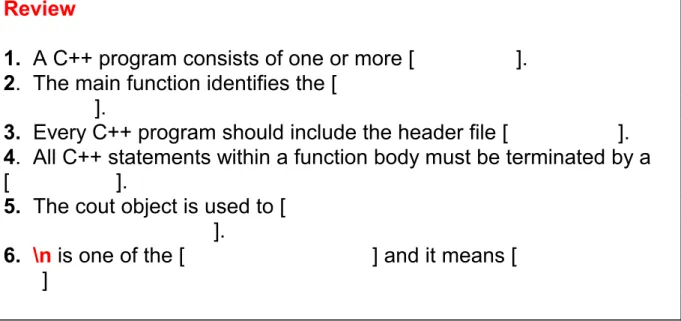
By far, converting the class notes to a typed format is the most time consuming part. It becomes even more time consuming if one needs to include graphics and charts. In order to evaluate stu-dents’ understanding of the subject matter, questions at the end of each section are included. In order to make the modules work as a self-study guide, answers to the questions are initially hid-den and are revealed by the change of the font color (see figure 1).
We recommend introducing students, early on, to the development and design process in pro-gramming which involves, (i) analysis of the problem, (ii) design of a solution, (iii) coding of the program, (iv) testing and correction of the errors, and (v) documentation.
We also recommend adding a number of small programming problems that can be worked out by teams of two or three students. Prior to this, students should be introduced to the basic concepts of teamwork and be given specific guidelines on how to write the project report.
If the plan is to put the notes on the Internet, one may want to password protect the modules, if
Proceedings of the 2002 American Society for Engineering Education Annual Conference & Exposition many different skills, such as organization and clarity of the presented materials and their logical bounding, grammar, spelling, fonts, etc., at times it may look and feel like writing a textbook! An undergraduate student assistant, who is familiar with the subject, can be very helpful in com-pleting this task.
(ii) Transfer the lecture modules and example programs to the course web site or local computer network so that students can have access to them.
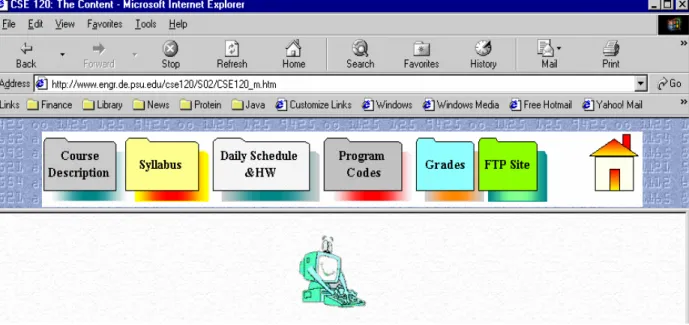
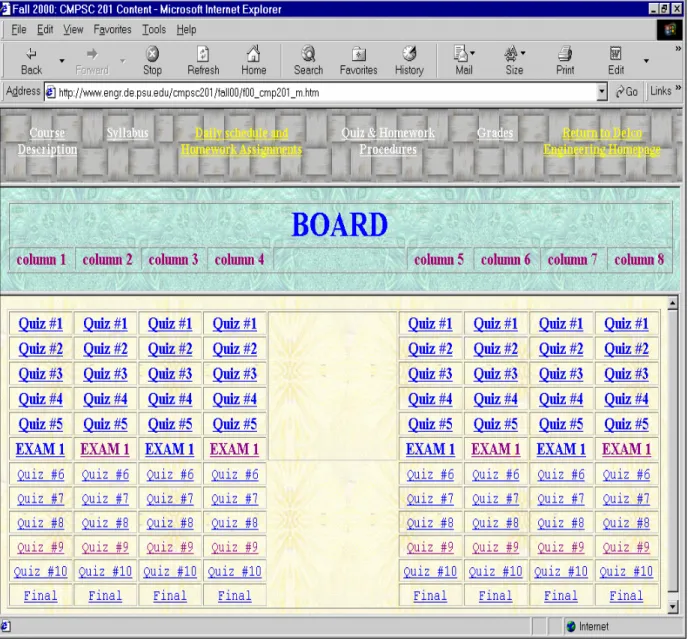
The assumption is that the course has a web site and all related information including the course syllabus, daily schedule, and homework assignments are posted on the web (see figures 2(a)-2(b) and -3). Weekly quizzes or projects along with exams could also be included as a link to the daily course schedule (see figures 4). These links should be activated just before a scheduled exam or quiz. One may also consider making them password protected and the password can be revealed during the exam or quiz. During an exam, students will be able to read the questions from the Internet and put their answers on an answer sheet, which has been provided at the be-ginning of the exam. The programming part of the exam or quiz will be saved on a diskette which, students will turn in along with the answer sheet. This way, we can achieve a paperless approach to teaching computer classes. We also require the homework assignments be turned in on a diskette with no paper solution accepted. This not only cuts the amount of paper that is used, but also helps the grader as well. By running the program, compiling and/or run time errors can be immediately identified. At the end of the program, the grader will add the grade and comments about the program. We also ask our students to include a sample run with each prob-lem, appended at the bottom of their solution as a block comment. This procedure is explained at the beginning of the semester and has been included, as one of the links, on the course homepage (see figures 2(a)-2(b)).
(iii) Conduct the lectures in a computer laboratory, where students are able to access the notes as well as writing programs.
The computer room that we have been using to conduct the course is equipped with a large screen, an electronic board, and a multi-function projector, which can project the computer screen, the electronic board, and video.
III. A Typical Class Meeting
A typical lecture will start by asking the students to go to the class web site and open the lecture notes by clicking on the appropriate link (see figure 3). Notes are saved using Microsoft Word format. Those who want to add their own comments to the notes can do so by copying the lec-ture module to their own diskette. We have included our example programs in the leclec-ture notes and students can run and observe the result by first copying the sample program to the editor, fol-lowed by compiling and executing the program. This will allow the students to observe the ef-fects of different programming codes and will generate a more meaningful classroom discussion. The subsections end with series of non-programming questions. These questions are designed to test the students understanding of the concepts that were discussed. Each module also contains a number of “In-Class Exercise” programming problems. In order to promote collaborative and
Proceedings of the 2002 American Society for Engineering Education Annual Conference & Exposition IV. Students' Reaction
Students' response to this approach has been very positive. They all like the idea of having the lecture notes in front of them on a computer screen and the ability of adding their own comments to the notes. They also very much like the idea of running the example programs, and observing the effect of different programming codes during the classroom lectures. Overall, this approach has made the learning more fun and enjoyable for students.
V. Instructor's Reaction
The instructor has observed higher learning curves, more student participation, and more fruitful class discussions. Moreover, since the students do not need to constantly take notes, they are paying more attention to the class lectures. The only negative comment is that it takes more time to compose lectures and the product may not necessarily reflect the effort that has been put into it.
VI. The Next Step
The approach described in the previous sections could be improved/enhanced in the following ways:
(i) The lecture notes and example programs could be transferred to a multi-media program. This will make the presentation more attractive and much easier to design the links between different topics. In order to accomplish this task it will require about 3-4 semesters, on a part time basis, and appropriate equipment and software.
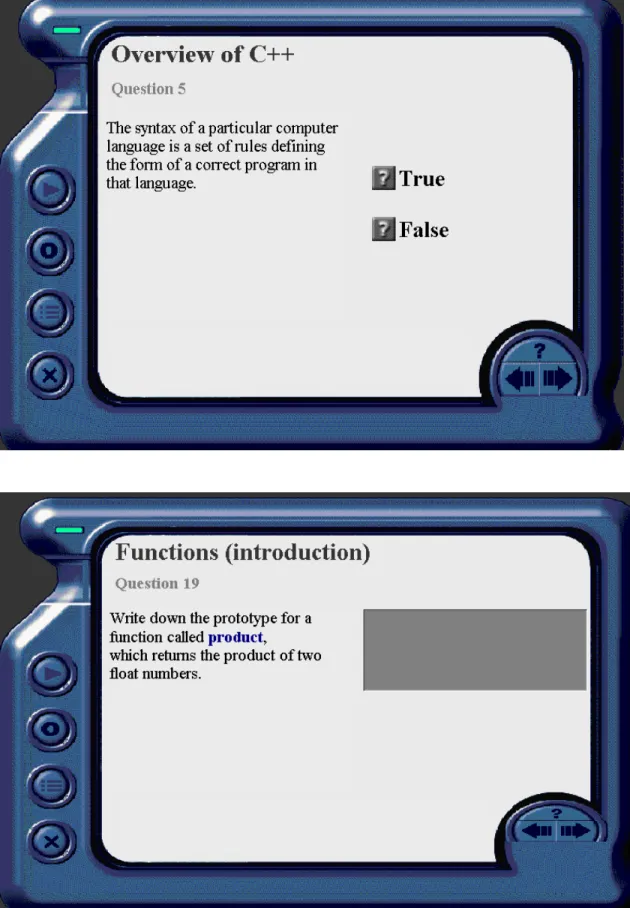
(ii) Gradable questions at the end of each sub-section must be converted to multiple choice or fill-in the blanks, which students complete as soon as they finish the section. These questions could be designed so that the students are required to log in and the results are e-mailed to the in-structor (see figure 5). Inin-structor II software 7 can be used to accomplish this task. This will make the students to pay more attention during the lecture, and since the class is being conducted in an Internet-ready computer laboratory, this will reduce the surfing, email checking and other distractions and activities that students may get into. Scores from these types of in-class exer-cises and teamwork exerexer-cises can be incorporated into the course grading policy. For the sake of fairness, we recommend that these questions be password protected. This should also increase class attendance and participation.
(iii) Include a “one-minute summary” in the course website, for each day, which announces the outline of the topics covered.
(iv) In order to introduce and/or enhance the teamwork approach to problem solving, we suggest several group projects, incorporating inter-group and intra-group communications between the students groups, be added at the end of each module.
(v) In order to avoid problems that may arise with the use of diskettes and floppy drives and to increase efficiency, an ftp site can be established so that students can post their homework, quiz-zes, exams, etc. The quiz and exam folders should be setup so that the write permission can be
Proceedings of the 2002 American Society for Engineering Education Annual Conference & Exposition (vi) Install a management /control software in the technology-ready classroom. Typical man-agement software (e.g. Altiris Vision software) will allow the instructor to project his/her com-puter screen to every PC in the room. One can also monitor student progress and control student PCs - all from the instructor’s computer which includes the ability to lock each student’s key-board and mouse—ensuring attention.
(vii) Finally, a wireless mouse will provide the necessary mobility to monitor the students’ activ-ity during the lecture.
Conclusion
We have presented an approach that can make class lectures more informative and enjoyable for the students. Although the lecture modules produced in this way are not interactive in the true sense, it is a big step in that direction. The time requirement for producing lecture modules is substantial. The efforts expended in preparing these lecture modules are easily recovered if one plans to produce a courseware package later.
References
[1] Azemi, A., “Teaching Computer Programming Courses in a Computer Laboratory Environment,”
Proceed-ings of the 26th Frontier in Education Conference, vol. 1, pp. 209-213, 1996.
[2] Azemi, A., “Using Multimedia Courseware in an Electric Circuits Course,” Proceedings of the North East section of the ASEE. Session III, pp. 1-4, 1996.
[3] Azemi, A., “Using Multimedia Courseware in Engineering Education,” Proceedings of the 26th Frontier in Education Conference, vol. 1, pp. 209-213, Salt Lake, UT, 1996.
[4] Azemi, A.,“Enhancement of Student Learning Through Courseware Approach,” Proceedings of the
Ameri-can Society of Engineering Education, Zone I Meeting, pp. 2B4-1-2B4-3, 1997.
[5] Sammers, M.C., “Motivating Faculty to Use Multimedia as a Lecture Tool,” T.H.E Journal, vol. 21, No. 7, pp. 88, Feb. 1994.
[6] Azemi, A., “Developing an Active Learning Environment with Courseware Approach,Proc. of the 27th Fron-tier in Education Conference, pp. 1179-1184, 1997.
[7] click2learn.com, 110-110th Ave., Bellevue, WA, 98004
ASAD AZEMI
Asad Azemi is an associate professor of Engineering at Penn State University. He has received his B.S. degree from UCLA in 1982, M.S. degree from Loyola Marymount University in 1985, and Ph.D. degree from University of Ar-kansas in 1991. His professional interests are in nonlinear stochastic systems, signal estimation, neural networks and use of computers in undergraduate and graduate education.
P
Proceedings of the 2002 American Society for Engineering Education Annual Conference & Exposition
Figure 1. A fill-in the blank question set, where by changing the font color answers can be seen.
Figure 2a. A sample homepage
Review
1.
A C++ program consists of one or more [
functions
].
2
. The main function identifies the [
the sequence of modules to be
executed
].
3.
Every C++ program should include the header file [
iostream.h
].
4
. All C++ statements within a function body must be terminated by a
[
semicolon
].
5.
The cout object is used to [
send the data given to it to the standard
system display device
].
6.
\n is one of the [
escape sequences
] and it means [
start of a new
line
]
P
Proceedings of the 2002 American Society for Engineering Education Annual Conference & Exposition
Figure 2b. Another sample homepage
Figure 3. Daily Schedule and Homework Assignments
P
Proceedings of the 2002 American Society for Engineering Education Annual Conference & Exposition
Figure 4. Quiz and Exam web page
P
Proceedings of the 2002 American Society for Engineering Education Annual Conference & Exposition
Figure 5. Examples of on-line quiz P