Cisco IOS Security Command Reference: Commands S to Z, Cisco IOS
XE Release 3SE (Catalyst 3850 Switches)
First Published: January 11, 2013 Last Modified: January 11, 2013
Americas Headquarters
Cisco Systems, Inc.170 West Tasman Drive San Jose, CA 95134-1706 USA http://www.cisco.com Tel: 408 526-4000 800 553-NETS (6387) Fax: 408 527-0883
C O N T E N T S
C H A P T E R 1 sa ipsec through sessions maximum 1
server_(Diameter) 2
server (RADIUS) 4
server name (IPv6 TACACS+) 7
server-private (RADIUS) 8
server-private (TACACS+) 11
service password-encryption 14
service password-recovery 16
C H A P T E R 2 set aggressive-mode client-endpoint through show content-scan 23
show aaa servers 24
show access-lists 32
show authentication interface 35
show authentication registrations 37
show authentication sessions 39
C H A P T E R 3 show diameter peer through show object-group 45
show dot1x 46
show ip access-lists 50
show ip admission 54
show ip interface 60
show ip ssh 69
show ipv6 access-list 70
show mab 74
show mac-address-table 76
show privilege 90
show radius statistics 91
show ssh 97
C H A P T E R 5 show vlan group through switchport port-security violation 99
single-connection 100
source 101
ssh 103
switchport port-security 108
C H A P T E R 6 tacacs-server administration through title-color 111
tacacs server 112
tacacs-server host 114
telnet 117
test aaa group 123
timeout (TACACS+) 127
C H A P T E R 7 traffic-export through zone security 129
username 130
username secret 137
sa ipsec through sessions maximum
• server_(Diameter), page 2• server (RADIUS), page 4
• server name (IPv6 TACACS+), page 7
• server-private (RADIUS), page 8
• server-private (TACACS+), page 11
• service password-encryption, page 14
server_(Diameter)
To associate a Diameter server with a Diameter authentication, authorization, and accounting (AAA) server group, use theservercommand in Diameter server group configuration submode. To remove a server from the server group, enter thenoform of this command.
server name no server name
Syntax Description
Character string used to name the Diameter server. The name specified for this command should match the name of a Diameter peer defined using thediameter peercommand.
Note
name
Command Default No server is associated with a Diameter AAA server group.
Command Modes Diameter server group configuration
Command History Release Modification
This command was introduced. 12.4(9)T
Usage Guidelines Theservercommand allows you to associate a Diameter server with a Diameter server group.
Examples The following example shows how to associate a Diameter server with a Diameter server group:
Router (config-sg-diameter)# server dia_peer_1
Related Commands
Description Command
Enables AAA accounting of requested services for billing or security purposes.
aaa accounting
Set AAA authentication at login. aaa authentication login
Sets parameters that restrict user access to a network. aaa authorization
sa ipsec through sessions maximum server_(Diameter)
Description Command
Configures a server group for Diameter. aaa group server diameter
sa ipsec through sessions maximum
server (RADIUS)
To configure the IP address of the RADIUS server for the group server, use theservercommand in server-group configuration mode. To remove the associated server from the authentication, authorization, and accounting (AAA) group server, use thenoform of this command.
server ip-address[auth-port port-number] [acct-port port-number] no server ip-address[auth-port port-number] [acct-port port-number]
Syntax Description
IP address of the RADIUS server host. ip-address
(Optional) Specifies the User Datagram Protocol (UDP) destination port for authentication requests. The port-number argument specifies the port number for authentication requests. The host is not used for authentication if this value is set to 0.
auth-port port-number
(Optional) Specifies the UDP destination port for accounting requests. The port number argument specifies the port number for accounting requests. The host is not used for accounting services if this value is set to 0.
acct-port port-number
Command Default If no port attributes are defined, the defaults are as follows: • Authentication port: 1645
• Accounting port: 1646
Command Modes Server-group configuration
Command History Release Modification
This command was introduced. 12.0(5)T
The following new keywords/arguments were added: •auth-port port-number
•acct-port port-number 12.0(7)T
This command was integrated into Cisco IOS Release 12.2(33)SRA. 12.2(33)SRA
sa ipsec through sessions maximum server (RADIUS)
Modification Release
This command is supported in the Cisco IOS Release 12.2SX train. Support in a specific 12.2SX release of this train depends on your feature set, platform, and platform hardware.
12.2SX
Usage Guidelines Use theservercommand to associate a particular server with a defined group server. There are two different ways in which you can identify a server, depending on the way you want to offer AAA services. You can identify the server simply by using its IP address, or you can identify multiple host instances or entries using the optionalauth-portandacct-portkeywords.
When you use the optional keywords, the network access server identifies RADIUS security servers and host instances associated with a group server on the basis of their IP address and specific UDP port numbers. The combination of the IP address and UDP port number creates a unique identifier, allowing different ports to be individually defined as RADIUS host entries providing a specific AAA service. If two different host entries on the same RADIUS server are configured for the same service--for example, accounting--the second host entry configured acts as failover backup to the first one. Using this example, if the first host entry fails to provide accounting services, the network access server will try the second host entry configured on the same device for accounting services. (The RADIUS host entries will be tried in the order they are configured.)
Examples
Examples The following example shows the network access server configured to recognize several RADIUS host entries with the same IP address. Two different host entries on the same RADIUS server are configured for the same services--authentication and accounting. The second host entry configured acts as fail-over backup to the first one. (The RADIUS host entries are tried in the order in which they are configured.)
! This command enables AAA. aaa new-model
! The next command configures default RADIUS parameters. aaa authentication ppp default radius
! The next set of commands configures multiple host entries for the same IP address. radius-server host 172.20.0.1 auth-port 1000 acct-port 1001
radius-server host 172.20.0.1 auth-port 2000 acct-port 2000
Examples In this example, the network access server is configured to recognize two different RADIUS group servers. One of these groups, group1, has two different host entries on the same RADIUS server configured for the same services. The second host entry configured acts as failover backup to the first one.
! This command enables AAA. aaa new-model
! The next command configures default RADIUS parameters. aaa authentication ppp default group group1
! The following commands define the group1 RADIUS group server and associates servers ! with it.
aaa group server radius group1
server 172.20.0.1 auth-port 1000 acct-port 1001
! The following commands define the group2 RADIUS group server and associates servers ! with it.
aaa group server radius group2
server 172.20.0.1 auth-port 2000 acct-port 2001
! The following set of commands configures the RADIUS attributes for each host entry ! associated with one of the defined group servers.
radius-server host 172.20.0.1 auth-port 1000 acct-port 1001
sa ipsec through sessions maximum
radius-server host 172.20.0.1 auth-port 1000 acct-port 1001 radius-server host 172.31.0.1 auth-port 1645 acct-port 1646
Related Commands
Description Command
Groups different server hosts into distinct lists and distinct methods.
aaa group server
Enables the AAA access control model. aaa new-model
Specifies a RADIUS server host. radius-server host
sa ipsec through sessions maximum server (RADIUS)
server name (IPv6 TACACS+)
To specify an IPv6 TACACS+ server, use theserver namecommand in TACACS+ group server configuration mode. To remove the IPv6 TACACS+ server from configuration, use thenoform of this command.
server name server-name no server name server-name
Syntax Description
The IPv6 TACACS+ server to be used. server-name
Command Default No server name is specified.
Command Modes TACACS+ group server configuration (config-sg-tacacs+)
Command History Release Modification
This command was introduced. Cisco IOS XE Release 3.2S
Usage Guidelines You must configure theaaa group server tacacscommand before configuring this command. Enter theserver namecommand to specify an IPv6 TACACS+ server.
Examples The following example shows how to specify an IPv6 TACACS+ server named server1:
Router(config)# aaa group server tacacs+ Router(config-sg-tacacs+)# server name server1
Related Commands
Description Command
Configures the TACACS+ server for IPv6 or IPv4 and enters TACACS+ server configuration mode. aaa group server tacacs
sa ipsec through sessions maximum
server-private (RADIUS)
To configure the IP address of the private RADIUS server for the group server, use theserver-private command in server-group configuration mode. To remove the associated private server from the authentication, authorization, and accounting (AAA) group server, use thenoform of this command.
server-private ip-address[auth-port port-number|acct-port port-number][non-standard][timeout seconds] [retransmit retries] [key string]
no server-private ip-address[auth-port port-number|acct-port port-number][non-standard][timeout seconds] [retransmit retries] [key string]
Syntax Description
IP address of the private RADIUS server host. ip-address
(Optional) User Datagram Protocol (UDP) destination port for authentication requests. The default value is 1645.
auth-port port-number
Optional) UDP destination port for accounting requests. The default value is 1646.
acct-port port-number
(Optional) RADIUS server is using vendor-proprietary RADIUS attributes. non-standard
(Optional) Time interval (in seconds) that the router waits for the RADIUS server to reply before retransmitting. This setting overrides the global value of the radius-server timeout command. If no timeout value is specified, the global value is used.
timeout seconds
(Optional) Number of times a RADIUS request is resent to a server, if that server is not responding or responding slowly. This setting overrides the global setting of the radius-server retransmit command. retransmit retries
(Optional) Authentication and encryption key used between the router and the RADIUS daemon running on the RADIUS server. This key overrides the global setting of the radius-server key command. If no key string is specified, the global value is used.
key string
Command Default If server-private parameters are not specified, global configurations will be used; if global configurations are not specified, default values will be used.
sa ipsec through sessions maximum server-private (RADIUS)
Command History Release Modification
This command was introduced on the Cisco 7200 series and Cisco 7401ASR.
12.2(1)DX
This command was integrated into Cisco IOS Release 12.2(2)DD. 12.2(2)DD
This command was integrated into Cisco IOS Release 12.2(4)B. 12.2(4)B
This command was integrated into Cisco IOS Release 12.2(13)T. 12.2(13)T
This command was integrated into Cisco IOS Release 12.2(28)SB. 12.2(28)SB
This command was integrated into Cisco IOS Release 12.2(33)SRC. 12.2(33)SRC
This command was integrated into Cisco IOS Release 12.2(33)SXH. 12.2(33)SXH
This command was integrated into Cisco IOS Release 12.2(33)SXI. 12.2(33)SXI
Usage Guidelines Use theserver-privatecommand to associate a particular private server with a defined server group. To prevent possible overlapping of private addresses between Virtual Route Forwardings (VRFs), private servers (servers with private addresses) can be defined within the server group and remain hidden from other groups, while the servers in the global pool (default "radius" server group) can still be referred to by IP addresses and port numbers. Thus, the list of servers in server groups includes references to the hosts in the global
configuration and the definitions of private servers.
If theradius-server directed-requestcommand is configured, then a private RADIUS server cannot be used as the group server by configuring theserver-private(RADIUS) command.
Note
Examples The following example shows how to define the sg_water RADIUS group server and associate private servers with it:
aaa group server radius sg_water
server-private 10.1.1.1 timeout 5 retransmit 3 key xyz server-private 10.2.2.2 timeout 5 retransmit 3 key xyz
Related Commands
Description Command
Groups different server hosts into distinct lists and distinct methods.
aaa group server
Enables the AAA access control model. aaa new-model
sa ipsec through sessions maximum
Description Command
Specifies a RADIUS server host. radius-server host
Allows users logging into a Cisco network access server (NAS) to select a RADIUS server for authentication.
radius-server directed-request
sa ipsec through sessions maximum server-private (RADIUS)
server-private (TACACS+)
To configure the IPv4 or IPv6 address of the private TACACS+ server for the group server, use the
server-privatecommand in server-group configuration mode. To remove the associated private server from the authentication, authorization, and accounting (AAA) group server, use thenoform of this command. server-private{ip-address|name|ipv6-address}[nat] [single-connection][port port-number] [timeout seconds] [key[0| 7]string]
no server-private
Syntax Description
IP address of the private RADIUS or TACACS+ server host.
ip-address
Name of the private RADIUS or TACACS+ server host.
name
IPv6 address of the private RADIUS or TACACS+ server host.
ipv6-address
(Optional) Specifies the port Network Address Translation (NAT) address of the remote device. This address is sent to the TACACS+ server.
nat
(Optional) Maintains a single open connection between the router and the TACACS+ server. single-connection
(Optional) Specifies a server port number. This option overrides the default, which is port 49.
port port-number
(Optional) Specifies a timeout value. This value overrides the global timeout value set with the tacacs-server timeoutcommand for this server only. timeout seconds
(Optional) Specifies an authentication and encryption key. This key must match the key used by the TACACS+ daemon. Specifying this key overrides the key set by the globaltacacs-server keycommand for this server only.
• If no number or 0 is entered, the string that is entered is considered to be plain text. If 7 is entered, the string that is entered is considered to be encrypted text.
key [0|7]
(Optional) Character string specifying the authentication and encryption key. string
sa ipsec through sessions maximum
Command Default If server-private parameters are not specified, global configurations will be used; if global configurations are not specified, default values will be used.
Command Modes Server-group configuration (server-group)
Command History Release Modification
This command was introduced. 12.3(7)T
This command was integrated into Cisco IOS Release 12.2(33)SRA1. 12.2(33)SRA1
This command was integrated into Cisco IOS Release 12.2(33)SXH. 12.2(33)SXH
This command was integrated into Cisco IOS Release 12.2(33)SXI. 12.2(33)SXI
This command was integrated into Cisco IOS Release 12.2(54)SG. 12.2(54)SG
This command was modified. Theipv6-addressargument was added. Cisco IOS XE Release 3.2S
Usage Guidelines Use theserver-privatecommand to associate a particular private server with a defined server group. To prevent possible overlapping of private addresses between virtual route forwardings (VRFs), private servers (servers with private addresses) can be defined within the server group and remain hidden from other groups, while the servers in the global pool (default "TACACS+" server group) can still be referred to by IP addresses and port numbers. Thus, the list of servers in server groups includes references to the hosts in the global configuration and the definitions of private servers.
Examples The following example shows how to define the tacacs1 TACACS+ group server and associate private servers with it:
aaa group server tacacs+ tacacs1
server-private 10.1.1.1 port 19 key cisco ip vrf cisco
rd 100:1
interface Loopback0
ip address 10.0.0.2 255.0.0.0 ip vrf forwarding cisco
Related Commands Command Description
Groups different server hosts into distinct lists and distinct methods.
aaa group server
Enables the AAA access control model. aaa new-model
sa ipsec through sessions maximum server-private (TACACS+)
Description Command
Uses the IP address of a specified interface for all outgoing TACACS+ packets.
ip tacacs source-interface
Configures the VRF reference of an AAA RADIUS or TACACS+ server group.
ip vrf forwarding (server-group)
Specifies a TACACS+ server host. tacacs-server host
sa ipsec through sessions maximum
service password-encryption
To encrypt passwords, use theservice password-encryptioncommand in global configuration mode. To restore the default, use thenoform of this command.
service password-encryption no service password-encryption
Syntax Description This command has no arguments or keywords.
Command Default No passwords are encrypted.
Command Modes Global configuration
Command History Release Modification
This command was introduced. 10.0
This command was integrated into Cisco IOS Release 12.2(33)SRA. 12.2(33)SRA
This command is supported in the Cisco IOS Release 12.2SX train. Support in a specific 12.2SX release of this train depends on your feature set, platform, and platform hardware.
12.2SX
This command was integrated into Cisco IOS Release 12.2(33)SB. 12.2(33)SB
Usage Guidelines The actual encryption process occurs when the current configuration is written or when a password is configured. Password encryption is applied to all passwords, including username passwords, authentication key passwords, the privileged command password, console and virtual terminal line access passwords, and Border Gateway Protocol neighbor passwords. This command is primarily useful for keeping unauthorized individuals from viewing your password in your configuration file.
When password encryption is enabled, the encrypted form of the passwords is displayed when amore system:running-configcommand is entered.
This command does not provide a high level of network security. If you use this command, you should also take additional network security measures.
Caution
You cannot recover a lost encrypted password. You must clear NVRAM and set a new password.
Note
sa ipsec through sessions maximum service password-encryption
Examples The following example causes password encryption to take place:
service password-encryption
Related Commands
Description Command
Sets a local password to control access to various privilege levels.
enable password
Specifies the authentication string for a key. key-string (authentication)
Enables MD5 authentication on a TCP connection between two BGP peers.
neighbor password sa ipsec through sessions maximum
service password-recovery
To enable password recovery capability, use theservice password-recoverycommand in global configuration mode. To disable password recovery capability, use theno service password-recoverycommand.
service password-recovery no service password-recovery
Syntax Description This command has no arguments or keywords.
Command Default Password recovery capability is enabled.
Command Modes Global configuration
Command History Release Modification
This command was introduced. 12.3(8)YA
This command was integrated into Cisco IOS Release 12.3(14)T. 12.3(14)T
This command was integrated into Cisco IOS Release 15.1(1)SY. 15.1(1)SY
Usage Guidelines
This command is not available on all platforms. Use Feature Navigator to ensure that it is available on your platform.
Note
If you plan to disable the password recovery capability with the theno service password-recoverycommand, we recommend that you save a copy of the system configuration file in a location away from the device. If you are using a device that is operating in VTP transparent mode, we recommend that you also save a copy of the vlan.dat file in a location away from the device.
Entering the noservice password-recoverycommand at the command line disables password recovery. Always disable this command before downgrading to an image that does not support password recovery capability, because you cannot recover the password after the downgrade.
Caution
The configuration register boot bit must be enabled so that there is no way to break into ROMMON when this command is configured. Cisco IOS software should prevent the user from configuring the boot field in the config register.
Bit 6, which ignores the startup configuration, and bit 8, which enables a break should be set.
sa ipsec through sessions maximum service password-recovery
The Break key should be disabled while the router is booting up and disabled in Cisco IOS software when this feature is enabled.
It may be necessary to use theconfig-registerglobal configuration command to set the configuration register to autobootbeforeentering theno service password-recoverycommand. The last line of theshow version EXEC command displays the configuration register setting. Use theshow versionEXEC command to obtain the current configuration register value, configure the router to autoboot with theconfig-registercommand if necessary, then enter theno service password-recoverycommand.
Once disabled, the following configuration register values areinvalidfor theno service password-recovery command:
• 0x0
• 0x2002 (bit 8 restriction) • 0x0040 (bit 6)
• 0x8000 (bit 15) Catalyst Switch Operation
Use theservice password-recoverycommand to reenable the password-recovery mechanism (the default). This mechanism allows a user with physical access to the switch to hold down theModebutton and interrupt the boot process while the switch is powering up and to assign a new password. Use thenoform of this command to disable the password-recovery capability.
When the password-recovery mechanism is disabled, interrupting the boot process is allowed only if the user agrees to set the system back to the default configuration. Use theshow versionEXEC command to verify if password recovery is enabled or disabled on a switch.
Theservice password-recoverycommand is valid only on Catalyst 3550 Fast Ethernet switches; it is not available for Gigabit Ethernet switches.
Examples
Examples The following example shows how to obtain the configuration register setting (which in this example is set to autoboot), disable the password-recovery capability, and then verify that the configuration persists through a system reload. Thenoconfirmkeyword prevents a confirmation prompt from interrupting the booting process.
Router# show version
Cisco Internetwork Operating System Software
IOS (tm) 5300 Software (C7200-P-M), Version 12.3(8)YA, RELEASE SOFTWARE (fc1) TAC Support: http://www.cisco.com/tac
Copyright (c) 1986-2004 by Cisco Systems, Inc. Compiled Wed 05-Mar-03 10:16 by xxx
Image text-base: 0x60008954, data-base: 0x61964000
ROM: System Bootstrap, Version 12.3(8)YA, RELEASE SOFTWARE (fc1)
BOOTLDR: 7200 Software (C7200-KBOOT-M), Version 12.3(8)YA, RELEASE SOFTWARE (fc1) Router uptime is 10 minutes
System returned to ROM by reload at 16:28:11 UTC Thu Mar 6 2003 .
. .
125440K bytes of ATA PCMCIA card at slot 0 (Sector size 512 bytes). 8192K bytes of Flash internal SIMM (Sector size 256K).
Configuration register is 0x2012 Router# configure terminal
Router(config)# no service password-recovery noconfirm WARNING:
sa ipsec through sessions maximum
Executing this command will disable the password recovery mechanism. Do not execute this command without another plan for password recovery. Are you sure you want to continue? [yes/no]: yes
. . . Router(config)# exit Router# Router# reload
Proceed with reload? [confirm] yes 00:01:54: %SYS-5-RELOAD: Reload requested System Bootstrap, 12.3(8)YA...
Copyright (c) 1994-2004 by cisco Systems, Inc. C7400 platform with 262144 Kbytes of main memory PASSWORD RECOVERY FUNCTIONALITY IS DISABLED .
. .
The following example shows what happens when a break is confirmed and when a break is not confirmed.
Examples
PASSWORD RECOVERY FUNCTIONALITY IS DISABLED
program load complete, entry point: 0x80013000, size: 0x8396a8 Self decompressing the image :
########################################################################################################################### [OK] !The 5-second window starts.
telnet> send break
Restricted Rights Legend
Use, duplication, or disclosure by the Government is subject to restrictions as set forth in subparagraph (c) of the Commercial Computer Software - Restricted Rights clause at FAR sec. 52.227-19 and subparagraph (c) (1) (ii) of the Rights in Technical Data and Computer Software clause at DFARS sec. 252.227-7013.
Cisco Systems, Inc. 170 West Tasman Drive
San Jose, California 95134-1706
Cisco IOS Software, C831 Software (C831-K9O3SY6-M), Version 12.3(8)YA Copyright (c) 1986-2004 by Cisco Systems, Inc.
Compiled Fri 13-Aug-04 03:21
Image text-base: 0x80013200, data-base: 0x81020514 PASSWORD RECOVERY IS DISABLED.
Do you want to reset the router to factory default configuration and proceed [y/n]? !The user enters "y" here.
Reset router configuration to factory default.
This product contains cryptographic features and is subject to United States and local country laws governing import, export, transfer and use. Delivery of Cisco cryptographic products does not imply third-party authority to import, export, distribute or use encryption.
Importers, exporters, distributors and users are responsible for compliance with U.S. and local country laws. By using this product you agree to comply with applicable laws and regulations. If you are unable to comply with U.S. and local laws, return this product immediately.
A summary of U.S. laws governing Cisco cryptographic products may be found at: http://www.cisco.com/wwl/export/crypto/tool/stqrg.html
If you require further assistance please contact us by sending email to [email protected]. Cisco C831 (MPC857DSL) processor (revision 0x00) with 46695K/2457K bytes of memory. Processor board ID 0000 (1314672220), with hardware revision 0000 CPU rev number 7 3 Ethernet interfaces
4 FastEthernet interfaces 128K bytes of NVRAM
24576K bytes of processor board System flash (Read/Write) 2048K bytes of processor board Web flash (Read/Write)
System Configuration Dialog
---Would you like to enter the initial configuration dialog? [yes/no]: no !Start up config is erased.
SETUP: new interface FastEthernet1 placed in "up" state SETUP: new interface FastEthernet2 placed in "up" state SETUP: new interface FastEthernet3 placed in "up" state SETUP: new interface FastEthernet4 placed in "up" state Press RETURN to get started!
Router> enable
sa ipsec through sessions maximum service password-recovery
Router# show running-config | incl service no service pad
service timestamps debug datetime msec service timestamps log datetime msec
no service password-encryption !The "no service password-recovery" is disabled.
==========================================================================================
Examples
PASSWORD RECOVERY FUNCTIONALITY IS DISABLED telnet> send break
program load complete, entry point: 0x80013000, size: 0x8396a8 Self decompressing the image :
#################################################################################################################################################################### [OK]
telnet> send break
Restricted Rights Legend
Use, duplication, or disclosure by the Government is subject to restrictions as set forth in subparagraph (c) of the Commercial Computer Software - Restricted Rights clause at FAR sec. 52.227-19 and subparagraph (c) (1) (ii) of the Rights in Technical Data and Computer Software clause at DFARS sec. 252.227-7013.
Cisco Systems, Inc. 170 West Tasman Drive
San Jose, California 95134-1706
Cisco IOS Software, C831 Software (C831-K9O3SY6-M), Version 12.3(8)YA Copyright (c) 1986-2004 by Cisco Systems, Inc.
Compiled Fri 13-Aug-04 03:21
Image text-base: 0x80013200, data-base: 0x81020514 PASSWORD RECOVERY IS DISABLED.
Do you want to reset the router to factory default configuration and proceed [y/n]? !The user enters "n" here.
This product contains cryptographic features and is subject to United States and local country laws governing import, export, transfer and use. Delivery of Cisco cryptographic products does not imply third-party authority to import, export, distribute or use encryption. Importers, exporters, distributors and users are responsible for compliance with U.S. and local country laws. By using this product you agree to comply with applicable laws and regulations. If you are unable to comply with U.S. and local laws, return this product immediately.
A summary of U.S. laws governing Cisco cryptographic products may be found at: http://www.cisco.com/wwl/export/crypto/tool/stqrg.html
If you require further assistance please contact us by sending email to [email protected]. Cisco C831 (MPC857DSL) processor (revision 0x00) with 46695K/2457K bytes of memory. Processor board ID 0000 (1314672220), with hardware revision 0000 CPU rev number 7 3 Ethernet interfaces
4 FastEthernet interfaces 128K bytes of NVRAM
24576K bytes of processor board System flash (Read/Write) 2048K bytes of processor board Web flash (Read/Write)
Press RETURN to get started! !The Cisco IOS software boots as if it is not interrupted. Router> enable
Router# show startup configuration Using 984 out of 131072 bytes !
version 12.3 no service pad
service timestamps debug datetime msec service timestamps log datetime msec no service password-encryption no service password-recovery ! hostname Router ! boot-start-marker boot-end-marker ! memory-size iomem 5 ! no aaa new-model ip subnet-zero ! ip ips po max-events 100 no ftp-server write-enable
sa ipsec through sessions maximum
! interface Ethernet0 no ip address shutdown ! interface Ethernet1 no ip address shutdown duplex auto ! interface Ethernet2 no ip address shutdown ! interface FastEthernet1 no ip address duplex auto speed auto ! interface FastEthernet2 no ip address duplex auto speed auto ! interface FastEthernet3 no ip address duplex auto speed auto ! interface FastEthernet4 no ip address duplex auto speed auto ! ip classless ! ip http server no ip http secure-server ! control-plane ! line con 0 no modem enable
transport preferred all transport output all line aux 0
line vty 0 4 !
scheduler max-task-time 5000 end
Router# show running-configuration | incl service no service pad
service timestamps debug datetime msec service timestamps log datetime msec no service password-encryption no service password-recovery
Examples Theno service password-recoverycommand expects the router configuration register to be configured to autoboot. If the configuration register is set to something other than to autobootbeforetheno service password-recoverycommand is entered, a prompt like the one shown in the following example asking you to use theconfig-registerglobal configuration command to change the setting.
Router(config)# no service password-recovery Please setup auto boot using config-register first.
sa ipsec through sessions maximum service password-recovery
To avoid any unintended result due to the behavior of this command, use theshow versioncommand to obtain the current configuration register value. If not set to autoboot, then the router needs to be configured to autoboot with theconfig-registercommand before entering theno service password-recoverycommand.
Note
Once password recovery is disabled, you cannot set the bit pattern value to 0x40, 0x8000, or 0x0 (disables autoboot). The following example shows the messages displayed when invalid configuration register settings are attempted on a router with password recovery disabled.
Router(config)# config-register 0x2143
Password recovery is disabled, cannot enable diag or ignore configuration.
The command resets the invalid bit pattern and continue to allow modification of nonrelated bit patterns. The configuration register value resets to 0x3 at the next system reload, which can be verified by checking the last line of theshow versioncommand output:
Configuration register is 0x2012 (will be 0x3 at next reload)
Examples The following example shows how to disable password recovery on a switch so that a user can only reset a password by agreeing to return to the default configuration:
Switch(config)# no service-password recovery Switch(config)# exit
To use the password-recovery procedure, a user with physical access to the switch holds down theMode button while the unit powers up and for a second or two after the LED above port 1X goes off. When the button is released, the system continues with initialization. If the password-recovery mechanism is disabled, the following message is displayed:
The password-recovery mechanism has been triggered, but is currently disabled. Access to the boot loader prompt through the password-recovery mechanism is disallowed at this point.
However, if you agree to let the system be reset back to the default system configuration, access to the boot loader prompt can still be allowed.
Would you like to reset the system back to the default configuration (y/n)?
If you choose not to reset the system back to the default configuration, the normal boot process continues, as if theModebutton had not been pressed. If you choose to reset the system back to the default configuration, the configuration file in flash memory is deleted and the VLAN database file, flash:vlan.dat (if present), is deleted.
The following is sample output from theshow versioncommand on a device when password recovery is disabled:
Switch# show version
Cisco Internetwork Operating System Software
IOS (tm) C3550 Software (C3550-I9Q3L2-M), Version 12.3(8)YA, RELEASE SOFTWARE (fc1) Copyright (c) 1986-2004 by cisco Systems, Inc.
Compiled Wed 24-Oct-01 06:20 by xxx
Image text-base: 0x00003000, data-base: 0x004C1864 ROM: Bootstrap program is C3550 boot loader
flam-1-6 uptime is 1 week, 6 days, 3 hours, 59 minutes System returned to ROM by power-on
Cisco WS-C3550-48 (PowerPC) processor with 65526K/8192K bytes of memory. Last reset from warm-reset
Running Layer2 Switching Only Image
Ethernet-controller 1 has 12 Fast Ethernet/IEEE 802.3 interfaces Ethernet-controller 2 has 12 Fast Ethernet/IEEE 802.3 interfaces Ethernet-controller 3 has 12 Fast Ethernet/IEEE 802.3 interfaces Ethernet-controller 4 has 12 Fast Ethernet/IEEE 802.3 interfaces Ethernet-controller 5 has 1 Gigabit Ethernet/IEEE 802.3 interface Ethernet-controller 6 has 1 Gigabit Ethernet/IEEE 802.3 interface
sa ipsec through sessions maximum
48 FastEthernet/IEEE 802.3 interface(s) 2 Gigabit Ethernet/IEEE 802.3 interface(s) The password-recovery mechanism is disabled.
32K bytes of flash-simulated non-volatile configuration memory. Base ethernet MAC Address: AA:00:0B:2B:02:00
Configuration register is 0x10F
Related Commands
Description Command
Changes the configuration register settings. config-register
Displays version information for the hardware and firmware.
show version
sa ipsec through sessions maximum service password-recovery
set aggressive-mode client-endpoint through
show content-scan
• show aaa servers, page 24
• show access-lists, page 32
• show authentication interface, page 35
• show authentication registrations, page 37
show aaa servers
To display the status and number of packets that are sent to and received from all public and private
authentication, authorization, and accounting (AAA) RADIUS servers as interpreted by the AAA Server MIB, use theshow aaa serverscommand in user EXEC or privileged EXEC mode.
show aaa servers[private| public]
Syntax Description
(Optional) Displays private AAA servers only, which are also displayed by the AAA Server MIB. private
(Optional) Displays public AAA servers only, which are also displayed by the AAA Server MIB. public
Command Modes User EXEC (>) privileged EXEC (#)
Command History Release Modification
This command was introduced. 12.2(6)T
This command was integrated into Cisco IOS Release 12.3(7)T. 12.3(7)T
This command was integrated into Cisco IOS Release 12.2(33)SRE. 12.2(33)SRE
This command was modified. Support for private RADIUS servers in CISCO-AAA-SERVER-MIB was added.
15.1(1)S
This command was modified. Support for private RADIUS servers in CISCO-AAA-SERVER-MIB was added.
15.1(4)M
This command was modified. Support for displaying the estimated outstanding and throttled transactions (access and accounting) in the command output was added.
15.2(4)S1
Usage Guidelines Only RADIUS servers are supported by theshow aaa serverscommand.
The command displays information about packets sent and received for all AAA transaction types--authentication, authorization, and accounting.
set aggressive-mode client-endpoint through show content-scan show aaa servers
Examples The following is sample output from theshow aaa servers privatecommand. Only the first four lines of the display pertain to the status of private RADIUS servers, and the output fields in this part of the display are described in the table below.
Router# show aaa servers private
RADIUS: id 24, priority 1, host 172.31.164.120, auth-port 1645, acct-port 1646 State: current UP, duration 375742s, previous duration 0s
Dead: total time 0s, count 0 Quarantined: No
Authen: request 5, timeouts 1, failover 0, retransmission 1 Response: accept 4, reject 0, challenge 0
Response: unexpected 0, server error 0, incorrect 0, time 14ms Transaction: success 4, failure 0
Throttled: transaction 0, timeout 0, failure 0 Author: request 0, timeouts 0, failover 0, retransmission 0
Response: accept 0, reject 0, challenge 0
Response: unexpected 0, server error 0, incorrect 0, time 0ms Transaction: success 0, failure 0
Throttled: transaction 0, timeout 0, failure 0 Account: request 5, timeouts 0, failover 0, retransmission 0
Request: start 3, interim 0, stop 2 Response: start 3, interim 0, stop 2
Response: unexpected 0, server error 0, incorrect 0, time 12ms Transaction: success 5, failure 0
Throttled: transaction 0, timeout 0, failure 0 Elapsed time since counters last cleared: 4d8h22m Estimated Outstanding Access Transactions: 0 Estimated Outstanding Accounting Transactions: 0 Estimated Throttled Access Transactions: 0 Estimated Throttled Accounting Transactions: 0
Maximum Throttled Transactions: access 0, accounting 0 Requests per minute past 24 hours:
high - 8 hours, 22 minutes ago: 0 low - 8 hours, 22 minutes ago: 0 average: 0
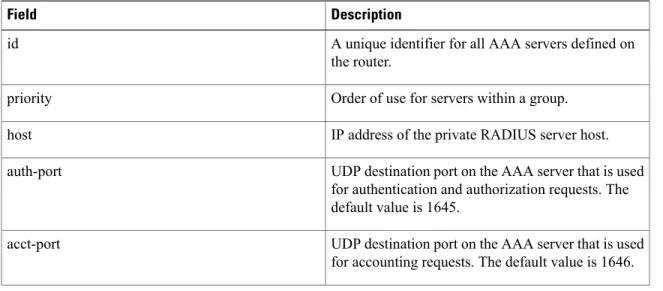
The table below describes the significant fields in the display.
Table 1: show aaa servers Field Descriptions
Description Field
A unique identifier for all AAA servers defined on the router.
id
Order of use for servers within a group. priority
IP address of the private RADIUS server host. host
UDP destination port on the AAA server that is used for authentication and authorization requests. The default value is 1645.
auth-port
UDP destination port on the AAA server that is used for accounting requests. The default value is 1646. acct-port
set aggressive-mode client-endpoint through show content-scan
Description Field
Describes the current state of the AAA server; the duration, in seconds, that the server has been in that state; and the duration, in seconds, that the server was in the previous state.
The following states are possible:
• DEAD--Indicates that the server is currently down and, in the case of failovers, this server will be omitted unless it is the last server in the group.
• duration--Indicates the amount of time the server is assumed to be in the current state, either UP or DEAD.
• previous duration--Indicates the amount of time the server was considered to be in the previous state.
• UP--Indicates that the server is currently considered alive and attempts will be made to communicate with it.
State
Indicates the number of times that this server has been marked dead, and the cumulative amount of time, in seconds, that it spent in that state.
Dead
set aggressive-mode client-endpoint through show content-scan show aaa servers
Description Field
Authen
set aggressive-mode client-endpoint through show content-scan
Description Field
Provides information about authentication packets that were sent to and received from the server, and authentication transactions that were successful or that failed. The following information may be reported in this field:
• request--Number of authentication requests that were sent to the AAA server.
• timeouts--Number of timeouts (no responses) that were observed when a transmission was sent to this server.
• Response--Provides statistics about responses that were observed from this server and includes the following reports:
• unexpected--Number of unexpected responses. A response is considered unexpected when it is received after the timeout period for the packet has expired. This may happen if the link to the server is severely congested, for example. An unexpected response can also be produced when a server generates a response for no apparent reason.
• server error--Number of server errors. This category is a “catchall” for error packets that do not fall into one of the previous categories.
• incorrect--Number of incorrect responses. A response is considered incorrect if it is of the wrong format than the one expected by the protocol. This frequently happens when an incorrect server key is configured on the router.
• time--Time (in milliseconds) taken to respond to an authentication packets. • Transaction: These fields provide information
about authentication, authorization, and accounting transactions related to the server. A transaction is defined as a request for
authentication, authorization, or accounting information that is sent by the AAA module, or by an AAA client (such as PPP) to an AAA protocol (RADIUS or TACACS+), which may involve multiple packet transmissions and retransmissions. Transactions may require set aggressive-mode client-endpoint through show content-scan show aaa servers
Description Field
packet retransmissions to one or more servers in a single server group, to verify success or failure. Success or failure is reported to AAA by the RADIUS and TACACS+ protocols as follows
• success--Incremented when a transaction is successful.
• failure--Incremented when a transaction fails; for example, packet retransmissions to another server in the server group failed or did not succeed. A negative response to an Access-Request, such as
Access-Reject, is considered to be a successful transaction.
The fields in this category are similar to those in the Authen: fields. An important difference, however, is that because authorization information is carried in authentication packets for the RADIUS protocol, these fields are not incremented when using RADIUS. Author
The fields in this category are similar to those in the Authen: fields, but provide accounting transaction and packet statistics.
Account
Displays the time in days, hours, and minutes that have passed since the counters were last cleared. Elapsed time since counters last cleared
In case of Intelligent Services Gateway (ISG), the estimated outstanding accounting transactions will take some time to become zero. This is because there is a constant churn in the interim accounting requests.
Note
The fields in the output of theshow aaa serverscommand are mapped to Simple Network Management Protocol (SNMP) objects in the Cisco AAA-SERVER-MIB and are used in SNMP reporting. The first line of the sample output of theshow aaa serverscommand (RADIUS: id 24, priority 1, host 172.31.164.120, auth-port 1645, acct-port 1646) is mapped to the Cisco AAA-SERVER-MIB as follows:
• id maps to casIndex • priority maps to casPriority • host maps to casAddress • auth-port maps to casAuthenPort • acct-port maps to casAcctPort set aggressive-mode client-endpoint through show content-scan
Mapping the following set of objects listed in the Cisco AAA-SERVER-MIB map to fields displayed by the show aaa serverscommand is more straightforward. For example, the casAuthenRequests field corresponds to the Authen: request portion of the report, casAuthenRequestTimeouts corresponds to the Authen: timeouts portion of the report, and so on.
• casAuthenRequests • casAuthenRequestTimeouts • casAuthenUnexpectedResponses • casAuthenServerErrorResponses • casAuthenIncorrectResponses • casAuthenResponseTime • casAuthenTransactionSuccesses • casAuthenTransactionFailures • casAuthorRequests • casAuthorRequestTimeouts • casAuthorUnexpectedResponses • casAuthorServerErrorResponses • casAuthorIncorrectResponses • casAuthorResponseTime • casAuthorTransactionSuccesses • casAuthorTransactionFailures • casAcctRequests • casAcctRequestTimeouts • casAcctUnexpectedResponses • casAcctServerErrorResponses • casAcctIncorrectResponses • casAcctResponseTime • casAcctTransactionSuccesses • casAcctTransactionFailures • casState • casCurrentStateDuration • casPreviousStateDuration • casTotalDeadTime • casDeadCount
To locate and download MIBs for selected platforms, Cisco IOS releases, and feature sets, use Cisco MIB set aggressive-mode client-endpoint through show content-scan show aaa servers
Related Commands Command Description
Forces one or both of the criteria--used to mark a RADIUS server as dead--to be the indicated constant. radius-server dead-criteria
Associates a particular private RADIUS server with a defined server group.
server-private
set aggressive-mode client-endpoint through show content-scan
show access-lists
To display the contents of current access lists, use theshow access-listscommand in user EXEC or privileged EXEC mode.
show access-lists[access-list-number|access-list-name]
Syntax Description
(Optional) Number of the access list to display. The system displays all access lists by default.
access-list-number
(Optional) Name of the IP access list to display. access-list-name
Command Default The system displays all access lists.
Command Modes User EXEC Privileged EXEC
Command History Release Modification
This command was introduced. 10.0
The output was modified to identify the compiled ACLs. 12.0(6)S
This command was implemented on the Cisco 7200 series. 12.1(1)E
The command output was modified to identify compiled ACLs. 12.1(5)T
This command was implemented on the Cisco 7100 series. 12.1(4)E
The command output was modified to show information for IPv6 access lists. 12.2(2)T
This command was integrated into Cisco IOS Release 12.2(14)S. 12.2(14)S
This command was integrated into Cisco IOS Release 12.2(33)SRA. 12.2(33)SRA
This command is supported in the Cisco IOS Release 12.2SX train. Support in a specific 12.2SX release of this train depends on your feature set, platform, and platform hardware.
12.2SX
Usage Guidelines The show access-lists command is used to display the current ACLs operating in the router. Each access list is flagged using the Compiled indication if it is operating as an accelerated ACL.
set aggressive-mode client-endpoint through show content-scan show access-lists
The display also shows how many packets have been matched against each entry in the ACLs, enabling the user to monitor the particular packets that have been permitted or denied. This command also indicates whether the access list is running as a compiled access list.
Examples The following is sample output from theshow access-listscommand when access list 101 is specified:
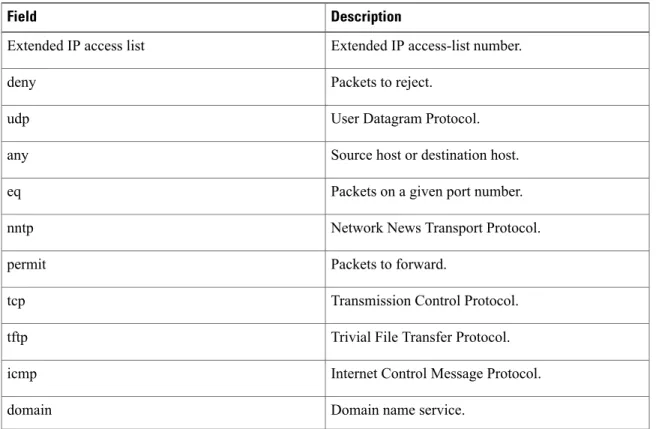
Router# show access-lists 101 Extended IP access list 101
permit tcp host 198.92.32.130 any established (4304 matches) check=5 permit udp host 198.92.32.130 any eq domain (129 matches)
permit icmp host 198.92.32.130 any
permit tcp host 198.92.32.130 host 171.69.2.141 gt 1023
permit tcp host 198.92.32.130 host 171.69.2.135 eq smtp (2 matches) permit tcp host 198.92.32.130 host 198.92.30.32 eq smtp
permit tcp host 198.92.32.130 host 171.69.108.33 eq smtp permit udp host 198.92.32.130 host 171.68.225.190 eq syslog permit udp host 198.92.32.130 host 171.68.225.126 eq syslog deny ip 150.136.0.0 0.0.255.255 224.0.0.0 15.255.255.255
deny ip 171.68.0.0 0.1.255.255 224.0.0.0 15.255.255.255 (2 matches) check=1 deny ip 172.24.24.0 0.0.1.255 224.0.0.0 15.255.255.255 deny ip 192.82.152.0 0.0.0.255 224.0.0.0 15.255.255.255 deny ip 192.122.173.0 0.0.0.255 224.0.0.0 15.255.255.255 deny ip 192.122.174.0 0.0.0.255 224.0.0.0 15.255.255.255 deny ip 192.135.239.0 0.0.0.255 224.0.0.0 15.255.255.255 deny ip 192.135.240.0 0.0.7.255 224.0.0.0 15.255.255.255 deny ip 192.135.248.0 0.0.3.255 224.0.0.0 15.255.255.255
An access list counter counts how many packets are allowed by each line of the access list. This number is displayed as the number of matches. Check denotes how many times a packet was compared to the access list but did not match.
The following is sample output from the show access-lists command when the Turbo Access Control List (ACL) feature is configured on all of the following access lists.
The permit and deny information displayed by the show access-lists command may not be in the same order as that entered using the access-list command.
Note
Router# show access-lists
Standard IP access list 1 (Compiled) deny any
Standard IP access list 2 (Compiled)
deny 192.168.0.0, wildcard bits 0.0.0.255 permit any
Standard IP access list 3 (Compiled) deny 0.0.0.0
deny 192.168.0.1, wildcard bits 0.0.0.255 permit any
Standard IP access list 4 (Compiled) permit 0.0.0.0
permit 192.168.0.2, wildcard bits 0.0.0.255
The following is sample output from theshow access-listscommand that shows information for IPv6 access lists when IPv6 is configured on the network:
Router# show access-lists IPv6 access list list2
deny ipv6 FEC0:0:0:2::/64 any sequence 10 permit ipv6 any any sequence 20
set aggressive-mode client-endpoint through show content-scan
Related Commands Command Description
Defines an extended IP access list. access-list (IP extended)
Defines a standard IP access list. access-list (IP standard)
Clears the counters of an access list. clear access-list counters
Clears a temporary access list entry from a dynamic access list manually.
clear access-template
Defines an IP access list by name. ip access-list
Displays the contents of all current IP access lists. show ip access-lists
Displays the contents of all current IPv6 access lists. show ipv6 access-list
set aggressive-mode client-endpoint through show content-scan show access-lists
show authentication interface
To display information about the Auth Manager for a given interface, use theshow authentication interfacecommand in privileged EXEC mode.
show authentication interface type number
Syntax Description
Interface type. For more information, use the question mark (?) online help function.
type
Interface number. For more information about the numbering syntax for your networking device, use the question mark (?) online help function. number
Command Modes Privileged EXEC (#)
Command History Release Modification
This command was introduced. 12.2(33)SXI
This command was integrated into Cisco IOS Release 15.2(2)T. 15.2(2)T
Usage Guidelines Use theshow authentication interfacecommand to display information about the Auth Manager for a given interface.
Examples The following is sample output from theshow authentication interfacecommand:
Switch# show authentication interface g1/0/23 Client list:
MAC Address Domain Status Handle Interface
000e.84af.59bd DATA Authz Success 0xE0000000 GigabitEthernet1/0/23 Available methods list:
Handle Priority Name
3 0 dot1x
Runnable methods list: Handle Priority Name
3 0 dot1x
The table below describes the significant fields shown in the display. Other fields are self-explanatory.
Table 2: show authentication interface Field Descriptions
Description Field
The MAC address of the client. MAC Address
set aggressive-mode client-endpoint through show content-scan
Description Field
The domain of the client--either DATA or voice. Domain
The status of the authentication session. The possible values are:
• Authc Failed--an authentication method has run for this session and authentication failed. • Authc Success--an authentication method has
run for this session and authentication was successful.
• Authz Failed--a feature has failed and the session has terminated.
• Authz Success--all features have been applied to the session and the session is active. • Idle--this session has been initialized but no
authentication methods have run. This is an intermediate state.
• No methods--no authentication method has provided a result for this session.
• Running--an authentication method is running for this session.
Status
The type and number of the authentication interface. Interface
Summary information for the authentication methods available on the interface.
Available methods list
Summary information for the authentication methods that can run on the interface.
Runnable methods list
Related Commands Command Description
Displays information about the authentication methods that are registered with the Auth Manager. show authentication registrations
Displays information about the current Auth Manager sessions.
show authentication sessions
set aggressive-mode client-endpoint through show content-scan show authentication interface
show authentication registrations
To display information about the authentication methods that are registered with the Auth Manager, use the show authentication registrationscommand in privileged EXEC mode.
show authentication registrations
Syntax Description This command has no arguments or keywords.
Command Modes Privileged EXEC (#)
Command History Release Modification
This command was introduced. 12.2(33)SXI
This command was integrated into Cisco IOS Release 15.2(2)T. 15.2(2)T
Usage Guidelines Use theshow authentication re gistrationscommand to display information about all methods registered with the Auth Manager.
Examples The following is sample output for the show authentication registrations command:
Switch# show authentication registrations Auth Methods registered with the Auth Manager:
Handle Priority Name
3 0 dot1x
2 1 mab
1 2 webauth
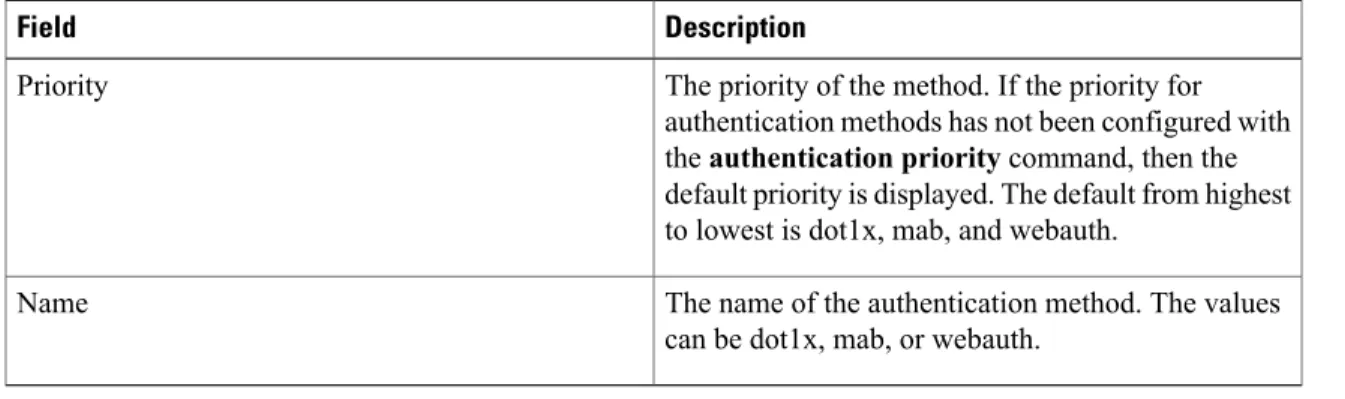
The table below describes the significant fields shown in the display.
Table 3: show authentication registrations Field Descriptions
Description Field
The priority of the method. If the priority for authentication methods has not been configured with theauthentication prioritycommand, then the default priority is displayed. The default from highest to lowest is dot1x, mab, and webauth.
Priority
The name of the authentication method. The values can be dot1x, mab, or webauth.
Name
set aggressive-mode client-endpoint through show content-scan
Related Commands
Description Command
Displays information about the Auth Manager for a given interface.
show authentication interface
Displays information about current Auth Manager sessions.
show authentication sessions
set aggressive-mode client-endpoint through show content-scan show authentication registrations
show authentication sessions
To display information about current Auth Manager sessions, use the show authentication sessionscommand in privileged EXEC mode.
Effective with Cisco IOS Release 12.2(33)SXI, theshow dot1xcommand is supplemented by theshow authentication sessionscommand. Theshow dot1xcommand is reserved for displaying output specific to the use of the 802.1X authentication method. Theshow authentication sessionscommand displays information for all authentication methods and authorization features.
Note
Cisco IOS XE Release 3SE and Later Releases
show authentication sessions[[database]| [handle handle-number|interface type number|mac mac-address| method method-name[interface type number]|session-id session-id]][details]
All Other Releases
show authentication sessions[handle handle-number|interface type number|mac mac-address|method method-name interface type number|session-id session-id]
Syntax Description
(Optional) Displays session data stored in the session database. This keyword allows you to see information like the VLAN ID, which is not cached internally. A warning message displays if data stored in the session database does not match the internally cached data. database
(Optional) Specifies the particular handle for which to display Auth Manager information.
handle handle-id
(Optional) Specifies a particular interface type and number for which Auth Manager information is to be displayed. To display the valid keywords and arguments for interfaces, use the question mark (?) online help function.
interface type number
(Optional) Specifies the particular MAC address for which you want to display information.
mac mac-address
set aggressive-mode client-endpoint through show content-scan
(Optional) Specifies the particular authentication method for which to display Auth Manager information. Valid methods are one of the following:
•dot1x—IEEE 802.1X authentication method. •mab—MAC authentication bypass (MAB)
method.
•webauth—Web authentication method. If you specify a method, you can also specify an interface.
method method-name
(Optional) Specifies the particular session for which to display Auth Manager information.
session-id session-id
(Optional) Displays detailed information for each session instead of displaying a single-line summary for sessions.
details
Command Modes Privileged EXEC (#)
Command History Release Modification
Support for this command was introduced. 12.2(33)SXH
This command was changed to add thehandle handlekeyword and argument and add information to the output.
12.2(33)SXI
This command was integrated into Cisco IOS Release 15.2(2)T. 15.2(2)T
This command was modified. Thedatabaseanddetailskeywords were added.
Cisco IOS XE Release 3.2SE
Usage Guidelines Use theshow authentication sessionscommand to display information about all current Auth Manager sessions. To display information about specific Auth Manager sessions, use one or more of the keywords.
Examples The following example shows how to display all authentication sessions on the switch:
Device# show authentication sessions
Interface MAC Address Method Domain Status Session ID
Gi1/48 0015.63b0.f676 dot1x DATA Authz Success 0A3462B1000000102983C05C Gi1/5 000f.23c4.a401 mab DATA Authz Success 0A3462B10000000D24F80B58 Gi1/5 0014.bf5d.d26d dot1x DATA Authz Success 0A3462B10000000E29811B94
set aggressive-mode client-endpoint through show content-scan show authentication sessions
The following example shows how to display all authentication sessions on an interface:
Device# show authentication sessions interface gigabitethernet2/47 Interface: GigabitEthernet2/47
MAC Address: Unknown IP Address: Unknown
Status: Authz Success Domain: DATA
Oper host mode: multi-host Oper control dir: both
Authorized By: Guest Vlan Vlan Policy: 20
Session timeout: N/A Idle timeout: N/A
Common Session ID: 0A3462C8000000000002763C Acct Session ID: 0x00000002
Handle: 0x25000000 Runnable methods list:
Method State mab Failed over dot1x Failed over
---Interface: GigabitEthernet2/47 MAC Address: 0005.5e7c.da05
IP Address: Unknown User-Name: 00055e7cda05
Status: Authz Success Domain: VOICE
Oper host mode: multi-domain Oper control dir: both
Authorized By: Authentication Server Session timeout: N/A
Idle timeout: N/A
Common Session ID: 0A3462C8000000010002A238 Acct Session ID: 0x00000003
Handle: 0x91000001 Runnable methods list:
Method State
mab Authc Success dot1x Not run
The following example shows how to display the authentication session for a specified session ID:
Device# show authentication sessions session-id 0B0101C70000004F2ED55218 Interface: GigabitEthernet9/2
MAC Address: 0000.0000.0011 IP Address: 20.0.0.7
Username: johndoe Status: Authz Success Domain: DATA
Oper host mode: multi-host Oper control dir: both
Authorized By: Critical Auth Vlan policy: N/A
Session timeout: N/A Idle timeout: N/A
Common Session ID: 0B0101C70000004F2ED55218 Acct Session ID: 0x00000003
Handle: 0x91000001 Runnable methods list:
Method State
mab Authc Success dot1x Not run
The following examples show how to display all clients authorized by the specified authentication method:
Device# show authentication sessions method mab No Auth Manager contexts match supplied criteria
set aggressive-mode client-endpoint through show content-scan
Device# show authentication sessions method dot1x
Interface MAC Address Domain Status Session ID
Gi9/2 0000.0000.0011 DATA Authz Success 0B0101C70000004F2ED55218
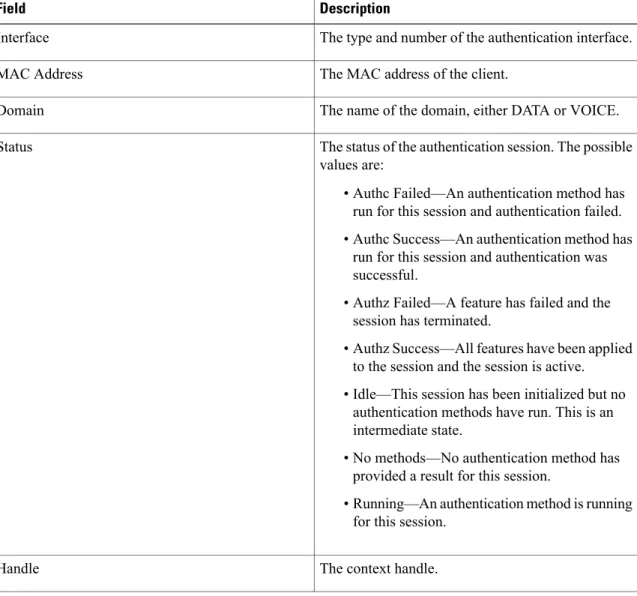
The table below describes the significant fields shown in the displays.
Table 4: show authentication sessions Field Descriptions
Description Field
The type and number of the authentication interface. Interface
The MAC address of the client. MAC Address
The name of the domain, either DATA or VOICE. Domain
The status of the authentication session. The possible values are:
• Authc Failed—An authentication method has run for this session and authentication failed. • Authc Success—An authentication method has
run for this session and authentication was successful.
• Authz Failed—A feature has failed and the session has terminated.
• Authz Success—All features have been applied to the session and the session is active. • Idle—This session has been initialized but no
authentication methods have run. This is an intermediate state.
• No methods—No authentication method has provided a result for this session.
• Running—An authentication method is running for this session.
Status
The context handle. Handle
set aggressive-mode client-endpoint through show content-scan show authentication sessions
Description Field
The operating states for the reported authentication sessions. The possible values are:
• Not run—The method has not run for this session.
• Running—The method is running for this session.
• Failed over—The method has failed and the next method is expected to provide a result. • Success—The method has provided a successful
authentication result for the session. • Authc Failed—The method has provided a
failed authentication result for the session. State
Related Commands
Description Command
Displays information about session aware networking sessions.
show access-sessions
Displays information about the authentication methods that are registered with the Auth Manager. show authentication registrations
Displays statistics for Auth Manager sessions. show authentication statistics
Displays details for an identity profile specific to the use of the 802.1X authentication method.
show dot1x
set aggressive-mode client-endpoint through show content-scan
set aggressive-mode client-endpoint through show content-scan show authentication sessions
show diameter peer through show object-group
• show dot1x, page 46• show ip access-lists, page 50
• show ip admission, page 54
• show ip interface, page 60
• show ip ssh, page 69
• show ipv6 access-list, page 70
• show mab, page 74