173
Copyright © 2016. Vandana Publications. All Rights Reserved.
Volume-6, Issue-6, November-December 2016
International Journal of Engineering and Management Research
Page Number: 173-177
Secure Graphical Password Authentication
Dr. Santosh S.Lomte1, Anil H.Rokade2 1
Principal, Department of Computer Science, VDF School of Engineering & Technology, LATUR, INDIA 2
Assistant Professor, Department of Computer science and Engineering, Hi-Tech Institute of Technology, Aurangabad, INDIA
ABSTRACT
The most common computer system uses the password schemes for security purpose. We develop Graphical password as alternatives to biometry and text password.becouse text password is hard to remember and graphical password is easy to remember for human being. Our graphical password scheme is recognition-based not the recall based. In this paper, we present invovative graphical password which is combination of Text, Number and Images. The user start with identifying the symbol from 6*6 grid formed using 36 blocks which contains 26 alphabets, 10 numbers that is 0 to 9 and images to effectively defeat prevalent from social hacking, at time of registration user have to select 4 alphabet and 2 numbers and for login user have to remember only six images in order ,if order is mismatched you cannot login. In this we use remote keyboards and disable of mouse right click.
Keywords— Authentication, symbol, security, OTP,
Usability.
I.
INTRODUCTION
Authentication for the user is a major problem in every system providing secure access to confidential data and personalized services. Although, today there exists number of ways to authenticate a user [1, 2], the most popular method amongst them is with passwords. In this knowledge based authentication scheme, user authenticates hin/herself by presenting the knowledge of a secret string of alphanumeric characters. The secret string is called as
password and it is assumed to be known only to the
claimed identity and hence her identity gets verified. However, in practice, anyone who knows or guesses the password is also able to authenticate as the legitimate user. Passwords represent simple, cost effective and user friendly authentication solution since its usage requires no special hardware or training and passwords can be easily distributed, maintained and updated via telephone, fax or email. However, passwords are effective only if following
two conflicting requirements are satisfied simultaneously [3].
• Usability: Passwords should be easy to remember and user authentication process should easy for humans and should take less time.
• Security: Passwords should be secure; that is, they should look random and should be hard to guess; they should be changed frequently and should be different on different accounts of the same user; they should not be written or stored down in plain text. remembered for a longer time, better than the text.
• OTP: We use the one time password for
Authentication of the user by sending message on registered cell phone. and registered e-mail ID.
174
Copyright © 2016. Vandana Publications. All Rights Reserved.
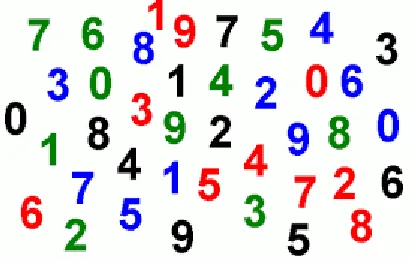
Figure 1S: What is easy to remember, a picture ofKonark Temple or a set of numbers?
As we can see in Figure 1, the task of memorizing a list of ten random digits, after a few seconds of inspection, would be impossible for most of us. On the other hand, the aerial picture of Konark Temple could easily be memorized so that at some future time, it could be distinguished from variety of other scenes.
The fact that images are better remembered than text and can potentially be chosen from an infinite set of images makes graphical passwords an ideal replacement to text passwords, especially in environments where the text entry is awkward or limited (For example, mobile phones, Point of sale (POS) devices and ATMs) .
Even though the area of graphical passwords is actively discussed in the academic arena and experimental graphical password schemes [3,6, 7] present promising results in terms of improved memorability, overall commercial adaptations of graphical passwords has been low.
The aim of this paper is to investigate the reasons behind low commercial acceptance and provide suitable recommendations to overcome them. In the second half of this paper, based on these recommendations, we design a simple graphical password scheme, called SECURE GRAPHICAL PASSWORD AUTHENTICATION is a cued recognition based graphical authentication scheme, which allows users to choose number, text as well as images as passwords without any specific alternations to underlying authentication design and process. It also blends together the strengths of Numbers, Alphabets and Pictures (NAP) to effectively defeat prevalent forms of social hacking. In this paper we describe the complete design of SECURE GRAPHICAL PASSWORD AUTHENTICATION and argue for its potential benefits in terms of security and usability. We then provide results of user study and security analysis.
Also in future we will add two features to this paper 1.Design algorithm for data base security.
2.Design the algorithm to keep data (secrete string)secrete from client to server.
II.
METHODOLOGY
Early in graphical password, it was conceived that the picture superiority effect coupled with the large password space offered by images, would solve the password problem entirely (the conflict between the security and usability) and people would choose graphical passwords that are stronger than the text passwords. However, in practice, results were not as expected. Graphical passwords have issues in both usability and security [9, 10] Balancing them together is as difficult as it was in text passwords. As a result, even after a lot of academic attention and recommendations, graphical passwords are rarely used in practice. In this section, we review some of the common problems associated with graphical passwords. Our focus is mainly on Cognometric graphical password schemes.
2.1 Usability Issues
Security experts often say that users are the weakest link in a security system [1, 7]. Users misunderstand how to use security mechanisms and do not realize the need for such a protection. User behavior is essentially goal driven and security is usually a supportive task. Users are happy to circumvent the security measures, if security measures try to impede their primary tasks. It is imperative therefore to consider carefully the usability of the proposed authentication scheme. As explained earlier, authentication process should take less time, it should be easy and stress free for the users. However, graphical passwords present some problems in terms of the efficiency (time to execute) and affordance.
2.2 Security
Compared to text passwords, graphical passwords are weak against some of the common attacks on passwords schemes. We list down some of the common attacks and how related proposals have tried to mitigate them.
2.2.1 Brute force and dictionary based attack
Simplest of the attack against any authentication scheme is to randomly guess the correct password. For example, an attacker needs 10,000 attempts to correctly guess a four digit Personal Identification Number PIN. Dictionary attack is more sophisticated attack than brute force. Here, instead of random guessing, attacker tries to crack the password using a dictionary of most common passwords.
2.3 OTP
We used the one time password for Authentication purpose, we achieve this by two ways first is registered users own mobile phone and send him/her a four digit number for the confirmation of user is the authorize person if, he/she is authorize person then he/she can login otherwise not.
2.4 Remote(Login) keyboard
175
Copyright © 2016. Vandana Publications. All Rights Reserved.
right click of Mouse, because any one can copy the code orpassword.
III.
PRIOR APPROACH
We did the literature the survey of Existing graphical passwords and have following observations that laid the foundation for this work.
3.1 Personal vs. Random images
The success of the graphical password scheme strongly depends on the type of images used [8]. For example, user can create a portfolio using personal images or random images. Both approaches have advantages and disadvantages. Psychological results show that self-generated or personal images are better recognized than those that are not. However, such images are insecure in practical setting due to their vulnerability against guessing attacks. System-chosen random images on the other hand, are more secure against guessing attacks, but they are difficult to remember than personal images [4, 5]. Ideally, we desire an authentication scheme that can merge together the security benefits of system-chosen images and memorability gains of self-chosen images.
3.2 Cognitive flexibility
We must realize that cognitive flexibility is important to accommodate people with different cognitive ability [13]. For users who do not want the visual way of working or prefer the traditional text passwords, graphical passwords should inhabit some alternate mechanism that allows them to select and enter text passwords.
3.3 Selection of decoy images
As we said earlier, locating password images involves visual search which consumes time. In order to improve the efficiency, the selection of decoy images becomes crucial, in a sense that these images should be both visually and semantically distinct so that users are not confused while locating their password images.
3.4 Cued Recognition
A cued recognition is an interesting approach to graphical passwords design. In such schemes, a cue is given to the user that helps her in the recognition of portfolio images. Best example of such a scheme is a Story scheme [11], where the story or the semantic relationship between the images assists user in the recognition of chosen password images. However, the cue should be designed carefully so that it only helps the legitimate user and not the attacker.
3.5 Drawmetric Schemes
Drawmetric schemes are recall based authentication schemes, which require user to remember and repeat a visual drawing on predefined grid cells. Draw-A-Secret (DAS) [11] is one such scheme. In DAS, during enrolment, user creates a password consisting of an outline drawing of a figure on top of an image or a grid. To authenticate, she must recollect the drawing from her memory and redraw at the same place as before in the grid.
However, the password space of such schemes is small as users prefer to draw symmetric images and with less number of strokes [12]
3.6 Locometric Schemes
Locometric schemes like Pass points are based upon human skill to locate preselected points within an image. For example, in Pass points scheme, the password is constructed with a series of random clicks on predefined regions of an image. In order to login, user must repeat clicking on the same locations and in correct order. The Pass Points.
3.7 Cognometric Schemes
The graphical password schemes of our particular interest are Cognometric schemes. These schemes are based upon human ability to recognize previously learned pictures. Psychological research shows that humans are proficient in recognizing the Pictures they have seen before, even within a set of distracters
3.8 NAP Tune Scheme
NAP Tune is a novel cognometric graphical authentication scheme which involves recognition of portfolio images. During account setup user creates a portfolio of 4 images or 4 characters or a 4-character word as her password and recognizes the images that corresponds to the chosen password to login. Motivation behind NAP Tune came from Alphabet charts used in kindergarten schools to teach alphabets with the help of illustrative pictures (For example, A for Apple, B for ball etc). We adopt the same concept to develop a novel authentication scheme that can serve both alphanumeric and pictorial passwords with same underlying design and interaction.
IV.
OUR APPROACH
SECURE GRAPHICAL PASSWORD AUTHENTICATION is a novel cognometric graphical authentication scheme which involves recognition of portfolio images. During account setup user creates a portfolio of 4 images or 4 characters or a 4-character word as her password and recognizes the images that corresponds to the chosen password to login. Motivation behind SECURE GRAPHICAL PASSWORD AUTHENTICATION came from Alphabet charts used in kindergarten schools to teach alphabets with the help of illustrative pictures (For example, A for Apple, B for ball etc). We adopt the same concept to develop a novel authentication scheme that can serve both alphanumeric and pictorial passwords with same underlying design and interaction.
We explain the steps during registration and login below.
1. Steps during registration
176
Copyright © 2016. Vandana Publications. All Rights Reserved.
Figure 6. In the current prototype (for testing purpose), wehave used pictures from the publically available picture dictionary.
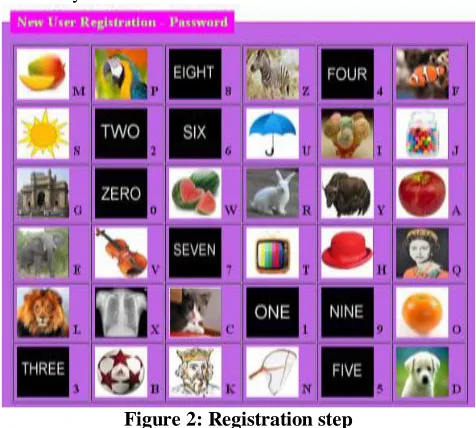
Figure 2: Registration step
User picks four images or characters and two numbers as password and enters the corresponding alphabet with number in the textbox shown below the image grid. User is then free to choose any four images or four characters along with two numbers as her password. Irrespective of the selection (images or characters), he is allowed to enter only the four characters and two numbers in the textbox provided below. To illustrate, even if user chooses images of Ice-Cream, Ball, Apple and Umbrella as his password along with two numbers- ONE and TWO. He must enter IBAU12 (The associated characters and numbers with those images) in the textbox. Once the user has submitted four characters and two numbers, a confirmation message is displayed about successful completion of registration.
2. Steps during Login
During login, user sees the same 26 pictures and 10 numbers (0-9) randomly placed in the 6×6 image grid. However this time, the alphabets and numbers are replaced with a new set of numbers in the range of 0 to 9. In other words, each cell has a number instead of an alphabet associated with it as shown in Figure 1.4. In order to enter, user needs to recognize password (six images as four password characters and two password numbers) and enter the associated number in the textbox below. Users who have chosen character and number as password should recall character and numbers, only then perform a visual search for images that correspond to the characters and numbers since the characters not visible on screen, instead a number is assigned to each image and the original set of numbers has been replaced with a new set of numbers during entry. The images here act as a cue for recalling the password.
figure 3: Login Step
User recognizes the six password images and enters the corresponding numbers in the text box shown below the image grid. For example, for the password as DCBA21, user must locate the images of Ice-Dog, Cat, ball, Apple, TWO, ONE in Figure 2; user must enter 506640 as password to login. The numbers associated with the images keep changing with each login session and thus become the one time access code for a particular login session. Moreover, the numbers are repeated multiple times in the 6×6 image grid to that observation attacks. Forget password If user forget his/her password then user has to click on Forget password link then it will ask you to enterthat hint that you entered during registration after that it will send you password on that email id.
V.
CONCLUSION
177
Copyright © 2016. Vandana Publications. All Rights Reserved.
authentication scheme, very strong for banking, finance,e-commerce and sensitive organization military. Its strength lies in its simplicity and unique graphical way of working. We have designed and secure prototype of SECURE GRAPHICAL PASSWORD AUTHENTICATION. We discussed possible attacks on our scheme and how we could defend each of them. Results of the user study provide evidences for improved usability and memorability. Our future work includes working on the feedbacks received by the participants (using personal pictures and improving the visual search) and testing the scheme with large audience of all ages and under secure password inferences .Also we will provide the security to database by developing the algorithm for database also develop the algorithm for to keep the data secure traveling from client to server.
REFERENCES
[1] W. Bruce Croft, Donald Metzler, Trevor Strohman, Search Engines: Information Retrieval, 2009.
[2] Laura A Granka, Matthew Feusner, Lori Lorigo, Eye Monitoring in online Search, 2008.
[3] I.Qunis, G. Amati, V. Plachouras, B. He, C. Macdonald and C. Lioma, A High Performance and Scalable Information Retrieval Plateform, In SIGR Workshop on Open Source Information Retrieval, 2006
[4] T. Fagni, R. Perego, F. Silvestri, and S. Orlando., Boosting the performance of Webs Searching Engines : Caching and pre-fetching Query Results by Exploring historical usage Data, ACM Trans. Inf. Syst., 24(1): 51-78, 2006
[5] X. Long and T. Suel, Three Level Caching for Efficient Query Processing in Large Web Search Engines, 2005 [6] R.A. Baeza Yates and F. Saint-Jean, A Three Level Search Engine Index Based in Query Log Distribution , In SPIRE 2003.
[7] R. Lempel and S. Mohan, Predictive Caching and Pre-fetching of Query Results in Search Engines, 2003. [8] S. J. Caughey, D. B. Ingham and M. C. Little, flexible open caching for the web, dec. 1997.
[9] Dhamija, R., and Dusseault, L. 2008. The Seven Flaws of Identity Management: Usability and Security Challenges. IEEE Security and Privacy 6, 2 (Mar. 2008), 24-29.
[10] Jermyn, I., Mayer, A., Monrose, F., Reiter, M. K., and Rubin, A. D. 1999. The design and analysis of graphical passwords. In Proceedings of the 8th Conference on USENIX Security Symposium. 8(1999). 1-1.
[11] Nali, D., and Thorpe, J. Analyzing user choice in graphical passwords. Technical report, TR-04-01, School of Computer Science, Carleton University, May 2004. [12] Dirik, A. E., Memon, N., and Birget, J. 2007. Modeling user choice in the Pass Points graphical Password scheme. In Proceedings of the 3rd Symposium