OPERATING
SYSTEM
OPERATING
SYSTEM
CONCEPTS
ABRAHAM SILBERSCHATZ
Yale University
PETER BAER GALVIN
Pluribus NetworksGREG GAGNE
Westminster CollegeExecutiveEditor BethLangGolub EditorialAssistant KatherineWillis ExecutiveMarketingManager ChristopherRuel SeniorProductionEditor KenSantor Coverandtitlepageillustrations SusanCyr
CoverDesigner MadelynLesure
TextDesigner JudyAllan
ThisbookwassetinPalatinobytheauthorusingLaTeXandprintedandboundbyCourier Kendallville.ThecoverwasprintedbyCourier.
Copyright©2013,2012,2008JohnWiley&Sons,Inc.Allrightsreserved.
Nopartofthispublicationmaybereproduced,storedinaretrievalsystemortransmittedinany formorbyanymeans,electronic,mechanical,photocopying,recording,scanningorotherwise, exceptaspermittedunderSections107or108ofthe1976UnitedStatesCopyrightAct,without eitherthepriorwrittenpermissionofthePublisher,orauthorizationthroughpaymentofthe appropriatepercopyfeetotheCopyrightClearanceCenter,Inc.222RosewoodDrive,Danvers, MA01923,(978)7508400,fax(978)7504470.RequeststothePublisherforpermissionshouldbe addressedtothePermissionsDepartment,JohnWiley&Sons,Inc.,111RiverStreet,Hoboken,NJ 07030(201)7486011,fax(201)7486008,EMail:[email protected].
Evaluationcopiesareprovidedtoqualifiedacademicsandprofessionalsforreviewpurposes only,foruseintheircoursesduringthenextacademicyear.Thesecopiesarelicensedandmay notbesoldortransferredtoathirdparty.Uponcompletionofthereviewperiod,pleasereturn theevaluationcopytoWiley.Returninstructionsandafreeofchargereturnshippinglabelare availableatwww.wiley.com/go/evalreturn.OutsideoftheUnitedStates,pleasecontactyour localrepresentative.
Foundedin1807,JohnWiley&Sons,Inc.hasbeenavaluedsourceofknowledgeand understandingformorethan200years,helpingpeoplearoundtheworldmeettheirneedsand fulfilltheiraspirations.Ourcompanyisbuiltonafoundationofprinciplesthatinclude responsibilitytothecommunitiesweserveandwhereweliveandwork.In2008,welauncheda CorporateCitizenshipInitiative,aglobalefforttoaddresstheenvironmental,social,economic, andethicalchallengeswefaceinourbusiness.Amongtheissuesweareaddressingarecarbon impact,paperspecificationsandprocurement,ethicalconductwithinourbusinessandamong ourvendors,andcommunityandcharitablesupport.Formoreinformation,pleasevisitour website:www.wiley.com/go/citizenship.
ISBN:9781118063330 ISBNBRV:9781118129388
PrintedintheUnitedStatesofAmerica
To my children, Lemor, Sivan, and Aaron and my Nicolette
Avi Silberschatz
To Brendan and Ellen,
and Barbara, Anne and Harold, and Walter and Rebecca
Peter Baer Galvin
Preface
Operating systems are an essential part of any computer system. Similarly, a course on operating systems is an essential part of any computer science education. This field is undergoing rapid change, as computers are now prevalent in virtually every arena of day-to-day life—from embedded devices in automobiles through the most sophisticated planning tools for governments and multinational firms. Yet the fundamental concepts remain fairly clear, and it is on these that we base this book.
We wrote this book as a text for an introductory course in operating systems at the junior or senior undergraduate level or at the first-year graduate level. We hope that practitioners will also find it useful. It provides a clear description of theconceptsthat underlie operating systems. As prerequisites, we assume that the reader is familiar with basic data structures, computer organization, and a high-level language, such as C or Java. The hardware topics required for an understanding of operating systems are covered in Chapter 1. In that chapter, we also include an overview of the fundamental data structures that are prevalent in most operating systems. For code examples, we use predominantly C, with some Java, but the reader can still understand the algorithms without a thorough knowledge of these languages.
Concepts are presented using intuitive descriptions. Important theoretical results are covered, but formal proofs are largely omitted. The bibliographical notes at the end of each chapter contain pointers to research papers in which results were first presented and proved, as well as references to recent material for further reading. In place of proofs, figures and examples are used to suggest why we should expect the result in question to be true.
The fundamental concepts and algorithms covered in the book are often based on those used in both commercial and open-source operating systems. Our aim is to present these concepts and algorithms in a general setting that is not tied to one particular operating system. However, we present a large number of examples that pertain to the most popular and the most innovative operating systems, including Linux, Microsoft Windows, Apple MacOS X, and Solaris. We also include examples of both Android and iOS, currently the two dominant mobile operating systems.
The organization of the text reflects our many years of teaching courses on operating systems, as well as curriculum guidelines published by the IEEE
Computing Society and the Association for Computing Machinery (ACM). Consideration was also given to the feedback provided by the reviewers of the text, along with the many comments and suggestions we received from readers of our previous editions and from our current and former students.
Content of This Book
The text is organized in eight major parts:
•
Overview. Chapters 1 and 2 explain what operating systems are, what they do, and how they are designed and constructed. These chapters discuss what the common features of an operating system are and what an operating system does for the user. We include coverage of both traditionalPCand server operating systems, as well as operating systems for mobile devices. The presentation is motivational and explanatory in nature. We have avoided a discussion of how things are done internally in these chapters. Therefore, they are suitable for individual readers or for students in lower-level classes who want to learn what an operating system is without getting into the details of the internal algorithms.
•
Process management. Chapters 3 through 7 describe the process concept and concurrency as the heart of modern operating systems. A processis the unit of work in a system. Such a system consists of a collection ofconcurrentlyexecuting processes, some of which are operating-system processes (those that execute system code) and the rest of which are user processes (those that execute user code). These chapters cover methods for process scheduling, interprocess communication, process synchronization, and deadlock handling. Also included is a discussion of threads, as well as an examination of issues related to multicore systems and parallel programming.
•
Memory management. Chapters 8 and 9 deal with the management of main memory during the execution of a process. To improve both the utilization of the CPU and the speed of its response to its users, the computer must keep several processes in memory. There are many different memory-management schemes, reflecting various approaches to memory management, and the effectiveness of a particular algorithm depends on the situation.Preface ix
performance bottleneck, we also examine performance issues associated withI/Odevices.
•
Protection and security. Chapters 14 and 15 discuss the mechanisms necessary for the protection and security of computer systems. The processes in an operating system must be protected from one another’s activities, and to provide such protection, we must ensure that only processes that have gained proper authorization from the operating system can operate on the files, memory,CPU, and other resources of the system. Protection is a mechanism for controlling the access of programs, processes, or users to computer-system resources. This mechanism must provide a means of specifying the controls to be imposed, as well as a means of enforcement. Security protects the integrity of the information stored in the system (both data and code), as well as the physical resources of the system, from unauthorized access, malicious destruction or alteration, and accidental introduction of inconsistency.•
Advanced topics. Chapters 16 and 17 discuss virtual machines and distributed systems. Chapter 16 is a new chapter that provides an overview of virtual machines and their relationship to contemporary operating systems. Included is an overview of the hardware and software techniques that make virtualization possible. Chapter 17 condenses and updates the three chapters on distributed computing from the previous edition. This change is meant to make it easier for instructors to cover the material in the limited time available during a semester and for students to gain an understanding of the core ideas of distributed computing more quickly.•
Case studies. Chapters 18 and 19 in the text, along with Appendices A and B (which are available on (http://www.os-book.com), present detailed case studies of real operating systems, including Linux, Windows 7,FreeBSD, and Mach. Coverage of both Linux and Windows 7 are presented throughout this text; however, the case studies provide much more detail. It is especially interesting to compare and contrast the design of these two very different systems. Chapter 20 briefly describes a few other influential operating systems.
The Ninth Edition
As we wrote this Ninth Edition ofOperating System Concepts,we were guided by the recent growth in three fundamental areas that affect operating systems:
1. Multicore systems
2. Mobile computing
3. Virtualization
We have also made substantial organizational changes. For example, we have eliminated the chapter on real-time systems and instead have integrated appropriate coverage of these systems throughout the text. We have reordered the chapters on storage management and have moved up the presentation of process synchronization so that it appears before process scheduling. Most of these organizational changes are based on our experiences while teaching courses on operating systems.
Below, we provide a brief outline of the major changes to the various chapters:
•
Chapter 1, Introduction, includes updated coverage of multiprocessor and multicore systems, as well as a new section on kernel data structures. Additionally, the coverage of computing environments now includes mobile systems and cloud computing. We also have incorporated an overview of real-time systems.•
Chapter 2, Operating-System Structures,provides new coverage of user interfaces for mobile devices, including discussions of iOSand Android, and expanded coverage of MacOS Xas a type of hybrid system.•
Chapter 3, Processes, now includes coverage of multitasking in mobile operating systems, support for the multiprocess model in Google’s Chrome web browser, and zombie and orphan processes inUNIX.•
Chapter 4, Threads, supplies expanded coverage of parallelism and Amdahl’s law. It also provides a new section on implicit threading, including OpenMPand Apple’s Grand Central Dispatch.•
Chapter 5, Process Synchronization(previously Chapter 6), adds a new section on mutex locks as well as coverage of synchronization using OpenMP, as well as functional languages.•
Chapter 6,CPUScheduling(previously Chapter 5), contains new coverage of the LinuxCFSscheduler and Windows user-mode scheduling. Coverage of real-time scheduling algorithms has also been integrated into this chapter.•
Chapter 7, Deadlocks,has no major changes.•
Chapter 8, Main Memory,includes new coverage of swapping on mobile systems and Intel 32- and 64-bit architectures. A new section discussesARMarchitecture.
•
Chapter 9, Virtual Memory, updates kernel memory management to include the LinuxSLUBandSLOBmemory allocators.•
Chapter 10, Mass-Storage Structure(previously Chapter 12), adds cover-age of solid-state disks.•
Chapter 11, File-System Interface (previously Chapter 10), is updated with information about current technologies.•
Chapter 12, File-System Implementation (previously Chapter 11), is updated with coverage of current technologies.Preface xi
•
Chapter 14, Protection,has no major changes.•
Chapter 15, Security, has a revised cryptography section with modern notation and an improved explanation of various encryption methods and their uses. The chapter also includes new coverage of Windows 7 security.•
Chapter 16, Virtual Machines,is a new chapter that provides an overview of virtualization and how it relates to contemporary operating systems.•
Chapter 17, Distributed Systems, is a new chapter that combines and updates a selection of materials from previous Chapters 16, 17, and 18.•
Chapter 18, The Linux System(previously Chapter 21), has been updated to cover the Linux 3.2 kernel.•
Chapter 19, Windows 7, is a new chapter presenting a case study of Windows 7.•
Chapter 20, Influential Operating Systems(previously Chapter 23), has no major changes.Programming Environments
This book uses examples of many real-world operating systems to illustrate fundamental operating-system concepts. Particular attention is paid to Linux and Microsoft Windows, but we also refer to various versions of UNIX
(including Solaris,BSD, and MacOS X).
The text also provides several example programs written in C and Java. These programs are intended to run in the following programming environments:
•
POSIX.POSIX(which stands forPortable Operating System Interface) repre-sents a set of standards implemented primarily forUNIX-based operating systems. Although Windows systems can also run certainPOSIXprograms, our coverage ofPOSIXfocuses onUNIXand Linux systems.POSIX-compliant systems must implement thePOSIXcore standard (POSIX.1); Linux, Solaris, and Mac OS X are examples of POSIX-compliant systems. POSIX also defines several extensions to the standards, including real-time extensions (POSIX1.b) and an extension for a threads library (POSIX1.c, better known as Pthreads). We provide several programming examples written in C illustrating thePOSIXbaseAPI, as well as Pthreads and the extensions for real-time programming. These example programs were tested on Linux 2.6 and 3.2 systems, MacOS X10.7, and Solaris 10 using thegcc4.0 compiler.•
Java. Java is a widely used programming language with a rich API and built-in language support for thread creation and management. Java programs run on any operating system supporting a Java virtual machine (orJVM). We illustrate various operating-system and networking concepts with Java programs tested using the Java 1.6JVM.We have chosen these three programming environments because we believe that they best represent the two most popular operating-system models —Windows andUNIX/Linux—along with the widely used Java environment. Most programming examples are written in C, and we expect readers to be comfortable with this language. Readers familiar with both the C and Java languages should easily understand most programs provided in this text.
In some instances—such as thread creation—we illustrate a specific concept using all three programming environments, allowing the reader to contrast the three different libraries as they address the same task. In other situations, we may use just one of theAPIs to demonstrate a concept. For example, we illustrate shared memory using just the POSIX API; socket programming inTCP/IPis highlighted using the JavaAPI.
Linux Virtual Machine
To help students gain a better understanding of the Linux system, we provide a Linux virtual machine, including the Linux source code, that is available for download from the the website supporting this text (http://www.os-book.com). This virtual machine also includes a gcc development environment with compilers and editors. Most of the programming assignments in the book can be completed on this virtual machine, with the exception of assignments that require Java or the Windows
API.
We also provide three programming assignments that modify the Linux kernel through kernel modules:
1. Adding a basic kernel module to the Linux kernel.
2. Adding a kernel module that uses various kernel data structures.
3. Adding a kernel module that iterates over tasks in a running Linux system.
Over time it is our intention to add additional kernel module assignments on the supporting website.
Supporting Website
When you visit the website supporting this text athttp://www.os-book.com, you can download the following resources:
•
Linux virtual machine•
C and Java source code•
Sample syllabi•
Set of Powerpoint slides•
Set of figures and illustrationsPreface xiii
•
Solutions to practice exercises•
Study guide for students•
ErrataNotes to Instructors
On the website for this text, we provide several sample syllabi that suggest various approaches for using the text in both introductory and advanced courses. As a general rule, we encourage instructors to progress sequentially through the chapters, as this strategy provides the most thorough study of operating systems. However, by using the sample syllabi, an instructor can select a different ordering of chapters (or subsections of chapters).
In this edition, we have added over sixty new written exercises and over twenty new programming problems and projects. Most of the new program-ming assignments involve processes, threads, process synchronization, and memory management. Some involve adding kernel modules to the Linux system which requires using either the Linux virtual machine that accompanies this text or another suitable Linux distribution.
Solutions to written exercises and programming assignments are available to instructors who have adopted this text for their operating-system class. To obtain these restricted supplements, contact your local John Wiley & Sons sales representative. You can find your Wiley representative by going to http://www.wiley.com/collegeand clicking“Who’s my rep?”
Notes to Students
We encourage you to take advantage of the practice exercises that appear at the end of each chapter. Solutions to the practice exercises are available for download from the supporting website http://www.os-book.com. We also encourage you to read through the study guide, which was prepared by one of our students. Finally, for students who are unfamiliar withUNIX and Linux systems, we recommend that you download and install the Linux virtual machine that we include on the supporting website. Not only will this provide you with a new computing experience, but the open-source nature of Linux will allow you to easily examine the inner details of this popular operating system.
We wish you the very best of luck in your study of operating systems.
Contacting Us
We have endeavored to eliminate typos, bugs, and the like from the text. But, as in new releases of software, bugs almost surely remain. An up-to-date errata list is accessible from the book’s website. We would be grateful if you would notify us of any errors or omissions in the book that are not on the current list of errata.
use to other readers, such as programming exercises, project suggestions, on-line labs and tutorials, and teaching tips. E-mail should be addressed to [email protected].
Acknowledgments
This book is derived from the previous editions, the first three of which were coauthored by James Peterson. Others who helped us with previous editions include Hamid Arabnia, Rida Bazzi, Randy Bentson, David Black, Joseph Boykin, Jeff Brumfield, Gael Buckley, Roy Campbell, P. C. Capon, John Carpenter, Gil Carrick, Thomas Casavant, Bart Childs, Ajoy Kumar Datta, Joe Deck, Sudarshan K. Dhall, Thomas Doeppner, Caleb Drake, M. Racsit Eskicio ˘glu, Hans Flack, Robert Fowler, G. Scott Graham, Richard Guy, Max Hailperin, Rebecca Hartman, Wayne Hathaway, Christopher Haynes, Don Heller, Bruce Hillyer, Mark Holliday, Dean Hougen, Michael Huang, Ahmed Kamel, Morty Kewstel, Richard Kieburtz, Carol Kroll, Morty Kwestel, Thomas LeBlanc, John Leggett, Jerrold Leichter, Ted Leung, Gary Lippman, Carolyn Miller, Michael Molloy, Euripides Montagne, Yoichi Muraoka, Jim M. Ng, Banu ¨Ozden, Ed Posnak, Boris Putanec, Charles Qualline, John Quarterman, Mike Reiter, Gustavo Rodriguez-Rivera, Carolyn J. C. Schauble, Thomas P. Skinner, Yannis Smaragdakis, Jesse St. Laurent, John Stankovic, Adam Stauffer, Steven Stepanek, John Sterling, Hal Stern, Louis Stevens, Pete Thomas, David Umbaugh, Steve Vinoski, Tommy Wagner, Larry L. Wear, John Werth, James M. Westall, J. S. Weston, and Yang Xiang
Robert Love updated both Chapter 18 and the Linux coverage throughout the text, as well as answering many of our Android-related questions. Chapter 19 was written by Dave Probert and was derived from Chapter 22 of the Eighth Edition of Operating System Concepts. Jonathan Katz contributed to Chapter 15. Richard West provided input into Chapter 16. Salahuddin Khan updated Section 15.9 to provide new coverage of Windows 7 security.
Parts of Chapter 17 were derived from a paper by Levy and Silberschatz [1990]. Chapter 18 was derived from an unpublished manuscript by Stephen Tweedie. Cliff Martin helped with updating the UNIX appendix to cover
FreeBSD. Some of the exercises and accompanying solutions were supplied by Arvind Krishnamurthy. Andrew DeNicola prepared the student study guide that is available on our website. Some of the the slides were prepeared by Marilyn Turnamian.
Mike Shapiro, Bryan Cantrill, and Jim Mauro answered several Solaris-related questions, and Bryan Cantrill from Sun Microsystems helped with the
ZFScoverage. Josh Dees and Rob Reynolds contributed coverage of Microsoft’s
NET. The project forPOSIXmessage queues was contributed by John Trono of Saint Michael’s College in Colchester, Vermont.
Judi Paige helped with generating figures and presentation of slides. Thomas Gagne prepared new artwork for this edition. Owen Galvin helped copy-edit Chapter 16. Mark Wogahn has made sure that the software to produce this book (LATEXand fonts) works properly. Ranjan Kumar Meher rewrote some
Preface xv
Our Executive Editor, Beth Lang Golub, provided expert guidance as we prepared this edition. She was assisted by Katherine Willis, who managed many details of the project smoothly. The Senior Production Editor, Ken Santor, was instrumental in handling all the production details.
The cover illustrator was Susan Cyr, and the cover designer was Madelyn Lesure. Beverly Peavler copy-edited the manuscript. The freelance proofreader was Katrina Avery; the freelance indexer was WordCo, Inc.
Abraham Silberschatz, New Haven, CT, 2012 Peter Baer Galvin, Boston, MA, 2012
Contents
PART ONE
OVERVIEW
Chapter 1
Introduction
1.1 What Operating Systems Do 4 1.2 Computer-System Organization 7 1.3 Computer-System Architecture 12 1.4 Operating-System Structure 19 1.5 Operating-System Operations 21 1.6 Process Management 241.7 Memory Management 25 1.8 Storage Management 26
1.9 Protection and Security 30 1.10 Kernel Data Structures 31 1.11 Computing Environments 35 1.12 Open-Source Operating Systems 43 1.13 Summary 47
Exercises 49
Bibliographical Notes 52
Chapter 2
Operating-System Structures
2.1 Operating-System Services 552.2 User and Operating-System Interface 58
2.3 System Calls 62
2.4 Types of System Calls 66 2.5 System Programs 74 2.6 Operating-System Design and
Implementation 75
2.7 Operating-System Structure 78 2.8 Operating-System Debugging 86 2.9 Operating-System Generation 91 2.10 System Boot 92
2.11 Summary 93 Exercises 94
Bibliographical Notes 101
PART TWO
PROCESS MANAGEMENT
Chapter 3
Processes
3.1 Process Concept 105 3.2 Process Scheduling 110 3.3 Operations on Processes 115 3.4 Interprocess Communication 122 3.5 Examples of IPC Systems 1303.6 Communication in Client – Server Systems 136 3.7 Summary 147
Exercises 149
Bibliographical Notes 161
Chapter 4
Threads
4.1 Overview 1634.2 Multicore Programming 166 4.3 Multithreading Models 169 4.4 Thread Libraries 171 4.5 Implicit Threading 177
4.6 Threading Issues 183
4.7 Operating-System Examples 188 4.8 Summary 191
Exercises 191
Bibliographical Notes 199
Chapter 5
Process Synchronization
5.1 Background 2035.2 The Critical-Section Problem 206 5.3 Peterson’s Solution 207
5.4 Synchronization Hardware 209 5.5 Mutex Locks 212
5.6 Semaphores 213 5.7 Classic Problems of
Synchronization 219
5.8 Monitors 223
5.9 Synchronization Examples 232 5.10 Alternative Approaches 238 5.11 Summary 242
Exercises 242
Bibliographical Notes 258
Chapter 6
CPU Scheduling
6.1 Basic Concepts 2616.2 Scheduling Criteria 265 6.3 Scheduling Algorithms 266 6.4 Thread Scheduling 277
6.5 Multiple-Processor Scheduling 278 6.6 Real-Time CPU Scheduling 283
6.7 Operating-System Examples 290 6.8 Algorithm Evaluation 300 6.9 Summary 304
Exercises 305
Bibliographical Notes 311
Chapter 7
Deadlocks
7.1 System Model 3157.2 Deadlock Characterization 317 7.3 Methods for Handling Deadlocks 322 7.4 Deadlock Prevention 323
7.5 Deadlock Avoidance 327
7.6 Deadlock Detection 333 7.7 Recovery from Deadlock 337 7.8 Summary 339
Exercises 339
Bibliographical Notes 346
PART THREE
MEMORY MANAGEMENT
Chapter 8
Main Memory
8.1 Background 3518.2 Swapping 358
8.3 Contiguous Memory Allocation 360 8.4 Segmentation 364
8.5 Paging 366
8.6 Structure of the Page Table 378
8.7 Example: Intel 32 and 64-bit Architectures 383
8.8 Example: ARM Architecture 388 8.9 Summary 389
Exercises 390
Contents xix
Chapter 9
Virtual Memory
9.1 Background 3979.2 Demand Paging 401 9.3 Copy-on-Write 408 9.4 Page Replacement 409 9.5 Allocation of Frames 421 9.6 Thrashing 425
9.7 Memory-Mapped Files 430
9.8 Allocating Kernel Memory 436 9.9 Other Considerations 439 9.10 Operating-System Examples 445 9.11 Summary 448
Exercises 449
Bibliographical Notes 461
PART FOUR
STORAGE MANAGEMENT
Chapter 10 Mass-Storage Structure
10.1 Overview of Mass-StorageStructure 467 10.2 Disk Structure 470 10.3 Disk Attachment 471 10.4 Disk Scheduling 472 10.5 Disk Management 478
10.6 Swap-Space Management 482 10.7 RAID Structure 484
10.8 Stable-Storage Implementation 494 10.9 Summary 496
Exercises 497
Bibliographical Notes 501
Chapter 11 File-System Interface
11.1 File Concept 50311.2 Access Methods 513
11.3 Directory and Disk Structure 515 11.4 File-System Mounting 526 11.5 File Sharing 528
11.6 Protection 533 11.7 Summary 538
Exercises 539
Bibliographical Notes 541
Chapter 12 File-System Implementation
12.1 File-System Structure 54312.2 File-System Implementation 546 12.3 Directory Implementation 552 12.4 Allocation Methods 553 12.5 Free-Space Management 561 12.6 Efficiency and Performance 564
12.7 Recovery 568 12.8 NFS 571
12.9 Example: The WAFL File System 577 12.10 Summary 580
Exercises 581
Bibliographical Notes 585
Chapter 13 I/O Systems
13.1 Overview 58713.2 I/O Hardware 588
13.3 Application I/O Interface 597 13.4 Kernel I/O Subsystem 604 13.5 Transforming I/O Requests to
Hardware Operations 611
13.6 STREAMS 613 13.7 Performance 615 13.8 Summary 618
Exercises 619
PART FIVE
PROTECTION AND SECURITY
Chapter 14
Protection
14.1 Goals of Protection 625 14.2 Principles of Protection 626 14.3 Domain of Protection 627 14.4 Access Matrix 63214.5 Implementation of the Access Matrix 636
14.6 Access Control 639
14.7 Revocation of Access Rights 640 14.8 Capability-Based Systems 641 14.9 Language-Based Protection 644 14.10 Summary 649
Exercises 650
Bibliographical Notes 652
Chapter 15
Security
15.1 The Security Problem 657 15.2 Program Threats 66115.3 System and Network Threats 669 15.4 Cryptography as a Security Tool 674 15.5 User Authentication 685
15.6 Implementing Security Defenses 689 15.7 Firewalling to Protect Systems and
Networks 696
15.8 Computer-Security Classifications 698
15.9 An Example: Windows 7 699 15.10 Summary 701
Exercises 702
Bibliographical Notes 704
PART SIX
ADVANCED TOPICS
Chapter 16
Virtual Machines
16.1 Overview 71116.2 History 713
16.3 Benefits and Features 714 16.4 Building Blocks 717
16.5 Types of Virtual Machines and Their Implementations 721
16.6 Virtualization and Operating-System Components 728
16.7 Examples 735 16.8 Summary 737 Exercises 738
Bibliographical Notes 739
Chapter 17
Distributed Systems
17.1 Advantages of DistributedSystems 741 17.2 Types of
Network-based Operating Systems 743 17.3 Network Structure 747 17.4 Communication Structure 751 17.5 Communication Protocols 756
17.6 An Example: TCP/IP 760 17.7 Robustness 762
17.8 Design Issues 764
17.9 Distributed File Systems 765 17.10 Summary 773
Exercises 774
Contents xxi
PART SEVEN
CASE STUDIES
Chapter 18 The Linux System
18.1 Linux History 78118.2 Design Principles 786 18.3 Kernel Modules 789 18.4 Process Management 792 18.5 Scheduling 795
18.6 Memory Management 800 18.7 File Systems 809
18.8 Input and Output 815
18.9 Interprocess Communication 818 18.10 Network Structure 819
18.11 Security 821 18.12 Summary 824
Exercises 824
Bibliographical Notes 826
Chapter 19 Windows 7
19.1 History 82919.2 Design Principles 831 19.3 System Components 838 19.4 Terminal Services and Fast User
Switching 862 19.5 File System 863
19.6 Networking 869
19.7 Programmer Interface 874 19.8 Summary 883
Exercises 883
Bibliographical Notes 885
Chapter 20 Influential Operating Systems
20.1 Feature Migration 88720.2 Early Systems 888 20.3 Atlas 895
20.4 XDS-940 896 20.5 THE 897 20.6 RC 4000 897 20.7 CTSS 898 20.8 MULTICS 899 20.9 IBM OS/360 899
20.10 TOPS-20 901
20.11 CP/M and MS/DOS 901 20.12 Macintosh Operating System and
Windows 902 20.13 Mach 902
20.14 Other Systems 904 Exercises 904
Bibliographical Notes 904
PART EIGHT
APPENDICES
Appendix A
BSD UNIX
A.1 UNIX History A1 A.2 Design Principles A6 A.3 Programmer Interface A8 A.4 User Interface A15 A.5 Process Management A18 A.6 Memory Management A22
A.7 File System A24 A.8 I/O System A32
A.9 Interprocess Communication A36 A.10 Summary A40
Exercises A41
Appendix B
The Mach System
B.1 History of the Mach System B1 B.2 Design Principles B3B.3 System Components B4 B.4 Process Management B7
B.5 Interprocess Communication B13
B.6 Memory Management B18 B.7 Programmer Interface B23 B.8 Summary B24
Exercises B25
Part One
Overview
An operating system acts as an intermediary between the user of a computer and the computer hardware. The purpose of an operating system is to provide an environment in which a user can execute
programs in aconvenientandefficientmanner.
An operating system is software that manages the computer hard-ware. The hardware must provide appropriate mechanisms to ensure the correct operation of the computer system and to prevent user programs from interfering with the proper operation of the system.
Internally, operating systems vary greatly in their makeup, since they are organized along many different lines. The design of a new operating system is a major task. It is important that the goals of the system be well defined before the design begins. These goals form the basis for choices among various algorithms and strategies.
1
C H A P T E R
Introduction
An operating systemis a program that manages a computer’s hardware. It also provides a basis for application programs and acts as an intermediary between the computer user and the computer hardware. An amazing aspect of operating systems is how they vary in accomplishing these tasks. Mainframe operating systems are designed primarily to optimize utilization of hardware. Personal computer (PC) operating systems support complex games, business applications, and everything in between. Operating systems for mobile com-puters provide an environment in which a user can easily interface with the computer to execute programs. Thus, some operating systems are designed to beconvenient,others to beefficient,and others to be some combination of the two.
Before we can explore the details of computer system operation, we need to know something about system structure. We thus discuss the basic functions of system startup, I/O, and storage early in this chapter. We also describe the basic computer architecture that makes it possible to write a functional operating system.
Because an operating system is large and complex, it must be created piece by piece. Each of these pieces should be a well-delineated portion of the system, with carefully defined inputs, outputs, and functions. In this chapter, we provide a general overview of the major components of a contemporary computer system as well as the functions provided by the operating system. Additionally, we cover several other topics to help set the stage for the remainder of this text: data structures used in operating systems, computing environments, and open-source operating systems.
CHAPTER OBJECTIVES
• To describe the basic organization of computer systems.
• To provide a grand tour of the major components of operating systems. • To give an overview of the many types of computing environments. • To explore several open-source operating systems.
user 1
user 2
user 3
computer hardware operating system system and application programs
compiler assembler text editor database system
user
n
…
…
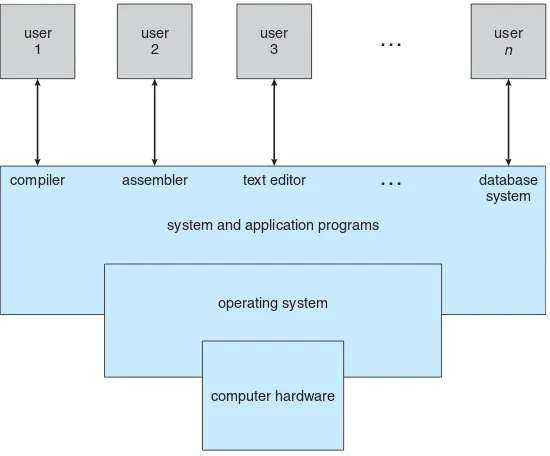
Figure 1.1 Abstract view of the components of a computer system.
1.1
What Operating Systems Do
We begin our discussion by looking at the operating system’s role in the overall computer system. A computer system can be divided roughly into four components: thehardware,theoperating system, theapplication programs,
and theusers(Figure 1.1).
Thehardware—thecentral processing unit(CPU), thememory, and the input/output(I/O)devices—provides the basic computing resources for the system. Theapplication programs—such as word processors, spreadsheets, compilers, and Web browsers—define the ways in which these resources are used to solve users’ computing problems. The operating system controls the hardware and coordinates its use among the various application programs for the various users.
We can also view a computer system as consisting of hardware, software, and data. The operating system provides the means for proper use of these resources in the operation of the computer system. An operating system is similar to a government. Like a government, it performs no useful function by itself. It simply provides anenvironmentwithin which other programs can do useful work.
To understand more fully the operating system’s role, we next explore operating systems from two viewpoints: that of the user and that of the system.
1.1.1 User View
1.1 What Operating Systems Do 5
to monopolize its resources. The goal is to maximize the work (or play) that the user is performing. In this case, the operating system is designed mostly for ease of use, with some attention paid to performance and none paid toresource utilization—how various hardware and software resources are shared. Performance is, of course, important to the user; but such systems are optimized for the single-user experience rather than the requirements of multiple users.
In other cases, a user sits at a terminal connected to a mainframe or a minicomputer. Other users are accessing the same computer through other terminals. These users share resources and may exchange information. The operating system in such cases is designed to maximize resource utilization— to assure that all availableCPUtime, memory, andI/Oare used efficiently and that no individual user takes more than her fair share.
In still other cases, users sit at workstations connected to networks of other workstations and servers. These users have dedicated resources at their disposal, but they also share resources such as networking and servers, including file, compute, and print servers. Therefore, their operating system is designed to compromise between individual usability and resource utilization. Recently, many varieties of mobile computers, such as smartphones and tablets, have come into fashion. Most mobile computers are standalone units for individual users. Quite often, they are connected to networks through cellular or other wireless technologies. Increasingly, these mobile devices are replacing desktop and laptop computers for people who are primarily interested in using computers for e-mail and web browsing. The user interface for mobile computers generally features atouch screen, where the user interacts with the system by pressing and swiping fingers across the screen rather than using a physical keyboard and mouse.
Some computers have little or no user view. For example, embedded computers in home devices and automobiles may have numeric keypads and may turn indicator lights on or off to show status, but they and their operating systems are designed primarily to run without user intervention.
1.1.2 System View
From the computer’s point of view, the operating system is the program most intimately involved with the hardware. In this context, we can view an operating system as a resource allocator. A computer system has many resources that may be required to solve a problem:CPUtime, memory space, file-storage space,I/O devices, and so on. The operating system acts as the manager of these resources. Facing numerous and possibly conflicting requests for resources, the operating system must decide how to allocate them to specific programs and users so that it can operate the computer system efficiently and fairly. As we have seen, resource allocation is especially important where many users access the same mainframe or minicomputer.
1.1.3 Defining Operating Systems
By now, you can probably see that the termoperating systemcovers many roles and functions. That is the case, at least in part, because of the myriad designs and uses of computers. Computers are present within toasters, cars, ships, spacecraft, homes, and businesses. They are the basis for game machines, music players, cableTVtuners, and industrial control systems. Although computers have a relatively short history, they have evolved rapidly. Computing started as an experiment to determine what could be done and quickly moved to fixed-purpose systems for military uses, such as code breaking and trajectory plotting, and governmental uses, such as census calculation. Those early computers evolved into general-purpose, multifunction mainframes, and that’s when operating systems were born. In the 1960s,Moore’s Lawpredicted that the number of transistors on an integrated circuit would double every eighteen months, and that prediction has held true. Computers gained in functionality and shrunk in size, leading to a vast number of uses and a vast number and variety of operating systems. (See Chapter 20 for more details on the history of operating systems.)
How, then, can we define what an operating system is? In general, we have no completely adequate definition of an operating system. Operating systems exist because they offer a reasonable way to solve the problem of creating a usable computing system. The fundamental goal of computer systems is to execute user programs and to make solving user problems easier. Computer hardware is constructed toward this goal. Since bare hardware alone is not particularly easy to use, application programs are developed. These programs require certain common operations, such as those controlling theI/Odevices. The common functions of controlling and allocating resources are then brought together into one piece of software: the operating system.
In addition, we have no universally accepted definition of what is part of the operating system. A simple viewpoint is that it includes everything a vendor ships when you order“the operating system.”The features included, however, vary greatly across systems. Some systems take up less than a megabyte of space and lack even a full-screen editor, whereas others require gigabytes of space and are based entirely on graphical windowing systems. A more common definition, and the one that we usually follow, is that the operating system is the one program running at all times on the computer—usually called the kernel. (Along with the kernel, there are two other types of programs: system programs, which are associated with the operating system but are not necessarily part of the kernel, and application programs, which include all programs not associated with the operation of the system.)
The matter of what constitutes an operating system became increasingly important as personal computers became more widespread and operating systems grew increasingly sophisticated. In 1998, the United States Department of Justice filed suit against Microsoft, in essence claiming that Microsoft included too much functionality in its operating systems and thus prevented application vendors from competing. (For example, a Web browser was an integral part of the operating systems.) As a result, Microsoft was found guilty of using its operating-system monopoly to limit competition.
1.2 Computer-System Organization 7
is increasing. Mobile operating systems often include not only a core kernel but alsomiddleware—a set of software frameworks that provide additional services to application developers. For example, each of the two most promi-nent mobile operating systems—Apple’s iOSand Google’s Android—features a core kernel along with middleware that supports databases, multimedia, and graphics (to name a only few).
1.2
Computer-System Organization
Before we can explore the details of how computer systems operate, we need general knowledge of the structure of a computer system. In this section, we look at several parts of this structure. The section is mostly concerned with computer-system organization, so you can skim or skip it if you already understand the concepts.
1.2.1 Computer-System Operation
A modern general-purpose computer system consists of one or more CPUs and a number of device controllers connected through a common bus that provides access to shared memory (Figure 1.2). Each device controller is in charge of a specific type of device (for example, disk drives, audio devices, or video displays). TheCPUand the device controllers can execute in parallel, competing for memory cycles. To ensure orderly access to the shared memory, a memory controller synchronizes access to the memory.
For a computer to start running—for instance, when it is powered up or rebooted—it needs to have an initial program to run. This initial program, or bootstrap program, tends to be simple. Typically, it is stored within the computer hardware in read-only memory (ROM) or electrically erasable programmable read-only memory (EEPROM), known by the general term firmware. It initializes all aspects of the system, fromCPUregisters to device controllers to memory contents. The bootstrap program must know how to load the operating system and how to start executing that system. To accomplish
USB controller keyboard printer
mouse monitor
disks
graphics adapter disk
controller
memory CPU
on-line
user process executing CPU
I/O interrupt processing
I/O request
transfer done
I/O request
transfer done I/O
device idle
transferring
Figure 1.3 Interrupt timeline for a single process doing output.
this goal, the bootstrap program must locate the operating-system kernel and load it into memory.
Once the kernel is loaded and executing, it can start providing services to the system and its users. Some services are provided outside of the kernel, by system programs that are loaded into memory at boot time to becomesystem processes, orsystem daemonsthat run the entire time the kernel is running. OnUNIX, the first system process is“init,”and it starts many other daemons. Once this phase is complete, the system is fully booted, and the system waits for some event to occur.
The occurrence of an event is usually signaled by aninterruptfrom either the hardware or the software. Hardware may trigger an interrupt at any time by sending a signal to theCPU, usually by way of the system bus. Software may trigger an interrupt by executing a special operation called asystem call (also called amonitor call).
When the CPUis interrupted, it stops what it is doing and immediately transfers execution to a fixed location. The fixed location usually contains the starting address where the service routine for the interrupt is located. The interrupt service routine executes; on completion, the CPU resumes the interrupted computation. A timeline of this operation is shown in Figure 1.3.
1.2 Computer-System Organization 9
STORAGE DEFINITIONS AND NOTATION
The basic unit of computer storage is thebit. A bit can contain one of two values, 0 and 1. All other storage in a computer is based on collections of bits. Given enough bits, it is amazing how many things a computer can represent: numbers, letters, images, movies, sounds, documents, and programs, to name a few. Abyteis 8 bits, and on most computers it is the smallest convenient chunk of storage. For example, most computers don’t have an instruction to move a bit but do have one to move a byte. A less common term isword, which is a given computer architecture’s native unit of data. A word is made up of one or more bytes. For example, a computer that has 64-bit registers and 64-bit memory addressing typically has 64-bit (8-byte) words. A computer executes many operations in its native word size rather than a byte at a time. Computer storage, along with most computer throughput, is generally measured and manipulated in bytes and collections of bytes. Akilobyte, or KB, is 1,024 bytes; amegabyte, orMB, is 1,0242 bytes; agigabyte, orGB, is 1,0243bytes; aterabyte, orTB, is 1,0244bytes; and apetabyte, orPB, is 1,0245 bytes. Computer manufacturers often round off these numbers and say that a megabyte is 1 million bytes and a gigabyte is 1 billion bytes. Networking measurements are an exception to this general rule; they are given in bits (because networks move data a bit at a time).
the interrupting device. Operating systems as different as Windows andUNIX
dispatch interrupts in this manner.
The interrupt architecture must also save the address of the interrupted instruction. Many old designs simply stored the interrupt address in a fixed location or in a location indexed by the device number. More recent architectures store the return address on the system stack. If the interrupt routine needs to modify the processor state—for instance, by modifying register values—it must explicitly save the current state and then restore that state before returning. After the interrupt is serviced, the saved return address is loaded into the program counter, and the interrupted computation resumes as though the interrupt had not occurred.
1.2.2 Storage Structure
TheCPUcan load instructions only from memory, so any programs to run must be stored there. General-purpose computers run most of their programs from rewritable memory, called main memory (also calledrandom-access memory, or RAM). Main memory commonly is implemented in a semiconductor technology calleddynamic random-access memory(DRAM).
All forms of memory provide an array of bytes. Each byte has its own address. Interaction is achieved through a sequence of load or store instructions to specific memory addresses. Theloadinstruction moves a byte or word from main memory to an internal register within theCPU, whereas the storeinstruction moves the content of a register to main memory. Aside from explicit loads and stores, theCPUautomatically loads instructions from main memory for execution.
A typical instruction–execution cycle, as executed on a system with avon Neumann architecture, first fetches an instruction from memory and stores that instruction in the instruction register. The instruction is then decoded and may cause operands to be fetched from memory and stored in some internal register. After the instruction on the operands has been executed, the result may be stored back in memory. Notice that the memory unit sees only a stream of memory addresses. It does not know how they are generated (by the instruction counter, indexing, indirection, literal addresses, or some other means) or what they are for (instructions or data). Accordingly, we can ignore
howa memory address is generated by a program. We are interested only in the sequence of memory addresses generated by the running program.
Ideally, we want the programs and data to reside in main memory permanently. This arrangement usually is not possible for the following two reasons:
1. Main memory is usually too small to store all needed programs and data permanently.
2. Main memory is avolatile storage device that loses its contents when power is turned off or otherwise lost.
Thus, most computer systems providesecondary storage as an extension of main memory. The main requirement for secondary storage is that it be able to hold large quantities of data permanently.
The most common secondary-storage device is a magnetic disk, which provides storage for both programs and data. Most programs (system and application) are stored on a disk until they are loaded into memory. Many programs then use the disk as both the source and the destination of their processing. Hence, the proper management of disk storage is of central importance to a computer system, as we discuss in Chapter 10.
In a larger sense, however, the storage structure that we have described— consisting of registers, main memory, and magnetic disks—is only one of many possible storage systems. Others include cache memory, CD-ROM, magnetic tapes, and so on. Each storage system provides the basic functions of storing a datum and holding that datum until it is retrieved at a later time. The main differences among the various storage systems lie in speed, cost, size, and volatility.
1.2 Computer-System Organization 11
registers
cache
main memory
solid-state disk
magnetic disk
optical disk
magnetic tapes
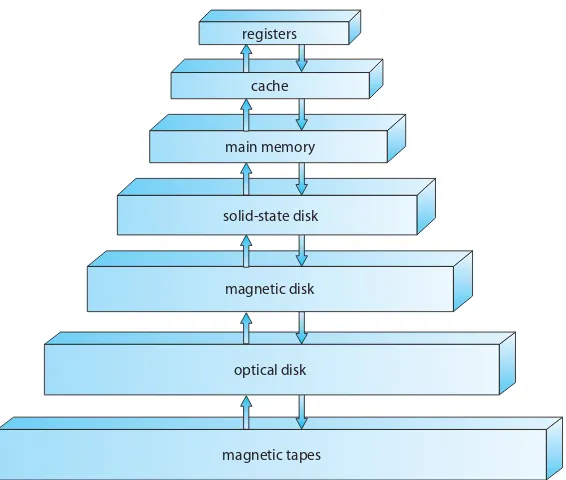
Figure 1.4 Storage-device hierarchy.
tape and core memories, are relegated to museums now that magnetic tape and semiconductor memoryhave become faster and cheaper. The top four levels of memory in Figure 1.4 may be constructed using semiconductor memory.
In addition to differing in speed and cost, the various storage systems are either volatile or nonvolatile. As mentioned earlier,volatile storageloses its contents when the power to the device is removed. In the absence of expensive battery and generator backup systems, data must be written to nonvolatile storage for safekeeping. In the hierarchy shown in Figure 1.4, the storage systems above the solid-state disk are volatile, whereas those including the solid-state disk and below are nonvolatile.
Solid-state disks have several variants but in general are faster than magnetic disks and are nonvolatile. One type of solid-state disk stores data in a largeDRAMarray during normal operation but also contains a hidden magnetic hard disk and a battery for backup power. If external power is interrupted, this solid-state disk’s controller copies the data fromRAM to the magnetic disk. When external power is restored, the controller copies the data back intoRAM. Another form of solid-state disk is flash memory, which is popular in cameras andpersonal digital assistants(PDAs), in robots, and increasingly for storage on general-purpose computers. Flash memory is slower thanDRAMbut needs no power to retain its contents. Another form of nonvolatile storage isNVRAM, which is DRAM with battery backup power. This memory can be as fast as
DRAMand (as long as the battery lasts) is nonvolatile.
be installed to improve performance where a large disparity in access time or transfer rate exists between two components.
1.2.3 I/O Structure
Storage is only one of many types ofI/Odevices within a computer. A large portion of operating system code is dedicated to managingI/O, both because of its importance to the reliability and performance of a system and because of the varying nature of the devices. Next, we provide an overview ofI/O.
A general-purpose computer system consists ofCPUs and multiple device controllers that are connected through a common bus. Each device controller is in charge of a specific type of device. Depending on the controller, more than one device may be attached. For instance, seven or more devices can be attached to thesmall computer-systems interface(SCSI)controller. A device controller maintains some local buffer storage and a set of special-purpose registers. The device controller is responsible for moving the data between the peripheral devices that it controls and its local buffer storage. Typically, operating systems have adevice driverfor each device controller. This device driver understands the device controller and provides the rest of the operating system with a uniform interface to the device.
To start anI/Ooperation, the device driver loads the appropriate registers within the device controller. The device controller, in turn, examines the contents of these registers to determine what action to take (such as “read a character from the keyboard”). The controller starts the transfer of data from the device to its local buffer. Once the transfer of data is complete, the device controller informs the device driver via an interrupt that it has finished its operation. The device driver then returns control to the operating system, possibly returning the data or a pointer to the data if the operation was a read. For other operations, the device driver returns status information.
This form of interrupt-drivenI/Ois fine for moving small amounts of data but can produce high overhead when used for bulk data movement such as disk
I/O. To solve this problem,direct memory access(DMA)is used. After setting up buffers, pointers, and counters for the I/O device, the device controller transfers an entire block of data directly to or from its own buffer storage to memory, with no intervention by theCPU. Only one interrupt is generated per block, to tell the device driver that the operation has completed, rather than the one interrupt per byte generated for low-speed devices. While the device controller is performing these operations, the CPUis available to accomplish other work.
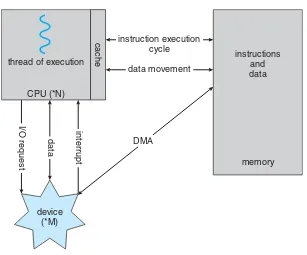
Some high-end systems use switch rather than bus architecture. On these systems, multiple components can talk to other components concurrently, rather than competing for cycles on a shared bus. In this case,DMAis even more effective. Figure 1.5 shows the interplay of all components of a computer system.
1.3
Computer-System Architecture
1.3 Computer-System Architecture 13
thread of execution instructionsand
data instruction execution
cycle
data movement
DMA
memory
interrupt
cache
data
I/O request
CPU (*N)
device (*M)
Figure 1.5 How a modern computer system works.
can categorize roughly according to the number of general-purpose processors used.
1.3.1 Single-Processor Systems
Until recently, most computer systems used a single processor. On a single-processor system, there is one mainCPUcapable of executing a general-purpose instruction set, including instructions from user processes. Almost all single-processor systems have other special-purpose single-processors as well. They may come in the form of device-specific processors, such as disk, keyboard, and graphics controllers; or, on mainframes, they may come in the form of more general-purpose processors, such as I/O processors that move data rapidly among the components of the system.
a multiprocessor. If there is only one general-purposeCPU, then the system is a single-processor system.
1.3.2 Multiprocessor Systems
Within the past several years,multiprocessor systems(also known asparallel systems or multicore systems) have begun to dominate the landscape of computing. Such systems have two or more processors in close communication, sharing the computer bus and sometimes the clock, memory, and peripheral devices. Multiprocessor systems first appeared prominently appeared in servers and have since migrated to desktop and laptop systems. Recently, multiple processors have appeared on mobile devices such as smartphones and tablet computers.
Multiprocessor systems have three main advantages:
1. Increased throughput. By increasing the number of processors, we expect to get more work done in less time. The speed-up ratio withNprocessors is not N, however; rather, it is less than N. When multiple processors cooperate on a task, a certain amount of overhead is incurred in keeping all the parts working correctly. This overhead, plus contention for shared resources, lowers the expected gain from additional processors. Similarly,
N programmers working closely together do not produceN times the amount of work a single programmer would produce.
2. Economy of scale. Multiprocessor systems can cost less than equivalent multiple single-processor systems, because they can share peripherals, mass storage, and power supplies. If several programs operate on the same set of data, it is cheaper to store those data on one disk and to have all the processors share them than to have many computers with local disks and many copies of the data.
3. Increased reliability. If functions can be distributed properly among several processors, then the failure of one processor will not halt the system, only slow it down. If we have ten processors and one fails, then each of the remaining nine processors can pick up a share of the work of the failed processor. Thus, the entire system runs only 10 percent slower, rather than failing altogether.
1.3 Computer-System Architecture 15
is restarted. This solution is expensive, since it involves special hardware and considerable hardware duplication.
The multiple-processor systems in use today are of two types. Some systems useasymmetric multiprocessing, in which each processor is assigned a specific task. Abossprocessor controls the system; the other processors either look to the boss for instruction or have predefined tasks. This scheme defines a boss–worker relationship. The boss processor schedules and allocates work to the worker processors.
The most common systems use symmetric multiprocessing (SMP), in which each processor performs all tasks within the operating system. SMP
means that all processors are peers; no boss–worker relationship exists between processors. Figure 1.6 illustrates a typical SMP architecture. Notice that each processor has its own set of registers, as well as a private—or local —cache. However, all processors share physical memory. An example of an
SMP system isAIX, a commercial version of UNIX designed by IBM. An AIX
system can be configured to employ dozens of processors. The benefit of this model is that many processes can run simultaneously—N processes can run if there areNCPUs—without causing performance to deteriorate significantly. However, we must carefully control I/O to ensure that the data reach the appropriate processor. Also, since theCPUs are separate, one may be sitting idle while another is overloaded, resulting in inefficiencies. These inefficiencies can be avoided if the processors share certain data structures. A multiprocessor system of this form will allow processes and resources—such as memory— to be shared dynamically among the various processors and can lower the variance among the processors. Such a system must be written carefully, as we shall see in Chapter 5. Virtually all modern operating systems—including Windows, MacOS X, and Linux—now provide support forSMP.
The difference between symmetric and asymmetric multiprocessing may result from either hardware or software. Special hardware can differentiate the multiple processors, or the software can be written to allow only one boss and multiple workers. For instance, Sun Microsystems’ operating systemSunOS
Version 4 provided asymmetric multiprocessing, whereas Version 5 (Solaris) is symmetric on the same hardware.
Multiprocessing addsCPUs to increase computing power. If theCPUhas an integrated memory controller, then addingCPUs can also increase the amount
CPU0
registers
cache
CPU1
registers
cache
CPU2
registers
cache
memory
of memory addressable in the system. Either way, multiprocessing can cause a system to change its memory access model from uniform memory access (UMA) to non-uniform memory access (NUMA).UMAis defined as the situation in which access to anyRAMfrom anyCPUtakes the same amount of time. With
NUMA, some parts of memory may take longer to access than other parts, creating a performance penalty. Operating systems can minimize theNUMA
penalty through resource management, as discussed in Section 9.5.4.
A recent trend in CPU design is to include multiple computing cores on a single chip. Such multiprocessor systems are termed multicore. They can be more efficient than multiple chips with single cores because on-chip communication is faster than between-chip communication. In addition, one chip with multiple cores uses significantly less power than multiple single-core chips.
It is important to note that while multicore systems are multiprocessor systems, not all multiprocessor systems are multicore, as we shall see in Section 1.3.3. In our coverage of multiprocessor systems throughout this text, unless we state otherwise, we generally use the more contemporary termmulticore, which excludes some multiprocessor systems.
In Figure 1.7, we show a dual-core design with two cores on the same chip. In this design, each core has its own register set as well as its own local cache. Other designs might use a shared cache or a combination of local and shared caches. Aside from architectural considerations, such as cache, memory, and bus contention, these multicoreCPUs appear to the operating system as
N standard processors. This characteristic puts pressure on operating system designers—and application programmers—to make use of those processing cores.
Finally,blade serversare a relatively recent development in which multiple processor boards,I/Oboards, and networking boards are placed in the same chassis. The difference between these and traditional multiprocessor systems is that each blade-processor board boots independently and runs its own operating system. Some blade-server boards are multiprocessor as well, which blurs the lines between types of computers. In essence, these servers consist of multiple independent multiprocessor systems.
CPU core0
registers
cache
CPU core1
registers
cache
memory
1.3 Computer-System Architecture 17
1.3.3 Clustered Systems
Another type of multiprocessor system is aclustered system, which gathers together multiple CPUs. Clustered systems differ from the multiprocessor systems described in Section 1.3.2 in that they are composed of two or more individual systems—or nodes—joined together. Such systems are considered loosely coupled. Each node may be a single processor system or a multicore system. We should note that the definition ofclusteredis not concrete; many commercial packages wrestle to define a clustered system and why one form is better than another. The generally accepted definition is that clustered computers share storage and are closely linked via a local-area networkLAN
(as described in Chapter 17) or a faster interconnect, such as InfiniBand. Clustering is usually used to providehigh-availability service—that is, service will continue even if one or more systems in the cluster fail. Generally, we obtain high availability by adding a level of redundancy in the system. A layer of cluster software runs on the cluster nodes. Each node can monitor one or more of the others (over the LAN). If the monitored machine fails, the monitoring machine can take ownership of its storage and restart the applications that were running on the failed machine. The users and clients of the applications see only a brief interruption of service.
Clustering can be structured asymmetrically or symmetrically. In asym-metric clustering, one machine is in hot-standby mode while the other is running the applications. The hot-standby host machine does nothing but monitor the active server. If that server fails, the hot-standby host becomes the active server. In symmetric clustering, two or more hosts are running applications and are monitoring each other. This structure is obviously more efficient, as it uses all of the available hardware. However it does require that more than one application be available to run.
Since a cluster consists of several computer systems connected via a network, clusters can also be used to providehigh-performance computing environments. Such systems can supply significantly greater computational power than single-processor or even SMP systems because they can run an application concurrently on all computers in the cluster. The application must have been written specifically to take advantage of the cluster, however. This involves a technique known asparallelization, which divides a program into separate components that run in parallel on individual computers in the cluster. Typically, these applications are designed so that once each computing node in the cluster has solved its portion of the problem, the results from all the nodes are combined into a final solution.
BEOWULF CLUSTERS
Beowulf clusters are designed to solve high-performance computing tasks. A Beowulf cluster consists of commodity hardware — such as personal computers— connected via a simple local-area network. No single specific software package is required to construct a cluster. Rather, the nodes use a set of open-source software libraries to communicate with one another. Thus, there are a variety of approaches to constructing a Beowulf cluster. Typically, though, Beowulf computing nodes run the Linux operating system. Since Beowulf clusters require no special hardware and operate using open-source software that is available free, they offer a low-cost strategy for building a high-performance computing cluster. In fact, some Beowulf clusters built from discarded personal computers are using hundreds of nodes to solve computationally expensive scientific computing problems.
ensure that no conflicting operations occur. This function, commonly known as adistributed lock manager(DLM), is included in some cluster technology.
Cluster technology is changing rapidly. Some cluster products support dozens of systems in a cluster, as well as clustered nodes that are separated by miles. Many of these improvements are made possible by storage-area networks (SANs), as described in Section 10.3.3, which allow many systems to attach to a pool of storage. If the applications and their data are stored on the SAN, then the cluster software can assign the application to run on any host that is attached to theSAN. If the host fails, then any other host can take over. In a database cluster, dozens of hosts can share the same database, greatly increasing performance and reliability. Figure 1.8 depicts the general structure of a clustered system.
computer interconnect computer interconnect computer
storage area network
1.4 Operating-System Structure 19
job 1 0
Max
operating system
job 2
job 3
job 4
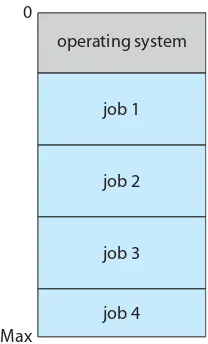
Figure 1.9 Memory layout for a multiprogramming system.
1.4
Operating-System Structure
Now that we have discussed basic computer-system organization and archi-tecture, we are ready to talk about operating systems. An operating system provides the environment within which programs are executed. Internally, operating systems vary greatly in their makeup, since they are organized along many different lines. There are, however, many commonalities, which we consider in this section.
One of the most important aspects of operating systems is the ability to multiprogram. A single program cannot, in general, keep either the CPU
or the I/O devices busy at all times. Single users frequently have multiple programs running.MultiprogrammingincreasesCPUutilization by organizing jobs (code and data) so that theCPUalways has one to execute.
The idea is as follows: The operating system keeps several jobs in memory simultaneously (Figure 1.9). Since, in general, main memory is too small to accommodate all jobs, the jobs are kept initially on the disk in thejob pool. This pool consists of all processes residing on disk awaiting allocation of main memory.
The set of jobs in memory can be a subset of the jobs kept in the job pool. The operating system picks and begins to execute one of the jobs in memory. Eventually, the job may have to wait for some task, such as an I/O
operation, to complete. In a non-multiprogrammed system, theCPUwould sit idle. In a multiprogrammed system, the operating system simply switches to, and executes, another job. Whenthatjob needs to wait, theCPUswitches to
anotherjob, and so on. Eventually, the first job finishes waiting and gets the
Multiprogrammed systems provide an environment in which the various system resources (for example, CPU, memory, and peripheral devices) are utilized effectively, but they do not provide for user interaction with the computer system. Time sharing (or multitasking) is a logical extension of multiprogramming. In time-sharing systems, the CPUexecutes multiple jobs by switching among them, but the switches occur so frequently that the users can interact with each program while it is running.
Time sharing requires an interactive computer system, which provides direct communication between the user and the system. The user gives instructions to the