University of New Orleans University of New Orleans
ScholarWorks@UNO
ScholarWorks@UNO
University of New Orleans Theses and
Dissertations Dissertations and Theses
5-14-2010
High-Level Test-Driven Learning Using Web Application and Web
High-Level Test-Driven Learning Using Web Application and Web
Service
Service
Se Hun Oh
University of New Orleans
Follow this and additional works at: https://scholarworks.uno.edu/td
Recommended Citation Recommended Citation
Oh, Se Hun, "High-Level Test-Driven Learning Using Web Application and Web Service" (2010). University of New Orleans Theses and Dissertations. 1124.
https://scholarworks.uno.edu/td/1124
This Thesis is protected by copyright and/or related rights. It has been brought to you by ScholarWorks@UNO with permission from the rights-holder(s). You are free to use this Thesis in any way that is permitted by the copyright and related rights legislation that applies to your use. For other uses you need to obtain permission from the rights-holder(s) directly, unless additional rights are indicated by a Creative Commons license in the record and/or on the work itself.
High-Level Test-Driven Learning Using Web Application and Web Service
A Thesis
Submitted to the Graduate Faculty of the University of New Orleans in partial fulfillment of the requirements for the degree of
Master of Science in
Computer Science
by
Se Hun Oh
B.S. University of New Orleans, 2006
ii
To Mom, Dad, and Se Jin.
iii
Acknowledgements
My thesis advisor, Dr. Shengru Tu, has been an invaluable help throughout my computer science
career. If it was not for his advice and guidance, I would not have been able to finish this thesis. I
greatly thank him for always encouraging me to strive to be the best.
I would like to thank Dr. Adlai DePano and Dr. Vassil Roussev for being a part of my thesis
committee. I have learned so much from them throughout my computer science career.
I would also like to thank my friends for their help, support, and encouragement.
Lastly, but more importantly, I would like to thank my family for offering me unconditional love
iv
Table of Contents
List of Figures ...v
Abstract ... vii
1. Introduction ...1
2. Background: High-Level Test-Driven Learning ...3
2.1 Test-driven learning cases ...4
3. Development of Underlying Systems ...6
3.1 Purchase Order System ...6
3.2 Purchase Order System with Distribution Service ...7
3.3 Loan Approval System ...8
3.4 Loan Approval System with Credit Score Evaluation Service ...9
4. Turning Production Systems to Learning Systems ...11
4.1 Duplicating Working Components and Planting “Bugs” ...11
4.2 Learner’s Corner – Students’ Observation Tools ...18
5. High-Level Test-Driven Learning Case Examples ...27
5.1 Purchase Order System ...27
5.2 PO System with Distribution Service Learning Case Example ...38
5.3 Loan Approval System ...49
5.4 Loan Approval System with Credit Score Learning Case Example ...57
6. Discussion and conclusion ...67
7. References ...68
v
List of Figures
Figure 3.1: The communication diagram of the PO system ...7
Figure 3.2: The communication diagram of the PO system with a distribution service ...8
Figure 3.3: The communication diagram of the Loan Approval System ...9
Figure 3.4.1: The communication diagram of the Loan Approval System with CS ...10
Figure 3.4.2: Breakdown of the credit score ...10
Figure 4.1.1: iMac bug ...12
Figure 4.1.2: iPhone bug ...13
Figure 4.1.3: iPod nano bug ...13
Figure 4.1.4: iPod classic bug ...14
Figure 4.1.5: Mac OS X bug ...14
Figure 4.1.6: Chasel loan application bug ...15
Figure 4.1.7: Bank of State loan application bug...15
Figure 4.1.8: JavaScript function for allowing only numbers ...16
Figure 4.1.9: Error caused by missing requested resource ...16
Figure 4.1.10: JavaScript function to ensure there is no missing value ...17
Figure 4.2.1: System structure diagram ...18
Figure 4.2.2: Example of ActionScript used to make a clickable icon ...19
Figure 4.2.3: Detailed view of data flow in a Web Server ...19
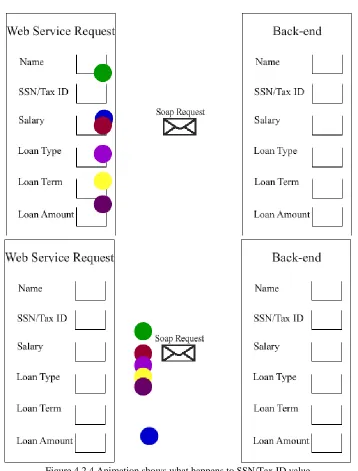
Figure 4.2.4: Animation shows what happens to SSN/Tax ID value ...20
Figure 4.2.5: ActionScript using FlashVars ...21
vi
Figure 4.2.7: JSP page displaying the actual data passed by systems ...22
Figure 4.2.8: Quiz provided by the system ...22
Figure 4.2.9: Flash animation explaining the planted bug in Mac OS X...23
Figure 4.2.10: Flash animation brought up by “Show JSP code” ...24
Figure 4.2.11: Students can manually send SOAP requests ...25
Figure 4.2.12: SOAP messages are available to students ...25
Figure 4.2.13: Modified stub files to store SOAP messages ...26
vii Abstract
In order to introduce learning cases with real-world contexts to the Computer Science
students in their early stage of learning, a set of Web applications that utilize Web services are
simplified and customized to demonstrate the core concept of high-level test-driven learning
methodology. Four e-commerce Web applications were implemented for this project. These
applications show how real-world Web services work and interact with each other. By
systematically planting a number of errors into the services, we created a learning environment
for the students to understand the system structure and basic programming through their critical
thinking. A goal is to keep students’ interest in computer science. In doing so, a set of features
that help students observe the systems’ behavior are designed, and collectively formed a pattern
of user interface – “the Learner’s Corner.”
Keyword
1
1. Introduction
Over the last decade, there has been a steady nationwide decline in computer science
student enrollment which poses a significant challenge to the nation’s leading position in the
global high-technology arena [1]. This decline in enrollment may have to do with saturated use
of simple and unrealistic examples, such as counting animals, cyber pets, or tic-tac-toe games,
that have made CS1 and CS2 students bored. One of the efforts of CS education community to
remedy this situation is the push for presenting abstract CS concepts in the context of familiar
real-world applications [2]. This approach answers the question “what is it useful for,” which
many computing students ask before they commit to the Computer Science major [3]. However,
some difficulties of this solution are that real-world applications are complicated, and developing
these applications requires years of learning.
A high-level test-driven learning (HTDL) model is proposed which facilitates students’
involvement in real-world computing tasks starting from their early computing courses and
continuing throughout their entire computing studies. The main purpose of the HTDL model is to
enrich the context of lessons, courses, and the CS programs, especially in the early stage of
students’ learning. Here, context refers to the framework in which the learning of computing is
embedded. The notion of context is important from a motivational and educational perspective.
By applying a suitable context, students may be motivated to invest efforts and energy in their
work. In the traditional CS teaching practice, the real-world problems are not brought into
classrooms until the senior-level CS courses. This is because the technical prerequisites of
construction of complex systems include many courses such as CS1 and CS2. In contrast, testing
only requires comprehension and analysis rather than synthesis (design, implementation).
2
tackling the real-world problems. A goal of the HTDL model is to expose the novice students to
working software systems that serve a real-world purpose such as scientific research, engineering
3
2. Background: High-Level Test-Driven Learning
The HTDL model is inspired by the “explanation test” and the “learning test” testing
patterns proposed by Beck [4]. HTDL emphasizes concrete cases and encourages hands-on
activities which have been proven to be effective in triggering students’ critical thinking. By
incorporating the core programming syntax, semantics, and algorithms into high-level test-driven
learning cases, HTDL can offer a pain-free introduction and learning experiences of difficult
concepts or algorithms to not only computing students at any level but also industry
professionals. Also, the HTDL bounds students to real-world challenges, which allows them to
see their future roles in real world projects in areas such as enterprise Web applications and Web
services, e-commerce, geographical information systems, and virtually any other field. By
following a set of given test cases and detecting bugs for a given system, the students carry out
logical derivation based on a model of the system. Furthermore, HTDL offers the students to get
familiar with objects, components, and services that build up a system through numerous
interactive testing of the system. For these reasons, HTDL can be a valuable resource in assisting
students taking in-classroom classes and online courses where the interaction between a teacher
and students is not as freely as a traditional, in-classroom course.
Teaching programming concepts and software design can be challenging without a well
structured learn-by-example process. In an ideal high-level test-driven learning process, the
students begin the process by reading the functional description of the subject system. A
simplified functional specification of the subject system can serve this purpose well. After
getting a basic idea of the system, the students can execute the program and interact with the
system as a user. In doing so, they familiarize themselves with the subject system. Then, the
4
at a high level such as those for system acceptance tests or for integration tests. The students
must document the testing results. A test detects a potential problem when the result is different
from the expected output. In this case, the students are encouraged to create new test cases. For
every new test case, the student must document the basic information, e.g., the input and the
output, as well as a justification stating the purpose and the reason for the new test case. Before
carrying out the new test, the students are quizzed with multiple-choice questions which
encourage them to find “what’s wrong” with the system. After successfully defining the problem,
the students are challenged to find the “bug.” Locating the planted bug requires critical thinking
and problem solving skills which trigger and expedite the students’ understanding of the
underlying system. To assist the students in finding the bug, a collection of facilities are provided
including system structure diagrams, data flow observers, illustrations of component structure
drill down, as well as a code inspection panel. For some complex components with a planted bug,
an animation that points out the problematic code is prepared. For the novice students, the
granularity of the question is at a coarse level. That is, they are asked to point out the problematic
subsystem or component rather than the program line numbers of the bug. The code inspection is
for advanced students, with which the students are expected to point out the problematic method
or the statement.
2.1 High-Level Test-Driven Learning Cases
To optimize the effect of high-level test-driven learning, it is crucial to have well planned
learning cases which are configured to support each HTDL activity. A high-level test-driven
learning case requires a working system with intuitive user interfaces for users to interact with
the components and objects. The learning case should also provide simplified specifications of
5
including intuitive explanation of the business rules and solution logic. The user guide of the
system and test cases consisting of input data and expected output should be part of the learning
6
3. Development of Underlying Systems
Four e-commerce Web applications which mimic real-world applications have been
implemented for this project. Two of these applications model an online shopping Web
application like that of Amazon.com. The other two e-commerce Web applications model online
loan approval applications like the one used by JPMorgan Chasel. Each system will be discussed
in detail in the following sections.
3.1 Purchase Order System
A simplified purchase order system was chosen as one of the underlying systems for
HTDL. This system is simple and intuitive yet indicative of the way the real-world Web services
interact. Hence, purchase order systems are used in numerous case studies and technical articles
about Web services [5]. Since most users will be familiar with the system, it will be easier for
them to understand and analyze the simplified purchase order system.
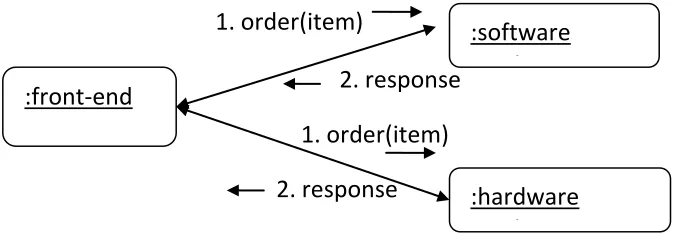
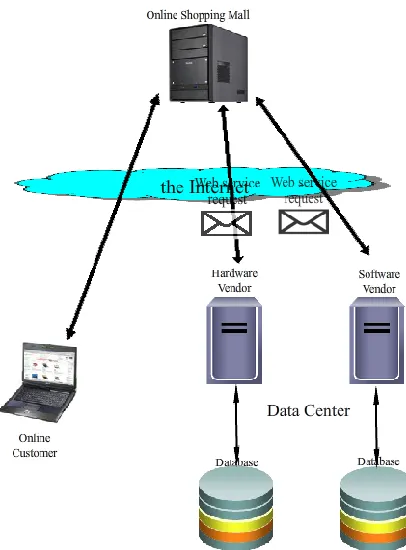
The simplified purchase order (PO) system, which is shown in Figure 3.1, is an overly
simplified PO system that sells merchandise from two vendors, software and hardware vendors.
The system consists of two Web services, which are a hardware service that only takes hardware
product orders and a software service that only takes software product orders. When a user
places an order, the front end accepts the order and forwards it to either software or hardware
system depending on the type of the order. When a hardware item such as MacBook or iPod
nano is ordered, the front end relays this purchase request to the hardware service (shown in Fig.
3.1). It is the front end’s job to determine which service to utilize. The orders are processed in
part by the front end. This, of course, is not used in the real-world applications because it places
7
existing Apple product names, descriptions, and prices are used to resemble a real-world system
and bring familiarity.
Figure 3.1 The communication diagram of the PO system
3.2 Purchase Order System with Distribution Service
To resemble more of the real-world shopping applications, a new and improved version
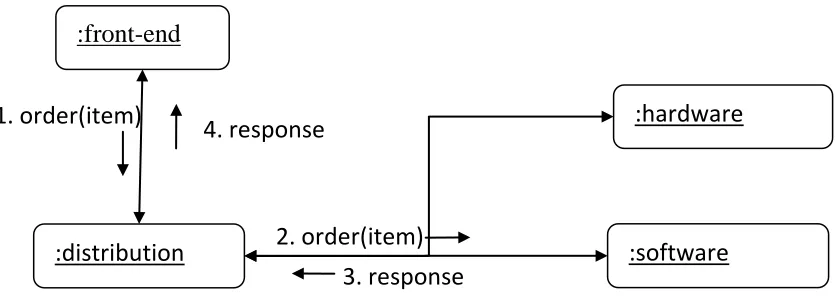
of the simplified purchase order system was implemented. The new PO system, which is shown
in Figure 3.2, introduces a PO distribution service which takes online orders and forwards them
to the correct service according to the type of the orders. In contrast to the online shopping site
#1, the new site does not require the front end to determining which service it needs to send the
orders. The front end simply relays the orders that it received to the PO distribution service. The
back end server running the PO distribution service then forwards the orders to either software or
hardware service. Both shopping sites store the processed purchase orders in a MySQL database
so they can be retrieved later.
:front-end
:software service
:hardware service 1. order(item)
2. response 1. order(item)
8
Figure 3.2 The communication diagram of the PO system with a distribution service
3.3 Loan Approval System
A loan approval system was chosen as a basic structural system for HTDL. Similar to the
simplified purchase systems previously mentioned, a loan approval system is widely used in case
studies because it is a good representation of the interaction between real-world Web services [5].
Loan approval systems are more complicated than the previously mentioned PO systems, but the
underlying logic is fairly simple and approachable for computing students. For these reasons, a
loan approval system is a good choice for HTDL test system.
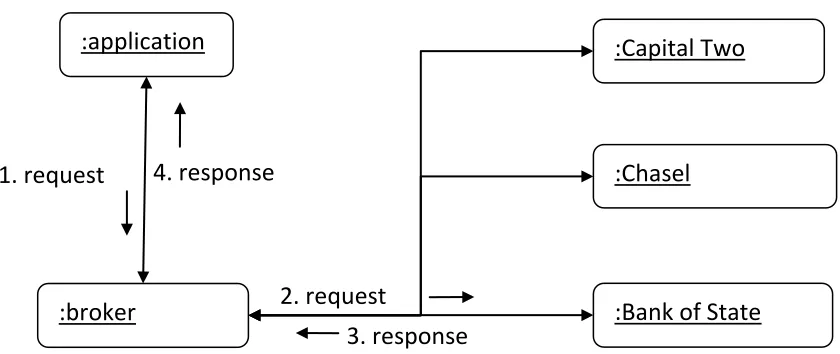
The loan approval system, which is shown in Figure 3.3, consists of four services, which
are: 1) a brokerage system which accepts applications for three banks that offer four lines of
credits, 2) a Capital Two loan approval system, 3) a Chasel loan approval system, and 4) a Bank
of State loan approval system. The system has loan applications for each bank. When a loan
application is submitted, the brokerage system takes the application information, generates a
SOAP request message, and sends it to the corresponding bank. The corresponding bank’s loan
approval system processes the application and sends a SOAP response which contains the
application’s result back to the brokerage system that relays the information back to the applicant.
Regardless of the approval results, the loan site #1 saves every application in a MySQL database.
:front-end
:distribution
:hardware service
:software 2. order(item)
3. response 4. response
9
Figure 3.3 The communication diagram of the Loan Approval System
3.4 Loan Approval System with Credit Score Evaluator Service
On top of the services provided by the previously mentioned loan approval system, the
new loan approval system, which is shown in Figure 3.4.1, offers one additional service, credit
score evaluator service, for checking the applicants’ credit scores that are used in loan approval
process. Since most widely used credit score formulas, such as FICO and the VantageScore, are
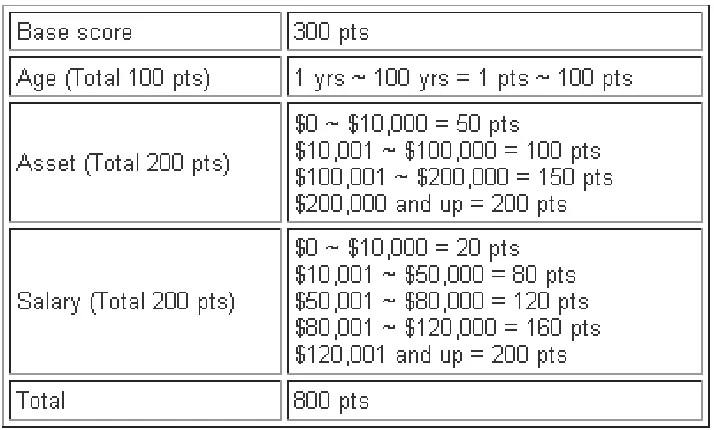
proprietary, a new credit score formula has been constructed for this project. The formula assigns
a score ranged from 300 to 800 based on the applicant’s age, asset, and salary. In order to be
considered for any type of loan, the applicant needs to have a score of at least 400. The credit
score used by the system ranges from 300 to 800. The detailed breakdown of the formula is
shown in Figure 3.4.2 and also available on the site under “Frequently Asked Questions (FAQ)”
section in the menu. When an application is submitted, the approval service corresponding to the
application’s bank sends a request to the credit score evaluator service for the applicant’s credit
score. The score evaluation service calculates the score based on the information provided and
returns the score to the approval service. Then, the approval service either approves or denies the
application and forwards its decision to the front end so the applicant can see the result. The
:application
:broker
:Capital Two
:Chasel
:Bank of State 2. request
3. response 4. response
10
system stores all of the applications that it receives. Each application can be retrieved by using
the “Look Up” menu on the site.
Figure 3.4.1. The communication diagram of the Loan Approval System with Credit Score Evaluator Service
Figure 3.4.2 Breakdown of the credit score :application
:broker
:Capital Two
:Chasel
:Bank of State 2. request
5. response 6. response
1. request
: Credit Score
11
4. Turning Production Systems to Learning Systems
In order to use the previously mentioned e-commerce Web applications for high-level
test-driven learning, numerous features have been added to support high-level test-driven
learning. The most notable change is the “bugs” that are intentionally planted in these
applications so that they would not work properly. Also, a new menu, “Learner’s Corner,” has
been constructed to assist the students with their HTDL test cases.
4.1 Duplicating Working Components and Planting “Bugs”
The four e-commerce Web applications were duplicated and modified by intentionally
injecting bugs. The purpose for these planted bugs is to challenge students to find them in
test-driven learning. The bugs are spread out and present from the front end to the back end. In order
to let students interact with properly working systems before they sail on the journey of finding
“bugs,” two items were left unchanged from each purchase order system, and one loan
application from each loan approval system was left unchanged. Students can use these working
Web applications as a guide and compare against the buggy Web applications. By doing so, they
will get a better idea of how real-world Web services and applications work.
When injecting “bugs,” finding ideal locations for these planted errors should be
determined based on learning objectives of the high-level test-driven learning cases. To be more
effective, the educational level of the target students should also be considered when finding
locations. For the two purchase order systems, their target students are beginners with very
minimal understanding of Web service. Therefore, it is necessary to make the systems
12
targeting at advanced students. Hence, “bugs” are placed according to their level, so the students
would not find the HTDL case too trivial.
The purchase order systems offer seven items that can be ordered. Two of these items,
MacBook and MacBook Pro, are left unchanged. “iMac”, “iPhone”, “iPod nano”, and “iPod
classic” contain “bugs” that are located in the front end where the information entered by the
students first get processed. To be more realistic, the bugs were picked carefully to represent
those that are frequently occurring in the real-world. For iMac, the college and name information
given by the users are swapped because it uses wrong variables to store the data (shown in Fig
4.1.1).
Figure 4.1.1 iMac bug – using wrong variables to store
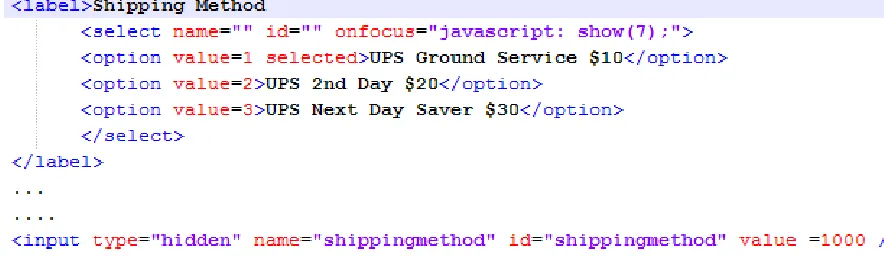
The planted bug for “iPhone” demonstrates a situation when a programmer forgets to remove a
hardcoded value that was used for testing. Therefore, this hardcoded test value overrides any
value entered by the users. In the case of “iPhone”, the quantity values from the users get
13
Figure 4.1.2 iPhone bug – a hardcoded test value overriding users’ inputs
The planted bug for “iPod nano” is similar to that of “iPhone”, but it has a hardcoded test value
for shipping methods, which is shown in Fig 4.1.3. For “iPod nano”, the college values from the
users do not get stored in a variable so when the variable is called, it returns null as its value
(shown in Fig 4.1.4). The planted bug for “Mac OS X” takes a different approach than the rest of
the bugs. Instead of placing the bug in the front end, it is placed in the Software Web service that
is utilized by “Mac OS X”. To calculate the order total amount before shipping, item price must
be multiplied by the number of items ordered. This calculation is done by the corresponding Web
service, and for “Mac OS X”, this calculated value is not used (shown in Fig 4.1.5). Therefore,
the users only pay for the price of one item regardless of the quantities requested.
14
Figure 4.1.4 iPod classic bug – not stored in a variable
Figure 4.1.5 Mac OS X bug – not using the calculated total
These bugs do not necessary play an important role in the actual exchanging of SOAP
messages between client and server, but they will teach the students how to properly handle and
process users’ information. By studying the PO systems, the students will understand the basic
structure of Web service and the way it operates. The two purchase order systems share the same
bugs which are planted in the same locations. The only difference between the two systems is the
available Web services which as described in Section 3.1 and 3.2.
The loan approval systems take loan applications for three banks, Capital Two, Chasel,
and Bank of State. Like “MacBook” and “MacBook Pro” of the PO systems, Capital Two loan
application is left unchanged for students to analyze. Since the loan approval systems are for
advanced students, the bugs in the loan approval systems are planted so that they deal with
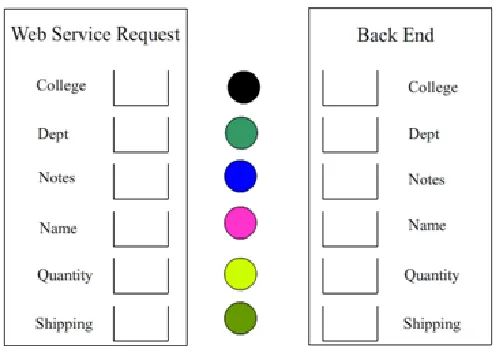
SOAP. For Chasel, the planted bug alters SOAP request messages by leaving out SSN/Tax ID
information when generating the SOAP messages (shown in Fig 4.1.6). For Bank of State, SOAP
request messages that are received by the Web services are valid, but the SOAP messages that
are returned by the Web services contain no value for SSN/Tax ID (shown in Fig 4.1.7). The two
planted bugs involve SSN/Tax ID, but one deals with SOAP messages sent to the Web services,
15
systems share the same bugs which are planted in the same location. They only differ in the Web
services it utilizes.
Figure 4.1.6 Chasel bug - SSN/Tax ID is missing from SOAP request messages
Figure 4.1.7 Bank of State bug – SSN/Tax ID is missing from SOAP response messages
Since the four e-commerce systems are used by students who will be testing the systems
vigorously, special care was given to address any exception that might arise by the systems.
Some required information that depends on users’ inputs only should take numbers, but this
cannot be done using HTML code. Therefore, a JavaScript function, which is shown in Fig 4.1.8,
16
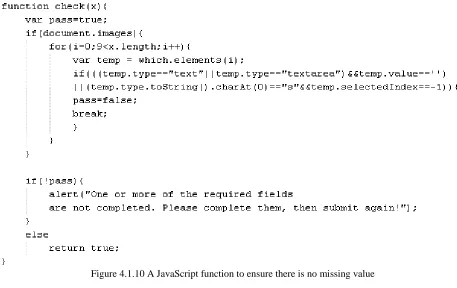
as shown in Fig 4.1.9, a JavaScript function (shown in Fig 4.1.10) was written to prevent PO
orders or loan applications from reviewing or submitting if any required value is missing.
Figure 4.1.8 JavaScript function for allowing only numbers
17
Figure 4.1.10 A JavaScript function to ensure there is no missing value
Instructors need to be able to track their students’ learning progress in order to effectively
carry out HTDL. Furthermore, it is needed to collect statistical data of each student’s
improvement. For this reason, each e-commerce Web application has been modified to store
every input from the students into a MySQL database. This data can be later retrieved to analyze
the effectiveness of HTDL. The amount of time each student spends on the test site is logged,
and the number of times it takes for a student to get the correct answers to the quizzes is also
recorded. The students also can benefit from the log data; the data can be provided to the
students so they can track their own progress. The records logged by the systems can also be
18
4.2 Learner’s Corner – Students’ Observation Tools
In addition to planting bugs to use the four e-commerce systems for high-level test-driven
learning, a new set of menu was provided. It features an animated system structure diagram for
each site (shown in Fig 4.2.1). These animated diagrams are created using Adobe Flash CS4.
Each icon in the diagram is made clickable by using Adobe ActionScript (shown in Fig 4.2.2).
ActionScript is the programming language for the Adobe Flash Player and offers interactivity
and data handling in Flash content and applications [6]. An animation that shows the
behind-the-scene information is available upon a mouse click on each server icon (shown in Fig 4.2.3).
19
Figure 4.2.2 Example of ActionScript used to make a clickable icon
Figure 4.2.3 Detailed view of data flow in a Web Server
Since the four test systems contain bugs, showing just the system structure diagrams of
properly working systems will not help students much. Hence, a new set of diagrams and
animations, which are based on the previously created system structure diagrams, has been
20
Figure 4.2.4 Animation shows what happens to SSN/Tax ID value
These animations are straight forward and directly point out the problems with each system. In
the new animations, the envelope icons become clickable; upon a click, the data entered by users
are displayed. These clickable envelopes were developed using ActionScript (shown in Fig 4.2.5)
and FlashVars (shown in Fig 4.2.6) which is used to pass variables to Adobe Flash contents.
When a user submits a PO order or a loan application, the information entered by the user is
21
primary key for storing. When the user clicks on an envelope, this unique id value is passed to
the Flash animation and opens a JSP page, which is shown in Fig 4.2.7, that retrieves the stored
data using the unique id.
Figure 4.2.5 An ActionScript which takes variables using FlashVars and opens a new window
22
Figure 4.2.7 A JSP page displaying the actual data passed by systems
To allow students to verify their guesses after find the bugs, simple quizzes are given in a
menu as shown in Fig 4.2.8. The students are allowed to try it many times to get the correct
answers.
Figure 4.2.8 Quiz provided by the system.
Even after the students locate the planted bugs, it may not be clear to them how and why
the systems are not working. For this reason, Adobe Flash animations, such as the one shown in
Fig 4.2.9, were developed to display the source code and explain how the bugs affect the systems.
The animations were generated using Wink (http://www.debugmode.com/wink) which captures
what is on the screen and turns it into an animation. These animations are accessible by clicking
23
Figure 4.2.9 Flash animation explaining the planted bug in Mac OS X
Besides the features mentioned above, more tools that are geared towards the advanced
students are available. The purchase order systems’ bugs are planted by altering corresponding
JSP pages. Students can visually watch the affected JSP code by utilizing “Show JSP code”
checkbox. When the checkbox is checked, it opens up Flash animation showing the JSP source
code in question (shown in Fig 4.2.10). The “Show JSP code” animations are generated the same
24
Figure 4.2.10 Flash animation brought up by “Show JSP code”
For a few selected systems, the students can manually send SOAP request messages, such as the
one shown in Fig 4.2.11. Not only they can manually send SOAP messages, but also the students
can review the messages that are sent and received from the service (shown in Fig 4.2.12). The
SOAP messages are viewable by utilizing “Show Request SOAP” and “Show Response SOPA”
25
Figure 4.2.11 Students can manually send SOAP requests.
<?xml version="1.0" encoding="UTF-8"?>
<soapenv:Envelope xmlns:soapenv="http://www.w3.org/2003/05/soap-envelope"> <soapenv:Header xmlns:wsa="http://www.w3.org/2005/08/addressing">
<wsa:Action>urn:processApplicationResponse</wsa:Action>
<wsa:RelatesTo>urn:uuid:45DA869DC8866D55361269542483393</wsa:RelatesTo> </soapenv:Header>
<soapenv:Body>
<ns:processApplicationResponse xmlns:ns="http://capital">
<ns:return xmlns:ax29="http://io.java/xsd" xmlns:ax213="http://shared/xsd" xmlns:ax28="http://rmi.java/xsd" type="shared.LoanOffer">
<ax213:loanOfferID>1000000638</ax213:loanOfferID> <ax213:loanType>Home Loans</ax213:loanType> <ax213:payments>5000000</ax213:payments> <ax213:rate>4.99</ax213:rate>
<ax213:taxID>123456789</ax213:taxID> <ax213:terms>5</ax213:terms>
</ns:return>
</ns:processApplicationResponse> </soapenv:Body>
</soapenv:Envelope>
Figure 4.2.12 SOAP messages are available to students.
To make these messages accessible, automatically generated Java source code files, stub files, by
26
store the messages sent and received by the Web services. Another function is added to format
SOAP messages into well formed XML (shown in Fig 4.2.14). The SOAP related options added
to the systems become very useful when the students want to familiarize themselves with SOAP.
//adding SOAP soap_headers
_serviceClient.addHeadersToEnvelope(env); // set the message context with that soap envelope _messageContext.setEnvelope(env);
//Added to store request SOAP messages - James Oh request = _messageContext.getEnvelope().toString();
// add the message contxt to the operation client
_operationClient.addMessageContext(_messageContext);
//execute the operation client _operationClient.execute(true);
org.apache.axis2.context.MessageContext _returnMessageContext = _operationClient.getMessageContext( org.apache.axis2.wsdl.WSDLConstants.MESSAGE_LABEL_IN_VALUE);
org.apache.axiom.soap.SOAPEnvelope _returnEnv = _returnMessageContext.getEnvelope();
//Added to store response SOAP messages - James Oh response = _returnEnv.toString();
Figure 4.2.13 Modified stub files to store SOAP messages
public String prettyFormat(String input, int ind) {
Source input = new StreamSource(new StringReader(ind)); StringWriter writer = new StringWriter();
StreamResult result = new StreamResult(writer); try {
Transformer transformer = TransformerFactory.newInstance().newTransformer(); transformer.setOutputProperty(OutputKeys.INDENT, "yes");
transformer.setOutputProperty("{http://xml.apache.org/xslt}indent-amount", String.valueOf(ind));
transformer.transform(input, result); }
catch (TransformerConfigurationException e) { e.printStackStrace();} catch(IllegalArgumentException e){ e.printStackStrace();}
catch(TransformerException e){ e.printStackStrace(); } return result.getWriter().toString();
}
27
5. High-Level Test-Driven Learning Case Examples
In this section, a set of HTDL cases are described. The learning case examples follow the
high-level test-driven learning model introduced in this paper. These learning cases were tested
by a small group of students, and their feedback was used to enhance and clarify the examples.
5.1 Purchase Order System
A purchase order (PO) system which consists of two services, hardware and software
purchase services, introduces a simplified Web application. By navigating and testing the PO
system, students will learn the basics of Web Service. Seven items can be ordered using the PO
system, MacBook, MacBook Pro, iMac, iPhone, iPod nano, iPod classic, and Mac OS X. The
first six items utilize a software purchase service and the last item uses a hardware purchase
service. When PO requests are made, Hard/Software purchase service processes the requests and
stores the PO information in a MySQL database.
An order can be placed by selecting an item from the menu and clicking the “Buy” button.
Then the user is asked to supply information such as name, quantity, shipping method, and etc.
After providing the necessary information, the user has an option to review the order before
submitting the request. When the user clicks on “Review Your Order”, the user can look over
the information the user provided. If the user is satisfied, the user can click on “Submit” to send
the request or click on “Edit” to go back and change the information. After submitting an order,
the user will receive an OrderID, which can be used to track the order. The user will also receive
the subtotal, shipping charge, order total, and confirmed shipping method for the order.
The programs for MacBook and MacBook Pro work correctly. However, the program
serving each of the other five products has an error. A bug is planted in the front end program of
28
of the software service. The “Submit” button is disabled for the items with bugs. The “Submit”
button will not be activated until the student answers correctly the question brought by the
“What’s wrong?” button.
Test case #1
Case name: Placing a purchase order for a MacBook.
Objectives: Test the Hardware Web Service provided by the PO site #1 and understand how its front end works.
Procedure:
1) Select MacBook from the site.
2) Check the product specs and price, which is $1000. Then click, “Buy” button. 3) Make sure the product information is correctly shown on the shopping cart page.
Enter the information below:
College University of New Orleans
Department Computer Science Notes Test case#1
Your Name James Quantity 2
Shipping Method UPS 2nd day $20
4) Click “Review Your Order” to review the information the user entered. When finished reviewing, submit the order.
5) Check the subtotal, shipping and order total from the order submission page. Also use the OrderID that is assigned to the user’s PO to track the order by clicking “Track Your Order” in the menu.
Result:
OrderID 1000000138
College University of New Orleans Department Computer Science
Notes Test case#1 Your Name James
29
Shipping $20.00 Item price $1000.00
Subtotal $2000.00 Order Total $2020.00
The result is correct.
Test case #2
Case name: Placing a purchase order for a MacBook Pro.
Objectives: Test the Hardware Web Service provided by the PO site #1 and understand how its front end works.
Procedure:
1) Select MacBook Pro from the site.
2) Check the product specs and price, which is $1200. Then click, “Buy” button. 3) Make sure the product information is correctly shown on the shopping cart page.
Enter the information below:
College University of New Orleans
Department Computer Science Notes Test case#2 Your Name James
Quantity 1
Shipping Method UPS Next Day Saver
4) Click “Review Your Order” to review the information the user entered. When finished reviewing, submit the order.
5) Check the subtotal, shipping and order total from the order submission page. Also use the OrderID that is assigned to the user’s PO to track the order by clicking “Track Your Order” in the menu.
Result:
OrderID 1000000139
College University of New Orleans Department Computer Science
30
Your Name James Quantity 1
Shipping $30.00 Item price $1200.00
Subtotal $1200.00
Order Total $1230.00
The result is correct.
Test case #3
Case name: Placing a purchase order for an iMac.
Objectives: Test the Hardware Web Service provided by the PO site #1 and understand how the information provided by a user gets processed and can be manipulated by the front end.
Procedure:
1) Select iMac from the site.
2) Check the product specs and price, which is $1200. Then click, “Buy” button. 3) Make sure the product information is correctly shown on the shopping cart page.
Enter the information below:
College University of New Orleans Department Computer Science
Notes Test case#3 Your Name James
Quantity 1
Shipping Method UPS Ground Service $10
4) Click “Review Your Order” to review the information the user entered. When finished reviewing, submit the order.
31
Result:
The “Submit Your Order” button is disabled which means there is a planted bug for iMac.
Review the order and it shows the following information:
College James
Department Computer Science Notes Test case#3
Your Name University of New Orleans Quantity 1
Shipping Method UPS Ground Service $10
The problem is that the values in the “College” and “Name” fields are swapped. To get a
better grasp of what is really happening, the user can use “Where?” option which will bring up
the system structure diagram with a flying envelope. Each icon in the diagram is clickable
including the flying envelope. Clicking on “Front End” icon will display an animation that will
illustrate how the information is transferred from “Front End” to “HTTP Request.” “What’s
wrong?” can be utilized to check the answer. The “Submit” button is enabled after choosing
“College and Name are swapped.”
Test case #4
Case name: Placing a purchase order for an iPhone.
Objectives: Test the Hardware Web Service provided by the PO site #1 and understand how the information provided by a user gets processed and can be manipulated by the front end.
Procedure:
1) Select iPhone from the site.
2) Check the product specs and price, which is $300. Then click, “Buy” button. 3) Make sure the product information is correctly shown on the shopping cart page.
32
College University of New Orleans Department Computer Science
Notes Test case #4 Your Name James
Quantity 8
Shipping Method UPS Ground Service $10
4) Click “Review Your Order” to review the information the user entered. When finished reviewing, submit the order.
5) Check the subtotal, shipping and order total from the order submission page. Also use the OrderID that is assigned to the PO to track the order by clicking “Track Your Order” in the menu.
Result:
The “Submit Your Order” button is disabled which means there is a planted bug for
iPhone. Review the order and it shows the following information:
College University of New Orleans
Department Computer Science
Notes Test case #4
Your Name James
Quantity 1000
Shipping Method UPS Ground Service $10
The quantity is suddenly jumped to 1000 from 8. To get a better grasp of what is really
happening, the user can utilize “Where?” option which will bring up the system structure
diagram with a flying envelope. Each icon in the diagram is clickable including the flying
envelope. Clicking on “Front End” icon will display an animation that will illustrate how the
information is transferred from “Front End” to “HTTP Request.” The “Why?” option can be
33
by using “What’s wrong?” quiz. The “Submit” button is enabled after choosing “Quantity is
incorrect.”
Test case #5
Case name: Placing a purchase order for an iPod nano.
Objectives: Test the Hardware Web Service provided by the PO site #1 and understand how the information provided by a user gets processed and can be manipulated by the front end.
Procedure:
1) Select iPod nano from the site.
2) Check the product specs and price, which is $150. Then click, “Buy” button. 3) Make sure the product information is correctly shown on the shopping cart page.
Enter the information below:
College University of New Orleans Department Computer Science
Notes Test case #5
Your Name James Quantity 1
Shipping Method UPS Next Day Saver $30
4) Click “Review Your Order” to review the information entered. When finished reviewing, submit the order.
5) Check the subtotal, shipping and order total from the order submission page. Also use the OrderID that is assigned to the PO to track the order by clicking “Track Your Order” in the menu.
Result:
The “Submit Your Order” button is disabled which means there is a planted bug for iPod
nano. Review the order and it shows the following information:
College University of New Orleans
Department Computer Science Notes Test case #5
34
Quantity 1
Shipping Method UNO One Minute Service.
The error is that the shipping method is changed. Bringing up a system structure diagram
by clicking “Where?” and then clicking “Front End” icon will display an animation which will
help the user understand exactly what is happening behind the scene. The user can uses “What’s
wrong?” to check the answer. The “Why?” option can be used to see the actual source code and
explanation for the error. The “Submit” button is enabled after choosing “Shipping Method is
incorrect.”
Test case #6
Case name: Placing a purchase order for an iPod classic.
Objectives: Test the Hardware Web Service provided by the PO site #1 and understand how the information provided by a user gets processed and can be manipulated by the front end.
Procedure:
1) Select iPod classic from the site.
2) Check the product specs and price, which is $250. Then click, “Buy” button. 3) Make sure the product information is correctly shown on the shopping cart page.
Enter the information below:
College University of New Orleans Department Computer Science
Notes Test case #6 Your Name James
Quantity 1
Shipping Method UPS Next Day Saver $30
4) Click “Review Your Order” to review the information the user entered. When finished reviewing, submit the order.
35
Result:
The “Submit Your Order” button is disabled which means there is a planted bug for iPod
classic. Review the order and it shows the following information:
College null
Department Computer Science Notes Test case #6
Your Name James Quantity 1
Shipping Method UPS Next Day Saver $30
The “College” field is missing data. To get an interactive explanation, the user can utilize
“Where?” option which will bring up the system structure diagram with a flying envelope.
Clicking on “Front End” icon will display an animation that will illustrate how the information is
transferred from “Front End” to “HTTP Request.” The “Why?” option can be used to see the
actual source code and explanation for the error. The user can check the answer by using
“What’s wrong?” quiz. The “Submit” button is enabled after choosing “College value is missing.”
Test case #7
Case name: Placing a purchase order for a Mac OS X.
Objectives: Test the Software Web Service provided by the PO site #1 and understand how the information provided by a user gets processed and can be manipulated by the back end server. Procedure:
1) Select Mac OS X classic from the site.
2) Check the product specs and price, which is $30. Then click, “Buy” button. 3) Make sure the product information is correctly shown on the shopping cart page.
Enter the information below:
College University of New Orleans
Department Computer Science Notes Test case #7
36
Quantity 1
Shipping Method UPS 2nd Day $20
4) Click “Review Your Order” to review the information entered. When finished reviewing, submit the order.
5) Check the subtotal, shipping and order total from the order submission page. Also use the OrderID that is assigned to the PO to track the order by clicking “Track Your Order” in the menu.
Result:
OrderID 1000000292
College University of New Orleans
Department Computer Science Notes Test case #7
Your Name James Quantity 1
Shipping $20.00 Item price $30.00
Subtotal $30.00 Order Total $50.00
The result is correct. This test case did not reveal the error.
Test case #8
Case name: Placing a purchase order for a Mac OS X.
Objectives: Test the Software Web Service provided by the PO site #1 and understand how the information provided by a user gets processed and can be manipulated by the back end server. Procedure:
1) Select Mac OS X classic from the site.
2) Check the product specs and price, which is $30. Then click, “Buy” button. 3) Make sure the product information is correctly shown on the shopping cart page.
37
College University of New Orleans Department Computer Science
Notes Test case #8 Your Name James
Quantity 4
Shipping Method UPS 2nd Day $20
4) Click “Review Your Order” to review the information entered. When finished reviewing, submit the order.
5) Check the subtotal, shipping and order total from the order submission page. Also use the OrderID that is assigned to the PO to track the order by clicking “Track Your Order” in the menu.
Result:
OrderID 1000000293
College University of New Orleans
Department Computer Science Notes Test case #8
Your Name James Quantity 4 Shipping $20.00
Item price $30.00 Subtotal $30.00
Order Total $50.00
At first this may look as if there is no bug, but the overall total is too low. One Mac OS X
costs $30 * 4 should be $120. The subtotal and order total are wrong. It appears that the system
disregards the quantity when calculating the totals. The user can confirm this by clicking on
“What’s wrong?” and choosing “Order total is incorrectly calculated.” To get a better grasp of
38
structure diagram with a flying envelope. The user can click on “Back End application server”
icon which will display an animation that will illustrate how the information is transferred from
“Back End” to “Database.” The “Why?” option can be used to see the actual source code and
explanation for the error. Since this bug appears to be on the server side, the user cannot fix it
from the client side.
5.2 PO System with Distribution Service Learning Case Example
A purchase order (PO) system that was used in Purchase Order System #1 has been
modified by introducing a new service, a PO distribution service. The new service takes online
orders and forwards them to the correct service according to the type of the orders. Like the PO
system for Purchase Order System #1, seven items are available for order, MacBook, MacBook
Pro, iMac, iPhone, iPod nano, iPod classic, and Mac OS X; but all seven items utilize a
distribution service which makes Purchase Order System #2 more similar to real world shopping
sites like Amazon.com and eBay.com. Each PO request is stored in a MySQL database.
The PO system works the same way as the one provided by Online Shopping Site #1. The
same planted bugs are presented in each of the following items, iMac, iPhone, iPod nano, iPod
classic, and Mac OS X. The PO system provides the same Learner’s Corner menus as the
Purchase Order System #1 to help students detect the planted bugs and better understand how a
Web Service operates.
Test case #1
Case name: Placing a purchase order for a MacBook.
Objectives: Test the Hardware and PO distribution Web services provided by the PO site #2 and understand how the information provided by a user gets processed by the front end.
Procedure:
1) Select MacBook from the site.
39
3) Make sure the product information is correctly shown on the shopping cart page. Enter the information below:
College University of New Orleans
Department Computer Science Notes Test case#1
Your Name James Quantity 2
Shipping Method UPS 2nd day $20
4) Click “Review Your Order” to review the information the user entered. When finished reviewing, submit the order.
5) Check the subtotal, shipping and order total from the order submission page. Also use the OrderID that is assigned to the user’s PO to track the order by clicking “Track Your Order” in the menu.
Result:
OrderID 1000000138
College University of New Orleans Department Computer Science
Notes Test case#1 Your Name James
Quantity 2 Shipping $20.00 Item price $1000.00
Subtotal $2000.00 Order Total $2020.00
The result is correct.
Test case #2
Case name: Placing a purchase order for a MacBook Pro.
Objectives: Test the Hardware and PO distribution Web services provided by the PO site #2 and understand how the information provided by a user gets processed by the front end.
40
1) Select MacBook Pro from the site.
2) Check the product specs and price, which is $1200. Then click, “Buy” button. 3) Make sure the product information is correctly shown on the shopping cart page.
Enter the information below:
College University of New Orleans Department Computer Science
Notes Test case#2 Your Name James
Quantity 1
Shipping Method UPS Next Day Saver
4) Click “Review Your Order” to review the information the user entered. When finished reviewing, submit the order.
5) Check the subtotal, shipping and order total from the order submission page. Also use the OrderID that is assigned to the user’s PO to track the order by clicking “Track Your Order” in the menu.
Result:
OrderID 1000000139
College University of New Orleans
Department Computer Science Notes Test case#2
Your Name James Quantity 1
Shipping $30.00 Item price $1200.00
Subtotal $1200.00 Order Total $1230.00
41
Test case #3
Case name: Placing a purchase order for an iMac.
Objectives: Test the Hardware and PO distribution Web services provided by the PO site #2 and understand how the information provided by a user gets processed and can be manipulated by the front end.
Procedure:
1) Select iMac from the site.
2) Check the product specs and price, which is $1200. Then click, “Buy” button. 3) Make sure the product information is correctly shown on the shopping cart page.
Enter the information below:
College University of New Orleans
Department Computer Science Notes Test case#3
Your Name James Quantity 1
Shipping Method UPS Ground Service $10
4) Click “Review Your Order” to review the information the user entered. When finished reviewing, submit the order.
5) Check the subtotal, shipping and order total from the order submission page. Also use the OrderID that is assigned to the user’s PO to track the order by clicking “Track Your Order” in the menu.
Result:
The “Submit Your Order” button is disabled which means there is a planted bug for iMac.
Review the order and it shows the following information:
College James
Department Computer Science
Notes Test case#3
Your Name University of New Orleans
Quantity 1
42
The problem is that the values in the “College” and “Name” fields are swapped. To get a
better grasp of what is really happening, the user can use “Where?” option which will bring up
the system structure diagram with a flying envelope. Each icon in the diagram is clickable
including the flying envelope. Clicking on “Front End” icon will display an animation that will
illustrate how the information is transferred from “Front End” to “HTTP Request.” “What’s
wrong?” can be utilized to check the answer. The “Submit” button is enabled after choosing
“College and Name are swapped.”
Test case #4
Case name: Placing a purchase order for an iPhone.
Objectives: Test the Hardware and PO distribution Web services provided by the PO site #2 and understand how the information provided by a user gets processed and can be manipulated by the front end.
Procedure:
1) Select iPhone from the site.
2) Check the product specs and price, which is $300. Then click, “Buy” button. 3) Make sure the product information is correctly shown on the shopping cart page.
Enter the information below:
College University of New Orleans Department Computer Science
Notes Test case #4 Your Name James
Quantity 8
Shipping Method UPS Ground Service $10
4) Click “Review Your Order” to review the information the user entered. When finished reviewing, submit the order.
43
Result:
The “Submit Your Order” button is disabled which means there is a planted bug for
iPhone. Review the order and it shows the following information:
College University of New Orleans
Department Computer Science Notes Test case #4
Your Name James Quantity 1000
Shipping Method UPS Ground Service $10
Similar to the Test case #4 of Purchase Order System #1, the quantity is suddenly jumped
to 1000 from 8. To get a better grasp of what is really happening, the user can utilize “Where?”
option which will bring up the system structure diagram with a flying envelope. Each icon in the
diagram is clickable including the flying envelope. Clicking on “Front End” icon will display an
animation that will illustrate how the information is transferred from “Front End” to “HTTP
Request.” The “Why?” option can be used to see the actual source code and explanation for the
error. The user can check the answer by using “What’s wrong?” quiz. The “Submit” button is
enabled after choosing “Quantity is incorrect.”
Test case #5
Case name: Placing a purchase order for an iPod nano.
Objectives: Test the Hardware and PO distribution Web services provided by the PO site #2 and understand how the information provided by a user gets processed and can be manipulated by the front end.
Procedure:
1) Select iPod nano from the site.
2) Check the product specs and price, which is $150. Then click, “Buy” button. 3) Make sure the product information is correctly shown on the shopping cart page.
44
College University of New Orleans Department Computer Science
Notes Test case #5 Your Name James
Quantity 1
Shipping Method UPS Next Day Saver $30
4) Click “Review Your Order” to review the information entered. When finished reviewing, submit the order.
5) Check the subtotal, shipping and order total from the order submission page. Also use the OrderID that is assigned to the PO to track the order by clicking “Track Your Order” in the menu.
Result:
The “Submit Your Order” button is disabled which means there is a planted bug for iPod nano.
Review the order and it shows the following information:
College University of New Orleans
Department Computer Science Notes Test case #5 Your Name James
Quantity 1
Shipping Method UNO One Minute Service.
The error is that the shipping method is changed. Bringing up a system structure diagram
by clicking “Where?” and then clicking “Front End” icon will display an animation which will
help the user understand exactly what is happening behind the scene. The user can uses “What’s
wrong?” to check the answer. The “Why?” option can be used to see the actual source code and
explanation for the error. The “Submit” button is enabled after choosing “Shipping Method is
45
Test case #6
Case name: Placing a purchase order for an iPod classic.
Objectives: Test the Hardware and PO distribution Web services provided by the PO site #2 and understand how the information provided by a user gets processed and can be manipulated by the front end.
Procedure:
1) Select iPod classic from the site.
2) Check the product specs and price, which is $250. Then click, “Buy” button. 3) Make sure the product information is correctly shown on the shopping cart page.
Enter the information below:
College University of New Orleans
Department Computer Science Notes Test case #6
Your Name James Quantity 1
Shipping Method UPS Next Day Saver $30
4) Click “Review Your Order” to review the information the user entered. When finished reviewing, submit the order.
5) Check the subtotal, shipping and order total from the order submission page. Also use the OrderID that is assigned to the user’s PO to track the order by clicking “Track Your Order” in the menu.
Result:
The “Submit Your Order” button is disabled which means there is a planted bug for iPod
classic. Review the order and it shows the following information:
College null
Department Computer Science
Notes Test case #6 Your Name James
Quantity 1
46
The “College” field is missing data. To get an interactive explanation, the user can utilize
“Where?” option which will bring up the system structure diagram with a flying envelope.
Clicking on “Front End” icon will display an animation that will illustrate how the information is
transferred from “Front End” to “HTTP Request.” The “Why?” option can be used to see the
actual source code and explanation for the error. The user can check the answer by using
“What’s wrong?” quiz. The “Submit” button is enabled after choosing “College value is missing.”
Test case #7
Case name: Placing a purchase order for a Mac OS X.
Objectives: Test the Software and PO distribution Web services provided by the PO site #2 and understand how the information provided by a user gets processed and can be manipulated by the back end server.
Procedure:
1) Select Mac OS X classic from the site.
2) Check the product specs and price, which is $30. Then click, “Buy” button. 3) Make sure the product information is correctly shown on the shopping cart page.
Enter the information below:
College University of New Orleans
Department Computer Science Notes Test case #7
Your Name James Quantity 1
Shipping Method UPS 2nd Day $20
4) Click “Review Your Order” to review the information entered. When finished reviewing, submit the order.
47
Result:
OrderID 1000000292
College University of New Orleans Department Computer Science
Notes Test case #7 Your Name James
Quantity 1 Shipping $20.00
Item price $30.00 Subtotal $30.00
Order Total $50.00
The result is correct. This test case did not reveal the error.
Test case #8
Case name: Placing a purchase order for a Mac OS X.
Objectives: Test the Software and PO distribution Web services provided by the PO site #2 and understand how the information provided by a user gets processed and can be manipulated by the back end server.
Procedure:
1) Select Mac OS X classic from the site.
2) Check the product specs and price, which is $30. Then click, “Buy” button. 3) Make sure the product information is correctly shown on the shopping cart page.
Enter the information below:
College University of New Orleans
Department Computer Science Notes Test case #8
Your Name James Quantity 4
Shipping Method UPS 2nd Day $20
48
5) Check the subtotal, shipping and order total from the order submission page. Also use the OrderID that is assigned to the PO to track the order by clicking “Track Your Order” in the menu.
Result:
OrderID 1000000293
College University of New Orleans
Department Computer Science Notes Test case #8
Your Name James Quantity 4
Shipping $20.00 Item price $30.00 Subtotal $30.00
Order Total $50.00
Similar to the Test case #4 of Purchase Order System #1, it is not calculating the subtotal.
The quantity is ignored when calculating the subtotal. Therefore, the user only needs to pay for
the price of one item. The user can confirm this by clicking on “What’s wrong?” and choosing
“Order total is incorrectly calculated.” To get a better grasp of what is really happening, the user
can utilize “Where?” option which will bring up the system structure diagram with a flying
envelope. The user can click on “Back End application server” icon which will display an
animation that will illustrate how the information is transferred from “Front End” to “Database.”
The “Why?” option can be used to see the actual source code and explanation for the error. Since
49
5.3 Loan Approval System
A loan approval system is provided as a simplified model for that of real world banks.
The system offers loan applications for three banks, Bank of State, Capital Two, and Chasel.
Each bank application utilizes a separate system for loan approval. The loan approval system
processes applications and stores the results in a MySQL database so it can be retrieved later by
using “Look Up.”
Each loan application can be submitted by selecting the bank of the user’s choice from
the menu and clicking “Submit Your Application” after providing the required information. The
user can also review the application before submitting by clicking “Review Your Application.”
After submitting the application, the user will receive a Loan Offer ID# which can be used to
view the application later. The program for Capital Two works correctly. However, the programs
serving applications to Chasel and Bank of State have a planted bug in generation or processing
of SOAP messages.
To help students detect the planted bugs and better understand a Web application, many
options are available under Learner’s Corner. In addition to the menu provided by the Online
Shopping sites, “Fix it, now!” option is introduced. The new menu option will allow the user to
manually create and send SOAP request messages to the server.
Test case #1
Case name: Applying for Capital Two loan.
Objectives: Test the Capital loan Web service provided by the Loan Approval site #1 and understand how the front end and the back end server communicate using SOAP messages. Procedure:
50
Your Name Student Tester SSN/Tax ID 123456789
Salary 50000 Loan Type Auto Loans Loan Term 5 years
Loan Amount 20000
3) Click Review Your Application to review the information the user entered. When finished reviewing, submit the application.
Result:
Loan Offer ID# 1000000487
Result Success SSN/Tax ID 123456789
Loan Amount 20000 Interest Rate 4.99
Loan Term 5
Loan Type Auto Loans
The result is correct.
Test case #2
Case name: Applying for Chasel loan.
Objectives: Test the Chasel loan Web service provided by the Loan Approval site #1 and
understand what happens if the front end sends a bad SOAP message to the back end server. Get familiar with SOAP messages.
Procedure:
51
Your Name Student Tester SSN/Tax ID 123456789
Salary 40000 Loan Type Home Loans Loan Term 30 years
Loan Amount 150000
3) Click “Review Your Application” to review the information the user entered. When finished reviewing, submit the application.
Result:
Loan Offer ID# 1000000488
Result Failed SSN/Tax ID null
Loan Amount null Interest Rate null
Loan Term null Loan Type null
The user gets an error message stating that the application did not get processed due to
missing at least one of the required information. First, check “View Your application” to check if
the user missed anything.
Your Name Student Tester
SSN/Tax ID 123456789 Salary 40000 Loan Type Home Loans