VIRMUF: THE VIRTUAL MUSEUM FRAMEWORK
MOHAMMED ELFARARGY AND AMR RIZQ∗
Abstract. With the immergence of 3D object digitization technologies, many museums are digitizing their collections using 3D scanning, photogrammetry and other techniques. These large 3D collections are not only great for documentation and preservation, but they are also a great means for introducing these collections to a wider audience worldwide through virtual museums. However, developing Virtual Museums can be a costly process considering that it needs a team of talented software developers, 3D designers and other software/hardware tools. In this paper we present VirMuF (Virtual Museum Framework), which is a set of tools that can be used by non-developers to easily create and publish 3D virtual museums in a very short time. This way, Museum staff doing collection digitization can also publish 3D virtual museums to exhibit these collections. VirMuF is open-source; hence, teams including software developers can further extend VirMuF to fit their needs.
Key words: Digital Cultural Heritage; Data Processing; Online Visualization
AMS subject classifications. 68M14, 00A66
1. Introduction and Previous Work. A virtual museum can be thought of in many ways. It should provide means to visit a museum that cant be visited in real world, either because it is difficult or because this virtual space does not exist in reality. The virtual museum should also complement the real one by giving users the ability to do thing they cannot do in real museums, such as freely manipulating objects or measuring them. Finally, the virtual museum should act as medium for interactive story-telling so as to provide more interesting ways of introducing history and archaeology to public. A virtual museum should have tools that concern users of a wide spectrum of expertise, ranging from casual visitors to experienced researchers. With these points in mind, a virtual museum pilot project was developed in Bibliotheca Alexandrina (BA) to digitize and exhibit over 700 pieces in the BA antiquities museum. The project aimed at recreating the real space of the museum as it exists in reality, including all showcases and artifacts. The objects were 3D scanned using Artec Eva handheld scanner. Each 3D model went down a pipeline of operations to make it ready for using inside a real time interactive environment. 3DS Max was used for modeling the museum space and Unity 4 game engine [1] was used to program the logic of the application. The project took two years to finish with a team of three software developers and one designer.
The development of a virtual museum is a demanding and costly task. This was clear through the pilot project at BA. This raised the need for a software solution that can simplify this task and make it possible for people with no software development background. This fact triggered the development of VirMuF. VirMuF was written in a modular manner to make it easier to improve or extend any module independent of the rest of the system. This also allows adding new tools and modules easily. VirMuF was written inside Unity 5, which one of the most popular modern graphics engines with a very big community. Unity is multiplatform which means that museums developed with VirMuF can simply be distributed over most operating systems and platforms, including mobile and web platforms.
There is a great diversity in the approaches used to make virtual museums. The ARCO system [1] pro-vides museum curators with software and interface tools to develop web-based virtual museum exhibitions by integrating augmented reality (AR) and 3D computer graphics. While web-based approaches can achieve a good content exposure, they are relatively limited in terms of visual quality and immersion level, compared to what can be achieved using high-end graphics engines and Virtual Reality (VR). Mata et al. [3] introduced an experimental setup that combined navigation facilities with augmented reality. The approach is based on a semantic model of a museum environment that reflects its organization and spatial structure. Augmented reality is a great choice for complementing physical museums; however, it can’t be effectively used to create a complete virtual museum used by those unable to visit the real museum. MNEME [4] project used a similar digitization approach to the one described in this paper. However, the system was not built in a way that allows people with no software development knowledge to build their own museums. Petridis et al. [5] used a mini game to attract and educate younger audience, thus expanding their potential user base. In [6], unity
∗Bibliotheca Alexandrina, Egypt ([email protected], [email protected]).
Fig. 2.1.Artifact digitization pipeline
game engine was used through a web player to create a virtual recreation of an archeological site. The approach however lacked some of the tools user might need to use through their virtual tour.
2. Digitization Pipeline. The output of artifact digitization operations such as scanning or photogram-metry is often an extremely high-details 3D mesh. While such a mesh is good for documentation purposes, it is not suitable for real-time applications such as virtual museums with hundreds of objects on display. VirMuF uses simplified models that keep the original look and feel of the highly-detailed models through baking multiple texture maps that encode surface properties. In some cases, when using a highly detailed model is necessary to show important surface details, VirMuF uses two versions of the model. A simplified version is used during virtual museum navigation along with the rest of displayed objects. The highly detailed version is used only when inspecting the artifact, hiding the rest of displayed items and focusing only on the inspected artifact, thus saving computational power. As shown in Figure 2.1, results of digitization operations must undergo a sequence of processing steps. Most of these steps are straight forward and can be done using many available software packages, both commercial and free.
It is not uncommon for digitized object meshed to contain some areas that need manual fixing. This is mainly due to sensitivity errors during digitization or some tight areas that scanning devices cannot reach. Artec Studio, or equivalent software, can be used to automatically fix most of these issues. Some parts might need manual. Big holes in the areas that are impossible to scan, such as statue bases glued to their bases, are left with blank colors indicating absence of scanning data.
A typical digitized artifact would initially contain millions of triangles. Models suitable for real-time ap-plications preferably contain 5,000 ≈ 10,000 triangles. This means that geometry for high frequency details such as fine surface relief will be lost during the process. These details will be later substituted with normal and displacement maps. For models that still need details geometry, error based decimation is used. An error tolerance not greater than 0.5 millimeter was usually able to keep all the important details while keeping overall geometry under 300,000 triangles. Next, the mesh has to be exported for editing in other 3D software packages. OBJ file format is the best choice here because it is supported by almost all 3D software and because it separates mesh and texture in two files, making it easier to refine texture colors in any image processing software.
Normal mapping and tessellation require normal texture maps and displacement maps, respectively. To produce these textures, XNormal software is used. XNormal uses a highly detailed model and a low-res model for the same object, and by subtraction, the required texture maps are produced. Surface colors obtained through 3D Object digitization will not always be accurate because it is usually affected by factors like surrounding environment lighting and sensitivity error. In order to fix that, a photo editing software is used for gamma correction, white balance adjustments and manual fixing of color value inconsistencies in some areas.
By default, digitized object orientation is random making it difficult to manipulate the object and apply CPU and shader codes. VirMuF assumes that object is oriented so its forward vector points towards positive X axis, right vector points towards positive Y axis and up vector points towards positive Z axis. 3DS max was used to align object axes.
3. System Design.
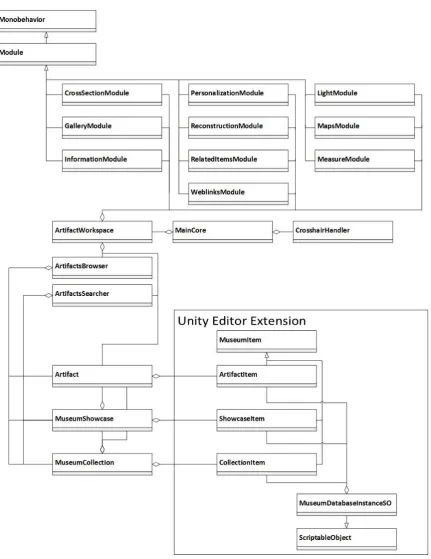
displayed artifacts. User should add one Artifact object to the scene for each new item added to the museum. ArtifactBrowser and ArtifactSearcher are responsible for the museum hierarchy browsing and item searching functions, respectively. By default, one object of each will be instantiated in the scene.
3.3. MainCore. MainCore is the main controller class of the application. This singleton is responsible for general tasks such as keeping track of application running time, application termination, and interaction with artifacts. The crosshair class is responsible for managing the different states of the cross hair and using it to inspect artifacts. When user hovers the mouse cursor over an artifact, the crosshair changes indicating the ability to do an in-depth inspection. Clicking an inspect-able object will display a small popup menu with the options to inspect the object, add it to a favorites list or exiting. When Inspection is selected, the ArtifactWorkspace object will take over.
3.4. ArtifactWorkspace. ArtifactWorkspace is responsible for handling the artifact inspection mode. When an object is inspected, the object is isolated from the rest of the museum and is given the main focus. If a higher quality model exists, it’s loaded in this mode as well. Regular museum walk-though is replaced with fixed camera, with mouse left and middle clicks on the object used for rotation and panning, respectively. Mouse scroll wheel is used for zooming In/out. Also the regular user interface layout is replaced by a set of buttons to activate various inspection tools, known inside VirMuF as Modules.
3.5. Modules. Modules are Unity GameObjects that perform certain operations on the object under inspection, and work independent from each other. By implementing OnGUI() and Update() methods in Unity’s monoBehavior class, each module is responsible for drawing its own GUI window and performing its operations. Also, multiple modules can work simultaneously on the same object. The following subsections describe the available modules.
3.5.1. Information. This tool toggles a window where basic information about the artifact is displayed. 3.5.2. Reconstruction. This module is used to show/hide reconstructed parts for an artifact that is damaged, missing parts or generally deteriorated. Reconstructed parts have to be drawn manually and then added to VirMuF inside unity editor. The module permits adding multiple reconstructions for the same missing part. This is to cover various possibilities proposed by multiple researchers working on the same piece.
3.5.3. Related Items. RelatedItems module connects two artifacts that have some relation due to being found in the same place, belonging to the same era of following the same pattern, for example. This module will display the two related items side-by-side for thorough comparisons. All other modules can be used on either, or both, of the two pieces being compared. Sometimes, zooming in/out the two pieces will lead to user’s inability to perceive the right proportions. To solve this, the module contains an option that locks the camera movement for the two viewports used to show the items in comparison in a way that each camera will exactly follow the other one being manipulated by the user. This leads to both cameras being always at the same distance from their targets and exactly at the same viewing angle.
3.5.4. Cross Section. This tool allows user to take cross sections through the artifact in any direction. The cross-section can be taken in any of the three main directions (X,Y, Z) in both positive and negative directions and at any depth. There is also the ability to use an arbitrary cross section plane in both directions. 3.5.5. Related Web Links. In case there is further online information resources related to this artifact web links can be added to each artifact. Clicking on URL button will open the webpage in users default browser (outside the virtual museum application).
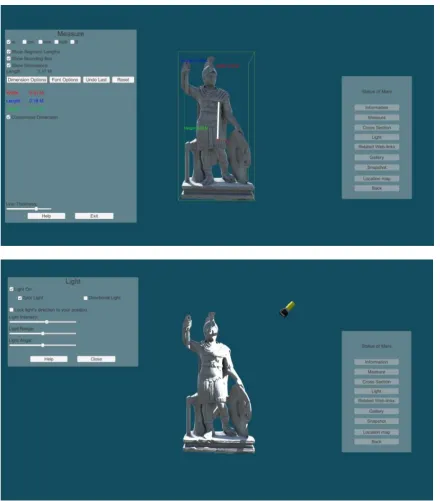
Fig. 3.2. VirMuF modules activated on an artifact: measure module (top) and light module (bottom)
3.5.7. Light. Light Module allows user to use a virtual torchlight. The light source has so many parameters that can be adjusted to help reveal the fine surface details. Torchlight position is change using right mouse button and it is always pointed towards the artifact. There is also the option to lock light position to viewer camera position.
When user clicks a thumbnail, it gets opened in a separate window in full size.
3.5.9. Location Map. Through Unity editor data-entry, each artifact has longitude and latitude fields that specify where the artifact was discovered and where it is currently exists. When virtual museum visitor activates the Map Location module, Google map will be loaded to show both locations.
3.5.10. Snapshot. This module saves a snapshot of the current view on the local hard drive.
3.5.11. Personalization. Personalization module has many artifact work space customization options for user convenience. This includes options to change background colors, toggle grids and change font size and color.
4. Future Work. More modules are to be added to VirMuF. One experimental module that was tested in the pilot project is the ”original context module”, where user is taken out of the virtual museum context to a virtual reconstruction of the original place and time where the archeological item was used. Another planned module will display text and multimedia information next to the 3D model in a slide show manner.
Online capabilities are amongst the most important features that would enrich a virtual museum experience. By allowing users to use 3D avatars and interact with each other will turn the virtual museum into a collaborative environment that is optimal for educational purposes. Virtual tour guides can be granted extra privileges and functionalities such as being able to share their view with other users when explaining a particular artifact.
Finally, VirMuF currently supports interaction through mouse and keyboard only. Support for VR input devices such as VIVEcontrollers is to be added for better and more intuitive VR virtual museum experiences using VirMuF.
Acknowledgments. This work was supported by the European Union’s Horizon 2020 research and innova-tion program, project Virtual Research Environment for Regional Interdisciplinary Collaborainnova-tion in Southeast Europe and Eastern Mediterranean VI-SEEM [675121].
REFERENCES
[1] Abate, D., Avgousti, A., Faka, M., Hermon, S., Bakirtzis, N., and Christofi, P., An online 3D database system for endangered architectural and archaeological heritage in the South-Eastern Mediterranean, Int. Arch. Photogramm. Remote Sens. Spatial Inf. Sci., XLII-2/W3, 1-8, https://doi.org/10.5194/isprs-archives-XLII-2-W3-1-2017, (2017). [2] Unity, https://unity3d.com/
[3] Sylaiou, Stella, et al. Exploring the relationship between presence and enjoyment in a virtual museum. International journal of human-computer studies 68.5 (2010): 243-253.
[4] Mata, Felix, Christophe Claramunt, and Alberto Juarez.An experimental virtual museum based on augmented re-ality and navigation.Proceedings of the 19th ACM SIGSPATIAL International Conference on Advances in Geographic Information Systems. ACM, 2011.
[5] Bruno, Fabio, et al.From 3D reconstruction to virtual reality: A complete methodology for digital archaeological exhibition.
Journal of Cultural Heritage 11.1 (2010): 42-49.
[6] Petridis, Panagiotis, et al.The herbert virtual museum.Journal of Electrical and Computer Engineering 2013 (2013): 16. [7] Pecchioli, Laura, et al.Browsing in the Virtual Museum of the Sarcophagi in the Basilica of St. Silvestro at the Catacombs
of Priscilla in Rome.Virtual Systems and Multimedia (VSMM), 2012 18th International Conference on. IEEE, 2012.
Edited by: Aneta Karaivanova
Received: Dec 22, 2017