Manual Grading Task Support System with
Interactive Correction Mechanism
Kohei Yamamoto1,*, Fumiya Kan1, Kazuya Murao1, Masahiro Mochizuki2, and Nobuhiko Nishio1
1 College of Information Science and Engineering, Ritsumeikan University, 1 1 1 Nojihigashi, Kusatsu, Shiga,
5258577, Japan; E-Mails: [email protected] (K.Y.); [email protected] (F.K.); [email protected] (K.M.); [email protected] (N.N.)
2 Research Organization of Science and Technology, Ritsumeikan University, 1 1 1 Nojihigashi, Kusatsu, Shiga,
5258577, Japan; E-Mail: [email protected]
* Author to whom correspondence should be addressed; E-Mail: [email protected]; Tel.: +81-775612741
Abstract:Gesture-based recognition is one of the most intuitive methods for inputting information and is not subject to cumbersome operations. Recognition is performed on human’s consecutive motion without reference to retrial or alternation by user. We propose a gesture recognition model with a mechanism for correcting recognition errors that operates interactively and is practical. We applied the model to a setting involving a manual grading task in order to verify its effectiveness. Our system, named GERMIC, consists of two major modules, namely, handwritten recognition and interactive correction. Recognition is materialized with image feature extraction and convolutional neural network. A mechanism for interactive correction is called on-demand by a user-based trigger. GERMIC monitors, track, and stores information on the user’s grading task and generates output based on the recognition information collected. In contrast to conventional grading done manually, GERMIC significantly shortens the total time for completing the task by 24.7% and demonstrates the effectiveness of the model with interactive correction in two real world user environments.
Keywords:handwriting recognition; recognition error correction; human computer interaction
1. Introduction
Human activity recognition has received much attention because it is considered one of the most natural methods for improving quality of life by monitoring and supporting human life and work[1][2][3][4]. Some famous systems include a system that monitors a nurse provider and automatically outputs the nurse’s notes[5] and a system that monitors an assembly worker and displays procedures[6][7]. These systems recognize human motions based on sensor values, store them as data memory in the virtual world, and then output the information in the real world. However, recognition is performed on a user’s consecutive motion without regard to retrial or alternation by the user even though that is likely to occur. Thus, a mechanism that allows the user to interactively correct recognition errors is needed to better fit an existing human activity model by allowing repeat motion, alternation, and suchlike unanticipated behavior.
Hence, we propose a gesture-based recognition model with a mechanism for correcting recognition errors by the user without affecting the real world. We developed a recognition system based on the proposed model to support manual grading tasks, and verified its effectiveness. Our system, named GERMIC, consists of two major modules: handwritten recognition and interactive correction. The handwritten module recognizes diagrams such as “” (correct), “4” (partially correct), and “/” (incorrect) drawn by a user with a pen-shaped mouse: it can draw something on a paper with ink, besides it can read the trails of the pen. Moreover, the module recognizes numbers drawn by user too. Diagrams are recognized by image feature extraction and numbers are recognized using
2 of 15
convolution neural network (CNN) on a PC. The interactive correction module is called on-demand by a user-based trigger, i.e., clicking a button embedded in the pen-shaped mouse. The interactive correction mechanism comes with voice feedback and the user can correct any occurrence of recognition errors or any recognition of unintended action. In addition, voice feedback enables the user to make corrections without slowing down or distracting the user by having to look at the PC screen. Each recognition result is stored in the system to be used to generate an output spreadsheet (excel file). Hence, we designed GERMIC to assist with grading tasks without impacting the user’s conventional way of grading manually while reducing the user’s mental and physical workload.
2. Related Work
Until today, there has been a number of research on the systems and on services that support graders. For instance, paper-based automated grading systems like “Glyph”[8] by Xerox1using a formatted sheet or systems using Optical Mark Recognition (OMR)2[9][10][11] help score papers, tests,
and surveys automatically, reducing the burden on graders or evaluators. However, these systems require a rich infrastructure: formatted sheets, software, hardware, optical recognition capabilities, and so on. The sheets themselves are severely constraining as these systems do not accept responses in just any format, such as handwritten characters or diagrams, which take away flexibility and convenience for users.
There are also tablet, cloud, and web-based learning and grading technologies to assist graders. A project called CLP[12][13][14], conducted by Massachusetts Institute of Technology (MIT), is one of the most famous tablet-based learning and grading systems, which focuses on interaction between a teacher and students using a pen and tablet with the capability of accepting various answer formats. However, utilizing the tablet requires a lengthy and cumbersome setup including inputting all the types of questions and answers that will appear on each tablet. The system is thus focused on recognizing and collecting various type of answers efficiently without regard for errors in recognition so that it is hardly used in the real environment. In addition, the infrastructure and costs for supporting the use of tablets are considered prohibitive. With respect to cloud and web-based learning and grading, there is a lot of research and development on expanding Web-based Center for Automated Testing (Web-CAT)[15][16], which is the most widely known open source automated grading system for programming. These types of systems can accept richly expressive codes but are limited to programming assessments. Some other systems[17][18][20] that focus on more generic uses, such as automated scoring of students’ writing, appears to be highly flexible with the ability to evaluate complex natural language but requires installation of a huge infrastructure, requires every user to own a PC, and does not recognize handwritten formats.
There has been a lot of research and development on recognition systems of handwritten characters[21][22][23][24]. Christoph et al.[21] proposed an interactive handwriting input method using motion sensors such as accelerometer and gyroscope. They focus on the modality and intuitiveness of their 3D recognition system but the system has very limited practical application. On recognition algorithms, Abdul et al.[22] proposed using a support vector machine to recognize handwritten characters, while others following a main current in handwriting recognition systems are utilizing deep neural network architectures such as recurrent neural network[23]. To investigate recognition accuracy, Ching et al.[24] introduced eight different classifiers for identifying handwritten digit errors. Despite these developments, none of the handwriting recognition systems have yet to be applied to the task of grading student work.
Research that assists graders investigated thus far has been forcing the user to drastically change their attitudes to grading tasks; a user has to learn a lot about how to operate a supporting system
1 Xerox:https://www.xerox.com/
2 Remark:http://remarksoftware.com/products/office-omr/
before the system comes into use, even if the research is based on mobile assisting system. This point must be burdensome for the user. Furthermore, although it is a major way for graders and teachers to perform grading manually, a system to assist such scenes have not been investigated thus far and consequently it requires them to score each paper and to tally the final results with burdens. Therefore, a practical system that supports manual graders without affecting their conventional attitudes to grading is highly needed.
3. System Design
This section describes system requirements and the system that meets the requirements named GERMIC, which stands for GEsture Recognition Model with Interactive Correction.
3.1. Requirements
Currently, grading is done manually because students are still required to put their answers down on paper. There is a huge demand for a system that recognizes users’ motion and supports manual grading, that is able to store and query the results for output and analysis, and that provides a mechanism for users to interactively correct recognition errors by the system. Besides, correction of the results should be conducted without affecting the real world, in this case, which refers to answer sheets. We propose a system that supports manual grading tasks in a school environment defined by paper-based assignments and exams.
For instance, the user will be able to grade a student’s paper using a pen-shaped mouse to manually draw a diagram such as a “” for a correct answer, “4” for a partially correct answer, and “/” for an incorrect answer. The user can also draw a number as partial point after the recognition of “4”. The results are collected and stored in a database and to be used for output and analysis (e.g., automatic calculation of an individual student’s scores to obtain a total score for that student). The system is set up to provide information to the user on the recognition results to enable the user to easily correct any recognition errors. The system physically consists of a PC for storing recognition results to a database and the pen-shaped mouse for reading the trail of hand gesture while their grading papers.
3.2. System Overview
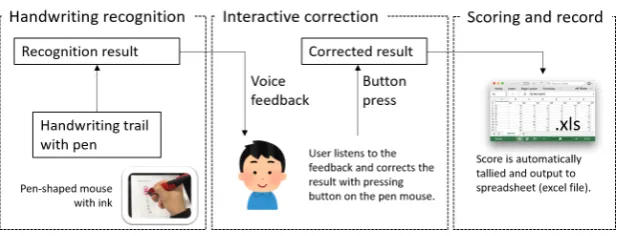
There is a large number of systems that perform gesture recognition. In such systems, recognition is conducted on a user’s successive activities without regard to retrial or alternation as described in the left part of Figure1. In conventional recognition model, the user first behaves in the real world and a system recognizes his/her motion in the digital world. Then the system outputs the recognition result at the end. In the proposed model described in the right part of Figure1, the system gives back the recognition result to the user after the recognition in digital world. When the user notices a misrecognition, the user can correct the recognition result in the real world by using an interactive correction mechanism. Then the correction is reflected in the digital world and the system finally outputs the recognition result as well as the conventional recognition model. Dissimilar to the conventional recognition model, GERMIC following the proposed model allows misrecognition to happen, which is likely to occur.
4 of 15
Figure 1. Different process flows between the conventional recognition model and the proposed recognition model.
Figure 2.Overview of GERMIC.
3.3. System Flow
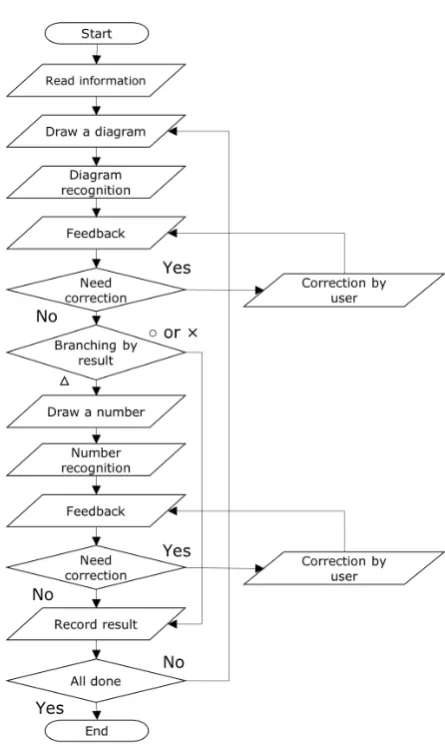
Figure3depicts more detailed system flowchart of GERMIC from the view of a user. To begin, GERMIC loads essential information on a scoresheet to grade from an excel file (e.g., the number of answerers, the number of questions, and allotment of scores). GERMIC then classifies diagrams drawn by the user into three groups: “” (correct answer), “4” (partially correct answer), and “/” (incorrect answer) by image processing. GERMIC provides results of the recognition to the user over voice feedback. Whenever the user catches a recognition error, the user can correct it by pressing the button embedded in the pen-shaped mouse. The user is notified of the correction through voice feedback. If the system recognizes a “” or “/” the score is stored in a database according to the points allocated to the question defined in the excel file for GERMIC. If GERMIC recognizes a “4”, the user is enjoined to write a number as a grade for a partially correct answer, which is recognized by the image recognition based on CNN model. The user can also correct faulty recognition of numbers by pressing the button on the pen. When the recognition result is corrected, the user is instructed to proceed to the next question.
Once the user is done with grading, GERMIC automatically calculates the score and output the results in a spreadsheet (excel file). The following provides details on how the recognition is achieved through image extraction, and how the voice feedback works with the mechanism for interactive correction.
Figure 3.Flowchart of GERMIC.
3.4. Handwriting Recognition
GERMIC performs image recognition on diagrams and numbers drawn by the user. How image recognition works is described below.
3.4.1. Diagram recognition
Diagram recognition classifies drawn diagrams into one of three diagram types: “”, “4”, and “/”. Thus, the expected output of a diagram recognition is any one of the three diagram types. There are several ways to classify diagrams but most do not execute fast enough to provide real-time feedback. Therefore, we adopted the FAST algorithm[19] for performing diagram recognition. The FAST algorithm is one of the major way to perform feature points detection, and it is based on the condition as to whether a certain pixelpis continuously lighter or darker than the circumference of the surrounding pixels.
If the condition can be satisfied, pixelpis registered as a feature point. Then the number of feature points are used to classify diagram types. For more detail, please refer to the original paper[19].
3.4.2. Numeric recognition
6 of 15
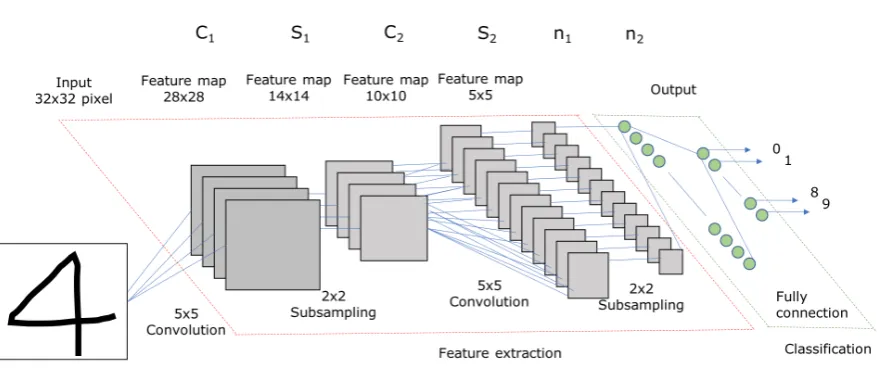
Figure 4.Diagram of convolution neural network used in numeric recognition.
drawn after “4” must be positive value. Numeric recognition is based on the CNN model as shown in Figure4.
The CNN model used in this paper consists of two sets of a convolution layer and a subsampling layer besides a fully connected layer. ReLu is used as an activation function as it is often used in the field of image recognition. Softmax function is used as activation function at an output layer and probability is calculated for each number. Learning session adjusts weights (parameters) with Adam using back propagation method. Cross-entropy is used as loss function to calculate the difference between the prediction and the groundtruth. In testing session, the CNN model calculates probability for each number and extracts a number with the highest probability as an output number.
3.5. Feedback and an Interactive Correction Mechanism
GERMIC tells the user the recognition result by voice for every recognition. For instance, when the recognition result is “”, GERMIC sounds “circle”, and when the result is “1” GERMIC says “one”. We assume that there are several ways to handle over the feedback to the user, for instance, by pop-up a window on a PC screen or by vibration system embedded in the pen. Among these, we utilized voice as the way to give the user feedback since it can be considered the most intuitive for human. Besides, the voice feedback enables the user to correct any faulty recognition on the fly without requiring the user to slow down in order to confirm the result on the computer screen. To correct a recognition error, the user presses the button embedded in the pen-shaped mouse to trigger the correction mechanism. If the error is a diagram misrecognition, then the user can swap the diagram with the correct one by clicking the button. The correction swaps in the order of “”→“4”→“/”→“”→ · · ·. If the intended diagram is “” but is incorrectly recognized as “/”, it can be corrected by clicking the button twice.
If the error relates to a number misrecognition, then the user can input the correct number by the number of clicks. For instance, if the intended number is 3 but is incorrectly recognized by GERMIC, then the user can click the button three times to input the correct number. At this point, we also assume that many types of interface can be conceivable, for example, by human voice or body gesture. However, our objective is to prove the effectiveness of the proposed recognition model with an interactive correction mechanism, we thus simply adopted a click as an interface to correct the misrecognition.
3.6. Final Output
Figure 5.Snapshot of final output excel file.
Figure 6.A pen-shaped mouse with ink that enables writing on paper and pointing on PC utilized in GERMIC.
contains all the recognition results (scores) by answerer (student in this case) and by question. All the results and the total score are calculated on the basis of four elements read at the start-up of GERMIC: allotment of correct point, allotment of incorrect point, the number of questions, and the number of answerers. Plus, the recognized results by numeric recognition is referred when it is called.
4. System Implementation
This section explains the implementation of GERMIC.
4.1. System Environment
GERMIC is implemented in Python (ver.3.6.1) comprising libraries related to automated computation that run on macOS Sierra (ver.10.12.4). Figure6 is a pen utilized in GERMIC and be able to actually write something on paper with ink, and its trail can be digitally recorded and obtained. A button on the pen is used to correct the recognition result. The following sections provide details on how GERMIC recognizes the user’s handwritten characters.
4.2. Acquisition of User Drawing
8 of 15
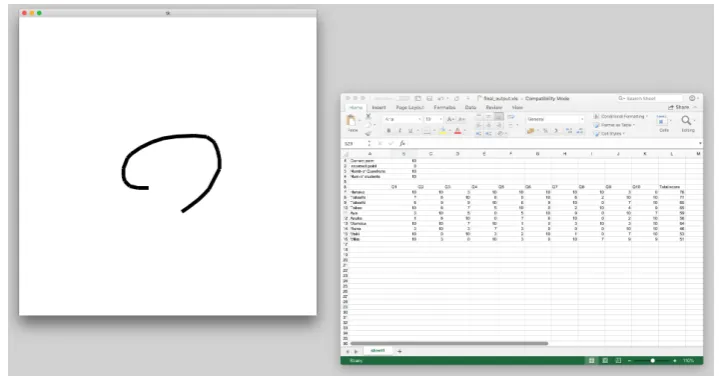
Figure 7.Screenshot of the application window (left) and output excel (right) on the desktop.
4.3. Diagram Recognition
As explained previously, GERMIC uses the number of feature points for classifying diagrams. Image feature extraction using FAST algorithm is implemented with OpenCV 3.0 (ver.3.2.0) library3. From our preliminary experiment, a diagram is recognized as “/” if the number of feature points is less than nine, as “4” if greater than or equal to nine but less than 23, and as “” if greater than or equal to 23. In addition, if the number of feature points is less than three, the diagram is processed as an unintended motion and thus ignored. During the preliminary experiment, we determined these thresholds that perform the best recognition accuracy by incrementally changing the number of feature points one by one from zero.
4.4. Numeric Recognition
This section describes how numeric recognition is implemented in GERMIC.
4.4.1. Cutout a drawing trail
When image recognition is performed on diagrams, the system processes the entire window since diagram recognition involves classifying the diagram based on the number of feature points contained in the window. For numeric recognition, the input must match the scale ratio of the image data (square image of a number) used in CNN training. Thus, numeric recognition involves the process of cutting out the square image of the handwritten number on the window frame.
Figure8shows the algorithm for a number cutout.
First, the entire window is converted to gray scale and each pixel is scanned as the top left is zero. Then the maximum x-axismax_x, the minimum x-axismin_x, the maximum y-axismax_y, and the minimum y-axis min_y are calculated. Cis the center of the handwritten number((max_x− min_x)/2,(max_y−min_y)/2). In order to make the image square fed to CNN, the image is cut into a square of max(max_x−min_x,max_y−min_y)length of one side.
3 OpenCV:http://opencv.org/opencv-3-2.html
Figure 8.The algorithm to cutout a number from the entire window for numeric recognition.
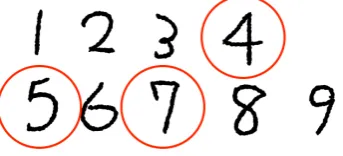
Figure 9.Numbers “4”, “5”, and “7” drawn with one stroke.
4.4.2. CNN model
Numeric recognition using CNN is implemented with a machine learning library called TensorFlow4developed by Google and released as open source. The CNN model is trained 20,000 times in advance with the datasets of one-digit written numbers called MNIST5. In the process of numeric recognition, the user is asked to draw a number in one stroke even if these are “4”, “5”, and “7” as shown in Figure9since the user draws a number without utilizing the button. In addition, feature point extraction is performed in parallel with numeric recognition. If the number of feature points is less than or equal to three, the drawing is recognized as unintended motion, and ignored so to secure the redundancy.
5. Evaluation
We conducted two types of experiments to evaluate the effectiveness of GERMIC: Measurement of recognition accuracies for diagram and numeric, and measurement of grinding task speed in real environment. In both experiments, five subjects were recruited to serve as graders. They were given a tutorial and lesson to familiarize grading with GERMIC.
5.1. Measurement of recognition accuracies of diagram and numeric
In the first experiment, the subjects were asked to draw three types of diagrams (“”, “4”, and “/”) and nine different numbers (numbers 1 through 9) for a total of ten times per item. Then the
recognition accuracy is calculated.
4 TensorFlow:https://www.tensorflow.org/
10 of 15
Table 1.Confusion matrix of diagram recognition for each subject.
P P P P P PP In
Out Subject 1 Subject 2 Subject 3 Subject 4 Subject 5
Accuracy
4 / 4 / 4 / 4 / 4 /
10 8 2 10 8 2 9 1 90%
4 2 8 1 9 10 1 9 3 7 86%
/ 10 10 10 10 10 100%
Figure 10.Case that drawn circle “” misrecognized as triangle “4”.
Figure 11.Case that drawn triangle “4” misrecognized as circle “”.
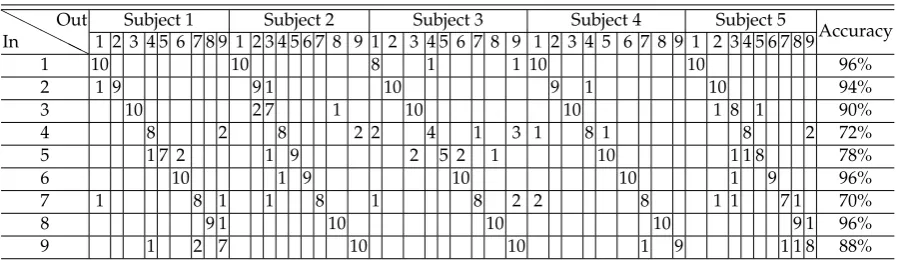
Table 2.Confusion matrix of numeric recognition for each subject.
H H
H HH
In
Out Subject 1 Subject 2 Subject 3 Subject 4 Subject 5
Accuracy 1 2 3 4 5 6 7 8 9 1 2 3 4 5 6 7 8 9 1 2 3 4 5 6 7 8 9 1 2 3 4 5 6 7 8 9 1 2 3 4 5 6 7 8 9
1 10 10 8 1 1 10 10 96%
2 1 9 9 1 10 9 1 10 94%
3 10 2 7 1 10 10 1 8 1 90%
4 8 2 8 2 2 4 1 3 1 8 1 8 2 72%
5 1 7 2 1 9 2 5 2 1 10 1 1 8 78%
6 10 1 9 10 10 1 9 96%
7 1 8 1 1 8 1 8 2 2 8 1 1 7 1 70%
8 9 1 10 10 10 9 1 96%
9 1 2 7 10 10 1 9 1 1 8 88%
5.1.1. Accuracy of diagram recognition
The result of diagram recognition for each subject is shown in Table1. Recognition accuracy of “/” was 100% while recognition errors occurred for “” and “4”. The overall average recognition accuracy was 92%. It appeared that “” tended to be misrecognized as “4” when the circle was quite small as shown in Figure10since the number of discernible feature points fell below 23. In contrast, “4” tended to be misrecognized as “” when the triangle resembled a circle as shown in Figure11
since the number of feature points were greater than or equal to 23.
5.1.2. Accuracy of numeric recognition
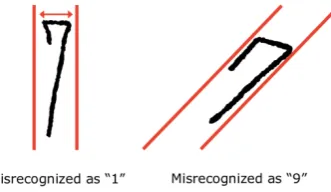
The results of numeric recognition for each subject is shown in Table2. The result shows that the average recognition accuracy was 87%. However, accuracies for “4”, “5”, and “7” are low relative to the other numbers. It is assumed that the subjects were not used to drawing such three numbers with one stroke: “4” tended to be misrecognized as “9” when the horizontal line was short as circled in red in Figure12, Number “5” tends to be misrecognized as “3” or “6” when the lines are crossing as marked with a red circle in Figure13. Number “7” tends to be misrecognized as “1” when the number is written elongatedly as shown in the left part of Figure 14and as “9” when the number is written diagonally as shown in the right part of Figure14.
Figure 12.Case that drawn number “4” tends to be misrecognized as “9”.
Figure 13.Case that drawn number “5” tends to be misrecognized as “3” or “6”.
Figure 14.Case that drawn number “7” tends to be misrecognized as “1” (left) or “9” (right).
5.2. Measurement of grinding task speed in real environment
Subjects were asked to utilize GERMIC during the actual grading tasks. As shown in Figure15, subjects were given ten papers to grade, which contained ten sentences of English translation question from Japanese. Subjects were asked to score the ten translated sentences by comparing them with correct answers.
Two types of experiments were performed: Partially correct grade “4” is not allowed and is allowed. In the first experiment, the subjects were required to grade the sentences based on the following criteria. Each English sentence consisted of four words. If the four words in the translated sentence matched all four words of the correct English sentence, subjects drew a “” inside a square next to the sentence. If the number of unmatched words were greater than or equal to one, they were asked to draw “/”. In the second experiment, if all four words of the translated sentence matched the words in the correct English sentence, the subjects drew a “”; if just one word did not match, they drew a “4”; and if the total number of unmatched words were greater than one, they drew a “/”. When a “4” is drawn, one-digit number as partial score was drawn.
12 of 15
Figure 15.Translated English sentences (right) are compared with the correct English sentences (left) in the grading task experiments.
Figure 16.Difference in flows between with and without GERMIC.
5.3. Results of Experiment in Real Environment
We evaluated GERMIC in two different real environments and measured time to finish grading task. Hereafter, the results are described.
5.3.1. Results of experiment with “” and “/”
Table 3.Time taken to complete grading tasks with “” and “/” with and without GERMIC.
Without GERMIC With GERMIC
Scoring [sec] Tallying [sec] Total Grading [sec] Grading [sec]
Subject 1 258 216 474 309
Subject 2 243 197 440 277
Subject 3 248 148 396 385
Subject 4 183 230 413 284
Subject 5 204 139 343 301
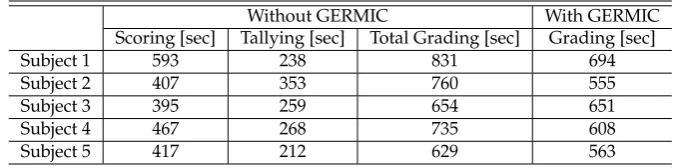
Table 4.Time taken to complete grading tasks with “”, “/”, and “4”with and without GERMIC.
Without GERMIC With GERMIC
Scoring [sec] Tallying [sec] Total Grading [sec] Grading [sec]
Subject 1 593 238 831 694
Subject 2 407 353 760 555
Subject 3 395 259 654 651
Subject 4 467 268 735 608
Subject 5 417 212 629 563
The results show that all of subjects completed their “scoring” task faster without GERMIC but on the whole completed their grading task 102 seconds (24.7%) faster on average with GERMIC.
5.3.2. Results of experiment with “”, “/”, and “4”
The result of GERMIC-based grading tasks when using diagram types “”, “/”, and “4” for scoring is shown in Table4. For the result, all subjects completed their scoring task faster without GERMIC, but on the whole completed their grading task faster with GERMIC by 107.6 seconds (14.9%) on average. We also found that the subject 2, 3, and 5, who were especially good at calculations could complete their scoring tasks much faster than the others and that the subject 1 and 5, who were especially good at operating PC could complete their tallying tasks much faster than the others.
5.3.3. Feedback from subjects
Subjects commonly reported that they would not have completed their grading tasks as quickly without GERMIC, and that they did not feel burdened by the interactive correction mechanism once they became familiar with using it. However, one subject felt a little delay for voice feedback (although feedback was given within 1 second after starting processing the handwritten character). We intend to continue improving GERMIC to reduce delay time to give feedback to the user. Another subject stated that she would have preferred voice over manual correction of a recognition error. As mentioned previously, we only focused on proving the effectiveness of the proposed recognition model with an interactive correction mechanism, therefore, we simply adopted a click as an interface to correct recognition error in this paper. As for the usability, we intend to look for a better interface to perform corrections, besides, intend to find other applications for GERMIC.
6. Discussion
14 of 15
recognition accuracy by removing such fluctuation of lines in our future work. In addition, as for the number “4”. “5”, and “7”, these numbers are showing the relatively lower recognition accuracy compared to that of the other one-digit numbers. In this respect, the five Japanese subjects were not used to drawing such three types of numbers with one stroke as shown in Figure9. Hence, their recognition accuracy could have been higher if they had more time to get familiarized with one stroke drawing or GERMIC allows free drawing as they usually do.
7. Conclusion
The usage of conventional systems that support graders is limited from the view of environment and infrastructure, for example, automatic grading machines and tablet-based scoring systems require rich infrastructure. Besides, the system that supports manual grading hardly exists. When it comes to materializing such system, we must think of applying hand gesture recognition as there is a large number of systems performing gesture recognition. However, in such systems, recognition is performed on a user’s consecutive motion without regard to retrial or alternation by the user even though that is likely to occur.
We proposed GERMIC as a gesture-based recognition system to assist with manual grading tasks. The important feature of GERMIC is its interactive correction mechanism, which is the integration of handwritten character recognition and voice feedback to enable users to correct recognition errors on the fly. We evaluated the effectiveness of GERMIC through grading task experiments by comparing with a grading task without GERMIC. Subjects were asked to use GERMIC to grade English translation questions. We found that all subjects using GERMIC completed their grading tasks much faster than the subjects who manually grades. Subjects indicated that they did not feel burdened by using the interactive correction mechanism once they became familiar with using it. Therefore, GERMIC significantly shortened the total time for completing the grading tasks without burdening the user and demonstrated the effectiveness of our interactive correction mechanism based on the gesture recognition model.
Author Contributions:Kohei Yamamoto contributed to the design, the software development, the user evaluation tests, and the writing and revision of the manuscript. Fumiya Kan contributed to the primary research. Kazuya Murao contributed to idea thinking and supervising writing and revision of the manuscript. Masahiro Mochizuki and Nobuhiko Nishio contributed to writing of the manuscript.
Conflicts of Interest:The authors declare no conflict of interest.
References
1. Bulling, A.; Blanke, U.; Schiele, B. A tutorial on human activity recognition using body-worn inertial sensors. ACM Comput. Surv. (CSUR)2014, 46(3), 33.
2. Ortiz, J.L.R.; Oneto, L.; Samá, A.; Parra, X.; Anguit, D. Transition-Aware Human Activity Recognition Using Smartphones. Neurocomputing.2016, 171(C), 754–767.
3. Ren, Z.; Meng, J.; Yuan, J.; Zhantg, Z. Robust Hand Gesture Recognition with Kinect Sensor. In Proceedings of the 19th ACM international conference on Multimedia, Scottsdale, USA, 28 November–01 December 2011, pp. 759–760.
4. Ren, Z.; Yuan, J.; Zhang, Z. Robust Hand Gesture Recognition Based on Finger-earth Mover’s Distance with a Commodity Depth Camera. In Proceedings of the 19th ACM International Conference on Multimedia, Scottsdale, USA, 28 November–01 December 2011, pp. 1093–1096.
5. Kuwahara, N.; Kogure, K.; Ohmura, A.; Noma, H. Wearable Sensors for Auto-Event-Recording on Medical Nursing - User Study of Ergonomic Design. In Proceedings of the 8th International Symposium on Wearable Computers, Arlington, USA, 31 October–3 November 2004, pp. 8–15.
6. Westerfield, G.; Mitrovic, A.; Billinghurst, M. Intelligent Augmented Reality Training for Motherboard Assembly. Int. J. Artif. Intell. Educ.2015, 25(1), pp. 157–172.
7. Radkowski, R.; Herrema, J.; Oliver, J. Augmented Reality-Based Manual Assembly Support With Visual Features for Different Degrees of Difficulty. Ind. Prod. Eng.2015, 34(5), pp. 362–374.
8. Johnson, W.; Jellinek, H.; Klotz Jr., L.; Rao, R.; Card, S. Bridging the Paper and Electronic Worlds. In Proceedings of INTERACT 1993 and CHI 1993 Conference, Amsterdam, The Netherlands, 24–29 April 1993, pp. 507–512.
9. Bayar, G. The use of hough transform to develop an intelligent grading system for the multiple choice exam papers. In Proceedings of Karaelmas Science & Engineering.2016, 6(1), pp. 100–104.
10. Benedito, J.L.P.; Aragón, E.Q.; Alriols, J.A.; Medic, L. Optical Mark Recognition in Student Continuous Assessment. IEEE Rev. Iberoam. de Tecnol. del Aprendiz.2014, 9(4), pp. 133–138.
11. Atasoy, H.; Yildirim, E.; Kutlu, Y.; Tohma, K. Webcam Based Real-Time Robust Optical Mark Recognition. In Proceedings of the 22nd International Conference on Neural Information Processing, Istanbul, Turkey, 09–12 November 2015, 9490, pp. 449–456.
12. Koile, K.; Chevalier, K.; Low, C.; Pal, S.; Rogal, A.; Singer, D.; Sorensen, J.; Tay, K.S.; Wu, K. Supporting PenBased Classroom Interaction: New Findings and Functionality for Classroom Learning Partner, In Proceedings of the International Workshop on Pen-Based Learning Technologies (PLT ’07), Catania, Italy, 4–5 May 2007, pp. 1–7.
13. Koile, K.; Chevalier, K.; Low, C.; Pal, S.; Rogal, A.; Singer, D.; Sorensen, J.; Tay, K.S.; Wu, K. Supporting Feedback and Assessment of Digital Ink Answers to In-Class Exercises. In Proceedings of the 22nd National Conference on Artificial Intelligence, Vancouver, Canada, 22–26 July 2007, pp. 1787–1794.
14. Tay, K.S.; Koile, K. Improving digital ink interpretation through expected type prediction and dynamic dispatch, In Proceedings of the 19th International Conference on Pattern Recognition, Tampa, USA, 8–11 December 2008, pp. 1–4.
15. Edwards, S. Work-in-progress: program grading and feedback generation with Web-CAT, In Proceedings of the 1st ACM Conference on Learning @ Scale Conference, Atlanta, USA, 04–05 March 2014, pp. 215–216. 16. Caiza, J.; Alamo, J.M.D. Programming assignments automatic grading: review of tools and implementations.
In Proceedings of the 7th International Technology, Education and Development Conference (INTED2013), Valencia, Spain, 04–06 March 2013, pp. 5691–5700.
17. Yamamoto, M.; Umemura, N.; Kawano, H. Automated Essay Scoring System Based on Rubric. Studies in Computational Intelligence.2017, 727, pp. 177–190.
18. Liu, M.; Li, Y.; Xu, W.; Liu, L. Automated Essay Feedback Generation and Its Impact in the Revision. IEEE Trans. Learn. Technol.2016, PP(99), 1.
19. Rosten, E.; Drummond, T. Machine Learning for High-Speed Corner Detection. ECCV. LNCS.2006, 3951, pp. 430–443.
20. Nguyen, D.M.; Hsieh, J.; Allen, G.D. The impact of web-based assessment and practice on students’ mathematics learning attitudes. Math. Sci. Teach.2006, 25(3), pp. 251–279.
21. Amma, C.; Georgi, M.; Schultz, T. Airwriting: a wearable handwriting recognition system. Pers. Ubiquit. Comput.2014, 18(1), pp. 191–203.
22. Ahmad, A.R.; Khalia, M.; Gaudin, C.V.; Poisson, E. Online handwriting recognition using support vector machine. In Proceedings of 2004 IEEE Region 10 Conference TENCON 2004, Chiang Mai, Thailand, 24 November 2004, pp. 311–314.
23. Doetsch, P.; Kozielski, M.; Ney, H. Fast and Robust Training of Recurrent Neural Networks for Offline Handwriting Recognition. In Proceedings of the 14th International Conference on Frontiers in Handwriting Recognition, Heraklion, Greece, 01–04 September 2014, pp. 279–284.