Backfilling the Grid with Containerized BOINC in
the ATLAS computing
Wenjing Wu1, David Cameron2, on behalf of the ATLAS
collaboration
1 Institute of High Energy Physics, CAS, 19B Yuquan Road, Beijing, 100049, China 2 Department of Physics, University of Oslo, P.b. 1048 Blindern, N-0316 Oslo, Norway
Abstract. Virtualization is a commonly used solution for utilizing the opportunistic computing resources in the HEP field, as it provides a unified software and OS layer that the HEP computing tasks require over the heterogeneous opportunistic computing resources. However there is always performance penalty with virtualization, especially for short jobs which are always the case for volunteer computing tasks, the overhead of virtualization reduces the CPU efficiency of the jobs, hence it leads to low CPU efficiency of the jobs. With the wide usage of containers in HEP computing, we explore the possibility of adopting the container technology into the ATLAS BOINC project, hence we implemented a Native version in BOINC, which uses the Singularity container or direct usage of the Operating System of the host machines to replace VirtualBox. In this paper, we will discuss 1) the implementation and workflow of the Native version in the ATLAS BOINC; 2) the performance measurement of the Native version comparing to the previous virtualization version. 3) the limits and shortcomings of the Native version; 4) The practice and outcome of the Native version which includes using it in backfilling the ATLAS Grid Tier2 sites and other clusters, and to utilize the idle computers from the CERN computing centre.
1. Introduction
Volunteer computing started to become popular in the late 1990s. Its goal is to use the free CPU cycles of worldwide volunteers personal computers for scientific computing. BOINC[1][2] is a middleware developed and commonly used for volunteer computing. Some projects, such as SETI@home[3] and Eintein@home[4], became very successful, and they not only yield a big amount of computing resources, but also attracted wide public interest and attention. Volunteer computing started to be applied to the HEP computing in 2004 with the launch of the LHC@home[5] project whose goal was to run simulation jobs of the accelerator.
The combination of CernVM[6] and CVMFS[7] made it possible to run their computing tasks inside a 1GB size image on top of various operating systems. However a certain amount of performance penalty is unavoidable with virtualization and also it requires the pre-installation of VirtualBox on the volunteer computers. The containerization technology which can also provide the required software environment for the application, started to be developed and be used in the HEP computing field in recent years as a more lightweight and performant solution compared to virtualization. In this paper, we explore the advantages and use cases of containerization in the context of the volunteer computing project ATLAS@home.
2. ATLAS@home
ATLAS@home[8] [9] is a BOINC-based volunteer computing project started in 2013 to use the free CPU cycles from worldwide volunteer computers and apply them to the simulation computing tasks of the ATLAS experiment[10][11]. ATLAS@home was the first volunteer computing project in the field of HEP experiments.
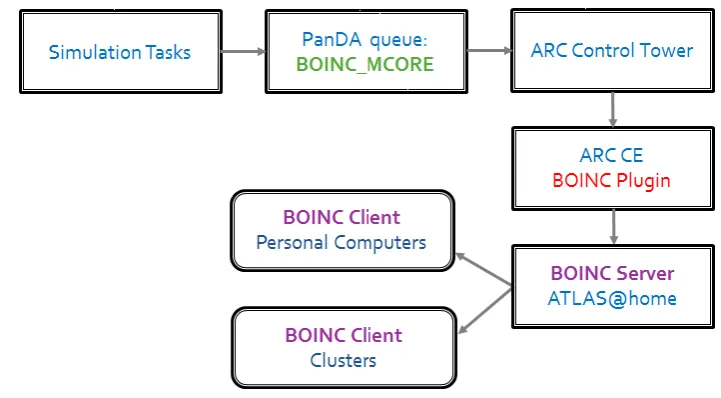
As shown in Figure 1, in its workflow and architecture, ATLAS@home is fully integrated into the grid computing infrastructure of the ATLAS experiment, through the common interface PanDA[12][13]. The production manager can submit their simulation tasks[14][15] to ATLAS@home which appears as a PanDA queue. Jobs from the simulation tasks are pulled by the ACT(ARC Control Tower), then ACT sends the jobs to the ARC CE that forwards the jobs to the BOINC server. The BOINC clients request and fetch the jobs from the BOINC server whenever they have idle CPU cycles.
As of now, ATLAS@home has become a very reliable computing resource for the ATLAS experiment, important simulation tasks are run via ATLAS@home, and on average it contributes about 14KHS06 computing power to the ATLAS computing on a daily basis.For example, we randomly choose the first 10 days of April 2018 as a sample period, during which the average daily CPU time acquired by the finished ATLAS@home jobs is 8950 CPU days(CPU time in the unit of Days), which accounts for 3.52% of the average daily CPU time acquired by all the finished ATLAS jobs.
3. Virtualization
3.1. Virtualization for ATLAS@home
When the project was first setup, the target hosts were the worldwide volunteer computers which were very heterogeneous in terms of operating systems and software environment. According to the ATLAS@home project monitoring, over 85% of the volunteer computers use various Microsoft Windows operating systems, and about 10% use various Linux operating systems, and the other use various Mac OS. So in the initial workflow, ATLAS@home adopted VirtualBox to virtualize the target hosts, so that they could have the software environment that the ATLAS simulation tasks require.
When a BOINC client attaches to the ATLAS@home project, it first downloads a program called Vbox-wrapper and the virtual machine image. The Vbox-wrapper controls VirtualBox to create, run and destroy a virtual machine based on the image. The ATLAS@home virtual machine image includes the CVMFS client and its cache area which caches the basic ATLAS software required by the ATLAS simulation tasks, and the image can be cached on the BOINC client for jobs to reuse until there is a new release of image from the BOINC server. The size of the image is about 1.3GB. The BOINC client uses the Vbox-wrapper to launches the virtual machine which includes the CVMFS client to run the actual ATLAS job.
Figure 1. ATLAS@home architecture and workflow
3.2. The disadvantages of virtualization
There are a few disadvantages of using virtualization, mainly from the performance point of view:
• The process of creating the virtual machine image is tedious and not easy to be automated.
• Whenever there is a new software release of ATLAS, the virtual machine image needs to be updated on both the server and client sides.
• For every new job, virtualization also introduces overhead in order to clone the image, and create and start the virtual machine. These extra work can significantly reduce the CPU efficiency of the short wall clock time jobs, which is a common case for the ATLAS multicore simulation jobs[16].
• Virtualization has performance penalty in I/O and CPU in general.
• Most of the ATLAS software is cached in the image, but extra files, including conditional database files, might need to be downloaded on the fly, and they cant be cached and shared by different jobs on the same host.
All the above factors can add up, and impact the CPU efficiency of the simulation jobs.
4. Containerization
4.1. Singularity and its performance test
Singularity[17] is a containerization solution which enables users to have full control of their environment, and can be used to package the entire scientific workflows, software and libraries, and even data. Singularity is being commonly used by the ATLAS computing in the scenarios of both grid sites and HPC sites. ATLAS distributes standard image files through CVMFS for sites to launch their Singularity containers.
average number. The tests were done on a host machine with 8GB RAM, and CentOS as its OS, and CentOS was also used as the Singularity image.
As shown in Table 1, no loss in neither CPU nor I/O performance is observed by using Singularity, and in terms of the average wall clock time of running ATLAS simulation jobs, using Singularity introduces 1.17% loss.
Table 1. Local performance test between host machine and Singularity READ WRITE CPU time wall time for ATLAS Job
Singularity 113 MB/s 116MB/s 26.97s 587s host machine 113 MB/s 114MB/s 27.74s 594s Performance Loss 0 -1.7% -2.7% 1.17%
4.2. Implementation of the Containerized ATLAS@home
Singularity only runs on Linux OS systems, so the target hosts for containerization are Linux machines. Depending on the OS version of the target host machines, there are two approaches to provide the required OS for running the ATLAS@home jobs. For hosts with Scientific Linux and CentOS Operating System, ATLAS@home jobs can just be launched directly upon the host machines. And for hosts with other Linux operating systems, the Singularity image will be used to execute the ATLAS@home jobs.
A wrapper is being used to control the workflow of running ATLAS jobs on the BOINC client host. Before launching the ATLAS job, the wrapper needs to perform some validations, including the status of CVMFS, the target OS, and the status of Singularity, then decides how to provide the OS environment for running the job.
4.3. Advantages and drawbacks of containerization
There are some advantages of using containerization compared to virtualization in the context of ATLAS@home:
• It saves the effort of maintaining a ATLAS@home specific VM image on the server side, while using Singularity, we use the standard Singularity image released by ATLAS.
• Containerization significantly saves the downloading time and the disk space on the client side for two reasons: 1) Both the singularity and ATLAS software and database files required by the ATLAS@home jobs are cached in the CVMFS of the target host, and can be shared among different jobs on this host. But in the context of virtualization, the software and database files need to be downloaded for every job; 2) there is no need to clone and store an image for each job running on the host.
• It eliminates the overhead time associated with each job, which includes the time for cloning the image and the creation and destroy of the virtual machine.
• There is no performance penalty in both I/O and CPU.
average number. The tests were done on a host machine with 8GB RAM, and CentOS as its OS, and CentOS was also used as the Singularity image.
As shown in Table 1, no loss in neither CPU nor I/O performance is observed by using Singularity, and in terms of the average wall clock time of running ATLAS simulation jobs, using Singularity introduces 1.17% loss.
Table 1. Local performance test between host machine and Singularity READ WRITE CPU time wall time for ATLAS Job
Singularity 113 MB/s 116MB/s 26.97s 587s host machine 113 MB/s 114MB/s 27.74s 594s Performance Loss 0 -1.7% -2.7% 1.17%
4.2. Implementation of the Containerized ATLAS@home
Singularity only runs on Linux OS systems, so the target hosts for containerization are Linux machines. Depending on the OS version of the target host machines, there are two approaches to provide the required OS for running the ATLAS@home jobs. For hosts with Scientific Linux and CentOS Operating System, ATLAS@home jobs can just be launched directly upon the host machines. And for hosts with other Linux operating systems, the Singularity image will be used to execute the ATLAS@home jobs.
A wrapper is being used to control the workflow of running ATLAS jobs on the BOINC client host. Before launching the ATLAS job, the wrapper needs to perform some validations, including the status of CVMFS, the target OS, and the status of Singularity, then decides how to provide the OS environment for running the job.
4.3. Advantages and drawbacks of containerization
There are some advantages of using containerization compared to virtualization in the context of ATLAS@home:
• It saves the effort of maintaining a ATLAS@home specific VM image on the server side, while using Singularity, we use the standard Singularity image released by ATLAS.
• Containerization significantly saves the downloading time and the disk space on the client side for two reasons: 1) Both the singularity and ATLAS software and database files required by the ATLAS@home jobs are cached in the CVMFS of the target host, and can be shared among different jobs on this host. But in the context of virtualization, the software and database files need to be downloaded for every job; 2) there is no need to clone and store an image for each job running on the host.
• It eliminates the overhead time associated with each job, which includes the time for cloning the image and the creation and destroy of the virtual machine.
• There is no performance penalty in both I/O and CPU.
The drawback of using containerization is that Singularity can only run on Linux machines, and also running ATLAS@home jobs in Singularity also requires the host machine having the CVMFS setup, so the containerization can be only implemented on the Linux machines, but not the other Windows machines.
4.4. Performance measurement
In order to have a precise comparison of the performance between virtualization and containerization, we run the same set of test jobs in both implementations of ATLAS@home. Each of the test job requests the same amount of CPU time, and they are all multi-core jobs, so the more cores each job uses, the shorter the wall clock time it uses.
And in order to measure the performance, CPU efficiency (CPU) is used to measure the
efficiency of the jobs, and wall time utilization (uwall) and CPU time utilization (ucpu) are used
to measure how fully these clusters are being utilized. Assuming that in a given period M days(including downtime), the total wall time (in seconds) of all jobs is Twall, the total CPU
time (in seconds) of all jobs is TCPU, and the total number of available cores of the site is Ncore,
then:
uwall =
Twall
3600×24×M×Ncore
(1)
ucpu=
Tcpu
3600×24×M×Ncore (2)
CPU=
Tcpu
Twall
(3)
In ATLAS jobs, the wall clock time includes the I/O time, CPU time, and extra time for downloading software and database files. In the context of containerization, both the I/O and CPU time are improved, and the downloading time is also improved because the software and data files can be downloaded from CVMFS and cached to the work node, while in the context of virtualization, all the software and database files which are not included in the virtual image need to be downloaded every time it runs a job.
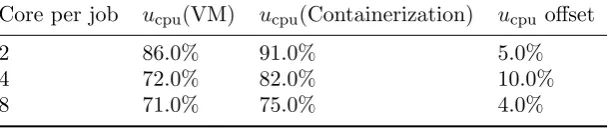
As shown in Table 2, the ATLAS job CPU efficiency is defined by the ratio between the CPU time and wall clock time reported by the ATLAS job wrapper which launches the ATLAS job, and it gets improved by 4% to 10% by using containerization depending on the number of cores used per job. The BOINC job CPU efficiency is defined by the ratio between the CPU time and wall clock time reported by the BOINC job wrapper which launches the BOINC job . In the context of BOINC, the BOINC job wrapper first initializes the software environment such as preparing for virtualization or containerization, then launches the real job(ATLAS job), while the ATLAS job is being launched, the ATLAS job wrapper(also known as the ATLAS pilot) again setup the ATLAS specific software environment, then starts the payload running. So the BOINC job wall clock time includes the ATLAS job wall clock time and the VM overhead time. In the context of containerization, the VM overhead time is completely eliminated. As shown in Table 3, the BOINC job CPU efficiency get improved by 1% to 12% by using containerization depending on the number of cores used per job.
Table 2. ATLAS job CPU efficiency: VM vs. Containerization Core per job ucpu(VM) ucpu(Containerization) ucpu offset
2 86.0% 91.0% 5.0%
4 72.0% 82.0% 10.0%
5. Use cases of the containerized ATLAS@home
Before using containerization, it is very tedious and inefficient to run the virtualized ATLAS@home on the cluster with physical nodes, as it requires the pre-installation of VirtualBox on the cluster nodes and also causes performance loss. And for the cloud nodes, it is impossible to run the virtualized version as another layer of virtualization cannot be implemented on the cloud nodes.
The containerized ATLAS@home provides a lightweight solution to run the ATLAS@home jobs on clusters, including clusters with both physical nodes and cloud nodes. In the cluster, we use containerized ATLAS@home jobs to either backfill the busy ATLAS grid sites, or fulfill the idle computer nodes from CERN IT department.
5.1. Backfilling the grid sites
A study we conducted on the ATLAS grid sites shows that the average CPU utilization is below 70%. In a batch system, it is very difficult to over allocate processes on cores due to the lack of flexibility to control the process priorities, so normally the clusters are configured to run one process on each core and also because the CPU efficiency of the jobs can never reach 100%, overall the CPU utilization becomes low. The concept of using ATLAS@home jobs to backfill grid sites implies running more than one process on each CPU core, and let the backfilling job have lower priority than the grid job, hence the backfilling job only uses the fragmental CPU cycles which cant be fully used by the grid jobs. The goal of backfilling jobs is to exploit whatever CPU cycles which are not being used by other higher priority processes, so the amount of CPU time they can get also depends on the CPU usage by the higher priority processes. In other words, if the CPU usage of the grid jobs is higher, then the CPU time exploited by the backfilling jobs is smaller.
Table 3. BOINC job CPU efficiency: VM vs. Containerization Core per job ucpu(VM) ucpu (Containerization) ucpu offset
2 90.4% 91.6% 1.2%
4 75.1% 81.3% 6.2%
8 66.3% 75.2% 11.9%
The backfilling model was tested on two ATLAS grid site, the BEIJING Tier 2 site and the TRIUMF Tier 1 site. The BEIJING Tier 2 site is a small scale site with 464 CPU cores, and the TRIUMF Tier 1 site is a medium scale site with 4816 CPU cores.
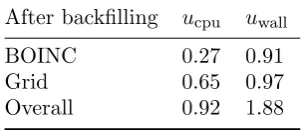
As shown in both Table 4 and 5, for the TRIUMF site, the overall CPU utilization, which is the sum of both BOINC and Grid CPU utilization, is improved by 23% with adding the backfilling jobs, and for the BEIJING site, the average overall CPU utilization improvement over the period of 6 months is 26%, with the average CPU utilization of 90% and with the CPU utilization of 95% at its peak.
Table 4. CPU Utilization of TRIUMF site before and after backfilling Before backfilling ucpu uwall
BOINC 0 0
Grid 0.69 0.88
Overall 0.69 0.88
After backfilling ucpu uwall
BOINC 0.27 0.91
Grid 0.65 0.97
5. Use cases of the containerized ATLAS@home
Before using containerization, it is very tedious and inefficient to run the virtualized ATLAS@home on the cluster with physical nodes, as it requires the pre-installation of VirtualBox on the cluster nodes and also causes performance loss. And for the cloud nodes, it is impossible to run the virtualized version as another layer of virtualization cannot be implemented on the cloud nodes.
The containerized ATLAS@home provides a lightweight solution to run the ATLAS@home jobs on clusters, including clusters with both physical nodes and cloud nodes. In the cluster, we use containerized ATLAS@home jobs to either backfill the busy ATLAS grid sites, or fulfill the idle computer nodes from CERN IT department.
5.1. Backfilling the grid sites
A study we conducted on the ATLAS grid sites shows that the average CPU utilization is below 70%. In a batch system, it is very difficult to over allocate processes on cores due to the lack of flexibility to control the process priorities, so normally the clusters are configured to run one process on each core and also because the CPU efficiency of the jobs can never reach 100%, overall the CPU utilization becomes low. The concept of using ATLAS@home jobs to backfill grid sites implies running more than one process on each CPU core, and let the backfilling job have lower priority than the grid job, hence the backfilling job only uses the fragmental CPU cycles which cant be fully used by the grid jobs. The goal of backfilling jobs is to exploit whatever CPU cycles which are not being used by other higher priority processes, so the amount of CPU time they can get also depends on the CPU usage by the higher priority processes. In other words, if the CPU usage of the grid jobs is higher, then the CPU time exploited by the backfilling jobs is smaller.
Table 3. BOINC job CPU efficiency: VM vs. Containerization
Core per job ucpu(VM) ucpu (Containerization) ucpu offset
2 90.4% 91.6% 1.2%
4 75.1% 81.3% 6.2%
8 66.3% 75.2% 11.9%
The backfilling model was tested on two ATLAS grid site, the BEIJING Tier 2 site and the TRIUMF Tier 1 site. The BEIJING Tier 2 site is a small scale site with 464 CPU cores, and the TRIUMF Tier 1 site is a medium scale site with 4816 CPU cores.
As shown in both Table 4 and 5, for the TRIUMF site, the overall CPU utilization, which is the sum of both BOINC and Grid CPU utilization, is improved by 23% with adding the backfilling jobs, and for the BEIJING site, the average overall CPU utilization improvement over the period of 6 months is 26%, with the average CPU utilization of 90% and with the CPU utilization of 95% at its peak.
Table 4. CPU Utilization of TRIUMF site before and after backfilling
Before backfilling ucpu uwall
BOINC 0 0
Grid 0.69 0.88 Overall 0.69 0.88
After backfilling ucpu uwall
BOINC 0.27 0.91 Grid 0.65 0.97 Overall 0.92 1.88
Table 5. CPU Utilization of BEIJING site during a busy and an idle week
Busy week ucpu uwall
BOINC 0.15 0.88 Grid 0.80 0.93 Overall 0.95 1.81
Idle week ucpu uwall
BOINC 0.42 0.88 Grid 0.48 0.62 Overalll 0.90 1.50
5.2. Fullfilling CERN cluster
Large computer centers can have a non negligible amount of idle computer nodes, for example, the CERN IT department has an average of 10000 cores idle which are either physical nodes near retiring, or the cloud nodes before they are being delivered to applications and users. And the cloud nodes usually require running the CPU intensive benchmark before being delivered to some applications, so running the CPU intensive ATLAS@home jobs fit into such requirement. As the ATLAS@home client software is provided by the system provision software puppet[18], the job running environment can be easily deployed and configured to all these nodes.
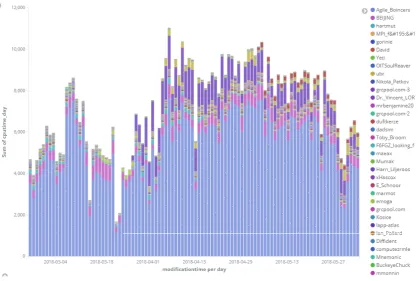
Figure 2. CPU time delivered by different ATLAS@home users
6. Conclusion
Containerized ATLAS@home provides a lightweight solution compared to the virtualization version. It reduces the overhead time caused by virtualization and improves the ATLAS job CPU efficiency by 5% to 10%; it also reduces the usage of disk space and network bandwidth from the clients, and lightened the maintenance work on the server side; it makes it possible for the two usages of running ATLAS@home jobs on the clusters, which significantly increases the available resource for ATLAS@home. And as of now, over 85% of the computing power of ATLAS@home is delivered by its containerized version.
Acknowledgments
This project is supported by the National Natural Science Foundation of China grants ”Research on fine grained Event Service for the BESIII offline software and its scheduling mechanism (No.11675201)”. We’d also like to thank all the volunteers of ATLAS@home who made this project possible.
References
[1] David Anderson, Boinc: A system for public-resource computing and storage, proceedings of the 5th IEEE/ACM International Workshop on Grid Computing, 4-10 (2004)
[2] Myers, Daniel S and Bazinet, Adam L and Cummings, Michael P, Expanding the reach of Grid computing: combining Globus and BOINC-based systems, Grid computing for bioinformatics and computational biology, 71-84 (2007)
[3] Anderson, David P., et al. ”SETI@ home: an experiment in public-resource computing.” Communications of the ACM 45.11 (2002): 56-61.
[4] Abbott, B. P., et al. ”Einstein@ Home search for periodic gravitational waves in early S5 LIGO data.” Physical review d 80.4 (2009): 042003.
[5] Herr, Werner, D. I. Kaltchev, F. Schmidt, and E. McIntosh. Large Scale Beam-beam Simulations for the CERN LHC using distributed computing. No. LHC-PROJECT-Report-927. 2006.
[6] Buncic, Predrag, et al. ”CernVMa virtual software appliance for LHC applications.” Journal of Physics: Conference Series. Vol. 219. No. 4. IOP Publishing, 2010.
[7] Aguado Sanchez, Carlos, et al. ”CVMFS-a file system for the CernVM virtual appliance.” Proceedings of XII Advanced Computing and Analysis Techniques in Physics Research. 2008.
[8] C Adam-Bourdarios, D Cameron,A Filipcic, E Lancon and Wenjing Wu for the ATLAS Collaboration, ATLAS@Home:Harnessing Volunteer Computing for HEP,21st International Conference on Computing in High Energy and Nuclear Physics, 664, 022009 2 (2015)
[9] Adam-Bourdarios, C., R. Bianchi, D. Cameron, A. Filipi, G. Isacchini, E. Lanon, Wenjing. Wu, and ATLAS Collaboration, Volunteer Computing Experience with ATLAS@Home, Journal of Physics: Conference Series, 898, 052009 5 (2017)
[10] Simone Campana, ATLAS Distributed Computing in LHC Run2, Journal, 664, 032004 3 (2015)
[11] Filipcic A, ATLAS Collaboration, ATLAS Distributed Computing Experience and Performance During the LHC Run-2, Journal of Physics: Conference Series, 895, 052015 5 (2017)
[12] Maeno T, PanDA: distributed production and distributed analysis system for ATLAS, Journal of Physics: Conference Series, 119, 062036 5 (2008)
[13] De, Kaushik and Klimentov, A and Maeno, T and Nilsson, P and Oleynik, D and Panitkin, S and Petrosyan, Artem and Schovancova, J and Vaniachine, A and Wenaus, T, The future of PanDA in ATLAS distributed computing, Journal of Physics: Conference Series, 664, 062035 6(2015)
[14] Rimoldi, A and Dell’Acqua, A and Gallas, M and Nairz, A and Boudreau, J and Tsulaia, V and Costanzo, D, The simulation for the ATLAS experiment: Present status and outlook, Nuclear Science Symposium Conference Record, 2004 IEEE, 3, 1886–1890 (2004)
[15] Yamamoto S, Shapiro M, on behalf of the ATLAS Collaboration, The simulation principle and performance of the ATLAS fast calorimeter simulation FastCaloSim, ATL-COM-PHYS-2010-838 (2010)
[16] Calafiura, Paolo and Leggett, Charles and Seuster, Rolf and Tsulaia, Vakhtang and Van Gemmeren, Peter, Running ATLAS workloads within massively parallel distributed applications using Athena Multi-Process framework (AthenaMP), Journal of Physics: Conference Series, 664, 072050 7 (2015)
[17] Kurtzer GM, Sochat V, Bauer MW (2017) Singularity: Scientific containers for mobility of compute. PLoS ONE 12(5): e0177459.