Volume 3, No. 5, Sept-Oct 2012
International Journal of Advanced Research in Computer Science
RESEARCH PAPER
Available Online at www.ijarcs.info
ISSN No. 0976-5697
Bluetooth Broadcasting: An Information Dissemination System
Bhushan G. Emekar*
Department of Electronics & Telecommunication, Pune Institute of Computer Technology,
Pune, India
Sourabh S. Kulkarni
Department of Electronics & Telecommunication, Pune Institute of Computer Technology,
Pune, India [email protected]
Abstract: A PC application for cost efficient transmission of information via Bluetooth to handheld mobile devices (smart-phone, tablet, etc) is proposed. In the wide spread area, where the information dissemination plays a vital role and the data content of information changes periodically, the conventional ways of information display becomes costly and tedious. Our application can be used to effectively broadcast the information for a personal/moderate area. It communicates with the personal handheld devices in its surrounding using Bluetooth network and sends appropriate information. The application compresses information in a suitable format, which makes it quick and easy to transmit. The range of operation can be altered with the help of PICONET or SCATTER-NET, pooling many transceivers together. In this way we can overcome the conventional way (sticking posters, banners and pamphlets) using an ecological, free of cost personal area Bluetooth network.
Keywords: Bluetooth, Java, J2ME, Mobile Devices, Windows/Linux, Information Dissemination, BlueCove
I. INTRODUCTION
Advertising is a marketing tool that is becoming impossible to avoid in everyday life. Advertising is crucial to a company's success and it is becoming more and more important to be backed by a creative and unique campaign. The conventional way of putting up banners, distributing pamphlets and advertise over television costs a lot in terms of resources; like paper for pamphlet, etc., It can be overcome by our innovative and Eco-friendly system. We use Bluetooth, which is common in almost all phones, to transfer information (advertises).
The idea is to transmit data which can be integrated to form a Java application for all the embedded micro devices (like Java enabled mobiles, PDAs, smart-phones) and devices like laptops etc. within the desired premises. All transmission operations such as maintaining database, device discovery are managed by Java application on server end machine (PC) [1].
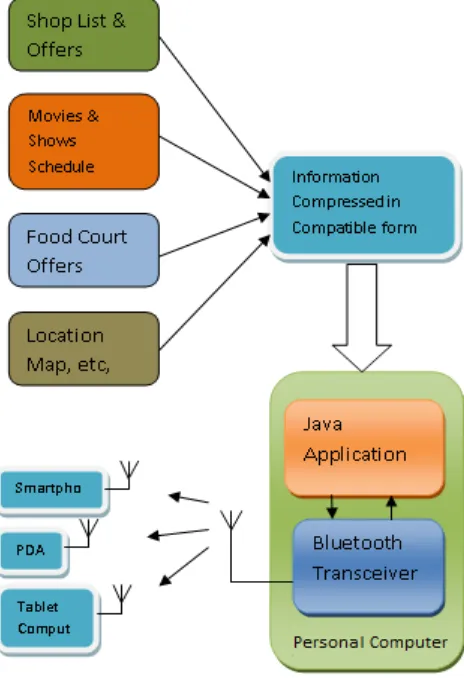
The existing system is a manual system. Let us take an example of Shopping Mall, which gives an overview of the scenario where we can use this system. Today malls are very big in size having hundreds of shops. Public enter the mall and first goes to every shop and check out for offers available which is a very hectic job. Then they choose shops out of them and go there to check the items. But visiting each and every shop is really boring and tiring process. In present scenario, many a times there are number of Multiplexes are on the top floor. Finding out current running movie, their show timings, seat availability and ticket booking is very difficult. So we can conclude that visiting malls takes most of the energy out of customers. An efficient solution in the form of different modules can be provided to overcome all above stated problems. The modules basically include Advertisement Management, Cinema Management, Food Zone Management, Map & Location Management, Announcement Management, etc., provides public advertisements on their mobiles / PDA’s,
[image:1.612.340.572.359.698.2]where shop keepers send their offers, business cards, animated images, etc. In this way information is transferred to handheld device efficiently.
II. DETAILED DESIGN
Our system consists of personal computer incorporating a Bluetooth transceiver, which is controlled with the help of Java application installed on the computer [1] [2]. The transceiver installed on PC is considered as master; it continuously searches for new bluetooth devices in vicinity and initiates the communication. Once connection in established between two devices, data transmission starts. The bunch of information in the compressed file consist of, various posters displaying information/offers in standard (.jpeg/.png) image format, various locations and maps in relational/ hierarchical form. All this content is compressed together to form a .JAR (Java Archive)/.APK (Android Package) format and then transmitted to handheld devices. When the device receives the file, it automatically gets installed on your device and you can browse through the information.
To understand the connection establishment and transmission properly, let us take detailed view:
A. Bluetooth Networks:
[image:2.612.46.282.365.591.2]Bluetooth devices are having various versions (v1, v1.2, v2, v3, v4) and classes (1, 2, & 3); their performance varies accordingly. Even though all the devices use frequency hop spread spectrum (FHSS) and 2.4GHz ISM band. For communication two types of networks can be formed namely, PICONET and SCATTERNET [3] [4].
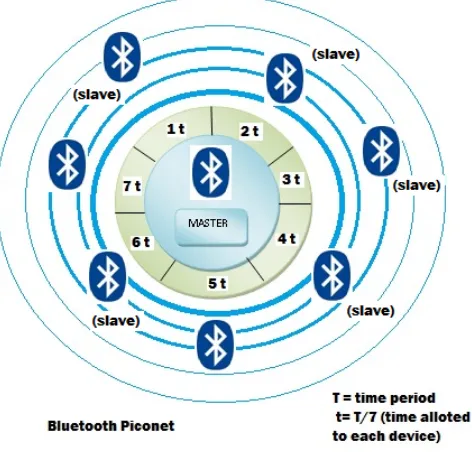
Figure 2: Bluetooth PICONET
PICONET consists of single master and up to seven slave devices. Master communicates with slaves in time division multiplexing fashion, allocating equal time for each slave. Two or more PICONET can be combined to form SCATTERNET. It is formed by agreement between master and slave; the slave in one network can serve as master for other network.
B. Controlling Master Transceiver:
One of the important tasks in information broadcast is to control the radio. We have built Java desktop application using
Swing framework, through which we give various commands to monitor the broadcast. Swing provides easy way to build user interface, includes buttons, logger windows to monitor operations. For controlling the radio: Implementation of Bluetooth Protocol Stack is given by JSR-82 (Java Specification request -82) standard [5]. BlueCove is a Java library for Bluetooth, works with most of the operating systems (Windows, Mac, Linux, etc.) [6]. JSR-82 provides the standard Java APIs for writing the application used to control the radio, whereas the BlueCove acts as an interface between the software application and the Operating System (OS) which in turn controls the Bluetooth hardware (radio).
C. Choosing The Right Protocol:
Bluetooth implements various protocols which are termed as bluetooth profiles; SDAP, RFCOMM, L2CAP, OBEX, etc., out of which following are useful for us [4] [5].
a. SDAP - Service Discovery Application Profile b. OBEX - Generic Object Exchange Profile (GOEP) SDAP helps us to discover the services supported by the device discovered by master. OBEX is generic object exchange protocol; here sender bluetooth device first transmits the information (size and file type) about the data being transferred and then begins the actual transmission. Hence using OBEX is preferred amongst others. RFCOMM is Serial Cable Emulation Protocol and OBEX is actually based on RFCOMM, hence data is sent similar to in serial cable.
D. Identify The Target Device Class & Services:
Our aim is to send the information to handheld bluetooth devices in vicinity. Nowadays bluetooth is present in many devices ranging from computers, cell-phones to toys, even microwave ovens also. Some of them will be able to process and view the information sent & others may not. Hence it becomes crucial to find the compatible device and then only send the information. For example, if a bluetooth headset/camera came across, simply we are going to neglect it; devices like this are not compatible with the information we are sending. Our system takes care of this via service discovery protocol (SDAP).
The initial communication is done in predefined steps, first look for all bluetooth devices around them and find out their "class”. Then, they use SDP in order to check if a device in a given class offers the type of service that they want. The Class of Device value is a 3-octet value [7]. Top 11-bits indicate the Service Class (Information, Telephony, Audio, etc.), 5-Bits for the Major Device Class, (Computer, Phone, LAN, etc.) and 6-bits for the Minor Device Class, which depends on the Major Device Class for interpretation [8]. This format is defined by “Bluetooth Special Interest Group” (SIG), and called as Universally Unique Identifier (UUID). Each UUID (in 128-bit hex format) corresponds to a particular service provided such as,
UUID: 0x1106: OBEX File Transfer Profile, UUID: 0x110A: Audio Source.
compressed information file and start sending to detected device.
E. Choosing The Correct File Format To Be Sent:
“Technological advancement brings ease of use with increased baseline complexities.” Meaning of the statement is more and more new operating systems and platforms are being developed. Each of them differs in file format processed. So it’s a challenge to send information packed in compatible file format, so that the device can view the data properly. For example, .APK file only works on android devices [9]; .JAR format is compatible with Java devices and most other systems like Symbian (S60, S40); whereas ZIP file works on Windows and both above devices [10]. However it’s widespread that most of the Smartphone, handheld device, etc. manufactured by one company incorporate same operating system [11].
Like each Network card has a universally unique id/address namely MAC; each bluetooth device has unique address in MAC-48 identifier format [11]. This 48-bit address contains first three octets which helps us to identify the manufacturer. By knowing the company of the device it is easy to filter them and send compatible file format. For example: Company ID for “Sony Ericsson Mobile Communications” is “0x0056”and it supports Java [8]. So whenever the master detects device of this particular company having OBEX capability, master will send the .JAR file. For precise operation we need to maintain the database of company codes and their compatible operating systems.
F. Maintaining The Database:
Our system is a dissemination system; every time a compatible device comes in the range information will be sent to the device. To avoid repeated transmission to a single device it is necessary to maintain a record/address book. For this purpose we can use any of the Open Source Databases like ORACLE, MySQL, Derby, etc. Once the file is sent to the device, system will save the Bluetooth address in the database and next time the detected device address is compared with the addresses saved in the database or Address Book. File will be sent to device only if device detected is new. It is necessary to refresh/delete this Address book after the contents of information are changes; making the old devices to get the new info [1].
Another purpose for using database is, we can maintain important data for comparison such as, the company codes for Bluetooth addresses, Class of device used for SDP and most important of all the files to be sent.
III. IMPLEMENTATION
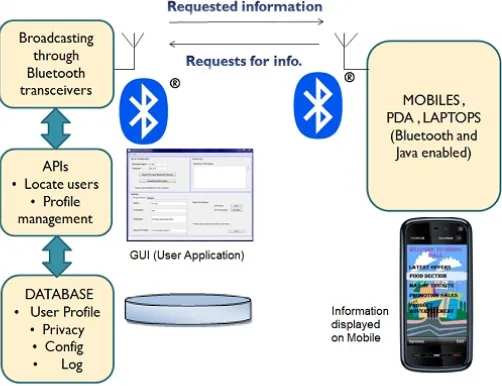
The system comprises of Master; Bluetooth transceiver controlled using Java desktop application, for this purpose we are using a Personal Computer having a bluetooth transceiver. Slaves are the devices which receives the broadcast information. Java application is built using Swing framework, creating user friendly GUI. It helps perform operations such as: start/ stop broadcast, clear saved device address book, and mange other database operations [1].
We are using MIDP 2.0 specifications as provided by Java APIs for mobile applications, to create the .JAR file. It will
show the information in the form of lists, trees and various prepared images [12]. Mobile applications are built and tested on Wireless Toolkit by Sun Micro-systems [3] [4]. For PC application JSR-135 and Swing is used. Desktop application is built using NetBeans IDE (v6.9).
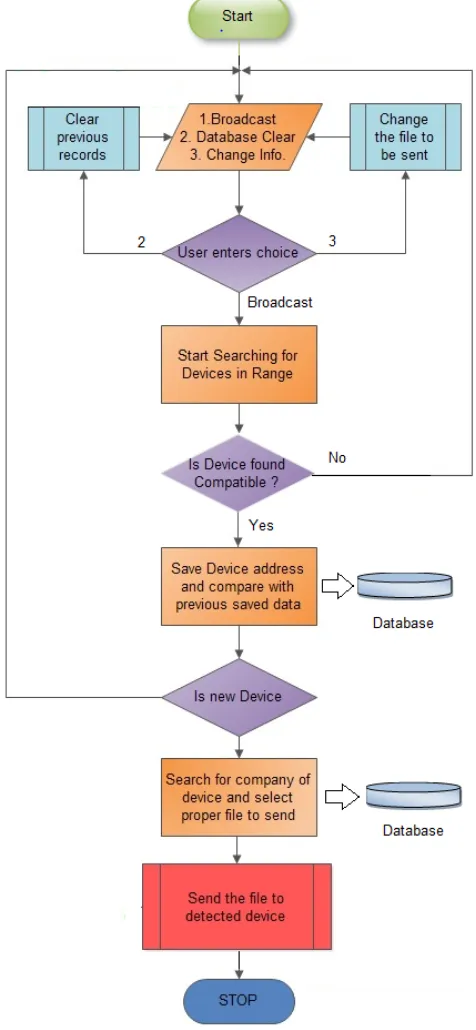
[image:3.612.326.564.155.670.2]The process of dissemination is having finite steps which repeat itself after a device is served. Let us take a look at the process closely:
Figure 3: Flow of the operations
A. On The Desktop Application(Master Side):
database is initialized. If bluetooth device is not present/ powered on, it shows an error message to user. b) Now application shows various options such as,
i. Start Disseminating (Broadcast) ii. Change file to be sent
iii. Clear Database
iv. Window showing log of ongoing activities c) User selects option “Start Disseminating”, the
Bluetooth Device on PC (Master) will start “Device Discovery”, and it searches for bluetooth devices in its range.(provided the devices are in discoverable mode) d) After a device is found, it is checked for OBEX
capability using SDP by the Master Bluetooth device. If the device is not compatible with OBEX then it is neglected.
e) If device supports OBEX then system saves its unique Bluetooth address, which helps to determine the device manufacturer and hence the information file-type to be sent. This calculation is done by immediate comparison with entries in saved database.
f) If the device address already exists in the database, we neglect it to avoid repeated transmission.
g) A database lookup is done against the bluetooth address (company & OS) and appropriate file (.JAR, .APK, etc.,) is selected.
[image:4.612.37.288.368.561.2]Selected file is prepared for sending, request for connection is sent to detected device (slave).
Figure 3: Overview of the operation
B. On The Handheld Device(Slave Side):
a) As the default implementation of OBEX, the file-name, file-type and size of the incoming file is displayed as a request on the handheld device.
b) As the mobile (slave) user accepts the request, file sent by master is received.
c) After complete file is received, user can browse through the information by opening/installing the file on the device.
This above cycle is repeated for all the devices which are detected or are in the range.
C. On The Desktop Application(Master Side):
a) Change the file to be sent: this option helps user to
select/change the particular file containing information.
b) Clear Database: this option is used to clear the
addresses of bluetooth devices which are already served.
c) Window: A window shows various devices captured
and interactions going on in user readable format. While serving (sending data via OBEX) a detected device the master device may search for other bluetooth devices in the range, check their capability with SDP, capture device address. Single master can serve up to seven slaves simultaneously forming a PICONET.
IV. INCREASED SCOPE AND PROBLEMS
The range of bluetooth device depends on class. Class 1 devices provide the highest range on operation (up to ~ 100m). However our system is limited for personal areas such as small scale Industries, Malls, Museums, etc. However to increase the area of operation SCATTERNET can be provide a wider scope. It consists of at least two PICONETs combined together. As Bluetooth is PAN(personal area network) it has some issues regarding security.
V. CONCLUSION
In the world facing problem of Global Warming our system provides an eco-friendly way of area specific information transmission. It gives a way to replace the conventional system of pamphlets, posters and banners reducing cost, resources. It’s an intelligent system, filter outs the device that are not compatible and sends the information to capable devices only. Thus our system is robust and works with most of the devices that incorporate bluetooth in it; ready to replace the conventional ways of advertisements. The most important factor it is cost effective (FREE) & never run out of number; initial set up cost is very low and operation user friendly. It doesn’t take much effort to change the information to be sent.
VI. REFERENCES
[1] A. I. Wang and J. Ho, “Is Bluetooth Broadcasting Practical and Useful ?” International Symposium on Collaborative Technologies and Systems, pp. 356-363, May 2007.
[2] Abu Ahmed Sayeem Reaz, Rajibul Alam, Bakhtiar Kamal and Fakhrul Alam "Application Development for Bluetooth Embedded Systems",0-7 803-8680-9/O4 @2004 IEEE.
[3] “Bluetooth Application Developers Guide” by "David Kammer", "Gordon McNutt", "Brian Senese"
[4] Bluetooth Technology Website: “www.bluetooth.com/”
[5] “Bluetooth App Programming With The JAVA API's” by "C Bala Kumar", "Paul J. Kline", "Timothy J. Thompson"
[7] Service Discovery Protocol IDs : “http://www.bluetooth.org/Technical/AssignedNumbers/servi ce_discovery.htm”
[8] Class of devices and UUIDs :
“http://www.bluetooth.org/Technical/AssignedNumbers” [9] Android Applicatio development: “developer.android.com”
[10] Mobile application development:
“www.developer.nokia.com/”
[11] Registered Company codes for Bluetooth: “ http://standards.ieee.org/develop/regauth/oui/oui.txt”