Implicit Access to IoT Devices Using
Bluetooth Technology
Mohammad Sheeraaz Shaikh1, Piyush Wani2, Suryansh Rajan3, Priyadarshan Prabhakar4, Nalini Mhetre5
B. E Students, Dept. of Computer Engineering, Smt. Kashibai Navale College of Engineering, Pune, India1234
Asst. Professor, Department of Computer Engineering, Smt. Kashibai Navale College of Engineering, Pune, India5
ABSTRACT: This paper discusses the design and implementation of easier access to IOT devices and endorses security in the system. To provide access to owner many researchers have made use of technologies like passwords, GPS based authentication, RFID authentication, Wi-Fi, NFC based authentication. To provide security to IoT resources the user has to provide the above mentioned credential for proving his identity. This is important to provide security against intruders and malicious intents. But this creates extra effort for user to prove himself as an authorized user. We are proposing a system that is efficient itself to identify its true owner and alert him when a malicious attempt of access if made. The system will relieve the user from providing authentication details and provide hassle free access to his IoT devices. The paper will further discuss efficient solution for the security trade-off that would be encountered.
The system is based on wireless protocol 802.15.4 Bluetooth which will prove as an identity for user. This Bluetooth signal will be sensed by the reader on the IoT resources and grant access rights to the user. Bluetooth had been evolved through years and latest version is optimized for minimal battery utilization and its influence is limited to few meters making it most suitable signal channel for authentication approvals.
KEYWORDS:Access System; Admin application; Owner application.
I.INTRODUCTION
The automation has revolutionized in the every sector of the society and the need for security is unavoidable. In this era of modernisation, everyone uses PINs, passwords, hardware devices for proving the identification for the access. These all methods require one or more steps for proving the owner identity and take care of protection of the devices from intruders.
Taking a step forward in the style of unlocking the devices we propose a system that provides easier but secure access to owners of the IoT devices. Machine to Machine communication is involved using a wireless/wired channel to exchange signals in IoT. We use Machine to Machine communication because it does require less human intervention for exchanging data for various purposes. In the proposed system a target device and authenticator device is used for intercommunication. The target device is the IoT device which is to be accessed by the user and the authenticator device is a smart device which provide signalling to target device and proving owner’s identity. The target device can include examples like door, electrical appliances, safe cases, car etcetera and the authenticator device can be any of the devices which has Bluetooth capability like mobile phones, smart watches, smart wearable. The authenticator devices need to be with user whenever the access is required. The prerequisite of carrying such authenticator device is no big challenge as everyone in today’s world has smart phones.
II. RELATED WORK
Various studies [2–13] for enhancing the convenience of authentication have been proposed. Their summarized features are shown in Table 1.
Sr. No.
Study Description Networking Via
1 [2] Transferring image Connection of mobile devices 2 [3] Door open/close by
speech recognition
N.A.
3 [4] Controlling door by short range communication
NFC(Near Field Communication)
4 [7] Face recognition N.A. 5 [8] Face recognition
and automatic open
Sending SMS to mobile phone 6 [12] Basic application
for remote control
Remote control
7 This Paper
Recognition of user by machine to machine
communication implicitly
Bluetooth
Table 1. Features of Previous Digital Door Lock
Seo et al. [1] studied convenient digital door lock functions, such as remote control via the integration of mobile devices and key sharing. Lee et al. [2] proposed a method for detecting an accessing object and transmitting the object image. Kwak et al. [3] studied a method for opening and closing the door lock using voice recognition, without using a network. Potts et al. [4] proposed a security system that interfaces with an Android mobile device. The mobile and security system communicate via Bluetooth in a short range. Choi et al. [5] developed an application for communication between devices for transferring the state of the alarms generated in a home through a door lock in the neighbourhood. Hassan et al. [7] and Satti et al. [8] studied face recognition for the lock open. In particular, the application of Satti et al. transfers the SMS about the legitimacy of the user to the mobile device. However, both of them cannot be a perfect IoT application because the door locks are not controlled by the mobile device remotely. Studies of Park et al. [9] and Verma et al. [10] are related to security applications for home automation. Studies of Khiyal et al. [12] and Ogri et al. [13], are initial studies, [11] for remotely controlling a lock, which cannot be classified also into application of the complete IoT.
III.PROPOSEDSYSTEM
A. Main features of the proposed system
1. Uses Bluetooth which is available on every smart watch and smart wearable device. 2. Doesn’t require user to authenticate self for using the target device.
3. Purely signalling based Machine to Machine communication and thus does not require any mass data transfer between authenticator device and target device.
4. Continuously scans for Bluetooth signal and can recognise when the user is going away from target device.
B. System Architecture –
The system architecture shown in fig 3.1 demonstrates the components used in the client-server model and wireless sensor at the application layer. The architecture comprises of an owner application, an admin application as clients which interacts with the server for the services of the database. The lower layer consist of all the target IoT device component that include a Bluetooth scanner, live feed camera, and actuators on the door.
Fig.1 Architecture
The lower layer consist of all the target IoT device component that include a Bluetooth scanner, live feed camera, and actuators on the door.
The following section gives an overview of all the components and their interactions.
1. Database – The database used is an RDBMS type MySQL version which is used to store the credentials of the authorized user. The data field includes Bluetooth id, Name and access rights associated. Also a separate table in the database stores the logs of every transaction that takes place about the access and denial of door service. 2. Server – The server reads requests from the admin application and processes it with database and generates a
response to the admin application.
4. Hardware Components – Hardware components include Bluetooth scanner, controller, actuators and a camera for working of the system. The controller placed on the Arduino board converts the Bluetooth signals into a Bluetooth id and passes it to admin application. The actuators are used to lock or unlock the door.
5. Owner Application- The owner application is a smart phone-based Android/ IOS application which takes the camera feed over the internet and displays it. Also, it provides an interface to remotely command the hardware at the site.
C. SEQUENCE DIAGRAM
FIG 2.SEQUENCE DIAGRAM
The Bluetooth device needs to be switched on during the operation and the Bluetooth scanner senses all the Bluetooth frequencies within its range. The frequency is then identified as Bluetooth id which is sent to admin application for server processing.
The admin application receives the Bluetooth id and forwards it to the server for validating it in the database records. If the Bluetooth id has a record then access rights are checked and the corresponding response is generated and forwarded to admin application. The admin application directs accordingly the controller to perform needful action i.e. to unlock the door or keep it locked. In the case of absence of id record in the database, a separate routine is executed.
The actuators are responsible for physically unlocking and locking the door. These are passive elements which are controlled by the commands issued by the microcontroller.
There are security use-cases discussed and elaborated in the following section.
USECASE1–WHEN A GUEST NEEDS AN ENTRY.
In this case, the guest would knock the door and the vibrator sensor issues signal to the admin application. The admin application sends a notification onto owner application providing live feed and options to do needful.
USECASE2–WHEN OWNER ACCIDENTALLY REACHES THE BLUETOOTH SCANNER RANGE.
The possibility of the owner's accidentally entering the scanning area of Bluetooth scanner cause the unlocking of the door unintentionally and is vulnerable to a security threat. The situation is handled by relocking the door after a period of time.
The case is highly less likely but unavoidable. In such case, physical keys need to be used to unlock the door. The system can be scaled to deal with such case by allowing remote access to the server other than owner application through a web-based application.
IV. IMPLEMENTATION
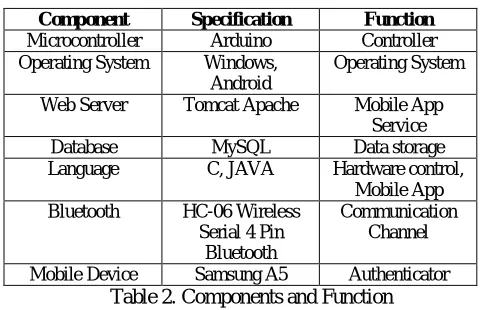
Component Specification Function
Microcontroller Arduino Controller
Operating System Windows,
Android
Operating System
Web Server Tomcat Apache Mobile App
Service
Database MySQL Data storage
Language C, JAVA Hardware control,
Mobile App
Bluetooth HC-06 Wireless
Serial 4 Pin Bluetooth
Communication Channel
Mobile Device Samsung A5 Authenticator
Table 2. Components and Function
The mobile device and the microcontroller use Bluetooth for close range communication. The digital door lock and the microcontroller are adjacent and connected by wire. The Arduino microcontroller and the mobile client use Bluetooth. The microcontroller communicates with the server via the HTTP protocol. The vibration sensor for sensing an impact, the camera sensor for taking a picture are all connected to the micro-controller. The Table 2. Describes the components, Specifications and Function which will be used in our Project Implementation. Tomcat Apache is the Web Server which we are using in our Project. The Database we are using is MySQL since it is freely available Open Source Relational Database Management System (RDBMS) that uses Structured Query Language(SQL). The Bluetooth Scanner used in our Project is HC-06 which is Wireless Serial 4 Pin Circuit. The Programming Language used for the Project is C, JAVA. The Web Application and Android Application is Written in JAVA , while the Hardware coding is done in C.
V.SIMULATIONRESULTS
The simulation studies involvesthe three main domains that is necessary for project execution i.e. Admin Application, Owner/User Application, and Hardware. The Fig.1. describes the Web Application which will be used by Admin for registering the new users and as well as manage the database which is stored on the server. The Admin Web Application provides admin to manage users, add new users, modify or update Bluetooth Ids.
The Fig.2. demonstrates the User Registration Window which is used by admin so as to add new users in the system and to provide them with access privileges. The phase requires Unique Bluetooth Ids to be registered with username and password.
Fig.1.Admin Web Application Fig. 2. User Registration Window
Fig. 3. Circuit Board Fig. 4. Owner Main Form
VI. CONCLUSIONANDFUTUREWORK
VII.ACKNOWLEDGEMENT
We would like to acknowledge the support lent by our guide Prof.NaliniMhetre. She was always available to address our queries and lead us through the right direction. Her encouragement and faith in us proved to be extremely helpful for us. Her knowledge and experience came to rescue us from the times when we were stuck at a point. We thank her for guiding us.
REFERENCES
1. D. Seo, H. Ko and Y. Noh, “Design and Implementation of Digital Door Lock by IoT,” KIISE Transactions on Computing Practices (KTCP),
vol. 21, no. 3, (2015), pp. 215-222.
2. S. Lee, J. Park, B. Woo and H. Choi, “Video Digital Doorlock System for Recognition and Transmission of Approaching Objects,” KIPS Transaction: Software and Data Engineering, vol. 3, no. 6, (2014), pp. 237-242.
3. T. Kwak and S. Moon, “A Digital Doorlock with Voice Recognition,” in Proceedings of KIIT Spring Conference, vol. 2012, no. 5, (2012), pp. 345-348.
4. J. Potts and S. Sukittanon, “Exploiting Bluetooth on Android Mobile Devices for Home Security Application,” in Proceedings of IEEE SoutheastconOrlango, (2012), pp. 1-4.
5. Y. Choi, Y. Park, W. Back, D. Lee and J. Byun, “Development of Home Automation System using Digital Doorlock based on Wireless Sensor
Network,” in Proceedings of KIIT Summer Conference, vol. 2011, no. 5, (2011), pp. 189-193.
6. O. Hoh and I. Ha, “A Digital Door Lock System for the Internet of Things with Improved Security and Usability,” Advanced Science and Technology Letters, vol. 109, (2015), pp. 33-38.
7. H. Hassan, R. Bakar, and A. Mokhtar, “Face Recognition Based on Auto-Switching Magnetic Door Lock System Using”, in Proceedings of 2012 International Conference on System Engineering and Technology, (2012), pp.1-6.
8. R. Satti, S. Ejaz, and M. Arshad, “A Smart Visitors’ Notification System with Automatic Secure Door Lock using Mobile Communication Technology,” International Journal of Computer and Communication System Engineering, vol. 2, (2015), pp. 39-44.
9. Y. Park, P. Sthapit, and J. Pyun, “Smart Digital Door Lock for the Home Automation”, in Proceedings of TENCON 2009, (2009), pp. 1-5. 10. G. Verma and P. Tripathi, “A Digital Security System with Door Lock System Using RFID Technology”, International Journal of Computer
Applications, vol. 5, no. 11, (2012), pp. 6-8.
11. M. Roy, F. Hemmert, and R. Wettach, “Living Interfaces: The Intimate Door Lock,” in Proceedings of the Third International Conference on Tangible and Embedded Interaction (TEI'09), (2009), pp. 45-46.
12. M. Khiyal, A. Khan and E. Shehzadi, “SMS Based Wireless Home Appliance Control System (HACS) for Automating Appliances and Security”, Issues in Informing Science and Information Technology, vol. 6, (2009), pp. 887-894.