
ABSTRACT
RAMACHANDRAN, VINAY. Bryce: An Extreme Programming (XP) Process Analysis and Project Management Tool (Under the direction of Dr. Laurie Williams.)
Increasingly, products in the software industry need to be delivered quickly to beat the competition. These products often have a dynamic and vague set of requirements. As a result, there has recently been a rapidly-rising interest in new approaches to software development. These approaches are lightweight and adaptive and have been called agile process methodologies. Extreme Programming (XP) is one such agile software process methodology.
XP is gaining popularity at a rapid rate, despite the lack of comprehensive, quantifiable studies demonstrating its effectiveness. In today’s fast-paced business environments, project managers need to obtain information, track, and manage projects as quickly as possible. Though project management tools are commercially available, none are specifically designed for XP and cannot capture the information regarding the elements specific to XP e.g. user story information, refactoring information, etc. Moreover, existing tools tend to be labor-intensive to learn and use. Additionally, these existing tools are mainly geared toward traditional software processes.
data recorded in the tool can also be analyzed to provide invaluable quantitative information in assessing the XP methodology’s effectiveness.
Bryce, a web-based tool, was developed using Java Server Pages (JSP). The tool was evaluated through its use in two graduate-level courses, CSC517 [Object-Oriented Languages and Systems, 49 students] and ECE 521/ECE 463 [Computer Design & Technology / Advanced Microprocessor Systems Design, 49 students], and one undergraduate course CSC326 [Software Engineering, 140 students] at North Carolina State University in the Fall 2002 semester. Furthermore, it has also been installed for managing XP projects at two industrial locations: International Business Machines (IBM) and Genesys Telecommunications Laboratories. Through this research, we observed the following:
1. Bryce appears to be an effective tool for managing XP projects.
BRYCE: AN EXTREME PROGRAMMING (XP) PROCESS ANALYSIS AND PROJECT MANAGEMENT TOOL
by
VINAY RAMACHANDRAN
A thesis submitted to the Graduate Faculty of North Carolina State University
in partial fulfillment of the requirements for the Degree of
Master of Science
COMPUTER SCIENCE
Raleigh 2002
APPROVED BY:
___________________________ ___________________________ Dr. Annie I. Antón Dr. Mladen A. Vouk
Advisory Committee Member Advisory Committee Member
________________________________ Dr. Laurie Williams
Biography
Acknowledgements
I would first like to thank my advisor, Dr. Laurie Williams, who gave me an opportunity to do research in my field of interest, Extreme Programming. She has helped me in every aspect of this research - starting off from suggesting my thesis topic through the completion of my thesis. She provided me with all the required resources for this research and opportunities to attend XP Universe conferences in 2001 and 2002. Attending these conferences greatly helped me in my research. I could have not done my thesis without her keen insight, guidance and support. Finally, she got IBM and Genesys to use the tool, which was very important for the tool evaluation.
I would like to extend my appreciation to my committee Dr. Mladen Vouk and Dr. Annie Antón for their valuable inputs. I would like to thank the Center for Advance Computing and Communications (CACC) for funding this research. I would also like to thank Dr. Edward F Gehringer (North Carolina State University), Lucas Layman (North Carolina State University), Bill Krebs (IBM), and Patricia Gage (Genesys) who helped me with the evaluation of the tool.
Table of Contents
LIST OF TABLES... VII LIST OF FIGURES ... VIII
1 INTRODUCTION ...1
1.1 TRADITIONAL METHODOLOGIES...1
1.2 AGILE SOFTWARE METHODOLOGIES...3
1.3 EXTREME PROGRAMMING...4
1.4 HYPOTHESES...9
1.5 SUMMARY OF REMAINING CHAPTERS...9
2 PROJECT MANAGEMENT ...11
2.1 INTRODUCTION TO PROJECT MANAGEMENT...11
2.2 XPPROJECT MANAGEMENT...12
2.3 TOOLS FOR XP PROJECT MANAGEMENT...13
2.4 COLLABORATION AND DISCUSSION TOOLS...15
2.4.1 Conferencing ...16
2.4.2 Whiteboarding ...17
2.4.3 Wiki...18
2.5 GENERIC PROJECT MANAGEMENT /WORKFLOW MANAGEMENT TOOLS...20
2.5.1 MILOS ASE ...21
3 INTRODUCTION TO BRYCE ...24
3.1 BRYCE OVERVIEW...24
3.2 LIST OF FEATURES IN BRYCE...25
3.3 BRYCE DOCUMENTATION...26
3.4 PLATFORM FOR BRYCE DEVELOPMENT AND ACCESS...27
3.5 IMPORTANCE OF RESEARCH...28
3.5.1 Project Management Capability...29
3.5.2 Research on XP ...36
3.6 BENEFITS OF USING BRYCE...41
3.7 PORTABILITY...42
3.8 SECURITY...43
4 BRYCE FEATURES ...46
4.1 BRYCE FEATURES OVERVIEW...46
4.2 NEW USER REGISTRATION...47
4.3 USING BRYCE...48
4.4 DESCRIPTION OF BRYCE MENU ITEMS...48
4.4.1 My Stuff ...49
4.4.2 Feature Management ...50
4.4.3 Project Information ...53
4.4.5 Manager Menu ...54
4.4.6 Other Menu Items...55
5 PRELIMINARY BRYCE EVALUATION...56
5.1 METHOD FOR BRYCE EVALUATION...56
5.2 DETAILS ABOUT THE SURVEY...57
5.3 USER FEEDBACK...57
5.4 BRYCE FOR XPRESEARCH...59
6 CONCLUSION ...61
6.1 FUTURE RESEARCH...62
6.1.1 Further tool Development ...62
7 LIST OF REFERENCES...64
APPENDIX 1: INSTALLATION MANUAL ...69
Requirements ...69
Extracting the compressed tool archive ...69
Installation and Configuration of Microsoft SQL Server 2000 ...70
Setting up of JDBC driver ...71
Installation and Configuration of Resin ...71
Installation and Configuration of IIS ...72
Installation on Apache and Tomcat...73
Trouble Shooting ...74
APPENDIX 2: USER MANUAL ...75
Overview...75
New User Registration...76
Description of the Menu items ...76
How do I use this Tool to track my Project?...82
APPENDIX 3: TUTORIAL ...84
SETTING UP THE TOOL FOR YOUR PROJECT...84
7.1 INTRODUCTION...84
Getting Started...86
Requirements ...86
Accessing the XP tool...87
New User Registration...87
Adding New Project (Manager Only) ...90
Adding Release, Iteration (Manager Only)...92
Adding/Deleting New Team Member (Manager Only) ...94
FEATURE MANAGEMENT...95
Adding a new story ...95
Viewing and editing all stories...98
Viewing and editing all Tasks...103
Adding a new Acceptance Test ...104
Viewing and editing all Acceptance Tests...105
Recording time spent on a Task ...106
Editing the Recorded Task Time...110
Changing Task status to completed...112
Changing Story status to completed ...114
Making changes to a completed Story...118
Keeping track of changes made to a story...122
Viewing Project Report ...124
TOOL ADMINISTRATION...125
Add Team Member ...125
Delete User Registration...126
Add/Change Manager...126
Change Password ...126
APPENDIX 4: DATABASE DIAGRAM ...127
APPENDIX 5: BRYCE SURVEY...128
PERSONAL INFORMATION...128
PROJECT MANAGEMENT...128
ABOUT STABILITY...130
ABOUT LEARNING,USAGE AND DOCUMENTATION...130
LIST OF TABLES
LIST OF FIGURES
FIGURE 3.5.1. VIEWING ALL THE USER STORIES IN A PROJECT ...30
FIGURE 3.5.2. VIEWING ALL THE USER TASKS IN A PROJECT ...32
FIGURE 3.5.3. LISTING USER STORIES BELONGING TO THE CURRENT USER...33
FIGURE 3.5.4. TRACKING THE REWORK DONE TO A USER STORY...34
FIGURE 3.5.5. A SAMPLE PROJECT REPORT ...35
FIGURE 3.5.6 THE COST OF CHANGE CURVE FOR TRADITIONAL PROCESSES (SOURCE [12])...37
FIGURE 3.5.7 THE COST OF CHANGE CURVE FOR XP (SOURCE [12])...38
FIGURE 3.5.8. REWORK INFORMATION OF A PROJECT ...39
1 Introduction
This chapter provides an overview of the traditional methodologies for software development and the newer methodologies called agile methodologies. It discusses one of the most popular agile methodologies called Extreme Programming in more detail since it is served as the primary basis for this investigation. The hypothesis for this thesis is then presented. The summary of the remaining chapters is presented at the end of this chapter.
1.1 Traditional Methodologies
Developing reliable software on time and within budget is a difficult endeavor for many software organizations [1]. The waterfall model was introduced in a paper by W.W Royce [2] as a methodology for gaining control over software development and suggests a systematic, sequential approach to software development [3]. In the waterfall model, a project proceeds through the stages of requirements analysis, design, coding, testing and support with sign-off points at the end of each stage [3]. Some have found the application of the waterfall model problematic in more uncertain environments, such as Internet software engineering [4]. Uncertain environments with high requirements volatility necessitates greater interactivity between the customer and the development team [4].
practices in which prototypes are developed and shown to customers early in the development process. The rapid-prototyping model [5] emphasizes the construction of an early prototype to help establish customer requirements [4]. Similarly, the spiral model [6] moves through a series of prototype builds to help the developers identify and reduce the risk associated with the project [4]. In both those models, however, the prototypes are not part of the design itself but merely representations that are thrown away after fulfilling their function as a communication vehicle. The bulk of the design work carried out thereafter is performed in a similar manner to the waterfall model [4]. In some projects, the time spent on a throwaway prototype typically does not result in code that can be reused in a full-scale system, and, hence, excessive effort spent on a throwaway prototype can be wasteful [7].
Alternatively, when the incremental software development model [3] is followed, a system is delivered to the customer in discrete chunks. This model is used as means of partitioning work so that some functionality can be delivered to the customer early [4].
In spite of these software development models, the success rate for software projects has been fairly poor [9]. A landmark 1994 white paper, "The CHAOS Report (1994)" [9] published by The Standish Group, a West Yarmouth, Massachusetts-based consultancy, reported that just 16 percent of software projects they studied succeeded. The rest either failed (31 percent) or were challenged (53 percent); a term encompassing cost and time overruns and missing features [9]. Another report by The Standish Group states that, “Underestimating project complexity and ignoring changing requirements are basic reasons why projects fail” [10].
1.2 Agile Software Methodologies
until the requirements change [11]. In an effort to respond to the changing requirements, agile methodologies use iterative development to incorporate or adapt to customer feedback throughout the development cycle, hence they are characterized as adaptive [11]. With agile planning, the long-term plans are very fluid, and the only stable plans are short-term plans that are made for a single iteration [11].
Some of the more popular agile methodologies are Extreme Programming (XP) [12], Dynamic Systems Development Method (DSDM) [13], Scrum [14], Crystal [15], Adaptive Software Development [16] and Feature Driven Development (FDD) [17]. Extreme Programming (XP) is considered the most popular of the agile methodologies [11, 18]. XP is also the most documented and specified of the agile methodologies, and its practices are appealing to many software developers. Chapter 3 discusses the development of a tool to support XP teams.
1.3 Extreme Programming
to a methodology occurred in 1997 when Kent Beck successfully used the full set of XP practices (which will be described later in this section) to implement a payroll project for Daimler Chrysler [11]. Since then, XP has been successfully used at many companies, such as Bayerische Landesbank, Credit Swiss Life, First Union National Bank, Ford Motor Company and UBS [19].
XP is based on Beck and Cunningham’s observations of what made program development faster and what made it slower [20]. XP is an important new methodology because it is one of several new agile software methodologies created to produce high quality software [12] and reduce the cost of software [20]. XP is also professed to be a process that is simple and enjoyable [20].
Kent Beck [12] established the following set of four core values for XP: o Communication. This XP value focuses on building a person-to-person,
mutual understanding of the problem environment through minimal formal documentation and through maximum face-to-face interaction. XP’s practices are designed to encourage interaction, developer-to-developer and developer-to-customer [12].
o Feedback. XP teams obtain feedback by testing their software early and often [19]. They deliver the system to the customers as early as possible and implement changes and reprioritization as suggested by feedback from the customer.
o Courage. Developers often cite the pressure to ship a buggy product. It takes courage to resist this pressure [12]. Beck also states that XP teams must be courageous and willing to make changes late in the project or even discard the code and start all over again [12].
XP derives its practices from the above values. The 12 practices of XP are briefly discussed below [12]:
1. The Planning Game. The goal of the Planning Game is to quickly determine the scope of the next release by combining business priorities and technical estimates of product requirements.
2. Small Releases. A simple system is produced quickly, followed by new versions of increasing functionality in very short cycles of approximately three weeks.
3. Metaphor. A simple shared story of how the whole system works is used to guide all development.
5. Testing. Programmers continually write automated unit tests, which must run flawlessly before development can continue. Customers also write acceptance tests, which are used to demonstrate that features have been implemented.
6. Refactoring. Programmers restructure the system without changing its behavior to remove duplication, improve communication, to simplify, and/or to add flexibility.
7. Pair programming. Pair programming is a style of programming in which two programmers work side by side at one computer, continually collaborating on the same design, algorithm, code or test [21, 22]. All production code in an XP project is written with two programmers at one machine.
8. Collective Ownership. Anyone can change any code anywhere in the system at anytime, regardless of who originally created the code.
9. Continuous Integration. The system is integrated and built several times each day, every time a task is completed.
10. Sustainable Pace. XP teams do not work an excessive number of hours per week for an extended period of time.
11. On-site Customer. An on-site customer should be available full time to answer questions for the development team.
(Fully achieved). The participants felt that all of the following aspects were aided by XP:
• Deliver software in time (4)
• Develop software with a high quality, i.e. with less bugs (4)
• Let developers have fun with their work (3)
• Allow changes without incurring big costs (3)
Finally, almost all of them expressed that they would advocate using XP in the future [23].
1.4 Hypotheses
This research involved the development of Bryce, a web-based project management and process analysis tool designed for XP teams. Through this research, we examine the following two hypotheses in relation to this tool:
1. A lightweight project management tool will be beneficial for managing XP projects.
2. A lightweight measurement and analysis system will aid in research by obtaining quantitative information regarding XP projects.
1.5 Summary of Remaining Chapters
development of the Bryce tool. Chapter 4 contains an explanation of the features in the tool. Chapter 5 contains an explanation of how the tool was evaluated. Chapter 6 summarizes the conclusions and contributions of the thesis. It also suggests the areas for further development of the tool and research areas in which the tool could be used.
2 Project Management
This chapter discusses the need for project management of software projects and in particular how Extreme Programming projects are managed. It discusses the various tools that are currently used in XP project management, their advantages and drawbacks.
2.1 Introduction to Project Management
Without the right information, you’re just another person with an opinion.
— Tracy O’Rourke, CEO of Allen-Bradley[24]
The objectives of software project management are to set and meet achievable commitments regarding cost, schedule, quality, and function delivered—as they apply to individual development or maintenance projects [24]. Effective measurements help software development groups succeed by enabling them to understand their capabilities. Software groups can then develop achievable plans for producing and delivering products and services [24]. Measurements also enable people to detect trends and to anticipate problems, thus providing better control of costs, reducing risks, improving quality, and ensuring that business objectives are achieved [24].
up [10]. This growth of the project management field has been accompanied by the emergence of planning, estimating, scheduling, and tracking tools designed to support the software process [10]. Project management tools support the project management process by providing a vehicle for planning, executing, and controlling the software development. For example, a project management tool may aid in the creation of a project plan for delivering a certain number of features in a release, assigning tasks to team members for the execution of the plan, and controlling the plan execution by monitoring the progress. The project management tool does not actually manage the project; the project manager manages the project by utilizing the tool [10].
2.2 XP Project Management
Metrics are the basic tool for XP project management [12]. For example, the project velocity metric is the basic measure required for running the Planning Game [12]. The project velocity (or just velocity) is a measure of how much work is being completed on a project [25]. It is calculated by adding the time estimates of all the completed user stories of an iteration [25] that were actually completed in iteration. For example, if ten user stories with an estimated completion time of ten hours each are completed in an iteration, the project velocity is 100.
stand at any one time [12]. If there is a shortage of tests being written, Beck suggests that a manager should put up a “Big Visible Chart” [12] with the number of tests written and update it everyday [12]. In this way the manager can communicate the need for improvement.
In XP, a person is assigned the role of a tracker to gather project metrics [12]. Tracking should happen without much overhead [12]. It is the responsibility of the tracker to make the minimum amount of measurement and still be effective [12]. Beck suggests gathering project data, such as development time, from each team member approximately twice each week [12]. The XP manager is involved in XP project management because he/she runs the Planning Game, ensures that metrics are seen by those whose work are being measured, and occasionally resolves issues in which team consensus cannot be achieved [12].
2.3 Tools for XP project management
After the user story cards are written, customers place priorities on the cards, and developers place time estimates on the cards. If the time estimate indicates a certain story is too large for one iteration, the customer is asked to split the requirement into multiple user story cards. When all priorities and estimates have been completed, the developers and the customer play the Planning Game and collectively decide what features will go into a release. The developers and customers collectively understand the amount of time and resources available for an iteration. They lay the user story cards out on a table and slide them around until they jointly choose the highest priority (and/or highest risk) stories that fit into the iteration.
Once the stories are chosen for a release, the developers choose stories to be responsible for in the release. The story owners then break the stories into smaller tasks (generally a half to a full day) and record this information on task cards. The story owner finds a partner for each task and incrementally writes test cases and implementation code for the task. When the pair completes the implementation of a task and all the new and existing test cases are passed, they integrate and release the new code to the code base and project test suite [12].
accessing the story or task information can only be possible with some form of electronic media.
XP also calls for some quantitative record keeping and computation of statistics; for example, estimated and remaining days of effort on tasks [27]. Someone is usually delegated the role of tracker, collecting the above information on a personal database (for example, a spreadsheet such as Excel) capable of performing a wide variety of computations on a variety of data. Again, there are times when a physically distributed team would benefit from being able to collect measurements online.
To address the issue of accessing project information online, RoleModel Software, Inc., of Fuquay-Varina, North Carolina used a private Wiki site (discussed in Section 2.4.3) [27]. Another tool, named MILOS ASE (where MILOS stands for “Minimally Invasive Long-term Organizational Support” [28] and ASE stands for Agile Software Engineering [28]), discussed in Section 0, has been developed to provide project collaboration, coordination and organizational learning for distributed XP teams [28].
2.4 Collaboration and Discussion Tools
Collaboration and discussion tools are software that promote and mediate discussions and enable joint working between different users [27]. There are three models for collaboration over a network [27]
public form of email is the Internet newsgroup, where postings are distributed globally to all participating newsgroup members and kept there for later access. The disadvantage of postings is that they cannot be edited or easily cross-linked in anyway useful to a group unless they are somehow collected with annotation in a central archive. If archival access is required, postings can made directly to a database, similar to the other models.
• Shared folder/ File Access. Shared file access in its simplest form allows members to directly access the same files in a common repository on a public server. The disadvantage of this model is that the files may be in application specific formats and therefore may not be immediately “browsable”.
• Interactive content update/access. Interactive page access allows members of a group to collectively edit a material. There are a number of solutions supporting this model, some of the popular ones being conferencing, whiteboard collaboration, etc. Wiki also belongs to this model of collaboration. These interactive update/access models will be discussed in detail in the next few sections.
2.4.1 Conferencing
decision makers are geographically separated. Some of the different types of conferencing are [29]:
• Text-Based Conferencing. Text-based conferencing is usually asynchronous communication when used in the business world. It is based on the concept of a discussion thread where different participants discuss a particular topic. A thread consists of a group of postings from different participants indented to show replies to an original comment. Synchronous, text-based conferencing is possible using chat software like Internet relay chat.
• Video Conferencing. In the last few years, the Internet has accelerated the growth of video conferencing. The advantage of video conferencing is that it reduces travel time and costs and offers an opportunity to arrange a meeting at relatively short notice.
2.4.2 Whiteboarding
2.4.3 Wiki
The Wiki [27, 30], a general purpose collaborative webpage development tool, is server software originally authored by Ward Cunningham. The Wiki allows users to freely create and edit webpage content using any forms-enabled web browser. Wiki supports hyperlinks and has simple text syntax for dynamically creating new pages and cross-links between internal pages. It is a medium for collaboration because of its freedom, ease of access and use, simple and uniform navigation conventions, and apparent lack of formal structure [27]. “Wiki is inherently democratic” [27] – every user has exactly the same capabilities/authority as any other user. It allows web collaboration without the need to manage accounts and passwords for server access; however Wiki can run on intranets and can sometimes have password access to the webpages. Although this may seem risky, experience shows that little damage is done to Wiki content even in the absence of security mechanisms [27].
the stories and tasks for which a team member had accepted responsibility for the current iteration.
If a task was delayed to a later iteration, the citation was simply removed from one iteration page on Wiki and added to a later one. Anyone could make such a change simply by editing both iteration pages, cutting the citation from one page and pasting it into the other. Reassigning a task from one individual to another was handled in the same manner as moving task between iterations.
Within the context of the Wiki, customizable calculations could be invoked on recorded story and task pages using CGI scripts. Locating the data within the page to be used as input to the calculation was typically based on a formatting convention. The page formatting convention used to specify the location of the user story estimates in a page is “space indented, one or more words followed by a colon, then (with or without spaces) numbers” [27]. A regular expression is used to parse the page according to this formatting convention and to obtain the user story estimates. Additionally, the CGI script located any references or hyperlinks to further pages, which it recursively walked through. The scripts also contained some other constraints for obtaining data, such as which links to follow and how much of the page to continue for parsing data. A report was generated based on the results of the calculations and was displayed using HTML unordered lists and HTML tables.
• Locating data within a page requires a formatting convention for each page. If the pages are not properly formatted, the script may break or produce incorrect output.
• Since a formatting convention is essential for locating the data, changing the layout of a webpage will require modifying the scripts in order to locate the data in the webpage.
• The project Wiki pages have to be recursively walked through to obtain all the project data required for a calculation. It would be more efficient for a program to retrieve project data if the data is stored in a database.
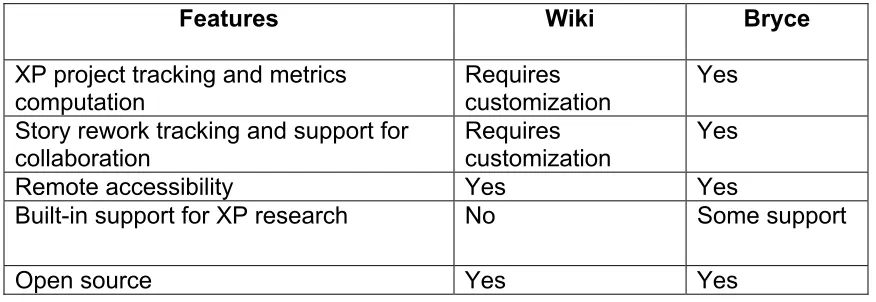
The following table, Table 2.4.1, compares the features available in Wiki and Bryce
Features Wiki Bryce
XP project tracking and metrics
computation Requires customization Yes
Story rework tracking and support for
collaboration Requires customization Yes
Remote accessibility Yes Yes
Built-in support for XP research No Some support
Open source Yes Yes
Table 2.4.1 Comparison of Wiki and Bryce Features
2.5 Generic Project Management / Workflow Management Tools
for these tools may be too long. Due to the XP culture, programmers would not spend the time to customize or learn the tool and would resort back to manual means of project management.
Another set of tools, called workflow management tools, are used to manage projects. Workflow is defined as a series of tasks within an organization to produce a final outcome [31]. At each stage in the workflow, one individual or group is responsible for a specific task [31]. Once the task is complete, the workflow software ensures that the individuals responsible for the next task are notified and receive the data they need to execute their stage of the process [31]. Generic Workflow management systems share the same disadvantages of a generic project management tools in a XP Project. They may require customization for being used in XP projects, may not aid in XP research and the learning curve for these tools may be too long.
2.5.1 MILOS ASE
MILOS ASE [28] (or short: M-ASE) is a web-based tool that supports agile software engineering practices for distributed teams. It is currently being developed by Dr. Frank Maurer and his team at the University of Calgary. The overall goal of the tool is to support project collaboration, coordination, and organizational learning for virtual software development teams [28].
The main features of M-ASE are listed below [32]:
• Iteration planning. User stories and other tasks are assigned to iterations. The effort available for the next iteration is determined based on work hours and the velocity of the last iteration.
• Progress tracking. The system tracks completed user stories and task effort.
• Metrics collection. M-ASE manages task effort, task estimates, and estimation accuracy, user stories completed, velocity, source code size metrics, and test metrics.
Both Bryce and M-ASE share many common features. However, they are also different in several aspects.
The following aspects are strengths of M-ASE for use with XP projects: • M-ASE is integrated with NetMeeting. This allows a programmer to see
and converse with another programmer while performing a task even though they may not be collocated.
• M-ASE shows the users who are online at the moment.
• M-ASE can calculate source code metrics such as number of packages, classes, functions and inner classes using JavaNCSS [33]. It can calculate test metrics like the number of JUnit assertXXX statements if the source code is Java.
Correspondingly, the following are strengths of Bryce for use with XP projects:
• M-ASE support for measuring pair programming is still under
development. Bryce can record pair programming information and also compute metrics for pair programming such as amount and percentage of pair programming effort.
• Bryce also enables the quantitative analysis of metrics for research
purposes, for example the cost of change/rework of a user story. M-ASE cannot track changes made to a story (because of bugs, customer etc). This information is valuable as it shows how much of rework has been done to a particular story or in a particular release/iteration.
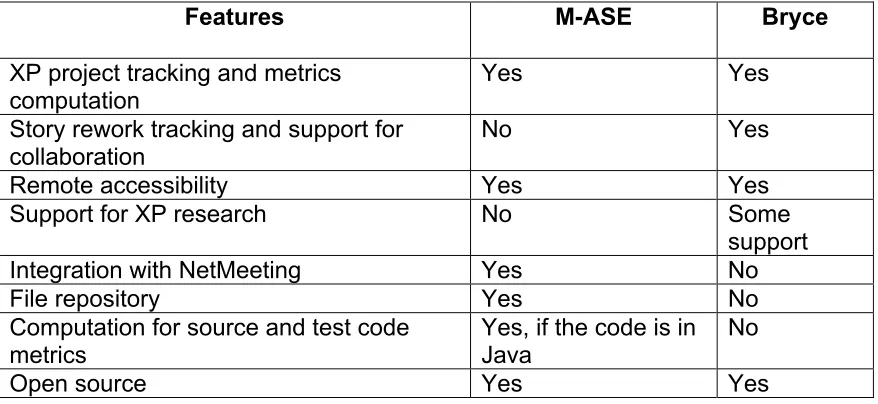
The following table, Table 2.4.1, compares the features in Bryce and M-ASE.
Features M-ASE Bryce
XP project tracking and metrics computation
Yes Yes Story rework tracking and support for
collaboration No Yes
Remote accessibility Yes Yes
Support for XP research No Some
support
Integration with NetMeeting Yes No
File repository Yes No
Computation for source and test code metrics
Yes, if the code is in Java
No
Open source Yes Yes
3 Introduction to Bryce
This chapter provides an overview of the Bryce tool and its associated documentation. It specifies the tool’s development platform and how the tool can be accessed. This chapter also discusses the importance of the tool development for project management and for Extreme Programming research. It provides insight into some important issues like security and portability of Bryce.
3.1 Bryce Overview
Bryce is a tool specially developed for recording and analyzing the metrics of XP, for facilitating project management and reporting on project status and progress. Bryce was developed based on the XP philosophy of “doing the simplest thing that could possibly work” [12] for tracking the project. Hence an important requirement of the tool was that it needed to be easy to use and learn.
In today’s fast paced environment, the product requirements change often [10]. Bryce provides support for tracking such changing requirements. Bryce tracks changes made to a user story due to customer requests and also due to other factors like refactoring and bugs fixes.
development phases on a minute-by-minute basis, so tracking would likely be impossible. Instead the tool captures the total time for the above phases as task time. Though the time recorded by the tool may lack some precision, it is still very useful. XP researcher Succi states,
You will never obtain 100% precision in your measurements, nor do you want it - it is too expensive, and you do not need it. Think of the speedometer-it always shows a 10% error. Still you can use it to drive safely and avoid tickets. [34]
3.2 List of features in Bryce
The following are the list of features available in Bryce.
• Automated project tracking. Project reports can be generated for any release or iteration. The project report provides real-time information regarding the various aspects of the project, such as user story and user task, pair programming, acceptance test, and user story rework information. This information can provide insight into project progress and a manager can take appropriate steps, if necessary.
• Personal task management. Team members can track user stories and tasks for which they are responsible in single or multiple projects. The menu item “My Stuff” is specifically dedicated for tracking a team member’s user stories and tasks.
• Rework tracking. Bryce users can track rework due to bug-fix, refactoring, pre-release and post-release rework done to a particular user story.
• Support for collaboration. Bryce users can record and obtain quantitative information on pair programming.
• Support for research. Bryce users can obtain a wealth of quantitative information regarding the project such as pair programming information, rework information on bug-fix, refactoring, pre-release and post-release rework.
• Support for multiple managers. Bryce allows more than one team member to perform operations that are privileged to a manager.
• Documentation. Bryce has comprehensive documentation available for installing and using the tool. A tutorial is also available for obtaining hands-on experience with the tool.
• Open Source. The source code for the Bryce tool is available for customization.
3.3 Bryce Documentation
Three documents have been written for installing and using Bryce. These documents have been included as appendices in this thesis.
State University. It was updated when the tool was installed at IBM and Genesys.
• User manual. This manual explains how to use Bryce. It contains a list of all the menu items and description of their functionality. A user can access this manual from the login page of the Bryce tool. Please refer to APPENDIX 2: User Manual for more details.
• Tutorial. The tutorial guides a new user through the Bryce functionality by giving an example of a pseudo project. A user can access this tutorial from the login page of Bryce. Please refer to APPENDIX 3: Tutorial for more details.
3.4 Platform for Bryce Development and Access
(DBMS) for storing project information, a web server with a JSP engine to host the JSP pages, and JDBCTM drivers for database connectivity.
Bryce was developed on a Microsoft Windows 2000, Internet Information Services 5.0 (IIS) server. The JSP engine, used to serve the JSP pages, was Resin® [37]. Bryce was developed using Microsoft SQL 2000 as its database server. Other database management systems that support Structured Query Language (SQL), with some advanced features like “subSELECT” (nested SQL) can be used in place of MS SQL server. The aveconnect Version 2.3, Type 4, JDBCTM Driver was used to connect to the Microsoft SQL Server database.
This implementation of Bryce has more than 70 JSP and Java files and over 12000 lines of code. Additionally, it uses 12 tables in two databases to store project information. As mentioned earlier, it uses a single CSS, which contains all the information regarding the style of all its webpages. APPENDIX 4: Database Diagram pictorially depicts the database tables and the relationship between them.
The tool may be accessed using any Web browser at
http://bryce.csc.ncsu.edu/xptool/default.jsp and has been tested with Microsoft Internet Explorer Version 5 and Netscape Version 6.2.
3.5 Importance of Research
• Other available project management tools, like MS Project, may not be
able capture information regarding elements unique to XP without some customization; for example, user story information, pair programming information, refactoring information, etc.
• Many project management tools assume project planning is done upfront
and hence the entire project plan is generated upfront. This is not suitable for an XP environment where planning is done only for the current release and iteration.
• Some project management tools, like MS Project, cannot be modified or
customized to obtain data pertaining to one specific area of research because the source code for the tool may not be available, for example studying the cost of making changes late in an XP Project.
The tool can be utilized to support: 1) project management and 2) research.
3.5.1 Project Management Capability
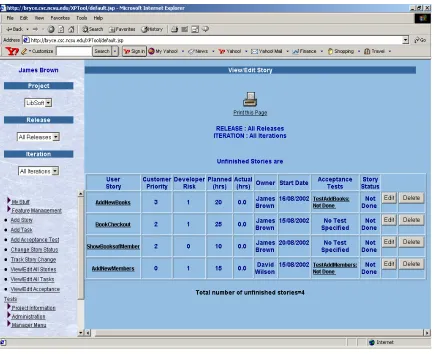
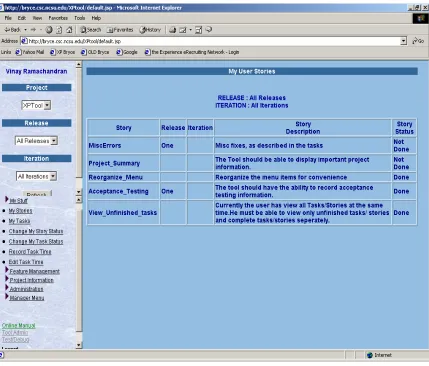
When the “View/Edit All Stories” link under the “Feature Management” menu is clicked on the left frame, all the user stories in the current release and iteration can be viewed. Figure 3.5.1 shows a sample list of recorded user stories. This list of user stories is sorted based on the customer priority. Moreover the tasks associated with the user story can be viewed by clicking on the story name. Similarly acceptance tests associated with the user story can also be viewed by clicking the corresponding acceptance test link.
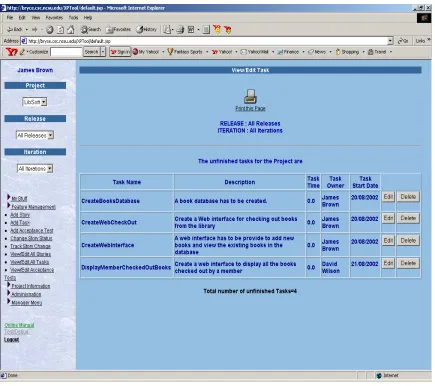
If a story is split into one or more tasks, the task information is also entered in the tool and the task is linked to the respective user story. Also, information regarding acceptance tests for each user story is also entered into the tool. All the stories, tasks and acceptance tests can be viewed and edited.
Bryce enables personal task management. The user can view the user stories and user tasks for which he/she is responsible. When the “My Tasks” link under the “My Stuff” menu is clicked on the left frame, all the tasks belonging to the current user be viewed. This task list first displays the incomplete tasks and then the complete tasks. Figure 3.5.3 shows the list of stories for which the current user is responsible.
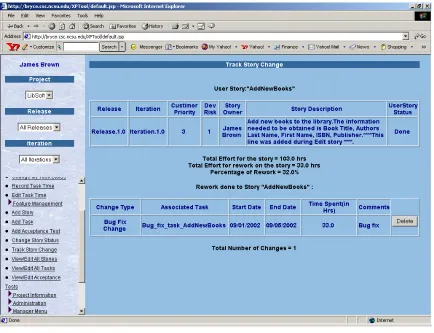
The tool also tracks changes made to a user story. When the “Track Story Change” link under the “Feature Management” menu is clicked on the left frame, the user can pick a user story and view the changes made to it. Figure 3.5.4 shows the rework done on a user story named “AddNewBooks”. The figure shows a bug fix change that was made to the user story. This page also shows total rework effort for the user story and percentage of rework effort.
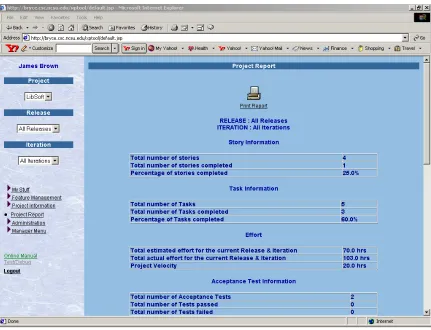
Project reports can generated for any particular release/iteration or the project as a whole. The project report helps in tracking project progress and obtaining project metrics real time from anywhere with just a web browser. Figure 3.5.5 shows a sample project report that was generated by the tool. The report contains user story information, user task information, acceptance test information, pair programming information, bug-fix rework information, refactoring rework information, pre-release rework information, post-release rework information and overall rework information.
3.5.2 Research on XP
There exists little statistical evidence to prove the effectiveness of XP. To date the evidence is highly anecdotal, but has aroused the curiosity of many highly respected software engineering researchers and consultants [21]. Bryce may aid in obtaining statistical evidence for (or against) the effectiveness of XP projects. Bryce has the capability to generate comprehensive reports for every project release and iteration. These reports provide quantitative feedback regarding a project, which will aid in XP research.
Figure 3.5.6 The Cost of Change Curve for Traditional Processes (source [12])
Figure 3.5.7 The Cost of Change Curve for XP (source [12])
However, there is no quantitative evidence to support this claim. A flattened cost-of-change curve allows big decisions to be made as late in the process as possible, defers the cost of making the decisions and have the greatest possible chance of being right [12]. Research has shown that developers perceive that XP allows change in software without incurring big costs [23], though there is no quantitative evidence to prove the same.
average cost per rework for each of the different types of rework (in hrs) and also their aggregate rework for every project release and iteration. Figure 3.5.8 shows the rework information of a sample project. This information may be used to plot and quantitatively ascertain whether the cost of change curve is somewhat flat for XP.
Figure 3.5.8. Rework information of a project
can aid in collection of some of the metrics suggested in [39]. These metrics are obtained from the “Project Report,” which are can be generated by Bryce:
• Productivity and Cycle Time. The developer productivity is the amount of time required to complete a task in relation to a measure size, such as lines of code or function points [39]. Bryce computes the average time taken to complete a user story in every release or iteration. It also computes the effort required for completing tasks, releases and projects. • Responsiveness to Customer Changes. XP professes the ability to adapt
available for the other types of rework, such as bug-fix, refactoring, pre-release rework.
3.6 Benefits of using Bryce
The following are the benefits of using Bryce in an XP project
• Bryce specifically is developed for XP. Hence it can capture information
regarding elements unique to XP such as user story, refactoring, and pair programming information.
• It provides real-time information about a project, such as project velocity,
user stories, tasks, acceptance tests, and pair programming information etc.
• It is web-based and, hence, can be accessed anywhere on the Internet or
via an intranet.
• It has a low learning curve and little training is necessary to learn the tool.
Ninety three percent of the students in CSC517, ECE 521/ECE 463 and CSC326 took just a few hours to learn the tool.
• It lessens the burden or even eliminates the need of a “tracker” [12]. Once
the data is entered into the tool by each developer, the tool tracks the project.
• Since the source code is available, new features can be added according
Moreover the tool is designed to be scalable because more features can be added with minimal or no changes to the existing functionalities.
3.7 Portability
Bryce is designed in such a way that it can be ported from one system to another in future. Broadly, the Bryce can be divided into following components,
• JSP, Java files and HTML files
• Database management system (DBMS)
• JDBC Drivers to connect to the database server
As mentioned before, Bryce was developed on a Microsoft Windows 2000, Internet Information Services 5.0 (IIS) server. The JSP engine, used to serve the JSP pages, was Resin® [37]. Bryce was developed using Microsoft SQL 2000 as its database server. The aveConnect version 2.3, type 4, JDBCTM Driver was used to connect to the Microsoft SQL Server database.
need to be migrated to the new DBMS. This can be done easily using commercial tools such as SQLPorter. However, SQLPorter does not support migration to many DBMS as yet. Finally, JDBC drivers are required to connect to the DBMS, which preferably should be Sun certified [43]. The Sun JDBC certification helps product vendors and applications developers choose the appropriate JDBC drivers for their specific needs with confidence that the driver has been certified to work with Java 2 Platform, Enterprise Edition (J2EE) compatible products [43].
At IBM and Genesys Telecommunications Laboratories, a different web server and JSP engine were used than the setup at North Carolina State University. In these locations, Apache version 1.3 was used instead of Microsoft Internet Information Services 5.0 (IIS) as the web server, and Tomcat version 4.x was used in place of Resin® as the JSP engine. Since Bryce has not been used very much at these industrial locations, we are not sure which configuration (IIS & Resin or Apache & Tomcat) is better.
3.8 Security
their user Id. Invalid access to a webpage is denied by first checking whether the session is a valid session and the user is a valid user. For example, the user may try to access a webpage directly by typing the URL without actually logging into the system. In this case, the session is invalid and consequently an “Invalid Session” page error is returned. Similarly invalid access to a restricted manager’s page is denied by verifying whether a user is a valid manager. To perform the above validations a Java API called “UserValidation” was implemented. This API is used in JSP to verify whether a user is indeed a valid user/manager.
Collective Ownership is one of XP practices [12]. It implies that anyone can change any code anywhere in the system at anytime, regardless of who originally created the code. Bryce extends this XP philosophy to allow anyone on a team to add, delete or modify project information. However some operations like creating or deleting the projects, releases, iterations are restricted a project’s manager since these operations must be performed by the manager and not by the team members. Restricting access to functions in this way prevents catastrophic operations like deleting a project, which obviously cause all the project information to be deleted. However in the future version of Bryce, it would be useful to have a logging mechanism, which will list the changes that are made to a project.
4 Bryce Features
This chapter discusses the functionality present in Bryce. It explains how a new user can sign up with the tool, set up a new project and utilize the tool for project management. This chapter also provides explanation to all the menu items present in Bryce.
4.1 Bryce Features Overview
Bryce is currently accessible at the following URL http://bryce.csc.ncsu.edu/XPTool/default.jsp. A user must first register to the tool using the “New user sign up” link in the login page. Once a new user has registered, he/she will be able to login to the tool and use it. Bryce has three categories of users
• Normal user - A normal user may use Bryce to record/view project information (except the information discussed in Section 4.4.5). In a project, typically a team member belongs to this category of users. A normal user can:
o add/edit User Stories, User Tasks, Acceptance Tests pertaining to the Project
o view/record certain Project related information such as viewing
project report
o perform limited project administration tasks like changing the
• Manager - A manager has certain special privileges in addition to the above listed normal user privileges. Typically, a project manager or team leader is granted the “manager” privileges. In addition to the normal user privileges, the manager may also
o add/delete projects
o add/delete release information
o add/delete iterations of a release
• Administrator - The administrator is responsible for the overall too maintenance. The tool administrator may grant or take away manager privileges from a user. The tool administrator is responsible for backing up the database periodically and restoring it in the event of a system crash. The generic term “user” employed in the remaining sections of this thesis refers to both normal users and managers. Once users are registered as a normal user or manager, they can login and begin using Bryce.
4.2 New User Registration
To use Bryce for the first time, users must register. All users must first register as normal users and may then request the tool administrator to grant manager privileges. As mentioned earlier, only the tool administrator can add or remove managers.
the tool are password, first name, last name and the project manager name, which is chosen from a project manager list in a drop down menu. Once users are successfully registered, an email notification is automatically sent to the manager. The manager may then add the new team member to the project. If a user has been successfully registered and the manager has added the user as a project team member, the user may login to access their assigned project information. A sample registration can be viewed in APPENDIX 3: Tutorial.
4.3 Using Bryce
To begin working on a project, the user must first select a project from the project dropdown menu (see page 92). Then, the user can opt to work on a particular release and iteration by selecting them in their corresponding drop down menus (see page 98).
4.4 Description of Bryce menu items
4.4.1 My Stuff
The “My Stuff” menu item provides users with the capability of tracking stories and tasks for which the current user is responsible. The following submenu items are provided:
o My Stories: This submenu item is used to view user stories assigned to the current user.
o My Tasks: This submenu item is used to view user tasks assigned to the current user.
o Change My Story Status: This submenu item is used to change the story status of the current user. The following are the valid story states: “not done,” “done,” “pre-release change,” ”post release change,” “refactoring,” and “bug fix change”. A user story is initially in “not done” state. When a story is completed, it is changed to the “done” state. When a story requires rework, the story state is changed to one of the following rework states: “pre-release change,” ”post release change,” “refactoring,” or “bug fix change” depending on the type of rework. A rework task is also added to the story in order to track the time spent on this story rework. Once this rework is completed, the task status is set to “complete”. Now the story can be changed back to “done” state. o Change My Task Status: This sub menu item is used to change the
o Record Task Time: This submenu item is used to record time to user tasks assigned to the current user. The user specifies the amount time spent on the particular task and the collaborators involved in the task sessions.
o Edit Task Time: This submenu item is used to edit the recorded time spent on tasks of the current user.
4.4.2 Feature Management
This menu item provides the user with the capability of adding, modifying or viewing any story, task or acceptance test in the project. The tool assumes that there is trust among the project team members and hence allows all the team members to view or edit project information.
o Add Stories: This submenu item is used to add new user stories to the project. The story can be assigned to a particular release or iteration either while adding a story or sometime later using the “View/Edit Stories” submenu item.
o Add Task: This submenu item is used to add new user tasks. The task can be assigned to a particular user story either while adding a task or sometime later using the “View/Edit Tasks” submenu item.
o Change Story Status: This submenu item is used to change the story status of any user. The following are the valid story states: “not done,” “done,” “pre-release change,” ”post release change,” “refactoring,” and “bug fix change”. As shown in Figure 4.4.1, the user story is initially in “not done” state. When the story is completed, it is changed to “done” state. When rework is to be done on a story, the story state is changed to one of the following rework states: “pre-release change,” ”post release change,” “refactoring,” or “bug fix change”. A rework task is also added to the story in order to track the time spent on this story rework. Once this rework is completed, the task status is set to completed. Now the story can be changed back to “done” state.
o Track Story Change: This submenu item is used to view all the rework that has been done to a story. Apart from the description of the story rework, the tool also computes and displays quantitative information regarding the rework. This includes total effort for the story, total effort for rework on the story and percentage of rework for the story.
o View/Edit Stories: This submenu item is used to view/edit user stories and tasks. He can view the tasks corresponding to a particular story by clicking on the story identifier. The “Edit” buttons beside the stories and tasks are used to edit the corresponding stories and tasks. Once the “Edit” button is clicked the individual fields of the story or task can be edited. Also, stories and tasks can be deleted clicking the “Delete” button beside them.
o View/Edit Tasks: This submenu item is used to view/edit user tasks. On clicking the “Edit” button, the individual fields of the task can be edited. Also, the tasks can be deleted by clicking the “Delete” button beside them.
4.4.3 Project Information
This menu item is used to obtain information regarding the current project. o Project Report: This menu item is used to compute and display metrics pertaining to the project. If a release and iteration is chosen in the corresponding dropdown menus, the project report will contain the corresponding release and iteration specific information. The project report contains quantitative information regarding the following:
o Story Information
o Task Information
o Acceptance Test Information
o Estimated and Actual Effort Information o Pair Programming Information
o Story Rework Information
4.4.4 Administration
This menu item is used for the administration of the project. The submenu items are
the new team member, the username and the password must be entered after clicking this submenu item.
o Delete User Registration: This submenu item is used to delete a user from the tool. This menu item deletes the currently logged user from the system. To delete the user, the user’s password must be entered. o Add/Change Manager: This submenu item is used to change the
current project manager. The user can choose a new manager from a list of project managers registered to the tool.
o Change Password: This submenu item is used to change the password of the current user.
4.4.5 Manager Menu
This menu item is only visible to a Manager. The manager, to perform certain privileged tasks, uses this menu item. The submenu items are:
o Create Projects: The manager uses this submenu item to add a new project.
o Delete Project: The manager uses this menu item to delete a project from the tool. The manager will be required to confirm the deletion of the project. Once a project has been deleted, the project related information is lost forever and cannot be recovered.
o Delete Release: The manager uses this submenu item to delete a project release. The manager confirmation is required for the deletion of the release.
o Add Iterations: The manager uses this submenu item to add iterations to a project release.
o Delete Iterations: The manager uses this submenu item to delete iterations of the project. The manager confirmation is required for the deletion of the iteration.
o Add/Remove Team member: The manager uses this submenu item to add/delete team member(s) to/from a project. The manager can add a user to the team only if the user has registered to the tool with him as the manager.
4.4.6 Other Menu Items These menu items are:
o Online Manual: This menu item is allows the user to access the online manual for the tool.
o Tool Admin: This menu item is used by the tool administrator to add managers to the system
5 Preliminary Bryce Evaluation
This chapter explains how Bryce was evaluated using a survey. It discusses the details of the survey and analyses the survey responses. It also discusses the user feedback and how Bryce may be useful in XP research.
5.1 Method for Bryce Evaluation
In section 1.4, we outline the following two hypotheses in relation to this tool:
1. A lightweight project management tool will be beneficial for managing XP projects.
2. A lightweight measurement and analysis system will aid in research by obtaining quantitative information regarding XP projects.
5.2 Details about the Survey
The online survey (see APPENDIX 5: Bryce Survey) had 17 multiple-choice questions with a set of answers to choose from. The possible answers to these questions conformed to Likert scaling to aid in statistical analysis. The answer choices were discrete continuums, such as “Strongly Disagree”, ”Disagree”, “Agree” and “Strongly Agree.” These choices were scaled linearly from 1 to 4. There were no neutral choices like “Neither Agree nor Disagree”. Hence, the choices were such that they ensured that the respondent to express a definite opinion, either positive or negative. A few questions also required the respondent to type in entire qualitative responses, such as suggestions for making the tool easier to use/navigate.
The quantitative data was analyzed statistically, using metrics such as mode and the percentage of the participants choosing the mode of the answers chosen by the participants for a particular question. In many cases, the answers were aggregated to represent the perceptions of a greater percentage of participants. For example, answers like “Agree” and “Strongly Agree” were aggregated as positive opinions. In some cases, the final values were rounded off to the nearest integer since their decimal values were not very significant.
5.3 User Feedback
Hence making the tool easier is a definite area for improvement. Finally, a majority (67%) of the students agreed that the tool is a better alternative to story cards and 67% said that the tool could be useful in industrial projects.
The following additional information could be obtained from the survey. Overall, only 58% percent of the students liked implementing their project using XP. Also, 53% of participants worked in co-located teams and 71% of the team member practiced pair programming. Lastly, 82% of the participants said that they spent 30 minutes or more a week using Bryce.
The survey was not completed by developers at Genesys or IBM. Although Bryce has been installed in these locations, the XP projects at each location are just beginning. However Bill Krebs, the IBM manager, agreed that Bryce is a better alternative to story cards, can save time and/or effort in tracking a project and can be useful in industrial projects.
We hypothesized that a lightweight project management tool will be beneficial for managing XP projects. Based on our findings, we state that Bryce may be useful for managing XP projects, though not popular, in an academic environment. Initial indications support its usefulness in managing industrial XP projects.
5.4 Bryce for XP Research
the “cost of change” information discussed in Section 3.5.2 pertaining to these projects; this information must be collected over several releases to obtain statistically valid results. However, Bryce can give instructors and researchers information about the effort required to accomplish each of the modules and the whole project/programming assignment and pair programming information. Indeed, two graduate theses will use the data obtained from Bryce during the Fall 2002 semester. One of these theses will examine the potential of pair programming as a vehicle for project management; the other thesis will study the distributed pair programming technique. Additionally, two supported researchers will be investigating the data collected at IBM and Genesys. To summarize, Bryce is currently being used to support four pair programming and/or XP research studies.
6 Conclusion
Bryce is a web-based tool, developed for the following purposes: 1. XP project management.
2. Aiding research on XP by providing a vehicle for obtaining quantitative information regarding XP projects.
Bryce was evaluated through its use in two graduate-level courses and one undergraduate course at North Carolina State University in the Fall 2002 semester. The students were required to use the tool as a part of their project. Furthermore, it has been installed for use for managing XP projects at two industrial locations: International Business Machines (IBM) and Genesys Telecommunications Laboratories. Feedback was obtained from the users of Bryce using a survey.
From our research, we state that Bryce appears to be useful in tracking XP projects. However, students may not find it helpful due to the size and scope of their assignments. Additionally, the data recorded by Bryce can be used for research on XP. Currently, four active research projects are using data collected using the tool.
6.1 Future Research
6.1.1 Further tool Development
The deployment of Bryce in IBM and Genesys marked the first industrial releases of Bryce. As with any XP project, the development of Bryce needs to evolve with user feedback. Therefore development of Bryce is still an ongoing process. While substantial amount of Bryce development has been done, there are areas that need improvement and further development.
The users of Bryce have provided valuable suggestions for improving the tool. Some of the areas for improvement suggested by the students are:
• Better organization of the menu items and pages for easier navigation
• Reduce the number of mouse clicks for performing some operations like
updating a user story, user task etc.
• Higher color contrast between text and the background for web pages
• Automatic project data collection similar to the Hackystat tool [44]
7 List of References
1. Zahran, S. Software Process Improvement. Essex, England: Addison Wesley Longman Limited, 1998.
2. Royce, W.W. Managing the Development of Large Software Systems: Concepts and Techniques, Proceedings of WESCON, Vol. 14, pp. 1-9, August 1970.
3. Pressman, R.S. Software Engineering: A Practitioner's approach. 5th Edition. New York: The McGraw-Hill Companies Inc., 2001.
4. MacCormack, A. Product-Development Practices that Work: How Internet Companies Build Software in MIT Sloan Management Review. Vol. 42 Iss. 2, pp. 86-94, Winter 2001.
5. Connell, J.L. and L. Shafer. Structured Rapid Prototyping: An Evolutionary Approach to Software Development. Englewood Cliffs, New Jersey:
Yourdon Press, 1989.
6. Boehm, B. A Spiral Model of Software Development and Enhancement in IEEE Computer. Vol. 11 Iss. 3, pp. 61-72, May 1988.
7. Nyberg, E.H. Prototyping in E-Commerce Projects. Carnegie Mellon University. 2002.
http://hakata.mt.cs.cmu.edu/11-791/Handouts/Prototyping_rev02.pdf.
9. The CHAOS Report. The Standish Group International, Inc. 1994.
http://www.standishgroup.com/sample_research/chaos_1994_1.php.
10. CHAOS: A Recipe for Success. The Standish Group International, Inc. 1999. http://www.standishgroup.com/sample_research/chaos1998.pdf. 11. Fowler, M. The New Methodology. June, 2002.
http://www.martinfowler.com/articles/newMethodology.html.
12. Beck, K. Extreme Programming Explained: Embrace Change. Mass.: Addison-Wesley, 1999.
13. DSDM consortium. 2002. http://www.dsdm.org/.
14. Schwaber, K., M. Beedle, K. Schwaber, and R.C. Martin. Agile Software Development with SCRUM. N.J.: Prentice Hall, October 15, 2001. 15. Cockburn, A. Agile Software Development. Boston: Addison-Wesley,
2001.
16. Highsmith, J.A. Adaptive Software Development: A Collaborative Approach to Managing Complex Systems. New York: Dorset House, January 2000.
17. Palmer, S.R. and J.M. Felsing. A Practical Guide to Feature-Driven Development. N.J.: Prentice Hall PTR, 2002.
18. Marchesi, M. Which AM should I Use? in Extreme Programming Perspectives. Boston, MA: Addison-Wesley. pp. 17-21, 2002. 19. Wells, D. What is Extreme Programming?. 2002.
20. Wells, D. Do We Need Yet Another Methodology?. 2002.
http://www.extremeprogramming.org/another.html.
21. Williams, L.A. The Collaborative Software Process. Salt Lake City, UT: Phd Dissertation in University of Utah, 2000.
22. Williams, L.A. Pair Programming Illuminated. Boston, MA: Addison Wesley, 2002.
23. Ramachandran, V. and A. Shukla. Circle of Life, Spiral of Death: Are XP Teams Following the Essential Practices? in Extreme Programming and Agile Methods - XP/Agile Universe 2002. Berlin: Springer-Verlag. pp. 166-173, 2002.
24. Florac, W.A., R.E. Park, and A.D. Carleton. Practical Software
Measurement: Measuring for Process Management and Improvement. SEI, Carnegie Mellon University. April, 1997.
http://www.sei.cmu.edu/pub/documents/97.reports/pdf/97hb003.pdf. 25. Wells, D. Project Velocity. 2002.
http://www.extremeprogramming.org/rules/velocity.html.
26. Jeffries, R., A. Anderson, and C. Hendrickson. Extreme Programming Installed. NJ: Addison Wesley, 2001.
27. Leuf, B. and W. Cunningham. The Wiki Way. N.J.: Addison-Wesley, 2001. 28. Maurer, F. Supporting Distributed Extreme Programming in Extreme
![Figure 3.5.6 The Cost of Change Curve for Traditional Processes (source [12])](https://thumb-us.123doks.com/thumbv2/123dok_us/1448805.1177505/47.612.103.512.92.367/figure-cost-change-curve-traditional-processes-source.webp)
![Figure 3.5.7 The Cost of Change Curve for XP (source [12])](https://thumb-us.123doks.com/thumbv2/123dok_us/1448805.1177505/48.612.90.522.90.274/figure-cost-change-curve-xp-source.webp)

