38
Control Access Security: Wireless LAN Auditing Framework
Komathi Krishnan, Hafiza Abas, Salwani Mohd Daud, and Zulkifli Adam
aAdvanced Informatics School, Universiti Teknologi Malaysia, Jalan Sultan Yahya Petra, 54100 Kuala Lumpur, Malaysia.
Abstract
Malaysian Government agencies are gradually enhancing their ICT infrastructure. The wireless network is one of the important elements in ICT infrastructure since it is famously known for the most vulnerable area of cyber-attacks. Planning a perfect access control and security protection for wireless network is one of the crucial task of network administrator and information security officer. Generally, data transfer in government agencies is highly classified and if it falls into wrong parties it could lead to a major disaster. This identified wireless network risk has to be mitigated with highly durable security and network protection. It is important to develop a highly secure network for government agencies and this could assist by a standard network security auditing framework as a guideline. This guideline can be applied by all the government agencies during their network development project and secure their network is fully protected. Therefore, an operating government agency is selected for this research for further study and development of this framework. A survey and observation activities have been conducted to collect sufficient information needed and a standard auditing framework is developed.
Keywords: Security issues; Wireless LAN; Framework; Auditing; Guideline; Government agencies
1. INTRODUCTION
Currently Malaysian Administrative Modernizations and Management Planning Unit (MAMPU) has release Public Sector ICT Strategic Plan 2016-2020[1]. This plans is developed by emphasizing in cybersecurity, cloud computing, data security and government digital information. The core effort of this plan is to make sure Malaysian government agencies are emphasizing towards ICT security by making sure government organizations follows a standard ICT guidelines in handling government ICT assets and data’s. Pertaining to this an authority is given to all government agencies network administrators to design and deploy some of the best practices in network security strategies in their organization. Hence it will help to mitigate some real risk such as unauthorized access, network hacking, network attacks and help to achieve operational compliance consistently.
39
Wireless networking is ubiquitous in government agencies and security in network access control is a vital concern in implementing wireless networks. Information disclosure are the major issues in government agencies which need to be avoid within network itself. Therefore, one of the main objectives of this paper is to develop a standard guideline consist of a wireless network auditing framework, especially for government agencies and supporting them in deploying an attack-free WLAN in their organization. This framework will ensure a list of guides to help network administrators in implementing a secure wireless network. It will also help IT officer in evaluating data confidentiality levels in their network transmission, by providing some required network access protective measures associated with the state of the art ICT technology.
In this paper, the current WLAN infrastructure of Institut Aminuddin Baki is studied and analyst. From the study, vulnerabilities are identified to distinguish the threats and associated risk in a wireless network. By outlining the appropriate countermeasure for this risk, the process will lead to identify important entities to ensure network integrity, authentication, confidentiality, and security. Once the entity is identified, it will be helpful to design the correct auditing framework. Finally, in conclusion, this paper shows the result achieved during survey, written report and analyses done in Institut Aminuddin Baki network environment, ending with some best practices suggestion on web security for the go-ahead.
2. LITERATURE REVIEW
2.1. Background
The wireless network has become universal with thriving of the state of the art ICT infrastructures and wireless access devices. User-friendly device with minimum plug and play, allow user to keep browsing the internet and access to network efficiently. Little did the user know that the wireless communications have open a new world for hackers to be specialized in creating and deploying new methods for attacks and hijacking network. This lead to serious security problem facing by business today such as security breach in wireless network and theft of data.
2.2. Wireless Lan Technology
Current WLAN technology is using three major types of spread spectrum modulation which incorporated in WLAN hardware. The foremost single is called Frequency Hopping spread spectrum (FHSS) and the second one is known as Direct Sequence Spread Spectrum (DHSS). Usually spread spectrum conquer a big percentage of the assigned radio spectrum. It is not same as radio and television stations carrier frequency which is narrowly centered and this will also help spread spectrum to become more durable from interference by narrowband signal[2]. In a very large scale integrated technology, it is possible to affordable spread spectrum on just a few or even a single integrated circuit.
40
changing frequency by remaining small time on each frequency within assigned range. Whereby DSSS signal like to control data with key sequence known as chipping code. Because of this DSSS can carry a higher range of data commonly than FHSS but FHSS is more intrusion tolerant then DHSS.
The third type of modulation is called orthogonal frequency division multiplexing (OFDM), which used by current high-speed wireless LANs. OFDM operate by splitting the input data into several parallel streams in the network, and each stream is modulated into separate carrier frequency. Once the data reach to end this separate carrier is demodulating and the data is combined into replica of the original[3].
2.3. IEEE Standards Wireless LAN Technologies
Institute Electrical and Electronics Engineers [IEEE] 802.3 exist since Ethernets is found. IEEE is generally the institute is the founder of 802.3 standard protocols for Ethernet, although 802.3 is not used now because the Ethernet protocol has gone through many enhancements and innovation. This protocol start is carrier in wired networked and gradually upgraded to Wireless LAN [4]. Version 802.11 is also sometimes referred as wireless Ethernet because of the added wireless functionality to the protocol structure and it is not a new network layer protocol. Table 1 below describe some the IEEE standards release over the year and the security function encompasses by each standard. This will aid in the framework development and also can be referred to information security officer/IT officer in any organization. It will help them to identify appropriate protocols for their switches and also to upgrade current WLAN switches if it does not support strong security functions.
IEEE STANDARDS
& RELEASE DATE
MAXIMUM DATA RATE
MODULATION FREQUENCY
BAND
SECURITY COMMENTS
802.11 (Jun 1997)
300Kbps FHSS 900Mhz ISM A uniform method for wireless
communication 802.11a (Sep
1999)
54Mbps OFDM 5Ghz Not compatible with 802.11b; more
expensive to implement than 802.11b 802.11b (Sep
1999)
11Mbps DSSS 2.4GHz Equipment based on 802.11b has been the dominant technology known as Wi-Fi
802.11g (Jun 2003)
54Mbps OFDM 2.4Ghz-5Ghz Suffer interference from other products operating in the 2.4 GHz band
802.11i (Jun 2004)
54Mbps OFDM 2.4Ghz-5Ghz Uses the Advanced Encryption Standard AES, instead of RC4, which was used in WEP
802.11n (Oct 2009)
54Mbps OFDM 5Ghz More security services, AES Advanced
Encryption standard. Standard introduces the concept of a Robust Security Network (RSN)
802.1ac (Dec 2013)
780Mbps OFDM 5Ghz Port-based network access control.
Provide mutual authentication between network and client. EAP protocol extensible authentication protocol. 802.1ad (Dec
2012)
Up to 6,912Mbps (6.75 Gbit/s)
OFDM, single carrier, Low-power single carrier
60Ghz Widely used advanced security and power management for WiGig devices
41
2.4. Wireless Ethernet Protocol (WEP)
WEP is a Wireless Encryption protocol known as wired equivalent privacy integrated into wireless devices. The main function of WEP is preventing casual network interfering. WEP is a good method to stop many attackers because it will become more strong when integrated with other security tools and techniques[7]. Wireless network that use WEP for broadcasting is a strong network to scare hackers from attempting to hack because since WEP dealing with newer 128-bit specification, it requires at least 500,000 data packets excess to even begin the cracking process and it is highly time-consuming. But sometime WEP maybe shortfall as firewall for unauthorized access when attacks such as dictionary attacks and brute force attacks is used since it is heavily technical attacks[6]. Therefore it is advised not to use WEP as primary defense protocol for network security in big organization. Many user also found that WEP is not easy in setting up and managing because it is too difficult and confusing.
2.5. Vulnerabilities and Network Attacks
As the other network WLAN is not a wired network. WLAN processing by sending and receiving signals between networks. This often made it more vulnerable for attack and network hijack because it broadcast data and receive data out of the air. It became more vulnerable with open network, no control over access point and number of station being operated, particularly in a large organization[8]. The amount of attacks in WLAN is increasing day by day and many types of attack is emerging. Table 2 depicts some of the attacks in WLAN and how they're functioning.
Attacks wireless network
How they function
Wireless Network
Sniffing-Eavesdropping
This will allow the attacker to collect MAC addresses and the network frames to crack the WEP. It operated through passive scanning in a network and detect Service set identifier (SSID).
Wireless Spoofing This attack will do IP, Network Frame, and Mac address spoofing.
Wireless Network Probing
This attack will detect vulnerable access point, Service Set Identifier (SSID) and any vulnerable station to launch attack.
AP Weaknesses This attack likes to attack Access point (AP) and send Trojan AP. It will overpower the MAC filtering and any equipment flaws available.
Denial of Service DOS attack can forge authentication and association. It also floods the association and can jam the airwaves send by WLAN.
Man-in-the-Middle Attacks
Wireless MITM can hijack a network session to get information and do ARP (Address resolution protocol) poisoning
War Driving By randomly connecting wireless network to find any available Wi-Fi node by driving around.
42
danger since it is easy to attack because ease of access. Table 2:WLAN Vulnerabilities & Attacks[9]
2.6. Wireless Security Elements
Table 3 below explains where organization regularly falls short when implementing WLAN. By categorizing the WLAN security elements, it will be easier to find the risk associated with each element and apply proper countermeasures. Mostly many risks emerge because of lacking proper security practices in the office and missing of network monitoring system. Hence security in sending classified data through the network is compromised. Therefore table below will give some idea to IT officer and security officer in controlling their network security efficiently.
Wireless security elements Where organizations are falling short
Access control Most vulnerable areas in WLAN, uncontrolled AP
Authentication Lack in proper security practices in office Authorisation Lack insufficient authentication procedures
Data security Data not prioritized and secured
Intrusion detection Lack of intrusion detection function in system Intrusion prevention Lack of control over access.
Monitoring Cloud computing is the biggest impact on security
Table 3: Wireless security basics
2.6.1. Some basic protection for wireless network
TYPE METHOD
Don’t use the device default
configuration
• Once network device is bought always change the default password given by the service provider.
• Try to off the SSID (Service Set Identifier) in the broadcast option.
• Always configure custom WLAN broadcasting channel and don’t use the default.
Blocking MAC Address
Can prevent unauthorized access to hardware by blocking MAC address.
Wireless Encryption Protocol (WEP)
Strong encryption method in WEP control unauthorized user and network snooping
Controlling Reset One of the simple action to aid great security is by controlling the reset function, this will reduce the potential of risk and hacking of the network.
Beacon Intervals Usually, client’s stations operating by initiating beacon interval signal to join the network. Changing the interval configuration will uniquely identify the client’s situation.
Using MAC ACL's (MAC Address Access List)
If a set of MAC ACL is configured and distributed to all AP, only authorized NIC's can connect to the network creates another difficulty to hack a network.
Disable the DHCP Disabling DHCP will stop assigning IP address to hacker and indirectly it is an effective and simple method to block hacker.
Table 4: Basic network protection for wireless network
2.7. Accomplishing wireless security fundamentals in the organization.
43
some fundamentals security process. As a start off an organization can develop an operational procedure to assist with the appropriate security program by determining requirements align with goals. Then IT staffs may regularly pilot risk assessment activities in the office such as identifying the threats, vulnerabilities and potential incident impact in WLAN. Frequently reviewing the security program is important to mitigate new threats and vulnerabilities. Therefore improving business function, security, monitoring and data security processes by considering the potential technologies influence need to be implemented. This will help in identifying the suitable countermeasures for the risks listed and deploying the countermeasure. Considering the performance perspective and threats in wireless vulnerabilities and regularly maintaining all the device integrated with WLAN is crucial steps. Selecting the correct technology is crucial in physical security, WLAN infrastructures, WLAN application, and cybersecurity. In constructing WLAN infrastructure contractor must achieve organization security requirement design, deployment, and effective action. Finally, some important process is important such as maintenance, security auditing, and testing on a regular basis and continues monitoring.
2.8. Detecting Network Interference And Auditing
IT staff needs to always prepare with suitable tools for troubleshooting and auditing WLAN[10] since detecting intrusions in WLAN is a heavy process which need more time and dedicated monitoring resources. Hence IPS (Intrusion Prevention Systems) and IDS (Intrusion Detection System) is two leading systems in measuring network security. IDS is dedicated to monitor and inform network administrator when detecting any interference in network whereby IPS is more in advance by ending the attacks before it starts. This help network administrators to perform other task until they are notify for a need of action in network management. IDS normally send report when it detect occurrence of new wireless transmitter or unusual data packets in the area and traffic encrypted with unknown WEP keys.
Many smaller business are deploying IDS and IPS systems nowadays in their organizations. This is because it is more flexible to use and easy to deploy in existing infrastructure in lower cost with minimum expertise. IDS and IPS also help in passive 802.11 monitoring that guard over any and all WLAN events and all the data recorded by sensors is sent to one central processing and analysis server. This provide proficiency in detecting rogue access points and more comprehensive assessment of wireless activity. Another method use by IPS and IDS is deploying sensor base processing, which sensor does not send report back to central server unless they notice something doubtful.
There are vide variety freely available tools in market now to secure WLAN in organization. This tool help to audit own network by trying to hack or launch an attacks against own enterprise WLAN setup. Example of such tools is SysInternals, Windows GodMode, Microsoft Enhanced Mitigation Emergency Toolkit (EMET), IBM’s Q-Radar, HP’s ArcSight, Splunk, Privileged Identity Management (PIM), and Patch management, Cyphort, Bluebox, and FireEye.
44
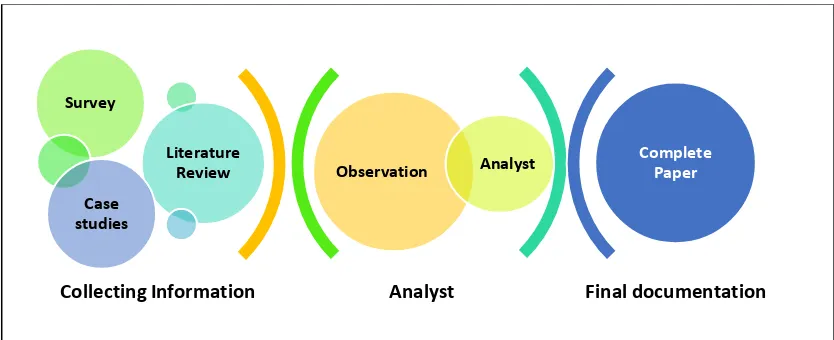
Figure 1 Research Methodology Process
For this paper, the research has been initiated by few different approaches. The following Figure 1 depicting the process for research methodology used for this paper.
As the initial stage to collect appropriate information for this paper, a literature review of more then 10 journal paper is selected. The process starts with reviews of research papers to collect information on wireless network security. These papers are cited from few popular search engine such as IEEE Xplore Digital Library, Scopus, Google Scholar, Taylor & Francis Online, SpringerLink. Only the papers published within the previous five years are identified since technological advancement may dictate implementation practices. Hence, it is crucial to review only papers discussing the security of wireless Lan and not some other issues. After that, the process is continued by doing some case studies to obtain a better understanding of how auditing could be done in Wireless LAN to maintain the integrity and what are the best practices of wireless Lan security. As the third method, a survey is conducted in Institut Aminuddin Baki. Since the IT department in Institut Aminuddin Baki consist of more than 15 IT staff, only the IT personnel is targeted to answer this questions. Furthermore, the questions in this survey is design more technically related to IT component which may be difficult to answer by none IT personnel.
Further, a direct observation is done in Institut Aminuddin Baki to understand on how the current wireless Lan has been implemented. How the security protocol is implemented and how the network manager are managing the security. This observation help to collect some information for analyst purpose. Information such as types of switches, types of security mechanism implemented, network security deployment, is collected during observation.
Finally, all the information and data collected is analyst. During analyst process, gathered information is prioritized by which is more related to security standard. Hence a framework is developed using this collected information which may assist government agencies in implementing and guarding their Wireless Lan.
4. RESEARCH FINDINGS AND RESULT
Analyst Final documentation
Observation Analyst
Survey
Literature Review Case
studies
Complete Paper
45
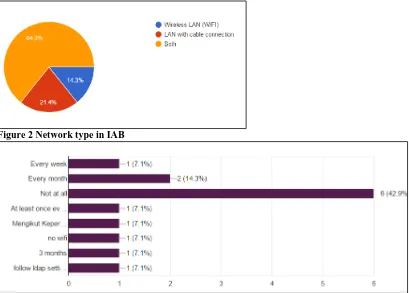
Figure 2 Network type in IAB
Figure 3 How often IAB user change password
46
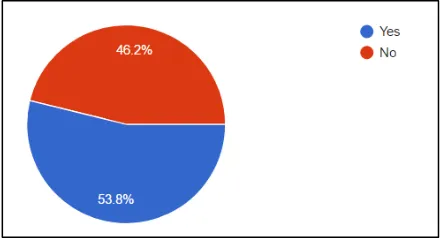
Figure 4 IAB user experienced Hacker Attacks, Trojan, virus
In IAB the equipment such as a router and network card are using default configuration which may lead to higher threat to the network. The IAB does not have any network monitoring system which can cause more network risk for the user. This allows an attacker and hijacker to easily penetrate this network. Almost more than 53.8% of user (Figure 4) has experience in hacker attack, a Trojan and received virus file through email, and all the staff is using either Microsoft Outlook or other tools to open their mail in daily routine. The only security using by staff to protect their computers and network is antivirus. Antivirus normally are known to be poor in handling attackers and hijackers in the network. Therefore, authority in IAB needs a strongest network protection system, and it can be a customised system to full fill their network security needs.
5. RECOMMENDATIONS
To implement an efficient secured WLAN, the entire process of developing WLAN from policy to operate should be incorporated with appropriate security elements. Thus, each phase is integrated with different types of recommendations and security solutions. It is crucial to identify best practices for each process and create a complete set of auditing standard. Usually, a project will have to go through 4 main processes, Planning, Analyst, Design, and Implementation. Therefore the framework developed is also segregated into 3 different levels include Initiation (Appendix 1), Planning and Design (Appendix 2) and Framework (Appendix 3) as the third phase. All this 3 levels will help government agencies to deploy a strong WLAN at any level needed and use relevant practice's needs anytime to assess and audit their network. It might also aid them in creating a network monitoring system for their office.
Government organization is strongly encouraged to use standard auditing for their network to reduce the risk associated with WLAN. This practice will guard all the information and network transaction since they are dealing with highly classified information every day. Any of the identified recommendations should only neglect if the implementation does not justify its cost and unfeasible in reducing threats.
6. CONCLUSION
47
and adhering all the security policies is important activities to mitigate risk and taking sufficient action during the attack. Hence auditing will help with identified risk associated and threats. The audit process will help the organization to identify significant changes need in network to enhance security and deal with sudden crises arises. In order to implement a complete audit functionality, a baseline of current network protection must be recognized. This will simplify the process of implementation by measuring the future activity with the current network technology and enhancing according to the changes needed. Continues risk assessment assists by review of log data constantly, attention to all servers and equipment, educating staff regarding network risk is important to maintain network security. To increase the effectiveness of the risk management process it is significant to consume technologies, high in cyber security and also protected WLAN infrastructures. Furthermore, IT market facilities such as apps and software that facilitate WLAN risk management may assist security officer. It is also feasible to develop a customized network risk management system that caters all the needs of government agencies.
References
[1] M. Basu, “Govinsider,” 2016. [Online]. Available:
https://govinsider.asia/innovation/malaysia-releases-digital-government-plan-for-2020/ .
[2] V. Chandramouli, “A detailed study on wireless LAN technologies,” …
/cse6392/termpapers/Vijay_paper. pdf# search=’A …, pp. 1–12, 2002.
[3] H. Omar, K. Abboud, N. Cheng, K. Malekshan, A. Gamage, and W. Zhuang, “A Survey on High Efficiency Wireless Local Area Networks: Next Generation WiFi,” IEEE Commun. Surv. Tutorials, vol. 18, no. c, pp. 1–1, 2016.
[4] K. McHugh, W. Akpedeye, and T. Hayajneh, “Next generation wireless-LAN: Security issues and performance analysis,” 2017 IEEE 7th Annu. Comput. Commun. Work. Conf., pp. 1–7, 2017.
[5] J. Lörincz and D. Beguši, “Physical layer analysis of emerging IEEE Physical Layer Analysis of Emerging IEEE 802 . 11n WLAN Standard,” no. March 2006, 2014.
[6] P. Singh, M. Mishra, and P. N. Barwal, “Analysis of Security Issues and Their Solutions In Wireless LAN,” no. 978, 2014.
[7] A. H. S. Hira Sathu, “Wireless Lan security changes in aukland CBD a case study,” 2015.
[8] D. Deng, K. Chen, and R. Cheng, “IEEE 802 . 11ax : Next Generation Wireless Local Area Networks,” 10th Int. Conf. Heterog. Netw. Qual. Reliab. Secur. Robustness ( QSHINE ), vol. 1, pp. 77–82, 2014.
[9] A. Kumar and A. Mobility, “Security Analysis and Implementation of a Simple Method for Prevention and Detection against Evil Twin Attack in IEEE 802 . 11 Wireless LAN,” Int. Conf. Comput. Tech. Inf. Commun. Technol., pp. 367–372, 2016.
48
APPENDIX
Appendix 1- Initiation
No Security
Recommendation
Audit Discussion
1 Perform a risk
assessment
Identifies which WLAN activities pose an acceptable risk to the organization’s information resources and which do not.
2 Establish a WLAN usage
policy
Identify WLANs, resources and information which are available or not available to business partners, customers, and other guests
3 Establish or enhance
operating system and application security configuration standards
The configuration standard should require 4personal firewall and anti-virus software for all STA platforms for which such security products are commercially available. Remote connectivity to the devices (e.g., file sharing, open network ports) should be limited where feasible.
4 Enhance operating
system and application security configuration standards for the Authentication Server (AS)
Special emphasis should be placed on preventing exposure of cryptographic keys to unauthorized parties.
5 Strong authentication and
encryption of all
communication(i.e., APs and ASs)
IEEE 802.11i does not specify any requirements related to the
management and administrative interfaces of WLAN
equipment, so it cannot be assumed that these interfaces are secure.
6 Educate users Security awareness and training helps users to establish good
security practices to prevent inadvertent or malicious intrusions into an organization’s information systems.
7 Require two-factor
authentication
Two-factor authentication could include use of biometrics or smart cards, enhances the strength of the authentication procedure.
8 WLAN intrusion detection
system
Intrusion detection systems deployed on the wireless network can detect and respond to potential malicious activities, including unauthorized WLAN vulnerability scanning and the installation of rogue APs.
Appendix2- Planning and Design
No Security
Recommendation Audit Discussion
1
Determine the AP’s location and regularly conduct site visit.
Report in the location for each AP, graphically notes its usable coverage area, and assigns it an IEEE 802.11 radio channel. To best achieve this result, APs should be located near the centre of rooms and away from exterior walls and windows. In addition, APs should be located in areas that can be physically secured to prevent unauthorized tampering.
2
A dedicated WLAN is appropriate to support AP connection in distributed network
Dedicated VLANs facilitate the use of network access control lists, which identify the protocols and services that are allowed to pass from WLANs to the DS.
3
Ensure that network management information between APs/ASs and network management servers or consoles are transmitted
49
over a dedicated management VLAN.
4
install a network firewall between each WLAN and its distribution system
Necessary if access to members of the general public.
5
Install a personal firewall on each mobile device.
A personal firewall can enforce a security policy on the information flow between the Station(STA) and other parties, allowing only authorized protocols and services to access the STA.
6
Develop wireless security audit processes and procedures
Both APs and ASs should send log data to a secure audit server in real time so that the integrity of previously captured audit data is protected even when the AP or AS is compromised.
7
Determine the fall back strategy when WLAN authentication fails
Fall back strategy to provide access to authorized user but fail authentication to WLAN
8
Deploy wireless intrusion detection systems
To identify and respond to attacks on systems or information resources before maximum potential damage.
Appendix 3- Summary Figure
This table descript the appendix 3 in summary.
DESCRIPTION AUDITING METHOD MECHANISM AND SUGGESTED
COMPONENT MANAGEMENT CONTROLS
Policy and Procedures
• Develop Wireless
Network policies and procedures on security.
• Policies and procedure
approved and endorsed by higher management.
• Distribute to all employees
• Review periodically
• Identify who may use wireless LAN
technology in the organization
• Describe who is responsible to install wireless access points and other wireless equipment’s for the organization.
• Provide limitations on the location of physical security for wireless access points.
• Describe the type of information that may
be sent over a wireless network.
• Describe conditions under which wireless
devices are allowed.
• Define standard security settings for wireless access points.
• Describe hardware and software
configurations for all wireless devices.
• Provide guidelines for the protection of wireless to clients.
• Provide guidelines on the use of
encryption and key management to wireless clients.
Risk
Assessment
• Assess all the Access
Point
• All wireless transaction
• All user in location perimeter
• Any other dependency
system on Wireless LAN
• Review and assess all
policies implemented and procedure implemented
• Check the existing organization’s policies and procedure that allow staffs to access organization’s network remotely from public wireless hot spot.
• Check if it describe adequate protection
on the wireless network, i.e. encryption and authentication mechanisms
• Identify types of data will the wireless LAN transmit.
50
organization’s wireless LAN.
• Define how critical is a wireless LAN in the organization.
Wireless Network Assessments
• Define security
requirements needed for wireless network assessment
• Define objective, scope
• Define assessment
frequency
• Define roles and
responsibilities
(employees, contractors, and/or 3rd party users) any others parties involved in the assessment.
• Conduct the assessment
• War Driving
• Computer (or notebook)
• Wireless NIC
• Software
• Antenna
• Global Positioning System (GPS) unit
• Wireless switches or router
TECHNICAL CONTROLS
Wireless Client Protection
• Install Encryption
software
• Intercept valid MAC
addresses
• Configure code
protection
• Configure auto update
security patches regularly.
• Password change
regularly
• Configure Strong Encryption
• Schedule full scan for malicious codes
periodically
• Change your Client Adapter’s MAC
address to an authorized MAC address
Access Point Protection
• Detection of Wireless
network
• Assess channels and
SSID
• Assess beacon
broadcast frame and broadcast recording
• Test rouge access from
outside perimeter
• Configure IP address
collection
• Configure MAC address
collection
• Enabled WEP access
points
• Capture WEP encrypted
data
• Ensure IDS and IPS
periodically update
• Check for screen and Scan outside the
facilities.
• Conduct Site Survey
• Ensure that the web-based configuration
portal for AP management uses strong authentication protocol
• Impersonate an authorized MAC address
in your Client Adapter with other credentials such as SSID and if possible WEP Keys.
• Deploy RF interface monitoring through
wireless IDS and IPS. These systems are intended to detect
• Anomalous traffic and prevent any
unusual frequency of attacks.
Encryption
• Determine types of
authentication methods
• Collect data transmitted
over the wireless networks
• Network Login functions
• Scan the services running in the Access
Point.
• Collect WEP packets and decode them to
see data packets.
Threat detection
• Disassociation attack
• MITM Attack
• Brute force Base station
• Sending Association or Disassociation of
frames.
51
Password
• Identifying the services
through clients and trying to exploit them.
back.
• Default Passwords
• Network Scanning.
OPERATIONAL CONTROLS
Physical and environmental protection
• Physical and
environmental security policies and procedures approved and endorsed by senior management
• Monitor periodically and retain logs related to physical security controls such as CCTV footage and server room access logs for a period of time
Human Resources Security
• Define terms and
conditions (staffs, contractors, and third party)
• Define responsibilities and roles
• Carry out background verification checks,
screening, and vetting procedures in accordance to relevant laws.
Training and Awareness
• Conduct awareness
training
• Provide regular updates
in organizational policies and procedures to staffs, contractors and third party users such as student, trainees
• Staff awareness training
• Review of policies and update
• Assess training outcome
Incident Handling Management
• Wireless network
security incidents are reported through a dedicated and appropriate channel immediately.
• Create reporting procedures.
• Create emergency incidents action plan
• Assign staff roles and responsibilities.
• Training for staff on incident action.
Patch Management
• Identify relevant patches
to be implemented.
• Authorized personnel
should apply patches and security
enhancements for wireless equipment’s whenever updates are available and published by the vendor.
• Ensure patches and security
enhancements are completed in a reliable and timely manner
• Validate and check procedures to assess
the implementation of patches and security enhancements.
Wireless Equipment Inventory
• Ensure all wireless
equipment’s and configurations are recorded.
• Keep track of lost or
stolen hardware.
• Inventory should be reviewed periodically.
• Change all passwords of APs in the
![Table 1: IEEE 02.11 WLAN Technologies[5]](https://thumb-us.123doks.com/thumbv2/123dok_us/1361950.1169019/3.545.64.490.396.692/table-ieee-wlan-technologies.webp)