DEFINITY
®
Enterprise Communications Server
Release 5
CallVisor
®
ASAI Protocol Reference
555-230-221
Notice
While reasonable efforts were made to ensure that the information in this document was complete and accurate at the time of printing, Lucent Technologies can assume no responsibility for any errors. Changes and corrections to the information contained in this document may be incorporated into future reissues.
Your Responsibility for Your System’s Security
You are responsible for the security of your system. Lucent Technologies does not warrant that this product is immune from or will prevent unauthorized use of common-carrier telecommunication services or facilities accessed through or connected to it. Lucent Technologies will not be responsible for any charges that result from such unauthorized use. Product administration to prevent
unauthorized use is your responsibility and your system
administrator should read all documents provided with this product to fully understand the features available that may reduce your risk of incurring charges.
Federal Communications Commission Statements Part 15: Class A Statement. This equipment has been tested and found to comply with the limits for a Class A digital device, pursuant to Part 15 of the FCC Rules. These limits are designed to provide reasonable protection against harmful interference when the equipment is operated in a commercial environment. This
equipment generates, uses, and can radiate radio-frequency energy and, if not installed and used in accordance with the instruction manual, may cause harmful interference to radio communications. Operation of this equipment in a residential area is likely to cause harmful interference, in which case the user will be required to correct the interference at his or her own expense.
Part 68: Network Registration Number. This equipment is registered with the FCC in accordance with Part 68 of the FCC Rules. It is identified by FCC registration number
AS593M-13283-MF-E.
Part 68: Answer-Supervision Signaling. Allowing this equipment to be operated in a manner that does not provide proper answer-supervision signaling is in violation of Part 68 rules. This equipment returns answer-supervision signals to the public switched network when:
■ Answered by the called station
■ Answered by the attendant
■ Routed to a recorded announcement that can be administered by the CPE user
A busy tone is received
■ A reorder tone is received
Trademarks
CallVisor is a registered trademark of Lucent Technologies. DEFINITY ECS is a registered trademark of Lucent Technologies in
the US and throughout the world.
UNIX is a registered trademark in the USA and other countries, licensed exclusively through X/Open Company Limited. UnixWare is a registered trademark of the Santa Cruz Operation,
Inc. in the USA and other countries.
Ordering Information
The ordering number for this document is 555-230-221. To order this document, call the BCS Publications Center at 1 800 457-1235 (International callers use 1 765 361-5353). For more information about Lucent Technologies documents, refer to the Business Communications Systems Publications Catalog, 555-000-010.
You can be placed on a Standing Order list for this and other BCS documents you may need. Standing Order will enable you to automatically receive updated versions of individual documents or document sets, billed to account information that you provide. For more information on Standing Orders, or to be put on a list to receive future issues of this document, please contact the Lucent
Technologies BCS Publications Fulfillment Center.
Lucent Technologies Fraud Intervention
If you suspect you are being victimized by toll fraud and you need technical support or assistance, call the BCS Technical Service Center Toll Fraud Intervention Hotline at 1 800 643-2353.
Comments
To comment on this document, return the comment card at the front of the document.
Acknowledgment
This document was prepared by the BCS Product Documentation Development Lucent Technologies
Contents
About This Document
xxix■ Reason for Reissue xxix
■ Terminology xxix
■ Intended Audience xxix
■ Related Documents xxx
1
Introduction to Layer 3 Protocol
1-1■ ASAI Association 1-2
■ ISDN Call Reference Values (CRVs) 1-3 ■ Facility Information Element (FIE)
General Description 1-5 FIE Acknowledgements 1-6 FIE Protocol Errors 1-6
Operation Values 1-7
Invoke-id Values 1-7
■ Denying an ASAI Request 1-8 ■ Aborting an ASAI Association 1-9
2
Messaging Sequences and ASAI
2-1Message Conventions 2-1
Conventions 2-2
■ Common Capabilities 2-3
Event Reports 2-3
Charging Event Report 2-10 Connected Event Report 2-10 Cut-Through Event Report 2-11 Disconnect/Drop Event Report 2-11 Entered Digits Event Report 2-11 Hold Event Report 2-12 Queued Event Report 2-12 Reconnected Event Report 2-12 Trunk Seized Event Report 2-13 Call-Related Event Reports When Ending
Adjunct Control 2-13
Busy/Unavailable Event Report 2-13 Reorder/Denial Event Report 2-14
Call Ended 2-14
Non-Call Related Event Reports 2-15 Logout Event Report 2-15 Login Event Report 2-15
■ Third Party Control Associations 2-16 ■ Call Control Association 2-17
Initiating a Call Control Association 2-17 Call Control and Event Reporting on a Call
Control Association 2-17 Termination of a Call Control Association 2-17 Third Party Make Call —
Initiating Procedure 2-18 Third Party Take Control —
Initiating Procedure 2-20 Third Party Relinquish Control —
Terminating Procedure 2-21
■ Domain (Station) Control Procedure 2-22
Domain (ACD Split) Control 2-22 Domain Control Request —
Initiating Procedure 2-22 Cancel Domain Control — Terminating Procedure 2-23 Domain Control Ended — Terminating Procedure 2-23 Auto Dial Procedure 2-24 Third Party Answer Procedure 2-25
■ Call Control Procedures 2-26
Contents
Third Party Hold Procedure 2-27 Third Party Reconnect Procedure 2-27 Third Party Merge Procedure 2-28 Third Party Clear Call Procedure 2-29 Send DTMF Signals Procedure 2-29 Redirect Call Procedure 2-30 Third Party Listen Disconnect Procedure 2-30 Third Party Listen Reconnect Procedure 2-31
■ Notification Association Procedure 2-32 ■ Routing Association Procedure 2-34 ■ Request Feature Association 2-37
Agent Login Procedure 2-37 Agent Logout Procedure 2-38 Agent Work Mode Change Procedure 2-38 Call Forwarding Activation Procedure 2-39 Call Forwarding Cancel Procedure 2-40 Send All Calls Activation Procedure 2-40 Cancel Send All Calls Procedure 2-41
■ Value Query Association 2-42
Date/Time Query Procedure 2-42 Split Status Query Procedure 2-42 Agent Status Query Procedure 2-43 Station MWL Status Query Procedure 2-43 Station Send-All-Calls Query Procedure 2-44 Station Call Forwarding Status Query Procedure 2-44 Station Status Query Procedure 2-45 Trunk Group Query Procedure 2-45 Call Classifiers Query Procedure 2-46 Calls Query Procedure 2-46 Party ID Query Procedure 2-47 Extension Information Query Procedure 2-47 Agent Login Audit Procedure 2-48 Integrated Directory Database Query Procedure 2-49
■ Set Value Association 2-50
Deactivate Message Waiting Lamp Procedure 2-50 Billing Change Request Procedure 2-51
■ Ending an ASAI Association 2-52
Endpoint Denies a Request 2-52 Endpoint Application Level Software Aborts
ASAI Processing 2-53
Endpoint Rejects FIE 2-54 ASAI and BRI Parser Interactions 2-55
■ Link Management and Maintenance Procedures 2-57
Maintenance Heartbeat Procedure 2-57 ASAI Restart Procedure 2-58
Sending RESTart 2-58
Receiving RESTart 2-59 Suspend/Resume ECS Alarming on ASAI Link 2-60
■ Application Timers 2-61
Timing of ASAI Responses (ACKs/NAKs) 2-61 Initial Messages on an ASAI Link 2-61
3
Message Descriptions
3-1■ Message Overview 3-1
■ FACility Message 3-2
■ Management Information Message (MIM) 3-3
■ REGister Message 3-3
■ RELease COMplete Message 3-4
■ RESTart Message 3-4
■ RESTart ACKnowledge Message 3-6
■ Status Message 3-7
4
Information Elements
4-1Contents
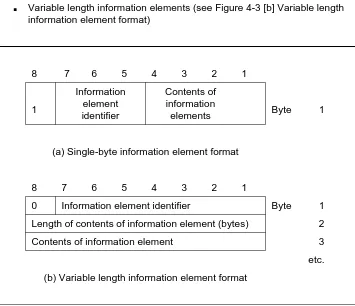
■ Message Type Information Element 4-5 ■ Codeset Information Elements 4-6
Coding Rules 4-6
Locking Shift Procedure 4-9
■ Codeset 0 Information Elements 4-11
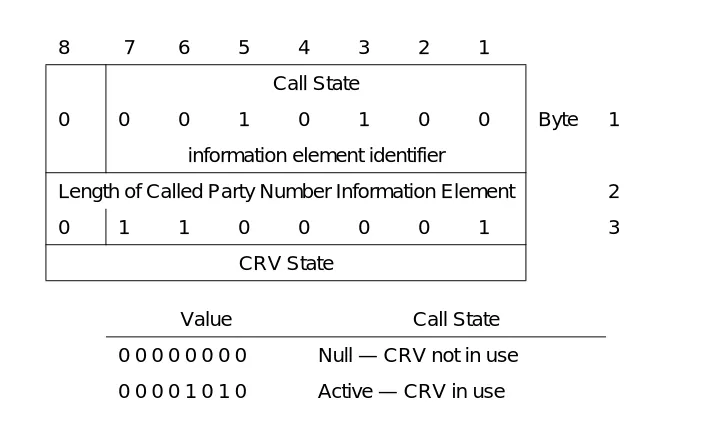
Call State 4-11
Called Party Number 4-12 Calling Party Number 4-14
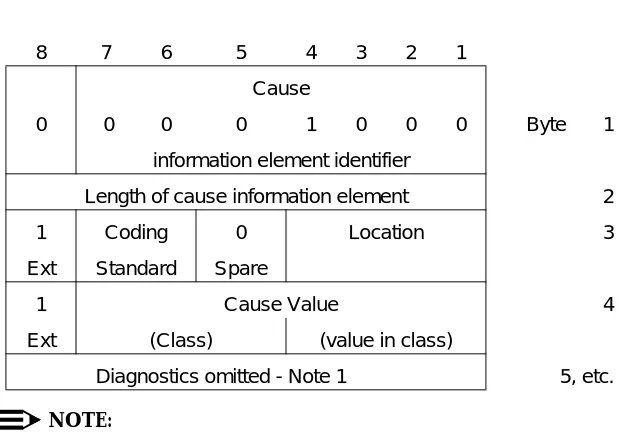
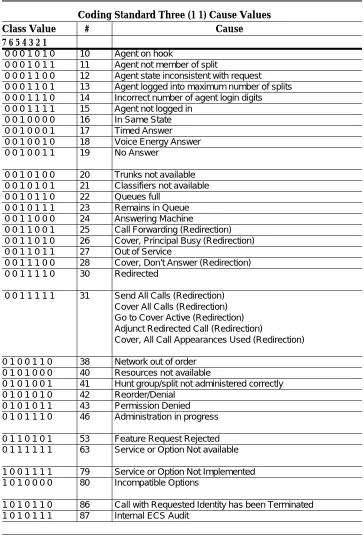
Cause 4-16
Call Identity 4-20
Connected Number 4-21
Date/Time 4-23
Progress Indicator 4-24 Redirecting Number 4-26 Redirection Number 4-28 Restart Indicator 4-29 User to User Information 4-30
■ Codeset 6 Information Elements 4-31
Call Options 4-31
Conference/Transfer Options 4-33
Counter 4-34
Data Item IE 4-35
Domain 4-37
Facility Information Element (FIE) 4-40 Service Discriminator 4-40 Components (Bytes 4, etc.) 4-40 Component Type Tag 4-45 Invoke Identifier Tags 4-46 Using Existing Q.931 IEs as Parameters 4-52
Feature 4-54
Generic Billing Data 4-55
Item 4-56
Party Identifier 4-63 Resource Identifier 4-64
Resource Status 4-65
Service Circuit 4-67
Specific Event 4-68
Status 4-70
Trunk Group Identification 4-72 Trunk Group/Trunk Status 4-74 User-Entered Code 4-76
Version 4-78
5
Byte Level Messages
5-1■ Conventions 5-1
■ Event Reports 5-2
Event Reports: REGister Messages Sent by the
Adjunct 5-2
Event Reports: REGister Messages Sent by the
switch 5-2
Event Reports: FACility Messages Sent by the
switch 5-2
Contents
Hold Event Report 5-28 Login Event Report —
Domain (ACD Split/Skill) Control Association 5-29 Logout Event Report —
Domain (ACD Split/Skill) Control Association 5-31 Queued Event Report 5-33 Reconnected Event Report 5-35 Reorder/Denial Event Report 5-36 Trunk Seized Event Report 5-37
■ Call Control Capability Group 5-38
Call Control: REGister Messages Sent by the
Adjunct 5-38
Third Party Make Call Request 5-39 Third Party Take Control Request 5-42 Call Control: REGister Messages Sent by the switch 5-43 Call Control: FACility Messages Sent by the Adjunct 5-43 Third Party Clear Call Request 5-44 Third Party Selective Drop Request 5-45 Third Party Selective Hold Request 5-46 Third Party Reconnect Request 5-47 Third Party Merge Request 5-48 Third Party Relinquish Control Request 5-49 Third Party Listen Disconnect Request 5-50 Third Party Listen Reconnect Request 5-51 Third Party Send DTMF Digits Request 5-52
Redirect Call 5-54
Call Control: FACility Messages Sent by the switch 5-55 Acknowledgment of Third Party
Make Call Request 5-55 Acknowledgment of Third Party
Take Control Request 5-57 Acknowledgment of Third Party Merge Request 5-59 Call Control: Acknowledgment (No Parameters)
Association Continues 5-61 Call Control: Request is Denied — Association
Call Control: RELease COMplete Messages Sent
by the Adjunct 5-63
Call Control: RELease COMplete Messages Sent
by the switch 5-63
Call Control: Acknowledgment — Association
Terminates 5-63
Call Control: Request is Denied — Association
Terminated 5-64
Call Control: Internal switch Audit
Finds Stale Call Control CRV 5-65 Third Party Call Ended —
Association Terminates 5-66 Call Control: RELease COMplete Messages Sent
by Both the switch and the Adjunct 5-67 Call Control: Normal Clearing Terminates
Call Control Association 5-67 Call Control: A Message is Not Understood —
Association Aborted 5-67 Call Control: Endpoint Rejects an
Invalid/Protocol Violation FIE — Terminates
Association 5-68
Call Control: Endpoint Aborts an Association 5-69
■ Domain Control Capability Group 5-70
Domain Control: REGister Messages Sent by the
Adjunct 5-70
Domain Control (Station/ACD Split)
Request 5-70
Domain Control: REGister Messages Sent by the
switch 5-71
Domain Control: FACility Messages Sent by the
Adjunct 5-71
Third Party (Domain) Selective Drop Request 5-72 Third Party (Domain) Selective Hold Request 5-73 Third Party (Domain) Reconnect Request 5-74 Third Party (Domain) Merge Request 5-75 Third Party (Domain) Answer Request 5-76 Third Party Auto Dial Request for an Extension 5-77 Third Party (Domain) Relinquish
Contents
Third Party (Domain) Send DTMF
Digits Request 5-80
Redirect Call (Domain) 5-82 Domain Control: FACility Messages Sent by the
switch 5-83
Acknowledgment of
Domain (Station) Control Request 5-84 Acknowledgment of
Third Party Auto Dial Request 5-86 Acknowledgment of
Third Party Merge Request (Domain) 5-87 Domain Control: Acknowledgment
(No Parameters) Association Continues 5-89 Domain Control: Request is Denied —
Association Continues 5-90 Domain Control: RELease COMplete Messages
Sent by the Adjunct 5-91 Domain Control: RELease COMplete Messages
Sent by the switch 5-91 Domain Control: Request is Denied —
Association Terminated 5-91 Domain Control: Acknowledgment —
Association Terminates 5-93 switch Ends Domain (Station) Control Association 5-94 Domain Control: RELease COMplete Messages
Sent by Both the switch and the Adjunct 5-95 Domain Control: Normal Clearing Terminates
Association 5-95
Domain Control: A Message is not Understood —
Association Aborted 5-95 Domain Control: Endpoint Rejects an
Invalid/Protocol Violation FIE — Terminates
Association 5-96
Domain Control: Endpoint Aborts an Association 5-97
■ Notification Capability Group 5-98
Notification: REGister Messages Sent by the
Adjunct 5-98
Notification: FACility Messages Sent by the Adjunct 5-99 Cancel Event Notification Request 5-99 Stop Notification on Call Request 5-100 Notification: FACility Messages Sent by the
switch 5-101
Notification: Acknowledgement (No Parameters)
Association Continues 5-101 Notification: Call Ended — Association Continues 5-102 Notification: RELease COMplete Messages Sent
by the Adjunct 5-103
Notification: RELease COMplete Messages Sent
by the switch 5-103
Notification: Acknowledgement (No Parameters)
Association Terminated 5-103 Notification: Request is Denied — Association
Terminated 5-104
switch Ends Notification Reporting Association 5-105 Notification: RELease COMplete Messages Sent
by Both the switch and the Adjunct 5-106 Notification: Terminate ASAI Association with
Normal Clearing 5-106
Notification: A Message is Not Understood —
Association Aborted 5-106 Notification: Endpoint Rejects an
Invalid/Protocol Violation FIE — Terminates
Association 5-107
Notification: Endpoint Aborts an Association 5-108
■ Routing Capability Group 5-109
Routing: REGister Messages Sent by the switch 5-109 Call Route Request 5-109 Routing: FACility Messages Sent by the Adjunct 5-111 Call Route Selection 5-112 Routing: RELease COMplete Messages Sent by
the Adjunct 5-114
Routing: Request is Denied — Association
Terminated 5-115
Contents
Routing: RELease COMplete Messages Sent by
the switch 5-116
End Adjunct Routing 5-116 Routing: RELease COMplete Messages Sent by
Both the switch and the Adjunct 5-117 Routing: Terminate ASAI Association With
Normal Clearing 5-117
Routing: A Message Is Not Understood —
Association Aborted 5-117 Routing: Endpoint Rejects an Invalid/Protocol
Violation FIE — Terminates Association 5-118 Routing: Endpoint Aborts an Association 5-119
■ Request Feature Capability Group 5-120
Request Feature: REGister Messages Sent by the
Adjunct 5-120
Agent Login Request 5-120 Agent Logout Request 5-122 Change Agent Work Mode Request 5-124 Send All Calls Feature Activation 5-126 Cancel Send All Calls Feature Activation 5-127 Call Forwarding Feature Activation 5-128 Cancel Call Forwarding Feature Activation 5-129 Request Feature: REGister Messages Sent by switch5-130 Request Feature: FACility Messages Sent by the
Adjunct 5-130
Request Feature: FACility Messages Sent by switch 5-130 Request Feature: RELease COMplete Messages
Sent by the Adjunct 5-130 Request Feature: RELease COMplete Messages
Sent by the switch 5-130 Request is Denied — Association Terminated 5-131 Request Feature: Acknowledgment —
Association Terminates 5-132 Request Feature: RELease COMplete Messages
Sent by Both the switch and the Adjunct 5-132 Request Feature: Terminate ASAI Association
Request Feature: A Message is Not Understood —
Association Aborted 5-133 Request Feature: Endpoint Rejects an
Invalid/Protocol Violation FIE — Terminates
Association 5-134
Request Feature: Endpoint Aborts an Association 5-135
■ Value Query Capability Group 5-136
Value Query: REGister Messages Sent by the
Adjunct 5-136
ACD Split Status Query 5-136 Agent Status Query 5-137 Station Feature Query — Message Waiting Lamp 5-138 Station Feature Query — Send All Calls 5-139 Station Feature Query — Call Forwarding 5-140 Station Status Query 5-141 Trunk Group Status Query 5-142 Call Classifiers Status Query 5-143 ACD Agent Login Audit Query 5-144
Date/Time Query 5-145
Call Information at Station Query 5-146 Party ID Information on Call Query 5-147 Extension Type/Class Information Query 5-148 Integrated Directory Database Query 5-149 Value Query: REGister Messages Sent by the
switch 5-150
Value Query: FACility Messages Sent by the
switch 5-150
Response to Agent Login Query (List of
Logged-in Agent Extensions) 5-151 Value Query: RELease COMplete Messages Sent
by the Adjunct 5-152
Value Query: RELease COMplete Messages Sent
by the switch 5-152
Response to ACD Split Status Query 5-153 Response to Agent Status Query 5-155 Response to Station Message Waiting Lamp
Contents
Response to Station Send-All-Calls Status Query 5-158 Response to Station Call Forwarding Status Query 5-159 Response to Station Status Query 5-160 Response to Trunk Status Query 5-161 Response to Number of Call Classifiers Query 5-162 Response to Call Query 5-163 Response to Party ID Query 5-165 Response to Extension Information Query 5-167 Response to Date/Time Query 5-168 Response to Integrated Directory Query 5-169 Value Query: Acknowledgment — Association
Terminates 5-170
Value Query: RELease COMplete Messages Sent
by the switch 5-171
Value Query: Request is Denied — Association
Terminated 5-171
Value Query: Endpoint Aborts an Association 5-172 Value Query: RELease COMplete Messages Sent
by Both the switch and the Adjunct 5-172 Value Query: Terminate ASAI Association With
Normal Clearing 5-172
Value Query: A Message is Not Understood —
Association Aborted 5-173 Value Query: Endpoint Rejects an
Invalid/Protocol Violation FIE — Terminates
Association 5-174
Value Query: Endpoint Aborts an Association 5-175
■ Set Value Capability Group 5-176
Set Value: REGister Messages Sent by the
Adjunct 5-176
Set Value: RELease COMplete Messages Sent by
the switch 5-181
Set Value: RELease COMplete Messages Sent by
the switch 5-182
Set Value: Acknowledgment — Association
Terminates 5-182
Set Value: RELease COMplete Messages Sent by
Both the switch and the Adjunct 5-183 Set Value: Terminate ASAI Association With
Normal Clearing 5-183
Set Value: A Message Is Not Understood —
Association Aborted 5-183 Set Value: Endpoint Rejects an Invalid/Protocol
Violation FIE — Terminates Association 5-184 Set Value: Request is Denied — Association
Terminated 5-185
Set Value: Endpoint Aborts an Association 5-185
■ Maintenance 5-186
Maintenance Messages Sent by Both the switch
and the Adjunct 5-186
RESTart an ASAI Interface 5-186 Acknowledge Restart of an ASAI Interface 5-187
Heartbeat 5-188
Response to Heartbeat 5-189 Maintenance Messages Sent by the Adjunct 5-190 Suspend/Resume Alarming for ASAI Interface 5-190 Maintenance Messages Sent by switch 5-191 Acknowledge Suspend/Resume Alarming for
ASAI Interface 5-191
Reject MIM Message 5-192
6
Maintenance
6-1Contents
■ ASAI Heartbeat 6-3
■ ASAI Interactions with System Restarts 6-3
Management Information Messages 6-4
■ Temporary Layer 2 Drop 6-4
■ Layer 3 6-4
Layer 3 RESTart AND RESTart
ACKnowledgement Messages 6-4 Layer 3 STATUS and STATUS ENQuiry Messages 6-4
Layer 3 Timers 6-5
■ The ECS Congestion and Flow Control on ASAI Links 6-5
ECS Controls on Receive Traffic 6-5 ECS CPU Congestion on Received Data 6-5 Layer 2 Processor Congestion on Received Data 6-6
Link Congestion (Hyperactivity) —
Received Data 6-6
Controls on Send Traffic 6-8 Layer 2 Processor Congestion on Send Traffic 6-8 Link Congestion on Send Traffic 6-8
7
TCP Tunnel Protocol
7-1■ Overview 7-1
■ Tunnel Protocol Procedure 7-9
Sample Message Exchange Scenarios 7-10 Successful Connection Scenario 7-10 Client Connects While ASAI Link is Down 7-11 Invalid TCP Tunnel Protocol Version Scenario 7-13 Error Notification Scenario 7-14 ASAI Link Status Scenario 7-15
Network Outages 7-16
A
The ECS Mapping to Information
Elements in Third Party Make Call
A-1B
Message Scenarios
B-1■ 1. Initialization B-3
■ 2. Notification Associations B-4
External Call to VDN Routed to ACD Split B-5 External Call to Monitored VDN Routed to
Non-Monitored VDN B-8 External Call to VDN Routed to Monitored VDN B-11 External Call to VDN Routed to Station B-13 External Call to VDN Routed to Announcement
Extension B-16
External Call to ACD Split B-18
■ 3. Adjunct Routing Associations B-20
Call to VDN Routed Directly to ACD Agent B-20 Call to VDN Routed to External Destination B-23 Call Routed Based on II-Digits B-25 ISDN Information Received with Incoming Call B-28
■ 4. Call Control Associations B-29
Third Party Make Call to ACD Split 3456 B-29 Third Party Merge B-31 Third Party Send DTMF B-34 User Scenario: Selective Listening B-35
■ 5. Switch-Classified Calls B-36
Switch-Classified Call Receives SIT Tone B-36 Switch-Classified Call Delivered to Agent B-38 Switch-Classified Call From ACD Split
Forwarded to VDN B-42
■ 6. Multiple Monitors and Controllers B-45 ■ 7. Domain (Station) Control Associations B-50
Contents
Value Queries for Calls at Domain Control Stations B-56 Domain Control — Call Disconnects B-59
■ 8. Call Redirection B-61
Incoming Call to Station Forwards to Another Station B-61 Incoming Call to Station Forwards to VDN B-64 Incoming Call to ACD Split Forwards to Hunt Group B-67 Call to Station Goes to Coverage Station B-69 Incoming Call to Station Sent to Coverage with
Send All Calls (SAC) B-72 External Call to ACD Split Intraflows
to Another ACD Split B-76 Incoming Call is Redirected by Adjunct B-78
■ 9. AUDIX Interactions B-79
Call Transferred to AUDIX via the AUDIX
Transfer Feature Access Code B-79 Call Transferred from AUDIX to Station via the
AUDIX Enhanced Transfer Feature B-82
■ 10. Calls Across Multiple Switches B-86
External Call to VDN, Answered by Station and
Transferred to a VDN on Another Switch B-87 External Call to VDN, Answered by Station, and
Transferred to a Station on Another Switch B-91 External Call to Lookahead Interflow VDN B-94 External Call to VDN, Answered by a Local
Station, and Transferred to a Lookahead
Interflow VDN B-99
■ 11. Expert Agent Selection Interactions B-105
External Call to VDN, Answered by Logical Agent, and Conferenced with Another Logical
Agent B-105
External Call to a Logical Agent’s Station
Transferred to Another Logical Agent B-109 Direct Agent Call to Logical Agent —
Make Call to Login ID B-112 Value Queries for Logical Agent and Skill
Hunt Groups B-114
External Call to a VDN with a Converse Step that
is Interrupted B-116
External Call to a VDN with a Converse Step that
is not Interrupted B-119
■ 13. Redirection On No Answer
(RONA) Interactions B-123 Call to Agent with RONA B-123 Direct Agent Call with RONA B-126
■ 14. VDN in Coverage Path Interactions B-129
Incoming Call routed to a Station that has a VDN
in the Coverage Path B-129 External Call to a VDN with a Forced First
Announcement that gets Routed to a Second
VDN B-132
Outgoing Call over Non-ISDN Trunk B-135 Outgoing Call over ISDN Trunk that Results in
an ISDN Progress Message B-137
■ 15. User to User Information (UUI) B-139
User Scenarios — User to User Information B-139
■ 16. User Scenarios — Connected IE for
non-ISDN Trunks B-147
■ 17. User Scenarios — ASAI-Provided
Dial-Ahead Digits B-148
■ 18. User Scenarios — ASAI-Requested
Digit Collection B-150
■ 19. User Scenarios —VDN Return
Destination B-152
■ 20. ASAI Messaging Scenarios —
VDN Return Destination B-154
■ 21. Flexible Billing B-157
User Scenarios — Flexible Billing B-157
■ Advice of Charge B-162
Switch-Classified Call Receives Charging
Information During the Call B-162 User-Classified Call, Charge Information B-164 Conference Call in Progress, Multiple
Contents
World-Class Routing (ARS/AAR), Incoming Call Routed over Outgoing ISDN Trunk Group,
Charge Information Provided during the Call B-169
■ 22. Miscellaneous Cases B-170
Unsuccessful Requests for Domain
(Station) Control B-170 ISDN Network Congestion B-172 Invalid Call Destination— Reorder B-173 User Does Not Go Off-hook B-174 Extension Removed B-174 Invalid Association Requests B-175 Invalid Call_id Numbers B-176 Invalid Station Numbers B-177
About This Document
This manual provides detailed protocol information for the CallVisor®
Adjunct/Switch Application Interface for DEFINITY® Enterprise Communications Server Release 5. (In the interest of brevity, CallVisor ASAI is referred to as ASAI throughout the remainder of this manual.)
Reason for Reissue
This document has been updated with new features up to Release 5.5.
Terminology
See the glossary included in the DEFINITY Enterprise Communications Server CallVisor ASAI Technical Reference.
Intended Audience
This document is written for the library or driver programmer of an adjunct computer who is responsible for creating the library of commands for use by the applications programmer. However, this document will also be helpful to any individual who needs a protocol description of the ASAI.
NOTE:
See "Related Documents" that follows for a list of documents that provide information on ECS features and ASAI functionality.
Related Documents
Adjunct/Switch Application Interface (ASAI) Specification, 555-025-203
The ASAI Specification document provides a detailed description of the ASAI Reference Model. The Reference Model contains all the capabilities available with ASAI.
DEFINITY Communications System CallVisor ASAI Planning Guide, 555-230-222
This manual provides planning and implementation information for CallVisor ASAI.
DEFINITY Enterprise Communications Server Release 5 CallVisor ASAI Technical Reference, 555-230-220
The Technical Reference is the “companion book” to the Protocol Reference. It provides a detailed functional description of CallVisor ASAI for Release 5.
DEFINITY Enterprise Communications Server Release 5 CallVisor ASAI Overview, 555-230-225
The Overview provides a general description of CallVisor Adjunct Switch Application Interface (ASAI) and applications. This document also describes the functions and services that can be provided using this interface.
DEFINITY Enterprise Communications Server Installation, Administration, and Maintenance of CallVisor ASAI over the DEFINITY LAN Gateway, 555-230-223
This document describes the installation, administration, and maintenance of the ASAI-Ethernet application, which provides ASAI functionality using 10Base-T Ethernet rather than BRI as a transport media.
DEFINITY Enterprise Communications Server Release 5 CallVisor PC ASAI Installation and Reference, 555-230-227
This document provides details on the installation, administration, programming, testing, troubleshooting and engineering of the CallVisor PC.
Related Documents
The Administration and Feature Descriptions document serves as an overall reference for the planning, operation, and administration of Release 5 for DEFINITY ECS.
DEFINITY Enterprise Communications Server Release 5 Implementation, 555-230-302
This manual documents the implementation of the DEFINITY ECS.
ISDN Basic Rate Interface (BRI) Specification, 801-802-100
This technical reference provides detailed information about the physical interface structure and message-oriented signaling procedures of the ISDN Basic Rate Interface (BRI).
CallVisor ASAI CD Document Set, 585-246-801
1
Introduction to Layer 3 Protocol
This chapter introduces the layer 3 protocol by explaining how the ISDN
ASAI Association
An ASAI association is an exchange of one or more messages on the Integrated Services Digital Network Basic Rate Interface (ISDN BRI) signaling channel (D-channel) or on an Ethernet interface between the ECS and the adjunct.
To start an association, the initiating endpoint assigns an idle ISDN Call
Reference Value (CRV) and places it into an initiating message that is sent to the serving endpoint. When the serving endpoint accepts this message, the
association is initiated and the endpoints may exchange an unlimited number of intermediate messages. To close the association, one endpoint sends a
terminating message that frees the CRV for later use.
The three ISDN messages and their functions used to control an association are as follows:
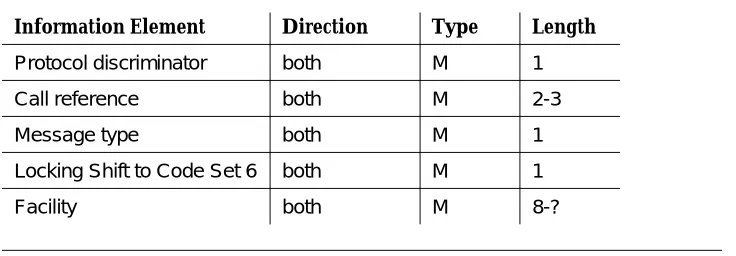
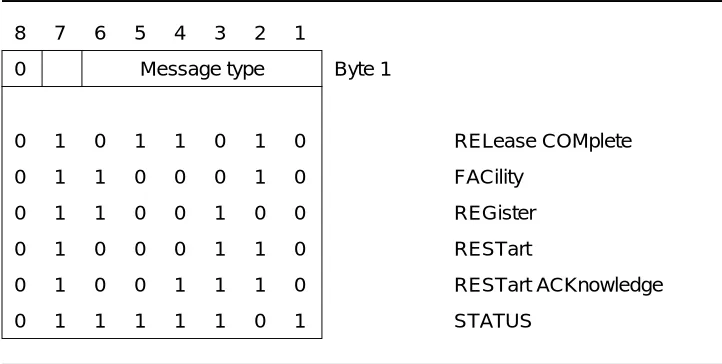
■ A Q.931 REGister message initiates an ASAI association. ■ A Q.931 FACility message is the intermediate message.
■ A Q.931 RELease COMplete message ends an ASAI association.
While the ISDN message controls the association, the Q.932 Facility Information Element (FIE) within these messages carries the ASAI information across the interface. The Facility Information Element (FIE) provides the framework to invoke an ASAI capability and pass parameters associated with the capability.
In addition to the REGister, FACility, and RELease COMplete messages that provide ASAI application level functions across an interface, the ECS uses three other ISDN messages:
1. Management Information Messages (MIMs) (for link maintenance and management)
2. RESTart
3. RESTart ACKnowledge
ISDN Call Reference Values (CRVs)
ISDN Call Reference Values (CRVs)
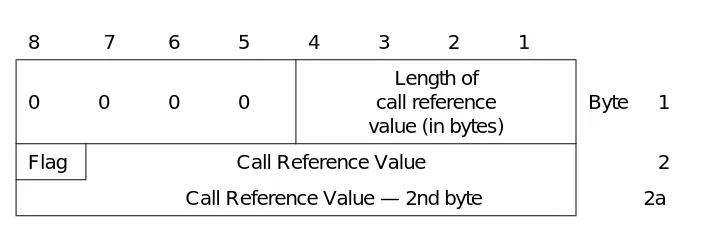
ASAI endpoints use ISDN Call Reference Values (CRVs) to associate the sequence of messages carried on an ASAI association. CRVs map one-to-one to ASAI associations and each CRV carries information for only one ASAI
association, regardless of how many capabilities are invoked during the association. CRVs are unique on an ASAI link and are present in every ASAI message sent across the interface.
The originating ASAI endpoint assigns an idle CRV for the ASAI association (one not in use for any other ASAI association) and sends the CRV in a REGister message to initiate the association. After the CRV is accepted, and while both endpoints exchange intermediate messages, the CRV contained in each
message remains fixed for the duration of the association. When either endpoint passes that CRV in a RELease COMplete message, the association ends. The CRV becomes idle and the originating endpoint may assign the CRV to a later association. Use of a flag bit in the CRV encoding ensures that the two connected ASAI endpoints do not allocate the same CRV on an ASAI.1 The link
administration requirements for an ASAI specify that the length of the CRV value be set to one or two bytes.
The ECS uses CRVs for the following types of ASAI associations:
■ Call Control
When an adjunct has control of a call, it may invoke several Call Control capabilities. All call control invocations, together with call feedback, occur on one CRV for any given call.
■ Domain (Station) Control
When an adjunct controls calls for a specific station extension, Domain (Station) Control capabilities are invoked. Like Call Control, all domain control invocations, together with call feedback, occur on one CRV for any given call.
Domain (ACD Split) Control is a subset of domain control and
allows the adjunct to obtain agent-related information for agents in the specified ACD split.2
■ Notification
When an adjunct requests notification of certain events on a given CRV, the messages containing the event reports all use that CRV.
1. Since CRVs are local to an ASAI, endpoints on different interfaces may allocate the same CRVs on their respective interfaces.
■ Routing
When the ECS requests routing information for a call using a given CRV, the adjunct returns the route on that same CRV.
■ Request Features
The request and response for the ECS feature invocation use the same CRV.
■ Value Queries
The request and response for queries use the same CRV.
■ Set Value
Both the request and response for the Set Value capability use the same CRV.
■ Audits
The adjunct may request an audit operation over a CRV. The ECS uses the same CRV and responds with several messages containing audit
Facility Information Element (FIE) General Description
Facility Information Element (FIE)
General Description
The CCITT Q.932 Facility Information Element (FIE) identifies the capability being requested for or responded to within an association. The FIE carries ASAI capability information across the ASAI. At most, one FIE may be contained in a
REGister, FACility, or RELease COMplete message. All REGister and FACility
messages contain an FIE. All RELease COMplete messages used during normal ASAI operation also contain an FIE. The FIE carries information in a component that has one of four basic structures, explained as follows:
1. An Invoke component invokes an ASAI capability and contains:
■ An invoke-id used to identify this capability’s invocation within the
ASAI association, and used to associate any later result with the specific invocation
■ An Operation Value used to identify the capability ■ Any optional ASAI parameters
2. A Return Result component indicates that a previously invoked capability (within this association) has successfully completed, and contains:
■ The invoke-id of the FIE that carried the capability request
■ An optional Operation Value that identifies the completed capability3 ■ Any optional ASAI parameters with a result
3. A Return Error component indicates that a previous ASAI request (within this association) is denied, and contains:
■ The invoke-id of the FIE that carried the capability request ■ An Operation Value that identifies the terminated capability ■ Any optional ASAI parameters with an error
4. A Reject component rejects a previous FIE that violates protocol, and contains:
■ The invoke-id of the rejected FIE (if it can be determined) ■ A problem code
FIE Acknowledgements
ASAI Capability invocations may be:
The messaging procedures in Chapter 2, ‘‘Messaging Sequences and ASAI’’ explain when capability invocations require an acknowledgement. Within an ASAI association, an acknowledgement uses the same invoke-id and CRV in the Return Result or Return Error component as was present in the invoke request.
An endpoint need not wait for a capability to be acknowledged before invoking another capability within the same association. The messaging procedures in Chapter 2, ‘‘Messaging Sequences and ASAI’’ indicate when the requesting endpoint must wait for acknowledgements. For example, an adjunct may send a Third Party Clear Call request at any time during a Call Control association. Also, an ASAI endpoint may send an Abort request any time during any association.
FIE Protocol Errors
An ASAI endpoint may use the Reject component to reject a badly structured FIE or one that violates protocol. When FIE contents violate protocol, the ASAI endpoint may use the Reject component if it is able to determine the message type, CRV, and FIE within a message but not where the FIE contents violate the protocol. Or, the ASAI endpoint may also abort or return an empty RELease COMplete message.
acknowledged The serving ASAI endpoint always responds with either a Return Result component or a Return Error component (an example is the Value Query
capability).
unacknowledged The serving ASAI endpoint does not send a response (an example is the Event Report capability).
acknowledged only on failure The serving ASAI endpoint sends a Return Error component if it cannot process the request (or if the processing results in an error). The serving endpoint does not return a Return Result component in response to a successful request.
Examples are the Routing and Third Party Make Call capabilities.
acknowledged only on success
Facility Information Element (FIE) General Description
ASAI permits the rejecting endpoint to send the Reject component in either:
■ A FACility message if the rejecting endpoint permits the requesting
endpoint to continue the association and retry
■ A RELease COMplete message if the rejecting endpoint terminates the
association when an FIE protocol error occurs
Of these options, the ECS always sends a Reject component in a RELease COMplete message to terminate any association where an FIE protocol violation occurs. The ECS does not permit the adjunct to retry within the same association after an FIE protocol violation.
The ECS does not attempt to retry during any association where an adjunct rejects an FIE sent by the ECS. If the ECS receives a Reject component in a FACility message, it immediately replies with a RELease COMplete message that terminates the association.
Operation Values
As previously noted, each FIE carries ASAI information for an ASAI capability. The Operation Value segment of the FIE component identifies the ASAI capability for which the FIE is carrying information. The Operation Value/Error Value Coding Table in Chapter 4 (Table 4-14 on page 4-48) lists the complete set of Operation Values and their encodings.
Invoke-id Values
Invoke-ids are identifiers that carry binary values within each association (CRV). To ensure orderly acknowledgements within an ASAI association, endpoints must use the following rules to select invoke-ids:
1. With any new request (whether it begins a new association or is one added onto an existing association), the requesting endpoint assigns an invoke-id value for the duration of that request. Because the invoke-id is a binary field, the requesting endpoint may use any binary value except all zeros. ASAI reserves the all zero value. In addition, the endpoint initiating the ASAI association must use invoke-ids with the low order bit set to one; the serving endpoint must use invoke-ids with the low order bit set to zero. An endpoint making a new request on an existing association need not be the endpoint that initially requested the association.
2. Invoke-ids for an association are in one of two states:
■ Available — Not assigned to an association ■ In-use — Assigned to an association
4. When an ASAI endpoint invokes an operation, it uses an available invoke-id in the FIE. If the capability is acknowledged, then the invoke-id state changes to “in-use.” If the operation is not acknowledged, then the invoke-id state remains “available.”
5. An endpoint may assign invoke-id values in any order; they do not have to be sequential. Therefore, an endpoint must be able to receive invoke-ids in any order.
6. When an ASAI endpoint receives a Return Result or Return Error component, the associated invoke-id becomes available.
7. If an adjunct re-uses invoke-ids within a single association, it is recommended that it select those ids that have been available for the longest period of time.
8. The initiating endpoint must not use (within a given association) the same invoke-id value for more than one acknowledged operation at a time. The receiving endpoint may reject subsequent requests using an “in-use” invoke-id. In other words, the initiating endpoint must ensure that it does not use an “in-use” invoke-id when invoking another capability.
Denying an ASAI Request
When an endpoint receives a capability request for a service that is permitted in the present ASAI context, but that it cannot provide (such as an invalid value for a request parameter), it responds with a message whose FIE contains a Return Error component and an optional reason for the denial. The return error response must be the first response to the request.
The denial may be carried in:
■ A FACility message if the denying endpoint allows the association to
continue
■ A RELease COMplete message if the denying endpoint does not allow the
association to continue
Aborting an ASAI Association
Aborting an ASAI Association
Once an ASAI endpoint has started processing an ASAI request and finds, for some reason, that it cannot continue to process the request, the endpoint may abort the association. The abort mechanism may be used:
■ When internal constraints within the ASAI endpoint terminate processing ■ When a capability request is made on the wrong association
■ When an error, unexpected, or abnormal condition occurs within the ASAI
endpoint
Any ASAI endpoint may abort any ASAI association at any time. An ASAI endpoint must be prepared to receive an abort at any time.
2
Messaging Sequences and ASAI
This chapter describes the ASAI message sequences for the ASAI capabilities. These message descriptions include information necessary for understanding the procedures, such as the message direction, message type (REGister, FACility, or RELease COMplete), the FIE component type, Operation Value, and the
parameters within the FIE.
The descriptions provided in this chapter focus on the information flowing across the ASAI. They are not bit-level descriptions of each message. The latter
descriptions for each message are located in Chapter 5, ‘‘Byte Level Messages.’’
Message Conventions
All procedures implicitly include the denial, association termination, protocol violation, reject, and abort messaging.
The message procedures are presented in this chapter in the following order:
■ Common Capabilities (Event Reports) ■ Call Control Association
■ Domain (Station/ACD) Control Association ■ Notification Association
■ Routing Association
■ Request Feature Association ■ Value Query Association ■ Set Value Association ■ Ending an ASAI Association
■ Link Management and Maintenance ■ Application Timers
Conventions
Common Capabilities
Common Capabilities
The Event Report capability is common to certain other capability groups that require message procedure instructions.
Event Reports
The ECS sends event reports to an adjunct for controlled calls (Third Party or Domain) and monitored calls. A call becomes either controlled or monitored in the following circumstances:
■ The adjunct invoked a Third Party Make Call capability to set up the call
(the call is controlled). Event reports are sent on the call control association.
■ The adjunct invoked a Third Party Take Control capability to take control of
the call (the call is controlled). In this case the event reports are sent on the call control association.
■ The adjunct invoked the Request Notification capability on a domain and
the event report pertains to a call that was offered as an incoming call to the domain (the call is monitored). The event reports are sent on the Request Notification association.
■ The call is present at a station extension for which an adjunct has a
Domain (Station) Control association. Event reporting for such a call ceases when the call leaves the controlled extension (though it may continue on another association because it enters a monitored domain or arrives at another controlled extension). Event reports are sent on the Domain Control Association.
■ The adjunct invoked the Third Party Domain (Split) Control Request for a
split domain. Event reports inform the adjunct when the agent(s) has logged into or logged out of the split domain. The event reports are sent on the Domain Control association.
The ECS also sends Charging Event Reports indicating charge advice received for ISDN-PRI calls. These are sent if the adjunct has invoked an Event Notification capability on the domain of all trunk groups. However these calls are not
considered monitored by ASAI. No events other than the Charging Event are sent on the Event Notification association for all trunk groups.
Certain call-related event reports indicate that further control of a call is no longer possible. An adjunct might use this information to determine when it might terminate a control association. Event reports are of three types:
1. Those that inform the adjunct of some event; the control association continues and adjunct control of the call is still possible.
3. Call Ended Event Reports, which terminate a Call Control association. A RELease COMplete message carries the call ended operation and terminates the association. Within a notification association, a FACility message carries the Call Ended operation so that the association is not terminated and notification of any future calls will continue to occur.
Events may be sent to monitoring, call control, and domain control adjuncts as a result of either:
■ A manual operation
■ A request from another association controlling the call or endpoint
An endpoint making an ASAI call control request receives an acknowledgement, not an event report, such as when there is domain control on both stations of a call, and one of the associations is used to request a hold. The requesting association gets an acknowledgement, and the other association gets a Hold Event Report.
Common Capabilities
Call-Related Event Reports
The event reports in this section show that further call control is possible within the Call Control and Domain (Station) Control associations. Also, the ECS may send additional event reports.
1. Charging Event Reports are only sent on the Notification association associated with all trunk groups. They are not sent on Split or VDN Notification associations.
Table 2-1. Use of Event Reports in Associations
Event Report
Domain (Station)
Control Call Control Notification
Domain (Split) Control
Alerting yes yes yes no
Answered yes yes no no
Busy/Unavailable yes yes yes no Call Conferenced yes yes yes no Call Ended (FACility) no no yes no
Call Initiated yes no no no
Call Offered to Domain no no yes no Call Originated yes no no no Call Redirected yes no yes no Call Transferred yes yes yes no
Charging no no yes1 no
Connected yes yes yes no
Cut-Through yes yes yes no
Disconnect/Drop yes yes yes no Entered Digits no yes yes no
Hold yes yes yes no
Login no no no yes
Logout no no no yes
Queued yes yes yes no
Reconnected yes yes yes no
Reorder/Denial yes yes yes no
Alerting Event Report
The ECS sends the adjunct a FACility message. Note that within a Domain (Station) Control Association, this event is sent for both incoming calls alerting at the controlled extension and also for far-end alerting for calls originating at the controlled extension.
The message contains an invoke FIE with:
Operation Value = Event Report, an “alerting” event (Specific Event IE), a party_id (Party ID IE),
the calling number (Calling Number IE or Trunk Identifier IE), the called number (Called Number IE),
[the number that is alerting if that party is local (Connected Number IE)], [the reason for redirection] (Cause IE),
[the split that has distributed the call to an alerting agent, if any (Domain IE)], a call_id (Call Identity IE),
[a cause value (Cause IE)],
[User-to-User Information] (User-User IE), and [originating line information] (Originating Line IE).
The Alerting Event Report contains one of the following values for the Calling Number IE or Trunk identifier IE:
(For incoming calls:)
■ An on-PBX extension passed in the Calling Number IE ■ An off-PBX CPN/BN passed in the Calling Number IE
■ The group number of the incoming trunk passed in the Trunk Identifier IE
(For outgoing calls:)
■ An on-PBX extension originating the call
NOTE:
A Switch-Classified call (destination alerting first option) appears as an incoming call to the ACD agent. Thus, the Alerting Event Report for the agent and the Call Offered to Domain Event Report will contain the external number as the “caller” and the split or VDN extension as the “called” number.
For coding, see ‘‘Alerting Event Report’’ on page 5-3 of Chapter 5, “Byte Level Messages.”
Answered Event Report
Common Capabilities
Operation Value = Event Report, an “answer” event (Specific Event IE), a call_id (Call Identity IE),
[the answering number] (Connected Number IE), the dialed number (Called Number IE),
a party_id (Party ID IE), and
the tone the classifier detected (Cause IE).
For coding, see ‘‘Answered Event Report’’ on page 5-6 of Chapter 5, “Byte Level Messages.”
Call Conferenced Event Report
When a local party on a monitored (or controlled) call uses a voice instrument (set) to conference another party onto the call, or when another association conferences two calls for a party, the ECS sends the Call Conferenced Event Report to the monitoring (controlling) association(s).
The ECS sends the adjunct a FACility message with an invoke FIE containing:
Operation Value = Event Report,
a “conferenced” event (Specific Event IE), the call_id for the resulting conference call after the conference operation (Call Identity IE)1,
the call_id of the other call before the conference operation (Call Identity IE),
the conferencing party’s number (Calling Number IE), the conferenced party’s number (Called Number IE), a list of up to six old party identifiers for the parties on the
call (Old Party ID IE)
a list of up to six party identifiers for the parties on the call (Party ID IE), and
a list of up to six extensions of the parties on the call (Connected Number IE).
For coding, see ‘‘Call Conferenced Event Report’’ on page 5-9 of Chapter 5, “Byte Level Messages.”
Call Initiated Event Report
The ECS sends the Call Initiated Event Report when a domain-controlled extension goes off-hook and receives dial tone.
This event is only sent within Domain (Station) Control associations.
The ECS sends the adjunct a FACility message with an invoke FIE containing:
Operation Value = Event Report, a call_id (Call Identity IE),
a party_id of the extension initiating the call (Party ID IE), and a “call initiated” event (Specific Event).
For coding, see ‘‘Call Initiated Event Report’’ on page 5-11 of Chapter 5, “Byte Level Messages.”
Call Offered to Domain Event Report
The ECS sends a FACility message with an invoke FIE containing:
Operation Value = Event Report, call offered event (Specific Event IE), a call identifier that refers to this call
in any ASAI association (Call Identity IE),
the calling number (Calling Party Number IE or Trunk Identification IE)2, the called number (Called Party Number IE),
[Split or VDN number] (Domain IE),
[Lookahead Interflow information] (Lookahead Interflow IE),3 [digits collected by the ECS call prompting unit] (User Code IE), [User-to-User Information] (User-User IE),
[Flexible Billing] (Feature IE), and
[originating line information] (Originating Line IE).
For coding, see ‘‘Call Offered to Domain Event Report’’ on page 5-12 of Chapter 5, “Byte Level Messages.”
NOTE:
A Switch-Classified call (destination alerting first option) appears as an incoming call to the ACD agent. Thus, the Alerting Event Report for the agent and the Call Offered to Domain Event Report will contain the external number as the “caller” and the split or VDN extension as the “called” number.
2. The ECS supplies the data that the network has passed to the ECS with the incoming call: CPN, or BN, but not both. The Calling Party IE is present when the calling number is known; it is mutually exclusive with the Trunk Identification IE, which is present when the number is not known. This is described in the Alerting Event Report section.
Common Capabilities
Call Originated Event Report
The ECS sends the adjunct a FACility message with an invoke FIE containing:
Operation Value=Event Report,
a “call originated” event (Specific Event IE), a call_id (Call Identity IE),
a party_id (Party Identifier IE),
the connected number (Connected number IE) the calling number (Calling number IE), and a dialed number (Called Number IE), and [User-to-User Information] (User-User IE).
For coding, see ‘‘Call Originated Event Report’’ on page 5-15 of Chapter 5, “Byte Level Messages.”
Call Redirected Event Report
The ECS sends this event report when a call leaves a monitored Automatic Call Distribution (ACD) split, monitored Vector Directory Number (VDN), or controlled extension. The ECS sends the adjunct a FACility message with an invoke FIE containing:
Operation Value = Event Report,
a “call redirected” event (Specific Event IE), and the call_id of the call (Call Identity IE).
For coding, see ‘‘Call Redirected Event Report’’ on page 5-17 of Chapter 5, “Byte Level Messages.”
Call Transferred Event Report
When a local party on an adjunct-monitored (or adjunct-controlled) call uses a voice instrument to transfer the call to another party, or when another association transfers a call on behalf of a party, the ECS sends the Call Transferred Event Report to the monitoring (controlling) adjunct(s).
The ECS sends the adjunct a FACility message with an invoke FIE containing:
Operation Value = Event Report, a “transfer” event (Specific Event IE),
the call_id of the resulting transferred call (Call Identity IE), the other call_id before the transfer (Call Identity IE), the transferring party’s number (Calling Number IE), the transferred party’s number (Called Number IE),
a list of up to six old party identifiers for the parties on the call (Old Party ID IE),
a list of up to six extensions of the parties on the call (Connected Number IE).
For coding, see ‘‘Call Transferred Event Report’’ on page 5-18 of Chapter 5, “Byte Level Messages.”
Charging Event Report
The ECS sends this event report when an ISDN-PRI trunk sends charge advice for an outbound call placed on that trunk. This event report is only sent over the Notification association for the domain of all trunk groups.
The ECS sends the adjunct a FACility message with an invoke FIE containing:
Operation Value = Event Report, a “charging” event (Specific Event IE), a call_id (Call Identity IE),
the called number (Called Number IE), the charging number (Calling Number IE), the trunk group and member (Trunk ID IE), type of charge (Data Item IE),
charge amount (Data Item IE) [party ID of trunk] (Party ID IE), [reason for error] (Cause IE).
For coding, see ‘‘Charging Event Report’’ on page 5-20 of Chapter 5, “Byte Level Messages.”
Connected Event Report
The ECS sends the adjunct a FACility message with an invoke FIE containing:
Operation Value = Event Report, a “connected” event (Specific Event IE), a party_id (Party ID IE),
a call_id (Call Identity IE),
the calling number (Calling Number IE or Trunk ID IE), the dialed number (Called Number IE),
cause giving type of answer supervision (Cause IE), and
[the number that actually answered the call if that party is local] (Connected Number IE)
[originating line information] (Originating Line IE).
For coding, see ‘‘Connected Event Report’’ on page 5-22 of Chapter 5, “Byte Level Messages.”
NOTE:
Common Capabilities
contain the external number as the “caller” and the split or VDN extension as the “called” number.
Cut-Through Event Report
The ECS maps a Primary Rate Interface (PRI) PROGress message to an ASAI Cut-Through Event Report for nonswitch-classified calls. A PRI network may send the ECS a PROGress message for a variety of reasons contained in a Progress Indicator (within the PROGress message). The ECS forwards the Progress Indicator to the adjunct in the cut-through event.
The ECS sends the adjunct a FACility message with an invoke FIE containing:
Operation Value = Event Report,
a “cut through” event (Specific Event IE), a party_id (Party ID IE),
the progress information from the ISDN network (Progress Indicator IE), and
a call_id (Call Identity IE).
For coding, see ‘‘Cut-Through Event Report’’ on page 5-24 of Chapter 5, “Byte Level Messages.”
Disconnect/Drop Event Report
The ECS sends the Disconnect/Drop Event Report when a party drops from a multiparty call. The ECS does not send this event report for the last party on the call since doing so would be redundant with sending Call Ended. The ECS does send it for the last party dropped on domain-controlled associations.
The ECS sends the adjunct a FACility message with an invoke FIE containing: Operation Value = Event Report,
a “party dropped from call” event (Specific Event IE), a party_id (Party ID IE),
[the number of the party that dropped if local] (Connected Number IE), a call_id (Call Identity IE),
[the tone a classifier detected if the classifier reports a drop] (Cause IE), and [User-to-User Information (User-User IE)].
For coding, see ‘‘Disconnect/Drop Event Report’’ on page 5-25 of Chapter 5, “Byte Level Messages.”
Entered Digits Event Report
The ECS sends an Entered Digits Event Report to the adjunct when the ECS has collected the number of digits previously requested. The ECS sends the adjunct a FACility message with an invoke FIE containing:
Operation Value = Event Report,
the call_id for the call (Call Identity IE), and the digit(s) entered (User Entered Code IE).
For coding, see ‘‘Entered Digits Event Report’’ on page 5-27 of Chapter 5, “Byte Level Messages.”
Hold Event Report
The ECS sends the Hold Event Report when a local party on a monitored call puts the call on hold. Within a Domain (Station) Control association this means that the ECS sends the Hold Event Report for not only the controlled extension, but for all the local endpoints on calls that are present at the controlled extension.
The ECS sends the adjunct a FACility message with the invoke FIE containing:
Operation Value = Event Report,
a “party held call” event (Specific Event IE), a party_id (Party ID IE),
the extension number of the party that held (Connected Number IE), and a call_id (Call Identity IE).
For coding, see ‘‘Hold Event Report’’ on page 5-28 of Chapter 5, “Byte Level Messages.”
Queued Event Report
The ECS sends the adjunct a FACility message with an invoke FIE containing:
Operation Value = Event Report,
a “call queued” event (Specific Event IE), a split identifier (Domain IE),
the number of calls now in the queue (Counter IE), the dialed number (Called Party Number IE), and a call_id (Call Identity IE).
For coding, see ‘‘Queued Event Report’’ on page 5-33 of Chapter 5, “Byte Level Messages.”
Reconnected Event Report
The ECS sends the Reconnect Event Report when a local party on a monitored call reconnects to a held call. Within a Domain (Station) Control association this means that the ECS sends the Reconnected Event Report for not only the controlled extension, but for all the local endpoints on calls that are present at the controlled extension.The ECS sends the adjunct a FACility message with an invoke FIE containing:
Operation Value = Event Report,
a “party reconnected to call” event (Specific Event IE), a party_id (Party ID IE),
Common Capabilities
(Connected Number IE), and a call_id (Call Identity IE).
For coding, see ‘‘Reconnected Event Report’’ on page 5-35 of Chapter 5, “Byte Level Messages.”
Trunk Seized Event Report
The ECS sends a Trunk Seized Event Report to the adjunct when a
nonswitch-classified call leaves the ECS on a non-PRI facility. The application
may only receive Connected and Dropped Event Reports for the far-end party, following the Trunk Seized Event Report. The ECS sends the Trunk Seized Event Report, for example, when the destination for a Third Party Make Call capability is off the ECS, the call uses a non-PRI trunk, and the call is manually classified; or when an incoming call is transferred or forwarded to a remote endpoint over a non-PRI facility.
The ECS sends the adjunct a FACility message with an invoke FIE containing:
Operation Value = Event Report,
a “trunk seized” event (Specific Event IE), a party_id (Party ID IE),
the dialed number (Called Number IE), and a call_id (Call Identity IE).
For coding, see ‘‘Trunk Seized Event Report’’ on page 5-37 of Chapter 5, “Byte Level Messages.”
Call-Related Event Reports When Ending
Adjunct Control
The ECS sends the event reports described in this section within Call Control associations, extension control associations, and notification associations.
When sent for Call control, these event reports imply that limited further adjunct call control is possible. Subsequent to “busy” and “reorder,” the adjunct can still send a Third Party Drop or a Third Party Clear call. “Busy” and “reorder” events do not terminate the extension control association.
Busy and Reorder Event Reports are followed by a Call Ended Event Report for call control and event notification associations when the ECS frees the resources associated with the call.
Busy/Unavailable Event Report
The ECS sends the adjunct a FACility message with an invoke FIE containing:
a cause (Cause IE), and
the called number (Called Number IE).
For coding, see ‘‘Busy/Unavailable Event Report’’ on page 5-8 of Chapter 5, “Byte Level Messages.”
Reorder/Denial Event Report
The ECS sends the adjunct a FACility message with an invoke FIE containing:
Operation Value = Event Report, a “denial” event (Specific Event IE), the call_id for the call (Call Identity IE), the called number (Called Number IE), and a cause (cause IE).
For coding, see ‘‘Reorder/Denial Event Report’’ on page 5-36 of Chapter 5, “Byte Level Messages.”
Call Ended
The ECS sends the Call Ended Event Report when it frees the internal ECS resources associated with a controlled/monitored call (for example, the call has terminated). The ECS sends Call Ended in a RELease COMplete on a Call Control association so that the association is terminated. For coding, see ‘‘Third Party Call Ended — Association Terminates’’ on page 5-66 of Chapter 5, “Byte Level Messages.”
The ECS sends the Call Ended operation in a FACility message for a notification association so that the association continues. For coding, see ‘‘Notification: Call Ended — Association Continues’’ on page 5-102 of Chapter 5, “Byte Level Messages.” The ECS sends the adjunct a RELease COMplete or FACility message with an invoke FIE containing:
Operation Value = Third Party Call Ended, the call_id of the call (Call Identity IE), and a cause (Cause IE).
The cause generally indicates that the call terminated normally, or that the call terminated as a result of a transfer operation.
Example causes: classifier not available trunks not available
Common Capabilities
Non-Call Related Event Reports
Logout Event Report
The ECS sends the Logout Event Report on a Domain (Split) Control Association.
The ECS sends a FACility message with an invoke FIE containing:
Operation Value = Event Report a logout event (Specific Event IE) the split (Domain IE),
the agent’s physical extension4 (Domain IE), [the agent’s logical extension4] (Domain IE), and [reason code5] (Domain IE).
For coding, see ‘‘Logout Event Report — Domain (ACD Split/Skill) Control Association’’ on page 5-31 of Chapter 5, “Byte Level Messages.”
Login Event Report
The ECS sends the Login Event Report on a Domain (Split) Control Association.
The ECS sends a FACility message with an invoke FIE containing:
Operation Value = Event Report a login event (Specific Event IE) the split (Domain IE),
the agent’s physical extension4 (Domain IE), [the agent’s logical extension4] (Domain IE), and work mode (Domain IE).
For coding, see ‘‘Login Event Report — Domain (ACD Split/Skill) Control Association’’ on page 5-29 of Chapter 5, “Byte Level Messages.”
4. In an EAS environment, both the logical and physical extension are provided. In an ACD environment, only the physical extension is provided.
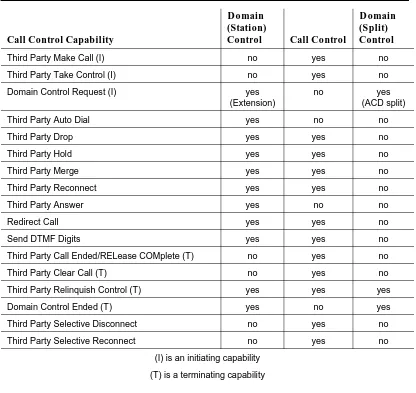
Third Party Control Associations
The ECS provides three types of Third Party control associations:
1. Call Control, which monitors and controls all parties on a specified call 2. Third Party Domain (Station) Control, which monitors all calls at a specific
station and allows control of the station only
3. Third Party Domain (ACD Split) Control, which monitors logout events for all agents in a given split
These control capability groups encompass call feedback event reports and call control operations (although, as Table 2-2 shows, there are different subsets).
Table 2-2. Use of Call Control Capabilities in Third Party Associations
Call Control Capability
Domain (Station)
Control Call Control
Domain (Split) Control
Third Party Make Call (I) no yes no
Third Party Take Control (I) no yes no
Domain Control Request (I) yes (Extension)
no yes
(ACD split)
Third Party Auto Dial yes no no
Third Party Drop yes yes no
Third Party Hold yes yes no
Third Party Merge yes yes no
Third Party Reconnect yes yes no
Third Party Answer yes no no
Redirect Call yes yes no
Send DTMF Digits yes yes no
Third Party Call Ended/RELease COMplete (T) no yes no
Third Party Clear Call (T) no yes no
Third Party Relinquish Control (T) yes yes yes
Domain Control Ended (T) yes no yes
Third Party Selective Disconnect no yes no
Third Party Selective Reconnect no yes no
(I) is an initiating capability
Call Control Association
These procedures provide descriptions of the messaging procedures.
Call Control Association
A Call Control association allows an adjunct to control all the endpoints on a call using those Call Control capabilities shown in Table 2-2. Call control includes: establishing a call, taking control of an existing call, controlling a call, and the call feedback (event reports) that the ECS provides about a controlled call.
Initiating a Call Control Association
An adjunct begins a Call Control association and obtains control of a call when it: 1. Invokes the ASAI Third Party Make Call capability to set up a call
2. Invokes the ASAI Third Party Take Control capability to obtain control of an existing call
Call Control and Event Reporting on a Call
Control Association
Once the association has been successfully established, the ECS designates the associated call as an adjunct-controlled call and thereby provides call feedback event reports. During the time the Call Control association exists, the adjunct can request Call Control operations.
The ECS terminates the association when the call terminates; the adjunct may use Third Party Relinquish Control to terminate the association when it no longer needs to control the call.
Termination of a Call Control Association
Either the adjunct or the ECS may terminate a Call Control association.
Three ways an adjunct can terminate such associations are as follows:
■ Use the Third Party Clear Call procedure. This disconnects all parties from
the call and terminates the association.
■ Use the Third Party Relinquish Control procedure. This does not dismantle
the call. The ECS continues normal processing of the call although adjunct control of the call (and call feedback) is terminated.
■ Send RELease COMplete. For coding, see ‘‘Call Control: Normal Clearing
The ECS terminates a Call Control association in two wa