DSU 5600
Data Service Unit
USER MANUAL
Huntsville, AL 35814-4000 Phone: (205) 963-8000
© 1997 ADTRAN, Inc. All rights reserved.
1. This equipment complies with Part 68 of the FCC rules. On the bottom of the equipment housing is a label that shows the FCC registration number and Ringer Equivalence Number (REN) for this equipment. If requested, provide this information to the telephone company.
2. If this equipmentcauses harm to the telephone network, the telephone company may temporarily discontinue service. If possible, advance notification is given, otherwise, notification is given as soon as possible. The telephone company will advise the customer of the right to file a complaint with the FCC.
3. The telephone company may make changes in its facilities, equipment, operations, or procedures that could affect the proper operation of this equipment; advance
notification and the opportunity to maintain uninterrupted service is given.
4. If experiencing difficulty with this equipment,please contact ADTRANfor repair and warranty information. The telephone company may require this equipment to be disconnected from the network until the problem is corrected, or it is certain the equipment is not malfunctioning.
5. This unit contains no user serviceable parts.
6. An FCC compliant telephone cord with a modular plug is provided with this equipment. In addition, an FCC compliant cable appropriate for the dial backup option ordered is provided with this equipment. This equipment is designed to be connected to the telephone network or premises wiring using an FCC compatible modular jack, which is Part 68 compliant.
7. The following information may be required when applying to the local telephone company for leased line facilities.
Service Digital Facility Service Order Network
Type Interface Code Code Jacks
This equipment has been tested and found to comply with the limits for a Class A digital device, Pursuant to Part 15 of the FCC Rules. These limits are designed to provide reasonable protection against harmful interference when the equipment is operated in a commercial environment. This equipment generates, uses, and can radiate radio frequency energy and, if not installed and used in accordance with the instruction manual, may cause harmful interference to radio frequencies. Operation of this equipment in a residential area is likely to cause harmful interference in which case the user will be required to correct the interference at his own expense.
Shielded cables must be used with this unit to ensure compliance with Class A FCC limits.
Change or modifications to this unit not expressly approved by the party responsible for compliance could void the user's authority to operate the equipment.
CANADIAN EMISSIONS REQUIREMENTS
This digital apparatus does not exceed the Class A limits for radio noise emissions from digital apparatus as set out in the interference-causing equipment standard entitled “Digital Apparatus," ICES-003 of the Department of Communications.
Notice: The Canadian Industry and Science Canada label identifies certified equipment. This certification means that the equipment meets certain telecom-munications network protective, operational, and safety requirements. The Department does not guarantee the equipment will operate to the user's satisfac-tion.
Before installing this equipment, users should ensure that it is permissible to be connected to the facilities of the local telecommunications company. The equip-ment must also be installed using an acceptable method of connection. In some cases, the company's inside wiring associated with a single line individual service may be extended by means of a certified connector assembly (telephone extension cord). The customer should be aware that compliance with the above conditions may not prevent degradation of service in some situations.
Repairs to certified equipment should be made by an authorized Canadian maintenance facility designated by the supplier. Any repairs or alterations made by the user to this equipment, or equipment malfunctions, may give the telecom-munications company cause to request the user to disconnect the equipment.
Users should ensure for their own protection that the electrical ground connec-tions of the power utility, telephone lines and internal metallic water pipe system, if present, are connected together. This precaution may be particularly important in rural areas.
Caution: Users should not attempt to make such connections themselves, but should contact the appropriate electric inspection authority, or an electrician, as appropriate.
Table of Contents
Chapter 1. Introduction
General Description ... 1
Physical Description ... 2
Front Panel ... 2
LED Identification ... 2
DTE Status (Green) ... 2
Network Status (Red) ... 2
Test Status/Error (Yellow/Red) ... 3
Select and Test Buttons ... 3
Rear Panel ... 4
Chapter 2. Installation Unpacking ... 7
ADTRAN Shipments Include ... 7
Customer Provides ... 7
Warranty and Customer Service ... 8
Powering ... 8
Configuration ... 8
DTE Rate and Scrambler - SW 1, SW 2, SW 3 ... 8
Loop Rate - SW 4 ... 9
Clear To Send (CS) - SW 5 ... 9
Carrier Detect (CD) - SW 6 ... 10
Data Set Ready (SR) - SW 7 ... 10
Remote Digital Loopback (RDL) - SW 8 ... 10
Network Connections ...11
DTE Connections ... 12
Chapter 3. Test Modes Self Test ... 13
Near End Test ... 14
DTE Only Test ... 14
DTE With Test Pattern (TP) ... 16
DTE and Loop Test (LL) ... 18
Loop Only Test ... 20
Far End Tests ... 21
RDL With Test Pattern (TP) ... 21
Test Pattern (PTRN) ... 22
Remote Tests ... 23
Chapter 4. Specifications Summary Specifications and Features ... 25
Loop Interface ... 25
Line Requirements ... 25
Loop Rates ... 25
Receiver Sensitivity ... 25
DTE Interfaces ... 25
DTE Data Rates ... 25
DTE Operating Modes ... 25
Diagnostics ... 26
Power ... 26
Environment ... 26
Index ... 27
List of Tables Table 2-A Switch Settings for DTE Async Rate ... 9
Table 2-B Network Connections ...11
Table 2-C Pin Assignments for Primary EIA-232 Connector ... 12
List of Figures Figure 1-1 DSU 5600 Front Panel ... 4
Figure 1-2 DSU 5600 Rear Panel ... 5
Figure 3-1 DTE Only Test Diagram ... 15
Figure 3-2 DTE with Test Pattern Test Diagram ... 17
Figure 3-3 DTE and Loop Test Diagram ... 19
Chapter 1
Introduction
GENERAL DESCRIPTION
The ADTRAN DSU 5600 is a technologically advanced, high performance Data Service/Channel Service Unit (DSU/CSU) that provides the interface between telco provided Digital Data Service (DDS) and the customer’s Data Terminal Equipment (DTE).
The DSU 5600 supports both 56 kbps and 64 kbps loop service rates and provides either synchronous or asynchronous modes of operation for the DTE interface. When the DTE interface is configured for synchronous operation, the DSU 5600 matches the selected loop rate. When the DTE interface is configured for asynchronous operation, it supports asynchronous data commu-nications over either a 56 kbps or 64 kbps DDS service. In asynchronous mode, the DTE can be configured to operate at any of the standard asynchronous communication rates from 1.2 kbps to 57.6 kbps. All setup or configuration is accomplished with a single eight position DIP switch that is accessible from the back panel of the unit.
PHYSICAL DESCRIPTION
The DSU 5600 is a stand alone unit designed to be used either on a desktop or mounted on a wall. The physical measurements of the DSU 5600 are:
Length = 8.32 inches Width = 6.50 inches Height = 1.56 inches Weight = 1.50 pounds
Front Panel
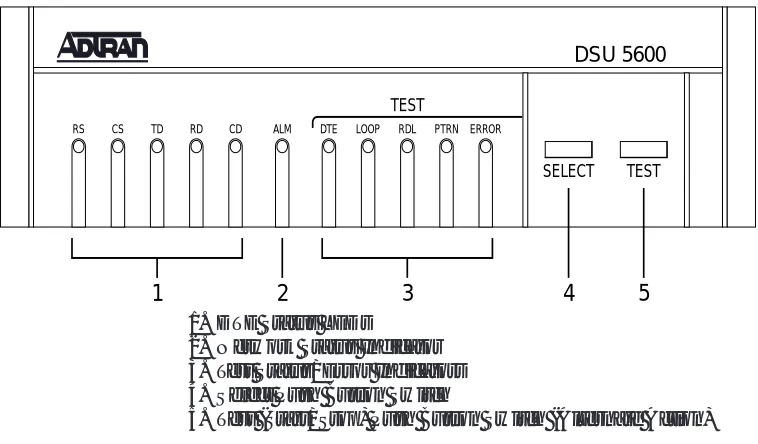
As shown in Figure 1-1, the front panel of the DSU 5600 contains eleven LED indicators that display DTE interface, network, and test status. These indicators are defined in the following section
LED Identification.
LED Identification
DTE Status (Green)
INDICATOR DEFINITION SOURCE
RS Request To Send DTE
CS Clear To Send DSU
TD Transmit Data DTE
RD Receive Data DSU
CD Carrier Detect DSU
The active state for the status indicators (RS, CS, and CD) is On; the On state for the data indicators (TD and RD) represents a SPACE condition.
Network Status (Red)
ALM On indicates a problem on the local loop or within the DDS network.
Test Status/Error (Yellow/Red)
DTE On indicates DTE interface test in progress.
Flashing indicates loop interface test (CSU Loopback) has been initiated by the telco.
Loop On solid indicates loop interface test has been initiated from local DSU.
Flashing indicates loop interface test (CSU or DSU Loopback) has been initiated by the telco.
RDL On solid indicates remote digital loopback test has been initiated from the local DSU.
Flashing indicates remote digital loopback test has been initiated from the remote DSU.
PTRN On indicates integral pattern generator is being utilized for testing.
Error On solid indicates remote digital loopback test has been initiated from the local DSU.
Flashing indicates remote digital loopback test has been initiated from the remote DSU.
For more information on the tests indicated by the indicators described previously see the chapter Test Modes.
Select and Test Buttons
The front panel also contains two push-button switches for selecting and controlling the various test modes for the DSU 5600.
Select Each time this switch is pressed the current test mode is displayed by turning On one or more LEDs to indicate the specific test.
1
SELECT ERROR PTRN RDL TEST LOOP DTE TEST DSU 5600 CD RD TD CS RS ALM3
2
4
5
1. DTE Status LEDs
2. Network Status Indicator 3. Test Status/Error Indicators 4. Select Push Button Switch
5. Test (Start/Stop) Push Button Switch (Alternate Action)
Figure 1-1 DSU 5600 Front Panel
Rear Panel
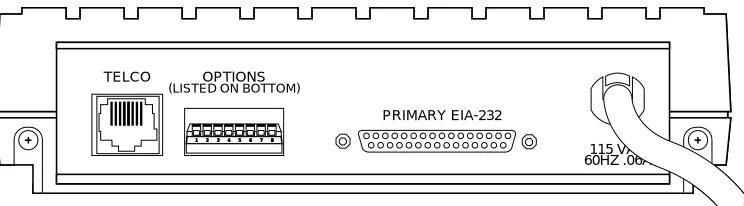
A drawing of the rear panel of the DSU 5600 is shown in Figure 1-2. The 25-pin connector labeled PRIMARY EIA-232 provides the synchronous/asynchronous DTE interface. Connection to the DDS network is made using the 8-pin modular jack (RJ-48S) labeled TELCO. The pin assignments for these connectors are listed in the sections Network Connections and DTE Connections.
1 2 3 4 5 6 7 8 1 2 3 4 5 6 7 8 1 2 3 4 5 6 7 8 1 2 3 4 5 6 7 8 1 2 3 4 5 6 7 8 1 2 3 4 5 6 7 8
115 VAC 60HZ .06A
TELCO OPTIONS
(LISTED ON BOTTOM)
PRIMARY EIA-232
1 2 3 4 5 6 7 8 1 2 3 4 5 6 7 8 1 2 3 4 5 6 7 8
115 VAC 60HZ .06A
TELCO OPTIONS
(LISTED ON BOTTOM)
PRIMARY EIA-232
Chapter 2
Installation
UNPACKING
After unpacking the DSU 5600, carefully inspect it for shipping damages. If damage is suspected, file a claim immediately with the carrier and then contact ADTRAN Technical Support. If possible, keep the original shipping container for use in return-ing the unit to ADTRAN for repair or verification of shippreturn-ing damage.
ADTRAN Shipments Include
The following items are included in ADTRAN shipments of the DSU 5600:
• The DSU 5600 unit
• Network interface cable (an 8-position modular to 8-position modular)
• The user manual
Customer Provides
WARRANTY AND CUSTOMER SERVICE
For information regarding warranty and customer service see the inside cover of this manual.
POWERING
The DSU 5600 is equipped with a captive six-foot power cord that is terminated with a three-prong plug for connecting to a grounded power receptacle.
Ensure that a grounded, 115 VAC, 60 Hz receptacle is used for power-ing the DSU 5600.
When the DSU 5600 is plugged into an AC power source, it performs a SELF TEST that tests all LED indicators plus various circuit blocks within the unit. Proper operation plus failures are indicated via the LED indicators.
CONFIGURATION
The DSU 5600 has eight options for controlling the operation of both the network and DTE interfaces. These options are selected by setting individual switches on the eight position DIP switch that is accessible from the rear panel. A label of the switch settings and their respective options is attached to the bottom of the unit for convenience.
DTE Rate and Scrambler - SW 1, SW 2, SW 3
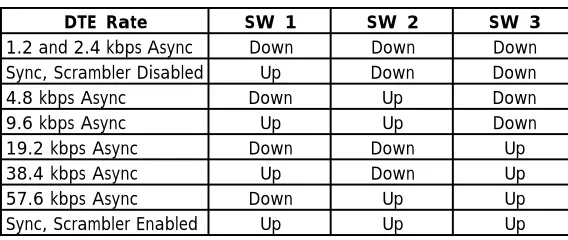
These three switches select the data rate for the DTE interface and enable or disable the scrambler. As shown in Table 2-A, combinations of up and down settings for these switches select specific data rates and enable or disable the scrambler.
Table 2-A Switch Settings for DTE Rate
DTE Rate SW 1 SW 2 SW 3
1.2 and 2.4 kbps Async Down Down Down Sync, Scrambler Disabled Up Down Down 4.8 kbps Async Down Up Down 9.6 kbps Async Up Up Down 19.2 kbps Async Down Down Up 38.4 kbps Async Up Down Up 57.6 kbps Async Down Up Up Sync, Scrambler Enabled Up Up Up
Loop Rate - SW 4
When the SW4 switch is in the down (56 kbps) position, the network interface of the DSU 5600 is configured for operation at 56 kbps, and when this switch is in the up (64 kbps) position, the network interface is configured for 64 kbps operation.
For 64 kbps clear channel operation, there is a possibility that the DTE data sequences might mimic network loop maintenance functions and erroneously cause other network elements to activate loopbacks. To prevent this, a data scrambler is enabled when the 64 kbps option is selected.
Clear To Send (CS) - SW 5
When this switch is in the down (normal) position Clear To Send (CS) follows the Request To Send (RS) lead with 250 µ± 125 µ of delay. The only exceptions to this occur when network or test conditions prevent data from being transferred over the DTE interface. During these conditions CS is turned Off.
Carrier Detect (CD) - SW 6
When this switch is in the down (normal) position, Carrier Detect (CD) is On any time customer data is being received and
Off when the receive circuit is idle, (not carrying customer data). When this switch is in the up (On) position, CD is forced On all the time.
Data Set Ready (SR) - SW 7
When this switch is in the down (On) position, Data Set Ready (SR) is forced On all the time. For the up (normal) position, SR is turned Off when the network is out of service or a test is in progress.
Remote Digital Loopback (RDL) - SW 8
When this switch is in the down (enable) position, the DSU 5600 accepts the industry standard V.54 Remote Digital Loopback (RDL) command from the far end of the circuit.
NETWORK CONNECTIONS
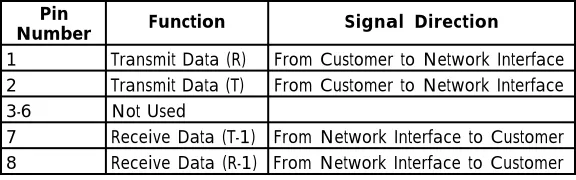
This interface consists of four leads paired to provide separate transmit and receive circuits. The four leads are provided on the eight position modular jack (RJ-48S) labeled TELCO on the rear panel of the DSU 5600. The pin assignments for this connector are shown in Table 2-B.
Table 2-B Network Connections
Pin
Number Function Signal Direction
1 Transmit Data (R) From Customer to Network Interface 2 Transmit Data (T) From Customer to Network Interface 3-6 Not Used
DTE CONNECTIONS
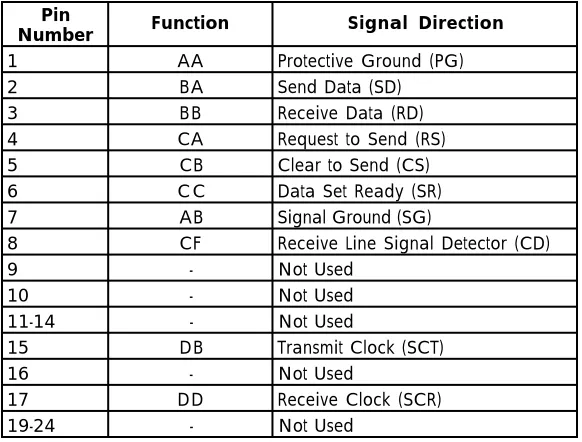
The Data Terminal Equipment is attached to the connector labeled PRIMARY EIA-232 at the rear of the DSU 5600. The pin assignments for all pins used on this connector are shown in Table 2-C.
Table 2-C Pin Assignments for Primary EIA-232 Connector
Pin
Number Function Signal Direction
1 AA Protective Ground (PG) 2 BA Send Data (SD) 3 BB Receive Data (RD) 4 CA Request to Send (RS) 5 CB Clear to Send (CS) 6 C C Data Set Ready (SR) 7 AB Signal Ground (SG)
8 CF Receive Line Signal Detector (CD)
9 - Not Used
10 - Not Used 11-14 - Not Used
15 DB Transmit Clock (SCT) 16 - Not Used
17 DD Receive Clock (SCR) 19-24 - Not Used
Chapter 3
Test Modes
In addition to a self test mode, other DSU 5600 test modes allow the user to isolate problems to specific components of the communications circuit. These various test modes for the DSU 5600 are initiated and terminated from the front panel using
Select and Test.
SELF TEST
When the DSU 5600 is powered on, all LEDs on the front panel turn On simultaneously for approximately two seconds then turn Off briefly. The LEDs then cycle On in pairs with a fan-out pattern away from the ALM indicator. Next, the LEDs cycle Off
in pairs with a fan-in pattern back towards the ALM indicator. These patterns are repeated four times to determine that all LEDs are functioning properly.
At completion of the LED test patterns the PTRN LED is On, indicating the DTE with TP test is being performed. This test is successful if the Error indicator does not turn On. If the DTE with TP test fails, the RS, ALM, DTE, PTRN, and Error indica-tors all Flash.
If an EPROM CHECKSUM failure is detected during self test,
NEAR END TEST
The local DSU 5600 is capable of performing the following near end tests:
• DTE Only
• DTE with Test Pattern • DTE and Loop (LL) • Loop Only (RT)
DTE Only Test
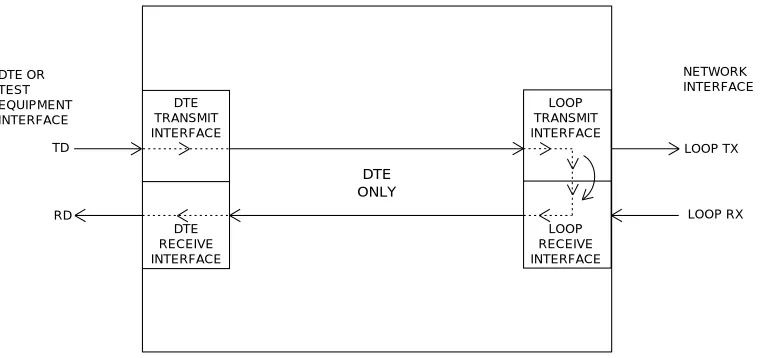
The DTE Only test provides a method for testing both the DTE interface of the local DSU 5600 plus its loop transmitter and receiver. For this test, the loop transmit data is connected to the loop receive data at a point close to the physical network inter-face. A block diagram illustrating the loopback point and the signal paths for this test is shown in Figure 3-1.
To initiate the DTE Only test, perform the following steps:
1. Press Select once to turn On the DTE test indicator. 2. Press Test while the test indicator is On.
To terminate this test, press Test.
DTE TRANSMIT INTERFACE
LOOP TRANSMIT INTERFACE
DTE RECEIVE INTERFACE
LOOP RECEIVE INTERFACE
DTE ONLY
TD
RD LOOP RX
LOOP TX DTE OR
TEST EQUIPMENT INTERFACE
NETWORK INTERFACE
DTE with Test Pattern (TP)
The DTE with Test Pattern (TP) test is similar to the DTE Only test described previously. The DTE with TP test is initiated at the local DSU 5600 and is used to independently test the opera-tion of the DSU 5600.
To initiate the DTE with TP test, perform the following steps:
1. Press Select twice to turn On both the DTE and PTRN test indicators.
2. Press Test while these test indicators are On. To terminate this test, press Test.
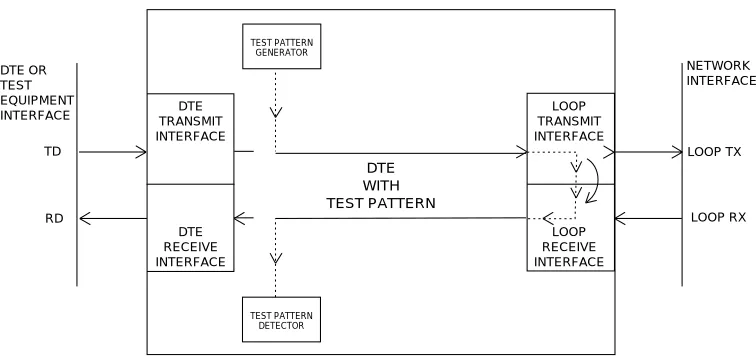
Instead of using data from the terminal or test equipment, this test utilizes an internal test pattern generator and detector built into the DSU 5600. The loopback point and the data paths for this test are illustrated in Figure 3-2.
The internal test pattern generator and detector of the DSU 5600 operate with a 2047 data pattern. When this test is initiated, the test pattern detector examines the receive data stream until synchronization to the 2047 pattern is achieved. Once synchro-nized, the detector continues to check the receive data and reports any bit errors detected by turning On the Error LED. Once a test is initialized with the internal test pattern generator and detector, errors can be injected into the transmit data stream by pressing Select and observed by watching the Error LED turn
On for a brief period of time.
DTE TRANSMIT INTERFACE
LOOP TRANSMIT INTERFACE
DTE RECEIVE INTERFACE
LOOP RECEIVE INTERFACE
DTE WITH TEST PATTERN
TD
RD LOOP RX
LOOP TX
TEST PATTERN DETECTOR TEST PATTERN
GENERATOR
DTE OR TEST EQUIPMENT INTERFACE
NETWORK INTERFACE
DTE and Loop Test (LL)
The DTE and Loop test is initiated at the local DSU 5600 and allows independent testing of the separate sections of the DSU 5600. First, it allows the local DTE interface to be tested with data from the terminal or test equipment. Second, it allows the loop interface section of the local DSU 5600 to be tested from the remote site over the actual communications circuit. Testing from the remote end of the circuit is done with test data generated by the remote DSU or terminal type test equipment.
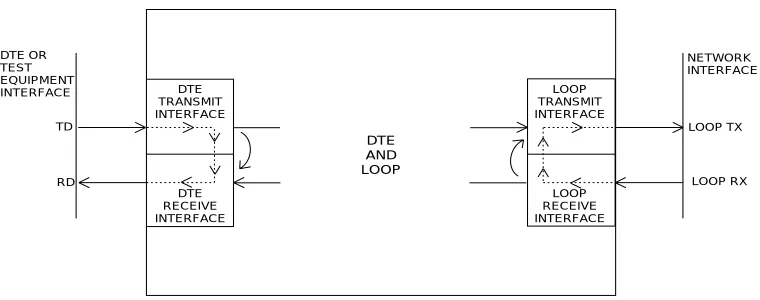
The DTE and Loop test splits the DSU 5600 into separate DTE and Loop interface sections and then loops the transmit data of each interface back to its respective receive data. A block dia-gram illustrating the loopback points and the signal paths for this test is shown in Figure 3-3.
To initiate the DTE and Loop test, perform the following steps:
1. Press Select three times to turn On both the DTE and Loop test indicators.
2. Press Test while these test indicators are On. The DTE and Loop LEDs Flash during initialization of the test and turn On
solid once the test is in progress.
DTE TRANSMIT INTERFACE
LOOP TRANSMIT INTERFACE
DTE RECEIVE INTERFACE
LOOP RECEIVE INTERFACE
DTE AND LOOP
TD
RD LOOP RX
LOOP TX DTE OR
TEST EQUIPMENT INTERFACE
NETWORK INTERFACE
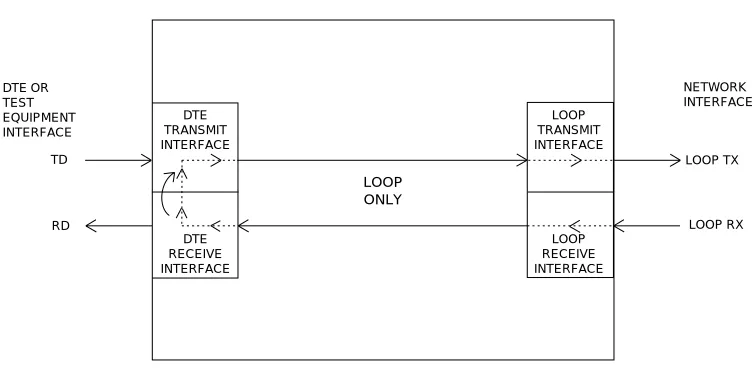
Loop Only Test
The Loop Only test allows the loop interface and a major portion of the DTE interface of the local DSU 5600 to be tested from a remote site over the actual digital data circuit.
During the Loop Only test, the network receive data is looped to the network transmit data inside the DTE interface section of the DSU 5600. The physical DTE interface is ignored for this test. A block diagram illustrating the loopback point and the signal paths for this test is shown in Figure 3-4.
To initiate the Loop Only test, perform the following steps:
1. Press Select four times to turn On the loop test indicator. 2. Press Test while this test indicator is On. The Loop LED
Flashes during initialization of the test and turns On solid once the test is in progress.
To terminate this test, press Test.
DTE TRANSMIT INTERFACE LOOP TRANSMIT INTERFACE DTE RECEIVE INTERFACE LOOP RECEIVE INTERFACE LOOP ONLY TD
RD LOOP RX
FAR END TESTS
Remote Digital Loopback (RDL)
When the remote digital loopback (RDL) test is initiated at the local DSU 5600, it commands the remote DSU into loopback with the industry standard V.54 loopback pattern. The loopback point and the signal paths for the remote DSU are the same as the Loop Only test for a local DSU (Figure 3-4). This loopback test is performed with data from the terminal or test equipment.
To initiate the RDL test, perform the following steps:
1. Press the Select switch five times to turn On the RDL test indicator.
2. Press Test while the test indicator is On. The RDL LED
Flashes during initialization of the test and turns On solid once the test is in progress.
To terminate this test, press Test.
RDL with Test Pattern (TP)
When the RDL with TP test is initiated at the local DSU 5600, it commands the remote DSU into loopback with the industry standard V. 54 loopback pattern. The loopback point and the signal paths for the remote DSU are the same as the Loop Only test for a local DSU (Figure 3-4). This loopback test is performed with data from the internal test pattern generator and error detector.
To initiate the RDL with TP test, perform the following steps:
1. Press Select six times to turn On both the RDL and PTRN test indicators.
2. Press Test while these test indicators are On. The RDL and PTRN LEDs Flash during initialization of the test and turn
Test Pattern (PTRN)
When the PTRN test is initiated, the local DSU 5600 uses the integral test pattern generator to transmit a standard 2047 test pattern to the DSU On the far end of the circuit. The local DSU 5600 then examines the received data for the standard 2047 pattern. Once this pattern is detected the, Error indicator is turned Off. The Error indicator turns On when errors in the receive data pattern are detected. While this test is active, errors can be injected into the transmit data stream by pressing the
Select push button.
To initiate the PTRN test, use the following steps:
1. Press the Select switch seven times to turn On the PTRN test indicator.
2. Press the Test switch while this test indicator is On. The PTRN LED Flashes during initialization of the test and turns
On solid once the test is in progress.
REMOTE TESTS
The DSU 5600 responds to three remote activated tests:
• Remote Digital Loopback (RDL) • CSU Loopback (LL)
• DSU Loopback (RT)
The RDL test is initiated by a remote DSU and causes the local DSU 5600 to loopback. The loopback point is the same as the Loop Only point shown in Figure 3-4. This test is run to test the end-to-end performance of the circuit.
Both the CSU Loopback and the DSU Loopback tests are acti-vated from the telephone company diagnostic test equipment and are used to isolate trouble on a circuit.
The CSU Loopback, commonly called the LL test, has the same loopback points as the DTE and Loop test. It is used by the telephone company to test the integrity of the local loop.
Chapter 4
Specifications Summary
SPECIFICATIONS AND FEATURES
This section describes the standard specifications and features incorporated in the DSU 5600.
Loop Interface
4-wire, full duplex
Line Requirements
Local loop specifications per AT&T Pub 62310
Loop Rates
56 kbps or 64 kbps
Receiver Sensitivity
-45 dB
DTE Interfaces
EIA-232 synchronous or asynchronous
DTE Data Rates
• 1.2 kbps, 2.4 kbps, 4.8 kbps, 9.6 kbps, 19.2 kbps, 38.4 kbps, or 57.6 kbps asynchronous
• 56 kbps or 64 kbps synchronous
DTE Operating Modes
Diagnostics
• Network test center activated
- CSU loopback on sealing current reversal in local loop - DSU loopback
• User activated - Self test - Local loopback
- V.54 activated remote loopback with: 2047 test pattern
DTE data/data from external test set
Power
115 VAC
4 Watts (maximum)
Environment
• Temperature
Index
Symbols
2047 Test Pattern 16
A
ALM Indicator 2, 13
B
Back Panel 5
C
Carrier Detect 2, 10 CD Indicator 2, 10 Clear To Send 2 CS Indicator 2 Customer Service 8
D
Data Set Ready 10 Diagnostics 26
Digital Loopback Test 21 with Test Pattern 21 DTE
Operating Modes 25 DTE and Loop Test
Diagram 19 DTE Data Rates 25 DTE Indicator 2, 13, 16
DTE Interface 1, 2, 8, 25 DTE Only Test Diagram 15 DTE Status 2
DTE with Test Pattern 13 Diagram 17
E
Environment 26 Error
Indicator 3, 13, 16 Inject 16
F
Far End Test 21
I
Indicator ALM 2, 13 CD 2, 10 CS 2, 9 DTE 2, 13, 16 Error 3, 16 LED 8 Loop Test 3 PTRN 3, 21, 22 PTRN test 16 RD 2
Remote Digital Loopback 21 RS 2, 13
SR 10 TD 2 Inject Error 16
L
LED
Indicator 8 Test Pattern 13 Line Requirements 25 Loop Interface 25 Loop Interface Test 3 Loop Only Test 20 Loop Rate 25
N
Network Status Indicator 2
O
Options 4
P
Parameters 4 Pattern
2047 16 Generator 3 Power 8, 26
Cord 5, 8 Primary EIA-232 12 Prom Checksum Failure 13
PTRN Test Indicator 3, 13, 16, 21, 22
R
RD Indicator 2
RDL Indicator 3, 10, 21 Rear Panel 4
Receive Data 2
Receiver Sensitivity 25 Remote
Digital Loopback Test 3 Request To Send 2 RS Indicator 2, 13
S
Select Switch 22 Self Test 8 SR Indicator 10 SW 1 8 SW 2 8 SW 3 8 SW 4 9 SW 5 9 SW 6 10 SW 7 10 SW 8 10 Switch
Options 4 Select 22 Test 3, 21
T
TD Indicator 2 Test
DTE Interface 2 Far End 21 Loop Interface 3 Loop Only 20 Pattern Detector 16 Pattern Generator 16 Remote Digital Loopback 3 Self 8
Status 2
Presales Inquiries and Applications Support
Please contact your local distributor, ADTRAN Applications Engineering, or ADTRAN Sales:
Applications Engineering (800) 615-1176
Sales (800) 827-0807
Post-Sale Support
Please contact your local distributor first. If your local distribu-tor cannot help, please contact ADTRAN Technical Support and have the unit serial number available.
Technical Support (888) 4ADTRAN
Repair and Return
If ADTRAN Technical Support determines that a repair is needed, Technical Support will coordinate with the Return Material Authorization (RMA) department to issue an RMA number. For information regarding equipment currently in house or possible fees associated with repair, contact RMA directly at the following number:
RMA Department (205) 963-8722
Identify the RMA number clearly on the package (below ad-dress), and return to the following address:
ADTRAN, Inc. RMA Department 901 Explorer Boulevard Huntsville, Alabama 35806