Collaborative Development and Evaluation of Text-processing Workflows in a
UIMA-supported Web-based Workbench
Rafal Rak, Andrew Rowley, Sophia Ananiadou
National Centre for Text Mining and School of Computer Science, University of Manchester 131 Princess Street, Manchester, M1 7DN, UK
{rafal.rak,andrew.rowley,sophia.ananiadou}@manchester.ac.uk
Abstract
Challenges in creating comprehensive text-processing worklows include a lack of the interoperability of individual components coming from different providers and/or a requirement imposed on the end users to know programming techniques to compose such workflows. In this paper we demonstrate Argo, a web-based system that addresses these issues in several ways. It supports the widely adopted Unstructured Information Management Architecture (UIMA), which handles the problem of interoperability; it provides a web browser-based interface for developing workflows by drawing diagrams composed of a selection of available processing components; and it provides novel user-interactive analytics such as the annotation editor which constitutes a bridge between automatic processing and manual correction. These features extend the target audience of Argo to users with a limited or no technical background. Here, we focus specifically on the construction of advanced workflows, involving multiple branching and merging points, to facilitate various comparative evalutions. Together with the use of user-collaboration capabilities supported in Argo, we demonstrate several use cases including visual inspections, comparisions of multiple processing segments or complete solutions against a reference standard, inter-annotator agreement, and shared task mass evaluations. Ultimetely, Argo emerges as a one-stop workbench for defining, processing, editing and evaluating text processing tasks.
Keywords:Text mining; Text-processing workflows; Evaluation methods
1.
Introduction
Due to their extensive and ever expanding volume, the an-notation of textual resources is often supported by auto-matic text processing systems. Such systems are generally composed of multiple independent processing components bridged together in a pipeline or workflow. For example, a statistical named entity recogniser requires the original text to be segmented into sentences and tokens, which are tasks that may be performed by two individual components. Currently, finding a ready-to-use component capable of per-forming a specific, atomic task is no longer an issue. The problem, however, lies in a lack of compatibility between components coming from various sources, and thus an in-ability to build a meaningful workflow.
Unstructured Information Management Architecture (UIMA) (Ferrucci and Lally, 2004) is one of the efforts towards making individual processing components com-patible with each other. The architecture has become a de-facto industry standard and software framework for content analysis. As such, it does not provide any specific processing components; instead, it ensures interoperability between the components through the use of common data representations and interfaces.
Originally developed by IBM, UIMA is currently an open-source project hosted by Apache Software Foundation1and is registered at the Organization for the Advancement of Structured Information Standards2. The framework has been widely adopted, which resulted in a vast number of publicly available UIMA component repositories, such as, Carnegie Mellon University’s UIMA Component
Reposi-1
http://uima.apache.org
2
http://www.oasis-open.org/committees/uima
tory3, BioNLP UIMA Component Repository (Baumgart-ner et al., 2008), or JULIE Lab’s UIMA Component Repos-itory (JCoRe) (Hahn et al., 2008). However, these reposi-tories are primarily targeted at users with a technical back-ground, capable of programmatically incorporating the pro-cessing components into their applications. To alleviate this problem, we created Argo (Rak et al., 2012), a workbench for developing text processing workflows with user collabo-ration and comparative evaluation solutions. Argo is a web-based application and is accessible entirely through a web browser and an intuitive graphic user interface. It does not involve any installation and the actual processing of work-flows is carried out on a remote machine.
In this work, we are especially interested in exploiting the capabilities of the UIMA framework in terms of cre-ating graph-like workflows, i.e., workflows consisting of branches and merging points, and their applicability to comparative evaluation. A typical use case is a serial pro-cessing workflow (a pipeline) that is split at some point with a current output sent to two or more branches inde-pendentlyfor further processing. The independent branches then merge into an evaluation component that calculates various comparative metrics.
Such a scenario is rather unusual from the UIMA frame-work perspective. In a typical UIMA processing frame-workflow there is a single common annotation structure (CAS) for each input resource (in our case, a text document), which is shared among all processing components, that is, the pro-cessing components populate one and the same CAS with their respective annotations of (usually) different types, re-gardless of whether the components are deployed in a
se-3
Figure 1: Screen capture of web-based graphic user interface in Argo.
quence, in parallel or as a combination of the two. In the comparative evaluation scenario, multiple processing com-ponents produce the same types of (often overlapping) an-notations. In the shared-CAS processing these annotations are stored together, which makes it impossible to compare against each other or some reference annotations. We ad-dress this issue with UIMA’smultiple viewsandCAS mul-tipliermechanisms.
The remainder of this paper is structured as follows. In Section 2 we present related work. Section 3 describes the Argo system focusing on user collaboration as well as workflow branching and merging capabilities. Compara-tive evaluation use cases in Argo are presented in Section 4. Section 5 mentions future work, whereas Section 6 con-cludes the paper.
The system is available at http://nactem.ac.uk/Argo.
2.
Related Work
Workflow supporting platforms have been gaining popu-larity due to their convenience in building multi-step ex-perimental applications often using third-party resources. They range from general-purpose to field-specific systems. Examples include Galaxy (Goecks et al., 2010), a plat-form for genomic research; Konstanz Inplat-formation Miner (KNIME) (Berthold et al., 2008) for general data analysis; and Taverna (Hull et al., 2006), a multi-purpose, domain-independent workflow management system, which allows
users to build workflows using third-party web services. GATE (Cunningham et al., 2002) and U-Compare (Kano et al., 2010b) are the notable examples of workflow de-velopment platforms intended specifically to perform text processing tasks. GATE is a suite of text processing and annotation tools that comes with its own application pro-gramming interface (API). In contrast, U-Compare uses UIMA as its base interoperability framework. Although a standalone application, U-Compare is capable of using web service-based processing components and was also linked to previously mentioned Taverna (Kano et al., 2010a). A se-ries of U-Compare workflows is available as web services as well (Kontonatsios et al., 2011).
Due to its support for UIMA as well as comparative eval-uation capabilities (Kano et al., 2011), U-Compare is the most closely related system, and in fact, was a major in-spiration in developing Argo. As opposed to U-Compare, Argo is a web-based application with a user interface avail-able entirely via a web browser. Other key differences in-clude remote simultaneous multi-user collaboration, user-interactive processing components, and an intuitive dia-gramming tool making Argo a more flexible and accessible alternative.
3.
Overview of Argo
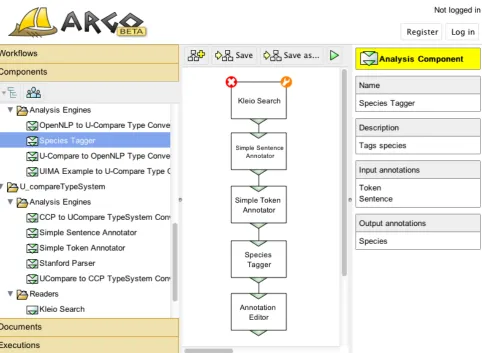
Centre for Text Mining. The interface provides the user with a range of graphical and interactive elements as shown in a screen capture in Figure 1. The main panel of the inter-face is a flexible and intuitive diagramming tool, which al-lows users to draw block diagrams representing their work-flows. The left-hand panel contains storable objects avail-able in the user space, whereas the right-hand panel is a context-dependent informational panel that displays, e.g., the description of a currently selected component or the progress of a selected workflow execution.
3.1. Storable Objects
The storable objects in the left-hand panel are categorized into workflows, processing components, documents, and workflow executions.
Workflowsare representations of workflow diagrams. The user is able to load and work on previously saved work-flows. Apart from the structure, the workflows store the settings of individual components.
Processing componentsare the equivalents of UIMA analy-sis components and constitute the building blocks of work-flows. Argo provides an ever expanding repository of pro-cessing components ready for users to incorporate in their workflows. Users can also upload their own UIMA compo-nents as well as create new aggregate compocompo-nents by saving workflows as components.
Documentsare resources uploaded to the system by users with the intention of being processed by workflows. Each user has his/her own user space, which is available only to this user unless the user decides to share it. This space is also used to save the outputs of executing workflows, which can be of various formats depending onconsumers
used. Consumers are a special class of processing compo-nents whose purpose is to transform and save (a selection of) annotations from CASes. An example of a consumer available in Argo is the CAS Writer component that seri-alises and saves CASes. Although the serialised CASes are not directly human interpretable, they can be used to store intermediate or final results of processing workflows. The CASes from one workflow can also be reused in other workflows, which simplifies the workflows and saves users the effort of building their own serialisation components.
Executionshelp track the processing of workflows, which, depending on the scale of the task at hand, may sometimes take hours or even days. They store information such as current execution progress, elapsed time as well as individ-ual component execution times.
3.2. User-interactive Components
User-interactive components are a novel type of processing components, which allow the running workflow to pause its execution and wait for some input from the user. An exam-ple of a user-interactive component is Argo’s Annotation Editor shown as part of a workflow in Figure 1 and during user interaction in Figure 2. Annotation Editor allows the user to inspect annotations provided by automatic process-ing components and modify incorrect instances as well as introduce a completely new set of annotations. The modi-fied annotations could be sent to other processing compo-nents for further processing.
Figure 2: Screen capture of Argo Annotation Editor
Argo object Read only Full collaboration
Document •
Processing component •
Workflow • •
Execution • •
Annotation Editor • •
Table 1: Sharing levels of various storable objects in Argo
3.3. Remote Collaboration in Argo
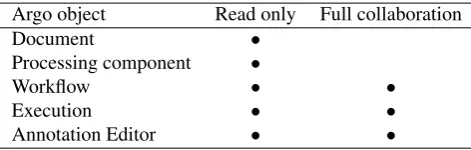
The major strength of Argo lies in the ability to share the various objects owned by users. Argo provides two levels of sharing: reading (viewing) only, and reading and writing (collaboration). The sharing capabilities are summarized in Table 1.
The remote collaboration is facilitated through the use of asynchronous requests available in modern-day browsers. For instance, multiple users collaborating remotely on a single workflow will see each other’s modifications (such as adding, moving, and removing component blocks) al-most immediately in their respective browsers.
3.4. Workflow Branching and Merging
A typical UIMA pipeline operates on a single CAS, i.e., multiple processing components populate a single CAS with their respective annotations. This type of storing in-formation is not appropriate when, e.g., there are multiple components producing the same types of annotations that need to be compared against each other at some point in the workflow. One solution would be to store provenance information for every annotation. Argo, however, incor-porates a more flexible mechanism of creating copies of a CAS for each branch in the workflow. This process is sim-ilar to UIMA’s CASmultipliers, a special class of analysis components that are capable of both creating copies of or destroying CASes.
When multiple processing components merge into a sin-gle component, Argo merges individual CASes coming from the different branches into a single CAS with multiple
processing component with multiple inputs operates on a single CAS with multiple views.
3.5. Processing Component Interoperability
As previously mentioned, the interoperability of process-ing components is ensured by UIMA itself. UIMA does it by providing programming interfaces that need to be im-plemented by each of the components as well as the use of common type systemsshared between components. Type systems are the definitions of annotation structures and are used by the processing components to “understand” CASes they read from and write to.
Since developers can create their own type systems, the in-teroperability of components supportingdifferenttype sys-tems becomes an issue. This is accomplished in Argo by the use of type system converters, which are simple map-pings of annotation structures from one type system to an-other. An example of the usage of a type system converter is depicted in Figure 3.
3.6. Web Services
Argo also exposes web services, which provide access to virtually all the functionality available in the system. This is a step towards software developers who wish to commu-nicate with the Argo server through their own clients. For example, a workflow created with the convenience of the Argo web interface may be executed directly by a purpose-fully built and tailored client application.
4.
Evaluation Use Cases
This section explores branching and merging as well as col-laboration capabilities in various evaluation scenarios that can be accomplished in Argo.
4.1. Manual Verification
The simplest scenario involves creating a workflow with an annotation viewer at the end of the workflow. Based on the manual inspection of the results in the annotation viewer, the user replaces the components or changes the parameters of the components in the workflow. This kind of setup is commonly used in the early stages of the development of more sophisticated evaluation workflows.
4.2. Comparison against Standard Reference
The most common task in creating text-processing work-flows and tools is the evaluation of their performances against astandardor gold reference. In this case, the re-sults of automatic processing of a resource are compared with the manually annotated (or manually verified) version of the same resource.
Argo supports this kind of evaluation by the use of the Ref-erence Evaluator component. This component belongs to the category of components capable of dealing with multi-ple CAS views. Reference Evaluator is capable of compar-ing multiple views against areferenceview selected by the user.
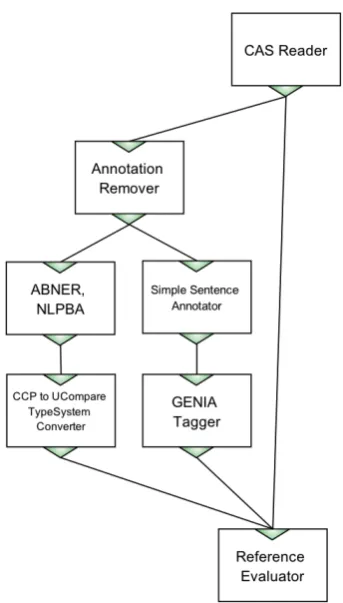
An example workflow depicting the comparison of process-ing workflows to a standard reference is given in Figure 3. The subject of evaluation is the performance of two named
Figure 3: A workflow for comparing two taggers against a reference.
entity recognisers, ABNER and GENIA Tagger4, capa-ble of recognising biological mentions of proteins, DNAs, RNAs, cell lines and cell types5. In this particular workflow the resources are read by the CAS Reader component. CAS Reader is a special document collection reader that reads serialised versions of CASes previously saved by Argo’s CAS Writer component.
Since the output of the reader component consists of both the source text and manually curated annotations, the first component after the reader, Annotation Remover, removes the annotations to allow the following components to at-tempt recreating them.
The ABNER component is self-contained, i.e., it does not require any preprocessing steps. GENIA Tagger, on the other hand, requires the source text to be segmented into sentences, hence the presence of the Simple Sentence Annotator component right before the tagger. Since the ABNER and GENIA Tagger components support differ-ent type systems, the output of the ABNER compondiffer-ent is passed through an appropriate type system converter (see Section 3.5.).
The output of the named entity recognizers, as well as the reference annotations are eventually passed onto the Ref-erence Evaluator component. The evaluator accepts any number of incoming branches. It is the user’s
responsibil-4
ABNER and GENIA taggers are available as stan-dalone applications at http://pages.cs.wisc.edu/ bsettles/abner and http://www-tsujii.is.s.u-tokyo.ac.jp/GENIA/tagger, respectively.
5The named entities come from and are defined in the NLPBA
(a) (b)
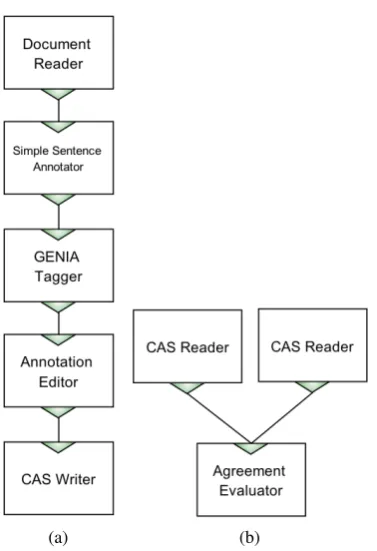
Figure 4: Evaluating inter-annotator agreement with the use of two workflows: (a) the main processing workflow with the Annotation Editor component, and (b) a workflow for combining results and calculating the agreement.
ity to identify a branch that will serve as the reference. This task is accomplished simply by selecting one of the incom-ing branches in the settincom-ing panel of this component. The evaluator then compares the annotations coming from all (except one) inputs against the selected input and produces a report listing standard information retrieval metrics, such as precision, recall and F score, for each of the documents separately and as an aggregate.
4.3. Inter-annotator Agreement Evaluation
A common task in preparing a language resource involves the manual annotation of the resource independently by multiple human annotators. The results of annotation from each of the annotators are later compared to calculate the inter-annotator agreement. The agreement rate gives an in-sight into the complexity of the annotation task, and may prompt the authors of the task to improve the annotation guidelines to avoid subjective interpretation.
One of possible scenarios to accomplish this evaluation task in Argo involves creating two processing workflows. The first workflow consists of the Annotation Editor component and constitutes the main analysis power. The second work-flow serves only to gather different versions of annotations created by the different human annotators. The two work-flows are shown in Figure 4.
Both workflows are prepared by the author of the annota-tion task. The workflow in Figure 4a consists of automatic processing components, which serve to pre-annotate the in-put resources for manual verification and correction in the Annotation Editor. The processing components preceding the Annotation Editor represent a general idea of
support-ing manual annotation with automated processes.
To begin the annotation process, the author of the work-flows executes the first workflow once for each human an-notator. The author then shares each of theexecutionswith each of the human annotators. By sharing only the execu-tions (and not the workflows), the author ensures that the annotators will not modify the workflows themselves. In-stead they will only be able to interact with the workflow by opening the Annotation Editor, which will be filled with pre-annotated entities.
Since each of the executions results in persistent CAS sets (through CAS Writer), the author may read each of them separately and pass them to an agreement evaluator com-ponent, as shown in Figure 4b. The Agreement Evaluator component compares the annotations coming from differ-ent sources and reports agreemdiffer-ent metrics such as Cohen’s kappa, broken down for each of the annotation labels. As an alternative, especially useful with a large number of human annotators, the author may replace individual CAS Read-ers in Figure 4b with a single Multi-Source CAS Reader, described in the next section.
Additionally, to save resources and avoid running the au-tomatic pre-annotation step for each of the annotators, the first workflow can be split into two. The first one could save the CASes right after the automatic processing component, whereas the second could first read the saved results from the previous workflow right before the Annotation Editor component.
4.4. Mass Evaluation
The previous section shows multiple sources of CASes be-ing evaluated against a sbe-ingle reference by means of plac-ing multiple CAS Reader components in the workflow. That scenario is useful when dealing with a limited num-ber of incoming results; however, it might become counter-productive with dozens or hundreds of inputs. A typical case includes various shared tasks and competitions such as the BioNLP shared task6 or the BioCreative workshop series7.
Argo accommodates large scale evaluations by providing the Multi-Source CAS Reader component. The reader takes a folder name as a parameter, which presumably consists of previously saved or shared CASes, and creates a CAS view for each of the saved/shared CAS sets.
For instance, the task participants can submit their results by sharing their CASes with the task organiser. Alterna-tively, the organiser may take advantage of the exposed Argo web services and set up a web page, which allows the task participants to upload their results (in a predefined format). The web page then uses the Argo web services to deposit the submissions in the organiser’s work space. The advantage of the latter solution is that the participants can work independently of Argo; in fact, they do not even have to be aware of its existence. The former, however, frees the organiser from having to build a user registration sys-tem. Moreover, the task participants can take advantage of the various visualisation and evaluation components as well as supporting resources (either already available in Argo or
6
https://sites.google.com/site/bionlpst/
prepared specifically by the organiser) to ease the develop-ment process.
5.
Future Work
A major bottleneck of ensuring processing component in-teroperability is the necessity of programmatically devel-oping type system converters capable of mapping one type system to another (see Section 3.5). We plan to address this problem by introducing a convenient graphic interface where users will be able to provide this mapping without having to resort to programming.
6.
Conlusions
By using the UIMA framework wrapped in an intuitive, web-based user interface, Argo is an attractive alternative for text-analysis practitioners familiar with this widely ac-cepted standard.
Argo exploits the capabilities of UIMA and pushes them in new directions. The branching and merging of process-ing flows makes it possible to carry out independent exper-iments stemming from a single source, combine indepen-dent experiments into a single target, as well as the com-bination of the two. Together with the collaborative ca-pabilities and the user-interactive components, the system make for a powerful one-stop service facilitating the defi-nition, automatic processing, manual editing and evaluation of text processing tasks. Argo supports various comparative evaluation tasks ranging from simple visual examinations to comparison of multiple processing segments against a standard reference and each other to shared task mass eval-uations.
7.
References
W. A. Baumgartner, B. K. Cohen, and L. Hunter. 2008. An open-source framework for large-scale, flexible eval-uation of biomedical text mining systems. Journal of Biomedical Discovery and Collaboration, 3:1+.
M. R. Berthold, N. Cebron, F. Dill, T. R. Gabriel, T. K¨otter, T. Meinl, P. Ohl, C. Sieb, K. Thiel, and B. Wiswedel. 2008. KNIME: The Konstanz Information Miner. Data Analysis, Machine Learning and Applications, (38):319– 326.
H. Cunningham, D. Maynard, K. Bontcheva, and V. Tablan. 2002. GATE: A framework and graphical development environment for robust NLP tools and applications. In
Proceedings of the 40th Anniversary Meeting of the As-sociation for Computational Linguistics.
D. Ferrucci and A. Lally. 2004. UIMA: An Architec-tural Approach to Unstructured Information Processing in the Corporate Research Environment. Natural Lan-guage Engineering, 10(3-4):327–348.
Jeremy Goecks, Anton Nekrutenko, James Taylor, and Galaxy Team. 2010. Galaxy: a comprehensive approach for supporting accessible, reproducible, and transparent computational research in the life sciences. Genome bi-ology, 11(8):R86+.
U. Hahn, E. Buyko, R. Landefeld, M. M¨uhlhausen, M. Poprat, K. Tomanek, and J. Wermter. 2008. An Overview of JCORE, the JULIE Lab UIMA Component
Repository. InLREC’08 Workshop, Towards Enhanc. In-teroperability Large HLT Syst.: UIMA NLP, pages 1–8. D. Hull, K. Wolstencroft, R. Stevens, C. Goble, M. R.
Pocock, P. Li, and T. Oinn. 2006. Taverna: a tool for building and running workflows of services. Nucleic acids research, 34(Web Server issue):W729–732. Y. Kano, P. Dobson, M. Nakanishi, J. Tsujii, and S.
Ana-niadou. 2010a. Text mining meets workflow: linking U-Compare with Taverna.Bioinformatics (Oxford, Eng-land), 26(19):2486–2487.
Y. Kano, R. Dorado, L. McCrochon, S. Ananiadou, and J. Tsujii. 2010b. U-Compare: An integrated language resource evaluation platform including a comprehensive UIMA resource library. InProceedings of LREC 2010, pages 428–434.
Y. Kano, M. Miwa, K. B. Cohen, L. E. Hunter, S. Anani-adou, and J. Tsujii. 2011. U-Compare: A modular NLP workflow construction and evaluation system.IBM Jour-nal of Research and Development, 55(3):11:1–11:10. J.-D. Kim, T. Ohta, Y. Tsuruoka, Y. Tateisi, and N.
Col-lier. 2004. Introduction to the bio-entity recognition task at jnlpba. In Proceedings of the International Joint Workshop on Natural Language Processing in Biomedicine and its Applications, JNLPBA ’04, pages 70–75, Geneva, Switzerland. Association for Computa-tional Linguistics.
G. Kontonatsios, I. Korkontzelos, B. Kolluru, and S. Anani-adou. 2011. Adding text mining workflows as web ser-vices to the biocatalogue. InProceedings of the 4th In-ternational Workshop on Semantic Web Aplications and Tools for the Life Sciences (SWAT4LS).