A Survey on Android Security, Vulnerabilities, Attacks and Defense
J Rahul1, Anirudh R Bharadwaj2 and Ramakrishna KT3
1
Department of ISMS, Jain University,Bangalore, Karnataka, India
2
Department of ISMS, Jain University, Bangalore, Karnataka, India
3
Faculty, Department of ISMS, Jain University/iNurture Educational Solutions Pvt. Ltd, Bangalore, Karnataka, India
Abstract
Smartphones have become pervasive due to the availability of office applications, Internet, games, vehicle guidance using location-based services apart from conventional services such as voice calls, SMSes, and multimedia services [1]. Android devices have gained huge market share due to the open architecture of Android and the popularity of its application programming interface (APIs) in the developer community. Increased popularity of the Android devices and associated monetary benefits attracted the malware developers, resulting in big rise of the Android malware apps between 2010 and 2014. Academic researchers and commercial antimalware companies have realized that the conventional signature-based and static analysis methods are vulnerable. In particular, the prevalent stealth techniques, such as encryption, code transformation, and environment-aware approaches, are capable of generating variants of known malware. This has led to the use of behavior-, anomaly-, and dynamic-analysis-based methods. Since a single approach may be ineffective against the advanced techniques, multiple complementary approaches can be used in tandem for effective malware detection. The existing reviews extensively cover the smartphone OS security. However, we believe that the security of Android, with particular focus on malware growth, study of anti-analysis techniques, and existing detection methodologies, needs an extensive coverage. In this survey, we discuss the Android security enforcement mechanisms, threats to the existing security enforcements and related issues, malware growth timeline between 2010 and 2014, and stealth techniques employed by the malware authors, in addition to the existing detection methods. This review gives an insight into the strengths and shortcomings of the known research methodologies and provides a platform, to the researchers and practitioners, toward proposing the next-generation Android security, analysis, and malware detection techniques.
Keywords: Author Guide, Article, Camera-Ready Format, Paper Specifications, Paper Submission.
1. INTRODUCTION
Android is known to be one of the popular mobile Operating System today. As the number of the Mobile and Internet users are increasing, the demand for Android OS is increasing. Therefore, the extensive use of Android devices has given rise to Android Security Bugs, Loopholes and Vulnerabilities. However, [2] Android development team considered the robust security model is required to provide a strong ecosystem for Android platform and has security features built into OS, it is the most vulnerable mobile Operating System.
When the Android mobile [3] OS project was launched at the end of 2007, the idea was that Google wasn’t pushing it just for its own purposes but it also allowed developers to experiment with the code and create their own versions of Android. This came as a big advantage for developers as well as hackers. Hackers could easily use the Android Open Source Project for understanding the structure of Android and finding out loopholes in it for their good. The core problem is that Android fails to validate public key infrastructure certificate chains for app digital signatures. Studies suggest, most of the pre-loaded apps requested more Android permissions than they actually use, which they term as “over-privileged”. This increases the security issues.
2. SECURITY MODEL
other. Android applications run in separate processes under distinct UIDs each with distinct permissions. Programs can typically neither read nor-write each other’s data or code,1 and sharing data between applications must be done explicitly. The Android GUI environment has some novel security features that help support this isolation.
Mobile platforms are growing in importance, and have complex requirements including regulatory compliance. Android supports building applications that use phone features while protecting users by minimizing the consequences of bugs and malicious software. Android’s process isolation obviates the need for complicated policy configuration files for sandboxes. This gives applications the flexibility to use native code without compromising Android’s security or granting the application additional rights.
Android permissions are rights given to applications to allow them to do things like take pictures, use the GPS or make phone calls. When installed, applications are given a unique UID, and the application will always run as that UID on that particular device. The UID of an application is used to protect its data and developers need to be explicit about sharing data with other applications. Applications can entertain users with graphics, play music, and launch other programs without special permissions.
Malicious software is an unfortunate reality on popular platforms, and through its features Android tries to minimize the impact of malware. However, even unprivileged malware that gets installed on an Android device (perhaps by pretending to be a useful application) can still temporarily wreck the user’s experience. Users in this unfortunate state will have to identify and remove the hostile application. Android helps users do this, and minimizes the extent of abuse possible, by requiring user permission for programs that do dangerous things like:
– directly dialing calls (which may incur tolls), – disclosing the user’s private data, or
– destroying address books, email, etc.
3. VULNERABILITIES
In security [5], a vulnerability is a weakness which allows an attacker to reduce a system’s information assurance.
Vulnerability is the intersection of three elements: a system susceptibility or flaw, attacker access to the flaw, and attacker capability to exploit the flaw. Many Google Play’s most downloaded Android apps are susceptible to MITM attacks. These popular apps allow an attacker to intercept data exchanged between the Android device and
a remote server.
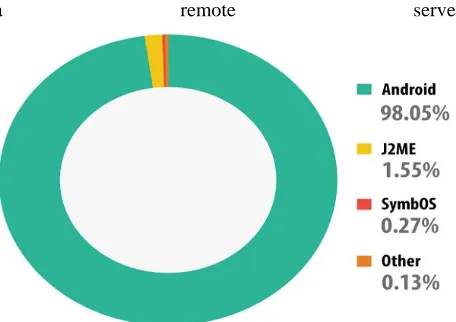
Fig. 1 Graphical Representation of Mobile Operating System Vulnerabilities
Another vulnerability found recently is Android Root Access Vulnerability which gives the attacker administrative access to a victim’s phone. The flaw is not itself malicious but the exploit lets attackers remotely download malware, copy the device owner’s files and other personal data, disable the device’s security apps and create a backdoor for more attacks.
Luckily, there are some solutions to protect your app from these bugs and vulnerabilities. The Heartbleed bug can be avoided by using OTP (One Time Password) or TOTP (Time based One Time Password). End-to-end encryption (E2EE) can also be used to avoid attacks like Heartbleed. If your app can read the data, the attackers can also but if you encrypt data, it is difficult to be read. One of the solutions to prevent MITM attack is to use, VPN (Virtual Private Network). A VPN protects all of the information coming into and out of your mobile device, so even if a hacker were able to intercept it, it would be difficult to modify. Developers should keep in mind these loopholes may risk the trust of your customers.
3.1 Security Bug
through security bugs. The Heartbleed Bug was found in April, 2014. It is a serious vulnerability in the popular OpenSSL cryptographic software library used in Android. The Heartbleed bug allows anyone on the Internet to read the memory of the systems protected by the vulnerable versions of the OpenSSL software.
There are quite a few interesting vulnerabilities inside of Android browser, one of them being Same Origin Policy Bypass vulnerability. The thing that makes it worse was the same SOP bypass was already inside of chrome years ago, however the patches were not applied to Android browser less than 4.4 (KitKat). The vulnerability can harm devices running with Android version lower than 4.4.
3.2 Security Loopholes
Security Loophole can be termed as a vulnerability in software, typically in the operating system, that enables an attacker to compromise the system. The Fake ID is a vulnerability which allows attackers to duplicate the ID used for authentication. The fake signatures can be used by attackers as authentic ones. The issue is that while Android checks an app has the right ID before granting it special privileges, it fails to double-check that the certification signature involved was properly issued and not forged. Google has claimed that fix for the Fake ID bug but there are still many other bugs.
4. ATTACKS
With more and more people using their smartphones and tablets to surf the web, update social networking sites, and shop & bank online, cybercriminals and malware are increasingly targeting mobile devices – with new smartphone threats and mobile threats [6]
4.1 Cross-Site Scripting
Cross-Site Scripting (XSS) allows the injection of client-side script into web pages and can be used by attackers to bypass access controls. XSS attacks can result in attackers obtaining the user’s session information (such as cookies). They can then use this information to bypass access controls. At the heart of XSS attacks is the fact that untrusted user input is not thoroughly vetted and is used without sanitization/escaping. In the case of XSS, user input is not sanitized for and is then either displayed back to the browser (reflected XSS) or stored (persistent XSS) and viewed later. Mobile sites are as prone to XSS attacks as their regular counterparts, as mobile HTML sites might
have even less controls around validating/sanitizing user input. Treating mobile HTML sites like regular websites and performing proper validation of user input can prevent a site from being vulnerable to XSS attacks.
4.2 SQL Injection
SQL injection allows the injection of an SQL query from a client into an application. A successful SQL query (or attack) can provide attackers with sensitive information and enable them to bypass access controls, run administrative commands, and query/update/delete databases. At the heart of SQL injection attacks is the fact that untrusted user input is directly used in crafting SQL queries without validation. These SQL queries are then executed against the backend database. Similar to XSS, mobile HTML and WAP sites are prone to SQL injection attacks. Mobile sites might have the same flaws as their desktop counterparts, or, even worse, they might not be performing the validation of user input when accepting inputs through mobile sites. Using parameterized queries or stored procedures can prevent SQL injection attacks.
4.3 Cross-Site Request Forgery
A Cross-Site Request Forgery (CSRF, XSRF) attack results in unwanted (unauthorized) commands from a user already authenticated to a website. The website trusts an authenticated user and, therefore, commands coming from him, as well. In CSRF, the website is the victim of the trust in the user, whereas in XSS, the user is the victim of the trust in the server/website. It is typical for a user to be authenticated to multiple websites on a mobile device. Thus, CSRF attacks are possible, just as they are on desktop/laptop computers. In addition, small interface and UI layouts can disguise CSRF attacks (e.g., an e-mail with a URL link) and trick the user into performing unwanted operations on a website.
4.4 Phishing
recent security breach at the bank. For his convenience, the user is provided with a URL to change his password. On clicking the link, the user is taken website that looks like the bank’s website.
The user performs the password-reset operation and, in turn, provides the current password to the attacker. Such attacks are even more difficult for users to recognize on mobile devices. Due to small UI real estate, users can’t really read the entire URL that they are viewing. If they are being redirected to a website, they would not be able to tell it easily on a mobile device. Differences between legitimate and fake websites are not easy to distinguish on a small UI screen of mobile devices. If URLs are disguised (e.g., tiny URL) or if these are URLs that are sent through a Short Message Service (SMS) message (tiny URL via SMS), it is even more difficult to distinguish between legitimate and fake requests. Many users (even ones who are aware of such attacks) can be tricked into going through with an attack. As mentioned in the previous chapter, Quick Response (QR) codes can also be used for such attacks.
5. DEFENSE
Security controls [7] can be divided into four main categories:
1. Policies and restrictions on functionality: Restrict the user and applications from accessing various hardware features (e.g., camera, GPS), push configurations for wireless, Virtual Private Network (VPN), send logs/violations to remote server, provide a whitelist of applications that can be used, and prevent rooted devices from accessing enterprise resources and networks.
2. Protecting data: This includes encrypting local and external storage, enabling VPN communications to access protected resources, and using strong cryptography for communications. This also should include a remote wipe functionality in the case of a lost or stolen device.
3. Access controls: This includes authentication for using the device (e.g., PIN, SIM password) and per-application passwords. A PIN/Passcode should be required after the device has been idle for few minutes (the recommendation is 2–5 minutes).
4. Applications: This includes application-specific controls, including approved sources/markets from which applications can be installed, updates to applications, allowing only trusted applications (digitally signed from
trusted sources) to be installed, and preventing services to Backup/restore from public cloud-based applications.
5.1 Hardening Android
In the previous section, we reviewed common threats to mobile devices and some of the mitigation steps one can take. In this section, we will cover in detail how to configure (harden) an Android device to mitigate the risks.
We divide this section into two: hardening Android devices by configuration changes (hardening) and developing Android applications that are secure.
5.2 Deploying Android Securely
Out of the box, Android does not come with all desired configuration settings (from a security viewpoint). This is especially true for an enterprise environment. Android security settings have improved with each major release and are fairly easy to configure. Desired configuration changes can be applied either locally or can be pushed to devices by Exchange ActiveSync mail policies. Depending on the device manufacturer, a device might have additional (manufacturer or third-party) tools to enhance security.
Unauthorized Device Access
As mentioned earlier in the chapter, lack of physical control of mobile devices is one of the main concerns for a user and for an enterprise. The risk arising out of this can be mitigated to a certain extent through the following configuration changes:
Setting up a Screen Lock
After enabling this setting, a user is required to enter either a PIN or a password to access a device. There is an option to use patterns, although we do not recommend it. To enable this setting, go to ”Settings” -> ”Security” -> ”Screen Lock” and choose between the “PIN” and “Password” option. We recommend a strong password or an 8-digit PIN). Once “Screen Lock” is enabled, the automatic timeout value should be updated as well.
Setting up the SIM Lock
SMS messages. To enable SIM lock, go to “Settings” ->”Set up SIM Card lock” (see Figures 9.3 and 9.4) and enable “Lock SIM card.” Pick a value that is different from the screen lock.
5.3 Remote Wipe
System administrators can enable the “Remote Wipe” function through Exchange ActiveSync mail policies. If a user is connected to the corporate Exchange server, it is critical to enable this feature in case the device is lost stolen. There are other settings that can be pushed as well (e.g., password complexity).These are covered later in this chapter. Remote Wipe essentially wipes out all data from the phone and restores it to factory state. This includes all e-mail data, application settings, and so forth. However, it does not delete information on external SD storage.
5.4 Other Settings
In addition to the above settings, we strongly recommend disabling the “Make passwords visible” option. This will prevent shoulder surfing attacks, as characters won’t be repeated back on screen if you are typing a password or PIN. Go to “Settings” and uncheck “Make passwords visible”. It is also recommended to disable “Allow installation of apps from unknown sources.” As we have mentioned before, there are secondary application stores apart from Google Play, and it is prudent to not trust applications from these sources before ascertaining their authenticity. Disabling this option will prevent applications from being installed from other sources .As a rule of thumb, it is recommended to turn off services that are not being used. A user should turn off “Bluetooth,” “NFC,” and “Location features” unless using them actively, as well as the “Network notification” feature from the Wi-Fi settings screen. This will make the user choose a connection rather than connecting to any available network. Discourage backing up of data to “Gmail or Google” accounts or Dropbox. Create a whitelist of applications and educate users on the list so they do not install applications outside of the approved list.
5.5 Encryption
Android 3.0 and later have the capability to perform full-disk encryption (this does not include the SD card). Turning this feature on encrypts all data on the phone. In case the phone is lost or stolen, data cannot be recovered because it is encrypted. The caveat here is that the screen lock password has to be the encryption password. Once
the phone is encrypted, during boot time you will be required to enter this password to decrypt the phone. To turn on encryption, prepare your phone by going through the following
Steps:
1. Set up a strong PIN or password 2. Plug in and charge your phone
Once ready to encrypt the phone, go to “Settings” -> “Security” -> “Encrypt
Phone.” Enable “Encrypt phone” and enter a lock screen password or PIN.
Once the encryption process is complete, you will be required to decrypt your phone at boot time by entering the screen lock password or PIN.
5.7 Device Administration
The Android Device Administration APIs have been available since Android 2.2. These APIs allow security-aware enterprise applications to be developed. The built-in e-mail application leverages this API to improve Exchange support and enables administrators to enforce certain security settings, such as remote wipe, screen lock, time out, password complexity, and encryption. Mobile Device Management (MDM) applications from third-party providers leverage these APIs. System administrators or developers write security-aware applications leveraging these APIs. Such an application can enforce a local or remote security policy. Policy can be either hard coded in an application (local) or can be fetched from a remote server (e.g., E-mail Exchange server—see Figure 9.11). Typically, such an application will need to be installed by users from Google Play or another installation medium. In the case of e-mail, a default e-mail application comes preinstalled, and thus it is easiest to push security policies through this application if the devices are to sync/connect to a corporate Exchange server. Once the application is installed (or configured, in the case of e-mail), the system prompts the user to enable the device admin application. If the user consents, security policies are enforced going forward, and if he or she does not, the user won’t be able to use certain functionality (i.e., connect to corporate resources, sync with Exchange server). Below are some of the policies supported by Device Administration APIs. These policies can be enforced by the device admin application.
- Password enabled
- Strength/complexity of passwords - Password expiry
- Password history restrictions - Screen lock timeout
- Storage encryption - Remote wipe
6. CONCLUSION
We have done the survey on latest Android mobile operating system security vulnerabilities, attacks and how to overcome from those threats.
References
[1] Android
https://source.android.com/devices/tech/security/overview/in dex.html
[2] Harshad Jagtap, Appvigil https://appvigil.co/blog/android-security-bugs-loopholes-and-vulnerabilities/
[3] Jesse Burns, “The Android Security Model”, Mobile Application Security on Android, 2009
[4] Google, http://code.google.com/android/intro/tutorial.html [5] Kaspersky lab,
https://usa.kaspersky.com/internet-security-center/threats/mobile
[6] Abhishek Dubey and Anmol Misra, Android Security, CRC Press, 2013
[7] Harshad Jagtap, Appvigil,