1036
Using The Rapid Authoring Tools In E-Learning
Content Design: A Case Study Of Online Course
Design
Dr. Abuelainin Hussain
Abstract: The adoption of a rapid authoring tools approach has increased exponentially across the globe. E-Learning projects, that used to take several months, are now delivered in a few weeks, days, or hours. In addition, the costs are also reduced in comparison to a traditional classroom. Rapid authoring tools are used to empower efficient learning experiences. This software helps the faculty members to embed different multimedia elements with e-learning courses. This research finds an adequate process by a quick look at the benefits of different rapid authoring tools and selects one of them to be used in Royal University for Women, Bahrain.
Keywords: e-Learning, Educational technology, Multimedia design, Graphic design, Web design, Higher education.
——————————————————
1.
INTRODUCTION
One of the biggest problems for faculty members and instructional designers is the difficulty of creating e-Learning content design or online course design that they are unable the easy way to convert a traditional course to be electronic course for several purposes using. This study supports the scientific research in the fields of interactive multimedia design and e-Learning content design. The purpose of this study is to examine the effectiveness of the Rapid authoring tools to design an online e-learning course to provide the following: (1) Support the e-learning instructional design in higher education (2) Find proper technology tools used in e-learning instructional design (3) Encourage the faculty members to create online/web-based learning content (4) Apply e-learning instructional design techniques to convert traditional learning courses to become e-learning courses (5) Develop e-learning content fast and easy by using rapid authoring tools (6) Saving money and keeping time in the e-learning content design..
2
.MATERIALS
AND
METHOD
Research methodology depends on a theoretical and analytical study and also it provides a framework to design e-learning content by using rapid authoring tools through a software application to design online e-learning courses content. Data collection in the process, will be gathered from different references and observations. In this study, methods will include taking measurements and testing the most appropriate solution to be used in the e-learning instructional design. It will also include collecting data regarding accuracy, reliability and repeatability. Research approach will be a mix of quantitative and qualitative. This study will be conducted through interviews and questionnaire with faculty members and students to conclude the strengths and weaknesses of the proposed software applications and to indicate that to what extent the program is aiding the process of online e-learning content design.
3.
LITERATURE
REVIEW
Interactive multimedia is a combination of text, graphic, sound, animation, and video that is delivered interactively to the user by electronic or digitally manipulated means [2].The e-learning theory describes the cognitive science principles of effective multimedia learning using electronic educational technology [3]. The blended learning is an approach to education that combines online educational materials and opportunities for interaction online with traditional place-based classroom methods. It requires the physical presence of both teacher and student, with some elements of student control over time, place, path, or pace [4]. An authoring system is a programs that has pre-programmed elements for the development of interactive multimedia software titles. Authoring systems can be defined as software that allows its user to create multimedia applications for manipulating multimedia objects. [5]. A multimedia authoring tool is an application which uses a multiple media sources e.g. text, graphics, images, sound/audio, animation and/or video. Multimedia applications is the creation of exciting and innovative multimedia systems that communicate information customized to the user in a non-linear interactive format [6]. The learning management system LMS is a software application for the administration, documentation, tracking, reporting and delivery of online educational courses, training programs, or learning and development programs [7].
1037
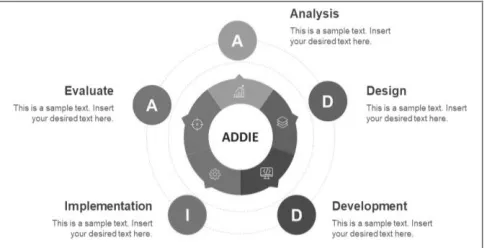
The Analyze, Design, Develop, Implement, and Evaluate (ADDIE) process is used to introduce an approach to instruction design that has a proven record of success. Instructional design: The ADDIE approach is intended to serve as an overview of the ADDIE concept [8]. The rapid authoring tools are a rapid authoring for an online training material development software that helps e-learning professionals create effective web-based training courses. These tools come with many built-in features that make the lives of online courseware developers easy. They eliminate the need for coding skills and multimedia tool expertise and enable learning experts such as Subject Matter Experts (SMEs) and instructional designers who have little knowledge of programming, make the best use of their features. From simple quizzes to interactive e-learning scenarios, rapid authoring tools allow us to develop a wide variety of e-learning courses easily and quickly. Authoring tools enable instructional designers to put together different types of media to create engaging and interactive course content [9].
4.
CHOOSING
E-LEARNING
AUTHORING
TOOLS
Choosing e-learning authoring tools is one of the most crucial decisions any training organization, project, or developer can make. Authoring tools are designed for particular styles of learning, delivery platforms, file formats, e-learning standards, and production workflows. If your organization chooses a tool or set of tools that is not optimized for your needs, you could waste a lot of time and money creating e-learning that does not function correctly within your training infrastructure or is instructionally ineffective. Another critical factor in choosing tools—one that can make or break an organization’s training budget with costly conversions—is durability. This relates to whether the tools will have longevity in the marketplace such as they continue to be available and supported, allowing source files to be opened and edited in future versions of the application. It also relates to whether the tools will, in the future, produce output formats supported by browser versions and browser plug-in updates [10] The global adoption of rapid authoring approach has increased exponentially over the past few years. Gone are the days when e-learning projects would take several weeks or months to be delivered. Unlike the traditional classroom approach, the effective use of authoring tools helps to reduce cost and the time associated with training, thereby leading to engaging content delivery. Various authoring tools are used to create, edit, review and test e-learning courses to deliver a comprehensive e-learning experience [11].
5.
TOP
5
E-LEARNING
RAPID
AUTHORING
TOOLS
The five popular authoring tools from leading developers: iSpring, Articulate, Adobe Captivate, TechSmith Camtasia and Trivantis. For this purpose, we’ve defined the main criteria in Table 1 that instructional designers and developers can expect from a convenient e-learning tool (iSpring, 2017) (See Appendix 1).
A. iSpring Suite (https://www.ispringsolutions.com) B. Adobe Captivate (https://www.adobe.com)
C. Articulate Storyline (https://articulate.com/360/storyline) D. Techsmith Camtasia (https://www.techsmith.com) E. Lectora Publisher (https://www.trivantis.com)
6.
TYPES
OF
E-LEARNING
CONTENT
DESIGN
PowerPoint presentations: Convert presentations to online / e-learning course.
Video Capture: create video materials to be e-learning content.
Interactive assessments: create interactive tests, exams and quizzes for scoring.
Screen recordings: Record simulation screen.
Dialogue simulations: create dialogue simulations for more skills.
Interactive Multimedia: create an interactivity for e-learning Instructional materials.
E- library: Create courses from external ready-made e-library content and assets.
Integration with LMS: Publish e-learning course content to any learning management system LMS.
7.
THE
TRADITIONAL
AND
RAPID
E-AUTHORING
TOOLS
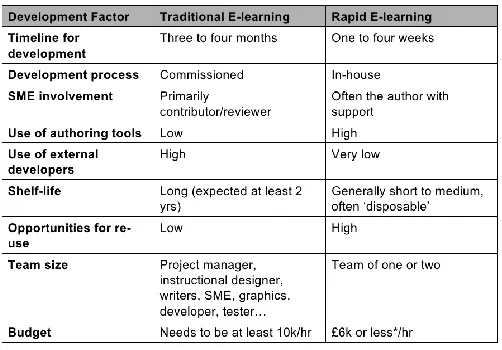
Table 1 the comparison between traditional e-learning tools and the rapid e-learning authoring tools
8.
A
CASE STUDY OF ONLINE COURSE DESIGN1038
idea or solving a certain problem. This course created by the following steps:
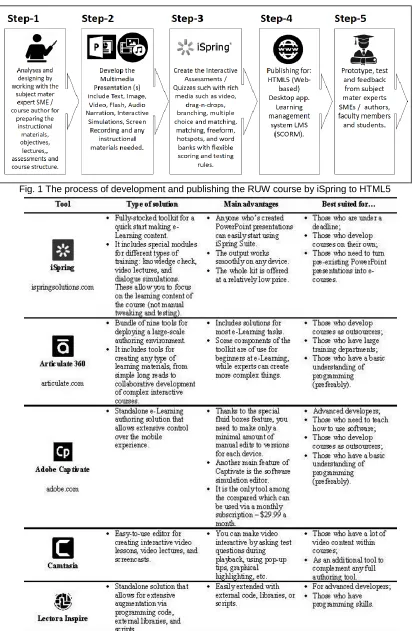
Fig. 2 The process of development and publishing the RUW course by iSpring to HTML5
Step 1: Analyses and designing by working with the subject matter expert SME / course author for preparing the instructional materials, objectives, lectures, assessments and course structure.
Step 2: Develop the Multimedia Presentation (s) include Text, Image, Video, Flash, Audio Narration, Interactive Simulations, Screen Recording and any instructional materials needed.
Step 3: Create the Interactive Assessments / Quizzes such with rich media such as video, drag-n-drops, branching, multiple choice and matching, matching, freeform, hotspots, and word banks with flexible scoring and testing rules.
Step 4: Publishing for online course HTML5 (Web-based) or Desktop app. or for Learning management system LMS (SCORM).
Step 5: Prototype, test and feedback from subject-matter experts SMEs / authors, faculty members and students.
Fig. 3 The rapid multimedia authoring tools can create an e-learning content design formats for using on any display like a
responsive design technique.
By using Microsoft PowerPoint and iSpring software we created an online course content about the fundamentals of graphic design. For test and further details – please visit
https://abuelainin.com/ruw.
Fig. 4 Start Screen of the sample RUW online course
Fig. 5 Internal Screen of the sample RUW online course
This online course shown in Fig. 3 and 4 contain full multimedia content (text, images, computerized narration, audio, video, and animation) created by: PowerPoint, Adobe Photoshop, Adobe Flash, Adobe After Effects and audio narration by using text to speech voice (https://text-to-speech-demo.ng.bluemix.net ). After preparing the multimedia presentation (PowerPoint), we created by using iSpring, the interactive assessments/quizzes with rich media such as video, drag-n-drops, branching, multiple choice and matching, freeform, hotspots, and word banks with flexible scoring and testing rules. After that, we added the interactive assessments we published, by using iSpring to HTML5 to be web-based online course to be able to available to students after prototype testing and feedback by faculty members and students.
9.
TESTING
AND
ANALYSE
RESULT
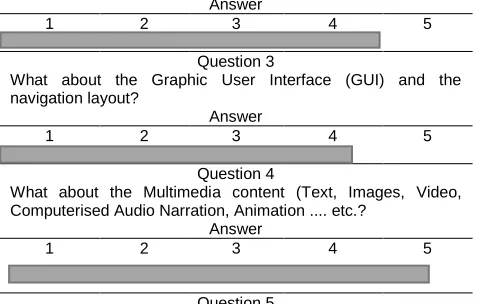
Table 2 The feedback survey from faculty members about RUW course
Question 1
The online e-learning will support the Virtual Learning Environment (VLE) in Royal University for Women?
Answer
Strongly
agree Agree
Neither agree nor
disagree
Disagree Strongly disagree
80% 20% 0 0 0
Question 2
The rapid authoring tools used in e-learning instructional design will encourage the faculty members to create online / web-based learning content? especially, the instructor just will need to create a PowerPoint presentation and by one click will convert it to be an online e-Learning course!
Answer
1 2 3 4 5
Question 3
What about the Graphic User Interface (GUI) and the navigation layout?
Answer
1 2 3 4 5
Question 4
What about the Multimedia content (Text, Images, Video, Computerised Audio Narration, Animation .... etc.?
Answer
1 2 3 4 5
1039 This course designed in 28 working hours and converted to be
e-learning within 30 minutes .... is this will saving money and keeping time in the e-learning content design delivered to students?
Answer
True False
90% 10%
Question 6
The Quiz sample is easy with user-friendly navigation and the final result is clear.
Answer
Strongly
agree Agree
Neither agree nor
disagree
Disagree disagree Strongly
76% 24% 0 0 0
Question 7
How consistent was the course content with the course outcomes?
Answer Extremely
useful
Very useful
Somewhat useful
Not so useful
Not at all useful
20% 70% 10% 0 0
Question 8 Rate the quality of this online e-learning?
Answer
1 2 3 4 5
10.
CONCLUSION
AND
RECOMMENDATION
This study introduced a useful solution to reduce the cost and time for e-learning content design and presented information about the rapid authoring tools and interactive multimedia content along with providing some samples of formats used in e-learning courses. These formats would be more useful than normal traditional e-learning tools for using this technology in the future. This research recommends to use the rapid authoring tools to easily create e-learning course content and migrate it with the learning management system LMS or online course to get the benefits of e-learning technology into the educational organizations or corporate training systems. This study recommends for use the rapid e-Learning authoring tools to easily create eLearning course content and migrate it with the Learning Management system LMS to get the benefits of e-learning technology into the educational organisations or corporate training systems.
ACKNOWLEDGMENT
Thanks so much for Royal University for Women for funding this research and special thanks to all faculty members for cooperation and support. Also, many thanks for ISMSIT conference for accepting and publishing this paper.
REFERENCES
[1] Januszewski, A., & Molenda, M. (2013). Educational technology: A definition with commentary. Florence: Taylor and Francis.
[2] Vaughan, T. (2014). Multimedia: Making it work. New Delhi: McGraw-Hill Osborne Media.
[3] Stechbart, D. (2013). Cognitive theory of multimedia learning. Germany: Grin Verlag.
[4] Garrison, D. R., & Vaughan, N. D. (2008). Blended learning in higher education: Framework, principles and guidelines. San Francisco (CA): Jossey-Bass.
[5] Martinez, J. (2017). The best e-learning authoring tools of 2017, PC Mag UK, Retrieved from https://uk.pcmag.com/cloud-services/85068/the-best-elearning-authoring-tools.
[6] Furht, B. (1996). Multimedia tools and applications. Boston: Kluwer Academic.
[7] Ellis, R. K. (2009). Field guide to learning management systems. ASTD Learning Circuits, 1-8. Retrieved from https://www.scirp.org/reference/ReferencesPapers.aspx ?ReferenceID=684787
[8] Branch, R. M. (2014). Instructional design: The ADDIE approach. New York, USA: Springer.
[9] Commlab India (2019). 5 Popular authoring tools for delivering courses via the web on tablets. Retrieved from
https://blog.commlabindia.com/elearning-design/authoring-tools-for-delivering-courses-on-tablets solutions.net&blog-title=g-cube. Accessed 22 January, 2019.
[10] Cartwright, S. R., & Cartwright, G. P. (1999). Choosing an authoring system. Designing and Producing Media-Based Training, 129-142. doi:10.1016/b978-0-240-80325-8.50009-3
1040
Appendix 1
Fig. 1 The process of development and publishing the RUW course by iSpring to HTML5
Fig. 2 Top 5 e-learning rapid authoring tools: Use cases comparison (2017 Update)