765 |
P a g e
A Review on Virtual Mouse Using Hand Gesture and
Color Detection
Nalini jungare
ABSTRACT
Now a day‟s intelligent machine which can be used along with the computer are being developed, which helps
in friendly Human Computer Interaction (HCI). Mouse & keyboard are unnatural and cumbersome to use at
times by disabled people. Virtual mouse or keyboard is the solution for the disabled people to handle the
computer system. In the recent years different technologies are used for developing the virtual mouse. In this
paper, we have tried to provide a review on different technologies for the virtual mouse.
Keyword: Human Computer Interaction (HCI), disabled people, Virtual mouse.
I.INTRODUCTION
For disabled people / physically challenged persons (persons without hands) it is very difficult to control the
compute and now a day‟s computer has influenced our life. To work with a computer mouse and Keyboard are
the very essential input devices. To solve this problem virtual keyboard and mouse is developed. For the Virtual
mouse, mostly uses web camera works with the help of different image processing techniques in which color
pointer has been used for the object recognition and tracking. Left and the right click events of the mouse have
been achieved by detecting the number of pointers on the images [3].
In the Human Computer Interaction (HCI), many researchers have tried to control mouse or keyboard
movement or input respectively. Erdem et al. [4], used fingertip tracking to control the motion of the mouse. In
this system click of the mouse button was implemented by defining a screen such that a click occurred when a
user‟s hand passed over the region. Another approach was developed by Chu-Feng Lien [5], proposed
finger-tips to control the mouse cursor and click, where clicking method was based on image density, and required the
user to hold the mouse cursor on the desired spot for a short period of time. Paul et al. [6], used the motion of
the thumb (from a „thumbs-up‟ position to a fist) to mark a clicking event thumb. Movement of the hand while
making a special hand sign moved the mouse pointer. Asanterabi Malima et al. [7], they developed a finger
counting system to control behaviors of a robot. In this system contains steps for segmenting the hand region,
locating the fingers, and finally classifying the gesture. In this paper introduction section provides the
importance of Virtual Mouse Using Hand Gesture and Color Detection where as the section two i.e. literature
survey provides an overview on Using Hand Gesture and Color Detection systems developed in the recent year
II. RELATED WORK
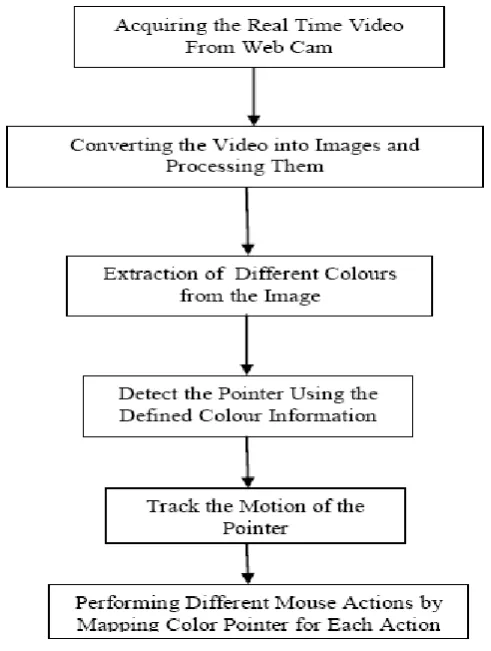
Abhik Banerjee rt al. [1] present an approach for Human computer Interaction (HCI). In this proposed system
control the mouse cursor movement and click events of the mouse using hand gestures. Basic block diagram is
766 |
P a g e
the real time video at a fixed frame rate), Flipping of Images (camera captures an image which is in the form ofinverted, means that if we move the colour pointer towards the left, the image of the pointer moves towards the
right and vice-versa), Conversion of Flipped Image into Gray scale Image (computational complexity is reduced
in a gray scale image as compared to a coloured image), Colour Detection (This process creates an image which
contains the detected object as a patch of grey surrounded by black space), Conversion of gray scale Image into
Binary scale Image (grey region of the image obtained after subtraction needs to be converted to a binary image
for finding the region of the detected object), Finding Centroid of an object and plotting (MATLAB is used to
find the centroid of the detected region) , Tracking the Mouse pointer(Once the coordinates has been
determined, the mouse driver is accessed and the coordinates are sent to the cursor), and finally Performing
Clicking Actions (Clicking action is based two colours 1. If Red along with Green colour is detected, Left
clicking action is performed and 2. If Red along with Blue colour is detected, Right clicking action is performed
Fig 1 The Basic Block Diagram of the System [1].
Amardip Ghodichor and Binitha Chirakattu [2] proposed Virtual Mouse using Hand Gesture and Color
Detection technology, in which three technologies are mainly used: object detection, image processing and color
recognition. The proposed system consists of four parts, as shown in fig 2, Hand Gloves (gloves will have
different colors painted on different fingers, which will make the system faster and easier for the algorithm),
Webcam (necessary component for detecting the image), image processing and mouse movement.
Real Time Video Form Web
Camera
Converting video into
images and processing
them
Extraction of different
colors from the image
767 |
P a g e
Fig 2. Overview of system [2].
This proposed system, image processing is main part and the flow is shown in the fig 3. Image
processing was done in 5 steps; Color Detection (MATLAB built in function “imsubstract” can be
used), Filtering the Images (Median filtering gives optimum results), Conversion of Images (after
filtering was done over, For conversion of image one may also use in built function “im2bw”),
Removing small areas (here MATLABs “bwareaopen” function was used) and Find Centre (Here
“bwlabel” Matlab function can be used for cropping the genuine area). Next is Move the cursor and
Mouse click event, after Find Centre step centroid from final image, movement has to take place and
finalize (X,Y) coordinates where clicking action is taken.
Fig 3. Image processing part sequence
Image
processing
Extracting colorcomponents
Red and Blue
Components
Filtering
Gray to binary
Erosion and dilation
Region filling
Blobs analysis
768 |
P a g e
Abdul Khaliq and A. Shahid Khan present virtual mouse implementation using color pointer detection. Figure 4shows the flow of / working of the proposed system. In the first step Webcam is used to capture and recognizes
an object in view and tracks the user's hand gestures using computervision based techniques. In the second step
Video is divided into Image frames based on the FPS (Frames per second) of the camera. In the third step red,
green and blue color object is extracted or detected by subtracting the flipped color suppressed channel from the
flipped Gray Scale Image. In the fourth step MATLAB is used to find the centroid of the detected region i.e.
Matrix consisting of the X (horizontal) and Y (vertical) coordinates of the centroid. Finally Perform Clicking
Actions, where JAVA is used to access these flags / centroids.
Fig. 4 working of proposed system
II. CONCLUSION
Due to disabilities many people are not able to use the mouse the computers and without using keyboard and
mouse User can not interact with a computer system. To solve this problem virtual mouse is one of the
solutions. This paper provides a review on different technologies for the virtual mouse.
REFERENCES
[1] Abhik Banerjee, Abhirup Ghosh, Koustuvmoni Bharadwaj, Hemanta Saikia, “Mouse Control using a Web
Camera based on Colour Detection”, International Journal of Computer Trends and Technology (IJCTT),
769 |
P a g e
[2] Amardip Ghodichor and Binitha Chirakattu, “Virtual Mouse using Hand Gesture and Color Detection”,International Journal of Computer Applications, Volume 128, No.11, October 2015, pp. 06-10.
[3] Abdul Khaliq and A. Shahid Khan, “Virtual Mouse Implementation Using Color Pointer Detection”,
International Journal of Electrical Electronics & Computer Science Engineering, Volume 2, Issue 4, August,
2015, pp. 63-66.
[4] Erdem, E. Yardimci, Y. Atalay, V. Cetin, A. E., “Computer vision based mouse”, Acoustics, Speech, and
Signal Processing, Proceedings (ICASS), IEEE International Conference, 2002.
[5] Chu-Feng Lien, “Portable Vision-Based HCI – A Realtime Hand Mouse System on Handheld Devices”,
National Taiwan University, Computer Science and Information Engineering Department.
[6] Hojoon Park, “A Method for Controlling the Mouse Movement using a Real Time Camera”, Brown
University, Providence, RI, USA, Department of Computer Science, 2008.
[7] Asanterabi Malima, Erol Ozgur, and Mujdat Cetin, “A Fast Algorithm for Vision-Based Hand Gesture
![Fig 1 The Basic Block Diagram of the System [1].](https://thumb-us.123doks.com/thumbv2/123dok_us/7776008.1282320/2.595.202.366.307.552/fig-basic-block-diagram.webp)
![Fig 2. Overview of system [2].](https://thumb-us.123doks.com/thumbv2/123dok_us/7776008.1282320/3.595.248.345.419.750/fig-overview-of-system.webp)