Chapter Overview Chapter Overview Chapter Overview Chapter Overview Chapter Overview
This chapter will discuss the concepts and techniques for creating multi-table queries, including joining two subqueries in the FROM clause. SQL can pull information from any number of tables, but for two tables to be used in a query, they must share a com-mon field. The process of creating a multi-table query involves joining tables through their primary key-foreign key relationships. Not all tables have to share the same field, but each table must share a field with at least one other table to form a “relationship chain.” There are different ways to join tables, and the syntax varies among database systems. Chapter Objectives Chapter Objectives Chapter Objectives Chapter Objectives Chapter Objectives
In this chapter, we will:
❍ Study how SQL joins tables
❍ Study how to join tables using an Equi Join ❍ Study how to join tables using an Inner Join
❍ Study the difference between an Inner Join and an Outer Join ❍ Study how to join tables using an Outer Join
❍ Study how to joina table to itself with a Self Join ❍ Study how to join to subqueries in the FROM clause
How SQL Joins T
How SQL Joins T
How SQL Joins T
How SQL Joins T
How SQL Joins Tables
ables
ables
ables
ables
Consider the two tables below. We’ll step away from Lyric Music for a moment just so we can use smaller sample tables.
66
Joining T
Joining T
Joining T
Joining T
Joining Tables
ables
ables
ables
ables
4
44
Employee Table
EmpID FirstName LastName DeptID
3 Laura Miller
1 Tim Wallace Actg
2 Jacob Anderson Mktg
Mktg
4 Del Ryan Admn
Department Table DeptID Fin Actg Admn Mktg DeptName Finance Accounting Administration Marketing
The primary key of the Employee table is EmpID. The primary key of the Department table is DeptID. The DeptID field in the Employee table is a foreign key that allows us to JOIN the two tables. The foreign key is very important, because without it SQL would not know which rows in the one table to join to which rows in the other table.
In fact, when SQL joins two tables it is a two-step process. The first step is to join every row in the first table to every row in the second table in every possible combination, as illustrated below. This is called a Cartesian product, named after the French mathematician and philoso-pher, Rene Decartes.
Cartesian Product DeptID DeptName Accounting Accounting Accounting Accounting 3 1 2 4
EmpID FirstName LastName
Laura Tim Jacob Del Miller Wallace Anderson Ryan Actg Mktg Mktg Admn DeptID Actg Actg Actg Actg 3 1 2 4 3 1 2 4 3 1 2 4 Laura Tim Jacob Del Laura Tim Jacob Del Laura Tim Jacob Del Miller Wallace Anderson Ryan Miller Wallace Anderson Ryan Miller Wallace Anderson Ryan Actg Mktg Mktg Admn Actg Mktg Mktg Admn Actg Mktg Mktg Admn Admn Admn Admn Admn Fin Fin Fin Fin Mktg Mktg Mktg Mktg Administration Administration Administration Administration Finance Finance Finance Finance Marketing Marketing Marketing Marketing 67
Of course, with a Cartesian product, most of the joined rows do not match on the primary key-foreign key relationship. The shading above indicates the few rows that do match. The second step of SQL’s joining process is to throw out the non-matching rows, yielding the joined recordset shown below.
Employee Table
EmpID FirstName LastName DeptID
3 Laura Miller
1 Tim Wallace Actg
2 Jacob Anderson Mktg Mktg
4 Del Ryan Admn
With this joined recordset you could report the name of each employee along with the name of the department the employee works in. With a joined recordset you can use columns from either of the joined tables in the SELECT clause, the WHERE clause, the ORDER BY clause, aggregate functions, calculated columns, and more. Joining tables is where SQL gains tremen-dous power in reporting virtually any kind of information.
These two steps in SQL’s joining process (joining the two tables into a Cartesian product and then eliminating the non-matching rows) indicate the two tasks before the SQL programmer: Tell SQL which tables to join, and tell SQL which two fields to match. There are various options for specifying these two things, but these two things must always be done.
Equi Join
Equi Join
Equi Join
Equi Join
Equi Join
One way to write a join is to list the two tables in the FROM clause separated by commas and specify the table relationship in the WHERE clause. This is called an Equi Join, and it is the original join syntax for SQL, so most database systems support it, including all four of our target databases.
Let’s look at the first example. Select Title, TrackTitle From Titles, Tracks
Where Titles.TitleID = Tracks.TitleID And StudioID = 2
Title TrackTitle
--- ---Smell the Glove Fat Cheeks
69
Equi Join
Access, SQL Server, Oracle, MySQL
Examples
Syntax SELECT Field | Field, Field, Field | * FROM Table1, Table2
WHERE Table1.Field = Table2.Field
2. List the names of members from Georgia (GA) and their salespeople.
Select Members.Lastname, Members.FirstName, Salespeople.Lastname,Salespeople.Firstname From Members, Salespeople
Where Members.SalesID= Salespeople.SalesID And Region='GA'
1. List the CD title and the title of all tracks recorded in StudioID 2.
Select Title, TrackTitle From Titles, Tracks
Where Titles.TitleID=Tracks.TitleID And StudioID=2
3. List the names of all artists who have recorded a title and the number of titles they have.
Select Artistname, Count(Titles.ArtistID) As NumTitles
From Artists, Titles
Where Artists.ArtistID = Titles.ArtistID Group By Artistname
4. List the names of members in The Bullets.
Select Members.Lastname, Members.FirstName From Members, XRefArtistsMembers, Artists
Where Members.MemberID = XRefArtistsMembers.MemberID And Artists.ArtistID = XRefArtistsMembers.ArtistID And Artistname = 'The Bullets'
Smell the Glove Rocky and Natasha Smell the Glove Dweeb
Smell the Glove Funky Town Smell the Glove Shoes
Smell the Glove Time In - In Time Smell the Glove Wooden Man
Smell the Glove UPS Smell the Glove Empty Smell the Glove Burrito
Sonatas Violin Sonata No. 1 in D Major
Sonatas Violin Sonata No. 2 in A Major Sonatas Violin Sonata No. 4 in E Minor Sonatas Piano Sonata No. 1
Sonatas Clarinet Sonata in E Flat
Notice how the fields that are reported come from two different tables. This illustrates the power of joining tables. Also notice that the only rows reported are those where the primary key and foreign key match.
In the WHERE clause the primary key-foreign key relationship is expressed using the syntax Table1.Field = Table2.Field. This dot notation (table.field) is required anytime your Cartesian product contains more than one column with the same name. It specifies which table you are referring to. This is almost always needed in specifying the table relationship, since primary keys and foreign keys are generally named the same. It may also be needed in the SELECT clause as illustrated by Example 2.
Select Members.Lastname, Members.FirstName, Salespeople.Lastname,Salespeople.Firstname From Members, Salespeople
Where Members.SalesID = Salespeople.SalesID And Region=’GA’
Example 3 above shows that you can use aggregates and GROUP BY with a join. In fact, once you have joined the tables, you can do practically anything with them that you can do with a single table.
Example 4 joins three tables. Here you can begin to see the limitations of the Equi Join syntax. As more tables are added, the WHERE clause gets more and more messy. If you try to combine that with a complex WHERE clause for selecting records, you can end up with some-thing that is hard to write and hard to read. As we’ll see later, other forms of the join syntax separate the relationship specifications from the regular WHERE clause.
71
Select Members.Lastname, Members.FirstName From Members, XRefArtistsMembers, Artists
Where Members.MemberID = XRefArtistsMembers.MemberID And Artists.ArtistID = XRefArtistsMembers.ArtistID And Artistname = ‘The Bullets’
Another potential problem with the Equi Join syntax is that with all the tables listed in one place and the relationships specifications in another place, it would be easy to forget one of the rela-tionship specifications. What would happen if you did that? You would end up with a Cartesian product of results. With 23 members, 11 artists, and 23 records in XRefArtistsMembers, that would yield a Cartesian product of 23 x 11 x 23 = 5,819 rows! If you ever return many, many more rows of results than you expected, it is probably because you left out relationship tion. Other forms of the join syntax put the relationship specification nearer the table specifica-tion, making it less likely to forget.
Inner Join
Inner Join
Inner Join
Inner Join
Inner Join
An INNER JOIN produces the exact same results as an Equi Join. The only difference is in the syntax. Some SQL programmers prefer the Equi Join syntax while others prefer the Inner Join syntax. Also, not all database systems support the Inner Join syntax. Of our four target databases, Oracle prior to version 9 did not support INNER JOIN. However, Oracle 9i and all our other target databases support this syntax.
There are three differences in the syntax. First, the tables are listed with the keywords INNER JOIN between them rather than commas. Second, the relationship specification is moved out of the WHERE clause and place in an ON clause, freeing the WHERE clause for traditional WHERE conditions. Finally, if more than two tables are joined, they are handled one join at a time with the ON specifying the relationship immediately following the join of those two tables.
The examples below are the same examples used for Equi Join so that you can see the difference.
Inner Join
Access, SQL Server, Oracle 9i, MySQL
Examples
Syntax SELECT Field | Field, Field, Field | *
FROM Table1 INNER JOIN Table2 On Table1.Field = Table2.Field
2. List the names of members from Georgia (GA) and their salespeople.
Select Members.Lastname, Members.FirstName, Salespeople.Lastname,Salespeople.Firstname From Members Inner Join Salespeople On Members.SalesID= Salespeople.SalesID Where Region='GA'
1. List the CD title and the title of all tracks recorded in StudioID 2.
Select Title, TrackTitle From Titles Inner Join Tracks On Titles.TitleID=Tracks.TitleID Where StudioID=2
3. List the names of all artists who have recorded a title and the number of titles they have.
Select Artistname, Count(Titles.ArtistID) As NumTitles From Artists Inner Join Titles
On Artists.ArtistID = Titles.ArtistID Group By Artistname
4a. List the names of members in The Bullets.
Select Members.Lastname, Members.FirstName From Members Inner Join XrefArtistsMembers On Members.MemberID = XRefArtistsMembers.MemberID Inner Join Artists
On Artists.ArtistID = XRefArtistsMembers.ArtistID Where Artistname = 'The Bullets'
4b. List the names of members in The Bullets.
Select Members.Lastname, Members.FirstName From (Members Inner Join XrefArtistsMembers On Members.MemberID = XRefArtistsMembers.MemberID) Inner Join Artists
On Artists.ArtistID = XRefArtistsMembers.ArtistID Where Artistname = 'The Bullets'
Oracle 9i, SQL Server, MySQL Access, Oracle 9i, SQL Server, MySQL
Example 4 is listed with two versions of the syntax. In Access if you join more than two tables, the joins must be separated by parentheses. If you join more than three tables, you need to nest the parentheses. This can get a little confusing. Of our four target databases, these parenthe-ses are required only by Access, though all of them support it.
Tip
Example 3 above does the same thing as Example 3 for WHERE Clause Subqueries in Chapter 3. The example in Chapter 3 used a subquery with IN. This example uses a join. So which approach should you use? Generally, the join is the better approach. Joins generally run faster than IN statements.
73
Using T
Using T
Using T
Using T
Using Table Aliases
able Aliases
able Aliases
able Aliases
able Aliases
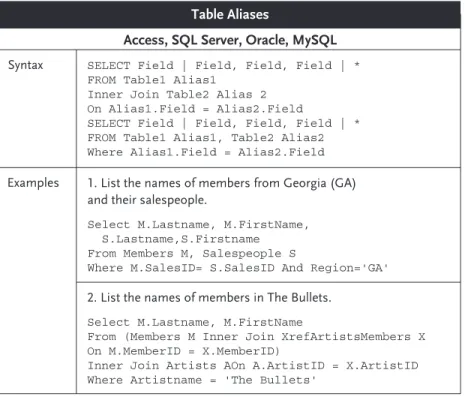
We saw in previous chapters how to assign aliases to columns. We can also assign aliases to tables, significantly reducing typing. A table alias can also make the code shorter and thus easier to read. However, if you select a counter-intuitive alias, you can make the code more difficult to read.
To use an alias, in the FROM clause simply follow the real table name with a space and the alias you want to use. Optionally, you can place the word AS between the real table name and the alias, just as you do with column aliases. In none of our four target databases is an AS required for table aliases, so it will not be used here. In the rest of the query, you must refer to the table by its alias. This works with either Equi Joins, Inner Joins, or (as we will see) Outer Joins.
Note
If an alias is used, the table name cannot be used in the rest of the query. With some data-base systems, the alias is case sensitive. Why don’t we discuss which ones? A complete list cannot be given. There are many front-end programs for MySQL, each with subtle differ-ences. There are also differences between versions of the same database system. So experi-ment and you’ll soon find out.
Table Aliases
Access, SQL Server, Oracle, MySQL
Examples
Syntax SELECT Field | Field, Field, Field | * FROM Table1 Alias1
Inner Join Table2 Alias 2 On Alias1.Field = Alias2.Field
SELECT Field | Field, Field, Field | * FROM Table1 Alias1, Table2 Alias2 Where Alias1.Field = Alias2.Field
2. List the names of members in The Bullets.
Select M.Lastname, M.FirstName
From (Members M Inner Join XrefArtistsMembers X On M.MemberID = X.MemberID)
Inner Join Artists AOn A.ArtistID = X.ArtistID Where Artistname = 'The Bullets'
1. List the names of members from Georgia (GA) and their salespeople.
Select M.Lastname, M.FirstName, S.Lastname,S.Firstname From Members M, Salespeople S
Where M.SalesID= S.SalesID And Region='GA'
Outer Join
Outer Join
Outer Join
Outer Join
Outer Join
When you do an INNER JOIN, SQL compares all the records of the tables being joined and essentially matches up the rows based on the shared fields. What about rows that don’t match? For instance, consider the 11 rows in the Artists table compared to the six rows in the Titles table. Several artists don’t have recorded titles. So if we join the Artists table and the Titles table, the unmatched rows will be thrown out.
Outer Joins are a way to make SQL show you unmatched rows. Technically, there are two kinds of Outer Joins: Left Joins and Right Joins. But they are just mirror images of each other. Left Joins report all of the records of the first (left) of two tables, plus matching records in the second (right) table. Right Joins report all of the records of the second (right) of two tables plus matching records in the first (left) table.
There are three forms of the syntax. The first form is nearly identical to the syntax of Inner Joins. Both tables are listed in the FROM clause with the words LEFT JOIN or RIGHT JOIN between them, The second table name is followed with the word ON and a statement showing the shared field or fields.
The second syntax form is to list the tables in the FROM clause—separated by commas— and then include in the WHERE clause a statement showing the shared field or fields. In this second syntax form, the direction of the join is indicated by a symbol in the WHERE clause, which varies between database systems. The syntax shown above is for Oracle. A plus sign (+) is placed on the side of the table that lacks information. Use Table1.Field=Table2.Field (+) to view all records from Table1 along with matching records from Table2. Use
Table1.Field (+)=Table2.Field to view all records from Table2 along with match-ing records from Table1. This second syntax form will be documented only for Oracle. It is the required form for Oracle prior to version 9. Our other target database systems (as well as Oracle 9i) can use the first syntax form.
The third syntax form is an alternative only for SQL Server. Some SQL Server programmers prefer it. You will notice that it is a similar to but yet different from the older Oracle syntax. The relationship specification uses *= to indicate a LEFT JOIN and =* to indicate a RIGHT JOIN.
75
Outer Join (first syntax form) Access, SQL Server, Oracle 9i, MySQL
Examples
Syntax SELECT Field | Field, Field, Field | * FROM Table1 LEFT|RIGHT JOIN Table2 On Table1.Field = Table2.Field
2. List the names of all salespeople and a count of the number of members they work with.
Select S.Lastname, S.FirstName, Count(M.SalesID) As NumMembers
From Salespeople S Left Join Members M On S.SalesID=M.SalesID
Group By S.Lastname, S.FirstName
1. List the names of all artists and the titles (if any) that they have recorded.
Select Artistname, Title
From Artists A Left Join Titles T ON A.ArtistID = T.ArtistID
3. List every genre from the Genre table and a count of the number of recorded tracks in that genre, if any.
Select G.Genre, Count(Tracknum) As NumTracks From Genre G Left Join Titles TI
On G.Genre = TI.Genre Left Join Tracks TR
On TI.TitleID = TR.TitleID Group By G.Genre
Outer Joins (second syntax form) Oracle (all versions)
Examples
Syntax SELECT Field | Field, Field, Field | * FROM Table1, Table2
WHERE Table1.Field = Table2.Field (+)
2. List the names of all salespeople and a count of the number of members they work with.
Select S.Lastname, S.FirstName, Count(M.SalesID) As NumMembers
From Salespeople S, Members M Where S.SalesID=M.SalesID (+) Group By S.Lastname, S.FirstName
1. List the names of all artists and the titles (if any) that they have recorded.
Select Artistname, Title From Artists A, Titles T Where A.ArtistID=T.ArtistID (+)
3. List every genre from the Genre table and a count of the number of recorded tracks in that genre, if any.
Select G.Genre, Count(Tracknum) As NumTracks From Genre G, Titles TI, Tracks TR
Where G.Genre = TI.Genre (+) And TI.TitleID = TR.TitleID (+) Group By G.Genre
77
Outer Joins (third syntax form) SQL Server
Examples
Syntax SELECT Field | Field, Field, Field | * FROM Table1, Table2
Where Table1.Field *= | =* Table2.Field
2. List the names of all salespeople and a count of the number of members they work with.
Select S.Lastname, S.FirstName, Count(M.SalesID) As NumMembers
From Salespeople S, Members M Where S.SalesID*=M.SalesID Group By S.Lastname, S.FirstName
1. List the names of all artists and the titles (if any) that they have recorded.
Select Artistname, Title From Artists A, Titles T Where A.ArtistID*=T.ArtistID
Example 3 shows a joining of three tables. When doing outer joins with more than two tables, the sequence of the joins can make significant difference. In fact, with Microsoft Access you must use parentheses to pair up the joins, and even then not all combinations will even run. SQL Server and MySQL are more flexible in this regard. When doing outer joins with more than two tables, always review your results carefully to make sure you are getting what you want to get.
Let’s illustrate the difference between an INNER JOIN and an Outer Join using example one. The first SQL statement below uses a LEFT JOIN to get all the artists and their titles, if any. Notice that for the artists without titles, the title is listed as Null. The second SQL statement below changes the LEFT JOIN to an INNER JOIN. Now all the artists without titles just drop out of the results.
Select Artistname, Title
From Artists A Left Join Titles T ON A.ArtistID=T.ArtistID
Artistname Title
---- ---The Neurotics Meet the Neurotics The Neurotics Neurotic Sequel Louis Holiday Louis at the Keys Word NULL
Sonata Sonatas The Bullets Time Flies Jose MacArthur NULL
Confused Smell the Glove The Kicks NULL
Today NULL 21 West Elm NULL Highlander NULL
Select Artistname, Title
From Artists A Inner Join Titles T ON A.ArtistID=T.ArtistID
Artistname Title
---- ---The Neurotics Meet the Neurotics Confused Smell the Glove The Bullets Time Flies The Neurotics Neurotic Sequel Sonata Sonatas
Louis Holiday Louis at the Keys
Note
When you use Outer Joins on more than two tables or mix Outer and Inner Joins, things can get tricky. Since Inner Joins eliminate non-matching rows and Outer Joins maintain matching rows from one table only, the order in which you join them can make a big difference. You can force the order of joins by placing them in parentheses. The innermost parentheses will be handled first. The only rule of thumb here is to think through what your joins are doing. A good technique is to build the query one join at a time and check results against what you would expect at each step.
Using an Outer Join to Duplicate NOT IN F Using an Outer Join to Duplicate NOT IN F Using an Outer Join to Duplicate NOT IN F Using an Outer Join to Duplicate NOT IN F
Using an Outer Join to Duplicate NOT IN Functionalityunctionalityunctionalityunctionalityunctionality
We saw earlier in the chapter that an Inner Join could do the same thing as using IN with a subquery. An Outer Join with just a bit more work can do the same thing as using NOT IN with a subquery.
79
In Chapter 3 we looked at the following example, which reports artists who do not have titles:
Select Artistname From Artists
Where ArtistID NOT IN(Select ArtistID From Titles)
Let’s do an Outer Join on Artists and Titles and examine the data.
Select A.ArtistID, Artistname, T.ArtistID From Artists A Left Join Titles T
On A.ArtistID = T.ArtistID
ArtistID Artistname ArtistID --- --- ---1 The Neurotics ---1 1 The Neurotics 1 2 Louis Holiday 2 3 Word NULL 5 Sonata 5 10 The Bullets 10 14 Jose MacArthur NULL 15 Confused 15 17 The Kicks NULL 16 Today NULL 18 21 West Elm NULL 11 Highlander NULL
We’re doing this just for illustration. Both the first and the third column report ArtistID. From the SQL code you can tell that the first column comes from the Artists table while the third column comes from the Titles table. The artists without matching records in the Titles table have Null for the third column. We can use that Null to find the artists without titles. In the SQL code below, we test for the matching ArtistID in the Titles table being Null.
This displays a list that is identical to the results obtained with NOT IN and a subquery. But there is a difference. If you had thousands of rows of data, the Outer Join would often, but not always, be noticeably faster depending on many factors including the number of rows in the subquery, the number of rows in the outer query, and the idiosyncrasies of each database engine. Before implementing any complex SQL statement into a production situation, it is a good idea to test it. The more often this SQL statement will be run, the more you should test.
Select Artistname
From Artists A Left Join Titles T On A.ArtistID=T.ArtistID
Where T.ArtistID Is Null
Artistname ---Word Jose MacArthur The Kicks Today 21 West Elm Highlander
Joining T
Joining T
Joining T
Joining T
Joining Tables Y
ables Y
ables Y
ables Y
ables You Don’t Select F
ou Don’t Select F
ou Don’t Select F
ou Don’t Select From
ou Don’t Select F
rom
rom
rom
rom
Suppose we want to report the names of all artists and the studios where they have recorded. The artist names are in the Artists table, and the studio names are in the Studios table. These two tables are not related to each other. Do you write the query with just these two tables and leave them unrelated? Absolutely not. To leave the tables unrelated would create a Cartesian product, which is almost never what you want. How do you write the query? You must include in the query any other tables you need to make those tables related. Referring to the relationship diagram in Appendix A, we see that in this particular case the Titles table relates to both artists and studios. By adding Titles we bring the other tables into relationship. We won’t be selecting anything from the Titles table. It’s only purpose is to create a relationship chain to the other tables. So we can write the query as:
Select Artistname, Studioname
From Artists Inner Join Titles ON Artists.ArtistID=Titles.ArtistID Inner Join Studios On Studios.StudioID=Titles.StudioID
Artistname Studioname
--- ---The Neurotics MakeTrax
Confused Lone Star Recording The Bullets Pacific Rim
The Neurotics MakeTrax
Sonata Lone Star Recording Louis Holiday Pacific Rim
81
Outer Joins and Mixed Joins
Outer Joins and Mixed Joins
Outer Joins and Mixed Joins
Outer Joins and Mixed Joins
Outer Joins and Mixed Joins
with More Than T
with More Than T
with More Than T
with More Than T
with More Than Two T
wo T
wo T
wo Tables
wo T
ables
ables
ables
ables
Earlier we saw some examples of doing Inner Joins with more than two tables. With each table joined in an INNER JOIN, you limit the resulting recordset to those records that have matching records in the other table or tables. Joining more than two tables is a little more complicated with Outer Joins or with mixed Inner and Outer Joins. Because you are including unmatched records, it makes a difference which table you join first.
Consider the following three tables:
Zip1 46015 46012 46013 46017 46011 46018 46019 zip Zip2 46014 46012 46013 46011 zip Zip3 46016 46013 zip
Let’s write a couple of different Outer Join queries using these tables and see what we get.
Select zip1.zip
From zip1 Left Join zip2 On zip1.zip = zip2.zip Left Join zip3 On zip1.zip = zip3.zip
Zip ---46012 46011 46013 46015 46017 46018 46019
Since we are left joining zip1 to each of the other tables, what we end up with is zip1. But let’s mix the LEFT JOIN with a RIGHT JOIN and see what happens.
Select zip1.zip
From zip1 Left Join zip2 On zip1.zip = zip2.zip Right Join zip3 On zip1.zip = zip3.zip
Zip ---46013
What produced this result? First the query did the left join, taking all the records from zip1 and matching records from zip2. This preliminary result is essentially the same a zip1. But then this result is right joined to zip3, taking all the records of zip3 and any matching records of zip1. As you can see, that would yield only 46013.
The situation is more complicated with mixed inner and outer joins. Let’s see what the following query gives us with these same three tables:
Select zip1.zip
From (zip1 Inner Join zip2 On zip1.zip = zip2.zip) Left Join zip3 On zip1.zip = zip3.zip
zip ---46012 46011 46013
You’ll notice that parentheses were added to the query. This isn’t required, except in Access. However, the parentheses make the query more understandable. The INNER JOIN is done first, yielding a preliminary result of just those rows common to zip1 and zip2. This would be 46011, 46012, and 46013. This is then Left Joined to zip3, resulting in all the rows from the prelimi-nary result and any matching records from zip3.
What have we learned from these examples? The most important lesson is to be careful with using multiple outer joins or mixing inner and outer joins. Use parentheses to make sure the joins are handled in the proper order. Also, do some reality checks on the resulting data to make sure you are getting what you want.
83
Joining on More Than One C
Joining on More Than One C
Joining on More Than One C
Joining on More Than One C
Joining on More Than One Column
olumn
olumn
olumn
olumn
Depending on your table structure, you may need to do a Join on more than one column. It is pretty easy. You just include an AND in your ON clause (if you use an Inner or Outer Join) or WHERE clause (if you use an Equi Join).
For example, suppose you decided to have the Lyric Music database support WAV, AIFF, and other audio file formats beside mp3 and Real Audio. That might call for splitting the mp3 and RealAud fields out of the Tracks table and putting them in a new AudioFiles table structured like this:
TitleID TrackNum AudioFormat
4 1 MP3 4 1 Real 4 1 WAV 4 2 AIFF 4 2 MP3 4 3 MP3 5 1 AIFF 5 2 Real
As with the Tracks table, it takes both TitleID and TrackNum to identify a particular track (since TrackNum repeats for each title). So if we were going to join these two tables we would need to join on both identifying columns.
Select TrackTitle From
Tracks T Inner Join AudioFiles A
On T.TitleID = A.TitleID And T.Tracknum = A.Tracknum Where AudioFormat = ‘MP3’ TrackTitle ---Bob’s Dream Third’s Folly My Wizard Leather
Hot Cars Cool Nights Music in You
Don’t Care About Time Kiss
Pizza Box Goodbye
You could write the same query with Equi Join syntax.
Select TrackTitle From Tracks T, AudioFiles A
Where T.TitleID = A.TitleID And T.Tracknum = A.Tracknum And AudioFormat = ‘MP3’
Self Join
Self Join
Self Join
Self Join
Self Join
A Self Join is a table that is joined to itself. The Self Join can be either an INNER or OUTER JOIN. Self Joins can also be confusing. They are not used often, but when they are needed they are very useful.
SalesID FirstName LastName Initials Base Supervisor 1 Bob Bentley bbb $100.00 4
2 Lisa Williams lmw $300.00 4 3 Clint Sanchez cls $100.00 1 4 Scott Bull sjb
The typical example for a Self Join is an employee table, similar to the Salespeople table in Lyric, as shown above. The Supervisor field for each row refers to the employee who is the supervisor for the employee in that row. In other words, the supervisor for Bob Bentley is SalesID 4, who is Scott Bull. The supervisor for Clint Sanchez is SalesID 1, who is Bob Bentley.
A Self Join always uses two fields in a table. One field is the foreign key to the table’s primary key. Once we have that concept straight, writing the Self Join is fairly straightforward. You join the foreign key and primary key as you would with any other Inner or Outer Join. The only thing special you must do is use table aliases with the tables and with all columns. That is because once you join the table to itself, you essentially have two instances of the table, and SQL needs to know which one you are referring to with each table and column reference.
Select Sales.Firstname As EmpFirst, Sales.Lastname As EmpLast, Sup.Firstname As SupFirst, Sup.Lastname As SupLast
From Salespeople Sales Inner Join Salespeople Sup On Sales.Supervisor = Sup.SalesID
85
EmpFirst EmpLast SupFirst SupLast --- ---- -- ---Bob Bentley Scott Bull Lisa Williams Scott Bull Clint Sanchez Bob Bentley
Think through the example SQL above. The tricky part often is identifying the ON clause. Should it be Sales.Supervisor=Sup.SalesID or Sup.Supervisor = Sales.SalesID? You could easily think it should be the second because it associates the table alias Sup with the Supervisor ID. But that is precisely why that is the wrong answer. You want to associate the Supervisor field of the Sales version of the table with the SalesID field of the Sup version of the table, as visualized below.
Notice that in the above results, the sales record for Scott Bull dropped out. That is because we did an Inner Join and Scott has no supervisor. We could include him by changing the Inner Join to an Outer Join. In fact, we could list any salespeople without a supervisor with the follow-ing SQL:
Select Sales.Firstname As EmpFirst, Sales.Lastname As EmpLast From Salespeople Sales Left Join Salespeople Sup On
Sales.Supervisor=Sup.SalesID Where Sales.Supervisor Is Null
EmpFirst EmpLast
--- ---Scott Bull
SalesID FirstName LastName Initials Base Supervisor 1 Bob Bentley bbb $100.00 4 2 Lisa Williams lmw $300.00 4 3 Clint Sanchez cls $100.00 1 4 Scott Bull sjb Sup version Sup version Sup version Sup version Sup version Sales version Sales version Sales version Sales version Sales version Self Join
Self Join
Access, SQL Server, Oracle, MySQL
Oracle 9i, SQL Server, MySQL, Access
Syntax SELECT Table1.Field, Table2.Field, Table1.Field FROM Table1 Inner | Left | Right Join Table2 On Table1.Field = Table2.Field
SELECT Table1.Field, Table2.Field, Table1.Field FROM Table1, Table2 Where Table1.Field = Table2.Field
1b. List the names of all salespeople who have supervisors along with the names of their supervisors.
Select Sales.Firstname As EmpFirst, Sales.Lastname As EmpLast, Sup.Firstname As SupFirst, Sup.Lastname As SupLast
From Salespeople Sales, Salespeople Sup Where Sales.Supervisor = Sup.SalesID
1a. List the names of all salespeople who have supervisors along with the names of their supervisors.
Select Sales.Firstname As EmpFirst, Sales.Lastname As EmpLast, Sup.Firstname as SupFirst, Sup.Lastname As SupLast
From Salespeople Sales Inner Join Salespeople Sup On Sales.Supervisor = Sup.SalesID Oracle (all versions), SQL Server, MySQL, Access
Joining T
Joining T
Joining T
Joining T
Joining Two Subqueries
wo Subqueries
wo Subqueries
wo Subqueries
wo Subqueries
Suppose we wanted to produce a list of all the artists with members in Georgia. To do this we need to join the Members and Artists table. They don’t join directly because there is a many-to-many relationship between these two tables. In other words, an artist can have several members, and a member can be part of more than one artist (or group). The XrefArtistsMembers table (part of which is shown below) handles this joining between these two tables as well as adding a field that indicates the responsible party.
87
MemberID ArtistID RespParty
20 2 -1
31 14 -1
3 1 -1
10 3 -1
13 3 0
So we could write SQL to list the artists with members in Georgia as shown below. We have used parentheses in the joins so it will work in Access.
Select Distinct Artistname
From (Artists A Inner Join XRefArtistsMembers X On A.ArtistID = X.ArtistID)
Inner Join Members M
On M.MemberID = X.MemberID Where M.Region=’GA’
Artistname ---Confused
There are other ways to write this using a subquery. Below we have created a subquery that selects just the Georgia MemberIDs from Members. That subquery is then joined to the other two tables.
Select Distinct Artistname
From Artists A Inner Join XRefArtistsMembers X On A.ArtistID = X.ArtistID)
Inner Join (Select MemberID From Members M Where M.Region=’GA’) M On M.MemberID = X.MemberID
Artistname ---Confused
This selects the same data. Why would you want to do it with a subquery? Though it won’t be noticeable with this small amount of data, the subquery would be faster. Remember the Cartesian product that is built of a join? In our first SQL statement with 23 members, 11 artists, and 23 records in XRefArtistsMembers, that would yield a Cartesian product of 23 x 11 x 23 = 5,819 rows! The second SQL uses the WHERE clause to reduce the number of members to just
3 rows before the Cartesian product is built. That yields a Cartesian product of 3 x 11 x 23 = 759 rows. That makes the join easier to do and, hence, faster.
Note
When using a subquery in the FROM clause, you must select every column you will need outside the subquery in the outer query’s SELECT or WHERE clause. Also, the subquery must be given an alias so it can be joined to the other tables in the query.
Here is another way to do this same query: Select Distinct Artistname
From Artists A Inner Join (
Select ArtistID From Members M Inner Join XRefArtistsMembers X On M.MemberID = X.MemberID Where M.Region=’GA’) SC
On A.ArtistID = SC.ArtistID
Artistname ---Confused
This may take a little analysis. The parentheses denote the subquery. This time a subquery joins two of three tables and makes the Georgia selection. The subquery has to select both ArtistIDs so that the subquery can be joined to Artists. This probably would not be faster because it is forcing a large join before applying a WHERE condition. But it is another way of doing the same thing, and with some queries, this would be faster.
These will work great in SQL Server and Oracle. Of course, no subqueries work in MySQL. In Access 97 and earlier you cannot use subqueries in the FROM clause, though you can accom-plish the same thing by saving the subquery as a separate Access query and then joining to that. But since Access 2000, subqueries in the FROM clause are supported.
89
Subqueries in FROM Clause SQL Server, Oracle, MySQL, Access 2000+
Syntax SELECT Field | Field, Field, Field | * FROM Table1 Inner | Left | Right Join
(SELECT Field, Field FROM Table Where condition) Alias On Table1.Field = Alias.Field
SELECT Field | Field, Field, Field | * FROM Table1 , (SELECT Field, Field FROM Table
Where condition) AliasWhere Table1.Field = Alias.Field
1b. List all artists with members in Georgia.
Select Distinct Artistname From Artists A Inner Join (Select ArtistID From Members M Inner Join XRefArtistsMembers X
On M.MemberID = X.MemberID Where M.Region='GA') SC On A.ArtistID = SC.ArtistID
1a. List all artists with members in Georgia.
Select Distinct Artistname
From Artists A Inner Join XRefArtistsMembers X On A.ArtistID = X.ArtistID
Inner Join (Select MemberID From Members M Where M.Region='GA') M
On M.MemberID = X.MemberID]
1c. List all artists with members in Georgia.
Select Distinct Artistname
From Artists A, XRefArtistsMembers X,
(Select MemberID From Members M Where M.Region='GA') M Where A.ArtistID = X.ArtistID And M.MemberID = X.MemberID
1d. List all artists with members in Georgia.
Select Distinct Artistname From Artists A,
Select ArtistID From Members M, XRefArtistsMembers X Where M.MemberID = X.MemberID And M.Region='GA') SC Where A.ArtistID = SC.ArtistID
SQL Server, Oracle 8i and earlier SQL Server, Oracle 9i, Access 2000+
F
F
F
F
Full Join
ull Join
ull Join
ull Join
ull Join
We have seen that an Outer Join can report all the records in one table plus matching records in a second table. What if you want to see all the records in both tables whether they match or not? This is what a FULL JOIN does. It essentially does a LEFT JOIN and a RIGHT JOIN at the same time.
Full Join SQL Server, Oracle
Syntax SELECT Field | Field, Field, Field | * FROM Table1 FULL JOIN Table 2
On Table1.Field = Table2.Field
1. List all phone numbers from either of two tables.
Select phone1.phone As firstphone, phone2.phone As secondphone
From Phone1 Full Join Phone2 On Phone1.phone=phone2.phone
SQL Server, Oracle
There are not many situations in which you need to do a FULL JOIN. But here is one example. Suppose a telemarketing company has two tables of phone numbers purchased from independent sources and they want to combine the lists, taking the unique phone numbers from each list. We have displayed two very small sample tables like that below.
Phone 1 4445556666 2223334444 3334445555 5556667777 1112223333 6667778888 7778889999 Phone Phone 2 8889990000 6667778888 7778889999 9990001111 5556667777 0001112222 Phone
We can do a Full Join on these tables with the following SQL statement. The Null values in one column or the other indicate which values are missing from each table.
Select phone1.phone As firstphone, phone2.phone As secondphone From Phone1 Full Join Phone2
On Phone1.phone = phone2.phone
firstphone secondphone --- ---1112223333 NULL
91 3334445555 NULL 4445556666 NULL 5556667777 5556667777 6667778888 6667778888 7778889999 7778889999 NULL 0001112222 NULL 9990001111 NULL 8889990000
Now if we combine the Full Join with a CASE statement we can get a list of all the unique phone numbers from either table.
Select Case
When phone1.phone is null Then phone2.phone Else phone1.phone
End As phone
From Phone1 Full Join Phone2 On Phone1.phone=phone2.phone phone ---1112223333 2223334444 3334445555 4445556666 5556667777 6667778888 7778889999 0001112222 9990001111 8889990000
Pretty cool, huh? Though you will rarely ever use a Full Join, it’s nice to know it’s there in your toolbox, at least in Oracle and SQL Server. Access and MySQL do not support Full Join.
C
C
C
C
Cross Join
ross Join
ross Join
ross Join
ross Join
A Full Join has few real world applications; a CROSS JOIN has fewer. A Cross Join essentially builds a Cartesian product of the rows from two tables. Because of this, it uses no ON keyword. When would you want such a thing? One example would be when you were filling a database
with sample data for performance testing. If you created a table with 50 common first names and another table with 50 common last names, you could then generate a combination of 50 x 50 = 2500 records of first and last names. Of course, the Cross Join itself does not create a table, but it can be combined with the data definition and data manipulation commands we will see in later chapters. Cross Join is supported by SQL Server, Oracle, and MySQL.
Cross Join
SQL Server, Oracle, MySQL
Syntax SELECT Field | Field, Field, Field | * FROM Table1 CROSS JOIN Table 2
1. List all possible combinations of salespeople and genres.
Select firstname, lastname, genre From salespeople cross join genre
SQL Server, Oracle, MySQL
Chapter Summary
Chapter Summary
Chapter Summary
Chapter Summary
Chapter Summary
SQL has tremendous power to select information from multiple tables. The Equi Join and Inner Join are two different ways to report all the rows of two different tables that match on a shared field. When you do that, you can then report any column from either of the tables. An Outer Join allows you to report all the rows of one table plus the matching rows from another table. When doing an Outer Join you have to specify which table to pull all the rows from. The keywords LEFT JOIN and RIGHT JOIN accomplish this by pointing to the table from which you want to pull all the rows. A Full Join reports all the rows from both tables. A Cross Join builds a Cartesian product of all rows from two tables.
You can join any number of tables with multiple joins. You can even join tables to subqueries in Oracle and SQL Server. If doing multiple Outer Joins or mixing Inner and Outer Joins, you need to carefully watch the order in which you join the tables. You can specify the order by placing joins in parentheses.
Key T Key T Key T Key T Key Termsermsermsermserms Cartesian product Cross Join Equi Join Full Join Inner Join Join Left Join Outer Join Right Join Self Join table alias
93 Review Questions Review Questions Review Questions Review Questions Review Questions
1. What is a Cartesian product? How is it used in the SQL Join process?
2. What do you get if you do an Equi Join and leave out the WHERE clause that specifies the table relationship?
3. When combining Outer Joins and Inner Joins, what can you do to specify the joining order? 4. Which syntax form do you prefer: Equi Join or Inner Join? Why?
5. Why are table aliases helpful in doing Joins?
6. What is the difference between a Left Join and a Right Join?
7. Why does order of joining tables matter with Outer Joins and not Inner Joins? 8. Which of our target database systems supports joining to a subquery?
9. What is a Full Join?
10. Why must table and column aliases always be used in Self Joins?
Exercises
Exercises
Exercises
Exercises
Exercises
Using any SQL tool, write SQL commands to do the following:
1. List each title from the Title table along with the name of the studio where it was recorded. 2. List each title from the Title table along with the name of the studio where it was recorded,
the name of the artist, and the number of tracks on the title.
3. List each genre from the genre table and the total length in minutes of all tracks recorded for that genre if any.
4. List the names of responsible parties along with the artist name of the artist they are respon-sible for.
5. Report the names of all artists that came from e-mail that have not recorded a title. Use NOT IN to create this query.
6. Report the names of all artists that came from e-mail that have not recorded a title. Use a Join to create this query.
7. Report the name of the title and number of tracks for any title with fewer than nine tracks. 8. List each artist name and a count of the number of members assigned to that artist. 9. List any salesperson whose supervisor is supervised by no one.
10. Each member is given his or her salesperson as a primary contact name and also the name of that salesperson’s supervisor as a secondary contact name. Produce a list of member names and the primary and secondary contacts for each.
Additional References Additional References Additional References Additional References Additional References
HelpFixMyPC.Com – Joins Tutorial http://www.helpfixmypc.com/sql/join.htm
A Gentle Introduction to SQL http://sqlzoo.net/
Interactive SQL Tutorial - Performing a join http://www.xlinesoft.com /interactive_sql_tutorial /Performing_a_join.htm