CUSTOM APPLICATION INTERFACE
LIBRARY MANUAL
(PROGRAMMING SECTION)
MELDASMAGIC is a registered trademark of Mitsubishi Electric Corporation.
Microsoft and Windows are registered trademarks of Microsoft Corporation
Introduction
This instruction manual describes the Custom Application Interface Library (Custom API
Library) used for developing the custom application of MELDASMAGIC Series.
This instruction manual describes the programming and usage of the Custom API
Function/variables used when developing custom applications.
Please read this manual and the following manuals before programming.
MELDASMAGIC 64 Custom Application Interface Library Guide ... BNP-B2198
(Function Section)
MELDASMAGIC 64 Custom Application Interface Library Guide ... BNP-B2199
(Variable Section)
Please read the following "Precautions for Safety" to ensure safe use of MELDASMAGIC
Series.
Precautions for Safety
Always read the specifications issued by the machine maker, this manual, related
manuals and enclosed documents before starting installation, operation, programming,
maintenance or inspections to ensure correct use. Thoroughly understand the basics,
safety information and precautions of this numerical controller before using the unit.
The safety precautions are ranked as "DANGER", "WARNING" and "CAUTION" in this
manual.
When there is a great risk that the user could be subject to
fatalities or serious injuries if handling is mistaken.
When the user could be subject to fatalities or serious injuries if
handling is mistaken.
When the user could be subject to injuries or when physical
damage could occur if handling is mistaken.
Note that even if the item is ranked as " CAUTION", incorrect handling could lead to
serious results. Important information is described in all cases, so please observe the
items.
DANGER
Not applicable in this manual.
WARNING
Not applicable in this manual.
CAUTION
Items related to product and manual
For items described as "Restrictions" or "Usable State" in this manual, the
instruction manual issued by the machine maker takes precedence over this
manual.
Items not described in this manual must be interpreted as "not possible".
This manual is written on the assumption that all option functions are added.
Refer to the specifications issued by the machine maker before starting use.
Some screens and functions may differ or may not be usable depending on the
NC system version.
DANGER
WARNING
Contents
1. Outline ...
1
1.1 System configuration...
1
1.1.1 General configuration ...
1
1.1.2 Outline of custom release system ...
2
1.2 Software configuration...
3
1.2.1 Software configuration diagram ...
3
1.2.2 Software related to custom release ...
3
2. Setup of Programming Environment ...
5
2.1 Before starting setup ...
5
2.2 Setting up of Custom API Library ...
5
2.3 Before using ...
6
3. Programming with Visual Basic ...
7
3.1 Before starting programming...
7
3.2 Using Custom API Library ...
8
3.2.1 How to use the Custom API Library...
8
3.2.2 Creation of application with Custom API Library ...
9
3.2.2.1
Counter display application...
9
3.2.2.2
Parameter setting application ... 16
3.2.2.3
File transfer application... 42
3.2.2.4
Improvement of counter display application ... 73
3.2.2.5
Program in operation display application ... 85
3.2.2.6
Operation search application ... 95
3.2.2.7
Alarm message display application ... 119
3.2.3 Helpful information for creating custom applications... 128
3.2.3.1
How to access T_BIT data ... 128
3.2.3.2
Precautions for using variables of String type ... 128
3.2.3.3
Prohibition of Variant type for variable data type ... 129
3.2.3.4
Calling custom application from MELDASMAGIC MMI Software (MAGIC.EXE)
(option) ... 129
4. API Test ... 130
4.1 API Test Outline ... 130
4.2 Installing the API Test ... 131
4.3 Starting and Ending the API Test ... 132
4.3.1 Starting the API Test... 132
4.3.2 Ending the API Test... 132
4.4 API Test Basic Operation ... 133
4.4.1 Selecting the API Function ... 133
4.4.2 Opening multiple windows ... 134
4.4.3 Starting multiple API Tests ... 135
4.4.4 Setting the API Test options ... 135
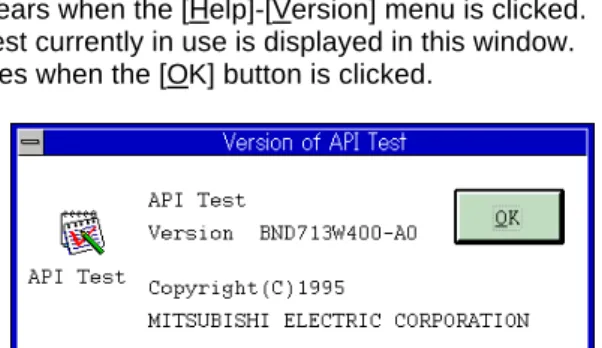
4.4.5 Version information... 136
4.5 Operation of the Function Execution window ... 137
4.5.1 Common window operations... 137
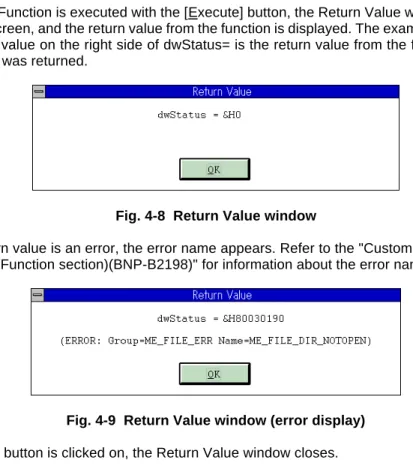
4.5.2 Displaying the return value from the function ... 138
4.5.3 Function window initial value ... 138
4.5.4 System control commands ... 139
4.5.4.1
melloctl... 139
4.5.5 File access related commands ... 140
4.5.5.1
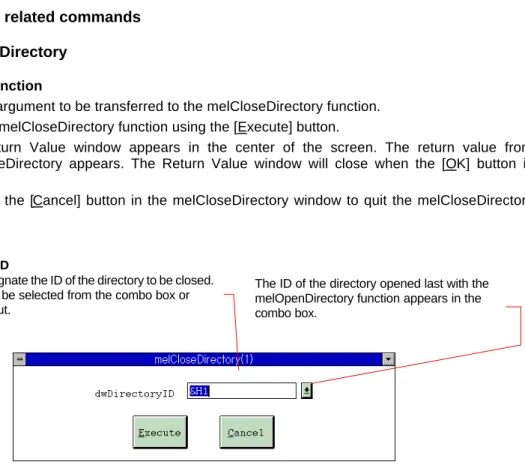
melCloseDirectory... 140
4.5.5.3
melDeleteFile ... 142
4.5.5.4
melGetDiskFree ... 143
4.5.5.5
melGetDriveList ... 144
4.5.5.6
melOpenDirectory ... 145
4.5.5.7
melReadDirectory ... 146
4.5.5.8
melRenameFile... 147
4.5.6 Data access-related commands ... 148
4.5.6.1
melCancelModal ... 148
4.5.6.2
melReadData ... 149
4.5.6.3
melReadModal ... 150
4.5.6.4
melRegisterModal ... 151
4.5.6.5
melWriteData ... 152
4.5.7 Operation related commands ... 153
4.5.7.1
melActivatePLC ... 153
4.5.7.2
melGetCurrentAlarmMsg ... 154
4.5.7.3
melGetCurrentPrgBlock ... 155
4.5.7.4
melSelectExecPrg ... 156
4.5.8 Input window ... 157
4.5.8.1
Integer type, real number type ... 157
4.5.8.2
Character string type... 158
4.5.8.3
Real number character string type ... 159
4.5.8.4
Special type ... 160
4.5.9 Setting, Browse windows ... 161
4.5.9.1
AddressSet window... 161
4.5.9.2
FileTypeSet window ... 162
4.5.9.3
OptionSet window ... 163
4.5.9.4
FileList window... 164
5. Restrictions ... 165
Appendix List of Sample Applications ... 166
List of related documents ... 167
1. Outline
1.1 System configuration
1.1.1 General configuration
The applications (custom applications) for MELDASMAGIC 64 Series are developed on the IBM PC-AT
compatible personal computer in which an NC Card has been mounted. All operations from
programming to debugging are done on the personal computer.
Mount in expansion slot
IBM PC-AT compatible machine
Video monitor Connection card Ready Video Key Full key
Machine operation board Track ball/mouse
NC Card
1.1.2 Outline of custom release system
The following systems have been prepared for the custom release system of MELDASMAGIC 64
Series.
(1) Custom API (Application Interface) Library
This is a library where in the functions used to access the data and files in the NC Card from the
custom application are found.
The Custom API Library has several tens of functions including those listed below.
Reading of NC axis coordinate value
Reading/writing of parameters in NC Card
Getting of file information in NC Card
Transferring of files between NC Card and personal computer
Getting of NC alarm information, etc.
The Windows 95 DLL (Dynamic Link Library) format is used for the runtime library in the Custom
API Library. Thus, there are no limits to the custom application development language as long as
the programming language supports DLL. The user can freely select a programming language that
fits the characteristics of the custom application to be developed.
1.2 Software configuration
1.2.1 Software configuration diagram
NC Card Personal Computer
Custom Apprication Custom Software for Windows
Custom API Library(DLL) PC file server Task NC communication Task
Windows communication Driver Windows95
NC Card Device Driver ISA bus Driver Device Drivers
PC H/W ISA-BUS
NC System Software (M/L/D/G system)
CNC Card Access Real Time Multi Task OS
EIA/ISO Process Control Communi-cation Control PLC Control ServoControl
AT communication Driver Windows (command/modal) Operation Communication Display
1.2.2 Software related to custom release
(1) Custom application
This is an application developed by the user. The MELDASMAGIC 64 can be accessed by calling
the Custom API Library, and screen display processing can be done using the Windows function,
etc.
(2) Custom API Run-Time Library
This is a group of functions used to release the NC Card internal data or access files to support the
custom application.
(3) NC Card Communication Task
This is a task used to communicate with the NC system in the NC Card. This task is driven by the
messages from the Custom API Function.
(4) PC File Server Task
This is a task used to supply personal computer file data to the NC system in the NC Card. The task
is driven by messages from the NC system.
This task is used in the personal computer direct operation function (option function).
(5) Windows command driver
This is the driver on the personal computer side that communicates with the NC Card connected
with an ISA bus.
Commercial software
Custom development software (created by user) Software provided by Mitsubishis
(6) ISA Bus Driver
This is the device driver on the personal computer side used to access the device connected with an
ISA bus.
(7) NC Card Driver
This is the device driver used to process various NC Card commands and messages from the NC
Card.
(8) PC-AT driver
This is a driver on the NC side that communicates with the personal computer connected with an
ISA bus.
(9) Command task
This is a task used to access the NC internal data and files and communicate with the personal
computer.
2. Setup of Programming Environment
2.1 Before starting setup
Before starting the setup of the custom application programming environment, confirm the details of the
hardware, software and Custom API Library package being used.
(1) Confirmation of required system configuration
To develop the custom application, the following hardware and software are required besides the
Custom API Library.
IBM PC/AT or compatible personal computer that satisfies the following:
CPU that is i486SX 33MHz or more
ISA bus
Hard disk with 20Mbytes or more of free space
One or more floppy disk drive compatible with the 3.5-inch, 1.44Mbyte format
CRT compatible with Microsoft Windows 95, and having a resolution of 640
×
480 dots or more and
256 colors or more
Memory that is 8Mbytes or larger (16MB or more is recommended)
Mouse or compatible pointing device
Microsoft Windows 95
When developing with Visual Basic
Microsoft Visual Basic Professional Edition 4.0 32-bit version (Japanese version)
When developing with other programming languages
Programming language that can be developed with Windows application, and which satisfies the
following:
Can develop Windows 32-bit application.
Supports Windows DLL, and has a function to call DLL.
(2) Contents of Custom API Library
Before setting up the Custom API Library, confirm the contents of the Custom API Library.
"Setup Instruction Manual (BNP-B2191)
MELDASMAGIC MMI Operation Manual (D/M) (BNP-B2193)
MELDASMAGIC MMI Operation Manual (L/G) (BNP-B2194)
"Custom Application Interface Library Guide (Programming Section) (BNP-B2197)" (This manual)
"Custom Application Interface Library Guide (Function Section) (BNP-B2198)"
"Custom Application Interface Library Guide (Variable Section) (BNP-B2199)"
Floppy disk
• Custom API Library SDK1
• Custom API Library SDK2
The floppy disk contains the README_E.TXT (English)/README_J.TXT (Japanese). The
README_E.TXT (English)/README_J.TXT (Japanese) file describes the new information not
described in the manual. Confirm the contents before setting up.
2.2 Setting up of Custom API Library
(1) Installation of Custom API Run-Time Library
Install the Custom API Run-Time Library before starting development of an application using the
Custom API Library. When executing the operations up to debugging with the personal computer
used to develop the application, the NC Card must also be installed.
The method for installing the Custom API Run-Time Library and NC Card are described in the
"MELDASMAGIC 64 Setup Instruction Manual (BNP-B2191)".
(2) Installation of Custom API Library
The method for installing the Custom API Library is described in the README_E.TXT/
README_J.TXT file. Read README_E.TXT/README_J.TXT, and install the Custom API Library.
2.3 Before using
The Custom API Library runs on Windows, and is a support kit used to develop the application to operate
MELDASMAGIC 64 Series. Thus, when using the Custom API Library, the user must basically
understand Windows and the programming language used for the custom application development.
These are not explained in this manual. For details on Windows and the programming language, refer to
each manual enclosed with the respective software.
3. Programming with Visual Basic
3.1 Before starting programming
(1) Custom API Library files to be used
The following files are used to program the custom application with Visual Basic.
NCMCAPI.BAS
MELNCAPI.BAS
MELTYPE.BAS
MELERR.BAS
MELSBERR.BAS
These files are located in the SDK32\INCLUDE\VB\ directory under the directory where the Custom
API Library was installed.
1. NCMCAPI.BAS
This is the code module that describes the declarations used to call the Custom API Functions
prepared in the Custom API Library as procedures for Visual Basic.
2. MELNCAPI.BAS
This is the code module that defines the constants used with the Custom API Functions and the
procedures used for creating the function arguments.
3. MELTYPE.BAS
This is the code module that defines the data type constants used with the Custom API
Functions and defines the user defined type arrays.
4. MELERR.BAS
This is the code module that defines the error code constants used with the Custom API
Function and defines the procedures used for checking the error codes.
5. MELSBERR.BAS
This is the code module that defines the procedure used when checking the sub-error codes
and defines the sub-error code constants. These sub-error codes and definitions are detailed
information of the error codes used in the Custom API Function.
(2) Premise and supplement for explanations in this manual
This explanation of the program in this manual is premised on the Visual Basic Professional Edition
version 4.0 (Japanese version). Thus, the details may differ when using other versions of Visual
Basic.
When using the program explained in this manual with the English version of Visual Basic, some
Visual Basic function names may differ. The functions that require changes between the Japanese
and English versions are as follow.
Function name in Japanese version
Function name in English version
InStrB
InStr
MidB, MidB$
Mid, Mid$
LeftB, LeftB$
Left, Left$
RightB, RightB$
Right, Right$
Len B, Len B$
Len, Len$
Important technical information for programming the custom application is described in the
following sections of the Visual Basic programming guide. Please read these sections before
starting programming.
"Call of procedures in DLL"
"Compatibility with other Visual Basic versions"
"Specifications and limits"
3.2 Using Custom API Library
3.2.1 How to use the Custom API Library
Incorporate the code modules for the Custom API Library into the project
When using the custom application using the Custom API Library, the following code modules for
the Custom API Library will be incorporated in the project.
NCMCAPI.BAS
MELNCAPI.BAS
MELTYPE.BAS
MELERR.BAS
MELSBERR.BAS
The Visual Basic [File] menu [Add File...] function is used to incorporate the code module.
How to call the Custom API Functions
The functions (Custom API Functions) prepared in the Custom API Library are called as Visual
Basic statements or functions.
The Custom API Functions are DLL procedures. To call the DLL procedure from Visual Basic, each
DLL procedure must be declared beforehand using a declare statement. For the Custom API
Function the procedure is declared with the NCMCAPI.BAS of the code module for the Custom API
Library, so declaring again is not required.
The Custom API Function calling method is explained using melReadData as an example.
The Custom API Functions are function procedures that return a long value for the function return
value, so they are called as follows for example.
lRetVal = melReadData (Me.hWnd, lAddress, lSectionNum, lSubSectionNum,
lReadData, lReadType)
Custom API Function error check
Each Custom API Function return value has a return value or error code determined for each
function. Thus, check the return value for errors before using the value. Use the RetvIsError
procedure to check whether the Custom API Function return value is an error code. The RetvIsError
procedure is defined in the MELERR.BAS code module for the Custom API Library. An example of
the error check is shown below.
If RetvIsError (lRetVal) = True Then
'The error process is described
End If
There are Custom API Functions that can retrieve a more detailed error code when an error occurs.
This detailed error information is called a sub-error No. The sub-error code is retrieved using
GetLastError() of Windows API. Call GetLastError() immediately after calling Custom API Function.
It may not be possible to retrieve the sub-error code correctly if, directly after calling the Custom API
Function, another Custom API or Windows API is called instead of GetLastError().
Refer to "Custom Application Interface Library Guide (Function section)(BNP-B2198)" for sub-error
code details, usage, and the types of Custom API Functions that support the sub-error codes.
3.2.2 Creation of application with Custom API Library
3.2.2.1 Counter display application
What is a counter display application?
This counter display application (Position Counter) is a monitor used to display the NC's current
position. The current positions for the No. 1 axis to No. 3 axis are displayed on the window. The No.
of axes and axis names displayed are fixed. The displayed current position is updated in a 100ms
cycle.
Custom API Functions to be used
melReadData
Creation of counter display application
With this application, a procedure called GetAxisPosition is created to get the current position of
each axis from the NC Card. The GetAxisPosition is a function procedure used to return the current
position of the axis having the axis No. designated with the argument. The current position returned
by GetAxisPosition is a double type (double precision real number).
'Get current position of the designated axis 'The axis designation is 1 origin
Private Function GetAxisPosition (ByVal iAxisNum As Integer) As Double Dim dwStatus As Long
Dim lAddress As Long
Dim lSectionNum, lSubSectionNum As Long Dim dReadData As Double
Dim lReadType As Long Dim Message As String
'Variable to get return value from API function 'Variable to designate address
'Variable to designate NC Data Access Variable No. 'Variable to store read data
'Variable to designate requested data type
'Set address of data to be read
'NC Card No. = 1, system designation = No. 1 system, axis No. designation = 1_ lAddress = ADR_MACHINE (1) Or ADR_SYSTEM (1) Or ADR_AXIS (iAxisNum)
'Set NC Data Access Variable No.
'Set current position data (Section No. = 21, Sub-section No. = 20032) lSectionNum = 21
lSubSectionNum = 20032
'Set read data type
'Set double precision floating type (8-byte floating type) lReadtype = T_DOUBLE
'Read current position data from the NC Card
dwStatus = melReadData (Me.hWnd, lAddress, lSectionNum, lSubSectionNum, dReadData, lReadType)
'Check API function call for errors
Call APIErrorCheck (dwStatus, "GetAxisPosition")
'Return read current position GetAxisPosition = dReadData
In GetAxisPosition, the Custom API Function melReadData is called, and the current position data
for each axis is gotten from the NC Card. When calling melReadData in GetAxisPosition, address
(lAddress) and NC Data Access Variable (lSectionNum, lSubSectionNum) are used to designate
the current position data for each axis. The storage variable (dReadData) and requested data type
(lReadType) is transferred to store the gotten current position.
The address is a long type (long integer type) data, and instructs the operation target for the Custom
API Function. The Custom API Function knows which axis in which system of the NC Card to
operate according to the address. The address designation is required when using most Custom
API Functions. The NC Card, system and axis do not all need to be designated in all cases for the
address designation. Depending on the Custom API Function, the system and axis, etc., may not
need to be designated. The system and axis may need to be designated for the melReadData used
here depending on the type of data to be gotten. Whether the address is required for the Custom
API Function to be used and what needs to be designated is described in the "Custom Application
Interface Library Guide (Function Section) (BNP-B2198)". ADR_MACHINE( ), ADR_SYSTEM( )
and ADR_AXIS( ) are used when creating the address in GetAxisPosition. These are procedures
used to create the address, and are defined in the Custom API Library file MELNCAPI.BAS.
The NC Data Access Variables are Nos. assigned to the data in the NC Card. In the custom
application, the data in the NC Card is read out by designating this No. and calling melReadData.
The NC Data Access Variables include Section Nos. and Sub-section Nos., and one data item is
designated with these two section Nos. The Section No. and Sub-section No. data is long type (long
integer type) data. The details of the NC Data Access Variable section Nos. are described in the
"Custom Application Interface Library Guide (Variable Section) (BNP-B2199)".
The requested data type designated the type of data to be read out by the custom application in
regard to the Custom API Function. The custom application has variables of the data types to be
read out (this is called the requested data type), and transfers that variable and type to the Custom
API Function. The Custom API Function converts the data type originally held by the NC Card (this
is called the default data type) into the requested data type, and returns it to the custom application.
The types of data that can be requested to the Custom API Function are as follow.
Data types that can be requested to the Custom API Function
Data type Type of variable prepared by custom application
T_CHAR 1-byte integer type Byte Byte type
T_SHORT 2-byte integer type Integer Integer type T_LONG 4-byte integer type Long Long integer type
T_DOUBLE 4-byte real number type Double Double precision real number type T_STR Character string type STRINGTYPE User defined array for character string data T_DECSTR Decimal integer character string type STRINGTYPE User defined array for character string data T_HEXSTR Hexadecimal character string type STRINGTYPE User defined array for character string data T_BINSTR Binary character string type STRINGTYPE User defined array for character string data
T_FLOATSTR Real number character type FLOATSTR User defined array for real number character string data
It must be noted here that there are cases where the conversion into the requested data type may
not be done correctly depending on the default data type of data to be read out. For example, the
character string type (T_STR) data cannot be converted into a numerical value type such as the
4-byte integer type (T_LONG). If the 4-byte integer type (T_LONG) is converted into a 2-byte integer
type (T_SHORT), the high-order 2-byte data of the 4-byte integer will be lost, and when the 4-byte
real number type (T_DOUBLE) is converted into a 4-byte integer type (T_LONG), the data after the
decimal point will be cut off. The combination of the default data type and requested data type is
shown below.
The combination of the default data type and requested data type
Requested data type Default datatype
T_BIT T_CHAR T_SHORT T_LONG T_DOUBLE T_STR T_DEC STR T_HEXS TR T_BINS TR T_FLOATS TR T_CHAR T_SHORT T_LONG T_DOUBLE T_STR T_DECSTR T_HEXSTR T_BINSTR T_FLOATSTR : Conversion is possible
: Conversion is possible, but some data may be lost : Conversion is not possible (An error will occur.)
List 1-1 COUNTER32.VBP project file
Form=Frmposit.frm
Module=Module1; Common.bas
Module=melerr; ..\..\include\vb\Melerr.bas Module=melsberr; ..\..\include\vb\Melsberr.bas Module=melncapi; ..\..\include\vb\Melncapi.bas Module=meltype; ..\..\include\vb\Meltype.bas Module=ncmcapi. ..\..\include\vb\Ncmcapi.bas
Object={BDC217C8-ED16-11CD-956C-0000C04E4C0A}#1.0#0; TABCTL32.OCX Object={3B7C8863-D78F-101B-B9B5-04021C009402}#1.0#0; RICHTX32.OCX Object={FAEEE763-117E-101B-8933-08002B2F4F5A}#1.0#0; DBLIST32.OCX Object={00028C01-0000-0000-0000-000000000046}#1.0#0; DBGRID32.OCX Reference=*\
G{BEF6E001-A874-101A-8BBA-00AA00300CAB}#2.0#0#C:\WINDOWS\SYSTEM\OLEPRO32.DLL#Standard OLE Types
Reference=*\G{00025E01-0000-0000-C000-000000000046}#3.0#0#C:\PROGRAM FILES\COMMON FILES\MICROSOFT SHARED\DC:\PROGRAM FIL#Microsoft DAO 3.0 Object Library
Object={0BA686C6-F7D3-101A-993E-0000C0EF6F5E}#1.0#0; THREED32.OCX Object={B16553C3-06DB-101B-85B2-0000C009BE81}#1.0#0; SPIN32.OCX
Reference=*\G{EF404E00-EDA6-101A-8DAF-00DD010F7EBB}#4.0#0#C:\PROGRAM FILES\MICROSOFT VISUAL BASIC\vbext32.C:\#Microsoft Visual Basic 4.0 Development Environment
Object={6B7E6392-850A-101B-AFC0-4210102A8DA7}#1.0#0; COMCTL32.OCX Object={F9043C88-F6F2-101A-A3C9-08002B2F49FB}#1.0#0; COMDLG32.OCX ProjWinSize=200,391,243,281 ProjWinShow=0 IconForm="frmPosit" HelpFile=""
Title="COUNTER32" ExeName32="counter32.exe" Name="Project1" HelpContextID="0" StartMode=0 VersionCompatible32="0" MajorVer=1 MinorVer=0 RevisionVer=0 AutoIncrementVer=0 ServerSupportFiles=0
List 1-2 FRMPOSIT.FRM Form module
VERSION 4.00 Begin VB.Form frmPosit Appearance = 0 'Flat BackColor = &H00C0C0C0& BorderStyle = 1 'Fixed (solid line) Caption = "Position Counter" ClientHeight = 1728 ClientLeft = 3120 ClientTop = 1716 ClientWidth = 2775 BeginProperty Font name = "System" charset = 128 weight = 700 size = 13.2 underline = 0 'False italic = 0 'False strikethrough = 0 'False EndProperty ForeColor = &H80000008& Height = 2112 Left = 3072 LinkTopic = "Form1" MaxButton = 0 'False ScaleHeight = 1728 ScaleWidth = 2772 Top = 1380 Width = 2868 Begin VB.Timer timPosition
Interval = 100 Left = 2400 Top = 1320 End
Begin Threed.SSPanel Pnl3dAxis Height = 540 Index = 0 Left = 372 TabIndex = 3 Top = 72 Width = 2268 _Version = 65536 _ExtentX = 3995 _ExtentY = 953 _StockProps = 15 BevelInner = 1
Alignment = 1 'Flush right BackStyle = 0 'Transparent Caption = "-1234.1234" Height = 390 Index = 0 Left = 75 TabIndex = 6 Top = 75 Width = 1965 End End
Begin Threed.SSPanel Pnl3dAxis Height = 540 Index = 1 Left = 372 TabIndex = 4 Top = 600 Width = 2268 _Version = 65536 _ExtentX = 3995 _ExtentY = 953 _StockProps = 15 BevelInner = 1
Begin VB.Label lblAxisPosition Alignment = 1 'Flush right BackStyle = 0 'Transparent Caption = "-1234.1234" Height = 390 Index = 1 Left = 75 TabIndex = 7 Top = 75 Width = 1965 End End
Begin Threed.SSPanel Pnl3dAxis Height = 540 Index = 2 Left = 375 TabIndex = 5 Top = 1125 Width = 2265 _Version = 65536 _ExtentX = 3995 _ExtentY = 953 _StockProps = 15 BevelInner = 1
Begin VB.Label lblAxisPosition Alignment = 1 'Flush right BackStyle = 0 'Transparent Caption = "-1234.1234" Height = 390 Index = 2 Left = 75 TabIndex = 8 Top = 75 Width = 1965 End End
Begin VB.Label lblAxisName Appearance = 0 'Flat BackColor = &H80000005&
BackStyle = 0 'Transparent Caption = "Z" BeginProperty Font name = "Courier" charset = 0 weight = 700 size = 15 underline = 0 'False italic = 0 'False strikethrough = 0 'False EndProperty ForeColor = &H80000008& Height = 255 Index = 2 Left = 120 TabIndex = 2 Top = 1140 Width = 255 End
Begin VB.Label lblAxisName Appearance = 0 'Flat BackColor = &H80000005& BackStyle = 0 'Transparent Caption = "Y" BeginProperty Font name = "Courier" charset = 0 weight = 700 size = 15 underline = 0 'False italic = 0 'False strikethrough = 0 'False EndProperty ForeColor = &H80000008& Height = 255 Index = 1 Left = 120 TabIndex = 1 Top = 660 Width = 255 End
Begin VB.Label lblAxisName Appearance = 0 'Flat BackColor = &H80000005& BackStyle = 0 'Transparent Caption = "X" BeginProperty Font name = "Courier" charset = 0 weight = 700 size = 15 underline = 0 'False italic = 0 'False strikethrough = 0 'False EndProperty ForeColor = &H80000008& Height = 255 Index = 0 Left = 120 TabIndex = 0 Top = 180 Width = 255 End End
Attribute VB_Name = "frmPosit" Attribute VB_Creatable = False Attribute VB_Exposed = False Option Explicit
'Get current position of the designated axis 'The axis designation is 1 origin
Private Function GetAxisPosition(ByVal iAxisNum As Integer) As Double
Dim dwStatus As Long 'Variable to get return value from API function
Dim lAddress As Long 'Variable to designate address
Dim lSectionNum, lSubSectionNum As Long 'Variable to designate NC data Access Variable No. Dim dReadData As Double 'Variable to store read data
Dim lReadType As Long 'Variable to designate requested data type Dim Message As String
'Set address of data to be read
'NC Card No. = 1, system designation = No. 1 system, axis No. designation = 1~ lAddress = ADR_MACHINE(1) Or ADR_SYSTEM(1) Or ADR_AXIS(iAxisNum)
'Set NC Data Access Variable No.
'Set current position data (Section No. = 21, Sub-section No. 20032) lSectionNum = 21
lSubSectionNum = 20032
'Set read data type
'The double precision floating type (8-byte floating type) is set lReadType = T_DOUBLE
'Read current position data from the NC Card
dwStatus = melReadData(Me.hWnd, lAddress, lSectionNum, lSubSectionNum, dReadData, lReadType)
'Check API function call for errors
Call APIErrorCheck(dwStatus, "GetAxisPosition") 'Return read current position
GetAxisPosition = dReadData End Function
'Timer process of Position Counter window Private Sub timPosition_Timer()
Dim dReadData As Double 'Variable to store read data Dim iAxisNum As Integer 'Loop counter
'Get current positions for 3 axes and display on screen For iAxisNum = 0 To 2
'Get current position
dReadData = GetAxisPosition(iAxisNum + 1) 'Display read current position on screen
lblAxisPosition(iAxisNum).Caption = Format$(dReadData, "0.000") Next
List 1-3 COMMON.BAS code module
Option Explicit
'Check if API function return value is an error 'If return value is an error, display message, and 'quit application
Sub APIErrorCheck (dwStatus As Long, FunctionName As String) Dim Message As String
If RetvIsError(dwStatus) = True Then 'Error occurrence
'Display error message
Message = "Error occurred in API function call"
Message = Message + Chr$(10) + "Error occurrence place is " + FunctionName + "." Message = Message + Chr$(10) + "Error No. is &h" + Hex$(dwStatus) + "." MsgBox (Message) 'Quit application 'Stop End End If End Sub
3.2.2.2 Parameter setting application
What is the parameter setting application?
The parameter setting application (Parameter Setup) is a tool for setting the NC parameters. The
three machining parameters in [ProcessParameter], [WorkCountM] (M code for counting No. of
workpiece machinings), [WorkCount] (No. of workpiece machinings to this point) and [WorkLimit]
(Max. No. of workpiece machinings), and the three control parameters in [ControlParameter],
[MacroSingle] (macro single valid), [CollectAlarmOFF] (interference version) and
[CollectCheckOFF] (interference check invalid), are displayed on the window.
For each parameter in the [ProcessParameter], a numerical value is input in the text box, and the
[Enter] key is pressed to write the set data in the NC Card. If each item for the [ControlParameter]
parameters is clicked, the ON/OFF status of the parameter will change, and the setting value will be
simultaneously written into the NC Card.
When the application is started, each parameter value will be read from the NC Card and displayed.
Custom API Function to be used
melReadData
melWriteData
Getting of parameter values
In this application, the following procedure is created to get the parameter values from the NC Card.
These procedures get the parameter values from the NC Card and display the gotten values.
These procedures are sub-procedures and do not have a return value.
Procedures created to get parameters:
GetCollectAlarm
GetCollectCheck
GetMacroSingle
GetWorkCount
GetWorkCountM
GetWorkLimit
'Get interference evasion parameter value from the NC Card and display Private Sub GetCollectAlarm()
Dim dwStatus As Long ' Variable to get return value from API function
Dim lAddress As Long 'Variable to designate address
Dim lSectionNum, lSubSectionNum As Long 'Variable to designate NC Data Access Variable No. Dim nReadData As Integer 'Variable to store read data (short type)
Dim lDataType As Long 'Variable to designate requested data type
'Set address of data to be read
'NC Card No. = 1, system designation = No. 1 system lAddress = ADR_MACHINE(1) Or ADR_SYSTEM(1)
'********************************************* 'Read the interference evasion parameter value '********************************************* 'Set NC Data Access Variable No.
'Designate interference evasion parameter (Section No. = 1, Sub-section No. = 193) lSectionNum = 1
lSubSectionNum = 193
'Set read data type
'Set integer type (2-byte integer type) lDataType = T_SHORT
'Read data from the NC Card
dwStatus = melReadData(Me.hWnd, lAddress, lSectionNum, lSubSectionNum, nReadData, lDataType)
'Check API function call for errors
Call APIErrorCheck(dwStatus, "GetCollectAlarm")
'Get only the interference evasion parameter value from the read data nReadData = nReadData And &H20
'Turn check box ON/OFF according to the read parameter value If nReadData <> 0 Then
'Parameter ON
'Set check box to check state ChkCollectAlarm.Value = 1 Else
'Parameter OFF
'Set check box to not-check state ChkCollectAlarm.Value = 0 End If
'Get interference Check invalid parameter value from the NC Card and display Private Sub GetCollectCheck()
Dim dwStatus As Long ' Variable to get return value from API function
Dim lAddress As Long 'Variable to designate address
Dim lSectionNum, lSubSectionNum As Long 'Variable to designate NC Data Access Variable No. Dim nReadData As Integer 'Variable to store read data (short type)
Dim lDataType As Long 'Variable to designate requested data type
'Set address of data to be read
'NC Card No. = 1, system designation = No. 1 system lAddress = ADR_MACHINE(1) Or ADR_SYSTEM(1)
'************************************************** 'Read the interference check invalid parameter value '************************************************** 'Designate NC Data Access Variable No.
'Set interference check invalid parameter (Section No. = 1, Sub-section No. = 198) lSectionNum = 1
lSubSectionNum = 198
'Set read data type
'Set integer type (2-byte integer type) lDataType = T_SHORT
'Read data from the NC Card
dwStatus = melReadData(Me.hWnd, lAddress, lSectionNum, lSubSectionNum, nReadData, lDataType)
'Check API function call for errors
Call APIErrorCheck(dwStatus, "GetCollectCheck")
'Get only the interference check invalid parameter value from the read data nReadData = nReadData And &H40
'Turn check box ON/OFF according to the read parameter value If nReadData <> 0 Then
'Parameter ON
'Set check box to check state ChkCollectCheck.Value = 1 Else
'Parameter OFF
'Set check box to not-check state ChkCollectCheck.Value = 0 End If
End Sub
'Get Check macro single valid parameter value from the NC Card and display Private Sub GetMacroSingle()
Dim dwStatus As Long ' Variable to get return value from API function
Dim lAddress As Long 'Variable to designate address
Dim lSectionNum, lSubSectionNum As Long 'Variable to designate NC Data Access Variable No. Dim nReadData As Integer 'Variable to store read data (short type)
Dim lDataType As Long 'Variable to designate requested data type
'Set address of data to be read
'NC Card No. = 1, system designation = No. 1 system lAddress = ADR_MACHINE(1) Or ADR_SYSTEM(1)
'************************************************** 'Read the macro single parameter value
'************************************************** 'Designate NC Data Access Variable No.
'Set read data type
'Set integer type (2-byte integer type) lDataType = T_SHORT
'Read data from the NC Card
dwStatus = melReadData(Me.hWnd, lAddress, lSectionNum, lSubSectionNum, nReadData, lDataType)
'Check API function call for errors
Call APIErrorCheck(dwStatus, "GetMacroSingle")
'Get only the macro single parameter value from the read data nReadData = nReadData And &H40
'Turn check box ON/OFF according to the read parameter value If nReadData <> 0 Then
'Parameter ON
'Set check box to check state ChkMacroSingle.Value = 1 Else
'Parameter OFF
'Set check box to not-check state ChkMacroSingle.Value = 0 End If
End Sub
'Get No. of workpiece machinings parameter value from the NC Card and display Private Sub GetWorkCount()
Dim dwStatus As Long ' Variable to get return value from API function
Dim lAddress As Long 'Variable to designate address
Dim lSectionNum, lSubSectionNum As Long 'Variable to designate NC Data Access Variable No. Dim nReadData As Long 'Variable to store read data (long type)
Dim lDataType As Long 'Variable to designate requested data type
'Set address of data to be read
'NC Card No. = 1, system designation = No. 1 system lAddress = ADR_MACHINE(1) Or ADR_SYSTEM(1)
'************************************************ 'Read No. of workpiece machinings parameter value '************************************************ 'Designate NC Data Access Variable No.
'Set No. of workpiece machinings parameter (Section No. = 10318, Sub-section No. = 2896) lSectionNum = 10318
lSubSectionNum = 2896 'Set read data type
'Set long integer type (4-byte integer type) lDataType = T_LONG
'Read data from the NC Card
dwStatus = melReadData(Me.hWnd, lAddress, lSectionNum, lSubSectionNum, lReadData, lDataType)
'Check API function call for errors
Call APIErrorCheck(dwStatus, "GetWorkCount") 'Display read No. of workpiece machinings value txtWorkCount.Text = Str$(lReadData)
End Sub
'Get No. of workpiece machinings M parameter value from the NC Card and display Private Sub GetWorkCountM()
Dim dwStatus As Long ' Variable to get return value from API function
Dim lAddress As Long 'Variable to designate address
Dim nReadData As Integer 'Variable to store read data (short type) Dim lDataType As Long 'Variable to designate requested data type
'Set address of data to be read
'NC Card No. = 1, system designation = No. 1 system lAddress = ADR_MACHINE(1) Or ADR_SYSTEM(1)
'************************************************ 'Read No. of workpiece machinings M parameter value '************************************************ 'Designate NC Data Access Variable No.
'Set No. of workpiece machinings M parameter (Section No. = 1, Sub-section No. = 1280) lSectionNum = 1
lSubSectionNum = 1280 'Set read data type
'Set integer type (2-byte integer type) lDataType = T_SHORT
'Read data from the NC Card
dwStatus = melReadData(Me.hWnd, lAddress, lSectionNum, lSubSectionNum, nReadData, lDataType)
'Check API function call for errors
Call APIErrorCheck(dwStatus, "GetWorkCountM") 'Display read No. of workpiece machinings M value txtWorkCountM.Text = Str$(nReadData)
End Sub
'Get max. workpiece value parameter value from the NC Card and display Private Sub GetWorkLimit()
Dim dwStatus As Long ' Variable to get return value from API function
Dim lAddress As Long 'Variable to designate address
Dim lSectionNum, lSubSectionNum As Long 'Variable to designate NC Data Access Variable No. Dim nReadData As Long 'Variable to store read data (long type)
Dim lDataType As Long 'Variable to designate requested data type
'Set address of data to be read
'NC Card No. = 1, system designation = No. 1 system lAddress = ADR_MACHINE(1) Or ADR_SYSTEM(1)
'***************************************** 'Read max. workpiece value parameter value '***************************************** 'Designate NC Data Access Variable No.
'Set max. workpiece value parameter (Section No. = 10318, Sub-section No. = 2898) lSectionNum = 10318
lSubSectionNum = 2898
'Set read data type
'Set long integer type (4-byte integer type) lDataType = T_LONG
'Read data from the NC Card
dwStatus = melReadData(Me.hWnd, lAddress, lSectionNum, lSubSectionNum, lReadData, lDataType)
'Check API function call for errors
Call APIErrorCheck(dwStatus, "GetWorkLimit") 'Display read max. workpiece value
txtWorkLimit.Text = Str$(lReadData) End Sub
In the procedure for getting the parameter value, the Custom API Function melReadData is called
and each parameter value is gotten from the NC Card. Refer to section "3.2.2.1 Counter display
application" for how to use melReadData.
In each procedure, the parameter to be gotten is designated in the NC Data Access Variable.
However the following items of the gotten parameters are bit parameters, so special processing is
required.
Bit parameter type parameters (Only those used)
Parameter name
Section No.
Sub-section No.
Default data type
Bit
Interference evasion
1
193
T_CHAR
Bit 5
Interference check
invalid
1
198
T_CHAR
Bit 6
Single block valid
1
194
T_CHAR
Bit 6
The NC Data Access Variable default data type for these parameters is T_CHAR (1-byte integer
type), but the actual parameter value is one of the bits in the one byte. Thus, a process to get a
specific bit from the byte gotten from the NC Card is required.
For example, the following process is executed in the GetCollectAlarm procedure.
'Get only the interference evasion parameter value from the read data nReadData = nReadData And &H40
'Turn check box ON/OFF according to the read parameter value If nReadData <> 0 Then
'Parameter ON
'Set check box to check state ChkCollectAlarm.Value = 1 Else
'Parameter OFF
'Set check box to not-check state ChkCollectAlarm.Value = 0 End If
Writing of parameter values
In this application, the following procedure is created to write the parameter values set with the
application into the NC Card. These procedures write the parameter value transferred with an
argument into the NC Card. These procedures are sub-procedures and do not have a return value.
Procedures for writing parameters
SetCollectAlarm
SetCollectCheck
SetMacroSingle
SetWorkCount
SetWorkCountM
SetWorkLimit
Private Sub SetCollectAlarm(ByVal SetValue As Integer)
Dim dwStatus As Long ' Variable to get return value from API function
Dim lAddress As Long 'Variable to designate address
Dim lSectionNum, lSubSectionNum As Long 'Variable to designate NC Data Access Variable No. Dim nWriteData As Integer 'Variable to store written data (short type)
Dim lDataType As Long 'Variable to designate write data type
'Set address of data to be read
'NC Card No. = 1, system designation = No. 1 system lAddress = ADR_MACHINE(1) Or ADR_SYSTEM(1)
'********************************************* 'Write the interference evasion parameter value '********************************************* 'Set NC Data Access Variable No.
'Designate interference evasion parameter (Section No. = 1, Sub-section No. = 193) lSectionNum = 1
lSubSectionNum = 193
'Set write data type
'Set integer type (2-byte integer type) lDataType = T_SHORT
'Read current value data from the NC Card
dwStatus = melReadData(Me.hWnd, lAddress, lSectionNum, lSubSectionNum, nWriteData, lDataType)
'Check API function call for errors
Call APIErrorCheck(dwStatus, "SetCollectAlarm") 'Mask read data
nWriteData = nWriteData And &HDF
'Set interference evasion parameter value If SetValue <> 0 Then
'Parameter ON
nWriteData = nWriteData Or &H20 End If
'Write data to NC Card
dwStatus = melWriteData(Me.hWnd, lAddress, lSectionNum, lSubSectionNum, nWriteData, lDataType)
'Check API function call for errors
Call APIErrorCheck(dwStatus, "SetCollectAlarm") End Sub
Private Sub SetCollectCheck(ByVal SetValue As Integer)
Dim dwStatus As Long ' Variable to get return value from API function
Dim lAddress As Long 'Variable to designate address
Dim lSectionNum, lSubSectionNum As Long 'Variable to designate NC Data Access Variable No. Dim nWriteData As Integer 'Variable to store written data (short type)
Dim lDataType As Long 'Variable to designate write data type
'Set address of data to be read
'NC Card No. = 1, system designation = No. 1 system lAddress = ADR_MACHINE(1) Or ADR_SYSTEM(1)
'************************************************** 'Read interference check invalid parameter value
'************************************************** 'Designate NC Data Access Variable No.
'Set interference check invalid parameter (Section No. = 1, Sub-section No. = 198) lSectionNum = 1
lDataType = T_SHORT
'Read current value data from the NC Card
dwStatus = melReadData(Me.hWnd, lAddress, lSectionNum, lSubSectionNum, nWriteData, lDataType)
'Check API function call for errors
Call APIErrorCheck(dwStatus, "SetCollectCheck") 'Mask read data
nWriteData = nWriteData And &HBF
'Set interference check invalid parameter value If SetValue <> 0 Then
'Parameter ON
nWriteData = nWriteData Or &H40 End If
'Write data to NC Card
dwStatus = melWriteData(Me.hWnd, lAddress, lSectionNum, lSubSectionNum, nWriteData, lDataType)
'Check API function call for errors
Call APIErrorCheck(dwStatus, "SetCollectCheck") End Sub
Private Sub SetMacroSingle(ByVal SetValue As Integer)
Dim dwStatus As Long ' Variable to get return value from API function
Dim lAddress As Long 'Variable to designate address
Dim lSectionNum, lSubSectionNum As Long 'Variable to designate NC Data Access Variable No. Dim nWriteData As Integer 'Variable to store written data (short type)
Dim lDataType As Long 'Variable to designate written data type
'Set address of data to be read
'NC Card No. = 1, system designation = No. 1 system lAddress = ADR_MACHINE(1) Or ADR_SYSTEM(1)
'************************************************** 'Write macro single prameter value
'************************************************** 'Designate NC Data Access Variable No.
'Set macro single parameter (Section No. = 1, Sub-section No. = 194) lSectionNum = 1
lSubSectionNum = 194
'Set write data type
'Set integer type (2-byte integer type) lDataType = T_SHORT
'Read current value data from the NC Card
dwStatus = melReadData(Me.hWnd, lAddress, lSectionNum, lSubSectionNum, nWriteData, lDataType)
'Check API function call for errors
Call APIErrorCheck(dwStatus, "SetMacroSingle")
'Mask read data
nWriteData = nWriteData And &HBF
'Set macro single parameter value If SetValue <> 0 Then
'Parameter ON
nWriteData = nWriteData Or &H40 End If
'Write data to NC Card
dwStatus = melWriteData(Me.hWnd, lAddress, lSectionNum, lSubSectionNum, nWriteData, lDataType)
Call APIErrorCheck(dwStatus, "SetMacroSingle") End Sub
Private Sub SetWorkCount(ByVal SetValue As Long)
Dim dwStatus As Long ' Variable to get return value from API function
Dim lAddress As Long 'Variable to designate address
Dim lSectionNum, lSubSectionNum As Long 'Variable to designate NC Data Access Variable No. Dim lDataType As Long 'Variable to designate requested data type
'Set address of data to be written
'NC Card No. = 1, system designation = No. 1 system lAddress = ADR_MACHINE(1) Or ADR_SYSTEM(1)
'************************************************ 'Write No. of workpiece machinings parameter value '************************************************ 'Set NC Data Access Variable No.
'Set No. of workpiece machinings parameter (Section No. = 10318, Sub-section No. = 2896) lSectionNum = 10318
lSubSectionNum = 2896 'Set write data type
'Set long integer type (4-byte integer type) lDataType = T_LONG
'Write data to the NC Card
dwStatus = melWriteData(Me.hWnd, lAddress, lSectionNum, lSubSectionNum, SetValue, lDataType)
'Check API function call for errors
Call APIErrorCheck(dwStatus, "SetWorkCount") End Sub
Private Sub SetWorkCountM(ByVal SetValue As Integer)
Dim dwStatus As Long ' Variable to get return value from API function
Dim lAddress As Long 'Variable to designate address
Dim lSectionNum, lSubSectionNum As Long 'Variable to designate NC Data Access Variable No. Dim lDataType As Long 'Variable to designate requested data type
'Set address of data to be written
'NC Card No. = 1, system designation = No. 1 system lAddress = ADR_MACHINE(1) Or ADR_SYSTEM(1) '************************************************ 'Write No. of workpiece machinings M parameter value '************************************************ 'Set NC Data Access Variable No.
'Set No. of workpiece machinings M parameter (Section No. = 1, Sub-section No. = 1280) lSectionNum = 1
lSubSectionNum = 1280
'Set write data type
'Set integer type (2-byte integer type) lDataType = T_SHORT
'Write data to the NC Card
dwStatus = melWriteData(Me.hWnd, lAddress, lSectionNum, lSubSectionNum, SetValue, lDataType)
'Check API function call for errors
Call APIErrorCheck(dwStatus, "SetWorkCountM") End Sub
Dim lAddress As Long 'Variable to designate address
Dim lSectionNum, lSubSectionNum As Long 'Variable to designate NC Data Access Variable No. Dim lDataType As Long 'Variable to designate requested data type
'Set address of data to be written
'NC Card No. = 1, system designation = No. 1 system lAddress = ADR_MACHINE(1) Or ADR_SYSTEM(1)
'****************************************** 'Write max. workpiece value parameter value '****************************************** 'Designate NC Data Access Variable No.
'Set max. workpiece value parameter (Section No. = 10318, Sub-section No. = 2898) lSectionNum = 10318
lSubSectionNum = 2898
'Set write data type
'Set long integer type (4-byte integer type) lDataType = T_LONG
'Write data from the NC Card
dwStatus = melWriteData(Me.hWnd, lAddress, lSectionNum, lSubSectionNum, SetValue, lDataType)
'Check API function call for errors
Call APIErrorCheck(dwStatus, "SetWorkLimit") End Sub
In the procedure for writing the parameter value, the Custom API Function melWriteData is called,
and each parameter value is written to the NC Card. When calling melWriteData in each procedure,
each parameter is designated by using address (lAddress) and NC Data Access Variable
(lSectionNum, lSubSectionNum). The variable (SetValue) where the setting value is set and the
write data type (lDataType) is transferred to transfer the write parameter setting value.
The details of the melWriteData argument address and NC Data Access Variable are the same as
melReadData. Refer to section "3.2.2.1 Counter display application" for details on these.
The write data type has approximately the same meaning as the melReadData requested data type.
The write data type is used to designate the type of data to be written in by the custom application
for the custom API Function. The custom application prepares the variable of the type of data to be
written (this is called the write data type), and transfers that variable and type to the Custom API
Function. The Custom API Function converts the write data type to the default data type originally
held by the NC Card, and then writes the data to the NC Card. The following data types can be
designated for the Custom API Function. These are the same as the request data type.
Write data types that can be designated for Custom API Function
Data Type Type of variable prepared by custom application
T_BIT 1-bit data type Cannot be used with Visual Basic T_CHAR 1-byte integer type CHAR Byte type T_SHORT 2-byte integer type Integer Integer type T_LONG 4-byte integer type Long Long integer type
T_DOUBLE 4-byte real number type Double Double precision real number type T_STR Character string type STRINGTYPE User defined array for character string data T_DECSTR Decimal integer character
string type STRINGTYPE User defined array for character string data T_HEXSTR Hexadecimal character string
type STRINGTYPE User defined array for character string data T_BINSTR Binary character string type STRINGTYPE User defined array for character string data T_FLOATSTR Real number character string
type FLOATSTR
User defined array for real number character string data
As with the requested data type, it must be noted here that there are cases where the conversion
into the write data type may not be done correctly depending on the default data type of data to be
written.
Next, the bit parameter process will be explained.
When writing a bit parameter, a special process is required as when reading the parameters.
The NC Data Access Variable default data type for the bit parameters used in this application is
T_CHAR (1-byte integer type), but the actual parameter value is one of the bits in the one byte. The
other bits in the one byte correspond to other parameters. Thus, when writing a value into the NC
Card, a process is required so that the other bits in the one byte are not rewritten.
For example, in the SetCollectAlarm procedure, the current value is read before writing, and the
write data is created based on that read value.
'Read current value data from NC Card
dwStatus = melReadData(Me.hWnd, lAddress, lSectionNum, lSubSectionNum, nWriteData, lDataType)
:
: : 'Mask read data
nWriteData = nWriteData And &HDF 'Set interface evasion parameter value If SetValue <> 0 Then
'Parameter ON
nWriteData = nWriteData Or &H20 End If
'Write data to NC Card
dwStatus = melWriteData(Me.hWnd, lAddress, lSectionNum, lSubSectionNum, nWriteData, lDataType)
:
:
List 2-1 PARAMET32.VBP project file
Form=Frmparam.frm Module=Module1; Common.bas Module=melerr; ..\..\include\vb\Melerr.bas Module=melsberr; ..\..\include\vb\Melsberr.bas Module=melncapi; ..\..\include\vb\Melncapi.bas Module=meltype; ..\..\include\vb\Meltype.bas Module=ncmcapi. ..\..\include\vb\Ncmcapi.bas Object={BDC217C8-ED16-11CD-956C-0000C04E4C0A}#1.0#0; TABCTL32.OCX Object={3B7C8863-D78F-101B-B9B5-04021C009402}#1.0#0; RICHTX32.OCX Object={FAEEE763-117E-101B-8933-08002B2F4F5A}#1.0#0; DBLIST32.OCX Object={00028C01-0000-0000-0000-000000000046}#1.0#0; DBGRID32.OCX Reference=*\G{BEF6E001-A874-101A-8BBA-00AA00300CAB}#2.0#0#C:\WINDOWS\SYSTEM\OLEPRO32.DLL#Standard OLE TypesReference=*\G{00025E01-0000-0000-C000-000000000046}#3.0#0#C:\PROGRAM FILES\COMMON FILES\MICROSOFT SHARED\DC:\PROGRAM FIL#Microsoft DAO 3.0 Object Library
Object={0BA686C6-F7D3-101A-993E-0000C0EF6F5E}#1.0#0; THREED32.OCX Object={B16553C3-06DB-101B-85B2-0000C009BE81}#1.0#0; SPIN32.OCX
Reference=*\G{EF404E00-EDA6-101A-8DAF-00DD010F7EBB}#4.0#0#C:\PROGRAM FILES\MICROSOFT VISUAL BASIC\vbext32.C:\#Microsoft Visual Basic 4.0 Development Environment
Object={6B7E6392-850A-101B-AFC0-4210102A8DA7}#1.0#0; COMCTL32.OCX Object={F9043C88-F6F2-101A-A3C9-08002B2F49FB}#1.0#0; COMDLG32.OCX ProjWinSize=81,397,243,274 ProjWinShow=0 IconForm="frmParam" HelpFile="" Title="PARAMETER" ExeName32="Paramet32.exe" Name="Project1" HelpContextID="0" StartMode=0 VersionCompatible32="0" MajorVer=1 MinorVer=0 RevisionVer=0 AutoIncrementVer=0 ServerSupportFiles=0
List 2-2 FRMPARAM.FRM form module
VERSION 4.00
Begin VB.Form frmParam Appearance = 0 'Flat BackColor = &H00C0C0C0& BorderStyle = 1 'Fixed (solid line) Caption = "Parameter Setup" ClientHeight = 3156 ClientLeft = 1920 ClientTop = 1968 ClientWidth = 2916 BeginProperty Font name = "System" charset = 128 weight = 400 size = 13.2 underline = 0 'False italic = 0 'False strikethrough = 0 'False EndProperty ForeColor = &H80000008& Height = 3540 Left = 1872
LinkTopic = "Form1" LockControls = -1 'True MaxButton = 0 'False ScaleHeight = 3156 ScaleWidth = 2916 Top = 1632 Width = 3012
Begin VB.CheckBox ChkMacroSingle Appearance = 0 'Flat
BackColor = &H00C0C0C0& Caption = "Macro Single" BeginProperty Font name = "Courier" charset = 0 weight = 400 size = 9.6 underline = 0 'False italic = 0 'False strikethrough = 0 'False EndProperty ForeColor = &H80000008& Height = 315 Left = 300 TabIndex = 9 Top = 1950 Width = 2475 End
Begin VB.CheckBox ChkCollectAlarm Appearance = 0 'Flat
BackColor = &H00C0C0C0& Caption = "Collect Alarm OFF" BeginProperty Font name = "Courier" charset = 0 weight = 400 size = 9.6 underline = 0 'False italic = 0 'False strikethrough = 0 'False EndProperty ForeColor = &H80000008& Height = 315 Left = 300 TabIndex = 8 Top = 2250 Width = 2475 End
Begin VB.CheckBox ChkCollectCheck Appearance = 0 'Flat
BackColor = &H00C0C0C0& Caption = "Collect Check OFF" BeginProperty Font name = "Courier" charset = 0 weight = 400 size = 9.6 underline = 0 'False italic = 0 'False strikethrough = 0 'False EndProperty ForeColor = &H80000008& Height = 315
Left = 300 TabIndex = 7 Top = 2550 Width = 2475 End
Begin Threed.SSFrame Frame3d1 Height = 1590 Left = 0 TabIndex = 0 Top = 0 Width = 2895 _Version = 65536 _ExtentX = 5106 _ExtentY = 2805 _StockProps = 14
Caption = "Process Parameter"
BeginProperty Font {0BE35203-8F91-11CE-9DE3-00AA004BB851} name = "Courier" charset = 0 weight = 400 size = 9.6 underline = 0 'False italic = 0 'False strikethrough = 0 'False EndProperty
Begin Threed.SSPanel pnl3dWorkCountM Height = 372 Left = 1680 TabIndex = 1 Top = 216 Width = 672 _Version = 65536 _ExtentX = 1191 _ExtentY = 661 _StockProps = 15 BevelOuter = 0 BevelInner = 1
Begin VB.TextBox txtWorkCountM Alignment = 1 'Flush right BackColor = &H00FFFF00& BorderStyle = 0 'None BeginProperty Font name = "Courier" charset = 0 weight = 400 size = 9.6 underline = 0 'False italic = 0 'False strikethrough = 0 'False EndProperty Height = 270 Left = 60 TabIndex = 11 Text = "99" Top = 60 Width = 555 End End
Begin Threed.SSPanel pnl3dWorkCount Height = 372
Left = 1680 TabIndex = 3