University of Cape Town
Scaffolding Java Programming on a
Mobile Phone for Novice Learners
By
Charity Chao Mbogo
A Dissertation Submitted For the Degree of
Doctor of Philosophy in the Department of Computer Science, Faculty of Science,
University of Cape Town
September 2015
Supervised by:
Edwin Blake
Hussein Suleman
The copyright of this thesis vests in the author. No
quotation from it or information derived from it is to be
published without full acknowledgement of the source.
The thesis is to be used for private study or
non-commercial research purposes only.
Published by the University of Cape Town (UCT) in terms
of the non-exclusive license granted to UCT by the author.
ii
Declaration
I declare that this dissertation is my own original work. Where collaborations with other researchers are involved, or materials generated by other researchers are included, the parties and/or materials are acknowledged or are explicitly referenced as appropriate.
This work is being submitted for the degree of Doctor of Philosophy in Computer Science at the University of Cape Town, South Africa. This thesis has not been submitted to any other university or institution for any other degree or examination.
Date Signature
Charity Chao Mbogo
iii
Publications
Some ideas, figures and tables of this dissertation have previously appeared in the following five publications:
Mbogo, C., Blake, E., & Suleman, H. (2013, December 7 - 9). A Mobile Scaffolding Application to Support Novice Learners of Computer Programming. In Proceedings of the Sixth International Conference on Information and Communications Technologies and Development: Notes-Volume 2 (p. 84-87). ACM. Mbogo, C., Blake, E., & Suleman, H. (2014, Feb 28 – Mar 2). Initial Evaluation of a Mobile Scaffolding Application that seeks to Support Novice Learners of Programming. In Proceedings of the 10th
International Conference on Mobile Learning: (p. 175 – 182).
Mbogo, C., Blake, E., & Suleman, H. (2014, April 7- 9). Supporting the Construction of Programs on a Mobile Device: A Scaffolding Framework. In Proceedings of 4th International Conference on M4D Mobile Communication for Development: (p. 155).
Mbogo, C. (2014, October 8-10). Scaffolding Java Programming on a Mobile Phone for Novice Learners. In Poster session at Grace Hopper Conference, 2014.
Mbogo, C., Blake, E., & Suleman, H. (2015, Mar 14 – 16). Scaffolding Java Programming on a Mobile Phone for Novice Learners. In Proceedings of the 11th International Conference on Mobile Learning.
iv
Dedication
To my family:
To mom for her love, patience and unwavering support. To all of you for your love and laughter:
Mariam, Daniel, Jennifer, Shali, Hannah, Benjamin, Alice, Geoffrey, Joel, Shali, Naomi, Enoch, Shalom, Precious, Neema, James, Tabitha, Job, Hebron, Sarah, Ronnie, Mercy and Neema.
*****
To my late father:
I miss you every day. I have not forgotten the values you taught me of being teachable, hard work and persistence, all of which have seen me to this.
v
Acknowledgements
Heartfelt appreciation to my supervisors, Professor Edwin Blake and Associate Professor Hussein Suleman, for their invaluable support, guidance and mentorship right from the start. I am especially grateful that all our meetings always left me a better and more enlightened student. Special thanks to the late Gary Marsden for his support and guidance right from the time of applying to join the PhD. The PhD and fieldwork was funded by the Hasso Plattner Institute, and for the last part, by Google Anita Borg (EMEA) scholarship. I also received funding for conference facilitation from IPID, Google, ACM-W, Schlumberger’s Faculty for the Future and the Department of Computer Science at UCT. I am immensely grateful for their financial support. Special thanks to the three examiners who took the time to read and review my thesis.
I appreciate the institutions that allowed access to their learners and to the learners who participated in the experiments at University of Cape Town, University of Western Cape, Kenya Methodist University and Jomo Kenyatta University of Agriculture and Technology. I would like to specifically thank the lecturers in the respective institutions for permission to access their learners: Audrey Mbogho, Bill Tucker, Robert Mutua, and John Njue.
All my colleagues in the ICTD lab have accompanied me on this journey through the hard days, lamentations, serious discussions and laughter. Special thanks to Chris Chepken, Mvurya Mgalla, Fiona Ssozi, Nasubo Ongoma, George Ng’ethe, Josiah Chavula, Aderonke Sakpere, Sinini Ncube and Lighton Phiri for their feedback on papers and posters. I thank the lecturers in the ICTD group for their constructive feedback during workshops and presentations. I am also thankful for Eve Gill for her support in arranging for conference travels.
Notable appreciation to Kenya Methodist University. Special thanks to Professor Robert Gateru, Dr Salesio Kiura, Ronald Wanyonyi, Lawrence Mwenda, Miriam Mwirebua, Daniel Muendo and Philip Oyier for their support and unselfish facilitation during my fieldwork in Kenya.
My love to my family whose unwavering love has been my rock and comfort. To my friends for their devotion and loyalty: Mercy Gacheri, Jemimah Nzale, Martha Mwangome, Vivian Ntinyari, Krystal Ndinda, and Doreen Areri. Thank you all for still being there even after my extended periods of silence while I was buried in work. I am grateful for my friends (Brian Laung, Krystal, Richard, Vivian, Doreen, Josh, and Michael), my brother James, and Professor Wallace Chigona, who took time to read sections of my thesis.
Most importantly, I thank God for the blessings that have been the last three years of good health, mental acuity, opportunities, rewards, great lessons, and the energy and ability to work on the project conscientiously, sometimes for long, long hours.
vi
Table of Contents
Declaration ... ii Publications ...iii Dedication ... iv Acknowledgements ... v Table of Contents ... vi List of Tables ... xiList of Figures ...xiii
List of Abbreviations Used ... xvii
Abstract ...xviii
Chapter 1 Introduction ... 1
1.1 Scope of the Study ... 4
1.2 Problem Statement ... 4
1.3 Research Questions ... 4
1.4 Research Design and Approach ... 5
1.5 Research Contributions ... 8
1.6 Thesis Outline ... 9
Chapter 2 Constructivism and Programming ... 11
2.1 Choice of Constructivist Theory ... 11
2.2 Constructivist Theory ... 13
2.3 Constructivism in Programming ... 15
2.4 Scaffolding ... 16
2.5 Chapter Summary ... 18
Chapter 3 Related Work ... 20
3.1 Difficulties Faced by Novice Learners of Programming ... 20
3.2 Scaffolding Programming on PCs ... 23
3.2.1 New programming languages ... 23
3.2.2 Stand-alone applications ... 24
3.2.3 Teacher-learner architecture ... 25
3.2.4 Web-based applications ... 26
3.3 Using Mobile Phones for Learning ... 27
3.3.1 Limitations of mobile phones ... 29
3.4 Learning Programming using Mobile Phones ... 30
3.5 Summary of Gaps and Opportunities ... 33
Chapter 4 Design and Implementation of Scaffolding Techniques ... 36
vii
4.2 Requirements ... 39
4.2.1 Learner-cited challenges ... 39
4.2.2 Limitations of mobile phones ... 42
4.3 Six-Level Scaffolding Framework ... 43
4.4 Implementation of Scaffolding Techniques ... 45
4.4.1 Learner challenge 1: Difficulty in connecting program parts into one ... 45
4.4.2 Learner challenge 2: Difficulty in debugging errors in programs ... 49
4.4.3 Learner challenge 3: Small screen size and small keypad of a mobile phone ... 51
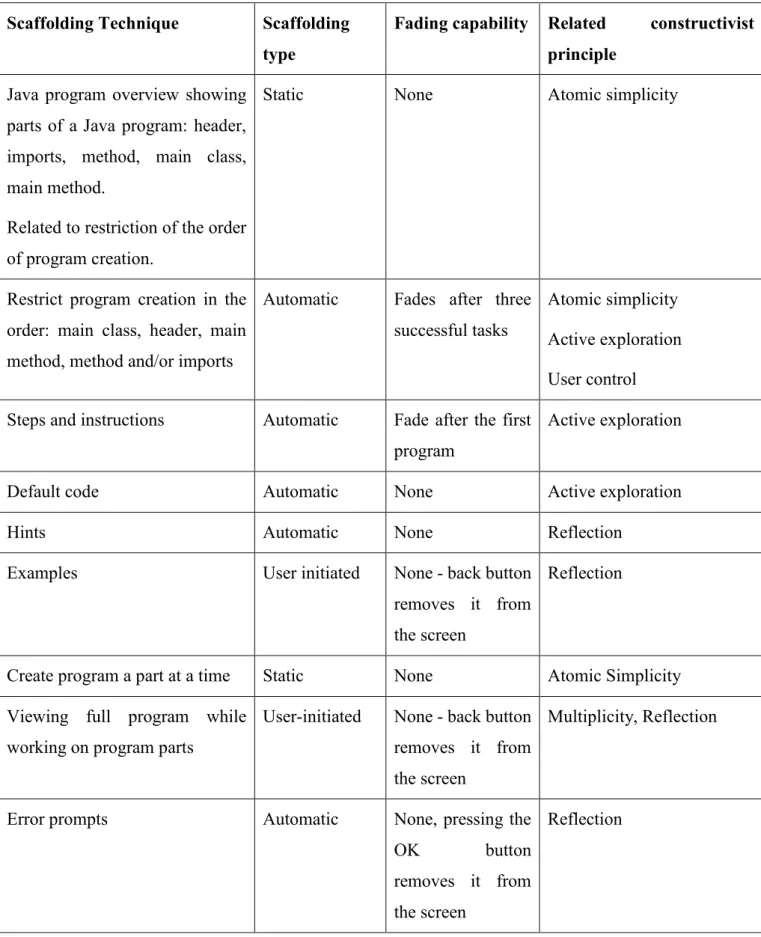
4.4.4 Summary of scaffolding techniques ... 53
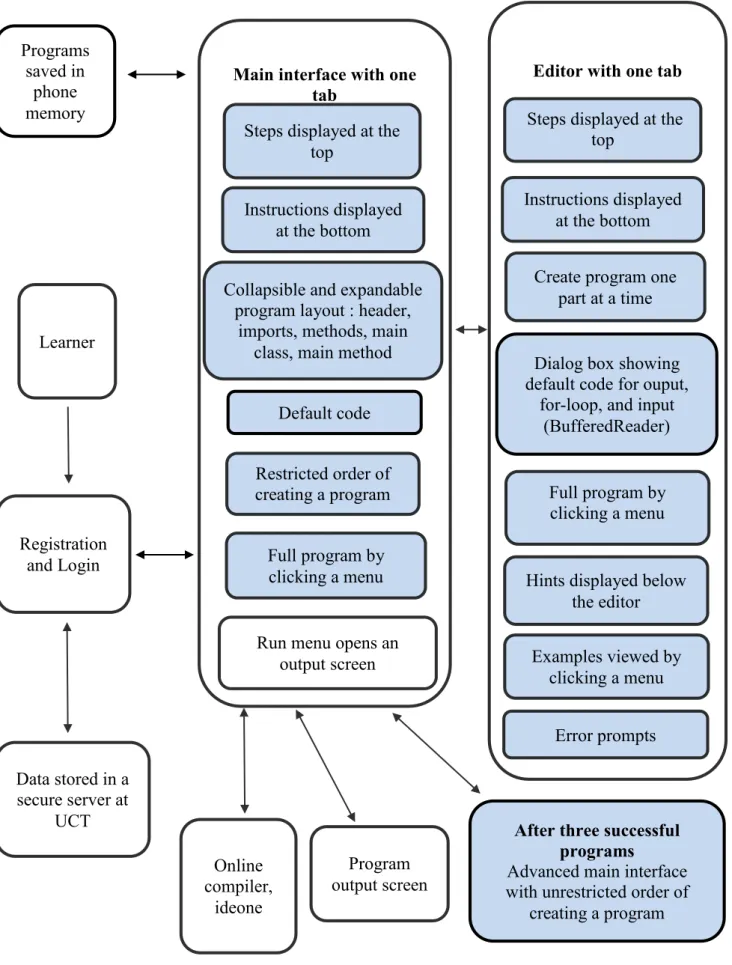
4.5 System Overview ... 55
4.5.1 First prototype ... 55
4.5.2 Second prototype ... 58
4.6 Example of a Simple Program Created Using the Scaffolding Techniques ... 60
4.7 Non-Scaffolded System Implementation ... 63
4.8 Chapter Summary ... 64
Chapter 5 Evaluation ... 65
5.1 Study Participants ... 65
5.2 Data Collection Methods ... 67
5.2.1 Electronic questionnaires ... 67
5.2.2 Computer logs ... 67
5.2.3 Video and image recordings ... 68
5.3 Internet-enabled mobile phones ... 68
5.4 Experiment Design ... 69
5.4.1 Programming tasks ... 69
5.4.2 Experiment procedure ... 70
5.5 Criteria to Address the First Research Question ... 71
5.5.1 Which scaffolding techniques were used to construct programs? ... 71
5.5.2 How were scaffolding techniques used to construct programs? ... 72
5.5.3 Qualitative Feedback ... 73
5.6 Criteria to Address the Second Research Question ... 73
5.6.1 Task Success ... 73
5.6.2 Time-on-task ... 74
5.6.3 Efficiency ... 75
5.6.4 Errors ... 75
5.6.5 Learnability ... 76
5.7 Summary of Criteria to Address Research Questions ... 76
viii
Chapter 6 Results and Discussion ... 79
6.1 Participants and Experiments ... 79
6.1.1 First Experiment ... 79 6.1.2 Second Experiment ... 81 6.1.3 Third Experiment ... 81 6.2 Task Success ... 84 6.2.1 First Experiment ... 84 6.2.2 Second Experiment ... 89 6.2.3 Third Experiment ... 92
6.2.4 Summary of Task Success Results from all the Experiments ... 94
6.3 Time-on-task ... 96
6.3.1 Second Experiment ... 96
6.3.2 Third Experiment ... 101
6.3.3 Summary of Time-on-Task Results ... 106
6.4 Efficiency ... 107
6.5 Errors ... 109
6.5.1 Second Experiment ... 110
6.5.2 Third Experiment ... 113
6.5.3 Discussion: Error Results from the Second and Third Experiments ... 114
6.6 Scaffolding Techniques Used ... 115
6.6.1 Use of Static Scaffolding ... 116
6.6.2 Use of Automatic Scaffolding ... 120
6.6.3 User-initiated Scaffolding Techniques ... 123
6.6.4 Summary of Results on which Scaffolding Techniques were used ... 125
6.7 How the Scaffolding Techniques were used to Create Programs ... 126
6.7.1 Time-based Outliers ... 126
6.7.2 Learners who attempted to edit a chunk repeatedly before proceeding to the next one ……….. 126
6.7.3 Learners who cancelled the use of scaffolding techniques ... 127
6.7.4 Learners who unlocked the advanced interface ... 127
6.7.5 Summary of how scaffolding techniques were used ... 129
6.8 Chapter Summary ... 129
Chapter 7 Conclusion ... 132
7.1 Synthesis of Empirical Findings ... 132
7.1.1 Which of the theoretically-derived scaffolding techniques support construction of Java programs on a mobile phone? ... 132
7.1.2 What is the effect of using the scaffolding techniques to construct Java programs on a mobile phone? ... 132
ix
7.2 Implications of the Study ... 133
7.2.1 Theory of constructivism ... 133
7.2.2 Design process ... 135
7.2.3 Novel scaffolding techniques and fading mechanisms ... 136
7.2.4 Understanding how learners use scaffolding techniques ... 137
7.2.5 Contribution to the field of ICT4D ... 137
7.3 Limitations of Research ... 138
7.4 Opportunities for Future Work ... 139
7.1.1 Extension of the system ... 139
7.1.2 Additional experiments ... 140
7.1.3 Evaluation with other existing tools ... 140
7.1.4 Model on fading of scaffolding ... 140
7.1.5 Use of the system to teach a class ... 140
REFERENCES ... 141
APPENDICES ... 152
Appendix A: Table of the Scaffolding Framework ... 152
Appendix B: Summary of Scaffolding Design Framework ... 158
Appendix C: Ethical Clearances ... 159
Appendix C1: Ethical clearance from University of Cape Town ... 159
Appendix C2: Permission to access learners at University of Cape Town ... 160
Appendix C3: Ethical clearance from Kenya Methodist University ... 161
Appendix D: Consent form signed by learners before participating in study ... 162
Appendix E: Questionnaires ... 163
Appendix E1: Experiment 1 questionnaire ... 163
Appendix E2: Experiment 2 and 3 questionnaire ... 172
Appendix E3: Experiment 3 questionnaire for control group... 175
Appendix F: Screenshots of the second prototype with modifications ... 177
Appendix F1: Screenshot showing use of tabs in the main interface, a green run button at the top of the screen, and addition of ‘other class’ chunk ... 177
Appendix F2: Screenshot showing use of tabs in the editor ... 177
Appendix F3: Screenshot showing ‘public class’ keyword in main class disabled, showing menu options that can be selected to enable (left figure) or disable it (right figure) ... 178
Appendix F4: Screenshot showing instructions in the main class indicating that a user can proceed without creating the main class ... 178
Appendix F4: Screenshot showing a header dialog (left figure) that can be enabled using a menu option (right figure) ... 179
Appendix F5: Screenshot showing the Scanner class option (left figure) and the corresponding default text (right figure) that is to be edited and reused ... 179
x
Appendix F6: Screenshot showing the import statements that are automatically inserted in the imports chunk (left figure) and the resulting dialog box for user input when the program
is compiled (right figure) ... 180
Appendix G: Raw Data for Number of Tasks ... 181
Appendix G1: Number of tasks attempted and completed per user for KeMU, Experiment 2 ... 181
Appendix G2: Number of tasks attempted and completed per user for UWC, Experiment 2 ... 181
Appendix G3: Number of tasks attempted and completed per user for JKUAT, Experiment 2 ... 182
Appendix G4: Number of tasks attempted and completed per user for KeMU, Experiment 3 ... 182
Appendix G5: Number of tasks attempted and completed per user for JKUAT, Experiment 3 ... 183
Appendix H: Raw Data for Time-on-Task ... 184
Appendix H1: Time-on-task data for learners in Control and Experimental groups at UWC Experiment 2 ... 184
Appendix H2: Time-on-task data for learners in Control and Experimental groups at JKUAT Experiment 2 ... 186
Appendix H3: Time-on-task data for learners in Control and Experimental groups at KeMU Experiment 3 ... 188
Appendix H4: Time-on-task data for learners in Control and Experimental groups at JKUAT Experiment 3 ... 189
Appendix I: Raw Data for Verbatim User Feedback ... 191
Appendix I1: Survey responses at UWC, Experiment phase 2 ... 191
Appendix I2: Survey responses at JKUAT, Experiment phase 2 ... 192
Appendix I3: Survey responses at KeMU and JKUAT, Experiment phase 3 ... 193
Appendix J: ERROR ANALYSIS ... 194
Appendix J1: Raw data showing error analysis of UWC data from the experimental group in the second Experiment ... 194
Appendix J2: Raw data showing error analysis of JKUAT data from the experimental group in the second Experiment ... 195
Appendix J3: Raw data showing error analysis of JKUAT data from the experimental group in the third Experiment ... 198
xi
List of Tables
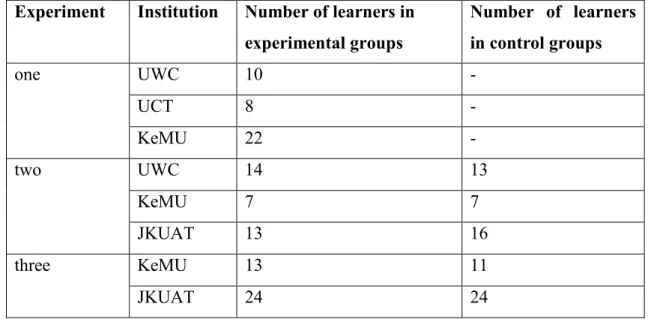
Table 2.1: Differences between behaviorism, cognitivism, and constructivism for learning ... 12 Table 4.1: Differences between User-Centered design and Learner-Centered design ... 37 Table 4.2: Table showing the designed scaffolding techniques, associated scaffolding type, fading capability and the related constructivist principle ... 54 Table 5.1: Total number of participants across the four institutions and the number of experiments conducted at each institution ... 66 Table 5.2: Number of experiments conducted at the four universities, the number of learners at each of the experiments, the groups involved in each experiment, and the data collection methods used at each experiment ... 70 Table 5.3: Summary of criteria to evaluate use of scaffolding techniques ... 72 Table 5.4: Table showing number of experiments, number of learners at each of the experiments, groups involved in each and the evaluation criteria addressed at each experiment ... 78 Table 6.1: Distribution of learners in the control and experimental groups across three experiments at four institutions ... 79 Table 6.2: Number of learners who completed each task at UCT, UWC and KeMU in the first
experiment ... 84 Table 6.3: How UCT and UWC learners rated the different scaffolding techniques in terms of
desirability to support construction of programs on a mobile phone ... 85 Table 6.4: How KeMU learners rated the different scaffolding techniques in terms of desirability to support construction of programs on a mobile phone ... 85 Table 6.5: Number of learners who attempted and completed each task in the Experimental groups at KeMU, UWC and JKUAT in the second Experiment ... 90 Table 6.6:Number of learners who attempted and completed each task in the Control groups at KeMU, UWC and JKUAT in the second Experiment ... 90 Table 6.7: Statistical task success results for attempted and completed tasks in the second Experiment ... 90 Table 6.8:Number of learners who attempted and completed tasks in the Experimental groups at KeMU and JKUAT in the third Experiment ... 93 Table 6.9:Number of learners who attempted and completed each task in the Control groups at KeMU and JKUAT in the third Experiment ... 93 Table 6.10: Statistical task success results for attempted and completed tasks in the third Experiment ... 93
xii
Table 6.11: Statistical task success results in the second and third Experiments for attempted and completed tasks in Experimental and Control groups ... 95 Table 6.12: Statistical time-on-task results for all complete and incomplete tasks in the second Experiment ... 97 Table 6.13: Statistical time-on-task results per completed task in the second Experiment ... 99 Table 6.14: Statistical time-on-task results for all complete and incomplete tasks in the third
Experiment ... 102 Table 6.15: Statistical time-on-task results per completed task in the third Experiment ... 105 Table 6.16: Statistical time-on-task results in the second and third Experiments for attempted and completed tasks in Experimental and Control groups ... 106 Table 6.17: Task completion rate, Average task time and Efficiency calculations for UWC,
Experiment 2 ... 108 Table 6.18: Task completion rate, Average task time and Efficiency calculations for JKUAT,
Experiment 2 ... 108 Table 6.19: Task completion rate, Average task time and Efficiency calculations for KeMU,
Experiment 3 ... 108 Table 6.20: Task completion rate, Average task time and Efficiency calculations for JKUAT,
Experiment 3 ... 109 Table 6.21: Statistical results on the mean number of errors for all tasks, first task, and second task at UWC and JKUAT in the second experiment ... 110 Table 6.22: Mean number of run-time errors and scaffolded errors in attempted tasks (per task) at UWC and JKUAT Second Experiment ... 112 Table 6.23: Statistical results on the mean number of errors for all tasks, first, second and third tasks at JKUAT in the third experiment ... 113 Table 6.24: Average number of run-time errors and scaffolded errors in attempted tasks in control and experimental groups, JKUAT Third Experiments ... 114 Table 6.25: Statistical error results from the second and third Experiments at UWC and JKUAT across all tasks and the first three tasks ... 115 Table 6.26: Summary of the sequence of program creation in the advanced interface by learners at JKUAT, Experiment 3 ... 128
xiii
List of Figures
Figure 1.1: Graph showing percentage of respondents (Ghana N=2051, Kenya = 2000) who have the
item at home in working order ... 2
Figure 1.2: Graph showing mobile phone ownership among Kenyan respondents (N = 2000) by education category ... 3
Figure 1.3: Flowchart showing mixed methods research design and research approach followed in the study ... 7
Figure 2.1: Comfort zone of proximal development (Anderson & Gegg-Harrison 2013) ... 17
Figure 3.1: TouchDevelop interface on a mobile device ... 32
Figure 3.2: Example of an AppInventor program ... 32
Figure 3.3: SAND IDE ... 32
Figure 3.4: Java Editor ... 32
Figure 4.1: LCD methodology followed in this study as adapted from the TILT model ... 39
Figure 4.2: Distribution of all respondents according to university ... 40
Figure 4.3: Distribution of all respondents according to course of study ... 40
Figure 4.4: Distribution of all respondents according to degree of study ... 41
Figure 4.5: Main interface showing only the main class activated ... 47
Figure 4.6: Main class default code ... 47
Figure 4.7: Creating the main class ... 47
Figure 4.8: Method default code ... 47
Figure 4.9: Creating a method ... 47
Figure 4.10: dialog for default statements ... 47
Figure 4.11: Main class completed (in green) and header button activated ... 49
Figure 4.12: Unrestricted interface ... 49
Figure 4.13: Error prompt ... 51
Figure 4.14: Incorrect creation of return statement ... 51
Figure 4.15: Error prompt indicating incorrect use of return statement ... 51
Figure 4.16: Hints displayed when creating main class ... 51
Figure 4.17: Main Class example displayed after clicking on a menu item ... 51
Figure 4.18: Creating method ... 53
Figure 4.19: Full program as was last saved ... 53
xiv
Figure 4.21: System overview of the first prototype showing the scaffolding techniques in blue at the
main interface and at the editor ... 56
Figure 4.22: System overview of the second prototype showing the scaffolding techniques in blue at the main interface and the editor ... 59
Figure 4.23: Screenshot showing the main interface of the second prototype with three tabs, a button for other class, and a quick-access run button ... 60
Figure 4.24: Editor with three tabs for instructions, editing and full program ... 60
Figure 4.25: The header dialog in the editor ... 60
Figure 4.26: Restricted main class keywords at the editor ... 60
Figure 4.27: Main class active ... 61
Figure 4.28: Main class clicked ... 61
Figure 4.29: Editing main class ... 61
Figure 4.30: Error prompt ... 62
Figure 4.31: Header activated ... 62
Figure 4.32: Saved on device ... 62
Figure 4.33: Header clicked ... 62
Figure 4.34: Full program ... 62
Figure 4.35: Creating header ... 62
Figure 4.36: Main method clicked ... 62
Figure 4.37: Default statements ... 62
Figure 4.38: Edit main method ... 62
Figure 4.39: Completed program parts ... 63
Figure 4.40: Completed full program ... 63
Figure 4.41: Output of program after compilation ... 63
Figure 4.42: Interfaces for the non-scaffolded application ... 63
Figure 5.1: Samsung Galaxy Pocket S5300 used during the experiments ... 68
Figure 6.1: First Experiment session at UCT ... 80
Figure 6.2: First Experiment session at UWC ... 80
Figure 6.3: Programming task attempted by learners in the first experiment ... 80
Figure 6.4: Class session at KeMU during the first experiment ... 81
Figure 6.5: Second Experiment session at KeMU ... 82
Figure 6.6: Second Experiment session at UWC ... 82
Figure 6.7: Programming tasks attempted by learners in the second Experiment at UWC, KeMU and JKUAT ... 82
xv
Figure 6.8: Third Experiment session at KeMU ... 83
Figure 6.9: Third Experiment session at JKUAT ... 83
Figure 6.10: Programming tasks attempted by learners in the third Experiment ... 83
Figure 6.11: Full program written within the main class chunk where only the class name is required ... 87
Figure 6.12: Inappropriate completion of the main class ... 87
Figure 6.13: Dialog box showing default statements ... 87
Figure 6.14: Learner typing statement from scratch ... 87
Figure 6.15: Video screenshot of a learner at the main interface of the application ... 87
Figure 6.16: Video screenshot showing soft keypad covering half the screen ... 87
Figure 6.17: Box plots showing time-on-task for incomplete tasks, completed tasks and total time for Experimental and Control group at UWC, Experiment 2 ... 96
Figure 6.18: Box plots showing time-on-task distribution for incomplete tasks, completed tasks and total time on task for Experimental and Control groups at JKUAT, Experiment 2 ... 97
Figure 6.19:Box plot showing time on completed tasks per-task in the Experimental and Control group at UWC, Experiment 2 ... 98
Figure 6.20:Box plot showing time on completed tasks per-task for Experimental and Control group at JKUAT, Experiment 2 ... 99
Figure 6.21:Box plots showing time-on-task distribution for incomplete tasks, completed tasks and total time on task for Experimental and Control groups at KeMU,Experiment 3 ... 101
Figure 6.22: Box plots showing time-on-task distribution for all incomplete tasks, completed tasks and total time on task for Experimental and Control groups of JKUAT, Experiment 3 ... 102
Figure 6.23:Box plot showing task completion rates across completed tasks for Experimental and Control groups at KeMU, Experiment 3 ... 104
Figure 6.24: Box plot showing task completion rates across completed tasks for Experimental and Control groups at JKUAT, Experiment 3 ... 104
Figure 6.25: Error prompt showing incorrect creation of the main class ... 112
Figure 6.26: Error prompt showing incorrect completion of the for-loop ... 112
Figure 6.27 A program showing the Keywords ‘String’ and ‘System’ written in lower case ‘s’ (in bold) ... 112
Figure 6.28: Error prompts encountered within the main class in italics ... 114
Figure 6.29: Error prompts encountered within the main method in italics ... 114
Figure 6.30: Comparison of use of static scaffolding techniques between incomplete and complete programs at UWC, KeMU and JKUAT in Experiments 2 and 3 ... 116
xvi
Figure 6.31: A section of a learner’s logs showing several attempts at adding an extra line within the main class chunk ... 118 Figure 6.32: Progression of use of static scaffolding techniques in incomplete and complete programs at JKUAT Experiment 3 ... 119 Figure 6.33:Use of automatic scaffolding techniques in incomplete and complete programs at
JKUAT Experiment 3 ... 121 Figure 6.34: Sequence of program creation showing the statement dialog cancelled twice while creating the main method, and then enabled on the third attempt ... 121 Figure 6.35: Progression of use of automatic scaffolding techniques in incomplete and complete programs at JKUAT Experiment 3 ... 123 Figure 6.36 : Use of user-initiated scaffolding techniques in all programs across the four experiment sessions ... 124 Figure 6.37:Graph showing when the full program was viewed and the average view per learner at UWC, Experiment 2 ... 124 Figure.6.38: Graph showing when the full program was viewed and the average view per learner at JKUAT, Experiment 3 ... 125
xvii
List of Abbreviations Used
IT – Information TechnologyPC – Personal Computer 3D – Three-dimensional
IDE – Integrated Development Environment LCD – Learner-Centered Design
UCD – User-Centered Design
API – Application Programing Interface CSE – Computer Science Education ZPD – Zone of Proximal Development
CZPD – Comfort Zone of Proximal Development GUI – Graphical User Interface
ICT – Information Communication Technology ACM – Association for Computing Machinery
IEEE – Institute of Electrical and Electronics Engineers
xviii
Abstract
The ubiquity of mobile phones provides an opportunity to use them for learning programming beyond the classroom. This would be particularly useful for novice learners of programming in resource-constrained environments. However, limitations of mobile phones, such as small screens and small keypads, impede their use as typical programming environments. This study proposed that mobile programming environments could include scaffolding techniques specifically designed for mobile phones, and designed based on learners’ needs.
A six-level theoretic framework was used to design scaffolding techniques to support construction of Java programs on a mobile phone. The scaffolding techniques were implemented on an Android platform. Using the prototype, three experiments were conducted with 182 learners of programming from four universities in South Africa and Kenya. Evaluation was conducted to investigate: (i) which scaffolding techniques could support the construction of Java programs on a mobile phone; and (ii) the effect on learners of using these scaffolding techniques to construct Java programs on a mobile phone. Data was collected using computer logs, questionnaires, and image and video recordings.
It was found that static scaffolding, such as a program overview and constructing a program one part at a time, supported the construction of programs on a mobile phone. It was also found that automatic scaffolding, such as error prompts and statement dialogs, and user-initiated scaffolding, such as viewing of the full program while creating parts of a program, supported learners to construct programs on the mobile phone. The study also found that the scaffolding techniques enabled learners to attempt and complete more tasks than a non-scaffolded environment. Further, the scaffolding techniques enabled learners to complete programs efficiently, and captured syntactical errors early during program creation. The results also indicated that after the initial familiarization with the scaffolded environment, the scaffolding techniques could enable faster completion of programs. Learners’ feedback indicated that they found the scaffolding techniques useful in supporting programming on a mobile phone and in meeting learners’ needs.
This study provides empirical evidence that scaffolding techniques specifically designed for mobile phones and designed based on learners’ needs could support the construction of programs on a mobile phone.
1
Chapter 1 Introduction
Computer programming is a difficult subject for most learners of programming. Research indicates this to be a universal problem, especially among novice learners (Piteira & Costa 2012; Watson & Li 2014). Novice learners of programming may be defined as learners enrolled in a university-level, introduction to programming course (Maleko et al. 2012). This research adopts this definition of a novice learner. The learning difficulties in the subject indicate that some programming skills are beyond the novice learners’ efforts. Scaffolding refers to support provided so that the learner can engage in activities that would otherwise be beyond their abilities or their unassisted efforts (Jackson et al. 1998; Wood et al. 1976). For example, an adult could support a child who is learning how to walk by holding the child’s hands. Likewise, support structures erected around an upcoming building enable a construction worker to access a higher part of the building. Both the adult’s hands and the building’s support structures offer scaffolding. Thus, a novice’s learning process can also be scaffolded in different ways.
A child learns how to walk by actually trying to walk. Similarly, programming is best learnt by attempting to write programs and not just reading or memorizing programs. This principle of learning by writing programs is embedded in the constructivist theoryof knowledge building, which focuses on learning through doing (Fosnot 2005). As a child is learning to walk, the adult’s hands can be withdrawn when the child is more stable on their feet, but the adult’s hands should be available to the child if they still need support. Thus, the constructivist theory supports the notion of scaffolding because, as learners construct programs, they can be provided with support that could later fade away. Because it underlies the principles of learning by doing and scaffolding, constructivism was used as the theoretical framework for this research.
In order to contribute towards tackling learning difficulties in programming, novice learners can be supported to construct programs while they are outside the classroom. This makes any such support to be additional to the learner’s classroom learning, and not a replacement. Further, learners may not always have access to the school’s computer laboratories where they can practice programming. Support to learners outside the classroom can be provided using PC-based applications. Indeed, several studies have offered scaffolded environments on PC platforms targeting novice learners of programming, for example, 3D environments such as Alice (Dann et al. 2011), and teacher-learner assessment environments such as Test My Code (Vihavainen et al. 2013).
However, most learners who are in resource-constrained environments, such as in parts of Africa, have limited access to PCs while they are outside the classroom. In fact, in many developing
2
countries, people are much more likely to use computers at school or at work than to own them at home. For example, a survey conducted in Ghana and Kenya to investigate the ownership of information and communication technologies at home showed that only 10% of respondents in Ghana and 5% in Kenya have a computer at home (Bowen & Goldstein 2010). This is illustrated in Figure 1.1. The limited access to PCs outside the classroom aggravates the learning difficulties faced by such learners because resource constraints present their own challenges in developing a good programming foundation (D’Souza et al. 2008). Further, research conducted in Tanzania highlights that one of the contributors to learners struggling in programming is lack of adequate access to computers, which limits hands-on learning (Apiola et al. 2011).
The ubiquity of mobile devices provides an opportunity to use them as a resource to support learning of programming beyond the classroom. This is especially because, in developing countries, mobile devices hold enormous promise as the single ICT most likely to deliver education, and to do so in a sustainable, equitable and scalable basis (Traxler 2011). Mobile devices include laptops, tablets and mobile phones. Of these, mobile phones are the most widely used mobile devices among learners in developing countries (Kafyulilo 2012). Further, Figure 1.1 shows that the percentage of respondents in Ghana and Kenya who own mobile phones was higher in comparison to the percentage of respondents who own computers at home. In addition, Figure 1.2 shows a graph from a study conducted in Kenya, indicating that most of therespondents studying for university degrees or higher own mobile phones (Hannah 2010).For these reasons, the mobile phone was selected as the resource that could be used to construct programs outside the classroom.
Figure 1.1: Graph showing percentage of respondents (Ghana N=2051, Kenya = 2000) who have the item at home in working order
Source of Data: (Bowen & Goldstein 2010) 87% 41% 5% 11% 2% 71% 9% 86% 59% 10% 4% 6% 72% 8%
Radio TV Computer Internet Landline Mobile Phone MP3 Player Ghana Kenya
3
Figure 1.2: Graph showing mobile phone ownership among Kenyan respondents (N = 2000) by education category
Source of Data: (Hannah 2010)
However, limitations of mobile phones, such as a small screen size and a small keypad, impede their use as typical programming environments. To deal with these limitations, and for handheld devices to become effective learning tools, the unique design challenges inherent in such a system must be understood (Luchini et al. 2002). In fact, even when designing for Web-based GUIs that run on a mobile device, it has been suggested that interfaces on mobile devices should be tailored for such devices (Alonso-Ríos et al. 2014; Zimmerman & Yohon 2009).
There are mobile programming environments that can be used by novice learners. Some, such as SAND IDE1, can be used to create standard programs. Others, such as App Inventor2, can be used
to create mobile applications. However, mobile programming environments such as SAND IDE mostly mimic PC IDEs and do not address the limitations of mobile phones. Further, it was not the aim of this study to support the creation of mobile applications, but to support the creation of standard programs that would typically be created in an introduction to programming class.
In addition to addressing limitations of mobile phones, the challenges faced by learners of programming should be considered. This is because addressing these challenges maximizes the potential of meeting learners’ needs. The aim of this research was to support novice learners by 1 http://goo.gl/708IuE 2 http://appinventor.mit.edu/explore/ 97% 91% 69% 49% 24%
University Degree or Higher Post-Secondary, Vocational Secondary (complete or incomplete) Primary (complete or incomplete) No Formal Education
4
scaffolding the construction of programs. Therefore, in providing scaffolding, the needs of learners can be placed at the center of the design process. Such an approach was defined as learner-centered design, which claims that software can embody scaffolding that can address learners’ needs (Soloway et al. 1996). Further, learner-centered design understands learners as a unique group of novices who are trying to learn the content and work practices of unfamiliar domains (Luchini et al. 2002). In addition, learner-centered design should provide tools that provides learners with an active process of learning by doing where learners manipulate the material they are learning (Quintana et al. 2000; Soloway et al. 1996). Such an approach is embodied in the constructivist theory, which is the underlying theoretical framework for this research.
Consequently, this research proposed that programming environments on mobile phones could include scaffolding techniques that are specifically designed for mobile phones, and designed based on learners’ needs.
1.1
Scope of the Study
The study focused on introduction to programming courses taught using Java. Java was selected as the language for construction of programs because it was the common language taught across the institutions that participated in this research. In addition, most novice learners learn an introductory programming course using object-oriented programming languages such as Java (Black et al. 2013). Further, the programs that were used in the study are programs that were created in an introduction to programming class. This focus was deemed appropriate because the aim of the study was to support novice learners of programming. The learners who participated in the study were from institutions in South Africa and Kenya. The institutions from these two locations were selected because of their convenience in terms of having established contacts. Further, the two locations were deemed appropriate since they are both developing countries where learners could have limited access to PCs and laptops outside the classroom. Lastly, the focus of the study was on the use of a mobile phone as a programming environment and not the use of other mobile devices such as tablets, or the use of desktops and laptops.
1.2
Problem Statement
The aim of this research was to identify which scaffolding techniques could support Java programming on a mobile phone and, further, to evaluate the effect on learners of using these scaffolding techniques to construct Java programs on a mobile phone.
1.3
Research Questions
5
1. Which of the theoretically-derived scaffolding techniques support construction of Java programs on a mobile phone?
To design scaffolding techniques that could support construction of Java programs on a mobile phone, a six-level scaffolding framework was used. This framework consisted of theoretical guidelines that were followed in order to design specific scaffolding techniques. This scaffolding framework is discussed in Chapter 4. To address this research question, first, an analysis was conducted to identify which of the scaffolding techniques were used to construct programs. Then the scaffolding techniques were analyzed to identify how learners used them to construct programs. Further, learners were asked: if they found the scaffolding techniques useful; which scaffolding techniques they found useful; and to comment on their experiences while using the scaffolding techniques.
2. What is the effect on learners of using the scaffolding techniques to construct Java programs on a mobile phone?
By learners constructing programs using the derived scaffolding techniques and some constructing programs using a non-scaffolded environment, the study investigated the effect of the scaffolding techniques. The data from the two groups of learners was analyzed to measure: the number of tasks completed; the amount of time spent on the tasks; the errors encountered while constructing the tasks; and the efficiency with which the programs were constructed. In addition, the learnability of the scaffolded environment was analyzed.
1.4
Research Design and Approach
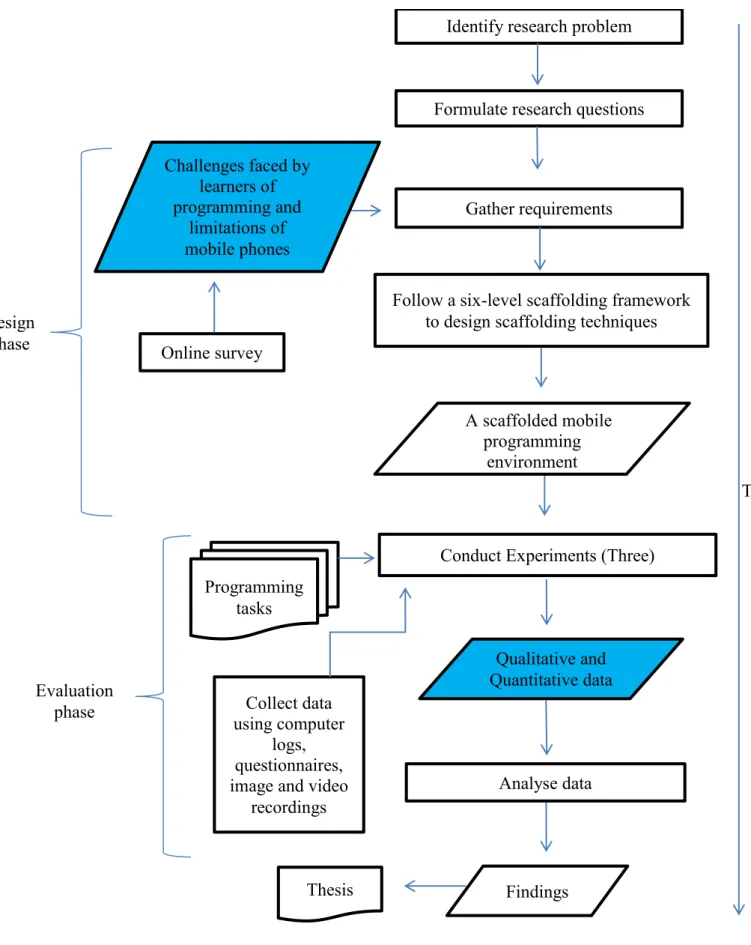
To conduct the research, a mixed methods design was used. Mixed methods research involves collecting, analyzing, and interpreting quantitative and qualitative data in a single study or in a series of studies that investigate the same underlying phenomenon (Leech & Onwuegbuzie 2007). Mixed methods research is based on the idea that the use of quantitative and qualitative approaches in combination provides a better understanding of a research problem than either approach alone (Azorín & Cameron 2010).
To address the first research question, qualitative data was collected in order to analyze which of the specifically-designed scaffolding techniques were used to construct programs. Further, qualitative data was collected in order to understand the perception of learners of the scaffolding techniques, and their experiences while using the scaffolding techniques. In addition, quantitative data was collected in order to analyze the frequency of use of the scaffolding techniques.
6
To address the second research question, data was collected to measure quantities such as number of completed tasks and time-on-task. Collectively, both research questions were addressed using both quantitative and qualitative data.
This study followed a combination of a multiphase design and embedded design of the mixed methods research. A multiphase design combines both sequential and concurrent use of qualitative and quantitative data over a period of time (Creswell & Clark 2007). An embedded design collects and analyzes both quantitative and qualitative data within a traditional quantitative or qualitative design (Creswell & Clark 2007). Figure 1.3 shows these phases in blue. First, qualitative data was collected during the design phase. This qualitative data informed the design of the scaffolded environment. Thereafter, both qualitative and quantitative data was collected and analyzed in the evaluation phase. Further, Figure 1.3 summarizes the overall research approach as described next.
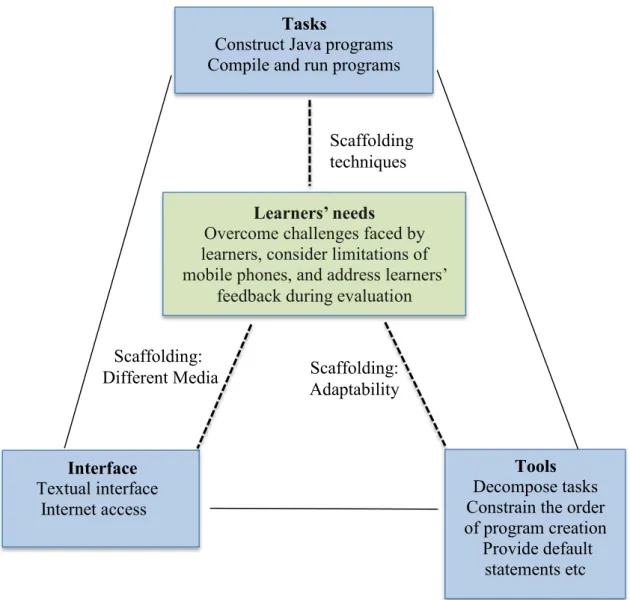
The aim of this research was to contribute towards tackling learning difficulties in programming. Therefore, the first step was to understand the challenges that learners face in the subject. These challenges were elicited from learners of programming using an online survey and were used as part of the requirements in the design process. The elicited learner challenges and limitations of mobile phones were integrated within a six-level scaffolding framework to select scaffolding techniques that could support Java programming on a mobile phone. The framework was based on a theory-driven model that has four main levels (Quintana et al. 2004): challenges experienced by learners; cognitive type of the learning challenges; scaffolding guidelines; and scaffolding strategies that implement the guidelines. In addition to these four levels, two other levels were added in order to accommodate: a model for categorizing the type of scaffolding to use (Jackson et al. 1998); and selection of specific scaffolding techniques that could support construction of Java programs on a mobile phone (Mbogo et al. 2014).
To implement the selected scaffolding techniques in a mobile programming environment, an Android prototype was developed. Android was selected as the platform of implementation because it is open source, and it has an 85% market share among smartphone users (Hornyak 2014). Apart from the scaffolded environment, a non-scaffolded prototype was designed to be used in the experiments. These prototypes were used in three experiments with a total of 182 learners of introductory programming courses taught using Java, from four institutions in South Africa and Kenya. In these experiments, learners attempted Java programming tasks and data was collected using computer logs, questionnaires, video recordings and image recordings. In the first experiment, only an experimental group participated in the study, where all the learners used the scaffolded environment. In the second
7
Figure 1.3: Flowchart showing mixed methods research design and research approach followed in the study
Identify research problem
Formulate research questions
Gather requirements
Conduct Experiments (Three) Design phase Evaluation phase Time Online survey
Follow a six-level scaffolding framework to design scaffolding techniques
Collect data using computer
logs, questionnaires, image and video
recordings Analyse data
Findings Thesis Qualitative and Quantitative data Challenges faced by learners of programming and limitations of mobile phones AA scaffolded mobile programming environment Programming tasks
8
and third experiments, control and experimental groups participated in the study, where the control group used the non-scaffolded environment.
Evaluation was conducted while learners used the mobile programming environments to construct programming tasks. Conducting evaluation while considering data about learners’ interaction is encouraged in educational evaluation models such as the micro-meso-macro framework (Vavoula & Sharples 2009) and the CIAO model (Jones et al. 1999). Following this recommendation, the evaluation criteria derived from the research questions were used to analyze the data. For example, to identify which scaffolding techniques were used to construct the programs, first, task success was measured by analyzing if a programming task was successfully completed or not. Thereafter, analysis was conducted on which scaffolding techniques were used to construct the complete and incomplete tasks. This evaluation process led to the research findings.
1.5
Research Contributions
In addressing the research questions, it was expected that this research would make the following five contributions:
1. Application of constructivist principles in designing scaffolding techniques on mobile programming environments.
2. A theory-driven process of designing scaffolding techniques for a mobile programming environment.
3. A proof-of-concept prototype with which novice learners can construct Java programs while supported by scaffolding techniques.
4. Empirical evidence about which scaffolding techniques could support Java programming on a mobile phone.
5. Empirical evidence about the effect on learners of using scaffolding techniques to support Java programming on a mobile phone.
It was anticipated that making the above contributions would generate interest among educators and researchers working on designing mobile-based tools that support learning, especially in subjects such as programming that require a hands-on approach.
In addition, the study would contribute towards tackling the challenges in learning programming among novice learners, especially in resource-constrained environments where learners own mobile phones but could have limited access to PCs or laptops outside the classroom. In using ICT (scaffolding techniques on a mobile phone) to foster development (improving skills by learning), the results of this study would be relevant to the field of ICT for Development. Further, this study showed a theoretic
9
and methodological process for designing a programming environment on a mobile phone; such a methodological process was emphasized as important in conducting Mobile for Development research (Svensson & Wamala 2012).
1.6
Thesis Outline
Chapter 2: Constructivism and Programming
In this chapter, the constructivism theory and its use in programming is discussed. Other learning theories are presented, leading to a discussion on the choice of constructivism as a grounding theory for this research. Finally, scaffolding as a principle of constructivism is discussed.
Chapter 3: Related Work
Previous work that relates to the use of scaffolding in programming is discussed in this chapter. In order to guide the structure of the chapter, discussion is divided into four parts: difficulties faced by novice learners of programming; scaffolding programming on PCs; using mobile phones for learning and the limitations of mobile phones; and learning programming using mobile phones. The chapter concludes with a summary of gaps and opportunities that have been identified in related work.
Chapter 4: Design and Implementation
The design of a prototype that offers scaffolding techniques to construct Java programs on a mobile phone is presented in this chapter. A six-level scaffolding framework that culminates in the choice of scaffolding techniques guides the design process. How the scaffolding techniques were implemented on a mobile phone is discussed, followed by a summary of the scaffolding techniques. Thereafter, the system overview is presented followed by an example of how a simple program can be created on the scaffolded environment. The chapter concludes by describing a non-scaffolded environment that was used by learners in a control group.
Chapter 5: Evaluation
This chapter discusses how evaluation was conducted in order to address the two research questions. The chapter describes theparticipants who took part in the study, and the data collection methods and materials used. Further, the chapter discusses the number of experiments that were conducted and how they were conducted. Thereafter, the evaluation criteria derived to address the research questions and the related hypotheses are presented. The chapter concludes with a summary of the criteria used to address the two research questions.
Chapter 6: Results
In this chapter, the results and analyses of the collected quantitative and qualitative data as per the evaluation metrics used to address the research questions are presented and discussed. The chapter starts with a discussion of the participants who took part in the study and a review of how they
10
participated in the experiments. Thereafter, results and related discussions are presented for each of the three experiments. The chapter concludes with a summary of the research findings.
Chapter 7: Conclusion
This chapter begins by restating the research problem and the research questions. A synthesis follows of how the empirical findings addressed the research questions. Thereafter, the chapter discusses the implications of the study. Finally, the chapter discusses the limitations of the study and ideas for future research.
11
Chapter 2
Constructivism and Programming
The previous chapter introduced the purpose and motivation of the research and briefly showed that the constructivist theory supports learning by doing and scaffolding. This chapter describes the constructivist theory and its application to programming. Thereafter, scaffolding is described as a principle of constructivism.
2.1
Choice of Constructivist Theory
The need to choose a learning theory was influenced by two factors: to select a learning theory that supports the nature of programming as a practical course; and to select a learning theory that can underlie the concept of supporting learners. There are several learning theories such as behaviorism, cognitivism, and constructivism. Table 2.1 shows the differences among these three learning theories as outlined by Ertmer & Newby (2008) using the five definitive questions described by Schunk and Dale (2011). Further, using the example of a child learning how to walk, the last row of Table 2.1 illustrates how each of the theories could be applied to this example.
As illustrated in the table, behaviorism and cognitivism focus on response to stimuli and internal mental processes, respectively, while constructivism focuses on interaction between the learners and the environment. In this research, new learners of programming interact with a programing environment in order to learn a programming skill. In addition, since the aim was to support learners outside the classroom, there was need for a learning theory that emphasizes on individual learning since the learners are assumed to be working on their own. This made constructivism the appropriate choice of a theoretical framework.
However, one criticism of constructivism is that it is relativist, where anyone’s constructions are as good as anyone else’s and where we are unable to judge the value or truth of constructions with any degree of certainty (Cunningham & Duffy 1996). While this is a genuine criticism, its negativity is lessened in the context of programming by using correct outcomes of programs as the criteria for validity. A second concern is that the individualistic nature of constructivism leads to an inability to communicate (Cunningham & Duffy 1996). That is, learners are unable to talk to one another because learning occurs through personal experience. Since the aim of this research was to provide support outside the classroom alongside other modes of learning, there was room for learners to communicate. A third criticism of constructivism is that researchers attempt to implement the theory by promoting active knowledge construction while giving minimal guidance (Kirschner et al. 2006). Such minimal guidance is only provided if the learner needs it, hence the learner is required to construct most of the new knowledge on their own. It seems that such a constructivist approach reflects how programming
12
Table 2.1: Differences between behaviorism, cognitivism, and constructivism for learning
Behaviorism (Response to stimuli) Cognitivism (Mental processing) Constructivism (creating meaning from ones experiences) How does learning occur?
When a proper response is demonstrated to specific stimuli.
Learning focuses on what learners know. Emphasis is on creating meaning. What factors influence learning?
External stimuli. Environmental conditioning.
Learner and
environmental factors.
What is the role of memory?
Emphasis is placed more on habit rather than reliance on memory.
Learning results when information is stored in the memory in an organized manner.
Understanding is developed through continual use.
How does prior learning affect new learning?
Through generalization. Retrieving knowledge from memory.
Engaging the learner in actual use of tools in real world situations. What types of
learning are best explained by the theory?
Recalling facts, generalizations, associations, and chaining (automatically performing a specified procedure). Reasoning, problem solving, information retrieval. Transitional learning that equips new learners with skills they can use to become advanced learners. Theory applied
to example of a child learning to walk.
The stimuli could be the adult holding out his hands in front of the child and encouraging the child to reach out.
A child learns how to walk depending on the stage of their cognitive development. (Piaget 1964)
An adult holding the child’s hands learns how to walk by using the adult’s hands as support as they take one step after another.
13
is taught, where the emphasis is that people should learn programming by constructing programs from the basic information of the language, and they should do it in the same way that experts do (Guzdial 2015). Such an approach capitalizes on the learners’ working-memory (and not the long-term memory), which retains information only temporarily, if at all (Kirschner et al. 2006). This study addressed this criticism of constructivism in two ways. First, the aim of the study was to provide a scaffolded environment alongside a classroom learning experience. This way, the learners could still receive active instructions in the classroom, which they could then apply in creating programs using the scaffolding techniques. Secondly, the scaffolding techniques were designed to provide strongly guided learning while learners construct programs. Such an approach was recommended as one that enables deeper learning than one with minimal guidance (Moreno 2004). Further, some forms of strongly guided learning approaches are worked examples or process worksheets (Kirschner et al. 2006). In the design of the scaffolding techniques in this study, such approaches were considered.
2.2
Constructivist Theory
Constructivism stems from the field of cognitive science, particularly the work of Jean Piaget and the socio-historical work of Lev Vygotsky (Fosnot & Randall 1996). In addition, Seymour Papert developed a theory of learning based on Piaget’s constructivism (Ackermann 2001). A description follows on how Piaget, Papert, and Vygotsky described constructivism.
Piaget’s constructivism suggests that knowledge expands from within according to complex laws of self-organization (Ackermann 2001). As such, children’s perceptions of the world are determined by innate processes and not what an adult says is wrong or right. However, this does not mean that children’s perceptions do not change. Indeed, they are continually evolving as they interact with their environment. But, for a child to abandon their current view, they must go through experiences and actions in the world (Ackermann 2001). Piaget’s view describes two implications on education: (i) learning is not a direct process that is influenced by external factors, but one that happens innately from within; and (ii) a learner grows from their innate knowledge by going through an experience. It is this focus on internal cognition by Piaget that Papert diverts from.
Papert’s description of constructivism focuses on learning through making rather than overall cognitive potentials (Ackermann 2001). Papert’s view stresses that learning happens through context and knowledge is acquired when a learner expresses himself, which in turn makes that idea tangible and therefore can be shared. Stressing the importance of a learner expressing themselves to an external environment is not new; Vygotsky stressed on social interaction to foster learning.
Vygotsky’s theory focuses on socially elaborated learning where he emphasized that it is in the course of interaction between children and adults that young learners identify effective means for
14
remembering (Vygotsky 1978). He further argued that the lack of recognition among educators of the ways in which an experienced learner can share his knowledge with a less advantaged learner, limits the intellectual development of many learners (Vygotsky 1978). Therefore, people gain by receiving guidance from others. This is a notion that had been discussed by Bruner.
In the book Toward a Theory of Instruction, Jerome Bruner talks about how instruction is achieved through showing and not telling (Bruner 1966). In the final chapter of this book, he tells of a scenario observed between children and adults of a hunter-gatherer community where there were very few instances of ‘telling’ or teaching as we know it, but children imitated what they saw adults do. This book could be said to have begun the first illustrations of application of constructivism in education, without explicitly calling it so.
Despite the different definitions, they seem to all share three key characteristics that form the core of constructivism:
(i) knowledge is gained when a learner goes through an experience that enables them to learn;
(ii) learners are active builders of their own knowledge through expression and interaction with other people or other things in their environment; and
(iii) there is a relation between existing knowledge and any new knowledge that is acquired by the learner.
Constructivism has been applied to many domains, including education and educational software. However, it is noted that constructivism is a theory about learning, not a description of teaching (Fosnot & Randall 1996). This distinction stems from the illustration that knowledge cannot be merely copied from a teacher to a learner. Instead, knowledge is acquired when learners are given an opportunity for meaningful experience based on the information given by the teacher, through which they can ask questions, interact with the information and create their own mental models.
In order to practically apply constructivism to the design of applications, some researchers derived a set of constructivist principles (Winterbottom & Blake 2004; Winterbottom 2010). These principles are:
i. Atomic simplicity, where new pieces of information are kept as simple as possible and the complexity of knowledge can be built through links between the simpler parts, and there is provision for incremental building of knowledge.
ii. Multiplicity, which encourages multiple perspectives on concepts and methods of approaching a problem.
iii. Active exploration, which supports the active learning nature of constructivism. Part of exploration is making mistakes and learning from them. Therefore, errors can be seen
15
as a mechanism for users to gain insight, and this means that they should be easily identified.
iv. Reflection, whichcan enable people to form viable theories about their knowledge and how it fits together. The process of constructing knowledge requires acting with reflection so as to build effective connections between bits of knowledge.
v. User control, which implies that active construction is the idea of personal control where people gain power over their learning processes by actively constructing their own knowledge. While learners have control over their learning process, they could be provided with support that facilitates this learning that with time, adjusts according to their needs. Such support is known as scaffolding.
vi. Scaffolding, which describes guidance provided in the form of artefacts, advice and tutorials, which allow learners to perform tasks that would normally be beyond their ability, but which fall away when learners have constructed the knowledge and skill to accomplish the task alone.
These six principles could be applied to programming. Programming being a complex subject, the aim must be to simplify as much as possible the interface that is presented to a new learner. In so doing, a programming environment can provide multiple views of a program and then support the learner to connect them into a single unit. Further, a programming environment could provide feedback when errors are encountered. In addition, programming learners need to be supported to think about the programs they are creating. This can be achieved by providing multiple representation and feedback mechanisms. Lastly, while learners construct programs, they could be provided with support that adjusts over time.
The definitions of constructivism, and the aforementioned characteristics and constructivist principles, illustrate the suitability of the constructivist theory for application to learning of programming. If knowledge is acquired through doing, then it is possible to conclude that if learners are adequately supported while constructing programs, they will be able to learn programming. The next section discusses the application of constructivism in programming.
2.3
Constructivism in Programming
One of the widely cited papers that examines the application of constructivism in Computer Science Education (CSE) indicates that, at the time it was written, the constructivist theory had been widely influential in science and mathematics education but not in CSE (Ben-Ari 1998). This paper asserted that the application of constructivism to CSE must take into account two characteristics that do not appear in natural sciences: (i) a novice CSE student does not come to the course with a mental model
16
of how to work with a computer or how a computer works; and (ii) a computer forms an accessible source of correct answers with its own feedback system.
Therefore, since a new CSE learner does not come to the course with a preconceived model, a viable model must be constructed in order to guide the learner in acquiring new knowledge. Further, application of the constructivist theory to programming suggests that some knowledge must first be shared with the learner (perhaps through teaching) in order for the learner to use that knowledge to create their own experience (perhaps through trying out exercises). This research aims at providing support outside the classroom, alongside a learner’s classroom experience, thereby meeting this characteristic of constructivism in CSE.
In the last decade, there has been significant interest in studying the application of constructivism in programming. There have been different ways that constructivism has been applied to programming. Some of these are:
(i) programming as a collaborative effort between learners, for example, where learners are engaged in a collaborative code development environment using a smartphone interface, which allows for individualized feedback (Pears & Rogalli 2011);
(ii) programming where another resource is needed, for example, where a learner is required to first open a textbook and then use an environment that provides guides and prompts on how to complete examples from the textbook (Esper et al. 2012); and
(iii) teaching programming based on questions from learners, for example, where learners ask questions and post this to a Blackboard portal and then the next lesson is taught based on the questions that the learners thought were most relevant (Boyer et al. 2008).
What is similar across these different approaches is the focus on learners working on the programs themselves and the availability of some kind of support that guides the learner. In addition, and to emphasize Ben-Ari’s assertion, such support should enable a new learner to create the correct mental model. Such support is known as scaffolding.
2.4
Scaffolding
Vygotsky illustrated the concept of scaffolding when he defined the Zone of Proximal Development (ZPD) in relation to support that a child receives from an adult (Vygotsky 1978). However, Vygotsky did not explicitly call this support ‘scaffolding’ but he implied it from his description of two types of school-going children.
Suppose there are two children, both of them 10-year old chronologically and 8-years old in terms of mental development. These two children can be said to be of the same age mentally because they can independently deal with tasks up to the degree of difficulty that has been standardized for an
17
8-year old. Suppose that these two children are thereafter shown various ways of dealing with a particular problem by a tutor. For example, one way might be to ask a child to repeat some words after the tutor, another might be to initiate a solution and then ask the child to finish it. Under these circumstances, it may turn out that the first child can deal with problems up to a 12-year old’s level and the second child up to a 9-year old’s level. So at this point it can be concluded that these children do not have the same mental capacity (Vygotsky 1978).
Borrowing from this analogy of two children, suppose we have two novice learners of programming, both of whom have no prior experience in programming and are both taking their first class of programming. At this point, these two learners can be said to be at the same level. Suppose that these two learners are thereafter provided with different ways to tackle programming exercises. For example, they could be provided with a programming environment that provides coaching, such as in Emile (Guzdial 1994), or one that provides small incremental steps to complete a program, such as in Test My Code (Vihavainen et al. 2013). While working in these environments, it then turns out that the first learner is able to progress quickly to work on more advanced programs, and the second learner takes more time on simpler programs. The difference between these two learners is the ZPD.
Therefore, ZPD can be defined as ‘the distance between the actual development as determined by independent problem solving and the level of potential development as determined through problem solving while under adult guidance or in collaboration with more capable peers.’ (Vygotsky 1978). ZPD has been applied to an introduction to programming course by combining ZPD and a comfort zone to result in the comfort zone of proximal development (CZPD)as shown in Figure 2.1 (Anderson & Gegg-Harrison 2013). In this particular example, the zone of proximal development was the concepts taught in an introductory object oriented programming course. The comfort zone was an extra-credit course that introduced the learners to the development of iPhone applications. Therefore, CZPD combined the provided support by the teachers and resources in the course (ZPD) with an approach that was deemed interesting to the learners (comfort zone).