A Web Based Document Database
E. W. Vaandering
Vanderbilt University, Nashville, TN 37235, USA
We describe a document database, developed for BTeV, which has now been adopted for use by other collabo-rations. A single web based database and archival system is used to maintain public and internal documents as well as documents for a related collaboration. The database performs archiving, versioning, access control, and easy remote access and submission. We cover the technical and security requirements of the database and its implementation. Usage patterns, improvements in our collaborative style, and missteps along the way are also discussed.
BTeV1
is a Tevatron experiment slated to begin tak-ing data in 2008. We found ourselves in need of a system to store and categorize documents throughout the life of the experiment (perhaps until 2020). The software described here is designed to fulfill this goal for the foreseeable future. While it may not last the entire lifetime of the experiment, a transition to a new system should be reasonably easy.
1. Replacing our old document database
Until the end of 2001, BTeV used a simpler docu-ment catalog. A few Perl scripts and flat files were used to store a list of URLs and a small amount of information about each of them. While this system worked, it was under-utilized and had several prob-lems and limitations.
The first problem was how documents were clas-sified. Each document had “topics” (for instance a type of physics or a detector) that were user-defined. This meant there was little consistency from user to another and topics were effectively duplicated. Also, artificial limitations were placed on documents; each document could have only one author, only one file, and the lists of private and public documents were separate. These last two limitations meant that doc-uments were often duplicated. In the worst case sce-nario, Postscript and PDF files would be provided for a private document which was then released to the public, resulting in four “documents” even though the content was the same.
Two other structural problems also made this old solution inadequate. First, only URLs of documents were stored on a central server. The files themselves remained on the Web at large, meaning that docu-ments could (and did) easily disappear. Finally, up-dated submissions overwrote the originals so there was no way to keep a history of changes.
From inception in 1995 to decommisioning in 2001, this system was used to categorize about 110 internal
1URL:http://www-btev.fnal.gov/
and 40 public documents.
2. Design of the new system
In the process of replacing the old database, we wanted to eliminate all of these problems and extend the database to deal with new situations as well. We wanted a document database that would
• Be single place to store and manage talks from collaboration meetings, conference talks and proceedings, and publicationsandto present the relevant information for these special cases. • Allow each document to have multiple revisions
with old revisions still available.
• Allow each revision of each document to have multiple files. This accommodates multiple file types (source and presentable) and/or child files (which is especially useful for web pages). • Provide the ability to upload files from the user’s
local computer or force the document database to download them via http.
BTeV also had some security considerations not met by the document catalog. We have an associ-ated group of computer scientists, BTeV RTES (Real Time Embedded Systems2
) which is developing fault management software for the BTeV trigger system. We want them to be able to fully use the document database, but also to be able to have documents which are not accessible to this group. BTeV is also under active review, so we needed the ability to easily pro-vide certain documents to reviewers.
To accomplish these tasks, we needed a database that
• Had the ability to not only have public and pri-vate documents but also documents that are
2
URL: http://www-btev.fnal.gov/public/hep/detector/ rtes/index.shtml
accessible to subgroups (like RTES or review-ers) with their own password. We also want to have documents that are only accessible to sub-groups (like the executive council).
• Could restrict reviewers to viewing selected doc-uments, but not allow them to create or modify documents.
• Provided the ability to easily move documents, or just certain versions of documents, among all these security settings.
• Would restrict knowledge that a document ex-ists to those that have privileges to view it. We evaluated the NUMINotes system3
used by the MINOS collaboration. While we found that it didn’t solve most of the problems we were having, its database structure and interface did provide good ideas for solving our problems.
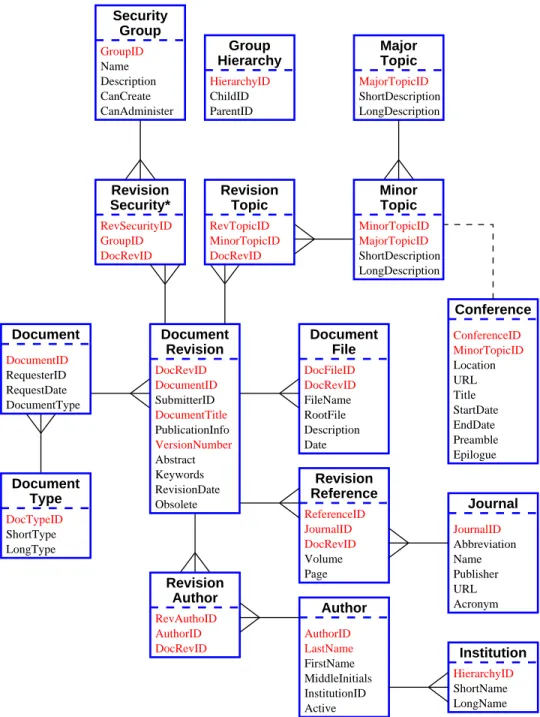
To implement our new document database (called DocDB) we use CGI scripts written in Perl. We choose MySQL as the relational database since Perl bindings are readily available and its (somewhat lim-ited) features were more than adequate for our needs. The files that make up documents are stored on the web server’s file system. All the meta-data for the documents are stored in a collection of MySQL tables shown in Figure 1. This table structure has allowed us to remove the arbitrary limits on numbers of au-thors, topics, and files per document. For instance, as shown in Figure1, revision-author pairings are stored in a separate table and an arbitrary number of these pairings can be associated with each document revi-sion and with each author. Linking between tables is supported with a number of keys.
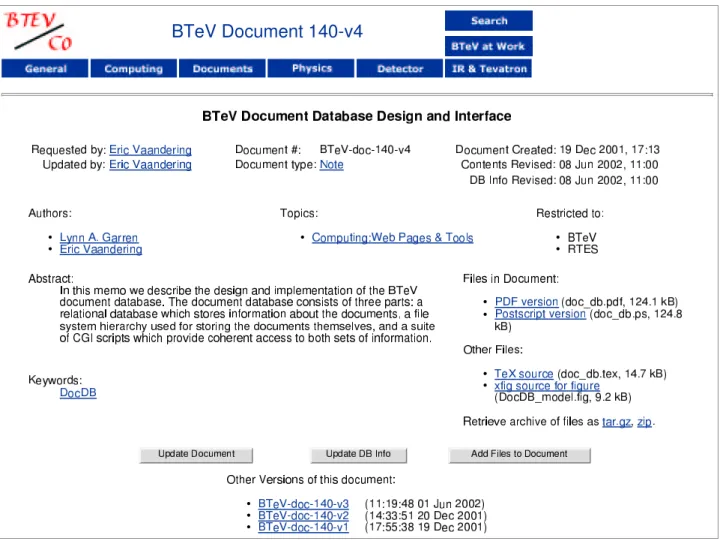
These different tables are, of course, hidden from the user. When asked for information on a certain document, the information is gathered from a number of different tables (which can be up to four “steps” away from the original table) and all the information is presented in a single summary. An example of such a summary is shown in Figure2.
2.1. Adding documents
Users can add or modify information in a number of ways. They can reserve a document number for a fu-ture document (for reference purposes). They can cre-ate a new document, a new version of an existing doc-ument, or just update the document meta-information without supplying new content. They can also add or replace files (perhaps a new presentation format) without creating a new version.
3
URL:http://www-numi.fnal.gov/noteSelPublic.html
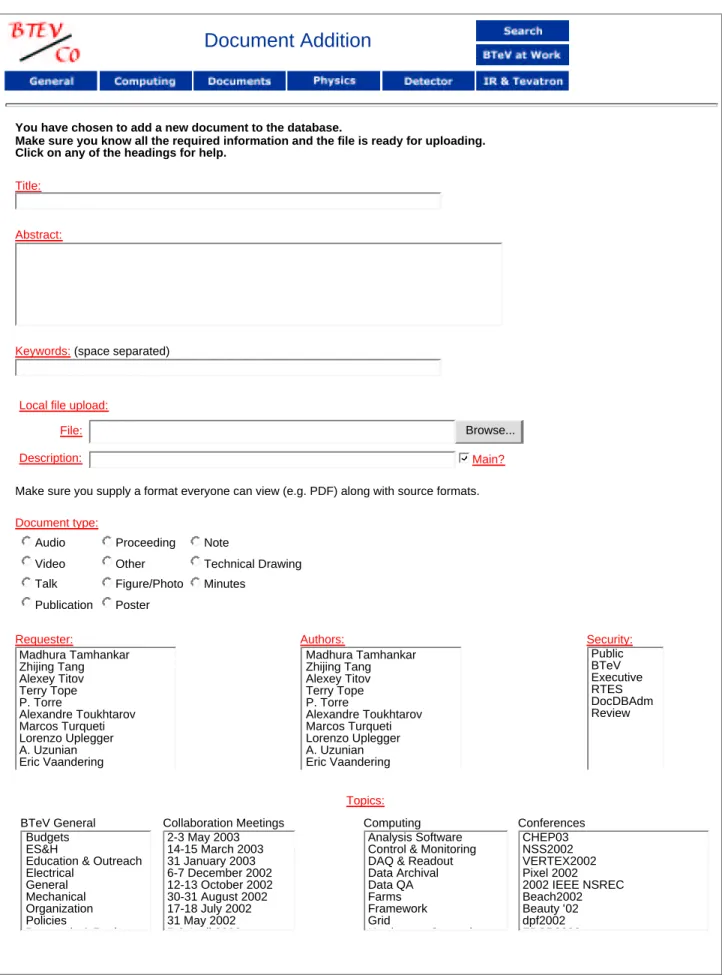
Most of the form used to submit documents is shown in Figure 3. At the top, the user is asked to enter a title, abstract, and any keywords which de-scribe the document. Next is the box (or boxes) to upload the files in the document. In an alternate ver-sion, the user may request that the DocDB fetch a file via http or ftp from a server (which may be password protected).
Next, the author must choose a document type, se-lect who he or she is (Requester), who all the authors of the document are, and what groups may view the document. Finally, the user selects all the subtopics which apply to the document. (Here there is one list of subtopics for each topic).
Not shown are the elements to specify a revision date, journal references, and a field to enter other publication information for the document. The ap-pearance of this form is customized based on user preferences and requests; for instance, a user can ask to always have upload boxes for three files. What is shown here is the simplest possible version.
2.2. Document classification
The document view in Figure 2 shows many of the different ways in which documents can be classi-fied. For example, at the top left, we see the individ-ual responsible for putting the information into the database and the authors of the document. At top middle we see the document ID (BTeV-doc-140-v4) and document type. Underlined text are hyperlinks to a list of documents with, for example, the same au-thor. In the center are the subtopics for the document (explained below). Near the bottom right are links to the actual files in the document; some are designated as primary files and some are designated as support-ing files. Near the bottom left are the user supplied keywords for the document and at the bottom center are links to earlier versions of the document.
There are also buttons that the user can use to add a new version, change the meta-information, or add files to this document.
Topics: Because of our earlier, confusing, experi-ence with allowing users to freely define new topics to classify documents, we adopted a centralized ap-proach. We have about ten topics (MajorTopics in the internal nomenclature) each of which is divided into subtopics (MinorTopics internally). These lists can only be modified by the administrators of the database. For instance, “Detectors” is a topic and sub-detectors like “Pixel Detector” are subtopics. For detector subtopics, each is used primarily by a dif-ferent subgroup of the collaboration numbering about 10–20 people.
Keywords: In order to give these subgroups the ability to better organize their own documents, we introduced the concept of keywords, which are free
DocRevID RevAuthoID AuthorID Author Revision Author AuthorID LastName FirstName InstitutionID MiddleInitials Active DocRevID JournalID Revision Reference ReferenceID Volume Page GroupID Group Security Name Description CanCreate CanAdminister ParentID HierarchyID ChildID Hierarchy Group Topic Major MajorTopicID ShortDescription LongDescription LongName HierarchyID ShortName Institution Journal JournalID Name Publisher Abbreviation URL Acronym RootFile DocRevID FileName Description File Document DocRevID RevSecurityID GroupID Revision RequesterID DocumentID DocumentType RequestDate Document LongType Type Document ShortDescription MajorTopicID Minor Topic LongDescription MinorTopicID DocRevID MinorTopicID Revision Topic RevTopicID DocRevID SubmitterID PublicationInfo Abstract Revision Document ShortType DocFileID DocTypeID DocumentID DocumentTitle VersionNumber Keywords RevisionDate Obsolete Date Security* MinorTopicID URL ConferenceID Location Conference Preamble EndDate StartDate Epilogue Title
Figure 1: Database table structure of the DocDB. Fields in red (or light color) are indexed for fast lookup. In addition to RevisionSecurity there is a parallel table named RevisionModify which, in the optional enhanced security model, contains the list of groups allowed to modify documents. See the text for more details.
form and entered by users. Subgroups are encouraged to form canonical lists of these keywords to be affixed to the relevant documents, so for instance, the pixel detector group may choose the keyword “support” to classify any documents dealing with the pixel support structure.
Authors: All possible authors are also maintained in a managed list. While there was some initial con-cern about the flexibility of this, it has worked out well. Duplication and consistency issues, as with top-ics, were the reason for this choice.
2.3. Security
In order to achieve our security goals, we have im-plemented a parent/child security model. Each group has its own password, and parent groups may view any document their child groups may. The security mechanism is based on http Basic Realm Authoriza-tion. The meta-information is protected by the Perl scripts, the actual files by.htaccessfiles; which secu-rity method is protecting what is mostly transparent to the user. In the normal mode of operation, any
Figure 2: An example document view. See the text for an explanation.
group that may view a document may modify that document (presuming they can modify documents at all), but there is an alternate security model in which the groups that may modify a document are separate from the groups that may view it.
3. Special cases
In addition to storing general documents as they are produced, we realized that there are certain special types of documents which need additional information stored about them, and/or need to be presented to the user in special ways.
3.1. Conferences and collaboration
meetings
Users associate their documents with a conference or meeting by selecting a special topic in addition to the topic(s) of the document. These topics have additional information associated with them, such as
dates, location, and a URL for the conference or meet-ing.
BTeV has collaboration meetings about every six weeks. These are video conferenced, so an accurate and timely record of the meeting is important for re-mote participants. Since uploading a talk for a meet-ing is many people’s first interaction with the DocDB, a special form to enter such talks into the database was created. This minimizes the information that a user must fill in and has sensible defaults for group meeting talks. However, users can always use the full-featured entry form as well.
There is also a special default mode to view the list of talks. The files (PowerPoint, PDF, etc.) for the talk are linked directly from the list of talks, since this list of talks is used as the “home page” for the meeting while it is going on. For conferences, there is also a special view of the document list.
3.2. Publications
Published documents also receive special treatment. When placing a document in the database, publication
Document Addition
You have chosen to add a new document to the database.
Make sure you know all the required information and the file is ready for uploading. Click on any of the headings for help.
Title:
Abstract:
Keywords: (space separated)
Local file upload:
File: Browse...
Description: Main?
Make sure you supply a format everyone can view (e.g. PDF) along with source formats.
Document type:
Audio Proceeding Note
Video Other Technical Drawing Talk Figure/Photo Minutes
Publication Poster
Requester: Authors: Security:
Topics:
BTeV General Collaboration Meetings Computing Conferences S. Subramania Madhura Tamhankar Zhijing Tang Alexey Titov Terry Tope P. Torre Alexandre Toukhtarov Marcos Turqueti Lorenzo Uplegger A. Uzunian Eric Vaandering S. Subramania Madhura Tamhankar Zhijing Tang Alexey Titov Terry Tope P. Torre Alexandre Toukhtarov Marcos Turqueti Lorenzo Uplegger A. Uzunian Eric Vaandering Public BTeV Executive RTES DocDBAdm Review Budgets ES&H
Education & Outreach Electrical
General Mechanical Organization Policies
Proposals & Reviews
2-3 May 2003 14-15 March 2003 31 January 2003 6-7 December 2002 12-13 October 2002 30-31 August 2002 17-18 July 2002 31 May 2002 5-6 April 2002 Analysis Software Control & Monitoring DAQ & Readout Data Archival Data QA Farms Framework Grid Hardware - General CHEP03 NSS2002 VERTEX2002 Pixel 2002 2002 IEEE NSREC Beach2002 Beauty ’02 dpf2002 FPCP2002
Figure 3: Form for entering a document. Now shown are all the topics, references, and the area to enter additional publication information. See the text for a full description.
references for that document can be entered. There may be an arbitrary number of such references for each document (e.g. an arXiv.org and journal reference). There is also an extensible framework to generate ex-ternal links to the paper on the journal’s website.
4. Other Features
The most used parts of the system are those allow-ing addition of documents, showallow-ing individual doc-uments, and retrieving lists of documents by an au-thor, etc. However, there are several other features of the DocDB that, while less frequently used, provide needed functionality.
4.1. Searching
We have provided a robust search engine that allows searching for individual words, phrases, etc. in all of the text fields and searches on authors, topics, and the other fields in the database. For a database of our size, all the flexibility provided isn’t strictly necessary, but as the number of documents increases it will become more important. Also, listing by keyword uses the search engine to find the relevant documents.
4.2. Preferences
The DocDB has lots of options, especially regard-ing how the document submission page appears. For instance, a user can upload from a local file or submit a document via http. We have provided a preference system, based on browser cookies, to save the user’s preferences for these options.
4.3. E-mail notification
We have also provided the ability for the DocDB to send e-mail to users when documents they are inter-ested in have been added or modified in the database. Users can select to be notified based on document top-ics, keywords, or authors, and they can select to be notified about such changes immediately, nightly, or weekly. They can have separate criteria for each time frame.
4.4. Administration interface
Finally, of interest primarily to the administrators of the document database, is a set of tools which al-low the administrators to modify the lists of authors, topics, document types, etc. This means that once the database is set up, the administrator should never
need to manipulate the underlying SQL database. Ev-erything that needs to be done can be done via the web interface.
For convenience, certain administration functions are left open to all users, such as adding a person to the list of potential authors and adding a conference.
5. Effects on collaborative style
We have generally found the DocDB to be a great benefit in enhancing collaboration within BTeV. In this section, we will give some examples of these ben-efits.
First, we have been fairly effective in redefining what a “document” is. A document, for us, is not just words written down on a piece of paper, but is any information which someone wants to save and share with others. Users also seem to have accepted a lower threshold of “importance” that they feel information must meet before placing information in the DocDB. While most things in the DocDB still fit a traditional definition of documents, we have a number of photo-graph collections, videos, musings, and figures which have been placed in the DocDB.
We’ve also been fairly effective in promoting the DocDB as a central repository of information. In the past, most sub-groups (mostly sub-detector projects during this stage of BTeV) maintained, on web pages, lists of various documents. With an easy to use and visible DocDB, more of this information is now being placed in the database. However, migration of older information into the DocDB has been slow or non-existent for most groups.
One application that has benefitted most strikingly from using the DocDB is our video conferenced collab-oration meetings. In the past we had an agenda with links to talks maintained by a secretary. This caused several problems. First, meetings were often held on weekends which meant updates weren’t made. Even when the agenda was updated, there was a delay be-fore a submission appeared on the list. What this often led to was a flurry of e-mails, sometimes with large attachments, as a person got up to give their talk. The speaker would then be delayed while all the remote groups checked their e-mail and accessed the talk.
Now the process is much smoother. Speakers can easily update a talk just moments before giving it, often incorporating information or ideas from earlier talks. Additionally, talks are archived in the same location as other documents.
As mentioned above, to further ease the process of posting and viewing talks, slight modifications to both the submission and listing interfaces have been made. External reviews of the experiment are another place where the DocDB has proved its worth. We have a read-only account for reviewers and relevant
documents are easily made accessible to them. The group organizing our reviews has been especially ef-fective in using keywords to further organize review documents. Reuse of information is another benefit; our latest review (in Fall 2002) required over 250 doc-uments, but many of these will simply be updated for future reviews.
As mentioned above, our old database was used to catalog about 150 documents over a 7 year pe-riod from 1995–2001. From the end of 2001 until mid-2003 we’ve placed over 1750 documents in the new database. Of these, about 400 documents actu-ally predate the DocDB. Our collaboration (about 200 people including engineers, etc.) averages about 3–4 new documents placed in the database per day. The number of “living documents,” or older documents which are regularly updated, remains fairly low.
As mentioned above, our old document catalog en-forced lots of artificial limitations on document classi-fication. Currently the average document has 1.6 ver-sions. Each version averages 1.4 authors, 1.8 topics, and 1.8 files, confirming that these earlier limitations were not valid.
6. Other users
While the DocDB was initially designed for BTeV and not much thought was put into a portable system, other groups have been evaluating or have started to use the code. The underlying Perl code is now com-pletely portable and setting up the DocDB takes just a couple of hours.
Fermilab’s Beams Division is the only other user so far to officially adopt the DocDB and a small number of features were added to the code to facilitate their use. Their use began with the Main Injector group, but the system was quickly adopted by the rest of the division.
The Beams division began using this system at the beginning of 2003 and, as of this writing, has nearly 600 documents in their DocDB. Their usage patterns seem to be similar to BTeV’s.
Like BTeV, they have found the DocDB to be very useful in organizing their frequent reviews and meet-ings. Previously most of their meeting talks existed in hard copy only, archived in a filing cabinet. How-ever, they now find it just as easy to make an elec-tronic copy and place it in the database before the meeting. Beams also seems to be more effective than BTeV in using keywords to better organize their doc-uments. Their database (http://beamdocs.fnal. gov/cgi-bin/public/DocDB/DocumentDatabase) is a particularly good demonstration of the software since many of the documents are publicly accessible.
The DocDB code and installation instructions are available for use by other groups at the URLhttp://
cepa.fnal.gov/DocDB/doc/install-docdb.html. A working demo of the software will be provided at this address as well, perhaps by the time of publication. We welcome additional users and are willing to provide some help setting up the system. We are also open to extending the DocDB to meet others’ needs.
7. Lessons learned
While we’ve been very happy with this system, we’ve also made a few mistakes along the way and learned some lessons.
The first thing we’ve learned (or confirmed) is that effectively organizing groups of physicists can be hard. We’ve never had any “official” guidance on us-ing the DocDB on a collaboration wide basis, we’ve only had suggestions on how to go about using the DocDB and organizing documents within it. Some subgroups, often consisting of larger numbers of engi-neers, have provided such official guidance and they use the database in a more consistent and effective manner. (In fact, the concept of keywords was added to the DocDB o accommodate these groups).
The second thing we’ve learned is that limiting flex-ibility for fear of misuse was not a good idea. Initially we resisted allowing as much flexibility as we have now in creating or modifying documents because that capability can be used by a knowledgeable (or par-ticularly n¨aive) user to circumvent the versioning and archiving features of the database. However, this has not proved to be a problem as users overwhelmingly use this power in a responsible fashion.
Finally, we’ve learned from our seven year experi-ence with our old catalog system that documents do disappear from the web, that archiving is very useful, and that starting with a flexible system as soon as possible is very helpful. However, we’ve also learned that the initial pain of migration from an inadequate system is well worth the benefits.
8. Conclusions
In conclusion, BTeV has built a new document database an has now been using and refining it for a year and a half. This new system is much more flexible than our previous one and the other solutions we looked at. This new software has made noticeable improvements in the way we collaborate and has been a real time saver.
We’ve also shown that this software is easily adapt-able to other groups and that they are reaping similar benefits.