From BIM to VR
Integrating immersive visualizations in the current design process
Mikael Johansson
1, Mattias Roupé
2, Mikael Viklund Tallgren
3 1,2,3Chalmers University of Technology, Sweden
1,2,3
{jomi|roupe|mikael.tallgren}@chalmers.se
This paper presents a system that allows immersive visualizations to become a
natural and integrated part of the current building design process. It is realized
through three main components: (1) the Oculus Rift - a new type of Head
Mounted Display (HMD) directed at the consumer market, (2) a real-time
rendering engine supporting large Building Information Models (BIM) that is, (3)
implemented as a plug-in in a BIM authoring software. In addition to provide
details regarding the implementation and integration of the different components
in our system, we present an evaluation of it from three different perspectives;
rendering performance, navigation interface and the ability to support fast design
iterations.
Keywords:
Building Information Modeling, BIM, Virtual Reality, Real-time
rendering, HMD
INTRODUCTION
During the design process of a building, it is im-portant that all the involved actors understand, par-ticipate, communicate, and collaborate with each other to obtain a high quality outcome of the de-sign process. Hall and Tewdwr-Jones (2010) highlight the communication difficulties between the differ-ent stakeholders in the design and planning process. Communication difficulties mainly occur as a result of the different planning cultures, and because there is insufficient collaboration and information sharing during the process. The most common problem is that the information is not presented in such a way that people can understand it.
In this context, real-time visualizations and Vir-tual Reality (VR) have been shown to offer an effi-cient communication platform (Bouchlaghem et al.,
2005). With the ability to navigate freely through 3D scenes from a first-person perspective, it is possi-ble to present and communicate ideas regarding fu-ture buildings in a way that facilitates understanding among all involved parties, despite their background or professional expertise. While the use of this tech-nology has been naturally limited in the past due to lack of available 3D data from the design process, the recent introduction of Building Information Models (BIM) within the AEC field has opened up new pos-sibilities. With the use of BIM the required 3D data can be extracted from the architect's own design-environment, instead of creating it from scratch us-ing 2D-plans, elevations and sketches as a reference. Because of this, use of real-time visualizations has become more accessible in practice.
To further enhance user experience it is com-monly advocated to take advantage of immersive display technologies. Although real-time visualiza-tions have been shown to be useful per se, stere-oscopy, large screen and wide field of view all pro-vide additional benefits. When comparing a non-immersive (monitor) solution to a four-screen (3 walls and a floor) CAVE solution, Shiratuddin et al. (2004) found consistently higher ratings for the latter re-garding level of realism, ease of navigation, sense of scale and overall suitability for design and decision-making tasks.
In this context, Head Mounted Displays (HMD) also represents a viable option. Still, as avail-able alternatives (until very recently) have been ei-ther low-cost-low-performance or high-cost-high-performance devices (Dörner et al., 2011), CAVEs and PowerWalls have emerged as the de facto standard when it comes to immersive visualizations. When considering practical applications, these types of so-lutions have been shown beneficial during the de-sign of hospital patient rooms and courtrooms, as well as for design review sessions in general (Cas-tronovo et al., 2013).
However, when considering the integration and use of immersive VR within the actual design process, the current adaptation in the AEC field still suffers from a number of limitations:
• High cost:Even if the cost of display and PC hardware has been rapidly decreasing over the past years, fully or semi-immersive solu-tions such as CAVEs or PowerWalls are still ex-pensive (DeFanti et al., 2011).
• Limited accessibility: Regardless of dis-play technology (e.g. immersive or semi-immersive), the use of a specific room or stu-dio will naturally restrict visualization sessions to a single location. Even if situated close to the designers working environment it makes the use of VR less accessible, both physically and mentally. This immobility has also been reported inconvenient for clients and other stakeholders (Sunesson et al., 2008).
• Limited BIM-support:Even if created with vi-sualization in mind, real-time constraints and stereo rendering often require the input 3D data to be further optimized in order to be fully functional in the VR environment. When considering BIMs this process typically be-comes even worse due to a large number of individual objects and high geometric com-plexity (Dalton and Parfitt, 2013). In addition, many BIM authoring applications have limited or missing support for materials and texture definitions when exporting 3D-data for visu-alization purposes (Kumar et al., 2011). In this paper we present a solution that overcomes the above mentioned limitations and allows immer-sive VR to become a natural and integrated part of the design process. It is realized through three main components: (1) the Oculus Rift Head Mounted Dis-play (HMD) - a comparably low cost device that sup-ports a large field of view, stereoscopic viewing and physically rotation, (2) an efficient real-time render-ing engine supportrender-ing large 3D datasets that is (3) im-plemented as a plug-in in a BIM authoring software.
A PORTABLE SYSTEM FOR IMMERSIVE BIM
VISUALIZATION
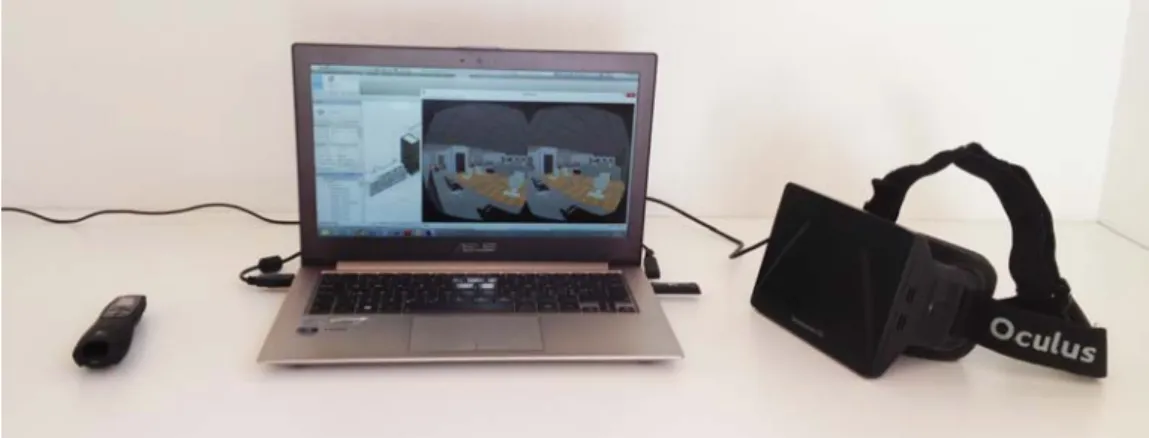
Figure 1 shows the different components of our pro-posed system: The Oculus Rift HMD, the real-time viewer application implemented as a plug-in in Revit Architecture and a so-called PowerPoint remote con-trol used as a navigation interface, all connected to a lightweight laptop. In the following subsections we present and discuss these components in more de-tail.
The Oculus Rift HMD
In order to provide an immersive visualization en-vironment our proposed system takes advantage of the Oculus Rift HMD. The Rift is a new affordable (ex-pected price range $300-$350) virtual reality device directed at the consumer's market, mainly to provide immersive experiences for videogames. Although currently only available in the form of a Developer Kit,
Figure 1 System overview; the Oculus HMD, the Revit Viewer plug-in and the PowerPoint remote control
it is expected to be available on the broad consumer market during 2015. The device provides approxi-mately 100° field of view, stereoscopic 3D view and includes a gyroscope, an accelerometer and a mag-netometer to determine the orientation of the user's head in the real world.
As with any other stereo-providing display solu-tion the 3d scene has to be rendered twice, once for each eye. In the case of the Rift this is implemented by means of split-screen rendering, where the left half of the screen corresponds to the left eye, and vice versa. With a full-screen resolution of 1280 x 800 pix-els, this gives an effective resolution of 640 x 800 per eye.
However, although this approach to support stereo vision is conceptually simple, the actual ren-dering process is a bit more involved. Due to the lenses, which provide an increased field of view, a pincushion distortion of the image is introduced. To cancel out this effect, the rendering has to be done at a higher resolution, followed by a post-processing step that performs a barrel distortion. Preferably, an-tialiasing should also be enabled, as this greatly en-hances the image quality.
So, in effect, even if the devices' resolution is "only" 1280 x 800 pixels, the actual rendering (rasteri-zation) has to be performed at a much higher resolu-tion (i.e. 2194 x 1371) , potentially with antialiasing
enabled, followed by a full-screen post-processing step. Obviously, these requirements put addition-ally stress on the graphics hardware, which, in turn, put high demands on a rendering engine to deliver enough rendering performance to support an inter-active experience.
The rendering engine
An important property for any type of real-time visu-alisation system is its ability to maintain a sufficiently high frame rate. For typical desktop applications (i.e. non-immersive) 15Hz is often considered a minimum (Yoon et al. 2008), although 30 or 60 Hz is generally advocated in order to provide a satisfactory level of interactivity. However, for HMDs, such as the Ocu-lus Rift, the minimum interactivity-demands are typ-ically higher, as physical interaction and display up-date becomes much more integrated. Ultimately, a user's head movement should directly correspond to an update of the display in order to reduce the risk of potential conflicts between visual-vestibular sensory. In this context a minimum frame rate of 60 Hz is of-ten recommended (Adelstein et al., 2003), although higher values have also been proposed (Jerald, 2010). When considering that the task of visualizing BIMs interactively is known to be a challenge in it-self (Steel et al., 2012; Johansson and Roupé, 2012), the frame rate requirements posed by using an HMD
thus put very high demands on the rendering engine. This, especially, as the 3D dataset has to be rendered twice every frame in order to support stereoscopic vi-sion, followed by a full-screen post-processing step.
To address these requirements we have devel-oped an efficient rendering engine that takes advan-tage of two characteristics shared by typical building models - high level of occlusion and frequent reuse of identical building components. The engine, which is described in more detail in (Johansson and Roupé, 2012) and (Johansson, 2013), uses an efficient occlu-sion culling algorithm to restrict rendering efforts to visible objects only, and takes advantage of hardware instancing to render replicated building components efficiently. These two acceleration techniques com-plement each other and are essential in order to fulfil the requirements in terms of interactivity. However, we do not primarily use this rendering engine in a separate application. To support an integrated de-sign environment we have instead implemented it as a viewer plug-in in Autodesk Revit.
The Revit plug-in
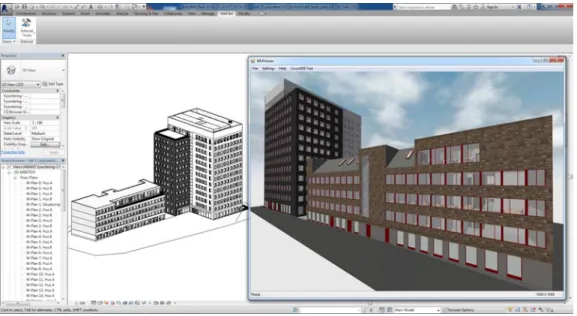
Figure 2 illustrates how our viewer plug-in is inte-grated in Revit from a user's perspective. With a BIM loaded in Revit the viewer is initialized from the Add-Ins tab, resulting in the real-time 3D visualization rep-resentation becoming visible in a new window. After that a user is free to either navigate the model in a typical desktop fashion using mouse and keyboard, or connect the Oculus HMD to experience the model immersively.
From a programmers point of view the plug-in extracts the required 3D data through the Re-vit C# API, which exposes the entire underlying BIM database. To speed-up the data extraction process and to keep the memory footprint low, we take ad-vantage of geometry instancing (i.e. that several identical components can share the same geomet-rical representation), which is an integral part of the internal Revit database. Every time a unique geomet-ric representation is encountered for the first time, all of its data is extracted. For all subsequent cases the previously extracted geometry data is used in combi-nation with a unique transformation.
Figure 2
The viewer plug-in interface in Revit
Figure 3
System architecture
As the rendering engine and the Oculus API is written in C++, the different software components needs to be connected through a C++/Cli bridge (Heege, 2007). The complete architecture is illus-trated in Figure 3 and also shows how the GUI-module is separated from the actual plug-in, essen-tially allowing us to run the viewer as a standalone application on a system without Revit installed, with identical interface.
Previous versions of the Revit API did not expose material data such as colors and textures, making it very difficult to use BIMs, without further treatment, for visualization sessions related to aesthetics. Fortu-nately, since version 2014, the API has been extended with a Custom Export API, that facilitates the extrac-tion of material and texture data as well as texture co-ordinates. Because of this, it is now possible to ex-tract complete visualization models, with materials and textures assigned, directly from the BIM author-ing software.
The navigation interface
The use of an HMD makes traditional navigation in-terfaces, such as ones with keyboard and a mouse harder to master. As the user cannot see anything in the real world, even seemingly simple tasks, such as pressing a specific key on the keyboard or even grabbing the mouse becomes much more involved.
For very experienced users that daily works with, and navigates in, 3D models this does not necessarily pose itself as a problem, however, for people with less experience it can easily become a huge obstacle.
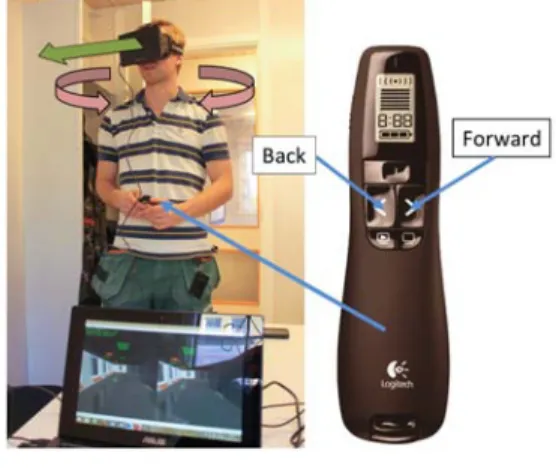
In order to allow for any type of user we have therefore developed a very simple navigation inter-face by means of a so-called PowerPoint remote con-trol. As illustrated in Figure 4, a user can move for-ward or back by pressing the corresponding buttons on the remote control, with the direction of move-ment being decided by the user's orientation of the head.
Figure 4 The navigation interface
SYSTEM EVALUATION
To illustrate the effectiveness of our proposed system we present an evaluation of it from three different perspectives - rendering performance, navigation in-terface and the ability to support fast design itera-tions. As test-model we have used a BIM received from a real-world project, a ten-story office building which is currently being built in Gothenburg, Swe-den (Figure 2). The model is primarily an architec-tural model, with no Mechanical, Electrical or Plumb-ing (MEP) data present, however it does contain fur-niture and other interior equipment (See Figure 5). The model was created in Revit Architecture 2013 and contains approximately 4,400,000 triangles, dis-tributed over 15,000 individual objects.
Figure 5
Interior viewpoint at the third level of the test-model
Rendering performance
The rendering performance test was performed on two different computers, one workstation and one laptop. The workstation was equipped with an Intel i7 3.06 GHz CPU, 6 GB of RAM and an Nvidia GeForce GTX 570 GPU running Windows 7 x64. The laptop was equipped with an Intel i7 1.9 GHz CPU, 4 GB of RAM and an Nvidia GeForce GT 620M GPU running Windows 8 x64. On both system, two different cam-era paths was used; one interior at the third floor of the building, and one exterior at the ground-level in front of the building. The results from these tests are presented in Figure 6. To better illustrate the per-formance gain offered by our rendering engine we also present performance results obtained when only view frustum culling is enabled (i.e. only discarding objects that are outside the cameras view frustum). The following abbreviations are used (and combined) in the plots: OC for Occlusion Culling, HI for Hardware Instancing, VFC for View Frustum Culling, and MSAA for 4x MultiSample AntiAliasing.
As can be seen in the plots, the use of additional acceleration techniques is vital in order to provide the required level of interactivity. With only view frus-tum culling enabled (VFC) it becomes very difficult to guarantee a minimum frame rate of 60 Hz, even on the workstation system. In fact, for the given camera paths, not even 20 Hz can be guaranteed on both sys-tems.
However, with the combined use of occlusion culling (OC) and hardware instancing (HI) it is possi-ble to fulfil the interactivity demands. The only
ex-ception appears during parts of both camera paths on the laptop system when antialiasing is enabled. Although not by much (the lowest recorded frame rates are 52 Hz and 48 Hz, respectively) it is defi-nitely below our target frame rate of 60 Hz. Still, as antialiasing-capacity scale well with GPU perfor-mance (which is not necessarily the case with 3D model complexity due to driver overhead), we ex-pect this particular issue to be solved by increasingly faster GPUs. This, especially when also considering that these tests were performed on a, at the time of writing, two year old laptop.
Nevertheless, without antialiasing activated, our rendering engine can provide the required level of in-teractivity, even on a lightweight laptop system.
Navigation interface
As part of a different, but related, research project we have performed an initial evaluation of the nav-igation interface with members of the on-site team that is currently erecting the real building. This group of people included the site manager as well as five construction workers from different sub-trades (pip-ing, ventilation, sprinklers, prefab and electrical). No one, except for the site manager, had any previous experience from working with, or navigating in, 3D-models. While freely navigating and inspecting the digital representation of the building that they were currently erecting, they were asked questions regard-ing how they felt that this type of interface could help them extract information to support their daily work and what additional features they would like the sys-tem to have. Except for the electrical trade worker, they all expressed that this type of visual interface helped them to get a better understanding, not only in terms of specific details, but also for the project as a whole.
However, perhaps more interesting in this con-text, is the fact that we observed that all of them, in-cluding the electrical trade worker, were able to navi-gate in the model with ease. Based on our own previ-ous experience we know that this is typically not the case when inexperienced people are faced with the
Figure 6
Frame rates for the exterior (top) and interior (bottom) camera paths on the workstation (left) and the laptop (right) system (OC=Occlusion Culling, HI=Hardware Instancing, MSAA=4xMultiSample AntiAliasing, VFC=View Frustum Culling).
task of navigating in a 3D-model using the keyboard and a mouse (i.e. mouse-look and WASD).
Design iterations
The benefit of having the visualization environment closely connected to the BIM authoring environment becomes especially clear when considering rapid de-sign iterations. To illustrate this we will provide two concrete examples applied to our test-model: one is the change of window types on one of the facades and the other is the removal of two conference rooms on the third floor in order to extend the office land-scape area.
Although solutions have been proposed where it is possible to modify architectural models directly in an immersive environment (Schulze et al., 2014), these systems typically only support insertion and repositioning of pre-made objects or creation and
modification of simple geometry. In contrast, our examples are much more involved, as they include operations on fairly complex objects that also affect other objects. For instance, when changing windows to a type that is geometrically smaller or larger, the geometry for the host object, the wall, needs to be recomputed in order for the opening size to match the corresponding window size. Although such func-tionality would have been technically possible to implement in our viewer, we have instead focused on making the "conversion" from design-model to visualization-model as fast as possible. In the case of our test model, this process takes approximately 20 seconds. That is, regardless of modification, the only time needed to produce a new version of the immer-sive visualization will be the time required to make the actual modifications in Revit, plus 20 seconds. For the examples described above this time corresponds
Figure 7 Before (left) and after (right) rapid design modifications. Top row illustrates removal of conference room. Bottom row illustrates change of window types.
to 3 minutes and 2.5 minutes, respectively. In Figure 7, these two modifications are illustrated with "before and after" screenshots.
CONCLUSIONS AND FUTURE WORK
We have presented a system that allows immersive vi-sualization to become a natural and integrated part of the building design process. By using the Ocu-lus Rift HMD we are able to provide an immersive vi-sualization environment without the need of a ded-icated facility to host a PowerWall or CAVE installa-tion. In addition to greatly reduce investment costs, this feature also makes the use of VR within a project become physically more accessible. As the technol-ogy is portable, clients and design team members can take advantage of immersive visualization ses-sions without the need to travel to a specific location. To further address accessibility, we have devel-oped a rendering engine capable of managing large and complex 3D datasets in real-time. As a result we can directly visualize large and complex BIMs, in stereo, without the need to manually optimize or pre-pare the input dataset. To support an integrated
de-sign environment this rendering engine has been im-plemented as a viewer plug-in in Autodesk Revit. Be-cause of this, immersive design review sessions can be performed directly in the BIM authoring software without the need to export any data or create a sep-arate visualization model.
In addition, we have presented an initial evalu-ation of the proposed system with a BIM received from a real-world project. Regarding rendering per-formance, navigation interface and the ability to sup-port fast design iterations, we have shown that it has all the needed properties in order to function well in practice.
For future work we are considering several dif-ferent directions, including studies related to spatial understanding with HMDs, enhancement of the in-teraction interface, investigation of benefits with our system in different contexts (i.e. design review, plan-ning, on-site information extraction, etc.) as well as further research to improve rendering performance.
REFERENCES
Adelstein, BD, Lee, TG and Ellis, SR 2003 'Head tracking latency in virtual environments: psychophysics and a model',In Proceedings of the Human Factors and Er-gonomics Society Annual Meeting, pp. 2083-2087 Bouchlaghem, D, Shang, H, Whyte, J and Ganah, A 2005,
'Visualisation in architecture, engineering and con-struction (AEC)',Automation in Construction, 14, pp. 287-295
Castronovo, F, Nikolic, D, Liu, Y and Messner, JI 2013 'An evaluation of immersive virtual reality systems for design reviews',Proceedings of the 13th International Conference on Construction Applications of Virtual Re-ality
Dalton, B and Parfitt, M 2013 'Immersive Visualization of Building Information Models',Design Innovation Re-search Center working paper 6, University of Reading, UK
DeFanti, T, Acevedo, D, Ainsworth, RA, Brown, MD, Cutchin, S, Dawe, G, Doerr, KU and Johnson, A 2011, 'The Future of the CAVE',Central European Journal of Engineering, 1, pp. 16-37
Dörner, R, Lok, B and Broll, W 2011, 'Social Gaming and Learning Applications: A Driving Force for the Fu-ture of Virtual and Augmented Reality?', in Coquil-lart, S (eds) 2011,Virtual Realities, Springer, pp. 51-76
Hall, P and Tewdwr-Jones, M 2010,Urban and Regional Planning, Routledge
Heege, M 2007,Expert C++/CLI: NET for Visual C++ Pro-grammers, Apress
Jerald, JJ 2010, Scene-motion-and latency-perception thresholds for head-mounted displays, Ph.D. Thesis, University of North Carolina
Johansson, M 2013 'Integrating Occlusion Culling and Hardware Instancing for Efficient Real-Time Render-ing of BuildRender-ing Information Models',International Conference on Computer Graphics Theory and Appli-cations (GRAPP 2013), pp. 197-206
Johansson, M and Roupé, M 2012 'Real-Time Render-ing of Large BuildRender-ing Information Models',CAADRIA 2012 - Beyond Codes & Pixels, pp. 647-656
Kumar, S, Hedrick, M, Wiacek, C and Messner, JI 2011, 'De-veloping an experienced-based design review ap-plication for healthcare facilities using a 3d game en-gine',Journal of Information Technology in Construc-tion (ITcon), 16, pp. 85-104
Schulze, JP, Hughes, CE, Zhang, L, Edelstein, E and Macagno, E 2014 'CaveCAD: a tool for architectural design in immersive virtual environments',
Proceed-ings of SPIE 9012, The Engineering Reality of Virtual Re-ality 2014
Shiratuddin, MF, Thabet, W and Bowman, D 2004 'Eval-uating the effectiveness of virtual environment dis-plays for reviewing construction 3D models', Pro-ceedings of CONVR 2004, pp. 87-98
Steel, J, Drogemuller, R and Toth, B 2012, 'Model inter-operability in building information modelling', Soft-ware & Systems Modeling, 11, pp. 99-109
Sunesson, K, Allwood, CM, Paulin, D, Heldal, I, Roupé, M, Johansson, M and Westerdahl, B 2008, 'Virtual Re-ality as a New Tool in the City Planning Process', Ts-inghua Science & Technology, 13, pp. 255-260 Yoon, SE, Gobbetti, E, Kasik, D and Manocha, D 2008,
Real-Time Massive Model Rendering, Morgan & Clay-pool Publisher