Usability Study of the Open Audit Voting System Helios
Janna-Lynn Weber
University of Waterloo
Waterloo, Ontario, Canada
[email protected]
Urs Hengartner
University of Waterloo
Waterloo, Ontario, Canada
[email protected]
Abstract
The field of electronic voting has ventured into the area of elections that are publically auditable. A handful of open audit elections systems exist but very few of them have been critically looked at from the end user’s point of view. In our paper, we present a usability study of the web based open audit voting system Helios. By creating a mock student government election and observing the target voter’s behaviour, we have uncovered various usability issues and opinions regarding electronic voting. While the feedback was generally favourable for electronic voting, more than half of our participants would not have completed their vote. We explore the reasons behind these findings and provide a set of recommendations for the future of open audit voting systems.
1
Introduction
As technology moves forward in every aspect of our lives it is inevitable that we would want to shape it into our voting systems. The promises of accuracy, security and precision have driven electronic voting systems forward. However the worries of corrupt or manipulative software have held back widespread adoption of any one system. Open audit elections aim to increase the integrity properties and tamper resistance of the voting process [1]. While some systems exist, very few have been carefully studied in terms of end user usability. It remains unclear if the target voters understand the subtle differences introduced or if voters are able use the system to its full potential.
The ideas behind electronic voting bring to light the concerns of voters who are unsure that their vote has been properly recorded and counted. In 2004 the ACM issued their statement on the state of electronic voting and rec-ommended that “e-voting systems enable each voter to inspect a physical record to verify that his or her vote has been accurately cast and to serve as an independent check on the result produced and stored by the system. Those records should be made permanent, not based solely in computer memory, to provide a means to conduct an accurate recount.” [6] Open audit election systems, also known as end to end verifiable elections, are designed with two major goals in mind to meet this recommendation. The first goal is to allow each voter personal assurance that their vote was recorded properly. The second goal is to allow any observer to verify the election and that all votes were properly tallied.
The research community has put forth a small number of end to end verifiable election systems to meet the desired goals. One of those systems and the specific focus of this paper is the Helios voting system. Helios (www.heliosvoting.org) is a web based open audit voting system. Based on preexisting cryptographic and web development technologies, He-lios was designed to provide an accessible open audit voting solution. The HeHe-lios voting and auditing process is based on Benalohs Simple Verifiable Voting protocol [3]. Some research warns that with many high stakes elections if the voter is able to verify who they voted for, they potentially could be coerced to vote a particular way [1]. Helios has been designed specifically for elections that do not suffer from high coercion risks such as student governments, local clubs or online groups. These groups require the same personal assurance for the voter’s peace of mind but are less likely to have voters forced to cast their ballot in a specific way. An advantage of the system being online is that voters can access the system from any computer connected to the Internet. This allows for greater flexibility of the election period, less pressure on the voter to complete their vote quickly and should encourage more people to vote. While Helios is one of the most complete implementations of an open audit election, there has been no published study of its end user usability.
Our contribution with this paper is a usability study of the Helios voting system. To the best of our knowledge, we present the first usability study of a web based open audit voting system. Our goal is to determine the target voter’s ability to accurately record and verify their intended vote. By talking to target voters, we aim to get a better
understanding of their opinions regarding electronic voting and the subtle differences used in an open audit election. By creating and administrating a mock election, we also evaluate the usability of the system from the administrator’s point of view. Based on our results we provide a number of recommendations to improve the usability of Helios and for future open audit voting systems.
The rest of the paper is organized in the following way; In section 2 we discuss related end to end voting systems and related research in the usability of electronic voting. In section 3 we discuss the methodology used during this particular study. Section 4 presents the analyzed results of the study. In section 5 we present a series of recommenda-tions for Helios and future open audit voting systems. Finally, we conclude in section 6 and add some suggesrecommenda-tions for possible future work in this area.
2
Related Work
There currently exist some end to end verifiable election systems at various levels of research or implementation. Four of the most commonly known and mentioned systems are: Prˆet `a Voter [11], Punchscan [9], ThreeBallot [10], Scantegrity [5]. Each system provides its own strengths and weaknesses based on its implementation and approach to the problem. Each of these systems uniquely tackles the large problems of end to end verifiable systems and aims to be secure and usable enough for any election. Often these systems use a combination of paper and electronic methods to reach their solution. Helios is different in that it is not aiming to solve the coercion aspect of the electronic voting problem by choosing specific target elections. Additionally, Helios requires no special hardware to conduct an online election.
There have been very few documented usability studies of voting systems despite the implicit need for these systems to be easy to use for all potential voters. In 2003, Bederson et al. [2], presented an analysis of the usability issues that arise with electronic voting. They studied four systems that were to be used in US government elections. None of these systems however provided a way for the voter to audit their ballot or the election. In 2005 Herrnson et al. [7] presented a preliminary view of the electronic voting systems and in 2006 [8] they continued to stress the importance of usability when it comes to voting systems. In Herrnson et al.’s second paper, [8], the group carefully analyzes six non-web based voting systems in terms of usability. Two of these tested systems offered a voter verifiable paper trail, which the group found was largely ignored by their voters. Buechler et al. [4] conducted a usability study of the non-web based end to end verifiable systems: Optical Scan, Zoomable, Punchscan. The group was able to compare and contrast the systems in terms of efficiency, ease of use and user satisfaction. The paper is a great introduction to the specific usability issues of an end to end verifiable system and a comparison between the systems. Our paper presents an in depth usability review of the first web based open audit voting system.
3
Methodology
In order to carefully analyze the usability of the system from both the voter’s and administrator’s perspective, we conducted a user study and a cognitive walkthough on Helios. For the purpose of both evaluations we created a mock student government election, which is one of the target election types of Helios. This mock election was designed with the help from the University of Waterloo’s Federation of Students Chief Electoral Officer. Using his expertise we determined the typical number of questions to appear on the ballot and the typical ordering of the questions. Our ballot contained seven questions, with two to five candidates for each race. One question had the voters select multiple candidates, which is common for student representative positions. One aspect of student government elections that was not incorporated into our mock election was voting based on student program or department. Typically, a student in the faculty of arts may have more or fewer questions than a student in the faculty of science depending on the positions open at that time. Because we were using a limited number of participants, we chose to expose them to the same ballot regardless of their program and leave the usability of multi-department elections for future study.
3.1
User Study - Voter Perspective
To analyze the usability of Helios from the voter’s perspective, we conducted a user study. Every participant was given an intent card and asked to vote in our mock election. Each intent card listed the position and candidate that the participant was asked to vote for. This method was used to ensure that users can match their intended vote to the ballot in the system. Half of the participants were later asked to change their vote and to view the audit ballot section of the system. After each participant completed their vote, they were asked a small number of questions and then asked to
complete a short exit survey regarding their opinions of the test system. Opinions gathered from the exit survey were based on a five point likert scale where one is strongly disagree and five is strongly agree.
During the study sessions, participants were asked to use their own laptops and email addresses to allow the user to be more comfortable with the environment. Having participants use their own laptop was also important because a feature of Helios is that it can be used anywhere and at the voter’s leisure. We used the think aloud protocol to gain a better understanding what the participants were thinking as they interacted with the system. We did not record time on task measurements because the system is designed to be used at the voter’s leisure and the participants were being asked to think aloud which can affect time performance. Audio was digitally recorded for each session and each session lasted around 20 minutes from start to end.
The sessions ran over a period of two weeks with our volunteer participants. A total of 20 participants were selected to partake in the study after they had initially responded to our poster advertisements. Each participant was compensated for their time with a ten dollar gift certificate. The ten participants that were asked to change their vote were randomly chosen from the entire set. The participants were recruited for a study about ‘Electronic Voting’ and were not given specific information about open audit voting systems. This was done to ensure that natural and unbiased participants were using the system.
Our target participants were undergraduate students from the University population. The selected participants ranged in age from 18 to 23 and were studying a variety of programs at the University. All of the participants claim to be online at least three hours a day but half the participants claim to be online eight or more hours a day. All participants claim to be okay to very comfortable with new technology. Most participants had voted in an election for government or student government in the past. Eight of the participants had recently voted online for the University’s student government. Five of the participants had never voted in any election before. A complete breakdown of the participants can be found in the appendix table 1.
3.2
Cognitive Walkthrough - Administrator Perspective
To evaluate the usability from the administrator’s perspective, we carefully considered each step of the process from the point of view of the administration. We analyzed what an administrator would have to do, what she would have to do next and how the site instructions and clues would help her along the way. We considered the administrator not to be a computer security expert and generally to be more concerned about the functions of the election itself. These functions being of the nature, ‘are the voters registered properly?’ or ‘are the ballots clear and easy to understand?’. As we go through the administrator duties we focus on this type of user and raise issues where we believe the system is unclear or unsafe. This type of cognitive walkthrough methodology is often used in user experience research and has been described in many papers. In particular, when we talk about security and usability, a cognitive walkthough is often helpful to get to details that do not always come up in user studies.
4
Results
This section discusses a number of themes that developed throughout the study with regards to user behaviours and opinions. Some of the participants openly expressed security concerns about electronic voting, but most participants feel that the benefits of electronic voting outweigh the risks. The benefits most commonly mentioned included con-venience, accuracy and efficiency. We feel it is also important to highlight that more than half of our participants (11 of 20) would have not completed their vote and submitted their ballot. Additionally in four of the seven races the intended tallied vote, based on the intent cards, was different from the actual tallied vote produced by Helios. Finally, the seven question ballot with 20 voters took almost six minutes to tally the votes and another six minutes to verify.
The rest of the result section of the paper has been broken into the following subsections based on the natural flow of the election system. First, we review the email that brings all potential voters to the voting site. Second we look at the ballot and how the voters work with the ballot to capture their intent. The next steps in the normal process include encrypting the ballot, authenticating the voter and submitting the ballot. Then we look specifically at the audit ballot section of the system. We then carefully and critically look at the participants’ feedback and opinions regarding the system and electronic voting. A complete breakdown of the information gathered from the exit survey can be seen in the appendix table 2. In the last subsection we review the aspects of the system from the point of view of the election administrator.
Figure 1: Invitation Email
4.1
Invitation to Vote Email
At the beginning of the session a participant was asked to check his or her email for an invitation to start voting in the online election. All the email addresses were initially collected and registered by the administrator. Figure 1 is a sample email that a participant received. Most of the participants immediately wondered why there were two URLs and if there was a difference between them. Occasionally on closer inspection, some participants claimed that the two URLs would take them to the same site. Many participants did not spend any time reading this email and simply clicked the URL to begin voting. As we will discuss in more detail later, many participants did not see or understand the login information, email and password, that was presented in this email. A few participants expected to be authenticated by accessing the site through the link in the invitation email. Lastly, towards the end of the study some of the invitation emails were being filtered as spam or took a significant amount of time to be received.
4.2
Completing the Ballot
Many participants felt that the ballot was very straightforward and easy to use. In the exit survey, many participants strongly agreed that the ballot was easy to read (mean = 4.6, median = 5, mode = 5). Some participants were confused by the use of checkboxes instead of radio buttons. See appendix figure 5 to see the checkboxes on the ballot. When participants were correcting their vote, having to de-select before being able to select a different candidate frustrated some. However many participants still agreed in the end that they were able to easily correct mistakes using this system (mean = 3.95, median = 4, mode = 5).
4.3
Encrypting and Submitting the Ballot
After the voter completes the ballot, she is asked to encrypt the ballot. Each ballot is encrypted using Javascript in the browser. Half of our participants received at least one script timeout error message while the ballot was being processed. This occurs when the script takes too long to process and the browser security features consider it to be harmful to the user. Some of the participants experience three or four script timeout warnings before their ballot was fully encrypted. The warning was experienced on a variety of different browsers with slightly different phrasing each time. When a participant chose (occasionally on accident) to end the script, they were forced to redo their entire ballot. A few participants claimed they would have quit instead of redoing their ballot by reasoning that the site might be broken.
Many participants did not fully understand what the encryption process was and some felt it was an unnecessary confusion. In particular most of the participants who had used an online voting system before thought that this was a natural part of the process and that other systems had included it but not made it visible to voter. Some participants, although they did not fully understand what was happening, identified encryption as a security feature of the system.
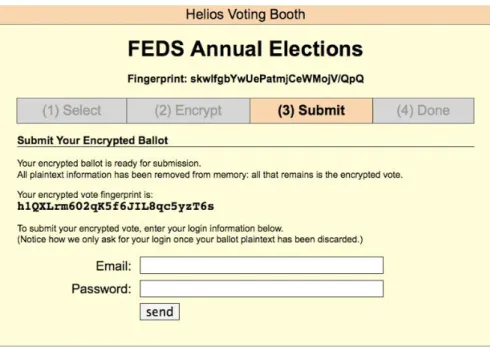
Once the ballot is encrypted, in order to submit the ballot the voter first must be authenticated. For many partic-ipants this was a cause of great confusion. The authentication page can be seen in figure 2. 13 of our particpartic-ipants initially were confused regarding which email address and password the system wanted. As one participant said, “I didn’t register so I don’t know which password they are asking for.” Some assumed it would be tied to their university account because it was a student government election. Once some participants were able to identify the email address,
Figure 2: Authenticating the Voter
they became confused as to which password to provide. Our participants were very hesitant to put in their own pass-word and many gave up at this point. A few participants even attempted to create new passpass-words or to use the ballot receipt/election ID as the password.
4.4
Auditing the Ballot
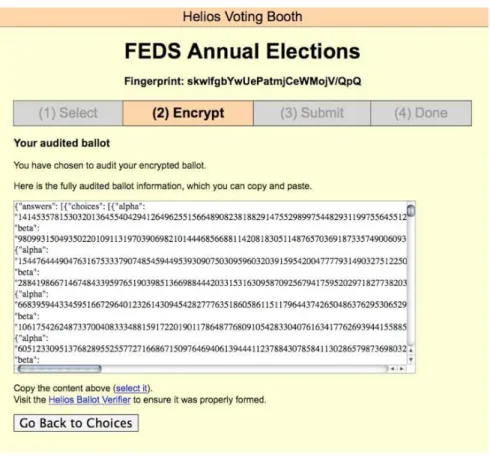
Instead of submitting her encrypted ballot, a voter can choose to audit it to make sure it was properly encrypted. When the voter decides to audit the ballot, “the JavaScript code reveals the randomness used in encrypting Alices choices. Alice can save this data to disk and run her own code to ensure the encryption was correct, or she can use the Python Ballot Encryption Verification (BEV) program provided by Helios.” [1]. We initially asked the participants what they expected to happen if they clicked the audit ballot button. Some participants expected to be returned to the “review all choices” section of the system. A few participants did not want to click on the audit button because they felt they would have to redo their ballot if they did. “Submit would record, Audit would not record.” One participant said “I would have no idea what [audit] means, it’s off to the right so I would just ignore it and submit.”
We proceeded to ask half of our participants to click on the audit ballot button before attempting to submit their ballot. When participants visited the audit ballot section (Figure 3) of Helios, many were defeated and confused by the large page of ciphertext and lack of instructions. Two of all participants were motivated enough to continue to interact with the page and were eventually able to verify their ballot by pasting the block of text in the provided verifier. Most of the participants were confused. “I have no idea what this means, I can copy and paste it but it doesn’t tell me where or why I would want to do that”. Another participant said “That’s techie stuff, random stuff that makes sense to someone but not me.” Even when the participant understood the encryption process they seemed confused by this section: “I’m looking at how my selections were encrypted, but it doesn’t mean a whole lot to me... I have no idea why this was here, the explanation was vague.”
4.5
User Feedback and Opinions
As previously mentioned the feedback from our participants was generally in favour of electronic voting. In particular based on our exit survey most of the participants were confident that their vote was accurately recorded, would be accurately counted and would be kept secret. Efficiency and convenience were also very beneficial factors in electronic voting. One participant wrote “The biggest difference I felt was less pressure because there were no lineups and it took much less time ... It also feels more private and secure and I’m more confident in a technological system to accurately count my vote than in people.” Another participant wrote “The time needed to vote seems to be much less than the time required at voting stations ... I enjoyed electronic voting because its at my own pace and I can do it whenever I
Figure 3: The Audit Ballot Section
wanted.” These comments were complimented by the exit survey question “I felt the voting process took too much time”, in which most of participants disagreed.
Some of the participants continued to be skeptical of electronic voting systems, in particular for federal elections citing the problems of the systems in the past. “For federal elections I don’t really think I believe in a electronic system. Generally there are too many problems with e-systems, although they would be easier than paper voting.” A second participant was more on the fence about the issue and said “I don’t feel comfortable voting online because I feel I could be traced and someone could determine my vote easily. But at the same time, who is going to take the time to determine who I voted for? It doesn’t really matter that much.”
During the exit survey, many of our participants commented on the security features of this system and how the language used through the system affected them.
• “[Helios] seemed to be heavily focused on making the voter feel like their vote was secure. It used technical
language I was not familiar with.”
• “It was convenient but to voters who aren’t comfortable with computers it may have been confusing to use. I
also think using the words ‘Encrypt’ and ‘Audit’ may be overwhelming to some people.”
• “[Helios] provides you proof of encryption data. The test voting system offers a sense of security.”
• “Although [Helios] did work, some aspects (the audit) seemed pointless.”
• “I feel that the encryption aspect and how it erases the plain text memory is different. If that is actually been
done on other voting systems I’ve used I have not known. I feel this makes the system more secure.”
• “[University of Waterloo’s system] was a bit easy to understand, I guess because I don’t know a lot about
computers. There was too much technical language. The encryption part made it more confusing, I’d rather not see it.”
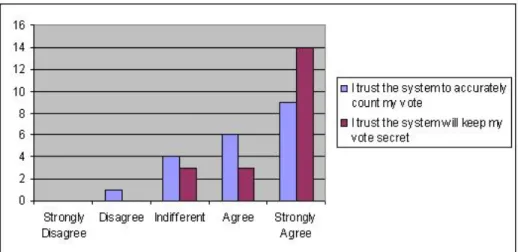
Finally, the exit survey revealed a very interesting result about the participant’s opinions of accuracy vs secrecy in this system. Participants trusted the system to keep their vote secret slightly more than they trusted the system to accurately count their vote. As illustrated by Figure 4, participants generally had stronger feelings of trust when it
came to secrecy than with accuracy. The finding is unexpected based on the design and intention of Helios because Helios trusts no one for integrity, but it trusts the administrator for privacy [1].
Figure 4: Accuracy vs Secrecy - Based on Exit Survey Questions
4.6
Administrator Issues
As part of our usability study we choose to be the administrator of the mock election. Responsibilities as the admin-istrator include management of the election key, creating the election ballot, setting up the voter list and initiating the tallying the vote. The introductory paper for Helios cautions that the administrative side of Helios requires some polishing and we are also aware that parts of the interface and functionality have recently been changed [1]. Overall, we found many aspects of the administrative process make sense and are easy to do. However, a few tasks seemed to lack the proper instruction or were counterintuitive to security. When the administrator creates the election, Helios generates a new El-Gamal keypair and it is the administrator’s responsibility to guard the private election key [1]. Although the system warns the administrator of the consequences of losing the key (unable to tally the election), it is still a potentially dangerous responsibility to put on one person. The security of the election now depends on how security minded the administrator is and how she protect her own system. Interestingly, we discovered that every email that was sent to a potential voter was also sent to the administrator’s account, including all emails and passwords of the voters.
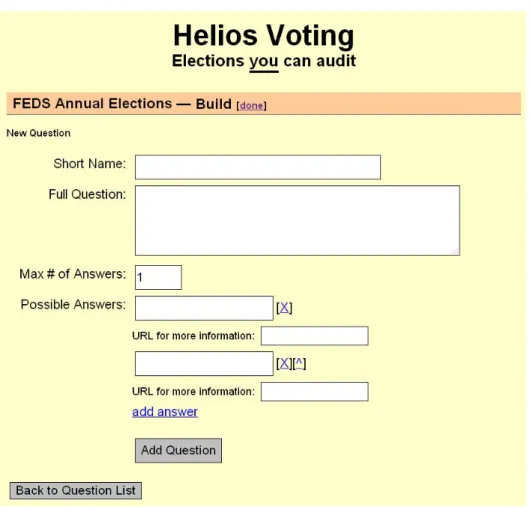
In creating the questions for the election ballot the administrator is asked to enter a short name and a full question. It is actually very unclear how these will appear on the ballot. The question builder section of Helios can be seen in appendix figure 6. What seemed the most confusing was that there was no field for question title and that the short name field does not appear on the voting portion of the ballot. The full question appears on the voting portion where as the short name only appears in the review all choices section.
The process for setting up the voter list is very straight forward and the subtle difference between open and closed registration was explained very well. The voter registration section can be seen in appendix figure 7. It is still unclear to us, however, how the category field is used in this election system. The category appears to be disconnected from the ballot questions. It seems it would be difficult to pose a question on the ballot to only one category of voter. Alternatively it is unclear if the category field is for administrative purposes to help organize the voters. This seems unlikely because the table of voters can not be sorted.
In our experience, the task of tallying the vote was easy to perform. Once the administrator inputs the private elec-tion key, Helios begins tallying the votes on the server. It is unclear what might happen if the system was interrupted during the tallying process. For our seven question ballot, it took almost six minutes to process the 20 votes. This time is not believed to be excessive and certainly shorter than counting by hand. However, from the administrator’s point of view feedback on the page is vague and it is difficult to tell if the processes is actually working. For larger elections, tallying and building the proof could take a significant amount of time, this is also seen in the numbers reported by Adida [1]. This time may lead some administrators to believe that this is not the best system for their needs. Appendix figure 8 shows the site after the tally is completed. A notification message, once all the votes are tallied, claims, the “tally and proof done and uploaded”. It is not clear what it means to be uploaded or where it might be uploading to. When verifying our election using the provided verifier, a vague script error caused the browser to crash about half
way through the verification. The second attempt at verifying the election was completed in about six minutes.
5
Recommendations
Most of the issues with Helios led to two different problems: 1) Voters not completing their vote and giving up before submitting. 2) Voters not understanding the security features implemented or language used. Many of the recom-mendations put forth here should be considered for all future open audit voting systems. While they are explained using references to Helios, the theory can be applied to all new systems. Helios has good intentions to be simple and straightforward with minimal amount of text on the screen. However confused participants were often looking for more instructions or reasonings behind each step of the system. For the benefit of confused voters it would be useful to add some help functionality, FAQs or instructions along the way.
To help voters complete their vote, some simple user interface changes could be implemented. Beginning with the invitation email; By placing the login information before the call to action, the election URL, it increases the chances that the information will be seen and read. Two other small UI changes that could be considered include: 1) The use of radio buttons instead of checkboxes. 2) Having a ‘Done’ button on the last question. Additional UI changes could be inferred for the admistrator’s view of the system. As with any system when UI changes are implemented it is recommended that they be tested to measure their impact on system’s usability.
Another strong recommendation for Helios is to decrease the number of script timeout warning that the users receive. Having half our participants receive one to four warnings before their vote was encrypted was a major disadvantage of this system. Because this system is designed to be used at home, it must be able to run on many different computers regardless of the individual computing power. It is possible that many voters receiving warnings could blame themselves or assume the system is broken. Either way they are not likely to complete their vote.
A major contributor to the users’ understanding of the system and its features is the language used. As we noted even though our participants were comfortable with technology, many found the language used on the site too technical for them. It is important for all electronic voting systems to be clear about what is happening while not using an overwhelming amount of jargon. Also the number and size of ID hashes that the voter sees can be overwhelming. In particular when the voter is unaware what they should be doing with the IDs. For example, should they write them down or should they be verifying them somehow?
When it comes to auditing the ballot, the audit ballot section did not provide enough information or motivation for the participants to actually verify their ballot. Even considering that some of our participants had security concerns, the concept of verifying that their ballot was encrypted properly was not effectively conveyed to them. Part of the problem again relies on language and instructions but another part of the problem is education of the voter. As with most security related applications many users are simply unaware of all the possible risks. For many participants it is likely that improper encryption never even occurred to them as a potential problem. However, as electronic voting systems advance forward they need to be usable by all potential voters and not just security minded people. If we are not conveying to voters why this system is different, then the goal of the system is also lost. All voters should be able to understand why and how this system is protecting their vote.
6
Future Work and Conclusion
The area of open audit elections has made many great improvements and Helios is no exception. The future of this area relies on aligning the technical advances with usable and understandable voting solutions. Continual user testing is required for these types of solutions simply because voting mechanisms must be easy to use for everyone. Future testing could include testing systems on a larger but still observable scale; more participants with department specific ballots. Additional testing can be done with different test systems or different target voters.
In particular for Helios, after considering the recommendations put forth by this paper, another round of usability testing with potential voters is encouraged. This usability study looked at the voters ability to place their intended vote, a follow up study could be done to see if the voters are able to verify the election after the tally.
This paper presented a small scale user study of the Helios voting system. By analyzing the administrative side and observing potential voters interacting with the system we were able to highlight some problem areas. Many of the usability problems could be corrected with simple UI or language changes. Some problems represent larger and more complex issues such as voter education and motivation. With an advanced solution such as open audit voting it becomes more difficult to balance the security features in a usable and understandable manner. This fine balancing act is the reason that usability testing is so critical to the future of all electronic voting.
References
[1] B. Adida. Helios: Web-based open-audit voting. In Proceedings of the 17th USENIX Security Symposium
(Security08), San Jose, CA, 2008.
[2] B.B. Bederson, B. Lee, R.M. Sherman, P.S. Herrnson, and R.G. Niemi. Electronic voting system usability issues. In CHI ’03: Proceedings of the SIGCHI conference on Human factors in computing systems, pages 145–152, New York, NY, USA, 2003. ACM.
[3] J. Benaloh. Simple verifiable elections. InProceedings of the USENIX/Accurate Electronic Voting Technology
Workshop, pages 5–5. USENIX Association Berkeley, CA, USA, 2006.
[4] J. Buechler, T. Earnet, and B. Smith. Voting System Usability: Optical Scan, Zoomable, Punchscan. Technical report, 2007.
[5] D. Chaum, A. Essex, R. Carback, J. Clark, S. Popoveniuc, A. Sherman, and P. Vora. Scantegrity: End-to-end
voter-verifiable optical-scan voting.IEEE Security & Privacy, 6(3):40–46, 2008.
[6] J. Grove. Acm statement on voting systems. Commun. ACM, 47(10):69–70, 2004.
[7] P.S. Herrnson, B.B. Bederson, B. Lee, P.L. Francia, R.M. Sherman, F.G. Conrad, M. Traugott, and R.G. Niemi.
Early appraisals of electronic voting. Soc. Sci. Comput. Rev., 23(3):274–292, 2005.
[8] P.S. Herrnson, R. G. Niemi, M. J. Hanmer, B. B. Bederson, F. G. Conrad, and M. Traugott. The importance
of usability testing of voting systems. In EVT’06: Proceedings of the USENIX/Accurate Electronic Voting
Technology Workshop, pages 3–3, Berkeley, CA, USA, 2006. USENIX Association.
[9] S. Popoveniuc and B. Hosp. An introduction to punchscan. InIAVoSS Workshop On Trustworthy Elections
(WOTE 2006), 2006.
[10] R.L. Rivest. The ThreeBallot voting system. Unpublished draft, http://theory. lcs. mit. edu/
rivest/Rivest-TheThreeBallotVotingSystem. pdf, 2006.
[11] P.Y.A. Ryan and S.A. Schneider. Prˆet `a voter with re-encryption mixes. InEuropean Symposium on Research in
Appendix
Figure 5: Ballot Question with Check Boxes
Figure 7: Voter Registration
T able 1: P articipant Information P articipant Age Pr ogram Y ear Primary OS Primary Br o wser Online hours/Day Comf ort Le v el V oted Bef or e V oting Systems Used 1 23 Math -Actuarial Science 3 MacOS FF More than 8 V ery Comfortable No n/a 2 18 PoliSci 1 V ista FF 4 to 6 Comforta ble Go v ernm ent and School Online and P aper 3 21 Arts/Business -Le g al Studies 4 XP FF 4 to 6 Comfortable Go v ernment and School P aper 4 21 Math with Psy-chology 3 XP IE 4 to 6 V ery Comfortable Go v ernment and School Online and P aper 5 20 En vironmental Studies 1 V ista Chrome 4 to 6 Comfortable No n/a 6 19 Science 2 XP FF More than 8 Okay School Online 7 20 PoliSci 3 XP IE Less than 4 V ery Comfortabl e Go v ernment and School Online and P aper 8 20 Arts -Social De-v elopment 3 XP FF 6 to 8 Okay No n/a 9 21 Science 2 V ista FF More than 8 Comfortabl e Go v ernme n t P aper 10 22 Electrical Engi-neering 3 Se v en FF More than 8 V ery Comfortable No n/a 11 22 Electrical Engi-neering 3 V ista Chrome 4 to 6 V ery Comfortable School Online 12 19 Kinesiology 1 V ista IE Less than 4 Okay School Online 13 21 Nanotechnology 3 XP FF More than 8 V ery Comfortable School Online 14 20 Arts -Religious Studies 3 V ista IE 4 to 6 Okay Go v ernment P aper 15 21 Science 4 XP FF 6 to 8 Comfortable Go v ernment and School P aper 16 22 Kinesiology 4 V ista FF More than 8 V ery Comfortable No n/a 17 19 Mecatronics 1 V ista FF More than 8 Comfortable School Online 18 18 Life Sciences 1 V ista Chrome 4 to 6 Okay School P aper 19 21 PoliSci 3 XP IE Less than 4 Comfortable Go v ernment and School Online and P aper 20 19 Arts/Business 1 XP FF More than 8 Okay Go v ernment P aper
T able 2: Exit Surv ey Results Exit Sur v ey Inf ormation Mean Median Mode Counts Section A (n=20) Strongly Disagree Disagree Indif ferent Agree Strongly Agree The v oting system w as easy to use 3.75 4 4 1 1 3 12 3 I felt comfortable using the system 3.9 4 4 0 2 4 8 6 I felt the v oting process took too much time 2.4 2 1 7 5 3 3 2 I enjo yed v oting at my o wn pace 4.1 4 5 1 1 2 7 9 the ballot w as easy to read 4.6 5 5 0 0 1 6 13 The instructions and questions on the ballot were clear 3.9 4 5 0 3 4 5 8 I w as able to easily correct my mistak es 3.95 4 5 2 1 2 6 9 I am confident my v ote w as recorded accurately 4.4 4.5 5 0 0 2 8 10 I trust the system to accurately count my v ote 4.15 4 5 0 1 4 6 9 I trust the system will k eep my v ote secret 4.55 5 5 0 0 3 3 14 Section B (n=8) The test system is easier than the FEDS system 3.375 3 3 0 2 3 1 2 I trust the test system more than the FEDS system 2.875 3 3 0 3 4 0 1 I feel more comfortable using the test system 3.25 3 3 0 2 4 0 2