UC Santa Cruz
UC Santa Cruz Previously Published Works
Title
Data Brushes: Interactive Style Transfer for Data Art
Permalink
https://escholarship.org/uc/item/8kf7d3w3
Authors
Dubey, Mahika
Otto, Jasmine
Forbes, Angus G
Publication Date
2019-10-01
DOI
10.1109/visap.2019.8900858
Peer reviewed
eScholarship.org
Powered by the California Digital Library
Data Brushes: Interactive Style Transfer for Data Art
Mahika Dubey*, Jasmine Otto†, Angus G. Forbes‡Department of Computational Media University of California, Santa Cruz
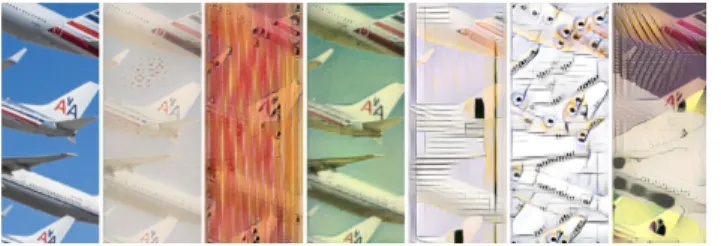
Figure 1: A series of style transfer data brushes applied to an image from Kelley’sAirportraitsproject.ashows the original image without any styling,bshows the image styled with theBruisesbrush (Lupi and King),cuses theHennessybrush (Lupi, Maeda, and King),dis styled using ourFlatlandbrush (generated from an image analyzed by Tufte),eis styled using a brush generated from one of Lupi’s experimental scrapbook pieces,fshowcases styling with the data brush based on Lupi’sData Items, andg
demonstrates the result of layering multiple data brushes (including brushes created from visualizations by Minard).
ABSTRACT
This paper introducesData Brushes, an interactive web application to explore neural style transfer using models trained on data visu-alizations. Our application includes two distinct modes that invite casual creators to engage with deep convolutional neural networks to co-create custom artworks. The first mode, ‘magic markers’, mimics painting with a brush on a canvas, enabling users to paint a style onto selected areas of an image. The second mode, ‘compositing stamps’, uses a real-time method for applying style filters to selected portions of an image. Specifically, we focus on style transfer networks cre-ated from canonical and contemporary works of data visualization and data art in order to investigate the versatility and flexibility of the algorithm. In addition to enabling a novel creative workflow, the process of interactively modifying an image via multiple style transfer networks reveals meaningful features encoded within the networks, and provides insight into the effects particular networks have on different images, or different regions within a single image. To evaluateData Brushes, we gathered expert feedback from partici-pants of a data science symposium and ran an observational study, finding that our application facilitates the creative exploration of neu-ral style transfer for data art and enhances user intuition regarding the expressive range of style transfer features.
Keywords: Style transfer, data art, casual creators, creative AI.
*e-mail: [email protected], web: https://mahikadubey.com †e-mail: [email protected], web: https://jazztap.github.io
‡e-mail: [email protected], web: https://creativecoding.soe.ucsc.edu
1 INTRODUCTION
Neural style transfer models encode an image-to-image function which minimizes some loss function relative to a source ‘style im-age’ for a given target ‘content imim-age’. The alternating convolutional and subsampling layers of these models reproduce strokes, palette choices, and other perceptual properties of the style image, in partic-ular where similar features are present in or implied by the content image [16]. Data Brushesis a novel web-based application that encourages users to interactively explore the creative possibilities of style transfer. Neural style transfer was originally popularized through the imitation of iconic works by famous early 20th Century painters such as Van Gogh and Picasso, andData Brushesfurther incorporate styles learned from seminal works of data visualization by Charles Minard and Edward Tufte, and from data art created by influential data designer Giorgia Lupi. We chose to focus on data art in order to promote visualization as a viable form of artistic expression, as well as to generate discussion about additional uses of style transfer applications. Figs. 1 and 2 show examples of a target image by Mike Kelley [12] manipulated using various styles transfer brushes generated by our application.
Data Brushesmakes it easy to create complex data art collages by interacting with a digital canvas, which transforms source images using predefined or custom data art styles. Our two interactive modes, ‘magic markers’ and ‘compositing stamps’, enable users to evaluate the effect of style transfer functions on their own images, without requiring advanced technical or programming knowledge. By facilitating creative manipulation,Data Brushesprovides users— both casual creators and computational researchers— with a way to interrogate the very feature sets isolated through the style transfer training process, enabling them to playfully interact with an AI medium, and creating a deliberate conflation of visual analysis and
Figure 2: A comparison of the effects of styling the same target image with different data brushes. Here, we use the same brushes used in Fig. 1, but now each is applied to the exact same region of Kelley’s photo (Fig.1d).
new media creation [37]. The contributions of this paper are: a) We introduce an interactive application for generating novel data art collages; b) We incorporate data representations into a neural style transfer pipeline; c) We investigate how interactive tools can provide insight into how neural networks encode image features that describe artistic style; and d) We present an observational study that provides initial validation of the creative potential of interactive style transfer tools for casual creators.
Sec. 2 contextualizes our work in terms of previous investiga-tions of style transfer and sketch-based interfaces, including existing canvas-based applications for computational and machine learning art. Sec. 3 describes our system in detail, presenting our design deci-sions, explaining the process of model training, and providing visual evidence to demonstrate the expressive range of our style brushes via the two available modes. Sec. 4 presents details of our observational study sessions, summarizes the expert feedback of data scientists, and discusses howData Brushesfacilitates new creative roles at the intersections of art, curation, and data visualization. Finally, Sec. 5 introduces new questions that arose during the development of this project, and outlines our plans for a future iteration of the
Data Brushesapplication.
2 BACKGROUND& RELATEDWORK
2.1 Content-Agnostic Style Transfer
Style transfer refers to methods of integrating the distinct features of a source image into the existing content of a target image, transform-ing, to take a common example, a photograph of a landscape (the target image) into a new image that looks like an Impressionist paint-ing (the source image). A deep learnpaint-ing neural network—inspired by the functionality and structure of biological neurons to mimic visual recognition and understanding—is ‘trained’ to encode the visual features of the source image [11, 22]. In general, a successful style transfer should transfer visual properties of the source image without altering the spatial layout and structural information of the target image it is being applied to.Data Brushesuses the approach pioneered by Gatys et al. [16], which encodes the feature space of a source image using the VGG 19 neural network, which has a deep architecture with 16 convolutional layers and 5 pooling layers [35]. Fig. 3 presents a flowchart that provides an overview of the process of applying trained networks to new content.
2.2 Casual Creators
Software tools for casual creators support author creativity through autotelic (self-motivating) design patterns [8, 9]. Such tools are de-signed to support user experience, rather than the production of any particular result. Our system emphasizes the patterns ofalteration
(users can upload their own image, allowing them to personalize it),
annotation(users are learning a common set of trained style trans-fer functions), andimprovisation. Creativeparalysisdue to ‘blank slate’ is discouraged by the filter-like nature of our style transfer brushes, facilitating the interactive creation of new content based
Figure 3: A high-level overview of the style transfer algorithm used in theData Brushesapplication. Given a source ‘style image’, we complete the training of a VGG 19 network in order to generate an image-to-image function which will compress the primary features of any input ‘content image’ (minimizing loss relative to the style image), and then expand the content image into a new composition that retains the overall spatial layout of the target image, while adding the stylistic elements learned from the source image.
on user-selected regions of an image. This form of play supports the study of a black box, be it the neural network, or the user’s own artistic process. Interactive exploration blurs the boundaries between the two, creating an emerging process that is potentially both entertaining and educational.
Art creation is often thought of in terms of a single author making decisions, perhaps within a genre of content, using a style which is distinctively their own. Yet unwanted artifacts generated by image macros and photo filters can also be considered meaningful com-ponents of an artwork, exposing the underlying materiality of the work [29, 40]. The artistic use of networks trained to encapsulate features of an already existing artwork further complicates the mat-ter, not necessarily of authorship, but of the relationship between curation and creation [32]. Style transfer requires feature annotation followed by texture synthesis. State-of-the-art algorithms for the latter, combined with manual annotation, achieve style transfer as well [26]. Our system explores mixed-initiative feature annotation through its real-time graphical interface. By incorporating multiple blending modes we also give the user control over the texture syn-thesis process, enabling expressive outputs that would be difficult to achieve with traditional, sprite-based digital brushes.
Furthermore, machine learning researchers often use support tools originally created for casual creators. As Olah and Carter [27] explain when introducing their concept of ‘distillation’, it is increas-ingly important to find effective ways to overcome ‘research debt’, which overburdens an audience with interpretive labor. If instead the interpretive labor is performed by the system, this then allows par-ticipants to better understand and more seamlessly engage with, in our case, style transfer functions, and to explore the effects of small perturbations to their input (some which have a disproportionate impact).
2.3 Brush & Canvas Interaction
With digital technologies and interfaces becoming increasingly rich, many canvas-based tools for artists are available, inspired by the pioneering work of Sutherland’sSketchpad[38], as well as by more contemporary systems [28, 34]. The direct manipulation affordance promotes user interaction with abstract functions, extending tradi-tional mediums of 2D art making. These kinds of interactions closely follow the concept of a ‘magic lens’ in which clicking actions are used to place small filters on digital images to change the under-lying content [4]. Yet despite the simplicity of such interactions, computational art and creative coding are too often inaccessible to less technical users. This gap is reduced through the development of applications that make algorithms interactive, such as sketch-based interfaces that incorporate a pen or brush metaphor that lets users to manipulate pixels with ease [2, 14, 18, 21].
Jacobs et al. [19] explore this technique in their procedural illus-tration toolPara, providing a drawing environment for artists that includes interactive brushes with unique and customizable designs and styles, specifically adapting techniques (including symmetries and particle systems) from procedurally-generated art [15, 25]. Their expert evaluations support the usefulness of such a software sys-tem for artists to gain control of algorithms. Expanding on tools for computer-assisted art, applications aimed at casual creators for photo editing and image filtering have been augmented using style transfer [33]. While many popular image effects such as color en-hancement and vintage styling can be accomplished through simple pixel manipulations, style transfer can provide uncannily effective re-sults when emulating an artist’s work. For example, a recent mobile style transfer application by Reimann et al. calledMaeSTrO[30] extends this style transfer functionality by enabling users to apply multiple styles onto distinct, user-selected, masked areas of an im-age. InMaeSTrO, the user is directed to produce a layer of semantic annotation, as is sometimes used in non-ML style transfer [10]. Bau et al.’sGANPaint Studioprovides direct interaction with neural net-works by using brushing on a canvas to insert or remove physical features from an image by manipulating underlying generative net-works [3]. Their approach, unlike ours, is to apply texture synthesis over the entire canvas based, using spatially localized edits to the low-dimensional structure that are observed by a narrow, intermedi-ate layer of their network. By contrast, we vary neuronal activations (in our ‘compositing stamps’ mode) by changing the local domain that our network is exposed to.
These approaches, and others like them [20], have been used to develop applications that encourage the casual consumption of style transfer as a form of artistic expression.Data Brushesencourages users to create compositions interactively using a palette of style transfer networks, providing different modes for applying styles onto a single image. As we describe below, theData Brushesstyle transfer brushes are responsive both to the artist’s manual input and the strokes and patterns observed by a convolutional neural network.
3 IMPLEMENTATION ANDINTERACTIONMODES
3.1 Application Design
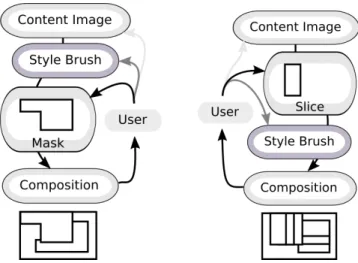
Data Brushesoffers users two distinct modes that allow users to experiment with applying the styles of different famous data visual-ization artists onto an image of their own choosing. Fig. 4 presents an overview that illustrates the processing flow of each mode, which are described in more detail below (in Secs. 3.3 and 3.4). The front-end interface makes use of layered HTML5 canvases as well as the D3.js library [5]. The back-end is built using ml5.js, a machine learning package built for the web on top of the TensorFlow.js li-brary [36] that aims to improve the availability of common machine learning algorithms for developers and creative professionals of vary-ing backgrounds. While ml5.js’s pre-trained examples provide high quality results, the relationship of each painting to its ‘perceptual loss’, visible in the trained style model, can be difficult to interpret. In developingData Brushes, we decided to expose this perceptual loss as a form of real-time evaluation of the effectiveness of a brush when applied to features in a particular target image, giving users a tool that is both exploratory and experiential, and making it possible to understand the mechanics behind the feature extraction algorithm. Thematically,Data Brushespushes beyond traditional painterly style transfer by instead training on data art made by data visualiza-tion experts and artists, including Giorgia Lupi, Charles Minard, and Edward Tufte, as displayed in Fig. 5 (and described in more detail below). Using the GPU cluster on Paperspace’s cloud infrastructure, the initial training of a network to encapsulate the features of each image takes approximately 4-6 hours, depending on the size of the input. Our system lets users create new style transfer networks (i.e., new data brushes), and once trained, the networks can be queried within a few milliseconds, enabling interactive exploration. While
Figure 4: An overview of application design in each mode, as de-scribed in Secs. 3.3 and 3.4. The user is given control over style brushes of their choosing. Left: The user controls which regions of the composition it can effect, using a ‘magic marker’ to reveal styled layers underneath the image. Right: The user controls which regions it is affected via a ‘compositing stamp’ that uses only features local to that selected area to transform the image, unaware of other features in the rest of the image. In both modes, the results are integrated into the content image, preserving their spatial context.
each of our two modes provides a slightly different set of interactions with the style models, both encourage the user to explore the subtle differences in applied styles. By observing how each brush tends to transform particular patterns, lines, or colors within the target image in characteristic ways, a user will become familiar with the behaviors of the brushes and can begin to use them more skillfully and expressively.
3.2 Data Brushes
Traditional style transfer interfaces often use famous works by painters with distinct, easily recognizable styles, such as Picasso, Kandinsky, and Van Gogh. Given our motivation to improve acces-sibility to computational art for casual creators and artists, while also providing insight into the internal behavior of a style transfer network, we chose to provide our users with brushes based on data visualization and data art works that emphasize the role of aesthetics and visual design in representing, communicating, and analyzing data. Our tool is an initial attempt at exploring these artistic features involved in visualizing data, demonstrating the flexibility of the style transfer algorithm and promoting the usage of such novel pieces in computational applications. Though our system supports the cre-ation of style brushes from any image, Fig. 5 shows thumbnails of some of the images used to train the models provided by default in
Data Brushes. Here we describe the distinct visual features for a selection of these default brushes:
• Hennessy, by Giorgia Lupi, John Maeda and Kaki King:This visualization was part of a project to re-branding Hennessy’s V.S.O.P Privilege cognac [24]. Given the many interesting small details present in the image, we focused on a zoomed-in selection to train our data brush. The colorful vertical lines and the small notations and markings in black stood out as features most visible in styled content.
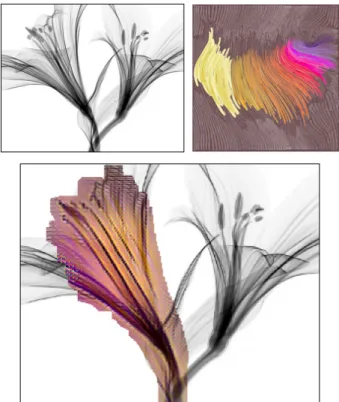
• Scrapbook1, by Giorgia Lupi:We incorporated some of Lupi’s design experiments in our brush selections. This data brush produced the most varied colors, creating interesting and intu-itive mapping of stroke direction to color [23].
Figure 5: Examples of source images used to train some of our custom models. We use original data visualizations and data art from Giorgia Lupi, Charles Minard, and Edward Tufte for a breadth of effects, and users can train their own custom style networks to add brushes to theData Brushesapplication.
• Flatland, a piece examined by Edward Tufte:This image was taken from Tufte’s analysis of designing visualizations for flat interfaces such as paper or a screen [39]. He uses the image, a map from a Japanese travel guide, to demonstrate the unique usage of flat space in representing multi-dimensional information. The subtle blending used in this image produces an understated watercolor effect when applied to new content images, smoothing the image without changing its structure. • Cattle, by Charles Minard:Much of Minard’s work articulates
patterns in the transportation of people and products. This particular image details the amount of cattle sent to Paris from various parts of France in 1858 [31]. We cropped out a part of the entire map visualization to capture specific features of interest. The color difference between the base map and pie charts used in the visualization are captured by our feature extractor, leading to the drawing of dark circular areas over high frequency image content.
• Immigration, by Charles Minard:Another flow visualization by Minard, this piece highlights worldwide immigration in 1858, approximating people’s origin and destination coun-tries [31]. The antique map texture produced a sketchbook like effect when this brush was used to style images.
We chose these specific images for our application as they repre-sent a breadth and evolution of data interpretation in the visualization community, and encode various levels of complexity in artifactual generation. The selected pieces are not meant to be a comprehen-sive representation of data visualization, however we believe they provide good variance in data content and visual style.
3.3 Magic Markers
Themagic markersmode uses natural brush interactions so that users can ‘paint’ on different styles through simple selection and dragging. Usage of the application mimics the physical space of a painter with a palette of ‘styles’ (rather than colors), and includes undo functionality to revert recent changes to the canvas. A set of thumbnail images shows the available pre-trained models. In this mode, all styled images are pre-computed and stored in hidden
Figure 6: This figure illustrates the relationship between color and stoke features that can emerge when applying a style brush to an im-age. Using the ‘magic marker’ mode with the source brush generated from theScrapbook1image (top right), the coloration of the resulting image (bottom) is highly dependent on the direction of the lines in the black-and-white target image (top left). Orange shades begin to appear at the center of the flower, while the darker purples only appear as the angle of the flower’s petals are close to the horizontal, replicating the exact usage of the colors as seen in the source image.
canvas layers aligned with the main canvas image. Clicking on one of the buttons copies the styled image onto the hidden layer stored below the main image. Brush selections can then be made on the canvas, and dragged around or reshaped as needed to reveal the styled image in the painted areas, unmasking the styled content by removing pixels from the top layer in real time.
Painted sections are applied to the main canvas upon the click of the ‘Apply Brush’ button, which flatten the layered canvases into a single image. If changes have not been applied yet, the ‘Clear Brush’ can be used to remove any un-applied ‘paint’ by resetting the top canvas layer through the reversal of the pixel removal. Based on the varied size of the brush, users can change their level of details for different features, adding an additional level of customization to the co-creation process.
A limitation of this approach is that multiple styles can not be lay-ered on top of each other. Painting a new style over an already styled portion of the image replaces the content with the new style, instead of incorporating the effects of the old style onto the new styled image. Thus, our ‘magic markers’ implementation also includes a multi-layering option to recursively style an image. Since this is inherently more computationally expensive, currently these multi-layering paint brushes can introduce a delay of up to 10 seconds when applying the style model to the hidden background canvas using a consumer laptop without a dedicated GPU. However, this delay is greatly minimized on desktop computers with fast GPUs (less than 1 second on a workstation with an Nvidia GeForce RTX 2080 Ti). Once loaded, these layering brushes can style
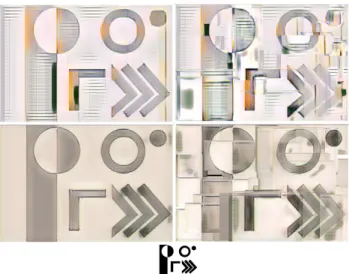
already-Figure 7: Comparison ofScrapbook 2(top row) andImmigration (bot-tom row) styles applied directly to the black-and-white test glyph at the bottom of the figure. The test glyph contains a range of geometric primitives in varying rotations, enabling us to observe how a style brush affects different features in a target image. The left column uses the magic markers mode with a single marker, applying each style to the entire image. The right column uses the compositing stamps mode with one stamp applied to the image many times, us-ing the features local to the currently selected area. Note how the chevrons darken differently in each mode, how the ‘ring’ and ‘moon’ are transformed, how the compositing stamps mode introduces inter-esting border artifacts, and how overall there is an increased density of dramatic contrast which is introduced by our system as the style transfer network normalizes input values.
styled content, enabling a user to develop unique combinations of the features spaces of multiple different visualizations or artists. Figs. 1, 2, 6, 7, and 10 present examples created usingData Brushes‘magic markers’ mode.
3.4 Compositing Stamps
In contrast to the pre-processing approach used in themagic markers
mode, ourcompositing stampsmode uses real-time post-processing of small selected areas of an image to layer ‘style patches’ to create interesting outputs resembling tiled mosaics or collages. Users can select different rectangular sections of their image of choice and immediately transform localized content based on the selected style. Unlike in the magic markers mode, image size is not scaled down in this mode, as the rapid selection of small rectangular areas reduces the computational load on the browser.
Composting stampssimulates the physical application of stamps colored with paint. Once a brush is selected, the user isolates a rectangular patch on the canvas through a click-and-drag operation. Upon mouse release, this patch will then be immediately replaced with a stylized version of the original content, applied only to that selected region. A patch of any size can be ‘stamped’. A button labeled ‘Apply Brush’ merges the changes on the preview canvas to the main canvas, so that a user can then add additional layers of style on top of the transformed canvas. Pressing ‘Clear Brush’ removes the brush box from the canvas area, and pressing ‘Clear Image’ removes any changes on the preview layer that haven’t yet been applied to the main canvas.
This mode is especially useful for interpreting what features are encapsulated within a style transfer network, and for observing the interaction of style brushes on particular target images. By sending rectangular selections of the digital canvas directly to the style trans-fer algorithm, we can also study the trained network on a continuous
Figure 8: Example of theScrapbook 2style brush applied sequentially in space 10 times (moving downwards, using the ‘compositing stamps’ mode) to a region of the test glyph presented in Fig. 7. Note how its effect can change radically due to small ‘catastrophes’ [41] in the underlying content, creating interesting visual artifacts through the varying alignment of features encoded in the style transfer brush with those of the target image.
deformation of content (see Fig. 9 for an example comparing two different brushes using this method of iterative deformation to accen-tuate features). This interactive process reveals the artifactual texture of the network, for instance in its response to boundaries and aspect ratios created by the successive application of small stamps. This mode exposes the style transfer network’s expressive range when used to transform local regions. (See Fig. 7, right, which depicts an investigation of how smaller stamps generate interesting textures.)
3.5 Network Details
The models in our implementation consist of a VGG 19 network comprising of 3 convolutional layers (representing kernels), 5 pairs of convolutional layers (representing a difference between kernels), 2 transpose layers (representing stamp-like patterns of application of kernels), 1 more convolutional layer, and a final activation and normalization step [35]. Every layer in the large 19 layer convolu-tional VGG network structure produces a different filter response. A representation of artistic style in an image is built by combining the correlations between these responses over the entire image [17]. Figs. 7–9 present examples of the trained networks applied to indi-vidual features of a basis image comprised of geometric primitives, demonstrating the baseline behavior of the network. With no content image to warp, the produced imagery is a useful snapshot to under-stand the general color scheme and default stroke patterns used by the style.
4 EVALUATION& DISCUSSION
The current version ofData Brusheswas developed over a 7 month period, beginning in January 2019. During the development process, we gathered feedback and instigated discussion with artists, visual-ization researchers, and data scientists. In this section, we briefly describe two of these information gathering sessions, and summarize lessons learned from them.
4.1 User Feedback
A version of theData Brushesapplication was presented at a Data Science Symposium held at University of California, Santa Cruz in
Figure 9: Here we show an example of how a user can probe the features of two of the default style brushes,Scrapbook 2(left) and Immigration(right), using the ‘compositing stamps’ mode. A simple black-and-white test glyph is used as the target image (bottom), which contains simple symmetrical features. In the output shown on the left, horizontal ‘grating’ tends to occur on dark horizontal features, but will also sometimes occupy white areas where there is an absence of features. Interestingly, dark vertical lines are shaded orange in some regions, even though this color is not dominant in the original source image (see Fig. 3.2, lower left), and only ‘hallucinated’ in this interaction between the style transfer network and this type of vertical stroke. In the output shown on the right, corners are darkened and, unlike the grid artifacts, rotationally symmetric.
early May 2019, with over 350 attendees, including faculty, gradu-ate students, and data science experts from industry research labs. We presented an overview of the system architecture and showed a range of example outputs. While participants were intrigued by our results, a repeatedly voiced concern was that our work was difficult to evaluate, as we aimed to support the creative process, rather than to measure outputs against other style transfer techniques. Through discussions with participants on the practicality and purpose of as-sessing creative support tools, we realized that our project is a tool
forevaluation rather than producing imagesto beevaluated, and that the outputs ofData Brushesfunction as a form of feature visu-alization [6]. Another common thread in the feedback we received was the interest in the use of data visualization pieces as inputs to the style networks, and it was validating to have our audience gain an appreciation for data visualization as a viable bridge between machine learning and creative arts.
4.2 Observational Study
Following our presentation at the Data Science Symposium, we sought to understand how non-experts would interact with our ap-plication. We conducted an observational pilot study to investigate a user’s ability to develop insight into the behavior of style transfer networks.
Our application focuses less on trying to generate an accurate or optimal style transfer algorithm, and more on the user experience itself. SinceData Brusheshelps users make their own assessments of style brushes, we were interested in the insights that such users may develop through the assisted interaction experience of our appli-cation. We conducted a pilot study with 7 volunteers, in which each subject was recorded completed an unguided session of between 10 and 20 minutes of application exploration using the ‘magic markers’ mode, followed by a short survey (filled out anonymously). Each user spent an additional 20 minutes completing the survey, and had access to the application during that time, in case they wanted to revisit a particular aspect before finalizing an answer. We collected comments indicating how users perceived the ease of use of the appli-cation, as well as comments that described how users interpreted the behavior of each data brush. We used the screen recordings of these
Figure 10: Examples of outputs created by users in our pilot study, using the ‘magic marker’ mode for a single target image. One user (bottom) has generated a grid of all pairs of style brushes in order to characterize their interactions.
interactions and the surveys to provide us with insight into the user experience, as well as to guide future iterations of the application.
Fig. 10 presents 3 examples of the outputs created during their exploration sessions, in which participants were provided with a default target image and a selection of style transfer brushes. Given their freedom to layer brushes as they wished, it is interesting to note the different ways in which participants chose to combine all brushes for comparisons. Overall, the participants, all of who were new to neural style transfer, preferred the effects produced by brushes that generated a greater variance in patterns, as seen in Fig. 11, despite the fact that the use of these brushes were the most likely to obscure the underlying structural features of the target image. The primary reasoning provided for the preferences of these brushes was that they introduced more dramatic and unusual shapes and colors into the image, with one user explaining that “each of these brushes has a distinctive style and character over and above the underlying image itself.”
We used the survey to gauge the intuition developed through interaction withData Brushes, asking users to rank brushes based
Figure 11: When asked to choose their favorite brushes,Data Items, Flatland, andScrapbook 1were selected the most. The original style image is shown on the left of the main image, which has been styled by each brush respectively.
Figure 12: Users were asked to rank each data brush on a scale of 1 to 5 for pattern generation (1 representing the least variance in pattern generation and 5 representing the most variance) and content preservation (1 being the worst content preservation and 5 being the best). There is a clear correlation learned by our subjects between the variance in pattern generation and the ability of each brush to best preserve underlying content. We order the brush thumbnails in order, displaying the one which was most given that rank, and also show the average rank given to each of the brush.
on two criteria: the variance in pattern generation, and the level of content preservation. Fig. 12 summarizes the most frequent ranking provided by each user for both criteria. Interestingly, there appears to be a correlation between user interpretation of the brushes and their ability either to generate varied patterns or to preserve the content image. This gives us an initial indication that participants are able to glean insights into the behaviour of each brush, and provides motivation for developing further studies to investigate the potential benefits of demystifying computational methods for novice users.
4.3 Discussion
During the development of this application, we engaged in an ongo-ing debate about the role of individual artistic vision in art creation. Does an artistic process begin with the intended content of the im-age and result in its ‘style’? Does it begin with affordances of the medium (e.g., paints of various pigment, and brushes of various texture), and result in a ‘form’? Or does creativity emerge precisely from the inherent tension between the two concerns? Style transfer architectures are designed to minimize the perceptual loss of an arbitrary image relative to a given style, transforming the content im-age into a compressed vector representation that encodes the salient features of the image [7]. By re-translating the vector representation and integrating it into another image, this generative pipeline allows
a user to make creative decisions about which images to transform, making the algorithm itself an artistic medium. By embedding this procedure into an interactive canvas, we enable users (even those with no knowledge of computer programming) to also decidewhere
to transform their images, and engage with this new medium. As programmers, we are also acting ascuratorsof style brushes, and we began to predict the pattern of responses that source images would yield, once fitted into the connection weights of a network pre-trained on visual primitives, for different target images. While general color schemes and structural motifs were reliably replicated (by the process of re-encoding a vector as an image), the style trans-fer brush’s ‘opinion’ likewise depended on stroke directionality (as we illustrate in Fig. 6), contrast, and aspect ratio (Fig. 9) in the content image. This instinct for the algorithm’s valuation of various image segments is what we hope our users will take away from our application. During the development of this application, we improved at selecting training images for our data brushes, deter-mining which would produce more distinct results before running any model training as we became adept at identifying key features in a style image. In our future work, we consider extending the number of default brushes, and to make it easier for a user to train on style images of their choice, which could also help to facilitate data literacy [1], or at least provide an intuition for how features are encoded in neural style networks. Because paintings are fre-quently the source material mined to create style transfer networks, we decided to treat data art in the same way, no longer focusing on the semantic bindings used to create them, but instead on the emergent structures resulting from those ‘stroke choices’ which are illegible to a bare visual cortex (layering of kernels), and replaced by stroke choices which ensure a similar local structure yet arbitrary global order (as explored in Fig. 13). Additionally, the aesthetic outcome of many data visualizations make them suitable choices for style source. However, we also believe that this type of creative experimentation could potentially help generate new approaches to the design of data visualization representations [13], and we also look forward to future style transfer applications that could, say, transform a simple scatterplot into a more evocative representation using interactive style brushes.
5 CONCLUSION& FUTUREWORK
In experimenting with web frameworks for machine learning in an artistic context, we created an easy-to-use and explorable style transfer system for users of various levels of skill and creativity, promoting availability of creative tools for computational and algo-rithmic art. With this application, we move toward understanding the motivations of two very different audiences: researchers and content creators. While researchers seek to understand the mechanisms of content-aware image generation by deep convolutional networks, content creators desire a broader array of intuitive features to author and version their work. We aim to develop for the needs of both, so as to reduce the knowledge gap between the roles while promoting data visualization art, which intersects the two audiences.
A main challenge in accomplishing these tasks is optimizing for browser constraints, as we aim for a system that would allow immediate training of new data brushes based on user-submitted style images. As with any image manipulation task, style trans-fer is a computationally heavy process that scales with time as the size of the input increases. Currently, we work around this issue by pre-computing all possible styles on hidden layers, and reordering the information based on the selected brush. Pro-viding users with the ability to rapidly generate custom brushes will increase access to artistic algorithms, improving the under-standing and accessibility of computational art for non-technical users. TheData Brushesweb application is available athttps: //github.com/CreativeCodingLab/DataBrushes, along with source code, instructions, and video documentation.
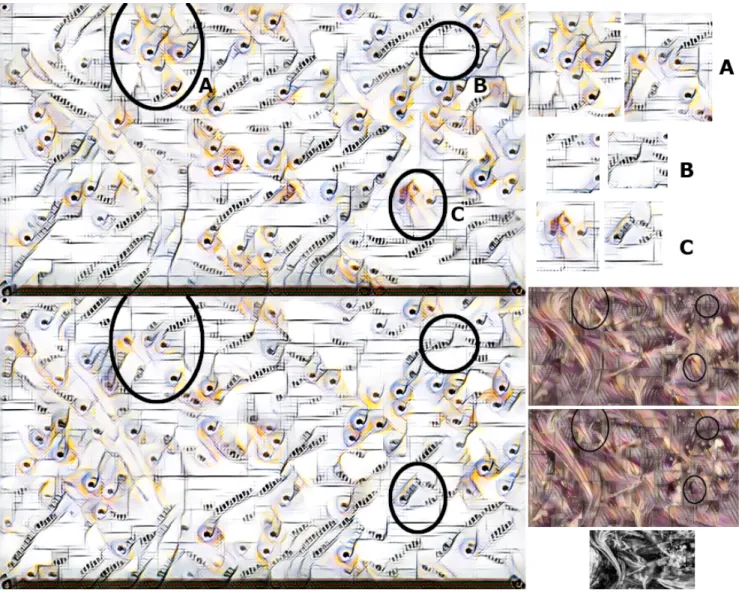
Figure 13: Analysis using theMOMAbrush in the ‘magic markers’ mode on two variants of the same image, made visible through changes in motif (selected examples are shown in the top right quadrant). Despite using the same brush on the entire image, different outcomes can be produced in the same regions based on brush direction and layering. The circled sections isolate areas where different artifacts are generated despite having the same underlying content images. Similar variations are created by stamping theScrapbook 1brush in the ‘compositing stamps’ mode in various detailed patterns (bottom right quadrant) onto a synthetic image with many contours (the black-and-white image at the bottommost right).
REFERENCES
[1] B. Alper, N. H. Riche, F. Chevalier, J. Boy, and M. Sezgin. Visualiza-tion literacy at elementary school. InProceedings of the ACM SIGCHI Conference on Human Factors in Computing Systems, pp. 5485–5497, 2017.
[2] P. Barla, S. Breslav, J. Thollot, F. Sillion, and L. Markosian. Stroke pattern analysis and synthesis.Computer Graphics Forum, 25(3):663– 671, 2006.
[3] D. Bau, H. Strobelt, W. Peebles, J. Wulff, B. Zhou, J.-Y. Zhu, and A. Torralba. Semantic photo manipulation with a generative image prior.ACM Transactions on Graphics, 38(4):59, 2019.
[4] E. A. Bier, M. C. Stone, K. Pier, W. Buxton, and T. D. DeRose. Tool-glass and magic lenses: The see-through interface. InProceedings of the 20th Annual ACM Conference on Computer Graphics and Interac-tive Techniques, pp. 73–80, 1993.
[5] M. Bostock, V. Ogievetsky, and J. Heer. D3: Data-driven
docu-ments.IEEE Transactions on Visualization and Computer Graphics, 17(12):2301–2309, 2011.
[6] S. Carter, Z. Armstrong, L. Schubert, I. Johnson, and C. Olah. Activation atlas. Distill, 2019. https://distill.pub/2019/
activation-atlas.
[7] A. J. Champandard. Semantic style transfer and turning two-bit doodles into fine artworks.arXiv:1603.01768, 2016.
[8] K. Compton. Casual creators: Defining a genre of autotelic cre-ativity support systems. PhD thesis, UC Santa Cruz, 2019. https: //escholarship.org/uc/item/4kg8g9gd.
[9] K. Compton and M. Mateas. Casual creators. InProceedings of the Sixth International Conference on Computational Creativity, pp. 228–235, 2015.
[10] A. A. Efros and W. T. Freeman. Image quilting for texture synthesis and transfer. InProceedings of the 28th ACM Conference on Computer Graphics and Interactive Techniques, pp. 341–346, 2001.
[11] M. Elad and P. Milanfar. Style transfer via texture synthesis. IEEE Transactions on Image Processing, 26(5):2338–2351, 2017. [12] N. Felton, S. Ehmann, and R. Klanten.PhotoViz: Visualizing
informa-tion through photography. Gestalten, 2016.
[13] A. G. Forbes. Articulating media arts activities in art-science contexts.
Leonardo, 48:330–337, 2015.
[14] A. G. Forbes, T. H¨ollerer, and G. Legrady. Generative fluid pro-files for interactive media arts projects. In Proceedings of the
ACM/Eurographics International Symposium on Computational Aes-thetics in Graphics, Visualization, and Imaging (CAe), pp. 37–43, 2013.
[15] P. Galanter. What is generative art? Complexity theory as a context for art theory. InProceedings of the 6th Generative Art Conference, 2003. [16] L. A. Gatys, A. S. Ecker, and M. Bethge. A neural algorithm of artistic
style.arXiv:1508.06576, 2015.
[17] L. A. Gatys, A. S. Ecker, and M. Bethge. Texture synthesis using convolutional neural networks. In C. Cortes, N. D. Lawrence, D. D. Lee, M. Sugiyama, and R. Garnett, eds.,Advances in Neural Information Processing Systems 28, pp. 262–270. 2015.
[18] M. Gerl and T. Isenberg. Interactive example-based hatching. Comput-ers & Graphics, 37(1-2):65–80, 2013.
[19] J. Jacobs, J. Brandt, R. Mech, and M. Resnick. Extending manual drawing practices with artist-centric programming tools. In Proceed-ings of the ACM SIGCHI Conference on Human Factors in Computing Systems, pp. 590:1–590:13, 2018.
[20] Y. Jing, Y. Yang, Z. Feng, J. Ye, Y. Yu, and M. Song. Neural style transfer: A review.arXiv:1705.04058, 2017.
[21] J. Jorge and F. Samavati. Sketch-based interfaces and modeling. Springer Science & Business Media, 2010.
[22] Y. Li, N. Wang, J. Liu, and X. Hou. Demystifying neural style transfer.
arXiv:1701.01036, 2017.
[23] G. Lupi. DataVizScrapbooks!http://giorgialupi.com, retrieved August 19, 2019.
[24] G. Lupi, J. Maeda, and K. King. Capturing the Blend. http:// giorgialupi.com, retrieved August 19, 2019.
[25] J. McCormack, O. Bown, A. Dorin, J. McCabe, G. Monro, and M. Whitelaw. Ten questions concerning generative computer art.
Leonardo, 47(2):135–141, 2014.
[26] Y. Men, Z. Lian, Y. Tang, and J. Xiao. A Common Framework for Interactive Texture Transfer. InProceedings of the IEEE/CVF Con-ference on Computer Vision and Pattern Recognition, pp. 6353–6362, June 2018.
[27] C. Olah and S. Carter. Research debt. Distill, 2017. https:// distill.pub/2017/research-debt.
[28] L. Olsen, F. F. Samavati, M. C. Sousa, and J. A. Jorge. Sketch-based modeling: A survey.Computers & Graphics, 33(1):85–103, 2009. [29] S. Pink, M. Ruckenstein, R. Willim, and M. Duque. Broken data:
Conceptualising data in an emerging world.Big Data & Society, 5(1), 2018.
[30] M. Reimann, M. Klingbeil, S. Pasewaldt, A. Semmo, M. Trapp, and J. Dllner. MaeSTrO: A mobile app for style transfer orchestration using neural networks. InProceedings of the International Conference on Cyberworlds, pp. 9–16, Oct 2018.
[31] S. Rendgen.The Minard system: The complete statistical graphics of Charles-Joseph Minard. Chronicle Books, 2018.
[32] H. Sarin. Playing a game of GANstruction.https://thegradient. pub/playing-a-game-of-ganstruction/, retrieved August 19, 2019.
[33] A. Semmo, T. Isenberg, and J. D¨ollner. Neural style transfer: A paradigm shift for image-based artistic rendering? InProceedings of the Symposium on Non-Photorealistic Animation and Rendering, pp. 5:1–13, 2017.
[34] T. M. Sezgin, T. Stahovich, and R. Davis. Sketch based interfaces: Early processing for sketch understanding. InProceedings of the ACM Workshop on Perceptive User Interfaces, pp. 1–8, 2001.
[35] K. Simonyan and A. Zisserman. Very deep convolutional networks for large-scale image recognition.arXiv:1409.1556, 2014.
[36] D. Smilkov, N. Thorat, Y. Assogba, A. Yuan, N. Kreeger, P. Yu, K. Zhang, S. Cai, E. Nielsen, D. Soergel, et al. TensorFlow.js: Machine learning for the Web and beyond.arXiv:1901.05350, 2019. [37] H. Staten. Techne theory: A new language for art. Bloomsbury
Publishing, 2019.
[38] I. E. Sutherland. Sketchpad: A man-machine graphical communication system.Simulation, 2(5):3–20, 1964.
[39] E. R. Tufte.Envisioning information. Graphics Press Cheshire, CT, 1993.
[40] R. Vuillemot and S. Huron. Glitches as a generative design process. In
Proceedings of the IEEE VIS Arts Program (VISAP), pp. 48–53, 2016.
[41] E. C. Zeeman. Catastrophe theory.Scientific American, 234(4):65–83, 1976.