ExPort: Detecting and Visualizing API Usages in
Large Source Code Repositories
Evan Moritz
1, Mario Linares-Vásquez
1, Denys Poshyvanyk
1, Mark Grechanik
2,
Collin McMillan
3, Malcom Gethers
41The College of William and Mary, Williamsburg, VA, USA 2University of Illinois at Chicago, Chicago, IL, USA
3University of Notre Dame, Notre Dame, IN, USA 4University of Maryland Baltimore County, Baltimore, MD, USA
{eamoritz, mlinarev, denys}@cs.wm.edu, [email protected], [email protected], [email protected]
Abstract—This paper presents a technique for automatically mining and visualizing API usage examples. In contrast to previous approaches, our technique is capable of finding examples of API usage that occur across several functions in a program. This distinction is important because of a gap between what current API learning tools provide and what programmers need: current tools extract relatively small examples from single files/functions, even though programmers use APIs to build large software. The small examples are helpful in the initial stages of API learning, but leave out details that are helpful in later stages. Our technique is intended to fill this gap. It works by representing software as a Relational Topic Model, where API calls and the functions that use them are modeled as a document network. Given a starting API, our approach can recommend complex API usage examples mined from a repository of over 14 million Java methods.
Index Terms—API usage, visualization, call graph, code search
I. INTRODUCTION
Programmers build new software by using functionality provided by a multitude of pre-existing software modules such as libraries. These modules are usable because they provide public-facing Application Programming Interfaces (APIs). Building software from APIs has many benefits, including stability, testability, and common, predictable use [16].
Unfortunately, it is notoriously difficult to learn an API [13]. Many barriers to API learning are well-documented. The list of problems include specific [25], [18] or overly-general [25] explanations of API usage, lack of understanding of the relationships among code elements [13], [7], code elements with a large number of alternative uses [25], [27], [18], [17], [24], confused order of operations in extracted API examples [4], and limited details about how to reuse components relevant to a given task [14].
Recent work has helped programmers address some of these problems and learn to use individual APIs [12], [22], [25], [9], [14]. These approaches focus on extracting snippets of source code that use methods provided by an API and can successfully suggest patterns of usages of these methods. However, understanding how to use an API to implement high-level functionality is not immediately obvious with examples from single files or functions.
High-level functionality is not usually implemented in single files or functions [8]; it is represented by the interaction of
different functions in source code that implement the func-tionality and belong to different APIs. Therefore, programmers face with a coordination barrier [13], because several low-level APIs needs to be coordinated to create high-level behaviors, and they do not know how APIs should be used. One example of a coordination barrier is when a programmer does not know how to cast the type used as output in one API to the input of another API. Another example is when several APIs complement each other, but are not actually dependent on each other. Consequently, before reuse, programmers need to identify structural dependencies between relevant elements in the code under investigation, and then to understand the roles of the elements as part of a high-level behavior that can be reused [11].
We target this problem in our interactive code search tool called ExPort. The idea behind ExPort is simple: given a task, present the programmer with a list of API methods related to that task. Once the programmer selects the API methods he or she wishes to use, present the programmer with usage examples related to the task. To be interactive, the tool presents information to the programmer visually, so that he or she may navigate the results and reason about their relationships. Previous studies [20], [21], [14] have shown that presenting relationships in a visual manner greatly help the user in determining the usefulness of the results.
For the tool implementation, we generated a database from over 13,000 open source Java projects consisting of about 14 million methods. For the purposes of the prototype, we computed relationships between 3700 methods in 2 software projects: GNU Electric VLSI design system1, a CAD system
for designing circuits; and GCJ2, a front-end compiler for Java
projects. We used Relational Topic Modeling (RTM) [6] to cal-culate these relationships and provide concrete usage examples of APIs via an interactive call-graph visualization. In addition to its primary applications, this tool can be used as a research setting to study the effectiveness of the approach and discover how developers search for APIs. ExPortis free and available for public use at http://www.cs.wm.edu/semeru/export/.
1http://www.gnu.org/software/electric/ 2http://www.gnu.org/software/gcc/
Our contribution with Export and the underlying model is three-fold: (i) we used RTM to identify similarities between API methods and provide programmers with a list of relevant methods; (ii) ExPort presents relevant API methods and API usage patterns visually in such a way that the developers can explore the relationships between API methods; and (iii)
Export allows users to provide relevance (active) feedback, and passively logs user actions in order to understand users behavior when searching and browsing API usage examples.
II. THEPROBLEM
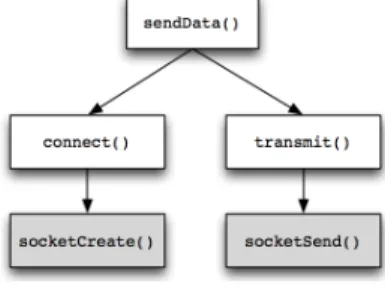
To illustrate the problem of providing API usage examples based on API calls in single functions3 (as in the current approaches) instead of API calls used across several functions we discuss two API usage scenarios. In Figure 1 the func-tion sendData calls two API methods: socketCreate and socketSend; in Figure 2 the high-level functionality implemented in the functionsendDatais based on the other two functions (which may be in different files or classes) that individually calls the API methodssocketCreateand socketSend.
Current approaches extract sets of APIs used in relevant code examples (i.e., files, functions or code snippets) to mine frequent combinations of APIs (usage patterns). For example, if the sendData functions in Figures 1 and 2 are considered as relevant, after extracting the API calls in both methods, no API usage patterns are identified because API methods socketCreate and socketSend are not called by sendData in the second scenario (Figure 2). However, in both scenarios the API methodssocketCreate and socketSend are used to implement the functionality implemented by sendData.
ExPortfinds API usage examples even if the usage of those APIs is in situations such as those in Figure 2. For example, given the API call socketCreate, we also recommend the API call socketSend. We extract the API usage by analyzing the function invocations in existing source code, in addition to the current approach of looking at the API calls made in individual functions or files. A key feature of our approach is sensitivity to the proximity of API calls. For example, in Figure 1, the two API calls are highly related because they appear in the same function. In Figure 2, the API calls are related to a lesser degree because they occur in separate functions. Programmers can better understand recom-mendations of API usage if they can also see examples of that usage. Therefore, our technique also provides these examples to programmers. These examples are sets of functions which call the recommended APIs. For example, in response to a query of the API callsocketCreate, we would recommend socketSend and show (as examples) the three functions sendData, connect, and transmit from Figure 2.
3In this paper we use the terms function and method to distinguish between
methods in software projects (functions), and methods in APIs (API methods) such as the official Sun Java SDK, Apache libraries, etc.
Fig. 1. Example of two API calls used in a single function. The API calls are shaded gray.
Fig. 2. Example of two API calls used across three functions. The API calls are shaded gray.
III. OURAPPROACH
Programmers navigate software spaces (e.g., an application or a set of applications in a repository) in two ways: di-rected searching and browsing [21]. The former occurs when programmers are looking for specific information, while the latter is used to explore the space and understand high-level concepts [21]. Moreover, browsing is most effective when programmers follow relationships between elements in the software space [20] (e.g., classes or functions in a call graph). But, when the elements are atomic units (i.e., functions or fields), the browsing process provides useful information for understanding high level concepts [19], [14].
Therefore, we considered browsing as the main feature in ExPort to help programmers when they are looking for examples implementing high-level functionality.ExPorthelps to identify structural dependencies, and the role of the de-pendencies as part of a high-level functionality. It is done by computing similarities between API methods and representing the software space of relevant methods as a call graph that can be visually explored.
In general, the process follows 6 steps: 1) similarities between APIs are precomputed offline using Relational Topic Modeling; 2) the programmer inputs a query 4 to ExPort;
3) API methods related to the query are displayed to the user; 4) the user selects APIs relevant to his her task; 5) the relevant APIs are displayed in a call-graph, which shows other functions that call the APIs; 6) finally, the user selects functions from the call graph to view API usage examples.
A. Relational Topic Modeling (RTM)
Relational Topic Model is a hierarchical model that defines a comprehensive approach to modeling interconnected docu-ments, taking into account both document attributes as well as 4For our initial prototype, a query is the starting API the user is
investi-gating. Future work will involve textual queries and return suggested APIs related to the task.
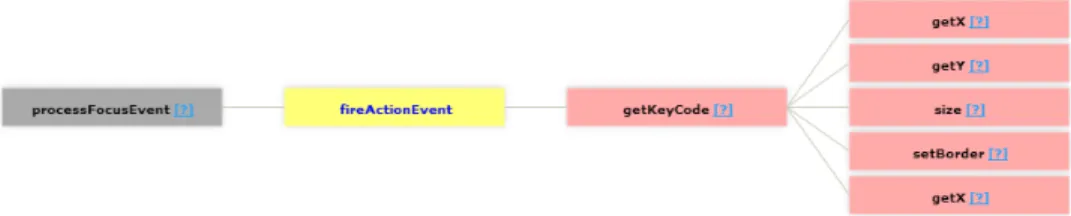
Fig. 3. Browsing similar APIs in the similarity view.
known links between documents. RTM identifies latent topics associated with documents and allows for the prediction of links between documents in large corpora based on document attributes and known relationships between the documents [6]. Each document is modeled as a mixture of various topics, where a topic is a probabilistic mixture over the set of attributes (e.g., terms in a text corpus). Applications of RTM include analysis of networked data such as social networks of friends, collection of scientific papers with citations, as well as web pages and their links. RTM was previously used by Gethers and Poshyvanyk [10] to capture conceptual relationships (degree of coupling) between classes. In ExPort
we use the same motivation in [10] but we consider functions as documents, and the document attributes are the API calls in the functions. Each function in a project is represented as a vector of the API calls in the function (e.g., a call to a method in a class in the Java SDK), and the calls between functions in the projects represent the links between documents. Therefore, if the model identifies a link between two functions with a high probability, we consider these functions to be similar.
RTM identifies links between documents according to topic-document distributions. Therefore, linked topic-documents have a high probability of being associate to the same topics. Based on this property, we identified the API calls that describe similar functions by using the topic-word distribution of topics. Then, for a given API method (considered to be a starting point of the required high-level functionality), relevant methods are retrieved as the ones with high probability of being associated with the same topics. For example, given an initial method socketSend(Figure 2), and a link identified by the model between functions connect andtransmit (because both functions are called by sendData), the methods called by connect and transmit with high probability of being associated to the same topics of socketSend are retrieved as methods relevant tosocketSend.
B. Detecting and Visualizing API Usage
ExPortprovides a visual interface (GUI) to browse the space of APIs that are identified as relevant by using RTM. The GUI is composed of two views: similarity, and call-graph.
a) Similarity view: As a user enters a query, the auto-completion feature of the tool presents APIs that are textually related to the query as the user types. This feature allows the users to identify an API method as the starting point of the required high-level functionality. Once a query API has been chosen, the tool presents APIs related to the query in the form
Fig. 4. Browsing API usage examples in the callgraph view.
of a directed graph, with the original query as the root and related APIs as children (Figure 3). Further children are APIs related directly to their parent nodes (not to the original query). This helps widen the search space to account for different variations of the task. For the purposes of this prototype, a
queryis the initial starting API typed by the user.
For example, suppose a user wants to investigate the API JComboBox.fireActionEvent(). The user enters the query and gets as result a graph like the one in Figure 3. The query node is highlighted in yellow. The other nodes’ colors indicate how many children they have in the graph, ranging from dark red (many) to pink (few) to grey (none). The user can navigate the graph to view suggested related APIs, such as the similar event handler processFocusEvent. Clicking on a node will show the method’s basic information, with the ability to open a new window comparing the source code of processFocusEvent and fireActionEvent side-by-side.
b) Call-graph view: Once a user has selected a relevant API or a set of relevant APIs, those APIs are sent to the call-graph view (Figure 4). This displays the chain of calls in which an API is used, showing the programmer other functions that use the API. When the user clicks on a node in the call-graph, an info pane shows the actual code that implements the call, providing a concrete example of how the API is used in the code. From this the programmer can determine how to use the API in her code. The API methods selected on the Similarity view appears as red stars in the Call-graph view, and functions are represented as grey circles nodes. Orange squares correspond to other methods that are in the API (i.e., Java SDK).
From the example given in the similarity view, the user has decided to investigate how fireActionEvent is used. The call-graph for this method is shown in Figure 4. From the method calls, the user can tell that the function
contentsChanged gets called when a JComboBox re-ceives an event. The user reads that contentsChanged calls selectedItemChanged and follows the callgraph. From the code for selectedItemChanged, the user can see that the function fires an item event for the selected item,
thennotifies all of theJComboBox’s event listeners by calling fireActionEvent. This provides a concrete example to the user on how to properly use the method.
C. Implementation Details
This section describes the main implementation details of our tool.
a) Platform: In order to be portable and reach a large audience running on different systems, the tool is implemented as a web-based interactive GUI. This avoids the problem of changing the tool to run on different operating systems and architectures, as well as providing instant updates to all users and allowing the researcher direct access to the data. The prototype runs in an Apache web server on a Linux host.
b) Languages: Given the web-based platform, the choice of client-side language is clear: the GUI is rendered in HTML and JavaScript, communicating with the server through the standard HTTP requests (Get, Post, Cookie, Request) and Asynchronous JavaScript And XML (AJAX). The server-side architecture is written in PHP and renders pages into HTML, responds to requests, and records information.
c) Libraries: The prototype uses a graphing library to render the graphs in the GUI in JavaScript. This library is the JavaScript InfoVis Toolkit (JIT)5. The prototype makes use of the jQuery6 framework to use its advanced JavaScript
capabilities. This functionality includes (but is not limited to): Document Object Model (DOM) manipulation, textbox autocomplete, UI elements, and AJAX.
d) Database: The prototype uses a pre-computed database of similarities and calls for its back end. The data is stored in a MySQL database which is linked to from the server-side architecture. The database contains tables for, among other things: individual function information, function similarities, function call graphs, and logging information.
e) WebService: The webservice implements a commonly-used webservice format, JSON.7 The backend is
provided by the server-side architecture. The same information used in the tool is provided to the public. The webservice can be called via HTTP GET parameters.8 The full path to
the webservice implementation can be found here.9
IV. EXAMPLES OFDETECTING ANDVISUALIZINGAPI USAGES WITHEXPORT
To illustrate the ability of ExPort to recommend related APIs through complex relationships, we present an example of finding API usages.
5http://www.thejit.org/ 6http://www.jquery.com/ 7http://www.json.org/
8URL?function=functionname¶m1=value¶m2=. . . 9http://www.cs.wm.edu/semeru/export/service.php
TABLE I
SUMMARY OF WEBSERVICE FUNCTIONALITY.
Function Description
getApiInfo(apiId) Returns information about the givenapiId, such as class name, the name of file it is contained in, parameters, return value type, and more.
apiSim(apiId, threshold, cutpoint, exclude)
Returns all of the APIs similar to apiId, given the other parameters. The threshold
parameter determines the similarity score which all of the APIs with equal or higher similarity scores will be included, and all of the APIs with lower similarity scores will be excluded. The cutpoint parameter determines how many total APIs to return. Theexcludeparameter is an array of API IDs to exclude from the query, for example when used in the breadth-first search of finding relevant APIs in the similarity view.
callee(apiId) Returns all of the methods in the database called byapiId.
caller(apiId) Returns all of the methods in the database that callapiId.
apicalls(apiId) Returns all of the Java J2SE API methods called byapiId.
autocomplete(search) Returns the names and IDs of methods in the corpus with names containing the search term. For example, searching “save” returns entries for Properties.save() and
JFileChooser.showSaveDialog().
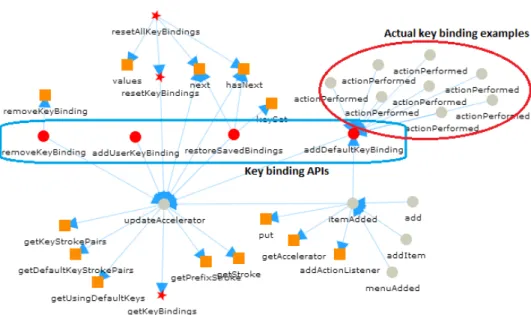
Suppose a user wishes to investigate how menu key bindings are used in the GNU electric VSLI system, with the goal of discovering how to add his or her own key bindings to a menu item. The user enters the query keybinding and selectsMenuBar.getKeyBindings()from the autocom-pletion drop-down list. The similarity view presents suggested APIs related to the query (Figure 5). From these, the user selects two additional methods from the MenuBar class to add to the call-graph view: resetKeyBindings and resetAllKeyBindings. This produces the call-graph in Figure 6. In this view, the user can immediately see the relationship between the three methods, represented as stars. resetAllBindings calls resetBindings, which calls updateAccelerator and finallygetKeyBindings.
But there is more to it than that – ExPort looks deeper into the call-graph and presents additional usage exam-ples. The four red10 nodes in the center of the fig-ure also call updateAccelerator. Each of them de-scribes additional functionality that can be used with key bindings. Clicking on a node will display the relevant code implementing the actual functionality in the project. removeKeyBinding shows the user how a key binding can be removed from a menu item.addUserKeyBinding shows the user how a key binding can be added to a menu item. restoreSavedBindings shows the user how it is possible to restore a set of key bindings that were saved previously. Finally, addDefaultKeyBinding shows the user how the program registers its default 10We highlighted the nodes using red color only for illustration purposes.
key bindings. Each actionPerformed call leading to addDefaultKeyBinding provides the user a concrete example of how to add a menu item with a key binding. All of these examples address the user’s original goal of discovering how to use key bindings in the MenuBar.
V. RELATED WORK
This section describes other approaches that try to solve problems related to software search and API usage.
MAPO [26], [25] is an Eclipse plugin for MiningAPI us-ages fromOpen source repositories that gathers code snippets from common online code search tools, such as Google Code Search [3] and Koders [1] (now merged with Ohloh Code).
MAPO mines API usage patterns from the code snippets and clusters them based on the task they perform. A user with the MAPOEclipse plugin installed could then select and API from their code and haveMAPOreturn relevant usage patterns based on the code snippets. While this is similar toExPort, it is dependent on the quality of the online search engine results. In addition, it does not present the results in a visualization of concrete usage examples.
Apatite [9] is an online code search tool that creates associations between results based on how often they are used together. Apatite provides additional search options by provid-ing results at the package, class, and method granularity. The association rules are created by retrieving the first 100 results from the Yahoo! [2] search engine. If methodB appears in the results of a search formethodA, then a link is established between them. Apatite presents its results in a column format. The textual results of each granularity are sorted and sized based on their computed relevance, with the option to view the API documentation. Apatite does not present its results graphically and does not provide concrete usage examples.
Portfolio [14], [15] is a web-based code search engine that takes in a textual query as input and generates a list of suggestions based on a spreading activation network and PageRank. Portfolio then visualizes the callgraph and has the option to view source code. Portfolio primarily operates on a corpus of C/C++ projects and does not focus on API usage. Furthermore, Portfolio does not have interactive or con-figurable graphs, limiting their effectiveness. In some sense,
ExPort is the spiritual successor of Portfolio, as some of the authors were involved in both projects.
PARSEweb[23] assists programmers in finding code exam-ples from “source → target” queries. Given a source object type, PARSEweb will identify chains of calls that transform the object into the target object type through method calls, class constructors, and type casts. PARSEweb is implemented as an Eclipse plugin and allows the user to navigate to the relevant code functions.
Sourcerer[5] is a web crawler that mirrors the functionality of popular web search engines, specialized on indexing online source code repositories. Sourcerer records several aspects of the source code artifacts it finds: source code entities (such as classes or methods), dependency relationships, keywords, and uniquely identifying information. Sourcerer recommends
TABLE II
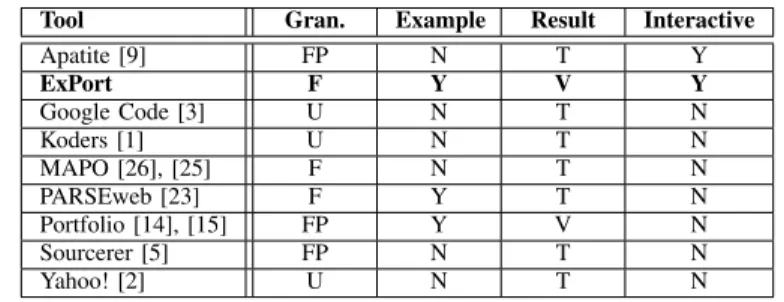
COMPARISON OF CODE SEARCH TOOLS. THEGRANULARITY COLUMN SPECIFIES THE LEVEL AT WHICH RESULTS ARE RETURNED(PROJECT,
FUNCTION,UNSTRUCTURED). THE NEXT COLUMN SPECIFIES WHETHER THE TOOL PROVIDESUSAGEEXAMPLES OF THE QUERY(YES,NO). THE
RESULT COLUMN SPECIFIES THE WAY THE RESULTS ARE PRESENTED
(TEXT,VISUAL). LASTLY,THEINTERACTIVE COLUMN SPECIFIES WHETHER THE RESULTS ARE INTERACTIVE(YES,NO).
Tool Gran. Example Result Interactive
Apatite [9] FP N T Y ExPort F Y V Y Google Code [3] U N T N Koders [1] U N T N MAPO [26], [25] F N T N PARSEweb [23] F Y T N Portfolio [14], [15] FP Y V N Sourcerer [5] FP N T N Yahoo! [2] U N T N
relevant code in response to a query based on several ranking heuristics.
Table II presents a comparison of other code search tools andExPort. As the table shows, the major web-based search tools Koders, Google Code, and Yahoo! present unstructured results, while the others offer more specialized results, fo-cusing on individual functions (and in some cases, projects). Of the code search tools listed, only ExPort, Portfolio, and PARSEweb provide real-world usage examples demonstrating how the function is used.ExPortand Portfolio are the only two tools that present results in a visualization, while the rest only offer text-based results. ExPort and Apatite are the only two tools that offer an interactive method of discovering results. Finally,ExPortis the only tool combining all of these features.
VI. CONCLUSION ANDFUTUREWORK
In this paper, we presented a visualization-based approach for finding relevant API usage examples. Our approach uses RTM to detect relationships between functions allowing the programmer to identify API usages across several functions. We indexed 13,000 open source Java systems containing over 14 million methods and investigated them using the visualization-based approach. Our preliminary observations indicate that visualizing methods in a call-graph is a useful tool in discovering API usages. Future work will involve performing a user study to evaluate the effectiveness of the tool compared to other code search engines and extending it to include further functionality.
VII. ACKNOWLEDGEMENTS
This work is supported in part by the NSF CCF-0916260, NSF CCF-1253837, NSF CCF-CCF-1016868, and NSF CA-REER CCF-1253837. Any opinions, findings, and conclusions expressed herein are the authors’ and do not necessarily reflect those of the sponsors.
REFERENCES [1] http://www.koders.com/.
[2] http://search.yahoo.com/.
Fig. 5. API suggestions for MenuBar.getKeyBindings() in theelectricproject.
Fig. 6. Finding additional usage examples from an initial query in the call-graph view. The blue oval shows additional APIs involved with key binding functionality. The red oval shows concrete examples of registering key bindings in a MenuBar.
[4] M. Acharya, T. Xie, J. Pei, and J. Xu. Mining api patterns as partial orders from source code: From usage scenarios to specifications. In
ESEC-FSE ’07, pages 25–34, 2007.
[5] S. Bajracharya, T. Ngo, E. Linstead, Y. Dou, P. Rigor, P. Baldi, and C. Lopes. Sourcerer: a search engine for open source code supporting structure-based search. In Companion to the 21st ACM SIGPLAN symposium on Object-oriented programming systems, languages, and applications, pages 681–682. ACM, 2006.
[6] J. Chang and D. M. Blei. Relational topic models for document networks. In International Conference on Artificial Intelligence and Statistics (AISTATS’09), 2009.
[7] E. Duala-Ekoko and M. P. Robillard. Asking and answering questions about unfamiliar apis: An exploratory study. InInternational Conference on Software Engineering (ICSE’12), pages 266–276, 2012.
[8] M. Eaddy, T. Zimmermann, K. D. Sherwood, V. Garg, G. C. Murphy, N. Nagappan, and A. V. Aho. Do crosscutting concerns cause defects?
IEEE Transactions on Software Engineering, 34:497–515, 2008. [9] D. S. Eisenberg, J. Stylos, A. Faulring, and B. A. Myers. Using
association metrics to help users navigate api documentation. In Vi-sual Languages and Human-Centric Computing (VL/HCC), 2010 IEEE Symposium on, pages 23–30. IEEE, 2010.
[10] M. Gethers and D. Poshyvanyk. Using relational topic models to capture coupling among classes in object-oriented software systems. In
ICSM’10, pages 1–10, 2010.
[11] R. Holmes. Pragmatic Software Reuse. PhD thesis, Department of Computer Science, University of Calgary, 2008.
[12] R. Holmes, R. J. Walker, and G. C. Murphy. Strathcona example recommendation tool. SIGSOFT Software Engineering Notes, 30:237– 240, September 2005.
[13] A. J. Ko, B. A. Myers, and H. H. Aung. Six learning barriers in end-user programming systems. InIEEE Symposium on Visual Languages - Human Centric Computing (VLHCC’04), pages 199–206, 2006. [14] C. McMillan, M. Grechanik, D. Poshyvanyk, Q. Xie, and C. Fu.
Portfolio: a search engine for finding functions and their usages. In33rd International Conference on Software Engineering (ICSE’11), pages 1043–1045. IEEE, 2011.
[15] C. McMillan, M. Grechanik, D. Poshyvanyk, Q. Xie, and C. Fu. Port-folio: finding relevant functions and their usage. In33rd International Conference on Software Engineering (ICSE’11), pages 111–120. IEEE, 2011.
[16] R. Prieto-Diaz. Status report: software reusability. IEEE Software, 10(3):61–66, 1993.
[17] M. Robillard and R. DeLine. A field study of API learning obstacles.
Empirical Software Engineering (EMSE), 16:703–732, 2012.
[18] M. P. Robillard. What makes apis hard to learn? answers from developers. IEEE Software, 26(6):27–34, November/December 2009. [19] M. P. Robillard and G. C. Murphy. Automatically inferring concern
code from program investigation activities. In18th IEEE International Conference on Automated Software Engineering (ASE’03), pages 225– 234, 2003.
[20] S. E. Sim, C. L. A. Clarke, R. C. Holt, and A. M. Cox. Browsing and searching software architectures. InIEEE International Conference on Software Maintenance (ICSM’99), pages 381–390, 1999.
[21] J. Singer, R. Elves, and M. Storey. Navtracks: Supporting navigation in software maintenance. InICSM’05, pages 325–334, 2005.
[22] J. Stylos and B. A. Myers. A web-search tool for finding api components and examples. InIEEE Symposium on VL and HCC, pages 195–202, 2006.
[23] S. Thummalapenta and T. Xie. Parseweb: a programmer assistant for reusing open source code on the web. In Proceedings of the twenty-second IEEE/ACM international conference on Automated software engineering, pages 204–213. ACM, 2007.
[24] G. Uddin, B. Dagenais, and M. P. Robillard. Temporal analysis of api usage concepts. InICSE’12, pages 804–814, 2012.
[25] T. Xie and J. Pei. Mapo: Mining api usages from open source repositories. In Proceedings of the 2006 international workshop on Mining software repositories, pages 54–57. ACM, 2006.
[26] H. Zhong, T. Xie, L. Zhang, J. Pei, and H. Mei. Mapo: Mining and recommending api usage patterns. In ECOOP 2009–Object-Oriented Programming, pages 318–343. Springer, 2009.
[27] M. Zibran. What makes apis difficult to use? International Journal of Computer Science and Network Security (IJCSNS), 8(4):255–261, 2008.