®
SolarWinds ORION® Software
Security Target
Version 1.9 August 19, 2014 SolarWinds Worldwide, LLC 3711 South MoPac Expressway
Building Two Austin, Texas 78746
DOCUMENT INTRODUCTION
Prepared By:
Common Criteria Consulting LLC 15804 Laughlin Lane
Silver Spring, MD 20906 http://www.consulting-cc.com
Prepared For:
SolarWinds Worldwide, LLC 3711 South MoPac Expressway Building Two
Austin, Texas 78746 http://www.solarwinds.com
REVISION HISTORY
Rev Description
1.0 September 24, 2013, Initial release
1.1 October 8, 2013, Updated the Orion component versions 1.2 October 23, 2013, Refined the SFRs
1.3 December 1, 2013, Consistency with ADV documents 1.4 January 24, 2014, Updates from testing
1.5 February 18, 2014, TOE name change and addressed ORs/CRs 1.6 March 6, 2014, Addressed additional ORs/CRs
1.7 June 6, 2014, Corrections from testing
1.8 July 14, 2014, Corrected audit records for FIA_ATD.1 1.9 August 19, 2014, Clarified the evaluated configuration
TABLE OF CONTENTS
1. SECURITY TARGET INTRODUCTION ... 9
1.1 Security Target Reference ... 9
1.2 TOE Reference ... 9
1.3 Evaluation Assurance Level ... 9
1.4 Keywords ... 9
1.5 TOE Overview ... 9
1.5.1 Usage and Major Security Features ... 9
1.5.2 TOE type ... 12
1.5.3 Required Non-TOE Hardware/Software/Firmware ... 12
1.6 TOE Description ... 14
1.6.1 Physical Boundary ... 14
1.6.2 Logical Boundary... 16
1.7 Functionality Excluded From the Evaluation ... 17
1.8 TSF Data ... 17
1.9 Evaluated Configuration ... 24
2. CONFORMANCE CLAIMS ... 27
2.1 Common Criteria Conformance ... 27
2.2 Security Requirement Package Conformance ... 27
2.3 Protection Profile Conformance ... 27
3. SECURITY PROBLEM DEFINITION ... 28
3.1 Introduction ... 28
3.2 Assumptions... 28
3.3 Threats ... 28
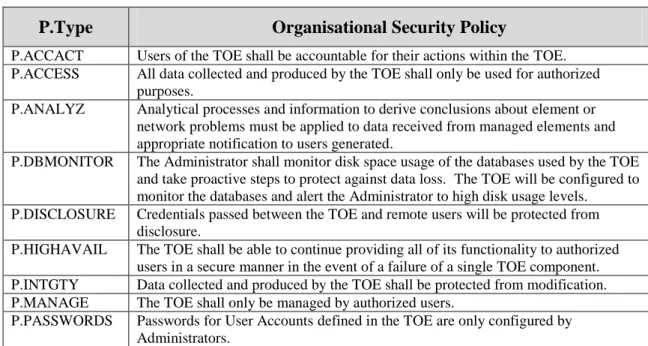
3.4 Organisational Security Policies ... 29
4. SECURITY OBJECTIVES... 30
4.1 Security Objectives for the TOE ... 30
4.2 Security Objectives for the Operational Environment ... 30
5. EXTENDED COMPONENTS DEFINITION ... 32
5.1 Extended Security Functional Components ... 32
5.1.1 Class FNM: Network Management ... 32
5.1.1.1 FNM_MDC Monitor Data Collection ... 32
5.1.1.2 FNM_ANL Monitor Analysis... 33
5.1.1.3 FNM_RCT Management React ... 33
5.1.1.4 FNM_RDR Restricted Data Review ... 34
5.1.1.5 FNM_STG Monitor Data Storage ... 35
5.2 Extended Security Assurance Components ... 36
6. SECURITY REQUIREMENTS ... 37
6.1 TOE Security Functional Requirements ... 37
6.1.1 Security Audit (FAU) ... 37
6.1.1.1 FAU_GEN.1 Audit Data Generation ... 37
6.1.1.2 FAU_SAR.1 Audit Review ... 38
6.1.1.3 FAU_SAR.2 Restricted Audit Review ... 38
6.1.2.1 FIA_ATD.1 User Attribute Definition ... 38
6.1.2.1.1 FIA_ATD.1(1) User Attribute Definition (Orion Web Console) ... 38
6.1.2.1.2 FIA_ATD.1(2) User Attribute Definition (EOC Web Console) ... 39
6.1.2.2 FIA_UAU.2 User Authentication Before any Action... 39
6.1.2.3 FIA_UAU.7 Protected Authentication Feedback ... 39
6.1.2.4 FIA_UID.2 User Identification Before any Action ... 39
6.1.2.5 FIA_USB.1 User-Subject Binding ... 39
6.1.2.5.1 FIA_USB.1(1) User-Subject Binding (Orion Web Console) ... 40
6.1.2.5.2 FIA_USB.1(2) User-Subject Binding (EOC Web Console)... 40
6.1.2.5.3 FIA_USB.1(3) User-Subject Binding (Orion Windows Applications) ... 41
6.1.3 Security Management (FMT) ... 41
6.1.3.1 FMT_MTD.1 Management of TSF Data ... 41
6.1.3.1.1 FMT_MTD.1(1) Management of TSF Data (Orion Server TSF Data (Other Than NCM-Specific and IPAM-Specific)) ... 41
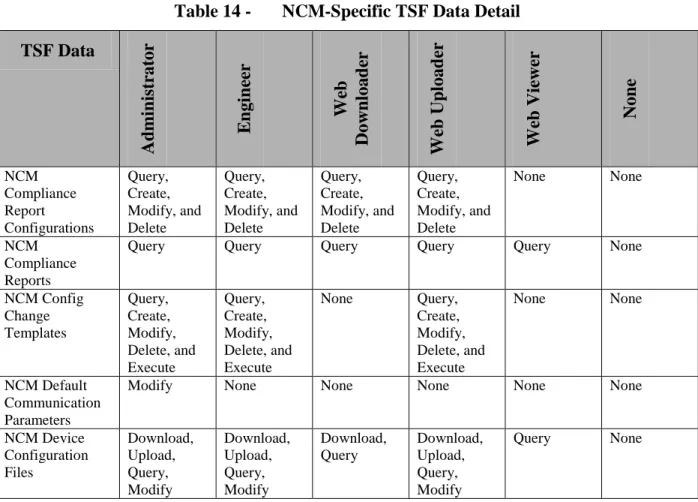
6.1.3.1.2 FMT_MTD.1(2) Management of TSF Data (NCM-Specific TSF Data on Orion Servers (Accessed via the Orion Web Console)) ... 44
6.1.3.1.3 FMT_MTD.1(3) Management of TSF Data (IPAM-Specific TSF Data on Orion Servers (Accessed via the Orion Web Console)) ... 44
6.1.3.1.4 FMT_MTD.1(4) Management of TSF Data (EOC Server TSF Data) ... 45
6.1.3.2 FMT_SMF.1 Specification of Management Functions ... 45
6.1.3.3 FMT_SMR.1 Security Roles ... 46
6.1.4 Network Management (FNM) ... 47
6.1.4.1 FNM_MDC.1 Monitor Data Collection ... 47
6.1.4.2 FNM_ANL.1 Monitor Analysis ... 47
6.1.4.3 FNM_RCT.1 Management React ... 47
6.1.4.4 FNM_RDR.1 Restricted Data Review ... 47
6.1.4.4.1 FNM_RDR.1(1) Restricted Data Review (Authorized Orion Web Console Users) ... 47
6.1.4.4.2 FNM_RDR.1(2) Restricted Data Review (Authorized Orion Web Console Users That Have NCM Roles Configured) ... 47
6.1.4.4.3 FNM_RDR.1(3) Restricted Data Review (Authorized EOC Web Console Users)48 6.1.4.5 FNM_STG.1 Guarantee of Monitor Data Availability ... 48
6.1.4.6 FNM_STG.2 Prevention of Monitor Data Loss ... 48
6.1.5 Protection of the TSF (FPT) ... 48
6.1.5.1 FPT_FLS.1 Failure with Preservation of Secure State ... 48
6.1.6 Resource Utilisation (FRU) ... 48
6.1.6.1 FRU_FLT.2 Limited Fault Tolerance ... 48
6.1.7 TOE Access (FTA) ... 49
6.1.7.1 FTA_SSL.3 TSF-Initiated Termination ... 49
6.2 TOE Security Assurance Requirements ... 49
6.3 CC Component Hierarchies and Dependencies ... 49
7. TOE SUMMARY SPECIFICATION ... 51
7.1 Security Functions ... 51
7.1.1 Audit ... 51
7.1.2 Identification and Authentication ... 51
7.1.4 Network Monitoring ... 52
7.1.5 Configuration Management ... 53
7.1.6 High Availability ... 53
8. RATIONALE ... 55
8.1 Rationale for IT Security Objectives... 55
8.2 Security Requirements Rationale ... 57
8.2.1 Rationale for Security Functional Requirements of the TOE Objectives ... 57
LIST OF TABLES
Table 1 - EOC Server Minimum Hardware and Software Requirements ... 12
Table 2 - Orion Server Minimum Software Requirements ... 13
Table 3 - Orion Server Minimum Hardware Requirements ... 13
Table 4 - Database Server Minimum Software Requirements ... 13
Table 5 - Database Server Minimum Hardware Requirements ... 13
Table 6 - TSF Data Descriptions ... 18
Table 7 - Assumptions ... 28
Table 8 - Threats... 28
Table 9 - Organisational Security Policies ... 29
Table 10 - Security Objectives for the TOE ... 30
Table 11 - Security Objectives of the Operational Environment ... 30
Table 12 - Auditable Events ... 37
Table 13 - Orion Server TSF Data Detail ... 41
Table 14 - NCM-Specific TSF Data Detail ... 44
Table 15 - IPAM-Specific TSF Data Detail ... 45
Table 16 - EOC Server TSF Data Detail ... 45
Table 17 - EAL2 Assurance Requirements ... 49
Table 18 - TOE SFR Dependency Rationale ... 49
Table 19 - Threats, Assumptions, and Organisational Security Policies to Security Objectives Mapping ... 55
Table 20 - Threats, Assumptions and Organisational Security Policies to Security Objectives Rationale 56 Table 21 - SFRs to Security Objectives Mapping ... 57
ACRONYMS LIST
CC ... Common Criteria CIDR ... Classless Internet Domain Routing CLI ... Command Line Interface CLR ... Common Language Runtime CPU ... Central Processing Unit DBMS ... DataBase Management System DHCP ... Dynamic Host Configuration Protocol DNS...Domain Name System EAL ...Evaluation Assurance Level EOC ... Enterprise Operations Console FoE ...ORION Failover Engine™ FTP ... File Transfer Protocol GB ... GigaByte GHz... GigaHertZ GUI ... Graphical User Interface HTTP ... HyperText Transfer Protocol HTTPS ... HTTP Secure ICMP ... Internet Control Message Protocol IIS ... Internet Information Services IMAP ... Internet Message Access Protocol IOS ... Internetwork Operating System IP... Internet Protocol IPAM ... ORION IP Address Manager™ IT ... Information Technology MAC ... Media Access Control MIB... Management Information Base MOS ... Mean Opinion Score NCM ... ORION Network Configuration Manager™ NPM ... ORION Network Performance Monitor™ NTA ... ORION NetFlow Traffic Analyzer™ OS ...Operating System POP... Post Office Protocol SAM ... ORION Server & Application Monitor™ SCP ... Secure CoPy SFTP ... Secure FTP SLA ... Service Level Agreement SNMP ... Simple Network Management Protocol SQL... Structured Query Language SSH ... Secure SHell SSL ... Secure Socket Layer ST ...Security Target TCP... Transmission Control Protocol TFTP ... Trivial File Transport Protocol TOE ... Target of Evaluation ToS ... Type of Service
TSF ... TOE Security Function UDP ...User Datagram Protocol UDT ... ORION User Device Tracker™ URL ... Uniform Resource Locator VNQM ... ORION VoIP & Network Quality Manager™ VoIP ... Voice over IP WAN ... Wide Area Network WMI ... Windows Management Instrumentation WPM ... ORION Web Performance Monitor™
1. Security Target Introduction
This Security Target (ST) describes the objectives, requirements and rationale for the SOLARWINDS® ORION® software TOE. The language used in this Security Target is consistent with the Common Criteria for Information Technology Security Evaluation, Version 3.1 and all international interpretations through December 1, 2013. As such, the spelling of terms is presented using the internationally accepted English.
1.1 Security Target Reference
SolarWinds Orion Software Security Target, version 1.9, August 19, 2014.
1.2 TOE Reference
SolarWinds Orion Suite for Federal Government V1.0
This suite of individually-purchased products includes the following components: Network Performance Monitor (NPM) V10.6.0, Orion Server & Application Monitor (SAM) V6.0.0, Orion Network Configuration Manager (NCM) V7.2.0, Orion Netflow Traffic Analyzer (NTA) V3.11.0, Orion IP Address Manager (IPAM) V4.0.0, Orion VoIP & Network Quality Manager (VNQM) V4.1.0, Orion User Device Tracker (UDT) V3.0.1, Orion Web Performance Monitor (WPM) V2.0.1, Orion Enterprise Operations Console (EOC) V1.4.1, and Orion Failover Engine (FoE) V6.7.0.
1.3 Evaluation Assurance Level
Assurance claims conform to EAL2 (Evaluation Assurance Level 2) from the Common Criteria for Information Technology Security Evaluation, Version 3.1 Revision 4.
1.4 Keywords
Performance Monitor, Configuration Manager, Performance Manager, NetFlow Traffic Analyzer, Address Manager, Quality Manager
1.5 TOE Overview
1.5.1 Usage and Major Security Features
Orion is a set of software applications and services executing on one or more Windows servers. The applications monitor a configured set of network-attached devices and applications for status, performance and configuration settings. Depending on the size of the network, multiple instances of the applications may be deployed on different servers to provide adequate
performance. For enhanced availability and robustness, a failover configuration may be deployed.
The Orion suite consists of the following network, application, system, and storage monitoring and management components:
Orion Network Performance Monitor - Orion Network Performance Monitor (Orion NPM) provides the ability to detect, diagnose, and resolve performance issues with a dynamic network. It delivers real-time views and dashboards to visually display network performance. Automated network discovery features enable network managers to keep up with evolving networks.
Orion Server & Application Monitor - Orion Server & Application Monitor (Orion SAM) brings agentless monitoring, alerting, and reporting capabilities to applications and servers.
Automatically discovers servers and applications and provides visibility into application performance and the underlying operating systems and servers they run on.
Orion Network Configuration Manager - Orion Network Configuration Manager (Orion NCM) notifies network managers in real-time when device configurations change, helping network managers determine which changes could potentially cause network issues. Orion NCM also provides nightly configuration backups, bulk configuration changes, user tracking, and inventory and compliance reporting.
Orion NetFlow Traffic Analyzer - Orion NetFlow Traffic Analyzer (Orion NTA) enables network managers to quantify exactly how a network is being used, by whom, and for what purpose. The application mapping feature correlates the traffic arriving from designated ports, source IPs, destination IPs, and protocols to application names network managers can recognize. Orion NTA provides a comprehensive view of the network traffic, enabling network managers to find the bottlenecks or identify the bandwidth hogs.
Orion IP Address Manager - Orion IP Address Manager (Orion IPAM) is an IP address
management component that enables network managers to create, schedule, and share IP address space reports. Orion IPAM provides IP address management that is unified with performance monitoring data for a comprehensive view of network health.
Orion Voice & Network Quality Manager - Orion Voice & Network Quality Manager (Orion VNQM) delivers a network and VoIP monitoring solution for identifying site-specific and WAN-related performance issues from the perspective of each of the remote sites. With this Orion component, network managers can utilize Cisco IP SLA technology with automatic VNQM setup to monitor key WAN performance metrics, including Cisco VoIP jitter and MOS.
Orion User Device Tracker - Orion User Device Tracker (Orion UDT) delivers automated user and device tracking to monitor who and what are connecting to the network. Searches of the accumulated information can be performed on a user name, IP address, Hostname, or MAC address. UDT also provides the ability to send commands to network devices to shut down a port, but this functionality is not included in the evaluation.
Orion Web Performance Monitor - Orion Web Performance Monitor (Orion WPM)
continuously monitors the performance of web servers and applications. Performance issues can be identified as DNS look-up, connection time, send time, time to first byte, or content download time.
Orion Enterprise Operations Console - Orion Enterprise Operations Console (Orion EOC) provides a consolidated command center to remotely monitor critical network infrastructure in multiple different physical locations. Orion EOC provides a consolidated command center to monitor the entire enterprise network and gives network managers unified visibility into remote Orion servers.
Orion Failover Engine - Orion Failover Engine (Orion FoE) monitors the health of the
SolarWinds servers to ensure availability of the performance data of monitored elements in the IT infrastructure. If something should happen to a primary SolarWinds server, the Failover Engine automatically fails over to a remote server.
The Orion suite provides the following capabilities to network managers: Schedule network scans to identify new network devices or applications.
Perform detailed monitoring & analysis of performance data from routers, switches, servers, and applications to identify peak performance issues.
Monitor the health of critical applications.
Remotely monitor WMI performance counters to identify and resolve application issues. Monitor the availability and responsiveness of critical DNS, IMAP4, and POP3 network
services.
Get a comprehensive view of network traffic on a single page, or drill down into any element’s traffic.
Break down the display of network traffic information by application. Identify network issues across the enterprise.
Configure alerts for correlated events, sustained conditions, or complex combinations of device states.
Generate reports for network performance, application performance and server availability.
Schedule and automatically backup network device configurations on a regular basis for routers, switches, firewalls, and wireless access points.
Receive real-time alerts when configurations change on monitored resources.
Generate a detailed network inventory of all managed devices, including serial numbers, port details, and IP addresses.
Perform remote IOS/firmware updates in real time or schedule them to run at a future time.
Generate configuration change reports for monitored resources
Establish unique accounts and specify which types of information are displayed for a particular user.
Create a custom poller to monitor any SNMP-enabled device, collect detailed data from MIB tables, & monitor virtually any statistic available on network devices. This
functionality is not evaluated.
Install additional polling engines for large networks with a small number of NPM or SAM instances. This functionality is not evaluated.
Install additional web servers to support a large number of network managers. This functionality is not evaluated.
Users may interact with the TOE via multiple interfaces. The EOC Web Console provides access to the EOC, and through it provides visibility to the overall TOE, which is especially useful when multiple Orion Servers are deployed. The Orion Web Console provides access to individual Orion Servers. All of these interfaces support connections from remote IT systems via web browsers.
User access to information via each of these interfaces is controlled by the roles configured for individual users by administrators. When a connection is established, the user is prompted for a username and password. User credential validation is performed by the TOE for the Orion Web Console interface, and by Windows for the EOC Web Console interface. In all cases, permitted user accounts must be defined within the TOE so that user-specific TOE parameters (e.g. role) can be associated with each user.
Orion Servers also provide user interfaces for configuration of specific parameters within the TOE via Windows application programs. These tasks are performed by invoking applications via the Windows Start menu. For the applications to configure NCM, users are required to provide valid credentials before performing any other action. For the other Windows applications providing TOE access, any user with access to these applications must first authenticate to Windows and is then assumed to be authorized to perform the configuration actions.
1.5.2 TOE type
Network Management
1.5.3 Required Non-TOE Hardware/Software/Firmware
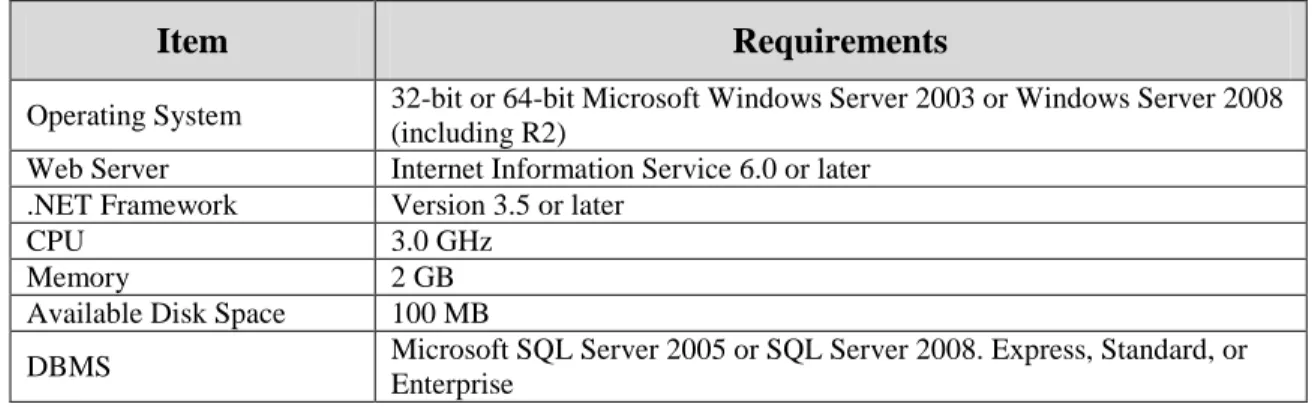
The TOE consists of applications installed on multiple server types: 1. EOC Server - EOC installed on a dedicated server.
2. Orion Server - Orion Suite components (other than EOC) installed on a dedicated server. Any combination of components may be installed with each instance. Any combination is generically referred to as an Orion Server.
3. Failover Server – FoE components are installed on a dedicated secondary server(s) as well as on primary EOC Servers or Orion Servers. The passive server monitors the health of the active EOC Server or Orion Server, and the passive server automatically assumes the active role of any failed server. The components on the active EOC Server or Orion Server ensure that data files required by the passive EOC Server or Orion Server are supplied to the passive server for replication.
Table 1 - EOC Server Minimum Hardware and Software Requirements
Item Requirements
Operating System 32-bit or 64-bit Microsoft Windows Server 2003 or Windows Server 2008 (including R2)
Web Server Internet Information Service 6.0 or later .NET Framework Version 3.5 or later
CPU 3.0 GHz
Memory 2 GB
Available Disk Space 100 MB
DBMS Microsoft SQL Server 2005 or SQL Server 2008. Express, Standard, or Enterprise
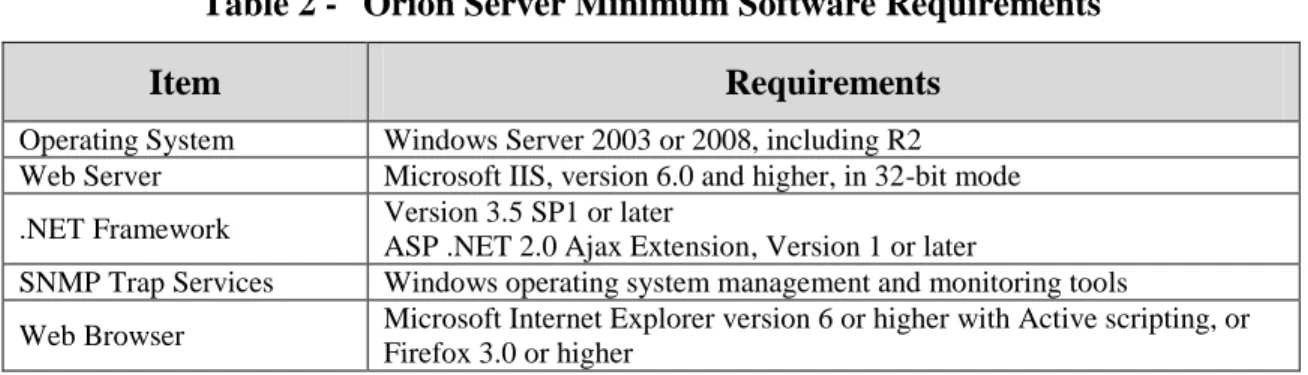
Table 2 - Orion Server Minimum Software Requirements
Item Requirements
Operating System Windows Server 2003 or 2008, including R2 Web Server Microsoft IIS, version 6.0 and higher, in 32-bit mode .NET Framework Version 3.5 SP1 or later
ASP .NET 2.0 Ajax Extension, Version 1 or later
SNMP Trap Services Windows operating system management and monitoring tools
Web Browser Microsoft Internet Explorer version 6 or higher with Active scripting, or Firefox 3.0 or higher
The hardware requirements for Orion Servers are dependent on the number of elements to be monitored and/or managed by the server.
Table 3 - Orion Server Minimum Hardware Requirements
Item Requirements
<500 Elements <2000 Elements 2000+ Elements
CPU 2.0 GHz 2.4 GHz 3.0 GHz
Memory 3 GB 4 GB 4 GB
Available Disk Space 2 GB 5 GB 20 GB
Note that there are no additional hardware or software requirements (beyond those for an EOC or Orion Server) when FoE is deployed.
In addition to these platforms, the database used by the TOE is installed on a dedicated server with the DBMS. Each Orion Server requires its own Database Server.
Table 4 - Database Server Minimum Software Requirements
Item Requirements
DBMS SQL Server 2005 SP1 Express, Standard, or Enterprise; or SQL Server 2008 Standard, or Enterprise
Operating System Any supported Windows OS Additional Software
SQL Server System Common Language Runtime (CLR) Types Microsoft SQL Server Native Client
Microsoft SQL Server Management Objects
The hardware requirements for Database Servers are dependent on the number of elements to be monitored and/or managed by the associated Orion Server.
Table 5 - Database Server Minimum Hardware Requirements
Item Requirements
<500 Elements <2000 Elements 2000+ Elements
CPU 2.0 GHz 2.4 GHz 3.0 GHz
Item Requirements
<500 Elements <2000 Elements 2000+ Elements
Available Disk Space 2 GB 5 GB 20 GB
Credential validation for the EOC Web Console interface is performed by Windows locally or via Active Directory. The credentials supplied by the user to the TOE are passed to Windows for validation. If credential validation is successful, the same username is used to associate
attributes with the user session in the TOE. Credential validation for the Orion Web Console is performed entirely by the TOE.
The evaluated configuration requires that IIS is configured to require secure (HTTPS) connections on all the servers hosting TOE components. This requirement protects any credentials supplied by remote users from disclosure.
When connecting to network devices, the TOE supports the use of SSH as well as Telnet. Files transferred from the network devices to the TOE may use SFTP or SCP. The SSL functionality used for these operations is provided by the operational environment.
1.6 TOE Description
The Orion software acts as a monitoring and management tool for use by network managers. It maintains a list of the managed elements in the network, monitors their operation, and alerts the network managers to specified conditions. Managed elements are network devices (e.g. routers and switches), servers or applications that can be monitored by standard mechanisms such as SNMP, ICMP, Syslog or WMI. NCM may be used to track configuration changes on the network devices for products that are able to download a copy of their current configuration parameters.
Users interact with the TOE via multiple mechanisms. The EOC Web Console and Orion Web Console are provided for remote interaction with the EOC and Orion functionality. Application programs to configure the TOE may also be invoked from the Windows Start menu by
authorized users.
1.6.1 Physical Boundary
The TOE consists of the SolarWinds Orion software identified in section 1.2 executing on multiple dedicated Windows servers. The operating systems (including the network protocol stacks and cryptographic functionality), web servers and DBMS are outside the TOE boundary.
Figure 1 - Physical Boundary (Orion and EOC Servers)
Figure 2 - Physical Boundary (FoE Detail)
The SolarWinds ToolSet distributed as part of the Orion suite is not installed in the evaluated configuration and is not included in the physical boundary. All other parts of the Orion Suite distributed with the standard distribution mechanisms are included in the TOE boundary. The physical boundary includes the following guidance documentation:
1. SolarWinds® Enterprise Operations Console Administrator Guide
2. SolarWinds® Orion® Common Components Administrator Guide
Secondary Server FoE (Active/Passive)
Same Orion Suite components as Primary
in opposite state
IIS and network protocol services
Windows OS
Server Hardware FoE (Active/Passive)
Other Orion Suite components, all started
or stopped IIS and network protocol services Windows OS Server Hardware Primary Server EOC Server EOC, FoE
IIS and network protocol services Windows OS Server Hardware NPM, SAM, NCM, NTA, IPAM, VNQM, UDT, WPM, FoE IIS and network protocol services
Windows OS
Server Hardware
Orion Server DBMS Server
DBMS Network protocol services Windows OS Server Hardware
3. SolarWinds® Orion® Network Performance Monitor Administrator Guide
4. SolarWinds® Orion® Network Performance Monitor Quick Start Guide
5. SolarWinds® Technical Reference SolarWinds Orion Web-Based Reports
6. SolarWinds® Server & Application Monitor Administrator Guide
7. SolarWinds® Network Configuration Manager Administrator Guide
8. SolarWinds® Orion® Network Configuration Manager QuickStart Guide
9. SolarWinds® IP Address Manager Administrator Guide
10.SolarWinds® NetFlow Traffic Analyzer Administrator Guide
11.SolarWinds® User Device Tracker Administrator Guide
12.SolarWinds® Orion® VoIP and Network Quality Manager Administrator Guide
13.SolarWinds® Web Performance Monitor Administrator Guide
14.SolarWinds® Failover Engine v6.7 Administrator Guide
15.SolarWinds® Technical Reference Orion® Failover Installation Walkthrough
16.SolarWinds® Technical Reference Preparing an Orion® Failover Engine Installation
17.SolarWinds® Orion® Common Criteria Supplement
1.6.2 Logical Boundary
The TOE provides the following security functionality:
1. Audit - Audit records are generated for specific actions performed by users. The audit records are stored in the Orion database and may be viewed via the Orion Web Console by authorized administrators.
2. Identification and Authentication – When a connection is established to the EOC Web Console or Orion Web Console, the TOE prompts the user for login credentials. The credentials are validated by the TOE for the Orion Web Console. For the EOC Web Console, the credentials are first passed to Windows for validation.
3. Management – Management functionality is provided to authorized users. The
functionality provided to individual users is determined by the user’s role, which is one of the security attributes for users.
4. Network Monitoring – The status and performance of managed elements are monitored. The results are saved and may be viewed by authorized users. Access to data about the managed elements may be limited by view limitations. Alerts may be generated in respond to configured conditions detected about the managed elements.
5. Configuration Management – The configurations of network devices may be downloaded from the network device, saved in the TOE database, and compared to a reference
configuration. If a configuration change is detected, an upload of a saved configuration for the network device may be triggered.
6. High Availability – When FoE is installed, Primary and Secondary servers constantly communicate to monitor health and synchronize data updates. In the event of the failure
of a TOE process, FoE automatically attempts to restart it. If that fails, or in the event of failure of the Primary, the Secondary server automatically assumes the active state and all communication is redirected to it. Since the Primary and Secondary are synchronized, full functionality can continue to be provided in the secure state.
1.7 Functionality Excluded From the Evaluation
The following functionality included in the Orion suite is not evaluated:
Create a custom poller to monitor any SNMP-enabled device, collect detailed data from MIB tables, & monitor virtually any statistic available on network devices.
Install additional polling engines for large networks with a small number of NPM or SAM instances.
Install additional web servers to support a large number of network managers. External web sites are not added to Orion Web Console views.
The “Check for product updates” function is not used.
Custom device pollers are not configured. Pollers supplied with the TOE are included in the evaluation.
Custom component monitors are not configured. Component monitors supplied with the TOE are included in the evaluation. Account limitations are tied to custom component monitors and are also not configured.
Custom property functionality is not configured. Built-in properties are included in the evaluation.
Advanced Alerts (which use custom properties) are not configured. Basic Alerts are included in the evaluation.
The functionality to remotely manage interfaces in Network Devices.
Custom NCM device templates are not configured. The default device templates supplied with the TOE are included in the evaluation.
Customized views are not configured on Orion Web Consoles; default Views are used. View Limitations are not configured.
Customized account limitations are not configured on Orion Web Consoles; predefined account limitations may be configured.
Customized page views are not configured on EOC Web Consoles; default page views are used (the Allow User To Personalize Their Pages permission is not set).
Each Orion Server may have any combination of NPM, SAM, NCM, NTA, IPAM, UDT,
WPM, VNQM and/or FoE installed. Evaluation testing only includes scenarios with all components installed.
1.8 TSF Data
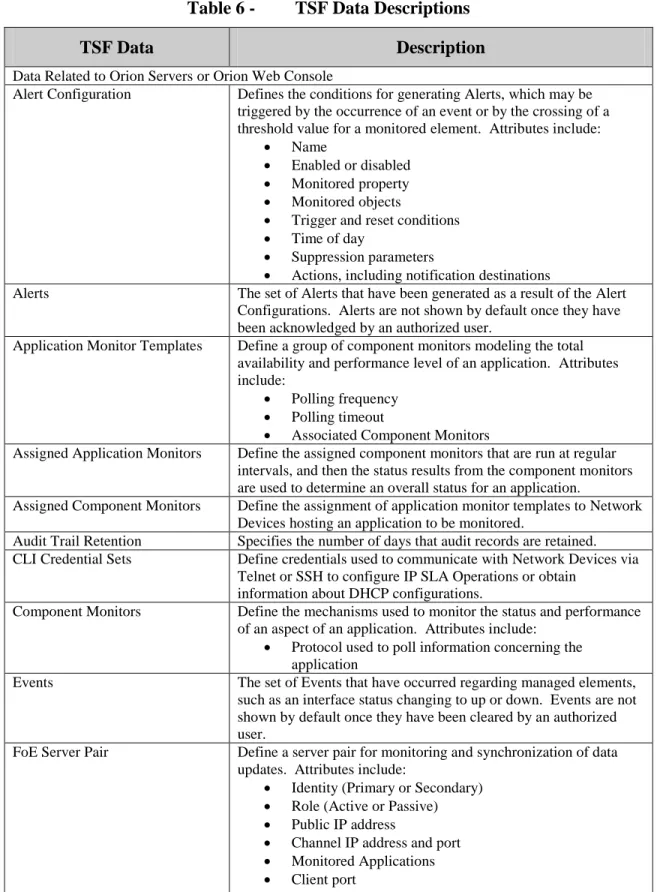
The following table describes the TSF data. The term Node is used to describe any network device monitored by the TOE.
Table 6 - TSF Data Descriptions
TSF Data Description
Data Related to Orion Servers or Orion Web Console
Alert Configuration Defines the conditions for generating Alerts, which may be triggered by the occurrence of an event or by the crossing of a threshold value for a monitored element. Attributes include:
Name
Enabled or disabled Monitored property Monitored objects
Trigger and reset conditions Time of day
Suppression parameters
Actions, including notification destinations
Alerts The set of Alerts that have been generated as a result of the Alert Configurations. Alerts are not shown by default once they have been acknowledged by an authorized user.
Application Monitor Templates Define a group of component monitors modeling the total availability and performance level of an application. Attributes include:
Polling frequency Polling timeout
Associated Component Monitors
Assigned Application Monitors Define the assigned component monitors that are run at regular intervals, and then the status results from the component monitors are used to determine an overall status for an application.
Assigned Component Monitors Define the assignment of application monitor templates to Network Devices hosting an application to be monitored.
Audit Trail Retention Specifies the number of days that audit records are retained. CLI Credential Sets Define credentials used to communicate with Network Devices via
Telnet or SSH to configure IP SLA Operations or obtain information about DHCP configurations.
Component Monitors Define the mechanisms used to monitor the status and performance of an aspect of an application. Attributes include:
Protocol used to poll information concerning the application
Events The set of Events that have occurred regarding managed elements, such as an interface status changing to up or down. Events are not shown by default once they have been cleared by an authorized user.
FoE Server Pair Define a server pair for monitoring and synchronization of data updates. Attributes include:
Identity (Primary or Secondary) Role (Active or Passive) Public IP address
Channel IP address and port Monitored Applications Client port
TSF Data Description
Groups Defines groupings of Network Devices, enabling the corresponding set of Network Devices to be selected for an operation. Groups may be used to create a hierarchical grouping of the Network Devices.
IPAM Addresses and Subnets Define the IP address ranges or subnets that are monitored by the IPAM functionality. Attributes include:
Name
Address range or CIDR prefix Scan interval
Automatic Scanning enabled/disabled
IPAM DHCP Scopes Define the DHCP scopes configured in Cisco IOS and Microsoft DHCP servers that are monitored by the IPAM functionality. Parameters include:
Address range DHCP Server Scan parameters Leases
IPAM DHCP Servers Define the DHCP servers to be monitored. Parameters include: IP address/Name
Monitoring protocols supported Served scopes
Address usage
IPAM DNS Servers Define the DNS servers to be monitored. Parameters include: IP address/Name
Monitoring protocols supported Configured zones
IPAM DNS Zones Define the DNS zones configured in DNS servers that are monitored by the IPAM functionality. Parameters include:
Zone name Zone members DNS Server Scan parameters
IPAM Settings Define the operation of IPAM monitoring. Parameters include: Subnet scan parameters
Device CLI credentials for Scope scans Device SNMP credentials for Scope scans NCM Compliance Report
Configurations
Define the set of pattern searches that can be applied to configuration files to detect configured conditions. Properties include:
Name Description
Rules (Patterns to search for, along woith severities) Policies (Collections of Rules)
NCM Compliance Reports Results of NCM Compliance Report Configurations applied to specific NCM Nodes.
TSF Data Description
NCM Config Change Templates Define scripts that can be executed on Nodes to perform common configuration functions. Attributes include:
Name Description Tags
Parameters for variables used in the script Script commands
NCM Default Communication Parameters
Define the default parameters used when communicating with a managed Node. Parameters include:
Community String SNMPv3 Settings Login Information Transfer Protocols Transfer Ports
NCM Device Configuration Files Contains the configuration information for a Node. This information may be obtained via download from a Node or by editing an existing configuration file. Configuration files may be designated as baseline configurations for a Node.
NCM Ignore List Specifies a set of entities that are not added as Managed Devices even if they are found during discovery processes.
NCM Inventory Settings Specify the statistics collected from Nodes during Inventory Jobs. NCM Jobs Define jobs configured to perform periodic operations against
Nodes, such as downloading a configuration file or collecting inventory information. Parameters include:
Name Type of job Starting date/time Ending date/time Frequency
Windows credentials for local job execution Selected Nodes
Download configuration file parameters Command script
Results parameters
NCM Settings Define the behavior of NCM with regard to change detection for Node configurations. Settings include:
Realtime Change Detection
Enable Realtime Config Change Notifications Configuration Comparison Parameters Email Notification Parameters Syslog Receiver Parameters SNMP Trap Receiver Parameters
NetFlow Sources Define the interfaces in Network Devices that are monitored by the NTA functionality.
TSF Data Description
Network Devices Defines the set of Network Devices monitored by the TOE. Attributes include:
Hostname or IP Address Dynamic IP Address Monitor via ICMP only
External (applications are monitored, but not the device itself)
VMware parameters, including credentials SNMP parameters, including credentials Polling parameters
Management State (polled or not polled) Interfaces
Interface Management Parameters (polled or not polled, what parameters are polled, alert when down, bandwidth) Applications
Whether the Device is monitored by VNQM and/or NCM SNMP Version
SNMP Parameters
Login Type (Device or User) Device Login Credentials
Communication Protocols and Ports
NTA Settings Define the operation of NTA monitoring. Parameters include: Enable automatic addition of NetFlow sources Enable data retention for traffic on unmonitored ports Allow monitoring of flows from unmanaged interfaces Application and Service Ports
Enable/disable each Application and Service Port Limit monitoring to selected Destination or Source IP
Address(es)
Monitored protocols NetFlow collector ports Types of Services
Name resolution parameters IP address processing period Data retention parameters Chart parameters
Polling Settings Define the behavior of polling of the managed elements and the amount of time collected data is retained.
Report Configurations Define the Reports that are generated and made available for review via the Orion Web Console.
Reports Pre-defined Reports may be viewed via the Orion Web Console. SAM Settings Configured information used for monitoring applications. The
information includes: Credential sets Polling parameters Data retention policies
SNMP Credential Sets Define credentials used to communicate with Network Devices via SNMP to obtain information.
Syslogs The set of Syslog messages that have been received from Network Devices. Syslogs are not shown by default once they have been cleared by an authorized user.
TSF Data Description
Thresholds Define values for devices that cause warning or error indicators to be displayed in the Orion Web Console. Threshold values may be set for:
CPU Load Disk Usage
Percent Memory Used Percent Packet Loss Response Time Availability
Node Warning Interval
Traps The set of SNMP trap messages that have been received from Network Devices.
UDT AD Domain Controllers Defines a list of Active Directory Domain Controllers that are monitored for user activity.
UDT Settings Define the operation of UDT monitoring. Attributes include: Polling intervals
Data retention periods Thresholds
Credentials
UDT Watched Entities List Defines a list of addresses, ports, and names to be tracked.
UDT White List Defines a list of systems on the network that are considered trusted and a set of rules for adding devices to the list.
User Accounts Define the user accounts attributes for users authorized to access Orion Servers via the Orion Web Console. Attributes include:
Username Password Enabled Expiration Date
Disable Session Timeout
Allow Administrator Rights (Role) Allow Node Management Rights Allow Report Management
Allow Account to Clear Events and Acknowledge Alerts Alert Sound
Views (restricts access to Views) Account Limitations
Report Folder (restricts access to Reports)
Menu Bar Assignments (limits access to specific GUIs) NCM Role
IPAM Role
Views Define the views that may be invoked by users. Attributes include: Resources included in the View
VNQM CallManager Nodes Define the set of Cisco CallManager and CallManager Express devices to be monitored by the VNQM functionality.
TSF Data Description
VNQM Operations Define test measurements to be performed by the VNQM functionality on VNQM Nodes. Testing may be configured for DNS, FTP, HTTP, DHCP, TCP Connect, UDP Jitter, VoIP UDP Jitter, ICMP Echo, UDP Echo, ICMP Path Echo, or ICMP Path Jitter. Parameters include:
Measurement type Frequency Path type VNQM Nodes Warning threshold Critical threshold
VNQM Settings Define the operation of VNQM monitoring. Parameters include: VoIP UDP Port
VoIP Jitter Codec
Test data collection interval Test data retention period MOS advantage factor Type of Service (ToS) octet
VNQM VoIP Nodes Define the set of VoIP devices that are monitored by the VNQM functionality.
(Orion) Web Console Settings Defines parameters controlling the behavior of an Orion Web Console session. Settings include:
Session Timeout Page Refresh Time Status Rollup Mode
WPM Transaction Monitors Define a set of HTTP message exchanges to a specified web server. Attributes include:
Sequence of HTTP messages Target Web Server
Status (e.g. managed) Timing threshold values Data Related to EOC or EOC Web Console
EOC User Accounts Define the user account attributes for users authorized to access the EOC Web Console. Attributes include:
Username Role
Accessible Orion Servers
Orion Server Credentials user-supplied or admin-supplied Orion Server credentials
FoE Server Pair Define a server pair for monitoring and synchronization of data updates. Attributes include:
Identity (Primary or Secondary) Role (Active or Passive) Public IP address
Channel IP address and port Monitored Applications Client port
TSF Data Description
Orion Servers Define the Orion Servers associated with the EOC. Attributes include:
Name
Hostname or IP Address
URL
Orion Server credentials Polling interval
Enabled or disabled
Roles Define the Views members assigned the role may access. Parameters include:
Name Menu Bar
1.9 Evaluated Configuration
The evaluated configuration consists of the following:
1. One instance of the EOC, installed on a dedicated Windows server.
2. One or more instances of the Orion Server, each installed on a dedicated Windows server. Each Orion Server has NPM, SAM, NCM, NTA, IPAM, UDT, WPM and VNQM
installed. FoE is installed, therefore the Orion Servers must be installed in redundant pairs.
3. For each instance of the Orion Server, a database (and DBMS) is installed on a separate dedicated Windows server.
The following installation and configuration options must be used:
1. IIS on all the dedicated Windows servers hosting TOE components is configured to accept HTTPS connections only.
2. The SolarWinds Toolset optional component is not installed.
3. Session timeouts are not disabled for user accounts, and the Session Timeout for web users is configured as a non-zero value.
4. Windows Account Login is not enabled for the Orion Web Console. 5. Enable Audit Trails is selected.
6. Access to the Windows applications to invoke the TOE is restricted in Windows to users authorized to perform those functions, in particular: backup and restore the database, manage TOE Alerts, manage FoE functionality, and manage Report configuration settings.
7. The Customize option is not configured for any menu bars for the Orion Web Console. 8. External web sites are not added to Orion Web Console views.
9. The “Check for product updates” function is disabled. Installing updates may update the component to a version that has not been evaluated.
10.Custom device pollers are not configured or evaluated. Pollers supplied with the TOE are included in the evaluation.
11.Custom component monitors are not configured or evaluated. Component monitors supplied with the TOE are included in the evaluation.
12.Custom property functionality is not configured or evaluated. Built-in properties are included in the evaluation and may be used to configure View limitations.
13.Advanced Alerts are not configured or evaluated. Basic Alerts are included in the evaluation.
14.Customized Views are not configured on the Orion Web Console. 15.View Limitations are not configured.
16.Custom account limitations are not configured.
17.The functionality to remotely manage interfaces in Network Devices is not evaluated. 18.Custom IPAM roles are not defined; the built-in IPAM roles are used exclusively. 19.Properties of IPAM-specific entities are not used to delegate access.
20.The SAM and WPM components allow for separately-configurable roles. The evaluated configuration requires the SAM and WPM component-specific roles to be configured the same as the Orion role (Administrator or User).
21.The NTA Database Maintenance option is enabled in order to have the TOE automatically compress and purge data according to the configured periods.
22.When importing User Accounts into the TOE, only individual accounts are imported. Windows Group Accounts are not imported.
23.Only Administrators assign passwords for User Accounts defined in the TOE. Non-Administrators are not permitted to change their own passwords.
24.The Orion Server Browser Integration parameter is not enabled for User Accounts, since the operations performed via this integration are outside the control of the TOE.
25.Reports are managed via the Orion Web Console rather than the Report Writer Windows application (legacy).
26.Custom NCM device templates are not configured or evaluated. The default device templates supplied with the TOE are included in the evaluation.
27.Custom Configuration Change Templates are not configured or evaluated. The default configuration change templates supplied with the TOE are included in the evaluation. 28.Real-time config change notification is not enabled in NCM since it is dependent on
additional software beyond the scope of the evaluated components. 29.Per-device credentials are used rather than per-user device credentials.
30.The Allow User To Personalize Their Pages permission is not set for any EOC user accounts. Therefore, only the default page views are included in the evaluation.
31.If TFTP is used to exchange configuration files with Nodes, the TFTP service is restricted to requests from authorized Nodes.
2. Conformance Claims
2.1 Common Criteria Conformance
Common Criteria version: Version 3.1 Revision 4, dated September 2012 Common Criteria conformance: Part 2 extended and Part 3 conformant
2.2 Security Requirement Package Conformance
EAL2 conformant.
The TOE does not claim conformance to any security functional requirement packages.
2.3 Protection Profile Conformance
3. Security Problem Definition 3.1 Introduction
This chapter defines the nature and scope of the security needs to be addressed by the TOE. Specifically this chapter identifies:
A) assumptions about the environment, B) threats to the assets, and
C) organisational security policies.
This chapter identifies assumptions as A.assumption, threats as T.threat and organisational security policies as P.policy.
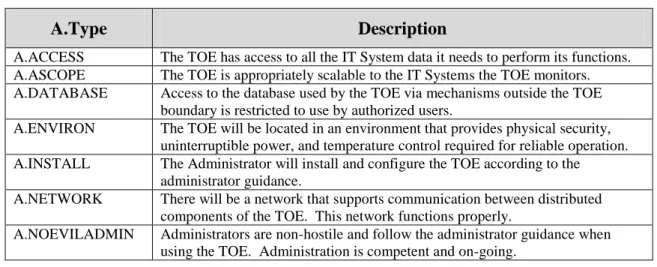
3.2 Assumptions
The specific conditions listed in the following subsections are assumed to exist in the TOE environment. These assumptions include both practical realities in the development of the TOE security requirements and the essential environmental conditions on the use of the TOE.
Table 7 - Assumptions
A.Type Description
A.ACCESS The TOE has access to all the IT System data it needs to perform its functions. A.ASCOPE The TOE is appropriately scalable to the IT Systems the TOE monitors. A.DATABASE Access to the database used by the TOE via mechanisms outside the TOE
boundary is restricted to use by authorized users.
A.ENVIRON The TOE will be located in an environment that provides physical security, uninterruptible power, and temperature control required for reliable operation. A.INSTALL The Administrator will install and configure the TOE according to the
administrator guidance.
A.NETWORK There will be a network that supports communication between distributed components of the TOE. This network functions properly.
A.NOEVILADMIN Administrators are non-hostile and follow the administrator guidance when using the TOE. Administration is competent and on-going.
3.3 Threats
The threats identified in the following subsections are addressed by the TOE and the Operational Environment.
Table 8 - Threats
T.Type Description
T.INTERCEPT An unauthorized network entity may intercept, modify, or inject data exchanged between distributed TOE components to compromise the operation of the TOE or gain unauthorized access to TSF data.
T.MASQUERAD E
A user or process may masquerade as another entity in order to gain unauthorized access to data or TOE resources.
T.TSF_COMPR OMISE
A user or process may cause, through an unsophisticated attack, TSF data to be modified.
T.Type Description
T.UNIDENT_AC TIONS
The administrator may not have the ability to notice potential security violations such as attempts by users to gain unauthorized access to the TOE, thus limiting the administrator’s ability to identify and take action against a possible security breach.
3.4 Organisational Security Policies
An organisational security policy is a set of rules, practices, and procedures imposed by an organisation to address its security needs.
Table 9 - Organisational Security Policies
P.Type Organisational Security Policy
P.ACCACT Users of the TOE shall be accountable for their actions within the TOE. P.ACCESS All data collected and produced by the TOE shall only be used for authorized
purposes.
P.ANALYZ Analytical processes and information to derive conclusions about element or network problems must be applied to data received from managed elements and appropriate notification to users generated.
P.DBMONITOR The Administrator shall monitor disk space usage of the databases used by the TOE and take proactive steps to protect against data loss. The TOE will be configured to monitor the databases and alert the Administrator to high disk usage levels.
P.DISCLOSURE Credentials passed between the TOE and remote users will be protected from disclosure.
P.HIGHAVAIL The TOE shall be able to continue providing all of its functionality to authorized users in a secure manner in the event of a failure of a single TOE component. P.INTGTY Data collected and produced by the TOE shall be protected from modification. P.MANAGE The TOE shall only be managed by authorized users.
P.PASSWORDS Passwords for User Accounts defined in the TOE are only configured by Administrators.
4. Security Objectives
This section identifies the security objectives of the TOE and the TOE’s Operational
Environment. The security objectives identify the responsibilities of the TOE and the TOE’s Operational Environment in meeting the security needs. Objectives of the TOE are identified as O.objective. Objectives that apply to the operational environment are designated as
OE.objective.
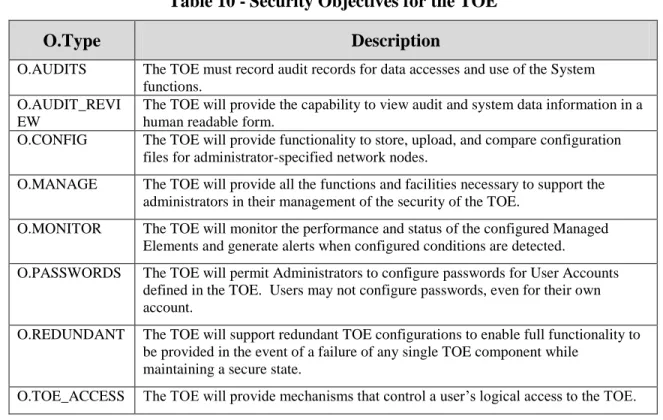
4.1 Security Objectives for the TOE
The TOE must satisfy the following objectives.
Table 10 -Security Objectives for the TOE
O.Type Description
O.AUDITS The TOE must record audit records for data accesses and use of the System functions.
O.AUDIT_REVI EW
The TOE will provide the capability to view audit and system data information in a human readable form.
O.CONFIG The TOE will provide functionality to store, upload, and compare configuration files for administrator-specified network nodes.
O.MANAGE The TOE will provide all the functions and facilities necessary to support the administrators in their management of the security of the TOE.
O.MONITOR The TOE will monitor the performance and status of the configured Managed Elements and generate alerts when configured conditions are detected.
O.PASSWORDS The TOE will permit Administrators to configure passwords for User Accounts defined in the TOE. Users may not configure passwords, even for their own account.
O.REDUNDANT The TOE will support redundant TOE configurations to enable full functionality to be provided in the event of a failure of any single TOE component while
maintaining a secure state.
O.TOE_ACCESS The TOE will provide mechanisms that control a user’s logical access to the TOE.
4.2 Security Objectives for the Operational Environment
The TOE’s operational environment must satisfy the following objectives.
Table 11 -Security Objectives of the Operational Environment
OE.Type Description
OE.COMM The Operational Environment will protect communication between the TOE and systems outside the TOE boundary from disclosure.
OE.CRYPTO The Operational Environment will provide cryptographic functionality needed to provide confidentiality with the protocols used for communication with remote IT Systems.
OE.DATABASE Those responsible for the TOE must ensure that access to the TOE database via mechanisms outside the TOE boundary (e.g., DBMS) is restricted to authorized users only.
OE.Type Description
OE.DBMONITOR The Administrator shall monitor disk space usage of the databases used by the TOE and take proactive steps to protect against data loss. The TOE will be configured to monitor the databases and alert the Administrator to high disk usage levels.
OE.ENVIRON The Administrator will install the TOE in an environment that provides physical security, uninterruptible power, and temperature control required for reliable operation.
OE.INSTALL The Administrator will install and configure the TOE according to the administrator guidance.
OE.INTROP The TOE is interoperable with the IT Systems it monitors.
OE.NETWORK The Administrator will install and configure a network that supports
communication between the distributed TOE components. The administrator will ensure that this network functions properly.
OE.NOEVILADMIN Administrators are non-hostile and follow the administrator guidance when using the TOE. Administration is competent and on-going.
OE.SSL The Operational Environment will require incoming connections to the Orion Web Console and EOC Web Console to use SSL/TLS.
OE.TIME The Operational Environment will provide reliable timestamps. OE.WINDOWSACCES
S
Users invoking the Orion Server functionality via Windows application programs must successfully perform identification and authentication functions with Windows first, and access to the applications that invoke ORION Server functionality must be limited to users authorized to invoke TOE management functionality.
5. Extended Components Definition
5.1 Extended Security Functional Components
5.1.1 Class FNM: Network Management
All of the components in this section are derived from the U.S. Government Protection Profile Intrusion Detection System System For Basic Robustness Environments.
This class of requirements addresses the data collected and analyzed by network management systems. The audit class of the CC (FAU) was used as a model for creating the IDS class in the Protection Profile, and the IDS class was used as a model for these requirements. The purpose of this class of requirements is to address the unique nature of network management data and provide for requirements about analyzing, reviewing and managing the data. This document uses the term “Monitor data” to refer to the information collected and saved by the collection and analysis functions specified herein.
5.1.1.1 FNM_MDC Monitor Data Collection
Family Behaviour:
This family defines the requirements for the TOE regarding receipt of information related to the status and performance of managed elements.
Component Levelling:
FNM_MDC.1 Monitor Data Collection provides for the functionality to require TSF controlled processing of data received from managed elements regarding their status or performance. Management:
The following actions could be considered for the management functions in FMT:
FNM_MDC Monitor Data Collection 1
FNM_MDC Monitor Data Collection 1
FNM_ANL Monitor Analysis 1
FNM_RCT Management React 1
FNM_RDR Restricted Data Review 1
FNM_STG Monitor Data Storage
1 2
a) Management of the configuration information for real-time feeds.
Audit:
There are no auditable events foreseen.
FNM_MDC.1 Monitor Data Collection
Hierarchical to: No other components. Dependencies: None
FNM_MDC.1.1 The TSF shall be able to store configuration, status and performance information
received via real-time feeds and/or polling.
5.1.1.2 FNM_ANL Monitor Analysis
Family Behaviour:
This family defines the requirements for the TOE regarding analysis of information related to status and performance received from managed elements.
Component Levelling:
FNM_ANL.1 MonitorAnalysis provides for the functionality to require TSF controlled analysis of data received from managed elements regarding their status or performance.
Management:
The following actions could be considered for the management functions in FMT: a) Configuration of the analysis to be performed.
Audit:
The following actions should be auditable if FAU_GEN Security audit data generation is included in the ST:
a) Minimal: Enabling and disabling of any of the analysis mechanisms.
FNM_ANL.1 Monitor Analysis
Hierarchical to: No other components.
Dependencies: FNM_MDC.1 MonitorData Collection
FNM_ANL.1.1 The TSF shall perform the following analysis function(s) on all status and
performance information received from managed elements:
a) Status changes;
b) Threshold values exceeded;
c) Configuration changed; and
d) Configured conditions satisfied.
5.1.1.3 FNM_RCT Management React
Family Behaviour:
This family defines the requirements for the TOE regarding reactions to the analysis of information related to status and performance received from managed elements.
Component Levelling:
FNM_RCT.1 Management React provides for the functionality to require TSF controlled
reaction to the analysis of data received from managed elements regarding information related to status and performance.
Management:
The following actions could be considered for the management functions in FMT: a) the management (addition, removal, or modification) of actions. Audit:
There are no auditable events foreseen.
FNM_RCT.1 Management React
Hierarchical to: No other components.
Dependencies: FNM_ANL.1 Monitor Analysis
FNM_RCT.1.1 The TSF shall perform the configured alert action(s) when conditions specified by
an administrator are detected.
5.1.1.4 FNM_RDR Restricted Data Review
Family Behaviour:
This family defines the requirements for the TOE regarding review of the monitor data collected by the TOE.
Component Levelling:
FNM_RDR.1 Restricted Data Review provides for the functionality to require TSF controlled review of the monitor data collected by the TOE.
Management:
The following actions could be considered for the management functions in FMT:
a) maintenance (deletion, modification, addition) of the group of users with read access right to the monitor data records.
Audit:
The following actions should be auditable if FAU_GEN Security audit data generation is included in the ST:
a) Basic: Attempts to read monitor data that are denied.
FNM_RCT Management React 1
b) Detailed: Reading of information from the monitor data records.
FNM_RDR.1 Restricted Data Review
Hierarchical to: No other components.
Dependencies: FNM_MDC.1 Monitor Data Collection FNM_ANL.1 Monitor Analysis
FNM_RDR.1.1 The TSF shall provide [assignment: authorised users] with the capability to read
[assignment: list of Monitor data] from the Monitor data.
FNM_RDR.1.2 The TSF shall provide the Monitor data in a manner suitable for the user to
interpret the information.
FNM_RDR.1.3 The TSF shall prohibit all users read access to the Monitor data, except those
users that have been granted explicit read-access. 5.1.1.5 FNM_STG Monitor Data Storage
Family Behaviour:
This family defines the requirements for the TOE to be able to create and maintain a secure monitor data trail.
Component Levelling:
FNM_STG.1 Guarantee of Monitor Data Availability requires that the monitor data be protected from unauthorised deletion and/or modification.
FNM_STG.2 Prevention of Monitor Data Loss defines the actions to be taken if the monitor data storage capacity has been reached.
Management: FNM_STG.1
The following actions could be considered for the management functions in FMT:
a) maintenance of the parameters that control the monitor data storage capability.
Management: FNM_STG.2
The following actions could be considered for the management functions in FMT:
a) maintenance (deletion, modification, addition) of actions to be taken in case
monitor data storage capacity has been reached.
Audit: FNM_STG.1
There are no auditable events foreseen. Audit: FNM_STG.2
The following actions should be auditable if FAU_GEN Security audit data generation is included in the ST:
FNM_STG Monitor Data Storage
1 2
a) Basic: Actions taken if the storage capacity has been reached.
FNM_STG.1 Guarantee of MonitorData Availability
Hierarchical to: No other components.
Dependencies: FNM_MDC.1 Monitor Data Collection FNM_ANL.1 Monitor Analysis
FNM_STG.1.1 The TSF shall protect the stored Monitor data from unauthorised deletion via
operations under the control of the TSF.
FNM_ STG.1.2 The TSF shall protect the stored Monitor data from modification via operations
under the control of the TSF.
Application Note: Authorised deletion of data is not considered a modification of Monitor data in this context. This requirement applies to the actual content of the Monitor data, which should be protected from any modifications.
FNM_STG.2 Prevention of Monitordata loss
Hierarchical to: No other components.
Dependencies: FNM_MDC.1 Monitor Data Collection FNM_ANL.1 Monitor Analysis
FNM_STG.2.1 The TSF shall [selection: 'ignore Monitor data', 'prevent Monitor data, except
those taken by the authorised user with special rights', 'overwrite the oldest stored
Monitor data']if the storage capacity has been reached.
5.2 Extended Security Assurance Components
6. Security Requirements
This section contains the functional requirements that are provided by the TOE. These requirements consist of functional components from Part 2 of the CC.
The CC defines operations on security requirements. The font conventions listed below state the conventions used in this ST to identify the operations.
Assignment: indicated in italics
Selection: indicated in underlined text
Assignments within selections: indicated in italics and underlined text
Refinement: indicated with bold text
Iterations of security functional requirements may be included. If so, iterations are specified at the component level and all elements of the component are repeated. Iterations are identified by numbers in parentheses following the component or element (e.g., FAU_ARP.1(1)).
6.1 TOE Security Functional Requirements
The functional requirements are described in detail in the following subsections. Additionally, these requirements are derived verbatim from Part 2 of the Common Criteria for Information Technology Security Evaluation with the exception of completed operations.
6.1.1 Security Audit (FAU)
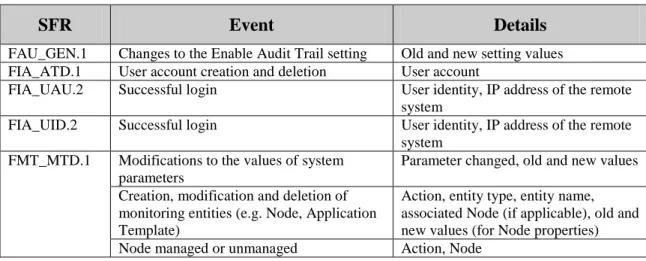
6.1.1.1 FAU_GEN.1 Audit Data Generation
FAU_GEN.1.1 The TSF shall be able to generate an audit record of the following auditable events:
a) Start-up and shutdown of the audit functions;
b) All auditable events for the not specified level of audit; and
c) The events in the following table.
Table 12 -Auditable Events
SFR Event Details
FAU_GEN.1 Changes to the Enable Audit Trail setting Old and new setting values FIA_ATD.1 User account creation and deletion User account
FIA_UAU.2 Successful login User identity, IP address of the remote system
FIA_UID.2 Successful login User identity, IP address of the remote system
FMT_MTD.1 Modifications to the values of system parameters
Parameter changed, old and new values Creation, modification and deletion of
monitoring entities (e.g. Node, Application Template)
Action, entity type, entity name, associated Node (if applicable), old and new values (for Node properties) Node managed or unmanaged Action, Node
a) Date and time of the event, type of event, subject identity (if applicable), and the outcome (success or failure) of the event; and
b) For each audit event type, based on the auditable event definitions of the functional components included in the PP/ST, no additional information.
6.1.1.2 FAU_SAR.1 Audit Review
FAU_SAR.1.1 The TSF shall provide all Orion Administrators with the capability to read all data from the audit records.
FAU_SAR.1.2 The TSF shall provide the audit records in a manner suitable for the user to interpret the information.
6.1.1.3 FAU_SAR.2 Restricted Audit Review
FAU_SAR.2.1 The TSF shall prohibit all users read access to the audit records, except those users that have been granted explicit read-access.
6.1.2 Identification and Authentication (FIA) 6.1.2.1 FIA_ATD.1 User Attribute Definition
Refinement Rationale: The TOE provides multiple access mechanisms for users. The security attributes defined for the users vary based upon the mechanism, with the exception of Orion Windows Applications where the only attribute (the role) is implied. Therefore, iterations for this SFR are specified for individual access mechanisms. The collection of iterations addresses the user attribute definitions for the TOE access mechanisms.
6.1.2.1.1 FIA_ATD.1(1) User Attribute Definition (Orion Web Console)
FIA_ATD.1.1(1) The TSF shall maintain the following list of security attributes belonging to individual users of the Orion Web Console:
1. Username
2. Password
3. Account enabled status
4. Account expiration date
5. Allow administrator rights (role)
6. Allow Node management
7. Allow Report management
8. Allow account to clear Events, acknowledge Alerts and Syslogs
9. Alert sound
10. Menu Bar assignments 11. Report folder