McAfee, Inc.
Vulnerability Manager v7.5.4
Security Target
Evaluation Assurance Level (EAL): EAL2+ Document Version: 0.1
Prepared for: Prepared by:
McAfee, Inc. Corsec Security, Inc.
2821 Mission College Blvd. Santa Clara, CA 95054 United States of America
13135 Lee Jackson Memorial Highway, Suite 220 Fairfax, VA 22033
United States of America
Phone: +1 800 847 8766 Phone: +1 703 267 6050
Email: [email protected] Email: [email protected] http://www.mcafee.com http://www.corsec.com
McAfee Vulnerability Manager v7.5.4 Page 2 of 65
Table of Contents
1 INTRODUCTION ... 4
1.1 PURPOSE ... 4
1.2 SECURITY TARGET AND TOEREFERENCES ... 4
1.3 TOEOVERVIEW ... 5
1.3.1 Brief Description of the Components of the TOE... 7
1.3.2 TOE Environment ... 8
1.4 TOEDESCRIPTION ... 9
1.4.1 Physical Scope ... 9
1.4.2 Logical Scope ... 12
1.4.3 Product Physical/Logical Features and Functionality not included in the TOE ... 14
2 CONFORMANCE CLAIMS ... 15
3 SECURITY PROBLEM ... 16
3.1 THREATS TO SECURITY ... 16
3.2 ORGANIZATIONAL SECURITY POLICIES ... 17
3.3 ASSUMPTIONS ... 18
4 SECURITY OBJECTIVES ... 19
4.1 SECURITY OBJECTIVES FOR THE TOE ... 19
4.2 SECURITY OBJECTIVES FOR THE OPERATIONAL ENVIRONMENT ... 20
4.2.1 IT Security Objectives ... 20
4.2.2 Non-IT Security Objectives ... 20
5 EXTENDED COMPONENTS ... 22
5.1 EXTENDED TOESECURITY FUNCTIONAL COMPONENTS ... 22
5.1.1 Class IDS: Intrusion detection function ... 23
5.2 EXTENDED TOESECURITY ASSURANCE COMPONENTS ... 29
6 SECURITY REQUIREMENTS ... 30
6.1 CONVENTIONS ... 30
6.2 SECURITY FUNCTIONAL REQUIREMENTS ... 30
6.2.1 Class FAU: Security Audit ... 32
6.2.2 Class FIA: Identification and Authentication... 33
6.2.3 Class FMT: Security Management ... 34
6.2.4 Class FPT: Protection of the TSF ... 37
6.2.5 Class IDS: Intrusion Detection Functions ... 38
6.3 SECURITY ASSURANCE REQUIREMENTS ... 40
7 TOE SUMMARY SPECIFICATION ... 41
7.1 TOESECURITY FUNCTIONS ... 41
7.1.1 Security Audit ... 41
7.1.2 Identification and Authentication... 42
7.1.3 Security Management ... 42
7.1.4 Asset Data Import ... 46
7.1.5 Scanning ... 47
8 RATIONALE ... 49
8.1 CONFORMANCE CLAIMS RATIONALE ... 49
8.2 SECURITY OBJECTIVES RATIONALE ... 49
8.2.1 Security Objectives Rationale Relating to Threats ... 49
8.2.2 Security Objectives Rationale Relating to Policies ... 53
8.2.3 Security Objectives Rationale Relating to Assumptions ... 56
8.3 RATIONALE FOR EXTENDED SECURITY FUNCTIONAL REQUIREMENTS ... 58
8.4 RATIONALE FOR EXTENDED TOESECURITY ASSURANCE REQUIREMENTS ... 58
8.5.1 Rationale for Security Functional Requirements of the TOE Objectives ... 58
8.5.2 Security Assurance Requirements Rationale ... 61
8.5.3 Dependency Rationale ... 62
9 ACRONYMS AND TERMS ... 63
9.1 ACRONYMS ... 63
Table of Figures
FIGURE 1-CC-EVALUATED CONFIGURATION OF THE TOE ... 6FIGURE 2-PHYSICAL TOEBOUNDARY ... 11
FIGURE 3-EXT_IDS: INTRUSION DETECTION FUNCTION CLASS DECOMPOSITION ... 23
FIGURE 4–SYSTEM DATA COLLECTION FAMILY DECOMPOSITION ... 24
FIGURE 5–ANALYSER ANALYSIS FAMILY DECOMPOSITION ... 26
FIGURE 6–RESTRICTED DATA REVIEW FAMILY DECOMPOSITION ... 27
FIGURE 7–PREVENTION OF SYSTEM DATA LOSS FAMILY DECOMPOSITION ... 28
List of Tables
TABLE 1-ST AND TOEREFERENCES ... 4TABLE 2-ENTERPRISE MANAGER COMPONENT REQUIREMENTS... 8
TABLE 3–PRIMARY SCAN ENGINE COMPONENT REQUIREMENTS ... 8
TABLE 4–FOUNDSTONE DATABASE/REPORT SERVER COMPONENT REQUIREMENTS ... 9
TABLE 5-TOEDATA ... 13
TABLE 6-CC AND PPCONFORMANCE ... 15
TABLE 7-THREATS ... 16
TABLE 8-ORGANIZATIONAL SECURITY POLICIES ... 17
TABLE 9-ASSUMPTIONS ... 18
TABLE 10-SECURITY OBJECTIVES FOR THE TOE ... 19
TABLE 11-ITSECURITY OBJECTIVES... 20
TABLE 12-NON-ITSECURITY OBJECTIVES ... 20
TABLE 13-EXTENDED TOESECURITY FUNCTIONAL REQUIREMENTS ... 22
TABLE 14–SYSTEM DATA COLLECTION EVENTS AND DETAILS ... 24
TABLE 15-TOESECURITY FUNCTIONAL REQUIREMENTS ... 30
TABLE 16–AUDITABLE EVENTS ... 32
TABLE 17–TSFDATA ACCESS PERMISSIONS ... 34
TABLE 18–SCAN AND REPORT ACCESS PERMISSIONS ... 35
TABLE 19–SYSTEM DATA COLLECTION EVENTS AND DETAILS ... 38
TABLE 20–SYSTEM DATA ACCESS... 39
TABLE 21-ASSURANCE REQUIREMENTS ... 40
TABLE 22-MAPPING OF TOESECURITY FUNCTIONS TO SECURITY FUNCTIONAL REQUIREMENTS... 41
TABLE 23–ROLE DESCRIPTIONS ... 43
TABLE 24–REPORT TEMPLATE IPADDRESS AND URLRESTRICTIONS... 45
TABLE 25–REPORT ACCESS ... 48
TABLE 26-THREATS:OBJECTIVES MAPPING ... 49
TABLE 27-POLICIES:OBJECTIVES MAPPING ... 53
TABLE 28-ASSUMPTIONS:OBJECTIVES MAPPING ... 56
TABLE 29-OBJECTIVES:SFRS MAPPING ... 58
TABLE 30-FUNCTIONAL REQUIREMENTS DEPENDENCIES ... 62
McAfee Vulnerability Manager v7.5.4 Page 4 of 65
1
Introduction
This section identifies the Security Target (ST), Target of Evaluation (TOE), and the ST organization. The Target of Evaluation (TOE) is the McAfee Vulnerability Manager v7.5.4, and will hereafter be referred to as the TOE throughout this document. The TOE is a Vulnerability Management System that scans specified targets for vulnerabilities and noncompliant configurations. It provides a management interface to configure the system and generate reports regarding the results of the scans.
1.1
Purpose
This ST is divided into nine sections, as follows:
Introduction (Section 1) – Provides a brief summary of the ST contents and describes the organization of other sections within this document. It also provides an overview of the TOE security functions and describes the physical and logical scope for the TOE, as well as the ST and TOE references.
Conformance Claims (Section 2) – Provides the identification of any Common Criteria (CC), Protection Profile, and Evaluation Assurance Level (EAL) package claims. It also identifies whether the ST contains extended security requirements.
Security Problem (Section 3) – Describes the threats, organizational security policies, and assumptions that pertain to the TOE and its environment.
Security Objectives (Section 4) – Identifies the security objectives that are satisfied by the TOE and its environment.
Extended Components (Section 5) – Identifies new components (extended Security Functional Requirements (SFRs) and extended Security Assurance Requirements (SARs)) that are not included in CC Part 2 or CC Part 3.
Security Requirements (Section 6) – Presents the SFRs and SARs met by the TOE.
TOE Summary Specification (Section 7) – Describes the security functions provided by the TOE that satisfy the security functional requirements and objectives.
Rationale (Section 8) - Presents the rationale for the security objectives, requirements, and SFR dependencies as to their consistency, completeness, and suitability.
Acronyms and Terms (Section 9) – Defines the acronyms and terminology used within this ST.
1.2
Security Target and TOE References
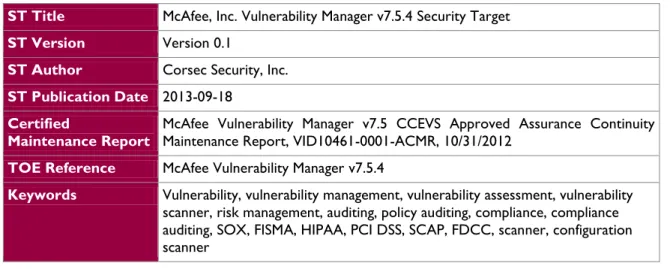
Table 1 - ST and TOE References
ST Title McAfee, Inc. Vulnerability Manager v7.5.4 Security Target
ST Version Version 0.1
ST Author Corsec Security, Inc.
ST Publication Date 2013-09-18
Certified
Maintenance Report
McAfee Vulnerability Manager v7.5 CCEVS Approved Assurance Continuity Maintenance Report, VID10461-0001-ACMR, 10/31/2012
TOE Reference McAfee Vulnerability Manager v7.5.4
Keywords Vulnerability, vulnerability management, vulnerability assessment, vulnerability scanner, risk management, auditing, policy auditing, compliance, compliance auditing, SOX, FISMA, HIPAA, PCI DSS, SCAP, FDCC, scanner, configuration scanner
1.3
TOE Overview
The TOE Overview summarizes the usage and major security features of the TOE. The TOE Overview provides a context for the TOE evaluation by identifying the TOE type, describing the product, and defining the specific evaluated configuration.
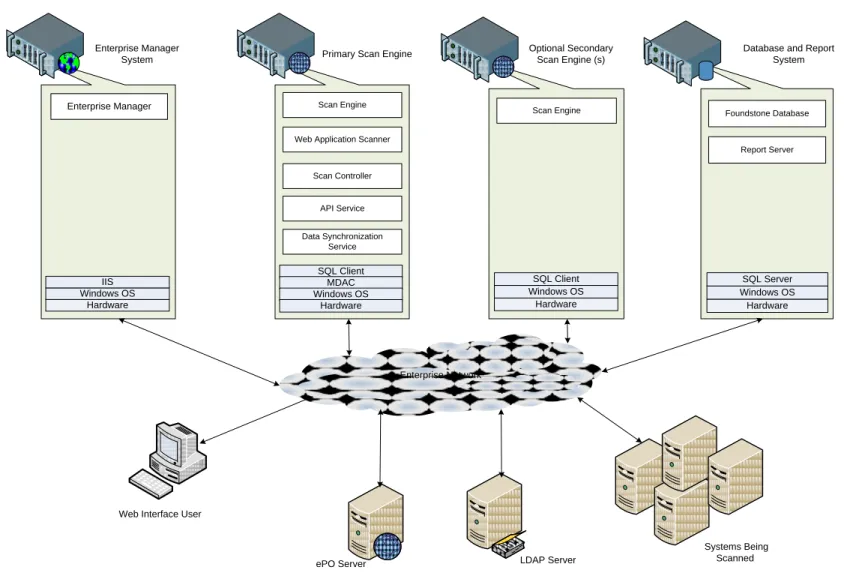
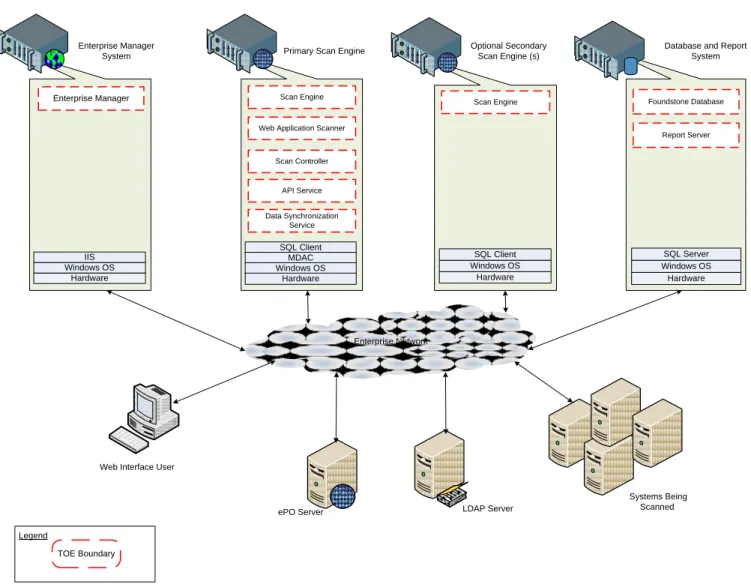
Vulnerability Manager v7.5.4 is a software-only TOE that consists of several separate executable components. Figure 1 shows the detailed view of the CC-evaluated configuration of the TOE and contains the following previously-undefined acronyms and abbreviations:
ePO- epolicy Orchestrator IIS - Internet Information Services OS- Operating System
API - Application Program Interface
LDAP - Lightweight Directory Access Protocol MDAC - Microsoft Data Access Components SQL - Structured Query Language
McAfee Vulnerability Manager v7.5.4 Page 6 of 65 Enterprise Network Scan Engine Hardware Windows OS SQL Client Foundstone Database Report Server Hardware Windows OS SQL Server
Web Application Scanner
API Service Scan Controller Data Synchronization Service Scan Engine SQL Client Enterprise Manager Enterprise Manager
System Primary Scan Engine
Optional Secondary Scan Engine (s)
Database and Report System
Web Interface User
ePO Server LDAP Server
Systems Being Scanned MDAC Windows OS Hardware Hardware Windows OS IIS
The CC-evaluated configuration of the TOE is composed of:
One Windows Server 2008 machine running as the Enterprise Manager System
One Windows Server 2008 machine running as the Primary Scan Engine with Scan Engine, Web Application Scanner, Scan Controller, API Service, and Data Synchronization Service installed (Optional) Zero or more Windows Server 2008 machines running as the Secondary Scan Engines
with Scan Engine installed
One Windows Server 2008 machine running as the Database and Report System with Foundstone Database and Report Server installed
1.3.1
Brief Description of the Components of the TOE
The TOE consists of the following software components:
1.3.1.1 Enterprise Manager Component
The Enterprise Manager provides authorized users with access to the TOE through their Web browsers. It allows them to manage and run the TOE from anywhere on the network. Access is protected by user identification and authentication.
1.3.1.2 Scan Engine Component
One or more Scan Engines scan the network environment. Depending on the logistics and size of your network, you may need more than one Scan Engine to scan the network. The Scan Engine performs identification, interrogation, and vulnerability assessment of remote computer systems.
1.3.1.3 Scan Controller Component
The Scan Controller provides the communication between the scan engine and the database. Large or segmented networks (WANs1) may require more than one scan controller to be deployed.
1.3.1.4 API Service
The API service provides an interface for Enterprise Manager to store data into and retrieve data from the Foundstone Database. This interaction uses SOAP2 over SSL3.
1.3.1.5 Data synchronization service
The Data Synchronization Service enables Vulnerability Manager to import asset information from McAfee’s ePO enterprise management system or an LDAP directory such as Microsoft Active Directory. This integration permits Vulnerability Manager to learn about assets through a mechanism other than discovery scans.
1.3.1.6 Foundstone Database
The Foundstone Database is the data repository for the Vulnerability Manager system. It uses Microsoft SQL Server to store everything from scan settings and results to user accounts and Scan Engine settings. It contains all of the information needed to track organizations and workgroups, manage users and groups, run scans, and generate reports.
1 Wide Area Networks 2
McAfee Vulnerability Manager v7.5.4 Page 8 of 65
1.3.1.7 Report Server
The Report Server is responsible for generating reports requested by authorized users. It retrieves scan results from the Foundstone Database, prepares the report, and saves it for future review.
1.3.1.8 Web Application Scanner
The Web Application Scanner provides a scan configuration, vulnerability checks, and scan reports for web applications. The web application scanner module is a licensed item which can be purchased and added on to a Vulnerability Manager v7.5.4 deployment at any time. Any scan engine is capable of web application scanning once the module has been purchased with no additional software required.
1.3.2
TOE Environment
The TOE is an Intrusion Detection System (IDS) /Intrusion Prevention System (IPS) which consists of a set of software applications. The hardware, operating systems and all third party support software (e.g., DBMS4) on the systems on which the TOE executes are excluded from the TOE boundary.
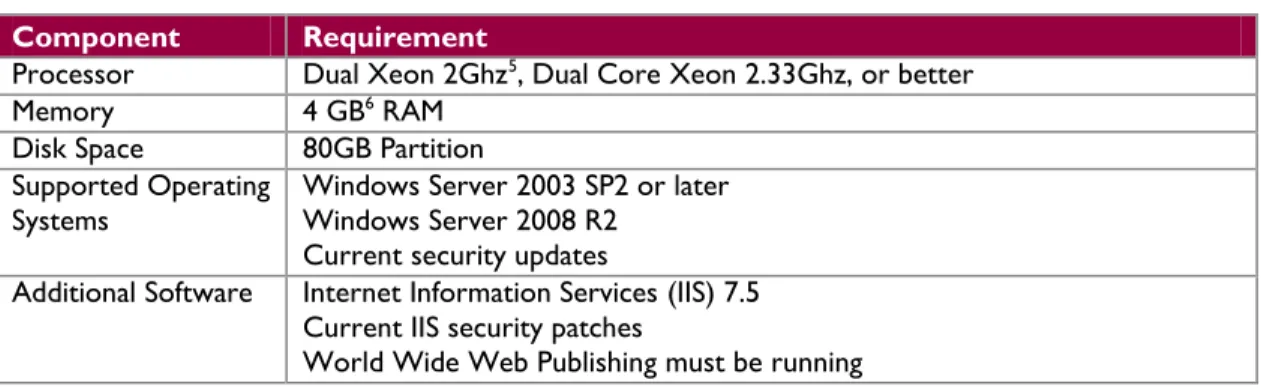
The platform on which the Enterprise Manager software is installed must be dedicated to functioning as the Enterprise Manager. The TOE requires the following hardware and software configuration on this platform:
Table 2 - Enterprise Manager Component Requirements
Component Requirement
Processor Dual Xeon 2Ghz5, Dual Core Xeon 2.33Ghz, or better
Memory 4 GB6 RAM
Disk Space 80GB Partition
Supported Operating
Systems Windows Server 2003 SP2 or later Windows Server 2008 R2 Current security updates
Additional Software Internet Information Services (IIS) 7.5 Current IIS security patches
World Wide Web Publishing must be running
The Scan Engine, Scan Controller, API Service, and Data Sync Service are all installed on the same platform. The TOE requires the following hardware and software configuration on this platform:
Table 3 – Primary Scan Engine Component Requirements
Component Requirement
Processor Dual Xeon 2Ghz, Dual Core Xeon 2.33Ghz, or better
Memory 4 GB RAM
Disk Space 80GB Partition
Supported Operating
Systems Windows Server 2003 SP2 or later Windows Server 2008 R2 Current security updates
Additional Software MDAC 2.8 SQL Client Tools
Microsoft Windows Script 5.6
4 Database Management System 5
Gigahertz
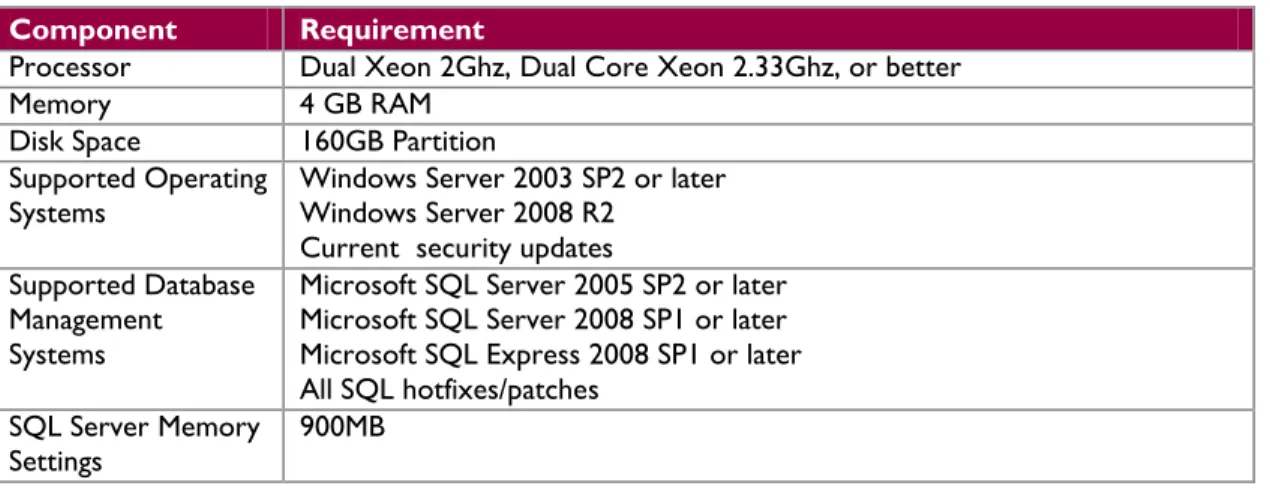
The platform on which the Foundstone Database and Report Server are installed must be dedicated to functioning as the servers for these functions of the TOE. The DBMS is installed on this same platform. The TOE requires the following hardware and software configuration on this platform.
Table 4 – Foundstone Database/Report Server Component Requirements
Component Requirement
Processor Dual Xeon 2Ghz, Dual Core Xeon 2.33Ghz, or better
Memory 4 GB RAM
Disk Space 160GB Partition
Supported Operating
Systems Windows Server 2003 SP2 or later Windows Server 2008 R2 Current security updates
Supported Database Management Systems
Microsoft SQL Server 2005 SP2 or later Microsoft SQL Server 2008 SP1 or later Microsoft SQL Express 2008 SP1 or later All SQL hotfixes/patches
SQL Server Memory
Settings 900MB
Authorized users can access the Enterprise Manager through their Web browser software. The TOE supports Microsoft Internet Explorer 8.0 and higher, running on a Windows operating system. Latest service packs should be applied to both the web browser and operating system. Recommended minimum screen resolution is 1024 x 768.
1.4
TOE Description
This section primarily addresses the physical and logical components of the TOE included in the evaluation.
1.4.1
Physical Scope
As stated in section 1.3, the TOE is composed of modular components and thus numerous deployment scenarios are possible. The TOE is evaluated in a distributed server architecture. This architecture is appropriate for complex organizations where large disparate networks in multiple geographical regions may require multiple scan engines. The scan engines generate all scanning traffic on their local network segments and then send the resulting scan data to the Foundstone Database. During the installation of each component, custom certificates are installed for use with the SSL protocol that protects traffic between the components.
For the purpose of CC testing, the following deployment configuration is used: One (1) instance of Enterprise Manager on a dedicated platform
One (1) instance of Scan Engine, Web Application Scanner , Scan Controller, API Service, and Data Sync Service on a dedicated platform (Primary Scan Engine)
Zero or more instances of Scan Engine on additional dedicated platforms (Secondary Scan Engines).
One instance (1) of the Foundstone Database and Report Server hosted on a separate dedicated platform (together with the DBMS)
McAfee Vulnerability Manager v7.5.4 Page 10 of 65 Root Organization Administrators are not permitted to switch to Global Administrator access (the
user must log out and log back in as a Global Administrator) The following items are excluded from the evaluation:
Remediation management and tickets – this is optional functionality that previously required the purchase of a separate license. It is not evaluated in the evaluated configuration as the functions are not needed for the core functionality of the TOE.
Notification service - this is optional functionality that previously required the purchase of a separate license. This functionality is not evaluated in the evaluated configuration.
Enterprise Network Scan Engine Hardware Windows OS SQL Client Foundstone Database Report Server Hardware Windows OS SQL Server
Web Application Scanner
API Service Scan Controller Data Synchronization Service Scan Engine SQL Client Enterprise Manager Enterprise Manager
System Primary Scan Engine
Optional Secondary Scan Engine (s)
Database and Report System
Web Interface User
ePO Server LDAP Server
Systems Being Scanned TOE Boundary Legend MDAC Windows OS Hardware Hardware Windows OS IIS
McAfee Vulnerability Manager v7.5.4 Page 12 of 65
1.4.1.1 Guidance Documentation
The following guides are required reading and part of the TOE: McAfee Vulnerability Manager 7.0 Best Practices Guide McAfee Vulnerability Manager 7.5 Install Guide McAfee Vulnerability Manager 7.5 Product Guide McAfee Vulnerability Manager 7.5.1 Release Notes McAfee Vulnerability Manager 7.5.4 Release Notes
McAfee Vulnerability Manager 7.0 Technote System Requirements
The McAfee Vulnerability Manager 7.0 Best Practices Guide and the McAfee Vulnerability Manager 7.0 Technote System Requirements have not been updated to v7.5 or v7.5.4. However, the guidance they provide for managing the TOE remain valid for v7.5.
1.4.2
Logical Scope
The logical boundary of the TOE will be broken down into the following security classes which are further described in sections 6 and 7 of this ST. The logical scope also provides the description of the security features of the TOE. The security functional requirements implemented by the TOE are usefully grouped under the following Security Function Classes:
Security Audit
Identification and Authentication Security Management
Asset Data Import Scanning
1.4.2.1 Security Audit
The TOE’s Audit Security Function provides auditing of management actions performed by administrators. The audit records generated by the TOE are categorized by the following event types: Administrator actions, User actions, and System actions. Audit records include the date and time of the event, the type of the event, the subject identity, and a description of event.
1.4.2.2 Identification and Authentication
The TOE requires users to identify and authenticate themselves before accessing the TOE software or before viewing any TSF data or configuring any portion of the TOE. No action can be initiated before proper identification and authentication. Each TOE user has security attributes associated with his user account that defines the functionality the user is allowed to perform. When interacting with the TOE via the Enterprise Manager GUI7, identification and authentication is performed by the TOE. Identification and authentication for local login to the operating system (i.e., via a local console) is performed by Windows (IT Environment).
1.4.2.3 Security Management
The TOE’s Management Security Function provides administrator support functionality that enables a human user to configure and manage TOE components.
Management of the TOE may be performed via the Enterprise Manager. All user types may use the Enterprise Manager. The TOE provides the following management functions:
1. User management,
2. Root organization management, 3. Workgroup management, 4. Scan Engine management, 5. Asset management, 6. Scan management, 7. Report management,
8. Known vulnerability management.
1.4.2.4 Asset Data Import
The TOE may be configured to import data about assets from LDAP servers or McAfee ePO. The value of this functionality is that the information about the assets may be more accurate or complete than the information obtained from scans.
1.4.2.5 TSF Data
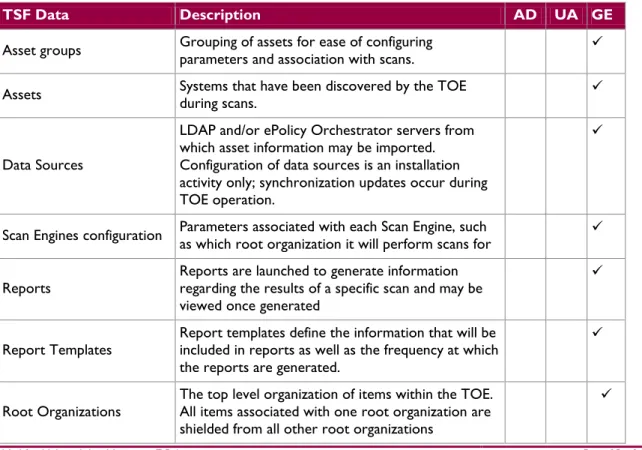
TOE data consists of both TSF data and user data (information). TSF data consists of authentication data, security attributes, and other generic configuration information. Security attributes enable the TOE to enforce the security policy. Authentication data enables the TOE to identify and authenticate users. Table 5 below contains the following TOE Data
Table 5 -TOE Data
TSF Data Description AD UA GE
Asset groups Grouping of assets for ease of configuring parameters and association with scans.
Assets Systems that have been discovered by the TOE during scans.
Data Sources
LDAP and/or ePolicy Orchestrator servers from which asset information may be imported. Configuration of data sources is an installation activity only; synchronization updates occur during TOE operation.
Scan Engines configuration Parameters associated with each Scan Engine, such as which root organization it will perform scans for Reports Reports are launched to generate information regarding the results of a specific scan and may be
viewed once generated
Report Templates
Report templates define the information that will be included in reports as well as the frequency at which the reports are generated.
Root Organizations The top level organization of items within the TOE. All items associated with one root organization are shielded from all other root organizations
McAfee Vulnerability Manager v7.5.4 Page 14 of 65
TSF Data Description AD UA GE
Scans
Parameters that define the scanning actions to be performed by the TOE and permissions relevant to each scan granted to Foundstone Users
User Accounts
Root Organization, Username and password for each individual user that connects to the TOE via the Enterprise Manager web interface.
User groups Grouping of users for ease of configuring parameters and association with workgroups. User roles The administrator type for each individual user that connects to the TOE via the Enterprise Manager
web interface.
Known Vulnerabilities List of known vulnerabilities that can be associated with individual scans. Workgroups One or more levels of hierarchy under root organizations that permit access restrictions to be
defined for scans and reports.
Note: AD=Authentication data; UA=User attribute; GE=Generic Information
1.4.2.5.1 Scanning
The TOE scans designated systems to detect known vulnerabilities on those systems. Results of the scans are stored in the database (the DBMS is in the IT Environment), and reports based upon completed scans may be retrieved via the GUI interface of the Enterprise Manager.
1.4.3
Product Physical/Logical Features and Functionality not
included in the TOE
Most features and functionality of the Vulnerability Manager v7.5.4 are part of the evaluated configuration of the TOE. The only exceptions are the following:
Configuration Manager – this functionality is used for infrastructure management, not for everyday vulnerability management.
McAfee Product Integration – Allows for McAfee Asset Manager integration to allow Vulnerability Manager to import asset information from Asset Manager. McAfee Asset Manager is outside the scope of the TOE boundary.
RealTime Scanning – RealTime Scanning requires integration with McAfee Asset Manager which is outside the scope of the TOE boundary.
Telnet only option for Shell credentials – administration is not to be restricted to the Telnet only option. Secure remote authentication methods are required.
2
Conformance Claims
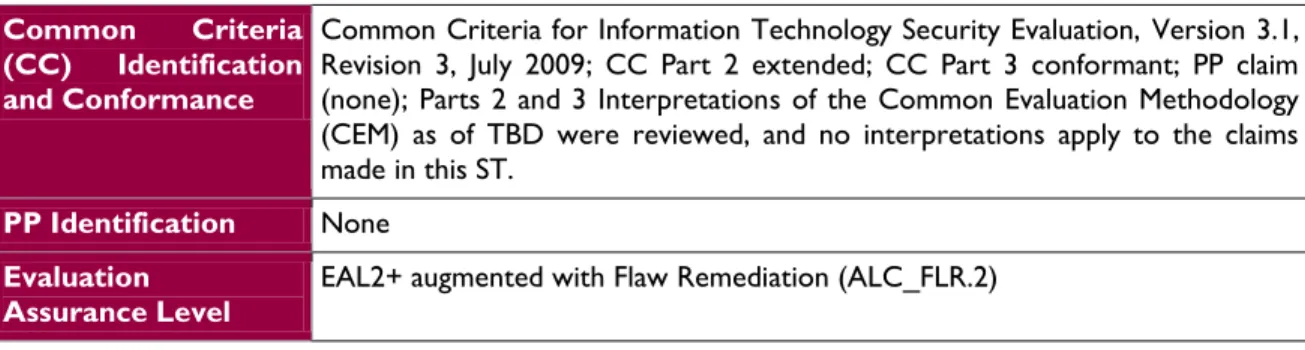
This section provides the identification for any CC, Protection Profile (PP), and EAL package conformance claims. Rationale is provided for any extensions or augmentations to the conformance claims. Rationale for CC and PP conformance claims can be found in Section 8.1.
Table 6 - CC and PP Conformance
Common Criteria (CC) Identification and Conformance
Common Criteria for Information Technology Security Evaluation, Version 3.1, Revision 3, July 2009; CC Part 2 extended; CC Part 3 conformant; PP claim (none); Parts 2 and 3 Interpretations of the Common Evaluation Methodology (CEM) as of TBD were reviewed, and no interpretations apply to the claims made in this ST.
PP Identification None
Evaluation Assurance Level
McAfee Vulnerability Manager v7.5.4 Page 16 of 65
3
Security Problem
This section describes the security aspects of the environment in which the TOE will be used and the manner in which the TOE is expected to be employed. It provides the statement of the TOE security environment, which identifies and explains all:
Known and presumed threats countered by either the TOE or by the security environment Organizational security policies with which the TOE must comply
Assumptions about the secure usage of the TOE, including physical, personnel and connectivity aspects
3.1
Threats to Security
This section identifies the threats to the IT8 assets against which protection is required by the TOE or by the security environment. The threat agents are divided into two categories:
Attackers who are not TOE users: They have public knowledge of how the TOE operates and are assumed to possess a low skill level, limited resources to alter TOE configuration settings or parameters and no physical access to the TOE.
TOE users: They have extensive knowledge of how the TOE operates and are assumed to possess a high skill level, moderate resources to alter TOE configuration settings or parameters and physical access to the TOE. (TOE users are, however, assumed not to be willfully hostile to the TOE.)
Both are assumed to have a low level of motivation. The IT assets requiring protection are the TSF9 and user data saved on or transitioning through the TOE and the hosts on the protected network. Removal, diminution and mitigation of the threats are through the objectives identified in Section 4 Security Objectives. The following threats are applicable:
Table 7 - Threats
Name Description
T.COMINT An unauthorized user may attempt to compromise the integrity of the
data collected and produced by the TOE by bypassing a security mechanism.
T.COMDIS An unauthorized user may attempt to disclose the data collected and
produced by the TOE by bypassing a security mechanism.
T.LOSSOF An unauthorized user may attempt to remove or destroy data
collected and produced by the TOE.
T.NOHALT An unauthorized user may attempt to compromise the continuity of
the System’s collection and analysis functions by halting execution of the TOE.
T.PRIVIL An unauthorized user may gain access to the TOE and exploit system
privileges to gain access to TOE security functions and data
T.IMPCON An unauthorized user may inappropriately change the configuration of
the TOE causing potential intrusions to go undetected.
8
IT – Information Technology
Name Description
T.SCNCFG Improper security configuration settings may exist in the IT System
the TOE monitors.
T.SCNMLC Users could execute malicious code on an IT System that the TOE
monitors which causes modification of the IT System protected data or undermines the IT System security functions.
T.SCNVUL Vulnerabilities may exist in the IT System the TOE monitors.
T.FALREC The TOE may fail to recognize vulnerabilities or inappropriate activity
based on data received from each data source.
T.FALASC The TOE may fail to identify vulnerabilities or inappropriate activity based on association of data received from all data sources.
T.FACCNT Unauthorized attempts to access TOE data or security functions may
go undetected.
T.FALACT Issues resulting from scans of monitored systems may fail to be acted
upon because the information is not disseminated from the TOE to other IT systems that are responsible for tracking or correcting the issues.
3.2
Organizational Security Policies
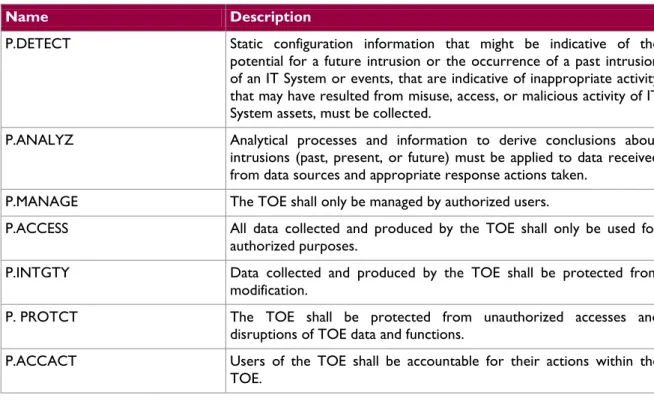
An Organizational Security Policy (OSP) is a set of security rules, procedures, or guidelines imposed by an organization on the operational environment of the TOE. The following OSPs are presumed to be imposed upon the TOE or its operational environment by any organization implementing the TOE in the CC evaluated configuration:
Table 8 - Organizational Security Policies
Name Description
P.DETECT Static configuration information that might be indicative of the
potential for a future intrusion or the occurrence of a past intrusion of an IT System or events, that are indicative of inappropriate activity that may have resulted from misuse, access, or malicious activity of IT System assets, must be collected.
P.ANALYZ Analytical processes and information to derive conclusions about
intrusions (past, present, or future) must be applied to data received from data sources and appropriate response actions taken.
P.MANAGE The TOE shall only be managed by authorized users.
P.ACCESS All data collected and produced by the TOE shall only be used for authorized purposes.
P.INTGTY Data collected and produced by the TOE shall be protected from
modification.
P. PROTCT The TOE shall be protected from unauthorized accesses and
disruptions of TOE data and functions.
P.ACCACT Users of the TOE shall be accountable for their actions within the TOE.
McAfee Vulnerability Manager v7.5.4 Page 18 of 65
3.3
Assumptions
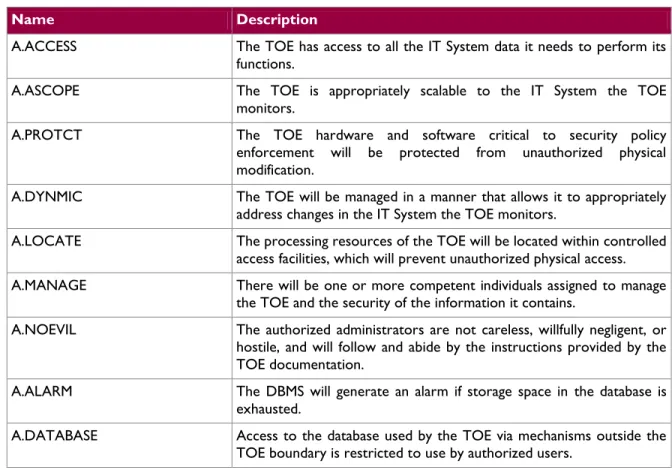
This section describes the security aspects of the intended environment for the evaluated TOE. The operational environment must be managed in accordance with assurance requirement documentation for delivery, operation, and user guidance. The following specific conditions are required to ensure the security of the TOE and are assumed to exist in an environment where this TOE is employed.
Table 9 - Assumptions
Name Description
A.ACCESS The TOE has access to all the IT System data it needs to perform its
functions.
A.ASCOPE The TOE is appropriately scalable to the IT System the TOE
monitors.
A.PROTCT The TOE hardware and software critical to security policy
enforcement will be protected from unauthorized physical modification.
A.DYNMIC The TOE will be managed in a manner that allows it to appropriately
address changes in the IT System the TOE monitors.
A.LOCATE The processing resources of the TOE will be located within controlled
access facilities, which will prevent unauthorized physical access.
A.MANAGE There will be one or more competent individuals assigned to manage
the TOE and the security of the information it contains.
A.NOEVIL The authorized administrators are not careless, willfully negligent, or
hostile, and will follow and abide by the instructions provided by the TOE documentation.
A.ALARM The DBMS will generate an alarm if storage space in the database is exhausted.
A.DATABASE Access to the database used by the TOE via mechanisms outside the
4
Security Objectives
Security objectives are concise, abstract statements of the intended solution to the problem defined by the security problem definition (see Section 3). The set of security objectives for a TOE form a high-level solution to the security problem. This high-level solution is divided into two part-wise solutions: the security objectives for the TOE, and the security objectives for the TOE’s operational environment. This section identifies the security objectives for the TOE and its supporting environment.
4.1
Security Objectives for the TOE
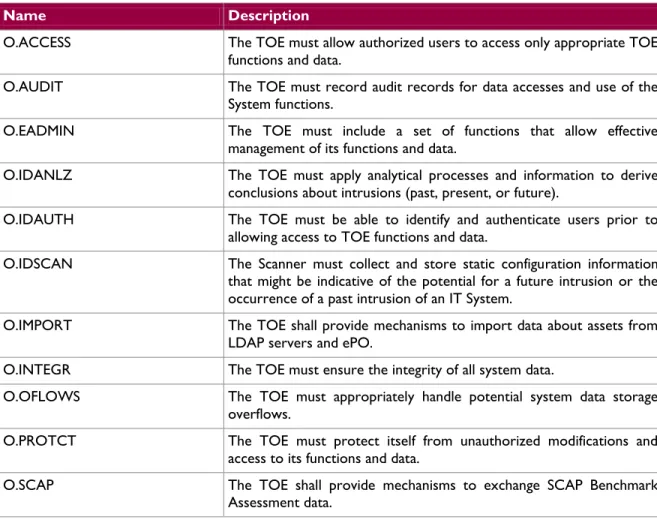
The specific security objectives for the TOE are as follows:
Table 10 - Security Objectives for the TOE
Name Description
O.ACCESS The TOE must allow authorized users to access only appropriate TOE
functions and data.
O.AUDIT The TOE must record audit records for data accesses and use of the
System functions.
O.EADMIN The TOE must include a set of functions that allow effective
management of its functions and data.
O.IDANLZ The TOE must apply analytical processes and information to derive
conclusions about intrusions (past, present, or future).
O.IDAUTH The TOE must be able to identify and authenticate users prior to
allowing access to TOE functions and data.
O.IDSCAN The Scanner must collect and store static configuration information
that might be indicative of the potential for a future intrusion or the occurrence of a past intrusion of an IT System.
O.IMPORT The TOE shall provide mechanisms to import data about assets from
LDAP servers and ePO.
O.INTEGR The TOE must ensure the integrity of all system data.
O.OFLOWS The TOE must appropriately handle potential system data storage
overflows.
O.PROTCT The TOE must protect itself from unauthorized modifications and
access to its functions and data.
O.SCAP The TOE shall provide mechanisms to exchange SCAP Benchmark
McAfee Vulnerability Manager v7.5.4 Page 20 of 65
4.2
Security Objectives for the Operational
Environment
4.2.1
IT Security Objectives
The following IT security objectives are to be satisfied by the environment:
Table 11 - IT Security Objectives
Name Description
OE.ALARM The DBMS will generate an alarm if storage space in the database is exhausted.
OE.AUDIT_PROTECT The IT Environment will provide the capability to protect audit information generated by the TOE.
OE.AUDIT_REVIEW The IT environment will provide the capability to review audit information generated by the TOE.
OE.CRYPTO The IT Environment will provide the cryptographic functionality and
protocols required for the implementation of secure channels between the TOE components and between the TOE and external IT systems.
OE.IDAUTH The IT Environment must be able to identify and authenticate users prior to the TOE allowing access to TOE functions and data on the Scan Engine.
OE.INTROP The TOE is interoperable with the IT System it monitors
OE.PROTECT The IT Environment will protect itself and the TOE from external
interference or tampering.
OE.SD_PROTECTION The IT Environment will provide the capability to protect system data.
OE.TIME The IT Environment will provide reliable timestamps to the TOE.
4.2.2
Non-IT Security Objectives
The following non-IT environment security objectives are to be satisfied without imposing technical requirements on the TOE. That is, they will not require the implementation of functions in the TOE hardware and/or software. Thus, they will be satisfied largely through application of procedural or administrative measures.
Table 12 - Non-IT Security Objectives
Name Description
OE.CREDEN Those responsible for the TOE must ensure that all access credentials
are protected by the users in a manner which is consistent with IT security.
OE.DATABASE Those responsible for the TOE must ensure that access to the
database, via mechanisms outside the TOE boundary (e.g., DBMS), is restricted to authorized users only.
Name Description
delivered, installed, managed, and operated in a manner which is consistent with IT security.
OE.PERSON Personnel working as authorized administrators shall be carefully
selected and trained for proper operation of the System.
OE.PHYCAL Those responsible for the TOE must ensure that those parts of the TOE critical to security policy are protected from any physical attack.
McAfee Vulnerability Manager v7.5.4 Page 22 of 65
5
Extended Components
This section defines the extended SFRs and extended SARs met by the TOE. These requirements are presented following the conventions identified in Section 6.1.
5.1
Extended TOE Security Functional
Components
This section specifies the extended SFRs for the TOE. The extended SFRs are organized by class. Table 13 identifies all extended SFRs implemented by the TOE
Table 13 - Extended TOE Security Functional Requirements
Name Description
EXT_IDS_SDC.1 System Data Collection
EXT_IDS_ANL.1 Analyser analysis
EXT_IDS_RDR.1 Restricted Data Review
5.1.1
Class IDS: Intrusion detection function
Intrusion Detection functions involve collecting information from designated systems and analyzing the information for vulnerabilities and compliance. The extended family “EXT_IDS: Intrusion detection function” class was modeled after the CC FAU: Security audit class. The extended family and related components for EXT_IDS_SDC: System data collection was modeled after the CC family and related components for FAU_GEN: Security audit generation. The extended family EXT_IDS_ANL: Analyser analysis was modeled after the family CC family and related components for FAU_SAA: Security audit analysis. The extended family EXT_IDS_RDR: Restrictive Data Review was modeled after the CC family and related components for FAU_SAR: Security audit review. The extended family and related components for EXT_IDS_STG: Prevention of System data loss was modeled after the CC family and related components for FAU_STG: Security audit event storage.
1 EXT_IDS_SDC: System data collection
1 EXT_IDS_ANL: Analyser analysis
1 EXT_IDS_RDR: Restricted data reveiw
1 EXT_IDS_STG: Prevention of system data loss
McAfee Vulnerability Manager v7.5.4 Page 24 of 65 System data collection (EXT_IDS_SDC)
Family Behaviour
This family defines the requirements for recording the information from the targeted IT system resources that take place under TSF control. This family identifies the level of system data collection, enumerates the types of events that shall be collected by the TSF, and identifies the minimum set of IDS-related information that should be provided within various IDS record types.
Component Leveling
1 EXT_IDS_SDC: System data collection
Figure 4 – System data collection family decomposition
EXT_IDS_SDC.1 System data collection, defines the level of events, and specifies the list of data that shall be recorded in each record.
Management: EXT_IDS_SDC.1
The following actions could be considered for the management functions in FMT: a) Configuration of the events to be collected.
Audit: EXT_IDS_SDC.1
b) There are no auditable events foreseen
EXT_IDS_SDC.1 System data collection
Hierarchical to: No other components
EXT_IDS_SDC.1.1
The System shall be able to collect the following information from the targeted IT System resource(s):
a)
[
selection: Start-up and shutdown, identification and authentication events, data accesses, service requests, network traffic, security configuration changes, data introduction, detected malicious code, access control configuration, service configuration, authentication configuration, accountability policy configuration, detected known vulnerabilities]; andb) [assignment: other specifically defined events].
EXT_IDS_SDC.1.2
At a minimum, the TSF shall collect and record the following information:
a) Date and time of the event, type of event, subject identity, and the outcome (success or failure) of the event; and
b) The additional information specified in the Details column of the table below.
Table 14 – System data collection Events and Details
Component Event Details
IDS_SDC.1 Start-up and shutdown none
IDS_SDC.1 Identification and authentication events User identity, location, source address, destination address
Component Event Details
IDS_SDC.1 Data accesses Object IDs, requested access, source
address, destination address
IDS_SDC.1 Service Requests Specific service, source address, destination
address
IDS_SDC.1 Network traffic Protocol, source address, destination
address
IDS_SDC.1 Security configuration changes Source address, destination address
IDS_SDC.1 Data introduction Object IDs, location of object, source
address, destination address
IDS_SDC.1 Detected malicious code Location, identification of code
IDS_SDC.1 Access control configuration Location, access settings
IDS_SDC.1 Service configuration Service identification (name or port),
interface, protocols
IDS_SDC.1 Authentication configuration Account policy parameters
IDS_SDC.1 Accountability policy configuration Accountability policy configuration parameters
IDS_SDC.1 Detected known vulnerabilities Identification of the known vulnerability
McAfee Vulnerability Manager v7.5.4 Page 26 of 65
5.1.1.1 Analyser analysis (EXT_IDS_ANL)
Family Behaviour
This family defines the analysis the TOE performs on the collected system data. This family enumerates the types of program code that shall be collected by the TSF, and identifies what type of control will be enforced on the executable code. This family also determines which changes are to be prevented, and which are to be monitored and reported.
Component Leveling
EXT_IDS_ANL: Analyser analysis
1 EXT_IDS_ANL: Analyser analysis
Figure 5 – Analyser analysis family decomposition
EXT_IDS_ANL.1 Analyser analysis, specifies the list of analyses the TOE will perform on the collected system data.
Management: EXT_CCS_ANL.1
The following actions could be considered for the management functions in FMT: a) Configuration of the analysis to be performed.
Audit: EXT_CCS_ANL.1
The following actions should be auditable if FAU_GEN Security audit data generation is included in the ST:
a) Minimal: Enabling and disabling of any of the analysis mechanisms.
EXT_IDS_ANL.1 Analyser analysis
Hierarchical to: No other components
EXT_IDS_ANL.1.1
The System shall perform the following analysis function(s) on all system data received: a) [selection: statistical, signature, integrity]; and
b) [assignment: other analytical functions].
EXT_IDS_ANL.1.2
The System shall record within each analytical result at least the following information: a) Date and time of the result, type of result, identification of data source; and
b) [assignment: other security relevant information about the result]. Dependencies: EXT_IDS_SDC.1 System Data Collection
5.1.1.2 Restricted data review (EXT_IDS_RDR)
Family Behaviour
This family defines the requirements for system data tools that should be available to authorized users to assist in the review of system data.
Component Leveling
EXT_IDS_ANL: Analyser analysis
1 EXT_IDS_RDR: Restricted data review
Figure 6 – Restricted data review family decomposition
EXT_IDS_RDR.1 Restricted data review, the TSF shall prohibit all users read access to the audit records, except for those user that have been granted explicit read-access.
Management: EXT_IDS_RDR.1
The following actions could be considered for the management functions in FMT:
a) maintenance (deletion, modification, addition) of the group of users with read access right to the system data records.
Audit: EXT_IDS_RDR.1
The following actions should be auditable if FAU_GEN Security audit data generation is included in the ST:
a) Basic: Attempts to read system data that are denied.
b) Detailed: Reading of information from the system data records.
Application Note: The audit event definition is consistent with CCEVS Policy Letter #15, which states that only access failures are auditable at the Basic level of audit.
EXT_IDS_RDR.1 Restricted data review
Hierarchical to: No other components
EXT_IDS_RDR.1.1
The System shall provide [assignment: authorised users] with the capability to read [assignment: list of System data] from the System data.
EXT_IDS_RDR.1.2
The System shall provide the System data in a manner suitable for the user to interpret the information.
EXT_IDS_RDR.1.3
The System shall prohibit all users read access to the System data, except those users that have been granted explicit read-access.
McAfee Vulnerability Manager v7.5.4 Page 28 of 65
5.1.1.3 Prevention of System data loss (EXT_IDS_STG)
Family Behaviour
This family defines the requirements for system data tools that should be available to authorized users to assist in the review of system data.
Component Leveling
EXT_IDS_ANL: Analyser analysis
1 EXT_IDS_STG: Prevention of System data loss
Figure 7 – Prevention of System data loss family decomposition
EXT_IDS_STG.2 Prevention of System data loss, the TSF shall define what actions the System will take if storage capacity has been reached.
Management: EXT_IDS_STG.2
The following actions could be considered for the management functions in FMT:
b) maintenance (deletion, modification, addition) of actions to be taken in the event that system data storage capacity has been reached.
Audit: EXT_IDS_STG.2
The following actions should be auditable if FAU_GEN Security audit data generation is included in the ST:
a) Basic: Actions taken if the storage capacity has been reached.
EXT_IDS_STG.2 Prevention of System data loss
Hierarchical to: No other components
EXT_IDS_STG.2
The System shall [selection: ignore System data, prevent System data, except those taken by the authorized user with special rights, overwrite the oldest stored System data] if the storage capacity has been reached.
5.2
Extended TOE Security Assurance
Components
McAfee Vulnerability Manager v7.5.4 Page 30 of 65
6
Security Requirements
This section defines the SFRs and SARs met by the TOE. These requirements are presented following the conventions identified in Section 6.1.
6.1
Conventions
There are several font variations used within this ST. Selected presentation choices are discussed here to aid the Security Target reader.
The CC allows for assignment, refinement, selection and iteration operations to be performed on security functional requirements. All of these operations are used within this ST. These operations are performed as described in Part 2 of the CC, and are shown as follows:
Completed assignment statements are identified using [italicized text within brackets]. Completed selection statements are identified using [underlined text within brackets].
Refinements are identified using bold text. Any text removed is stricken (Example: TSF Data) and should be considered as a refinement.
Extended Functional and Assurance Requirements are identified using “EXT_” at the beginning of the short name.
Iterations are identified by appending a letter in parentheses following the component title. For example, FAU_GEN.1(a) Audit Data Generation would be the first iteration and FAU_GEN.1(b) Audit Data Generation would be the second iteration.
6.2
Security Functional Requirements
This section specifies the SFRs for the TOE. This section organizes the SFRs by CC class. Table 15 identifies all SFRs implemented by the TOE and indicates the ST operations performed on each requirement.
Table 15 - TOE Security Functional Requirements
Name Description S A R I
FAU_GEN.1 Audit data generation
FIA_ATD.1 User attribute definition
FIA_SOS.1 Verification of secrets
FIA_UAU.1 Timing of authentication
FIA_UID.1 Timing of identification
FMT_MOF.1 Management of security functions behavoir
FMT_MTD.1 Management of TSF data
FMT_SMF.1 Specification of management functions
FMT_SMR.1 Security roles
FPT_TDC.1(a) Inter-TSF Basic TSF Data Consistency
FPT_TDC.1(b) Inter-TSF Basic TSF Data Consistency
Name Description S A R I
EXT_IDS_ANL.1 Analyzer analysis
EXT_IDS_RDR.1 Restricted data review
EXT_IDS_STG.2 Prevention of system data loss
McAfee Vulnerability Manager v7.5.4 Page 32 of 65
6.2.1
Class FAU: Security Audit
FAU_GEN.1 Audit Data GenerationHierarchical to: No other components.
FAU_GEN.1.1
The TSF shall be able to generate an audit record of the following auditable events: a) Start-up and shutdown of the audit functions;
b) All auditable events, for the [not specified] level of audit; and c) [Access to the System and access to the TOE and System data].
FAU_GEN.1.2
The TSF shall record within each audit record at least the following information:
a) Date and time of the event, type of event, subject identity, and the outcome (success or failure) of the event; and
b) For each audit event type, based on the auditable event definitions of the functional components included in the PP/ST, [the information detailed in Table 16 below].
Table 16 – Auditable Events
Component Event Details
FAU_GEN.1 Start-up and shutdown of audit functions
Access to the TOE and System data Object IDs, Requested access
FIA_UAU.1 All use of the authentication mechanism User identity, location
FIA_UID.1 All use of the user identification
mechanism
User identity, location
FMT_MOF.1 All modifications in the behavior of the
functions of the TSF
FMT_MTD.1 All modifications to the values of TSF
data
FMT_SMF.1 Use of the management functions. User identity, function used
FMT_SMR.1 Modifications to the group of users that
are part of a role User identity
FPT_TDC.1 Successful use of TSF data consistency
mechanisms
Data Source
EXT_IDS_ANL.1 None (the analysis function is always
enabled)
EXT_IDS_RDR.1 None (the user is not given the option of
accessing unauthorized system data)
EXT_IDS_STG.2 None (a common database is used for
system data and audits; if the database is full, all new information is discarded)
6.2.2
Class FIA: Identification and Authentication
FIA_ATD.1 User attribute definitionHierarchical to: No other components.
FIA_ATD.1.1
The TSF shall maintain the following list of security attributes belonging to individual users: [ a) Login name; b) Password; c) User role; d) Lock status; e) Organization; f) Workgroup membership;
g) Group membership and
h) Scan permissions.
].
Dependencies: No dependencies
FIA_SOS.1 Verification of secrets
Hierarchical to: No other components.
FIA_SOS.1.1
The TSF shall provide a mechanism to verify that secrets meet [the following metrics:
a) Contains at least 8 characters
b) Contains at least one number
c) Contains at least one non-alpha-numeric character (`~!@#$%^&*()-_=+).
].
Dependencies: No dependencies
FIA_UAU.1 Timing of authentication
Hierarchical to: No other components.
FIA_UAU.1.1
The TSF shall allow [no actions] on behalf of the user to be performed before the user is authenticated.
FIA_UAU.1.2
The TSF shall require each user to be successfully authenticated before allowing any other TSF-mediated actions on behalf of that user.
Dependencies: FIA_UID.1 Timing of identification
FIA_UID.1 Timing of identification
Hierarchical to: No other components.
FIA_UID.1.1
The TSF shall allow [no actions] on behalf of the user to be performed before the user is identified.
FIA_UID.1.2
The TSF shall require each user to be successfully identified before allowing any other TSF-mediated actions on behalf of that user.
McAfee Vulnerability Manager v7.5.4 Page 34 of 65
6.2.3
Class FMT: Security Management
FMT_MOF.1 Management of security functions behaviourHierarchical to: No other components.
FMT_MOF.1.1
The TSF shall restrict the ability to [modify the behaviour of] the functions [of functions System data collection and analysis] to [Foundstone Users with permissions for specific scans, Global Administrators, Root Organization Administrators and Workgroup Administrators].
Dependencies: FMT_SMF.1 Specification of management functions FMT_SMR.1 Security roles
FMT_MTD.1 Management of TSF data
Hierarchical to: No other components.
FMT_MTD.1.1
The TSF shall restrict the ability to [query] [and add System data], and the [assignment: list of TSF data] shall restrict the ability to query and modify all other TOE data to [the roles associated with specific data and operations as show in Table 17]
Table 17 – TSF Data Access Permissions
TSF Data Global
Administrator Root Organization Administrator* Workgroup Administrator** Foundstone User
Asset groups None Create, Delete, Modify Create, Delete, Modify None
Assets None Modify Modify None
Data Sources None Performed during
installation only None None Known Vulnerabilities Create, Delete, Modify
None None None
Scan Engines Modify Modify None None
Reports None Submit or Cancel Report access is
determined by the access permission in Table 18 Report access is determined by the access permission in Table 18
Report Templates None View and Edit Report access is
determined by the access permission in Table 18 Report access is determined by the access permission in Table 18 Root Organizations Create, Delete,
Modify
Modify None None
Scans View Create, Delete,
Modify, Launch Create, Modify, Launch Delete, Scan access is determined by
the access
permission in Table 18
TSF Data Global
Administrator Root Organization Administrator* Workgroup Administrator** Foundstone User
User Accounts Create, Delete,
Modify Create, Delete, Modify Create, Delete, Modify Modify the user’s own password
User Groups Create, Delete,
Modify Create, Delete, Modify Create, Delete, Modify None
User Roles Create, Delete,
Modify Create, Delete, Modify Create, Delete, Modify None
Workgroups Create, Delete,
Modify Create, Delete, Modify Create, Delete, Modify None
*Root Organization Administrators can only have access to the TSF Data within the same root organization
** Workgroup Administrators only have access to TSF Data within the workgroups
Table 18 – Scan and Report Access Permissions
Permissions Description
View View the reports, templates and other information displayed in the Enterprise Manager for the selected scan. Reports may be submitted and canceled for any reports for which the user has View access.
Edit IP Allow the user or group to edit the IP ranges for the selected scan.
Edit Body Allow the user or group to edit the selected scan's settings, other than the IP ranges and schedule.
Schedule Allow the user or group to change the times when the selected scan is scheduled to run.
Delete Allow the user or group to delete the selected scan.
Full All of the above. Allows the user or group to edit, launch, or delete any scan in the organization or workgroup.
Dependencies: FMT_SMF.1 Specification of management functions FMT_SMR.1 Security roles
FMT_SMF.1 Specification of Management Functions
Hierarchical to: No other components.
FMT_SMF.1.1
The TSF shall be capable of performing the following management functions: [
1) User management,
2) Root organization management,
3) Workgroup management,
4) Asset management,
5) Scan management,
6) Report management
7) Scan engine management
McAfee Vulnerability Manager v7.5.4 Page 36 of 65 Dependencies: No Dependencies
FMT_SMR.1 Security roles
Hierarchical to: No other components.
FMT_SMR.1.1
The TSF shall maintain the roles [Foundstone User, Root Organization Administrator, Workgroup Administrator, and Global Administrator].
FMT_SMR.1.2
The TSF shall be able to associate users with roles. Dependencies: FIA_UID.1 Timing of identification
6.2.4
Class FPT: Protection of the TSF
FPT_TDC.1(a) Inter-TSF basic TSF data consistencyHierarchical to: No other components.
FPT_TDC.1.1a
The TSF shall provide the capability to consistently interpret [assets] when shared between the TSF and another trusted IT product.
FPT_TDC.1.2a
The TSF shall use [the following rules] when interpreting the TSF data from another trusted IT product:
1) For LDAP servers, the data is interpreted according to the LDAP version 3 protocol.
2) For EPO, the data is interpreted according to McAfee’s schema for the ePO database.
3) When conflicting information is received from different sources, highest priority is given to ePO data, then to LDAP server data.
Dependencies: No dependencies
FPT_TDC.1(b) Inter-TSF basic TSF data consistency
Hierarchical to: No other components.
FPT_TDC.1.1b
The TSF shall provide the capability to consistently interpret [known vulnerabilities] when shared between the TSF and another trusted IT product.
FPT_TDC.1.2b
The TSF shall use [the SCAP Benchmark Assessment XCCDF and OVAL standards] when interpreting the TSF data from another trusted IT product.
McAfee Vulnerability Manager v7.5.4 Page 38 of 65
6.2.5
Class IDS: Intrusion Detection Functions
EXT_IDS_SDC.1 System data collectionHierarchical to: No other components
EXT_IDS_SDC.1.1
The System shall be able to collect the following information from the targeted IT System resource(s): a) access control configuration, service configuration, authentication configuration, detected
known vulnerabilities and
b) no other events.
EXT_IDS_SDC.1.2
At a minimum, the System shall collect and record the following information:
a) Date and time of the event, type of event, subject identity, and the outcome (success or failure) of the event; and
b) The additional information specified in the Details column of the table below.
Table 19 – System Data Collection Events and Details
Component Event Details
EXT_IDS_SDC.1 Access control configuration Location, access settings
EXT_IDS_SDC.1 Service configuration Service identification (name or port), interface, protocols
EXT_IDS_SDC.1 Authentication configuration Account policy parameters
EXT_IDS_SDC.1 Detected known vulnerabilities Identification of the known vulnerability
Application Note: Access control configuration refers to configuration settings used to restrict access for individual users/roles. Service configuration refers to services made available to users via the network interface and protocol stack. Authentication configuration refers to settings regarding password content parameters and authentication attempts.
Dependencies: FPT_STM.1 Reliable time stamps
EXT_IDS_ANL.1 Analyser analysis
Hierarchical to: No other components
EXT_IDS_ANL.1.1
The System shall perform the following analysis function(s) on all system data received: a) [signature]; and
b) [the following analytic functions: operating system identification, registry queries (when credentials are provided), and positive and negative responses to packets transmitted to the scanned systems ].
EXT_IDS_ANL.1.2
The System shall record within each analytical result at least the following information: a) Date and time of the result, type of result, identification of data source; and
b) [Criticality of the asset on which the vulnerability was detected]. c) [Risk factor of the detected vulnerability]
Dependencies: EXT_IDS_SDC.1 System Data Collection FPT_STM.1 Reliable Timestamps
EXT_IDS_RDR.1 Restricted IDS data review
Hierarchical to: No other components
EXT_IDS_RDR.1.1
The System shall provide [Foundstone User, Root Organization Administrator, and Workgroup Administrator] with the capability to read [the system data listed in Table 20 below] from the System data.
Table 20 – System Data Access
User Type Access
Foundstone User System data associated with specific scans they are authorized
to view.
Workgroup Administrator System data associated with all workgroups the Workgroup Administrator is associated with.
Root Organization Administrator System data associated with all scans in the same root organization
EXT_IDS_RDR.1.2
The System shall provide the System data in a manner suitable for the user to interpret the information.
EXT_IDS_RDR.1.3
The System shall prohibit all users read access to the System data, except those users that have been granted explicit read-access.
Dependencies: EXT_IDS_SDC.1 System data collection
EXT_IDS_STG.2 Prevention of System data loss
Hierarchical to: No other components
EXT_IDS_STG.2.1
The System shall [ignore System data] if the storage capacity has been reached. Dependencies: EXT_IDS_SDC.1 System Data Collection
McAfee Vulnerability Manager v7.5.4 Page 40 of 65
6.3
Security Assurance Requirements
This section defines the assurance requirements for the TOE. Assurance requirements are taken from the CC Part 3 and are EAL2 augmented with ALC_FLR.2. Table 21 - Assurance Requirements summarizes the requirements.
Table 21 - Assurance Requirements
Assurance Requirements
Class ASE: Security Target
evaluation ASE_CCL.1 Conformance claims ASE_ECD.1 Extended components definition ASE_INT.1 ST introduction
ASE_OBJ.2 Security objectives
ASE_REQ.2 Derived security requirements ASE_SPD.1 Security problem definition ASE_TSS.1 TOE summary specification Class ALC : Life Cycle Support ALC_CMC.2 Use of a CM system
ALC_CMS.2 Parts of the TOE CM Coverage ALC_DEL.1 Delivery Procedures
ALC_FLR.2 Flaw reporting procedures
Class ADV: Development ADV_ARC.1 Security Architecture Description
ADV_FSP.2 Security-enforcing functional specification ADV_TDS.1 Basic design
Class AGD: Guidance documents AGD_OPE.1 Operational user guidance AGD_PRE.1 Preparative procedures
Class ATE: Tests ATE_COV.1 Evidence of coverage
ATE_FUN.1 Functional testing
ATE_IND.2 Independent testing – sample Class AVA: Vulnerability assessment AVA_VAN.2 Vulnerability analysis