An Li. Scheduling information system: the design and development of an online database for tracking scheduling information. A Master’s paper for the M.S. in I.S. degree. April, 2004. 34 pages. Advisor: Deborah Barreau
This paper describes the design and development of a Web-based scheduling
information system. This particular system is intended to allow workers to enter
the hours they would like to request to work so that the scheduler can query the
database to see who is available to work on which days in order to make the
schedule. The workers are able to query the database as well, so that they can
see how many other people have requested the days they plan to request for.
For data input, the proposed system presents Web-based HTML forms that can
be accessed from any Web browser; the system stores the collected information
in a MySQL database. PHP scripting language is used to link the HTML forms
and the MySQL database; it constructs SQL insert statements to enter data into
the database, and constructs queries to extract information from the database.
Headings:
Database—Management—Systems
Information Systems
Web Databases
SCHEDULING INFORMATION SYSTEM:
THE DESIGN AND DEVELOPMENT OF AN ONLINE DATABASE FOR TRACKING SCHEDULING INFORMATION
by An Li
A Master’s paper submitted to the faculty of the School of Information and Library Science of the University of North Carolina at Chapel Hill
in partial fulfillment of the requirements for the degree of Master of Science in
Information Science
Chapel Hill, North Carolina
April 2004
Approved by:
______________________________
Table of Contents
T
ABLE OFC
ONTENTS... 1P
ROJECTS
UMMARY... 2Problem
... 2Original Approach
... 3User Description
... 4Proposed System
... 4U
SER ANDT
ASKI
NFORMATION... 6User Roles
... 6Scheduler
... 7Workers
... 7User Requirements
... 8Use Cases and Scenarios
... 9Use Case: Scheduler Interactions
... 10Use Case: Scheduler Search Database... 10
Use Case: Worker Interactions
... 13Use Case: Worker Making Schedule Request ... 13
Use Case: Worker Search Database... 16
S
YSTEMD
ESCRIPTION... 18ER Diagram
... 18Data Dictionary
... 19Schema
... 19System Architecture
... 20MySQL Database
... 20PHP Hypertext Preprocessor
... 21Web-Based Forms and Results
... 21Screenshots
... 22Security
... 23F
UTUREE
NHANCEMENT... 24L
ESSONSL
EARNED... 25R
EFERENCES... 26A
PPENDIXA:
PHP
C
ODE FORR
EQUESTS
CHEDULEF
ORM.... 27Project Summary
Problem
With the need for scheduling employees on rotational work schedules to cover
24-hour days at some organizations, the schedulers of these organizations are
faced with tens or even hundreds of work scheduling requests from workers as
often as every two weeks. It is essential to cover 24-hour days in certain
organizations because places like hospitals and Emergency Medical Services
cannot close down like normal businesses do since people can get sick or injured
at any time of the day. Also, when a database system or a network goes down in
a company, it cannot wait until the next business day to be fixed because many
people depend on it, so administrators who are responsible for these systems
have to cover 24-hour days as well.
Schedulers are faced with many kinds of problems. For example, it is very
difficult for the schedulers to process the requests on paper, and there is no way
to query and retrieve a request other than going through every single one of
them. Also, schedulers are unable to make schedules unless the paper requests
are accessible to them, and sometimes during extreme weather conditions, they
The workers face problems with scheduling as well. They have no way of
knowing which days have been overly requested by other workers and which
days require more help since they cannot access other people’s requests.
Furthermore, the workers are unable to make scheduling requests via computers
if everything is paper-based. Being able to make requests via computer makes
things easier when the workers are not able to get to the office to hand-deliver
the requests due to extreme weather conditions, or due to other types of
emergencies they might have.
The goal of this project is to develop a scheduling system for use in a technology
company, a hospital, or similar organization requiring that staff be scheduled for
varied work shifts and work groups. The project is developed using use-case
models.
Original Approach
Workers fill out a sheet stating the schedules they want to work for the next
month or for the next two weeks depending on the policy of the organization, and
submit these sheets to the scheduler. Once collected, the scheduler works out
everything manually. With this method, everything has to be performed by hand,
and becomes very difficult as the number of schedules increases. Although this
method gets the job done, it is not very efficient, and is extremely time
consuming. Also, with this method, there is no way for the workers to be able to
not know which shifts require more help, therefore, are not able to make requests
based on the need of the organization.
User Description
The user set for this system can be very broad, as it is useful to any organization
that has workers who work rotational schedules, such as IT professionals,
Healthcare professionals, etc. This database system is particularly useful for
professionals in the areas listed above because they all have the need to cover
24-hour days. IT professionals have the need because systems such as
databases or networks cannot wait to be fixed on the next working day when they
go down because many groups of people depend on them, and some of these
groups may be in a different time zone, so they need these systems to be up and
running even during evening hours local time. Also, there are many contractors
working in the IT field, this system is a good way to help manage their scheduling
as well since it not only tracks their scheduled shifts, it also tracks their working
hours, which is essential because they get paid by the hour. Moreover,
healthcare professionals have the need because hospitals cannot close down at
night or during holidays since people do not just get ill during the workdays, they
can get sick any time.
Proposed System
The proposed system is a tool that helps organizations that may require
Although the old system performs similar duties, it is done manually by the
scheduler, therefore is time-consuming, and not very efficient. This new system
not only provides easy access and simple use for the scheduler, but also
provides straightforward access and input for all the workers to be scheduled.
With this system, workers no longer have to print out paper copies of scheduling
sheets, drag them along everywhere, find time to fill them out, and then
remember to turn them in on time. They are now able to do everything from any
place a computer connected to the Internet is accessible, which is just about
anywhere nowadays. They do, however, still have the option to turn in their
schedules on paper if they do not have access to a computer. If this happens,
the scheduler can enter the paper schedules into the database if he/she
chooses, so that queries can be done for ease of scheduling.
This system stores all the collected scheduling information in a MySQL database,
thereby allowing users to query the data as desired. The workers are able to
make queries to see how many people have requested to work on a certain day
and shift, and then decide if they would want to request to work on that day as
well depending on the need. The scheduler, on the other hand, is able to make
queries to see who has requested to work on which days, and be able to make
up satisfactory schedules more readily and proficiently.
For data input, the system presents Web-based HTML forms that the users can
also contain some links for easy navigation between forms. The system then
stores the collected information in a MySQL database. PHP is used to link the
HTML forms and the MySQL database; it takes the information from the filled
parts of the form, and constructs SQL insert statements when the workers submit
their work schedule requests. Once the schedule requests are submitted, the
system presents the workers with a confirmation and a summary of the input; the
summary is in the form of a table. As for the queries, the users are able to enter
information such as employee ID, employee name, job title, date, or shift to
obtain desired information. The query results are also presented in the form of
an easy to read table.
User and Task Information
User Roles
The user set for this system can be very broad since any organization that may
require shifts to cover 24-hour days can be potential users. Therefore,
depending on the type of organization using the system, the user group can vary
greatly in size and need. The users of this system can be separated into two
groups: the schedulers who make the schedules and the workers who are to be
scheduled. These two roles consist of different responsibilities, and perform
distinct tasks.
The user roles include:
• Scheduler
Scheduler
The scheduler is the person that is responsible for making work schedules for the
organization, so that sufficient workers cover all shifts during 24-hour days. The
scheduler will be querying the database after the workers have entered the hours
they would like to work to see who is available to work at what time. The user
can enter a date and/or enter a morning or evening shift, then submit the query to
get a list of workers’ names that are available to work that shift. The user can
also enter a worker’s employee ID or name to obtain his/her entire requested
schedule; job title can be used as a search criterion as well. The scheduler does
not need to have extensive computer skills; he/she only needs to have basic
knowledge on how to use a web-based application, and be able to type
accurately.
Workers
The workers are responsible for entering the dates and shifts they would like to
work accurately and by a set deadline. Depending on the type of organization
where the scheduling system is being used, the system will be slightly different.
For example, if it is at a hospital, and the system is being used for scheduling
nurses, then all nurses of the same classification (Licensed Practical Nurse,
Registered Nurse, Nurse’s Aid, etc.) should have similar, if not equal needs; they
will all be requesting three 12-hour shifts per week. However, if the system is
being used in a technology company, the workers will not be requesting 12-hour
take turns wearing the on-call beeper several days a month, so they need to
make scheduling requests to wear the beeper for specified days of the month.
The workers have the ability to update their previously entered schedules, as the
system replaces existing records with new ones if the employee ID entered in the
new request already exist in the database. Therefore, there is always only one
schedule request for each employee ID in the database at any given time. In
addition, workers are able to make similar types of queries the schedulers are
able to make in order to see how many other people have requested to work on a
specific day and shift. The workers do not need to have extensive computer
skills; they only need to have basic knowledge on how to use a web-based
application and be able to type accurately.
User Requirements
The system addresses the following requirements:
• Support entry of data, such as URL, date and shift requesting, and other
essential information (worker)
• Display summary of information entered in an easy to read table format,
i.e. shifts requested (worker)
• Search for information in the database, according to given information
such as date or shift (scheduler and worker)
• Display summary of information queried by user in an easy to read table
Use Cases and Scenarios
This section describes the main tasks for the system, including task hierarchy
diagrams for each task. Task analysis is used to investigate an existing situation,
and to analyze the purpose of what people are doing: what they are trying to
achieve, why they are trying to achieve it, and how they are achieving it. The
task hierarchy diagram breaks a task down into subtasks, and then into
sub-subtasks and so on (Preece et al., 231-234). Also, use cases are included in this
section for each main task. Use cases were first introduced by Ivar Jacobson in
his famous book “Object-Oriented Software Engineering” (Jacobson et al., 1992),
and today they are widely used to define a goal-oriented set of interactions
between users and the system. Use cases are stories of using a system to meet
goals of customers and end users. A complete set of use cases specifies all the
different ways to use the system, and defines all behavior required of the system.
In general, use cases are written in easy to understand narrative to help novice
users to understand how the system works (Preece et al., 226-231). The tasks
are organized into groups by user group since the two user groups will be
performing different types of tasks.
• Scheduler tasks, querying the database for listings of shift requests
made by workers, and making schedules accordingly to these requests
and according to staffing policies such as only scheduling one Head Nurse
• Workers, entering shift information to request desired dates and shifts to
work on, and making queries to see how many other people have
requested to work on those days.
Use Case: Scheduler Interactions
Scheduler Tasks
Search Database
Input information Submit information View result 1
Fig. 1. Scheduler Task Group
Use Case: Scheduler Search Database
User Intention System Responsibility
Present Main page Choose link to Search Form
Present Search Form Enter necessary information
Present filled search form Press Submit
Present queried information in the format of a table
Scenario 1: Search Database
Cindy is a manager at the city hospital; she is responsible for making monthly
work schedules for the nurses. She needs to make queries on the database to
see who is available to work on each day of the month, so she can make the
schedule accordingly. She normally does this on the third Friday of the month.
On that day, she turns on the computer in her office, and plans to make the
schedule for next month.
Cindy opens up the Internet browser, and enters the URL for the main page of
the new scheduling system. The main page opens up, and she clicks on the
“Search Form” link to get to the form in order to make queries. Cindy can enter
the employee ID, name, job title, date, and shift as search criterions one at a time
to query the information she needs, or she can enter several criterions at once to
refine the search to help her make the schedule. When she enters the nurse’s
employee ID or name and clicks Submit, the result page displays the entire
schedule of the month that particular nurse has entered in his/her request. When
she enters the job title and date, the result page displays all the nurses with job
titles that match the one she entered, who have requested to work that day. This
functionality helps her schedule each shift with balanced skills, such as
scheduling four Registered Nurses, two Licensed Practical Nurses, and two
Nurse’s Assistants for each shift or as needed. When she enters the date only,
the result page displays the names of the nurses who have requested to work on
shift, the result page displays the names of the nurses who have requested to
work that particular day and shift.
Scenario 2: Search Database
John is the scheduler for the local 911 dispatchers who work 12-hour shifts on a
rotational schedule. The dispatchers are asked to make their schedule requests
by a given deadline so that John will have sufficient time to make the schedule.
John would like to check and see which workers have made their requests on
time, and print out these requested schedules to look over.
John opens up the Internet browser, and enters the URL for the main page of the
new scheduling system. The main page opens up, and he clicks on the “Search
Form” link to get to the form in order to make queries. John enters a person’s
name and clicks Submit to get his/her schedule, but nothing comes up. John
puts in another name, but still nothing comes up. He stares at the screen for a
moment and realizes he accidentally entered the name in the Job Title field, and
that is why nothing in the database matches his query. John hits the Reset
button and then re-enters the name again, in the correct field this time, and
successfully pulls up this person’s requested schedule. John then remembers he
was told to schedule three extra people on the 15th of this month because there
is going to be a big event going on in downtown that day. John enters the 15th
as the date to see how many people have requested to work on that day; he is
Use Case: Worker Interactions
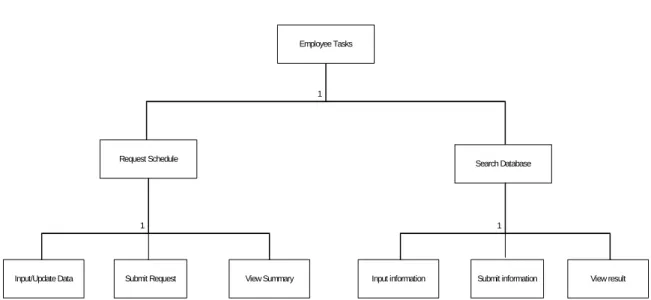
1 Employee Tasks
Request Schedule
Search Database
Input/Update Data Submit Request View Summary Input information Submit information View result
1 1
Fig. 2. Worker Task Group
Use Case: Worker Making Schedule Request
User Intention System Responsibility
Present Main page Choose link to Request Form
Present Schedule Request Form Enter necessary information
Present filled request form Press Submit
Present submission confirmation
Present submitted information in the format of a table
Table 2. Use Case: Worker Requests Schedule
Scenario 1: Schedule Request
Kathy would like to have a certain weekend off next month, and a few particular
weekdays off for her doctor’s appointments. She wants to make sure she gets
chances of getting the days she needs. She turns on her home computer, which
is with Cable Modem access.
Kathy opens up the Internet browser, enters the URL for the main page of the
new scheduling system. The main page opens up, and she clicks on the
“Request Form” link to get to the form in order to make her scheduling request.
Kathy enters her personal information such as name and employee ID on the
request form, and then starts entering the dates and shifts she would like to work
in reference to the calendar. Once she is done entering all the information, she
checks everything to make sure she entered them correctly, and clicks the
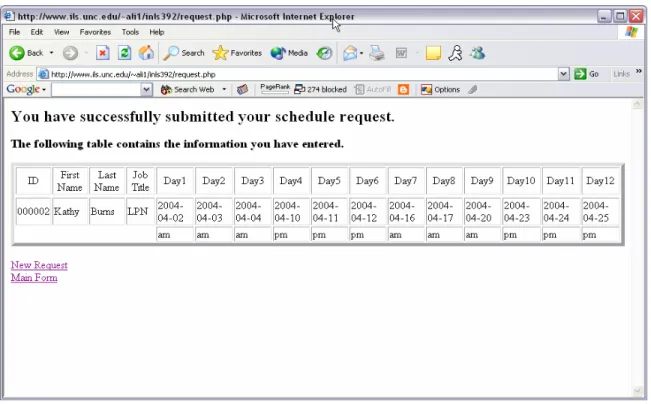
Submit button. The confirmation page is displayed saying that she has
successfully put in a schedule request, and also a table with her requested shifts
displayed on the same page.
Scenario 2: Schedule Request
Jen is at a job where she is required to wear a beeper five days each month; she
and five other co-workers take turns carrying the beeper during the month.
These five days can fall on any weekdays or weekends, but she is permitted to
make a request of which days she would like to carry the beeper, although it is
not guaranteed that she gets all the days she wants. When she is on call, she is
required to be within 30 minutes from work 24-7 in case something comes up
and she needs to go into work. She gets to a computer with Internet access to
put in her scheduling request.
Jen opens up the Internet browser, enters the URL for the main page of the new
scheduling system. The main page opens up, and she clicks on the “Request
Form” link to get to the form in order to make her scheduling request. Jen enters
her personal information such as name and employee ID on the request form,
and then starts entering the dates of her five required beeper days in reference to
the calendar. Suddenly, she remembers she is suppose to go to a wedding with
her boyfriend next month, but cannot remember exactly which day that is, and
does not have that information handy. She needs to make sure she does not
have to carry the beeper that day because the location of the wedding is 3 hours
away, so she decides to just reset this form since she just started filling it out,
and will not lose too much information, and make the request another day when
Use Case: Worker Search Database
User Intention System Responsibility
Present Main page Choose link to Search Form
Present Search Form Enter necessary information
Present filled search form Press Submit
Present queried information in the format of a table
Table 3. Use Case: Worker Search
Scenario 1: Search Database
Ben is a nurse at the City Hospital, he works 12-hour shifts, and is able to make
requests for the days he would like to work each month. He would like to make
some queries on the database to see how many other people have requested to
work the shifts he plans to request for in order to find out the need of these shifts
since only a certain number of nurses is needed during each shift. He turns on
his home computer, which is with Internet connection and waits for it to boot up.
Ben opens up the Internet browser, enters the URL for the main page of the new
scheduling system. The main page opens up, and he clicks on the “Search
Form” link to get to the form in order to make queries. Ben needs to enter the
shift information for each of the shifts he would like to request for to see how
many other people have already requested to work on that day. Ben enters the
shift information for one of his desired shifts, and submits the query; the result
page displays the information he needs. He does this query for all the shifts he
Scenario 2: Search Database
Mark is one of the employees who has to work rotational shifts at the company
where he works. Since he and his wife both work at the same place and both
have to work some night shifts, he would like to distribute their night shifts, so
that at least one of them can be home to stay with their 7-year-old son at night.
Normally, he would just ask her for her schedule, but she happens to be out of
town visiting her sister for the weekend, and he needs to make his requests
today to meet the deadline, so he wants to make some queries on the database
to see which days she has asked for, so that he can avoid working same nights
as her.
Mark opens up the Internet browser, enters the URL for the main page of the
new scheduling system. The main page opens up, and he clicks on the “Search
Form” link to get to the form in order to make queries. Mark enters his wife’s
employee ID, hits the Submit button, the result page displays the entire schedule
of the month that she has entered in her request. Mark prints out her schedule,
and checked it against his own desired schedule to make sure they are not
working any night shifts together. He actually found a few shifts where his wife
had signed up to work that he was originally also going to request for; he
System Description
This system is composed of a MySQL database that the user interacts with
through a Web-based interface. This section describes the components of the
system, including:
• Design of the database (ER Diagram)
• Data dictionary
• Database schema
• System architecture
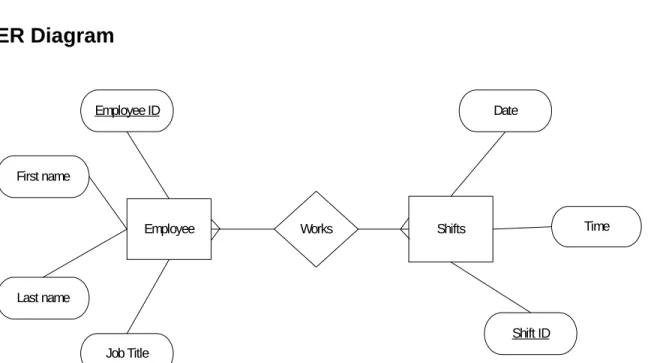
ER Diagram
Employee Shifts
Employee ID
First name
Last name
Date
Time
Shift ID Works
Job Title
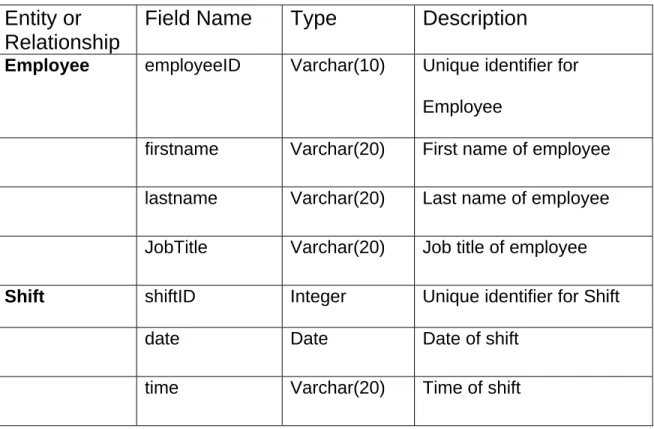
Data Dictionary
Entity or
Relationship
Field Name
Type
Description
Employee employeeID Varchar(10) Unique identifier for
Employee
firstname Varchar(20) First name of employee
lastname Varchar(20) Last name of employee
JobTitle Varchar(20) Job title of employee
Shift shiftID Integer Unique identifier for Shift
date Date Date of shift
time Varchar(20) Time of shift
Table 4. Scheduling System Data Dictionary
Schema
EMPLOYEE (employeeID, firstname, lastname, jobTitle)
System Architecture
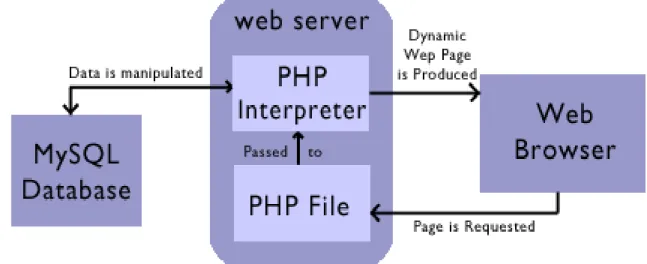
This scheduling system consists of three main components: a set of Web-based
forms and result tables (stored on ruby.ils.unc.edu), a PHP Hypertext Processor,
and a MySQL database (pearl.ils.unc.edu)
Fig. 5. System Architecture
MySQL Database
All the scheduling information gathered from the workers is stored in a MySQL
database. MySQL is chosen for this task because it is an open source SQL
database, and it is a very fast, multi-threaded, multi-user, and robust SQL
database server. The system uses the MySQL server (pearl.ils.unc.edu) that is
PHP Hypertext Preprocessor
PHP is a server-side, HTML-embedded, cross-platform scripting language; it
provides a way for you to put instructions in your HTML files to create dynamic
content. In this project, PHP is used because it has the capability to insert data
into the database, and perform SQL queries and process the results, making it
suitable for linking the database with the Web-based HTML forms. (See
Appendix A and B for the Code).
Web-Based Forms and Results
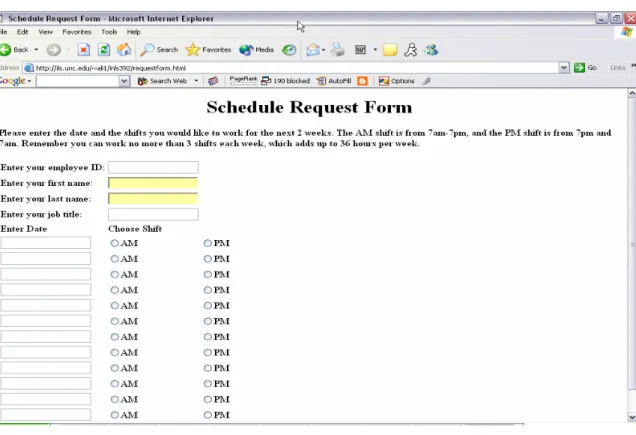
The user interface for this proposed system is Web-based, composed of HTML
forms for user input and HTML tables for displaying information on schedules in
the database. As described above, PHP scripting language is used to provide
real-time communication with database and to enable direct manipulation of its
content. The Scheduling Form serves as the resource for PHP to insert data
into the database, and the Search Form serves as the resource for PHP to
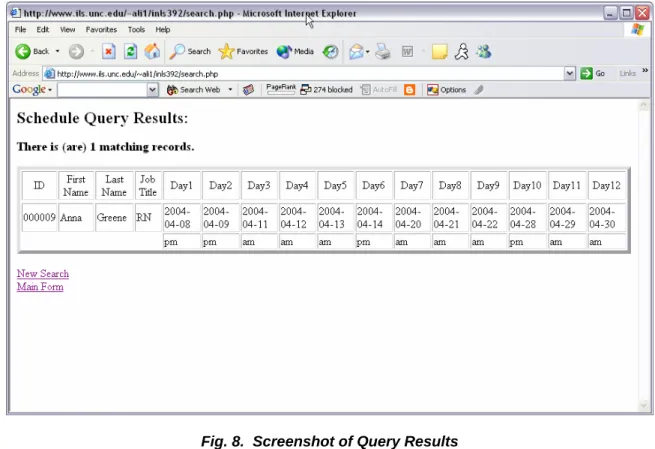
construct queries. Once the queries are completed and submitted, the result
page is displayed in a clear HTML table.
Any computer with a connection to the Internet is able to access these forms and
perform the tasks stated earlier in the paper. The browser requirement for the
Screenshots
Fig. 6. Screenshot of Schedule Request Form
Fig. 8. Screenshot of Query Results
Security
“Database security is a very broad area that addresses many issues” (Elmasri
and Navathe, 715). Some of these issues are: legal and ethical issues
regarding who has rights to access certain information, policy issues as to what
types of information should not be made publicly available, security policies
within an organization as to who should have what level of access to certain
classified information (715).
Due to time and resource constraints, no real security functionalities in terms of
authorization and authentication is implemented with this Beta version of the
unauthorized individual may try to extract information from the database, or try to
damage the database by entering gibberish random data into it using the
scheduling sheet. However, potential danger is unlikely for this particular test
system since it does not contain the sort of information a typical hacker desires,
information such as credit card number, social security number, or bank account
number. Therefore, security is not a real concern for this test scheduling system,
but is very important for any real application.
Future Enhancement
Since this system is intended for many different types of organization where a
scheduling system is necessary to schedule shifts to cover 24-hour days, it is
very important for the code to be customizable due to the distinct needs of
different organizations. For example, some organizations only need to schedule
workers with similar responsibilities, where balance of skills is not an issue during
each shift, and some places need to schedule workers with different positions
and skills for each shift. Also, some organizations make their schedules once a
month, and others more frequently. For the above reasons, the system needs to
be documented very well in close detail, and the system should be easy to reuse,
and customize for future usage. Future customization will include features that
will simplify data entry and reduce opportunity for data entry errors.
Although security features are not required for the test system, they are
and password should be created in the future for schedulers and workers to have
access to this database. Once this function has been implemented, users will be
given an account when they start working for their organization; they will be given
a default login and password, but will be able to change the password to what
they want it to be after their initial successful login. Each login and password will
be associated with one set of user data, so that each employee will have full
access to only his/her own record, and partial access to other employees’
records such as viewing already requested schedules with employee names
hidden.
Delete and Edit functions need to be implemented, and will be a function that is
included only in the “full access” package, meaning it can be done by an
employee on his/her own record only, although the database administrator and
the scheduler will have full access to all employee records.
Lessons Learned
Designing the system was not difficult, however, linking the database and HTML
forms was certainly a challenge. The biggest challenge, however, was coding
and debugging in PHP. Now that the challenges are mastered, more
functionality can be built into the system.
References
Elmasri, Ramez and Shamkant B. Navathe. Fundamentals of Database
Systems. Reading: Addison-Wesley, 1997.
Hacker, Diana. Research and Documentation Online. BEDFORD St. Martin’s.
22 Mar. 2004. http://www.dianahacker.com/resdoc/.
Jacobson, Ivar, Magnus Christerson, Patrik Jonsson, and Gunnar Overgaard.
Object-Oriented Software Engineering: A Use Case Driven Approach.
Reading: Addison-Wesley Pub Co, 1992.
Montana, David. “So You Want to Build an Automated Scheduling System.”
BBN Technologies. 20 Nov. 2002. BBN Technologies. 25 Mar. 2004.
http://vishnu.bbn.com/papers/so.pdf.
Preece, Jennifer, Yvonne Rogers, and Helen Sharp. Interaction Design.
Hoboken: John Wiley & Sons, 2002.
Sauer, Jürgen. “Knowledge-Based Design of Scheduling Systems.” Intelligent
Automation and Soft Computing, An International Journal, 7.1 (2001):
55-62. http://www-is.informatik.uni-oldenburg.de/publications/663.pdf.
“Using Modern Language Association (MLA) Format”. Purdue Online Writing
Lab. 2003. Purdue University. 6 Feb. 2003.
Appendix A: PHP Code for Request Schedule Form
<?php
//select my database to use $db = "inls392";
$table = "search_res";
//connect to the database
$con = mysql_connect('pearl.ils.unc.edu', 'ali1', 'ali1') or die ("Could not connect");
mysql_select_db($db, $con) or die ("Could not connect");
//check for existence of the entered employeeID in the database
$checkID = "SELECT * FROM employees WHERE employeeID=$employeeID"; mysql_query($checkID, $con);
$result1 = mysql_query($checkID); $num = mysql_num_rows($result1);
//update the record
$sql1 = "UPDATE employees SET fname='$fname', lname='$lname', title='$title', day1='$day1', day2='$day2', day3='$day3', day4='$day4', day5='$day5',
day6='$day6', day7='$day7', day8='$day8', day9='$day9', day10='$day10', day11='$day11', day12='$day12', shift1='$shift1', shift2='$shift2', shift3='$shift3', shift4='$shift4', shift5='$shift5', shift6='$shift6', shift7='$shift7', shift8='$shift8', shift9='$shift9', shift10='$shift10', shift11='$shift11', shift12='$shift12' WHERE employeeID='$employeeID'";
$sq2 = "UPDATE shifts SET day1='$day1', day2='$day2', day3='$day3', day4='$day4', day5='$day5', day6='$day6', day7='$day7', day8='$day8',
day9='$day9', day10='$day10', day11='$day11', day12='$day12', shift1='$shift1', shift2='$shift2', shift3='$shift3', shift4='$shift4', shift5='$shift5', shift6='$shift6', shift7='$shift7', shift8='$shift8', shift9='$shift9', shift10='$shift10',
shift11='$shift11', shift12='$shift12' WHERE shiftID='$shiftID'";
//insert new record
'$shift2', '$shift3', '$shift4', '$shift5', '$shift6', '$shift7','$shift8', '$shift9', '$shift10', '$shift11', '$shift12')";
$sql4 = "INSERT INTO shifts (shiftID, day1, day2, day3, day4, day5, day6, day7, day8, day9, day10, day11, day12, shift1, shift2, shift3, shift4, shift5, shift6, shift7, shift8, shift9, shift10, shift11, shift12) VALUES ('$employeeID', '$fname',
'$lname', '$title','$day1', '$day2', '$day3', '$day4', '$day5', '$day6', '$day7', '$day8', '$day9', '$day10', '$day11', '$day12', '$shift1',
//general query
$q = "SELECT * FROM employees WHERE employeeID=$employeeID";
//if record found, then update it, otherwise, insert a new one. if ($num>0)
{
mysql_query($sql1, $con);
mysql_query($sql2, $con);
} else {
mysql_query($sql3, $con);
mysql_query($sql4, $con);
}
//get result by using queries that are built earlier $result = mysql_query($q);
//count number of rows in result
$numOfRows = mysql_num_rows($result);
//print out the summary
print '<h2>You have successfully submitted your schedule request.</h2>'; print '<h3>The following table contains the information you have entered.</h3>'; print '<table border="5">';
print '<tr align="center"><td>ID</td><td>First Name</td><td>Last Name</td><td>Job
//loop through all the returned results to print them out $i=0;
while ($i < $numOfRows) {
echo "<tr>\n";
$row = mysql_fetch_row($result); echo "<tr>\n";
echo
“<td>$row[0]</td><td>$row[1]</td><td>$row[2]</td><td>$row[3]</td><td>$row[4] </td><td>$row[5]</td><td>$row[6]</td><td>$row[7]</td><td>$row[8]</td><td>$ro w[9]</td><td>$row[10]</td><td>$row[11]</td><td>$row[12]</td><td>$row[13]</td ><td>$row[14]</td><td>$row[15]</td>";
echo "</tr>\n"; echo "<tr>\n"; echo
"<td></td><td></td><td></td><td></td><td>$row[16]</td><td>$row[17]</td><td> $row[18]</td><td>$row[19]</td><td>$row[20]</td><td>$row[21]</td><td>$row[2 2]</td><td>$row[23]</td><td>$row[24]</td><td>$row[25]</td><td>$row[26]</td> <td>$row[27]</td>";
echo "</tr>\n"; $i++;
}
print '</table></br>';
//providing a link to do a new request
print '<a href="http://www.ils.unc.edu/~ali1/inls392/requestform.html">New Request</a>';
print '<br>';
//providing a link to go to the main page
print '<a href="http://www.ils.unc.edu/~ali1/inls392/mainform.html">Main Form</a>';
Appendix B: PHP Code for Search Form
<?php
//select my database to use $db = "inls392";
$table = "search_res";
//connect to the database
$con = mysql_connect('pearl.ils.unc.edu', 'ali1', 'ali1') or die ("Could not connect");
mysql_select_db($db, $con) or die ("Could not connect");
//general query
$q = "select * from employees where ";
//if employeeID is not null if( $employeeID != "" ) {
$q .= " employeeID='".$employeeID."' and "; }
//if firstname is not null if( $fname != "" ) {
$q .= "fname='".$fname."' and "; }
//if lastname is not null if( $lname != "" ) {
$q .= " lname='".$lname."' and "; }
//if title is not null if( $title != "" ) {
//if date is not null if( $date != "" ) {
($q .= " day1='".$date."' and ") or ($q .= " day2='".$date."' and ") or ($q .= " day3='".$date."' and ") or ($q .= " day4='".$date."' and ") or ($q .= " day5='".$date."' and ") or ($q .= " day6='".$date."' and ") or ($q .= " day7='".$date."' and ") or ($q .= " day8='".$date."' and ") or ($q .= " day9='".$date."' and ") or ($q .= " day10='".$date."' and ") or ($q .= " day11='".$date."' and ") or ($q .= " day12='".$date."' and "); }
//if shift is not null if( $shift != "") {
($q .= " shift1='".$shift."' and ") or ($q .= " shift2='".$shift."' and ") or ($q .= " shift3='".$shift."' and ") or ($q .= " shift4='".$shift."' and ") or ($q .= " shift5='".$shift."' and ") or ($q .= " shift6='".$shift."' and ") or ($q .= " shift7='".$shift."' and ") or ($q .= " shift8='".$shift."' and ") or ($q .= " shift9='".$shift."' and ") or ($q .= " shift10='".$shift."' and ") or ($q .= " shift11='".$shift."' and ") or ($q .= " shift12='".$shift."' and "); }
//remove extra 'or '
$q = preg_replace("/or $/",") ", $q); //remove 'and '
$q = preg_replace("/and $/"," ", $q); //remove 'where '
$q = preg_replace("/where $/"," ", $q);
//get result by using queries that are built earlier $result = mysql_query($q);
//count number of rows in result
$numOfRows = mysql_num_rows($result);
//print out the query results
print '<h2>Schedule Query Results:</h2>';
print '<h3>There is (are) '.$numOfRows.' matching records.</h3>'; print '<table border=5>';
Title</td><td>Day1</td><td>Day2</td><td>Day3</td><td>Day4</td><td>Day5</ td><td>Day6</td><td>Day7</td><td>Day8</td><td>Day9</td><td>Day10</td><t d>Day11</td><td>Day12</td></tr>';
//loop through all the returned results to print them out $i=0;
while ($i < $numOfRows) {
echo "<tr>\n";
$row = mysql_fetch_row($result); echo "<tr>\n"; echo "<td>$row[0]</td><td>$row[1]</td><td>$row[2]</td><td>$row[3]</td><td>$row[4] </td><td>$row[5]</td><td>$row[6]</td><td>$row[7]</td><td>$row[8]</td><td>$ro w[9]</td><td>$row[10]</td><td>$row[11]</td><td>$row[12]</td><td>$row[13]</td ><td>$row[14]</td><td>$row[15]</td>"; echo "</tr>\n"; echo "<tr>\n"; echo "<td></td><td></td><td></td><td></td><td>$row[16]</td><td>$row[17]</td><td> $row[18]</td><td>$row[19]</td><td>$row[20]</td><td>$row[21]</td><td>$row[2 2]</td><td>$row[23]</td><td>$row[24]</td><td>$row[25]</td><td>$row[26]</td> <td>$row[27]</td>"; echo "</tr>\n"; $i++; } print '</table></br>';
//providing a link to do a new search
print '<a href="http://www.ils.unc.edu/~ali1/inls392/searchform.html">New Search</a>';
print '<br>';
//providing a link to go to the main page
print '<a href="http://www.ils.unc.edu/~ali1/inls392/mainform.html">Main Form</a>';