meet compelling business needs
More than ever, companies are conducting business using the Internet or an intranet. Service providers offer Internet access or hosted applications. Online retailers sell everything imaginable to the home shopper. Banks and brokerages provide remote account access. Manufacturers automatically order inventory from suppliers. Corporate IT departments develop Web-based applications and provide infrastructure services such as DNS and DHCP. Monitoring these services from the customer or end user’s viewpoint, as well as the components behind the scenes, has become critical to business success.
Poor availability or performance of these services can dramati-cally affect your business through lost customers and revenues, damaged brand reputation, shortages of required inventory and supplies, or lost employee productivity. Businesses now expect their service providers and internal IT departments to provide clear service level guarantees on the availability and response time of the services they provide, along with notifications and resolutions of outages and slowdowns. When things go wrong, your Web and network operations staff members need to be able to isolate and solve problems quickly and communicate with impacted customers and end users in a timely manner. These are needs met by HP OpenView Internet Services. It offers a single integrated view of the complete Internet infra-structure. It is designed to help your IT staff efficiently predict, isolate, diagnose and troubleshoot problem occurrences, anticipate capacity shortfalls, and manage and report upon service level agreements.
getting the most from your investment
HP provides high-quality software services that address all aspects of your software application life cycle needs and align with your business goals. With HP as your partner, you have access to standards-based, modular, multi-platform software coupled with HP's best-in-class services and support portfolio.
HP offers premier onsite deployment assistance and development support, in addition to consulting, outsourcing, financing, education, extensive online self-help, and mission-critical support options. All of these offerings are focused on helping you maximize the return on your investment.
simulate and monitor business activity
HP OpenView Internet Services uses software probes to simulate business activity. These synthetic transactions are monitored, the result of which is a set of top-down metrics that closely mirror your customers’ experiences and allow HP OpenView Internet Services to provide immediate notification when problems occur.
HP OpenView Internet Services actively monitors discrete Internet services and protocols by simulating user requests for basic services, such as name resolution and directory access, mail services for sending and receiving e-mail, Web services such as HTTP and secure HTTP, and remote access services, such as dial-up and wireless.
hp OpenView
internet services 4.5
product brief
Page 1
Data is gathered through active monitoring by software probes that are installed at an ISP’s Points of Presence, at a company’s remote offices, or at a partner site outside the firewall. These software probes feed the performance data securely back using HTTP to a centralized relational database. The database then populates a near real-time dashboard that shows overviews of availability, response time, and service level compliance, provides drill-down capability, and generates extensive Web reports.
Alarms can be forwarded with guaranteed message delivery to HP OpenView Operations and HP OpenView Operations for Windows, HP OpenView Network Node Manager or, with SNMP, to any generic SNMP manager.
new drill-down transaction analysis
HP OpenView Internet Services 4.5 provides new drill-down transaction analysis for Web-based applications via integration with HP OpenView Transaction Analyzer. It incorporates both simulated and actual transactions to provide more accurate diag-nostic capabilities for Web applications, rather than using only simulated transactions for network performance and availability. Once HP OpenView Internet Services determines that there is a problem, you can then locate the source of that problem with HP OpenView Transaction Analyzer.
HP OpenView Internet Services 4.5 also includes an additional probe for monitoring your short messaging services (SMS). This probe helps your team proactively monitor the availability and performance of these revenue-generating services. And in yet another new feature, HP OpenView Internet Services 4.5 includes the capability for scheduled downtime. This feature enables your team to specify downtime for specific users and services.
The HP OpenView Internet Services dashboard offers at-a-glance views of service levels, secured views of customer-specific data, or segmentation of data by customer and service.
Active Software
Description
Probe
Basic Services
DHCP Dynamic Host Configuration Protocol
DNS Domain Name Service
ICMP Ping-Based Connectivity
LDAP Lightweight Directory Access Protocol
NTP Network Time Protocol
TCP Transmission Control Protocol
E-mail Services
IMAP4 Internet Message Access Protocol POP3 Getting mail from a server SMTP Sending mail to a server
Web Services
FTP File Transfer Protocol
HTTP Web pages
HTTPS Secure Web pages
HTTP_TRANS Custom Web transactions
NNTP Pulling news headers, articles
STREAM_MEDIA Streaming Media
Mobile DataServices
WAP Wireless Access Protocol
SMS Short Message Service
Mission Critical Applications
SAP System and Basis Transactions
ODBC Database Connection
Other
X_SLAM Cisco SMS
DIALUP Dial-up service RADIUS Remote Authentication
CUSTOM Custom probe
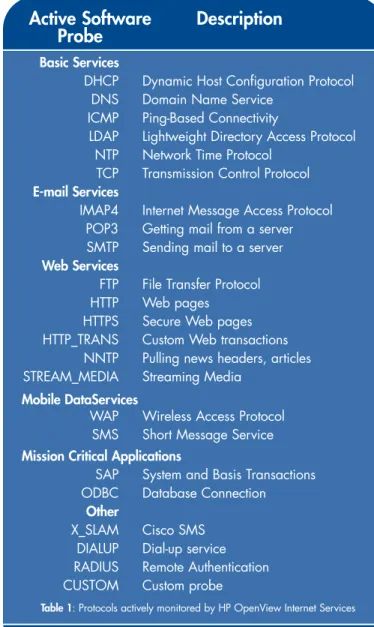
Table 1: Protocols actively monitored by HP OpenView Internet Services
meets the demands of business-critical services
Many characteristics make HP OpenView Internet Services attractive to any organization providing business-critical Internet services. These include:• Ease of installation and monitoring of complex e-business transactions
• Breadth of support for standard Internet protocols and applications
• The capability to manage against service level agreements • The ability to work in today’s secure environments • A highly scalable and flexible architecture
Add this to the monitoring of actual end-user experience from the Web browser using HP OpenView Web Transaction Observer and the monitoring of your backend infrastructure using HP OpenView Operations and you are armed with a breakdown of every important component of end-user response time, from the data center servers, through the Internet cloud and right out to the last mile and the client’s desktop.
powerful features
instant resultsInstant intelligence is a key feature designed into HP OpenView Internet Services. Following the automatic launch of the installa-tion process, the configurainstalla-tion wizard walks the administrator through the process of configuring targets, services and probes. The process is easy, even for first-time users, thanks to preset default values and simple sliding bars that can be used to modify alarm thresholds and service levels. In just minutes, HP OpenView Internet Services is installed and monitoring your complete Internet infrastructure.
HP OpenView Internet Services easily monitors complex Web processes and transactions, from logistics and procure-ment processes to online banking and shopping cart purchases to internal Web-based applications. New Web applications can be monitored the instant they come online using the HP OpenView Web transaction recorder. The intuitive wizard lets the administrator walk through each step of a typical end-user transaction, such as user logon, catalog lookup, and shopping basket review, while automatically recording all URLs and cap-turing all data input.
The Web transaction probe then replays the recorded transac-tion on a regular basis, simulating typical end-user activity, and collects important availability and response time data. For opti-mal flexibility, the Web transaction probe intelligently handles dynamic content such as auto-generated session IDs, cookies, server-generated URLs, Active Server Pages, CGI scripts, Java™ and JavaScripts.
breadth of support
In addition to the Web transaction recorder and probe, HP OpenView Internet Services supports out-of-the-box monitoring of an extensive list of Internet services and applications. (See Table 1 for a complete list.) Each service probe simulates user
requests and collects availability and response time data. To monitor services or applications not supported by out-of-the-box probes, you can develop your own probe using the custom probe capability included with HP OpenView Internet Services.
manage against service level agreements
HP OpenView Internet Services allows you to manage against service level agreements (SLAs) for individual customers or lines of business. The SLA configuration manager allows you to create your service level objectives, and then combine those SLOs into more complex SLAs. The SLA configuration manager will also support SLA templates. These templates allow the creation of generic SLAs that can be applied to specific customers. For example, a “Gold” level of service response time may be defined.
Page 3
The intuitive Web transaction recorder captures all URLs and data for later playback by the Web transaction probe.
new features in internet services 4.5
• drill-down transaction analysis for Web-based applications via hp OpenView transaction analyzer • new probes for monitoring the availability
and performance of short message and streaming media, SAP and ODBC services
• probe sequencing for monitoring aggregated services and better scalability
• scheduled downtime feature for turning off the monitoring of select services for maintenance or other activities
• automated installation of remote probes on Windows platforms
The dashboard enables near-time views and historical reports to be selected for specific customers or customer/service combi-nations. Service level violations can be examined from various angles to determine which customers are impacted and which services are generating violations, helping to isolate the component that is causing the service level violations. Service reports are created daily and are available for Web browsing. These include detailed transaction breakdowns and a visual comparison of activity against the established “base-line” for the service. HP OpenView Internet Services uses time-sensitive dynamic or “baseline” thresholding. Using baselines helps to reduce alarm spikes and makes it easier to set thresh-olds. Other reports are generated which record SLA compliance per customer over time.
works in today’s secure environments
When it comes to Internet services, security is a must. With HP OpenView Internet Services, you can monitor your Internet services without compromising on security. It can monitor your secure HTTP Web sites, using NTLM and proxy authentication, so you don’t need to risk exposing your sites to monitor them. Data traveling from the probes to the measurement server can be sent via HTTPS, so your data is secure and you don’t need to open an additional port in your firewall.
The Restricted Views feature allows you to secure the dashboard interface using logons and passwords. This permits individual customers or lines of business to securely view the dashboard interface but see only their own data.
unparalleled scalability and flexibility
HP OpenView Internet Services is both scalable and flexible. It can monitor a handful of servers or a huge server farm with thousands of servers. Management data from distributed soft-ware probes is transferred at high speed to the measurement server. Data is buffered in a time-based details cache and summarized, resulting in high-performance dashboard updates and report generation. Additional improvements can be gained by storing the management data in a SQL Server or Oracle®
database tuned for high throughput.
For probing flexibility, virtually all probes are available on the following platforms:
• Windows NT®/Windows®2000
• HP-UX • Sun Solaris • Red Hat Linux
Page 4
secure
In addition, you have a number of choices for your data store, depending on your needs. Included with HP OpenView Internet Services is the default database Microsoft MSDE. You also have the option of using other databases for enhanced capacity and performance:
• Microsoft SQL Server for Windows NT or Windows 2000 • Oracle on HP-UX or Solaris
harness the power of hp OpenView
Service level agreements, health status, and management reporting can be performed standalone with HP OpenView Internet Services. However, the full power of end-to-end management can best be obtained by harnessing the built-in synergies and integrations with other HP OpenView products. The result is the most fully integrated, single-vendor devel-oped and supported solution in the industry.
The following are some of the key integration features: • Events can be forwarded to Network Node Manager,
which automatically generates propagation sensitive submaps with icons representing customers, services, and service level objectives. Message delivery is guaranteed: if Network Node Manager goes down it will re-establish contact with HP OpenView Internet Services to process buffered alarms. Forwarded events are viewable under a new alarm category and a new menu item allows network operators to launch the HP OpenView Internet Services dashboard.
• Events can also be forwarded to HP OpenView
Operations and HP OpenView Operations for Windows via the opcmsg interface. Internet services events can then be correlated with other network, systems, and applications events from across the enterprise. • Service-level data can be propagated to Service
Navigator.
• You can compare Web URL performance and availability information from HP OpenView Internet Services with data from Keynote and HP OpenView Web Transaction Observer using the Web Transaction Observer console. • Probe data is stored in ARM (Application Response
Measurement) format if an HP OpenView Performance Agent is installed on the HP OpenView Internet Services server. This enables correlation of Internet Services data with other network, systems, or applications data from HP OpenView Performance and HP OpenView Reporter. • HP OpenView Internet Services will automatically use HP OpenView Reporter if present for consolidated reporting. • View HP OpenView Internet Services data along with
data from other HP OpenView products using HP OpenView Service Information Portal.
Page 5 HP OpenView Internet
Services automatically generates hierarchical service views.
software requirements
management server• Microsoft Windows NT 4.0 Server or Workstation with Service Pack 6a
• Microsoft IIS 4.0 Web Server
(IIS Personal Web Server 4.0 for NT Workstation)
or
• Microsoft Windows 2000 Professional or Server with Service Pack 1 or 2
• Microsoft IIS 5.0 Web Server For either of above:
• Microsoft Internet Explorer 5.5 or greater IE 5.5 is required to support Restricted Views and for the Web Transaction Recorder.
• NTFS file system is required for the management server system.
• A Web browser is required for viewing the HTML reports (Netscape 4 or later, or Internet Explorer 5 or later). • Virtual memory should be set to an initial size of
512 MB or larger on the system running Internet Services. • Systems running other applications may require larger
virtual memory settings to accommodate HP OpenView Internet Services in addition to the other applications. • DHCP is not supported on the HP OpenView Internet
Services management server.
Windows probe system
• Microsoft Windows NT 4.0 Server or Workstation with Service Pack 6a or Microsoft Windows 2000 with Service Pack 1 or 2
• Internet Explorer 5.5 or greater
• For either of the above: DHCP may be used
UNIX probe system
• Sun Solaris 2.6, 2.7, or 2.8 • Red Hat Linux 6.0, 6.2, or 7.0 • HP-UX 11.0, 11.11, or 11.20
dashboard web page user
• A Web browser for viewing the HTML reports (Netscape 4 or later, or Internet Explorer 5 or later)
Send events to HP OpenView Operations or Network Node Manager.
Page 6
hardware requirements
management server• Intel Pentium III, 500MHz or faster processor with 256 MB of memory or more are recommended. • 200 MB of disk space are required initially, with
possible increases as more data are added.
• Temporary disk space during report generation may range from 50-1,000 MB, depending on the number of services being probed.
Windows probe system
• Intel Pentium, 200MHz or faster processor with 64 MB of memory or more is recommended. This depends on the number of probes that run in parallel. For most efficient execution and metric accuracy, it is recommended that the system be dedicated to probing.
• 10 MB of disk space for probes and configuration files, plus an additional 10-100 MB of disk space to hold probe data in queue in case the network goes down. Space required is dependent on the number of probe targets and length of network downtime you wish to accommodate.
UNIX probe system
• 128 MB of memory or more is recommended.
• 10 MB of disk space for probes and configuration files, plus an additional 10-100 MB of disk space to hold probe data in queue in case the network goes down. Space required is dependent on the number of probe targets and length of network downtime you wish to accommodate. See the Installation Notes or User Reference Guide for the complete list of hardware and software requirements.
For further information on HP OpenView Internet Services, visit:
www.openview.hp.com/products/internetservices/index.asp
For more information on HP software services available to address your specific business needs, visit:
http://support.openview.hp.com/support_options.jsp.
ordering information
hp product product description number
J4512AA HP OpenView Internet Services LTU
J4513AA HP OpenView Internet Services 5 Target Pack LTU
J4515AA HP OpenView Internet Services Base 25 Target Pack LTU
J4516AA HP OpenView Internet Services 250 Target Pack LTU
J4510AA HP OpenView Internet Services 4.5 Media
J4511AA HP OpenView Internet Services 4.5 Manual
U2461AA HP Partner Care Extended Support (for custom probes)
Page 7
instant
intelligence
Page 8
for more information
For more information on HP OpenView, please contact your local HP reseller or HP sales office.
Australia/New Zealand +61 3 8877 4097 [email protected] China +86 10 6564 3678 [email protected] Europe [email protected] Hong Kong +85 2 2805 3551 [email protected] India +91 11 690 6176 [email protected] Japan +81 3 3331 6111 Korea +82 2 2199 0913 [email protected] Malaysia +603 2698 6555 [email protected] Philippines +63 2 894 1451 Singapore +65 6275 3888 [email protected] Taiwan +886 2 2712 0404 [email protected] Thailand +662 661 3900
United States of America
1-877-OV-OWNER Or visit:
www.openview.hp.com
© Copyright Hewlett-Packard Company 2003. All Rights Reserved. Reproduction, adaptation or translation without prior written permis-sion is prohibited except as allowed under the copyright laws. Java is a U.S. trademark of Sun Microsystems, Inc. Microsoft, Windows and Windows NT are U.S. registered trademarks of Microsoft Corporation.
Netscape and Netscape Navigator are U.S. trademarks of Netscape Communications Corporation.
Oracle is a registered U.S. trademark of Oracle Corporation, Redwood City, California.
Pentium is a U.S. registered trademark of Intel Corporation. UNIX is a registered trademark of The Open Group.