®
Reference
DataDirect
Connect ODBC
™
March 1998
® ®TechGnosis, SequeLink, and middleware are registered trademarks of INTERSOLV, Inc. SiteSync, INTERSOLV Messaging, VM Server, Connect ODBC, Connect OLE DB, Reflector, WebDBLink, and Client/Server MiddleWare are trademarks of INTERSOLV, Inc. Other company or product names mentioned herein may be trademarks or registered trademarks of their respective companies.
No part of this publication, with the exception of the software product user documentation contained on a CD-ROM, may be copied,
photocopied, reproduced, transmitted, transcribed, or reduced to any electronic medium or machine-readable form without prior written consent of INTERSOLV, Inc.
Licensees may duplicate the software product user documentation contained on a CD-ROM, but only to the extent necessary to support the users authorized access to the software under the license
agreement. Any reproduction of the documentation, regardless of whether the documentation is reproduced in whole or in part, must be accompanied by this copyright statement in its entirety, without modification.
U.S. GOVERNMENT RESTRICTED RIGHTS. It is acknowledged that the Software and the Documentation were developed at private expense, that no part is in the public domain, and that the Software and Documentation are Commercial Computer Software provided with RESTRICTED RIGHTS under Federal Acquisition Regulations and agency supplements to them. Use, duplication or disclosure by the U.S.
Government is subject to restrictions as set forth in subparagraph (c)(1)(ii) of The Rights in Technical Data and Computer Software clause at DFAR 252.227-7013 et. seq. or subparagraphs (c)(1) and (2) of the Commercial Computer Software Restricted Rights at FAR 52.227-19, as applicable. Contractor is INTERSOLV, Inc., 9420 Key West Avenue, Rockville, Maryland, 20850. Rights are reserved under copyright laws of the United States with respect to unpublished portions of the
Software. INTERSOLV, Inc.
9420 Key West Avenue Rockville, Maryland 20850
3
Table of Contents
Preface . . . 17
Using this Manual . . . 17
Additional Documentation . . . 19
Conventions Used in This Manual . . . 19
Typography . . . 19
Mouse Conventions. . . . 20
Keyboard Conventions . . . 21
Environment-Specific Information . . . 21
Contacting Technical Support . . . 22
1
Getting Started . . . 25
About DataDirect Connect ODBC Drivers . . . 25
Support for Multiple Environments . . . 26
Installing the ODBC Drivers. . . 26
Environment-Specific Information . . . 27
For Windows 95 and Windows NT Users . . . 27
For Macintosh Users. . . 28
For UNIX Users . . . 29
Error Messages . . . 32
UNIX Error Handling . . . 33
2
Connect ODBC for Btrieve. . . 35
System Requirements . . . 35
Managing Databases . . . 36
Transactions . . . 37
Defining Table Structure . . . 42
Connecting to a Data Source Using a Connection String . . . 44
Data Types. . . 49
Indexes . . . 50
Column Names . . . 50
Select Statement. . . 51
Rowid Pseudo-Column . . . 51
Alter Table Statement . . . 52
Create and Drop Index Statements . . . 53
Create Index . . . 53
Drop Index . . . 53
Isolation and Lock Levels Supported . . . 54
ODBC Conformance Level . . . 54
Number of Connections and Statements Supported . . . 54
3
Connect ODBC for DB2 . . . 55
System Requirements . . . 55
Windows 95 and Windows NT. . . 55
UNIX . . . 56
Configuring Data Sources . . . 56
DB2 . . . 62
Binding . . . 62
Connecting to a Data Source Using a Logon Dialog Box. . . . 63
Connecting to a Data Source Using a Connection String . . . 64
Data Types. . . 67
Isolation and Lock Levels Supported . . . 68
ODBC Conformance Level . . . 68
5
4
Connect ODBC for dBASE . . . 69
System Requirements . . . 69
Macintosh. . . 69
Configuring Data Sources . . . 70
Configuring FoxPro 3.0 DBC Data Sources . . . 76
Defining Index Attributes . . . 82
Defining Index Attributes on UNIX Platforms . . . 84
Connecting to a Data Source Using a Connection String . . . . 85
Data Types . . . 92
Column Names . . . 93
Select Statement . . . 94
Rowid Pseudo-Column . . . 94
Alter Table Statement . . . 95
Create Index Statement . . . 96
Drop Index Statement . . . 98
Pack Statement . . . 99
SQL Statements for FoxPro 3.0 Database Containers . . . 100
Locking . . . 101
Levels of Database Locking . . . 101
Using Locks on Local Files . . . 102
Limit on Number of Locks . . . 102
How Transactions Affect Record Locks . . . 102
Isolation and Lock Levels Supported . . . 103
ODBC Conformance Level . . . 103
5
Connect ODBC for Excel Workbook . . . 105
System Requirements . . . 105
Using an Excel Database . . . 105
Configuring Data Sources . . . 106
Connecting to a Data Source Using a Connection String . . . 110
Data Types. . . 113
Table and Column Names . . . 114
Select Statement. . . 114
Create Table Statement . . . 114
ODBC Conformance Level . . . 115
Number of Connections and Statements Supported . . . 115
6
Connect ODBC for INFORMIX . . . 117
System Requirements . . . 117
Windows 95 and Windows NT. . . 117
UNIX (AIX, HP-UX, and Solaris for SPARC) . . . 119
Configuring Data Sources . . . 120
Connecting to a Data Source Using a Logon Dialog Box. . . . 124
Connecting to a Data Source Using a Connection String . . . 126
Data Types. . . 130
INFORMIX 9. . . 132
Isolation and Lock Levels Supported . . . 132
ODBC Conformance Level . . . 133
7
7
Connect ODBC for OpenIngres . . . 135
System Requirements . . . 135
Windows 95 and Windows NT . . . 135
UNIX . . . 136
Configuring Data Sources . . . 137
Connecting to a Data Source Using a Logon Dialog Box . . . . 143
Connecting to a Data Source Using a Connection String . . . . 144
Data Types . . . 149
Isolation and Lock Levels Supported . . . 150
ODBC Conformance Level . . . 150
Number of Connections and Statements Supported. . . 150
8
Connect ODBC for Oracle . . . 151
System Requirements . . . 151
Windows 95 and Windows NT . . . 151
UNIX . . . 152
Macintosh. . . 154
Configuring Data Sources. . . 154
Connecting to a Data Source Using a Logon Dialog Box . . . . 159
Connecting to a Data Source Using a Connection String . . . . 160
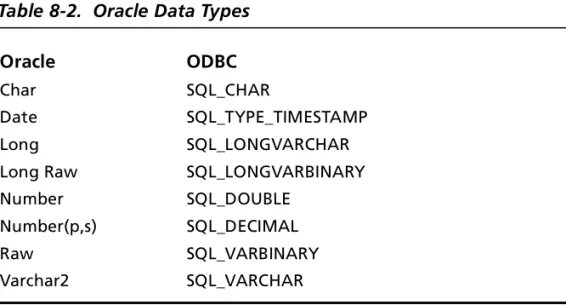
Oracle Data Types . . . 164
Oracle 8 . . . 165
Stored Procedure Results . . . 165
Isolation and Lock Levels Supported . . . 166
ODBC Conformance Level . . . 167
9
Connect ODBC for Paradox. . . 169
System Requirements . . . 169
Multiuser Access to Tables . . . 170
Locking . . . 170
Configuring Data Sources . . . 171
Connecting to a Data Source Using a Connection String . . . 175
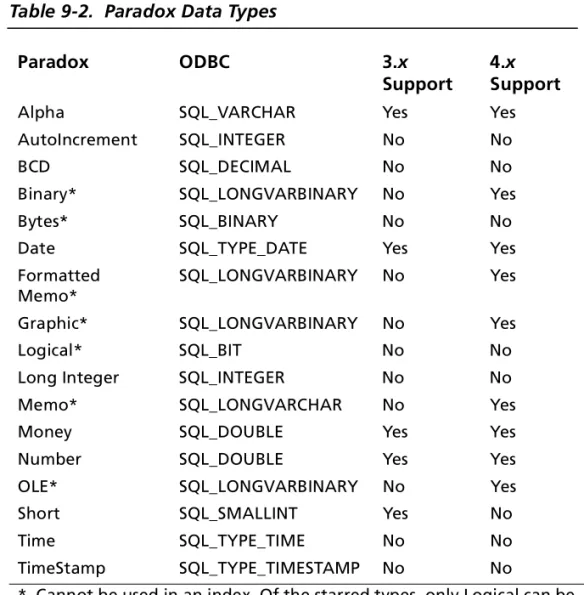
Data Types. . . 180
Select Statement. . . 181
Column Names . . . 181
Alter Table Statement . . . 181
Dropping Columns . . . 182
Create Table Statement . . . 183
Password Protection . . . 184
Encrypting a Paradox Table . . . 185
Accessing an Encrypted Paradox Table . . . 185
Decrypting a Paradox Table . . . 186
Removing a Password from Paradox. . . 186
Removing All Passwords from Paradox. . . 186
Index Files . . . 186
Primary Index . . . 187
Non-Primary Index . . . 187
Create and Drop Index Statements . . . 188
Create Index Primary Statement . . . 189
Create Index Statement . . . 189
Drop Index Statement . . . 191
Transactions . . . 191
Isolation and Lock Levels Supported . . . 192
ODBC Conformance Level . . . 192
9
10 Connect ODBC for PROGRESS. . . 195
System Requirements . . . 195
Configuring Data Sources . . . 196
Remote OID with Direct Access. . . 196
Remote OID with Database Access via Server . . . 203
Connecting to a Data Source Using a Logon Dialog Box . . . . 208
Connecting to a Data Source Using a Connection String . . . . 211
Data Types . . . 214
Isolation and Lock Levels Supported . . . 215
ODBC Conformance Level . . . 215
Connections and Statements Supported . . . 215
11 Connect ODBC for SQL Server . . . 217
System Requirements . . . 217
Configuring Data Sources . . . 218
Connecting to a Data Source Using a Logon Dialog Box . . . . 224
Connecting to a Data Source Using a Connection String . . . . 225
Data Types . . . 230
Isolation and Lock Levels Supported . . . 231
ODBC Conformance Level . . . 231
Number of Connections and Statements Supported. . . 232
12 Connect ODBC for SQLBase . . . 233
System Requirements . . . 233
Configuring Data Sources . . . 234
Connecting to a Data Source Using a Logon Dialog Box . . . . 237
Connecting to a Data Source Using a Connection String . . . . 238
Isolation and Lock Levels Supported . . . 241
ODBC Conformance Level . . . 242
Number of Connections and Statements Supported . . . 242
13 Connect ODBC for Sybase. . . 243
System Requirements . . . 243
Windows 95 and Windows NT. . . 243
UNIX . . . 244
Macintosh . . . 245
Configuring Data Sources . . . 245
Connecting to a Data Source Using a Logon Dialog Box. . . . 253
Connecting to a Data Source Using a Connection String . . . 254
Data Types. . . 260
Isolation and Lock Levels Supported . . . 261
ODBC Conformance Level . . . 261
Number of Connections and Statements Supported . . . 261
14 Connect ODBC for Text . . . 263
System Requirements . . . 263
Formats for Text Files . . . 264
Configuring Data Sources . . . 265
Defining Table Structure . . . 271
Defining Table Structure on UNIX Platforms . . . 276
Example of QETXT.INI. . . 278
Date Masks . . . 279
Connecting to a Data Source Using a Connection String . . . 281
Data Types. . . 286
Select Statement. . . 287
11
ODBC Conformance Level . . . 288
Number of Connections and Statements Supported. . . 288
A SQL for Flat-File Drivers . . . 289
Select Statement . . . 289 Select Clause. . . 290 From Clause . . . 292 Where Clause . . . 292 Group By Clause. . . 293 Having Clause. . . 294 Union Operator . . . 294 Order By Clause . . . 295
For Update Clause . . . 296
SQL Expressions . . . 296
Create and Drop Table Statements. . . 308
Create Table . . . 308 Drop Table . . . 309 Insert Statement . . . 310 Update Statement . . . 312 Delete Statement. . . 313 Reserved Keywords . . . 314
B
Using Indexes. . . 315
Introduction . . . 315Improving Record Selection Performance . . . 317
Indexing Multiple Fields . . . 317
Deciding Which Indexes to Create . . . 319
C
ODBC API and Scalar Functions . . . 323
API Functions . . . 323
Scalar Functions . . . 326
String Functions . . . 326
Numeric Functions . . . 329
Date and Time Functions . . . 331
System Functions . . . 333
D Locking and Isolation Levels. . . 335
Locking . . . 335
Isolation Levels . . . 336
Locking Modes and Levels . . . 339
E
Designing Performance-Oriented ODBC
Applications . . . 341
Optimizing Performance . . . 341
Catalog Functions . . . 342
Catalog Functions Are Relatively Slow . . . 343
Passing Null Arguments . . . 343
SQLColumns . . . 345
Retrieving Data. . . 347
Retrieving Long Data . . . 347
Reducing the Size of Data Retrieved. . . 347
Using Bound Columns . . . 349
Using SQLExtendedFetch instead of SQLFetch . . . 350
ODBC Function Selection . . . 351
Using SQLPrepare/SQLExecute and SQLExecDirect. . . 351
Using SQLPrepare and Multiple SQLExecute Calls . . . 352
13
Design Options . . . 355 Managing Connections . . . 355 Committing Data . . . 356 Asynchronous Execution . . . 356 Updating Data . . . 358Using Positional Updates and Deletes . . . 358
Using SQLSpecialColumns . . . 358
F
Threading . . . 361
G Microsoft Query ’97. . . 365
Creating a Flat-File Data Source for Use with Microsoft Query ’97 365 Using Microsoft Query ’97 with Single-Connect Data Sources 366
H The UNIX Environment . . . 369
The System Information File (.odbc.ini) . . . 369
Sample Solaris System Information File . . . 370
Environment Variables . . . 372
Required Environment Variables . . . 372
Optional Environment Variables. . . 372
Using Double-Byte Character Sets . . . 373
The ivtestlib Tool . . . 374
Translators . . . 374
15
List of Tables
Table 2-1. Btrieve Connection String Attributes . . . 45
Table 2-2. Btrieve Data Types . . . 49
Table 3-1. DB2 Connection String Attributes . . . 65
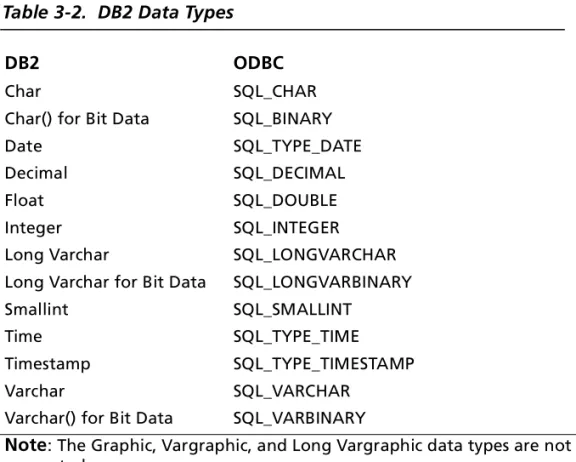
Table 3-2. DB2 Data Types . . . 67
Table 4-1. dBASE Connection String Attributes . . . 86
Table 4-2. dBASE Data Types . . . 92
Table 4-3. Additional FoxPro 3.0 Data Types . . . 93
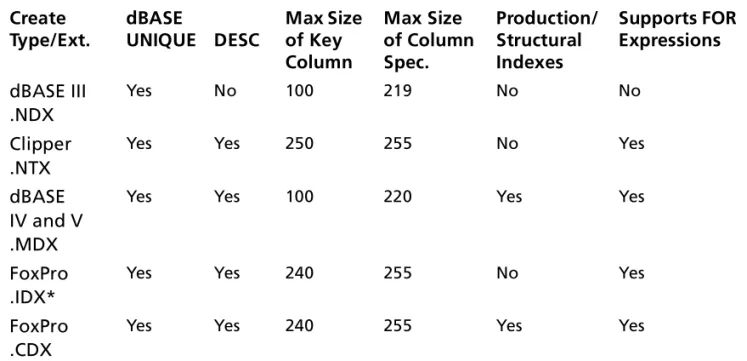
Table 4-4. dBASE-Compatible Index Summary . . . 98
Table 5-1. Excel Connection String Attributes . . . 111
Table 5-2. Excel Data Types . . . 113
Table 6-1. INFORMIX Connection String Attributes . . . 127
Table 6-2. INFORMIX Data Types . . . 130
Table 6-3. INFORMIX 9 Data Types . . . 132
Table 7-1. OpenIngres Connection String Attributes . . . 145
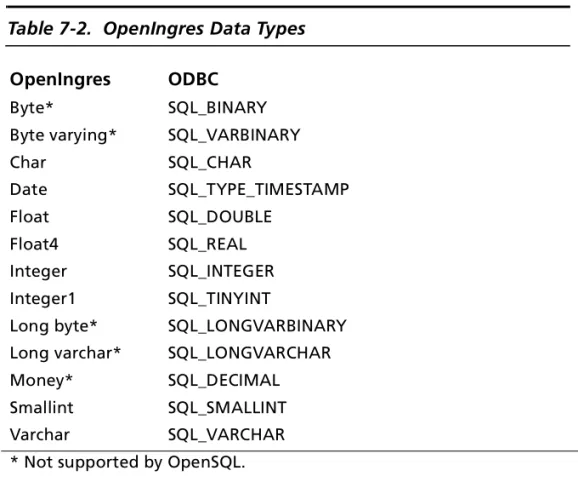
Table 7-2. OpenIngres Data Types . . . 149
Table 8-1. Oracle Connection String Attributes . . . 161
Table 8-2. Oracle Data Types . . . 164
Table 8-3. Oracle 8 Data Types . . . 165
Table 9-1. Paradox Connection String Attributes . . . 176
Table 9-2. Paradox Data Types. . . 180
Table 10-1. PROGRESS Connection String Attributes . . . 212
Table 10-2. PROGRESS Data Types . . . 214
Table 11-2. SQL Server Data Types . . . 230
Table 12-1. SQLBase Connection String Attributes . . . 239
Table 12-2. SQLBase Data Types . . . 241
Table 13-1. Sybase Connection String Attributes . . . 255
Table 13-2. Sybase Data Types . . . 260
Table 14-1. Common Text File Formats . . . 264
Table 14-2. Date Masks for Text Driver . . . 279
Table 14-3. Date Mask Examples . . . 280
Table 14-4. Text Connection String Attributes . . . 282
Table 14-5. Text Data Types . . . 286
Table A-1. Aggregate Functions . . . 291
Table A-2. Relational Operators . . . 300
Table A-3. Operator Precedence . . . 302
Table A-4. Functions that Return Character Strings . . . 303
Table A-5. Functions that Return Numbers . . . 306
Table A-6. Functions that Return Dates . . . 307
Table C-1. Supported 2.x ODBC API Functions . . . 324
Table C-2. Supported 3.x ODBC API Functions . . . 325
Table C-3. Scalar String Functions . . . 327
Table C-4. Scalar Numeric Functions . . . 329
Table C-5. Scalar Time and Date Functions . . . 331
Table C-6. Scalar System Functions . . . 333
Table D-1. Isolation Levels and Data Consistency . . . 338
Table E-1. Common ODBC System Performance Problems and Solutions . . . 341
17
Preface
This book is your reference to INTERSOLV® DataDirect® Connect ODBC™. The DataDirect Connect ODBC product consists of a number of database drivers that are compliant with the Open Database Connectivity (ODBC) specification.
Using this Manual
The content of this manual is based on the assumption that you are familiar with your operating system and its commands. It contains the following chapters:
■ An introductory chapter (Chapter 1, “Getting Started,” on page 25) that explains the DataDirect Connect ODBC drivers and ODBC, discusses environment-specific subjects, and explains the error messages returned by the drivers.
■ A chapter for each database driver. Each driver’s chapter is structured in the same way. First, it lists system requirements for your operating environment. Next, it explains how to configure a data source. Finally, it explains how to connect to that data source.
This manual also includes several appendixes that provide information on technical topics:
■ Appendix A, “SQL for Flat-File Drivers,” on page 289 explains the SQL statements that you can use with Btrieve, dBASE, Excel, Paradox, and text files.
■ Appendix B, “Using Indexes,” on page 315 provides general guidelines on how to improve performance when querying a database system.
■ Appendix C, “ODBC API and Scalar Functions,” on page 323 lists the ODBC API functions that each driver supports. Any exceptions are listed in each driver chapter, in the section “ODBC Conformance Level.” This appendix also lists the ODBC scalar functions.
■ Appendix D, “Locking and Isolation Levels,” on page 335 provides a general discussion of isolation levels and locking. ■ Appendix E, “Designing Performance- Oriented ODBC
Applications,” on page 341 provides guidelines for designing performance-oriented ODBC applications.
■ Appendix F, “Threading,” on page 361 discusses how ODBC ensures thread safety.
■ Appendix G, “Microsoft Query ’97,” on page 365 discusses how to use ODBC with Microsoft Query ’97.
■ Appendix H, “The UNIX Environment,” on page 369 explains the structure of the system information file (used in the UNIX environment), provides a sample system information file, and discusses UNIX environment variables.
If you are writing programs to access ODBC drivers, you need to obtain a copy of the ODBC Programmer’s Reference for the Microsoft Open Database Connectivity Software Development Kit, available from Microsoft Corporation.
Additional Documentation 19
Additional Documentation
In addition to this Reference, an online Installation Guide is provided on your DataDirect CD-ROM.
You can view this online documentation using the Adobe Acrobat Reader, which is also available on your CD-ROM. For instructions about installing the Acrobat Reader and viewing ODBC driver online documentation, refer to the insert in your CD-ROM case.
Conventions Used in This Manual
This manual employs various conventions to aid in its usability. The typography and terminology are intended to make this manual easy to use, regardless of the operating environment you are using. The following sections describe these conventions. The suffix .DLL is used to refer to a dynamic link library file. Your operating system may use the term shared object or shared library files instead.
Typography
This manual uses various typefaces, fonts, and characters to indicate certain types of information, as follows:
Convention Explanation
italics Used to introduce new terms that you may not be familiar with, and occasionally for emphasis.
Mouse Conventions.
UPPERCASE Indicates the name of a file. For operating environments that use case-sensitive filenames, the correct capitalization is used in information specific to those environments.
monospace Syntax examples, values that you specify, or results that you receive.
monospaced italics
Names that are placeholders for values you specify; for example,filename.
vertical rule | Indicates an OR separator to delineate items. brackets [] Indicate optional items; for example,
SELECT [DISTINCT]. In this example, DISTINCT is an optional keyword.
braces {} Indicate that you must select one item. For example, {yes | no} means that you must specify either yes or no.
Convention Explanation
This action… Means to…
Click Point to an object with the mouse pointer and press the left mouse button.
Double-click Click the left mouse button twice. Right-click Click the right mouse button.
Drag Press and hold the left mouse button while dragging item(s) to another part of the screen. SHIFT+Click Press and hold the SHIFT key; then, click a
selection. This lets you select a series of objects. CTRL+Click Press and hold the CTRL key; then, click a
Conventions Used in This Manual 21
Keyboard Conventions
Select menu items by using the mouse or pressing ALT+ the key letter of the menu name or item.
Environment-Specific Information
Wherever this manual provides information that is notapplicable to all supported environments, the following symbols are used to identify that information:
This manual shows dialog boxes that are specific to Windows 95. If you are using the drivers on Windows NT or Macintosh, the dialog box that you see may differ slightly from the Windows 95 version. If you are using a graphical user interface in the UNIX environment, you will see a dialog box for logon, but not for driver configuration.
Symbol Environment
Windows 95. Information specific to the Microsoft Windows 95 environment is identified by the Windows symbol and the numbers “95.”
Windows NT. Information specific to the Microsoft Windows NT environment is identified by the Windows symbol and the letters “NT.”
Macintosh Power PC. Information specific to the Macintosh Power PC environment is identified by the MacOS symbol, which is a registered trademark of Apple Computer, Inc., and the words “Power PC.” UNIX. Information specific to UNIX environments is identified by this symbol, which applies to all supported UNIX environments. UNIX is a registered trademark in the United States and other countries, licensed exclusively through X/Open Company Ltd.
Contacting Technical Support
INTERSOLV provides technical support for all registered users of Connect ODBC, including limited installation support, for the first 30 days. For support after that time, contact us using one of the following methods or purchase further support by enrolling in the SupportNet program. For more information about
SupportNet, contact your sales representative. WorldWide Web .http://www.intersolv.com
The INTERSOLV Web site provides the latest support information through SupportNet Online, our global service network that provides access to valuable tools and information. Our
SupportNet users access information using the Web, automatic email notification, newsgroups, and regional user groups.
SupportNet Online includes a knowledge base that allows you to search on keywords for technical bulletins and other information. You also can download product fixes for your DataDirect
products.
Telephone
Internet Australia and New Zealand
[email protected] EMEA [email protected] Japan [email protected]
USA and Canada [email protected]
Australia 1 800 335 664 or 9816 9977 for Melbourne Metro
8:30-5:30 p.m. Local Melbourne Time (LMT)
Belgium 0800 724 61 9:00-6:30 p.m. CET France 0800 91 56 07 9:00-6:30 p.m. CET Germany 0130 822 496 or +44 1727 812898 9:00-6:30 p.m. CET Japan 81-3-5401-9660 9:00-12:00, 1:00-5:00 p.m. JST
Contacting Technical Support 23
When you contact us, make sure that you can provide the following information:
■ The product serial number located on the Product
Registration Information card or on a product serial number card in your package. The number will be checked to verify your support eligibility. If you do not have a SupportNet contract, we will ask you to speak with a sales representative. ■ Your name and organization. For a first-time call, you may be asked for full customer information, including location and contact details.
■ The version number of your DataDirect product. ■ The type and version of your operating system.
■ Any third party software or other environment information required to understand the problem.
■ A brief description of the problem, including any error messages that you have received, and the steps preceding the occurrence of the problem. Depending on the complexity of the problem, you may be asked to submit an example so that we can recreate the problem.
■ An assessment of the severity level of the problem.
The Netherlands 0800 022 1609 9:00-6:30 p.m. CET New Zealand 1 800 335 664 8:30-5:30 p.m. LMT United Kingdom
and Ireland
+44 1727 811881 8:00-5:30 p.m. GMT USA and Canada 1 800 443 1601 8:30-8:00 p.m. EST
Fax US 1 919 461 4527
Fax International +32-15-320919
25
1
Getting Started
This chapter contains the following sections: ■ About DataDirect Connect ODBC Drivers ■ Environment-Specific Information
■ Error Messages
About DataDirect Connect ODBC Drivers
DataDirect database drivers and ODBC
The drivers that make up INTERSOLV DataDirect Connect ODBC are compliant with the Open Database Connectivity (ODBC) specification. ODBC is a specification for an application program interface (API) that enables applications to access multiple database management systems using Structured Query Language (SQL).
ODBC permits maximum interoperability—a single application can access many different database management systems. This enables an ODBC developer to develop, compile, and ship an application without targeting a specific type of data source. Users can then add the database drivers, which link the application to the database management systems of their choice.
INTERSOLV provides ODBC drivers for both relational and flat-file database systems. The flat-flat-file drivers provide full SQL support as discussed in Appendix A, “SQL for Flat-File Drivers,” on page 289.
Support for Multiple Environments
DataDirect driversoffer multi-platform support
INTERSOLV provides ODBC-compliant database drivers on the Windows 95, Windows NT, Windows 3.1, and Macintosh platforms, as well as the following UNIX platforms: Solaris for SPARC, HP-UX, and AIX.
Note: Database drivers are continually being added to each operating environment. See the README file shipped with your INTERSOLV product for an up-to-date list of drivers and for current driver information.
Network protocol requirements vary, depending on the database drivers that you use. To connect to a relational database system, you need the appropriate network software from the database vendor. See the “System Requirements” section in the
appropriate driver chapter for additional information.
“Environment-Specific Information” on page 27 explains the environment-specific differences that you should be aware of when using the database drivers in your operating environment.
Installing the ODBC Drivers
The DataDirect Connect ODBC drivers are installed by the Setup program for the product with which they are shipped. For instructions on running the Setup program, see the Installation Guide that accompanies the product.
Environment-Specific Information 27
Environment-Specific Information
The following topics contain information specific to your operating environment, such as filenames and system requirements. Information is provided for Windows 95, Windows NT, UNIX, and Macintosh systems.
For Windows 95 and Windows NT
Users
On Windows 95 and Windows NT systems, the ODBC drivers are 32-bit drivers. All required network software supplied by your database system vendors must be 32-bit compliant. The “System Requirements” section lists specific requirements for each relational database driver.
Starting the ODBC Administrator
The “Configuring Data Sources” section in each driver chapter instructs you to start the ODBC Administrator. To start the ODBC Administrator under Windows 95 or Windows NT, double-click the ODBC icon in the Windows 95 or Windows NT Control Panel.
Driver Names
The prefix for all Connect ODBC driver filenames on Windows 95 and Windows NT is “IV.” The file extension is .DLL. This indicates that they are dynamic link libraries. For example, the Oracle 7 driver filename is IVOR7nn.DLL, where nn is the revision number of the driver.
See the README file shipped with your INTERSOLV DataDirect product for the filename of each driver supported on Windows 95 and Windows NT.
Disk Space and Memory Requirements
Disk space requirements are 15 MB of free disk space on the disk drive where Windows 95 or Windows NT is installed.
Memory requirements vary, depending on the database driver. If you are using a flat-file database driver, you need at least 8 MB of memory on Windows 95 or at least 16 MB of memory on
Windows NT. If your system is hosting a relational database system, additional memory may be required. Consult your relational database documentation to determine the exact memory requirements.
For Macintosh Users
On Macintosh systems, the ODBC drivers are built using the Code Fragment Manager and are stored in the Extensions folder. For the Macintosh Power PC, no additional software is required to use the Code Fragment Manager.
The operating system required is System 7.1 or greater.
Starting the ODBC Administrator
The section “Configuring Data Sources” in each subsequent driver chapter instructs you to start the ODBC Administrator. To start the ODBC Administrator, double-click the ODBC Setup Control Panel, which is located in the Control Panels folder under the System folder.
Driver Names
The database drivers are shared libraries. An example of a driver name would be INTERSOLV 3.nn Sybase Driver, where nn is the revision number of the driver.
Environment-Specific Information 29
See the README file shipped with your INTERSOLV DataDirect product for the filename of each driver supported on the Macintosh.
Disk Space and Memory Requirements
Disk space requirements are 6 MB of free disk space on the disk where the operating system is installed.
Memory requirements vary, depending on the database driver. If you are using a flat-file database driver, you need at least 4 MB of memory. If your system will host a relational database system, additional memory may be required. Consult your relational database documentation to determine the exact memory requirements.
For UNIX Users
Consult the “System Requirements” section of each database driver chapter. The UNIX platforms supported are:
Solaris
■ Sun SPARCstation
■ Solaris 2.51 or 2.6 operating system AIX
■ AIX 4.1.4 or 4.2 operating system HP-UX cFront enabled
■ HP-UX 10.10 or 10.20 operating system ■ cFront compiled application
HP-UX aCC enabled
■ HP-UX 10.20 operating system ■ aCC compiled application
The System Information File (.odbc.ini)
In the UNIX environment, there is no ODBC Administrator. To configure a data source, you must edit the system information file, a plain text file that is normally located in the user’s $HOME directory and is usually called .odbc.ini. This file is maintained using any text editor to define data source entries as described in the “Connecting to a Data Source Using a Connection String” section of each driver’s chapter. A sample file (odbc.ini) is located in the driver installation directory.
Appendix H, “The UNIX Environment,” on page 369 explains the structure of the system information file, provides a sample file, and discusses UNIX environment variables.
Driver Names
The Connect ODBC drivers are ODBC API-compliant dynamic link libraries, referred to in UNIX as shared objects. The prefix for all ODBC driver filenames on UNIX is “iv.” On UNIX the driver filenames are lowercase and the extension is .so or .sl. This is the standard form for a shared object. For example, the Oracle 7 driver filename is ivor7nn.so, where nn is the revision number of the driver.
Note: The convention in this manual is to list the driver names in uppercase with the extension .DLL.
See the README file shipped with your INTERSOLV DataDirect product for the filename of each driver supported on UNIX.
Environment-Specific Information 31
Setting the Library Path Environment Variable
You must include the full path to the dynamic link libraries in the environment variable LD_LIBRARY_PATH (on Solaris), LIBPATH (on AIX), and SHLIB_PATH (on HP-UX). For example, if you install the ODBC drivers in the system directory /opt/odbc, then the fully qualified path for the ODBC Pack is /opt/odbc/lib. Duringinstallation, a shell startup script is created and stored in the odbc directory. This shell script sets up the odbc environment for you.
For C shell users, the shell startup script is called .odbc.csh. This script can be sourced from a user’s own .login script. For
example:
source /opt/odbc/odbc.csh
For Bourne or Korn shell users, the shell startup script is called .odbc.sh. This script can also be sourced from a user’s own .profile script. For example:
. /opt/odbc/odbc.sh
If you do not include the path /opt/odbc in the environment variable LD_LIBRARY_PATH (on Solaris), LIBPATH (on AIX), and SHLIB_PATH (on HP-UX), then your applications are unable to load the ODBC drivers dynamically at runtime.
Disk Space and Memory Requirements
Disk space requirements are 25 MB of free disk space on the disk where the UNIX system is installed.
Memory requirements vary, depending on the database driver. If you are using a flat-file database driver, you need at least 8 MB of memory. If your system will host a relational database system, additional memory will be required. Consult your relational database documentation to determine the exact memory requirements.
Error Messages
Error messages can come from: ■ An ODBC driver
■ The database system ■ The ODBC driver manager
An error reported on an ODBC driver has the following format: [vendor] [ODBC_component] message
ODBC_component is the component in which the error occurred. For example, an error message from INTERSOLV’s SQL Server driver would look like this:
[INTERSOLV] [ODBC SQL Server driver] Invalid precision specified.
If you get this type of error, check the last ODBC call that your application made for possible problems or contact your ODBC application vendor.
An error that occurs in the data source includes the data source name, in the following format:
[vendor] [ODBC_component] [data_source] message With this type of message, ODBC_component is the component that received the error from the data source indicated. For example, you may get the following message from an Oracle data source:
[INTERSOLV] [ODBC Oracle driver] [Oracle] ORA-0919: specified length too long for CHAR column
If you get this type of error, you did something incorrectly with the database system. Check your database system documentation
Error Messages 33
for more information or consult your database administrator. In this example, you would check your Oracle documentation. The driver manager is a DLL that establishes connections with drivers, submits requests to drivers, and returns results to
applications. An error that occurs in the driver manager has the following format:
[vendor] [ODBC XXX] message
For example, an error from the Microsoft driver manager might look like this:
[Microsoft] [ODBC Driver Manager] Driver does not support this function
If you get this type of error, consult the Programmer’s Reference
for the Microsoft ODBC Software Development Kit available from Microsoft.
UNIX Error Handling
UNIX error handling follows the X/Open XPG3 messaging catalog system. Localized error messages are stored in the subdirectory locale/localized_territory_directory/LC_MESSAGES, where localized_territory_directory depends on your language. For instance, German localization files are stored in
locale/de/LC_MESSAGES, where de is the locale for German. If localized error messages are not available for your locale, then they will contain message numbers instead of text. For example: [INTERSOLV] [ODBC 20101 driver] 30040
35
2
Connect ODBC for Btrieve
Connect ODBC for Btrieve (the “Btrieve driver”) supports Btrieve version 6.x and higher under the Windows 95 and Windows NT. The driver executes SQL statements directly on Btrieve
databases.
See the README file shipped with your INTERSOLV DataDirect product for the file name of the Btrieve driver.
System Requirements
To access a Btrieve database, you must be using one of the following software packages:
For Windows 95:
■ Btrieve Developer's Kit for Windows 95
■ Btrieve WorkStation Database Engine for Windows NT or Windows 95
For Windows NT:
■ Btrieve Developer's Kit for Windows NT
■ Btrieve WorkStation Database Engine for Windows NT or Windows 95
■ Btrieve Client/Server Database Engine
Before you attempt to access Btrieve files, you must incorporate existing Btrieve files into a Scalable SQL database. See “Defining Table Structure” on page 42 for more information.
If you attempt to configure a data source and you do not have the client loaded, a message similar to the following one appears: The setup routines for the INTERSOLV 3.00 32-BIT BTRIEVE ODBC driver could not be loaded due to system error code 126.
When you click OK, the following message appears:
Could not load the setup or translator library. Note: The Btrieve driver may experience problems if the Btrieve Microkernel Engine’s communication buffer size is smaller than the Btrieve driver’s Array Size attribute. You can increase the communication buffer size with the BTI Database Setup Utility. You can decrease the array size option when you configure a data source using the ODBC Btrieve Driver Setup dialog box, or when passing a connection string.
Managing Databases
If you already use Scalable SQL, the Btrieve driver can access your Scalable SQL databases directly. If not, your Btrieve files must be incorporated into a Scalable SQL database.
A Scalable SQL database is composed of data files that contain your records and data dictionary files that describe the database. The data files are Btrieve files. The data dictionary files are special Btrieve files that contain descriptions of the data files, views, fields, and indexes in your database.
All Btrieve files in a Scalable SQL database must reside in the same directory. In addition to the Btrieve data files, the three data dictionary files (FILE.DDF, FIELD.DDF, and INDEX.DDF) also must be in the directory.
Transactions 37
Incorporating a Btrieve file into a Scalable SQL database does not change the Btrieve file in any way. You can continue to access the file directly with any existing Btrieve application.
Transactions
The Btrieve driver supports transactions. A transaction is a series of database changes that is treated as a single unit. In
applications that don’t use transactions, the Btrieve driver immediately executes Insert, Update, and Delete statements on the database files and the changes are automatically committed when the SQL statement is executed. You cannot undo these changes. In applications that use transactions, the Btrieve driver holds inserts, updates, and deletes until you issue a Commit or Rollback. A Commit saves the changes to the database file; a Rollback undoes the changes.
Transactions affect the removal of record locking. All locks are removed when SQLTransact is called with the Commit or Rollback option to end the active transaction.
To use the Btrieve driver’s transaction processing capabilities, consult the Btrieve Installation and Operations Manual.
Configuring Data Sources
To configure a Btrieve data source:
1 Start the ODBC Administrator to display a list of data sources. 2 If you are configuring an existing data source, select the data source name and click Configure to display the ODBC Btrieve Driver Setup dialog box.
If you are configuring a new data source, click Add. A list of installed drivers appears. Select the Btrieve driver and click Finish to display the ODBC Btrieve Driver Setup dialog box.
3 Specify values as follows; then, click Apply:
Data Source Name: A string that identifies this Btrieve data source configuration in the system information. Examples include “Accounting” or “Btrieve Files.”
Description: An optional long description of a data source name. For example, “My Accounting Database” or “Btrieve files in C:\ACCOUNTS.”
Database Directory: The full pathname of the directory that contains the Btrieve files and the data dictionary files (.DDF). Data dictionary files describe the structure of Btrieve data. If no directory is specified, the current working directory is used.
Configuring Data Sources 39
4 Click the Advanced tab to configure additional, optional settings for the data source.
5 Specify values as follows; then, click Apply:
Default Logon ID: The default logon ID used to connect to your Btrieve database. A logon ID is required only if security is enabled on your database. Your ODBC application may override this value or you may override this value in a connection string.
File Open Cache: A numeric value to specify the maximum number of used file handles to cache. For example, the value 4 specifies that when a user opens and closes four tables, the tables are not actually closed. The driver keeps them open so that if another query uses one of these tables, the driver does not have to perform another open, which is expensive. The advantage of file open caching is increased performance. The
disadvantage is that a user who specifies file locking on open may get a locking conflict even though no one appears to have the file open. The default is 0, which means no file open caching.
Array Size: A value that enables the driver to retrieve an array of records from the Btrieve engine and in most cases results in better performance for the application. The Array Size value is the number of bytes in the array. The default value is 4,096 bytes, and the maximum is 65,535 bytes.
Data File Extension: A string of three or fewer characters that specifies the file extension to use for data files. The default value is DTA. This value is used for all Create Table statements. Sending a Create Table statement that uses an extension other than the one specified as the DataFileExtension value causes an error.
In other SQL statements, such as Select or Insert, you can specify an extension other than the DataFileExtension value. If you do not specify an extension value in these cases, the DataFileExtension value is used.
Action for Undefined Tables: A setting to indicate whether the driver should prompt the user when it encounters a table for which it has no structure information. Select the Prompt for Definition radio button to prompt the user; select the Return Error Condition radio button (the default) to return an error.
International Sort: A setting to indicate the order in which records are retrieved when you issue a Select statement with an Order By clause. Clear this box to use ASCII sort order (the default setting). This order sorts items alphabetically with uppercase letters preceding lowercase letters. For example, “A, b, C” would be sorted as “A, C, b.”
Select this box to use international sort order as defined by your operating system. This order is always alphabetic, regardless of case; the letters from the previous example
Configuring Data Sources 41
would be sorted as “A, b, C.” See your operating system documentation concerning the sorting of accented characters.
Use Long Qualifiers: A setting that specifies whether the driver uses long path names. If you select the Use Long Qualifiers check box, path names can be up to 255 characters. If the check box is cleared (the default), the maximum path name length is 128 characters.
Application Using Threads: A setting that ensures that the driver works with multi-threaded applications. You can clear this check box when using the driver with single-threaded applications. Turning off this setting avoids additional processing required for ODBC thread-safety standards. Define: Click Define to define table structure. See “Defining Table Structure” for step-by-step instructions.
Translate: Click Translate to display the Select Translator dialog box, which lists the translators specified in the ODBC translators section of the system information. INTERSOLV provides a translator named INTERSOLV OEM ANSI that translates your data from the IBM PC character set to the ANSI character set.
Select a translator; then, click OK to close this dialog box and perform the translation.
6 Click OK or Cancel. If you click OK, the values you have specified become the defaults when you connect to the data source. You can change these defaults by using this
procedure to reconfigure your data source. You can override these defaults by connecting to the data source using a connection string with alternate values.
Defining Table Structure
Because Btrieve does not store any column information in the data file, you must define its structure.
To define the structure of a file:
1 Display the ODBC Btrieve Driver Setup dialog box through the ODBC Administrator. Click the Advanced tab; then, click Define to display the Define File dialog box.
2 Select the file you want to define and click Open to display the Define Table dialog box.
Defining Table Structure 43
Database Name: The name of the Scalable SQL data dictionary directory that you selected in the Define File dialog box.
File: The name of the file that you selected in the Define File dialog box.
Table: Type the name of the table to be returned by
SQLTables. The name can be up to 20 characters and cannot be the same as another defined table in the database. This field is required.
3 Enter values in the following fields to define each column. Click Add to add the column name to the list box.
Name: Type the name of the column. Type: Select the data type of the column.
Length: Type the length of the column, if applicable. Scale: Type the scale of the column, if applicable.
4 To modify an existing column definition, select the column name in the list box. Modify the values for that column name; then, click Modify.
5 To delete an existing column definition, select a column name in the list box and click Remove.
6 Click OK to define the table.
Connecting to a Data Source Using a
Connection String
If your application requires a connection string to connect to a data source, you must specify the data source name that tells the driver which section in the system information to use for the default connection information. Optionally, you may specify
attribute=value pairs in the connection string to override the default values stored in the system information. These values are not written to the system information.
You can specify either long or short names in the connection string. The connection string has the form:
DSN=data_source_name[;attribute=value [;attribute=value]...]
An example of a connection string for Btrieve is:
DSN=BTRIEVE FILES;DB=EMP;UID=JOHN;PWD=XYZZY
Table 2-1 lists the long and short names for each attribute, as well as a description.
The defaults listed in the table are initial defaults that apply when no value is specified in either the connection string or in the data source definition in the system information. If you
Connecting to a Data Source Using a Connection String 45
specified a value for the attribute when configuring the data source, that value is your default.
Table 2-1. Btrieve Connection String Attributes
Attribute Description
DataSourceName (DSN)
A string that identifies a Btrieve data source configuration in the system information. Examples include “Accounting” or “Btrieve Files.”
Database (DB) The directory in which the Btrieve files and the data dictionary files (.DDF) are stored. Data dictionary files describe the structure of Btrieve data. These files must exist to connect with the driver.
UndefinedTable (UT) UndefinedTable={PROMPT | ERROR}. This attribute determines whether the driver should prompt the user when it encounters a table for which it has no structure
information. Set this option to PROMPT to prompt the user; set it to ERROR to return an error. The initial default is to return an error. FileOpenCache (FOC) An integer value that determines the
maximum number of used file handles to cache. For example, when FileOpenCache=4, and a user opens and closes four tables, the tables are not actually closed. The driver keeps them open so that if another query uses one of these tables, the driver does not have to perform another open, which is expensive. The advantage of using file open caching is increased performance. The initial default is 0, which means no file open caching.
LogonID (UID) The default logon ID used to connect to your Btrieve database. A logon ID is required only if security is enabled on your database. If so, contact your system administrator to get your logon ID.
Password (PWD) The password that you must enter if your Scalable SQL data dictionary files have security restrictions imposed.
IntlSort (IS) IntlSort={0 | 1}. This attribute determines the order that records are retrieved when you issue a Select statement with an Order By clause. If IntlSort=0 (the initial default), the driver uses the ASCII sort order. This order sorts items alphabetically with uppercase letters preceding lowercase letters. For example, “A, b, C” would be sorted as “A, C, b.”
If IntlSort=1, the driver uses the international sort order as defined by your operating system. This order is always alphabetic, regardless of case; the letters from the previous example would be sorted as “A, b, C.” See your operating system documentation concerning the sorting of accented characters. ModifySQL (MS) ModifySQL={0 | 1}. This attribute is provided
for backward compatibility. Specify
ModifySQL=0 to have the driver understand SQL dialects found in earlier drivers. Specify ModifySQL=1 (the default) to have the driver modify the SQL statement to conform to ODBC specifications.
Table 2-1. Btrieve Connection String Attributes (cont.)
Connecting to a Data Source Using a Connection String 47
DeferQuery Evaluation (DQ)
DeferQueryEvaluation={0 | 1}. This attribute determines when a query is evaluated—after all records are read or each time a record is fetched.
If DeferQueryEvaluation=0, the driver
generates a result set when the first record is fetched. The driver reads all records, evaluates each one against the Where clause, and compiles a result set containing the records that satisfy the search criteria. This process slows performance when the first record is fetched, but activity performed on the result set after this point is much faster because the result set has already been created. You do not see any additions, deletions, or changes in the database that occur while working with this result set.
If DeferQueryEvaluation=1 (the default), the driver evaluates the query each time another record is fetched and stops reading through the records when it finds one that matches the search criteria. This setting avoids the
slowdown while fetching the first record, but each fetch takes longer because of the
evaluation taking place. The data you retrieve reflect the latest changes to the database; however, a result set is still generated if the query is a Union of multiple Select statements, if it contains the Distinct keyword, or if it has an Order By or Group By clause.
UseLongQualifiers (ULQ)
UseLongQualifiers={0 | 1}. This attribute specifies whether the driver uses long path names as table qualifiers. With
UseLongQualifiers set to 1, path names can be up to 255 characters. The default is 0;
maximum path name length is 128 characters.
Table 2-1. Btrieve Connection String Attributes (cont.)
DataFileExtension (DFE)
A string of three or fewer characters that specifies the file extension to use for data files. The default value is DTA. This value is used for all Create Table statements. If you execute a Create Table statement that uses an extension other than the one specified as the
DataFileExtension value, an error occurs. In other SQL statements, such as Select or Insert, you can specify an extension other than the DataFileExtension value. If you do not specify an extension value in these cases, the DataFileExtension value is used.
ArraySize (AS) An integer value that enables the driver to retrieve an array of records from the Btrieve engine and in most cases results in better performance for the application. The value of ArraySize is the number of bytes in the array. The default ArraySize is 4,096 bytes and the maximum is 65,535 bytes.
ApplicationUsing Threads (AUT)
ApplicationUsingThreads={0 | 1}. Ensures that the driver works with multi-threaded
applications. The default is 1, which makes the driver thread-safe. When using the driver with single-threaded applications, you may set this option to 0 to avoid additional processing required for ODBC thread-safety standards.
Table 2-1. Btrieve Connection String Attributes (cont.)
Data Types 49
Data Types
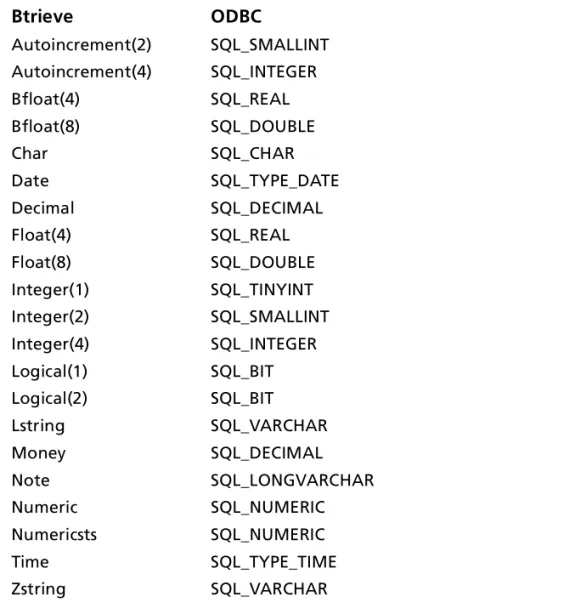
Table 2-2 shows how the Btrieve data types map to the standard ODBC data types. The Btrieve data types are used when you incorporate Btrieve files into a Scalable SQL database.
Table 2-2. Btrieve Data Types
Btrieve ODBC Autoincrement(2) SQL_SMALLINT Autoincrement(4) SQL_INTEGER Bfloat(4) SQL_REAL Bfloat(8) SQL_DOUBLE Char SQL_CHAR Date SQL_TYPE_DATE Decimal SQL_DECIMAL Float(4) SQL_REAL Float(8) SQL_DOUBLE Integer(1) SQL_TINYINT Integer(2) SQL_SMALLINT Integer(4) SQL_INTEGER Logical(1) SQL_BIT Logical(2) SQL_BIT Lstring SQL_VARCHAR Money SQL_DECIMAL Note SQL_LONGVARCHAR Numeric SQL_NUMERIC Numericsts SQL_NUMERIC Time SQL_TYPE_TIME Zstring SQL_VARCHAR
Indexes
Note: If you define an index using the INTERSOLV Btrieve driver, the index will not have the restrictions discussed here.
For query optimization, the Btrieve driver does not use
■ Indexes containing all-segment-null keys or any-segment-null keys.
■ Any index key that is marked case-insensitive.
■ Any index keys where the data type of the index key does not match the data type of the field. The one exception is if the index key is declared as an unsigned integer and the field in the file is declared as signed integer, or vice versa, then the driver assumes the field contains only unsigned quantities and uses the index. Note that this can lead to incorrect results if the field in fact does contain signed quantities.
The Btrieve driver only uses an alternate-collating-sequence (ASC) index key for equality lookups. Additionally, if an ASC key is part of a segmented index, the other index segments are not used for query optimization unless the Where clause contains an equality condition for the ASC key.
Column Names
Column names in SQL statements (such as Select and Insert) can be up to 20 characters long. If column names are in all lowercase, a combination of upper and lowercase, contain blank spaces, or are reserved words, they must be surrounded by the grave character ( ` ) (ASCII 96). For example:
Select Statement 51
Select Statement
You use the SQL Select statement to specify the columns and records to be read. Btrieve Select statements support all the Select statement clauses as described in Appendix A, “SQL for Flat-File Drivers,” on page 289. This section describes the information that is specific to Btrieve.
Rowid Pseudo-Column
Each Btrieve record contains a special column named Rowid. This field contains a unique number that indicates the record’s sequence in the database. You can use Rowid in Where and Select clauses.
Rowid is particularly useful when you are updating records. You can retrieve the Rowid of the records in the database along with the other field values. For example:
SELECT last_name, first_name, salary, rowid FROM emp
Then you can use the Rowid of the record that you want to update to ensure that you are updating the correct record and no other. For example:
UPDATE emp set salary = 40000 FROM emp WHERE rowid=21
The fastest way of updating a single row is to use a Where clause with the Rowid. You cannot update the Rowid column.
Select statements that use the Rowid pseudo-column in the Where clause achieve maximum performance only for exact equality matches. If you use range scans instead of exact equality matches, a full table scan is performed. For example:
SELECT * FROM emp WHERE rowid=21 //fast search SELECT * FROM emp WHERE rowid <=25 //full table scan
Alter Table Statement
The Btrieve driver supports the Alter Table statement to add one or more columns to a table or to delete (drop) a single column. The Alter Table statement has the form:
ALTER TABLE table_name {ADD column_name data_type | ADD (column_name data_type [, column_name data_type]
. . . ) |DROP [COLUMN] column_name}
table_name is the name of the table to which you are adding or dropping columns.
column_name assigns a name to the column you are adding or specifies the column you are dropping.
data_type specifies the native data type of each column you add. For example, to add two columns to the emp table,
ALTER TABLE emp (ADD startdate date, dept char 10) You cannot add columns and drop columns in a single statement, and you can drop only one column at a time. For example, to drop a column,
ALTER TABLE emp DROP startdate
The Alter Table statement fails when you attempt to drop a column upon which other objects, such as indexes or views, are dependent.
Create and Drop Index Statements 53
Create and Drop Index Statements
The Btrieve driver supports SQL statements to create and delete indexes. The Create Index statement is used to create indexes and the Drop Index statement is used to delete indexes.
Create Index
The Create Index statement for Btrieve files has the form: CREATE [UNIQUE] INDEX index_name ON table_name ([field_name [ASC | DESC] [,field_name [ASC | DESC]]...)
UNIQUE means that Btrieve does not let you insert two records with the same index values.
index_name is the name of the index.
table_name is the name of the table on which the index is to be created.
ASC tells Btrieve to create the index in ascending order. DESC tells Btrieve to create the index in descending order. By default, indexes are created in ascending order.
For example:
CREATE INDEX lname ON emp (last_name)
Drop Index
The form of the Drop Index statement is DROP INDEX table_name.index_name
table_name is the name of the table from which the index is to be dropped.
index_name is the name of the index. For example:
DROP INDEX emp.lname
Isolation and Lock Levels Supported
Btrieve supports isolation level 1 (read committed) only. Btrieve supports page-level locking. See Appendix D, “Locking and Isolation Levels,” on page 335 for details.
ODBC Conformance Level
The Btrieve driver supports the functions listed in Appendix C, “ODBC API and Scalar Functions,” on page 323. In addition, the following function is supported: SQLSetPos.
The Btrieve driver also supports backward and random fetching in SQLExtendedFetch and SQLFetchScroll. The driver supports the minimum SQL grammar with several core extensions.
Number of Connections and Statements
Supported
Btrieve files support a single connection and multiple statements per connection.
55
3
Connect ODBC for DB2
Connect ODBC for DB2 (the “DB2 driver”) supports the following database systems in the Windows 95, Windows NT Solaris, HP-UX, and AIX environments:
■ DB2 for Windows NT ■ DB2/6000
See the README file shipped with your INTERSOLV DataDirect product for the file name of the DB2 driver.
System Requirements
The server requirement for all platforms is the same:
■ The DB2 Server must be installed as the Server Version (not
the Local Version).
To access the DB2 family of databases, you must have one of the following software packages:
Windows 95 and Windows NT
■ IBM DB2 Client Application Enabler (CAE) for Windows 95 and Windows NT, version 2.1 or higher
■ IBM DB2 Software Development Kit (DB2 SDK) for Windows 95 and Windows NT, version 2.1 or higher
UNIX
Solaris■ IBM DB2 Client Application Enabler (CAE) for Solaris, version 2.1 or higher
■ IBM DB2 Software Development Kit (DB2 SDK) for Solaris, version 2.1 or higher
HP-UX
■ IBM DB2 Client Application Enabler (CAE) for HP-UX, version 2.1 or higher
■ IBM DB2 Software Development Kit (DB2 SDK) for HP-UX, version 2.1 or higher
AIX
■ IBM DB2 Client Application Enabler (CAE) for AIX, version 2.1 or higher
■ IBM DB2 Software Development Kit (DB2 SDK) for AIX, version 2.1 or higher
Configuring Data Sources
In the UNIX environment, there is no ODBC Administrator. To configure a data source in the UNIX environment, you must edit the system information file using the attributes in Table 3-1. You must also edit this file to perform a translation. For information about this file, see Appendix H, “The UNIX Environment,” on page 369.
Configuring Data Sources 57
To configure a DB2 data source:
1 Start the ODBC Administrator to display a list of data sources. 2 If you are configuring an existing data source, select the data
source name and click Configure to display the ODBC DB2 Setup dialog box.
If you are configuring a new data source, click Add to display a list of installed drivers. Select the DB2 driver and click Finish to display the ODBC DB2 Setup dialog box.
3 Specify values as follows; then, click Apply:
Data Source Name: A string that identifies this DB2 data source configuration in the system information. Examples include “Accounting” or “DB2-Serv1.”
Description: An optional long description of a data source name. For example, “My Accounting Database” or “DB2 on Server #1.”
Database Name: The name of the database to which you want to connect by default.
4 Click the Advanced tab to configure additional, optional settings for the data source.
5 Specify values as follows; then, click Apply:
Owner of Catalog Tables: On most DB2 systems, SYSIBM is the owner of the catalog system tables. If you have read access to the system tables, you do not need to change this option. If you do not have read access, the system administrator must create a view of the system tables in another account and give you permission to use that view. In this case, specify the Authorization ID for the account that owns the views of the system tables.
Groups: A value to determine which tables you can access. Your system administrator may have placed you in a “group” of users and granted table access to the entire group. If this is the case, specify the names of any groups to which you belong; separate each name with a comma. Alternatively, specify the word ALL so that you see all table names even if you cannot access the table.
Default Authorization ID: The default Logon ID used to connect to your DB2 database. A Logon ID is required only if security is enabled on your database. Your ODBC application may override this value or you may change this value in the logon dialog box.
Configuring Data Sources 59
Cursor Behavior: Select Preserve if you want cursors to be held at the current position when the transaction ends. Otherwise, leave this set to Close. Selecting Preserve may impact the performance of your database operations. This setting does not apply to SQL/DS.
When you select Preserve, the driver returns SQL_CB_PRESERVE from SQLGetInfo
(SQL_CURSOR_COMMIT_BEHAVIOR). But only Select
statements and prepared Update or Delete…Where Current of Cursor statements are preserved when the transaction ends. All other prepared statements are closed and deleted. Application Using Threads: A setting that ensures that the driver works with multi-threaded applications. You can clear this check box when using the driver with single-threaded applications. Turning off this setting avoids additional processing required for ODBC thread safety standards. Translate: Click Translate to display the Select Translator dialog box, which lists the translators specified in the ODBC Translators section of the system information. INTERSOLV provides a translator named INTERSOLV OEM ANSI that translates your data from the IBM PC character set to the ANSI character set.
Select a translator; then, click OK to close this dialog box and perform the translation.
6 You must catalog any remote database that you want to access. To do so, click the Catalog Db tab.
Type an alias name for the remote database, the name of the remote database, and an alias for the node (the node name could describe the remote node name and the
communication protocol used to access it). Optionally, you can enter a comment. Click Add. The alias name you added will be listed in the Database Name drop-down list on the Logon dialog box.
You can also uncatalog remote databases. To do this, select the alias you want to delete from the Alias Name drop-down list and click Delete.
7 To provide information about the remote site for the DB2 databases, click the Catalog Node tab.
Configuring Data Sources 61
Select a node name (only names of previously cataloged nodes are available), the name of the server or number of the adapter (NetBIOS nodes), the name of the remote node where the DB2 server is installed, and the type of
communication protocol to use (IPX/SPX, NetBIOS, or TCP/IP). Optionally, you can enter a comment. Click Add.
You can also uncatalog nodes. To do this, select the node you want to delete from the Node Name drop-down list and click Delete.
8 Click OK or Cancel. If you click OK, the values you have specified become the defaults when you connect to the data source. You can change these defaults by using this
procedure to reconfigure your data source. You can override these defaults by connecting to the data source using a connection string with alternate values.