1
Evaluating Records Management Solutions:
10 Things You Need to Know
By Neil Simons, SmeadSoft Product Manager, Smead Manufacturing
Approaching the technology evaluations for a records management solution can seem like a daunting endeavor. There’s much at stake—legal/legislative compliance, litigation management, business risk management and operational efficiencies. However, it’s easy to avoid the pitfalls and arrive at a successful outcome if you follow a thorough process that covers all the bases.
This white paper walks through 10 key areas to consider when evaluating a Records Management System (RMS) solution, including technology standards, operational needs, compliance issues, risk management, chain of custody, and the lifecycle management of records and content—from creation to storage or disposal. If you are charged with either evaluating various solutions or ensuring the selected systems meet the organization’s needs, this whitepaper can help you thoughtfully plan your process—and put you on the right track for a successful project.
SMEAD SOFTWARE SOLUTIONS
600 SMEAD BLVD. • HASTINGS, MN 55033 • VOICE 866-293-7664 FAX 800-216-3837
WWW.SMEADSOFT.COM
#1 Define your records management objectives and criteria
The first step in determining what you need is defining and clearly documenting your records management vision—for both electronic and paper records.Begin by considering the “whole” of your Records Information Management (RIM) requirements as a system: Consider the taxonomy or classification of the information. Learn and document the processes your organization uses, from document creation to record designation and throughout record lifecycle. Are there legal constraints or regulations to consider? Most important, how does your team work today, how do they want to work, and what would an ideal system do?
This may sound like a tall order, but if you talk with the people involved in the records management process, you’ll quickly discover the pain points and bottlenecks that exist and determine if automation will really provide greater efficiency, effectiveness and cost savings. What’s more, involving management, IT, legal, finance and other functions at this early stage will help muster up support for your RMS selection/implementation process well down the road.
Be realistic. Keep in mind that Rome wasn’t built in a day—nor can a comprehensive, effective and smoothly functioning RIM solution. Although you’re solving today’s problems, try to envision your organization’s future requirements as well. Will the Web play a role in a future self-service records management portal? What about technologies like RFID? Will the proliferation of mobile computing devices merging with cell phones impact your solution? This approach will help you understand the RMS selection criteria that meet not only your current needs but your future requirements as well.
#2 Know your RMS criteria
Are there technology standards you must work with—and if so, do you know why? Understanding the rationale behind a standard can better enable you to select a vendor that helps you meet it. Also, keep in mind that while a solution itself may be compliant, the ways in which it’s implemented could create non-compliance with legislative mandates or initiatives, like the Public Information Act or HIPAA. Technology systems do not make an organization compliant; they simply support compliance controls.
Start by understanding your organization’s best practices and then measure those standards against your compliance objectives. Outside support, such as a certified records manager or the American Records Management Association (ARMA), can offer some help here. Leverage what you learned in step one—your document and record lifecycles and taxonomy: Where they come from, what types you have, what buckets you put them in, and the retention and disposition rules you must follow. Look at how you manage the “chain of custody” on physical and electronic items. What levels of auditing/reporting do you need? And what type of security do you require from a system, application, record/item and user perspective? In other words, in order to determine if an RMS system is right for your organization, you need to know what can be done—by whom on what and when.
3 Be sure you understand the difference between “content” and a “record” since what your organization tracks will impact your RMS selection.
• Content is data or information of any kind and can be changed and shared frequently. • A record is an official version of the facts, such as a contract, an offer letter, a
purchase order, etc., and its integrity must be maintained. A record also has a different lifecycle and management requirements. The technology you select must be able to distinguish between content and records and must be able to handle your unique lifecycle requirements for records.
#3 Understand your people, process and environment
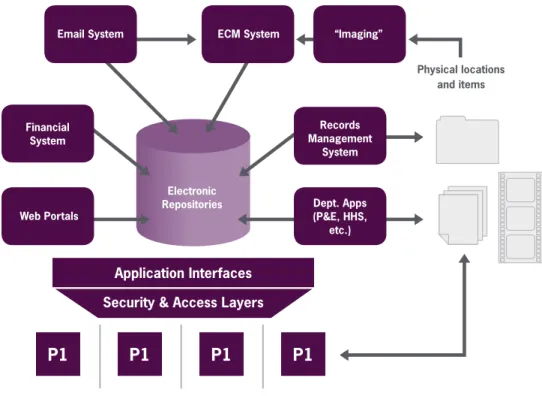
Since you’ll ultimately be implementing a technology solution, understanding your environment from an IT perspective is key. That doesn’t mean you need to be a technology expert. Simply engage your IT team, the people directly involved in the process of implementing and then maintaining the technologies you choose to deploy. Work with them to “map” your environment, understand the requirements of a complete RIM approach for the organization and define the specific technologies you need. Getting your IT team involved at this stage can also help you gain early buy-in from them. You may even elect to engage your potential vendors to help with this process. By working with the vendors, you’ll be able to establish expectations and ensure that no critical technology issues are missed.Diagram 1: Work with your IT team to map your environment, like the sample above. Application Interfaces
Security & Access Layers
Electronic Repositories
Physical locations and items
P1
P1
P1
P1
Email System ECM System “Imaging”
Records Management System Dept. Apps (P&E, HHS, etc.) Web Portals Financial System
What’s more, you should make sure that the vendors you look at are flexible and that their products can be tuned to your process rather than forcing you to change how you operate. Do the vendors’ solutions mesh with your technology environment, your infrastructure, your restrictions? Do they require a different environment than you have in place today? Do they require IT training for administration? Working with your IT team, you can find answers to these questions and increase your chance for success.
#4 Understand your risks and compliance mandates
A wide variety of legislative, legal or internal mandates—such as HIPAA, SOX and the Freedom of Information Act—can impact your RIM practices. Compliance requirements can be quite complex, with regulations that vary by state, county, even city, as well as by industry and organization type. Once again, though, you don’t need to become the resident expert. Working with an outside resource, such as legal counsel, a Certified Records Manager or associations like ARMA, can deepen your understanding of the relevant compliance issues and help ensure that the system you choose supports your organization’s requirements.
It’s also critical to understand the risks of non-compliance—financial, business and legal. Those risks should also guide your implementation decisions. After all, it’s you and your organization—not your vendor—on the line to ensure compliance. You’re ultimately responsible for making sure your vendor creates an RMS solution that supports compliance with controls designed around your business processes.
Be sure to clearly define your requirements for procedures, processes, reporting, audits, security, retention and disposition. Also, be sure you understand both your current state and the desired end result (see point No. 1). Then you’ll be ready to determine which vendors can or cannot help you meet your compliance initiatives.
When examining vendors’ products, be sure they can be configured without an endless stream of costly, customized development work to reach your goals. The vendor should be able to provide a viable solution out of the box with minor configuration. Finally, document and validate your decisions, assuming you have the ability to make configuration choices about the system you select.
Diagram 2: Be sure the system you choose will help you put the pieces of compliance together.
5
#5 Know the technologies’ strengths and limitations
With so many vendors and technologies to choose from, how do you make the best choice for your organization? The most common technologies selected for RIM practices are Enterprise Content Management (ECM) systems, Records Management Systems (RMSs) and portals, such as SharePoint. It’s important to understand how each system views and interacts with information and how each may impact your initiative.
ECMs focus primarily on managing general content—from creation through collaboration and destruction. Portals focus on making electronic content available to others with similar needs. RMSs focus on managing content that, according to business rules, is a matter of record. RMSs are not concerned with content or the dissemination of that content, but rather with the management of records and meeting an organization’s requirements for the lifecycle management of records.
Understanding each technology’s differences and how their features merge into a single solution will help you understand how to best meet your records management objectives. You may even discover that you need several products, not just one, to meet your needs.
Enterprise Content Management Portals Records Management Primary Function • Electronic collaboration • Info and data exchange • Organizational info sharing • Information sharing • Internal collaboration • Maintaining docs/files/ objects as records • Managing their locations and dispositions Design Focus • Document content • What data can be used,
re-tasked, shared, delivered
• Document content • What needs to be
shared
• “Envelopes” the docs are in
• Where the records are • Preservation of information Strengths • Sharing, storing, accessing and delivering information, data and content
• Deploying large repositories quickly and easily
• Preserving record integrity
• Capturing the chain of custody
• Ensuring appropriate retention and destruction
#6 Balance the costs and benefits
Be aware that the total cost of ownership is more than a financial investment in software and hardware. There are implementation and configuration costs, as well as maintenance and administration expenses. The scope of your project also figures into the mix: Will there be “back file work” (physical and electronic) or is it day forward with a process to work with existing records? What processes will this create, and what is the cost of change?
Here are some questions to help you get your arms around the real costs. First, consider the big picture: What internal resources are required for implementation—initially, during rollout and long term? What is your vendor bringing to the table? Dealing directly with a vendor vs. one of its resellers can provide front-end cost savings, but what about
term support costs? Compare each vendor and reseller: The methodologies they use to ensure proper configuration and customization of your solution; whether they utilize implementation best practices; whether you or your vendor will be driving them. Any or all of these issues may directly impact costs.
Finally, keep in mind that training is often the key to project success. The team using the system needs to understand the technology/solution, the reasons behind it and the processes around their work, to help them embrace the solution. Recognize that technology can be intimidating for some team members, so be sure to communicate with them and gain their buy-in before and during implementation. Bottom line: If users are not ready, willing or able to use the solution, your organization will not realize the benefits. Identifying both costs and returns on investment or cost savings will provide a complete financial picture. Don’t forget about efficiencies gained over the lifetime of the system, such as time/motion efficiencies, consumable use savings or reduction of paper and storage. They can all help you justify the expense of your decision.
To ensure ongoing benefits, it’s important to continually measure results, meet milestones and adjust your solution to accommodate reality. This process continues well beyond the deployment of the solution.
#7 Gain Consensus
Identify the stakeholders within your organization. Executive sponsors, the team who will actually get the project done, and the people and functions impacted throughout the process are all in a position to affect your project’s outcome. IT, finance, management and line workers responsible for ensuring your RIM initiative is going to succeed have a vested interest in ensuring its successful implementation. Therefore, it’s important to include them—either by their active participation or by incorporating their perspectives into a
Diagram 4: Weighing all the costs and savings will give you a complete financial picture.
COSTS
SAVINGS
• Software • Implementation • Integration • Backfiles • Maintenance • Training • Time efficiencies • Motion efficiencies • Shorter file search times • Consumable use savings • Reduced paper usage • Reduced storage costs7 Implementing a RIM initiative is more than simply installing technology. It’s about making sure your team understands the changes in policy, practice and function that accompany the new technology, as well as the rationale behind them. Teamwork helps define expectations, resolve erroneous assumptions and navigate the unknowns—all of which enhance the likelihood of a successful project.
Here’s an example: A new senior executive issues a mandate that all records must be electronic. In most environments, there may be legal or other constraints, such as back-file conversion costs, that make implementing this mandate prohibitive, or even put the organization at risk. Including this person on the team will help him or her form realistic expectations and will help you deliver a viable solution that meets the organization’s needs.
Together with your team and vendor pool, create a process to resolve issues, questions and concerns. Address each one before progressing to the next phase. While some level of unresolved concern may remain, a clear process and ongoing communication will allow you to absorb the impact and keep your project moving forward.
#8 Make sure you get what you need
You’ve defined your requirements, weighed the technologies, understood how various solutions meet requirements and worked closely with your vendor(s) during the evaluation. The next step is to validate that the solutions you are interested in will truly meet and deliver against expectations.
That simply means that it’s time to validate the specifics. Consider how retention or disposition will work; how processes will be configured; and how legal holds, security, access and reporting/auditing will work. Then put the rubber to the road by running some of your typical users through scenarios using the actual solutions you are evaluating—to prevent surprises at implementation time. You may find that some customization is required. At any rate, seeing is believing, and any vendors worth their salt will be happy to prove their solution will work.
As diligent as you might be, you’re only human, and it’s likely that something somewhere may be missed. How you deal with these issues is what truly matters, so plan in advance with your vendors how they will fairly and equitably accommodate unanticipated issues.
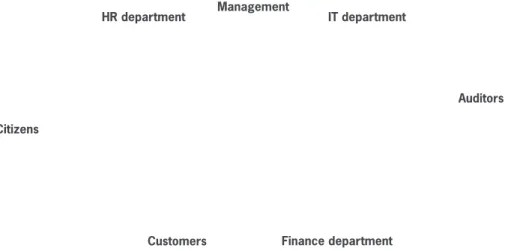
Diagram 5: Consider all of your stakeholders, both inside and outside of your organization.
COSTS
SAVINGS
• Software • Implementation • Integration • Backfiles • Maintenance • Training • Time efficiencies • Motion efficiencies • Shorter file search times • Consumable use savings • Reduced paper usage • Reduced storage costsRemember, you’re paying for a solution within the bounds of your agreed-upon scope and shouldn’t expect your vendors to provide endless revamping based on requirements that are unclear or in flux. Bottom line: Understand early on the extent of each party’s responsibilities and define and agree upon the change process for future issues. This is a practical and straightforward way to formalize long-term relationships with your vendors.
Checklist: Does the system provide?
Features Yes No
Document imaging and electronic tracking Paper file tracking
PC file management
Property and evidence room management Document routing and reporting workflows Paper and electronic versioning
Paper and electronic audit trail Web access to information
Multiple retention schedule management Automatic generation of barcodes for tracking Barcode tracking
Processing history report Pipeline report
Retention report Missing documents report Productivity report File history report Compliance report
Requestor exceptions report Audit report
Instant location of hard copy records Remote scanning capability Chain of custody capability
Applies barcodes and color-codes on one easy-to-apply label strip Creates alphabetic, numeric or custom index filing systems
Integrates color-labeled folders with existing files with a perfect color match Generate new labels automatically with information from host database or keyboard Vendor can create conversion plans
Vendor can provide file strategy consultation
Vendor can provide file-to-file conversions and data input into physical and electronic records management system
Vendor supports unique requirements for physical and electronic records management
SMEAD SOFTWARE SOLUTIONS
600 SMEAD BLVD. • HASTINGS, MN 55033 • VOICE 866-293-7664 FAX 800-216-3837 • WWW.SMEADSOFT.COM
#9 Plan the implementation
At this point, you’ve aligned your internal and external resources and are ready to lay out an implementation plan with the vendors you have chosen. This is a step-by-step map of who does what and when—from the time of selection through final acceptance and sign-off. When the plan is solidified, communicate all expectations and policy changes throughout the organization, as well as any last-minute clarifications. Continue to be demanding of yourself and of others as you dot the Is and cross the Ts on the final leg of your project’s journey to successful completion.
#10 Know your vendor
A little research will go a long way in validating your vendor selection. What is their central business focus? Is RMS a core competency or just a feature set or technology contained within a system? How will vendors address your needs when it comes to both physical and electronic RIM practices? Have they worked in environments similar to yours before? Have they previously faced similar challenges? Are they willing and able to work within your environment and constraints?
The history of the firms you select will reveal whether they have been in business two years or 102 years. The software industry continues to consolidate. Many organizations that covered the records management landscape 10 years ago have been consumed by larger organizations or have ceased operation. Look at the financial and organizational stability of the vendors carefully as you make your selection to ensure the firm you select will be with you for the long haul.
Examining these factors and validating them through references will enable you to select the vendor or vendors that are right for you, your organization and your RIM program— today, tomorrow and well into the future.