FINAL REPORT
1. Project Title: Integrating Project And Risk Management Techniques Into An Introductory Engineering Course
2. Project Objectives: The objectives of the project were to: 1) improve the student ability to manage engineering team-based, design-build projects; and 2) disseminate the materials (e.g., project
management module developed by the project) and results of the project (e.g., best teaching practices, assessment tools, data, and conclusions) to faculty members in different disciplines in the College of Engineering and Computer Science and work with interested faculty to adapt the module for
implementation in their courses’ projects; and 3) prepare the final written report for the Faculty Development Office, and use the final report as the basis to prepare a paper for a conference that focuses on engineering education.
The student learning outcomes for this project include the ability to: 1) create a project charter; 2) define completion tasks and milestones; 3) determine required task times and organize the tasks; 4) assign tasks and roles and responsibilities to team members; 5) develop a project budget; 6) create project documentation; and 7) discuss how the implemented project management helps the team complete the project.
3. Project Description: The project aimed to develop a project management module to be integrated into the course ME101 Introduction to Mechanical Engineering, implement the module in the class, create assessment and evaluation tools and procedures to evaluate the ability of student to use the module to manage the course’s semester-long and team-based design-build project, disseminate the results of the project to the Mechanical Engineering Department and College of Engineering and Computer Science and work with interested faculty members in different disciplines (e.g., Electrical Engineering, Civil Engineering, Computer Science) to adapt the module for implementation in their courses’ projects, write the final written report for the Faculty Development Office, and use the final report as the basis to prepare a paper for a conference that focuses on engineering education. The chosen module was based around a project management tool called JIRA.
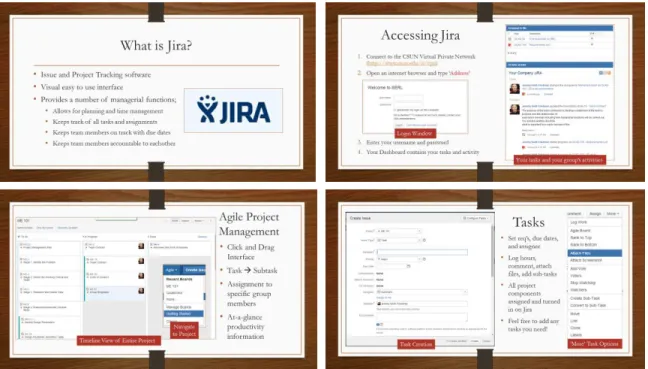
This program was chosen as a PM tool for ME101 students for a number of reasons. For one, the design process for ME101 is agile, meaning that it involves collaboration between multiple teams with fluid membership. Each student works either alone or with different team members at different time and on multiple tasks throughout the duration of the project. For example, a student may find herself teamed up with a certain partner to write the team charter in week 1, creating drawings by herself in week 4, and testing the team’s prototype with three other team members in week 8. JIRA
was created for agile development with features such as parallel issue tracking and the ability to vote as a group on task priority and thus, lends itself to use in ME101. Secondly, ME101 requires parallel work between students, and JIRA allows them to coordinate this work and keep watch over each other’s progress with issue and sub-task creation. Finally, the use of JIRA creates an environment of transparency to the project, as each student’s work and activities are displayed to their group
members. The assignment feature of JIRA allows for the student’s workload to be evenly distributed across the team, and the dashboard and comment features allows for students to keep in contact about their assignments. Between issue tracking, communication tools, and agile development architecture, JIRA provides tools that can help students in ME101 succeed.
4. Evidence of Project Implementation: In Fall 2014, the JIRA module was incorporated in ME101 and used to facilitate project management in the student groups throughout the project. Five JIRA servers were set up so that each of the five groups in the class had access to their own JIRA instance. Students logged onto the servers and used JIRA to manage the tasks assigned to them throughout the project as well as to communicate with each other about task completion and scheduling.
At the beginning of the semester, students were instructed in how to use Jira using the resources seen in Figures 4-7
At the beginning of the semester students were also instructed to upload all of their work to Jira, as evidenced by Figure 8.
Figure 8 - Example of students using Jira to turn in class assignments
5. Description of Procedures used for Measuring Project Objectives: Two types of assessment data were collected to evaluate how well PM and RM were added to the course and the ability of students
to apply the concepts in the project. The first set of data comes from two self-report surveys, the second from interviews with student teams
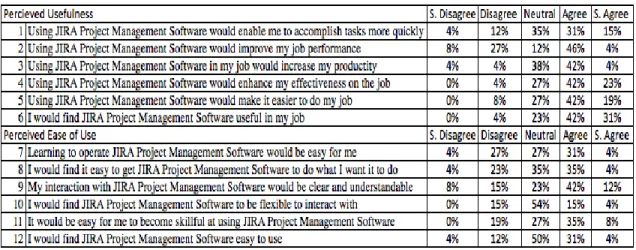
6. Project Results: The first set of data was collected through surveys taken by 26 students in Fall 2014. A self-report Perceived Usefulness Ease of Use (PUEU) survey was given to the class near the end of the course in order to identify areas for improvement in future iterations. Figure 5 shows the percentages of student agreement/disagreement to the questions posed by the survey. For most of the survey questions related to usefulness, between 50% and 73% of the class agreed or strongly agreed that JIRA was a useful tool, except for the questions asking whether JIRA improved work speed, which scored slightly lower, with around 46% agreement or strong agreement. For the questions related to ease of use, the results were lower. For almost all of the questions between 7 and 12, no more than 43% of students agreed or strongly agreed that JIRA was easy to use, most fell into the neutral range, which contained up to 54% of the students’ responses.
Figure 5 – PUEU Survey
Students were also given comment boxes in which to write three positive and three negative aspects of the program. The most notable positive aspects include: the students’ ability to create and manage tasks in an agile environment (reported as a positive aspect by 31% of the students), JIRA’s usefulness in keeping the group organized (35% of students), and the ability to upload files to work in parallel with one another using JIRA (35% of students). It is important to note that 54% of the students reported technical problems as a negative aspect. This included such problems as
compatibility issues between JIRA and the students’ computers and inability to log into the required VPN to run the program. Additionally, 35% of students wrote that JIRA was too complex for them.
The second source of data comes from the students in the form of personal interviews in Fall 2014. The student teams were asked the following questions two weeks before the final presentation and in the midst of finalizing their designs:
How useful did your team find JIRA?
How useful did group leaders, in particular, find JIRA? What exactly did you group use JIRA to do?
Which of JIRA’s capabilities were used the most? What, if any, unexpected uses did JIRA have?
Did your group use any other tools concurrently with JIRA? What problems did your group encounter with JIRA?
What tools, if any, did your group use for project management?
The student team responses to these questions were almost uniform across the groups. Although each group reported that they found the task-assignment and file uploading capabilities of JIRA useful, technical difficulties such as inability to access the JIRA webpage or inability to access the CSUN Virtual Private Network (via Internet) distracted from the positive experience. Each group stated that, while they appreciated the project management tools provided by JIRA, the benefits of using the software were outweighed by the technical costs.
In another session of ME101 in which students did not have access to JIRA, teams reported using programs such as google docs, google drive, Facebook, email, and text messages to assign tasks and communicate with one another. Similarly, in the session that did use JIRA, four out of the five group leaders said that, by the end of the course, they were only using JIRA for task-assignment and file uploading, and that they were not making use of the work logging, sub-task creation, or
communication capabilities. This was largely because of those other tools students had opted to use instead of JIRA. This is significant because google docs, google drive, Facebook, email, and text messages allow students to accomplish some of the same project management capabilities as JIRA, suggesting that project management software is invaluable to a student’s educational experience, even if JIRA specifically is not the optimal program.
7. What You Learned about Student Learning From this Project: The data from this case study are in good agreement, and consistent in several aspects. In terms of project management, the integration of JIRA was met with mixed results. Although students generally agreed that the program proved useful to their team in areas such as organization and communication, there were a large number of complaints about its ease of use. In order to access their JIRA, students had to connect CSUN’s Virtual Private Network (this is easy to do on campus, but proved difficult for many students trying to connect from home) and navigate to the URL for their specific group. However, despite the technical hassles associated with JIRA, many students reported that it did serve their team as a useful tool.
It seems that the project management aspects of JIRA were successful, but the integration and methods of access were not. These results suggest that a tool, such as JIRA, can be helpful for students in ME101 but also suggest that JIRA is not the optimal project management software for this environment due to its technical complexity.
8. What You Plan to implement in the Future as a Result of this Project: For future ME101 classes, different project management software (such as the free program Trello) will be tested. Learning from the reaction to JIRA, the future project management software will be chosen for such qualities as ease of access and ease of navigation.