Master Thesis
Computing Science
Improving the Adoption of
Dynamic Web Security
Vulnerability Scanners
Author: Y.R. Smeets, BSc [email protected] Student No. 4244249 Internal supervisor: Dr. G. Gousios [email protected] Second reader: Dr. ir. G.J. Tretmans [email protected] External supervisor: Prof. dr. ir. J. VisserAbstract
Security vulnerabilities remain present in many web applications despite the improving knowledge base on vulnerabilities. Attackers can exploit such security vulnerabilities to extract critical data from web applications and their users. Many dynamic security vulnerability scanners exist that try to automatically find such security vulnerabilities. We studied the adoption of these tools and found out they are rarely used by web developers during the development process of a web application. Through interviews, we inves-tigated the main cause of the lack of adoption is the difficulty to use such tools. In order to improve the adoption of dynamic security vulnerability scanners, we introduce the Universal Penetration Testing Robot (UPeTeR). UPeTeR is a class library that allows web developers to easily set relevant data for many dynamic vulnerability scanners by providing them with an abstraction of required configuration data. Plugins, ideally created by ex-perts of the scanners, transform this abstraction into an optimal setup of such scanners. A prototype has been created which was used to validate UP-eTeR’s acceptance by web developers at the Software Improvement Group, a software consultancy company in the Netherlands. The acceptance ex-periment demonstrated that web developers are willing to try out and work with UPeTeR.
Acknowledgments
Even though it was my task to do this research and write this thesis, I am not the only one who worked on this. Many people contributed in various ways and I would like to take this opportunity to thank them.
Firstly, I would like to express my gratitude to Joost Visser, Barbara Vieira, and Theodoor Scholte for their guidance, support, and positive at-titude. In the many situation of doubt or uncertainty, they helped me pull through and put me on the right track.
Secondly, I want to thank Georgios Gousios and Jan Tretmans for their academic supervision and critical thinking in order to improve this thesis. Although the few sessions we had were tough and critical, it challenged me to rethink my study and improve its design.
Thirdly, I am grateful for all SIG colleagues and interns who made me feel welcome and made my internship a pleasant experience. I was pleasantly surprised by the professional yet informal working environment in which everyone was helpful, kind, and down to earth. It was a honor to work with these highly skilled professionals and to experience their dedication and perfectionism.
Furthermore, the support of friends and family helped to a great extend with the motivation and enjoyment for this thesis.
Finally and most of all, I want to dedicate this thesis to my father. From the day I was born, he supported me, helped me, and guided me through challenging moments of life. Even though he did not have knowledge of the topic of this research, he advised me in any way he could. Unfortunately, he could not witness the results of this study as he passed away unexpectedly just before the end. Thank you with all my heart for everything.
Yannic Smeets Nijmegen October, 2015
Contents
1 Introduction 1 1.1 Problem Statement . . . 1 1.2 Research Questions . . . 2 1.3 Research Method . . . 2 1.4 Research Context . . . 3 1.5 Limitations . . . 3 1.6 Thesis Outline . . . 3 2 Background 5 2.1 Security Testing . . . 5 2.2 Web Applications . . . 6 2.3 Security Vulnerabilities . . . 7 2.4 Vulnerability Lifecycle . . . 132.5 Dynamic Web Vulnerability Scanners . . . 14
2.6 Related Work . . . 19
3 Adoption of Vulnerability Scanners 21 3.1 Interviews . . . 21
3.2 Results . . . 24
3.3 Discussion . . . 28
4 Automated Vulnerability Scanners 30 4.1 Experiment Applications . . . 30 4.2 Evaluation . . . 32 4.3 Discussion . . . 40 5 UPeTeR 42 5.1 Process Description . . . 42 5.2 Design . . . 43 6 Acceptance of UPeTeR 50 6.1 Focus Group Design . . . 50
7 Conclusion 56 7.1 Results . . . 56 7.2 Threads to Validity . . . 58 7.3 Future Work . . . 60 References 62 Acronyms 67 A Exploratory Interview Summaries 69 A.1 Interview #1 . . . 69 A.2 Interview #2 . . . 70 A.3 Interview #3 . . . 72 A.4 Interview #4 . . . 73 A.5 Interview #5 . . . 74 B Reference Codes 76 C Acceptance Questionnaire 83
Chapter 1
Introduction
1.1
Problem Statement
Due to the openness and accessibility of the Internet, many services have moved to the web in the form of web applications. Sending emails, perform-ing bank transactions, and administerperform-ing our taxes are only a few examples of the activities we can do with applications on the web. With the increas-ing reliance on web applications to perform our daily routines, the need for, and importance of, safe and trustworthy applications is rising [37]. How-ever, guaranteeing a secure web environment is hindered by the increasing complexity and interconnectivity of the applications.
OWASP, the Open Web Application Security Project, is an organization focused on improving the security of software [11]. One of their projects is the OWASP Top 10, of which the latest edition came out in 2013 [14]. It raises awareness on application security by listing the ten most common vulnerabilities found in applications, as well as describing possible risks, means of detection, and ways of prevention. The top 10 listing has been around for many years, indicating the difficulty of application security.
An example of the difficulty of creating and maintaining a secure web application is given in a study by the Dutch Consumers Association on 100 Dutch webshops [20]. Webshops were tested on the top 10 security issues from 2013 according to OWASP [14]. A staggering two third of examined webshops proved to be unsafe. Some serious XSS vulnerabilities were found in 41% of the webshops that would allow hackers to steal information from customers. Even more worrying, one webshop was vulnerable to an SQL Injection vulnerability which allowed attackers to take over the entire web-shop.
Fixing these vulnerabilities costs more the longer they remain in the software [23]. However in comparison, if found early enough in the develop-ment process, fixing a flaw might only take three minutes [25], given that the location of the flaw is known to the developer. A way to enable developers
to determine the location of flaws is using dynamic web vulnerability scan-ners. However, even though many tools exist for dynamic web vulnerability scanning, many vulnerabilities remain present in web applications.
1.2
Research Questions
Finding and fixing bugs in software is better and cheaper the earlier this is done in the development process. Unfortunately, many security vulnera-bilities are continued to be found in released software. Therefore, the main goal of this research is to improve the detection of security vulnerabilities in web applications early on in the development process, preferably before the application is released. Automated dynamic vulnerability scanners are tools that can aid developers in finding security vulnerabilities. Even though many automated vulnerability scanners are available for developers to use, vulnerabilities continue to be found in released web applications. This makes us believe developers are not adopting these scanners into their way of de-velopment. To verify this assumption and to understand why this is the case, we address the following research questions:
1. How widespread is the use of dynamic vulnerability scanners by web developers during development processes?
2. What are the impediments for web developers to make use of dynamic vulnerability scanners?
3. Are web developers more willing to use vulnerability scanners if they are offered ways to hide the impediments?
1.3
Research Method
In order to answer the first and second research question, interviews were conducted with security experts and web developers using a semi-structured approach. Interviewees were asked questions on their experience with dy-namic vulnerability scanners, the current state of security testing, and what they feel are impediments in using these vulnerability scanners.
The next step of this research was gaining hands-on experience with available vulnerability scanners. This approach was taken for two reasons. First, we could compare our findings with the results of the interviews. Sec-ond, benchmarks could be performed on the tools to gain a better insight in their performance and capabilities. The scanners were put to the test by scanning several applications within the OWASP Broken Web Applica-tions [12]. This project from OWASP consists of a virtual image holding a collection of deliberately vulnerable web applications.
From identified impediments, we created a design for a tool that could tackle some of the impediments. The design was implemented in a working prototype for one vulnerability scanner, and partially for another scanner.
To validate the acceptance of our tool, we organized two focus groups with web developers. We gave a presentation on the functionalities during the workshops. Also, to leave a concrete impression of the usage of the tool, a demonstration was given in which the tool ran security scans on a demo web application. After the presentation and the demo, the attendants were given a questionnaire with questions related to the earlier found impediments.
1.4
Research Context
This study was conducted at the Software Improvement Group (SIG), a software consultancy firm based in Amsterdam, the Netherlands. They aim toGetting Software Right by evaluating the quality of software systems and advising clients in ways to improve their code and development process. Source code is analyzed using the SIG Maintainability Model [35] and the Security Risk Assessment [60] among other things. Their goal is to reduce the cost and increase the quality of software [39].
1.5
Limitations
This research is subjected to several limitations. First of all, the experiments we conducted with several dynamic vulnerability scanners were done with no prior knowledge or experience with those scanners. We cannot guarantee that our use of the scanners is the optimal way, and therefore all findings are merely ours and do not necessarily reflect findings of other developers. However, as other web developers might also lack knowledge of adequate usage of the scanners, it is plausible they also come across similar issues.
Secondly, the prototype of UPeTeR we created only fully supported the scanners OWASP ZAP. We made attempts to incorporate the Arachni tool into the prototype, but due to limited time we only achieved a partial im-plementation. This could have consequences for the validation of UPeTeR. However, as a more complete implementation would only improve the proto-type, we feel current results could only be enhanced. Therefore, the impact of this limitation is limited.
1.6
Thesis Outline
In Chapter 2, we present some background on web applications, security testing, several security vulnerabilities and their lifecycle, and some vulner-ability scanners. Chapter 3 gives an in depth description of the interview methods we conducted and their results. The process of gaining hands-on
experience is explained in Chapter 4. This is followed by the design of our solution in Chapter 5. The validation of this solution is explained in Chapter 6. Finally, we conclude this thesis in Chapter 7.
Chapter 2
Background
The aim of this chapter is to provide background information on the concepts of this study. Section 2.1 will give a definition of security testing. This is fol-lowed by an explanation of common security vulnerabilities (Sec. 2.3). Some information on the vulnerability lifecycle in software development projects is given in the next section. The final section will give an overview of in-formation found on security web vulnerability scanners through literature study.
2.1
Security Testing
Security testing is large subject, which is part of the even broader area of testing. Understanding the meaning of security testing requires a definition of security and of testing.
Several definitions of testing can be found in literature. According to the Standard Glossary of Terms Used in Software Testing, testing is: ”the process consisting of all life cycle activities, both static and dynamic, con-cerned with planning, preparation and evaluation of software products and related work products to determine that they satisfy specified requirements, to demonstrate that they are fit for purpose and to detect defects” [55]. A more compact definition is given by Myers: ”Software testing is a process, or a series of processes, designed to make sure computer code does what it was designed to do and, conversely, that it does not do anything unintended”
[43]. Additionally, the OWASP Testing Guide states that: ”Testing is a process of comparing the state of a system or application against a set of criteria” [40].
Even though security is not regarded as a functionality, it is becoming an increasingly important aspect in the development of software [37]. McGraw’s definition of security states: ”Software security is the idea of engineering software so that it continues to function correctly under malicious attack”
security requirements.
Three major areas exist in the world of security testing. Static Analysis Security Testing, or SAST, is a white-box testing technique in which an ap-plication is analyzed without actually executing it. One of several methods to do this is dataflow analysis of backend code to verify whether unvali-dated input reaches sensitive areas. Static analysis typically has access to the source code of the application and can therefore reach all parts of the application and analyze all paths the execution of the code can follow. The code coverage is thus high. However, many false positives arise from static analysis as it is difficult to precisely determine whether a piece of code is actually vulnerable.
Dynamic Analysis Security Testing, or DAST, is a black-box testing technique that analyzes an application by running it. Communication is done via the exposed interface. Inputs are generated and submitted to the application. Observed output is then matched with expected output to determine if the application has functioned correctly. This is where the main advantages of dynamic analysis lie. Detection of vulnerabilities is done by actually abusing them, resulting in fewer false positives. However, as dynamic analysis is black-box, it cannot ensure all code is covered and could therefore miss vulnerabilities in code that is difficult to reach.
Gray-box testing, or often called white-box fuzzing, is a new technique that tries to combine the advantages of dynamic and static analysis [33]. Dynamic analysis depends on solid information gathering algorithms to dis-cover points in the application where attacks can be introduced and that can reach all parts of the backend code. This is difficult for ordinary dy-namic analysis as the source code is not analyzed. Static analysis is able to do this, and can thus be used initially to find attack vectors and even determine different inputs that can achieve a high code coverage. The tool SAGE, developed by Microsoft, is an example of this [31].
For this study, only DAST tools will be taken into account.
2.2
Web Applications
Web applications are client-server applications. One part of the application is executed on a remote computer, or server, that is connected to the inter-net. Server side code is usually responsible for retrieving and storing data. Programming languages that are commonly used for server side code are PHP, Java, and C#.
Users can access the web app via a web browser on their own computer. Browsers render and visualize the user interface of the application. This UI is written in the HTML language. HTML is a markup language that consists of tags containing attributes. The <p id=’id’>text</p>tag is an example of a paragraph tag holding the attribute id. The attributes are used to
Figure 2.1: Overview of web application communication [46]
apply styling. This can be achieved by creating cascading stylesheet (CSS) files. Also, all browsers try to parse the HTML tags as a Document Object Model (DOM). The DOM is an browser independent representation of the data structure in HTML documents. Browsers can interact with the DOM by adding, removing, or changing elements within it, thereby dynamically interacting with a web page. The scripting language JavaScript is mostly used for this, and browsers therefore have a JavaScript engine built in.
Communication between both sides is done with the use of requests and responses. Initially, the client side requests the information of a web page. The server receives the request, generates and collects the results and sends that back over to the client. A URL is enough to simply request the data of a web page. However, many situations require more information from the client than just a URL. If a user wants to log into the application, it needs to send over its login credentials. This is achieved by filling in forms. The HTML that is displayed on the client side can contain a form tag which holds various types of input fields that allow users to enter information that is to be sent to the server. Figure 2.2 is an example of a login form. A user enters its username and password, and clicks on the ’Sign in’ button. Whatever the user filled in is sent within the request to the server.
2.3
Security Vulnerabilities
Many different types of security vulnerabilities have been discovered and ex-ploited in the history of the web. These vulnerabilities can be divided into several subcategories. Authentication vulnerabilities affect the integrity a web application. The use of default credentials, credentials being sent over unencrypted channels, a weak lockout system after multiple failed log in attempts, and a weak password policy all belong to this category. Privilege
Figure 2.2: Login form for SIG Inspection Portal
escalation is a example of an authorization vulnerability, which allows users to gain access to parts of the application for which they should not have access to. Finally, one of the largest categories are input validation vul-nerabilities, which includes vulnerabilities caused by a lack of validation on input generated by a user of the application [49]. This thesis mainly focuses on input validation vulnerabilities.
2.3.1 SQL Injection
SQL injection attacks belong to the most dangerous types of attacks for applications [14], including web applications. SQL injection vulnerabilities within a web application allow attackers to control communication messages to the database. This can result in the extraction and alteration of critical information, and possibly even grant access to the underlying operating system.
Web applications use databases to store data that needs to persist. This can vary from user information and blog posts to orders on a webshop and creditcard details. Data is retrieved from and stored to the database via SQL queries. Many web applications usually have a database containing a table with user information. A query such as the following is usually sent to the database in order to retrieve the information of all users.
Listing 2.1: SQL query that selects all users SELECT * FROM Users;
This query selects all information from the Users table. Such static constructions of queries is used whenever the same type of data is requested for a web page, i.e. a page showing all users. However, due to the dynamic nature of web applications, a more dynamic way of constructing queries is
needed to provide the correct data. User input is sent to the application, after which it is transformed into a query. This interaction between the user, web application, and database is depicted in figure 2.3.
Figure 2.3: Web application interactions [53]
An authentication procedure is an example of this. Listing 2.2 illustrated Java code for authentication. Credentials like username and password are entered by the user. This is sent to the web application, where a query is generated to search for a user with the given username and password. All users that match the criteria are returned. After executing the query, the resulting set is checked to see whether it has at least one user in it. If so, the user is logged in.
Listing 2.2: Java based authentication mechanism
String query = "SELECT * FROM Users WHERE username = ’" + request.getParameter("username") + "’ AND password = ’" + request.getParameter("password") + "’;"
ResultSet users = database.executeQuery(query); if (users.next()) {
// User is logged in
}
Even though concatenating user input in predefined queries seems rea-sonable, resulting queries could potentially be completely altered. For in-stance, if user input is not restrained or validated and a password such as’ OR ’1’ = ’1 is transmitted, the resulting query will be:
Listing 2.3: Malicious query SELECT * FROM Users
WHERE username = ’administrator’ AND password = ’whatever’ OR ’1’ = ’1’;
Even though the administrator’s password is not ’whatever’, the final condition will always be evaluated as true. Therefore, the ’administrator’ user will always match the query and be returned to the program. This would allow anyone to log in as any user without knowing their password. However, potential dangers within this vulnerability are not limited to login
bypassing. A given password can even contain an entire different query. As the character ; denotes the end of a query, a password beginning with
; followed by another query results in two queries being executed by the database. The second query could be anything that the user’s imagination can think of. For example, ’; DELETE FROM Users; would result in a secondary query that deletes all users.
Listing 2.4: Secondary query generation SELECT * FROM Users
WHERE username = ’username’ AND password = ’’; DELETE FROM Users;
SQL injection is a part of the input validation vulnerability category, thus a lack of input validation is its main cause. Unvalidated strings can contain character that are SQL keywords, like the character ’. Stripping such keywords or rejecting inputs containing keywords might seem like a proper defensive coding technique. However, this approach prohibit users to specify legit input containing such keywords. For example, searching for people whose surname is O’Brian would be impossible. A better way would be to encode such keywords in a way that databases interpret them as regular input [34].
Encoding all parameters inside a query before it is executed is something even the most experienced developer can occasionally forget. A common method to avoid manual encoding is to use prepared statements [15] [54]. In ordinary SQL statements, variables are concatenated into the query string, making them vulnerable to changes. Prepared statements differ in the man-ner of building the query. When using prepared statements, a developer first needs to specify the static part of the query. Question mark charac-ters are used to specify where variables will be inserted at a later stage. Upon inserting the user input into the variables, the method used for that automatically encodes the user input, thereby removing any SQL injection attacks. An authentication algorithm using prepared statements in Java will look like:
Listing 2.5: Authentication with prepared statement in Java
String username = reqeust.getParameter{"username"); String password = request.getParameter{"password");
String query = "SELECT * FROM Users WHERE username = ? AND password = ?;"
PreparedStatement ps = connection.prepareStatement(query); ps.setString(1, username);
ps.setString(2, password);
Since encoding is automatically performed in thesetString function, de-velopers cannot forget this.
2.3.2 Cross Site Scripting
Cross-site scripting vulnerabilities, or XSS vulnerabilities, are common in many web applications, as demonstrated by [20]. Strings returned by the web application to the user can get executed by the web browser when it is not properly encoded. This is normal behaviour, as a HTML page is basically a large string which should be loaded by the browser. However, parts of the returned HTML depending on unencoded user input enables malicious users to insert custom HTML or JavaScript [32].
There are two types of XSS vulnerabilities: non-persistent and persis-tent. When vulnerable to non-persistent XSS attack, a web application directly inserts user input into resulting HTML. Search engines are typical examples for this issue. To improve user experience, many search engines display the used search terms in the list of results. When leaving this unen-coded, malicious users could search for a term that is actually valid HTML. The following listing shows an example in which JavaScript is directly re-flected by the web application.
Listing 2.6: Reflected search term
<p>
You searched for:
<script>alert(’hi’);</script> </p>
Obviously a user would not search with malicious code as he will be the only one affected. To take advantage of such vulnerabilities, attackers can try to steal information from valid users, as is illustrated in Figure 2.4. Some parameters, like search terms, are commonly transmitted to the server via a parameter within the URL, like http://www.example.com/ search=malicious+code. Therefore, the first step is to send such a link to an unsuspecting user. Upon clicking on the link, the user sends the malicious code to the vulnerable web server. Since the web server reflects the parameter directly, the sent payload will be embedded within the resulting HTML. This is then executed by the browser, which has access to the user’s cookies. Finally, the malicious code sends the information within the cookies to the attacker.
For persistent XSS, malicious code is not immediately reflected back to the user, but is saved into storage first. Whoever retrieves the malicious data will be exposed to it. A common example is a web forum. All posts are stored into the database and all users looking at the post will retrieve and execute the malicious code. For this reason, persistent XSS is far more
Figure 2.4: Reflected XSS [19]
dangerous than its non-persistent form as users do not need to click anything to be exposed to it.
The best practice to make a web application resistant to XSS attacks is, similar to SQL injection, proper input validation. Every user input that is sent to the server can contain characters that alter the meaning of other HTML. To prevent being vulnerable to XSS, developers need to encode all special characters that are sent to a user.
Besides implementing server-side preventive measures, developers can also help to mitigate the impact of an XSS attack by applying client-side best practices. Firstly, developers should set the HTTP-only cookie flag for session cookies. Attackers are often after information that is stored in cookies. HTTP-only cookie are not visible through the DOM (Document Object Model). Therefore, scripts are not permitted to access the data within the cookies [61], thereby making it less likely attackers can obtain secret information.
Secondly, Content Security Policies (CSPs) can be implemented. This mechanism is implemented in almost all popular web browsers [5], and al-lows developers to specify a whitelist of locations from which resources are allowed to be loaded [4]. A CSP consists of one or more Content-Security-Policy HTTP headers that specify from which sources content can be trusted. For instance, a header Content-Security-Policy: script-src ’self ’ https://apis.google.comnotifies browsers that any script file from https://apis.google.comis allowed to be executed. Loading a script file fromhttp://apis.evil.comwould not be allowed and will thus be blocked by the browser. This prevents attackers from inserting scripts from other sources via a XSS attack.
Finally, another header called theX-XSS-Protectionheader can be used to counteract XSS attacks. By setting this HTTP response header, web applications inform browsers to enable their built-in XSS filters that block potential reflected XSS attacks.
2.3.3 Path Traversal
Almost all web applications make use of included local resources, like im-ages, scripts, or other documents to be downloaded by users. Server-side scripts are used to manage the access to such files. Unfortunately, many web applications do not manage this properly, leading in some cases to path traversal, or directory traversal, attacks.
Upon exploiting such an attack, aggressors aim to access files and direc-tories they should not have access to. Source code of the application could be valuable as some developers include hard coded passwords or other sen-sitive data within the source code. Furthermore, attacks also try to break out of the web root directory with the use of adot-dot-slash (../) technique. Operating systems use the sequence ../ to traverse up the directory tree. By manipulating file paths with ../ sequences, attackers can get to critical sys-tem files like databases or password files. An example of this is a password file, containing system passwords, located at /etc/passwd on most UNIX-like operating systems. Malicious users try to gain access by requesting the file../../../../etc/passwd [40]. The four dot-dot-slashes traverse to the root of the system, after which the /etc/passwd file is retrieved.
To prevent users from breaking out of the web root directory, all user inputs containing ../ and ..\(Windows directory separator) sequences should be rejected as that clearly indicates an attempt to tamper with file paths. This also includes rejecting their character encoded counterparts. Further-more, keeping a list of allowed files and matching user input to white-listed files thwarts any attempts to access prohibited files.
Allowing users to specify which file they want to access is dangerous yet necessary in many cases. A solution is to use indexes rather than actual file names [13]. Developers can assign an identifier to a file, after which that file is only accessible through that identifier. Users can therefore only retrieve files which have an id assigned to them. This makes retrieving any other files impossible.
2.4
Vulnerability Lifecycle
All vulnerabilities have a lifecycle (Fig. 2.5), which starts when a coding mistake is put into the source code of an application. Whenever a vulner-ability is released into the wild, there comes a moment of discovery after which attempts are made to exploit it. Upon disclosure of the vulnerability, the creators will create a patch to fix the vulnerability.
Figure 2.5: High Risk Vulnerability Lifecycle (based on [28])
Security risk exposure increases the longer the vulnerability is exploitable [30] [51]. After releasing vulnerable software, many users can be affected by malicious attacks caused by those vulnerabilities. Therefore ideally, discov-ery happens as soon as possible during the development phase before the application is released (Fig. 2.6). The difference between Figures 2.5 and 2.6 shows the importance of early discovery in order to keep risks to a mini-mum. The benefits of early discovery include quicker and cheaper solutions [25] [23], and less risk exposure [29].
Figure 2.6: Low Risk Vulnerability Lifecycle (based on [28])
2.5
Dynamic Web Vulnerability Scanners
One way to discover security vulnerabilities of a web application early is to use dynamic web vulnerability scanners [27] throughout the development process. We define dynamic vulnerability scanners as tools that test for se-curity vulnerabilities by simulating known, predefined attacks on a running instance of a web application. Scanner typically can spider a web applica-tion, trying to reach as many pages and states as possible. This is done to gain as much knowledge as possible of the web application in order to in-crease their attack surface (e.g. HTTP GET and POST parameters, cookies, and HTML form fields). After that, by probing the application with mali-cious input, scanners analyze the observed responses to determine whether a security vulnerability has been triggered.
This section gives an explanation of some dynamic web vulnerability scanners. An overview of many common vulnerability scanners is presented first. This is followed by a more in depth description of some open-source scanners.
2.5.1 Overview
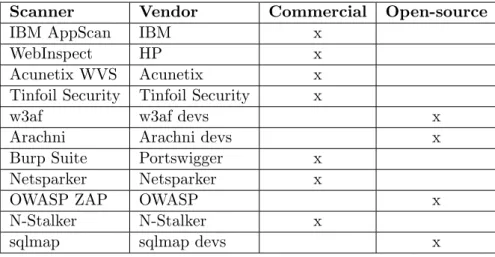
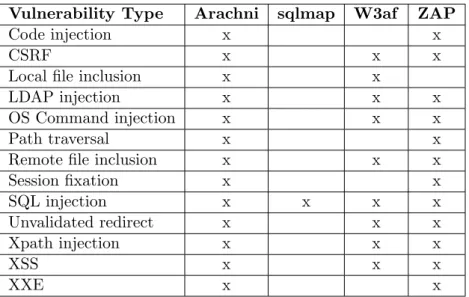
Developers have a variety of dynamic vulnerability scanners available to them, listed in Table 2.1. Most of the scanners are commercially available, either as a standalone application or as part of a penetration testing service. Others are free and open-source, like the scanners W3af [17], Arachni [1], OWASP ZAP [18], and sqlmap [16]. These scanners have been chosen for further analysis due to the easy access of their source code. Each scanner has their own method of finding vulnerabilities, and some scanners can detect different type of vulnerabilities compared to others. Table 2.2 illustrates which scanner is able to scan for which vulnerability type.
Scanner Vendor Commercial Open-source
IBM AppScan IBM x
WebInspect HP x
Acunetix WVS Acunetix x
Tinfoil Security Tinfoil Security x
w3af w3af devs x
Arachni Arachni devs x
Burp Suite Portswigger x
Netsparker Netsparker x
OWASP ZAP OWASP x
N-Stalker N-Stalker x
sqlmap sqlmap devs x
Table 2.1: Overview of dynamic web vulnerability scanners
2.5.2 Sqlmap
Sqlmap is an open source automatic SQL injection and database takeover tool. It aims to automate the process of finding and detecting SQL injection vulnerabilities and exploiting them. Many different techniques for finding SQL injection vulnerabilities are used. By fingerprinting the database be-hind a web application, it tries to generate specific payloads that target that specific database type. A whole range of database systems are supported including MySQL, Oracle, PostgreSQL, and Microsoft SQL Server. All SQL injection vulnerabilities found are stored in a CSV file.
Sqlmap allows a user to specify which URLs it should attack in three different ways:
• A single url
• A starting url to spidering from
Sqlmap comes with a built in spider capable of searching for URLs. Logging in to a web application is not possible however. To reach pages that can only be accessed after authentication, users must log in to the application manually and provide sqlmap with the resulting session cookie. This allows sqlmap to take over the session and act as if it is an authenticated user.
There are two different ways to use sqlmap: via its command-line in-terface and through its REST API. The CLI starts one instance of sqlmap that can scan multiple URLs with different threads. The REST API starts a server that can initiate multiple instances of sqlmap, yet only one URL is passed to each instance.
Vulnerability Type Arachni sqlmap W3af ZAP
Code injection x x
CSRF x x x
Local file inclusion x x
LDAP injection x x x
OS Command injection x x x
Path traversal x x
Remote file inclusion x x x
Session fixation x x SQL injection x x x x Unvalidated redirect x x x Xpath injection x x x XSS x x x XXE x x
Table 2.2: Overview of supported vulnerabilities
2.5.3 W3af
W3af describes itself as a web application attack and audit framework whose goal is to create a framework to help secure web applications by finding and exploiting all web application vulnerabilities [17]. Similar to sqlmap, it is built in python and is open source.
All functionalities within w3af are implemented as plugins. These func-tionalities are divided into three different types of plugins. Firstly, crawl plugins are responsible for finding new URLs, forms, and other injection points. The web spider plugin is one of the crawl plugins. It is a classic web spider designed to navigate through the application and extract all URLs from web pages it encounters. To allow spiders to spider as an authenticated
user, log in information can be given to auth plugins. This process can be helped further by providing URLs that are known beforehand. These URLs can be imported through a CSV file via the import results plugin. Further-more, the spider man plugin is a local proxy that can be used for gaining knowledge of the web application when it contains a lot of client-side code like JavaScript. By enabling the proxy, users can manually navigate through the application in order to show w3af new injection points.
Secondly, audit plugins are designed to use injection points, found by crawl plugins, to send specially designed payloads in order to trigger vul-nerabilities. Unlike sqlmap, w3af audits web applications for many vulner-abilities, as is shown in Table 2.2.
However, even though w3af supports the auditing of more vulnerabilities than sqlmap does, w3af tests SQL injection less thoroughly. Whereas sqlmap uses numerous techniques, w3af only uses two types of attacks.
Finally, users can activate attack plugins to exploit vulnerabilities. Those plugins usually try to operate a shell on the server of the web application, or manipulate the database in case of SQL injection vulnerabilities.
W3af is implemented with a GUI, a CLI, and a REST API. Users can select plugins to be used during the scan through each interface. The REST API is implemented in python.
For storing and reporting purposes, users can use output plugins. Sup-ported report formats are CSV, HTML, plain text, and XML.
2.5.4 OWASP ZAP
The Zed Attack Proxy, shortly ZAP, is the flagship open source project within the OWASP community. It started as a fork from the Paros Proxy Project, which allowed ZAP to easily use the proxy functionalities within the Paros Proxy. ZAP is built in Java and is intended to be an easy to use integrated penetration testing tool for finding vulnerabilities in web appli-cations. It is designed to support both developers and testers with a wide range of security expertise [18].
ZAP uses a concept of contexts to scan web applications. Each web application has its own context containing information specific for that web application, like the scope of URLs belonging to the application, authentica-tion details, technologies used by the web applicaauthentica-tion, and user credentials. The information within such contexts is used throughout the process of scanning the application.
Similar to w3af, functionalities within ZAP are implemented as plugins, or add-ons. These add-ons are separated by their maturity, of which three levels are present. The lowest ones are alpha add-ons. An add-on of this level can be created by anyone and has no special requirements. Alpha add-ons usually indicate that the functionalities within them are still under development and have not been fully tested. The second level is the beta
level. In order for add-ons to qualify for this level, they need to be of reasonable quality (according to lead project members) and mostly fit for purpose. However, beta add-ons can still need some testing. Finally, the released level indicates that add-ons are of high quality and well tested. Core release functionalities, like a spider and standard rules for testing various vulnerabilities. Others can be downloaded from within ZAP.
Spidering is implemented in two ways. The basic, traditional spider is automatically installed and is able to discover URLs by scanning and analyzing hyperlinks on each page. By utilizing authentication information of a context, the spider is able to manage a valid log in session throughout the spidering process, enabling it to reach content for which authentication is required. Another, more novel, method of spidering is implemented in the AJAX spider add-on, which operates Crawljax [6] [42].
Like w3af, ZAP has the ability to scan for multiple different security vul-nerability types including the ones stated for w3af. However, the detection of SQL injection is more advanced than w3af. ZAP is better at targeting its attacks due to the ability to specify which technologies are used. Similar to sqlmap, it can generate payload specific to a certain type of database. An add-on that mimics the payload generation of sqlmap is currently in beta level and in development.
Users can operate ZAP in three different manners. The GUI can be used for interaction with all functionalities. This allows users to do additional manual testing. Another way to use ZAP is via a CLI. A normal call to ZAP from the CLI will start the GUI. Additionally, a headless instance can be executed by running ZAP in daemon mode. Some options can be set, however little could be found in the documentation. Therefore, in order to communicate with ZAP in daemon mode, users have to make use of its REST API. However, not all functionality is available through the API, as the API tends to lag behind the available features from the GUI. The API grants users the ability to interact with ZAP programmatically. Class libraries have been created in Java and Python, and are automatically generated by ZAP to stay up to date.
2.5.5 Arachni
Arachni is a vulnerability scanning Ruby framework aimed towards helping penetration testers and administrators evaluate the security of web appli-cations [1]. It is a highly modular system whereby functionality can be extended via custom components. A web interface has been designed for a user-friendly access to Arachni. A CLI can also be used to control Arachni. Arachni is built around the headless PhantomJS browser. This allows Arachni, to properly handle client-side code by interacting with it through PhantomJS. Therefore, it can spider highly complex web applications which make heavy use of JavaScript. Furthermore, the trainer component enables
Arachni to train itself by monitoring the web application’s behavior and looking for new auditable elements on a web page. Theautologin component allows users to specify authentication information in order to grant Arachni access to pages behind authentication.
To further assist Arachni in its spidering, users can enable a proxy com-ponent. Manual interaction between the user and the application is recorded and analyzed by the proxy, giving more information about the application to Arachni.
Like w3af and ZAP, Arachni has detection capabilities for many dif-ferent vulnerabilities. Boolean-based, timing-based, and error-based SQL injection detection is supported. Furthermore, due to its ability to finger-print technologies used by the target application, payloads for detecting SQL injection (and all other vulnerabilities) will automatically be tailored to the used technologies.
By utilizing client-side code through its built-in browser, Arachni is able to test not only reflected and stored XSS, but also DOM-based XSS [38] wherein attack payloads are executed by arbitrary client-side code. This form of XSS can not be detected by just statically analyzing received HTML. Since Arachni also analyses changes to the DOM, it is able to detect these vulnerabilities whereas ZAP and w3af are unable to do so.
The output produced by Arachni is formatted into a custom type called theArachni Framework Report. This can be transformed by the Arachni -reported executable into other, more common, types like JSON, HTML, XML, YAML, or even plain text.
Arachni can be executed via a web interface or a CLI.
2.6
Related Work
Other researchers have investigated various aspects of dynamic vulnerability web scanner usage. Doup´e et al. [27] studied the performance of a number of scanners by creating their own realistic web application containing various known vulnerabilities. It uses features that are commonly found in modern applications and tend to make spidering difficult. Shay Chen [24] created a benchmark application that incorporates many different cases for different vulnerability types. He put numerous scanners to the test and analyzed their ability to identify actual vulnerabilities and ignore false positive cases. Earlier research was done on the adoption of general security tools. By interviewing 42 software developers, Xiao et al. [58] studied social effects on the adoption of security tools with the use of the established framework for understanding adoption called diffusion of innovations. This work was followed up by Witschey et al. [57], with the purpose of quantifying the relative importance of factors that predict security tool adoption. This was done with an online survey for software developers in 14 different companies.
Their research shows that, even though developers recognize the importance of security, security tools are rarely used for various reasons related to work-ing environments. Our results differ in the fact that we also studied other aspects besides environmental incentives.
Chapter 3
Adoption of Vulnerability
Scanners
Our aim is to investigate whether dynamic web vulnerability scanners are being used by web developers during the development process. We also intend to increase our understanding of the impediments for web developers to use dynamic web vulnerability scanners during the development process. Therefore, the following research questions are addressed:
1. How widespread is the use of dynamic vulnerability scanners by web developers during development processes?
2. What are the impediments for web developers to make use of dynamic vulnerability scanners?
In this chapter, we show that scanners are rarely being used. Further-more, we present impediments for the adoption of dynamic vulnerability scanners by web developers that were found in five interviews. Interviews were held with two security consultants, one ethical hacker, and two web developers.
3.1
Interviews
3.1.1 Methodology
Due to the exploratory nature of the research questions, we have chosen a qualitative research approach in the form of semi-structured interviews [36] [48] [50], similar to other exploratory studies [58] [59]. By having a predefined set of questions, interviews can be steered towards answers for the research questions, while at the same time leaving room for improvisation and the exploration of new insights [48]. In order to focus on the questions and the conversations, an audio recording was made for each interview in
accordance with the interviewee. This allowed us to represent the made statements in a reproducible manner [36].
3.1.2 Interviewee Sample
The research questions can be answered from two perspectives. On one hand, web developers know best whether vulnerability scanners are being used in their development process, what impediments they encounter, or what their reasons are for not using them. On the other hand, security experts have better knowledge of the scanners and thus have a better impression of any impediments these scanners have. Therefore, we have interviewed five people with backgrounds ranging from security experts to experienced web developers.
The first two interviewees were web developers with many years of expe-rience. The third and fourth interviewees were security consultants at SIG. Even though they have little time themselves to develop applications for the web, their profession as consultants allows them to visit and experience many different environments and speak to many web developers. Therefore, they have a large pool of experience to tap from with regards to the adop-tion of vulnerability scanners. Finally, we have interviewed an hacker who works as a security expert.
3.1.3 Interview Design
Each interview consisted of three parts. It started with an introductory part, followed by an investigation into the state of security testing in the web development industry. The interviews were concluded with exploration of ideas for improvements.
The introductory part consisted of questions on the experiences the in-terviewee had with dynamic vulnerability scanners. This gave us an indi-cation of the knowledge the interviewee had on the subject. Furthermore, web developers could provide an answer to the first research question, while interviewees with scanner experience could also give some insights into the second research question.
The following part of the interviews included questions regarding the current state of security testing in companies. This also included exploring the importance of security for companies, and the amount of effort that is put into security testing. The aim of this line of questions is to find impediments from a company culture point of view. Interviewing security consultants was beneficial in this stage, due to their experience of cultures within many different companies.
Finally, we finished the interviews with a set of questions focused on the ideal situation for security testing according to the interviewees. We wanted to get a better understanding of current impediments and possible solutions
by giving interviewees an opportunity to come up with ideas to improve the current state of security testing.
3.1.4 Questions
Due to the exploratory nature of the interviews, the actual questions asked during the interviews might not exactly match the questions proposed below. Depending on the course of the interviews, some questions have been left out while new questions were asked when appropriate.
Experience with dynamic vulnerability scanners
• What is your experience regarding automated black-box vulnerability scanners?
– How difficult are the tools to use without experience?
– How much knowledge and experience is needed to use the tools in the most effective way?
• What is your opinion on using automated security vulnerability scan-ners during the software development process?
– What would currently be the added value of the scanners? – What could be possible downsides of using the scanners? State of security testing in companies
• In general, how important is security for companies?
• For the companies that find security important, how do they make sure their web applications are secure?
– How much effort do they put into security testing? – What tools do they use for security testing?
∗ What are the benefits of the tools? ∗ What are downsides of the tools?
– What do you think is the reason that companies have chosen for their current test approach?
Requirements of a security test approach
• What would be important requirements for an approach to test the security of a web application?
• Do you think current security testing tools are suitable to be integrated in the software development processes of companies?
– If so, why do not all companies do this in your opinion? – If not, what is required to make the tools suitable?
3.1.5 Data Analysis
The interviews have been transcribed according to the audio recordings. To save time, the transcriptions are not precise word-for-word written reports, but summarized versions of the interviews where deviations from the main research questions are left out. The summarized reports can be found in appendix A.
The answers given by interviewees regarding usage of the scanners was analyzed to answer the first research question. The insights and judgments of the experts were put together to illustrate general consensus.
In order to extract impediments from the interview reports, the data was coded through the method of thematic analysis [26]. This has been used successfully in the past by other studies [56]. First of all, similar to the Grounded Theory Approach [56], segments of texts are given codes or keywords that represent an answer to a research question. This is followed by a translation from codes to themes, where a theme combines several codes into a more meaningful, all-embracing unit [26].
3.2
Results
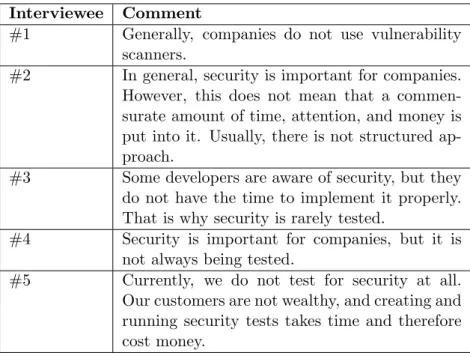
All interviewees explained that vulnerability scanners are seldom being used by companies at all, let alone integrate them into the development process. Some even claim security is rarely being tested at all. Table 3.1 shows comments made by the interviewees on this subject. Therefore, we are comfortable to state that vulnerability scanners are hardly used during the development process.
Table 3.2 represents an overview of the codes and matching themes that emerged from the interviews. These codes and themes represent impedi-ments that web developers face when using, or trying to use, dynamic vul-nerability scanners according to the interviewees. The matching of codes and summarized text of each interview can be found in appendix B
The opinion of each interviewee on each code is shown on the right side of the table. Interviews #1 and #2 were held with security consultants at SIG. Interview #3 was done with the ethical hacker. The final two interviews were conducted with web developers.
3.2.1 Usability
The theme that combines the most codes is usability. It encompasses the following codings:
• Ease of Use
Interviewee Comment
#1 Generally, companies do not use vulnerability
scanners.
#2 In general, security is important for companies. However, this does not mean that a commen-surate amount of time, attention, and money is put into it. Usually, there is not structured ap-proach.
#3 Some developers are aware of security, but they do not have the time to implement it properly. That is why security is rarely tested.
#4 Security is important for companies, but it is not always being tested.
#5 Currently, we do not test for security at all. Our customers are not wealthy, and creating and running security tests takes time and therefore cost money.
Table 3.1: Comments on security testing and vulnerability scanner usage
• Ease of Context Configuration • Ease of Integration
• Handling Different Output Formats
These codings were mentioned often during the interviews by both web developers and security experts/consultants. Integration, installation, and maintenance of the scanners came up in the interviews with security con-sultants. They explained these tasks require a lot of time and effort. Both interviewees noticed an absence of a continuous build pipeline, thereby forc-ing companies to manually operate the scanners.
This would not be a problem if scanners were user friendly. However, the difficulty to use and to configuring the scanners to operate on a target web application were mentioned as problem areas for many scanners. The eth-ical hacker, interview #3, emphasized the importance of proper contextual configuration on multiple occasions, as this is essential for effective security scanning. This is backed up by the web developer in interview #4. Having some experience with a few scanners, he explained he would rather focus on manual testing with personal knowledge of the application than use tools which lack this information. Even though web developers have the most knowledge of their application, transferring this knowledge is difficult.
Finally, the difficulty of handling different output formats was mentioned as a downside. According to a security consultant, updates for scanners
Theme Code Interview
#1 #2 #3 #4 #5
Usability
Ease of Use + + +
Ease of Installation & Maintenance + +
Ease of Context Configuration ± + + +
Ease of Integration + +
Handling Different Output Formats +
Lack of Effort Priority + + + +
Security Knowledge ± + +
Performance
Effectiveness ± + ± +
Test Speed + + +
-False Positives ± + + +
Others Data Contamination +
Understanding Tool Functionalities +
+ interviewee mentioned the impediment ± interviewee is undecided
- interviewee did not find this an impediment Table 3.2: Themes and Codings
can cause them to return a different output format, requiring a significant investment to keep a scanner functioning correctly. This also matches to the coding for ease of maintenance.
3.2.2 Lack of Effort
Two codes have been connected to this theme: • Priority
• Security Knowledge
In four out of the five interviews, priority was mentioned as a large im-pediment of the adoption of security scanning tools. This can be explained in two ways. First of all, four interviewees explained the battle between security and deadlines. Performing security tests takes time away from de-veloping features, which have a greater visible value than security. According to both web developers, security is not explicitly requested. Therefore, not much time is reserved for security testing. Secondly, a false sense of security may develop when companies use up to date web development technologies, like Microsoft’s .Net Framework [10] or Facebook Login [7]. Both web devel-opers claim these technologies or services automatically mitigate common vulnerabilities like SQL Injection and XSS. Even though this might be true
for some vulnerabilities, this does not always hold. The .Net Framework’s countermeasures for CSRF have to be manually applied. A developer can forget to do this, or even fail to understand the need for this. Therefore, relying only on other technologies could cause a false sense of security.
Security Knowledge, or a lack thereof, was also discussed in three inter-views. Two interviewees thought this is an impediment, while one had some contradicting statements. He blamed nescience for the absence of scanner usage. However, he also stated it should not be a problem, since vulnerabil-ities are easy to explain.
3.2.3 Performance
The Performance theme consists of the following codes: • Effectiveness
• Test Speed • False Positives
Interviewees had different opinions on the importance of the effectiveness of the scanners. All interviewees mentioned scanners only find low-hanging fruits, simple flaws that can easily be spotted. According to a security consultant, manual security tests can find far more interesting problems than automated vulnerability scanners can. However, interviewees #1 and #3 pointed out that even these findings are useful, as it is better than having no findings.
The majority of the interviewees said that the slow speed of scanners is a downside. Integration of the scanners into a build pipeline would result in a huge slowdown in the building process, which should be fast. On the other hand, one web developer suggested this would not be a complication, since the work is done automatically. To prevent a slowdown of the building process, the tests could be run at night or in the weekends, circumventing the delay.
Four interviewees mentioned false positives as being a problem. All of them state that the time required to process these false positives is a drawback. Nonetheless, one security consultant stated it is better than not doing security tests at all.
3.2.4 Others
The final theme is meant for codes that do not fit well within the other themes, and we feel are not relevant for this thesis. The reasons for this choice will be given in Section 3.3.1. Codes included in this theme are:
• Understanding Tool Functionalities
3.3
Discussion
During the interviews, some main problems came to our attention. All sub-jects mentioned some aspect of the difficulty to use scanners as a problem. In the interview with the ethical hacker, we discovered that configuring the scanners to fit the application under test has a great impact on the perfor-mance of the scanners, yet it is not trivial to do for many scanners. Although web developers know the context of their web application better than any-one, it requires great effort and knowledge to apply this to configuring the scanners.
Another interesting impediment we found was the handling of different output formats. The security consultant explained that not only the config-uration and setting up of the scanners requires time and effort, but also the processing of the results. The output format of a scanner could change in every update, which would require a change in the handling of these results. However, we also figured that using multiple scanners would further increase this hassle even more.
Priority and security knowledge have both been given the theme Lack of Effort. Many interviewees pointed out the battle between security and deadlines. Features have more visible value than proper security. Companies will therefore put much more effort into the development of functionalities instead of proper security testing. This results in a reluctance to use the scanners. We figured that a lack of security knowledge corresponds with a lack of effort as well. As the first interviewee pointed out, ”security vulner-abilities are not rocket science”. Many web developers will be able to learn and understand the risks and consequences of vulnerabilities. However, be-cause not much attention is given to security, gaining security knowledge falls short.
Companies cannot be forced to put more effort into security if they feel the costs are too high. However, making scanners easier to use might help with lowering the expenses. The Usability and Lack of Effort themes are therefore closely related.
Effectiveness is a topic that was discussed by four interviewees, yet only two considered this important. Obviously, the more these scanners find, the better they are. However, as subjects #1 and #3 stated, every vulnerability found, even the easy ones, are useful.
Similarly, four interviewees mentioned test speed, of which one did not consider this of great importance. Scans can take quite some time. However, as interviewee #5 says, these scans are automatically performed. Developers can focus on other tasks while a scan is running. Interviewee #1 claims long security scans cause increased building times. However, this can be
circumvented by running the scans nightly instead of on every commit. 3.3.1 Other Findings
Subject #4 suggested that data contamination could be an impediment for many companies to adopt vulnerability scanners. In order to observe possible flaws, test data has to be sent to the server. For example, to find out if a text field is vulnerable for a reflected XSS attack, a payload to trigger the attack must be sent. The input could be saved in a database by the application, causing the database to be contaminated with test data. We see this argument as laziness. Best practices of web application testing state using a proper testing environment is critical regarding web testing [52]. Having a separate testing environment that is independent of the production environment eliminates data contamination as a problem.
Secondly, subject #4 also mentioned he prefers to know how scanners function, and how tests for vulnerabilities are performed. This includes every payload that is being sent by scanners in order to determine flaws. While this might be interesting for some developers, it would generate huge amounts of data that provide little extra knowledge on vulnerabilities. Even though the actual payload with which a fault is detected is important, we feel the rest can be omitted since only one subject mentioned this.
Chapter 4
Automated Vulnerability
Scanners
In the previous chapter we show that web developers are not integrating security vulnerability scanners into the development processes of web appli-cations. This is due to the amount of effort required to use and incorporate the scanners into the development process. Furthermore, the success of the scanners greatly depends on correctly setting up scanners in order for them to understand the context of the application. This is difficult to do according to the developers, and therefore requires to much effort and time.
To verify the impediments that were found during the interviews, we intended to get hands-on practice with several scanners and see whether we experienced those impediments as well. Aside from the literature study that was done before hand, we did not have any practical experience with the scanners.
We focused on the impediments for usability and performance, as a lack of effort is not testable in this setting. Furthermore, as we do not feel test speed is of significant importance, we did not take testing time into con-sideration. Those impediments can be overcome by automating the testing process and executing it at night or during weekends. Finally, the similarities and differences between generated output of the scanners are evaluated.
4.1
Experiment Applications
In order to gain hands-on experience with scanners, we chose to run scans on three different test applications. This allows us to experience how to setup scanners to properly run a scan on an application. Two benchmarking applications were selected, as well as a demonstration application containing deliberate vulnerabilities.
4.1.1 Web Input Vector Extractor Teaser
WIVET is a benchmarking project that tests how well scanners can spider through a web page by finding all web links, thereby assessing the ability of the spiders to locate and extract additional resources and input delivery methods. This increases the attack surface of the scanners, and with that improves the chance of finding vulnerabilities. We have used the latest available version, Version 3, of WIVET for this study.
The project is a website that contains many web pages, each requiring different approaches to reach a certain success state. A total of 56 unique success states can be reached. Some examples of techniques used to test spi-der capabilities are the use of JavaScript, jQuery, iFrames, and even Adobe Flash. The session logs which success states have been reached so statistics of the spider can be gathered.
Furthermore, the benchmark also requires spiders to exclude the logout page from spidering. Logging out of the session will stop the benchmark and start a new one, as the collection of data is done throughout a session. Spiders should thus avoid entering that web page.
4.1.2 WAVSEP
The Web Application Vulnerability Scanner Evaluation Project, or WAVSEP in short, is an evaluation platform for dynamic security vulnerability scan-ners. It contains a variety of common vulnerabilities designed to assess the accuracy of detecting security vulnerability issues by scanners. Common and advanced scenarios are presented to establish the scanner’s abilities. Fur-thermore, the project also contains false positives cases in which scenarios give the impression of being vulnerable but in reality are not.
Version 1.5 of the WAVSEP was used for this study. Table 4.1 shows the number of true positive and false positives cases for each vulnerability type that are present in WAVSEP.
Vulnerability Type # of true positive cases
# of false positive cases
Path Traversal 816 8
Remote File Inclusion 108 6
XSS 73 7
SQL injection 132 10
4.1.3 BodgeIt Store
While the benchmarking applications give a good impression of possible capabilities of scanners and provide us with some experience in setting up and using the scanners, they lack a simulation for realistic scenarios. We therefore decided to also work with an application which simulates real life applications yet has known vulnerabilities to test on.
The BodgeIt Store [2] [3] is an application that satisfies the criteria. It is designed as a simulation of a webshop to help people learn about penetration testing. For this reason, it contains deliberate vulnerabilities. This includes a SQL injection vulnerability in the login page and two XSS vulnerabilities in the search and contact page.
4.2
Evaluation
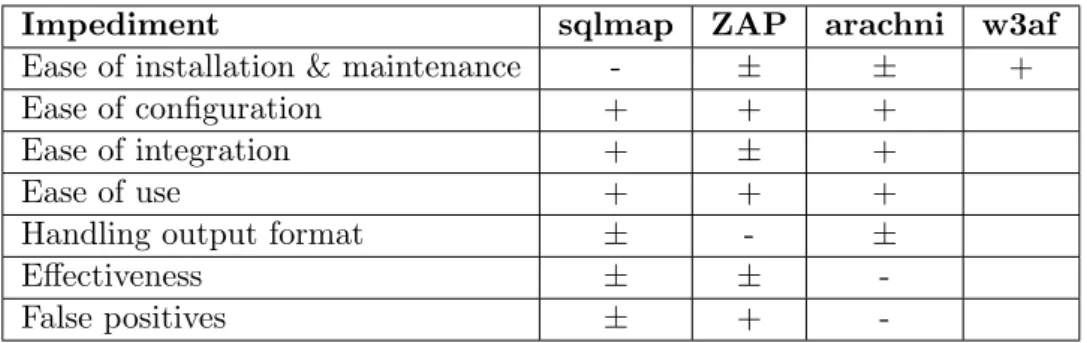
The four scanners that were discussed in Section 2.5 have been put to the test and were used to scan the applications discussed above. We used a MacBook Pro that was running OS X Yosemite. All target applications are part of the OWASP BWA [12]. VirtualBox version 5.0.4 was used to run the BWA, and set it up in such a way that communication between the virtual image and the native operating system was possible. Table 4.2 shows the results of the scanners on the benchmark applications. Table 4.3 reflects the evaluation of impediments we encountered for each scanner.
4.2.1 Sqlmap
As recommended by the developers of sqlmap, a cloned version of the github project [8] was used to install the latest version, version 1.0-dev-27707be, of sqlmap. The CLI was used to execute sqlmap.
Ease of installation & maintenance Sqlmap only requires Python version 2.6.x or 2.7.x. As version 2.7.10 was pre-installed on our machine, sqlmap ran without requiring further installation steps. Also, updating sqlmap can be achieved by merely providing the argument –update and sqlmap will update itself automatically. Therefore in our experience, in-stalling and maintaining sqlmap is not difficult.
Ease of configuration Setting up sqlmap turned out to be a hassle. By default, sqlmap does not spider an application, and the argument – crawl is required to enable spidering. Even then, it only detects pages with GET parameters. The argument–forms needs to be set in order to enable spidering and scanning of POST parameters. Additionally, sqlmap is not able to automatically handle sessions. Sessions are used by web applications, like the BodgeIt Store, to identify which account a user belongs to, and are therefore required in order to spider and scan pages that are only accessible to authenticated users. By using the argument–cookie, sqlmap can be given
Scanner WIVET precision W A VSE P results Bo dgeIt results SQLI XSS RFI P ath T ra v ersal Precision Recall Precision Recall Precision Recall Precision Recall Precision Recall sqlmap 7% 100% 100% -0% 0% O W ASP ZAP 21% 100% 100% 89% 100% 78% 99% 68% 100% 67% 67% Arac hni 96% 100% 100% 90% 100% 100% 100% 96% 100% 67% 100% T able 4.2: Benc hmark results
Impediment sqlmap ZAP arachni w3af
Ease of installation & maintenance - ± ± +
Ease of configuration + + +
Ease of integration + ± +
Ease of use + + +
Handling output format ± - ±
Effectiveness ± ±
-False positives ± +
-+ impediment is found
± undecided
- impediment is not found
Table 4.3: Impediment evaluation of scanners
a session id. Unfortunately, this required the user to manually get a session id in order to give it to sqlmap. On the other hand, sqlmap does allow users to specify the DBMS that is used by the application, by using the argument
–dbms.
Ease of integrationIntegrating sqlmap into the development process is not necessarily difficult, but it takes quite some effort. Much manual control is required to operate sqlmap. During the spidering and scanning process, the user is continuously presented with choices that have to be made for sqlmap to continue. Examples of this are the questions whether the user wants to check for the existence of a sitemap, or whether the user wants to test a certain URL. These have to be answered multiple times in similar situations during one scan, making it a tedious process. To overcome this, the argument–batch can be added. This makes sqlmap automatically fill in default answers for the choices. However, some of these default choices are not desirable. For instance, after detecting one SQL injection vulnerability, it will ask the user whether to continue. The default behaviour in batch mode will not continue, even though we want to find all vulnerabilities. Users can overwrite the default answer for a question with the –answers
argument.
Ease of use As explained in the points above, sqlmap is not very us-able for automated use. Sqlmap needs to be manually controlled by default. Alternatively, sqlmap can be activated in batch mode, which automatically fills in default answers that are not always desirable. Those default answers need to be overwritten. Yet to know which answers need to be overwrit-ten, a developer needs to go through the logs to find the ’wrong’ answers. Especially for developers that are not experienced with sqlmap, this takes much time and effort. Furthermore, testing authenticated pages requires
![Figure 2.1: Overview of web application communication [46]](https://thumb-us.123doks.com/thumbv2/123dok_us/8586556.2327080/12.892.182.711.191.424/figure-overview-of-web-application-communication.webp)

![Figure 2.3: Web application interactions [53]](https://thumb-us.123doks.com/thumbv2/123dok_us/8586556.2327080/14.892.198.695.276.385/figure-web-application-interactions.webp)
![Figure 2.4: Reflected XSS [19]](https://thumb-us.123doks.com/thumbv2/123dok_us/8586556.2327080/17.892.217.653.211.484/figure-reflected-xss.webp)
![Figure 2.5: High Risk Vulnerability Lifecycle (based on [28])](https://thumb-us.123doks.com/thumbv2/123dok_us/8586556.2327080/19.892.206.690.188.267/figure-high-risk-vulnerability-lifecycle-based.webp)